
Connected, secure and scalable technology solutions for businesses in Tanzania.
Fourteck helps organizations plan, supply, install and support the technology that keeps modern workplaces running: CCTV and IP cameras, video and audio conferencing, IP PBX and IP phones, laptops and desktops, servers and storage, network switches, Wi‑Fi access points, firewalls, access control, wallboards, TVs, structured cabling and integrated IT infrastructure.
Instead of treating every device as a separate purchase, we connect the requirements. Cameras need PoE switching and storage. IP phones need a voice-ready network. Video meetings need dependable Wi‑Fi, internet and room audio. Servers need secure access, backup and power protection. A coordinated design creates a cleaner, easier-to-support environment.

What does Fourteck Tanzania provide?
Fourteck Tanzania provides integrated IT, telecom, cybersecurity, collaboration and physical-security solutions for businesses. Our portfolio covers CCTV surveillance, IP cameras, video conferencing, audio conferencing, IP PBX, IP phones, laptops, desktops, workstations, servers, storage, firewalls, network switches, routers, Wi‑Fi access points, access control, wallboards, commercial TVs, structured cabling, racks, UPS systems and related support.
We support customers that need a single device, a planned upgrade or a complete site solution. A complete project can include requirement discovery, product selection, design, supply, installation, configuration, testing, documentation and support. The recommended architecture depends on the building, users, applications, available internet, power conditions, risk level, existing infrastructure and future growth.
For buyers searching for an IT solutions provider in Tanzania, the useful question is not only “who can sell this product?” but “who can make the product work correctly with the rest of the environment?” Fourteck is positioned around that integrated requirement. The same network can carry business data, voice, Wi‑Fi and cameras, but each service needs appropriate segmentation, capacity and security. The same rack may contain a firewall, switches, NVR, server and UPS, but those devices need organized power, cooling and cabling. Planning the dependencies early reduces rework.
Technology categories we supply, integrate and support.
CCTV Surveillance Systems in Tanzania
CCTV planning, IP and analog camera options, NVR/VMS recording, remote monitoring, PoE switching, storage design, maintenance and expansion.
Explore solution →IP Cameras, NVR and Video Management
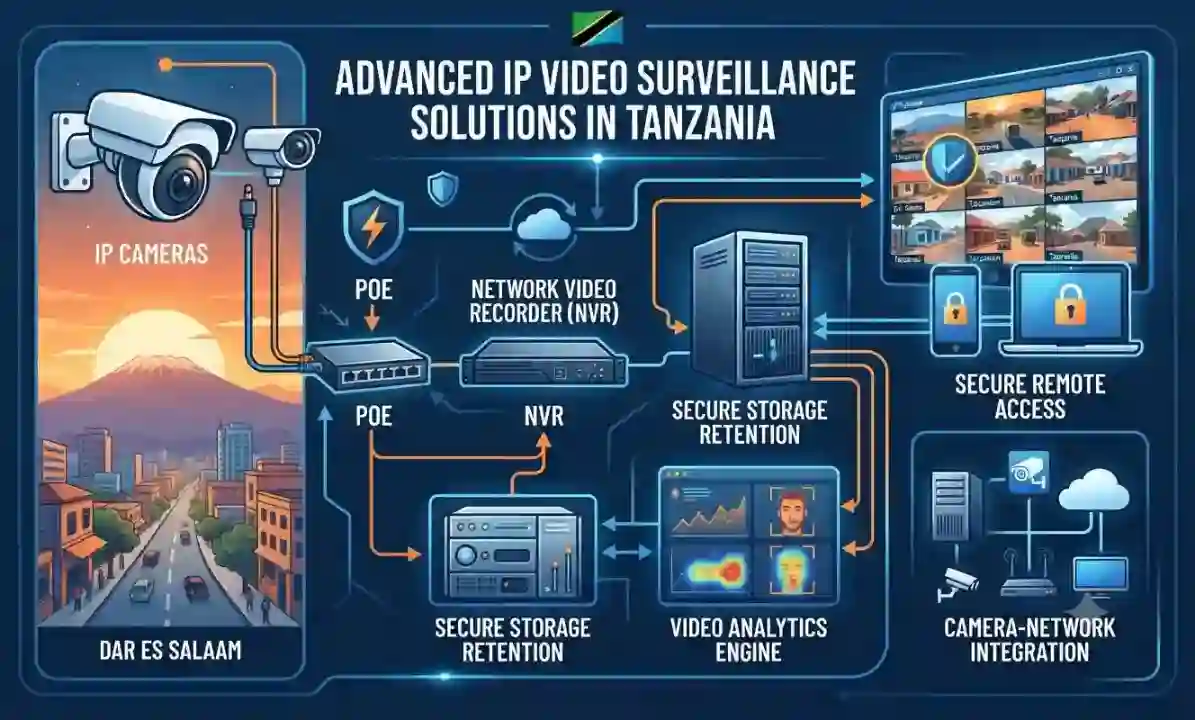
Network cameras, PoE, NVR, VMS, video analytics, storage retention, secure remote access and camera-network integration.
Explore solution →Video Conferencing Systems for Meeting Rooms
Video bars, PTZ cameras, room systems, microphones, displays, room controllers, Teams/Zoom-compatible designs and hybrid meeting integration.
Explore solution →Audio Conferencing and Meeting-Room Sound
Conference phones, speakerphones, USB/Bluetooth audio, ceiling microphones, DSP, acoustic planning and room audio integration.
Explore solution →IP PBX and VoIP Communication Solutions
IP PBX, SIP, IVR, queues, voicemail, call routing, recording, remote extensions, branch telephony and unified communications.
Explore solution →IP Phones and Business Desk Telephony
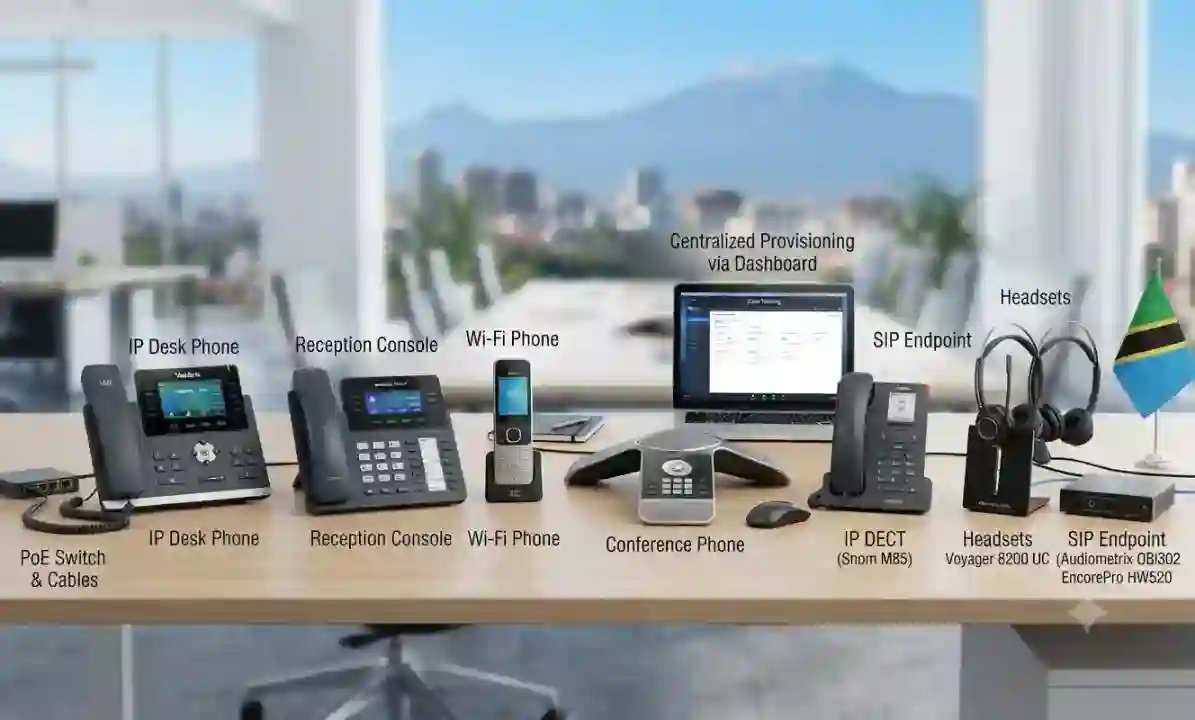
Desk phones, reception consoles, Wi‑Fi phones, conference phones, SIP endpoints, headsets, PoE and centralized provisioning.
Explore solution →Business Laptops, Desktops and Workstations
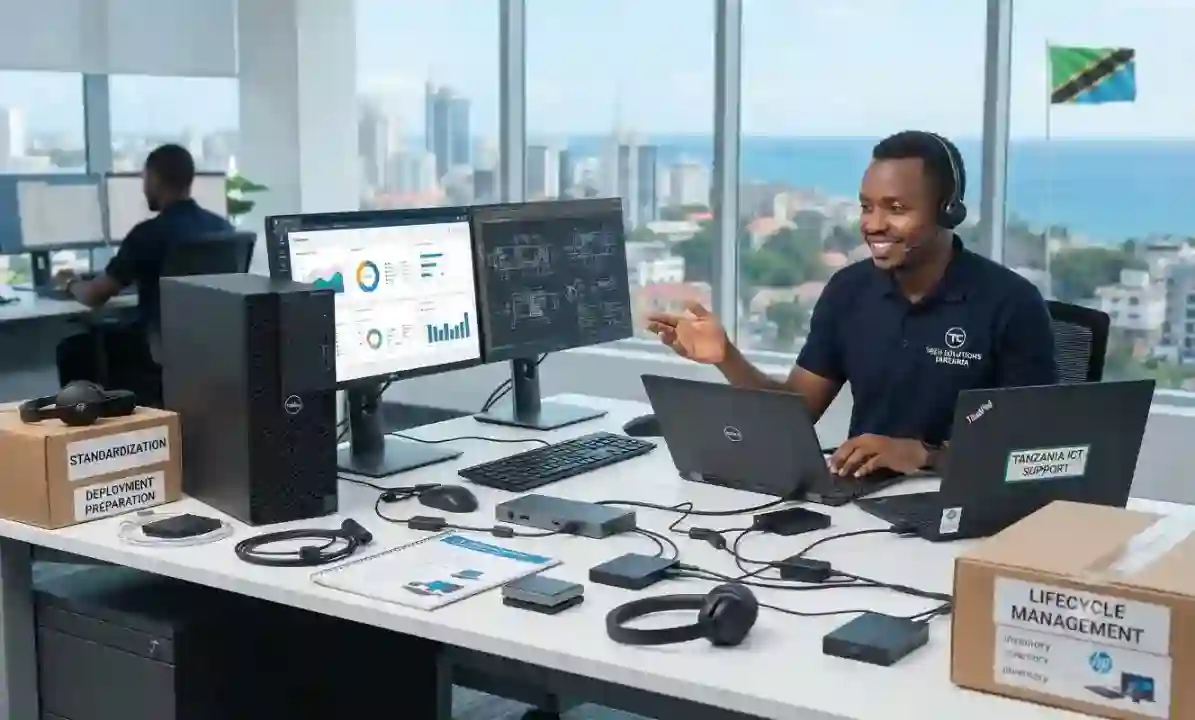
Business notebooks, desktops, workstations, monitors, docks, accessories, standardization, deployment preparation and lifecycle planning.
Explore solution →Firewall, VPN and Network Security Solutions
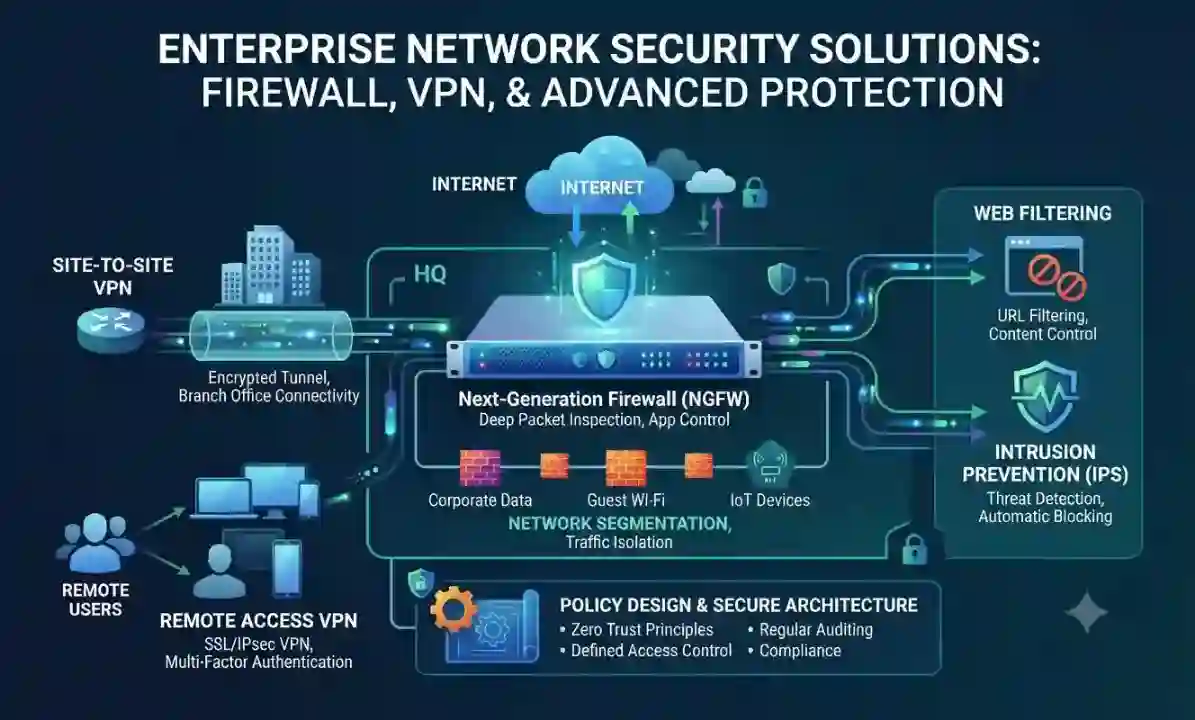
Next-generation firewalls, site-to-site VPN, remote access, segmentation, web filtering, intrusion prevention, policy design and secure network architecture.
Explore solution →Servers, Storage, Virtualization and Backup
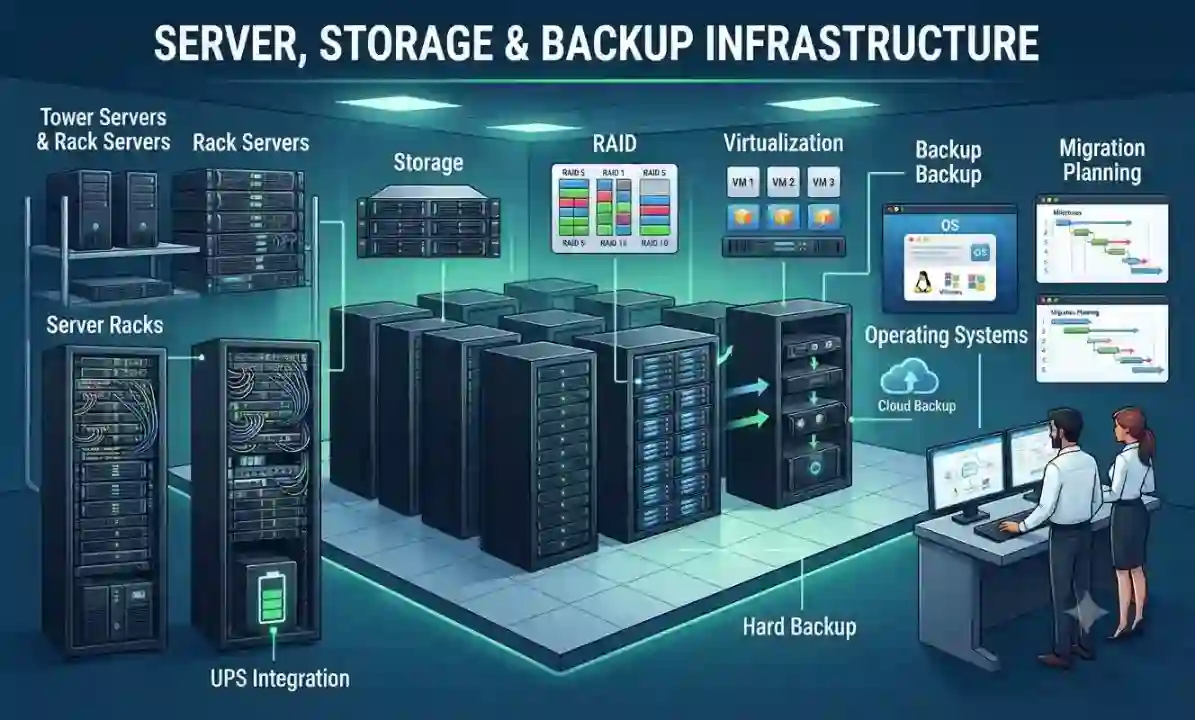
Tower and rack servers, storage, RAID, virtualization, backup, UPS integration, server racks, operating systems and migration planning.
Explore solution →Network Switches, Routing and LAN Infrastructure
Managed switches, PoE/PoE+, VLANs, fiber uplinks, routing, link aggregation, rack design and network documentation.
Explore solution →Wi‑Fi and Wireless Access Point Solutions
Indoor/outdoor access points, Wi‑Fi 6/6E planning, guest networks, roaming, controller/cloud management, VLAN integration and wireless optimization.
Explore solution →Access Control and Door Security Systems
Card readers, biometric readers, controllers, electric locks, door contacts, visitor access, event logs and CCTV integration.
Explore solution →Wallboards, Dashboards and Digital Signage
KPI wallboards, digital signage, dashboards, media players, mounting, scheduling, remote management and multi-screen display planning.
Explore solution →Commercial TVs and Business Display Solutions
Commercial displays, TVs, meeting-room screens, digital signage displays, mounts, source control, audio and presentation integration.
Explore solution →Structured Cabling, Fiber, Racks and UPS
Copper and fiber cabling, patch panels, racks, cable management, labeling, testing, UPS and infrastructure organization.
Explore solution →Integrated IT Solutions, Support and Lifecycle Services
IT assessment, solution design, multi-vendor supply, installation, configuration, documentation, troubleshooting, maintenance and expansion.
Explore solution →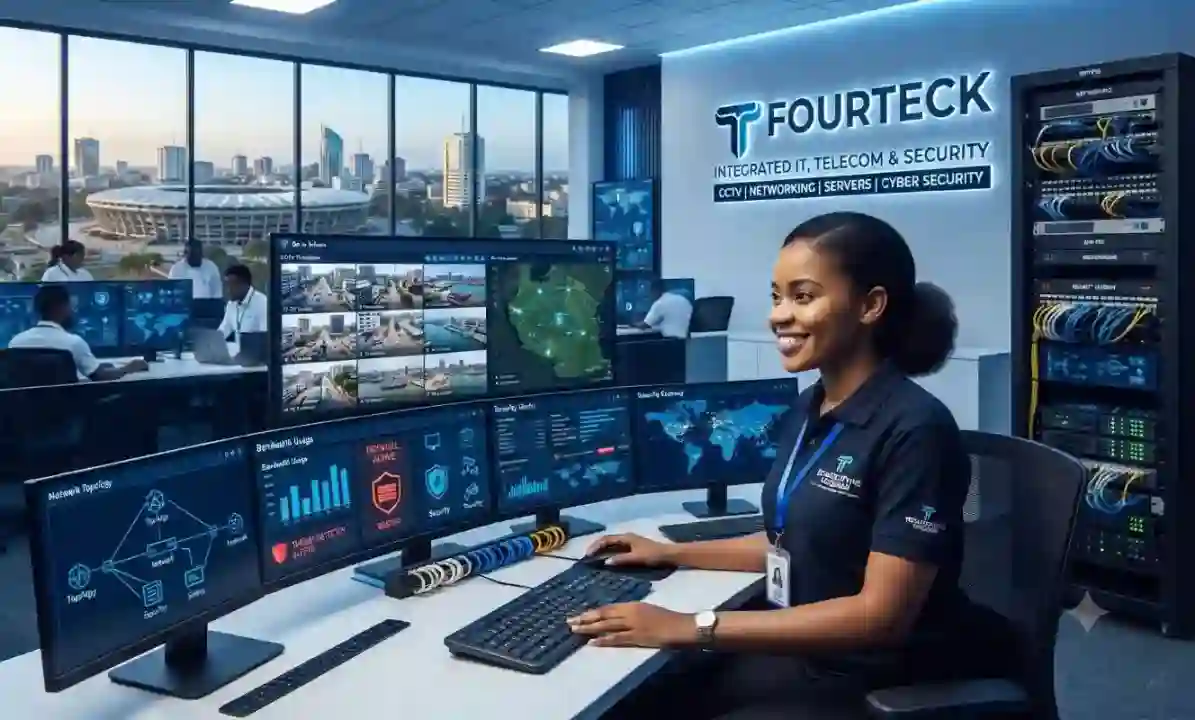
CCTV Surveillance Systems in Tanzania
Security cameras are most valuable when the full surveillance chain is planned correctly: camera position, lens choice, low-light performance, storage, network capacity, user permissions and the way footage is reviewed after an incident. Fourteck approaches CCTV as a business security system rather than a collection of cameras. We can help customers plan coverage for entrances, offices, warehouses, retail areas, loading bays, reception points, server rooms, parking zones and other operational spaces.
A practical CCTV design starts with what the business needs to see and why. Identification at an entrance requires a different field of view from general monitoring across a warehouse. Outdoor cameras need environmental protection and suitable night performance, while indoor cameras may need wider angles, discreet mounting or audio restrictions. Recording capacity must be sized from camera count, resolution, frame rate, compression and retention expectations. The network also matters: PoE switching, uplink capacity, VLAN separation and reliable power all influence whether the system remains stable.
Fourteck can coordinate camera selection, NVR or VMS sizing, display and monitoring requirements, remote viewing, network preparation, rack organization and handover. For existing sites, the project may begin with an audit of image quality, blind spots, faulty channels, storage health and cable conditions. The objective is not to add unnecessary cameras; it is to create useful coverage that can be operated and maintained with confidence. Privacy, signage and retention practices should also be reviewed according to the customer’s policies and applicable local requirements.
IP Cameras, NVR and Video Management
IP camera systems combine video capture with the data network, which makes them flexible for new buildings, expanding offices and multi-area sites. A network camera can deliver high-resolution video, analytics and remote management, but it also becomes another endpoint that must be powered, addressed, secured and monitored. Fourteck helps customers design IP surveillance with the network and storage layers in mind from the start.
Important decisions include camera resolution, codec, frame rate, lens, infrared range, WDR, analytics needs and expected retention. The PoE budget of the switch must be sufficient for all connected cameras, including higher-power models. Uplinks should be sized to avoid congestion, and camera traffic can be separated with VLANs and access rules. For larger deployments, VMS architecture, recording servers, storage pools and operator workstations may be more appropriate than a single appliance.
Remote viewing should be configured carefully. Convenience should not mean exposing the recorder directly to the internet. Secure access methods, strong credentials, controlled user roles and firmware management reduce unnecessary risk. When the surveillance platform is properly documented, future expansion becomes easier because ports, addresses, camera names and recording policies are already organized.
Video Conferencing Systems for Meeting Rooms
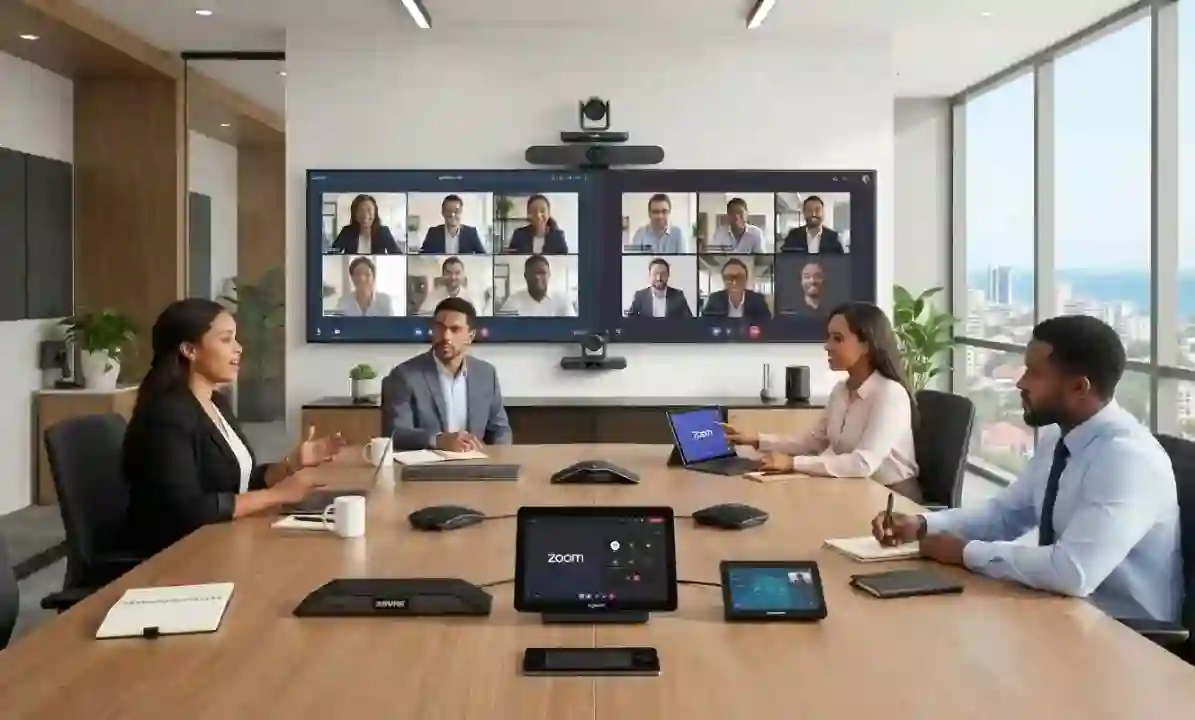
A good video conferencing room should feel simple to the people using it, even when the technology behind it is sophisticated. Fourteck designs collaboration spaces around room size, seating layout, meeting platform, acoustics, camera framing, microphone pickup and display visibility. The result should allow a user to enter the room, join a meeting quickly and communicate clearly with remote participants.
Small huddle rooms may need an all-in-one video bar and a single display. Medium rooms can benefit from a dedicated camera, table or ceiling microphones and a room controller. Boardrooms may require multiple displays, speaker tracking, digital signal processing, integrated microphones and careful cable management. The correct solution depends on the room rather than on a single preferred product.
We also consider the network path used by collaboration platforms. Wireless congestion, insufficient internet capacity or poor Quality of Service can make an expensive room system perform badly. Display height, camera eye line, lighting and echo control are equally important. For hybrid meetings, remote participants should be able to hear everyone in the room and see the person speaking without constant manual adjustment.
Audio Conferencing and Meeting-Room Sound
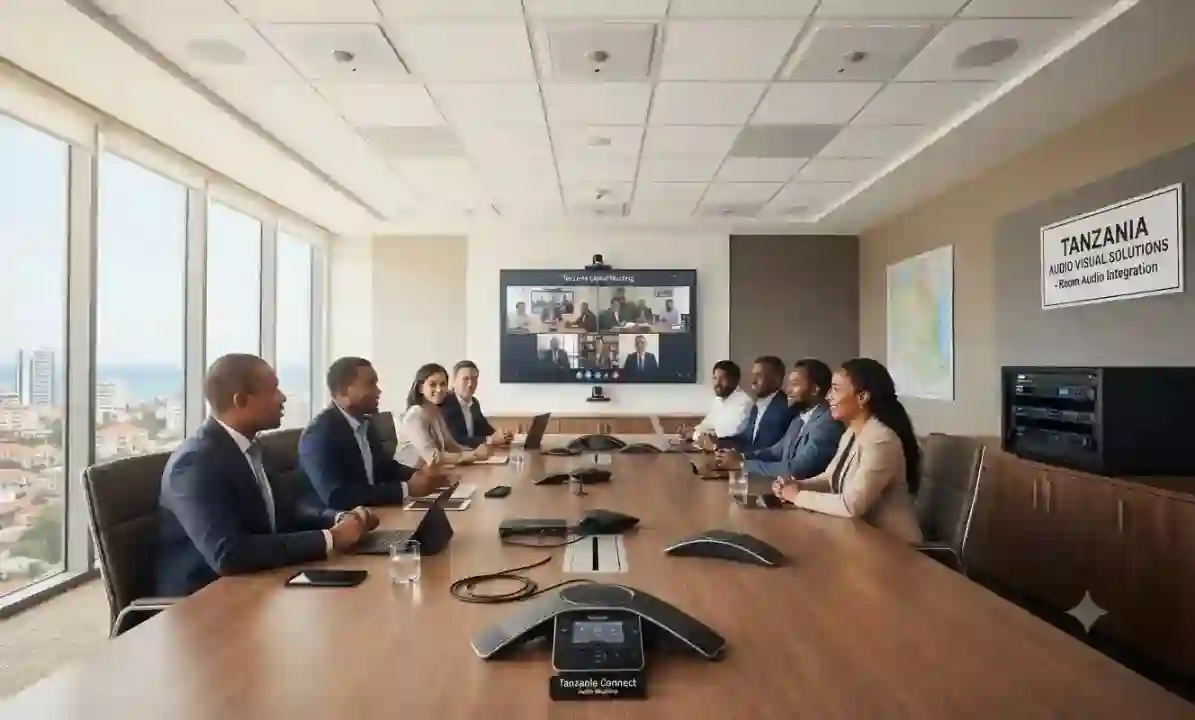
Clear audio is often more important than perfect video. People can continue a meeting when video quality changes, but communication breaks down quickly when voices are muffled, distant or full of echo. Fourteck plans audio conferencing systems for meeting rooms, training rooms and executive spaces where consistent voice pickup and playback are essential.
The right microphone strategy depends on where people sit and how the room behaves acoustically. Table microphones can be suitable for focused seating arrangements, while ceiling or beamforming microphones can reduce table clutter in larger rooms. Speakerphones may be ideal for small collaboration areas. Larger rooms can require DSP, echo cancellation, mixing, amplifiers and installed loudspeakers.
We assess practical issues such as HVAC noise, hard surfaces, reflective glass, speaker placement and the distance between microphones and participants. Integration with video conferencing platforms should be predictable, and users should not need to reconfigure audio devices at the beginning of every call. A well-designed system reduces meeting fatigue and improves the experience for remote attendees.

IP PBX and VoIP Communication Solutions
IP PBX gives a business a structured way to manage internal extensions, incoming numbers, call routing and user features over an IP network. Fourteck helps organizations move from basic telephone setups to more manageable communication platforms that can support reception, departments, remote users and branch offices.
Common requirements include IVR menus, ring groups, call queues, voicemail, call recording, extension mobility, office-hour routing and reporting. The best configuration begins with a call-flow discussion: who receives each type of call, what happens when a person is busy, where calls go after hours and which users require mobility. This prevents the PBX from becoming complicated without improving the customer experience.
The network must also be ready for voice. VLAN design, PoE, Quality of Service, firewall rules and stable internet links can influence call quality. SIP trunk compatibility and local telecom conditions should be confirmed before final deployment. Fourteck can assist with on-premises, hosted or hybrid approaches depending on the customer’s operational needs and available connectivity.
IP Phones and Business Desk Telephony
IP phones are the visible part of a business voice system, so usability matters as much as technical compatibility. Reception teams, managers, call-handling staff and general users often need different features. Fourteck helps match endpoint types to user roles instead of supplying one model for every desk.
A receptionist may need programmable keys, expansion modules and multiple line appearances. A manager may value a larger display, Bluetooth, Wi‑Fi or headset support. A warehouse or common area may need a simpler, durable phone. Conference rooms can use dedicated conference phones or integrate with broader room systems. Compatibility with the selected PBX, SIP features and provisioning method must be confirmed.
When IP phones are deployed at scale, centralized provisioning, naming conventions and VLAN planning make support much easier. PoE switching can reduce the number of power adapters required, while UPS-backed network infrastructure can help preserve calling during short power interruptions. Headset selection and user training are also useful for teams that spend significant time on calls.
Business Laptops, Desktops and Workstations
Computer purchasing should be connected to the applications people actually use. A basic office user, finance team, designer, developer, engineer and video operator can have very different needs. Fourteck supplies and plans business laptops, desktops, monitors and workstations with attention to performance, compatibility, warranty, manageability and future replacement cycles.
Processor, memory and storage are only part of the decision. Docking, monitor count, port requirements, wireless standards, webcam quality, battery expectations, graphics capability and operating-system edition can affect productivity. For desktop users, form factor and upgradeability may matter. For mobile teams, weight, battery life and reliable docking may be more important than maximum raw performance.
For organizations buying several systems, standardizing a small number of approved configurations can simplify support, imaging, spares and user onboarding. Fourteck can also coordinate peripherals, monitors, keyboards, mice, docking stations, UPS protection and network readiness so devices arrive as part of a workable environment rather than as isolated purchases.
Firewall, VPN and Network Security Solutions
A business firewall is not just an internet gateway. It is the policy point that can separate trusted and untrusted traffic, protect public-facing services, control remote access and help organizations see what is happening across the network. Fourteck helps businesses choose and configure firewall solutions according to user count, internet bandwidth, applications, branch requirements and security priorities.
Sizing should consider more than the manufacturer’s maximum throughput. Security services such as intrusion prevention, web filtering, antivirus inspection, application control and encrypted traffic inspection can change performance. VPN requirements, number of interfaces, high availability and future internet upgrades should also influence the model.
Good configuration is equally important. Network segments can be separated by function, guest Wi‑Fi can be isolated, servers can be protected with tighter policies and remote access can be limited to approved users. Regular firmware, backup and rule review help reduce configuration drift. Where Fortinet or other security platforms are selected, Fourteck can assist with design, deployment and integration without relying on one-size-fits-all rules.
Servers, Storage, Virtualization and Backup
Servers support the applications, files, databases and services that many businesses depend on every day. Fourteck helps customers design on-premises server environments when local control, application requirements, performance or data workflows make local infrastructure appropriate. We also help plan storage and backup so the server is not treated as a single box that can never fail.
A server specification should begin with workload. Processor cores, memory, storage type, RAID, network interfaces, GPU requirements and virtualization plans all depend on what will run on the system. File services have different patterns from databases, CCTV recording, ERP applications or virtual-machine clusters. Rack space, cooling and UPS capacity are also part of the design.
Backup needs separate attention. RAID improves availability but is not a backup. Businesses should define what data must be protected, how often copies are created, how long they are retained and how quickly systems need to be restored. Offsite or cloud copies can add resilience when appropriate. Documentation of credentials, network settings, warranty and recovery procedures makes ongoing support more dependable.
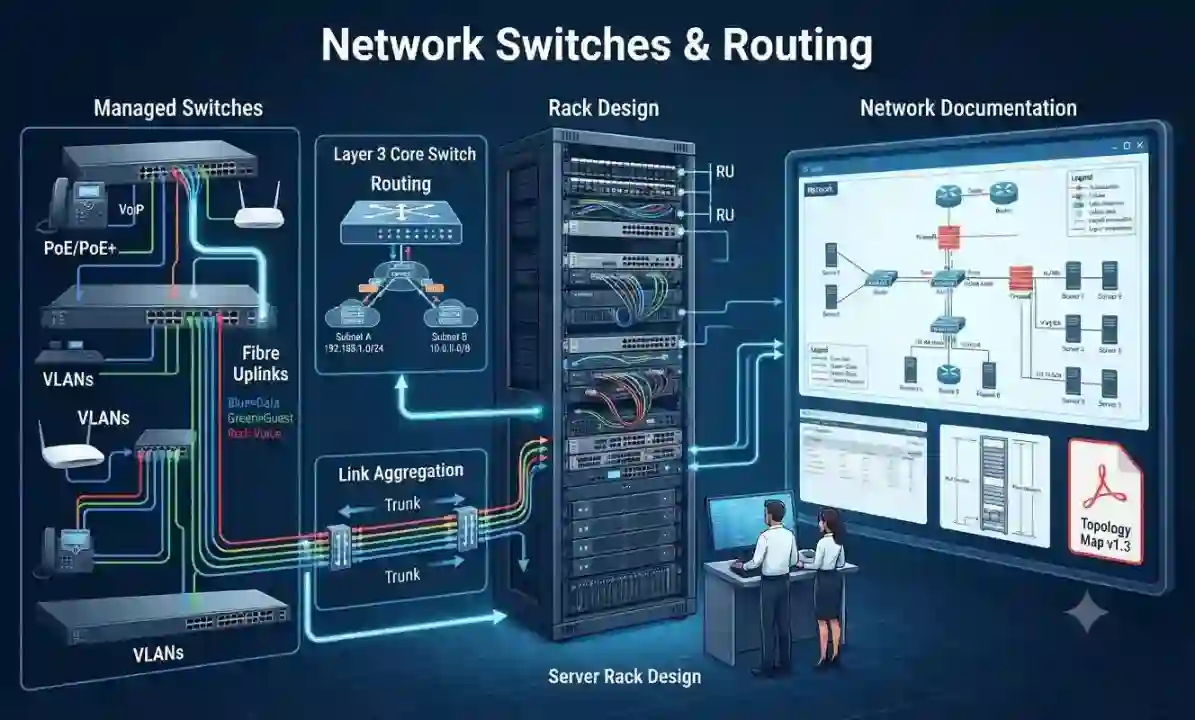
Network Switches, Routing and LAN Infrastructure
The switch layer connects users, cameras, access points, phones, servers and many other devices. A stable LAN requires more than enough ports. Fourteck plans managed switching around bandwidth, PoE demand, VLAN separation, uplink design, fiber requirements, redundancy and the expected number of devices.
Access switches serve desks and endpoints. PoE switches can power phones, cameras and wireless access points. Aggregation and core switches may be appropriate for multi-floor buildings, campuses or larger networks. Fiber uplinks can improve distance and capacity between racks or buildings. Managed features provide visibility and control that are difficult to achieve with unmanaged switches.
Network design should also avoid hidden bottlenecks. A site with dozens of high-resolution cameras, many Wi‑Fi users and large file transfers may need faster uplinks and careful traffic separation. Spanning-tree design, link aggregation, VLANs and documented port assignments can improve resilience and troubleshooting. The goal is a LAN that is easy to expand without creating a confusing patchwork of devices.
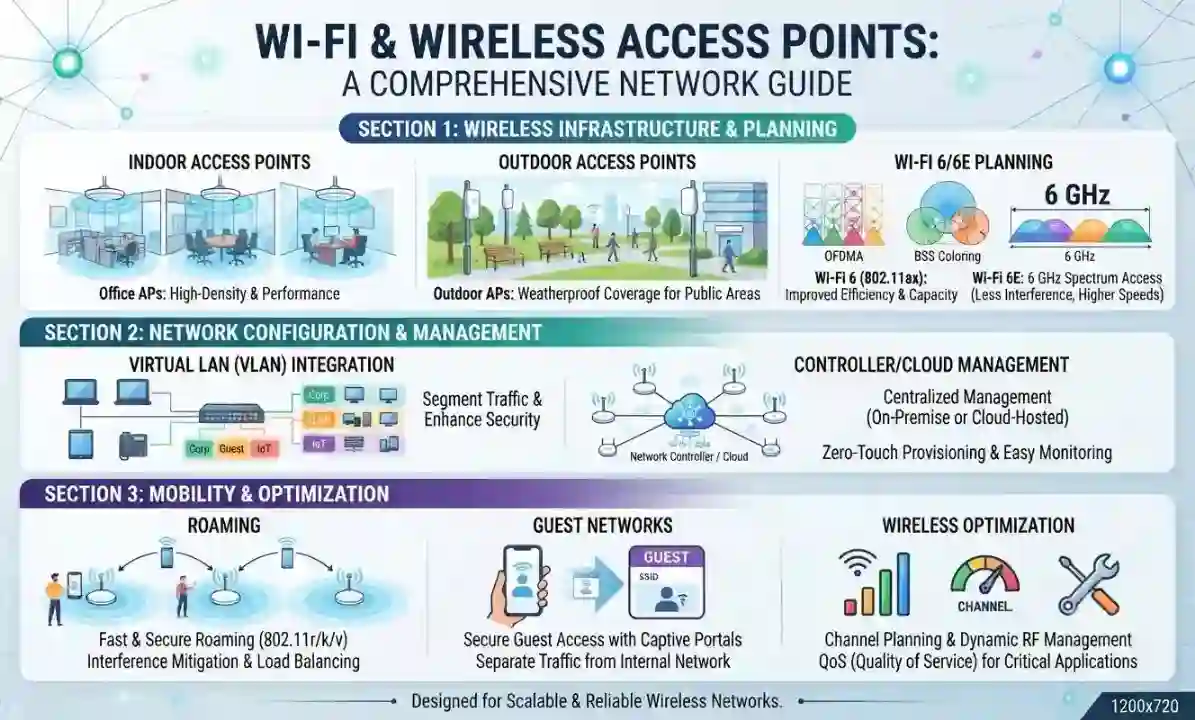
Wi‑Fi and Wireless Access Point Solutions
Reliable business Wi‑Fi depends on radio planning, not simply on the number of access points. Too few access points creates weak coverage; too many placed badly can cause interference and unstable roaming. Fourteck helps plan wireless networks for offices, hospitality spaces, warehouses, retail areas, classrooms and other environments where users expect consistent connectivity.
Coverage and capacity are different. A signal may be visible but still perform poorly when many users share the same radio. Wall materials, shelving, machinery, floor layout and outdoor areas influence propagation. Modern access points can support higher client density, but channel planning, transmit power and wired uplinks still matter.
Business wireless can also separate staff, guest and device traffic. Guest access may use captive portals or isolated internet-only networks, while business devices receive access to internal resources according to policy. Controller-based or cloud-managed platforms can simplify monitoring across multiple access points or sites. For critical applications, wireless planning should be coordinated with switching, firewall and internet capacity.
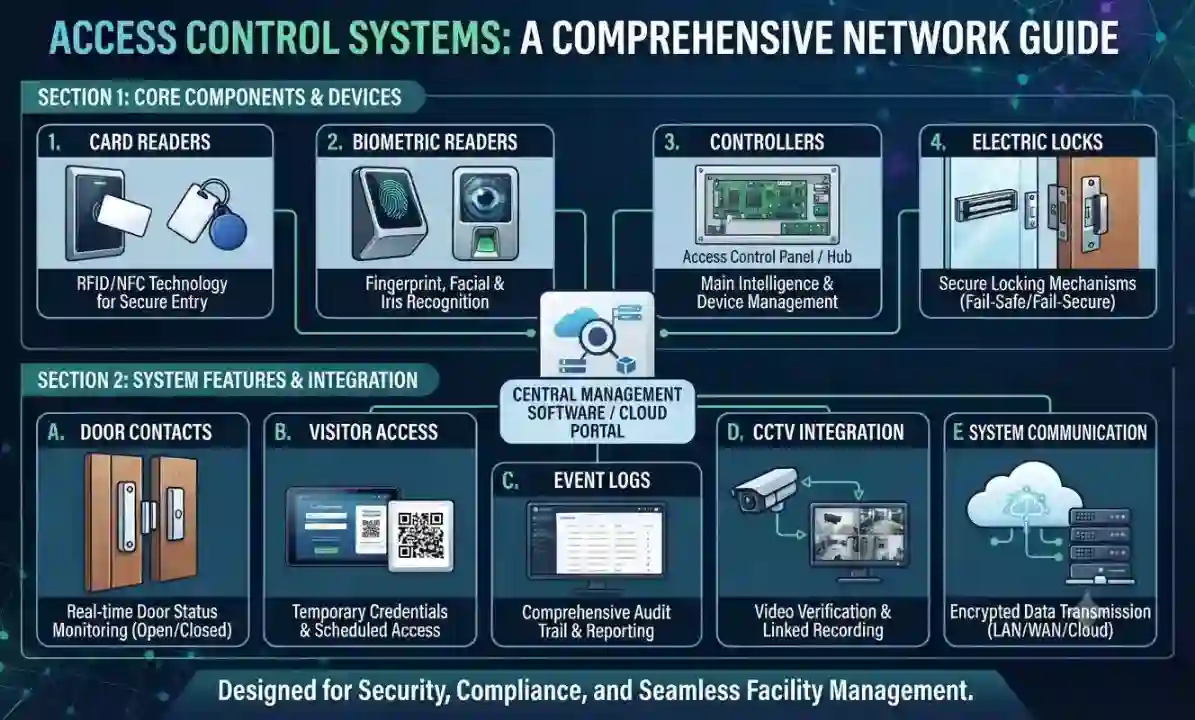
Access Control and Door Security Systems
Access control provides a recordable, manageable way to decide who can enter a door or protected area. Fourteck helps businesses plan card, PIN, biometric and other access methods for offices, server rooms, stores, warehouses and restricted operational areas. The system can be designed for a few doors or expanded into a multi-door environment.
A complete door solution includes more than a reader. The design may involve controllers, locks, door contacts, exit buttons, power supplies, emergency release interfaces and network connectivity. Door type and life-safety requirements must be considered before choosing hardware. The access platform should also make it practical to add and remove users, define schedules and review events.
Access control can complement CCTV by giving security teams both a door event and related video. Integration should be planned carefully so the systems remain manageable and permissions are controlled. For visitor workflows, temporary credentials and reception procedures may also be useful. Fourteck focuses on clear user administration and reliable field hardware rather than adding complexity without operational benefit.
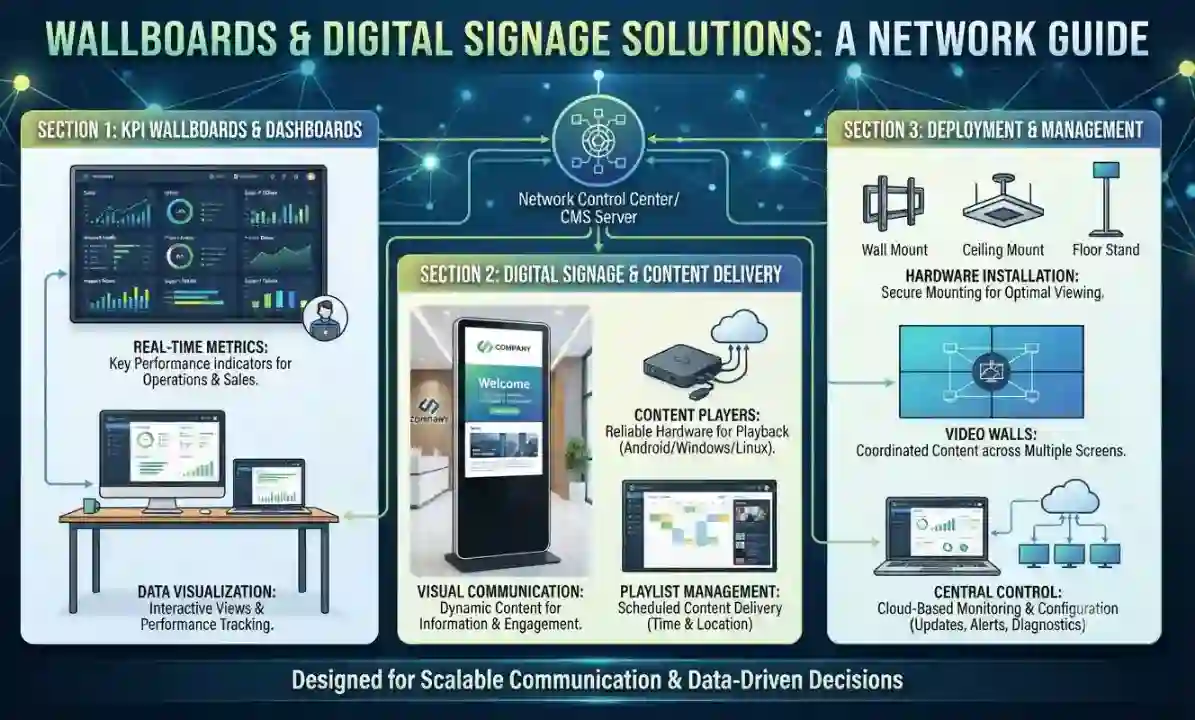
Wallboards, Dashboards and Digital Signage
Wallboards and digital signage turn information into a shared visual reference. A contact center may show queue status and service levels, an operations team may display live dashboards, a reception may show visitor information, and a retail or hospitality site may use scheduled messages. Fourteck can help select displays, players and mounting solutions for these different purposes.
The display must be suitable for viewing distance, operating hours, ambient light and the kind of content shown. A bright reception screen has different needs from a dashboard used by staff throughout the day. Content source and control also matter: some environments use browser-based dashboards, others use dedicated signage platforms, media players or centrally managed applications.
Installation planning covers wall strength, bracket type, cable paths, power, network connectivity and remote management. For multi-screen layouts, aspect ratio and bezel size can affect readability. The best wallboard solution keeps information clear and current without requiring users to manually connect a laptop each time content changes.
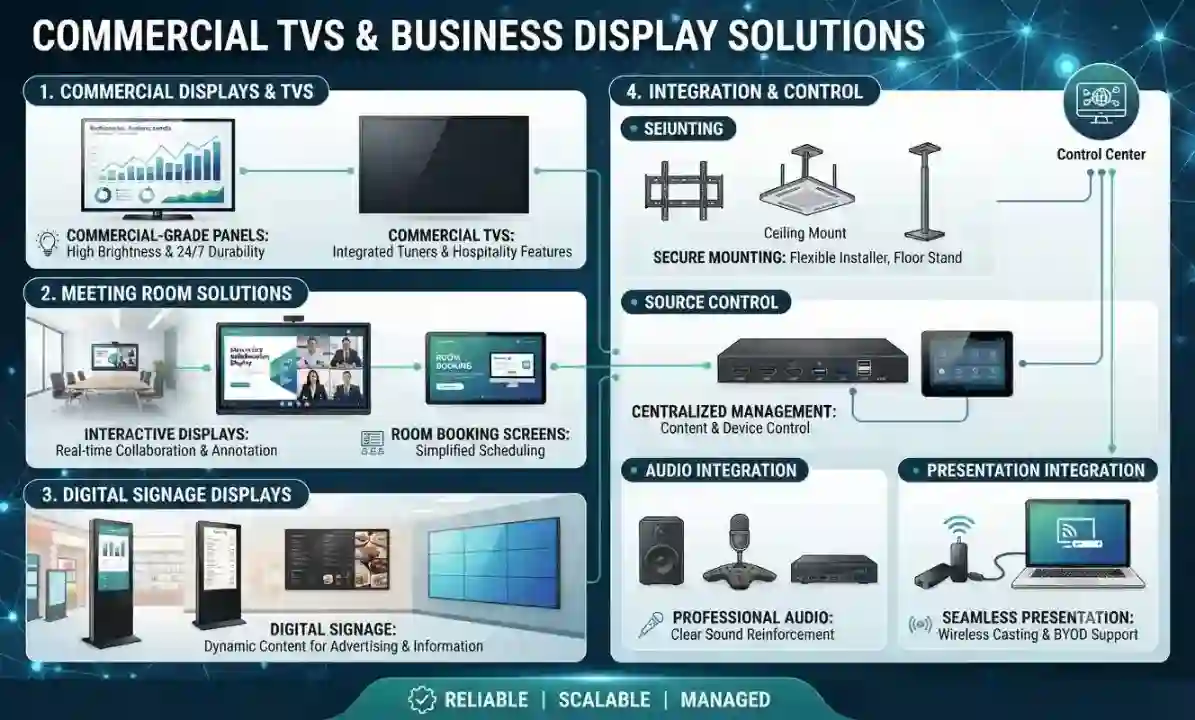
Commercial TVs and Business Display Solutions
Televisions and commercial displays support meeting rooms, receptions, training spaces, hospitality environments and information points. Fourteck helps customers choose screens based on size, viewing distance, brightness, input requirements, expected daily usage and mounting conditions.
A meeting-room display should work reliably with the conferencing or presentation system. Reception displays may need scheduled content or signage control. Hospitality and public-facing screens may require longer duty cycles, remote management or commercial warranty terms. For larger spaces, multiple displays or projection alternatives can be assessed.
The installation includes the details that make a screen usable: correct wall brackets, safe cable routing, source switching, network connection, sound strategy and control. Display placement should avoid glare and provide a comfortable viewing angle. Where a screen is part of a collaboration room, the camera position and furniture layout should be considered at the same time.
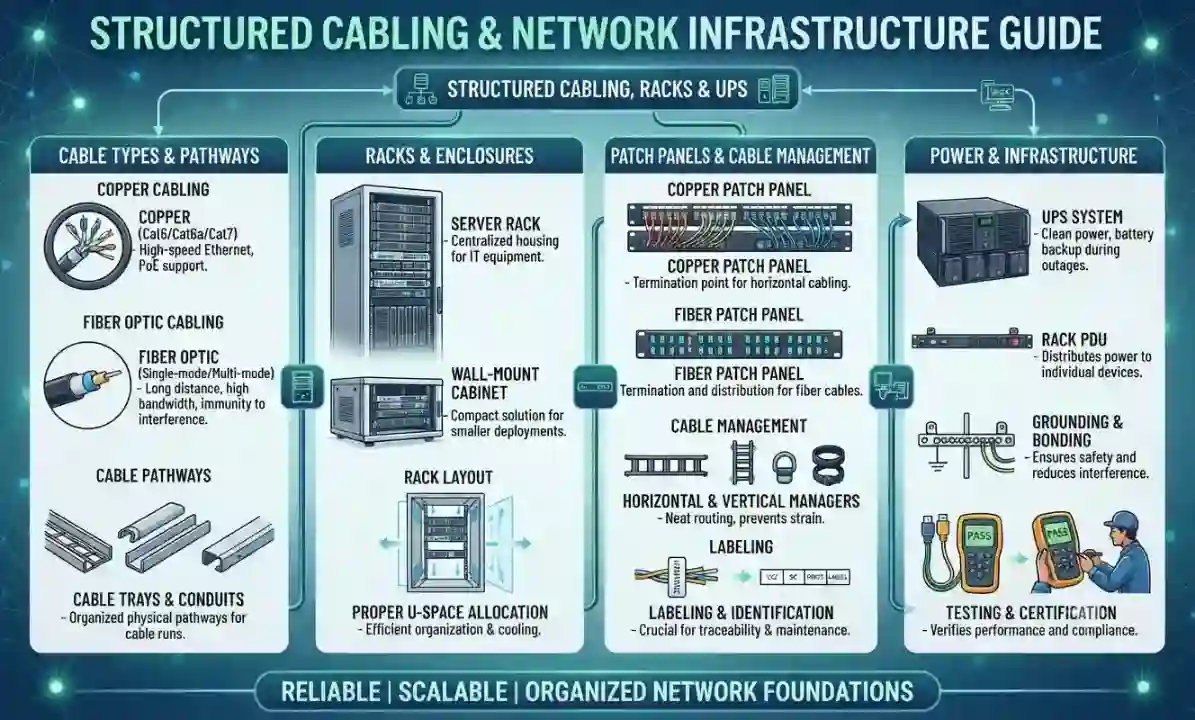
Structured Cabling, Fiber, Racks and UPS
Cabling is the physical foundation that every connected system depends on. Fourteck plans structured copper and fiber cabling for data networks, CCTV, IP phones, wireless access points and other IP-based services. A clean cabling system reduces faults, makes moves and changes easier, and allows future technicians to understand the site quickly.
Projects can include Cat6/Cat6A copper, fiber backbones, patch panels, faceplates, floor or wall racks, cable managers and labeling. Cable routes should respect distance, bend radius, separation from electrical interference and the physical conditions of the building. Fiber is useful for longer distances, higher bandwidth or links between buildings and floors.
Rack design brings switching, patching, firewalls, servers, NVRs and power into an organized space. UPS sizing can help maintain critical equipment during short interruptions and provide safer shutdown time. Documentation should map outlets and patch-panel ports so troubleshooting does not depend on memory. Testing and labeling are small tasks that have a large impact on long-term maintainability.
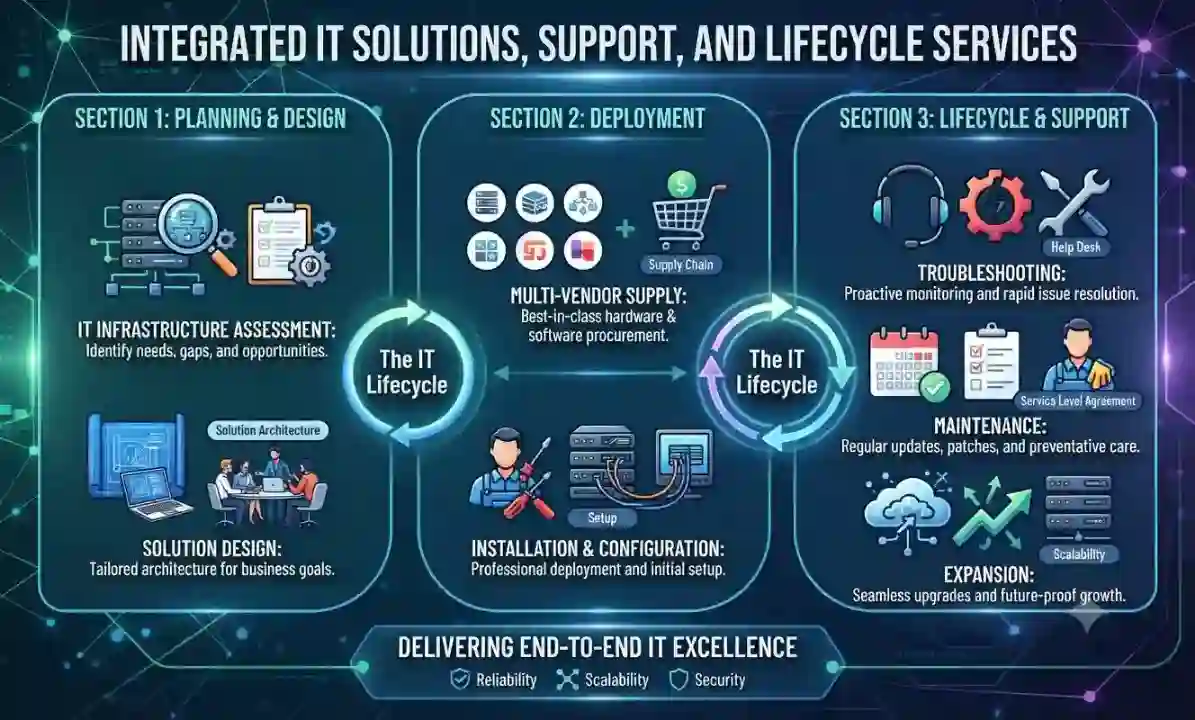
Integrated IT Solutions, Support and Lifecycle Services
Businesses often lose time when every technology problem is owned by a different supplier. The network provider blames the firewall, the CCTV installer blames the switch, the phone vendor blames the internet connection and the hardware supplier only covers the device warranty. Fourteck’s integrated approach is designed to reduce that fragmentation by considering how the systems interact.
A project may begin with a site review, bill of materials, design recommendation or replacement plan. Supply and installation can then be coordinated with configuration, testing and documentation. After handover, support can include troubleshooting, changes, expansion planning, maintenance and coordination with vendors or service providers where required.
This approach is especially useful for branch offices and growing companies because standards can be repeated across locations. Device naming, IP addressing, VLANs, rack layouts, backup policies and documentation can be made consistent. The aim is not to make the environment more complicated; it is to create clear responsibility and a technology base that supports the business as it grows.
Building dependable business technology across different site conditions.
Technology projects in Tanzania can range from a compact office in Dar es Salaam to a warehouse, hospitality property, school, clinic, branch network or remote operational location. The design should respond to the actual site rather than assume that every location has the same internet options, physical layout, power quality or support access. For this reason, Fourteck treats discovery as part of the engineering process. A short list of questions about users, floor plans, critical applications, security zones, internet links, available racks and growth expectations can prevent much more expensive changes after equipment has been ordered.
Connectivity is a good example. A business may have fast primary internet but still experience poor cloud performance because the internal network is congested, Wi‑Fi is badly placed or the firewall is undersized for security inspection. Another site may have excellent LAN performance but a single internet circuit with no practical failover. Camera traffic can consume uplink capacity if recording streams cross the wrong part of the network. Video meetings can suffer when voice and video compete with large backups. Each issue looks different to the user, but the root cause may be the same: the systems were added at different times without one architecture.
Power and environment should also be considered early. Network switches, firewalls, servers, recorders and access-control controllers are sensitive to heat and uncontrolled power interruption. A clean rack with correct ventilation, appropriate UPS capacity and documented power feeds is easier to maintain than equipment distributed on shelves around the site. For outdoor cameras and wireless devices, mounting, weather exposure and cable protection are part of the design. A reliable solution is therefore a combination of products, installation discipline and operational planning.
For companies with branches in more than one country, consistency becomes even more valuable. A standard firewall policy, VLAN structure, IP phone profile, Wi‑Fi approach, CCTV naming convention and documentation template can make support easier across Tanzania, Kenya, Uganda, the UAE and other regional operations. Standardization does not mean every branch uses the same number of devices; it means the architecture follows repeatable principles so technicians can understand a new site quickly.
Fourteck’s regional website network reflects this multi-market approach. Customers can use the Tanzania site for local project discussions and the linked Fourteck regional or specialist sites for related requirements. A customer may need a Tanzania office network, a UAE firewall project and an IP PBX standard that works across branches. Keeping the technology conversation connected supports procurement teams and IT managers who are responsible for more than one geography.
Why CCTV, IP telephony, Wi‑Fi, servers and cybersecurity should be planned together.
Many business systems now share the same IP infrastructure. An IP camera uses Ethernet and often PoE. An IP phone uses Ethernet, may share a desk port with a computer and depends on low latency. A wireless access point uses PoE and may carry staff, guest and operational traffic. Access-control panels can connect to the LAN. Meeting-room systems use the internet, DNS, cloud services and local presentation networks. Servers provide applications or storage to these users and devices. The firewall controls what can communicate externally and, in many designs, what can communicate internally. When each layer is purchased separately, conflicts appear later.
A coordinated design starts with logical separation. Business users, voice endpoints, surveillance equipment, guest wireless and infrastructure management do not always need to be in the same broadcast domain. VLANs can organize those groups, and firewall or routing policy can decide which groups are allowed to communicate. Managed switches provide the port-level control, PoE and uplink visibility. Wireless networks map SSIDs to the correct VLANs. IP addressing and DHCP are documented. This structure makes a growing site easier to troubleshoot because the network has intentional boundaries.
Capacity comes next. Every camera creates a video stream. Every video conference can create sustained upstream and downstream traffic. File backups may transfer large datasets at scheduled times. Wi‑Fi users can move between access points. The switch uplinks and firewall need to carry this traffic without creating bottlenecks. Storage must hold the intended camera retention and business backups. Internet circuits should be evaluated against cloud and collaboration demand. Planning capacity from expected usage is more dependable than selecting devices only by port count.
Security needs the same integrated view. Cameras, recorders, IP phones, access controllers and display players may have web interfaces that should not be open to every user. Remote access should use controlled methods rather than exposed management ports. Administrator accounts should be owned by the customer, documented and protected. Firmware and configuration backups should be part of support. A security strategy that protects only laptops but ignores infrastructure endpoints leaves unnecessary gaps.
Finally, the physical layer must support the logical design. Cables need labels, racks need space, patch panels need order, PoE budgets need calculation and UPS systems need enough capacity for critical equipment. When these details are handled correctly, later moves and changes are much faster. The value of an integrated solution is therefore not only that one supplier can provide many products. The real value is that each product is selected and installed with awareness of the systems around it.
Technology designed around the way your site operates.
The same product can be correct in one environment and wrong in another. A warehouse camera design, a hotel Wi‑Fi design and a corporate meeting-room design have different performance and operational priorities. Fourteck begins with the site and workflow so the selected products have a clear role.
Corporate offices
Secure LAN and Wi‑Fi, firewalls, laptops, IP PBX, meeting rooms, CCTV, access control and server services that support everyday staff productivity.
For this environment, the practical priority is to connect security, communication and network requirements into one maintainable design. That may mean separating operational devices from guest traffic, planning power backup for critical systems, standardizing equipment across departments and documenting the final installation so expansion can be managed without disruption.
Warehouses and logistics
Camera coverage, loading-area surveillance, rugged connectivity, Wi‑Fi planning, access control, network racks and reliable communication for operations teams.
For this environment, the practical priority is to connect security, communication and network requirements into one maintainable design. That may mean separating operational devices from guest traffic, planning power backup for critical systems, standardizing equipment across departments and documenting the final installation so expansion can be managed without disruption.
Hotels and hospitality
Guest and staff networking, surveillance, access systems, IP telephony, meeting-room technology, commercial displays and infrastructure that can be managed across busy properties.
For this environment, the practical priority is to connect security, communication and network requirements into one maintainable design. That may mean separating operational devices from guest traffic, planning power backup for critical systems, standardizing equipment across departments and documenting the final installation so expansion can be managed without disruption.
Retail and showrooms
CCTV, POS-ready networking, secure Wi‑Fi, digital signage, business phones and compact infrastructure for customer-facing locations.
For this environment, the practical priority is to connect security, communication and network requirements into one maintainable design. That may mean separating operational devices from guest traffic, planning power backup for critical systems, standardizing equipment across departments and documenting the final installation so expansion can be managed without disruption.
Schools and training centres
Wireless coverage, classroom displays, video conferencing, access control, CCTV, network switching and server connectivity designed for many concurrent users.
For this environment, the practical priority is to connect security, communication and network requirements into one maintainable design. That may mean separating operational devices from guest traffic, planning power backup for critical systems, standardizing equipment across departments and documenting the final installation so expansion can be managed without disruption.
Healthcare and clinics
Reliable business connectivity, segmented networks, access control, surveillance of appropriate areas, communication systems and carefully planned workstation infrastructure.
For this environment, the practical priority is to connect security, communication and network requirements into one maintainable design. That may mean separating operational devices from guest traffic, planning power backup for critical systems, standardizing equipment across departments and documenting the final installation so expansion can be managed without disruption.
Manufacturing and industrial sites
Fiber links, managed switching, outdoor wireless, perimeter cameras, access systems, control-room displays and resilient network security for operational environments.
For this environment, the practical priority is to connect security, communication and network requirements into one maintainable design. That may mean separating operational devices from guest traffic, planning power backup for critical systems, standardizing equipment across departments and documenting the final installation so expansion can be managed without disruption.
Construction and project sites
Temporary or permanent connectivity, CCTV, wireless links, ruggedized network planning, communication systems and scalable equipment that can move with project phases.
For this environment, the practical priority is to connect security, communication and network requirements into one maintainable design. That may mean separating operational devices from guest traffic, planning power backup for critical systems, standardizing equipment across departments and documenting the final installation so expansion can be managed without disruption.
Government and institutional environments
Structured infrastructure, secure network segmentation, meeting-room collaboration, surveillance, access control and documented deployment aligned to formal procurement requirements.
For this environment, the practical priority is to connect security, communication and network requirements into one maintainable design. That may mean separating operational devices from guest traffic, planning power backup for critical systems, standardizing equipment across departments and documenting the final installation so expansion can be managed without disruption.
Multi-branch businesses
Standardized firewalls, switches, Wi‑Fi, IP PBX, endpoint profiles, remote access and consistent documentation so branches can be supported as one environment.
For this environment, the practical priority is to connect security, communication and network requirements into one maintainable design. That may mean separating operational devices from guest traffic, planning power backup for critical systems, standardizing equipment across departments and documenting the final installation so expansion can be managed without disruption.
How to plan an IT, telecom or security project before you buy.
Useful technology content should help a buyer make a better decision, not only repeat product keywords. These planning principles apply across CCTV, networking, IP PBX, servers, firewalls, Wi‑Fi, computers and access control.
Start with the business outcome, not the model number
Before asking for a camera, firewall, server or switch model, define the problem the system must solve. For CCTV, that may be identification at an entrance, evidence after an incident or live monitoring of a loading bay. For networking, it may be reliable cloud access, branch connectivity or Wi‑Fi capacity. For telephony, it may be faster reception handling or better remote-user access. Once the outcome is clear, specifications have a reason. This reduces the risk of comparing products only by headline features and makes quotations easier to evaluate.
Document the current environment
Existing infrastructure changes the best design. Record internet links, rack locations, switch models, cable categories, IP ranges, PBX type, camera system, server roles, Wi‑Fi equipment and important application dependencies. Photos and a simple network diagram can reveal constraints before installation begins. When this information is missing, projects often discover hidden problems late, such as insufficient rack power, no spare fiber, incompatible PoE, weak internet or undocumented passwords.
Plan power and UPS protection
IT devices depend on stable power. Switches, firewalls, NVRs, servers, access controllers and wireless equipment may all need UPS protection, but their runtime requirements differ. Critical systems should be prioritized. A UPS must be sized for actual load and expected battery runtime, not just chosen by VA rating. For larger environments, electrical distribution, grounding, cooling and generator behavior may also affect IT reliability. Power planning is especially important where a brief interruption can stop phones, cameras or access systems.
Think about network segmentation
Modern networks carry many device types: staff computers, guest devices, cameras, phones, servers, printers, access-control panels and building systems. Placing every device on one flat network makes troubleshooting and security harder. VLANs and firewall rules can separate traffic according to business need. Segmentation also helps contain broadcast traffic and makes policies easier to understand. The design should remain practical, with clear documentation so support teams know why each network exists.
Size for realistic growth
Buying exactly enough ports, storage or capacity for today can make small changes expensive later. At the same time, buying far beyond realistic growth wastes budget. Good planning uses reasonable headroom: spare switch ports, rack space, storage capacity, licenses, address space and Wi‑Fi capacity based on expected changes over the next few years. The right amount varies by business. A rapidly expanding branch network needs more headroom than a stable small office.
Treat security as an operating process
A firewall does not make a network permanently secure after installation. User accounts change, vulnerabilities are discovered, internet services evolve and old rules accumulate. Security requires firmware management, configuration backups, access review, logging, endpoint hygiene and sensible user practices. The same is true for cameras, PBX systems and access control, all of which may have web interfaces and credentials. Lifecycle maintenance is part of the solution, not an optional detail added after deployment.
Plan for support and replacement
Every device will eventually need an update, repair or replacement. Choose equipment with a support path that matches the business. Record serial numbers, warranty details, configuration backups, licenses and installation dates. Standardized models can simplify spares and troubleshooting. For critical environments, consider whether a failure can wait for replacement delivery or whether redundancy or spare units are justified. Support planning converts procurement from a one-time purchase into a manageable lifecycle.
Make meeting rooms easy for non-technical users
Meeting rooms fail when every call requires someone from IT. The room should have a predictable join method, clear audio, sensible camera framing and obvious controls. Cable adapters, wireless presentation and guest access should be considered before people arrive for important meetings. If multiple platforms are used, define how the room will handle them. Simplicity is a design requirement, not just a training issue.
Validate cabling before blaming devices
Intermittent network faults are often caused by physical issues: damaged patch cords, poor termination, excessive cable length, tight bends, electromagnetic interference or mislabeled outlets. Replacing switches and access points without checking the cabling can leave the real problem unchanged. Structured cabling should be tested, labeled and routed cleanly. Fiber links should use appropriate optics and be cleaned before troubleshooting higher layers.
Use storage calculations for surveillance
Camera retention is not a guess. Storage depends on camera count, resolution, frame rate, compression, motion profile and retention days. Increasing resolution or frame rate can significantly increase capacity. Recording servers and NVRs also need disk performance and redundancy appropriate to the design. Calculating expected storage before purchase helps avoid the common situation where a system records fewer days than the business expects.
Design Wi‑Fi for users, not just signal bars
A strong signal icon does not guarantee a good wireless experience. Capacity, interference, channel reuse, roaming and uplink speed determine what users can actually do. Applications such as video meetings, cloud systems and voice over Wi‑Fi are more demanding than basic browsing. A wireless design should consider where people gather, not only where walls exist. After deployment, validation can identify dead zones, interference or overloaded radios.
Define handover before installation starts
A project is not complete when devices power on. Handover should include configuration ownership, admin access, diagrams, warranty information, device lists, training and acceptance testing. Decide who will manage the system and which changes require vendor support. Clear handover reduces future confusion and protects the customer from being locked into undocumented configurations. It also gives management a better view of what was purchased and why.
From requirement discovery to handover: a practical technology project process.
Requirement discovery
We begin by identifying the business problem, not by forcing a product into the discussion. The customer explains the site, users, critical systems, current pain points, preferred timeline and budget direction. For a CCTV project, discovery covers what must be seen, when footage is needed and who will review it. For a network project, it covers users, devices, internet, applications and growth. For conferencing, it covers room size, platforms and meeting behavior. Clear discovery creates a shared definition of success before technical decisions are made.
Site and infrastructure review
Where appropriate, the next step is a site review or a structured remote assessment using floor plans, photographs and existing documentation. We look at rack space, cable routes, power, UPS, internet handoff, switch capacity, current IP addressing, wireless coverage, camera mounting positions and equipment that may remain in service. This review helps expose dependencies that are easy to miss in a simple product quotation. The objective is to understand the environment well enough to recommend a solution that can actually be installed and supported.
Solution architecture
The architecture translates requirements into a system. We define device roles, network topology, VLANs, PoE, server or recording capacity, access permissions, room layouts or call flows depending on the project. The design also considers growth and operational ownership. A good architecture is understandable: the customer should be able to see why a device is needed, how it connects and what business function it supports. This makes technical review and budget approval easier than a bill of materials with no explanation.
Product and bill-of-material selection
Products are selected after the architecture is clear. We consider compatibility, performance, warranty, availability, lifecycle, manageability and the customer’s existing standards. For switches, that means port count, PoE budget and uplinks. For firewalls, it means real security throughput and VPN requirements. For cameras, it means image purpose, lens, low-light behavior and storage. For computers, it means user workload. The bill of materials should connect each item to a requirement instead of becoming a list of unrelated model numbers.
Installation and physical organization
Installation quality affects the life of the system. Devices should be mounted safely, cables routed and labeled, racks organized and power protected. Camera positions are checked against the required field of view. Access points are placed for coverage and capacity rather than convenience. Meeting-room displays and cameras are aligned with seating. Servers, firewalls and switches are installed with serviceability in mind. Clean physical work helps prevent intermittent faults and makes future changes much easier for the customer or any authorized support team.
Configuration and security baseline
After the physical layer is ready, the systems are configured according to the agreed design. This can include IP addressing, VLANs, firewall policy, Wi‑Fi SSIDs, PBX extensions, camera names, recording schedules, user roles, access-control permissions, server settings and device management. Default credentials are changed, administrative access is restricted and configuration backups are created where supported. The goal is to make the environment operational without leaving unnecessary default settings or undocumented shortcuts.
Testing and acceptance
Testing should confirm the business outcome rather than only confirm that equipment powers on. CCTV testing verifies useful images, recording and playback. Network testing checks links, VLAN reachability, PoE, internet access and Wi‑Fi behavior. PBX testing follows real call flows. Conferencing checks camera framing, microphones, speakers and platform joining. Access control verifies entry and exit behavior. Server and backup work should include restore checks where agreed. Acceptance testing gives both the customer and implementation team a clear point at which the solution is ready for use.
Documentation, training and lifecycle support
Handover should leave the customer in control. Documentation can include device lists, IP addresses, rack layouts, switch-port maps, administrator ownership, warranties, configuration backups and operating notes. Users may need simple training for phones, meeting rooms, camera playback or access-control administration. Support requirements are then defined according to the importance of the systems and the customer’s internal IT capability. A documented environment is easier to troubleshoot, expand and eventually replace, which protects the value of the original investment.
Frequently asked questions about Fourteck Tanzania IT solutions.
These direct answers are written for customers and for answer engines that need clear, self-contained explanations of Fourteck’s services.
What IT solutions does Fourteck provide in Tanzania?
Fourteck provides project support for CCTV and IP cameras, video and audio conferencing, IP PBX and IP phones, laptops and desktops, servers and storage, firewalls, switches, Wi‑Fi access points, access control, structured cabling, wallboards, TVs and integrated IT infrastructure. The exact scope can be tailored to the site, budget, user count and operational requirements.
Can Fourteck supply equipment as well as install it?
Yes. A project can include product selection, supply, installation, configuration, testing and handover where the required scope and logistics are agreed. Customers that only need equipment can also discuss supply requirements, while customers with a complete project can request an integrated solution.
Do you design CCTV systems for offices and warehouses?
Yes. CCTV design can cover offices, warehouses, retail areas, entrances, parking zones and other business spaces. The design should consider camera purpose, lens and placement, low-light performance, network bandwidth, PoE, recording capacity, retention and secure access to footage.
What is the difference between CCTV and an IP camera system?
CCTV is a broad term for video surveillance. An IP camera system specifically uses network-connected cameras that communicate over Ethernet or IP networks, often using PoE for power. IP systems can support higher resolution, easier network integration, centralized management and scalable recording architectures.
Can you upgrade an existing camera system instead of replacing everything?
Often, yes. An audit can identify which cameras, cables, power supplies, switches, recorders or monitors can remain and which components are creating limitations. Hybrid or phased upgrades may be possible depending on compatibility and the condition of the existing infrastructure.
Can you set up video conferencing for Microsoft Teams or Zoom rooms?
Fourteck can design meeting rooms around commonly used collaboration platforms and compatible room equipment. The correct approach depends on room size, camera framing, microphones, displays, room controls, acoustic conditions and the organization’s chosen meeting platform.
What should a business check before buying an IP PBX?
Check user and extension count, call flows, reception requirements, SIP or telecom compatibility, remote-user needs, call recording policy, reporting, redundancy, network readiness and future growth. The PBX should be selected after these requirements are clear.
Can IP phones run from the network without separate power adapters?
Many business IP phones support Power over Ethernet, allowing a compatible PoE switch to provide both data and power through one Ethernet cable. The switch must have sufficient PoE capacity, and the design should account for UPS requirements if phone availability during short outages is important.
How do I choose a firewall for my company?
Firewall sizing should consider internet speed, user count, VPN traffic, security inspection features, number of interfaces, branch links and expected growth. The effective throughput with security services enabled can be more important than a basic headline throughput figure.
Can you configure VPN between branches?
Yes, branch-to-branch VPN can be part of a firewall and network design. The design should consider internet stability, addressing, routing, security policies, failover requirements and whether applications need direct branch connectivity or cloud access.
Do you provide network switches with PoE?
Yes. PoE switches are commonly used to power IP cameras, access points and IP phones. The correct switch depends on port count, PoE wattage, uplink speed, management features, rack design and the number and type of powered devices.
How many Wi‑Fi access points does an office need?
There is no reliable answer based only on floor area. Wall materials, room layout, user density, device count, application type, interference and required performance all affect access-point quantity and placement. A wireless design or survey gives a better answer than simply adding more access points.
Do you supply business laptops and desktops?
Yes. Fourteck can assist with business laptops, desktops, workstations, monitors and related accessories. Standardizing a few approved configurations can simplify procurement, support, imaging and future replacement for organizations buying multiple devices.
Can you provide servers and storage?
Yes. Server and storage planning can cover rack or tower servers, RAID, virtualization, file services, application workloads, backup, network interfaces, UPS and rack requirements. The specification should be based on workload and recovery expectations.
Is RAID the same as backup?
No. RAID can improve availability when a drive fails, but it does not protect against accidental deletion, ransomware, corruption, theft or a major site event. A backup strategy should create separate recoverable copies according to a defined schedule and retention policy.
Can access control work with CCTV?
Yes. Access-control events can be coordinated with surveillance so security teams can review video around a door event. The exact integration depends on the selected platforms and should be planned with user permissions, network connectivity and operational procedures in mind.
Do you provide structured cabling and racks?
Yes. Structured cabling can include Cat6/Cat6A copper, fiber, patch panels, outlets, racks, cable management, labeling and testing. Rack planning can also incorporate switches, firewalls, NVRs, servers, UPS equipment and space for future expansion.
Can Fourteck support a complete new office setup?
Yes. A new-office project can combine internet and network planning, firewall, switching, Wi‑Fi, structured cabling, laptops and desktops, IP PBX, CCTV, access control, meeting-room systems, servers and displays. Coordinating these elements early reduces rework and compatibility problems.
Can the solution be expanded later?
Scalability is part of good design. Spare switch ports, rack capacity, modular licensing, address planning, wireless capacity, server resources and camera-storage headroom can all make later expansion easier. The right amount of headroom depends on realistic growth rather than overbuying from the start.
Do you work with multi-site companies?
Multi-site projects can be standardized across branches using repeatable firewall, switch, Wi‑Fi, telephony, endpoint and documentation standards. This can make remote support, troubleshooting and future rollout more consistent.
How should I request a quotation?
Share the site location, service category, approximate number of users or devices, current equipment if any, required timeline and the main business problem you want to solve. Photos, floor plans, existing bills of materials and network diagrams can also help produce a more accurate proposal.
Can I request only one product category?
Yes. Customers can ask for a specific requirement such as a firewall, network switch, server, laptop, IP phone, camera, access point or conferencing device. Fourteck can also review whether that product will be compatible with the existing environment before supply.
Why is documentation important after installation?
Documentation turns an installed system into a maintainable system. Device names, IP addresses, switch ports, rack layouts, credentials ownership, warranties and configuration backups make future changes and troubleshooting faster and reduce dependence on individual technicians.
Can you help improve an unreliable existing network?
Yes. Troubleshooting can include switch health, cabling, IP conflicts, VLANs, uplinks, wireless interference, firewall configuration, bandwidth usage and device errors. The objective is to identify root causes before recommending replacement hardware.
Does Fourteck support projects beyond Tanzania?
Fourteck operates a regional network of websites and project channels covering the UAE, Africa, Kenya, Uganda, Kuwait, Ghana, Nigeria and other solution-specific markets. The regional links on this page connect visitors to the appropriate Fourteck location or specialization.
Technology project enquiries for Dar es Salaam and other commercial centres.
Fourteck Tanzania is designed to support business enquiries from Dar es Salaam and organizations operating across other Tanzanian commercial locations such as Dodoma, Arusha, Mwanza, Mbeya, Morogoro and Zanzibar, subject to the project scope, logistics and the type of onsite work required. A branch office in a city centre, a warehouse on the edge of an industrial area and a hospitality property on an island may all need different deployment planning. The important point is to define the site conditions before selecting hardware.
Dar es Salaam projects often combine dense office requirements with branch connectivity, meeting-room collaboration, business telephony, surveillance and secure internet access. Warehousing and logistics environments may place more emphasis on camera coverage, long cable routes, outdoor links, access control and Wi‑Fi coverage around operational areas. Hospitality and public-facing sites can require a combination of guest connectivity, staff networks, commercial displays, surveillance and reliable voice communication. Education and training environments may focus on wireless user density, classroom displays, access control and centralized network management.
For multi-site organizations, Fourteck can help create a repeatable design standard so new Tanzanian branches do not start from zero. A template may define approved firewall sizes, switch families, IP addressing conventions, Wi‑Fi SSIDs, camera naming, PBX extension ranges, rack layouts and documentation. Each branch can then be adjusted to its actual user count and physical layout while maintaining a consistent operating model. This is useful for IT managers who need to troubleshoot remotely or compare infrastructure across locations.
Regional procurement can also be coordinated with the wider Fourteck network shown below. Organizations with operations in Tanzania, Kenya, Uganda, Ghana, Nigeria, Kuwait or the UAE may need similar technology categories in more than one country. Using consistent requirements, comparable product families and shared documentation can reduce procurement confusion and simplify lifecycle planning. Availability, warranty conditions, telecom requirements and onsite implementation arrangements should still be checked for each market.
When requesting a Tanzania proposal, include the city or site location, approximate floor area, number of users, number of cameras or phones if known, internet information, existing network equipment and any floor plans or photographs available. For a new office, list the systems that must be ready on opening day. For an upgrade, describe the current faults and equipment that may be reused. This information allows the solution discussion to focus on real constraints and produces a more useful technical response than a request based only on a product name.
Fourteck locations and specialist solution websites.
Use the appropriate Fourteck site for regional enquiries or specialist product categories. The links below are the current locations and solution websites provided for this homepage.
Planning CCTV, networking, IP PBX, servers, Wi‑Fi or a complete IT setup in Tanzania?
Send the site location, approximate user or device count, the products or systems you need, your current challenges and the required timeline. Fourteck can use that information to define the next practical step, from product supply to a coordinated technology solution.