
Yealink UVC85-BYOD Meeting Kit Tanzania
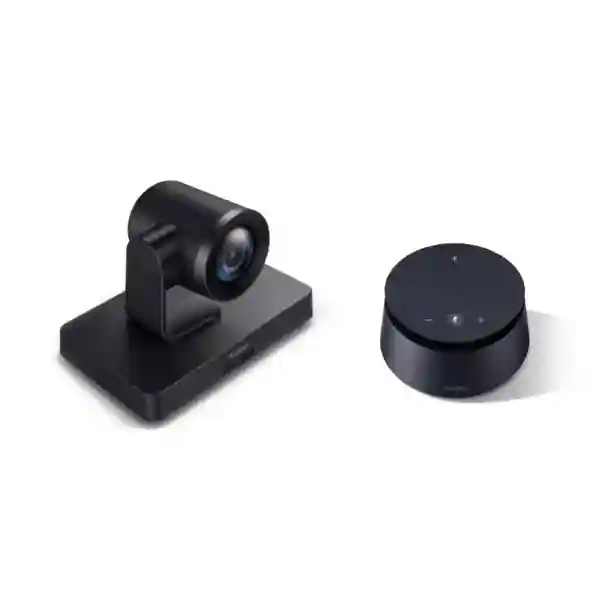
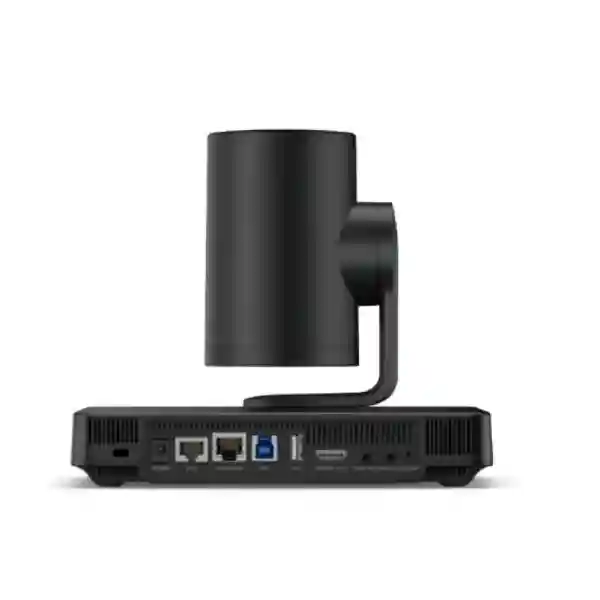
The Yealink UVC85-BYOD Meeting Kit combines the UVC85 4K PTZ conferencing camera with the CP50 professional speakerphone to create a flexible laptop-driven meeting-room experience. Yealink positions the kit for medium and large rooms, with 4K video output, 12x optical zoom, 3x digital zoom, mechanical pan-tilt-zoom, auto-framing, integrated audio and unified device management. For organizations that want users to walk in with a laptop and access professional room peripherals, the solution offers a practical alternative to a permanently dedicated room-compute platform.
The design is especially relevant for businesses that use more than one meeting application or that want to preserve user choice while standardizing the camera and audio experience in the room. A properly planned deployment should consider room depth, participant seating, camera sightline, microphone placement, display position, laptop connection path, network quality and the acoustic character of the room. FourTeck Tanzania can help customers assess those dependencies before a quotation is prepared.
Use it when a meeting room needs optical zoom, flexible PTZ framing, table-based professional audio and simple laptop-led conferencing without locking the room to a single meeting platform.
Ultra-HD room video
The UVC85 supports 4K maximum video output and uses an 8 MP camera sensor for detailed conference-room imaging.
Combined HD zoom
Yealink specifies 12x optical zoom and 3x digital zoom, giving the camera reach for medium and large rooms when properly positioned.
Laptop-led meetings
Users can connect a computer and use the room camera and speakerphone as conferencing peripherals, supporting flexible platform choice.
Professional room audio
The CP50 combines an omnidirectional microphone array, full-duplex communication, speaker playback and meeting controls in a tabletop device.
What the Yealink UVC85-BYOD Meeting Kit solves
Hybrid meetings often fail for ordinary reasons rather than exotic technical ones: the laptop webcam cannot frame everyone, the built-in laptop microphone is too far away from the table, participants sit outside the camera view, or users spend the first minutes of a call trying to select the correct audio and video devices. The UVC85-BYOD approach is intended to separate the user’s conferencing application from the room’s professional audio-visual hardware. The participant brings a laptop, while the room supplies the camera, microphone and speaker experience.
This architecture can be useful for organizations that host meetings across Microsoft Teams, Zoom, Webex, Google Meet or other software that can use standard conferencing peripherals. Yealink describes its BYOD solution as compatible with major video platforms. The key procurement question is therefore not simply whether the kit can connect to a computer, but whether the room layout, cabling route, display configuration and acoustics support a repeatable one-cable workflow for everyday users.
For wider collaboration planning, FourTeck Tanzania’s integrated business technology overview explains how conferencing depends on networking, displays, power and supporting infrastructure. Buyers can also review the Tanzania business technology shop to compare conferencing with related workplace categories, or use the FourTeck Tanzania services page when the requirement includes installation, configuration or broader infrastructure work.
Verified UVC85 camera capabilities
4K imaging and 8 MP sensor
Yealink specifies an 8 MP camera and up to 4K maximum video output. The purpose is to give remote participants a clearer view of people and room details than a typical notebook webcam can provide.
12x optical plus 3x digital zoom
Optical zoom helps preserve image detail when the camera must frame participants farther from the display. The additional digital zoom provides extra reach where appropriate.
Mechanical PTZ
The UVC85 uses mechanical pan, tilt and zoom with pan movement of ±100 degrees and tilt of +30 to -90 degrees, allowing a room design to cover different seating positions and presentation areas.
Auto-framing
Auto-framing detects participants and adjusts the camera view to create a suitable group frame, reducing the need for users to manually reposition the camera at the start of each call.
90° diagonal field of view
Yealink lists a 90° diagonal, 80° horizontal and 50° vertical field of view. Camera placement still matters because room width, table position and distance change the practical framing.
Flexible mounting
Yealink documents table, display-top, wall, ceiling, TV-stand and tripod mounting possibilities. Final mounting should protect sightlines, cable paths and service access.
CP50 audio for collaborative rooms
The CP50 is an important part of the kit because meeting quality depends heavily on speech clarity. Yealink specifies an eight-unit omnidirectional microphone array, 360-degree pickup, full-duplex communication and full-frequency speaker playback. Physical controls cover mute, volume and Bluetooth functions, and Yealink notes that meeting status can synchronize with supported meeting software. For procurement teams, this means the camera and audio should be treated as one room experience rather than two unrelated accessories.
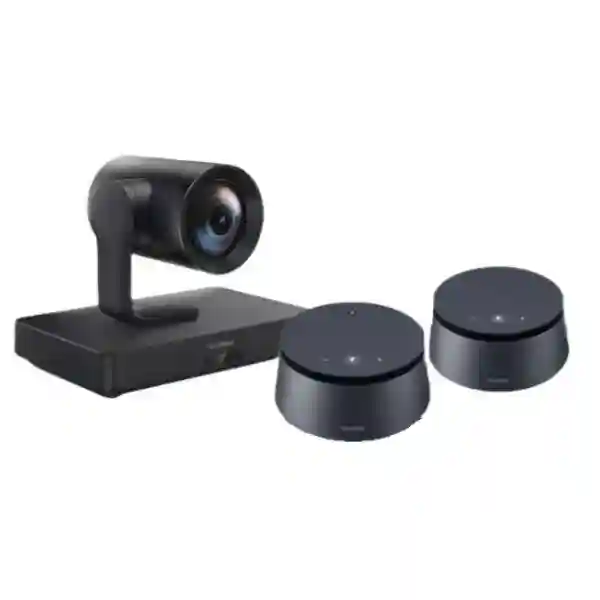
The CP50 also supports expansion for distributed room scenarios. Yealink states that multiple units can be cascaded over PoE cabling, with support for up to eight devices in appropriate configurations. Expansion should be designed from the room plan rather than assumed by default; long boardroom tables, U-shaped rooms, training spaces and rooms with acoustic obstacles can all require different microphone strategies.
If room sound is a major concern, review FourTeck Tanzania’s broader guidance on audio and video conferencing planning and the FourTeck Tanzania company overview for the wider integration approach. The goal is to create a room where remote participants can hear normal conversation without forcing everyone to speak toward a laptop.
Technical specification summary
| Room positioning | Medium to large meeting rooms |
|---|---|
| Camera sensor / output | 8 MP camera; maximum video output resolution up to 4K |
| Field of view | 90° diagonal, 80° horizontal, 50° vertical |
| Zoom | 12x optical, 3x digital, 36x HD zoom |
| PTZ | Mechanical PTZ; pan ±100°; tilt +30° to -90° |
| Camera presets | 9 preset positions |
| Focus / image controls | Autofocus; auto/manual exposure; auto tracking/manual/one-push white balance |
| Speakerphone | CP50 with omnidirectional microphone array, full duplex, speaker, USB and Bluetooth connectivity |
| Management | Yealink RoomConnect management tool for supported device management functions |
| BYOD workflow | Computer-led meeting using the room camera and audio peripherals through the kit’s BYOD connection design |
Who should consider this kit?
The UVC85-BYOD kit suits organizations that need a room more capable than a webcam-and-speakerphone setup but do not necessarily want a permanently dedicated meeting-room computer for every call. Executive boardrooms, management meeting rooms, project spaces, training rooms and customer presentation spaces can all benefit when the camera must cover people at different distances and the audio system must serve participants around a larger table.
It is also relevant where guest users regularly host meetings. A visitor may prefer to use the meeting application already configured on a corporate laptop rather than sign into a shared room account. BYOD can simplify that workflow, provided the room cable is clearly labeled, the display input is predictable and the operating system recognizes the conferencing devices consistently.
Before choosing the UVC85-BYOD, compare room depth, seating width, number of regular participants, meeting platforms, required content sharing, display count, cable distance and acoustic conditions. A smaller all-in-one video bar may be simpler for compact rooms, while a larger installed audio design may be more appropriate where a single tabletop speakerphone cannot provide the desired coverage.
Yealink UVC85-BYOD Meeting Kit Tanzania
For buyers in Tanzania, the strongest reason to evaluate the Yealink UVC85-BYOD Meeting Kit is its ability to standardize the physical meeting-room experience while leaving the meeting application on the user’s laptop. That can be valuable in organizations where departments, customers and international partners use different collaboration services. Instead of trying to make one shared room computer fit every workflow, a BYOD room can give each user access to the same camera and audio equipment from the device they already manage. Procurement teams should still confirm laptop port standards, adapter requirements, display connectivity and operating-system compatibility before deployment.
Tanzania deployments should be planned around the actual meeting environment. A long boardroom table may benefit from the UVC85 optical zoom because participants at the far end can be framed without relying only on digital enlargement. Wider rooms should be checked against the camera’s field of view and mounting location. The CP50 should be positioned where speech from the main seating area can be captured consistently, and expansion should be considered only when the room geometry or participant distance justifies it. Hard floors, glass walls, high ceilings and strong air-conditioning noise can all affect perceived audio quality.
Infrastructure is equally important. Reliable internet, stable LAN or Wi-Fi, sensible quality-of-service policies and a correctly sized display have a direct effect on meeting quality. A high-resolution camera cannot compensate for a poor upstream internet connection, and a premium meeting kit cannot overcome severe room echo without acoustic attention. Businesses planning several rooms should standardize cable labeling, user instructions, camera positions and support procedures so that staff have the same experience from room to room.
When requesting a Tanzania quotation, provide the room dimensions, table layout, expected participant count, display size and quantity, common meeting platforms, laptop types and whether the room requires guest BYOD use. That information makes it easier to decide whether the UVC85-BYOD is correctly sized and whether related items such as display mounts, cabling, network upgrades or additional room-audio components should be included. For broader regional technology support, FourTeck’s main business technology platform provides context on the wider IT and collaboration portfolio.
Yealink UVC85-BYOD Meeting Kit Dar es Salaam
Organizations evaluating the Yealink UVC85-BYOD Meeting Kit in Dar es Salaam often need meeting rooms that connect headquarters, branch locations, suppliers, regional partners and customers. In this environment, a useful room is one that starts quickly and works with the software people already use. The UVC85-BYOD design supports that objective by turning the room camera and speakerphone into shared professional peripherals while the participant’s laptop remains the meeting host. This can reduce platform friction in companies that receive visitors from multiple organizations or run meetings across different cloud services.
Room design should begin with the physical space. In a long executive room, the UVC85’s optical zoom can help create tighter views of people seated farther from the display. In a wide room, the 80-degree horizontal field of view and camera placement need to be checked against the outermost seats. Mounting above or below a display can influence eye contact and the apparent direction of conversation. The CP50 should be located around the dominant conversation area rather than placed wherever a cable happens to reach most easily.
Dar es Salaam offices may also combine meeting rooms with existing managed networks, wireless access points, firewalls and business displays. For dependable conferencing, traffic paths and internet service should be considered alongside the room hardware. If many users share the same connection, peak-hour bandwidth and latency can affect cloud meetings. Wired connectivity may be appropriate for fixed meeting-room equipment, while guest laptops may still use Wi-Fi. Power protection for displays, network equipment and room peripherals can also improve resilience during brief power disturbances.
A quotation request should therefore include more than a product name. Share the room size, seating count, display requirements, current cabling, internet connection, conferencing applications and whether installation work is required. That allows the complete requirement to be priced and prevents accessories from becoming last-minute additions. The objective is not simply to purchase a camera and speakerphone, but to create a repeatable meeting experience that staff in Dar es Salaam can use with minimal setup.
Yealink UVC85-BYOD Meeting Kit Mwanza
For businesses in Mwanza, the Yealink UVC85-BYOD Meeting Kit can support hybrid meetings between local teams, Dar es Salaam offices, regional operations and external partners without requiring every participant to adapt to a single room-native application. The BYOD model is particularly useful when project teams, consultants or visiting managers arrive with managed laptops and need to use their own meeting accounts. Once connected, the room’s UVC85 camera and CP50 audio become the professional capture and playback devices while the laptop continues to run the meeting software.
Mwanza buyers should pay close attention to room proportions. In a medium-depth room, a 4K PTZ camera may provide more flexibility than a fixed webcam because the view can be adjusted for a full table, a presenter or a smaller group. The 12x optical zoom is most useful when the mounting distance and room depth justify tighter framing. Camera presets can help repeat common views, while auto-framing is useful when participant numbers change between meetings. None of these functions remove the need for sensible lighting; strong backlighting from windows can still affect the visual result and should be considered during room setup.
Audio planning deserves equal attention. A tabletop speakerphone performs best when it is placed around the active participant area and not blocked by laptops, decorative objects or deep table wells. Rooms with hard walls and limited acoustic treatment may require additional consideration because reflections can reduce speech clarity even when the microphone hardware is capable. If a room is unusually long or seating extends far from the primary CP50, expansion options can be assessed rather than assuming one device will cover every layout.
When comparing quotes in Mwanza, check exactly what is included: the core UVC85 and CP50 components, mounting hardware, power supplies, required USB and network cabling, display connections, installation, testing and user handover. Confirm the chosen laptop connection workflow and any adapters required by the organization’s notebook fleet. A complete quotation should make the dependencies visible so procurement can compare total deployed value instead of only the headline kit price.
Yealink UVC85-BYOD Meeting Kit Arusha
The Yealink UVC85-BYOD Meeting Kit in Arusha can be a strong fit for hotels, professional firms, NGOs, training environments, corporate offices and organizations that frequently host external participants. BYOD is useful in guest-heavy meeting spaces because the visitor can use a familiar laptop and conferencing account while still benefiting from room-grade video and audio. The room therefore becomes less dependent on one platform identity and more focused on providing a consistent camera, microphone, speaker and display environment.
Arusha meeting spaces vary widely, from compact management rooms to larger boardrooms and training rooms. A UVC85 deployment should be based on seat positions rather than room area alone. A wide-angle view is useful for showing everyone, but too wide a framing can make faces appear small to remote participants. Optical zoom helps create more useful compositions for a presenter or the far end of a table. The camera’s mechanical PTZ and preset positions can support different room modes, for example a board meeting in the morning and a training presentation in the afternoon.
For organizations that host tourism, development, education or cross-border business meetings, clear audio can matter even more than high video resolution. Accent variation, larger tables and mixed in-room/remote discussion all increase the importance of microphone pickup and full-duplex conversation. The CP50 is designed to support natural two-way speech, but the room itself should not be ignored. Echo, HVAC noise and poor speaker placement can make any conferencing device harder to understand.
Procurement teams in Arusha should document common meeting applications, typical participant numbers, room dimensions, desired display size, cable routes and whether the kit needs to support frequent guest laptops. If the room is part of a larger renovation, coordinate conferencing with power outlets, network points, display mounts and furniture before installation. That planning can reduce visible cabling and prevent a premium collaboration system from looking temporary or being difficult for staff to use.
Yealink UVC85-BYOD Meeting Kit Dodoma
In Dodoma, organizations considering the Yealink UVC85-BYOD Meeting Kit may be planning executive, administrative, institutional or project meeting spaces where remote participation must be dependable and straightforward. The kit is particularly relevant when participants need to join calls from organization-managed laptops rather than use a shared room computer. This can align well with environments where user credentials, application access and security policies are tied to individual devices.
The UVC85 offers the ability to frame an entire room and then zoom toward selected participants or a presentation area. That flexibility is useful in multipurpose meeting rooms where seating changes. Auto-framing can simplify ordinary group calls, while manual PTZ and presets are helpful when operators want a predictable view. Before installation, however, verify where the camera can be mounted relative to the primary display. Eye-line placement affects how natural the remote conversation feels, and extreme mounting height can make participants appear to be looking away from the remote audience.
The CP50 should be evaluated against the conversation area rather than the theoretical maximum size of the room. If several people sit around a central table, tabletop placement can create a clean and understandable setup. For larger or unusual layouts, additional audio design may be required. Yealink supports cascaded CP50 expansion in suitable scenarios, but expansion should be part of a planned room design with the correct powering and cabling rather than an afterthought.
For Dodoma procurement, ask suppliers to distinguish the product kit from installation and infrastructure scope. Confirm display compatibility, cable lengths, laptop interfaces, network readiness, power availability, mounting requirements and commissioning. If several rooms are being standardized, include labeling, user quick-start instructions and a simple support process. The best result is a room where staff can connect, select the room devices and begin a call without needing technical assistance every time.
Yealink UVC85-BYOD Meeting Kit UAE
Organizations sourcing the Yealink UVC85-BYOD Meeting Kit for the UAE may be supporting regional headquarters, customer briefing rooms, management boardrooms and multi-country teams. The UAE market often combines highly equipped meeting spaces with diverse conferencing preferences, making BYOD useful where users need to move between corporate Teams meetings, customer Zoom sessions, Webex calls or other applications. The UVC85 and CP50 provide a consistent room hardware layer while the laptop handles identity, meeting software and user-specific workflows.
In premium office fit-outs, the visual integration of the equipment matters as much as the specifications. The UVC85 can be mounted in several ways, so planners should choose a position that supports natural eye contact, avoids blocking the display and keeps service access practical. Boardrooms with dual displays should define which screen shows remote participants and which is used for content. Cable paths should be planned with furniture and floor boxes so a BYOD connection is easy to reach without leaving loose cables across the table.
The room network and internet edge should also be reviewed. Cloud conferencing quality depends on stable upstream and downstream performance, and corporate security controls should allow the required media traffic without unnecessary bottlenecks. Guest access policies need to be considered when visitors use their own laptops. In some offices, a dedicated wired BYOD connection is preferable; in others, the room peripherals connect over USB while the laptop remains on secure corporate or guest Wi-Fi.
For broader UAE sourcing and integration context, see FourTeck UAE. When requesting a quote, specify room size, seat count, display count, preferred mounting, laptop interface requirements and whether the room must support content sharing through the same connection. This gives the supplier enough information to determine whether the UVC85-BYOD kit is sufficient on its own or should be combined with additional display, networking or acoustic components.
Yealink UVC85-BYOD Meeting Kit Uganda
For Uganda-based organizations, the Yealink UVC85-BYOD Meeting Kit can support collaboration between headquarters, branches, regional partners and international teams while preserving flexibility in the conferencing software used for each call. The kit is most compelling where a room should feel professional but still allow staff and guests to host meetings from their own laptops. That workflow can reduce account-switching issues and keep sensitive meeting credentials on the user’s managed device.
Medium and large meeting rooms should be measured before a model decision is finalized. The UVC85’s PTZ range, 12x optical zoom and 4K capability are designed for greater flexibility than a small-room fixed camera, but mounting distance and seating layout determine whether those capabilities are useful in practice. A room with a long table may need different framing from a classroom layout. Camera presets can support both, while auto-framing is useful for regular meetings where participant count changes.
Audio requirements depend on where people actually sit. The CP50 provides 360-degree pickup and full-duplex conversation, but room acoustics still influence intelligibility. Large glass surfaces, tiled floors and high ceilings can increase reflections. A practical assessment should check whether the primary speakerphone location covers normal seating and whether the room needs extra audio components. If CP50 cascading is planned, confirm the correct power and cabling configuration rather than assuming all expansion combinations are identical.
Regional buyers can review FourTeck Uganda for market-specific technology information. A well-prepared request should include room measurements, the number of seats, preferred conferencing platforms, laptop types, current display, network connection and installation expectations. This turns the quotation into a complete room-design conversation instead of a simple line item for a camera kit.
Yealink UVC85-BYOD Meeting Kit Kampala
Kampala businesses assessing the Yealink UVC85-BYOD Meeting Kit are often looking for a meeting-room upgrade that works across multiple conferencing applications without making every meeting depend on a shared room account. The BYOD approach is suited to that need because users bring the laptop, credentials and software while the room provides the higher-quality UVC85 camera and CP50 speakerphone. This is especially useful for consulting firms, financial organizations, NGOs, regional headquarters and customer-facing teams that interact with many external organizations.
In a boardroom, camera placement should be selected before cabling is finalized. The UVC85 can use optical zoom to frame participants farther from the screen and mechanical PTZ to shift between seating zones, but the most natural remote experience comes from a camera close to the display that shows remote attendees. Very high or side-mounted positions can make eye contact feel less direct. Lighting should also be balanced; strong windows behind participants can reduce facial detail even when camera resolution is high.
The CP50 makes the room less dependent on laptop audio, which is important around a larger table. Staff should still be shown where to place laptops so they do not block the speakerphone or create duplicate audio paths. A simple user instruction can prevent common problems such as leaving the laptop’s built-in microphone active at the same time as the room device, which may create echo or inconsistent pickup.
For a Kampala quotation, document the expected number of regular participants, room depth, table shape, display size, preferred camera mount, typical laptops and common meeting software. If the room is part of a wider office project, include switching, Wi-Fi, firewall and power considerations. The value of the kit comes from the complete experience: reliable connection, visible participants, understandable speech and a workflow that ordinary users can repeat without assistance.
Yealink UVC85-BYOD Meeting Kit Arua
For organizations in Arua, reliable remote collaboration can reduce the need for staff, partners and project teams to travel for every meeting. The Yealink UVC85-BYOD Meeting Kit is designed to improve the room side of those calls by replacing a laptop’s small camera and limited microphones with a dedicated PTZ camera and professional speakerphone. The laptop remains the host, so teams can continue using the meeting applications and accounts already approved by their organization.
A room assessment is particularly useful where the meeting area is multipurpose. If furniture moves between boardroom, classroom and workshop layouts, the camera should be positioned so it can cover each configuration without constant physical adjustment. The UVC85’s PTZ movement and presets can help, while auto-framing can make everyday meetings simpler. Optical zoom is valuable when the camera is mounted farther from the people who need to be shown clearly.
Connectivity should be planned with realistic local conditions. Cloud meetings depend on stable bandwidth and latency, so organizations should understand how much other traffic shares the same link during busy periods. Where possible, prioritize meeting traffic appropriately and ensure the room has reliable network coverage. Power protection for the display and networking equipment can help avoid unnecessary disruption during brief interruptions. These infrastructure points are separate from the camera specification but have a major effect on user experience.
When requesting the UVC85-BYOD for Arua, give the supplier the room dimensions, table or seating plan, typical call size, common platforms and the current display arrangement. Ask which cables and mounting items are included and which are part of the installation scope. This level of detail helps avoid receiving a technically correct kit that cannot be installed cleanly or used easily in the intended room.
Yealink UVC85-BYOD Meeting Kit Mbarara
The Yealink UVC85-BYOD Meeting Kit can serve Mbarara organizations that need to connect branch management, educational teams, healthcare administration, commercial operations or project groups with colleagues in other cities and countries. BYOD makes the room flexible because the user’s computer controls the meeting application, while the UVC85 and CP50 improve what remote attendees see and hear. That is useful where different teams use different conferencing platforms or where guests regularly lead meetings.
For a medium or large room, the UVC85’s zoom range is a key design advantage. Instead of forcing the entire room into one wide view, the camera can frame a smaller group or shift toward a presenter. Nine preset positions can support repeatable views for common layouts. Auto-framing adds convenience for general meetings. Buyers should still match the camera to the room dimensions because very small rooms may not benefit from a large-room PTZ design, while very complex rooms may need a more distributed AV architecture.
Audio planning should include furniture and behavior. A speakerphone placed in the center of a usable table area can make conversation easier, but large laptops, table dividers and distance can affect pickup. Users should avoid running both room and laptop speakers simultaneously. For rooms that frequently hold more participants, consider whether additional CP50 units or another audio topology is more appropriate, and confirm the supported power arrangement before procurement.
A complete Mbarara quote should identify equipment, cabling, mounts, adapters, installation, configuration and testing separately enough for procurement to understand the scope. Include the existing display and network information so compatibility can be checked before delivery. A small amount of planning at quotation stage is usually more valuable than solving cable, port and placement issues after equipment reaches the site.
Yealink UVC85-BYOD Meeting Kit Gulu
In Gulu, the Yealink UVC85-BYOD Meeting Kit can be considered for meeting rooms used by business, education, development, administration and project teams that need dependable communication with people outside the room. The benefit of the BYOD model is operational simplicity: the meeting invitation and software stay on the user’s laptop, while the room contributes professional video and audio hardware. This can reduce the need to maintain separate meeting accounts on a shared PC and can make guest-led calls easier.
The UVC85 supports 4K output and optical zoom, but real meeting quality depends on framing rather than resolution alone. A well-framed medium shot of participants is often more useful than a very wide view with tiny faces. PTZ movement and presets allow the room to support different meeting styles, and auto-framing can save time when participants join or leave. Installers should test the camera from actual seated positions and verify that no display, light fitting or furniture obstructs its movement.
The CP50’s full-duplex design supports natural back-and-forth speech, which is important in interactive meetings where both sides may speak without strict turn-taking. Room echo and background noise should still be managed. Curtains, acoustic panels, softer furnishings or simple changes in speakerphone placement can sometimes improve intelligibility more than adding microphone gain. The goal is to capture speech clearly without amplifying the whole room.
For Gulu procurement, prepare a room sketch and list the typical meeting applications, laptop ports, display inputs and number of users. If the building network is also being upgraded, coordinate the meeting-room requirement with switching, wireless coverage and firewall configuration. That joined-up approach helps ensure the UVC85-BYOD kit is not installed into a room where connectivity becomes the weakest part of the meeting experience.
Yealink UVC85-BYOD Meeting Kit Kenya
Kenyan organizations considering the Yealink UVC85-BYOD Meeting Kit may be standardizing meeting rooms across Nairobi and branch locations or looking for a flexible boardroom solution that can support several collaboration platforms. The UVC85-BYOD architecture is useful in mixed-platform environments because the room itself does not need to become a dedicated account endpoint for every meeting. Users connect their own laptops and gain access to the room’s PTZ camera and CP50 audio.
A good Kenya deployment plan separates user workflow from technical design. From the user’s perspective, the ideal experience is simple: connect the cable, select the room camera and audio if required, share content and join the call. Behind that workflow, installers need to think about cable length, adapter standards, display routing, camera power, mounting, USB reliability and network access. The fewer steps users see, the more planning usually happened behind the scenes.
For medium and large rooms, optical zoom and PTZ provide flexibility to show a full table or a smaller group. The CP50 handles room speech and playback, with expansion available where the layout needs broader coverage. Buyers should compare the UVC85-BYOD with smaller all-in-one bars and dedicated Teams or Zoom room systems according to operating model, not only camera specifications. A permanent room system may be preferable where one platform dominates and one-touch join is essential, while BYOD is attractive where user choice and guest flexibility matter more.
For regional information, visit FourTeck Kenya. When requesting a quotation, provide the number of rooms, room sizes, desired standardization level and existing display/network infrastructure. Multi-room projects should also define a consistent mount height, cable presentation and quick-start guide so users can move between rooms without learning a different workflow each time.
Yealink UVC85-BYOD Meeting Kit Kuwait
For Kuwait offices, the Yealink UVC85-BYOD Meeting Kit can support executive rooms and corporate meeting spaces where users need high-quality camera coverage but still prefer to launch calls from their own notebooks. This is useful in organizations with strict endpoint management because the user remains on a familiar managed device while the meeting room provides the professional capture and playback environment. It can also suit customer-facing rooms where visitors need to host sessions from their own accounts.
Room aesthetics are often important in executive installations. The camera mount, speakerphone cable, display connections and laptop interface should therefore be planned as part of the furniture and AV layout rather than added afterward. The UVC85 supports several mounting options, allowing installers to choose a location that balances eye line, service access and field of view. The camera’s optical zoom helps in deeper rooms, while presets can create consistent framing for a full table, presenter position or smaller executive group.
The CP50 should be placed where it can serve normal conversation without creating clutter. Air-conditioning noise is an important practical consideration in Gulf-region offices, particularly in large rooms with strong HVAC airflow. During commissioning, test normal speech from each seat and confirm that the far end hears voices clearly. Also verify that local speaker playback is strong enough for the room without causing feedback or forcing users to increase volume excessively.
A Kuwait quotation should specify exact room dimensions, display configuration, table arrangement, common laptop ports and installation expectations. Although FourTeck has specialist regional sites, only verified, contextually relevant links are used here to avoid implying unsupported local stock or delivery commitments. The key decision is whether the BYOD operating model fits the organization’s meeting habits and whether the room infrastructure is ready to support it reliably.
Yealink UVC85-BYOD Meeting Kit Ghana
Businesses and institutions in Ghana can use the Yealink UVC85-BYOD Meeting Kit to improve hybrid collaboration while maintaining flexibility in the meeting software used by staff and guests. In a BYOD room, the laptop hosts the call and keeps user credentials under the organization’s normal endpoint controls. The UVC85 provides the room-scale camera functions, while the CP50 replaces laptop microphones and speakers with hardware designed for group conversation.
This approach is especially useful when regional teams meet with partners using different collaboration platforms. Instead of configuring a permanent room account for each service, users can open the invitation on the laptop they already use. The room setup should make that simplicity visible: a clearly labeled connection cable, a predictable display source and a consistent camera position reduce support requests. If adapters are needed for some laptop models, include them as part of the standard room kit rather than relying on users to bring their own.
Room size determines whether the UVC85’s capabilities are justified. Its 12x optical zoom is valuable in deeper rooms, while auto-framing is useful for variable attendance. The CP50 is suitable for group audio, and expansion can be considered where table length or layout requires additional pickup. Acoustic testing should be performed with real speech rather than only a technical audio test, because reflective rooms can make voices difficult to understand even when levels look normal.
For Ghana-related sourcing context, see FourTeck Ghana. Procurement teams should request a complete bill of materials covering the kit, mounts, cables, power accessories, adapters and any installation work. If the room requires new displays or network upgrades, include those items in the same planning exercise so the finished system can be evaluated as one collaboration environment.
Yealink UVC85-BYOD Meeting Kit Nigeria
Nigeria-based organizations with distributed offices, regional management teams and customer-facing meeting spaces can consider the Yealink UVC85-BYOD Meeting Kit when they need a more professional room experience than laptop-only conferencing. The BYOD model is useful where participants work across several collaboration platforms because the user’s laptop remains in control of the meeting. This preserves familiar workflows while providing a PTZ camera and dedicated room audio.
In larger conference rooms, camera design should be tied to meeting behavior. A full-room shot is useful at the start of a call, but discussions often benefit from tighter framing. The UVC85’s mechanical PTZ, optical zoom and presets provide that flexibility. Auto-framing can reduce manual intervention for routine meetings. The installation should also consider how the camera view changes when people stand to present or use a whiteboard, especially if the room is used for both management meetings and training.
Power and connectivity resilience are practical parts of the Nigerian deployment conversation. Meeting quality depends on the internet path, switches, Wi-Fi or wired access and power feeding the display and room peripherals. Organizations may choose appropriate UPS protection for critical meeting spaces and should test the room under normal office network load rather than only during a quiet commissioning window. Where multiple sites are involved, standard settings and documentation can make remote support easier.
Visit FourTeck Nigeria for broader regional technology information. For a quotation, include room measurements, user count, meeting platforms, display requirements, laptop connection standards and whether installation is part of the scope. Clear specifications help procurement teams compare offers on deployed functionality rather than on a product box alone.
Yealink UVC85-BYOD Meeting Kit Seychelles
The Yealink UVC85-BYOD Meeting Kit can suit Seychelles organizations in hospitality, finance, public administration, professional services and other sectors that regularly connect with international teams. A BYOD meeting room is useful where visiting users or distributed managers need to join calls from their own laptops while still using professional room equipment. The model keeps the conferencing application on the endpoint and standardizes the camera and speakerphone used inside the room.
For island-based organizations, remote meetings can carry high operational value because they reduce unnecessary travel between locations and countries. That makes reliability important. The room should be tested as a complete system: camera, audio, display, laptop connection, local network and internet access. A high-quality PTZ camera cannot compensate for unstable connectivity, so network planning should be included when the room is business critical.
The UVC85’s optical zoom can support deeper meeting rooms, while its wide view helps capture a group around a boardroom table. In hospitality or customer-facing environments, visual presentation also matters; cables should be concealed where possible and the camera should be mounted neatly around the primary display. The CP50 can sit on the table for accessible mute and volume controls, but its position should not interfere with food service, documents or other room functions.
A Seychelles quotation should identify whether the requirement is supply-only or a complete room deployment. Include display size, mounting details, required cable distances, laptop types and the usual meeting platforms. Where spares or replacement accessories are operationally important, ask that they be identified at quotation stage. This makes lifecycle planning clearer and helps the organization maintain a consistent meeting experience after the original installation.
Compatibility, deployment and buying guidance
The UVC85-BYOD kit is fundamentally a room-peripheral solution, so compatibility should be checked at three levels: the laptop, the conferencing application and the physical room. On the laptop side, confirm the available USB-C or USB interfaces and whether adapters are needed. On the software side, test the applications used most often and verify that the Yealink camera, microphone and speaker appear as selectable devices. On the room side, confirm that the chosen cable route is practical and that the display can receive the intended laptop content path.
For installation, decide the camera height before drilling or finalizing cable paths. Test the widest and tightest required shots. Confirm that PTZ movement does not show distracting ceiling areas or cut off near seats. Place the CP50 around the primary seating area and make a test call from every seat. Check audio in both directions and verify that mute and volume controls behave as expected. Finally, test the workflow with more than one laptop model if the organization has a mixed device fleet.
For procurement, request the exact included accessories and separate optional items. Yealink’s published package information includes the UVC85, VCR20 remote control, power adapter, mounting accessories, USB and Ethernet cables, CP50, CP50 cabling, an HDMI cable and other package components. Confirm the current shipping bundle for the exact quoted region and revision before placing an order, because packaging can change over time.
Related FourTeck Tanzania solutions to plan with the meeting kit
Business displays
A meeting room needs a display sized for viewing distance, participant count and content. The display position also determines the best camera eye line.
Network switching and Wi-Fi
Cloud meetings rely on stable connectivity. Managed switching, wired ports and appropriate wireless coverage should be assessed with the room.
Installation and integration
Mounting, cable routing, configuration and commissioning can be planned as part of a complete collaboration-room scope.
Project consultation
Share room dimensions, platform requirements and participant count before deciding on final equipment and accessories.
Frequently asked questions
Is the Yealink UVC85-BYOD suitable for medium and large rooms?
Yes. Yealink positions the UVC85-BYOD as a premium meeting kit for medium and large rooms. Final suitability still depends on room depth, width, seating, acoustics and the desired camera views.
What is included in the UVC85-BYOD concept?
The solution is built around the Yealink UVC85 conferencing camera and CP50 speakerphone, along with the relevant power, control, mounting and connection accessories listed by Yealink for the kit. Confirm the exact current bundle in the supplier quotation.
Does the UVC85 support optical zoom?
Yes. Yealink specifies 12x optical zoom and 3x digital zoom, described together as 36x HD zoom.
Can I use the room with different meeting platforms?
That is one of the main reasons to choose a BYOD workflow. Yealink states that its BYOD solution works with major video platforms. The actual meeting runs on the connected laptop, so organizations should validate the applications and endpoint configurations they use.
Can the CP50 audio be expanded?
Yealink documents multi-unit cascading for distributed room scenarios, with up to eight devices in supported configurations. Power requirements differ in some larger cascades, so expansion should be designed from the official guidance.
What information should I send for a quotation?
Provide room dimensions, table shape, participant count, display details, conferencing platforms, laptop models or port types, installation location, cable-routing constraints and whether you need supply only or a complete installation.
Quotation checklist
Decision recap
Choose the Yealink UVC85-BYOD Meeting Kit when the room is medium to large, users need strong PTZ camera flexibility, table-based professional audio is appropriate and the organization values the freedom to host calls from user laptops. Consider a smaller all-in-one bar when the room is compact and simplicity matters more than optical zoom. Consider a dedicated room platform when one-touch join on a permanently installed Teams or Zoom system is the primary operating requirement.
The best procurement decision comes from matching the kit to the room, not from selecting specifications in isolation. A quotation should confirm the exact hardware bundle, installation accessories, connectivity, display arrangement and any additional audio or network work needed for a complete deployment.
Plan your Yealink UVC85-BYOD room with FourTeck Tanzania
Send the room size, participant count, display details and meeting-platform requirements. FourTeck Tanzania can use that information to help define the product and supporting infrastructure scope before quotation, reducing the chance of missing mounts, cables, adapters or room-readiness work.




Reviews
There are no reviews yet.