
Yealink MSpeaker Pro Soundbar
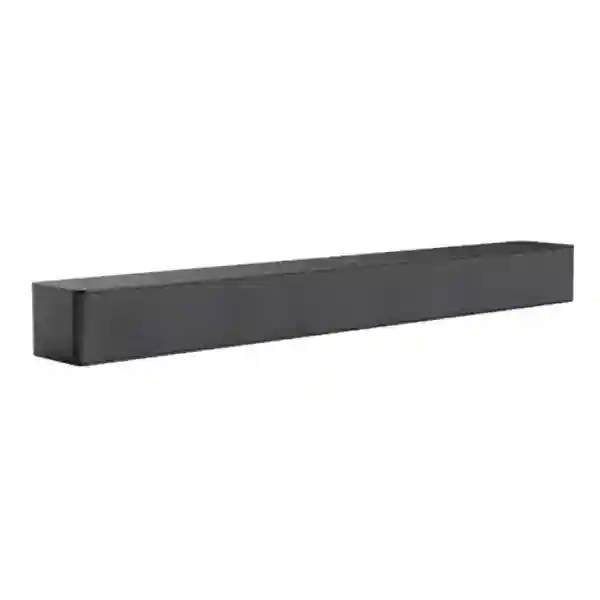
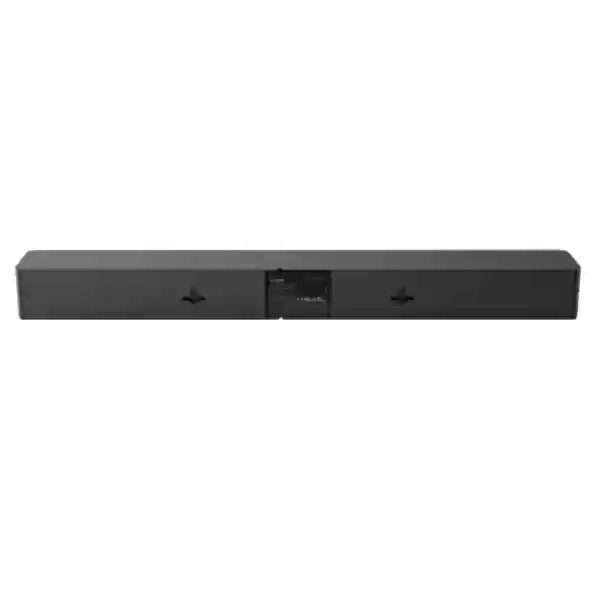
The Yealink MSpeaker Pro Soundbar is a purpose-built video-conferencing speaker for medium-sized meeting rooms. It is designed to make remote voices easier to hear across a shared room without filling the table with additional audio hardware. Four integrated speaker units provide the core playback system, while the unit can deliver a maximum sound pressure level of 93 dB at 1 metre when powered through PoE and up to 95 dB at 1 metre when powered through PoE+. Rated power is 12 W with PoE and 24 W with PoE+. A single VCH interface supports standard PoE/PoE+ for combined power and data, helping installers reduce cabling and keep the front-of-room area tidy. For projects that need wider coverage, Yealink supports star-topology cascading so multiple MSpeaker Pro units can be incorporated into an appropriately designed room system.
What MSpeaker Pro solves
In hybrid meetings, clear playback is essential because remote participants may include several people speaking from different locations. The MSpeaker Pro gives medium-room deployments a dedicated front-of-room audio device instead of relying on a television’s built-in speakers. That separation can make the meeting-room design cleaner and easier to standardize, especially where a Yealink camera, room controller, host and display are already being planned as one collaboration system.
Designed for practical installation
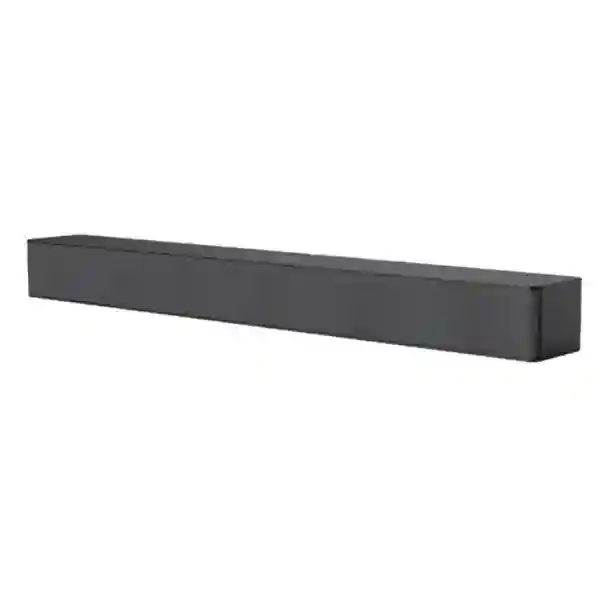
The enclosure measures 650 × 82 × 65.2 mm and uses a slender racetrack-style profile with a graphite-grey finish. The package includes the MSpeaker Pro, a mounting-bracket kit, a 3 m CAT5e cable and a quick-start guide. Because power and data can travel through one network cable, installers can avoid adding a separate local power lead at the speaker location when the host-side design provides the required PoE or PoE+ source.
Verified Yealink MSpeaker Pro specifications
| Audio output | 4 speaker units |
| Maximum SPL | 93 dB @ 1 m with PoE; 95 dB @ 1 m with PoE+ |
| Rated power | 12 W with PoE; 24 W with PoE+ |
| Interface | 1 × VCH, supporting standard PoE/PoE+ |
| Dimensions | 650 × 82 × 65.2 mm |
| Expansion | Star-topology cascading supported |
Buying and deployment guidance
Before requesting a quotation, identify the room dimensions, seating plan, display position, camera model, microphone arrangement, meeting platform and existing Yealink host hardware. MSpeaker Pro is a speaker, not a complete conferencing system, so the best result comes from checking the full signal chain. The room should also be reviewed for reflective glass, hard walls, air-conditioning noise and unusually long seating distances. These conditions influence perceived clarity even when the loudspeaker itself is appropriately specified.
Network and power planning is equally important because the unit depends on a VCH connection and PoE/PoE+. Confirm that the selected host or room architecture supports MSpeaker Pro, that firmware requirements are satisfied, and that cable routes can reach the chosen mounting position. For broader infrastructure planning, FourTeck Tanzania also covers video conferencing, meeting-room audio, managed switching, Wi-Fi, commercial displays and structured cabling. Regional resources are available through FourTeck UAE, FourTeck Kenya, FourTeck Uganda, FourTeck Ghana and FourTeck Nigeria.
Yealink MSpeaker Pro Soundbar Tanzania
For organizations in Tanzania, the MSpeaker Pro is best considered as part of a complete medium-room collaboration design rather than as a stand-alone loudspeaker purchase. Companies upgrading boardrooms, management meeting spaces, training rooms and shared collaboration areas often need consistent audio for Microsoft Teams, Zoom or other video-conferencing workflows. The speaker’s four-unit architecture and dedicated front-of-room form factor can help create a more purposeful meeting environment than relying on a commercial display’s internal speakers. A purchasing team should therefore document the room size, number of seats, display placement, camera position and microphone design before selecting quantities. The quoted system should also identify the Yealink host or compatible room component that will provide the VCH connection and the required PoE or PoE+ source.
In Tanzania, deployment quality can matter as much as the product specification. Office renovations, mixed cabling standards and existing network switches may affect where the speaker can be installed. Because MSpeaker Pro uses a network cable for both power and data, installers can achieve a cleaner result when CAT5e or better cabling is routed neatly from the equipment location to the mounting point. Where the room layout requires broader playback coverage, star-topology cascading gives designers an expansion path, but the number of units and their placement should be determined from the actual seating geometry rather than simply adding speakers. Procurement teams should also verify firmware compatibility with the selected Yealink room platform and keep configuration documentation with the project handover.
A strong Tanzania quotation should include the speaker quantity, mounting requirements, host compatibility, cable lengths, display and camera relationships, microphone strategy, network-switch requirements and installation scope. Buyers should ask whether existing PoE infrastructure can deliver the required power level, especially if the design aims to use the higher PoE+ output capability. They should also confirm what is included in the box and what must be supplied separately. FourTeck Tanzania can position the MSpeaker Pro within a wider collaboration requirement that may also include displays, conferencing cameras, room controllers, structured cabling, LAN switching, UPS protection and network readiness. This system-level approach is useful for customers who want a repeatable room standard across one office or several sites rather than an isolated device purchase.
Yealink MSpeaker Pro Soundbar Dar es Salaam
Dar es Salaam businesses frequently use meeting rooms for customer presentations, management calls, supplier discussions, regional coordination and hybrid project work. In these settings, a dedicated conferencing speaker can improve the room experience by placing voice playback where participants expect it: close to the display and camera, rather than depending on uneven television speakers. The MSpeaker Pro’s 650 mm-wide enclosure is slim enough for front-of-room integration while providing four speaker units for medium-room playback. Its graphite-grey appearance is suited to modern boardrooms and executive spaces where visible equipment should look intentional rather than improvised.
For a Dar es Salaam installation, the design should begin with furniture and wall conditions. Long rectangular tables, glass partitions and hard tiled surfaces can affect how speech is perceived, so speaker location and microphone placement should be reviewed together. The MSpeaker Pro handles playback only; microphone pickup still needs an appropriate Yealink or compatible audio design. Installers should confirm a practical cable path from the room host to the soundbar, because the VCH port carries both power and data. Where PoE+ is available, Yealink specifies a maximum sound pressure level of 95 dB at one metre and rated power of 24 W; with standard PoE, those figures are 93 dB and 12 W respectively.
Procurement teams in Dar es Salaam can reduce delays by sending a clear room brief when requesting pricing. Useful information includes the room dimensions, number of seats, primary meeting platform, camera model, microphone model, display count, existing Yealink equipment and whether installation is required. If the room is part of a larger office rollout, standardizing mounting height, cable routes and room-control behavior can make support easier. A complete collaboration quotation may also include commercial displays, PoE switching, Wi-Fi, structured cabling, UPS protection and testing. That broader view is particularly useful in offices where several technologies share the same rack and network, because the meeting-room system is only as dependable as the power, LAN and internet services supporting it.
Yealink MSpeaker Pro Soundbar Mwanza
Organizations in Mwanza evaluating the Yealink MSpeaker Pro should first decide whether their requirement is a dedicated medium meeting room, a training space or a multi-purpose room. The product is specifically positioned by Yealink for medium-sized meeting rooms, making it most suitable where participants need clear playback across a shared table or seating area. Because it is a conferencing speaker rather than an all-in-one video bar, it should be paired with the appropriate camera, microphones, host and room controls. This modular approach can be valuable when a business prefers separate components that can be positioned according to the room rather than accepting the limitations of a single integrated device.
Mwanza projects may also benefit from the MSpeaker Pro’s simplified cabling model. The VCH interface supports PoE and PoE+, so a single network cable can carry both the required power and data connection from the supported host-side equipment. That can reduce visible wiring at the display wall and simplify rack-to-room planning. The included package provides a 3 m CAT5e cable and mounting-bracket kit, but the final installation may require longer structured cabling depending on the room layout. Buyers should therefore avoid assuming that the in-box cable will suit every project. Cable routes, wall construction and available termination points should be checked before ordering.
For organizations with branches or project teams connecting Mwanza to other Tanzanian offices, repeatable room standards can make meetings easier to support. A consistent specification for speaker, camera, microphones, controller and display reduces user confusion and helps technical staff troubleshoot familiar components. If one room requires broader audio coverage, the MSpeaker Pro supports star-topology cascading, but the design should still be validated against the actual room dimensions and seating positions. When asking for a quotation, include required quantities, host model, software platform, installation scope and any existing PoE switching. This creates a clearer procurement basis and reduces the risk of receiving a device that is technically capable but not matched to the room ecosystem.
Yealink MSpeaker Pro Soundbar Arusha
Arusha has a wide range of organizations that depend on meetings with teams, guests, partners and remote stakeholders, including professional offices, hospitality operations, education environments and project organizations. The Yealink MSpeaker Pro can fit medium meeting rooms where dedicated voice playback is needed at the front of the room. Its four built-in speaker units are designed to produce clear conferencing audio, and the enclosure’s narrow profile allows it to sit visually with the display and camera without creating a large equipment footprint. For spaces used by different teams throughout the day, this type of fixed installed speaker can also reduce the need to move portable audio devices between meetings.
Room acoustics should be considered carefully in Arusha installations, particularly in conference areas with large windows, decorative hard surfaces or open connections to adjacent spaces. A powerful speaker does not automatically solve echo or poor microphone pickup. The full solution should balance playback level with microphone coverage and room behavior. The MSpeaker Pro can reach up to 95 dB at one metre with PoE+ and up to 93 dB with PoE, but the correct operating level for a business meeting is normally much lower and should be comfortable for people at every seat. Proper mounting and commissioning help achieve even, intelligible speech rather than excessive volume.
A procurement request for Arusha should identify whether the room already contains a Yealink conferencing platform or whether a complete room system is required. If equipment is being combined from different project phases, verify supported device combinations and required firmware before installation. The one-cable VCH connection makes deployment straightforward when the host supports the speaker, yet compatibility still matters. Buyers should also confirm installation responsibilities, cable routing, display mounting, network readiness and power resilience. For multi-room properties such as hotels or campuses, creating a standard medium-room design can simplify spare planning, staff training and support. The MSpeaker Pro can then be specified consistently where room dimensions and seating layouts genuinely match its intended use.
Yealink MSpeaker Pro Soundbar Dodoma
In Dodoma, organizations planning formal meeting rooms often need technology that can be documented, standardized and supported over time. The Yealink MSpeaker Pro is well suited to this procurement mindset because its role is clearly defined: it is a dedicated video-conferencing speaker for medium rooms. Its four speaker units, VCH interface and PoE/PoE+ power design make it a specific component within a broader Yealink room architecture. Procurement teams should therefore request a complete bill of materials rather than ordering the speaker alone unless the existing host platform and microphones have already been validated.
The physical installation can be planned around a wall-mounted display or front-of-room cabinet. At 650 × 82 × 65.2 mm, the MSpeaker Pro has a low-profile shape that is easier to integrate beneath or near a screen than larger freestanding loudspeakers. The mounting-bracket kit is included, and the supplied 3 m CAT5e lead may be useful for short runs. Longer or concealed routes should be implemented with properly installed structured cabling. Using one cable for power and data helps maintain a cleaner presentation in executive or institutional meeting spaces where exposed adapters and loose wiring are undesirable.
Dodoma buyers should also think about operational continuity. Meeting rooms often become shared resources, so users should not need technical intervention before every call. The speaker itself is plug-and-play once correctly connected, but the complete room still depends on the selected host, camera, microphones, controller, display, network and meeting-platform configuration. IT teams should retain documentation covering port connections, firmware versions, room naming and support contacts. For projects that may expand later, star-topology cascading gives the MSpeaker Pro a route to wider playback coverage where supported by the overall solution. Quotation requests should state current room requirements and expected future changes so the design can avoid unnecessary replacement when the space is upgraded.
Yealink MSpeaker Pro Soundbar UAE
UAE businesses often build meeting spaces around standardized Microsoft Teams Rooms, Zoom Rooms and broader unified-communications platforms. The Yealink MSpeaker Pro can serve as the dedicated playback component in a medium-room design where a separate camera and microphone architecture is preferred. Its four-speaker construction and maximum 95 dB output on PoE+ provide useful headroom, while the VCH interface reduces installation clutter by carrying both power and data through one cable. For offices with a strong emphasis on interior fit-out quality, the graphite-grey enclosure and slim profile can sit discreetly beneath or alongside the main collaboration display.
A UAE deployment should be coordinated with the AV contractor, network team and room-system integrator before cabling is closed. The speaker’s network-style connection does not mean it can simply be plugged into any Ethernet switch as a generic endpoint; it is intended to connect within a supported Yealink architecture. Confirm the exact host, firmware and room accessories before procurement. In new offices, allowing a dedicated cable route between the equipment location and front wall creates a cleaner result. Where several rooms are being built at once, consistent cable labeling and mounting templates can reduce commissioning time and simplify later maintenance.
Companies sourcing from the UAE may also be planning regional standards for branches in East Africa or other markets. Using the same Yealink room-audio design across comparable medium rooms can create a common user experience and a more manageable spare strategy. However, each site still needs its own assessment because room dimensions, table layout and acoustic finishes vary. Buyers should request pricing based on the complete meeting-room scope, including speaker quantity, mounting, compatible host, microphones, camera, controller, display interfaces and network readiness. FourTeck’s UAE technology resources can support wider collaboration, networking and infrastructure planning where the MSpeaker Pro forms one part of a larger project.
Yealink MSpeaker Pro Soundbar Uganda
Ugandan businesses looking for a professional medium-room audio solution can use the Yealink MSpeaker Pro as part of a fixed conferencing deployment. Unlike portable speakerphones intended for small tables, this soundbar-style unit is designed for front-of-room installation and uses four internal speaker units to distribute meeting audio. Its slim dimensions support a neat appearance around the display, while PoE/PoE+ over the VCH connection reduces the number of cables that must reach the speaker. This is useful where meeting rooms are being upgraded with structured cabling and a dedicated collaboration host.
For Uganda-wide projects, the first step is to classify rooms by size and use. Small huddle spaces may need a different solution, while medium boardrooms or departmental meeting rooms can be candidates for MSpeaker Pro. The selection should also consider how participants are seated and where microphones will be installed. Strong playback alone does not guarantee good hybrid meetings if the far-end audience cannot hear people in the room. For that reason, the speaker, microphone coverage, camera framing and display layout should be designed together. Buyers should also verify firmware and accessory compatibility with the chosen Yealink system before ordering quantities.
Quotations for Uganda should identify whether installation, configuration and testing are required in addition to the hardware. The package includes a mounting-bracket kit and 3 m CAT5e cable, yet site-specific cabling may still be needed. If PoE+ is used, the unit supports 24 W rated power and up to 95 dB at one metre; standard PoE provides 12 W rated power and up to 93 dB. Projects that may need greater coverage can consider supported star-topology cascading. FourTeck Uganda can be referenced for regional technology planning, while procurement teams should confirm actual availability, lead time and project scope at quotation stage rather than assuming stock or delivery conditions.
Yealink MSpeaker Pro Soundbar Kampala
Kampala offices frequently need collaboration rooms that support management meetings, client calls, regional coordination and remote-work routines. The Yealink MSpeaker Pro is a useful choice when the room design calls for a fixed, front-of-room loudspeaker rather than audio coming from the television. Four internal speaker units provide the playback platform, and the soundbar can be mounted as part of a clean display-wall installation. Because the product is intended for medium meeting rooms, buyers should match it to spaces with a suitable seating capacity and geometry rather than selecting it only on brand familiarity.
Network and cabling preparation is especially important in retrofit projects. The MSpeaker Pro uses a single VCH interface with PoE/PoE+ support, allowing power and data to share one cable. In an existing Kampala boardroom, that can reduce the need for a new electrical outlet at the speaker location, but a viable cable path from the supported host still needs to exist. Installers should inspect conduit capacity, wall access and rack position before promising a concealed finish. The supplied 3 m cable may work in compact arrangements, while larger installations may require properly terminated longer runs.
When several Kampala meeting rooms are being upgraded, a room-by-room matrix is useful. Record dimensions, seating count, display size, camera position, microphones, required platform and network connection for each room. Rooms with similar layouts can then share a standard design, making support easier. MSpeaker Pro’s star-topology cascading capability can help where wider audio distribution is needed, but additional units should be specified only after checking the coverage requirement. Procurement teams should ask for an itemized quotation separating hardware, mounting, cabling, configuration and testing. This makes it easier to compare proposals based on complete project scope rather than only the speaker’s unit price.
Yealink MSpeaker Pro Soundbar Arua
For organizations in Arua, the Yealink MSpeaker Pro can support medium-sized meeting rooms where remote coordination is a regular business requirement. A fixed conferencing speaker is particularly useful when the room has a permanent display and camera, because users can enter and join meetings without connecting a portable audio accessory. The MSpeaker Pro’s four-speaker design is intended for clear voice playback, and the slim soundbar format can be installed neatly at the front of the room. Its role should nevertheless be understood correctly: it provides speaker output and must be integrated with the rest of the conferencing system.
Arua projects may need careful coordination of equipment delivery, installation and site readiness. Before hardware is dispatched, the customer should confirm the room host, camera, microphones and display, along with the planned mounting position. The VCH interface uses standard PoE or PoE+ power, which simplifies the local connection but still depends on a supported upstream design. Buyers should not assume that any spare network port is sufficient. Firmware and accessory compatibility should be checked against current Yealink guidance, particularly where new components are being added to an older room platform.
Because travel and service logistics can differ from major capital-city deployments, remote preparation becomes valuable. Photographs of the front wall, room measurements, table layout and existing cabling can help define the solution before installation. A detailed quotation should list speaker quantity, mounting hardware, cable requirements and any additional room components. The in-box package includes one MSpeaker Pro, mounting bracket kit, 3 m CAT5e cable and quick-start guide. If broader sound coverage is needed, star-topology cascading is available within supported designs. Keeping the bill of materials clear helps the customer plan procurement accurately and reduces the likelihood of missing accessories when the room is commissioned.
Yealink MSpeaker Pro Soundbar Mbarara
Mbarara organizations upgrading boardrooms, training spaces or departmental meeting rooms can consider the Yealink MSpeaker Pro when they want a dedicated conferencing speaker integrated with a fixed video system. Four speaker units are built into the enclosure, and Yealink rates the product for medium-sized meeting rooms. This means the product should be selected based on room scale and seating layout, not simply as a generic soundbar. A properly planned system will coordinate the speaker with microphones, camera field of view, display size and meeting platform so both local and remote participants have a consistent experience.
The single-cable VCH connection is a practical advantage for Mbarara installations because it carries both data and PoE/PoE+ power. When the rest of the system is designed correctly, this can reduce visible power adapters and simplify the display wall. The mounting kit supplied with the product helps installers create a fixed installation, while the 650 × 82 × 65.2 mm dimensions should be checked against the selected screen, wall bracket and camera placement. Where a soundbar and camera share the same area, installers should ensure one device does not obstruct the other or force an uncomfortable camera angle.
For procurement, customers should ask for confirmation of the supported host platform and any firmware prerequisites. They should also distinguish between hardware supply and a full installed solution. A complete scope can include cable routing, mounting, network preparation, system configuration, user testing and handover documentation. PoE+ enables the speaker’s higher 24 W rated power and up to 95 dB maximum SPL at one metre, while standard PoE provides 12 W and up to 93 dB. These ratings indicate capability rather than a target listening level. The final room should be commissioned for comfortable speech clarity, with volume adjusted for the actual distance between participants and the front-of-room speaker.
Yealink MSpeaker Pro Soundbar Gulu
In Gulu, a reliable hybrid meeting room can connect local teams with head offices, project partners, customers and remote specialists. The Yealink MSpeaker Pro provides the dedicated playback element for medium-room conferencing designs. Its four built-in speaker units and front-of-room form factor make it more appropriate for a fixed collaboration room than a portable desktop speaker. The product can be especially useful where an organization wants a standardized meeting setup that staff can use without moving equipment or changing audio devices for every session.
Site preparation should focus on the whole room. The MSpeaker Pro needs a supported host connection through VCH and can receive power through standard PoE or PoE+. The difference affects rated output: Yealink lists 12 W and up to 93 dB at one metre with PoE, compared with 24 W and up to 95 dB with PoE+. If the room is already cabled, verify the available route and upstream design before installation. If it is a new room, placing the cable pathway during fit-out will generally create a cleaner result than adding surface trunking after furniture and displays are installed.
Gulu buyers should also define whether their requirement is for one room or a repeatable model across several sites. A repeatable standard can include the same speaker, camera, microphones, controller, screen size range and cable labeling approach. This helps IT staff recognize the design and simplifies remote troubleshooting. If one location has a wider seating area, supported star-topology cascading can be considered, but expansion should be based on room coverage needs. A quotation request should therefore include room measurements, photographs if available, desired conferencing platform, existing Yealink equipment and installation expectations. That information allows the supplier to propose an integrated system rather than pricing the speaker in isolation.
Yealink MSpeaker Pro Soundbar Kenya
Kenyan enterprises, institutions and professional offices often deploy multiple collaboration rooms across headquarters and branches. The Yealink MSpeaker Pro can form part of a standardized medium-room design when dedicated voice playback is required. Four speaker units provide the audio output, while the soundbar’s slim profile supports a professional installation near the primary display. Because the device is powered and connected through VCH with PoE/PoE+, designers can reduce local cabling at the front wall and maintain a cleaner room appearance. This is particularly useful in modern fit-outs where cable management is planned alongside furniture, lighting and display mounting.
A Kenya deployment should start with compatibility rather than price alone. Confirm the selected Yealink room host, camera and microphone arrangement, and check firmware requirements for the intended combination. MSpeaker Pro is not a generic powered soundbar with HDMI or Bluetooth as the primary design; it is a conferencing accessory within Yealink’s room ecosystem. Procurement teams should therefore compare complete room solutions, including all required accessories, rather than assuming the speaker can replace every existing audio device. Where the room grows or needs broader coverage, star-topology cascading offers an expansion method in supported deployments.
For Nairobi or branch-office projects, the quotation process should identify whether the customer requires supply only, installation, commissioning or a full collaboration-room refresh. Existing displays may be reusable if their size and inputs are suitable, while older cameras or microphones may need replacement to create a balanced system. Structured cabling, PoE capacity, internet quality and UPS protection can also influence meeting reliability. FourTeck Kenya provides a regional reference point for broader technology requirements, and organizations coordinating Tanzania-Kenya operations can benefit from adopting similar room standards where practical. Consistency makes training, documentation and support easier while still allowing each room to be adjusted for its specific dimensions and acoustic conditions.
Yealink MSpeaker Pro Soundbar Kuwait
Kuwait organizations building executive meeting spaces, project rooms and customer-facing conference rooms can use the Yealink MSpeaker Pro as the dedicated speaker element in a medium-room conferencing design. Its four integrated speaker units provide speech-focused playback, while the slender enclosure helps maintain a clean front-of-room appearance. The speaker’s VCH interface uses PoE or PoE+ for power and data, reducing the need for a separate power adapter at the mounting point. For office fit-outs where cable concealment and visual consistency matter, that architecture can simplify coordination between the AV and network scopes.
The room should be reviewed before quantities are finalized. Long boardroom tables, high ceilings, hard finishes and glass walls may require careful acoustic planning. The MSpeaker Pro offers up to 95 dB maximum SPL at one metre when powered by PoE+, but more level is not automatically better. Meeting audio should be commissioned for intelligibility and comfort. Microphone design is equally important, because remote participants need to hear the room clearly. A complete Yealink solution may therefore include separate microphones, camera hardware, a room host and touch controller in addition to the soundbar.
Kuwait procurement teams should request confirmation of current model compatibility and required firmware before issue of a purchase order. The package contents are straightforward: one MSpeaker Pro, one mounting-bracket kit, one 3 m CAT5e cable and one quick-start guide. Longer cable runs or structured cabling are project-specific. If multiple rooms are being delivered in one building, standardized mounting heights and labeling can speed commissioning and future maintenance. Buyers planning regional deployments should also record the exact room bill of materials and configuration so the same design can be reproduced in other offices where room dimensions are comparable. This documentation is often more valuable over time than treating each meeting room as a one-off installation.
Yealink MSpeaker Pro Soundbar Ghana
Ghanaian businesses considering upgrades to medium meeting rooms can use the Yealink MSpeaker Pro when they want a fixed conferencing loudspeaker with simplified cabling. The product contains four speaker units and is specifically positioned by Yealink for medium-sized meeting rooms. Its soundbar shape makes it suitable for installation around the main display, where remote voices can be projected from the same general direction as the people shown on screen. This can create a more natural meeting experience than sound coming from a small portable speaker on the table or from uneven television speakers.
The VCH interface supports standard PoE and PoE+, allowing one cable to carry power and data. In Ghana office projects, this can simplify cable planning when the speaker is installed on a finished wall, though the room host and cable route must be designed to support it. PoE+ provides the higher rated output of 24 W and maximum 95 dB SPL at one metre; standard PoE provides 12 W and up to 93 dB. Buyers should treat these values as engineering limits rather than normal operating levels. Commissioning should focus on even, comfortable speech throughout the seating area.
A useful quotation request should describe the complete meeting environment: room dimensions, seating count, conferencing platform, display, camera, microphones, existing Yealink host and preferred installation date. If the speaker is being added to an existing room, compatibility and firmware should be verified before shipment. If it is part of a new room, the supplier can coordinate speaker placement with display mounting and camera eye line. Star-topology cascading provides an expansion option for larger coverage needs within supported systems. FourTeck Ghana can support broader regional discussions, while customers should request current commercial terms for availability, price, lead time and installation rather than relying on unverified assumptions.
Yealink MSpeaker Pro Soundbar Nigeria
Nigeria’s large enterprise and professional-services market creates strong demand for dependable hybrid meeting rooms, particularly where teams coordinate across offices, clients and regional operations. The Yealink MSpeaker Pro can provide the dedicated speaker layer for medium meeting rooms. Its four built-in speaker units deliver conferencing playback, while a maximum rating of 95 dB at one metre with PoE+ provides useful headroom for suitably designed spaces. The slim 650 mm enclosure can be mounted around the primary display without requiring floor-standing speakers or tabletop audio hardware.
For Nigerian projects, reliability starts with correct integration. The MSpeaker Pro uses a Yealink VCH connection and should be specified alongside a supported room host and current firmware. The one-cable PoE/PoE+ design is convenient, but customers should not interpret it as a generic LAN speaker connection. AV and network teams should agree on the cable path, host location and power method before installation. Where the design uses PoE+, Yealink specifies 24 W rated power; standard PoE provides 12 W. The final listening level should be set during commissioning according to room size and participant positions.
Organizations rolling out multiple rooms can benefit from a standard bill of materials for small, medium and large spaces. MSpeaker Pro can occupy the medium-room tier, with consistent cameras, microphones and controllers selected around it. Star-topology cascading offers a way to extend audio coverage when required, though room-specific design remains important. A complete Nigeria quotation should state whether mounting, cabling, configuration, testing and user handover are included. It should also distinguish in-box accessories from project materials such as longer cable runs, trunking, display brackets and UPS equipment. FourTeck Nigeria provides a regional reference for related IT and collaboration requirements, enabling customers to discuss the soundbar as one component within a broader meeting-room and network infrastructure plan.
Yealink MSpeaker Pro Soundbar Seychelles
Organizations in Seychelles often need meeting rooms that connect island-based teams with regional headquarters, suppliers, travel partners and international customers. The Yealink MSpeaker Pro is a practical fit for medium rooms where a fixed collaboration system is preferred. Four built-in speaker units provide dedicated conferencing playback, and the compact soundbar shape can be integrated close to the main display. For hotels, corporate offices and institutional spaces, fixed installation can reduce the operational friction of moving portable speakers or troubleshooting user-selected audio devices before every call.
Because project logistics can be more sensitive in island environments, compatibility checks should happen before equipment is ordered. Confirm the Yealink host, camera and microphone arrangement, as well as any required firmware versions. The MSpeaker Pro connects through one VCH interface and supports PoE/PoE+, allowing one cable to deliver data and power. The package includes a 3 m CAT5e cable and mounting hardware, but actual room routes may require additional structured cabling. Buyers should therefore provide room photographs, wall-to-table distances and equipment locations when requesting a quotation, especially if remote design work is being done before a site visit.
The room’s acoustic character also matters. Hard floors, glass and open architectural finishes can increase reflections, so speaker and microphone positions should be chosen together. The MSpeaker Pro can deliver up to 95 dB maximum SPL at one metre with PoE+, yet normal conferencing should prioritize intelligible speech rather than maximum volume. If wider coverage is required, star-topology cascading can be considered in a supported system. A complete procurement plan should include spare and support considerations, clear cable labeling and handover documentation. These steps help the room remain maintainable after installation and make it easier to reproduce the same design in additional properties or offices where the physical conditions are similar.
Compatibility, integration and room design checklist
MSpeaker Pro should be treated as one element in a conferencing signal chain. Confirm the supported host, current firmware, camera and microphone arrangement before purchase. Yealink’s current compatibility documentation shows MSpeaker Pro support with selected room products and notes firmware minimums for certain combinations. Those requirements can change as products evolve, so the system should be checked against current vendor documentation at the time of deployment.
Dimensions, seating layout, wall finishes, display location and number of participants.
Meeting platform, Yealink host, camera, microphones, room controller and firmware versions.
Cable route, PoE/PoE+ source, LAN readiness, internet capacity and power resilience.
Frequently asked questions
What type of room is Yealink MSpeaker Pro designed for?
Yealink positions MSpeaker Pro as a video-conferencing speaker for medium-sized meeting rooms. Final suitability should still be checked against the room dimensions, seating layout, acoustic conditions and complete conferencing design.
Does MSpeaker Pro use PoE?
Yes. Its VCH interface supports standard PoE and PoE+. Yealink specifies 12 W rated power and up to 93 dB at one metre with PoE, or 24 W and up to 95 dB with PoE+.
Can more than one MSpeaker Pro be used?
Yealink states that MSpeaker Pro supports star-topology cascading, allowing multiple devices to be used for expanded audio coverage in supported room architectures.
What comes in the package?
The published package includes one Yealink MSpeaker Pro, one mounting-bracket kit, one 3 m CAT5e cable and one quick-start guide.
Quotation checklist
For the most useful quotation, provide: required quantity; country and city; room dimensions; number of seats; meeting platform; existing Yealink host; camera and microphone models; display count and size; whether PoE/PoE+ is already available; installation and cabling requirements; and whether the room is new or an upgrade.
This information helps separate a simple hardware supply request from a complete meeting-room integration project and reduces the risk of missing cables, mounts or compatible host components.
Decision recap
Choose the Yealink MSpeaker Pro when you need a dedicated conferencing speaker for a medium room, want one-cable VCH deployment using PoE/PoE+, prefer a slim front-of-room installation and may need scalable audio coverage through supported cascading. Confirm host compatibility and firmware before ordering, and design microphones, camera, display, network and cabling as one room system rather than treating the speaker as an isolated accessory.




Reviews
There are no reviews yet.