
Microsoft Teams USB desktop phone
Yealink MP45 Teams USB Phone
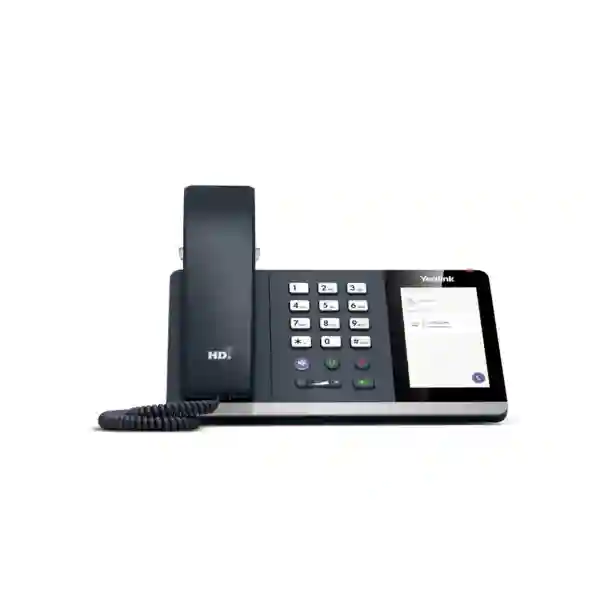
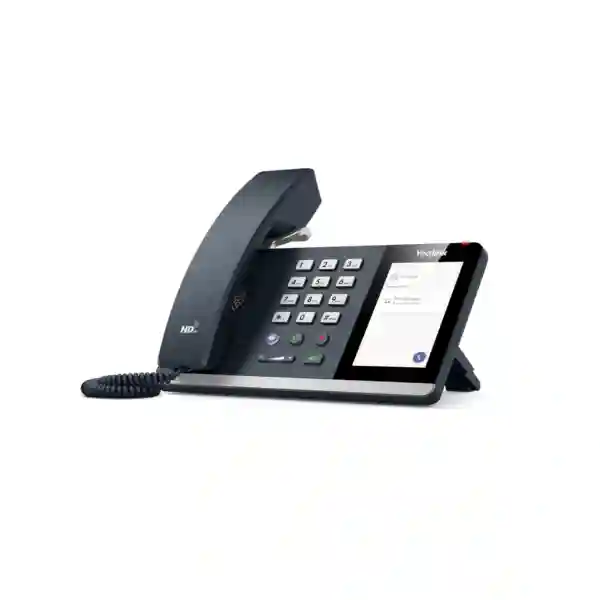
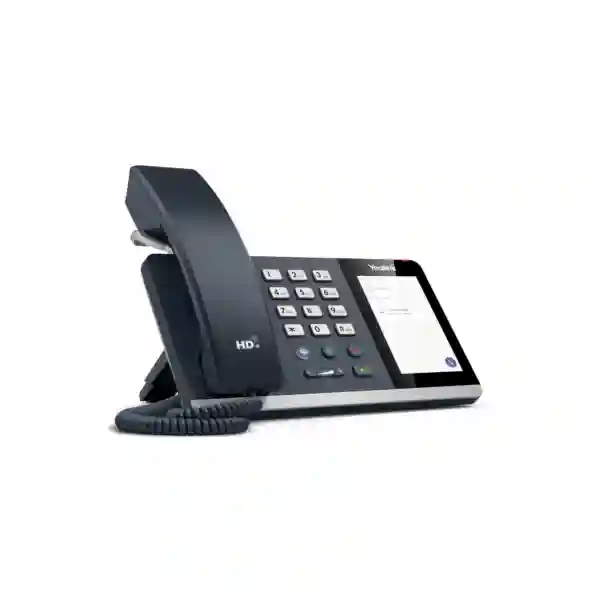
The Yealink MP45 is a USB desktop phone built for people who use Microsoft Teams on a PC but still want the comfort and speed of a conventional telephone. Instead of relying entirely on a headset or clicking through a softphone interface, users get a dedicated handset, physical dial pad, 4-inch capacitive touch screen, call-control keys and a dedicated Teams button. The phone connects to a compatible PC by USB and is designed to be recognized without a separate driver installation, making it particularly practical for daily office desks, hot-desking positions, classrooms and shared workspaces. For Tanzanian organisations standardising Microsoft Teams calling, the MP45 can provide a familiar desk-phone experience while keeping the communications workload on the connected computer.
4-inch touch screen
A 480 × 800 capacitive display gives users a clear visual interface for device and call functions while retaining the familiarity of a hard keypad.
Teams-focused controls
A dedicated Teams button and physical controls for headset, mute, speakerphone and volume support rapid handling of everyday calls.
Business audio
Yealink Optima HD voice, Noise Proof technology, noise suppression and full-duplex hands-free audio with acoustic echo cancellation are designed for clearer workplace conversations.
What the Yealink MP45 is designed to solve
Microsoft Teams calling is often experienced through laptop speakers or a headset. That is efficient for mobile work, but it does not suit every employee or every desk. Some users handle calls for long periods, some prefer a handset, some need a visible dial pad, and some shared desks benefit from a device that looks and behaves more like a conventional office phone. The MP45 addresses that gap. It acts as a USB peripheral for the connected computer rather than as a standalone Android Teams phone, so the user can access Teams calling through a purpose-built desktop device while keeping application processing on the PC.
This distinction is important during procurement. The MP45 should not be selected simply because an organisation wants a Teams-branded telephone. Buyers should first confirm that the intended user will work with a PC running Microsoft Teams and that a USB peripheral model fits the workstation design. For fixed desks and hot desks where a computer is already part of the user environment, the MP45 can reduce the dependence on a permanently worn headset and provide an immediately recognisable call interface. Where a desk needs a fully independent network-connected Teams phone with no PC dependency, another Yealink MP-series model may be a better match.
Fourteck Tanzania can help organisations place the MP45 within a wider collaboration design that considers PCs, headsets, meeting spaces, network quality and user roles. Buyers can also review the Fourteck Tanzania technology shop for related business equipment, or explore the integrated IT and collaboration services page when the requirement includes deployment, conferencing or network readiness as well as the phone itself.
Verified Yealink MP45 features
Display and interface: 4.0-inch, 480 × 800-pixel capacitive touch screen with backlight, plus a physical telephone keypad and dedicated feature keys.
Audio: HD handset and speaker, full-duplex hands-free speakerphone with AEC, noise suppression, adaptive jitter buffer, automatic gain control and hearing-aid-compatible handset.
Teams experience: dedicated Teams button, Microsoft Teams-tailored interface, and support stated by Yealink for Teams and Skype for Business.
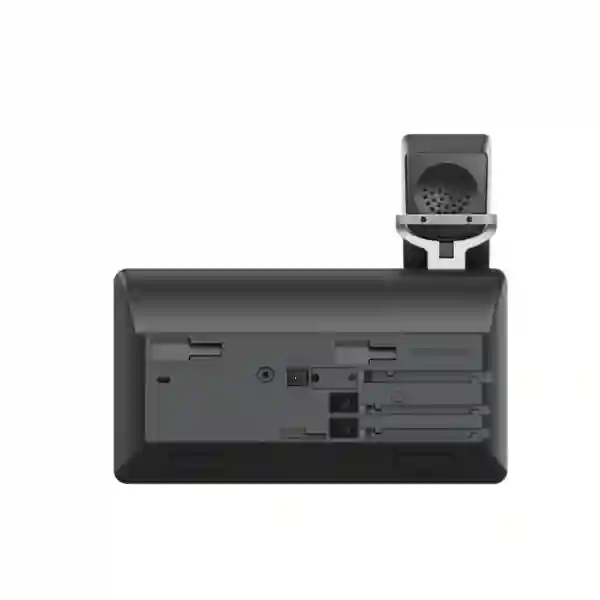
Connections: RJ9 handset port, RJ9 wired-headset port and a 2.5 mm jack for an optional Busylight. Yealink documentation also describes a USB-A/C adapter arrangement for PC connection.
Management: Yealink USB Connect can be used for USB-device deployment, management and firmware upgrade workflows.
Physical environment: Yealink lists operating temperature from -10°C to 50°C and operating humidity from 10% to 95%.
Technical specifications and package planning
| Operating system | Linux |
| Memory / storage | 64 MB memory / 128 MB storage |
| Display | 4-inch, 480 × 800 capacitive touch screen |
| Audio | HD handset and speaker; full-duplex speakerphone with AEC; NS, AJB and AGC |
| Ports | RJ9 handset, RJ9 headset, 2.5 mm Busylight jack |
| Dimensions | 223 × 159 × 127 × 36 mm as stated in Yealink documentation |
| Package | MP45 USB phone, handset with cord, stand and quick-start guide; power adapter and Busylight are listed as optional items |
Before ordering, procurement teams should confirm the exact regional package contents, USB cable/adapter configuration and any optional accessories required for the intended workstation. Specifications can be revised by manufacturers, so the final quotation should identify the exact model and included items rather than relying only on a generic product description.
Deployment, compatibility and buying guidance
The most important compatibility question is whether the user is working from a supported PC environment with Microsoft Teams. The MP45 is intended to connect to a computer as a USB peripheral, and Yealink describes plug-and-play recognition for Teams calling. This can make large desk rollouts simpler than deploying a standalone Android phone at every seat, but it also means the workstation becomes part of the calling solution. Device policy, Teams account configuration, PC availability, USB-port planning and endpoint-management practice should therefore be considered together.
For shared desks, organisations should define how staff sign in to Teams, how PC profiles are managed and whether the phone remains permanently attached to a docking station or workstation. For dedicated desks, the procurement team should check whether the user prefers a handset, wired headset or speakerphone and whether a Busylight would improve call awareness in an open office. The MP45 includes an RJ9 wired-headset connection and supports an optional Busylight, so these accessory decisions can be built into a standard desk bundle instead of handled as later exceptions.
The network path remains important even though the phone itself is connected by USB. Teams media still depends on the computer’s network connection and internet path. Poor Wi-Fi, congested WAN links or unmanaged Quality of Service can cause symptoms that users may incorrectly attribute to the phone. For organisations modernising more than the endpoint, Fourteck Tanzania’s broader IT, telecom and collaboration portfolio can help place the device within the surrounding workstation, network and meeting environment.
Yealink MP45 Teams USB Phone Tanzania
For organisations in Tanzania, the Yealink MP45 is most relevant where Microsoft Teams is already central to day-to-day calling and collaboration but users still benefit from a desk-phone form factor. Corporate offices, financial teams, administrative departments, schools, customer-service desks and professional-services firms may have employees who spend much of the day at a Windows workstation and do not want to wear a headset continuously. The MP45 gives these users a handset, physical dial pad, speakerphone and touch interface while keeping Teams on the connected computer. That combination can make the transition from traditional telephony feel less disruptive, especially for staff accustomed to lifting a handset and using familiar call-control buttons.
Tanzanian buyers should begin by mapping user roles rather than replacing every telephone with the same device. A permanently assigned office user who regularly handles calls may be an ideal candidate. A mobile employee who spends most of the day away from a desk may be better served by a headset. A reception or front-desk position may need a different endpoint if it requires extensive line appearances, programmable keys or standalone operation. The value of the MP45 is strongest when its USB architecture matches the user’s actual workflow. This role-based approach also makes quotations clearer because quantities can be grouped by user profile instead of estimated from total employee count.
Infrastructure planning should include the PC estate, docking stations, available USB connectivity, Teams licensing and account permissions, and the reliability of the network path used by Teams. The MP45 cannot correct an unstable internet connection or overloaded wireless network; those factors should be checked separately. Organisations rolling out many units may also want a defined firmware and management process using Yealink USB Connect, along with a standard accessory policy for wired headsets and Busylights. A clean standard can simplify deployment, user training and later support across departments.
When requesting a Yealink MP45 quotation in Tanzania, include the quantity, user type, PC environment, Teams calling setup, preferred accessories and deployment locations. That gives suppliers enough context to distinguish a simple product purchase from a broader Teams endpoint project and helps prevent omissions in power, USB adapters or accessories. For related telephony and collaboration planning, Fourteck Tanzania can combine the device discussion with workstation, conferencing and network-readiness requirements instead of treating the MP45 as an isolated purchase.
Yealink MP45 Teams USB Phone Dar es Salaam
Dar es Salaam organisations often operate busy offices where communication tools need to support both local teams and regional or international collaboration. The Yealink MP45 can fit desks where Microsoft Teams is already running on the user’s computer and the employee wants a more conventional call-handling experience. In an open-plan headquarters, for example, an employee can use the handset for privacy, switch to a wired headset for longer calls, or use the hands-free speakerphone when the surrounding environment allows it. The 4-inch touch screen and physical call keys reduce the need to keep moving between mouse controls and the Teams window for common actions.
A Dar es Salaam deployment should be designed around workstation consistency. If some staff use desktops, some use laptops with docks and others hot-desk, the USB connection method should be documented before purchasing at scale. IT teams can define an approved desk layout showing where the MP45 connects, which ports remain available for other peripherals and whether a Busylight is required. This is particularly useful in dense offices where colleagues need an obvious indication that someone is on a call. The optional Busylight connection can be considered during the original quotation rather than added later desk by desk.
Teams call quality in a large Dar es Salaam office still depends on the network. Businesses should review wireless density, wired connectivity, internet stability and the behaviour of other bandwidth-intensive applications. When complaints occur, support teams should distinguish endpoint audio issues from network or PC performance. That is easier when the rollout uses a documented baseline: known workstation specifications, consistent USB connectivity, standard firmware and an agreed test process. The MP45’s USB-device model can be straightforward to maintain when these surrounding standards are in place.
Procurement teams should request a quotation that identifies the exact MP45 package, optional items and any deployment services separately. They should also confirm how many users genuinely need a desktop handset instead of assuming one unit for every employee. For companies fitting out a new Dar es Salaam office, combining this review with network switching, Wi-Fi, conferencing rooms and PCs can produce a more coherent workplace communication design and reduce duplicated purchasing decisions.
Yealink MP45 Teams USB Phone Mwanza
For businesses in Mwanza that collaborate with head offices, suppliers, customers or remote teams through Microsoft Teams, the Yealink MP45 provides a desk-based way to handle Teams calls without giving up a physical handset. This can be useful in management offices, administration departments, education environments and branch locations where staff spend most of their working day at a PC. The familiar keypad and handset can shorten the learning curve for users moving from a conventional telephone system, while the touch display still gives the workstation a modern call-control surface.
Branch deployment should focus first on the dependency chain. The MP45 connects to a PC, the Teams application runs on that computer, and the media session depends on the site’s network and internet connection. A buyer should therefore confirm that the intended Mwanza site has suitable PCs, enough USB connectivity and a stable path to Microsoft 365 services. If a branch experiences fluctuating internet quality, those conditions should be addressed as part of the communication plan rather than expecting a new endpoint to solve transport issues.
The device can be particularly practical where an organisation wants the same user experience across several offices. Standardising a defined MP45 workstation bundle can simplify instructions for staff, remote support and replacement planning. IT administrators can maintain a record of firmware versions, approved wired headsets, optional Busylights and connection methods. If laptops are frequently swapped, docking-station and USB-port behaviour should be tested with the actual business hardware before a large rollout. A short pilot with representative users can reveal whether handset, speakerphone or headset use dominates and whether the desk layout needs adjustment.
A useful Mwanza quotation request should state the number of desks, whether users are fixed or hot-desking, the Teams calling arrangement and the accessories expected. If the requirement is part of a branch-modernisation project, it is also worth documenting the site’s switching, Wi-Fi and backup-power environment. The MP45 itself is a focused USB Teams device, but the quality of the user experience is ultimately determined by the complete workstation and communications environment around it.
Yealink MP45 Teams USB Phone Arusha
Arusha businesses with customer-facing offices, professional teams, hospitality administration, NGOs or regional project staff may use Microsoft Teams as a common communication platform while still needing reliable desk-based calling. The Yealink MP45 is suited to users who normally work at a PC and prefer a handset for voice calls. Its dedicated Teams key, dial pad, touch screen and familiar mute, volume, headset and speakerphone controls provide a physical interface that can be easier to operate during frequent calls than a purely on-screen softphone.
The key design question in Arusha is whether each target desk is permanently associated with a computer. In a conventional fixed office, this is straightforward: the MP45 can remain connected as part of the workstation. In flexible seating or hot-desking environments, the organisation should establish a standard sign-in and docking process so the phone is consistently recognised when different users arrive. A documented connection layout is valuable where laptops, docks, monitors and other USB devices compete for ports. The objective is to make the desk predictable enough that employees do not need technical support whenever they begin a shift.
Audio choices should also reflect the environment. A private office may use the handset or speakerphone frequently, while a busier open workspace may benefit from wired headsets and optional Busylights. The MP45’s hearing-aid-compatible handset can also be relevant when organisations are building more inclusive workplace standards. These decisions are easier to make when procurement teams test a representative desk and obtain feedback from the people who will actually handle calls.
Arusha procurement requests should clearly separate device quantity from accessory quantity and should identify whether deployment support, user guidance or broader Teams environment review is required. For organisations refreshing meeting rooms at the same time, desktop calling and video collaboration should be planned as related but different use cases. A personal MP45 should not be expected to replace a room conferencing system, and a room system should not be over-specified for users who simply need a comfortable daily desk handset.
Yealink MP45 Teams USB Phone Dodoma
Organisations in Dodoma often have structured administrative workflows where dependable daily communications matter more than adding unnecessary device complexity. The Yealink MP45 can be a good fit for staff who already use Microsoft Teams on a desktop or laptop and want a dedicated handset on the desk. The device’s physical keypad, four-inch touch display and dedicated Teams control help users handle calls in a way that feels familiar while remaining integrated with the computer-based Teams workflow.
For government-related offices, professional firms, education institutions and corporate branches, standardisation can be more valuable than selecting many different endpoint models. A pilot group can establish whether the MP45 fits standard users, supervisors and shared desks. The organisation can then document an approved workstation configuration, headset choice and optional Busylight policy. This reduces later variation and makes it easier for support staff to understand what should be present at each desk. When users move between offices, consistent equipment also shortens the time needed to become productive.
Teams media depends on the computer and network, so Dodoma sites should verify that their connectivity supports expected call volumes. A branch with limited or variable internet should consider how simultaneous Teams meetings and calls affect available bandwidth. The MP45’s audio processing can support clear local pickup and playback, but it cannot eliminate packet loss or congestion elsewhere in the network path. A useful deployment plan therefore tests audio and network behaviour during busy periods rather than only during a quiet demonstration.
For procurement, specify the exact number of MP45 units, intended user groups, PC operating environment, Teams calling permissions and required accessories. Ask the quotation to distinguish mandatory components from optional additions such as the power adapter or Busylight where relevant to the offered package. Clear scope is especially important for multi-site projects, because it allows a single standard to be replicated while still recognising local differences in PCs, desks, connectivity and power arrangements.
Yealink MP45 Teams USB Phone UAE
In the UAE, many businesses operate hybrid workplaces where Microsoft Teams is already the default environment for internal meetings, external calls and cross-border collaboration. The Yealink MP45 can provide a useful middle ground between a laptop-only softphone and a fully independent Teams desk phone. Users who are anchored to a PC can gain the comfort of a handset, physical dial pad and dedicated call keys without introducing a separate Android endpoint at every desk. This is particularly relevant in offices that standardise laptops and docking stations but still have staff who handle large volumes of voice calls.
For UAE headquarters, the device can be evaluated by persona. General office staff may appreciate a simple dedicated handset; customer-facing teams may require wired headsets; open-plan employees may benefit from a Busylight; executives may prefer a different model with a broader set of standalone functions. This prevents procurement from treating the MP45 as an automatic replacement for every existing desk phone. The USB model is strongest when Teams already runs on the workstation and the user benefits from physical call controls rather than a second independent communications platform.
Larger UAE rollouts should also establish central device-management processes. Yealink USB Connect can support management and firmware updates for USB devices. IT teams can pair that with endpoint-management standards for the PCs, consistent docks and a defined Teams client configuration. Network engineers should ensure that office connectivity supports the expected volume of Teams media, especially where Wi-Fi is heavily used. User-facing audio hardware and network transport should be troubleshot as separate layers so incidents can be isolated quickly.
Fourteck’s UAE IT and telecom solutions can be useful for buyers coordinating the MP45 with wider workplace infrastructure. A quotation request should include user count, workstation type, Microsoft Teams calling use, accessories and any deployment or support expectations. This gives the supplier a clear basis for recommending the MP45 where appropriate and proposing alternatives where a standalone Teams phone or headset-centric workflow would be more suitable.
Yealink MP45 Teams USB Phone Uganda
Ugandan organisations connecting offices, field teams and regional partners through Microsoft Teams may find the Yealink MP45 useful for users who remain at a PC for much of the working day. Rather than asking every employee to use a laptop microphone, speakers or headset for all calls, the MP45 introduces a traditional handset and visible phone controls. This can improve user acceptance during a move from legacy telephony because employees retain familiar actions while calls are handled through the Teams application on the connected computer.
The right Uganda deployment starts with desk roles and site connectivity. Office-based administrative staff may be strong candidates; employees who move frequently may not need a fixed handset. For branches, the IT team should check that workstation hardware, USB ports and Teams client configuration are consistent. If the devices will be used in a hot-desking model, define how users authenticate to the PC and Teams and how the phone remains connected to the desk. The simpler the repeatable desk standard, the easier remote support becomes.
Connectivity should be tested under realistic load. Teams calls share the site’s internet connection with cloud applications, browsing, file synchronisation and meetings. A good handset cannot compensate for a saturated WAN link, so branch rollouts should include practical checks of call quality at busy times. If problems appear, the network path, PC performance and endpoint audio should be isolated systematically. Yealink’s full-duplex speakerphone, HD audio and noise-processing features address the local audio experience, while the network remains a separate design responsibility.
For Uganda-specific infrastructure and business communication context, buyers can review Fourteck Uganda communication and IT solutions. When requesting the MP45, provide unit quantity, desk profile, location, Teams calling configuration and accessory requirements. That information supports a quotation that is based on the real deployment instead of an isolated model number.
Yealink MP45 Teams USB Phone Kampala
Kampala offices are often a natural fit for PC-based unified communications because head-office teams need to coordinate with branches, customers and international partners. The Yealink MP45 turns a Teams-enabled workstation into a more familiar call-handling position. A user can reach for the handset, dial from physical keys, mute quickly or switch to speakerphone without relying entirely on a mouse and headset. For employees who spend much of the day at the desk, this can create a clearer separation between ordinary computer work and the moment a voice call needs attention.
Companies planning an office fit-out in Kampala should assess desks in groups. Reception, finance, customer support, management and general staff may have different communication patterns. The MP45 is not automatically the right answer for every persona. A receptionist may need richer line handling, while a general office user may only need occasional voice access. Grouping staff by call volume and workflow helps avoid unnecessary purchases and provides better justification for the devices that are selected.
USB-connected hardware also needs physical planning. Laptop users may rely on docks, so port availability, cable routing and wake/sleep behaviour should be tested. Shared desks require a repeatable process for connecting and recognising devices. Wired-headset users need the correct RJ9-compatible accessory, and open-office users may benefit from the optional Busylight connection. These details should be part of the initial rollout design rather than treated as minor issues after hundreds of desks are installed.
Kampala organisations should also review internet and LAN conditions for Teams. A rollout can be technically correct at the desk but still disappoint users if the network is congested. Include site bandwidth, expected simultaneous call activity and existing wireless or wired infrastructure in the planning conversation. A well-scoped quotation can then separate MP45 hardware from network remediation, PC changes and optional accessories, making the total project easier for both IT and procurement teams to approve and support.
Yealink MP45 Teams USB Phone Arua
For an organisation in Arua, a Teams USB phone can be valuable when a branch needs to follow the same communication standard used by a larger head office. The Yealink MP45 gives local employees a physical handset and keypad while keeping Microsoft Teams on the computer. This can reduce the difference in user experience between locations and make training material easier to reuse. Staff who are comfortable with a conventional office phone can still operate familiar controls, while the organisation maintains its Teams-centric collaboration strategy.
The branch should first confirm that the intended PCs meet the organisation’s Teams standards and have reliable USB connectivity. In smaller offices, endpoint consistency can be particularly important because local technical resources may be limited. A documented connection diagram, approved headset model and clear restart or reconnection procedure can resolve many common user questions without specialist intervention. Yealink USB Connect can also form part of a managed firmware approach when the business maintains multiple USB devices.
Internet resilience deserves separate attention. The MP45 handles audio at the user’s desk, but a Teams call still crosses the PC and network. If the Arua site relies on a constrained or variable link, the business should test call quality alongside its normal application traffic. Where continuity is important, network redundancy and traffic prioritisation may be more important to the experience than changing the handset itself. Clear troubleshooting boundaries help staff understand whether a problem is local audio, computer configuration or connectivity.
When seeking a quotation for Arua, buyers should include the number of users, whether desks are fixed or shared, PC and docking details, Teams calling permissions and any need for wired headsets or Busylights. For a multi-branch rollout, state whether the same standard is required at each location. That allows procurement to build one repeatable bill of materials while still recognising that network, power and workstation conditions may differ from site to site.
Yealink MP45 Teams USB Phone Mbarara
Mbarara businesses that have adopted Microsoft Teams for collaboration can use the Yealink MP45 to provide a dedicated call surface at selected desks. This is useful where employees work with the same computer throughout the day and want an alternative to wearing a headset continuously. The handset supports private conversations, the speakerphone supports hands-free use, and the physical keys give fast access to common actions. The user still works within the familiar Teams ecosystem rather than learning a separate telephone platform.
A practical rollout should begin with a small user sample. Choose people with different calling patterns, such as administration, sales support and managers, then observe which features they actually use. Some may prefer the handset, some a headset and some the speakerphone. Their feedback can inform whether optional Busylights are worthwhile and whether the USB cable arrangement fits the available desks. Pilot results also help procurement avoid buying accessories that look useful on paper but are rarely used.
The MP45’s role as a USB device means the PC and Teams client remain part of every call. Mbarara sites should therefore maintain consistent application updates, audio-device selection and workstation support. If several USB audio devices are attached to the same computer, IT should define which device is expected to be the default and provide users with simple guidance for changing it. This avoids confusion when meeting headsets, webcams and the desk phone are all present.
A quotation should identify the precise MP45 configuration and package contents, not just the product family. Ask whether optional accessories are included or separately priced, and include the number of seats, Teams environment and deployment schedule. If the phone project is part of a wider office upgrade, coordinate it with switching, Wi-Fi and PC procurement so responsibilities are clear. The MP45 is simple at the desk, but the most successful rollouts treat that desk as part of a complete user environment.
Yealink MP45 Teams USB Phone Gulu
A Gulu branch office that relies on Teams for daily communication may need equipment that is easy for users to understand and easy for a central IT team to support. The Yealink MP45 is designed around this kind of straightforward desktop workflow. It connects to a PC as a USB phone and provides a classic handset, dial pad, touch screen and visible call controls. Users do not need to depend entirely on a laptop keyboard, mouse or headset for routine voice communication.
For remote or branch environments, standardisation should be deliberate. The business can define one supported workstation type, one MP45 connection method and a small set of approved accessories. A printed or digital quick guide can show users how to select the device in Teams, use mute and speakerphone controls, connect a headset and report a problem. These simple operational steps reduce support calls and are often more valuable than giving every user a long feature list.
Network conditions remain a key planning issue in Gulu. Because the MP45 is not a standalone network phone in this scenario, Teams audio travels through the attached PC. The organisation should test the site’s normal connectivity and confirm that calls remain usable while other cloud services are active. If quality varies, support teams should measure the network first rather than replacing endpoints unnecessarily. A disciplined test sequence protects the investment and makes root-cause analysis more reliable.
Before ordering, confirm how many employees actually need a fixed desk handset. Teams users who are frequently mobile may be better served by personal headsets, while full-time desk users can gain more from the MP45. Include desk count, user roles, workstation details, connectivity constraints and optional accessory needs in the quotation request. This ensures that the product is selected because it fits the work pattern, not merely because it carries the Teams name.
Yealink MP45 Teams USB Phone Kenya
Kenyan businesses using Microsoft Teams across offices, customer-support teams and regional operations can consider the Yealink MP45 for fixed PC users who prefer a telephone-style interface. It provides a physical handset and keypad alongside a four-inch capacitive screen, letting employees answer and manage calls with dedicated controls rather than relying only on the Teams window. The device is particularly relevant where the organisation wants to preserve familiar calling habits while moving communication workflows toward Microsoft 365.
Procurement should distinguish the MP45 from a standalone IP or Android Teams phone. The MP45’s value comes from its role as a USB peripheral for a Teams-enabled computer. This can simplify endpoint maintenance in environments where every user already has a managed PC, but it also means the phone is only one layer of the solution. Teams licensing, user permissions, PC performance, USB connectivity and the network must all be ready. Buyers should confirm those dependencies before making a large hardware commitment.
For multi-site Kenyan companies, a standard endpoint bundle can help create consistency between headquarters and branches. IT can document approved docks, wired headsets, optional Busylights and firmware-management practices. A pilot at one office can identify any USB or user-experience issues before rollout elsewhere. Network teams should also observe call quality during high-traffic periods, because branch internet conditions may differ significantly even when the desktop hardware is identical.
Buyers working on broader regional deployments can review Fourteck Kenya business communication and IT solutions. When asking for MP45 pricing, provide the quantity, deployment city, Teams setup, workstation type and accessories required. Clear details make it easier to compare quotations on the same scope and to decide whether the MP45 should be the primary desk endpoint or one element in a mixed portfolio of phones and headsets.
Yealink MP45 Teams USB Phone Kuwait
Kuwait organisations that rely heavily on Microsoft Teams can deploy the Yealink MP45 at desks where staff need a traditional voice interface without a separate standalone communications appliance. The handset, touch display and keypad are useful for employees who spend long periods on calls but do not want to wear a headset continuously. For users already working from a managed PC, the USB architecture can keep the device model comparatively simple while giving them dedicated physical call controls.
High-density offices should evaluate the audio environment before deciding how each MP45 will be used. Speakerphone may be suitable for private offices but inappropriate in open areas. Wired headsets can improve privacy, while an optional Busylight can help colleagues see that a user is occupied. These decisions should be standardized by workspace type. A procurement bundle for a private office may differ from one for an open-plan workstation even when the core MP45 device is the same.
IT administrators should plan device lifecycle management alongside PC and Teams client management. Yealink USB Connect supports management and firmware-update functions for USB devices, which can be incorporated into a wider operational process. The organisation should record deployed versions, test updates with a pilot group and maintain clear responsibility for Teams client, Windows, USB device and network support. This prevents a communication problem from being passed between teams without a defined owner.
Kuwait buyers should request the exact model, package contents and optional accessories on the quotation. Confirm the intended computer environment and whether the users have Teams calling privileges. If the project spans multiple branches, identify each site and expected quantity so network and workstation differences can be reviewed before installation. A well-defined scope helps procurement compare total deployment cost rather than only the headline price of the phone.
Yealink MP45 Teams USB Phone Ghana
Businesses in Ghana adopting Microsoft Teams for voice and collaboration can use the Yealink MP45 to create a more familiar experience for PC-based users. The phone combines a handset, keypad and touch screen with Teams-oriented controls, so employees can handle calls without relying entirely on a softphone window. This can be particularly useful during migration projects where the organisation wants to modernise the communication platform but reduce the change in physical user behaviour at the desk.
A Ghana rollout should start by identifying which employees are true desk users. Staff who regularly move between sites or work remotely may get more value from a portable headset. Employees in finance, administration, service coordination or management who spend most of the day at one workstation can benefit more from the MP45. Building the quantity from these personas produces a more defensible business case and reduces the risk of unused devices.
The attached computer is central to the solution, so IT should confirm USB-port availability, docking-station compatibility and Teams audio settings. If webcams, headsets and other USB audio devices are also connected, default-device behaviour should be tested and documented. Network quality should be reviewed separately, because the handset’s HD audio features cannot correct unstable internet transport. For branch sites, a short call-quality test during the normal working day can provide more useful evidence than a simple device power-on check.
For buyers coordinating the project with wider infrastructure, Fourteck Ghana business technology solutions provide regional context for networking and communications. A complete MP45 request should specify quantities, locations, user roles, Teams environment and accessory expectations. Procurement should also confirm warranty and delivery terms separately on the commercial quotation rather than assuming they are identical across markets.
Yealink MP45 Teams USB Phone Nigeria
Nigeria’s large and distributed business environments often require communication standards that work across headquarters, branches and hybrid employees. The Yealink MP45 can serve fixed Teams users who want a dedicated handset at a PC without deploying a standalone Teams phone for every seat. The physical keypad and call controls make frequent voice work more direct, while the four-inch touch screen provides a visual interface that is easier to recognise than a hidden software window when a call arrives.
For large deployments, segmentation by user role is essential. Call-centre or high-volume users may prefer headsets, executives may need different endpoint capabilities and general office users may only need occasional calling. The MP45 can be reserved for the desks where its handset form factor creates real value. This avoids turning a communications refresh into a simple one-for-one hardware replacement and allows investment to follow actual usage.
The deployment standard should define PC requirements, USB connection, Teams configuration and device-management responsibility. Yealink USB Connect can support USB-device management and updates, while the organisation’s normal endpoint tools handle the PCs. Network teams should monitor the quality of Teams traffic across branches and distinguish local endpoint audio from WAN performance. This is especially important when the same model is used in several cities but internet services and site designs differ.
When requesting supply in Nigeria, state the exact number of units per site, expected accessories, Teams calling model and workstation configuration. If deployment includes installation or user setup, ask for those services as separate line items so the commercial scope remains transparent. Regional buyers can also review Fourteck Nigeria IT services when the MP45 forms part of a broader workplace technology requirement rather than a simple device-only purchase.
Yealink MP45 Teams USB Phone Seychelles
In Seychelles, businesses that communicate with overseas partners, regional offices and remote staff through Microsoft Teams may value a desktop phone that keeps the user experience simple. The Yealink MP45 provides a handset and familiar controls while connecting to the user’s computer as a USB device. This can suit administrative offices, hospitality back offices, professional services and corporate teams where employees work from a fixed PC or laptop dock and regularly handle voice calls.
Because island operations can place a premium on easy support and careful procurement, buyers should standardise the complete desk configuration before ordering in volume. Confirm which USB ports or docks will be used, whether staff need wired headsets and whether Busylights are useful in shared spaces. A spare-unit strategy can also be considered for critical users, but the final quantity should be based on the organisation’s own continuity policy rather than an assumed formula. Clear documentation helps local staff reconnect or swap equipment without waiting for specialist assistance.
Teams call quality still depends on the computer’s network path. Businesses should therefore verify internet stability and internal connectivity at the intended sites. A device trial can include both audio testing and normal work traffic so that performance reflects real conditions. If the office uses Wi-Fi for laptops, signal quality and congestion should be checked around the desks where the MP45 will operate. For fixed stations, wired connectivity may provide a more predictable baseline where practical.
A Seychelles quotation request should include site location, number of units, Teams calling setup, user roles and required accessories, and should ask suppliers to state included components clearly. Delivery, warranty and support conditions should be confirmed in the commercial offer because they may vary by project. The MP45 is best treated as part of a carefully defined Teams workstation rather than as an isolated telephone, which makes the overall deployment easier to understand and support.
Industries and everyday use cases
Corporate offices
Ideal for PC-based staff who use Teams throughout the day but want a handset and dedicated call controls at a fixed desk.
Hot-desking
Suitable where the desk is built around a computer or dock and the organisation maintains a repeatable user sign-in and USB-device workflow.
Education and training
A practical option for administrative and classroom environments where Teams calling is used from a PC and users prefer a traditional handset.
Shared workspaces
The combination of physical controls and USB connectivity can support standardised desks when authentication and workstation assignment are managed clearly.
Quotation checklist for Yealink MP45
A precise quotation is easier to compare and approve. Include the exact product name, quantity and delivery location, then add the user and technical context that affects suitability.
✓ Number of fixed desks and hot desks that need a handset.
✓ PC or laptop model, docking arrangement and available USB connection.
✓ Microsoft Teams calling environment and whether users have the required voice permissions.
✓ Wired-headset and Busylight requirements by user group.
✓ Required deployment, configuration, firmware-management or user-support services.
✓ Separate confirmation of commercial warranty, delivery schedule and package contents for the quoted region.
Frequently asked questions
Is the Yealink MP45 a standalone Microsoft Teams phone?
The MP45 is designed as a USB desktop phone peripheral for a PC running Microsoft Teams. Buyers looking for a phone that operates independently of a PC should compare it with standalone Teams phone models before ordering.
Does the MP45 have a touch screen?
Yes. Yealink specifies a 4.0-inch capacitive touch display with 480 × 800 resolution. The phone also retains a physical dial pad and dedicated call-control keys.
Can I use a wired headset with the MP45?
Yes. Yealink lists an RJ9 headset port. The specific headset model should still be checked for physical and functional compatibility before a bulk purchase.
Does the Yealink MP45 support a Busylight?
Yes. Yealink lists Busylight support and a 2.5 mm Busylight jack. The Busylight itself is shown as optional in the manufacturer’s package information.
How is the MP45 managed?
Yealink states that the MP45 supports Yealink USB Connect for deployment, management and firmware upgrades. Organisations should incorporate that into their normal device-update and change-control process.
What should I confirm before requesting a price?
Confirm quantity, user type, PC and USB environment, Teams calling setup, preferred headset or Busylight accessories, deployment location and any setup or support requirements. Commercial warranty, availability and delivery should be confirmed on the quotation rather than assumed from a generic product page.
Decision recap
Choose the Yealink MP45 when the user already works from a Microsoft Teams-enabled PC, values a handset and physical keypad, and benefits from a dedicated desktop call device. It is especially compelling for fixed desks and managed hot-desking environments where IT can standardise USB connectivity and workstation configuration.
Consider another endpoint if the phone must operate independently of a PC, if the user is primarily mobile, or if the role requires specialised reception or advanced standalone phone functions. The best procurement decision matches the endpoint to the user, the Teams architecture and the surrounding network rather than selecting a model only by feature count.
Talk to Fourteck about your Teams desk-phone requirement
Share the number of users, the type of PCs and docks in use, how Microsoft Teams calling is configured, whether desks are fixed or shared, and any headset or Busylight requirements. Fourteck can use that information to assess whether the MP45 fits the intended workflow and prepare a more complete quotation. For broader solution questions, use the Fourteck Tanzania contact page to describe the project context.




Reviews
There are no reviews yet.