
Yealink WH66 Tanzania
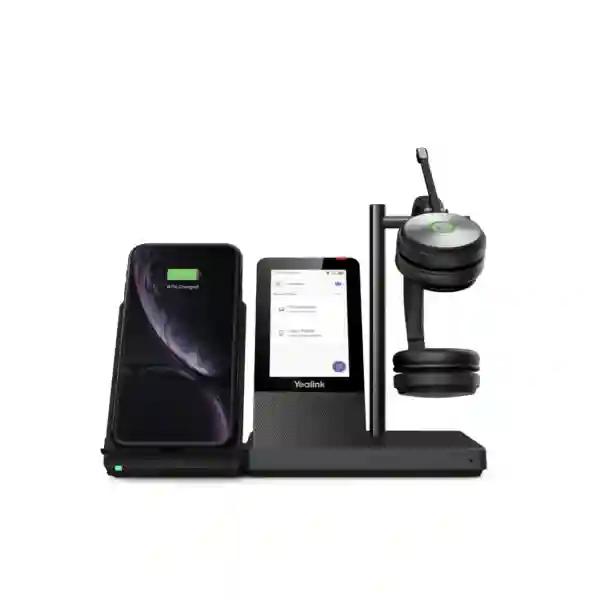
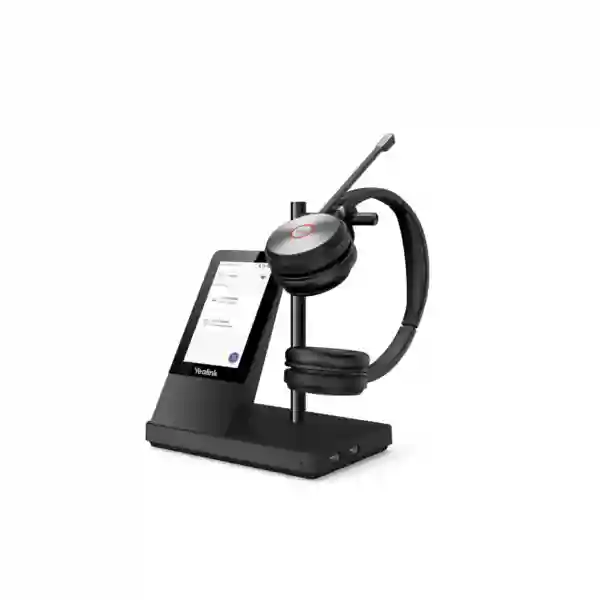
The Yealink WH66 is a premium Dual/Mono DECT UC workstation designed for professionals who spend a large part of the day on calls and want one organized desktop point for headset audio, call control, connected devices and speakerphone use. Its base combines a 4.0-inch 480 × 800 capacitive touchscreen, USB connectivity, Bluetooth connections, a two-port USB 3.0 hub and an integrated hands-free speakerphone. The headset uses Yealink Acoustic Shield technology with a dual-microphone design to reduce distracting background sound for the person on the far end of the call. For businesses in Tanzania, the practical value is not simply the list of features: it is the ability to consolidate several daily communication functions into a single workstation while retaining the mobility of DECT wireless calling.
WH66 is available in Mono and Dual wearing styles. Yealink states up to 13 hours of talk time for the Mono version and up to 14 hours for the Dual version, with a stated DECT range of up to 160 metres or 525 feet in suitable conditions. Real-world range is affected by walls, building materials and radio conditions, so workplace layout should still be considered before deployment. FourTeck can help buyers define the intended users, connected calling platform, quantity and regional requirement before quotation.
One workstation for daily calls
The touchscreen base can centralize call handling and device connections, reducing the need for separate desk accessories. Users can answer, end or reject calls, adjust volume, mute the microphone and move between headset and speakerphone workflows according to supported platform behavior.
Designed for focused conversations
Yealink Acoustic Shield uses the WH66 dual-microphone arrangement to help filter surrounding noise from the transmitted voice. This is useful for open offices, shared work areas, reception teams and customer-facing staff who need clearer outgoing speech.
Business mobility with DECT
A stated maximum range of 160 metres gives users more freedom to move away from the desk than typical short-range personal wireless use cases. Actual coverage depends on walls, interference and workspace geometry, so range should be treated as a design parameter rather than a guaranteed distance.
Verified Yealink WH66 features and specifications
Yealink positions the WH66 as an all-in-one UC workstation headset. The base provides a 4.0-inch 480 × 800 capacitive touchscreen, two feature buttons, USB 3.0 connectivity, built-in Bluetooth 4.2 and an integrated two-port Type-A USB 3.0 hub. The headset includes an integrated busylight, an adjustable boom arm and a charging stand. Yealink lists a dual-microphone headset design, wideband voice operation and full-band music performance, with stereo music available on the Dual model. Hearing-protection functions listed by the vendor include Peak Block Protection, Australian G616 protection and Daily Noise Exposure Protection.
| Touch interface | 4.0-inch capacitive touch screen, 480 × 800 |
| Base connectivity | USB 3.0 plus two Bluetooth device connections |
| USB hub | 2 × Type-A USB 3.0 ports |
| Microphone | Dual-microphone headset arrangement with Acoustic Shield technology |
| DECT range | Up to 160 m / 525 ft under suitable conditions |
| Talk time | Up to 13 hours Mono; up to 14 hours Dual |
| Standby time | Up to 90 hours Mono; up to 125 hours Dual |
| Call controls | Answer/end/reject, volume, mute; boom-lift mute behavior supported |
| Optional accessories | BLT60 external busylight, wireless charging accessory and BT50 Bluetooth dongle as documented by Yealink |
The WH66 can integrate with major UC environments and Yealink documents support for platforms such as Microsoft Teams, Zoom, 3CX, Unify and RingCentral, with exact platform behavior dependent on software, firmware and compatibility conditions. Before a bulk order, buyers should confirm the precise WH66 variant, target application, desk-phone model if one is involved, operating-system environment and any optional accessory requirement.
How to choose WH66 Mono or WH66 Dual
The Mono and Dual versions share the workstation concept but serve different user preferences. WH66 Mono leaves one ear uncovered, which can suit supervisors, reception staff and office users who need to remain aware of nearby colleagues while handling calls. WH66 Dual covers both ears and can be more comfortable for users who want greater conversational focus during sustained calling. The correct choice should reflect the user role, call volume, office noise, need for environmental awareness and whether the headset will also be used for music or long online meetings.
For procurement teams, standardizing by job role is often more useful than allowing every user to choose independently. A customer-service team might prefer one consistent model for training and spares, while managers and front-desk users could use a different wearing style based on workflow. When requesting a quote, list the number of Mono and Dual units separately and state whether Microsoft Teams or another UC platform is the primary environment.
Yealink WH66 Tanzania
For organisations evaluating the Yealink WH66 in Tanzania, the strongest purchasing case is usually a user group that spends substantial time on voice or video collaboration and needs dependable mobility around the workstation. Typical examples include reception, sales, customer support, finance, operations, management and hybrid employees using cloud communication applications. The WH66 brings together the headset, touch-based call control, speakerphone, device connectivity and USB expansion in one base. That can simplify desk organization, especially where a user regularly changes between PC calls, mobile conversations and supported business-phone workflows. Rather than buying only on the headline range figure, Tanzania buyers should map the headset to the real desk environment: which UC application is used, whether a compatible Yealink or third-party desk phone is involved, whether the employee needs one or two ears covered and how far the person actually moves during a typical call.
Regional compatibility deserves specific attention. DECT operates on radio bands that are allocated differently in different markets, and Yealink explicitly advises that DECT headsets should be used in their intended region or country. A procurement team should therefore identify Tanzania as the destination when requesting WH66 units and should not assume that a unit sourced for a different regulatory region is automatically suitable. The same principle applies to multi-country organizations standardizing headsets across Tanzania, East Africa and the Gulf: model naming may look identical while the correct regional hardware or certification path can still differ. FourTeck can use the requested destination, quantity and platform details as part of quotation preparation without making assumptions about a cross-border unit.
Business buyers should also consider deployment and user adoption. The base needs appropriate power and USB connectivity, and the workstation should be positioned where the touch display is easy to reach. Users benefit from a short orientation covering docking, microphone mute, boom movement, volume, speakerphone behavior and busylight status. If the organization is replacing older wired headsets, the WH66 can change how employees move during calls, so desk layout, privacy and the practical wireless coverage of each floor matter. For an informed Tanzania quotation, provide the number of users, Mono or Dual preference, primary calling platform, desk-phone model where relevant, office location and whether optional wireless charging or an external busylight is required. That information allows the buying conversation to focus on compatibility and fit rather than only unit price.
Yealink WH66 Dar es Salaam
Businesses searching for Yealink WH66 in Dar es Salaam are often trying to improve the calling experience for concentrated office teams, front desks, sales groups and customer-facing departments. The WH66 is particularly relevant when a user needs to move between desk work and short tasks nearby without abandoning a live call. Its DECT architecture is designed for greater mobility than ordinary short-range personal wireless headsets, while the workstation base keeps call controls visible on a dedicated 4-inch touch interface. In a corporate office, shared service centre, professional practice or administrative department, this arrangement can reduce the friction of repeatedly switching between separate audio devices.
Dar es Salaam deployments should be planned around building layout rather than assuming the maximum advertised wireless range will be achieved. Concrete walls, reinforced structures, partitions, equipment rooms and neighboring radio systems can all change practical coverage. The best approach is to place the base at the user’s normal workstation and treat long-distance movement as an occasional capability, not a substitute for site-wide cordless telephony. If employees need to roam across several floors or through multiple dense walls, the requirement may call for a different communication architecture. For users who mainly move around an open office, nearby meeting spaces or a reception zone, WH66 can provide a useful balance of mobility and desktop control.
Procurement teams in Dar es Salaam should list the calling platform and endpoint environment when requesting a quotation. A user on Microsoft Teams or another softphone may have a different setup from a user integrating the workstation with a desk phone. Confirm whether Mono or Dual is preferred, whether external busylights are needed for noisy shared offices and whether the optional wireless charging accessory adds real value for the user group. Standardizing one configuration for a department can simplify onboarding and spare management. The FourTeck Tanzania contact process is suited to this kind of requirement discussion: identify the model, number of units, intended platform, location, timeline and any existing phone equipment. This produces a cleaner basis for availability and compatibility checks than a generic request for “wireless headsets.”
Yealink WH66 Mwanza
For a Mwanza office, branch, healthcare administration team, hospitality back office, education department or commercial organization, the Yealink WH66 can be evaluated as a professional communications workstation rather than simply a headset. The touch base gives users a fixed control point while the DECT headset allows movement away from the desk. This can be useful for employees who need to consult a colleague, retrieve paperwork or reach nearby storage while remaining on a business call. The integrated speakerphone also gives the user a second way to handle audio at the desk without changing to another device.
A sensible Mwanza buying process should begin with user roles. Heavy callers may value the Dual model for greater focus, while supervisors or reception users may choose Mono to maintain awareness of the room. Users who work mostly through a PC should confirm the softphone and operating environment, while those connecting to desk phones should verify exact compatibility before purchase. Yealink’s documented platform support is broad, but platform names alone do not guarantee every call-control function in every combination of firmware, phone and application. A pilot unit can therefore be valuable for larger deployments where the organization wants to standardize one model across many employees.
The radio-region issue should also be part of the purchase request. Because DECT spectrum allocations are regional, buyers should obtain a WH66 version appropriate to the destination and avoid assuming that a visually identical unit sourced elsewhere is interchangeable. For a Mwanza project, state Tanzania as the intended deployment country and include quantity, Mono/Dual preference and platform details. If the office is preparing a wider communications refresh, headset selection should be aligned with the organization’s IP phones, PBX or UC software and network quality. Headset performance can improve user experience, but it cannot correct poor internet connectivity, unstable SIP service or overloaded PCs. Treating the WH66 as one component in the communications environment leads to a more dependable deployment and a more meaningful quotation.
Yealink WH66 Arusha
Yealink WH66 buyers in Arusha may include offices supporting tourism, professional services, administration, education, logistics, non-governmental work and regional business operations. In these environments, staff often communicate with colleagues, suppliers or customers across locations, making call clarity and desk flexibility important. WH66 is designed for exactly this kind of daily UC workflow: the headset connects wirelessly to its base using DECT, while the base handles the workstation functions and can interface with connected business devices. The result is a system that keeps the user mobile without turning the desktop into a collection of separate audio accessories.
For Arusha teams, the best-fit discussion should include both acoustic and operational conditions. An employee in a quiet private office does not have the same need as a receptionist near visitors or a sales team in a shared room. Acoustic Shield is intended to reduce background sound transmitted through the microphone, but it should not be confused with active noise cancellation for the wearer. The primary benefit is clearer speech sent to the far end. If the workplace itself is loud, the Dual version may provide a more focused wearing experience than Mono, while Mono may remain preferable when users must hear nearby colleagues.
A quotation request should specify exact quantities and whether accessories are required. External busylights can be useful where colleagues need an obvious visual cue that a user is on a call. The optional wireless charging accessory may suit employees who keep compatible mobile phones at the workstation, but it should be selected because it serves a workflow rather than because it appears on the feature list. IT teams should also confirm firmware management and compatibility expectations before deploying at scale. FourTeck’s broader Tanzania communication portfolio can help place the WH66 alongside business telephony and collaboration needs instead of treating it as an isolated purchase. For Arusha customers, the most useful starting information is the calling application, desk-phone model if any, Mono/Dual split, number of users, workspace style and intended deployment country.
Yealink WH66 Dodoma
Organizations looking for the Yealink WH66 in Dodoma can use it as a standardized workstation for employees who manage frequent voice communications through a PC, supported desk phone or mobile-connected workflow. Administrative teams, project coordinators, support desks and managers often need to stay reachable while moving briefly away from the keyboard. The WH66’s DECT connection between headset and base is designed to support this mobility, while the touch display remains a central call-control surface. When users return to the desk, the base can also serve as a speakerphone for hands-free conversations.
For structured deployments, Dodoma IT teams should separate the choice of headset from the choice of calling platform. WH66 can work in major UC environments, but the exact control experience depends on the connected application and equipment. Before ordering a larger quantity, document the PCs, operating systems, Yealink or third-party desk phones and softphones in use. Then confirm the expected functions: answering from the headset, mute behavior, speakerphone switching, call-control integration and any Teams-specific requirements. This avoids a common procurement problem where a headset is selected for audio quality but the organization later discovers that a desired control function behaves differently on its chosen platform.
DECT regulatory suitability should remain part of the specification. A unit intended for one radio region should not automatically be moved into another simply because the product name is the same. When requesting WH66 for Dodoma, identify Tanzania as the deployment country and ask for the appropriate regional model. Buyers should also provide quantity, Mono/Dual preference and accessory needs. If the organization already uses Yealink phones, mention the exact phone models because native integration can be an important reason to choose the WH66. If the office instead depends almost entirely on PC-based collaboration, emphasize the softphone environment. These details allow the quotation to be built around real operating conditions and reduce the risk of ordering accessories or variants that do not contribute to the deployment.
Yealink WH66 UAE
For UAE organizations, the Yealink WH66 can suit corporate desks, customer-service teams, sales operations, reception environments and hybrid workers using UC applications throughout the day. The product’s distinctive advantage is the workstation base: instead of functioning only as a charger, it combines a touch console, connectivity hub and speakerphone with the headset docking point. This can be useful in offices where employees frequently alternate between computer-based meetings, business calls and mobile communication while trying to keep desk cabling under control.
Regional sourcing is especially important when an enterprise operates across the UAE and Africa. Yealink notes that DECT frequency bands vary by region or country. A procurement team that standardizes the WH66 should therefore identify the actual destination of each batch and avoid treating all units as globally interchangeable. Central purchasing can still standardize user experience, accessories and policy, but the correct radio-region variant should be confirmed for every destination. This is more important than simply matching the external model name. Multi-country buyers should separate quantities by destination in the quotation request so the supplier can evaluate the requirement clearly.
UAE deployments may also involve complex mixed-device environments, so compatibility review matters. A user connected primarily to Microsoft Teams may have different priorities from a user attached to a Yealink IP phone or other supported desk-phone configuration. State the primary platform, exact phone model where applicable and whether optional BLT60 busylights or wireless charging accessories are needed. For large departments, consider a controlled pilot before full rollout so IT can check call control, audio behavior, user comfort and practical range in the actual building. FourTeck’s regional network can support broader communication discussions through FourTeck’s integrated IT and telecom portfolio, which is relevant when the headset purchase sits within a wider IP telephony, networking or workplace modernization project.
Yealink WH66 Uganda
Organizations sourcing the Yealink WH66 for Uganda should begin by defining the communications workflow, not merely the headset quantity. The WH66 is most valuable where users need a professional wireless calling device combined with a dedicated workstation base. This can fit centralized service teams, branch administrators, managers, financial staff and other roles that move between computer work and calls. The DECT connection is designed for workplace mobility, and the integrated speakerphone gives users a convenient alternative for short hands-free conversations at the desk.
Because WH66 is a DECT product, buyers should explicitly confirm that the supplied regional version is appropriate for Uganda. Yealink’s own guidance is that DECT headsets should not be used outside their intended region or country because radio-frequency allocations can differ. This matters for organizations whose purchasing teams source equipment from several international offices. A unit acquired for another market should not be assumed suitable without confirmation. For a cross-border rollout, list the quantity for Uganda separately and provide the city or project location along with the UC platform and any connected desk-phone models.
The Mono-versus-Dual choice can also be standardized by role. Dual is a logical option for users who want greater focus during sustained calls, while Mono can be appropriate for people who need to remain aware of activity around them. The external busylight accessory can help shared teams see when colleagues are busy, and the wireless charging accessory can add convenience for compatible phones, but both should be treated as optional project choices. Buyers coordinating East African requirements can also review FourTeck Uganda for regional communication and technology enquiries. For the best quotation input, provide destination, quantity, WH66 Mono/Dual split, platform, existing phone environment and expected rollout schedule rather than only asking for a unit price.
Yealink WH66 Kampala
Kampala businesses considering the Yealink WH66 may be trying to improve calling productivity in shared offices, service centres, professional firms, sales teams or multi-branch operations. The workstation approach is useful where a user needs more than a simple wireless headset. The base’s touchscreen presents controls directly at the desk, the USB hub can reduce pressure on limited PC ports and the speakerphone provides another way to handle calls without putting on the headset. This makes WH66 suitable for users who alternate between individual conversations, quick hands-free discussions and computer work through the day.
In Kampala offices, practical wireless coverage should be assessed according to layout. Yealink states a maximum range of up to 160 metres under suitable conditions, but walls and physical obstructions can reduce that significantly. If a user only needs movement around a department or nearby office area, this can be a strong fit. If the real requirement is building-wide roaming through multiple floors, IT should evaluate whether a headset is the right tool for that job. Wireless freedom should support the workflow rather than become an assumption that leads to coverage disappointment.
Compatibility and regional version should be checked before purchase. Identify the application used for calls, the PC operating environment, any IP phone model and whether the organization wants Teams-oriented behavior. Also indicate whether users prefer Mono or Dual and whether visible busylights are valuable in the workspace. Because the WH66 base can connect to multiple device types, clearly defining which devices each user actually needs prevents unnecessary complexity. Kampala buyers ordering through a regional procurement office should make Uganda the declared destination so the suitable DECT variant can be confirmed. For larger deployments, consider testing a representative workstation before placing the full order, then document the approved configuration for consistent rollout and support.
Yealink WH66 Arua
For organisations in Arua, the Yealink WH66 can support professional users who depend on voice communications but do not want to remain physically fixed to a chair throughout every call. A branch manager may need to reach a nearby file area, a support employee may consult a colleague, or an administrator may move between a computer and local paperwork while staying connected. The DECT headset-to-base link is intended for this type of workplace mobility, while the touch display gives the user a dedicated interface for common call actions.
The best purchasing decision should consider workload as well as specifications. A user handling only occasional calls may not need the full workstation feature set, while someone who spends many hours on calls can benefit from the charging dock, easy mute control, speakerphone and centralized connections. The Mono model keeps one ear open to the room; the Dual model can provide a more focused experience. A branch can standardize by role so replacements, training and accessories are simpler. If busylight visibility matters in a shared office, the optional external light can strengthen the “do not disturb” cue beyond the headset indicator.
Arua procurement should also account for regional DECT requirements. The correct radio-region version needs confirmation, especially when equipment is being consolidated with orders for other countries. Provide the intended deployment country and city rather than relying on the product name alone. Also list the primary UC software and any desk-phone model involved, because compatibility can affect call-control behavior. If the branch has limited local IT resources, documenting the setup becomes important: record USB connections, paired devices, firmware process and the user’s platform so support staff can troubleshoot consistently. The WH66 can be a powerful desktop communication tool, but its value is highest when it is purchased as a defined configuration instead of as an unplanned accessory.
Yealink WH66 Mbarara
Mbarara customers evaluating the Yealink WH66 should consider whether the target employees need both wireless calling and a multifunction desktop base. For sales, management, front-office and support roles, the combination can be more useful than a basic Bluetooth headset because DECT is intended to provide dependable business mobility between the headset and its base while the base remains connected to the user’s communication devices. The 4-inch touchscreen allows direct interaction with the workstation, and the integrated speakerphone can support short calls when the user does not want to wear the headset.
Noise conditions and awareness needs should influence wearing style. WH66 Dual covers both ears and can help a caller concentrate in a busy office, whereas WH66 Mono allows the other ear to remain open to colleagues and visitors. Yealink’s Acoustic Shield technology is designed to reduce background noise picked up by the microphone so the remote participant hears clearer speech. It is important to understand that this primarily improves the outgoing voice path; it is not a promise that the wearer will stop hearing every sound in the room. Setting the right expectation helps users choose the correct model for their environment.
Before a Mbarara order, confirm the intended call platform and regional DECT version. A cloud UC deployment should be checked for the desired call controls, and a desk-phone integration should include the exact phone model. For a multi-user deployment, provide the Mono/Dual quantity split and any required accessories. If the organization already operates several Ugandan branches, a common configuration document can reduce support differences between locations even when quantities vary. The objective is to standardize user experience while still sourcing hardware that is appropriate for the target market. That approach produces a more resilient communications rollout than purchasing a mixed batch from unrelated sources without regional or compatibility validation.
Yealink WH66 Gulu
The Yealink WH66 can be relevant to Gulu organizations that want a professional headset platform for employees handling regular business calls, online meetings and customer communication. Unlike a simple headset with a charging cradle, the WH66 base functions as a communications workstation. The touch display, USB hub, Bluetooth device connections and integrated speakerphone give the user more ways to manage the desk environment. This is particularly useful when a role involves both PC-based collaboration and other connected devices during the same working day.
When deciding whether WH66 fits a Gulu deployment, estimate how much mobility is actually needed. Yealink’s stated DECT maximum is up to 160 metres, but that figure is not a guarantee inside every office. Dense walls, partitions and other structural elements reduce practical range. Users who need to walk around an open department, nearby corridor or adjacent workspace may benefit significantly. Users who need reliable building-wide movement across difficult structures may need a different solution architecture. A small pilot can reveal whether the headset delivers the intended freedom in the real office before a large quantity is committed.
The procurement request should specify Uganda as the destination so the appropriate regional DECT version can be checked. Then include the primary UC software, desk-phone model where relevant, operating-system environment, quantity and preferred Mono or Dual style. If the business expects users to share a consistent workflow, create a standard setup guide covering docking, pairing, call controls, mute, speakerphone and busylight behavior. This reduces support calls and gives employees confidence from the first day. Optional accessories should be selected only where they solve an identified need. The BLT60 can strengthen visual busy indication in shared environments, while the wireless charger can be useful for compatible mobile phones kept at the workstation.
Yealink WH66 Kenya
Kenya businesses can consider the Yealink WH66 for high-call-volume office users who want a single professional workstation for wireless conversations and device control. The product is available in Mono and Dual configurations, giving organizations a simple way to align wearing style with role. Reception or supervisory employees may prefer Mono because it leaves one ear open to their surroundings, while focused sales, support or remote-collaboration users may prefer Dual. In both cases, the headset communicates with its base over DECT and can benefit from the same touch-based workstation experience.
For Nairobi and wider Kenya projects, sourcing should explicitly account for the intended radio region. Yealink advises that DECT standards are not globally identical and that allocated frequencies may vary. This means organizations should request hardware suitable for the destination instead of importing an arbitrary WH66 variant purely because it appears less expensive or immediately available elsewhere. A multi-country company can still standardize on WH66, but each location should receive the correct regional unit. This is a procurement-control issue as much as a technical one and should be included in request-for-quotation notes.
IT teams should also confirm compatibility before standardization. The WH66 supports a range of UC environments, but the exact user experience depends on the application, firmware and connected phone. State whether Microsoft Teams, Zoom, 3CX, RingCentral or another platform is primary and identify any desk-phone models. If an organization is also refreshing IP phones or PBX infrastructure, headset deployment can be coordinated with that project so the user experience is validated end to end. Kenya buyers can review FourTeck Kenya for region-focused technology enquiries. For cross-border projects covering Kenya and Tanzania, separate the quantities and destination requirements while keeping a common approved user configuration wherever practical.
Yealink WH66 Kuwait
Kuwait organizations evaluating the Yealink WH66 can use it as a premium desk collaboration endpoint for users who handle frequent calls through modern UC applications or supported office-phone environments. The workstation base is particularly useful for employees whose desks are already crowded with docks, chargers and peripherals because it combines several functions into one system. The built-in USB hub expands connection options, the touch display provides direct control and the integrated speakerphone allows the user to switch from private headset listening to a local hands-free mode when appropriate.
As with any DECT device used across regions, radio suitability must be confirmed. A company with purchasing teams in Europe, the Gulf or Africa should not assume that the same physical-looking WH66 can be redeployed anywhere without checking the intended regional specification. Yealink’s guidance highlights differences in DECT frequency allocation. Kuwait buyers should therefore name Kuwait as the destination in the quotation and ask the supplier to confirm the appropriate variant. This is especially important for multinational organizations that consolidate equipment in a central warehouse before sending it to country offices.
The rest of the buying brief should describe how the headset will be used. Provide user count, Mono or Dual preference, main calling platform, phone models if involved and any need for the optional external busylight or wireless charging stand. If the users operate in dense shared offices, a practical trial helps confirm comfort, microphone performance and real wireless range. The stated maximum range should not be treated as an indoor promise, since construction materials affect coverage. A well-managed rollout should also include firmware and device-management responsibilities so the headset remains part of the supported collaboration environment rather than becoming an unmanaged peripheral. This planning is more valuable than selecting solely on unit price.
Yealink WH66 Ghana
Ghana customers looking for the Yealink WH66 may be supporting contact teams, corporate administration, professional services, education, financial operations or remote collaboration. In each case, the product is best understood as a desk communications workstation built around a DECT headset. The user can manage calls through a touch base, keep the headset charged on its stand, connect supported devices and use the base speakerphone when a headset is not necessary. This can reduce the number of separate accessories around a busy workstation and create a more consistent user experience.
Procurement should identify the expected wearer profile. Mono works well where users must hear colleagues or visitors, while Dual can better suit sustained concentration. Teams should also consider call duration. Yealink lists up to 13 hours of talk time for Mono and up to 14 hours for Dual under its stated conditions, which is designed to cover a substantial working day for many users. Charging routines still matter; docking the headset when not in use helps keep it ready. For shared or shift-based environments, businesses should verify whether each employee will have an assigned headset rather than planning to share wearable equipment casually.
Regional DECT compliance and platform compatibility remain essential. Ghana should be identified as the destination when requesting supply, and the exact application or phone integration should be documented. If the organization operates across West and East Africa, central IT can use a common checklist while still confirming region-specific hardware for each country. FourTeck’s broader African technology presence is available through FourTeck Africa for region-wide communication discussions. A strong request should include the country, city, number of headsets, Mono/Dual split, primary UC platform, any desk-phone models, accessory needs and project schedule. Those details make it easier to evaluate the requirement accurately without making unsupported assumptions about stock or local delivery.
Yealink WH66 Nigeria
Nigeria businesses considering the Yealink WH66 can use it for employees whose productivity depends on reliable, repeatable calling workflows. Sales desks, customer support, account teams and managers often need to move around a workspace while maintaining a conversation, and DECT is well suited to this type of business mobility. The WH66 adds a workstation base with a touch display, speakerphone and connectivity functions, which can make it more useful than a basic cordless headset in offices where the user regularly switches between communications devices.
Large Nigeria deployments should be approached as an endpoint-standardization project. First define the user roles that genuinely need the premium workstation. Then select Mono or Dual based on environmental awareness and concentration. Next verify the calling platforms and connected desk phones. Finally test practical range and the most important call-control functions in the real environment. This process helps avoid overbuying for occasional callers while ensuring heavy users receive the capability they need. A pilot can also reveal whether optional busylights contribute to workflow in open offices and whether wireless charging adds sufficient value to justify inclusion.
DECT region selection must be explicit in the request. Yealink warns that DECT spectrum allocations vary, so buyers should source a version intended for the destination rather than assuming universal interchangeability. Multi-country Nigerian groups or international organizations should label each batch by destination. IT should also document firmware management, pairing and supported software. While the WH66 can connect with a broad range of UC platforms, a tested corporate configuration is more reliable than relying on generic compatibility statements. The final quotation request should include destination, quantity, wearing style, platform, phone models and rollout schedule. That gives the supplier the information needed to evaluate the configuration and allows the buyer to compare offers on equivalent requirements rather than on incomplete model descriptions.
Yealink WH66 Seychelles
For businesses in Seychelles, the Yealink WH66 can fit roles where professional voice communication, mobility and a tidy workstation are important. Hospitality administration, travel operations, corporate offices, service desks and professional teams may use cloud communications across multiple locations, and a dedicated headset system can make long call sessions more comfortable and manageable. The WH66 provides a touch-controlled base and DECT wireless headset rather than relying entirely on a phone or computer interface for every adjustment.
Smaller island-market procurements can benefit from careful pre-order specification because replacement logistics may be more involved than in a large metropolitan inventory environment. That makes compatibility verification valuable before the equipment is shipped. Confirm the primary softphone, the computers or supported desk phones involved, the number of Mono and Dual units and any optional accessories. The organization should also decide who owns firmware and device support. Standardizing a tested configuration can reduce troubleshooting because every workstation follows the same connection and call-control method.
The regional DECT question is equally important. Yealink advises using DECT products in their intended region or country because operating frequencies can differ. Seychelles should therefore be identified as the deployment destination when requesting WH66 supply. If a company operates offices in Seychelles, Tanzania, Kenya and the UAE, it can standardize the WH66 user experience while still separating the regional hardware requirement by country. For wireless range, plan based on the actual office rather than the maximum published figure. Walls and physical obstructions shorten coverage. A practical test in the target environment is useful when users expect to move far from their desks. When requesting a quote, include destination, quantity, user roles, Mono/Dual split, platform, phone models, accessory choices and expected timing so the proposal can be built around the actual deployment.
Compatibility, deployment and lifecycle guidance
Before ordering the WH66, confirm three layers: regional radio suitability, platform compatibility and user workflow. Regional suitability matters because DECT frequency allocations vary. Platform compatibility matters because audio may work while a specific call-control function requires a supported application, firmware or phone combination. User workflow matters because a feature-rich workstation only creates value when the person actually needs its controls, mobility and device connections. This three-part review is especially useful for organizations ordering dozens or hundreds of headsets across branches.
Deployment should include a simple standard. Define which USB port is used, which devices are paired, how users switch between headset and speakerphone, and how mute and busylight behavior should work. Where IT centrally manages endpoints, document firmware policy and approved application versions. If employees use hot desks, consider hygiene and ownership of wearable components. If every user has an assigned headset, asset labeling and replacement-ear-cushion planning may be appropriate. Avoid mixing many ad-hoc variants because support becomes harder when users have different call-control behavior.
The WH66 should also be considered alongside the wider communications environment. A good headset cannot solve packet loss, unstable internet, poorly configured PBX routing or an overloaded computer. If calls are consistently poor, troubleshoot the network and application path as well as the headset. FourTeck Tanzania’s integrated IT and telecom overview is relevant for projects that combine headsets with IP telephony, collaboration, networking or workplace infrastructure rather than treating each component separately.
Who should buy the Yealink WH66?
Quotation checklist for Yealink WH66
A complete request makes compatibility and quotation discussions faster. Prepare the following before contacting sales:
- Deployment country and city, especially for correct DECT regional selection.
- Required quantity and the split between WH66 Mono and WH66 Dual.
- Primary UC platform or softphone, such as Microsoft Teams, Zoom, 3CX or another environment.
- Exact desk-phone model if a phone integration is part of the requirement.
- PC operating system and any centralized device-management expectations.
- Optional accessory requirements such as BLT60 external busylight or wireless charging.
- Target deployment timing and whether a pilot unit is desired before a larger rollout.
- User role and workspace type: reception, call centre, executive desk, shared office, private office or hybrid work.
Related FourTeck regional resources
For organizations comparing regional sourcing and wider workplace technology requirements, FourTeck’s network can help connect headset procurement to the rest of the communications environment. Use FourTeck Tanzania for Tanzania-focused IT, telecom and collaboration enquiries; FourTeck for broader integrated IT and telecom projects; FourTeck Kenya for Kenya requirements; FourTeck Uganda for Uganda requirements; and FourTeck Africa for wider Africa-focused product and project discussions. These links are most useful where the WH66 is one part of a larger UC, IP telephony, networking or endpoint project.
Frequently asked questions about Yealink WH66
What is the Yealink WH66?
The WH66 is a Yealink DECT wireless headset system with a multifunction UC workstation base. It is available in Mono and Dual versions and combines a 4-inch touchscreen, USB connectivity, Bluetooth device connections, a USB hub, speakerphone capability and headset charging in one desktop system.
What is the wireless range of the WH66?
Yealink states a maximum DECT range of up to 160 metres or 525 feet. Actual range can be shorter because walls and other physical obstructions affect radio performance. Buyers should treat the published figure as a maximum specification, not a guarantee for every building.
How long does the WH66 battery last?
Yealink lists up to 13 hours of talk time for WH66 Mono and up to 14 hours for WH66 Dual, with up to 90 hours and 125 hours of standby time respectively. Real use can vary with calling patterns, settings and battery condition.
Does the Yealink WH66 support Microsoft Teams?
Yealink offers WH66 variants and documented support for major UC environments including Microsoft Teams. Exact call-control behavior depends on the chosen variant, application, firmware and connected equipment, so organizations should confirm the intended platform before ordering.
Can WH66 connect to more than one device?
Yes. Yealink documents USB connectivity and two Bluetooth device connections through the workstation base. The exact combination and control behavior should be checked against the intended PC, mobile phone and desk-phone environment.
Is wireless phone charging included?
Wireless charging is documented as an optional accessory rather than a feature that should be assumed in every box. Confirm the exact package and accessory requirement when requesting a quote.
Can I use a WH66 purchased in another country?
Do not assume so. Yealink notes that DECT frequency allocations vary by region or country and advises using DECT headsets in the intended region. Confirm the correct regional version for Tanzania or any other destination before purchase or relocation.
What information should I provide for a Yealink WH66 quotation?
Provide the destination country, quantity, Mono/Dual split, calling platform, desk-phone model if used, optional accessory requirements and expected deployment timing. For larger projects, also describe user roles and whether you want to validate a pilot configuration before rollout.
Decision recap: is the Yealink WH66 right for your team?
Choose the WH66 when users need a premium DECT wireless headset plus a multifunction desktop base for call control, speakerphone use and connected-device workflows. It is particularly compelling for employees who spend much of the day on calls, need freedom to move around the immediate office and value a dedicated touch interface rather than managing every action only through software.
Before purchase, verify the correct regional DECT version, confirm the UC or desk-phone compatibility you actually need, choose Mono or Dual based on user role, and specify optional accessories deliberately. This approach turns the WH66 from a feature-rich gadget into a standardized business communications endpoint.
Consult FourTeck Tanzania about Yealink WH66
For a useful quotation, share the quantity, intended city and country, WH66 Mono/Dual preference, primary calling platform, connected desk-phone model if applicable and accessory requirements. FourTeck can use that information to discuss product fit, regional version and quotation options without assuming availability, delivery timing or compatibility that has not been verified for your project.




Reviews
There are no reviews yet.