
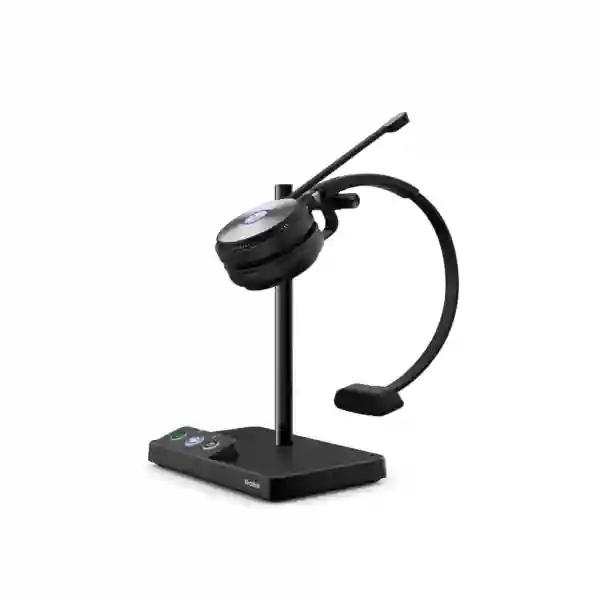
Yealink WH62 Tanzania
The Yealink WH62 is an office-focused DECT wireless headset designed for professionals who move between desk-phone calls, PC softphones and unified communications applications during the working day. Yealink offers the WH62 in Mono and Dual designs, with UC and Microsoft Teams variants, so organisations can align the headset with user preference and collaboration platform. The base supports simultaneous USB connection to a PC and compatible Yealink IP phone, while the headset provides on-ear controls, an integrated busy light and a boom microphone system built around Yealink Acoustic Shield Technology.
For businesses in Tanzania, the WH62 is particularly relevant where reception teams, sales desks, customer service staff, finance users, supervisors and managers need to leave the desk during a call without immediately losing audio. Yealink specifies wireless range of up to 160 metres in suitable conditions. Talk time is rated up to 13 hours for WH62 Mono and up to 14 hours for WH62 Dual, with charging through the supplied base. Range and battery figures are manufacturer maximums and real performance depends on building materials, radio conditions, usage patterns and device settings.
Quick answer
Yealink WH62 is a DECT wireless business headset for desk-phone and PC communication. It is available in Mono and Dual versions, works with major UC platforms, integrates natively with compatible Yealink IP phones, supports a built-in busy light and uses dual microphones with Acoustic Shield noise-reduction technology.
What the Yealink WH62 is designed to solve
Many business users still work around a fixed desk because their telephone or computer headset restricts mobility. A wireless office headset changes that workflow by allowing a user to answer calls, continue a conversation while walking to a nearby printer or colleague, and return to the charging base between calls. The WH62 uses DECT rather than standard Bluetooth as its primary radio architecture, which is useful when longer office range and a dedicated business-headset workflow are priorities.
The WH62 is also designed to simplify dual-device working. Yealink provides two Micro-USB ports in the base and supports connection to a PC and compatible Yealink IP phone at the same time. For organisations already using Yealink business phones, this native connection can reduce dependency on separate electronic hook switch adapters in supported scenarios. Procurement teams should still confirm the exact phone model, firmware and desired call-control behaviour before large-scale deployment.
Manufacturer-rated wireless range up to 160 metres gives staff more freedom around suitable office environments than a short wired headset connection.
Two microphones and Acoustic Shield Technology are designed to reduce surrounding noise reaching the far-end participant.
Mono keeps one ear open to nearby colleagues; Dual provides a more focused two-ear listening experience and stereo music support.
Different part numbers support mainstream UC and Microsoft Teams-oriented purchasing standards.
Verified Yealink WH62 specifications
| Models | WH62 Mono and WH62 Dual; UC and Microsoft Teams variants |
| Official part numbers | 1308005 WH62 Mono UC, 1308006 WH62 Dual UC, 1308000 WH62 Mono Teams, 1308001 WH62 Dual Teams |
| Wireless technology | DECT, with Yealink-specified wireless range up to 160 m / 525 ft |
| Talk time | Up to 13 hours Mono; up to 14 hours Dual |
| Standby time | Up to 90 hours Mono; up to 125 hours Dual |
| Charging time | Approximately 2.5 hours at 5 V / 1.2 A according to Yealink |
| Microphones | Dual-microphone design with Yealink Acoustic Shield Technology |
| Speaker frequency range | 20 Hz to 20 kHz; talk mode wideband 100 Hz to 8 kHz |
| Connectivity | USB connectivity to PC and compatible IP phone through the base |
| User controls | Answer, end, reject, volume up/down, microphone mute; boom-up mute behaviour |
| Management | Yealink USB Connect and Yealink management tooling where supported |
Choosing WH62 Mono or WH62 Dual
The most practical difference is how much of the surrounding workplace the user needs to hear. WH62 Mono covers one ear and leaves the other ear open. That can suit receptionists, office coordinators, supervisors, retail back offices and shared-team environments where the user must stay aware of conversations in the room. The Mono headset is also lighter than the Dual version. WH62 Dual covers both ears, making it better suited to staff who spend much of the day on voice or video calls and prefer stronger concentration from a two-ear design.
Dual also supports stereo music playback, while the Mono model is intended primarily for call communication. Neither choice should be made only on price. Teams buying dozens of headsets may benefit from trialling both wearing styles with representative users before standardising. User role, average call duration, office noise, need for colleague awareness, glasses, personal comfort and hot-desk practices can all influence adoption.
Yealink WH62 integration, compatibility and deployment
The WH62 is positioned by Yealink for major unified communications platforms and for native integration with Yealink IP phones. Compatibility should be treated as an environment-specific check rather than a blanket promise. Before procurement, identify the desk-phone model, computer operating system, UC client, Teams requirement, USB availability and whether users need call control from the headset rather than only audio transport. This is particularly important in mixed estates where some staff use Yealink phones and others use different vendors.
For PC use, standardisation can include installation of Yealink USB Connect where appropriate, agreed firmware versions and a simple user guide covering call buttons, boom mute, charging and base selection. For Yealink phone integration, confirm supported firmware and connection method in the project environment. The base should be positioned where the headset can be docked easily rather than hidden behind a monitor or under a desk. In dense offices, radio planning, desk spacing and practical range testing are recommended before assuming the published maximum range will be available everywhere.
Businesses planning a broader voice upgrade can review FourTeck Tanzania business communication and IT solutions. The site explains how IP phones, PBX, conferencing, switching, Wi-Fi and support fit together, which is useful when a headset purchase is part of a larger workplace communications project.
Yealink WH62 Tanzania
For organisations searching for Yealink WH62 Tanzania, the key purchasing question is whether the headset fits the organisation’s actual calling environment. The product is attractive to businesses with desk-based employees who use Yealink IP phones, PC softphones, Microsoft Teams or another supported UC platform and who want more mobility than a wired headset can offer. In a Tanzanian office, roles such as reception, telesales, customer service, administration, finance, dispatch coordination and technical support can benefit from being able to leave the chair while maintaining a call.
A good quotation request should identify Mono or Dual preference, Teams or UC variant, quantity, existing Yealink phone model where applicable, computer type and the main collaboration application. It should also mention whether staff share desks, whether calls are concentrated in one open-plan room and whether the project includes IP PBX or phone upgrades. These details reduce the risk of buying the right headset family but the wrong variant. For a larger deployment, an organisation may standardise one headset for general users and another wearing style for reception or call-intensive teams.
Power conditions and workspace layout are also practical considerations. The headset itself runs on its internal battery, while the base must be powered and connected. If the wider voice system is expected to remain operational during short power interruptions, buyers should consider the resilience of switches, PBX, routers, internet equipment and IP phones as a complete chain. A headset cannot preserve a call if the network or phone system has lost power.
For Tanzanian procurement teams, the most useful comparison is not simply WH62 versus a cheaper headset. Compare range, wearing comfort, compatibility, call-control behaviour, management needs, microphone performance, battery expectations and the support process for a fleet of devices. The WH62 is strongest when the organisation values professional desk communication, DECT mobility and integration with a Yealink-oriented environment.
Yealink WH62 Dar es Salaam
Businesses in Dar es Salaam often operate from busy offices where reception areas, sales floors, finance departments and management teams handle a high volume of voice and online meetings. In that environment, the Yealink WH62 can be considered for employees who need to move between a workstation, filing area, printer, nearby meeting point or colleague while staying connected to a call. The DECT architecture is especially relevant where consistent desk-based mobility is more important than using the same headset casually with a mobile phone.
Before ordering for a Dar es Salaam office, map the user groups. Reception staff may prefer WH62 Mono because they need to hear visitors and nearby colleagues. Staff working in a busier open-plan area may prefer WH62 Dual for a more focused two-ear listening experience. A finance or executive team may care more about comfort over long calls and interoperability with Teams or a preferred softphone. Recording these differences can prevent over-standardising on one wearing style.
The office layout should also be considered. Yealink states a maximum range of up to 160 metres, but real range varies with walls, glass partitions, concrete, metal shelving and radio conditions. A practical pilot should test the routes users actually walk, including nearby rooms rather than only an open corridor. For projects with many headsets, it is useful to document base locations, assigned users and firmware versions so support staff can identify devices quickly.
A quote for Yealink WH62 in Dar es Salaam should therefore include the exact variant, quantity, desk-phone models, UC platform and any need for deployment support. If the headset project is part of an office telephony refresh, buyers should consider the PBX, IP phones, switches, network quality and UPS strategy together rather than evaluating the headset in isolation.
Yealink WH62 Mwanza
For companies in Mwanza, the Yealink WH62 can support business functions where staff alternate between computer applications and phone conversations throughout the day. Typical examples include customer care, reservations, distribution coordination, professional services, education administration and branch operations. The headset’s value is clearest when users spend enough time on calls to benefit from hands-free working and the freedom to move away from the desk without immediately transferring or ending the conversation.
Procurement should start with compatibility. Identify whether each workstation uses a Yealink IP phone, another desk-phone brand, a PC softphone, Microsoft Teams or a combination. The WH62 base supports connection to a PC and compatible Yealink phone, but exact call-control behaviour depends on the deployed environment. Organisations with mixed phone estates should test representative devices rather than assuming one configuration behaves identically everywhere.
For Mwanza branches linked to a headquarters or cloud communications service, network quality is also important. The headset can deliver clear local audio, but end-to-end call quality still depends on the IP phone or softphone, LAN, internet link, PBX or cloud service, and remote endpoint. If users report delay, echo or dropouts, the cause may be outside the headset. A deployment plan should therefore distinguish endpoint problems from network or application issues.
When requesting a Mwanza quotation, include user count, preferred Mono or Dual format, Teams or UC requirement, expected daily call duration and any need to connect both a PC and desk phone. These details make it easier to prepare a relevant bill of materials and avoid unnecessary accessories or mismatched variants.
Yealink WH62 Arusha
Arusha organisations in tourism, professional services, education, hospitality administration, NGOs and corporate offices may use a combination of phone calls, Teams meetings and browser-based communication tools. The Yealink WH62 is appropriate where the user remains primarily desk based but needs a reliable wireless audio link and simple on-headset controls. Staff can answer or end calls, change volume and mute the microphone without returning to the computer for every action, subject to platform and device compatibility.
Choosing between Mono and Dual is particularly important in mixed customer-facing offices. A reservation or front-desk employee may need one ear open to the room, while a back-office coordinator or remote-meeting user may benefit from the additional focus of Dual. Yealink’s Dual version also supports stereo music playback, making it a more versatile option for staff who use the same headset for calls and media during the working day.
For multi-floor or partitioned offices, buyers should treat the up-to-160-metre specification as a maximum under favourable conditions. Range can be reduced by reinforced walls, stairwells and dense building materials. A short pilot using the intended desk position and realistic walking paths is more valuable than relying on a theoretical figure. Battery runtime should be evaluated in the same practical way, especially for users with long call queues and limited opportunities to dock the headset.
An Arusha procurement brief should state the current phone system, phone model, collaboration client, user quantity, wearing preference and whether the project includes staff training or configuration. A clear brief supports a faster, more accurate headset recommendation and reduces rollout friction.
Yealink WH62 Dodoma
In Dodoma, the Yealink WH62 can fit administrative, government-related, professional, education and enterprise workplaces where communication is increasingly split between traditional desk telephony and computer-based collaboration. The headset is not simply a listening accessory; it becomes part of the user’s daily communications interface. That makes comfort, microphone clarity, battery runtime and reliable call control important operational considerations when devices are deployed across many desks.
Teams planning a Dodoma deployment should separate occasional callers from heavy callers. Occasional users may prefer Mono for light weight and awareness of the office. Staff who attend long online meetings or handle continuous service calls may prefer Dual. For Teams-standardised organisations, select the appropriate Microsoft Teams variant rather than assuming every WH62 part number is identical. UC versions may be better suited to organisations using another softphone or multi-platform environment.
The WH62’s built-in busy-light behaviour can also help office etiquette. When a user is on a call, the visible indicator can signal to nearby colleagues that interruption should be avoided. In shared spaces this small feature can reduce accidental disruptions, although organisational habits still matter. Where even greater visibility is required, Yealink lists the BLT60 busylight as an optional accessory.
For quotation preparation in Dodoma, provide the number of users, required variant, desk-phone model, PC platform, primary calling application and target deployment date. If the organisation is simultaneously upgrading phones or PBX infrastructure, the headset selection should be coordinated with that project so compatibility and user workflows are validated together.
Yealink WH62 UAE
For UAE organisations, the WH62 can be evaluated as part of a broader unified communications and IP telephony standard. Offices in Dubai, Abu Dhabi and other emirates frequently combine Teams meetings, cloud applications and desk-phone systems, so buyers should document which users need PC-only communication and which need a base connected to both PC and a compatible Yealink phone. The WH62 is most useful when the employee works mainly from a desk but requires freedom to move around the immediate office during calls.
In high-density offices, standardisation is important. IT teams can define approved WH62 part numbers, firmware procedures, naming conventions and replacement processes. They can also decide whether Mono or Dual should be the default for different user groups. Busy open-plan sales areas may favour Dual for focus; executive assistants and receptionists may favour Mono to remain aware of the room. Pilot testing should reflect actual desk spacing and room partitions because real DECT range can differ from the published maximum.
Procurement teams should avoid mixing WH62 standard-base models with WH62 Portable variants in specifications unless the use case requires it. The portable product uses a different dongle-based architecture and has different package contents. Exact part numbers are therefore essential in tenders and purchase orders. Buyers can also review FourTeck UAE IT and telecom solutions when the headset requirement is part of a larger voice, network or workplace technology deployment.
A strong UAE quotation request should include quantity, user profile, Teams or UC requirement, Yealink phone model if applicable, expected service scope and whether the buyer needs only hardware or also configuration assistance. Clear inputs allow the headset project to be aligned with the wider communication platform.
Yealink WH62 Uganda
For businesses in Uganda, Yealink WH62 can serve teams that rely on frequent business calls and online meetings but do not want users physically tied to a desk. DECT mobility is useful for managers, service desks, reservations, sales and administrative roles that involve short movements within an office. The user can continue a conversation while reaching a nearby file, printer or colleague, provided the radio link remains within practical range.
The headset should be selected alongside the communication platform rather than as an isolated accessory. If the organisation uses Yealink IP phones, confirm the exact phone model and supported integration. If it uses Microsoft Teams, choose the appropriate Teams model and validate the PC client workflow. For another UC application, verify support and test call controls. This prevents a situation where basic audio works but answer, mute or other control behaviour differs from user expectations.
Ugandan organisations with several branches can also benefit from headset standardisation. A documented model list makes spare management, onboarding and user support easier. Where staff frequently move between locations, consider whether a fixed-base WH62 is still the right architecture or whether another product form factor better matches mobile work. The WH62 is fundamentally an office-desk headset with wireless freedom around that base.
For wider infrastructure planning, FourTeck Uganda business communication solutions provide context around IP PBX, VoIP, networking and related business systems. A headset rollout works best when endpoint, LAN and telephony requirements are planned as one communications environment.
Yealink WH62 Kampala
Kampala offices with busy customer-facing teams often need headsets that support concentration without making staff unavailable to colleagues. The WH62 gives buyers a choice between Mono and Dual to match those different roles. Mono leaves one ear open and can suit reception, coordination and supervisory positions. Dual covers both ears and can be more appropriate for contact-heavy teams, online meetings and open offices where stronger listening focus is preferred.
A Kampala rollout should begin with user mapping rather than a single bulk quantity. Group users according to phone model, PC operating system, communication application and call intensity. Confirm whether the headset must control calls directly or is used only as the audio device. Then select the Teams or UC part number accordingly. This approach reduces mismatches and makes IT support more predictable after deployment.
The WH62 also supports an integrated busy light. In shared workspaces that visible status can reduce interruptions, especially for employees who appear available because they are not holding a handset. The feature is most effective when staff understand what the indicator means and respect it as part of workplace etiquette. For teams with long working sessions, docking discipline also matters; returning the headset to the base between calls can help maintain battery availability.
For a Kampala quotation, include whether users connect to desk phones, PCs or both, the exact Yealink phone model, quantity, preferred wearing style and target UC platform. If the project also requires IP phones or PBX services, specify those elements together so the overall voice solution can be checked for compatibility and user workflow.
Yealink WH62 Arua
For organisations in Arua, a wireless business headset can be useful when a small number of staff perform several roles and need to remain reachable while moving around a branch office. The WH62 is well suited to a fixed workstation where the user handles phone or PC calls but occasionally needs to step away. The DECT base remains the centre of the connection, so it is more appropriate for office mobility than for users who spend the day travelling between sites.
Arua buyers should pay attention to the exact working environment. If desks are separated by thick walls or the user needs to walk into storage or service areas, test the route before relying on the up-to-160-metre figure. If the main challenge is outside-office mobility, another headset architecture may be more suitable. Product selection should follow the real movement pattern rather than only the maximum specification.
For small deployments, configuration consistency is still important. Record the model and part number supplied to each user, keep charging bases labelled where desks are shared, and provide a short guide covering mute, boom-arm control, charging and call buttons. These steps reduce simple support tickets and help users get the value of the headset from the first day.
A quotation request for Yealink WH62 in Arua should state quantity, Mono or Dual preference, Teams or UC requirement, phone model and application used for calls. If the user base is small but roles are diverse, it can be sensible to procure a mixed set after a short evaluation rather than forcing every employee into the same wearing style.
Yealink WH62 Mbarara
Mbarara businesses evaluating the Yealink WH62 should consider how much time employees actually spend on calls and how often they need to move while speaking. For a receptionist, reservations desk, account manager or branch coordinator, wireless range can improve daily convenience because the user can step away from the screen without disconnecting the call. For staff who make only occasional short calls, the investment case may depend more on comfort and standardisation than on mobility alone.
The dual-microphone design and Acoustic Shield Technology are intended to help the far-end participant hear the user’s voice more clearly when background sound is present. This does not make the room silent and does not replace good office acoustics. Teams working near loud machinery, public counters or very noisy retail areas should test the headset in the intended environment. A microphone that performs well in a quiet office may face different challenges in a highly dynamic space.
Battery planning should also match work patterns. Yealink rates WH62 Mono for up to 13 hours of talk time and Dual for up to 14 hours, but actual battery performance changes with usage and age. Heavy callers should dock the headset during breaks and between calls where possible. Shared-desk environments may need a process to ensure the correct headset is charged for each shift.
For Mbarara procurement, specify the headset variant, user role, desk-phone model and collaboration platform. If your requirement includes multiple branches, ask for a consistent deployment standard and clear part-number list so future expansion does not introduce unnecessary variation across sites.
Yealink WH62 Gulu
In Gulu, the Yealink WH62 can be considered by organisations that are formalising business telephony and online collaboration for administrative and customer-service teams. The product is designed around professional desk communication rather than casual mobile listening. That distinction matters: its base, charging workflow, call controls and DECT radio are optimised for an office station where reliability and range around the desk are more important than pocket portability.
Before purchasing, decide whether the user needs one-ear awareness or two-ear focus. WH62 Mono is often easier for employees who need to communicate with people in the room while monitoring calls. WH62 Dual can help staff concentrate when they spend long periods on meetings or customer calls. Both should be evaluated for comfort because head shape, glasses and individual preference can affect long-term acceptance.
For offices where power stability is a concern, remember that the headset battery can keep the headset itself running but cannot preserve the broader communication service if the network or phone loses power. Voice infrastructure may require UPS support for routers, switches, PBX equipment and IP phones. A professional headset deployment therefore fits best within a resilient communications design rather than being treated as an isolated endpoint.
When requesting WH62 pricing for Gulu, include the exact quantity, expected version, phone system, UC client and whether the buyer needs assistance with testing or rollout. If several locations are involved, provide a site-by-site user count and platform description so compatibility can be validated consistently.
Yealink WH62 Kenya
Kenyan organisations with established VoIP, Teams and hybrid-work environments can use the WH62 where desk-based staff need dependable wireless communication across a local office area. The product’s DECT design differentiates it from general Bluetooth headsets by focusing on professional desk range, a charging base and phone/PC integration. It is therefore well suited to reception, sales, support, reservations, operations and management users who remain associated with a fixed workstation for most of the day.
In Nairobi and other business centres, open-plan offices can create a challenging acoustic environment. Yealink’s dual-microphone Acoustic Shield design is intended to reduce background noise transmitted to the far end, while the Dual version can give the wearer a more focused listening experience. However, environmental testing is still recommended. Dense call floors may need broader acoustic management, sensible seating and platform settings in addition to headset selection.
Large Kenyan deployments should define one or more approved part numbers and ensure procurement teams distinguish UC and Microsoft Teams variants. IT teams can also create a simple operational standard for firmware, Yealink USB Connect, spare headsets, base assignment and replacement ear cushions. That turns the headset from an individual accessory into a manageable fleet.
Customers planning wider telephony and networking projects can review FourTeck Kenya IP PBX, VoIP and unified communication solutions. Including the headset requirement within the larger voice design helps align phones, network readiness, PBX features and user experience.
Yealink WH62 Kuwait
For businesses in Kuwait, the Yealink WH62 can be deployed where employees use desk phones and computer collaboration tools from a fixed office location but need the freedom to move during calls. Professional service firms, support teams, retail head offices, hospitality administration and enterprise departments can all have users whose productivity improves when they are no longer physically tethered to a handset or wired headset.
Procurement teams should first verify the communication platform. The WH62 is available in UC and Teams variants, and the correct part number should be stated in the purchase specification. If Yealink IP phones are in use, record the exact models and current firmware. If users connect mainly to PCs, verify the operating system and required collaboration clients. A short pilot across representative user types is a sensible step before scaling to hundreds of endpoints.
Office density and range should also be tested. The manufacturer’s up-to-160-metre range is a maximum, not a guaranteed distance through every wall or floor. Kuwait office towers may include reinforced cores, glass rooms and multiple partitions that affect radio propagation. Use realistic walk tests and identify whether staff expect to move within one room, across a floor or between separated areas.
A good Kuwait quotation request includes model variant, quantity, user roles, phone and UC platforms, service expectations and target deployment schedule. If the headsets are part of a wider IP telephony migration, it is more efficient to validate them together with phone models, PBX integration, network QoS and power resilience.
Yealink WH62 Ghana
Ghanaian businesses considering Yealink WH62 should evaluate it as a productivity tool for staff whose jobs depend on long or frequent calls. Sales representatives, service agents, front-office staff, branch managers and administrative users often need both hands free for typing or handling documents. Wireless DECT also lets them move a practical distance from the desk while continuing the conversation, which can reduce unnecessary call transfers and interruptions.
The headset’s performance should be considered end to end. The WH62 microphone can help present a clearer voice to the remote participant, but poor internet, overloaded Wi-Fi, misconfigured QoS or an unstable SIP service can still affect the call. When troubleshooting, separate local headset audio from network and application behaviour. This is especially important in branch environments where internet capacity may be shared among voice, cloud applications and other traffic.
For shared offices, the busy-light indicator can provide a useful visual signal that a colleague is on a call. Mono and Dual selection should follow the user’s need for environmental awareness. A team leader who frequently speaks to nearby colleagues may prefer Mono, while an agent who handles back-to-back remote calls may prefer Dual. Comfort testing is recommended for all-day users.
When preparing a Ghana purchase request, specify exact WH62 part numbers where possible and include phone model, UC platform and quantity. This allows suppliers to distinguish the standard WH62 base product from portable variants and to ensure the correct Teams or UC version is quoted.
Yealink WH62 Nigeria
Nigeria has many large, multi-team business environments where voice communication remains central to sales, customer service, financial services, logistics, professional services and enterprise operations. The Yealink WH62 can fit these environments when users need a professional desk headset that connects through a DECT base and supports movement around the immediate workplace. For large call-handling teams, the benefit is not only wireless freedom but also a more consistent endpoint standard for IT support.
High-volume deployments should treat headsets as managed assets. Standardise part numbers, decide which roles receive Mono or Dual, document firmware practices, keep a spare pool and define how devices are cleaned and reassigned. Where hot desking is common, identify whether the fixed-base model matches the operational model or whether users need a more portable solution. The WH62 is excellent for desk centricity but should not be forced into a workflow that requires constant travel.
Electrical and network resilience should form part of the voice design. Although the headset has its own battery, the communication chain may include an IP phone, switch, router, firewall, PBX, SIP trunk or cloud service. UPS planning and network monitoring can be more important to call continuity than the headset itself. For voice quality, also review bandwidth, packet loss, latency and QoS in the LAN and WAN.
For Nigerian procurement, request the exact UC or Teams version and list the devices and applications that must be supported. For large fleets, ask for a pilot batch first, evaluate comfort and call-control behaviour, then finalise the wider order. This reduces the risk of discovering workflow issues after hundreds of units have been distributed.
Yealink WH62 Seychelles
In Seychelles, the WH62 can support hospitality administration, travel services, finance, government, professional offices and other organisations where staff spend substantial time speaking with customers or remote colleagues. A hotel reservations team, for example, may need to check information away from the screen while remaining on a call. A finance or administrative user may need to move between a desk, printer and filing area. The DECT design is intended to make those short office movements easier.
Because island organisations may have smaller IT teams, simple and consistent deployment can be especially valuable. Standardise the approved WH62 version, document the headset’s assigned user and base, and keep basic troubleshooting steps available. Users should know how to mute from the headset, how the boom-arm mute behaviour works, how to read the busy indicator and when to return the headset to the charging base.
Compatibility should be confirmed before ordering. A supplier should know whether the headset will be used with a Yealink desk phone, a Windows or Mac computer, Microsoft Teams or another UC application. Where possible, test one unit in the actual environment, including the intended walking path. Building structure can affect radio range, and the maximum published distance should not be interpreted as a guarantee through multiple walls or floors.
A Seychelles quotation should include quantity, model variant, phone and software environment, target deployment date and any requirement for remote guidance or configuration support. Clear details help avoid returns and ensure the chosen headset matches real user needs rather than only a brand preference.
Industries and user roles that can benefit from WH62
Mono models can keep one ear open while still providing hands-free call handling and wireless movement near the reception desk.
Long call sessions benefit from on-headset controls, wireless freedom and a dedicated boom microphone.
Users can type, review documents and retrieve nearby information without holding a handset.
Connection to a PC and compatible Yealink phone supports a desk that handles both traditional and software-based calling.
Regional FourTeck resources
Headsets are one part of a complete communication environment. Organisations can also use FourTeck regional resources when planning IP PBX, VoIP, unified communications, networking and workplace IT requirements across multiple countries.
Buying guidance: what to confirm before ordering
Start with the exact use case. Determine whether the headset will connect to a Yealink desk phone, a PC, or both. Identify the collaboration application, then choose UC or Microsoft Teams accordingly. Decide whether each user needs Mono awareness or Dual focus. Estimate how long users remain on calls and whether they are likely to dock the headset regularly. Finally, confirm the expected walking range in the actual building.
For larger purchases, a pilot deployment is valuable. Select representative users from reception, sales, management and support. Test comfort over a full workday, microphone performance in normal office noise, call buttons, mute behaviour, base placement, roaming range and charging habits. Gather feedback and refine the standard before completing the main order. This process is inexpensive compared with correcting a fleet-wide mismatch.
Also distinguish the standard WH62 from WH62 Portable models. The portable version uses a WDD60 DECT dongle and is intended for a different mobility pattern. It should not be assumed to have the same base connectivity or package contents. Always purchase by exact model description and part number when a tender or deployment depends on consistent accessories.
Quotation checklist for Yealink WH62
Yealink WH62 FAQs
What is the wireless range of Yealink WH62?
Yealink specifies wireless range up to 160 metres or 525 feet for the standard WH62. This is a maximum figure. Actual range can be lower because of walls, floors, reinforced concrete, metal objects, radio conditions and the position of the base.
How long does the WH62 battery last?
The manufacturer rates WH62 Mono for up to 13 hours of talk time and WH62 Dual for up to 14 hours. Standby time is rated up to 90 hours for Mono and 125 hours for Dual. Actual runtime depends on usage, battery age and operating conditions.
Does Yealink WH62 work with Microsoft Teams?
Yes. Yealink sells dedicated WH62 Teams variants as well as UC variants. Buyers should specify the required version and verify the target PC and software environment before deployment.
Can WH62 connect to a PC and a Yealink IP phone?
The standard WH62 base provides two Micro-USB ports and is designed for USB connectivity to a PC and compatible Yealink IP phone. Exact integration and call-control behaviour should be confirmed against the phone model and software environment.
What is the difference between WH62 Mono and Dual?
WH62 Mono covers one ear and is suitable where the user needs awareness of nearby colleagues. WH62 Dual covers both ears and supports stereo music, giving a more focused listening experience. The Mono headset is lighter, while the Dual model has slightly longer rated talk time.
Does WH62 reduce background noise?
Yealink uses a dual-microphone design with Acoustic Shield Technology to reduce surrounding noise transmitted to the remote participant. Performance depends on the type and level of background sound, so organisations with very noisy workplaces should test the product in the actual environment.
Is WH62 a Bluetooth headset?
The WH62 is primarily a DECT wireless business headset. Its office workflow is based on the DECT connection and charging base. Buyers looking for a mobile-first Bluetooth headset should compare a different product category.
What should I provide when requesting a WH62 quotation?
Provide quantity, Mono or Dual preference, Teams or UC requirement, desk-phone model, PC operating system, collaboration platform, user roles and deployment location. For large projects, mention whether you want a pilot batch, spare units or assistance with rollout.
Decision recap
Choose Yealink WH62 when your priority is a professional DECT headset for a fixed workstation, with long office range, a charging base, strong Yealink IP phone integration and support for mainstream UC workflows. Choose Mono when room awareness matters. Choose Dual when two-ear focus and stereo music are more important. Select the exact UC or Teams part number instead of purchasing by the WH62 family name alone.
For the best outcome, validate one unit in the real office before a large purchase. Test call control, microphone clarity, comfort, wireless range and battery habits with the people who will use it most. A small pilot converts published specifications into practical evidence for your own environment.
Talk to FourTeck about Yealink WH62
FourTeck can help you clarify the required WH62 variant, user quantities, Yealink phone environment and broader communication requirements before quotation. For multi-country projects, include each site’s user count and platform details so model selection can remain consistent while allowing for local deployment conditions.




Reviews
There are no reviews yet.