
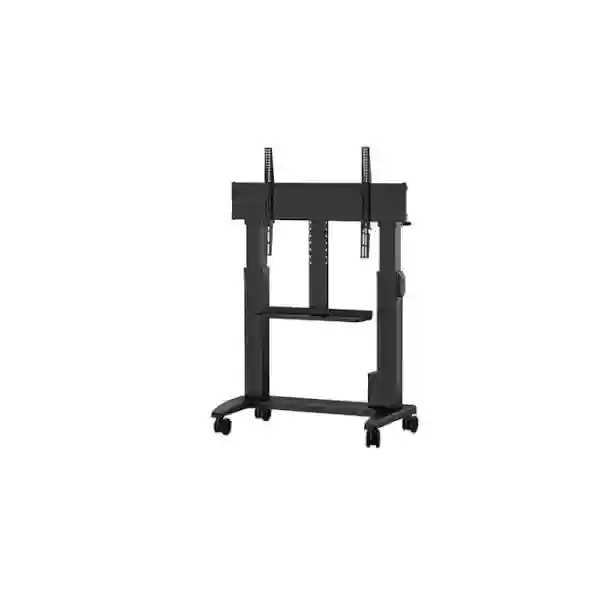
Yealink MB-FS-Lift Motorized Floor Stand Tanzania
The Yealink MB-FS-Lift is a motorized mobile floor stand designed for compatible Yealink display devices. Yealink specifies electric height adjustment with a travel range of up to 500 mm, a height-memory function for repeatable positioning, an integrated power-supply design intended to simplify cabling, swivel casters for movement, and a practical storage tray. For Tanzanian organizations planning boardrooms, training rooms, classrooms, executive collaboration spaces or flexible meeting areas, the MB-FS-Lift can turn a compatible Yealink display into a more adaptable room asset without committing the installation to a permanent wall position.
FourTeck Tanzania can help buyers confirm the exact display model, room use, mounting compatibility, installation conditions and supporting conferencing equipment before a quotation is finalized. The stand should be selected as part of the complete room design, not as an isolated cart purchase.
- Motorized height adjustment up to 500 mm
- Height memory function
- Integrated power-supply design
- Swivel casters for flexible movement
- Integrated storage tray
What the Yealink MB-FS-Lift solves
A fixed wall display works well when a meeting room has a permanent layout, a suitable mounting wall and a consistent eye line. Many modern collaboration spaces are less predictable. Training rooms may change from classroom seating to group work. Executive rooms may need the display brought closer to participants for document review and moved aside afterwards. Education spaces may use the same display for instruction, hybrid learning and workshop sessions. A multipurpose conference room may need to serve different table configurations during the week. The Yealink MB-FS-Lift addresses this type of requirement by combining a supported Yealink display with a mobile stand and powered height adjustment.
The motorized lifting mechanism is particularly useful where one fixed height does not suit every scenario. Yealink states that the stand supports up to 500 mm of electric height adjustment and includes a height-memory function. In practical terms, that gives room administrators a way to establish preferred positions for different room layouts and then return to those heights without repeatedly estimating the correct level. Mobility is handled through swivel casters, while the integrated power-supply design is intended to reduce loose power arrangements around the installation.
The stand does not replace the need for correct room planning. Floor condition, movement paths, cable reach, doorway clearance, user safety, display size, attached AV accessories and the final position of cameras and microphones still matter. FourTeck recommends confirming those details before purchase, especially for large displays and shared spaces where the stand may be moved regularly.
Verified features and buyer value
Electric height adjustment
Yealink specifies motorized height adjustment with a range of up to 500 mm. This can help align the display for seated meetings, standing collaboration, training sessions and presentations where viewing height changes with the room configuration.
Height memory
The height-memory function supports repeatable positioning. This is useful when a room alternates between a small set of known layouts and facilities teams want a consistent display level without manual trial and error.
Integrated power design
Yealink describes an integrated power-supply design intended to simplify connections and reduce clutter. Clean power routing matters in mobile installations because loose cables can interfere with movement and create avoidable service issues.
Swivel casters and tray
Swivel wheels enable flexible movement within suitable indoor spaces, while the integrated storage tray provides a practical place for selected room accessories. The exact accessory arrangement should be checked before deployment.
Yealink MB-FS-Lift compatibility
Yealink’s current compatibility documentation lists the MB-FS-Lift as an optional floor stand for several MeetingBoard and MeetingDisplay products. Compatible MeetingBoard models listed by Yealink include MeetingBoard 65, MeetingBoard 86, MeetingBoard 65 Pro, MeetingBoard 75 Pro, MeetingBoard 86 Pro, MeetingBoard 65C EDLA and MeetingBoard 75C EDLA. Yealink also lists the stand as compatible with MeetingDisplay 55, MeetingDisplay 65, MeetingDisplay 75 and MeetingDisplay 86.
Important procurement note: compatibility should be reconfirmed against the exact Yealink display model, generation and any attached accessories on the quotation. A display may be mechanically compatible while the complete room configuration introduces additional requirements for cameras, brackets, mini-PC hardware, speaker devices, cable routing or service clearance.
Where the MB-FS-Lift fits best
Flexible boardrooms
Useful when tables are reconfigured or when the display must move between presentation and collaborative work positions.
Training and education
Adjustable height can support seated instruction, standing demonstration, hybrid classes and workshop-style learning.
Shared meeting resources
A mobile display can serve nearby rooms when the operational process, floor surfaces and safe movement paths support shared use.
Project and war rooms
Teams reviewing plans, dashboards or live project material can reposition the display to suit changing group sizes and seating arrangements.
Planning a complete Yealink room around the stand
A motorized stand is only one part of a usable collaboration room. The display must be visible from the furthest normal seat, the camera should maintain an appropriate eye line, microphones must cover the seating area, and power plus network connections need to remain safe when the stand is moved. If a Yealink MeetingBoard is being used, the room design may be comparatively self-contained. If the stand supports a MeetingDisplay paired with a MeetingBar, MVC components or other room hardware, accessory brackets and cable routes should be planned as a system.
For organizations starting with a broader room project, the FourTeck Tanzania technology solutions overview explains how conferencing, displays, networking, Wi-Fi and supporting infrastructure fit together. Buyers comparing room hardware can also review the FourTeck Tanzania business technology shop, while organizations that need installation, integration or lifecycle assistance can use the FourTeck Tanzania services page to frame a wider project requirement.
Regional projects can also be coordinated through the wider FourTeck network where relevant. Customers with East African requirements may find the FourTeck Kenya technology site and FourTeck Uganda technology site useful when a collaboration standard must be considered across multiple countries.
Regional procurement and deployment guidance
The following regional guidance is designed for business buyers evaluating the Yealink MB-FS-Lift as part of a collaboration-room purchase. Availability, pricing, freight, installation scope and support arrangements should always be confirmed in a formal quotation rather than assumed from a web page.
Yealink MB-FS-Lift Motorized Floor Stand Tanzania
For organizations in Tanzania, the MB-FS-Lift is most relevant when a Yealink display must serve a room that changes configuration or when a permanent wall installation is undesirable. Corporate meeting rooms, training facilities, universities, professional-service offices, project teams and executive spaces can all benefit from a movable display platform when the room is managed carefully. The procurement process should start with the exact Yealink display model because the stand is an accessory whose usefulness depends on verified compatibility with the screen and any room-system components attached to it.
A Tanzania quotation should identify the display model, stand quantity, room location, floor type, typical movement distance, preferred conferencing platform and any camera, microphone, compute or controller hardware that will travel with the display. Buyers should also specify whether the stand will remain in one room and move only within that room, or whether staff expect to move it between rooms. Door widths, thresholds, ramps and lift access can matter when a large display is mounted. Power outlets and data connections should be positioned so the stand can be used safely at the intended locations without trailing cables across circulation paths.
Tanzanian organizations should also consider power resilience for the complete conferencing system, especially where meetings are business-critical. The stand’s integrated power design helps organize the installation, but the wider room may still require suitable surge protection or UPS planning for connected electronics. Network quality is equally important for Teams, Zoom or other cloud collaboration platforms. FourTeck can help frame the stand together with display selection, room audio, network readiness and mounting accessories so procurement teams receive a clearer bill of materials rather than a disconnected list of components.
Yealink MB-FS-Lift Motorized Floor Stand Dar es Salaam
In Dar es Salaam, the MB-FS-Lift can fit the needs of headquarters offices, consulting firms, financial organizations, hospitality groups, training providers and project teams that frequently reconfigure meeting areas. A motorized floor stand is particularly useful in rented offices or premium meeting spaces where wall drilling may be restricted, where partition walls are not ideal for a large display, or where a room must support several seating arrangements. The electric height range allows administrators to adapt the screen position when changing from a boardroom layout to a classroom or standing workshop.
Dar es Salaam buyers should provide room dimensions and the final Yealink display model at quotation stage. If the installation includes a MeetingBar, camera or other accessory, the complete mechanical arrangement should be checked before supply. Cable management deserves special attention in busy offices where the stand may be moved after meetings. Network and power outlets should be located to support the intended positions without creating trip hazards or forcing users to stretch cables beyond practical limits. Where Wi-Fi is used for collaboration traffic, capacity should be assessed against real user density rather than assumed from signal strength alone.
For offices standardizing several rooms, it may be useful to classify room types before ordering. A small meeting room may not need a large motorized display, while a training room or executive collaboration area may gain more value from mobility and height adjustment. Standardizing the same compatible display and stand combination across selected spaces can simplify user training and support, but the decision should be based on room function, viewing distance and operating process. FourTeck can assist with a room-by-room comparison so the MB-FS-Lift is deployed where its flexibility produces clear operational value.
Yealink MB-FS-Lift Motorized Floor Stand Mwanza
For Mwanza organizations, a mobile collaboration display can be valuable where one technology resource must support several functions in a controlled facility. Training centers, branch offices, healthcare administration teams, educational institutions and growing businesses may prefer a stand-based deployment when the room layout is expected to change. The MB-FS-Lift’s motorized height adjustment can help users position a compatible Yealink display for presentations, interactive discussions or hybrid meetings without physically remounting the screen.
Procurement should include a realistic movement plan. If the stand will be moved only within one room, facilities teams can concentrate on clear floor space, cable reach and stable operating positions. If it will move between adjacent rooms, doorway width, thresholds and safe transport procedures become more important. A large display creates a different handling requirement from a conventional wheeled whiteboard. Staff should know where the stand may be moved, where it should be parked, how cables are disconnected, and how accessories are secured before movement.
Connectivity planning is also essential. A meeting system may depend on wired Ethernet, Wi-Fi, USB peripherals or room controllers. Moving the display changes the relationship between the equipment and those connections. A good Mwanza deployment therefore considers the entire room workflow: how users join meetings, where the camera faces, how remote participants hear the room, where power is sourced, and how the display is returned to a standard position. Including these details in the request for quotation allows the stand, display and room components to be evaluated as one operating system rather than as separate products.
Yealink MB-FS-Lift Motorized Floor Stand Arusha
Arusha has a wide mix of organizations that use meeting technology for regional coordination, training, hospitality management, non-governmental work and professional services. The MB-FS-Lift can be attractive where a single meeting environment needs to change purpose during the day. A compatible Yealink display can be positioned for a formal video meeting, raised for a standing presentation and moved to another part of the room for a workshop. This versatility is more useful when the room process is designed around it rather than when mobility is treated as an occasional novelty.
Before purchasing, Arusha customers should confirm whether the display will be used as a standalone collaboration board or as part of a larger system with external camera, microphone, speaker or compute hardware. Attached components can affect bracket requirements, cable length and service access. The stand’s storage tray provides a useful platform for selected items, but procurement teams should not assume every accessory can be placed there without checking dimensions and operating requirements.
For hospitality and training environments, staff turnover and shared usage make simplicity important. Establishing a default stored height, marking approved parking positions and documenting the correct startup and shutdown sequence can reduce support calls. The room network should also be tested for conferencing at the positions where the stand will actually be used. If the installation must support important international meetings, reliable internet, suitable audio coverage and clear camera framing will influence the experience more than the stand alone. FourTeck can help combine these considerations into a practical room specification for quotation.
Yealink MB-FS-Lift Motorized Floor Stand Dodoma
In Dodoma, organizations planning modern meeting rooms often need technology that can support both structured sessions and flexible collaboration. The MB-FS-Lift provides a way to deploy compatible Yealink displays without making the viewing height and screen position permanent. This can suit administrative offices, training rooms, education environments and project spaces where the same room must accommodate different groups throughout the week.
The strongest business case comes from repeatable flexibility. Yealink’s height-memory function allows administrators to return the stand to preferred positions, reducing the need for users to guess the correct display height. For rooms used by many teams, facilities staff can define a standard meeting position and a second position for presentation or training. The caster-based design supports movement, but the floor surface and circulation paths should be reviewed to ensure the complete display system can be repositioned safely.
A Dodoma procurement request should include the exact compatible Yealink display, room dimensions, seating arrangement, intended meeting platform, available power outlets and network method. Where a display will be used for government, enterprise or institutional communication, security policies may also affect network segmentation, guest access and remote meeting practices. The floor stand itself does not determine those policies, but its mobility can change where the device connects. Documenting approved connection points and parking positions can keep the room easier to support. FourTeck can use this information to prepare a more complete solution discussion covering the stand, display, accessories and room infrastructure.
Yealink MB-FS-Lift Motorized Floor Stand UAE
UAE organizations often operate highly standardized collaboration environments across headquarters, branch offices, training centers and customer-facing spaces. The MB-FS-Lift can be considered where a Yealink display needs to remain mobile within a flexible room or where a permanent wall mount does not suit the architecture. Boardrooms with movable furniture, innovation spaces, training centers and temporary project rooms are typical examples where powered height adjustment and caster-based mobility can have practical value.
For enterprise projects, the stand should be evaluated alongside room standards. Procurement teams may already have approved display sizes, Teams or Zoom room designs, network policies and AV mounting standards. The MB-FS-Lift should fit those standards without creating exceptions that complicate support. Yealink’s compatibility documentation helps identify supported MeetingBoard and MeetingDisplay models, but the final bill of materials must account for any additional brackets or attached equipment used in the room design.
Multi-site UAE rollouts also benefit from clear operational rules. Define whether stands are fixed to a room or shared, who is authorized to move them, how cables are disconnected, and which stored heights are preferred. In premium meeting environments, cable appearance and room aesthetics can be as important as function. The integrated power concept helps organize the installation, yet external network and accessory cables still need planned routes. A quotation should therefore cover the complete room configuration and any installation services required rather than treating the stand as the only deployment task.
Yealink MB-FS-Lift Motorized Floor Stand Uganda
For Uganda-based businesses and institutions, the MB-FS-Lift can support rooms that need to accommodate changing participant numbers, teaching formats or meeting styles. Rather than building a collaboration experience around one fixed wall position, organizations can place a compatible Yealink display at a suitable viewing height and move it when the room is reconfigured. This can be useful in training centers, branch offices, universities, project spaces and shared conference facilities.
A good Uganda procurement plan should identify the display model first and confirm that it appears in Yealink’s supported compatibility list. Then evaluate the complete load of attached room components and the physical environment where the system will be used. Check floor surfaces, thresholds and doorway clearance. Confirm whether network access is wired or wireless at each operating position. Review power availability and consider how the device will be protected from accidental cable strain when moved.
Organizations rolling out similar rooms in Kampala and regional branches may also want to standardize user instructions. A small operating guide can explain the approved stored heights, normal parking position, safe movement process and connection sequence. This is especially useful when the equipment is shared by several departments. For hybrid meetings, room audio and internet stability remain critical. FourTeck can help position the MB-FS-Lift within a broader Yealink room design so purchasers understand which elements are stand-specific and which belong to conferencing, networking and installation scope.
Yealink MB-FS-Lift Motorized Floor Stand Kampala
Kampala offices frequently combine formal meeting rooms with training and project spaces that need to be rearranged. The MB-FS-Lift gives compatible Yealink displays a mobile base and powered height adjustment, making it easier for the same screen to support a seated conference in one session and a workshop or presentation in another. This can reduce the pressure to dedicate a separate fixed display to every temporary layout, provided the organization has a clear process for moving and reconnecting the system.
Kampala buyers should consider how the stand interacts with the rest of the room. A display mounted on a mobile stand may need a nearby power point, reliable Wi-Fi or a safely routed Ethernet cable. If a camera or other AV accessory is mounted to the display, its viewing angle can change when the stand is raised or repositioned. Microphone coverage should be checked for each common seating arrangement rather than assumed to remain ideal after the furniture moves.
In multi-room offices, the purchasing decision should also consider utilization. If the stand will rarely move, a wall or fixed floor solution may be simpler. If teams frequently change layouts, the MB-FS-Lift can provide real value by reducing installation rigidity. FourTeck recommends documenting the intended scenarios before ordering: executive meeting, training class, town-hall overflow, project review or client presentation. These scenarios can then be matched to stored heights, display size, accessory needs and cable locations so the installation is predictable for users and easier for IT teams to support.
Yealink MB-FS-Lift Motorized Floor Stand Arua
For organizations in Arua, flexible meeting technology may be especially useful when one well-equipped room must support multiple departments, visiting teams or training activities. The MB-FS-Lift allows a compatible Yealink display to be adjusted vertically and repositioned within suitable indoor spaces, giving administrators more options than a permanent wall mount. This can work well when the room changes between video conferences, teaching, planning sessions and collaborative workshops.
The deployment should be designed for the actual building. Floors should be smooth enough for controlled movement, and the route between operating positions should not include obstacles that could destabilize the stand or damage connected cables. If the equipment will stay in one room, consider defining two or three approved positions with accessible power and network. If it will move farther, establish a process for shutting down, disconnecting and securing any attached accessories before relocation.
Arua buyers should also factor in supportability. A flexible system can become difficult to troubleshoot if staff connect it differently each time it moves. Standardizing cable labels, network connection points, stored heights and parking positions makes the room more predictable. Where internet connectivity is the limiting factor for hybrid meetings, improving the network may deliver more benefit than changing room hardware. FourTeck can help separate those issues during requirement discovery so the MB-FS-Lift is purchased because mobility and height adjustment solve a real operational need, not simply because it is an attractive accessory.
Yealink MB-FS-Lift Motorized Floor Stand Mbarara
Mbarara businesses, education organizations and professional teams may use the MB-FS-Lift where collaboration rooms need to serve both local presentations and remote meetings. Height adjustment can help place the display appropriately for different seating arrangements, while mobility can make it easier to clear the screen from a room or reposition it for another activity. The value is strongest when the room frequently changes purpose and users can benefit from a repeatable, controlled setup.
For procurement, start by identifying the exact Yealink MeetingBoard or MeetingDisplay and confirming compatibility with the stand. Then define whether any additional room equipment must move with the display. A camera, touch controller, speaker or compute module may introduce mounting and cabling requirements that are not obvious when the stand is considered alone. The quote should clearly distinguish what is included with the stand, what belongs to the display and what must be ordered separately as part of the room solution.
Facilities teams should also decide how much movement is expected. If the system will be wheeled between spaces, door thresholds and cable disconnection procedures deserve attention. If the stand remains mostly stationary, the caster function may be used mainly for service access and occasional layout changes. Power protection, network stability and room acoustics should be reviewed according to the importance of the meetings. FourTeck can help customers in Mbarara frame these requirements before quotation so purchasing decisions cover deployment realities as well as the product’s motorized features.
Yealink MB-FS-Lift Motorized Floor Stand Gulu
In Gulu, the MB-FS-Lift may suit organizations that want one compatible Yealink display to support meetings, training and collaborative work without being tied to a permanent wall location. The motorized lift and height memory are especially relevant where different groups use the same room and need predictable display positioning. A stored setting can help users return the screen to the preferred height after another team has used a different configuration.
The room should be assessed before the stand is ordered. Measure viewing distance and check that the selected display is appropriate for the furthest participant. Review floor space around the stand so people can move safely. Identify the power and network locations used in each intended position. If wireless connectivity is preferred, test actual conferencing performance rather than relying solely on signal indicators. Hybrid meetings are sensitive to packet loss, congestion and unstable internet paths.
For institutions with limited technical staff on site, simplicity should guide the design. Keep the number of movable cables low, label the approved connection points and document the normal setup. If the display includes integrated collaboration functions, the stand can help create a cleaner all-in-one experience. If the room includes multiple external devices, additional cable management may be required. FourTeck can support the requirement definition so Gulu buyers understand the relationship between the MB-FS-Lift, the compatible Yealink display and the network, power and AV elements needed for a dependable meeting experience.
Yealink MB-FS-Lift Motorized Floor Stand Kenya
Kenyan organizations with modern collaboration programs may consider the MB-FS-Lift for flexible boardrooms, training facilities, education spaces and project rooms. In offices where furniture layouts change often, a mobile display can help maintain a useful screen position without repeated remounting. The motorized height range and memory function give facilities teams a more controlled way to adapt the screen to different meeting modes.
For Nairobi headquarters or multi-site deployments, standardization is often an important buying concern. Organizations can define a supported Yealink display-and-stand combination for selected room types while using fixed mounts in other rooms where mobility is unnecessary. This approach avoids paying for flexibility everywhere while still providing it in locations that benefit from reconfiguration. Procurement teams should record the exact Yealink model, room function and attached accessories for each site so compatibility and installation scope remain clear.
Kenya-based deployments should also plan how network and power connections follow the movable screen. In rooms using wired Ethernet, provide safe connection points near expected operating positions. In Wi-Fi designs, validate capacity during real meetings. Cable management should protect connectors during movement, and users should understand when equipment must be disconnected before repositioning. For regional companies operating across Kenya and Tanzania, using similar operating procedures can make support easier. FourTeck can help compare the MB-FS-Lift with fixed mounting options and define where a motorized stand provides meaningful operational value.
Yealink MB-FS-Lift Motorized Floor Stand Kuwait
Kuwait businesses and institutions often require polished meeting spaces that can support executive collaboration, presentations and hybrid communication. The MB-FS-Lift can be considered for rooms where design flexibility matters and a permanent wall mount would limit how the space is used. Its motorized adjustment allows a compatible Yealink display to be positioned for seated or standing use, while the caster system supports controlled movement within suitable indoor areas.
In premium meeting environments, the visual finish and cable plan are important. The integrated power-supply concept helps reduce clutter around the stand, but organizations should still account for external network, AV and accessory cables. Floor boxes or carefully positioned wall outlets can make mobile setups cleaner. If the room relies on wireless collaboration, the Wi-Fi design should provide stable capacity across the area where the stand will be used.
Kuwait procurement teams should also consider service access and room operations. A mobile display can simplify access to the back of the screen for maintenance, but the system should have a defined parking position where it can be safely stored. For rooms used by executives or clients, a stored default height can help ensure consistent presentation. FourTeck recommends confirming Yealink model compatibility, attached components, room dimensions and intended movement before ordering so the final solution is both technically correct and visually appropriate for the space.
Yealink MB-FS-Lift Motorized Floor Stand Ghana
For organizations in Ghana, the MB-FS-Lift can support meeting and training rooms that need more flexibility than a fixed screen installation provides. A compatible Yealink display mounted on the stand can be adjusted to suit different seating arrangements and moved when the room changes function. This may be attractive for corporate training, education, project collaboration and executive meetings where the same space serves several teams.
Accra-based headquarters and regional operations should include the movement workflow in procurement planning. The stand should have clear approved positions with accessible power and network. If the organization expects to move it between rooms, staff should know how to protect connectors and attached accessories. Doorway and floor conditions should be checked in advance because a large display mounted on a mobile stand requires more careful handling than a small portable screen.
Where conferencing platforms are cloud-based, network reliability can determine the user experience. A flexible stand does not correct poor Wi-Fi or internet performance, so buyers should assess connectivity alongside the hardware. The exact MeetingBoard or MeetingDisplay model also needs to be confirmed against Yealink’s compatibility information. FourTeck can assist by structuring the requirement around display size, room type, platform, camera and audio needs, network readiness and installation. This helps Ghana buyers obtain a quotation that reflects the whole collaboration environment rather than only the motorized stand.
Yealink MB-FS-Lift Motorized Floor Stand Nigeria
Nigeria has a wide range of enterprise, education, finance, energy and professional-service environments where flexible meeting spaces can be valuable. The MB-FS-Lift is relevant when a compatible Yealink display must adapt to different room layouts or when a fixed wall position does not suit the operational design. Powered height adjustment can help teams align the display for seated board meetings, standing presentations, training classes and collaborative workshops.
For Lagos, Abuja and other major business locations, procurement teams should determine whether the stand is a room-specific asset or part of a shared equipment pool. Shared use can increase utilization but requires stronger operational discipline. The system should have a defined process for disconnecting cables, moving safely, checking accessories and reconnecting at the destination. If the display is part of a Teams or Zoom room environment, the network path and room audio should be tested in every intended operating position.
Power planning may also be significant for critical meetings. While the MB-FS-Lift includes an integrated power-supply design, the display and room electronics still depend on suitable building power and any protection strategy the organization requires. Buyers should not assume that a stand removes the need for UPS or surge-protection planning for the overall solution. FourTeck can help Nigeria customers confirm model compatibility and define a bill of materials that includes necessary mounting accessories, display, conferencing components and deployment services.
Yealink MB-FS-Lift Motorized Floor Stand Seychelles
In Seychelles, a flexible collaboration setup may be particularly useful for hospitality groups, corporate offices, government organizations, education providers and businesses that make intensive use of multipurpose rooms. The MB-FS-Lift allows a compatible Yealink display to be repositioned and adjusted in height, reducing dependence on a single permanent wall installation. This can be useful when rooms serve executive meetings, staff training, remote coordination and guest presentations at different times.
Because island procurement can involve more complex logistics, the quotation should be precise about the exact display model, stand, accessories and installation requirements. Missing a bracket or small compatibility component can create avoidable delays. Buyers should therefore confirm the complete configuration before shipping. The room should also be checked for floor conditions, doorway clearance, power locations and network access at all intended display positions.
For hotel or resort environments, the system may be operated by different staff members, so a simple standard procedure is valuable. A default stored height, clearly labeled cable connections and a fixed parking position can keep the equipment consistent between events. If the stand is used in rooms with frequently changing furniture, the camera and microphone arrangement should be reviewed whenever the seating plan changes significantly. FourTeck can help structure the procurement checklist so Seychelles buyers understand the dependencies before placing an order.
How to choose between MB-FS-Lift and a fixed mount
Choose the MB-FS-Lift when flexibility has measurable value: the room changes layout, the display must be moved for training or workshops, a suitable wall is unavailable, facilities teams need easier service access, or users genuinely need more than one screen height. A fixed wall mount can be preferable when the room has one permanent seating arrangement, cable routes are built into the wall, the screen should never move, and the organization wants the simplest possible physical installation.
The right choice is therefore not “mobile is better” or “fixed is better.” The correct mounting method is the one that best supports the room’s normal operating pattern while keeping viewing, safety, cable management and maintenance straightforward.
Quotation checklist for Yealink MB-FS-Lift
Specify the complete Yealink MeetingBoard or MeetingDisplay model and size so compatibility can be checked.
Provide seating count, viewing distance and whether the room is for meetings, training, education or multipurpose use.
List cameras, meeting bars, microphones, speakers, mini-PC components and any brackets expected to move with the display.
Explain whether the stand moves inside one room, between nearby rooms or mainly remains stationary with occasional repositioning.
Identify available outlets, Ethernet points, Wi-Fi expectations and any UPS or surge-protection requirement.
Confirm whether you require supply only, assembly, display mounting, room integration, testing or user handover.
Frequently asked questions
What is the Yealink MB-FS-Lift?
It is a motorized mobile floor stand for compatible Yealink display devices. Yealink highlights electric height adjustment up to 500 mm, height memory, an integrated power-supply design, swivel casters and a storage tray.
Which Yealink displays are compatible?
Yealink’s compatibility material lists MeetingBoard 65, MeetingBoard 86, MeetingBoard 65 Pro, 75 Pro and 86 Pro, MeetingBoard 65C EDLA and 75C EDLA, plus MeetingDisplay 55, 65, 75 and 86. Compatibility should still be reconfirmed for the exact device and accessory configuration being quoted.
How much height adjustment does MB-FS-Lift provide?
Yealink states that the electric height adjustment range is up to 500 mm and that the stand includes a height-memory function for switching between preferred heights.
Is MB-FS-Lift suitable for Teams and Zoom rooms?
The stand is a mounting and mobility accessory rather than a conferencing platform. Suitability for a Teams or Zoom room depends on the compatible Yealink display or room-system configuration mounted to it and the required accessories.
Can the stand be moved between rooms?
Its swivel casters support mobility, but practical movement depends on the complete installed system, doorway dimensions, thresholds, floor conditions, attached equipment and safe cable-disconnection procedures. Plan the route before deciding to use the stand as a shared room resource.
Does the MB-FS-Lift include a tray?
Yes. Yealink describes the MB-FS-Lift as coming with a practical storage tray. The suitability of that tray for a specific accessory should be checked against the final room configuration.
What information should I send for a quotation?
Send the exact Yealink display model, quantity, room dimensions, seating layout, platform, attached AV devices, intended movement pattern, power and network details, site location and whether installation is required.
Decision recap
The Yealink MB-FS-Lift is best understood as a flexibility accessory for compatible Yealink display deployments. Its verified strengths are motorized height adjustment up to 500 mm, height memory, integrated power design, swivel casters and an included storage tray. It is especially relevant when a room changes layout, when several heights are useful, or when wall mounting is undesirable.
Before ordering, confirm the exact Yealink display model and any attached room components. Then review floor conditions, movement routes, power, network access, camera position, audio coverage and installation scope. A well-planned mobile room is easier to use and support than one assembled from individually compatible parts without a complete workflow.
Consult FourTeck Tanzania about your Yealink room
Tell us which Yealink MeetingBoard or MeetingDisplay you plan to use, the room size, the number of participants and how often the screen needs to move. We can help you organize the compatibility questions and supporting room requirements before a quotation is prepared. This is particularly useful when the project includes cameras, meeting bars, microphones, network upgrades or multiple room types.




Reviews
There are no reviews yet.