
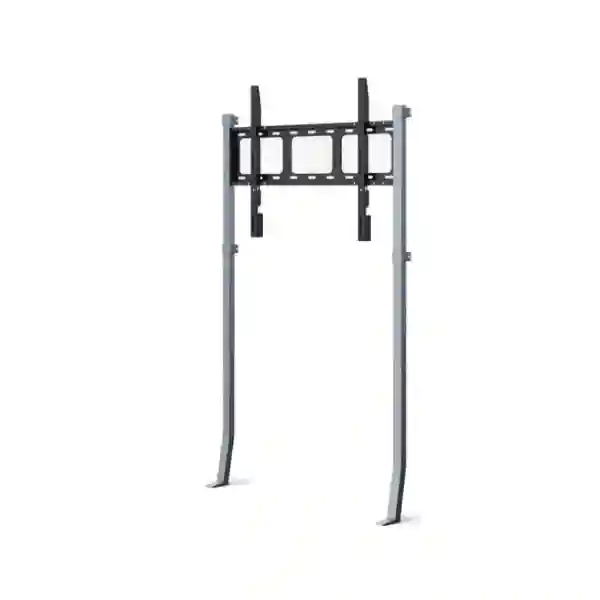
Yealink MB-WallStand-860W Tanzania
The Yealink MB-WallStand-860W is a reinforced wall-stand solution engineered for Yealink MeetingBoard 75 Pro and MeetingBoard 86 Pro deployments. Unlike a conventional wall bracket that depends primarily on the wall to carry the display load, this design transfers part of the weight down to the floor. That makes it particularly valuable for meeting rooms where drywall, partition walls, timber-backed surfaces or other limited load-bearing wall constructions make a traditional wall-only installation difficult to approve.
For organizations in Tanzania planning large-format interactive collaboration rooms, the mounting method deserves the same attention as the screen, camera, audio, network and room layout. The MB-WallStand-860W helps create a stable, professional installation while preserving the wall-oriented appearance many boardrooms, training rooms and executive meeting spaces require.
What the Yealink MB-WallStand-860W solves
A large interactive meeting display is not just another television. A MeetingBoard 75 Pro or MeetingBoard 86 Pro forms the visual and interactive center of a collaboration room, so its mounting position affects sightlines, touch interaction, camera perspective, room circulation and user confidence. In many offices the preferred location is against a wall, yet the available wall may not have the structural capacity for a conventional direct wall mount. The MB-WallStand-860W addresses this specific installation problem by combining wall positioning with a stand-supported structure that carries part of the device weight through the floor.
This approach expands installation flexibility without forcing every project toward a mobile cart or a fully freestanding arrangement. It is especially relevant when a room has been created using lightweight partitions, when the decorative wall surface cannot be relied upon as the sole structural support, or when facilities teams want a solution designed specifically around the compatible Yealink MeetingBoard Pro sizes. The stand remains a fixed installation component, so the result can feel more integrated into the room than a wheeled floor stand while reducing dependency on the wall alone.
Part of the MeetingBoard load is transferred to the floor, reducing the structural demand placed on the wall.
Designed for situations where drywall, partitions or wooden walls may not be ideal for traditional wall-only mounting.
Yealink specifies the accessory for MeetingBoard 75 Pro and MeetingBoard 86 Pro rather than positioning it as a generic display stand.
Verified specifications and compatibility
| Official product name | Yealink MB-WallStand-860W |
| Official positioning | Wall stand for MeetingBoard 75/86 Pro |
| Part number | 3311076 |
| Structure | Reinforced, stand-supported wall installation structure |
| Stand dimensions | 1131 × 127 × 1631 mm |
| Stand weight | 14.5 kg |
| MeetingBoard 75 Pro | Optional compatible accessory |
| MeetingBoard 86 Pro | Optional compatible accessory |
Compatibility should always be checked against the exact MeetingBoard model and project configuration before ordering. Third-party pages sometimes mix standard and Pro model references or publish conflicting dimensions, so this page uses Yealink’s current official product and support information as the factual baseline.
Planning a MeetingBoard installation with the wall stand
The correct mounting accessory is only one part of a successful MeetingBoard deployment. Before installation, the project team should confirm room dimensions, seating positions, desired screen centerline, camera sightlines, electrical outlet location, network cabling route and how people will approach the display for whiteboarding or touch interaction. A mechanically secure installation can still create a poor user experience when the screen is positioned too high, too low, too close to furniture or where lighting causes persistent glare.
Facilities teams should also inspect the floor and wall surfaces as a combined system because the MB-WallStand-860W relies on both. The stand reduces wall loading; it does not eliminate the need for correct fixing, level surfaces and professional installation. The wall material, available studs or structural backing, floor finish, skirting profile and any concealed electrical or plumbing routes should be understood before drilling or anchoring. The project should follow Yealink installation documentation and any applicable building or facilities requirements.
For a broader room design, FourTeck Tanzania’s business technology shop provides context for conferencing, displays and supporting infrastructure, while the FourTeck Tanzania solutions overview explains how video collaboration, networking and room technology can be planned together. These references are useful when the wall stand is part of a complete meeting-room project rather than a standalone accessory purchase.
Buying guidance: what to confirm before requesting a quotation
Confirm whether the room uses MeetingBoard 75 Pro or MeetingBoard 86 Pro. Product families can have different mounting accessories, so the exact model matters.
Describe whether the wall is concrete, blockwork, drywall, timber, partition construction or another material, and note any structural backing already available.
Share the floor finish and any skirting, raised floor or other detail that could affect how the stand sits against the wall.
Provide room dimensions, table position and typical seating so the final display height and location can be evaluated as part of the collaboration experience.
Yealink MB-WallStand-860W Tanzania
Organizations searching for the Yealink MB-WallStand-860W in Tanzania are usually solving a practical installation problem rather than simply purchasing a metal accessory. The MeetingBoard 75 Pro and 86 Pro are large collaboration systems, and the wall chosen for a boardroom, training room, executive office or hybrid-learning space may not be suitable for carrying the full load through a conventional wall-only bracket. In such cases, the MB-WallStand-860W offers a Yealink-designed path that combines wall positioning with floor support. This is particularly useful in modern fit-outs where interior partitions are commonly used to create flexible rooms and where the structural wall may sit behind decorative finishes or lightweight construction.
For Tanzania projects, procurement should begin with the exact MeetingBoard model, the target room, the wall construction and whether the installation is new or a retrofit. A retrofit may involve existing power outlets, data points, skirting, table positions and cable routes that limit where the stand can be placed. A new room gives more freedom, but it is still wise to coordinate the mounting point with electrical, networking and interior-work schedules. The stand itself measures 1131 × 127 × 1631 mm and weighs 14.5 kg according to Yealink support documentation, so space around the final installation should be planned rather than assumed.
Business buyers in Tanzania should also treat the stand and MeetingBoard as part of one room system. The display location influences camera height and participant framing. Network connectivity influences Teams or Zoom performance. Room acoustics determine whether remote participants can hear clearly. Lighting and glazing influence image quality and screen visibility. Power continuity may also matter in sites where short interruptions are common. These dependencies are why a quotation request should mention the wider room requirement, not only “one wall stand.” A complete bill of materials can then consider the correct MeetingBoard, stand, cabling, network connection, power arrangement and any additional room components.
FourTeck Tanzania can use the product requirement as the starting point for a broader collaboration-room discussion. Buyers who operate across East Africa can also review FourTeck IT Solutions Africa for multi-country technology planning. The important procurement outcome is a verified compatible accessory and a mounting plan that matches the real wall and room conditions, without assuming stock, delivery dates or installation scope before quotation.
Yealink MB-WallStand-860W Dar es Salaam
Dar es Salaam has a wide range of office environments, from purpose-built commercial buildings to converted spaces and partitioned suites. For companies deploying a MeetingBoard 75 Pro or 86 Pro in these environments, the mounting surface can vary substantially even within the same building. A boardroom may have a decorative feature wall over lightweight framing, while another meeting space may use gypsum board or a removable partition system. The MB-WallStand-860W is relevant because its stand-supported design reduces the load that would otherwise depend entirely on that wall structure.
A Dar es Salaam procurement team should provide facilities information alongside the product request. Useful details include the exact MeetingBoard model, photos of the intended wall, wall width, floor-to-ceiling height, skirting details, power-socket position and available data outlet. If the room already contains a large conference table, the distance from the wall to the nearest seat is also important. Large displays need an appropriate viewing distance, and users should still be able to reach the touch surface without squeezing behind furniture or interfering with presentation equipment.
For office towers and managed premises, installation may need to be coordinated with building management. Drilling rules, permitted working hours, concealed-service checks and approved fixing methods can affect the project schedule. The MB-WallStand-860W can reduce dependence on the wall as the sole load-bearing element, but the wall still participates in the installation and must be assessed. A professional installer should verify the substrate and follow Yealink’s installation guidance rather than treating the accessory as a freestanding cart.
Dar es Salaam businesses with regional operations may also want standardized room designs across branches. Using the same MeetingBoard family, mounting approach, screen height convention and cable-routing method can simplify support and user training. For organizations with parallel requirements in the UAE, FourTeck UAE provides a regional technology reference. For the Tanzania room itself, the quotation should remain site-specific and confirm compatibility, quantities, scope and lead time rather than relying on assumptions from another market.
Yealink MB-WallStand-860W Mwanza
For Mwanza businesses, educational organizations and project offices evaluating a large Yealink collaboration display, the MB-WallStand-860W can help when the preferred room does not have a wall suitable for carrying the MeetingBoard through a traditional wall mount alone. This situation can arise in partitioned offices, training rooms created inside larger buildings, hospitality meeting spaces and renovated premises where the visible wall is not the primary structure. The accessory’s reinforced floor-supported format allows part of the device weight to be taken through the floor while keeping the installation positioned against the wall.
Planning should begin before equipment reaches the site. Measure the usable wall width and identify whether doors, windows, air-conditioning units, electrical trunking or furniture limit placement. The 1131 mm stand width and 1631 mm stand height should be considered alongside the actual MeetingBoard dimensions, not in isolation. The final assembly needs enough clearance for installation, maintenance and comfortable user access. Where the room is used for teaching or workshops, consider standing users and the need for touch interaction. In a boardroom, consider seated sightlines and whether the display remains clearly visible from the far end of the table.
Mwanza procurement can also benefit from documenting the room’s network and power conditions. The wall stand itself is passive, but the MeetingBoard is a collaboration endpoint that depends on stable connectivity and power. A new deployment should verify the available Ethernet or wireless design, internet capacity, platform requirements and any policies for guest or corporate network access. Cabling should be routed cleanly so the visual benefit of a fixed wall-oriented installation is not undermined by exposed leads.
When requesting a quotation, include the exact product name Yealink MB-WallStand-860W and, where useful, official part number 3311076. That reduces confusion with similarly named wall mounts, earlier wall stands or floor stands. Also state whether installation is required and describe the wall type. A clear requirement lets the supplier confirm the correct accessory and identify additional site checks before delivery or installation is committed.
Yealink MB-WallStand-860W Arusha
Arusha organizations often use meeting rooms for management discussions, tourism and hospitality operations, training, NGO coordination, education and multi-site project work. In these settings, a large interactive collaboration board can become a central tool for remote meetings and shared content. The Yealink MB-WallStand-860W is appropriate when a MeetingBoard 75 Pro or 86 Pro needs a stable wall-oriented installation but the available wall is a lightweight partition or another surface where full wall loading is undesirable.
The first design question should be where people naturally look during a meeting. Mounting the board against the wrong wall can create backlighting from windows, poor camera angles or a table layout that blocks touch access. The MB-WallStand-860W provides mounting flexibility, but facilities planning still determines whether the chosen location works operationally. Arusha projects with glazed meeting rooms should consider reflections and daylight. Training spaces should consider presenter movement. Hospitality meeting rooms may need a clean visual appearance between events, which makes careful cable management particularly important.
The accessory should be treated as a structural component, not a decorative stand. The floor must be suitable for the support arrangement, and the wall fixation still needs to be completed correctly. Skirting boards, wall panels and raised cable ducts can prevent the stand from sitting as intended if they are not considered in advance. Sending wall photographs and basic measurements with the quotation request can help identify these issues early. For a new fit-out, the installer should coordinate with the contractor before finishes are finalized, because small adjustments to power or data outlet positions can make the finished room much neater.
Arusha buyers should also specify whether the project is a single room or part of a standard that will be repeated elsewhere. Repeating the same mounting height, MeetingBoard model, network method and room-control approach across multiple sites makes user experience more consistent. FourTeck Tanzania can help align the stand purchase with the broader conferencing requirement while keeping product claims tied to verified Yealink documentation.
Yealink MB-WallStand-860W Dodoma
In Dodoma, government-related offices, corporate branches, education facilities, project teams and professional organizations may need collaboration rooms that support remote participation without a complex user experience. A large MeetingBoard can consolidate display, whiteboarding and conferencing functions, but the device still needs a mounting method appropriate to the room construction. The MB-WallStand-860W offers an option for MeetingBoard 75 Pro and MeetingBoard 86 Pro when the intended wall is not ideal for carrying the entire load through a conventional bracket.
Procurement teams should involve facilities or building personnel before finalizing the order. The stand-supported structure transfers part of the weight to the floor, yet wall fixation remains part of the system. Wall composition, internal framing, floor flatness and the presence of service conduits should be identified. In formal boardrooms, the installation also needs to align with furniture and presentation workflows. A screen that is structurally secure but visually blocked by a table monitor, lectern or tall chair still creates a poor meeting environment.
Dodoma projects that involve new construction or refurbishment have an opportunity to prepare the room correctly before the hardware arrives. Power outlets can be positioned to reduce visible cabling, network outlets can be placed near the device, and the wall finish can accommodate the stand without awkward skirting conflicts. Lighting can be oriented to reduce glare and avoid strong backlighting behind participants. These decisions are inexpensive during fit-out compared with corrections after the room has been handed over.
A useful quotation request should list the MeetingBoard model, quantity of wall stands, site location, wall type and whether installation or only supply is needed. If multiple rooms are involved, identify which rooms use the 75 Pro and which use the 86 Pro. That prevents accessory mismatches and supports a clearer bill of materials. Lead time, stock status and service scope should be confirmed on the quotation rather than assumed from another country or online storefront.
Yealink MB-WallStand-860W UAE
The Yealink MB-WallStand-860W is also relevant to UAE meeting-room projects where commercial interiors frequently use drywall, demountable partitions, decorative wall systems and fit-out structures that may not be intended to carry the full weight of a large interactive display through conventional wall anchors alone. The product’s purpose-built stand-supported arrangement gives integrators another option for positioning MeetingBoard 75 Pro and 86 Pro devices against a wall while transferring part of the load toward the floor.
In UAE offices, the installation process often involves several parties: the tenant, fit-out contractor, building facilities team, AV integrator and IT department. The MB-WallStand-860W should be coordinated across those roles. The fit-out team can confirm wall composition and concealed services, the IT team can prepare network access, and the AV or collaboration installer can determine screen placement based on seating and camera geometry. This coordination is especially valuable in premium boardrooms where finishes, glass partitions and custom furniture leave little tolerance for last-minute changes.
For projects that span Tanzania and the UAE, standardizing on a compatible Yealink mounting accessory can simplify equipment schedules and documentation, but each site still needs its own structural assessment. Climate-controlled office towers, villas converted to offices, warehouse administration blocks and hospitality meeting spaces can all present different wall conditions. The product name may be the same, yet the required fixing method and installation process can differ significantly.
Organizations sourcing through the UAE market can use FourTeck UAE as a regional reference for broader IT and collaboration requirements. However, quotations should confirm the exact local scope, compatibility, quantity and delivery terms. Online prices from third-party markets should not be treated as a universal benchmark because tax, freight, supply channel and installation requirements vary by region.
Yealink MB-WallStand-860W Uganda
Uganda organizations looking to deploy Yealink MeetingBoard 75 Pro or 86 Pro systems may encounter the same wall-construction challenge seen across modern offices: the desired meeting-room wall is visually suitable but structurally limited for a full wall-only mount. The MB-WallStand-860W is designed for this scenario. Its reinforced stand structure transfers part of the display load to the floor, helping broaden the range of wall types that can be considered for a fixed wall-oriented MeetingBoard installation.
Before ordering for a Uganda project, identify whether the room uses permanent masonry, gypsum board, timber partitions or modular office partitions. Each material changes the installation approach. The stand is not a substitute for correct engineering or fastening; it is a product designed to reduce wall load and support safer installation on limited load-bearing walls. A site survey should confirm the actual construction behind the visible finish. Floor level and skirting details should also be checked because the support legs need to meet the floor correctly.
If the MeetingBoard will support regular cross-border meetings, network reliability and room acoustics should be reviewed together with mounting. Stable upstream bandwidth, sensible QoS, secure network access and a clear microphone environment have a direct effect on the meeting experience. The screen position should allow users to see remote participants naturally and approach the touch surface without disrupting people seated at the table. Good mounting is therefore one part of a broader collaboration-room design.
For Uganda-specific technology requirements, buyers can refer to FourTeck Uganda as a regional resource. Organizations procuring from Tanzania for Uganda branches should state the final installation country and site conditions when requesting the quote, because freight, installation scope and local project coordination may differ.
Yealink MB-WallStand-860W Kampala
Kampala has many offices in multi-tenant buildings where meeting rooms are created using internal partitions rather than structural masonry. That makes the Yealink MB-WallStand-860W a useful accessory to consider for MeetingBoard 75 Pro and 86 Pro installations. The product is specifically intended to reduce wall loading by using a reinforced stand-supported structure, helping when a conventional wall-only mounting solution is unsuitable for the available surface.
For a Kampala boardroom, the facilities survey should record the wall finish, suspected wall construction, floor finish, ceiling height and the path for power and network cabling. If the meeting room is located inside a managed building, obtain any building rules that affect drilling or fixing before installation. Some locations may require approval for penetrations or contractor access. The stand makes the structural challenge easier to manage, but it does not remove normal site-safety and building-management obligations.
The room layout should also be tested from a user perspective. Check whether participants at the far end of the table can read shared content, whether the integrated camera view is appropriate and whether people can stand at the board to annotate without blocking circulation. If the MeetingBoard is replacing a television or projector, do not automatically reuse the previous mounting height. Interactive displays often need a different ergonomic position because users touch the screen rather than only watch it.
Kampala procurement teams should include the official part number 3311076 in requests where model ambiguity is a concern. If multiple meeting rooms have different board sizes, map each accessory quantity to the exact room and MeetingBoard model. That simple step improves purchasing accuracy and helps the installer arrive with the correct hardware.
Yealink MB-WallStand-860W Arua
Arua organizations implementing a modern collaboration room may be working in a branch office, education environment, project facility or renovated building where the desired display wall has limited structural capacity. The Yealink MB-WallStand-860W can be considered when the selected endpoint is MeetingBoard 75 Pro or MeetingBoard 86 Pro and a wall-oriented installation is preferred. By shifting part of the load toward the floor, the stand helps reduce reliance on the wall alone.
Remote-site projects benefit from careful pre-installation planning because missing measurements or accessories can create disproportionate delays. Before shipment, record the wall width, room height, floor type, skirting profile and available route for power and Ethernet. Photograph the intended installation area from several angles and identify any nearby doors, windows or air-conditioning equipment. These details help the project team determine whether the chosen position is realistic before technicians and hardware arrive.
The MB-WallStand-860W itself is 1131 mm wide, 127 mm deep and 1631 mm high, with a documented stand weight of 14.5 kg. Those figures help with logistics and space planning, but they do not replace the full MeetingBoard dimensions or installation manual. The final assembly extends beyond the stand structure because the board itself is wider and taller in use. Transport access, stairs, door openings and safe handling should therefore be considered for the complete system rather than the stand alone.
When requesting an Arua quotation, ask for confirmation of compatibility and required installation scope. Avoid assuming that a wall stand includes the MeetingBoard or that every mounting accessory is interchangeable. Clear line items for the MeetingBoard, MB-WallStand-860W and any supporting components make the purchase order easier to audit and the installation easier to prepare.
Yealink MB-WallStand-860W Mbarara
Mbarara businesses, universities, healthcare organizations and professional offices may use large collaboration displays for training, remote consultation, management meetings and multi-site coordination. Where a Yealink MeetingBoard 75 Pro or 86 Pro is selected, the MB-WallStand-860W provides a purpose-built mounting option for rooms whose walls are not ideal for a traditional load-bearing mount. Its stand-supported structure is particularly relevant for partitioned interiors and remodeled office spaces.
The accessory can help solve the structural concern, but room design should still address how the board will be used. A training room may need the board accessible from several standing positions. A management boardroom may prioritize clean sightlines and centered camera framing. A healthcare meeting space may require careful cable management and easy cleaning around the installation. These use cases can produce different preferred positions even when the same hardware is used.
Mbarara projects should also consider serviceability. Leave enough access around the installation for maintenance and cabling changes. Avoid trapping power supplies, network connections or other components where the MeetingBoard would need to be removed for basic troubleshooting. If the room may later be reconfigured, record the mounting measurements and take installation photographs for future facilities teams. Documentation is especially useful when the original installer is not the person supporting the room several years later.
For procurement, state the target MeetingBoard size, desired quantity, installation town and whether the room is ready. A supplier can then identify whether additional information is needed before quoting installation. The official Yealink compatibility data should remain the source of truth, especially because third-party listings sometimes describe the stand generically as supporting a wider range of MeetingBoard variants.
Yealink MB-WallStand-860W Gulu
For Gulu offices and institutional meeting spaces, the MB-WallStand-860W can support a professional MeetingBoard 75 Pro or 86 Pro deployment where a lightweight wall would otherwise complicate installation. The design keeps the board positioned against the wall while using a reinforced stand structure to transfer part of the load downward. This combination can be preferable to a mobile cart when the room needs a fixed collaboration point and clear floor circulation.
Gulu projects should pay close attention to logistics and site readiness. Large collaboration systems are easier to deploy when the mounting location, power and network are already prepared. Confirm door widths, stair access and final-room clearance before delivery. Measure the wall and identify furniture that may need to be moved during installation. If cable routes pass through trunking or ceiling spaces, make sure those routes are accessible before installers arrive.
A floor-supported wall stand also requires a stable contact with the floor. Uneven surfaces, substantial skirting or raised features at the wall base should be discussed in advance. The wall still needs proper fixing, so the visible surface should be inspected for concealed services and suitable anchoring points. These checks help avoid improvisation on installation day and protect the MeetingBoard investment.
For organizations using Gulu as one branch within a broader Uganda network, standard room documentation can improve support. Record the MeetingBoard model, wall-stand part number, installed height, network settings and room contact person. The same information can then be used when expanding to additional branches, while still allowing each site’s physical installation to be assessed separately.
Yealink MB-WallStand-860W Kenya
Kenya has a mature market for hybrid-work and collaboration technology, and many modern offices use flexible partition construction that can complicate conventional mounting of large interactive displays. For MeetingBoard 75 Pro and MeetingBoard 86 Pro deployments, the Yealink MB-WallStand-860W provides a purpose-built wall stand that reduces the amount of device weight carried by the wall by transferring part of it to the floor.
In Nairobi and other commercial centers, collaboration rooms are often part of managed office fit-outs with glass fronts, gypsum partitions and integrated furniture. The stand can be useful in these environments, but it should be specified early enough to coordinate with interior works. Outlet positions, wall finishes, skirting and cable pathways can all affect the final appearance. If the MeetingBoard is being added to an existing room, a short site survey can identify whether furniture or previous mounting hardware will interfere with the preferred position.
For companies with offices in both Kenya and Tanzania, it can be useful to standardize on the same Yealink MeetingBoard Pro family and accessory set. Standardization improves procurement records, user familiarity and support documentation. However, the actual mount installation should never be standardized blindly; each room’s wall and floor construction must still be checked. A reinforced stand helps accommodate more wall types, but local building conditions remain decisive.
Kenya-specific buyers can review FourTeck Kenya for broader business technology and video-conferencing requirements. When requesting the MB-WallStand-860W, include the MeetingBoard model, destination, quantity and whether professional installation is part of the requirement so the quotation can separate product supply from site services.
Yealink MB-WallStand-860W Kuwait
Kuwait offices, training centers and enterprise meeting spaces frequently combine high-quality interior finishes with partitioned construction. Where a Yealink MeetingBoard 75 Pro or 86 Pro is planned, the MB-WallStand-860W can provide a more suitable fixed mounting approach than relying entirely on a lightweight wall. Its reinforced design allows part of the load to be supported by the floor, helping preserve a wall-oriented room layout while addressing structural limitations.
The product is especially relevant during office renovation, where the visible wall may include decorative panels over gypsum or framed construction. Installers should determine what lies behind the finish before selecting fixing points. The stand’s floor support does not mean anchors can be placed without regard to wall structure. Proper fastening remains essential, and installation should follow Yealink documentation and the project’s facilities rules.
Kuwait projects should also coordinate the MeetingBoard with power and network services. The fixed position should have a clean route for cables and enough access for maintenance. If the board is used for frequent executive meetings, camera framing and sightlines should be tested from the actual seating positions. If the room is used for training, the display should be reachable for annotation without users stepping around obstructive furniture.
Cross-regional procurement teams sourcing the same accessory for Kuwait, UAE and East African branches should maintain a common bill-of-materials format but confirm availability and installation terms independently in each market. Product compatibility can be standardized; stock, freight, tax and on-site service should be confirmed through the applicable quotation.
Yealink MB-WallStand-860W Ghana
For Ghana organizations adopting large-format Yealink collaboration systems, the MB-WallStand-860W offers a way to deploy MeetingBoard 75 Pro and MeetingBoard 86 Pro in rooms where the preferred wall has limited load-bearing capacity. The accessory combines wall positioning with floor-supported reinforcement, which is useful in offices built with lightweight partitions or retrofit spaces where installing heavy equipment directly onto the wall may be difficult.
Accra offices and branch environments often evolve over time, with meeting rooms created after the original building construction. In these cases the wall may not have been designed to carry a large interactive display. A site review should confirm the partition type, available internal supports and floor condition. The wall stand can reduce structural demand, but the installation still requires correct wall fastening and careful alignment.
The procurement request should also include the room’s intended use. A leadership boardroom, classroom, training suite and project war room can all use the same MeetingBoard hardware differently. Screen height, table distance and circulation affect whether the device feels natural in daily use. It is better to resolve those details before drilling and cabling than to reposition the system after commissioning.
For a cross-border project, keep a record of Yealink part number 3311076 and the exact MeetingBoard variant. This helps prevent confusion with MB-WallMount products or other wall stands. Where a complete collaboration-room quotation is needed, include the network, power and installation requirements so the accessory is evaluated as part of the system rather than as an isolated line item.
Yealink MB-WallStand-860W Nigeria
Nigeria enterprises, financial organizations, training centers, technology companies and distributed businesses can use Yealink MeetingBoard systems as fixed collaboration points for hybrid work. In buildings where internal office walls are made from gypsum board, lightweight framing or decorative partitions, the MB-WallStand-860W can be a valuable mounting accessory because it directs part of the MeetingBoard load through a reinforced stand to the floor.
For Lagos, Abuja and other urban projects, the room fit-out should be reviewed before the stand is ordered. Decorative wall cladding, floor skirting, cable raceways and concealed services can all influence how close the stand can sit to the wall and where anchors can be placed. Where a landlord or facility manager controls building alterations, obtain required approvals in advance. A well-planned installation reduces the risk of discovering structural constraints after the collaboration hardware has arrived.
Power resilience can be an important part of the broader MeetingBoard project. The stand does not require power, but the collaboration endpoint and network path do. Where business continuity matters, the room design may include suitable UPS protection for network components and appropriate power planning for the MeetingBoard. Connectivity should also be tested for the video platform the organization actually uses, particularly when the room will connect to international offices on a daily basis.
A Nigeria procurement team comparing offers should compare the exact accessory, not merely the description “wall stand.” Confirm MB-WallStand-860W, part number 3311076, MeetingBoard model compatibility, quantity, delivery scope and whether installation is included. This avoids misleading price comparisons where one quotation includes site work or freight and another covers hardware only.
Yealink MB-WallStand-860W Seychelles
Seychelles organizations, resorts, professional offices and public-sector facilities may need high-quality collaboration rooms while working with buildings whose internal walls are not intended for heavy direct mounting. The Yealink MB-WallStand-860W provides a practical mounting option for MeetingBoard 75 Pro and 86 Pro because part of the load is supported through the floor rather than depending exclusively on the wall.
Island logistics make accurate procurement especially important. Before shipping a large MeetingBoard and mounting accessory, confirm the exact model, room dimensions and installation conditions. A missing accessory or an incompatible stand can be expensive to correct when freight and project travel are involved. The official Yealink part number 3311076 should therefore be recorded on the purchase request, and the destination site should provide photographs and measurements where possible.
Hospitality environments may also place extra emphasis on visual finish. Cable routes should be planned so the fixed wall-oriented MeetingBoard looks intentional rather than temporary. The screen should be located where guests or staff have clear sightlines without blocking doors or service routes. In multipurpose rooms, the organization should decide whether a fixed wall installation is truly preferable to a mobile floor stand before finalizing the design; the MB-WallStand-860W is best suited to spaces where a permanent location is desired.
For Seychelles projects managed from Tanzania or another regional office, request a quotation that clearly separates hardware, freight, installation and any travel-related service scope. That creates a transparent basis for approval and avoids assuming that a price from another market includes the same delivery conditions.
How to decide between a wall stand, wall mount and floor stand
The MB-WallStand-860W fills a specific middle ground. A conventional wall mount can be visually clean when the wall is structurally suitable. A mobile or freestanding floor stand can provide flexibility when the display must move between rooms or when wall attachment is not desired. The MB-WallStand-860W is different: it keeps the MeetingBoard in a fixed wall-oriented position but adds floor-supported reinforcement so the wall does not carry the full load alone.
You want a fixed, against-the-wall installation, but the wall has limited load-bearing capacity and a Yealink-compatible supported structure is appropriate.
The wall structure has been verified for the installation and the project prefers a direct wall-mounted solution without floor-supported legs.
Mobility, repositioning or avoiding wall attachment is more important than maintaining a permanent wall-oriented installation.
Frequently asked questions
What is the Yealink MB-WallStand-860W?
It is a reinforced wall stand designed by Yealink for MeetingBoard 75 Pro and MeetingBoard 86 Pro. The structure transfers part of the device weight to the floor, reducing the load placed on the wall.
Which MeetingBoard models are officially compatible?
Yealink’s current product page identifies the MB-WallStand-860W for MeetingBoard 75/86 Pro. Yealink’s compatibility documentation lists it as an optional accessory for MeetingBoard 75 Pro and MeetingBoard 86 Pro.
Can it be used on drywall or partition walls?
The product is specifically positioned for environments where walls have limited load-bearing capacity, including drywall, partition walls and wooden walls. Correct fixing and professional installation are still required.
What are the stand dimensions and weight?
Yealink support documentation lists the MB-WallStand-860W at 1131 × 127 × 1631 mm and 14.5 kg.
What is the official Yealink part number?
Yealink lists part number 3311076 for the MB-WallStand-860W.
Does the wall stand include the MeetingBoard?
The wall stand is an accessory. A quotation should clearly identify the MeetingBoard and the MB-WallStand-860W as separate line items unless a supplier explicitly offers a bundled package.
Do I still need to check the wall structure?
Yes. The stand reduces wall loading but still uses wall fixation. The substrate, internal framing, concealed services and fixing method should be assessed before installation.
How should I prepare for a quotation?
Provide the exact MeetingBoard model, quantity, installation location, wall type, room measurements, photos of the intended wall and whether you require supply only or installation as well.
Quotation checklist for Yealink MB-WallStand-860W
Decision recap
Choose the Yealink MB-WallStand-860W when your project uses MeetingBoard 75 Pro or MeetingBoard 86 Pro, you want the display positioned against a wall, and the available wall has limited load-bearing capacity or requires a supported mounting approach. The stand’s defining benefit is structural: it transfers part of the display weight to the floor while remaining attached to the wall. This can make a fixed MeetingBoard deployment practical in spaces where a traditional wall-only mount would be difficult to justify.
Do not choose the accessory solely because it appears to fit a screen size. Confirm the exact MeetingBoard model and assess the room. The best installation combines correct product compatibility, safe fixing, sensible screen height, clean cable routing and a collaboration environment with reliable power and network access. A quotation should document the product, part number, quantity and project scope so procurement and installation teams work from the same assumptions.
Consultation and product selection
FourTeck Tanzania can help buyers evaluate the MB-WallStand-860W as part of a MeetingBoard deployment, including model compatibility, room-layout considerations, installation inputs and supporting meeting-room technology. The goal is to confirm that the accessory fits both the Yealink device and the real site conditions before the purchase is finalized.
For the most useful response, send the MeetingBoard model, installation city, wall photographs, approximate room measurements and whether you need supply only or a complete room solution. This information supports a clearer quotation and reduces the risk of installation-day surprises.




Reviews
There are no reviews yet.