
CISCO CATALYST 1300 · TANZANIA
Gigabit wired access with room for faster uplinks
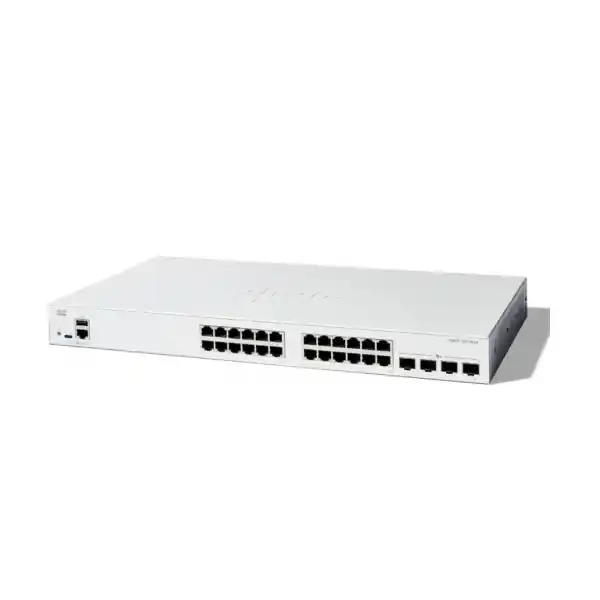
The Cisco Catalyst C1300-24T-4X Network Switch suits Tanzanian organisations that need dependable wired access for computers, printers and other separately powered equipment, with faster connections towards a server, distribution switch or network core. Its combination of Gigabit access and 10 Gigabit uplinks is useful when several users share central applications or move files at the same time. Ask FourTeck Tanzania for a quotation based on your endpoint count, uplink design and installation requirements.
Start with the practical distinction that matters most: this is a non-PoE switch. It carries data to compatible Ethernet equipment but does not supply electrical power to phones, cameras or wireless access points through its access ports. If those devices depend on switch-delivered power, include an appropriate PoE switch or compatible separate power arrangement in the design before placing an order.
This model is a particularly sensible candidate when the access devices remain Gigabit, while the connection carrying their combined traffic needs more headroom. Selecting it should still follow a review of the whole network. A faster uplink cannot correct a slow application server, poor cabling, an overloaded firewall or an internet connection operating below the business requirement.
Verified hardware at a glance
| Specification | Details |
|---|---|
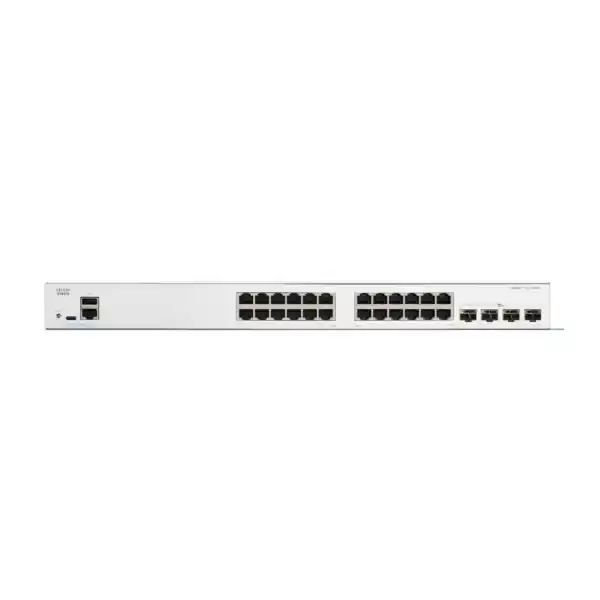
| Access connections | 24 × 10/100/1000 Ethernet ports |
| Uplink connections | 4 × 10 Gigabit SFP+ ports |
| Power over Ethernet | Not supported on this model |
| Switching capacity | 128 Gbps |
| Forwarding rate | 95.23 million packets per second, measured with 64-byte packets |
| Cooling | Fanless |
| Installation format | Rack-mountable |
| Dimensions, width × depth × height | 444.3 × 240 × 43.94 mm |
| Unit weight | 3.14 kg |
| AC input | 100–240 V, 50–60 Hz; internal power supply |
Read these figures as equipment specifications, rather than a promise of application throughput. Switching capacity describes aggregate switching capability; it does not turn a single workstation connection into a 128 Gbps link. The speed available to an individual device still depends on its own port, network adapter, cable and the destination it is communicating with.
Likewise, the forwarding figure uses a defined packet size. Real workloads contain different packet sizes, traffic patterns and bursts. A purchasing decision should consider the busiest shared links and the actual application experience alongside headline hardware numbers. If your current difficulty is slow file access, record when it happens and which resources are affected so that the proposed switch addresses the relevant constraint.
Who should choose this configuration?
Consider this configuration for an office floor, a small business network or a branch wiring cabinet serving primarily desktop computers, printers and other equipment with its own power source. It can also suit a training room where wired seats need consistent access to shared resources. These are suggested deployment scenarios, not claims about an existing installation or guaranteed suitability for every environment.
Prepare a port inventory before deciding that 24 access connections are enough. Include shared devices, meeting room equipment, locally connected servers, maintenance connections and any planned expansion. A layout containing twenty occupied desks may consume more than twenty switch ports once those supporting devices are counted. Assign spare capacity deliberately instead of assuming every currently unused socket will remain available.
Choose a different configuration if your requirements centre on powering many endpoints, providing multigigabit copper access or meeting a particular enterprise platform standard. A useful selection process starts with what must connect, how it receives power, where its traffic goes and who will maintain it. That approach produces a more suitable purchase than selecting a switch solely because it has a familiar brand name.
Plan the four SFP+ connections around real traffic
The uplink side deserves a small connection plan of its own. Identify the remote device, its available interface, the required connection speed and the physical route. A server connection within the same cabinet has different cabling needs from a fibre link to another equipment room. List the purpose of each uplink so that future expansion does not conflict with connections required on installation day.
For fibre, match the transceiver type at both ends, the fibre type, the connector arrangement and the link budget. For a short direct-attach connection, confirm that the selected cable is supported by both devices and is appropriate for the intended length. An SFP+ socket describes an interface format; it is not a guarantee that every module with the same physical shape will be supported.
Ask for the quotation to identify any required modules and cables as separate line items unless the confirmed package expressly includes them. Do not assume that four uplink slots mean four optical modules are supplied. Record the remote equipment model as well as the proposed module part numbers, because compatibility needs to be checked across the link.
Reserve interfaces for their intended roles before calculating expansion capacity. If a design uses front-panel connections for stacking, those connections are no longer freely available for ordinary uplinks. A simple diagram showing access devices, uplinks, stack links and remote ports can prevent an otherwise suitable switch from being ordered with an incomplete connection plan.
Gigabit access and 10G uplinks: what changes for users?
Think about where users share bandwidth. A computer with a Gigabit connection can send traffic towards a shared server while other computers do the same. Giving their common upstream path more capacity can reduce contention on that path, provided the server and the rest of the route can also sustain the workload. This is the main practical reason to combine Gigabit desktop access with faster uplinks.
It does not make every task ten times faster. A workstation reading small files may be limited by storage response time, while a cloud application may depend on internet performance. A copy to a remote office may be constrained by the wide area connection. Separate local traffic problems from external connectivity problems before choosing the upgrade.
For an initial assessment, list the applications that matter, the number of simultaneous users and any predictable peaks such as backups or software distribution. Where possible, compare measurements taken during normal operation with measurements taken during complaints. This provides a clearer basis for deciding whether to upgrade the access layer, the upstream link, the storage system or another component.
Set acceptance criteria that users can recognise. Examples include completing an agreed local file transfer within a measured range, maintaining access to business applications during a scheduled backup or confirming that an uplink no longer remains saturated during routine work. Use your own baseline; a switch specification alone cannot establish a realistic improvement target.
Separate departments and device groups with VLANs
VLAN configuration allows a managed network to keep defined device groups in separate broadcast domains. On this platform, access and trunk settings let administrators assign endpoint connections and carry the required VLANs between network devices. The useful starting point is a list of groups that have different access requirements, such as staff workstations, guests, building equipment and network administration.
Write down what each group needs to reach before assigning VLAN numbers. A printer may need to accept jobs from staff while remaining inaccessible to visitors. A management workstation may need access to switch administration while ordinary user devices do not. Express those requirements as a small communication matrix so the configuration can be reviewed against a clear business purpose.
Creating different VLANs is only part of the design. Communication between them requires routing, and permitted communication requires an appropriate policy. Decide whether that policy belongs on the switch or on a firewall, considering the visibility and inspection your organisation needs. Test both permitted and prohibited paths rather than confirming only that internet access works.
Keep names and records consistent across switches, firewalls and wireless equipment. A visitor network mapped to the wrong upstream VLAN can defeat the intended separation even when each individual device appears healthy. For further planning around access point power and wired uplinks, see the related Cisco wireless guidance linked below.
Decide where inter-VLAN routing should happen
The Catalyst 1300 supports Layer 3 functions, including inter-VLAN routing. That gives the designer an option to route selected internal traffic on the switching layer. It is still necessary to decide where gateways should live, how return traffic reaches each subnet and where security decisions are enforced. Enabling routing without that plan can create unexpected paths between device groups.
For a straightforward office, keeping gateways on the firewall may make policy management easier. In another network, routing trusted internal traffic on a switch may fit the performance and operational requirements better. These are design choices rather than universal rules. The right arrangement depends on the traffic, security policy, existing equipment and experience of the team responsible for support.
Do not confuse the standard C1300 model with the C1300X family when matching routing requirements. Cisco identifies OSPF support with C1300X models in its current series documentation. If your design requires a named routing protocol, route scale or integration feature, ask for that requirement to be checked explicitly against the exact model and software release.
Before implementation, prepare the address plan, gateway list, upstream route requirements and recovery access method. Include DHCP and DNS dependencies in the review. A successful test should show that a client receives the expected address, resolves required names, reaches authorised resources and cannot reach restricted ones. That is more useful than checking only whether the switch answers a ping.
Use link aggregation deliberately
Link Aggregation Control Protocol, or LACP, is available for combining suitable links into a logical group. It can be useful where the remote device also supports the intended configuration. Both ends must agree on the relevant settings, and the physical links need to be assigned to the correct group. Adding a second cable without configuring the topology properly can introduce problems instead of resilience.
Plan aggregate links around the traffic they will carry. Load distribution depends on the selected algorithm and traffic pattern, so an individual conversation should not be assumed to use the sum of all member-link speeds. Several independent flows may benefit differently from a single large transfer. Include the application pattern in your capacity assessment.
Document which ports belong to the group and make sure VLAN membership is applied consistently. Then test member-link removal during an approved maintenance period. Observe the effect on an agreed application, the link state and monitoring alerts. Restore the link and verify the group returns to its intended state.
Where the design connects towards multiple upstream devices, confirm that their architecture supports the proposed arrangement. Two independent switches are not automatically a single LACP peer. The quotation and implementation plan should describe the remote topology clearly enough that the installer does not have to guess how redundancy is expected to work.
Stacking and growth need a port and compatibility plan
Cisco lists this switch within the C1300 Family 1 stacking group, with support for up to eight switches in a compatible stack. Its current documentation distinguishes stacking families and does not support stacking across those families. If an existing installation will be expanded, provide every current switch model and software version for review before ordering another unit.
A stack can simplify administration, but it is also a design with shared operational consequences. Consider what happens when a member is maintained, a cable is disconnected or a power source is lost. Put important endpoint placement and upstream connectivity into the plan rather than treating stacking as an automatic guarantee of continuous service.
List the stack connections separately from ordinary uplinks. Confirm cable compatibility, physical routing and remaining interfaces, then choose a topology suitable for the business requirement. Leave enough cable slack for service without creating obstructed ventilation or an unmanageable bundle in the cabinet.
For growth planning, compare adding another compatible unit with moving to a larger access configuration. More switches can provide flexible placement, while fewer chassis can simplify patching in some environments. The best choice depends on cabinet space, endpoint distribution, spare ports and maintenance arrangements. Ask for a design review if the expansion affects more than port count.
Management should match the people who operate the network
The platform provides a browser interface and a command-line option. Cisco Business Dashboard is another management option for supported deployments. Choose an operating method that your team can maintain consistently. A small business may value clear browser-based configuration, while an experienced network team may prefer reviewed command templates and central monitoring.
During initial setup, establish an agreed management address and restrict administration to authorised systems. Use individual accounts where practical, assign responsibility for configuration changes and make sure recovery access is understood. Keep credentials in your organisation’s approved secure system instead of attaching them to a general procurement document or public support request.
Decide how changes will be recorded. A useful record contains the date, reason, affected interfaces, expected outcome and recovery action. Small changes such as moving a printer into another VLAN deserve a record when they affect business access. This helps the next administrator distinguish intended behaviour from an accidental configuration.
Ask for operational handover as a defined deliverable if installation assistance is part of your purchase request. Specify the records you need: a port map, management details, configuration backup, software version and a short explanation of the uplink and VLAN design. Confirm the scope and any service charges in the quotation rather than assuming they are included with the hardware.
Build access security in manageable stages
Cisco documents controls including port authentication, port security and DHCP snooping for the Catalyst 1300. These capabilities require an implementation plan. An authentication feature is useful only when the supporting identity service, endpoint configuration and exception process are ready. Start with the risks relevant to your environment and choose controls that your team can operate.
For example, an office may first restrict switch administration, disable unused connections and define how a visiting technician receives temporary access. A more structured deployment might add authenticated access for managed computers. Printers and other devices without the same authentication capabilities need a documented treatment instead of an unplanned bypass.
Pilot access controls on a limited set of representative ports before a wider rollout. Test an authorised device, an unauthorised device and the failure of any supporting authentication service. Decide in advance whether that failure should deny access or allow a constrained form of access, based on the organisation’s policy.
Review logs and support procedures after the pilot. A technically correct restriction can still create long interruptions if nobody knows why a device was blocked or who can authorise an exception. A practical security design includes visibility, ownership and a recovery process alongside configuration settings. These controls complement wider security measures and require ongoing review as the network changes.
Apply traffic filtering with a clear communication policy
Access control lists are supported for defined traffic filtering on this platform. Their purpose should be expressed in terms of the resources users and devices may reach. Keep the rule set understandable enough to audit, and confirm where each rule is applied. A correct-looking rule attached to the wrong interface does not provide the intended result.
Write test cases before applying restrictions. Include allowed application traffic, name resolution, address assignment, administration and blocked destinations. Use representative devices from each affected group. When possible, record both the expected outcome and the observed outcome so that an application failure can be traced to a specific policy change.
Switch filtering should be evaluated alongside firewall policy. If a requirement includes application inspection, internet threat protection or another specialised security function, confirm which device is responsible for it. Do not assume that having Layer 3 switching and ACLs satisfies every security requirement in a procurement specification.
Maintain a reason for each exception and remove temporary access when the work ends. Over time, undocumented exceptions can make a small network harder to understand than a larger one with consistent rules. Review the policy after office moves, new server deployments and major application changes, because those events can alter the communication paths that were originally approved.
Keep voice and business traffic in perspective
Quality of Service settings can classify traffic and control how it is treated when links become congested. The business goal should be specific: for example, preserving a usable voice experience while routine background transfers run. QoS does not create extra bandwidth, and settings need to be consistent with the applications and upstream equipment.
Establish which devices can be trusted to mark traffic and how those markings will be handled. Avoid giving every application the highest priority, because that removes the distinction the policy is meant to provide. Test an important call or other time-sensitive workflow under realistic load before accepting the configuration.
For IP telephony, remember the separate power question. A phone can be assigned to an appropriate voice network and still fail to start if it has no compatible power source. Identify the exact phone models, their power method and any connected desktop arrangements during planning. If the project also includes wireless equipment, check its wired speed and power needs separately.
Protect the topology from accidental loops
Spanning Tree configuration is available on the platform to manage Layer 2 paths. The surrounding topology still needs to be understood. Identify the intended upstream devices, any parallel links and the ports serving ordinary endpoints. Choose a consistent policy instead of allowing every additional cable to change the network unpredictably.
An accidental patch between two wall sockets can affect far more than the devices connected nearby. Label patch panels and switch ports clearly, restrict access to network cabinets and give support staff a current diagram. These simple operational measures help prevent faults that cannot be solved by purchasing more bandwidth.
During commissioning, verify that the network settles into the expected topology and that a planned redundant path behaves as intended. Do not test by randomly disconnecting business links. Agree the scope, timing and recovery action first, then record the observed results. The goal is a repeatable design that the support team can understand during an interruption.
Check copper cabling before moving endpoints
Cisco specifies Category 5e or better for the model’s Gigabit copper connections. Existing cabling should still be assessed for condition, termination quality and suitability for the intended installation. A cable category printed on a jacket does not prove that a complete channel has been installed or maintained correctly.
Before a migration, label both ends of each relevant cable and map patch-panel positions to switch interfaces. Look for damaged leads, loose terminations and undocumented small switches beneath desks. Where a device negotiates an unexpectedly low speed, investigate the cable and endpoint as well as the switch settings.
Use the move as an opportunity to simplify patching without losing traceability. Group connections by a documented plan and retain enough spare leads for maintenance. If an existing channel is unreliable, replacing the switch alone may leave the complaint unchanged. Ask for cabling assessment or remedial work to be quoted explicitly when it is part of the project.
Fanless design and physical installation
The fanless construction makes this model worth considering where equipment is near occupied space. It does not remove the need for ventilation or an appropriate installation location. Keep vents clear, avoid enclosing the switch in a space that traps heat and follow the installation guidance for mounting and clearance.
Check the cabinet’s usable space, power distribution and access for patching before ordering. Account for connected cables as well as the chassis dimensions. A cabinet that accepts the switch body may still provide poor access to connectors or require tight cable bends once the door is closed.
For a Tanzanian site, describe the actual room conditions and power arrangement in the purchase enquiry. Do not assume that an office switch is appropriate for an exposed, dusty or industrial location simply because the port count fits. If the installation environment is unusual, ask for the hardware choice to be checked against the manufacturer’s environmental requirements.
Plan power continuity across the complete service
An internal AC supply powers the switch itself. Select the correct regional power connection as part of the confirmed order, and use a suitable electrical installation. Where business continuity requires backup power, calculate the requirement for the relevant network devices together rather than protecting a single component in isolation.
A powered switch cannot keep an application available if its firewall, upstream switch or server loses power. Similarly, a non-PoE switch on a UPS does not provide backup power to separately powered phones or access points. Include those dependencies when deciding what must remain operational during an interruption.
Define the desired runtime and recovery sequence before selecting backup equipment. Identify who receives an alert, which services matter most and what should happen when power returns. Confirm the backup system’s capacity and maintenance needs with the responsible supplier. This is a project design consideration, not a claim that backup power equipment is included with the switch.
Suggested deployment scenarios
Office workgroup
Consider a cabinet serving computers, printers and a small group of shared resources. Start with the physical port map and the busiest connection towards the rest of the network. Keep spare ports assigned to a growth plan, and identify any endpoint that needs a separate power arrangement.
Training or shared workspace
Consider an environment with wired workstations that must remain separate from visitors or administration systems. Define the device groups and their permitted resources before configuring VLANs. Include a repeatable method for resetting or moving workstation connections without exposing management access.
Branch with central applications
Consider a branch whose wired users share an upstream connection to local or central resources. Check whether the limiting factor is the local uplink, the firewall or the wide area service. Use measured traffic and application behaviour to decide where the switch fits in the improvement plan.
These scenarios illustrate possible uses rather than a preconfigured package. The final design should identify endpoint models, uplink media, addressing, power dependencies and the person responsible for day-to-day support. Request any configuration or installation work as a stated part of the quotation.
Replace an existing switch through a controlled migration
Record the current configuration and physical connections before removing the old switch. Capture VLAN membership, uplink settings, management addressing and any port-specific exceptions. Identify equipment that may have a fixed address or depend on a particular network segment, because those devices may not recover correctly if their connection changes.
Build and review the replacement configuration before the maintenance window where practical. Do not assume an old configuration can be pasted unchanged just because both devices carry Cisco branding. Compare the required behaviour with the new platform’s configuration model, then test a representative endpoint and uplink.
Prepare a rollback point with a clear time limit. Keep the original switch, connection map and configuration available until the agreed checks have passed. Tell affected staff what will be tested and who owns the decision to continue or revert. For broader platform replacement planning, the related Catalyst migration guide below provides another starting point.
Commission, monitor and hand over the result
Acceptance should cover the service the business needs. Confirm port labels, negotiated link speeds, VLAN assignment, address allocation and access to required applications. Test the administration path separately from user access. Where restrictions were requested, demonstrate that the blocked paths are actually blocked.
Capture an initial monitoring baseline after the network is stable. Port statistics and logs can help distinguish an uplink capacity issue from a damaged connection or an endpoint problem later. Choose a small set of useful observations and assign somebody to review them; collecting data without ownership rarely improves support.
Save the approved configuration and keep a backup in an authorised location. Record the installed software version and plan future maintenance around the organisation’s change process. The handover should explain the intended topology, important dependencies and recovery method. Ask for these deliverables to be included in the service scope when requesting implementation assistance.
Compare alternatives by the requirement that changes
| If your requirement is… | What to review |
|---|---|
| Power for phones, cameras or access points | A PoE-capable model with suitable per-port power and total budget |
| More wired endpoints | A larger port count or a compatible expansion design |
| Faster-than-Gigabit copper endpoints | A model with the required multigigabit or 10G access interfaces |
| A named enterprise routing feature | Exact protocol support, platform and software release |
| Stack expansion | Current model family, software, cables and remaining uplinks |
Compare complete bills of materials rather than chassis prices alone. Optics, cables, power arrangements and configuration services can materially change the project scope. Ask each proposed option to meet the same endpoint, security and acceptance requirements so that the comparison remains meaningful.
The correct alternative depends on which requirement this configuration does not meet. If the access devices are already Gigabit and separately powered, this model may remain a suitable candidate. If the requirement has changed to a different access speed or power method, select around that change instead of trying to compensate with unrelated features.
Related network planning
- Cisco wireless access point planning in Tanzania — review endpoint power and wired access requirements.
- Cisco Catalyst replacement planning in Tanzania — review the wider scope of a platform migration.
Buyer questions answered
Does this switch provide PoE?
No. The C1300-24T-4X is the non-PoE configuration. Phones, cameras and access points that require Ethernet-delivered power need a suitable separate arrangement or a PoE-capable switch. Confirm each endpoint’s power requirement before selecting the hardware.
Are all its ports 10 Gigabit?
No. The 24 copper access ports provide 10/100/1000 connectivity. The four SFP+ uplink ports provide the 10 Gigabit connections. If workstations require more than Gigabit over copper, compare a model designed for that access speed.
Are optical modules included?
Do not assume they are included. Request written confirmation of the supplied package and list the exact optics or direct-attach cables needed for each connection. Compatibility must be checked with the switch, software and equipment at the other end.
Can it carry different departments on separate networks?
Yes, VLAN configuration supports separate device groups. A complete design also needs gateway placement and communication rules. Define what each group may reach, configure the relevant routing or firewall policy and test both allowed and restricted access.
Can it replace a firewall?
Evaluate it as a managed switch with Layer 3 and filtering capabilities. Keep any required firewall functions in the design and verify them separately. Routing between networks does not establish that every internet-security or application-inspection requirement has been met.
Can I add it to an existing stack?
Check the exact existing models first. Cisco places it in C1300 Family 1 and distinguishes that family from other stacking groups. Provide the current software versions and connection plan so compatibility and available interfaces can be reviewed before purchase.
Is it suitable for an office near staff?
Its fanless design is a useful consideration for occupied areas. Suitability still depends on mounting, ventilation, physical security and room conditions. Confirm the installation location rather than choosing it on cooling design alone.
Will a faster uplink improve internet speed?
It can address a local shared-link bottleneck when the wider path supports the workload. It does not increase the bandwidth purchased from an internet provider. Measure local and external traffic separately to establish which part of the network needs attention.
Can an old Cisco configuration be reused directly?
Treat it as an input for review. Map the required behaviour to the new platform, check supported syntax and validate key functions before migration. Keep the old configuration and a rollback plan until the replacement passes agreed tests.
What should I send for a Tanzania quotation?
Provide the quantity, endpoint count, power needs, remote device models, uplink distance and media, stacking requirement and installation location. Also state whether optics, configuration, installation and handover documentation should be included. Request current price and supply terms in the quotation.
Request a C1300-24T-4X quotation for Tanzania
Share your required quantity, endpoint list and uplink plan with FourTeck Tanzania. Include the remote device models, connection distances, preferred cable media and any existing stacking equipment so the proposed bill of materials can be checked against the deployment.
Ask for the current hardware price, supply position, included accessories, applicable warranty terms and any requested configuration or installation work to be stated in the written quotation. Confirm the final scope before ordering.




Reviews
There are no reviews yet.