
FOURTECK TANZANIA · ENTERPRISE ACCESS SWITCHING
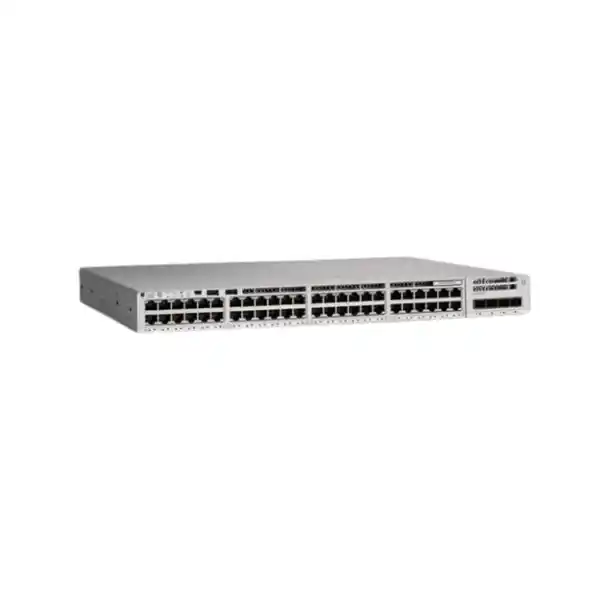
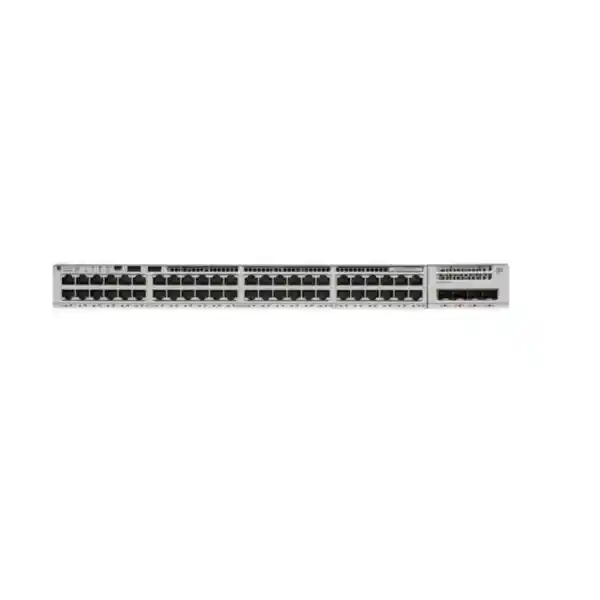
Cisco Catalyst C9200-48P Network Switch
Equip a busy access network with a managed switch sized for users, IP phones, wireless access points and other compatible powered endpoints. The Cisco Catalyst C9200-48P provides 48 Gigabit Ethernet PoE+ access ports and a modular uplink slot, making it a candidate for organizations in Tanzania that need a structured enterprise access layer. Request a configuration-specific quotation from FourTeck Tanzania with your endpoint list, uplink requirements and preferred software tier.
The buying decision extends beyond the chassis name. Confirm the uplink module, power supplies, stacking accessories, software entitlements and support requirements before placing an order. This page explains how to turn those choices into a usable specification, so procurement and technical teams can compare complete configurations against the same requirements.
Start your quotation: provide quantities, endpoint models, uplink speeds and media, the preferred license tier, and whether stacking or additional power resilience is required.
Where this switch fits
Start with the role of the wiring cabinet. An access switch connects the devices in a working area to the rest of the network; its suitability depends on the connections and services those devices require. This model is worth evaluating where a substantial group of Gigabit copper connections must share centrally managed policies and compatible Ethernet power. Typical planning scenarios include an office floor, an administration block or a staffed operations area.
Count usable outlets rather than employees alone. One desk may need a phone and computer arrangement, while a meeting room may contain several permanently connected devices. Printers, access points, cameras and building systems also consume ports. Record which endpoints need their own connection and which share an approved arrangement. Then reserve capacity for moves, replacements and growth instead of allocating every socket on the first day.
The best fit is a network whose endpoint speed and power requirements match this hardware. A design dominated by faster desktop connections or particularly demanding powered equipment needs a different assessment. Write those requirements down before comparing prices. A switch that satisfies the port count but misses an endpoint requirement can create extra equipment, cabling changes and a second purchasing exercise later.
Verified hardware at a glance
| Specification | C9200-48P planning detail |
|---|---|
| Access interfaces | 48 × 10/100/1000 copper ports with PoE+ capability |
| Uplink design | Modular; confirm the selected network module in the quotation |
| Switching capacity | 176 Gbps; Cisco lists 336 Gbps including stacking |
| Forwarding rate | 130.95 Mpps; Cisco lists 250 Mpps including stacking |
| AC PoE budget | 740 W with one specified 1 kW AC supply; 1,440 W with two |
| Stacking architecture | StackWise-160; compatible hardware and software required |
| Software platform | Cisco IOS XE; exact feature entitlement depends on the ordered license |
Use performance figures to compare platform specifications, then evaluate the actual traffic paths in your design. Switching capacity is not the same measure as an internet connection, a server transfer or the speed of one endpoint. A user experience depends on the complete path, including the chosen uplinks and the destination system. State the workload you need to support when requesting a technical review.
PoE planning: start with the devices
PoE combines Ethernet connectivity and compatible device power on the same cable. The supported PoE+ standard allows up to 30 W at the switch port, subject to negotiation, allocation and the overall available budget. Power delivered to an endpoint is affected by cable losses; use the endpoint manufacturer’s input requirements rather than assuming that a port rating equals usable device power.
Prepare an inventory with the device model, quantity, required PoE standard and power allocation for each group. Include different operating modes where relevant. A device that works with a reduced feature set during a quick bench test may need more power for its intended production mode. Confirm those requirements before treating a successful power-on as acceptance.
For illustration, 20 endpoints allocated 15 W each plus 12 endpoints allocated 25 W each would require 600 W of switch-side allocation. These are hypothetical planning inputs, not consumption claims for any particular phone, camera or access point. Replace them with verified values, allow an appropriate reserve, and compare the result with the selected power configuration. A simple worksheet makes later additions easier to assess.
Also decide which devices matter most during a constrained-power event. Document the required behavior for phones, coverage areas and monitoring equipment, and have the configuration reviewed against the deployed software. An agreed priority plan is more useful than discovering during an outage that every endpoint was treated as equally critical.
Two power supplies: capacity and continuity are different decisions
A second supply can increase the available PoE capacity, but the desired failure behavior still needs a separate calculation. If an installation uses more power than the surviving supply can provide, losing one supply may leave insufficient budget for every connected device. Ask for the expected endpoint load to be checked under both normal operation and the failure condition you intend to tolerate.
Define continuity in operational terms. For one site it may mean retaining every phone and access point; for another it may mean preserving only selected services until power is restored. That difference changes the required design. Record the acceptable behavior clearly so the quotation and commissioning plan can address the same objective.
Consider the power path feeding the cabinet as well. Two supplies connected to the same upstream source do not remove that source as a point of failure. Where continuity matters, have the responsible electrical and network teams review feed arrangements, UPS capacity and runtime under the planned load. Do not size backup power from a bare-chassis estimate when the switch will also power a substantial group of endpoints.
Include the rest of the service chain in the discussion. Keeping an access switch and phone powered does not by itself keep a call service, firewall, internet connection or remote application available. Identify dependencies and assign responsibility for each one. This turns resilience from a component feature into a requirement that can be tested.
Choose the uplink module around the upstream network
The C9200-NM-4G provides four 1G SFP uplink slots. The C9200-NM-4X provides four slots supporting 1G or 10G connections with compatible optics. Specify the required module explicitly: the chassis name alone does not establish which uplinks are included. Transceivers, patch leads and the far-end interfaces also need to match the intended connection.
Begin with the destination of each uplink. Record the upstream device, interface type, desired speed, fiber type and link distance. Include existing patch panels and any intermediate fiber path. This information helps distinguish a compatible end-to-end design from a list of components that merely have similar-looking connectors.
Think about simultaneous demand rather than adding interface labels and assuming that total is a measured workload. A few users browsing hosted applications generate a different traffic pattern from many clients accessing a local file service while backups run. Identify busy periods, shared destinations and expected growth. Use existing monitoring where available to support the uplink choice.
Document the intended redundancy arrangement before ordering multiple connections. Two cables are not a complete resilience design: the upstream topology, logical configuration and failure behavior must agree. Ask the engineer responsible for the core or distribution network to review the proposal, including how normal traffic is carried and what happens when a path is unavailable.
Stacking for a larger access cabinet
StackWise-160 allows compatible C9200 switches to operate as a logical stack, with up to eight members in supported arrangements. The stacking kit and suitable cables must be specified; they should not be assumed to accompany a base chassis. Compatibility depends on the exact members, software and configuration, so record every intended model before extending an existing stack.
A stack can simplify management of a cabinet containing several switches, but its physical plan deserves attention. Show the rack positions and cable routes in the design. Leave enough room to reach connectors and replace equipment without disturbing unrelated links. Arrange labels so a technician can identify both ends of each connection while standing at the rack.
Plan the complete stack topology and discuss failure conditions with the implementation team. Include a missing member, an unavailable stack link and an uplink connected to equipment under maintenance. A design review should explain which services remain available in each case and which endpoints are directly affected. Avoid translating a stacking capability into a promise of uninterrupted applications.
Growth should remain deliberate. Adding another chassis increases endpoint capacity, but it can also change power demand, cabinet heat and traffic toward shared uplinks. Review these dependencies when expanding. Keep a record of the approved stack membership and intended software state so future changes begin with an accurate baseline.
Confirm Network Essentials or Network Advantage
Cisco’s ordering guide distinguishes C9200-48P-E with Network Essentials from C9200-48P-A with Network Advantage. The unsuffixed model supplied for this enquiry does not settle that choice. Request the full ordering part number and a written statement of included software entitlements, subscription terms and any relevant exceptions before approving the purchase.
Start license selection with a feature requirement list. Identify where routing will occur, which access policies are needed, what management systems will be used and which integrations are part of the project. Ask for those requirements to be mapped to the proposed tier and software release. Avoid choosing from a label such as “advanced” without identifying the feature that makes it necessary.
Keep hardware, network software, subscriptions and support as separate lines during commercial comparison. Cisco’s ordering process includes subscription attachment requirements and documented exceptions; the applicable package needs confirmation for the actual order. Ask who will associate entitlements with the organization’s account and what information the buyer must provide.
A useful acceptance record lists the delivered part numbers, entitlement ownership and agreed administrative handover. It should also identify renewal responsibilities where subscriptions are involved. This helps prevent a later team from inheriting a working installation without knowing how the software was purchased or which organization controls the relevant accounts.
Connecting phones, access points and cameras
For IP phones, confirm the exact endpoint’s Ethernet and power requirements, discovery behavior and provisioning needs. Where voice and data share an outlet arrangement, test both services together. Include the desktop connection, phone registration and a sample call during acceptance. A live Ethernet link alone does not demonstrate that the voice service is ready for users.
For wireless access points, check the intended operating mode as well as the connector. This switch’s access ports are Gigabit Ethernet. An access point that benefits from a faster wired connection needs a deliberate assessment of whether that limitation is acceptable. Review its power requirements separately; matching a data rate does not establish an adequate power source.
Camera projects need a similar device-by-device approach. Identify power requirements in the intended operating conditions and document the paths to recording and viewing systems. Include busy periods and recovery after a planned restart in the test plan. The switch provides a connection point; recording capacity and video-system behavior remain part of the wider solution design.
For mixed deployments, group endpoints by requirement rather than by brand alone. Two products from one manufacturer can need different power standards, speeds or discovery settings. Share exact models with the technical team and retain the compatibility decisions with the installation documents. This makes later replacements less dependent on guesswork.
Segmentation and controlled access
Plan VLANs around the organization’s services and access rules. Staff devices, guests, voice endpoints and operational equipment may need different treatment. Decide which groups should communicate, through which gateway and under which policy. A VLAN assignment is one part of that design; the permitted traffic between groups must also be defined and implemented.
Cisco documents identity-based access methods including IEEE 802.1X and MAC authentication bypass for this platform. Their use requires suitable configuration and supporting infrastructure. Before enabling authentication broadly, identify the endpoint types, identity source, policy ownership and expected behavior when an authentication service is unavailable.
Pilot changes with a representative set of devices. A laptop, printer, phone and specialist terminal may respond differently to an access policy. Write down what a successful connection looks like for each category and how an authorized exception is handled. This helps the operations team distinguish a policy decision from a fault.
DHCP snooping is another documented control, using trusted and untrusted interfaces to restrict inappropriate DHCP-server traffic. Its placement must reflect the actual server and uplink paths. Have those paths reviewed before rollout, including any existing relay arrangement. Security controls should be introduced with a recovery plan so an incorrect trust decision can be corrected without an unnecessarily broad outage.
Voice quality and traffic priorities
A voice deployment needs more than spare bandwidth. Cisco’s configuration guidance describes QoS classification, marking and trust boundaries for phone traffic. The policy must fit the endpoint and remain consistent along the relevant network path. Agree where markings are trusted and how traffic is treated before applying a standard configuration across all access ports.
Create an acceptance scenario that includes realistic competing traffic. Test calls while representative business activity is taking place, then investigate any observed delay or instability across the full path. Keep the results tied to the test conditions; one successful call in an otherwise idle network is useful evidence, but it is a limited test.
Treat quality targets as requirements for the complete service. The access switch, upstream links, call platform and external connectivity all influence the outcome. Assign an owner for end-to-end testing and record where measurements are taken. This makes troubleshooting more focused if users later report a problem that is not visible at the local port.
Avoid applying priority labels without a policy. If every application is marked as urgent, the distinction becomes less useful. Work with application owners to identify the traffic that needs special treatment, then document the intended behavior and review it when applications or endpoints change.
Cabinet, cabling and power preparation in Tanzania
Check the actual installation room before finalizing the equipment list. Cisco’s installation guidance calls for a clean, dry and well-ventilated environment, with attention to airflow and heat from nearby equipment. Review cabinet access, cable management and maintenance space against that guidance. An available rack position is not automatically a suitable operating location.
Have the installation team confirm the relevant environmental limits for the exact configuration and site conditions. Keep intake paths clear and consider how the room is maintained outside normal working hours. If the cabinet is in a shared area, agree who controls access and who notices changes such as stored materials blocking ventilation.
Inspect the copper cabling and document any suspect outlets before cutover. Record the endpoint location, patch-panel position and switch-port assignment. A clear map helps separate a cabling fault from an equipment issue during deployment and gives the support team a reliable starting point for future moves.
For a Tanzania procurement, request commercial details for the actual delivery destination and project scope. Ask for the quoted currency, applicable charges, hardware condition, lead time and support terms in writing. These details need confirmation for the offer being made. Country context alone does not establish stock, installation coverage, local certification or a particular warranty arrangement.
A controlled migration from an existing switch
Begin with a service inventory and configuration backup. Identify which ports are active, which applications matter during the change window and which devices require special handling. Include management access and upstream dependencies so the team does not lose its ability to complete the migration after moving the first connections.
Translate the intended behavior into a reviewed configuration for the new platform. Compare VLAN assignments, uplink settings, security policy and management requirements with the existing design. Treat any old configuration as evidence of the current environment, then validate the proposed implementation against the selected software and entitlements.
Use a port-by-port cutover plan with clear labels and an agreed rollback point. Where practical, test a representative group before moving the full working area. Record what has changed and who is checking each service. A staged approach gives the team useful evidence before the remaining connections are transferred.
Define acceptance around business functions: a user can reach required applications, phones register and make calls, access points serve the intended networks, and operational endpoints reach their systems. Keep the old equipment and recoverable configuration available for the agreed rollback period. For broader replacement planning, see FourTeck Tanzania’s Catalyst 2960-X migration guidance.
Build a complete quotation request
Send the required quantity and indicate whether this is a new installation, an addition to an existing cabinet or a replacement project. Include the endpoint inventory, power worksheet and uplink details. If the project has a preferred software tier, state it; otherwise provide the features that need to be assessed.
Request an itemized bill of materials. It should identify the full switch part number, selected uplink module, transceivers or direct-attach components where appropriate, power supplies, stacking components if required, software and support. Ask the reviewer to explain any assumptions that could change the configuration.
Separate supplied equipment from project activities. Configuration, site preparation, installation, migration, testing and ongoing support should each have an agreed scope if they are requested. Clarify what the customer must provide, including rack readiness, cabling information, account details and access to upstream systems. This reduces gaps between a hardware quote and a deployable project.
Compare quotations against that common bill of materials and scope. A lower total may reflect omitted optics, a different license or a different power arrangement. Ask for differences to be resolved in writing before deciding. Confirm pricing, availability and delivery directly for the final configuration, since none is established by this product description.
When to compare another switch configuration
Revisit the selection if the endpoint inventory calls for more than Gigabit access speeds, a higher per-port power class or a different uplink architecture. Identify the requirement that drives the change and assess alternatives against it. This keeps the comparison focused on a measurable need rather than assuming that a larger model is always the better purchase.
If most devices do not need Ethernet power, calculate the value of the proposed PoE deployment against the actual endpoint plan. If only a small number of ports is required, assess the expected growth and cabinet layout before committing to a high-density chassis. The appropriate choice depends on the project rather than on port count alone.
Existing infrastructure can also influence the decision. A supported stack, established management practice or approved spare strategy may matter to the operations team. Record those constraints alongside performance and cost, and have compatibility verified for the exact proposed configuration.
For a wireless project with changing access-point requirements, review FourTeck Tanzania’s Cisco wireless access-point planning guidance. Use the chosen endpoint models to drive the switch assessment, especially where wired speed or power mode could constrain the intended wireless design.
Operational handover and future maintenance
Ask for a handover pack that reflects the installed system. Include the rack and port maps, final bill of materials, approved configuration backup, software version, entitlement record and acceptance results. Store administrative access information through the organization’s approved secure process, with ownership assigned to an identified team.
Agree how configuration changes will be recorded and recovered. A useful record explains the reason for a change, the affected services and the available rollback. Keep backups aligned with approved changes so a replacement device can be restored to a known intended state.
Set monitoring around the services and components that matter to the site. Review interface errors, utilization, available power and equipment health using the organization’s chosen tools and supported configuration. Establish a baseline after commissioning so later changes can be compared with normal operation.
Plan software maintenance as an operational task. Review release compatibility, security notices and the organization’s change process before selecting an upgrade. A maintenance window should include verification and recovery steps appropriate to the environment. Keep responsibility clear for checking those requirements throughout the installed equipment’s service life.
Agree the commissioning evidence before installation
Use the following checklist to agree what the project team will demonstrate and record. Adapt it to the services in scope, then assign an owner for each check. Any disruptive testing should take place within an approved change window, with the expected impact and recovery process understood by the people responsible for the site.
| Check | Evidence to agree |
|---|---|
| Endpoint connection | Check agreed outlet and port mapping, expected link behavior and access to required services. |
| Powered devices | Verify the intended operating mode, observed power allocation and the approved total-load plan. |
| Upstream connectivity | Check the selected module and media, permitted VLANs and access to the required destinations. |
| Voice and wireless | Test representative calls and wireless clients under agreed conditions with the relevant service owners. |
| Resilience | Test only the failure scenarios authorized in the commissioning plan, recording impact and recovery. |
| Management and handover | Confirm authorized access, configuration recovery, equipment records and ownership of ongoing tasks. |
Keep the results with the handover documents and note any accepted exceptions. If a test cannot be completed because another system is unavailable, record that dependency and who will close it. This gives the buyer a clear view of what has been verified and which actions still need attention before the project is considered complete.
Buyer questions
Does this model provide 10G connections to every device?
No. Its copper access interfaces support up to 1 Gbps. A compatible 10G uplink module provides faster upstream connections, but does not change the speed of the access ports. If a workstation or access point needs a faster individual connection, specify that requirement before purchase. Ask the technical reviewer to distinguish endpoint speed from aggregate traffic toward the core so the proposal addresses both questions.
Can all 48 ports power devices at the maximum PoE+ allocation?
That depends on the installed supplies and total allocation. Forty-eight ports allocated 30 W each require 1,440 W in aggregate. Compare the approved endpoint worksheet with the verified budget for the quoted configuration, then repeat the assessment for any supply-failure condition you need to support. Do not assume that every PoE-capable port can simultaneously operate at its maximum allocation with any supply arrangement.
Is the 1 kW power-supply rating the available endpoint budget?
No. The supply rating and the usable PoE budget are different figures. The switch itself also needs power. Use the manufacturer-stated PoE budget for the exact combination of hardware and supplies when sizing endpoints. For UPS selection, request an assessment of the complete operating load and required runtime rather than using only the endpoint total or assuming the supply rating is constant consumption.
Are uplink optics and stacking parts included?
Inclusion must be confirmed in the itemized quotation. Ask for the network module, optics, cables, adapters and any stacking kit to be named explicitly where required. State whether you already own components proposed for reuse, then have compatibility checked. A product-family description cannot establish what is in a particular order, and a complete accessory list is easier to verify before dispatch than during installation.
Can it be added to our existing Cisco stack?
Provide every existing member’s full model, software release and license information for review. The Cisco brand and a similar chassis appearance do not establish stacking compatibility. Include the available stack adapters, cable types and physical arrangement as well. Ask for an approved membership and upgrade plan before connecting the new equipment; changing an active stack can affect services beyond the new switch’s own ports.
Will it work with our current phones and access points?
Assess the exact endpoint models and intended operating modes. Check their Ethernet speed, power standard, allocation and provisioning requirements, then test representative devices using the proposed configuration. For a phone, include registration and calling; for an access point, include management reachability and client connectivity. Those service checks provide stronger evidence than link lights alone. Devices needing a different speed or power class require an alternative design.
Does purchasing Network Advantage automatically configure routing?
No. An entitlement makes applicable features available under its terms; it does not decide how the network should operate or implement the intended policy. Identify the required routing behavior, check support in the chosen release and license, and arrange configuration and testing within an agreed scope. Ask the quotation to separate the software tier from any engineering work so the responsibilities remain clear.
Can we replace our current switch without changing anything else?
Possibly, but that outcome needs verification. Review the current uplinks, VLANs, endpoint power, management access and security behavior against the proposed configuration. Check whether existing optics and stacking parts can be reused before budgeting on that assumption. Build a migration and rollback plan with service tests. Even when the intended user experience is unchanged, differences in hardware, software or licensing may require preparation.
What details are needed for a useful Tanzania quotation?
Provide quantity, delivery destination, endpoint models, expected power load, uplink speeds and media, stacking requirements and any mandatory network features. Include a configuration or design summary through an appropriate secure channel if it helps the technical review. Ask for commercial terms against the final bill of materials, including applicable charges, condition, availability and support. Do not send administrative passwords as part of a routine product enquiry.
Is the price, stock position or warranty confirmed here?
No commercial offer is established by this page. Request a written quotation for the exact configuration and confirm the applicable supply and support terms before ordering. If your procurement process requires a particular warranty, condition, entitlement ownership or delivery milestone, state it explicitly so it can be addressed. This avoids treating a general product capability as a commitment about the equipment or services being supplied.
What should we keep after commissioning?
Retain the accepted configuration, component list, serial-number inventory, port map and test results. Include the agreed software and entitlement records, plus the support route established for the purchase. Keep credentials under the organization’s secure access process rather than in an openly shared handover document. Assign an owner to maintain these records after changes, because a useful commissioning pack should remain useful when the network next needs attention.
Request a configuration-specific quotation
Share your requirements with FourTeck Tanzania so the proposed equipment can be assessed against the network you need to operate. Include the endpoint and power inventory, upstream connection details, desired failure behavior and software requirements. For an existing installation, include the relevant model and configuration summary through an appropriate secure channel.
Ask for a complete, itemized proposal and review it with the technical owner before ordering. Confirm the full ordering part number, accessory inclusion, entitlements and agreed project scope alongside the commercial terms. A well-defined configuration gives procurement a clear comparison and gives the implementation team a practical starting point for delivery.
Next step: request the switch, power, uplink and licensing configuration for your Tanzania project.




Reviews
There are no reviews yet.