
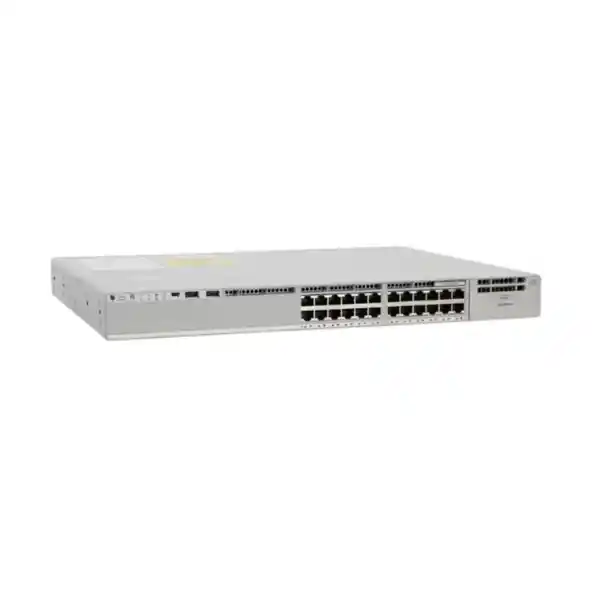
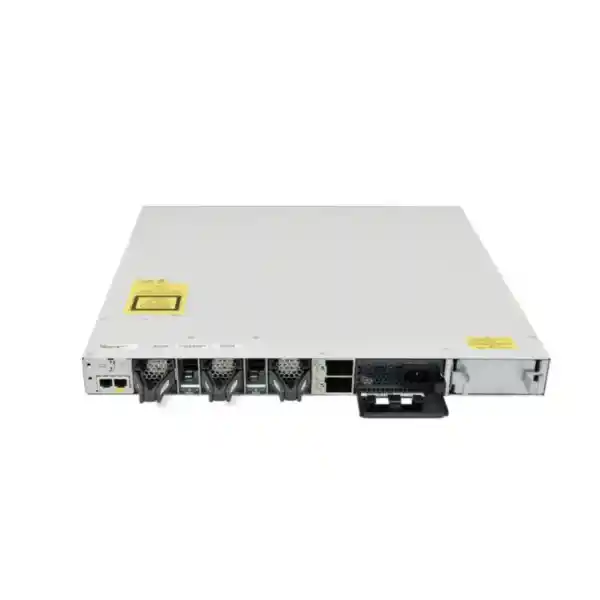
445 W PoE with default 715 W AC PSU
StackWise-480
Modular uplinks
Cisco Catalyst C9300-24P Network Switch
The Cisco Catalyst C9300-24P is designed for enterprise access networks that need twenty-four Gigabit Ethernet ports with PoE+ power, resilient stacking and flexible uplink choices. It fits environments where the access switch is expected to carry user, voice, wireless, security-camera and building-device traffic while remaining manageable as part of a larger campus or branch architecture.
For buyers in Tanzania, the important question is not simply whether the C9300-24P has enough ports. A correct design also checks the total PoE load, uplink speed and media, stacking plan, software license tier, subscription requirement, optics, rack power and future growth. This page focuses on those practical decisions so that the switch can be specified as a complete solution rather than as an isolated chassis.
C9300-24P is the hardware family name. Cisco offers different ordering variants such as Network Essentials, Network Advantage and Meraki-managed options. Confirm the exact SKU, software tier, subscription, uplink module and power configuration for your deployment before ordering.
At a glance: what the C9300-24P provides
| Access ports | 24 × 10/100/1000 Mbps copper Ethernet with PoE+ |
|---|---|
| Uplinks | Modular uplink architecture; select the supported network module that matches the required uplink design |
| Default power supply | 715 W AC |
| Available PoE with default PSU | Up to 445 W according to Cisco hardware documentation |
| Stacking | StackWise-480; up to eight compatible members in a supported stack design |
| Switching capacity | 208 Gbps standalone; 688 Gbps with stacking |
| Forwarding rate | 154.76 Mpps standalone; 511.90 Mpps with stacking |
| Form factor | 1RU class enterprise switch; approximately 7.4 kg with the default power supply |
Who should consider this switch?
The C9300-24P is a strong fit for organisations building a managed access layer rather than a simple unmanaged edge. Typical deployments include corporate offices, education campuses, hospitality networks, healthcare facilities, government or public-sector offices, warehouses, retail sites and multi-floor buildings where endpoint connectivity must be combined with policy, monitoring and resilient operations. The 24-port density can also suit smaller wiring closets where a 48-port model would leave substantial unused capacity.
It is particularly useful when many connected devices require both Ethernet data and PoE power. A single cable can carry network traffic and electrical power to compatible access points, IP phones, cameras and other powered devices. This simplifies edge cabling, but it also makes PoE sizing a design task. The number of physical ports alone does not guarantee that every attached device can receive its maximum possible power at the same time.
The switch is less suitable when the access layer requires multigigabit copper speeds above 1 Gbps to end devices. In that case, compare Catalyst 9300 multigigabit models rather than assuming C9300-24P will meet future high-speed wireless or workstation requirements. Similarly, sites that need more than 24 PoE+ ports in one rack may prefer a 48-port model or a planned stack of multiple switches.
Twenty-four Gigabit Ethernet PoE+ ports
Each front-panel access port on the C9300-24P supports 10/100/1000 Mbps Ethernet. That makes the switch appropriate for a broad range of standard business endpoints, from desktop computers and printers to IP telephony and security devices. The PoE+ capability is especially useful in environments where endpoint placement makes separate power adapters inconvenient or undesirable.
PoE+ can simplify moves, additions and changes because the power source is centralised at the network rack. If the switching infrastructure and supporting power system are protected by a suitable UPS, powered endpoints may also continue operating during brief mains interruptions, subject to the UPS design and total electrical load. This can be valuable for voice, wireless and security systems, but the runtime depends on the complete electrical design rather than the switch alone.
When planning the port map, separate devices by power requirement and business criticality. An IP phone may draw far less power than a high-performance wireless access point, while a camera with heaters, infrared illumination or motors can behave differently from a basic fixed camera. Use each endpoint manufacturer’s maximum power specification and leave engineering headroom instead of sizing to a typical or idle draw.
Understanding the 445 W default PoE budget
Cisco documents 445 W of available PoE power for the C9300-24P with its default 715 W AC power supply. That figure is the shared power pool available to powered devices, not a promise that every connected device can simultaneously draw 30 W. Twenty-four ports at the full 30 W PoE+ level would require 720 W for the powered devices alone, so deployments with many high-draw endpoints require a different supported power-supply arrangement.
A practical PoE budget starts with a device inventory. List every access point, phone, camera, sensor, controller and other powered device, then record the maximum expected consumption for each. Add the values, apply reasonable reserve capacity, and compare the total with the switch’s available PoE budget. Also consider whether the design needs power redundancy, because reserving capacity for a failed power supply can change how much PoE is safely committed during normal operation.
Cisco documents that the C9300-24P can reach a 720 W PoE budget with supported higher-capacity or dual-power-supply configurations. The exact choice should be made during configuration because it affects hardware ordering, redundancy and rack electrical requirements. Buyers should therefore specify the planned PoE load rather than ordering only by port count.
Flexible modular uplinks
Unlike fixed-uplink access switches, the C9300-24P uses a modular uplink architecture. This allows the network design to choose an uplink module suited to the aggregation or core layer rather than accepting a single fixed uplink configuration. Cisco’s Catalyst 9300 platform supports multiple uplink speeds and media options across the family, including fiber-based choices and selected higher-speed configurations.
That flexibility is useful when the same access-switch model will be deployed in different buildings or phases of a rollout. One closet may need a short-range fiber connection to a nearby distribution switch, while another may need a different optical reach or a higher-capacity uplink. The correct module and transceivers must be selected for the required distance, fiber type, connector, speed and peer equipment.
Do not treat the uplink module or optical transceivers as automatically included with the chassis. In a procurement list, identify the switch, uplink network module, compatible transceivers or cables, fiber patching, licenses, stacking cables and power-supply options as separate design elements. This reduces the risk of receiving a switch that cannot be connected as intended on installation day.
StackWise-480 for growth and operational simplicity
C9300 models support Cisco StackWise-480, which connects compatible switches into a logical stack with up to 480 Gbps of stack bandwidth. Cisco supports stacks of up to eight compatible members under the applicable model and license rules. A stack presents a single management and control plane, which can simplify configuration and operations compared with managing every access switch as a completely independent device.
Stacking is useful when a wiring closet needs to grow from 24 ports to 48, 72 or more without changing the overall operational model. It can also improve resiliency because multiple physical switches participate in one logical system. However, resilience depends on the actual topology, cabling, software design, upllink distribution and power plan. A stack is not automatically redundant simply because two switches are present.
For new deployments, plan the full expected stack size and cable layout early. Reserve rack space, confirm stack-cable lengths, distribute uplinks where appropriate, and define power redundancy. If mixing models, verify Cisco’s current supported stack combinations and license compatibility before purchase. These checks are especially important when an existing Catalyst 9300 stack is being expanded with newly ordered hardware.
Performance for enterprise access
Cisco specifies 208 Gbps of switching capacity and 154.76 million packets per second of forwarding performance for the standalone C9300-24P. With stacking, Cisco lists 688 Gbps of switching capacity and 511.90 Mpps of forwarding performance for this model. These figures place the switch in an enterprise access-layer class where the local switching fabric and stack interconnect are designed for dense endpoint traffic rather than basic small-office connectivity.
Performance numbers should still be interpreted in the context of the complete network. A 24-port access switch can have plenty of internal switching capacity while application performance is constrained by oversubscribed uplinks, WAN bandwidth, wireless contention, server design or internet connectivity. Uplink planning is therefore as important as switch fabric capacity.
For user networks, a common design goal is to prevent one busy access closet from becoming a bottleneck to the distribution layer. Estimate normal and peak traffic, account for backup windows, video, cloud applications and wireless aggregation, then choose uplink speed and redundancy accordingly. Where multiple switches are stacked, uplinks can be distributed across members to avoid concentrating all external connectivity on a single chassis.
Enterprise management, policy and automation
The Catalyst 9300 family is designed for centrally managed enterprise networks, with Cisco IOS XE as the operating system platform and support for Cisco’s broader campus management and automation ecosystem. Exact management capabilities depend on software release, license tier and subscription. Buyers should decide whether the switch will be operated mainly through traditional CLI and WebUI workflows or integrated into a broader Cisco management architecture.
For organisations with several sites, consistent templates, software lifecycle control, configuration backup, monitoring and policy management can be more important than the raw port count. A managed access layer makes it easier to enforce standard VLANs, access policies, quality-of-service settings and operational procedures across many closets. It also improves troubleshooting because port state, events and topology can be viewed in a consistent framework.
Before choosing a software tier, list the required features rather than selecting a license by name alone. Routing, segmentation, automation, assurance and advanced security capabilities can have different entitlement requirements. Cisco’s licensing model changes over time, so the exact order should be validated against the current ordering guide and the software release intended for deployment.
Security capabilities at the access layer
Cisco positions the Catalyst 9300 family as an enterprise platform with advanced security capabilities. Depending on software and licensing, the family includes technologies for encrypted traffic visibility, MACsec encryption and trusted platform operation, together with standard access-layer controls available in Cisco IOS XE. These capabilities can help organisations move security enforcement closer to users and devices rather than relying only on perimeter firewalls.
An access switch is a key policy point because almost every wired endpoint passes through it. Good designs use appropriate authentication, segmentation, DHCP protections, spanning-tree safeguards, management-plane controls and secure administrative access. The precise control set should match the organisation’s identity architecture, threat model and operational capability.
Security features must be planned together with licensing and authentication infrastructure. For example, a design that depends on identity services, advanced segmentation or central policy needs more than compatible switch hardware. It requires correctly licensed software, servers or cloud services where applicable, certificate handling, logging, time synchronisation and operational procedures. Treat the switch as one component in the security architecture rather than as a stand-alone security product.
Network Essentials, Network Advantage and Meraki options
Cisco currently lists C9300-24P ordering variants for Network Essentials, Network Advantage and Meraki-managed software options. The familiar -E and -A product variants represent Network Essentials and Network Advantage respectively, while Meraki-managed ordering uses its own option. Cisco’s current ordering guidance also requires a software subscription selection for Catalyst or Cisco DNA-managed purchases, with term choices depending on the offer.
This is why a quote should not simply say “C9300-24P” without the full ordering context. Two switches with the same physical port configuration can be purchased with different software entitlements. The right tier depends on the features the network team actually needs, including routing, automation, policy, management platform and support expectations.
If the switch will join an existing environment, confirm that the new license level aligns with the current operational design and, for stacking, with Cisco’s supported compatibility rules. Also confirm the customer’s Cisco Smart Account requirements and entitlement ownership before deployment. Doing this during procurement avoids licensing decisions becoming an installation blocker.
Power redundancy and StackPower considerations
The C9300-24P chassis provides two power-supply slots, with one supply installed by default in the standard configuration and the other position available for supported redundancy or additional PoE capacity. Cisco also supports StackPower on C9300 models, allowing compatible switches in an appropriate power stack to share power resources. These capabilities give designers several ways to balance redundancy, PoE demand and cost.
The right approach depends on what must remain powered during a failure. If all phones, access points and cameras must continue operating after one supply fails, the normal operating load must be low enough for the remaining power resources. A design that uses almost the entire available PoE capacity under normal conditions can lose powered devices during a power-supply fault unless redundancy is engineered specifically for that scenario.
Rack power must also be considered. Check supply input requirements, PDU capacity, UPS output, circuit loading and connector type. Where redundant power is required, use independent protected power paths when the facility design allows it. Redundant power supplies connected to the same unprotected circuit do not provide the same resilience as supplies fed from independent sources.
Physical installation and rack planning
Cisco lists the C9300-24P at approximately 1.73 inches high and 17.5 inches wide. Depth depends on the installed power supply; Cisco’s current datasheet lists about 17.7 inches with the default supply and up to about 19.2 inches with a 1100 W supply. The switch weighs approximately 7.4 kg with its default power supply. These dimensions should be checked against the cabinet, cable-management and rear-clearance plan.
Allow adequate airflow and service access rather than sizing the cabinet to the bare chassis dimensions. Rear power supplies, stack cables and uplink cabling need bend radius and hand clearance. Front patch cords need horizontal or vertical cable management so that ports and status indicators remain accessible. Dense PoE installations also add heat to the network room, making ventilation and environmental control important.
For Tanzanian sites where mains quality or outages are a concern, include suitable surge protection, UPS capacity and electrical grounding in the network-room design. The exact solution should be engineered for the facility and electrical standards in use. The switch should not be expected to compensate for poor rack power, excessive heat, dust ingress or inadequate grounding.
Planning for wireless access points
One common use for the C9300-24P is powering enterprise wireless access points. For Wi-Fi deployments, check both the PoE requirement and the wired interface speed of the selected access point. The C9300-24P provides 1 Gbps copper access ports, so it is suitable when the access point is designed to operate within that wired speed and power envelope.
Newer high-performance access points may use multigigabit Ethernet to avoid a 1 Gbps wired bottleneck. If the wireless design calls for 2.5, 5 or 10 Gbps copper connectivity, a multigigabit Catalyst model is more appropriate. The switch should therefore be chosen after the wireless bill of materials is known, not before.
Also consider uplink aggregation. A closet with many active access points can send substantial traffic toward the core, especially during software downloads, backups, cloud usage or events with high client density. A modular uplink gives the design team flexibility, but the selected uplink capacity must still be calculated from expected traffic and resilience requirements.
IP telephony and unified communications deployments
PoE+ switching is well suited to IP phone deployments because power and data can be delivered over the same Ethernet drop. Many office designs connect a phone to the switch and then attach a user computer through the phone’s integrated Ethernet pass-through. In those designs, verify the phone’s link capability, VLAN configuration, quality-of-service policy and authentication behaviour before rollout.
Voice quality depends on more than the switch. LAN congestion, WAN performance, SIP service quality, firewall traversal, DNS, time synchronisation and power continuity can all affect calling. The C9300-24P provides the enterprise switching platform, while the overall voice design must address prioritisation and resilience end to end.
If phones are considered business-critical, calculate UPS runtime for the switches, uplinks, routers, firewalls and any local voice gateways, not just the handset load. A switch remaining powered is useful only if the rest of the communication path also remains available. This is especially important at sites where power interruptions are part of the operational risk assessment.
IP cameras and physical-security networks
The C9300-24P can also serve PoE+ IP cameras, but surveillance networks require careful bandwidth and storage planning. Camera resolution, frame rate, codec, scene complexity and recording mode determine traffic levels. Twenty-four camera ports can therefore represent very different network loads depending on the selected devices and recording policy.
Use VLAN and security policies to separate camera traffic from ordinary user access where appropriate. Restrict management access, protect the switch management plane and verify whether cameras need internet access at all. If video is sent to a central recorder across the uplink, calculate sustained and peak bandwidth rather than assuming Gigabit access ports alone guarantee good recording performance.
PoE load can also vary significantly among cameras. Fixed indoor models may require modest power, while outdoor devices with infrared illumination, heaters, PTZ motors or edge-processing features can draw much more. Build the PoE budget from the exact camera models and worst-case operating states, then leave reserve capacity for expansion or replacement units.
VLANs, segmentation and branch/campus design
A managed access switch is most valuable when it participates in a clear segmentation plan. Separate business functions, voice, wireless, cameras, building systems, guests and management traffic as required by the organisation’s security and operational policies. VLAN boundaries alone are not a complete security model, but they provide a useful foundation for routing, access control and troubleshooting.
In a campus design, the C9300-24P commonly sits between endpoints and the distribution or core layer. Routing may occur upstream or on the access layer depending on architecture, software tier and operational preference. The design should define where default gateways live, how redundancy works, how spanning tree or routed access is handled, and how user identity or device policy is enforced.
For branch locations, the same switch can consolidate wired users, phones, access points and cameras, but WAN capacity may be the larger limitation. Map local traffic that stays within the site separately from traffic that traverses MPLS, SD-WAN or internet links. This produces a more accurate design than sizing the switch based only on user count.
Uplink optics, fiber and cabling decisions
The uplink path should be specified by distance, medium and required throughput. Multimode and single-mode fiber serve different reach and infrastructure scenarios, while direct-attach or copper choices can be appropriate for short rack-level links when supported by the selected network module and peer device. Optical transceivers must be compatible with the exact module, speed and Cisco software support matrix.
Document both ends of each uplink. A 10 Gbps optic on the access switch does not create a 10 Gbps path if the distribution switch, optic, fiber plant or configuration cannot support it. Check connector type, fiber grade, patch-panel path, loss budget and distance. Existing building fiber should be tested rather than assumed to meet the intended speed.
For resilient uplinks, avoid routing both fibers through the same physical risk path when practical. Two logical links in the same cable bundle, tray or building riser can fail together. Physical route diversity matters for environments where network continuity is important.
High availability: what to design around
High availability is a system property. StackWise, dual power supplies and multiple uplinks provide useful building blocks, but the final outcome depends on how they are combined. A resilient access design can spread uplinks across stack members, use redundant power paths, maintain appropriate stack cabling and ensure upstream distribution devices also provide redundancy.
Operational processes matter too. Standardised configurations, tested backups, software maintenance procedures and spare strategy reduce recovery time after faults. If an outage affects a stack, engineers need documented port maps, uplink topology, power layout and device roles. Good documentation is often as important as the hardware feature itself.
For critical sites, define what failure the network must tolerate: one uplink, one switch member, one power supply, one PDU, one upstream switch or a complete rack. The answer guides the number of components and the physical diversity required. Without a defined failure objective, “redundant” can mean different things to different teams.
Deployment checklist before ordering
Count current endpoints, reserve capacity and future additions. Separate standard data-only ports from PoE devices and identify endpoints that may need more than 1 Gbps.
Add the maximum power demand of every powered device and include reserve capacity. Decide whether PoE must survive a power-supply failure.
Choose uplink speed, media, network module, optics and redundancy based on the distribution/core design and the actual fiber path.
Confirm Network Essentials, Network Advantage or Meraki-managed requirements, plus the current subscription and Smart Account requirements.
Define the current and future member count, stack cables, rack positions, license compatibility and uplink distribution.
Verify cabinet depth, airflow, UPS capacity, PDU outlets, grounding, cable management and environmental conditions.
C9300-24P versus a 48-port PoE+ switch
Choosing between a 24-port and 48-port access switch is not only a question of how many ports are active today. Consider rack space, uplink count, stack design, failure domain, spare capacity and future growth. Two 24-port switches can provide operational flexibility and smaller failure domains, while one 48-port switch may use fewer rack units and uplink resources for the same port count.
PoE budget also differs by model and power-supply configuration. Do not assume that doubling port count automatically doubles the usable power available to endpoints. Compare the full power design for the exact switch and supply arrangement.
A 24-port model often makes sense in smaller closets, branches, low-density floors or deployments where future growth will be handled by stacking. A 48-port model can be more efficient where port density is consistently high. The correct choice is the one that fits the five-year port and power plan, not merely the first installation phase.
C9300-24P versus UPOE or multigigabit models
C9300-24P provides PoE+ on 1 Gbps copper access ports. Other Catalyst 9300 family members add Cisco UPOE, UPOE+ or multigigabit access capabilities. Those models are more appropriate when endpoints require higher power levels or Ethernet speeds above 1 Gbps. Examples can include advanced wireless access points, specialised collaboration endpoints and devices with substantial edge-processing requirements.
Buying a higher-capability model without a requirement can add cost and power consumption, while buying C9300-24P for a network that will soon need multigigabit access can force an early replacement. Map endpoint requirements to the switch family before selecting a model.
For mixed environments, it can be efficient to deploy different access-switch models in different closets. A standard user floor may be served well by C9300-24P, while a high-density wireless or specialist lab area uses multigigabit models. Consistency is useful, but technical fit should take priority over using one model everywhere.
Software lifecycle and maintenance planning
Enterprise switching is a long-lived investment, and software maintenance should be part of the design from the start. Choose an IOS XE release strategy that aligns with Cisco support guidance and the organisation’s change-management process. Test upgrades on representative hardware when possible, back up configurations and confirm feature compatibility before broad deployment.
A switch that powers phones and wireless access points has a wider blast radius than a simple desktop switch. Maintenance windows should therefore account for dependent services. In stacked environments, review the upgrade method and expected service effect for the specific software release and stack design.
Track hardware serials, software versions, licenses and support entitlements centrally. Good asset records make fault handling, replacement and audit work much easier. They also help procurement teams avoid purchasing incompatible spares or licenses when the network grows several years after the first installation.
Tanzania deployment considerations
For organisations deploying enterprise switching in Tanzania, site conditions can vary substantially between modern data rooms, branch offices, industrial locations and remote facilities. The switch should be installed in a clean, ventilated, secure communications space with stable power and appropriate grounding. Where power interruptions or voltage disturbances are part of the site risk profile, specify UPS and protection equipment according to the complete rack load.
Connectivity to other buildings or floors may rely on existing fiber whose condition and specification are unknown. Test and document that infrastructure before purchasing optics. Fiber reach, connector cleanliness and patch-panel quality can determine whether a high-speed uplink is reliable in production.
For multi-site organisations, design management access so that a branch switch can still be diagnosed during WAN incidents where practical. Keep configuration backups and device inventory in a secure central location. If remote sites lack local IT staff, clear labeling and standardised rack layouts can significantly reduce support effort during hardware swaps or circuit troubleshooting.
Environmental and thermal planning
PoE switches convert more electrical energy into heat than data-only switches because they are also supplying powered devices. The network room must therefore handle the combined thermal load of switches, power supplies, UPS systems, routers, firewalls and other equipment. Avoid enclosed cabinets without adequate ventilation, especially where ambient temperatures can rise during the day or when building cooling is interrupted.
Keep intake and exhaust paths clear and follow Cisco installation guidance for airflow and clearances. Dust can reduce cooling efficiency, so maintenance plans for challenging environments should include inspection and cleaning procedures appropriate to the facility. Do not place the switch where water ingress, corrosive atmosphere or uncontrolled humidity is likely.
Thermal planning becomes more important in a dense stack. Several 1RU switches in a small cabinet can produce a significant heat load even before UPS losses and other equipment are counted. Facility power and cooling should be sized for the final expected rack, not only the first switch.
Operational monitoring and troubleshooting
A well-designed Catalyst deployment should be monitored for port errors, link changes, PoE events, temperature, power-supply state, stack status and uplink utilisation. Trend data is useful because many faults develop gradually: a fiber link may accumulate errors before it fails, or PoE consumption may approach the available budget as new devices are added.
Use clear interface descriptions and maintain a port-to-outlet or port-to-device map. This simple practice can dramatically shorten incident response when a user, camera or access point loses connectivity. Standard naming for VLANs, uplinks and stack members also reduces mistakes during maintenance.
When troubleshooting, work from the physical layer upward. Confirm power, link state and cabling before assuming a routing or application problem. For PoE incidents, check whether the endpoint is requesting power correctly, whether the switch has sufficient budget and whether the cable supports reliable delivery. For stack incidents, verify the ring topology and member health before replacing hardware.
Procurement: specify the complete bill of materials
A complete C9300-24P order can involve more than the base switch. Depending on the design, the bill of materials may include the selected license variant, term subscription, uplink network module, optical transceivers or cables, secondary or higher-capacity power supply, stacking cables, power-stack accessories, rack hardware and support services. Items vary by deployment, so the correct list should be created from the network design.
Ask the procurement team to preserve exact Cisco part numbers on purchase orders and delivery documentation. Substituting a similar-sounding model can result in the wrong power capability, uplink architecture or license. C9300-24P, C9300-24U and multigigabit models are not interchangeable even though they belong to the same family.
Also verify regional power cords and any required optical accessories. Pricing, stock, delivery time, warranty handling and support options should be confirmed in the formal quotation for the exact configuration; they should not be inferred from a generic product description.
Why model accuracy matters
The “24P” in C9300-24P identifies a specific access-port configuration: twenty-four 1 Gbps copper ports with PoE+. It should not be confused with data-only C9300-24T, higher-power UPOE models or multigigabit variants. These differences affect endpoint compatibility, power budgets and project cost.
The software suffix matters as well. Cisco currently lists C9300-24P-E for Network Essentials and C9300-24P-A for Network Advantage, with a Meraki-managed C9300-24P-M option in current ordering information. A customer requirement that says only “C9300-24P” therefore needs one more step before it becomes an orderable configuration.
A good quotation records both the hardware requirement and the intended software/management model. This protects the buyer from receiving a physically correct switch with an entitlement package that does not match the planned features.
Frequently asked questions
Does the Cisco C9300-24P have 24 PoE+ ports?
Yes. Cisco specifies 24 copper 10/100/1000 Mbps access ports with PoE+ for the C9300-24P.
What is the default PoE budget?
Cisco documents up to 445 W of available PoE power with the default 715 W AC supply. A supported higher-capacity power configuration can increase the available PoE budget, so high-power deployments should be sized before ordering.
Can all 24 ports deliver 30 W at the same time?
Not with the default 445 W PoE budget, because 24 ports at 30 W would require 720 W for powered devices. Cisco documents supported power configurations that can provide a 720 W PoE budget.
Does C9300-24P support stacking?
Yes. C9300 models use StackWise-480 and can form supported stacks of up to eight compatible members, subject to Cisco’s model and licensing rules.
Are the uplink ports fixed?
No. C9300-24P uses a modular uplink architecture. The required network module and compatible optics or cables should be selected as part of the solution design.
Is this a multigigabit access switch?
No. The twenty-four access ports are 10/100/1000 Mbps copper. If endpoints require 2.5, 5 or 10 Gbps copper access, compare Catalyst 9300 multigigabit models.
Which license should I choose?
Choose the license and subscription from the actual feature and management requirements. Cisco currently offers Network Essentials, Network Advantage and Meraki-managed options for the C9300-24P family. The exact ordering SKU should be confirmed before purchase.
Does the switch include an uplink module and optics?
Do not assume that it does. Treat the uplink network module, transceivers and cables as design items and confirm exactly what is included in the quoted bill of materials.
Can this switch power Wi-Fi access points and IP cameras?
Yes, when the endpoint’s Ethernet speed and PoE requirement fit the switch. Calculate total PoE demand and, for high-performance wireless, verify whether 1 Gbps access ports are sufficient.
What should be checked before deployment in an existing stack?
Verify model compatibility, software release, license level, stack-cable arrangement, power design and available rack space. Existing production stacks should be expanded according to Cisco’s current compatibility guidance.
Request the correct C9300-24P configuration
Before requesting a quotation, prepare the number and type of PoE devices, expected uplink speed, fiber type and distance, desired stack size, power-redundancy requirement, preferred management model and software features. Those details make it possible to identify the correct switch variant and accessories.
Ask for a configuration review that covers the full bill of materials rather than the chassis alone. Confirm current pricing, availability, support, warranty handling and delivery terms in the formal Tanzania quotation for the exact SKU and accessory set.




Reviews
There are no reviews yet.