
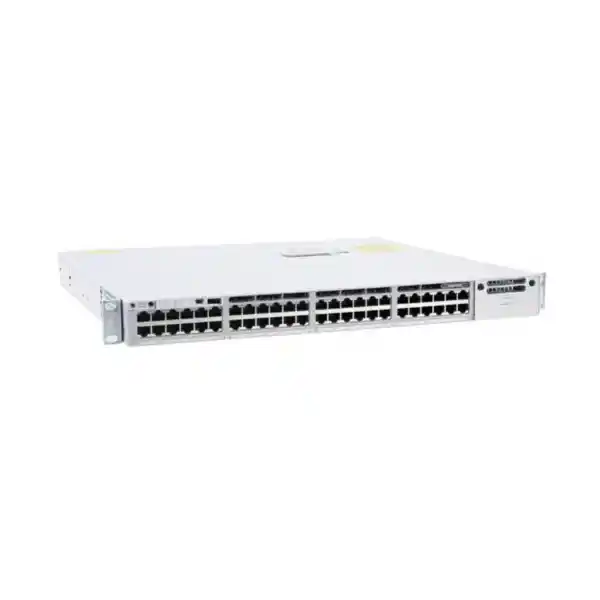
Cisco Catalyst 9300L • Enterprise access switching
Cisco Catalyst C9300L-48T-4X Network Switch
The Cisco Catalyst C9300L-48T-4X is designed for organisations that need a dense, managed 48-port Gigabit Ethernet access layer with four fixed 10G/1G SFP+ uplinks, enterprise switching features and optional high-speed stacking. It is a data-only model: the 48 copper ports do not provide Power over Ethernet. That distinction makes it especially suitable when endpoints already have their own power or when PoE is handled elsewhere in the network.
4 × 10G/1G SFP+ fixed uplinks
StackWise-320 capable
Data-only • No PoE
For buyers in Tanzania, the most important configuration decision is not simply whether 48 ports are enough. Confirm whether connected devices require PoE, whether four 10G uplinks suit the distribution design, which software license level is required, which optics or direct-attach cables will be used, and whether stacking hardware is needed. Those choices determine whether this exact model is the right fit and what should be included in the final quotation.
Fast answer: who should choose the C9300L-48T-4X?
Choose the C9300L-48T-4X when you need a professional Cisco Catalyst access switch with 48 standard Gigabit Ethernet copper ports, four faster SFP+ uplinks and the option to build a resilient StackWise-320 stack, but you do not need the switch to supply power to connected endpoints. It can be a practical fit for wired office users, desktop computers, printers, servers with 1G interfaces, building-management controllers, non-PoE network appliances and other Ethernet devices that receive power independently.
It is also attractive when a network design needs 10G fibre or DAC uplinks from an access rack to a distribution or core layer. The four fixed SFP+ interfaces can operate at 10G or 1G, giving the design team options for resilient uplinks, link aggregation or staged migration. Because these are fixed uplinks rather than a modular uplink bay, the interface type cannot be replaced with a different Cisco network module later. Buyers who need modular uplink flexibility should compare the modular-uplink Catalyst 9300 models rather than assuming the 9300L is interchangeable with them.
Do not choose this model if the same access switch must directly power IP phones, wireless access points, surveillance cameras or other PoE devices. Cisco lists the C9300L-48T-4X as data-only. In that situation, a C9300L PoE-capable variant may be more appropriate, subject to the required PoE budget, uplink type and software license.
Key specifications at a glance
| Model | Cisco Catalyst C9300L-48T-4X |
|---|---|
| Access ports | 48 × 10/100/1000 Mbps Ethernet data ports |
| PoE | No PoE on the 48T model |
| Fixed uplinks | 4 × 10G/1G SFP+ |
| Switching capacity | 176 Gbps standalone; Cisco lists 496 Gbps switching capacity with stacking |
| Forwarding rate | 130.95 Mpps standalone; Cisco lists 369.05 Mpps with stacking |
| Stacking | StackWise-320, optional stacking hardware, up to eight supported stack members in a compatible stack |
| Default power supply | 350W AC power supply |
| Memory | 8 GB DRAM, 16 GB flash for Catalyst 9300L/LM fixed-uplink models |
| VLAN IDs | 4094 |
| Jumbo frames | Up to 9198 bytes |
| Dimensions with default PSU | Approx. 4.4 × 44.5 × 44.9 cm (H × W × D) |
| Weight with default PSU | Approx. 7.0 kg |
Performance figures are Cisco platform specifications for this model. Actual design performance and feature availability depend on software release, configuration, packet mix, enabled services and the purchased license entitlement.
48 Gigabit access ports for high-density wired connectivity
The front-panel access layer is straightforward: 48 copper Ethernet ports supporting 10, 100 and 1000 Mbps. That makes the switch suitable for sites with a large number of conventional wired endpoints where 1G per edge port is sufficient. A single 48-port unit can consolidate many office or operational connections into one managed access platform, while VLANs, access control, quality of service and Layer 3 features can be used to organise traffic according to policy and license entitlement.
For a typical office floor, the ports can serve workstations, printers, meeting-room systems with their own power supplies, desktop phones that are externally powered, access-control appliances, local servers and other Ethernet devices. For an education, hospitality, healthcare or industrial administration environment, the same model can be useful where the endpoint mix is primarily data-only. The important design check is power: if any large portion of the access estate relies on Ethernet-delivered power, the 48T model adds external injectors or separate PoE switches to the design and may no longer be the cleanest option.
Capacity planning should also consider growth. Forty-eight ports can be consumed quickly when desks, printers, appliances and spare capacity are counted together. A sound deployment leaves room for moves, additions and changes rather than filling every port on day one. If multiple racks or floors are involved, planners should decide whether to deploy standalone switches, form compatible stacks, or distribute uplinks across multiple upstream devices for resilience.
Four fixed 10G/1G SFP+ uplinks: what that means in practice
The “4X” portion of the model name identifies four fixed SFP+ uplink interfaces that support 10 Gigabit or 1 Gigabit operation. These uplinks are a major reason to choose the C9300L-48T-4X over a model with only 1G uplinks. They provide headroom for aggregating traffic from dozens of 1G access ports into higher-speed links toward distribution switches, core switches, data-centre equipment or other network zones.
The SFP+ format also gives the network designer a choice of media, subject to Cisco-supported transceivers and cabling. Depending on distance and topology, an installation may use appropriate fibre optics or supported direct-attach connectivity. The switch model itself does not establish which optics, patch leads, DAC cables or fibre type are included in a commercial package. Those items should be selected and confirmed separately so that connector type, fibre mode, link distance and supported speed all match the actual path.
Because the uplinks are fixed, this model is best when 4 × 10G/1G SFP+ is already the desired long-term interface set. If the network roadmap may require a different modular uplink arrangement, higher-speed uplink modules or different port media, compare Cisco Catalyst 9300 models with modular uplinks. The 9300L offers a simpler fixed-uplink architecture, not a field-swappable network-module slot.
StackWise-320 for scalable access-layer resilience
Cisco lists the C9300L family with StackWise-320 support. With the required optional stack hardware, compatible switches can be connected into a stack that operates with a common management and control plane. Cisco documents support for up to eight members in a compatible C9300L/9300LM StackWise-320 stack, subject to the documented model and license-level compatibility rules. This can simplify operations when a wiring closet needs more than 48 access ports or when the design benefits from managing several physical switches as one logical system.
Stacking does not mean every Catalyst 9300 model can be mixed freely. Cisco specifically separates the fixed-uplink C9300L stacking architecture from the modular-uplink C9300 and C9300X families. A procurement team expanding an existing stack should therefore confirm the exact models already installed, the software/license level and the required stack kit before ordering another member. Do not assume that sharing the “Catalyst 9300” family name guarantees stack compatibility.
The commercial quotation should also make stack accessories explicit. StackWise-320 capability is built into the platform family, but the physical stack kit and cable are optional accessories. If the intended topology depends on stacking from day one, specify the appropriate stack kit and cable length as line items rather than discovering after installation that only standalone switching hardware was supplied.
Performance for busy enterprise access networks
Cisco specifies 176 Gbps of standalone switching capacity and a forwarding rate of 130.95 million packets per second for the C9300L-48T-4X. The same data sheet lists 496 Gbps switching capacity and 369.05 Mpps in the stacking context. These figures place the model well beyond basic unmanaged access switching and make it suitable for environments where many active wired clients must share multiple high-speed uplinks without turning the access switch into an obvious bottleneck.
Raw switching capacity is only one part of design quality. Real traffic patterns include a mix of packet sizes, east-west and north-south flows, bursts, QoS classes, multicast, management traffic and security processing. Cisco states that the listed forwarding measurements use 64-byte IPv4 packets, so planners should use the published figures as platform reference values rather than as a promise that every real deployment will sustain the same application throughput under every configuration.
For practical sizing, map users and devices to expected traffic, then size uplinks for the aggregate. Four 10G-capable uplinks can be assigned for redundancy or combined where the design and upstream switch support appropriate link aggregation. In a branch or office, even one or two 10G uplinks may provide ample aggregate capacity; in a large campus closet, using several uplinks can improve resilience and distribute load.
Enterprise scale: VLANs, routes, flow visibility and buffering
The C9300L fixed-uplink platform is built for structured enterprise networks rather than simple plug-and-play connectivity. Cisco publishes a scale of 32,000 MAC addresses, 32,000 IPv4 routes in the platform table, 16,000 IPv6 routing entries, 8,000 multicast routing entries, 5,120 QoS scale entries and 5,120 ACL scale entries for Catalyst 9300L/LM fixed-uplink models. It also lists 64,000 Flexible NetFlow entries for 24- and 48-port Gigabit Ethernet models.
For segmentation, Cisco lists 4,094 VLAN IDs, 300 PVST instances, up to 1,000 switched virtual interfaces and jumbo frames up to 9,198 bytes. These capacities matter in larger networks where the access layer must support many logical groups, policy boundaries, routed interfaces or monitoring requirements. They do not mean every feature can be enabled to its maximum simultaneously; real platform scale depends on how hardware resources are allocated by the chosen features and software release.
The model family uses 8 GB of DRAM and 16 GB of flash according to Cisco’s fixed-uplink platform specifications, with a 16 MB packet buffer for 24- and 48-port Gigabit Ethernet models. For buyers, these values are useful for validating that the exact platform fits the intended Cisco IOS XE software and feature design, but operational planning should still follow Cisco’s release-specific configuration guides and validated scale guidance for the chosen deployment.
Software licensing: confirm the suffix before you buy
“C9300L-48T-4X” identifies the core hardware configuration, but Cisco’s ordering structure includes different full product IDs for software and management choices. Current Cisco ordering information lists C9300L-48T-4X-E for Network Essentials, C9300L-48T-4X-A for Network Advantage and C9300L-48T-4X-M for Meraki-managed licensing choices. Because the user-facing product name may omit that suffix, a quotation should always state the exact orderable product ID and associated entitlement rather than leaving the buyer to infer the software level from the chassis name.
Network Essentials covers core switch fundamentals such as Layer 2 functions, certain routed-access capabilities, QoS, first-hop security, 802.1X, MACsec-128, telemetry and related foundational features. Network Advantage adds broader capabilities that can include advanced routing, network segmentation technologies, automation interfaces, enhanced resiliency functions and MACsec-256. Exact feature availability also depends on Cisco IOS XE release and current licensing policy, so the correct choice should be based on the actual network design rather than a generic assumption that “Advantage is better.”
If the organisation already operates Cisco Catalyst Center, existing automation, identity or segmentation architectures may influence the required license. If the intended operating model is cloud-managed Meraki, confirm that the ordered part number and subscription align with that mode. The goal is to avoid a hardware purchase that is physically correct but commercially or operationally mismatched to the management platform.
Layer 2, Layer 3 and policy controls
A managed enterprise access switch is valuable because it can enforce structure at the point where users and devices join the network. The Catalyst 9300 platform supports familiar campus technologies such as VLANs, spanning tree, link aggregation, QoS, port security, 802.1X and monitoring tools. With the appropriate license, the platform can also support more advanced routing, segmentation, automation and high-availability capabilities. This gives network teams room to move beyond a flat Layer 2 design when business requirements call for stronger policy boundaries or routed access.
In a Tanzania enterprise deployment, one practical use is separating departments or device classes into VLANs—for example users, servers, printers, guest systems, operational devices and management interfaces—while applying access policy between them. Quality of service can help classify business-critical traffic, but QoS is not a substitute for adequate WAN or uplink capacity. Similarly, 802.1X can strengthen access control when integrated with a compatible identity solution, but it requires planning for supplicants, certificates or credentials, fallback behaviour and non-user devices.
Feature selection should be intentional. Enabling advanced protocols simply because the switch supports them can make operations harder. Start from the organisation’s segmentation, routing, redundancy and compliance requirements, then choose the minimum feature set and license level that meets those requirements with a manageable operational model.
Security capabilities depend on the chosen license and design
Cisco positions the Catalyst 9300 family for secure enterprise access, and the software packages include capabilities that can support identity-based access, traffic protection and segmentation. Network Essentials includes foundational functions such as 802.1X, first-hop security and MACsec-128, while Network Advantage adds capabilities including Cisco TrustSec-related segmentation options and MACsec-256 in Cisco’s current feature table. These are platform capabilities, not automatic security outcomes.
A secure deployment still requires a policy architecture: which users and devices can connect, where they may communicate, how administrative access is protected, how logs are collected, how firmware is maintained and how configuration changes are controlled. For wired access, common safeguards include disabling unused ports, separating management traffic, applying appropriate access-control lists, using authenticated administration, monitoring for unusual events and maintaining tested configuration backups.
If MACsec is a requirement, confirm endpoint and uplink compatibility, key-management design, license level and performance expectations before assuming that encryption can simply be enabled everywhere. Likewise, advanced segmentation designs using VRF, VXLAN, LISP, Security Group Tags or MPLS should be validated against the exact software release and architectural requirements. The hardware offers a strong foundation, but secure outcomes depend on correct configuration and lifecycle management.
Automation, telemetry and day-to-day operations
For IT teams managing many switches, operational consistency matters as much as port count. The Catalyst 9300 software stack supports programmatic and telemetry capabilities, with the exact set varying by license. Cisco’s current feature table lists model-driven telemetry and sampled NetFlow in both Network Essentials and Network Advantage, while Network Advantage adds automation interfaces and functions including NETCONF, RESTCONF, gRPC, YANG, Plug and Play, zero-touch/open Plug and Play and on-box Python GuestShell capabilities.
These functions can help a mature network team standardise deployments, collect operational data and reduce repetitive manual configuration. They are most valuable when integrated into a controlled process with templates, version control, approval and rollback practices. Automation without configuration governance can reproduce mistakes faster, so organisations should match tooling to team maturity and business risk.
For smaller environments, there is no requirement to automate everything on day one. The same switch can be operated using conventional network-management workflows while the organisation gradually introduces centralised monitoring or automation. During procurement, identify who will administer the switch, which management platform is already used, how software updates are handled and whether telemetry data will be consumed by an existing monitoring system. That prevents buying a powerful platform without a plan to operate it effectively.
Power design: a 350W supply does not mean PoE
Cisco supplies the C9300L-48T-4X with a 350W AC power supply as the default power-supply class. That figure describes the power supply’s rated output capability; it should not be interpreted as a constant 350W operating draw. Most importantly, the presence of a substantial internal power supply does not make the access ports PoE-capable. Cisco explicitly lists no PoE for this 48T model.
Cisco’s published power-supply specification for the 350W unit lists a 100–240 VAC input range at 47–63 Hz. For deployment, the rack design should still consider local mains quality, UPS capacity, surge protection, earthing, generator changeover where applicable and the power requirements of every other device in the cabinet. A switch that remains operational while upstream routers, firewalls or optical equipment lose power does not preserve service, so resilience should be planned end to end.
The platform supports power-supply redundancy options, but the exact secondary power supply, cable and commercial bundle should be confirmed in the quotation. Do not assume a redundant PSU is included simply because the chassis supports redundancy. If uptime is important, specify the required redundancy level and UPS runtime explicitly, and confirm that the rack has suitable power distribution and airflow for the complete installed configuration.
Cooling, rack space and physical deployment
With the default power supply, Cisco lists the C9300L-48T-4X at approximately 4.4 cm high, 44.5 cm wide and 44.9 cm deep, with an approximate weight of 7.0 kg. The chassis is effectively a 1RU-class enterprise switch, but rack planning should allow additional space for front copper cabling, SFP+ transceivers or DACs, rear power leads, stack cables and airflow. A cabinet that is technically deep enough for the chassis can still become difficult to service if cable bend radius and rear clearance are ignored.
Cisco documents three field-replaceable fans with N+1 fan redundancy for the Catalyst 9300 Series. Good cooling still depends on the cabinet and room. Keep vents unobstructed, avoid tightly bundling cables across exhaust paths, and verify that the room can handle the combined heat load of switches, routers, servers, UPS systems and other equipment. In warmer locations, air-conditioning reliability and dust control can be just as important as switch specifications.
Cisco publishes environmental operating ranges that vary with altitude and conditions. Rather than treating the maximum published temperature as a normal target, operate the network room with comfortable thermal margin. This improves resilience when cooling performance degrades temporarily and gives other equipment in the rack a more stable environment.
Common Tanzania deployment scenarios
Office access layer
Connect desktop PCs, printers, business systems and other independently powered endpoints across one floor or department. Use VLANs and access policy to separate users and services, then use 10G SFP+ uplinks toward the distribution layer.
Campus wiring closet
Deploy one or more switches in a closet serving a building zone. StackWise-320 can simplify management and scaling where compatible stack members and accessories are selected, while multiple uplinks can improve path resilience.
Server and appliance connectivity
Use the 1G copper ports for servers, storage-management interfaces, firewalls or appliances that do not require PoE, with 10G uplinks to upstream switching. Confirm interface speed requirements before selecting 1G access ports for production servers.
Non-PoE operational networks
Support independently powered controllers, terminals and specialised Ethernet equipment where enterprise VLAN, security and monitoring controls are required. Validate environmental and cabling requirements for the actual site.
The model can also participate in networks that include voice, Wi-Fi or CCTV, but those endpoint categories often require PoE. In a mixed environment, designers may combine this data-only switch with separate PoE access switches, or choose a PoE variant for racks where powering endpoints through Ethernet is operationally simpler.
When the C9300L-48T-4X is not the right model
A good product page should make the limitations as clear as the benefits. The first limitation is PoE: the C9300L-48T-4X does not deliver PoE, PoE+ or UPOE from its 48 access ports. If phones, access points, cameras or sensors depend on switch-supplied power, select a PoE-capable model or deliberately design external power. The second limitation is access speed. These are 1G copper access ports, not multigigabit 2.5G, 5G or 10G copper ports. High-performance Wi-Fi access points or workstations that need multigigabit access may require another model.
The third limitation is uplink flexibility. Four SFP+ uplinks are fixed. If a future design may require a different uplink module, compare modular Catalyst 9300 alternatives. The fourth consideration is stacking compatibility: C9300L fixed-uplink models follow the StackWise-320 compatibility rules and should not be assumed to stack with modular-uplink C9300 or C9300X models.
Finally, software capabilities are license-dependent. Buying the correct physical chassis with an inadequate software entitlement can create project delays just as easily as buying the wrong port type. Procurement should therefore capture the exact orderable suffix, required subscription or entitlement, stacking accessories, optics, power redundancy and support requirements in the same bill of materials.
How it compares with nearby Catalyst 9300L choices
| Need | C9300L-48T-4X | Consider instead |
|---|---|---|
| 48 data ports, no endpoint power | Strong fit | Stay with 48T when PoE is unnecessary |
| 48 ports with PoE+ | Not suitable for direct PoE power | Compare C9300L-48P-4X or other PoE variants |
| Only 1G uplinks required | Provides more uplink speed than necessary | Compare C9300L-48T-4G |
| Multigigabit copper edge | Not a multigigabit access model | Compare suitable C9300L multigigabit/UPOE models |
| Modular uplink flexibility | Fixed uplinks | Compare modular-uplink Catalyst 9300 models |
This comparison is about architectural fit, not a universal ranking. The best choice is the model that matches the required access-port type, PoE budget, uplink speed, stacking plan, software entitlement and long-term network roadmap with the least unnecessary complexity.
Optics and cabling: specify the complete link, not just the switch
An SFP+ port is only one end of a network link. To bring the four 10G/1G uplinks into service, the design must select a supported media option that matches the upstream switch and the physical cabling path. Fibre links require appropriate transceivers at both ends, correct fibre type, connector compatibility and a link distance within the optic’s supported range. Short in-rack or adjacent-rack connections may use supported direct-attach options where appropriate.
Do not assume that SFP+ transceivers are included with the base switch. The switch has SFP+ slots, while optics, DACs and related cabling should be listed explicitly in the bill of materials according to the required link type and distance. This is particularly important for installations where fibre has already been laid: the existing plant must be identified as single-mode or multimode, connectorised correctly and tested before optics are finalised.
The same discipline applies to copper access cabling. A 1G port can only deliver reliable Gigabit Ethernet when the installed structured cabling, patch panels, patch leads and terminations meet the required standard and are in good condition. Network upgrades often expose old cabling faults that were not obvious at lower speeds, so testing the physical layer should be part of deployment rather than an afterthought.
Planning high availability without overcomplicating the network
The C9300L-48T-4X gives designers several building blocks for resilience: multiple 10G uplinks, optional StackWise-320 stacking, field-replaceable fans with N+1 fan redundancy, and support for power-supply redundancy options. The right combination depends on the business impact of an outage. A small office may accept a single switch and dual uplinks, while a larger campus or critical site may require stacked access switches, diverse upstream paths, redundant power and resilient core or distribution devices.
High availability is strongest when failure domains are explicit. Two uplinks connected to the same upstream chassis may protect against a cable failure but not against upstream chassis failure. Two stacked access switches powered from the same single PDU may protect against one switch failure but not against loss of rack power. Redundancy should therefore be mapped across the entire path from endpoint to application, including switch hardware, power, uplinks, upstream devices, WAN connectivity and critical services.
Avoid adding redundancy that the operations team cannot support. More links, stacks and protocols introduce more configuration and troubleshooting paths. Use the minimum architecture that meets the required availability target, document it clearly, test failover before production use and include spare optics, cables or other components where replacement lead time creates unacceptable risk.
Deployment checklist for an enterprise switch project
Before ordering
Count active and spare access ports. Confirm that endpoints do not require PoE from this switch. Define uplink speed, fibre type and path redundancy. Choose Network Essentials, Network Advantage or the intended management/licensing mode. Decide whether stacking and redundant power are required.
Before installation
Verify rack depth, airflow, UPS capacity, power sockets, earthing and cooling. Test copper and fibre cabling. Label patch panels and switch ports. Confirm optics, DACs, stack kits and power accessories. Prepare the approved software image and baseline configuration.
Before handover
Validate VLANs, routing, link aggregation, management access, logging, monitoring, security policy and failover. Record serial and asset information securely, export configuration backups, document patching and train the operating team on the chosen management workflow.
This checklist prevents a common procurement problem: buying the correct switch chassis but missing the optics, cables, licenses, stack hardware or infrastructure work required to make the network operational. Treat the C9300L-48T-4X as one component of a complete access-layer solution, not as a self-contained project.
Migration from an older access switch
Replacing an older switch is a good opportunity to clean up the network rather than copy every legacy setting. Begin by documenting active ports, VLAN assignments, trunks, spanning-tree roles, port channels, routing, DHCP-related functions, access-control lists, authentication settings, monitoring destinations and management dependencies. Identify unused configuration and obsolete VLANs before building the new platform.
Next, compare the existing switch’s interfaces with the C9300L-48T-4X. If the old switch provides PoE, this data-only replacement may break phones, cameras or access points even if the port count is identical. If the old uplinks are 1G optical links, decide whether to reuse 1G operation temporarily or move to 10G with compatible optics and upstream interfaces. If the old environment uses a different stacking technology, do not assume stack cables or architectures carry over.
Plan a rollback path for the cutover. Preconfigure the new switch, test management reachability and uplinks, back up the old configuration, label cables, and move services in a controlled sequence. After migration, verify application connectivity and monitoring rather than relying only on green link lights. A technically successful port migration can still leave routing, authentication or policy issues that users discover later.
Operations and software lifecycle
Cisco continues to publish IOS XE software guidance for the Catalyst 9300L family. Software selection should follow Cisco’s current compatibility and recommended-release documentation rather than installing an arbitrary image or copying the release from a different Catalyst platform. Before an upgrade, review release notes, feature caveats, minimum ROMMON or boot requirements where applicable, stack compatibility and the rollback procedure.
Operational maintenance should include configuration backups, software lifecycle reviews, administrator-account control, certificate monitoring where relevant, log retention, capacity checks and periodic validation that uplinks and stack links remain healthy. If the switch participates in a stack, maintenance planning should consider the effect on the active control plane and any redundancy features in use.
Keep an accurate asset record with the exact orderable product ID, serial information, license entitlement, installed software release, optics and stack accessories. That record is especially valuable years later when another switch must be added or replaced. The short marketing name “C9300L-48T-4X” is not enough to reconstruct every licensing and accessory choice made during the original purchase.
Frequently asked questions
Does the Cisco C9300L-48T-4X provide PoE?
No. Cisco identifies this as a 48-port data-only model. It does not provide PoE from the copper access ports. If phones, cameras, access points or other endpoints need Ethernet-delivered power, choose an appropriate PoE-capable Catalyst model or design separate power.
How many 10G uplinks does it have?
It has four fixed SFP+ uplink ports supporting 10G/1G operation. The exact transceivers, fibre or direct-attach cables required depend on the distance, media and upstream equipment and should be specified separately.
Can C9300L switches be stacked?
Yes. Cisco documents StackWise-320 for C9300L fixed-uplink models, using optional stack hardware. Compatible C9300L/9300LM models can form supported stacks subject to Cisco’s model and license-level rules. Confirm exact compatibility before expanding an existing stack.
Can it stack with a modular Cisco C9300 switch?
Do not plan on that. Cisco separates C9300L fixed-uplink StackWise-320 stacks from modular-uplink C9300/C9300X stacking. Use Cisco’s current compatibility documentation for the exact models before procurement.
What is the switching capacity?
Cisco lists 176 Gbps standalone switching capacity and 130.95 Mpps forwarding rate for this exact model. Cisco’s table also lists 496 Gbps switching capacity and 369.05 Mpps in the stacking context.
Which license should I order?
That depends on the required routing, segmentation, automation, security and management features. Cisco offers orderable variants including Network Essentials, Network Advantage and Meraki-managed options. A quotation should state the exact suffix and entitlement rather than only the base hardware name.
Are SFP+ optics included?
Do not assume they are included. The switch has SFP+ slots, while optics, DACs and related cabling should be listed explicitly in the bill of materials according to the required link type and distance.
Is it suitable for a Tanzania office or campus network?
It can be a strong fit when the site needs 48 managed 1G data ports, 10G uplinks, enterprise Catalyst features and optional stacking, and when PoE is not required from those access ports. Final suitability should be checked against the site’s power, cooling, cabling, uplink, software and resilience requirements.
Request the right C9300L-48T-4X configuration
Before requesting a quote, prepare the expected access-port count, whether any endpoints need PoE, preferred uplink media and distance, required software features, stacking plan, redundant-power requirement and any existing Cisco management platform. That information makes it possible to specify the correct orderable variant and accessories instead of quoting only a bare chassis.
Ask FourTeck Tanzania for a configuration review and quotation for the Cisco Catalyst C9300L-48T-4X. The final bill of materials should confirm the exact license suffix, power configuration, optics or DACs, stacking accessories and any support items required for the intended deployment.




Reviews
There are no reviews yet.