
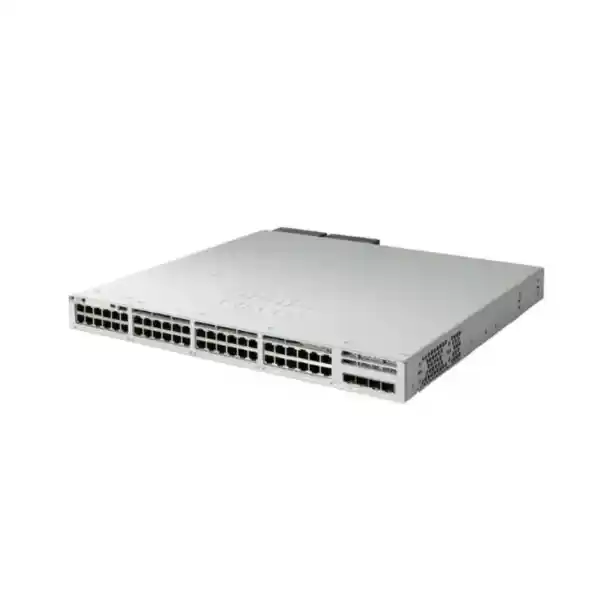
4 × fixed 1G SFP uplinks
Optional StackWise-320
Cisco IOS XE
Enterprise PoE+ access switching with a clear 1G design target
The Cisco Catalyst C9300L-48P-4G is built for organizations that want a high-density wired access layer with Power over Ethernet Plus, predictable Gigabit connectivity, and the operational model of the Catalyst 9300 family. Its 48 copper access ports support 10/100/1000 Ethernet and PoE+, while four fixed 1G SFP ports provide fiber or copper-transceiver uplink options. That combination makes the switch a practical fit when the access edge is 1G, connected devices need PoE, and the aggregation design does not require 10G uplinks from this particular switch.
For buyers in Tanzania, the most important step is to match the switch to the actual deployment rather than selecting by port count alone. Check the combined PoE demand of phones, access points, cameras, door controllers, or other powered endpoints; confirm whether four 1G uplinks provide enough headroom; choose the correct Network Essentials or Network Advantage orderable variant; and decide whether stacking, power redundancy, optics, UPS capacity, and rack depth need to be included in the bill of materials. FourTeck Tanzania can use those design inputs to prepare a quote around the required switch configuration without assuming stock, lead time, warranty terms, or licensing that have not been confirmed for the specific order.
Quick fit: when this model makes sense
Good fit
Choose this model when you need up to 48 Gigabit access connections, PoE+ for a meaningful number of edge devices, fixed 1G SFP uplinks, enterprise switching features, and an optional path to stack several access switches into one operational unit.
Review carefully
Review the design if many endpoints are high-draw PoE+ devices, because the standard available PoE budget is 505W with the default 715W power supply. The total budget matters more than the theoretical maximum per individual port.
Consider another variant
If the switch must uplink at 10G, compare the C9300L-48P-4X. If the design needs a larger default PoE budget, compare the C9300L-48PF-4G or another model sized specifically for the endpoint power requirement.
Verified platform highlights
| Access ports | 48 × 10/100/1000 copper PoE+ ports |
|---|---|
| Fixed uplinks | 4 × 1G SFP |
| Default power supply | PWR-C1-715WAC-P |
| Available PoE with default PSU | 505W |
| Switching capacity | 104 Gbps standalone; 424 Gbps with stacking |
| Forwarding rate | 77.38 Mpps standalone; 315.48 Mpps with stacking |
| Stacking | Optional StackWise-320; up to 8 compatible members at the same license level |
| Memory | 8 GB DRAM, 16 GB flash for the C9300L/LM fixed-uplink family |
| Scale indicators | 32,000 MAC addresses, 32,000 IPv4 routes, 16,000 IPv6 routing entries, 4094 VLAN IDs |
| Dimensions with default PSU | Approximately 4.4 × 44.5 × 44.9 cm (H × W × D) |
| Weight with default PSU | Approximately 7.03 kg |
Specifications should be checked against the final Cisco orderable part number and the intended software/license selection before purchase. The base model name does not by itself distinguish the Network Essentials and Network Advantage variants.
Plan the PoE budget before you count powered devices
PoE capacity is one of the biggest decision points for this switch. Each access port is capable of PoE+, but the switch’s standard power configuration does not provide 30W simultaneously to all 48 ports. Cisco lists 505W of available PoE power for the C9300L-48P-4G with its default 715W primary power supply. The practical number of powered devices therefore depends on the real power class and measured draw of the endpoints, not merely the number of RJ-45 ports.
A voice deployment may have many IP phones drawing relatively modest power, leaving substantial headroom. A wireless or surveillance deployment can behave differently because access points, cameras with heaters or infrared illumination, and other peripherals may draw more power, especially during startup or peak operation. Build the power plan from device data sheets, expected maximum draw, required redundancy, and expansion margin. This avoids the common mistake of assuming that a 48-port PoE+ label automatically means a 1,440W budget.
Cisco supports a second power supply and documents higher aggregate PoE budgets with different secondary PSU choices. That creates useful flexibility for deployments that need more PoE or power redundancy, but the exact objective matters. Adding a PSU for redundancy is not the same design goal as adding capacity for more powered endpoints. The final bill of materials should state whether the second PSU is intended for resiliency, additional PoE headroom, or both, and should confirm the resulting supported configuration.
Operationally, the Catalyst 9300 family also provides per-port power visibility and power controls. That can help administrators understand actual consumption and set sensible limits. For Tanzania sites where utility quality varies, the PoE plan should be paired with UPS and surge-protection design so that the switch and critical endpoints remain stable during short power disturbances. UPS runtime should be calculated from the complete rack load, including the switch, PoE draw, routers, firewalls, optical equipment, and any other equipment sharing the protected power source.
Understand the fixed 1G uplinks before deployment
The “4G” in the model name refers to four fixed 1G SFP uplinks. This is a deliberate design characteristic, not a modular uplink slot that can later be replaced with a faster network module. For many access-layer networks, four 1G uplinks are sufficient: a branch, floor, small campus block, or distribution closet may use one or more fiber links to upstream switching while keeping remaining SFP interfaces for resiliency or additional connections.
The same uplink design can become a constraint when a large number of active Gigabit clients produce sustained traffic toward servers, internet gateways, storage, or other network segments. A 48-port switch can aggregate far more theoretical edge traffic than a single 1G uplink can carry. Real networks rarely drive every access port at line rate simultaneously, but uplink oversubscription still needs to be intentional. Review expected busy-hour traffic, application patterns, wireless backhaul demand, camera video streams, backup windows, and east-west traffic before choosing the 4G variant.
Where the distribution layer expects 10G SFP+ links, the C9300L-48P-4X is the more direct comparison because it pairs the same general 48-port PoE+ access concept with four fixed 10G/1G uplinks. Where 1G uplinks are the correct fit, the C9300L-48P-4G avoids paying for unused uplink speed while retaining enterprise access switching and stacking capabilities.
Optics also belong in the design, not as an afterthought. Confirm fiber type, connector type, wavelength, link distance, peer-side interface, and Cisco-supported transceiver choice for every uplink. Existing building fiber may be multimode or single-mode, and the correct transceiver depends on that physical plant. If copper SFP modules are planned, verify support and cabling constraints for the exact use. The safest quotation is a complete link bill of materials rather than a switch-only quote with unspecified optics.
Performance for a Gigabit access layer
Cisco specifies 104 Gbps of standalone switching capacity and 77.38 million packets per second of forwarding performance for the C9300L-48P-4G, measured with 64-byte IPv4 packets. Cisco describes the Catalyst 9300 models in the bandwidth table as wire-speed nonblocking for IPv4 and IPv6. Those figures are useful when comparing models, but the practical performance of a deployment also depends on topology, feature configuration, traffic mix, uplink capacity, and the services enabled on the switch.
The fixed-uplink C9300L/LM family is listed with 8 GB of DRAM, 16 GB of flash, a 16 MB packet buffer for 24- and 48-port Gigabit Ethernet models, support for 4094 VLAN IDs, 1000 switched virtual interfaces, and jumbo frames up to 9198 bytes. Cisco also publishes platform scale values including 32,000 MAC addresses, 32,000 IPv4 routes, 16,000 IPv6 routing entries, 8,000 multicast routing entries, and 5,120 ACL and QoS scale entries for the fixed-uplink family. These are platform limits, not recommendations that every network should be designed near the ceiling.
For most buyers, the important question is simpler: does the switch have sufficient access density, uplink bandwidth, and feature headroom for the intended role? A well-designed access layer normally leaves room for growth, failure scenarios, and temporary traffic spikes. If the network is expected to carry high-volume video, large local file transfers, virtualization traffic, or dense Wi-Fi aggregation, the uplink speed decision may matter more than the raw switching-capacity figure.
StackWise-320 for growth and simpler operations
The C9300L fixed-uplink family supports optional StackWise-320. Cisco lists 320 Gbps of stacking bandwidth and up to eight members, using the appropriate C9300L stack kit and dedicated stack cables. A stack can simplify administration by presenting multiple physical switches as a coordinated switching system with a common operational model. It is particularly useful when a wiring closet needs more than 48 access ports or when capacity is expected to grow over time.
Stacking should be planned before installation because it affects rack layout, cable selection, software/license consistency, failure-domain design, and maintenance procedures. Cisco specifies that C9300L models stack with compatible C9300L and C9300LM members at the same license level. The stack kit is optional hardware, so it should be included explicitly when the requirement is to deploy a stack rather than standalone switches.
The performance table lists 424 Gbps switching capacity and 315.48 Mpps forwarding rate “with stacking” for this SKU, while StackWise-320 provides the stack interconnect bandwidth. These values describe different aspects of the platform and should not be treated as interchangeable. For network design, consider actual inter-switch traffic patterns, uplink distribution, redundancy objectives, and how endpoints are spread across members.
Stacking can reduce the number of devices managed independently, but it does not eliminate the need for resilient uplinks, redundant power planning, tested software upgrade procedures, configuration backups, and monitoring. The best design uses stacking as one availability and operations tool within a broader access-layer architecture.
Power and hardware resilience
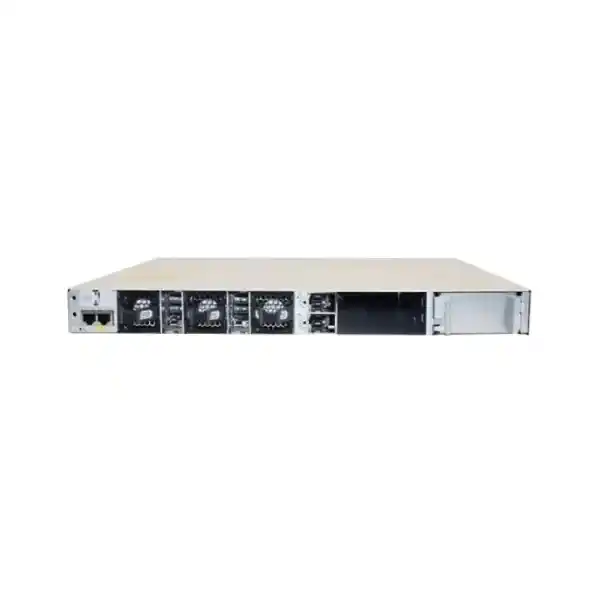
Cisco Catalyst 9300 Series switches support dual redundant power supplies and ship with one power supply by default. A second supported PSU can be added when redundancy or additional PoE capacity is required. For this model, Cisco’s current datasheet lists the 715W AC unit as the default primary PSU and 505W of available PoE in that configuration. The platform also uses three field-replaceable fans and supports N+1 fan redundancy.
This matters for enterprise access closets because power-supply and fan serviceability can reduce the operational impact of a component failure. However, resilience still depends on the surrounding infrastructure. Two PSUs connected to the same unprotected outlet do not provide the same protection as a carefully designed electrical arrangement. If the site has separate UPS circuits or redundant power feeds, verify how the switch PSUs will be connected and whether the UPS system can carry the PoE load during an outage.
Cisco StackPower is not a feature to assume on the C9300L fixed-uplink model. Cisco’s current documentation states StackPower support for the modular-uplink C9300 and C9300X models, while the C9300L’s documented stacking function is StackWise-320 for data stacking. Buyers who need shared power across stacked switches should therefore review the platform family carefully rather than assuming all Catalyst 9300 variants have identical power-stacking capabilities.
Cisco IOS XE management and automation
The Catalyst 9300 family runs Cisco IOS XE, giving network teams a familiar enterprise operating environment for switching, routing, policy, telemetry, and automation. Cisco documents an embedded WebUI for browser-based provisioning and management, along with standards-based interfaces such as NETCONF, RESTCONF, and gNMI. These options allow organizations to choose between traditional CLI workflows, graphical administration, and programmatic configuration depending on the skills and tooling of the network team.
Automation is most valuable when it is paired with configuration standards. A 48-port access switch can carry dozens of endpoint roles, so consistent VLAN, access-control, QoS, PoE, port-description, and monitoring conventions matter. Using templates or structured automation can reduce configuration drift across multiple closets and makes it easier to replace or expand switches without recreating every setting manually.
Cisco also documents cloud-management capabilities for the Catalyst 9300 family, but the exact experience, eligibility, and feature set depend on the selected product variant, management model, software state, and licensing. Because the 4G fixed-uplink model is offered as Network Essentials or Network Advantage rather than the Meraki orderable variant shown for some 4X models, buyers should define the desired management approach first and then confirm that the chosen orderable SKU and licenses support it.
For procurement, it is useful to state the intended operational model in the request: standalone IOS XE management, integration into an existing Cisco management platform, API-driven automation, or another supported approach. That prevents a technically compatible switch from being quoted with an incomplete license or management expectation.
Network Essentials or Network Advantage?
Cisco lists two principal orderable variants for this 48-port PoE+ 4x1G platform: C9300L-48P-4G-E with Network Essentials and C9300L-48P-4G-A with Network Advantage. The hardware family is the same basic access-switch concept, but the license level affects the software feature entitlement. The correct choice should therefore be based on the network design and required features, not simply on which part number is available first.
A straightforward access deployment may only require the feature set included in Network Essentials, while more advanced routing, segmentation, policy, assurance, or enterprise capabilities can drive a Network Advantage requirement. Cisco’s licensing portfolio changes over time, and feature availability can also depend on software release and additional subscriptions. For that reason, the safest buying process is to list the features that must be supported and map those requirements to the current Cisco license matrix at quote time.
Do not treat “C9300L-48P-4G” as a complete ordering code if licensing matters. A quote should show the full Cisco part number, the selected license level, any required software subscription, support coverage, stack accessories, optics, power supplies, and other components. This is especially important in projects where switch replacement must preserve an existing feature set or where compliance with an internal network standard has already been defined.
Security and segmentation at the access layer
An enterprise access switch is more than a port multiplier. The Catalyst 9300 platform is designed to participate in segmented networks where endpoint identity, traffic policy, quality of service, and routing boundaries are centrally planned. Cisco’s published scale for the fixed-uplink family includes thousands of ACL and QoS entries as well as large MAC and routing tables, giving administrators room to implement structured policy rather than operating a flat Layer 2 network.
The exact security configuration should be determined by the organization’s architecture. Typical access-layer planning may involve separate VLANs for employees, voice, wireless infrastructure, cameras, building systems, guest services, and management. The switch can then be integrated into the broader authentication, routing, firewall, and monitoring design. The important procurement point is that licensing and software capabilities must be checked against the required policy features before the hardware is ordered.
For sensitive environments, also define how the switch itself will be protected: management-plane access, administrator authentication, configuration backup, secure protocols, logging, time synchronization, software maintenance, and change control are all part of a secure deployment. A capable platform still needs a disciplined operating model. FourTeck Tanzania can use a requirements list to help identify whether the chosen hardware and license combination is appropriate before deployment engineering begins.
Physical installation and environmental planning in Tanzania
The C9300L-48P-4G is a one-rack-unit class switch. Cisco lists dimensions of approximately 4.4 cm high by 44.5 cm wide by 44.9 cm deep with the default power supply, and a weight of about 7.03 kg. Rack planning should still allow extra space for rear cabling, power cords, bend radius, airflow, stack adapters if used, and safe service access. A cabinet that is nominally deep enough for the chassis can still be uncomfortable to work in if patching and rear power connections are crowded.
Cisco’s current environmental table lists normal operation up to 45°C at lower altitude ranges, with reduced temperature limits at higher elevations, and 5% to 90% noncondensing relative humidity. Those are equipment limits, not a recommendation to run a network room close to the maximum. In warm climates, stable cooling, unobstructed airflow, clean filters where applicable, and regular dust control improve operating conditions for the entire rack.
Electrical planning deserves equal attention. PoE switches can represent a substantial rack load because they supply both their own electronics and remote endpoints. Use a UPS sized for realistic PoE draw and desired runtime, not only the switch’s idle consumption. Confirm plug type, PDU capacity, grounding, surge protection, circuit loading, and whether a second PSU will connect to a separate protected source. Where backup generators are used, the transition behavior and UPS hold-up time should be considered as part of the network availability design.
Finally, document the patching layout. Forty-eight access ports can become difficult to maintain if cabling is unmanaged. Port labels, patch-panel mapping, color conventions where used, horizontal or vertical cable managers, and clear separation of copper and fiber paths make troubleshooting faster and reduce accidental disconnections during future changes.
Common deployment scenarios
Office access layer
Connect desktops, printers, IP phones, wireless access points, meeting-room equipment, and other wired endpoints on one managed 48-port switch. The design works best when 1G access and 1G SFP uplinks align with expected traffic.
Voice and collaboration
PoE+ can power many IP phones and selected collaboration endpoints while carrying data on the same access infrastructure. Calculate real endpoint wattage and keep reserve for future additions instead of allocating ports only by quantity.
Wireless access
Use PoE+ access ports for compatible wireless access points where 1G edge connections are appropriate. Dense or high-throughput wireless designs should be checked carefully because newer access points may benefit from multigigabit access and faster uplinks.
IP surveillance
A camera network can use PoE+ for simplified power and data cabling. Video bitrate, recording architecture, uplink utilization, camera power draw, and resilience requirements should all be calculated before assigning a large camera count to one switch.
Education or training facilities
Classrooms, labs, offices, phones, and access points can be consolidated onto a managed access layer. Stacking can help when several 48-port units are required in the same communications room.
Branch or floor distribution
The switch can serve a branch office or building floor where centralized fiber uplinks return to a distribution layer. Confirm whether four 1G SFP uplinks provide enough capacity and redundancy for the site’s applications.
How it compares with nearby Catalyst 9300L choices
| Model | Access | Uplinks | Default PoE position | Best reason to choose |
|---|---|---|---|---|
| C9300L-48P-4G | 48 × 1G PoE+ | 4 × 1G SFP | 505W available PoE with default 715W PSU | 48-port PoE+ access where 1G uplinks are sufficient |
| C9300L-48P-4X | 48 × 1G PoE+ | 4 × 10G/1G SFP+ | 505W available PoE with default 715W PSU | Similar edge density with faster uplink headroom |
| C9300L-48PF-4G | 48 × 1G PoE+ | 4 × 1G SFP | 890W available PoE with default 1100W PSU | Higher default PoE budget while retaining 1G uplinks |
| C9300L-48T-4G | 48 × 1G data | 4 × 1G SFP | No PoE | Data-only access where endpoints have separate power |
This comparison highlights why the exact suffix matters. “P” indicates the PoE+ access model, “PF” targets a higher PoE budget, “T” is data-only, “4G” uses four 1G fixed uplinks, and “4X” uses four 10G/1G fixed uplinks. Selecting the correct combination at the beginning avoids unnecessary redesign later because the uplink type is fixed in the 9300L platform.
Buying checklist for a complete quote
State whether Network Essentials or Network Advantage is required and list any specific software features that must be preserved.
List powered device counts, model numbers where possible, maximum wattage, expected growth, and whether the default 505W budget is sufficient.
Confirm that 1G SFP uplinks meet the traffic plan. If 10G is required, compare the 4X variant before ordering.
Document fiber type, distance, connectors, peer equipment, and required supported transceiver for every uplink.
If switches will operate as a StackWise-320 stack, include the correct stack kit, cable lengths, compatible models, and consistent license level.
Determine whether a second PSU is required and whether it is intended for redundancy, additional PoE, or both.
Confirm rack depth, airflow, PDU capacity, UPS output, runtime target, grounding, and service clearance.
State the desired Cisco support coverage and maintenance expectations so the commercial quote matches the operational requirement.
Deployment checklist for network teams
A strong deployment starts before the switch is powered on. Record the intended hostname, management IP addressing, VLAN plan, routing role, uplink design, spanning-tree policy, endpoint classes, PoE priorities, QoS requirements, authentication method, time source, logging destination, monitoring platform, and configuration-backup process. This creates a repeatable build standard and reduces the risk of one-off settings being introduced during installation.
Before migration, validate the current network dependencies. If the new switch replaces an older access switch, capture port descriptions, VLAN assignments, trunks, voice settings, port-channel membership, security policies, and any special services. Confirm whether legacy endpoints depend on unusual speed or duplex settings and whether optical links need new transceivers. A port-by-port migration map is especially valuable on a 48-port switch because it allows installers to move connections in a controlled order and quickly identify any mismatch.
After installation, verify physical and logical health: power supplies, fans, stack members where applicable, uplink status, PoE allocation, VLAN and trunk operation, routing adjacencies, endpoint reachability, monitoring, logs, time synchronization, and configuration backups. Test a representative sample of powered endpoints rather than assuming that link status alone proves the complete service path is working.
Finally, document the as-built state. Store serial and asset details according to the organization’s asset policy, record software and license information, update rack diagrams, label fiber and copper links, and note spare optics or stack cables retained on site. Good documentation shortens future troubleshooting and makes expansion easier when additional access switches are introduced.
What to verify before replacing an older Catalyst switch
When this model is being considered as a replacement, compare functions rather than just port count. An older 48-port PoE switch may use different uplink speeds, different stacking technology, different power-supply behavior, or feature licenses that do not map one-to-one to the new platform. The replacement plan should identify which features are actually in use and then confirm their support on the chosen C9300L orderable SKU and software release.
Check physical cabling as well. Existing multimode or single-mode fiber may be reusable, but the transceivers at both ends must support the required standard. If the old switch uses 10G uplinks and the new selection is the 4G model, that is an immediate architecture mismatch even though both devices may have 48 access ports. Likewise, if the old platform provides a larger PoE budget than 505W, a like-for-like port migration could exceed the new switch’s default power availability.
A staged replacement is usually easier to troubleshoot than a simultaneous cutover of every dependency. Preconfigure management and core settings, validate software, confirm licenses, test uplinks, and migrate a controlled group of endpoints first. For stack replacements, document the member numbering and uplink distribution in advance. This turns the migration into a planned engineering change rather than a port-for-port cable move with hidden assumptions.
Tanzania project considerations beyond the switch itself
A reliable access-layer project depends on the surrounding infrastructure. In Tanzania, site conditions can vary widely between modern data rooms, branch offices, industrial spaces, schools, hospitality properties, retail locations, and remote facilities. The switch selection should therefore be paired with a basic site assessment covering rack space, cooling, dust exposure, electrical quality, backup power, grounding, fiber availability, structured cabling quality, and physical security.
For PoE-heavy projects, power continuity deserves special attention because a single switch can power many business-critical endpoints. When the switch is protected by a UPS, connected IP phones, cameras, and wireless access points may also remain online through short outages, but only if the UPS is sized for their combined draw. A switch that is fully stable under utility power can still experience endpoint shutdowns during an outage if the protected power design was calculated without the PoE load.
For fiber uplinks, document the complete path from the switch SFP to the upstream device, including patch cords, patch panels, connectors, splice points, fiber type, and distance. For copper access, verify structured cabling category and termination quality, especially where PoE is used continuously. Poor terminations can create intermittent faults that look like switching problems but are actually physical-layer issues.
Commercially, request the complete configured solution rather than only the chassis name. The quote should make clear which license variant, PSU configuration, stack accessories, optics, support service, and other required components are included. Because product availability, delivery, support entitlement, and commercial terms can change, those items should be confirmed for the specific Tanzania order rather than inferred from a generic product page.
Frequently asked questions
Does the C9300L-48P-4G have 48 PoE+ ports?
Yes. Cisco lists 48 10/100/1000 copper PoE+ access ports. The key distinction is that per-port PoE+ capability and the total available PoE budget are different specifications. With the default 715W PSU, Cisco lists 505W of available PoE for this model.
Can all 48 ports deliver 30W at the same time?
Not with the default 505W PoE budget. Forty-eight ports at 30W would require 1,440W for endpoints alone. Cisco documents larger available PoE budgets with additional secondary power-supply configurations, so the required PSU design must be calculated from the actual endpoint load.
Are the four uplinks 10G?
No. The C9300L-48P-4G has four fixed 1G SFP uplinks. Buyers who need four fixed 10G/1G SFP+ uplinks should compare the C9300L-48P-4X.
Is the uplink module replaceable?
No. The C9300L is a fixed-uplink model. Uplink speed should be chosen during procurement because the four uplink interfaces are part of the platform design rather than a removable network-module slot.
Can this switch be stacked?
Yes. Cisco supports optional StackWise-320 on C9300L models, with up to eight compatible stack members at the same license level. The required stack kit and dedicated stack cables are separate hardware considerations and should be included in the quote when stacking is needed.
Does it support a second power supply?
Yes. Cisco states that Catalyst 9300 Series switches support dual redundant power supplies. A second supported PSU can be ordered or added later, subject to the intended configuration and current Cisco ordering guidance.
What is the difference between C9300L-48P-4G-E and C9300L-48P-4G-A?
Cisco identifies the “-E” orderable variant with Network Essentials and the “-A” variant with Network Advantage. The required option depends on the software features and network architecture. Confirm the current Cisco license matrix against project requirements before ordering.
Is this a Layer 3 switch?
The Catalyst 9300 platform supports Layer 3 capabilities, and Cisco publishes routing-scale figures for the fixed-uplink family. The exact routing features available to a deployment depend on license level and software configuration, so required protocols and advanced features should be validated against the selected license.
Can it be used for Wi-Fi access points?
Yes, when the access points are compatible with the available Ethernet speed and PoE+ power. For newer high-throughput access points that benefit from multigigabit access or higher power classes, compare the endpoint requirements with other Catalyst 9300 variants before finalizing the switch.
Can it be used for IP cameras?
Yes, provided the camera power and bandwidth requirements fit the design. Large camera deployments should calculate aggregate video traffic toward recorders or servers as well as total PoE demand, because both the 1G uplink architecture and the 505W default PoE budget can be relevant.
What rack depth is needed?
Cisco lists about 44.9 cm of chassis depth with the default power supply for this model. The cabinet should provide additional rear clearance for power cords, airflow, stacking hardware where used, fiber bend radius, and service access.
How should I request a quote from FourTeck Tanzania?
Provide the required quantity, preferred license level if known, PoE endpoint list, uplink speed and fiber details, stacking requirement, second-PSU requirement, support expectations, and target deployment environment. If the license or optics are not yet known, provide the network design objective so the quotation can be checked against the intended use.
Request a configuration-based quote for Tanzania
For a Cisco Catalyst C9300L-48P-4G quote, send the deployment requirements rather than only the switch name. The most useful details are the number and type of PoE devices, whether 1G SFP uplinks are sufficient, the required Network Essentials or Network Advantage license level, optics and fiber type, stacking needs, power-redundancy objective, rack environment, and support requirement.
FourTeck Tanzania can then prepare the product configuration for review while confirming the commercial items that cannot be safely assumed from a generic specification page, including the exact orderable part number, current availability, lead time, support options, and any required accessories.




Reviews
There are no reviews yet.