
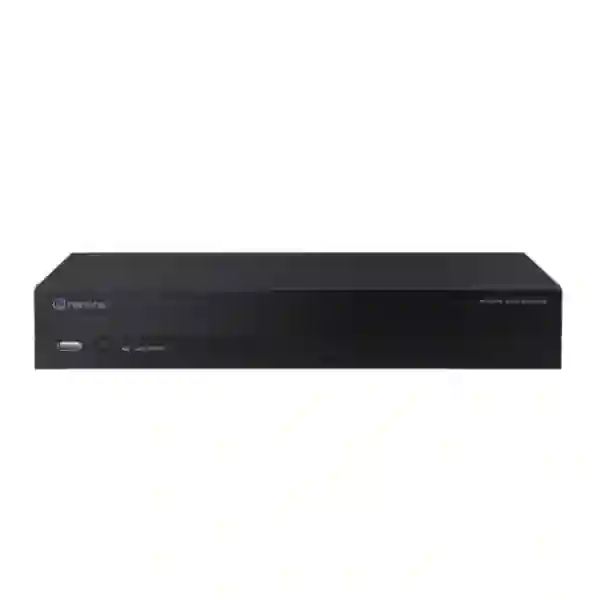
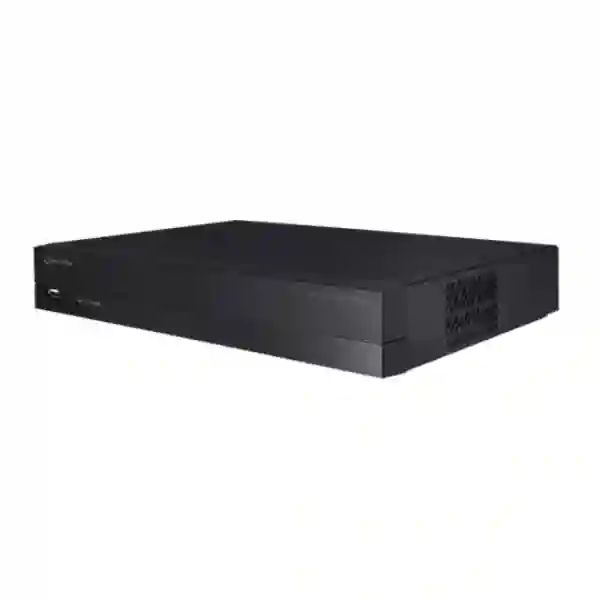
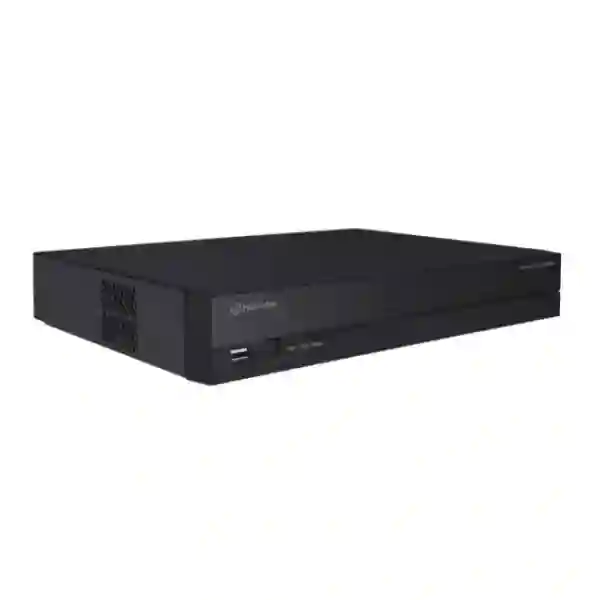
Hanwha Vision | 4TB Network Video Recorder
Hanwha QRN-430S-4T: 4TB 4-Channel PoE NVR
A compact four-camera recording hub for shops, offices and smaller properties. Combine up to four compatible IP cameras with a 4TB drive configuration, local HDMI viewing and supported remote workflows. Check the 40Mbps recording ceiling and 35W combined PoE budget against your selected cameras before ordering.
Key specifications
| Recorder / configuration | Hanwha Vision QRN-430S-4T; 4TB |
|---|---|
| Camera inputs | 4 IP camera channels, up to 8MP |
| Maximum recording bandwidth | 40Mbps combined |
| Compression | H.265, H.264, MJPEG |
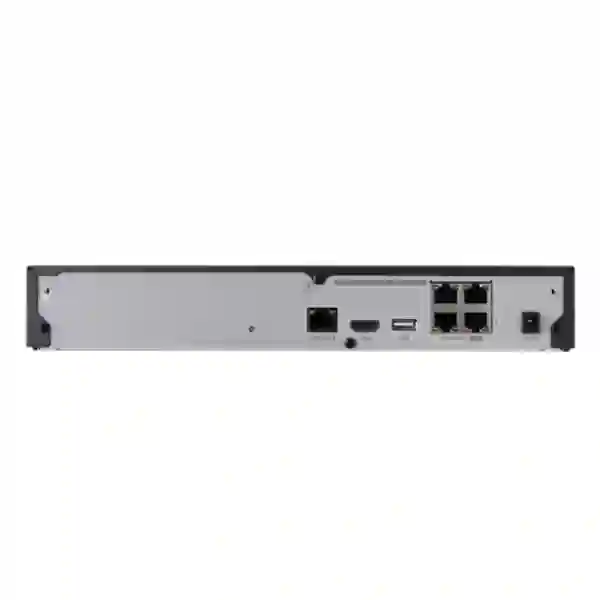
| Built-in camera-side power | 4 PoE ports; 35W combined budget |
| Storage configuration | 1 SATA HDD bay; up to 6TB supported |
| Display | 1 HDMI; output up to 3840 × 2160 at 30Hz |
| Camera protocols | SUNAPI and ONVIF |
| Network connections | 4 camera-side PoE RJ-45 ports; 1 separate RJ-45 uplink |
| USB | 2 USB 2.0 ports |
| Power | 100–240V AC, 50/60Hz via power arrangement |
| Maximum listed consumption | 52W with 1 HDD and PoE active |
| Operating environment | 0°C to 40°C; 20%–85% RH |
| Recorder dimensions | 300 × 47.1 × 208.4mm (QRN-430S chassis) |
Technical figures are manufacturer specifications for the QRN-430S platform and the documented 4T storage variant. Confirm exact supplied configuration and camera compatibility in the quotation.
What this 4TB Hanwha recorder is designed to do
The Hanwha QRN-430S-4T combines a four-channel IP-camera recorder with a 4TB hard-drive configuration. It is designed for buyers who need a straightforward local recording hub for a small camera deployment rather than a large multi-site recording server. Connect compatible network cameras, configure their recording profiles and keep searchable footage on the internal drive. Four built-in PoE camera ports can simplify a compact installation because suitable cameras may receive power and data through the same network cable. The recorder also provides HDMI viewing for a local monitor and supports appropriately configured remote access.
The practical buying decision is not simply whether four cameras can be connected. Check that the cameras together fit the 40Mbps recording limit and the combined 35W PoE budget, that their chosen codecs and features work with this NVR, and that a 4TB drive can retain footage for the number of days you require. This product is suited to a defined four-camera plan with realistic storage and power calculations. If future expansion is likely, a higher-channel recorder can be a better starting point.
At a glance: what is verified
Hanwha Vision identifies the QRN-430S-4T in its 2026 product range as a four-channel PoE network recorder with a 4TB storage configuration. The underlying QRN-430S platform handles up to four IP camera channels, resolutions up to 8MP, a maximum combined camera recording bandwidth of 40Mbps, and H.265, H.264 or MJPEG recording. The system uses one internal SATA drive bay with a stated 6TB maximum supported capacity. It has four camera-side PoE ports, one separate network connection, and a local HDMI output.
The stated combined PoE power budget is 35W, not 35W for each camera. The recorder accepts power through its supplied-type adapter and is specified for an AC input range of 100–240V at 50/60Hz. Hanwha lists maximum overall consumption of 52W with one drive and PoE active. Treat these figures as hardware limits and check the actual hardware revision, camera load and installation conditions before commissioning.
Choosing a recorder for a four-camera CCTV project
Four camera channels work well when the viewing plan is already clear: an entrance, a customer-facing counter, a stockroom and a loading point, for example. The QRN-430S platform lets an operator view each source and search recorded video, without forcing a complex server-based workflow. For a small shop or office, that simplicity can reduce the effort needed to inspect an event or identify which camera requires attention. A practical site drawing should show each camera’s field of view, mounting position, cable route, access restrictions and intended lighting conditions.
Four channels are a hard planning boundary, however. If a site needs five cameras immediately, or is likely to add several more entrances and corridors, it is better to evaluate an eight-channel or larger system before buying. An NVR does not compensate for missing coverage. In a small system, select the four most valuable positions and ensure each camera can capture useful details at the distance and lighting conditions that matter.
Understanding the 4TB storage configuration
The 4T variant is identified by Hanwha’s product documentation as the 4TB configuration. That is nominal drive capacity, not a guaranteed amount of retained video or usable space after formatting and system overhead. Footage retention depends on resolution, frames per second, compression, scene movement, stream bitrate, the number of cameras and whether recording is continuous or event-based. Higher motion, poor low-light conditions and more detailed scenes can raise encoded bitrates, reducing the number of days available on the same drive.
The QRN-430S has one internal SATA drive position and a supported drive capacity of up to 6TB. Because there is only one bay, do not interpret a larger supported disk as an additional second drive that can be installed alongside the 4TB disk. If the recording plan calls for more capacity, confirm supported disk models, whether replacement is appropriate, and how existing evidence will be exported or preserved before changing a drive. A single internal drive should not be mistaken for a redundant RAID storage array.
How to estimate recording retention before ordering
Start by defining a retention target, such as the number of days needed to investigate a typical incident. Next list each camera’s expected average recording bitrate at its proposed resolution, compression setting and frame rate. Multiply the combined average bitrate by the hours of recording each day to estimate data generated, then allow for variable scenes, drive formatting, system overhead and operational margin. The 40Mbps specification is a recording throughput ceiling; it does not mean that every deployment records continuously at 40Mbps or that all camera scenes will produce the same data rate.
As a rough calculation, four cameras averaging 2Mbps each generate about 86GB in 24 hours of continuous recording before storage overhead. At 4Mbps each, that figure is about 173GB per day. These are mathematical examples, not promises of actual retention or camera performance. They illustrate why choosing a sensible bitrate and codec can have a major effect on the usefulness of a 4TB configuration. Test the proposed settings with realistic activity and nighttime scenes before deciding the retention requirement has been achieved.
Recording bandwidth versus network connectivity
Hanwha specifies a 40Mbps maximum network-camera recording bandwidth for this recorder. That is the key aggregate limit when sizing four video streams. A system using four cameras at 8Mbps each would request about 32Mbps of recording throughput and should still be examined for bitrate spikes, secondary streams, network conditions and model-specific compatibility. A plan that requires more than 40Mbps in total is not suitable even though it uses no more than four cameras. The camera count and total throughput must both fit.
The recorder includes a separate network interface for connection to the local network and four designated camera-side PoE interfaces. Plan the cable routes and address allocation so cameras, local monitor access and optional remote viewing are manageable. Avoid assuming that an internet subscription’s headline speed proves the local system will record reliably. Camera-to-recorder traffic, uplink performance, remote viewing demands and overall network security are separate design issues.
What support for up to 8MP really means
The QRN-430S accepts compatible network cameras with resolutions up to 8 megapixels. This is a maximum supported camera resolution, not a promise that every 8MP camera, firmware release, analytics function or third-party feature will operate identically. Verify the exact stream format, selected compression mode and the camera’s supported protocols. Higher resolution can be useful for identification and scene detail, but it can also raise data demand and make low-light choices more important.
Also distinguish incoming camera resolution from the simultaneous layout on a connected screen. The recorder has an HDMI output with up to 3840 × 2160 at 30Hz stated in its specification, while its documented local decoding capabilities vary by layout and stream. A 4K monitor connection does not guarantee every camera appears at full 8MP resolution in every multi-camera view. Ask for a demonstration of the intended four-way display and review recorded clips at the export resolution required for actual investigations.
H.265, H.264 and MJPEG recording choices
Codec choice changes storage usage and may affect interoperability. This Hanwha platform supports H.265, H.264 and MJPEG, but the appropriate setting depends on the camera model, required image quality and playback workflow. H.265 is often selected to reduce the bitrate needed for comparable visual quality, while H.264 remains a familiar option for systems where broader decoder compatibility matters. MJPEG can be significantly more storage-intensive, depending on its configuration. No codec alone guarantees a particular reduction or retention period.
Treat the recording profile as part of your site design rather than a setting to leave unchecked. Test representative motion at entrances, shelf areas and nighttime scenes. Compare whether faces, packages or vehicle details remain useful after compression. Choose a suitable frame rate for the evidence you expect to capture, then verify the actual measured bitrates. A lower bitrate may save storage while undermining the image detail needed to answer an incident question.
The important 35W PoE budget
The four PoE ports make this NVR attractive for a small installation, but its specified total PoE budget is 35W across the connected cameras. Four ports do not imply four unrestricted high-power outputs. As an illustration, four cameras each needing 6W would have a nominal total of 24W, while four cameras each needing 11W would request 44W and exceed the combined budget. Actual requirements must be taken from the exact camera datasheets and include peak demand, such as infrared illumination, heaters or accessories where applicable.
Allow a sensible power margin rather than designing a system that consumes the complete budget during normal operation. If selected cameras require more power than the integrated ports can supply, an appropriately designed external PoE switch or independent power arrangement may be required, subject to the network architecture and compatibility checks. Do not promise that a high-demand PTZ or specialty camera will run solely because its network connector physically fits a PoE port. Confirm the camera’s PoE class and maximum load before purchase.
Network cabling and equipment placement
A small recorder can still benefit from a professional cabling plan. Use properly terminated network cabling suitable for the route and installation environment. Record each cable endpoint and label it so future troubleshooting does not require unplugging every camera. Check cable length, mechanical protection, water exposure and any required surge protection. Where outdoor cameras are used, suitable outdoor-rated cabling and protected transitions become especially important. Keep cable routes away from hazards and make provision for maintenance access.
The recorder itself should be located in a secure, dry, ventilated place that authorised staff can reach when they need to export footage. Avoid exposing the unit directly to dust, rainfall or high temperatures. A secure office cabinet may be appropriate if it has adequate ventilation and does not obstruct connections or access. Before handover, check that each camera retains connectivity and a stable image under expected daytime and nighttime power demands.
Camera integration: SUNAPI and ONVIF
Hanwha lists SUNAPI and ONVIF support for the QRN-430S camera interfaces, which can help with camera registration and integration. For Hanwha cameras, SUNAPI may provide access to manufacturer-specific controls within supported combinations. ONVIF can make certain compatible third-party cameras usable, but support for an ONVIF standard should not be interpreted as full support for every third-party feature, event type or firmware revision. Actual interoperability depends on the device, ONVIF profile, authentication methods and configured streams.
Before ordering mixed-brand cameras, test registration, live video, recording, clock synchronization, playback and the event features the project needs. If a camera is supposed to supply motion events or analytics to the NVR, check that those events reach the recorder in the expected format. PTZ controls, audio and special lens modes may require additional verification. A successful live picture is only the first compatibility test; a complete acceptance test checks the entire operational workflow.
A practical camera compatibility checklist
Make a list of every proposed camera model and its exact firmware or software baseline. For each, record the maximum and intended resolution, codec options, frame rate, typical and peak bitrate, supported network protocols, PoE requirements and any special imaging or analytics functions. Compare these details with the recorder’s limits. This small preparation step reduces the risk of buying cameras that technically connect but do not deliver the intended recordings or controls.
Then match technical characteristics to the location. An entrance camera may need strong backlight handling, while a stockroom may benefit more from good low-light detail. A long corridor requires a suitable lens and framing, not simply a higher megapixel figure. A loading bay may need weatherproof installation and higher illumination power. Confirm camera specifications separately; the NVR does not automatically provide infrared lighting, weather resistance, microphones or analytics. Those capabilities belong to the chosen camera and must be individually verified.
Local HDMI monitoring and daily use
The recorder provides a local HDMI monitor output so authorised users can view compatible camera feeds at the installed workstation or security desk. A four-camera grid offers a convenient overview of the immediate site, and a single-camera view may be more useful when checking an incident. The available layouts and displayed detail depend on recorder capability, camera streams and display configuration. A monitor and appropriate cable should be included in the installation plan when local viewing is needed.
Define who can operate the recorder and what those people should do. A shop supervisor may need to review a till incident, while a security guard may only require live viewing. Give each role the least access needed, rather than sharing one powerful administrator account. Explain how to identify the correct camera, search a time interval and export an incident clip. A system is more useful when routine tasks can be completed correctly by the actual staff who will use it.
Mobile and remote viewing considerations
Hanwha documents web viewing, supported client software and mobile access, with P2P QR-code assisted configuration available on the QRN-430S platform. These options can help authorised users check live views and recorded footage away from the physical monitor. Remote access is not an automatic entitlement to unrestricted connectivity: successful use depends on compatible client versions, recorder configuration, network conditions, user permissions and the security policy chosen for the site.
Discuss who truly needs remote access before enabling it. For some businesses, controlled local viewing and occasional managed remote access are preferable to making all feeds available to many phones. Use current supported software, set individual accounts where feasible, enable appropriate authentication controls and review the manufacturer’s current security guidance. Mobile video quality may adapt to bandwidth constraints, so an off-site view is not always identical to the high-resolution recording held locally. Test access using the real connection methods intended for the business.
Playback, searches and incident export
The QRN-430S documentation lists calendar-based searches, event-list searches and other supported search modes, together with local and network backup options. These features matter because recorded video is useful only when staff can find and preserve the appropriate event. Define a simple process for noting the camera name, date, start time and reason for an export. Confirm that the recorder clock and displayed timestamps are correct before relying on footage for incident reviews.
During installation, perform a real export from the intended operator account and check that the resulting file opens on the equipment used by the organisation. Record where the file is stored, who can retrieve it and how it is protected against accidental disclosure or deletion. Evidence-handling processes may require additional measures beyond the basic recorder functions. Do not assume that footage will remain available indefinitely or that copying it to a USB device is a complete retention and access-control strategy.
Continuous and event-led recording options
The platform provides recording modes that include continuous scheduling and event-oriented operation. Continuous recording is straightforward to understand because it aims to maintain a timeline, subject to capacity and system health. Event-led schedules can reduce storage usage in some situations, but only when the event detection and triggers function as intended. Sensitivity, scene motion, lighting changes, camera configuration and supported events all affect outcomes. A system that records only on events could omit important context if a trigger is missed.
Before relying on motion or other camera-triggered recording, test typical real scenes: customers entering, staff moving stock, quiet periods, reflections and after-hours lighting. Check any pre-event and post-event timing options supported by the chosen configuration. The correct mode depends on business risk and retention requirements rather than a universal best setting. For a critical entrance, continuous recording might be preferred; for a less active area, a carefully tested schedule could be appropriate.
Reliability and recovery expectations
Hanwha lists Automatic Recovery Backup and N+1 failover support within the QRN-430S platform specification. These capabilities should be interpreted in their documented system context; they do not mean that this standalone four-channel device contains two mirrored internal disks or can never lose footage. Recovery workflows may depend on compatible cameras, network conditions, other equipment and deliberate configuration. A small installation should never be marketed as fully fault-tolerant merely because a feature name appears in a datasheet.
Decide in advance how faults will be noticed. Staff should know what an offline camera looks like, how to check whether recording is active, and whom to contact for service. Use supported monitoring and event notifications where appropriate. Test a temporary camera disconnection and confirm the expected response rather than presuming an alarm is already configured. Combine good operational checks with evidence-export practices and a support plan that matches the importance of the footage.
Protecting the recorder and the video network
CCTV equipment is part of a business network and should be secured as carefully as other connected devices. Replace default credentials, use strong unique passwords, restrict administrator privileges and review current firmware guidance from Hanwha. Avoid placing management interfaces openly on the internet simply for convenience. A controlled network design, suitable firewall rules and securely managed remote access can reduce unnecessary exposure. Keep an inventory of who has been issued an account and when permissions should be removed.
Recording footage may capture customers, staff and visitors. Establish an appropriate privacy and access policy for the intended use and any applicable requirements. Limit viewing and exports to authorised personnel, secure saved copies and avoid retaining video longer than the legitimate operational need. A password alone is not a complete policy: consider physical access to the recorder, backup drives, viewing monitors and shared mobile devices. Ask qualified advisers about regulatory questions rather than assuming a product specification proves local legal compliance.
Power continuity for Tanzanian installations
The manufacturer’s AC input specification covers 100–240V at 50/60Hz via the recorder’s power arrangement, while the listed maximum operating consumption is 52W with one drive and PoE enabled. That does not remove the need to plan a safe installation and compatible power equipment. A qualified installer should assess the site’s supply, protective devices, earthing arrangements and suitable surge protection. Do not use an improvised adapter or assume all accessories have the same voltage requirements.
For a site where a brief outage would interrupt important recordings, discuss a correctly sized UPS for the recorder and any separate network or camera-power equipment. The backup runtime depends on the complete load, battery condition and UPS specification; it cannot be guaranteed from the NVR’s consumption alone. If cameras receive power from a separate PoE switch, that switch may also need backup. Test safe shutdown and recovery procedures so users know what to expect after an interruption.
Operating temperature and ventilation
Hanwha specifies a QRN-430S operating temperature range of 0°C to 40°C and a relative humidity range of 20% to 85%. Those limits matter when choosing the recorder’s location, particularly in rooms that become hot when closed or contain dense electronic equipment. A compact metal enclosure still requires suitable airflow. Avoid sealed cabinets, direct sunlight and positions where dust or moisture can enter. The NVR is an indoor electronic recording device, not a substitute for a weatherproof outdoor enclosure.
An installer should consider the temperature reached during the hottest realistic operating period, not merely the room temperature while commissioning. Make sure cables and furniture do not obstruct ventilation. A protected location that is easy to maintain may extend the practical serviceability of the equipment, though no specific lifespan can be guaranteed. Check the condition of the connected hard drive and recorder logs periodically and treat unexplained restarts, excessive heat or missed footage as issues requiring investigation.
Example: a small retail shop
A retail project might allocate one camera to the entrance, one to the main sales floor, one to the cash handling area and one to a storeroom doorway. This is an example of camera placement logic, not a guarantee that four cameras are enough for every shop. Use a floor plan to identify blind spots, assess backlighting near doors and decide what level of detail is needed at the point of sale. Check whether the selected cameras’ combined bitrate and power draw fit the recorder limits.
With 4TB of storage, recording duration will depend heavily on how busy the shop is and whether the system records all day or by schedule. The owner should define a reasonable retention requirement and a simple export process before installation. If the property includes several floors, multiple storerooms or outdoor areas, four channels may become restrictive. Use a larger system where the risk assessment requires more coverage rather than reducing critical camera positions simply to fit the recorder.
Example: an office or reception area
For a modest office, four cameras might monitor a reception entrance, a shared corridor, an equipment room entrance and an external approach where a suitable camera is used. The most useful layout depends on staff privacy, building access patterns and the reasons the system is being installed. Camera placement must be considered alongside lighting and privacy expectations, not based solely on maximum resolution. An NVR helps collect the recordings, but it does not make a poorly positioned camera more informative.
A receptionist may need a local display while a manager requires occasional, permission-controlled playback. Configure accounts around those distinct responsibilities. If sensitive data or personnel activity could be captured, define appropriate controls on who may view or export footage. Confirm the desired retention period with the organisation’s policies. For a growing office that expects more doors or floors, check expansion options before committing to a four-channel installation.
Example: a house or small property
A smaller property could use a camera at the main gate, one near the principal entrance, one for a parking area and one for a key walkway. This arrangement must be adapted to the actual property and should avoid unnecessary views into neighbouring private areas. Select camera lenses that provide useful identification at the required distance rather than the widest possible overview alone. Outdoor cameras need their own appropriate environmental protection and power design.
Owners should think about what happens during internet or mains-power disruption, where the recorder will be secured and how incident clips will be retrieved. Local recording and remote mobile access are different functions; confirm the former works reliably before enabling the latter. Recording at night can consume more storage than anticipated, so test low-light performance and realistic bitrates. A simple system is most effective when household users can search footage without having to understand complex network configuration.
Example: a small storehouse or workshop
A storehouse may need four targeted views: entry, dispatch bench, goods receiving and a controlled stock aisle. Movement patterns, low light and dust can make camera choice more significant than the NVR model. A camera overlooking a long aisle should be tested at the actual distance where package labels or people must be distinguishable. A loading area may require an outdoor-rated camera whose power demand must be included in the 35W budget calculation.
Plan for staff shift patterns and the time an incident may be discovered. If damage or missing stock is usually noticed days later, a very short recording history may be inadequate. Make retention calculations using the intended continuous or scheduled recording profiles and leave margin for busier periods. Equipment should be protected from accidental knocks and unauthorised access, with a clear process for checking recording status during routine facility inspections.
A practical installation sequence
Begin with a site survey and confirm the reason for each of the four camera views. Select exact cameras, check their documented power loads and calculate the combined recording bitrate. Confirm that the desired retention time is plausible with the 4TB configuration. Plan the cable routes, protected network connection, monitor position, security of the recorder and any UPS or external PoE equipment. This planning stage is the right moment to discover that a fifth camera or higher total PoE budget is needed.
After mounting and cabling, configure the NVR using the manufacturer’s current instructions. Register each camera, set the appropriate recording profile, synchronize time, configure user roles and establish the required schedules. Check display and recorded playback for all channels. Only then configure remote viewing according to the site’s security requirements. Finish by showing the responsible users how to verify recording health and export an incident, and provide a record of approved configuration details.
Commissioning and acceptance checklist
Do not treat a visible live picture as proof that an installation is complete. During acceptance, check every camera in realistic daylight and nighttime conditions, confirm that timestamps match, and record the selected resolution, frame rate, codec and measured bitrate. Verify that the total requested recording bandwidth remains within specification and that the PoE supply remains stable when camera lights or other accessories operate at their highest normal demand.
Perform a short event search, open the recorded result and export a sample file. Verify local HDMI viewing and any authorised remote connection. Test how the system behaves if one camera cable is temporarily disconnected, then confirm that recording resumes in the expected manner after reconnection. Review the security configuration, firmware state and account permissions. Document the retention estimate as an assumption that should be checked in operation, not a guarantee. Handover should include clear user instructions and an escalation path for faults.
What the recorder does not replace
The QRN-430S-4T is the recording centre, not a complete surveillance solution by itself. It does not choose the camera lens, provide night illumination to an unlit scene, waterproof an outdoor camera or create a useful field of view where the mounting position is poor. It also does not remove the need for an appropriate data network, secure credentials, stable electrical power and a realistic recording policy. Product specification pages should be read together with camera datasheets and project requirements.
Four channels, one drive bay, a 40Mbps recording ceiling and a 35W total PoE budget are meaningful constraints. They are not necessarily drawbacks for a genuinely small project, but they become important if buyers want high-bitrate cameras, specialty equipment, extensive footage history or near-term expansion. The right decision is based on matching actual site requirements to the whole system. If any critical requirement exceeds those limits, request a different NVR configuration instead of accepting compromised evidence quality.
Comparing a four-channel NVR with a larger system
A four-channel recorder is attractive when the final camera count is known and the installation needs a relatively compact appliance. Fewer channels can make initial planning and routine operation simple. The trade-off is reduced expansion room. A larger NVR may provide additional camera inputs, a greater recording-throughput allowance, more PoE budget or additional storage options, depending on the exact alternative model. Never assume that an eight-channel label automatically guarantees all of those benefits.
Compare alternatives using five separate figures: maximum camera channels, supported resolution and codec, combined recording bandwidth, total camera-power capacity and supported storage architecture. Add the required playback workflow, security features and camera compatibility. This structured comparison is more reliable than choosing based on channel count or nominal hard-drive size alone. A customer planning to add cameras next year may avoid replacement costs by evaluating a larger platform during the initial project.
Tanzania procurement questions to resolve
Before requesting a quotation for Tanzania, specify that the intended product is the QRN-430S-4T 4TB configuration, not the bare QRN-430S recorder without a drive and not a similar model number used in another regional market. Ask for confirmation of the precise supplied variant, included accessories, manufacturer packaging and any applicable commercial terms. Pricing, stock, delivery, taxes, warranty and installation services should only be stated in a quotation that verifies those conditions.
Include the exact proposed camera models, site type, indoor or outdoor locations, required recording days, user access requirements and anticipated expansion. Those details help distinguish a straightforward four-port installation from one needing additional PoE equipment, network work or a larger recorder. Where an organisation has purchasing or information-security policies, submit those requirements early so compatibility and operational questions can be addressed before hardware is ordered. FourTeck Tanzania can be asked for a configuration review and quotation; availability and services require confirmation.
A useful buyer handover document
Once a CCTV system is commissioned, keep a concise internal record covering recorder model, installed drive configuration, connected camera models, camera names, IP addressing plan, recording schedules and retention assumptions. Document which staff accounts can access live video, recordings and exports, but do not store passwords openly in the handover file. Note the software version at handover and the approved method for future updates. This avoids guessing how the system was configured after a staff change or equipment fault.
Include a simple plan showing camera positions, a contact or support escalation process and a reminder to test footage retrieval periodically. Any exported footage should be stored and shared in line with organisational policy. A short, clear handover is often more valuable than a long technical folder nobody uses. The aim is to preserve the value of the recorder throughout daily operation, not merely to confirm that it displayed video on installation day.
Common troubleshooting questions
If a camera does not appear, begin with physical power, cable continuity, correct port connection and whether the camera is compatible with the chosen registration method. Check the IP addressing arrangement and credentials before changing unrelated settings. If a camera appears live but recording is absent, review the recording schedule, available drive capacity, selected profile and any event dependency. Use the recorder’s status and event logs to narrow the issue rather than repeatedly rebooting without diagnosis.
If footage retention is shorter than expected, compare the actual observed bitrates with the original estimate and investigate changes in frame rate, motion, nighttime conditions or compression settings. If remote viewing fails while local viewing works, examine the local network, remote-access configuration and user permissions separately. If cameras become unreliable when infrared LEDs activate, reassess PoE power draw and available headroom. Persistent faults should be reviewed with current manufacturer documentation and a qualified technical specialist.
Frequently asked questions
Does the QRN-430S-4T include 4TB storage?
Hanwha’s 2026 line-up identifies the -4T as the 4TB configuration. Confirm the exact supplied regional variant and what is in the package when ordering. Nominal capacity is not the same as guaranteed retained footage.
Can it connect to five IP cameras?
No. The QRN-430S platform supports a maximum of four network camera channels. Choose a recorder with more channels if five or more cameras are required.
Does it support 8MP cameras?
The platform supports compatible network cameras up to 8MP. Check the specific camera model, codec, firmware, bitrate and integration features before purchase.
How much PoE power is available?
The documented total PoE power budget is 35W across the four camera ports. Add the peak power requirements of every connected camera and leave margin; do not assume 35W per port.
How many days of recording will 4TB provide?
There is no fixed answer. Retention depends on number of cameras, average bitrate, codec, frame rate, recording schedule, scene activity and drive overhead. Estimate and test against your required number of days.
Can the hard drive be expanded?
The platform has one internal SATA drive bay and Hanwha states support for up to 6TB. Confirm the current drive compatibility guidance and an appropriate evidence-preservation plan before replacing a disk.
Can I use ONVIF cameras from other manufacturers?
ONVIF support is listed, but exact interoperability is camera-specific. Test registration, recording, playback, events and any audio or PTZ functions you require.
Can I view recordings on a phone?
Hanwha documents supported mobile viewing and P2P-assisted setup. The exact experience depends on compatible applications, access configuration, network connectivity and user permissions.
Does the recorder have HDMI output?
Yes. A local HDMI output supports monitor viewing, with documented output capability up to 3840 × 2160 at 30Hz. Multi-view decoding is subject to its own limits.
Can it record continuously?
The NVR supports continuous and scheduled recording modes. Choose the mode and settings based on the intended retention period, evidence needs and camera streams.
Is it suitable for outdoor installation?
The recorder itself should be housed indoors within its specified temperature and humidity range. Outdoor camera installations need separate appropriately rated camera hardware, cabling and protection.
Is the recorder ready to use without any other equipment?
It requires suitable compatible cameras, cables, a secure installation and appropriate power. A display, network equipment, UPS or other accessories may also be needed depending on the site.
What if our four cameras exceed 35W?
Review the exact camera demand and consider suitable external PoE equipment or a different recorder architecture. The four integrated port count does not increase the total documented 35W budget.
Can it be used in a growing business?
Yes for a defined four-camera requirement, but expansion may demand a larger recorder. Plan future locations, power and retention needs before choosing equipment.
What should I send when asking for a quote?
Provide the exact QRN-430S-4T model, camera types and locations, desired recording days, remote-access needs, power constraints and whether future expansion is likely. Ask to confirm local pricing and availability.
Request a configuration check and quotation
Ask FourTeck Tanzania to review the proposed cameras, their aggregate power draw, expected recording bitrates, retention target and installation environment for this Hanwha QRN-430S-4T 4TB recorder. Share any expansion requirements at the outset so the right recorder capacity can be evaluated.
Request a quote and confirm pricing, stock, delivery terms, included accessories and any installation support directly with FourTeck Tanzania.




Reviews
There are no reviews yet.