
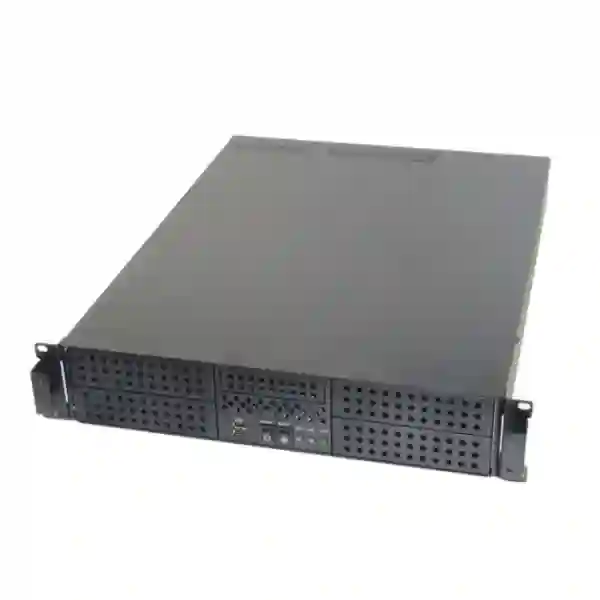
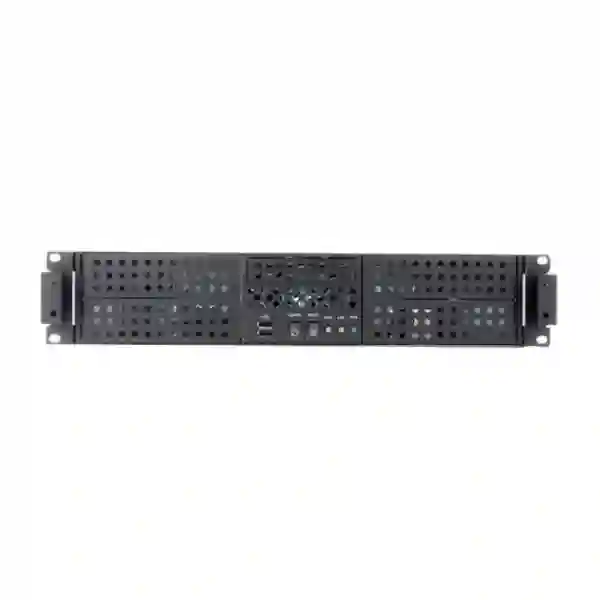
Hanwha SRN-SENCMS-CTL Central Video Management Server
Evaluating a discontinued Hanwha central management server for an existing CCTV system? Understand its verified specifications, separate software licensing, Windows Server 2012 lifecycle risks and practical upgrade decisions before requesting a quote in Tanzania.
Verified product facts at a glance
Specifications describe the manufacturer’s historical reference configuration; inspect the actual unit and verify software before deployment.
Important before ordering or redeploying
The manufacturer lists this model as discontinued. Microsoft has also ended security updates for the Windows Server 2012 generation originally supplied with the appliance. This page is intended to help assess legacy installations and migration needs; it does not represent a claim of stock, current security support, included SSM licences, local regulatory approval or a direct supported replacement.
1. What this central video management server is designed to do
The Hanwha SRN-SENCMS-CTL is a purpose-built central video management server from the earlier Samsung Techwin and Seneca generation of surveillance infrastructure. Its specified role is to host compatible central management components and help coordinate multiple recording servers and cameras. It is not best understood as a standalone network video recorder, a camera, a modern all-in-one surveillance appliance, or an automatic replacement for every existing server in a control room.
In a distributed CCTV environment, recorders can have the demanding job of accepting and storing video streams while operators need tools to locate devices, navigate cameras, and retrieve events. Historically, separating those responsibilities allowed integrators to design a central point of management alongside recording and viewing equipment. Hanwha identifies SSM System Manager, SSM Media Gateway and partner video-management CMS software as intended applications for this hardware, subject to the exact deployment and licensing.
For a buyer in Tanzania, the main question is therefore not simply whether the chassis has an Intel processor or an Ethernet interface. It is whether the equipment can safely maintain an existing approved configuration, whether the required software entitlement exists, and whether a supported modern platform would be a better choice. That decision should be made before money is committed to obtaining or reusing an older server.
- Primary function: central management infrastructure for a compatible surveillance system, not a promise of independent video recording.
- Manufacturer status: discontinued; check replacement architecture and support options rather than assuming new stock is available.
2. Where the SRN-SENCMS-CTL fits in a surveillance architecture
A typical legacy deployment may contain IP cameras, recording servers or NVRs, a network carrying video and control traffic, operator workstations, and central management services. The SRN-SENCMS-CTL belongs in the management-services part of that architecture. Depending on the software installed, the System Manager can organize servers and user policies, while a Media Gateway can relay video and events to an authorized console. These are roles described for historical SSM architecture, not promises that every feature or release runs on this exact appliance.
Recording capacity is a separate planning question. A 500GB system disk is listed for the SRN-SENCMS-CTL, but that does not establish a supported camera count, video retention period, recording bitrate, RAID layout, or archive capacity for a site. Those figures depend on the recording equipment, selected software release, camera streams, storage design, and licensing. Treating the management server’s internal disk as if it were the whole CCTV storage system can lead to costly design errors.
This distinction is important when an installer is asked to restore a site after a server failure. Replacing a management node may recover configuration or access functions, but it does not automatically rebuild footage, recorder indexes, credentials, database connections or application licences. Diagram the existing system and identify each service before selecting equipment.
- Separate the camera, recorder, management server and operator console roles in the deployment drawing.
- Inventory which service is currently installed on the legacy server and where the footage is actually stored.
3. Verified hardware characteristics and what they mean
The listed processor is an Intel quad-core Core i7-4790 running at 3.60GHz with an 8MB cache and LGA1150 platform. The manufacturer also specifies 8GB DDR3 memory and a 500GB SATA hard disk. For an older generation of central management software, this was a defined hardware configuration; it does not establish that the server meets the CPU, memory, graphics or security requirements of a current Wisenet SSM release.
The original technical specification identifies a 3.5-inch 7200RPM SATA drive, up to two SATA drive positions, and a 24x DVD-RW optical drive. Up to two Gigabit Ethernet interfaces, HDMI video output and two front USB 2.0 ports are also documented. These are physical features, not evidence of redundant networking, automatic failover, additional user licences or included video storage. The actual installed components in a second-hand chassis may differ from the historical factory configuration.
Before specifying a spare or refurbished unit, an IT engineer should validate its service tag or asset records, processor model, memory health, disk SMART information, network ports and installed operating system. Photographing the rear interfaces and recording the BIOS version can prevent configuration surprises. A machine that powers on successfully still needs an application-level and security assessment.
- Reference configuration: Core i7-4790, 8GB DDR3, 500GB SATA HDD, 24x DVD-RW.
- Published network and video interfaces: up to 2 × 1GbE LAN and HDMI; inspect the actual appliance before deployment.
4. Rack space, power and physical installation
The published form factor is a 2U rackmount chassis measuring approximately 483 × 89 × 577mm. The listed weight is about 32lb, or roughly 14.5kg. The specification includes a 510W power supply rated for 115–230V input. That wattage is a power-supply rating, not a measured continuous electricity consumption figure; do not use it alone to estimate operating cost or UPS runtime.
A server room needs enough usable rack depth, appropriate mounting hardware, accessible cable pathways and unobstructed airflow. The published dimensions describe the chassis, but they do not include every clearance needed for power cables, network connectors or servicing. A site survey should confirm the real cabinet depth, rail arrangement and service access. If the equipment is already mounted, record how it is supported before removing it for inspection.
In a Tanzania deployment, address practical infrastructure issues without assuming any particular site’s conditions. Confirm the actual mains supply, UPS design, electrical protection, cooling, ventilation, environmental exposure, earthing and safe maintenance procedures. Do not promise compatibility with a specific power system merely because a broad AC input range appears on the historic datasheet. A licensed electrical or facilities professional should check the installation where required.
- Allow two rack units plus appropriate rear clearance and cable-management space.
- Size UPS and cooling from a verified load assessment, not the maximum power-supply label.
5. The software licence is not part of the hardware offer
Hanwha’s official model description expressly states that the licence is not included. That is a decisive procurement detail. A physical SRN-SENCMS-CTL unit, even one with its original operating system, should not be presented as a fully licensed SSM installation unless the relevant software entitlement is separately verified. The exact SSM edition, version, module rights and activation arrangements must be checked against the system being supported.
The phrase ‘Windows Server 2012 with 5 users’ is part of the historical operating-system specification. It should not be read as confirmation of five surveillance console seats, five cameras, five recording servers or five perpetual CMS licences. Operating-system access terms and VMS application licensing are different commercial and technical matters. Camera channels, features and server roles can have their own licensing and version limitations.
Before buying or commissioning a replacement, request a documented account of the existing licence, entitlement owner, purchase or maintenance records, installed application version and transferable rights where relevant. Do not share licence keys, administrator credentials or activation screenshots in public tickets or product reviews. Use a verified secure quotation or support channel if confidential licensing details are necessary.
- Ask whether the requested scope is bare hardware, a legacy software recovery, an entitlement review or a full replacement solution.
- Treat any claim of included SSM software, licence transfer or activation as unverified until confirmed for the exact offer.
6. Understand the difference between historic SSM and current SSM
Smart Security Manager has evolved. Historic SSM documentation describes separately deployed components such as System Manager, Media Gateway and Recording Server. Hanwha’s newer Wisenet SSM documentation discusses a more consolidated server architecture and software releases that have their own installation, operating-system and hardware requirements. The older naming in the SRN-SENCMS-CTL product information should not be stretched into a guarantee that today’s SSM software will operate on the legacy hardware.
An organization may possess an older SSM deployment that is stable in its current form but no longer appropriate to expand. The correct evaluation starts with the installed versions on every node. Look at database and server version dependencies, client console requirements, device drivers, third-party integrations and any documented migration path. Verify compatibility from the applicable release notes rather than relying only on a product family name.
When upgrading, decide whether to preserve a supported historic configuration temporarily, migrate the whole site to a current software environment, or change to a different supported VMS architecture. Each option has consequences for user accounts, camera registration, playback access, recording continuity, event rules and software entitlements. Do not assume that the hardware model itself provides a supported upgrade path.
- Record the installed SSM edition and build before recommending hardware or software changes.
- Use the release notes and approved system requirements for the exact target release; do not infer support from the SRN-SENCMS-CTL name.
7. Windows Server 2012 security and lifecycle risk
The SRN-SENCMS-CTL was specified with Windows Server 2012, an operating system that is now beyond its normal Microsoft support lifecycle. Microsoft’s published lifecycle records state that standard extended support ended in October 2023, and its Extended Security Updates programme for Windows Server 2012 ended in October 2026. As of November 2026, a default Windows Server 2012 installation should therefore not be treated as a currently security-supported foundation for a new CCTV management deployment.
Continued operation can create exposure if the server is reachable by untrusted networks, uses outdated services, has unmanaged credentials or depends on unsupported browser and remote-management software. The right mitigation depends on business need and the actual system. Isolation, access restrictions, backups and close monitoring may reduce some exposure during a controlled transition, but they do not return the operating system to normal vendor support or eliminate the security risk.
For a new project, ask the integrator to propose an actively supported operating system and management platform instead of silently installing a discontinued appliance. For an existing mission-critical system, establish a time-bound risk acceptance and migration plan with the organization’s IT and security owners. Do not advertise this model as future-proof, fully secure by default, or appropriate for unrestricted internet exposure.
- Security checkpoint: Windows Server 2012 support and ESU dates have passed.
- Preferred direction for new designs: a manufacturer-supported contemporary management architecture, validated for the target cameras and workflow.
8. Check camera, recorder and protocol compatibility first
Being part of a Hanwha surveillance family does not mean the server automatically works with every Hanwha or third-party camera, NVR, encoder and access-control system. Compatibility resides in the installed management software, its licensed modules, version-specific protocol support, device firmware and configuration. Historical SSM documentation discusses technologies such as SUNAPI, SVNP and ONVIF in certain contexts, but support needs to be confirmed at the relevant software and device versions.
Begin with a camera and recorder inventory listing manufacturers, exact model numbers, firmware, stream settings, network addresses or VLANs, location and responsible owner. Identify which devices are registered directly, which are represented through recording servers, and which events or analytics the operators need. Record any critical audio, PTZ, time-synchronization or alarm requirements. This turns a vague compatibility question into a testable deployment checklist.
When comparing a new VMS platform, check that required live view, playback, event handling, motion metadata, export, user permissions and evidence procedures still work. A camera visible in a generic discovery tool is not necessarily supported for every advanced function. Perform a small controlled integration test before authorizing a broad equipment purchase or full migration.
- Verify every critical device by exact model, firmware, feature and supported software version.
- Never treat generic ONVIF discovery as proof of full feature or recording compatibility.
9. Network design for a centralized management environment
The manufacturer lists up to two 1GbE network interfaces for the historical server. Network planning should nevertheless start with actual traffic flows, not with the sum of interface speeds. Camera streams, recorder writes, playback sessions, client live views, event messages, management traffic and remote administration can take different paths. The central-management server is not a substitute for a correctly sized switching and recording network.
Obtain a current logical diagram showing subnets, VLANs, gateways, firewalls, uplinks and operator access. Check which management services need to communicate across segments and which should remain blocked. If sites are connected through WAN links, account for real throughput, latency, packet loss, contention and recovery after outages. Do not set a camera or client capacity from the number of Ethernet ports alone.
Use version-specific vendor documentation for service ports and traffic requirements; settings published for one SSM generation may not match another. Apply least-privilege firewall rules and limit remote management to approved channels. Keep network credentials separate from normal operator accounts. Where network resilience is required, design and test it explicitly; dual interface availability does not by itself prove a bonded or redundant configuration.
- Measure real live-view and playback traffic during busy operator periods.
- Document network routes and security rules before changing VLANs, switches or remote-access arrangements.
10. Storage expectations and footage retention
The internal 500GB SATA drive is a published system characteristic, not a surveillance-retention promise. The requested number of retention days depends on which recording servers store the streams, camera bitrate, codec, resolution, frame rate, continuous versus event-based scheduling, evidence-hold rules and available usable disk space. Even if the central server has additional installed storage, it should not be assumed to act as an approved primary archive.
Ask where each recording is stored and how it can be accessed if the management server goes offline. Verify whether recorder-local viewing remains possible, what metadata or indexes are tied to the central application, and whether any playback or export function requires the server. Confirm the timezone and clock synchronization of cameras, recorders and clients so an exported event can be matched to the incident record.
A migration or replacement plan must identify footage that must remain available, retention obligations defined by the organization, and the process for preserving evidence integrity. Do not wipe drives, rebuild software, alter recorder relationships or replace a management database until recoverability and evidence requirements have been confirmed. Disk backup, application configuration backup and exported video evidence are different safeguards.
- Calculate retention using verified recorder storage and camera stream settings.
- Agree a preservation and recovery plan for footage before decommissioning an older management system.
11. Operator access, permissions and auditability
Central management is valuable when multiple authorized operators need a consistent way to access cameras and recordings. For a legacy SSM environment, however, account design depends on the installed application edition and its specific capabilities. Determine who can view live footage, export recordings, change device settings, manage server credentials or modify event rules. A server purchased without defined user-management requirements can create both operational confusion and security gaps.
Use named accounts where the application supports them, review privileged accounts, and remove access for personnel who no longer require it. Test role restrictions rather than assuming they work because the permissions screen appears configured. Time synchronization is equally important: logs, incident records and exported clips can be difficult to correlate when servers, cameras and operator stations disagree about time.
Plan secure access for contractors or remote support without disclosing permanent administrator credentials. Document approval and expiry procedures for temporary access, maintenance activity and emergency changes. When moving from the SRN-SENCMS-CTL to a modern platform, list the user and group policies that must be recreated or mapped. Successful device registration alone does not mean the security-control model has been preserved.
- Review administrative rights, operator roles and procedures for recording export.
- Include account and permission testing in every recovery or migration acceptance test.
12. Reliability, monitoring and fault investigation
A central management node may influence what operators see even while some recorders continue to store video. For this reason, a sensible support plan distinguishes a management-service outage from a camera fault, recorder failure, network disruption or workstation problem. The SRN-SENCMS-CTL designation does not establish automatic failover, fault tolerance, RAID protection or redundant power in the equipment being offered.
Maintain an inventory of application services, operating-system health, installed drives, backup locations, event logs, network interface status and software dependencies. Set alerts for practical events that the deployed monitoring platform can actually observe: service stops, storage pressure, network loss, abnormal reboot patterns and backup failure. Test notification delivery and ownership so a warning results in an actionable response rather than an unmonitored inbox.
If operators report missing cameras or slow playback, capture time, affected site, user role, error text, network conditions and whether recording continues locally. Make controlled changes only after preserving logs and configuration. This produces better diagnosis than rebooting multiple components without understanding their relationships. For an aging server, keep a recovery procedure and planned replacement option documented.
- Map symptoms to cameras, recording, management, networking and client applications.
- Define escalation ownership for operational faults and security incidents.
13. Recovering or replacing a failed legacy control server
The most realistic case for considering a discontinued SRN-SENCMS-CTL may be recovery of a pre-existing deployment. Begin with evidence, not hardware substitution. Identify the original system role, software build, operating-system image, activation status, database location, administrator access and available backups. Determine whether a replacement device must match the original configuration or whether the vendor supports a safer migration to another platform.
Confirm the status of camera and recorder recordings before making a change. If the existing management server is partially operational, obtain configuration exports and other vendor-approved backups using documented procedures. If it has failed, do not assume that installing an unfamiliar copy of SSM on another machine will automatically recover registered devices, user accounts, events and archived metadata.
Create a staged restoration plan: establish a secure isolated test environment, restore the correct version, validate licences, register a limited number of known test devices, confirm authorized access and only then reconnect business-critical parts of the system. Prepare a rollback decision and identify who can approve interruptions. Where a system cannot be restored securely, a modern replacement may be the only responsible long-term option.
- Preserve existing disks and images until recovery has been verified.
- Treat licence portability, restore compatibility and service continuity as questions to confirm, never guarantees.
14. A practical migration path to supported technology
Rather than selecting a successor solely by chassis size, define the functions that the new solution must retain. Build a requirements matrix covering camera models, recordings, search and export methods, event handling, operator workstations, role-based access, remote sites, resilience, retention and integration with other security systems. Include physical requirements such as rack space, power, environmental control and maintenance access.
Request vendors or integrators to demonstrate a supported design using current documentation. That may involve modern Hanwha video-management software, a supported recording appliance, a new server platform or another approved architecture. It is not possible to identify a direct drop-in replacement from the SRN-SENCMS-CTL part number alone. Software changes may also require revised licences, hardware resources and operator training.
Sequence the transition to protect critical recording and incident workflows. Survey the present environment, back up configurations, pilot representative devices, confirm operator access, run acceptance tests and implement a controlled cutover. Record what could not be migrated directly and how old footage will be accessed during its required retention period. A structured plan reduces the risk that a hardware purchase solves one problem while creating several others.
- Define required outcomes and supported software before choosing the replacement server.
- Pilot camera playback, incident export and user permissions before a full cutover.
15. How to evaluate a refurbished or remaining unit
If a legacy unit is being sourced for a controlled recovery, insist on a precise description of its condition and included components. Ask for clear photographs, serial identification where appropriate, installed processor and memory, disk health, power-supply state, network-port tests and any missing drive rails or rack accessories. Never equate an old listing photograph with proof of the equipment being offered.
Clarify whether the operating system is installed and legally usable, whether a recovery image is present, and whether any application software or rights are included. An older chassis may have been modified, wiped or repaired, so historic datasheet values should be treated as the original specification rather than a substitute for inspection. Require an evaluation procedure that does not expose the buyer’s cameras or sensitive network to untrusted software.
Also ask for written terms on returns, testing, shipment scope, condition and any service arrangement. No current FourTeck Tanzania stock, selling price, delivery, warranty or replacement entitlement has been verified for this item. Those details belong in an individualized quotation, not an unqualified promise on the product page.
- Confirm serial identity, actual hardware configuration and results of basic hardware tests.
- Make the proposed licence and software scope explicit in writing before procurement.
16. Site preparation for Tanzania facilities
A buyer planning CCTV infrastructure in Tanzania may be supporting an office, industrial premises, retail environment, campus, warehouse or another facility with its own operational requirements. The critical factors are the installation’s real technical constraints: stable electrical supply, network topology, equipment room conditions, authorized access, useful maintenance windows and access to competent system administrators. These are site-assessment topics, not claims that any specific region or building has a particular infrastructure problem.
For more than one location, document how cameras, recorders and operators communicate and what should happen during a WAN interruption. Evaluate whether central administration is essential at every site or whether local recording can continue independently. Clarify how incidents are reviewed when a remote link is slow or unavailable. The answers should influence the supported new design far more than a historic server’s nominal CPU frequency.
Agree who owns security policies, footage retention decisions, backups and incident response. Where organizational or legal requirements apply, obtain advice specific to the customer’s environment; this listing makes no unsupported claim of local certification or regulatory approval. Any Tanzania-specific price, import arrangement, onsite service coverage or delivery commitment must be confirmed separately.
- Complete a real site survey and record power, cooling, rack and network requirements.
- Do not infer local service coverage, certification or stock from the existence of a product description.
17. Keep legacy CCTV systems separated from untrusted networks
Because the bundled Windows Server generation is no longer supported, security architecture is especially important if the server remains temporarily in use. A qualified IT team should decide whether it can be isolated behind restrictive firewalls, prevented from directly reaching the public internet, limited to defined service accounts and accessed only through controlled administrative paths. These precautions are risk reduction measures, not a claim that an end-of-life operating system can be made fully secure.
Create a traffic inventory before applying restrictions, because video-management services may require connections between clients, management nodes, recorders and third-party integrations. Block unnecessary inbound access and avoid broad port forwarding. Use separate administrative workstations and managed remote-access procedures where feasible. Apply vulnerability management and endpoint controls compatible with the installed software, without assuming that every modern agent supports the old OS.
Check the system’s sensitivity to certificate changes, authentication settings and network segmentation in a safe test environment. Document exceptions with owners and expiry dates. If the system cannot be maintained within acceptable risk, prioritize replacement rather than adding an indefinite list of compensating controls.
- Restrict management access and unnecessary network exposure.
- Set a documented end date for legacy use and a responsible owner for migration.
18. Backups, restoration and incident readiness
Backups are useful only when the right data has been identified and restoration has been tested. In a surveillance platform, configuration, application databases, account settings, device lists, firmware inventories, licence records, recorder configuration and actual video files may exist in different locations. The SRN-SENCMS-CTL’s internal drive should not be assumed to contain every element required to recover a site.
Ask the integrator to define the backup method for the exact installed software version. Record when backups run, how they are protected, who can access them and what hardware or software is needed for a restore. Where old operating-system images are retained for disaster recovery, store them securely and treat them as sensitive assets. They can include passwords, network details or outdated software that should not be started on an open network.
Practice recovering a limited test environment without disrupting the production recorder fleet. Confirm that restored users, devices, timestamps and application services behave as expected. For incident readiness, establish a process to export footage with correct time information, audit access and preserve evidence. A recovery plan should be specific enough that another authorized engineer can follow it during an outage.
- Maintain application-level and system-level backups according to verified recovery procedures.
- Test restores and video evidence access rather than relying on a successful backup-completion message.
19. Maintenance planning during a legacy system’s remaining life
If a business must retain an older central management server for a short transition, proactive maintenance can help identify failures early. Maintain current documentation of what the server actually does, who uses it, how to recognize service failure and which components depend on it. Take regular inventory of disk condition, cooling, power, clock synchronization, event logs and reachable endpoints. Avoid unsupported software changes simply to match a current feature list.
Assess any planned maintenance against recording continuity and the organization’s incident requirements. Schedule changes during approved windows, capture a configuration backup and provide operators with a clear escalation route. A qualified engineer should review whether hardware cleaning, drive replacement or other service is justified, recognizing that old parts and software images may be difficult to obtain. No continuing vendor support is implied by the historic specification.
Keep a decision register covering known vulnerabilities, unsupported dependencies, licence questions and blockers to replacement. Assign owners and realistic acceptance criteria. The business value of this work is not in keeping obsolete hardware forever; it is in maintaining control over risk until a supported design can take over.
- Track component health, backups, configuration drift and support dependencies.
- Review the migration plan and residual security risk regularly.
20. Questions to ask before requesting a quote
A useful enquiry for this product should be specific about the existing environment and desired outcome. Is the requirement to identify a part, recover an old management service, source a tested unit, review licences, or redesign an entire CCTV estate? Those are substantially different projects. A quotation without this context can make a low apparent hardware cost look attractive while concealing software, security and migration work.
Provide the model number SRN-SENCMS-CTL, the installed SSM software version if known, the number and types of recorders, the critical cameras, system diagrams, rack constraints and expected operational outcome. Note any strict maintenance window or evidence-retention requirement. Sensitive information such as IP addresses, passwords, licence keys and detailed security topology should be passed only through an appropriately protected channel.
Ask the supplier to state what is and is not included, including equipment condition, installation, application licensing, configuration restoration, compatibility testing and ongoing support. Since this is a discontinued model, require a discussion of supported alternatives instead of treating a like-for-like hardware search as the only solution. A documented scope helps buyers compare a short-term recovery with a safer long-term upgrade.
- State whether you need a legacy replacement evaluation or a supported new CCTV management system.
- Request separate confirmation of hardware, software, licence, services, support and site-specific commercial terms.
21. Acceptance testing before reconnecting a production CCTV site
After a repair, migration or replacement, evaluate the outcome against business functions rather than a simple ‘server online’ message. Check that authorized operators can access required live cameras, review existing recordings, locate incidents, export permitted clips and receive relevant event information. Confirm that recording continues in the intended location and that the system’s clock sources are synchronized.
Test more than one user role and more than one representative device type. Confirm that permissions prevent unauthorized viewing or configuration changes. Where the original deployment used remote sites or integrations, verify those flows deliberately. Consider what happens when a management service is stopped or a WAN connection fails, but conduct failure tests only with an approved plan that protects production operation.
Record pass/fail evidence, unresolved issues, software versions, assigned owners and sign-off. If a legacy risk has been temporarily accepted, document it clearly and set the next review date. Do not describe restoration as complete unless the customer’s essential workflows have been demonstrated. For a new system, retain the results as a baseline for future support.
- Test live view, playback, export, event handling, permissions and system recovery.
- Require documented sign-off from the system owner and relevant security administrator.
22. Choosing between maintenance, recovery and replacement
Continuing with an SRN-SENCMS-CTL can be a considered short-term decision only when an organization understands the inherited software and security constraints. It may make sense to evaluate the appliance as a reference component in an existing installation, to identify the correct legacy configuration, or to assess a controlled restore while a replacement is designed. None of those use cases establishes an endorsement for a fresh internet-connected deployment.
If the site is expanding camera coverage, changing recording policies, consolidating multiple facilities or demanding better cybersecurity, a current supported design is more appropriate to investigate. Compare whole-life factors: equipment, application licences, integration effort, operator training, backup and recovery, support availability, power, resilience, service windows and the risk of lost operational access. A low acquisition price on old hardware can be misleading when these costs are excluded.
FourTeck Tanzania can be approached for an assessment or quotation, but specific availability, service scope and terms must be confirmed. The most useful next step is a compatibility and migration discussion based on your actual camera and recorder environment, not a blind order for a discontinued model.
- Legacy recovery: confirm safety, exact configuration, entitlement and test results.
- Modern deployment: prioritize supported software, validated devices, documented resilience and secure operations.
Frequently asked questions about SRN-SENCMS-CTL
Is Hanwha SRN-SENCMS-CTL an NVR?
It is described by Hanwha as a central video management server intended to support management of multiple recorders and cameras. Do not assume its 500GB internal disk provides the required CCTV recording capacity or retention. Determine which existing NVRs or recording servers actually store video before designing storage, recovery or migration.
Does the server include a Wisenet SSM licence?
No. The official model description says the licence is not included. Check the exact SSM edition, modules, entitlement and activation status separately. Hardware ownership and application licensing are distinct, and the Windows Server specification does not establish camera-channel or console-user rights.
Is the SRN-SENCMS-CTL still a current model?
Hanwha’s product information marks it as discontinued. This does not establish whether a particular dealer holds tested remaining stock, nor does it establish a direct replacement. Obtain explicit confirmation of the proposed unit’s condition, availability and commercial terms before ordering.
Can I safely use Windows Server 2012 for a new CCTV system?
Windows Server 2012 has passed its Microsoft extended support lifecycle and the related Extended Security Updates period ended in October 2026. That is an important cybersecurity issue. A supported current operating system and validated VMS platform should be prioritized for a new design.
Will modern Wisenet SSM run on this hardware?
The original product was designed around an earlier generation of central management software. Newer SSM versions have different architecture and requirements. Confirm the exact server compatibility against the release notes and requirements for the intended software version; do not infer support from the product name.
Can it manage third-party IP cameras?
Actual compatibility depends on installed VMS software, its supported protocols, device firmware, licensing and required features. Test the exact device and operations, including playback, events and permissions. Generic protocol support elsewhere in the SSM family does not guarantee every feature works on the older server.
How many cameras can the SRN-SENCMS-CTL support?
A single camera-count limit is not established by the hardware information reviewed for this model. Capacity depends on software edition and version, architecture, device and client workloads, licences and network resources. Ask for an engineered design and validated software-specific capacity rather than an assumed number.
Does it provide RAID or automatic failover?
Neither should be promised on the basis of the available model specification. The datasheet lists up to two SATA positions but does not establish a configured RAID scheme or high-availability service. If continuity is required, request a documented redundancy architecture and an actual recovery test.
What should I check when replacing a failed management server?
Identify the old software version, services, server roles, available backups, licences, database dependencies and camera or recorder mappings. Protect existing disks and footage. Restore in a controlled environment and verify user access and operations before reconnecting critical production services.
What are the physical installation needs?
The original chassis is a 2U rackmount design with published dimensions of about 483 × 89 × 577mm. Verify rack depth, airflow, mounting accessories, actual electrical load, UPS arrangements and cooling. The listed 510W power-supply rating is not a measured continuous load.
Is a Tanzania selling price or delivery time confirmed?
No verified FourTeck Tanzania listing price, stock status, delivery period, installation coverage or warranty has been supplied. Request a site-specific quotation and written scope. Historic foreign-currency prices from other markets should not be used as Tanzania sales pricing.
What is the most useful next step?
Share a non-sensitive inventory of your existing recorders, camera models, SSM version and intended outcome through a verified quote channel. The resulting discussion should cover compatibility, software rights, operational security, continuity requirements and supported modernization options rather than hardware alone.
Request a legacy CCTV compatibility and upgrade review
Contact FourTeck Tanzania through its verified enquiry or quotation channel with the model number, existing software version, camera and recorder inventory, operational objective and site constraints. Ask for a documented assessment of recovery feasibility, licences, security exposure, compatible supported alternatives and any confirmed commercial terms. Do not send passwords or licence secrets in public messages.
Next step: request a scoped assessment or quotation before purchasing discontinued hardware.




Reviews
There are no reviews yet.