
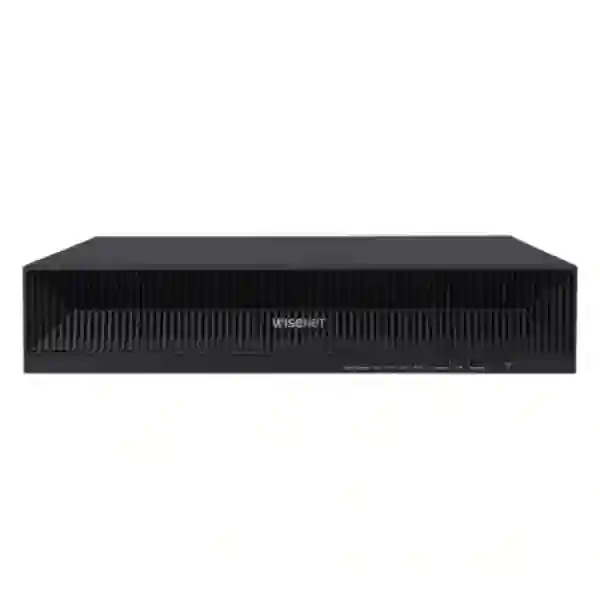
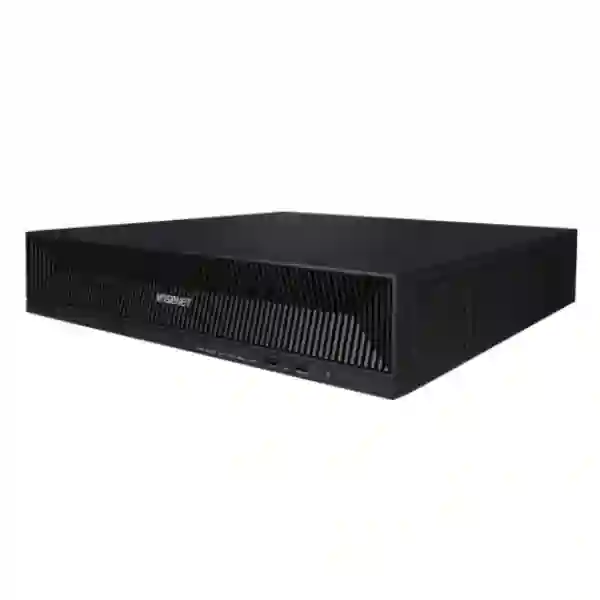
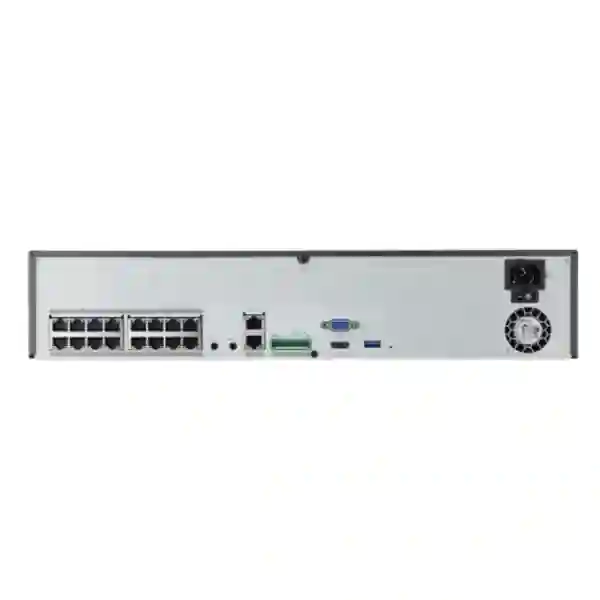
Hanwha XRN-1620SB1 16-Channel PoE Network Video Recorder
Need a practical recorder for up to sixteen compatible IP surveillance cameras? The Hanwha XRN-1620SB1 combines network recording, integrated PoE camera connections, storage bays and searchable video management in one appliance. It is intended for carefully planned systems that need central recording without assuming that every camera requires a separate power switch. Use the verified specifications and configuration checks below to decide whether it fits your premises in Tanzania.
Verified technical specifications
| Manufacturer / model | Hanwha Vision / XRN-1620SB1 |
|---|---|
| Equipment type | 16-channel network video recorder (NVR) |
| Camera inputs | Up to 16 channels; up to 32 MP camera support |
| Recording bandwidth | Up to 140 Mbps incoming |
| Compression | H.265, H.264, MJPEG |
| PoE | 16 PoE+ RJ-45 camera ports; 200 W total budget |
| Network interfaces | 2 × 1 Gbps RJ-45 LAN/WAN ports |
| Storage | 4 SATA bays; 6 TB per supported drive; 24 TB installed maximum |
| Redundancy | RAID-1 support; N+1 failover support subject to configuration |
| Display | HDMI up to 3840 × 2160 at 30 Hz; VGA up to 1920 × 1080 at 30 Hz |
| Playback bandwidth | Up to 32 Mbps |
| Alarm interfaces | 4 inputs and 2 outputs |
| USB | 2 front USB 2.0 and 1 rear USB 3.0 |
| Power | 100–240 VAC, 50/60 Hz; max. 310 W consumption |
| Operating environment | 0–40°C; 20–85% relative humidity |
| Dimensions / unit weight | 440.0 × 89.8 × 428.4 mm; approximately 5.76 kg |
Published maximums are conditional on compatible equipment and operating settings. Storage drives, installation and commercial bundle contents must be confirmed separately.
Choosing a 16-camera recording system
The Hanwha Vision XRN-1620SB1 is a network video recorder for organizations that need a central place to record, review and manage footage from as many as sixteen compatible IP cameras. Its built-in sixteen-port PoE switch can simplify small and midsize surveillance installations by putting camera power and network connections at the recorder. The important buying decision is not simply whether sixteen sockets are present; it is whether the selected cameras, recording settings, drive plan and operating environment fit the recorder’s documented limits.
For a new installation in Tanzania, begin with a camera schedule rather than a recorder model alone. Identify indoor and outdoor views, the purpose of every view, nighttime image requirements, whether audio is appropriate, and how long recordings must be kept. This approach makes it easier to decide whether this unit is sufficient or whether an expanded architecture would be more appropriate. Ask for a configuration review before committing to drives or cameras, especially when higher-resolution recording, long retention periods or substantial night-time illumination is planned.
At-a-glance features and decision points
This model supports up to sixteen network-camera channels and camera resolutions up to 32 megapixels within the manufacturer’s operating conditions. Its maximum incoming recording bandwidth is 140 Mbps, with H.265, H.264 and MJPEG recording options. It has four SATA drive bays with a published aggregate maximum of 24 TB, a 200 W shared PoE power budget, HDMI and VGA monitor outputs, alarm terminals and network-management features. Those are product specifications, not promises that every feature or maximum can be used simultaneously.
The recorder is worth evaluating when an installation needs a single, identifiable appliance instead of a continuously operated general-purpose computer. It is not a substitute for detailed system design. Cameras with heavy bitrates, PoE loads close to the budget, demanding simultaneous playback or unusual third-party integrations should be assessed individually. A successful purchase matches the recorder’s capabilities to the real workload and leaves reasonable operating headroom.
Recording bandwidth: why the 140 Mbps figure matters
Network recording bandwidth is the combined video traffic the recorder accepts for recording, not a guaranteed bitrate for each connected camera. The XRN-1620SB1 has a published maximum of 140 Mbps. To assess a system, estimate the configured peak recording rate of every camera, add the figures together and include a margin for changing scene complexity and settings. High resolution, high frame rates and challenging nighttime scenes may demand more bandwidth than simplified advertising examples imply.
For illustration, a proposed deployment with sixteen cameras configured for an average recording rate of 6 Mbps would use about 96 Mbps before practical headroom and variations. That number is an arithmetic planning example, not a tested throughput or recommendation for any particular camera. The real requirement depends on the selected profiles and scene conditions. If the proposed combined rate is likely to approach the recorder’s limit, review camera settings or consider a different recorder architecture instead of assuming that a sixteen-channel label guarantees suitable performance.
PoE ports, camera power and network layout
The sixteen integrated RJ-45 camera connections are listed as PoE+ ports with 10/100 network interfaces, while the recorder also has two gigabit RJ-45 network connections. The total published PoE power budget is 200 W. A shared budget means that sixteen connected cameras cannot each be assumed to receive an unrestricted amount of power. Before installation, compare the maximum power requirement of every camera against both the individual port capability and the aggregate budget, and allow for real accessories such as motorized lenses or infrared emitters.
Built-in PoE is particularly helpful where cameras can be home-run by cable to a central security cabinet. It may not be the right physical layout for a multi-building site, long cable routes, or locations needing separate switches. In those cases, design the topology first and confirm which camera traffic should enter through external network infrastructure. Cabling quality, distance, grounding, protection against surges and equipment placement remain important even when camera registration is described as plug and play.
Camera compatibility and the limits of plug and play
Hanwha lists SUNAPI and ONVIF connectivity for this recorder, and the product supports automatic or manual camera registration. These are useful integration starting points, not a statement that every third-party IP camera will offer every feature. Basic live video and recording can work differently from advanced analytics, event mapping, audio, PTZ controls, metadata search or camera-side configuration. Check an exact camera model, its firmware, the proposed stream profiles and required event functionality before buying a mixed-brand system.
With compatible Hanwha cameras, an installer can plan for tighter coordination of supported settings and events. For third-party devices, verify the camera’s advertised ONVIF profile and test the functions the customer actually needs. Do not assume that an ONVIF label automatically guarantees identical event handling or search behavior. A small proof of concept with one representative camera is often more useful than a broad compatibility statement, particularly for access-critical entrances and operationally important recording points.
Understanding the 32 MP headline
The product specification identifies support for input resolutions up to 32 MP, but the number does not mean that sixteen 32 MP streams can all be decoded on a local monitor at full rate or recorded at arbitrary bitrates. Recording, display and playback each have separate limits. For very high resolution streams, codec choice and frame rate can affect local decoding. Review the manufacturer’s display matrix for the exact viewing mode when screen layout and smooth live monitoring are important.
Buyers should consider the level of detail actually needed in each area. A narrow entrance requiring identification may call for a different camera and lens than a warehouse aisle being monitored for general activity. Camera placement, angle, lighting, field of view and the video profile often contribute more to usable evidence than simply selecting the largest megapixel number. Decide camera specifications for the task, then confirm that the total recording and viewing workloads fit this NVR.
H.265, H.264 and MJPEG recording choices
The XRN-1620SB1 supports H.265, H.264 and MJPEG compression. H.265 may reduce storage requirements compared with less efficient settings for comparable content, but actual results are scene-dependent. Motion, image noise, light changes, image quality targets and camera encoder behavior can substantially alter the generated bitrate. Check that any connected cameras can supply the codecs and profiles intended for continuous recording and that the required review software can handle exported evidence.
Recording settings should be tested rather than chosen solely to maximize the advertised retention period. Excessive compression can damage detail needed for later investigation, while unnecessarily high bitrates use storage and bandwidth. Set the camera image quality for the security objective first. Then measure realistic data rates, including night scenes, to size hard drives. Where dual-stream operation is used, clarify which stream is recorded, which is shown remotely and how the chosen settings affect review quality.
Four SATA drive bays and the 24 TB capacity ceiling
The manufacturer lists four SATA hard-drive positions, supported drive capacity of up to 6 TB per drive and an aggregate maximum of 24 TB. That published figure describes maximum installed drive capacity for the stated configuration; it should not automatically be presented as usable recording capacity. Drive formatting, reserved space and any chosen redundancy arrangements affect what is available for footage. Verify the current Hanwha drive compatibility guidance before specifying exact drive makes, models or firmware.
Never assume that hard drives are included with the recorder, because that depends on the precise supplied bundle and has not been established for this listing. Ask the seller to confirm whether the offer is recorder-only or includes preinstalled disks. For systems needing a long evidence-retention period, storage sizing should start with a documented retention target and camera bitrate schedule. If the calculation exceeds this unit’s realistic capacity, consider a different storage design rather than promising an unsupported number of days.
Planning retention with real footage assumptions
To estimate recording retention, multiply the combined recording bitrate by the number of seconds recorded per day, convert from bits to bytes and account for the usable drive space. Continuous recording uses more capacity than a carefully designed event-based schedule in some settings, but event recording can miss context if detections or schedules are poorly tuned. Pre-event and post-event recording can help capture what happened around an alarm while also consuming storage. The right policy should reflect operational and evidence requirements.
As a rough illustration, a constant combined 80 Mbps stream produces approximately 864 GB of video data in a day before storage overhead. This is only a calculation using a fixed illustrative bitrate, not a claim about the recorder’s real retention or its recommended disk configuration. Retention also depends on time-of-day schedules, compression, motion, drive availability and system settings. Confirm whether the customer needs seven days, a month or another duration, then verify the proposed configuration against observed camera traffic.
RAID-1: useful redundancy, not an evidence backup
The manufacturer’s specifications list RAID-1 support. Mirroring can provide protection against some individual drive failures when correctly configured, but RAID is not a second independent recording archive. It does not by itself protect against accidental deletion, recorder damage, a major power event, theft of the equipment or every type of simultaneous failure. The exact drive arrangement and supported setup procedure should be checked against current product documentation before installation.
Organizations with important evidence requirements should establish a separate export and evidence-handling procedure. Determine who may export video, where copies will be held, how access will be controlled and how file integrity will be recorded. A recorder may continue collecting footage while a local disk issue is addressed, but that does not make maintenance unnecessary. Monitor storage health, configure relevant alerts and document the steps for recovering from failures. Storage redundancy and operational backup serve different purposes.
Local monitor outputs and control-room usability
Hanwha specifies one HDMI output up to 3840 by 2160 at 30 Hz and one VGA output at up to 1920 by 1080 at 30 Hz. Full HD dual-monitor operation and single-monitor UHD operation are described in the product’s display specification. Available decoding performance depends on the selected multi-screen layout and source streams. Design the live-view arrangement around how people will use it, not simply around the maximum pixel count printed on a monitor.
A security desk may need a stable grid showing high-priority entrances, loading areas and perimeter views, while an investigator may prefer a single larger playback image. Identify which cameras require continuous display, whether simultaneous local and remote users are expected, and whether operators need a wall-mounted screen or a workstation. If a high-resolution stream plays at a reduced frame rate in a particular layout, that is a design issue to solve before handover rather than after operators begin relying on the system.
Playback, searching and evidence retrieval
The recorder supports time-and-date search, event lists, smart search, text search in applicable configurations and bookmarks. The manufacturer’s published playback bandwidth is up to 32 Mbps, which is separate from the 140 Mbps incoming recording figure. This distinction matters during investigations: recording capacity alone does not determine how quickly multiple high-bitrate clips can be reviewed. Operators should test the searches and playback views they expect to use during a real incident.
Evidence workflows should be straightforward for authorized personnel. Agree on camera naming, accurate time settings, event categories and the practical steps for exporting a clip. The product specification includes backup formats for local and network workflows; confirm the supported export method with the exact firmware and reviewing equipment. A simple written procedure can reduce delays and mistakes during incident response, especially when several employees may be asked to retrieve footage at different times.
AI search requires compatible AI cameras
The XRN-1620SB1 advertises AI-assisted object-attribute searching when used with compatible Hanwha AI cameras. This should not be confused with a guarantee that the recorder itself independently performs every advanced analytics task on any attached video stream. The camera, its firmware, the event or metadata type and the NVR’s supported search workflow all matter. Check the exact pairing before promising person, vehicle or other object-attribute searches for a proposed project.
For buyers, this means that an analytics requirement should be written as a question the system must answer. For example, will the team need to locate a vehicle within a defined area, review people entering a doorway or filter events by a camera-generated attribute? Then verify that the proposed camera supplies that metadata and that this recorder can search it as intended. Test results are stronger than a general AI badge. Where analytics are not required, prioritize recording dependability, usable footage and manageable storage.
Events, alarms and practical notification design
The manufacturer describes recording triggers that include external alarm inputs, loss of video, selected camera events and supported dynamic events. The recorder offers four alarm inputs and two alarm outputs and lists several event actions such as notifications, alarm output and control-related responses. The available action depends on how devices are connected and configured. Treat these features as tools to build a workflow rather than a ready-made security response that operates without planning.
Define which events deserve an immediate alert and which belong in a daily review. A camera disconnect alert may need different handling from a routine motion event. Too many low-value notifications can make important alerts easy to miss. Confirm mail, push notification and network requirements; assign alert recipients; and test how the system behaves if a camera, drive or network service stops responding. Document who will investigate an alarm, how footage is saved and who can change notification settings.
Remote viewing and user-access planning
The published specifications identify local and remote user limits as well as supported remote viewing and management methods. They list one local plus three remote users for specified playback access, alongside separate figures for live network viewing. Do not merge those numbers into a blanket promise of unlimited concurrent operators. If a site has a security desk, managers and a remote operations team, map their individual viewing needs and confirm the supported viewing method before choosing the system.
Available interfaces include web viewing and compatibility information for Hanwha software and mobile clients, subject to software version and supported environment. Remote viewing also depends on the site’s internet connection, access rules and network design. A camera system should not be exposed publicly just because remote access is convenient. Plan authenticated user accounts, strong credentials and secure connectivity; ask an IT administrator to review the proposed remote-access approach and the organization’s network policy.
Security controls and system administration
Hanwha lists IP address filtering, access logging, 802.1X, signed firmware and device certificate-related security capabilities for the model. These controls can support a stronger configuration when deployed correctly, but their presence does not guarantee a secure installation. Security outcomes depend on password practices, firmware maintenance, administrator permissions, network segmentation and how remote access is managed. Read the current firmware and configuration guidance for the actual installed version.
Create named accounts for authorized users where supported instead of sharing an administrator password among all operators. Restrict configuration privileges, review event and access logs, and retain an inventory of connected cameras and their addresses. Before applying updates, check release notes, compatibility and maintenance procedures. Record the device configuration and recovery information in a controlled location. These operational basics are as important as advertised encryption features because they reduce mistakes and make faults easier to investigate.
Site network design and bandwidth separation
The recorder includes integrated camera PoE connections and separate gigabit network ports. That makes physical and logical network planning important: a camera-side connection should not be assumed to behave like a general office LAN. Decide which ports serve cameras, which link the recorder to monitoring clients and how management traffic will be controlled. Use a consistent addressing plan and avoid overlapping network ranges or multiple unintentionally competing DHCP services.
For a multi-floor office, distribution building or mixed-use site, document cable routes, switch locations and responsibilities for the site’s IT team and installer. Confirm uplink bandwidth for any remote viewing clients, because outgoing video shares the site’s available network resources. When cameras are located far from the equipment room, verify that distances and power arrangements fit the selected cabling method. A thoughtfully drawn topology can prevent many commissioning issues that are incorrectly blamed on the recorder.
Electrical requirements and power continuity
The manufacturer’s electrical specification gives a 100–240 VAC input at 50/60 Hz, a maximum power consumption of 310 W and a 200 W PoE budget. The published budget describes a maximum design envelope, not a prediction of typical electricity use. Power requirements will depend on connected equipment and operating conditions. For a professional installation, assess the recorder, displays, any external switches and network equipment together rather than sizing protection for the recorder alone.
If recordings need to continue during a utility interruption, plan suitable backup power and safe shutdown behavior with an appropriately qualified installer. UPS selection should use a measured or conservative system load, battery-performance information and the desired backup duration. Grounding, surge protection and clean cabling are particularly important in environments where electrical disturbances are a concern. Verify the applicable installation requirements rather than assuming that a wide input-voltage range removes the need for electrical protection.
Temperature, ventilation and physical installation
The XRN-1620SB1 has a stated operating temperature range of 0 to 40 degrees Celsius and 20 to 85 percent relative humidity. It measures approximately 440.0 by 89.8 by 428.4 millimetres and weighs about 5.76 kilograms before accounting for the rest of a fully equipped installation. It is a metal-cased recorder designed for protected indoor equipment placement, not a weatherproof outdoor camera or enclosure.
Keep the unit in a secure, ventilated location with sufficient clearance for cabling, servicing and cooling. Ambient temperature inside a tightly closed cabinet can exceed the temperature of the surrounding room. Check conditions during periods of high equipment load and ensure that doors, fans or filters do not obstruct airflow. Protect the recorder from moisture, dust and unauthorized handling. A good site survey should identify where the screen, power backup, networking and recorder will physically fit before cables are installed.
Common business use: offices and shared workspaces
In an office environment, a sixteen-channel recorder may cover reception, entrances, corridors, loading access and other agreed common areas. The value lies in consistent recording, clear camera labels and a review process that helps staff find the relevant time and place. Choose the number and position of cameras based on actual coverage rather than filling all sixteen channels by default. A smaller number of well-positioned cameras can be more useful than maximum camera count with unsuitable angles.
Discuss who may monitor live images, who may access recordings and the retention period appropriate to the organization’s purposes. Ensure camera placement respects private areas and the applicable internal policies. If staff need occasional incident footage rather than a staffed monitoring desk, make evidence retrieval and time synchronization key acceptance tests. The recorder’s built-in ports may reduce infrastructure in compact offices, provided cable runs, power budgets and network constraints have been evaluated.
Common business use: retail and customer-facing sites
Retail spaces often need clear views of entrances, tills, selected aisles, receiving areas and stockroom access. The XRN-1620SB1 can be considered as the recording component of a planned sixteen-camera-or-smaller network system. Yet each view has different needs: a wide overview image is not interchangeable with a carefully positioned image intended to identify an individual or review a transaction. Lens choice, lighting and frame selection therefore matter alongside recorder specifications.
Peak customer activity and changing lighting can influence video complexity and storage consumption, so test recordings at realistic times. Where a business wants to search for particular people or objects, verify camera-side AI compatibility rather than relying on the recorder’s product headline alone. Ensure that managers know how to preserve clips for internal review and that user permissions are limited to the functions required. A clear operating procedure helps turn installed hardware into a reliable business tool.
Common business use: warehouses and industrial premises
Warehouses and production premises can have extensive interiors, high shelves, bright loading entrances and camera points far from the recorder. A sixteen-channel NVR may be suitable for a defined section of a larger operation, but it should not be chosen before mapping fields of view, cable routes and night conditions. Some sites need specialized cameras, network switches or storage planning that cannot be inferred from the NVR channel count alone.
Identify whether the key goal is monitoring vehicle movements, documenting goods handling, protecting restricted areas or investigating incidents. Each task changes the preferred camera position and recording settings. For multi-zone premises, confirm whether operators need central viewing of more than one recorder and whether there are site-specific network policies. If available PoE power, incoming bitrate or retention would be exceeded, that is a reason to change the design rather than reduce critical image quality to fit a convenient hardware specification.
Common business use: hospitality, education and mixed facilities
Hotels, schools and mixed-use facilities may have many common-area cameras but also a strong need for consistent access controls and privacy-conscious recording procedures. The XRN-1620SB1 can form part of a small, defined security zone when the camera requirement fits its sixteen channels and bandwidth limits. Determine whether staff must view live video around the clock, retrieve footage only after incidents or hand over selected events to a central security team.
Make the scope of recording explicit. A recorder alone does not establish lawful or appropriate camera placement, footage retention or user access. Seek local organizational and professional guidance where privacy and surveillance rules apply. In projects where numerous people may need simultaneous remote access, confirm the recorder’s documented session and playback limits and whether a different management arrangement is needed. The result should be a practical and governable system, not merely a collection of connected cameras.
Comparing this model with other recorder designs
An NVR with integrated PoE offers convenient cabling and fewer standalone network components for many compact systems. A recorder that relies on external switches may provide greater freedom to distribute cameras around a large site. Likewise, four drive bays and a stated 24 TB maximum can suit one retention target but fall short of another. Evaluate the XRN-1620SB1 against the required camera count, combined bitrate, power budget, redundancy choices and the ease of future expansion.
Do not compare recorders by channel count alone. A model with sixteen channels may support a different number of drive bays, recording throughput or display-decoding workload. Ask for the exact model name and current specification sheet when comparing alternatives. If the intended installation is likely to grow beyond sixteen cameras, or needs considerably more storage capacity, the architecture should allow for that future state instead of assuming that this recorder can simply be expanded beyond its published limits.
A practical pre-purchase specification checklist
Before requesting a final quote, prepare a list of the proposed cameras with exact model numbers, mounting locations, maximum power consumption, recording codec, resolution, frame rate and expected bitrate. Add the length and type of every network cable route, the chosen monitor arrangement, whether remote viewing is required and the number of authorized users. State the target retention period, recording schedules and evidence-export needs. Include any advanced event or AI-search outcomes required by the customer.
With those details, the design can be checked against the recorder’s sixteen input channels, 140 Mbps incoming recording limit, shared 200 W PoE budget and four-bay storage specification. Confirm that the power and network protection plan is credible and that the operating location stays within the published environmental range. Ask the supplier to distinguish confirmed items in the quote from assumptions or optional accessories. An itemized proposal makes differences between recorder-only and fully commissioned systems easier to understand.
Commissioning tests that matter after installation
Successful commissioning should demonstrate that every installed camera registers correctly, that the selected streams are actually recorded and that timestamps agree with the intended time source. Test live monitoring, the desired display layout, playback from recent and older footage, and the export procedure. If motion or camera analytics trigger recordings, check the event before-and-after periods using real examples. Observe camera bitrate and the recorder’s power loading under meaningful conditions.
Then verify account permissions, remote access, network isolation where applicable, loss-of-camera alarms and the storage health display. If redundancy or failover is part of the contracted design, test it in the prescribed manner and document the result. Hand over an accurate camera map, administrator recovery procedure and maintenance responsibilities. Recording systems often seem functional when a live picture appears; a complete handover proves that the footage can be recorded, retrieved and protected when it is needed.
Maintenance, updates and operational ownership
Over time, a recording system needs more than occasional visual checks. Create a routine for confirming that all expected cameras still record, available disk capacity is appropriate, the clock remains accurate and useful alerts reach the right people. Check firmware notices and compatibility before scheduled changes. Examine drive health as recommended by the manufacturer and replace failed components through an approved maintenance procedure rather than waiting for the loss of important footage.
Assign clear responsibility for reviewing failed-camera notifications, administering accounts and deciding when evidence may be exported. A site with limited technical staff can still use a short written checklist and a defined escalation contact. Retain installation records and a list of approved configuration changes so faults can be traced. The best outcome is an installation that stays useful after the original contractor leaves, with recording quality, access permissions and retention policies regularly reviewed against changing requirements.
Tanzania procurement and project scoping
For buyers planning a project in Tanzania, the next step is to describe the premises and requested surveillance outcomes, not to rely on an unverified local selling price. Provide the proposed camera count, network layout, required image detail and retention period. A realistic request for quotation should ask whether the offer includes drives, installation materials, displays, backup power, software setup and configuration work. None of those items should be assumed to be bundled simply because the recorder supports them.
Local stock, delivery coverage, price in Tanzanian shillings, warranty terms and installation availability have not been verified for this listing and should be confirmed in a written offer. Any electrical, privacy or sector-specific requirements should also be addressed for the exact project. FourTeck Tanzania can be asked to review the stated requirements and prepare an appropriate proposal, subject to confirmation of product supply and service scope. That creates a clearer purchasing decision than a generic claim that one NVR fits every site.
Frequently asked questions
How many IP cameras can the Hanwha XRN-1620SB1 record?
It supports a maximum of sixteen network-camera channels. That is the channel limit, not a guarantee that sixteen cameras can use any resolution and bitrate simultaneously. The combined incoming traffic must also fit the published recording bandwidth. Check the actual camera profiles, expected scene complexity and power requirements before choosing the full set of cameras.
Does it have built-in PoE, and is there enough power for sixteen cameras?
Yes. The recorder provides sixteen PoE+ camera ports with a shared 200 W PoE budget. The power demand of each chosen camera needs to be checked against its port and the overall total, particularly for models with substantial infrared illumination or other power-hungry functions. Sixteen physical ports do not imply sixteen unrestricted power allocations.
What is the maximum recording bandwidth?
Hanwha specifies up to 140 Mbps for incoming network-camera recording. Calculate the peak or conservative operating bitrate of the complete camera set, rather than dividing that maximum by sixteen and assuming every camera will behave identically. Remote display and playback have their own constraints, so include those needs in the system review.
Does the XRN-1620SB1 come with hard drives?
Whether storage disks are included depends on the particular commercial bundle and has not been confirmed for this listing. The recorder is specified with four SATA drive positions and a published maximum installed capacity of 24 TB, using supported disks up to 6 TB each. Request written confirmation of supplied drives and consult Hanwha’s compatibility information before purchasing disks separately.
How many days of CCTV footage can it keep?
There is no single reliable number without a camera schedule and recording plan. Retention depends on usable disk capacity, average and peak bitrates, camera count, compression, frame rates, scene activity and whether recording is continuous or event-based. Determine the required days first, then calculate and test the proposed storage configuration with realistic footage.
Can it record 32 MP network cameras?
The published specification allows camera resolutions up to 32 MP under applicable operating conditions. However, recording and local decoding are different workloads. Codec and frame-rate restrictions apply to some high-resolution local display modes, and overall recording bandwidth still matters. Verify the exact camera model and viewing requirement rather than assuming every high-resolution combination is supported.
Can I use another manufacturer’s IP cameras?
The recorder lists ONVIF and SUNAPI support, and some compatible third-party cameras may provide the required recording functions. Advanced events, audio, PTZ controls and analytics are not necessarily identical across brands. Test or verify exact models and firmware, especially when the installation depends on a feature beyond basic live video and recording.
Does its AI search work with any camera?
No universal AI-camera compatibility should be assumed. Hanwha describes object-attribute AI search when compatible Hanwha AI cameras are connected. Confirm the camera’s analytic metadata, NVR firmware support and required search workflow before specifying the system around AI-assisted retrieval. The recorder’s feature statement is conditional on the connected camera capabilities.
Can users view recordings on a phone or remotely?
Hanwha documents supported mobile and remote viewing options, subject to the relevant software versions, user permissions and network configuration. Remote access should be planned securely rather than exposing management interfaces unnecessarily. Also check the published distinctions between local playback users, remote search users and live viewing sessions when several people need access.
What outputs are available for a monitor?
The unit has HDMI and VGA output, with the manufacturer’s specification listing HDMI up to 3840 by 2160 at 30 Hz and VGA up to 1920 by 1080 at 30 Hz. Dual-monitor and single-UHD arrangements have different decoding conditions. Check the intended number of live cameras and monitor layout before finalizing a control-room specification.
Is RAID available, and does it replace a backup?
The manufacturer lists RAID-1 support. Mirroring can provide a degree of resilience against selected drive failures when configured correctly, but it is not an independent backup of important evidence. Plan secure exports and storage outside the recorder where required, and confirm the supported RAID configuration and drive compatibility for the installed firmware.
What should a buyer in Tanzania confirm before ordering?
Confirm the exact recorder model, camera compatibility, drive bundle, storage-retention target, power plan and required user access. Also request written confirmation of price, stock, warranty, delivery and installation scope; these commercial terms are not verified here. A camera schedule and an explicit requirement for evidence retrieval make a proposed quote easier to evaluate.
Request a configuration-based quotation
Considering the Hanwha XRN-1620SB1 for a project in Tanzania? Share the number and models of cameras, required recording days, preferred monitor arrangement and any remote-access or analytics requirements. Request confirmation of exact bundle contents, drive compatibility, pricing, stock, warranty and delivery or installation terms before placing an order.
Contact FourTeck Tanzania with your project specification to request a reviewed solution and a written quotation. No commercial availability or service commitment is implied by this product information.




Reviews
There are no reviews yet.