
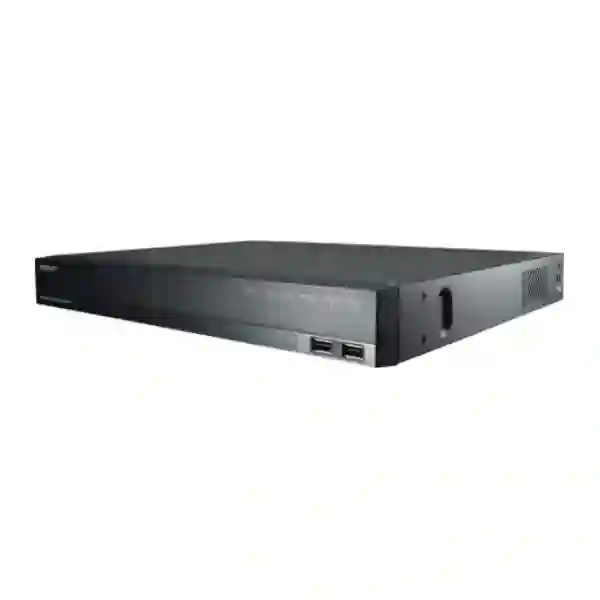
Hanwha XRN-811S 8-Channel PoE Network Video Recorder
Evaluating the Hanwha XRN-811S for an existing CCTV system or a replacement project in Tanzania? This recorder combines eight network-camera channels, integrated PoE ports, video compression and optional mirrored storage. It is marked discontinued by Hanwha Vision, so confirm the hardware, firmware, compatible drives and secure viewing workflow before committing to a purchase.
Use this guide to compare verified specifications with the actual recording requirements of your premises. For a new deployment, consider whether a currently supported NVR will be a better investment.
Verified feature summary
| Camera channels | Up to 8 IP camera channels |
|---|---|
| Supported camera resolution | Up to 8 MP, subject to integration |
| Recording bandwidth | Up to 100 Mbps combined |
| Compression | H.265, H.264, MJPEG; WiseStream |
| Camera power | Eight PoE / PoE+ ports |
| Drive arrangement | Up to two HDDs; RAID 1 supported |
| Local viewing | HDMI and VGA outputs |
| Manufacturer lifecycle | Discontinued model |
Manufacturer specifications describe model capabilities. They do not establish FourTeck Tanzania stock, price, included hard disks, warranty, current remote-app support or suitability for a particular site.
What the XRN-811S is designed to do
The Hanwha XRN-811S brings network-camera recording, local live viewing, event review and integrated camera power into one recorder for a site that needs no more than eight active camera channels. Its intended role is to collect IP video streams, write selected footage to compatible internal hard drives, and let an authorised operator retrieve recordings when an incident needs investigation. It is not a camera, cloud subscription, or substitute for a complete site security plan.
An installer evaluating this model should begin with the number of cameras, their expected recording bitrates, required retention period and the type of footage operators actually need. Eight camera inputs describe the channel ceiling, not a promise that every combination of maximum camera settings will fit simultaneously. The practical installation decision depends on the total recording workload, the camera protocols, the available disk arrangement and the condition of this discontinued product.
At-a-glance technical specification
Hanwha Vision lists the XRN-811S as an eight-channel recorder supporting compatible network cameras up to 8 megapixels. The verified main features include H.265, H.264 and MJPEG compression, WiseStream support, a maximum stated 100 Mbps network-camera recording bandwidth, eight PoE or PoE+ ports, provision for up to two internal hard drives and RAID 1 mirroring. HDMI and VGA provide local monitor connections, while ARB and QR-code-based P2P were included in the original feature set.
These specifications should be read as system design limits, not as guarantees of a particular image rate, disk capacity, software integration or support service in Tanzania. Hard-drive size limits can depend on supported drive models and firmware. A camera advertised as 8 MP may offer several codecs, frame rates and bitrate modes; the settings that matter are those the recorder and the camera can actually negotiate. Verify the exact installation before committing to a design.
Best-fit installations and when to choose another model
An eight-channel layout can suit a reception area, small warehouse, retail unit, office corridor, gated entry, equipment room or compact multi-camera upgrade where a local operator wants clear responsibility for recordings. The value is in keeping recording and camera power in a single installation rather than building a larger recorder rack for a modest site. A typical design might reserve channels for entrances, access points and high-value areas, leaving some room for deliberate expansion.
Choose a current-generation platform instead where the site expects more than eight cameras, higher combined recording throughput, newer AI-assisted search, broader current client-software compatibility or a longer forward-looking lifecycle. The XRN-811S is identified as discontinued by its manufacturer. That does not automatically make an installed unit unusable, but it changes procurement, firmware planning and the risk of adding new cameras. For a fresh installation, evaluate a newer recorder against the required camera and retention schedule.
Understanding the eight-channel limit
Each registered video channel is a place in the recorder’s camera plan. Start by drawing a numbered layout and mapping every scene to a specific camera: primary entrance, secondary access, sales floor, perimeter and so on. Include cameras that will be connected in a later phase instead of treating spare channels as guaranteed future capacity. If the design already needs nine distinct IP streams, an eight-channel NVR is the wrong starting point regardless of disk size.
A multi-sensor camera or specialised camera may create a different stream or licence arrangement than a conventional single-channel device. Do not assume that every physical camera consumes exactly one recorder channel without checking the compatibility information for that specific model. Also distinguish a configured camera from a camera that is actively delivering a usable recording; disconnected devices, network faults and incorrect profiles can result in apparently occupied channels with incomplete evidence.
Camera resolution and usable detail
The advertised maximum of 8 MP per supported camera provides an upper compatibility reference, not an assurance of forensic detail at any distance. Useful image quality depends on the lens, mounting height, lighting, exposure, compression, subject movement and whether the required detail occupies enough pixels in the scene. A high-resolution overview might be appropriate for a shop floor, whereas a narrower angle may be more effective at a doorway where a face must be identified.
Plan resolution together with retention and the real recording bitrate. Raising resolution or frame rate can consume more of the recorder’s recording-bandwidth allowance and disk space, depending on compression and scene complexity. Use sample footage from the proposed camera to judge whether an incident can be reviewed properly. If existing cameras are being retained, document their firmware and encoding profiles rather than assuming that the XRN-811S will accept every advertised mode.
Integrated PoE ports and cable design
The recorder includes eight PoE or PoE+ camera ports, allowing compatible cameras to receive data connectivity and power over Ethernet from the recorder. This can reduce the number of separate power adaptors in a compact installation and make camera cabling easier to document. It also makes the recorder’s own power supply and electrical protection especially important, because a failure at that point can affect both recording and the cameras directly connected to it.
PoE does not remove the need to check each camera’s power demand, cable quality, distance and installation environment. Some cameras draw more power with infrared illumination, heaters or motors active. Before connecting a camera, confirm its PoE class and the recorder’s supported budget from the applicable installation documentation. External switches, surge protection and structured cabling may be preferable on sites with long cable runs or dispersed buildings.
100 Mbps recording bandwidth: why it matters
Hanwha specifies up to 100 Mbps of network-camera recording bandwidth for this model. That is a combined recorder-side figure rather than a per-camera allowance. As a simple planning example, eight configured video streams each averaging 8 Mbps would represent 64 Mbps before considering variable peaks and other engineering allowances. The example is a calculation for planning, not a measured performance result or a recommended universal camera setting.
Real streams fluctuate with movement, noise, complex textures and codec behaviour. A layout based only on average bitrates can run short of headroom during the very events that matter most. Review the peak and sustained rates for each camera, the recorder’s playback and viewing requirements, and the actual profiles to be recorded. If the proposed load is near the stated ceiling, reduce the workload thoughtfully or choose a recorder with more headroom rather than relying on ideal conditions.
H.265, H.264, MJPEG and WiseStream
The XRN-811S supports H.265, H.264 and MJPEG, giving installers more than one approach to stream compression. H.265 can be attractive for longer recording periods, but it must be supported at the chosen settings by both camera and recorder. H.264 remains relevant when matching existing equipment or tools. MJPEG can have different storage implications and should not be chosen on the assumption that all supported codecs use comparable bandwidth.
WiseStream is also listed as a supported feature and may help supported camera systems manage bitrate while retaining useful image detail. Actual gains depend on the camera, footage and configuration; there is no justified single percentage saving for every deployment. Assess the storage outcome with real scenes including daytime movement, low light and busy periods. A successful commissioning test checks that live view, scheduled recording, playback and export all operate with the selected profile.
Two hard-drive bays and RAID 1
The unit supports up to two internal hard drives and RAID 1 mirroring. In RAID 1, the recorder keeps corresponding copies on two drives so that one drive’s failure need not immediately remove the recorded data from the surviving drive. This is a resilience feature rather than a way to double usable footage capacity. Two equal-sized drives configured for mirroring typically provide usable capacity comparable to one of those drives, subject to system overhead.
RAID 1 is not a complete backup strategy. Accidental deletion, malware exposure, misconfiguration, theft, fire or simultaneous drive damage can still affect the recordings. Hanwha advises checking RAID health and maintaining separate backups of important data. When ordering drives, validate the exact manufacturer compatibility list for this recorder and the firmware in use; generic surveillance-grade branding alone is not enough to prove that a particular capacity or drive revision is supported.
Choosing disks without assuming capacity
Before buying storage, decide how many days of footage must remain available, whether all cameras record continuously, and how often scenes are active. A retention estimate must reflect actual stream bitrates and the chosen disk mode. If a site wants redundancy, budget for both RAID-compatible drives rather than treating the second bay as automatic extra retention. Confirm whether drives are included with any offered unit, because the base model description does not establish a supplied drive bundle.
Check drive compatibility by exact model and capacity, with particular attention to older recorder firmware. Drive manufacturers can change internal components while keeping similar marketing labels. Record the installed drive identifiers, firmware version and RAID status in the handover file. On an existing system, read the current storage configuration before attempting a disk replacement: changing RAID settings may affect existing recordings. Back up evidence and follow the official recovery procedure.
How to plan recording retention
Retention is one of the most important business questions because a recorder with good image quality can still be unsuitable if recordings are overwritten before anyone needs them. Define a target in days from the site’s operational or legal requirements, not from a marketing storage estimate. List each camera’s recording schedule, normal and busy-scene bitrate, and priority. Where storage is limited, decide which cameras must retain the longest history rather than making every stream identical.
An approximate starting calculation is total average recording rate in megabits per second multiplied by 86,400 seconds per day, divided by eight to convert bits into bytes. Apply realistic allowances for file-system overhead, variation, changes to camera settings and any redundant-disk mode. This is only a sizing method; actual retained footage should be measured after installation. Recheck the oldest available recording regularly, especially after adding cameras or changing image profiles.
Scheduled and event-triggered recording
Use the recorder’s supported recording modes to decide when footage is collected. Continuous recording gives a consistent timeline but consumes disk space even during quiet periods. Schedule-based recording can align coverage with opening hours, while event-led recording can focus storage on detected activity where supported. The right policy depends on the risk and whether the site’s staff need to reconstruct events that occur before or after an alarm.
An event does not always represent a security incident. Moving shadows, rain, vehicles, insects, lighting changes and camera analytics settings can produce activity. Review sample event clips under different conditions and check whether the beginning and end of important actions are visible. Keep a written explanation of what triggers each camera’s recordings; the night shift and the system administrator should be able to understand what is and is not being saved.
Reviewing, exporting and handing over evidence
A useful recording system makes evidence retrievable, not merely stored. Plan who is authorised to search a date and time, how cameras are named, what reference clock the system uses and where exported copies will be placed. For an incident, operators should be able to locate relevant channels, play footage back in sequence and document what was exported. A local HDMI or VGA screen can support routine checks without relying entirely on a remote computer.
Evidence quality also depends on operational discipline. Keep time settings consistent across cameras and recorder, use access permissions appropriate to job roles and record when files are copied. Test exported playback on the intended reviewing environment before a real event. If a particular export format, digital signature, audit trail or integration is mandatory, verify it against the exact recorder firmware and local procedure rather than assuming every NVR provides identical forensic tools.
Live monitoring through HDMI and VGA
Hanwha lists HDMI and VGA outputs for local monitoring, allowing the recorder to serve a directly attached display. This is useful at a reception desk, control point or equipment area where a designated user needs to confirm that camera views are present. It is particularly relevant where internet access is unreliable, because the local surveillance workflow should not depend on reaching a cloud portal just to view cameras connected to the site network.
Check the display input type and the physical position of the recorder before committing to a monitor layout. A long display cable, unattended screen or shared office monitor may make operations less reliable than expected. Establish whether operators need a full-time multi-camera wall, occasional review or incident-only access. Those needs influence monitor placement, network permissions and whether a separate viewing workstation should be included in the wider security design.
Camera compatibility and integration checks
The recorder was designed around Hanwha or Wisenet network-camera ecosystems and supported network protocols. However, a general reference to network cameras or ONVIF does not establish that every third-party camera feature will work. A camera may deliver basic video while advanced motion events, audio, PTZ presets or specialised analytics are unavailable. Integration questions should be answered for the exact camera model, firmware and stream settings.
During a migration, test camera discovery, credentials, selected codec, clock synchronisation, continuous recording, event reception and playback. For cameras using external PoE switches, confirm that network routing and address allocation are correct. If a deployment needs licence-plate recognition, people counting, facial recognition or AI object search, do not infer those functions from the recorder’s basic 8 MP support. Such requirements need independent verification and may justify a modern platform.
Understanding ARB and recording continuity
ARB is included in the manufacturer’s stated feature list. It is relevant to designs concerned about a temporary loss of connectivity between compatible cameras and the recorder, but specific recovery behaviour requires compatible endpoints and appropriate setup. Do not treat the three-letter feature name as proof that every camera can preserve and transfer footage through every network outage. The mechanism and limits should be confirmed for the particular system.
Consider the real failure modes at the property: a damaged cable, a rebooting PoE supply, a failing switch or a wide-area connectivity problem. Decide how each condition will be noticed and who will investigate. A health-check procedure is useful even when redundancy features are configured. Cameras, disks and recorders should be monitored for faults, because a device that appears powered on may still have gaps in its recording timeline.
Remote viewing and the important software limitation
The original XRN-811S feature list includes QR-code P2P connection support. That historical feature statement must not be interpreted as universal compatibility with every current Hanwha desktop application or future remote-access service. Hanwha Vision’s support documentation specifically lists the XRN-811S among legacy NVRs that do not support P2P connection through the Wisenet Viewer desktop application. Local network access by IP address remains a separate method discussed by Hanwha.
Before specifying remote viewing, identify the exact client software, application version, mobile or desktop device, network path and cybersecurity requirements. Test the proposed workflow rather than promising one-scan access. Avoid exposing a recorder directly to the public internet as a shortcut. Prefer a carefully managed network access method approved by the organisation, with unique credentials and appropriate safeguards. Remote usability and ongoing software compatibility are reasons to compare newer alternatives.
A practical network and security design
Put camera devices and the recorder within a documented network plan. Assign addresses consistently, control who can administer the equipment and keep internet-connected services to the minimum necessary for the business. Strong individual credentials, restricted access and protected network management are especially important for a recorder that may store sensitive images of staff, visitors or customers. Avoid leaving installation defaults in use after handover.
Network security should include a method for checking firmware, maintaining configuration records and reviewing login permissions when employees change roles. The manufacturer’s support material references security-enhanced firmware for legacy recorders, but the applicable package, update path and site risk must be assessed for the actual unit. Firmware work should be scheduled and backed up appropriately, because failed or incompatible changes can interrupt recording. Document the steps required to restore service.
Tanzania power, connectivity and site conditions
For a Tanzania deployment, record the conditions at the actual premises rather than assuming one nationwide installation pattern. A stable power source, suitable ventilation, secure recorder location and protected cable pathways matter more to recording continuity than a product headline. Evaluate whether a UPS is needed for the NVR, camera power and any switches or network devices on which the security system relies. Confirm electrical requirements using the exact equipment documentation.
Remote access also depends on the site’s real internet connection, routing arrangements and organisational security policy. If a business expects managers to view footage from another branch, test upload performance and remote access under realistic conditions. Do not confuse internet availability with camera recording: a well-designed local NVR may continue its local role even while remote viewing is interrupted, subject to the local devices and power remaining operational.
Choosing camera positions before buying hardware
Start with a walk-through of what the business must protect: doors, loading areas, cash handling, stock movement or shared corridors. Decide what the camera must show in each location and whether the goal is observation, recognition, identification or incident reconstruction. Placement should minimise glare, severe backlighting and blind spots. A high ceiling may give a broad view but too little detail, while a narrow view can miss activity outside the frame.
Create a camera schedule including location, purpose, approximate lighting, lens choice, network run, mounting surface and whether audio or PTZ is proposed. This turns a vague request for an eight-camera system into a testable scope. It also prevents unnecessary recorder upgrades caused by poorly chosen camera positions. Where privacy rules or workplace policies apply, establish recording notices, access controls and retention policies as part of the site plan.
Commissioning: the checks that protect the investment
Commissioning should demonstrate that the chosen cameras remain connected, that footage records in the required mode, and that users can retrieve a clip after a realistic elapsed period. Inspect every installed channel at day and night settings where relevant. Confirm that the recorder’s clock is correct, alarms are understandable and storage health is visible to the appropriate administrator. Verify what happens after a controlled power interruption and normal restart.
Keep a handover pack with the network diagram, camera list, approved settings, firmware identifiers, retention expectation and a clear method for obtaining support. Give users a short review exercise instead of only demonstrating a live display. A site that can view a camera but cannot find yesterday’s footage has not achieved its operational objective. Schedule an early post-installation review to detect excessive bitrate, false motion events or unexpectedly short retention.
Maintenance for an older recorder
Legacy equipment often continues to have value when it is already installed and stable. The correct maintenance approach is deliberate monitoring rather than assuming that a device can run unattended indefinitely. Periodically review disk errors, RAID condition, recording gaps, camera connectivity, heat, power events and whether time synchronisation remains correct. Keep essential footage backed up according to the business procedure and check that any backup is actually readable.
Because the manufacturer identifies this model as discontinued, procurement should include discussion of replacement parts, firmware support, compatible drives and a migration path. An old recorder can become costly if a component fails and the exact replacement cannot be sourced. Keep a current list of connected cameras and cabling to reduce future changeover work. Where the recording system supports critical operations, agree in advance what downtime is acceptable.
Comparing XRN-811S with newer eight-channel recorders
The XRN-811S remains notable for its combination of eight channels, integrated PoE, 8 MP-era camera support and RAID 1. A current eight-channel recorder may bring different resolution ceilings, search functions, network performance, interface design and client-software options. These are categories for comparison, not claims that a particular replacement is automatically compatible. Every alternative must be checked against the cameras, storage policy and budget for the site.
When comparing models, use a consistent checklist: supported camera count, recording bandwidth, PoE power budget, drive bays and tested capacities, video codecs, local monitor outputs, required analytics, remote viewing method and software lifecycle. Also compare the cost of moving existing disks or cameras and the labour required to reconfigure the installation. A seemingly inexpensive recorder can be poor value if it breaks an essential viewing or evidence-export workflow.
When upgrading an existing XRN-811S installation
Begin an upgrade by documenting the working system before switching anything off. Save the camera inventory, network details, configuration references, user roles and a description of how footage is currently exported. Identify any special integrations such as alarm inputs, event monitoring or PTZ control. Decide whether past recordings must remain searchable on the old hardware and whether a formal evidence handover is required.
Do not assume that moving existing hard disks into a newer NVR will preserve recordings or RAID configuration. Storage formats, drive approval and migration procedures can differ between recorder generations. Plan a supported transition that protects retained footage and verifies new recordings independently. Commission the replacement against the same incident scenarios used on the old system so that a feature upgrade does not unintentionally reduce operational coverage.
Questions to settle before requesting a quote
Describe whether this is a replacement for a working XRN-811S, a request to source the exact legacy model, or an entirely new eight-camera installation. State the number and models of existing cameras, intended resolution and recording schedules, target retention days, need for mirrored storage and preferred viewing environment. Include whether the site already owns compatible hard drives or requires new drives to be specified and installed.
Also explain the intended installation location, power arrangement, network access requirements and any monitoring or evidence-export workflow. Ask the supplier to verify unit condition, model identity, software support, actual supplied accessories and any applicable commercial terms before purchase. Because this recorder is discontinued, obtain explicit confirmation of availability rather than interpreting this informational listing as a live stock promise. A clear brief makes a technically sound alternative easier to recommend.
A sound purchasing decision for Tanzania
For buyers in Tanzania, the right question is not simply whether the Hanwha XRN-811S records eight cameras. It is whether the exact recorder, compatible cameras, storage arrangement and viewing workflow can meet the required evidence quality and retention under local site conditions. If an organisation already owns this model, the best next step may be an audit and careful continued use. If starting from zero, evaluate current alternatives and support expectations before committing.
FourTeck Tanzania can be asked to review the requested model and the project requirements, but no stock position, price, local warranty, installation coverage or lead time is established by this description. Request a written compatibility and sourcing assessment that identifies what will be supplied and what remains to be confirmed. That approach protects both the buyer and the installer from assumptions about discontinued hardware.
Frequently asked questions
Is the Hanwha XRN-811S an eight-channel NVR?
Yes. Hanwha Vision identifies the XRN-811S as an eight-channel network video recorder. Eight is the stated upper limit of registered network-camera channels, not a guarantee that every set of camera encoding settings will fit its bandwidth and storage limits. Confirm the planned streams and intended retention before choosing a recorder.
Can it record 8 MP cameras?
The manufacturer’s key features specify support for compatible cameras up to 8 megapixels. Actual frame rate, live-view performance and recording capability depend on each camera’s profiles and the combined workload. Test the precise camera models, encoding settings and playback requirements instead of treating the 8 MP figure as an all-settings performance guarantee.
Does the recorder include PoE ports?
Yes. Eight PoE or PoE+ camera ports are listed. The camera power class, total power budget, cabling and site conditions still need to be checked. PoE connectivity simplifies a compact installation but does not guarantee that every high-power camera accessory can be used without an additional suitable power arrangement.
What is its maximum recording bandwidth?
Hanwha lists 100 Mbps for network-camera recording. This is a combined limit across the relevant recording streams. A practical design should include headroom for bitrate changes caused by motion and lighting. The recorder should be tested under realistic busy-scene conditions before a final camera profile is approved.
Does the XRN-811S support RAID 1?
Yes. Hanwha lists RAID 1 support with up to two hard drives. Mirroring can keep a copy of recorded data on a second drive when configured correctly, but it reduces usable capacity compared with two independent disks and is not a substitute for secure external backup. Confirm compatible drives and inspect RAID health routinely.
How many days of footage will it keep?
There is no reliable universal answer without the drive model, capacity, RAID mode, number of cameras, recording schedules and real stream bitrates. Calculate an initial target, then measure the oldest footage after commissioning. Motion-led recording may change storage consumption, but its coverage and false-event behaviour must be assessed for each site.
Does H.265 mean it will always use less storage?
H.265 is supported, but savings depend on camera implementation, settings and footage. A fixed percentage saving cannot be promised. Compare representative clips and real retention with the appropriate compatible camera profile. Check that the selected codec also works with the recorder’s playback and export workflow.
Will any ONVIF camera work with every function?
No blanket compatibility claim is appropriate. A third-party camera may connect for basic video while event notifications, audio, analytics or PTZ features are limited. Check the exact camera and recorder firmware combination, then test the features the business needs. General protocol support is not equivalent to full functional interoperability.
Can I use Wisenet Viewer desktop P2P with this NVR?
Hanwha Vision specifically lists the XRN-811S among legacy recorders not compatible with Wisenet Viewer desktop P2P connection. The manufacturer distinguishes that limitation from local IP-address access. Confirm the intended client, versions and secure network access route before promising remote viewing. Do not assume historical QR-code P2P support covers every modern application.
Is the XRN-811S still a current model?
Hanwha Vision marks the XRN-811S as discontinued. This page does not confirm whether any particular unit is available in Tanzania or what warranty or support terms might apply. Buyers should verify sourcing and lifecycle expectations, or compare a current recorder with the same camera and evidence requirements.
Can the two hard drives be moved directly to a new recorder?
Do not assume a direct move will retain existing footage or configuration. Recorder generations and RAID formats may differ. Preserve required recordings first, document the storage state and follow an approved migration plan. Confirm the destination recorder’s supported drives and record fresh test footage after migration.
What information should I send for a sourcing assessment?
Provide the camera models and count, the present recorder model if replacing an older unit, target retention period, desired RAID mode, power and network arrangement, and how staff will view footage. State whether the exact discontinued XRN-811S is mandatory or whether a current alternative is acceptable. Ask for confirmation of specification, condition and commercial terms.
Request an XRN-811S compatibility and sourcing review
Share your intended camera count and models, target recording retention, storage preference and whether the exact discontinued recorder is required. Ask FourTeck Tanzania to confirm what can actually be sourced and which current alternatives are suitable. The next step is a verified project assessment, not an assumption of live stock or product support.




Reviews
There are no reviews yet.