
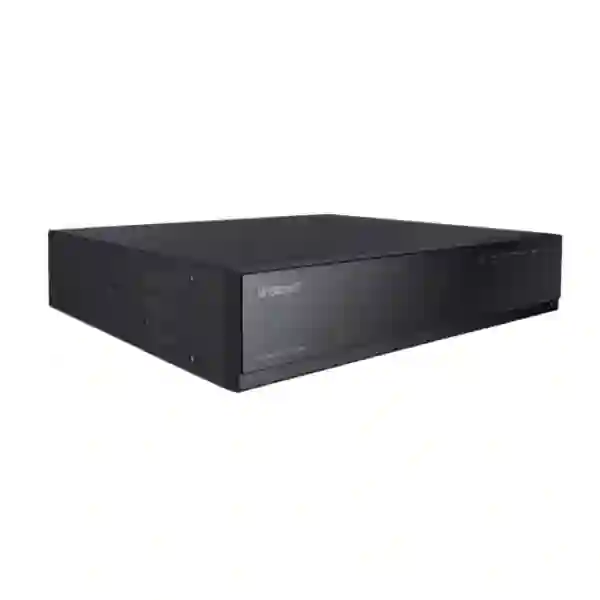
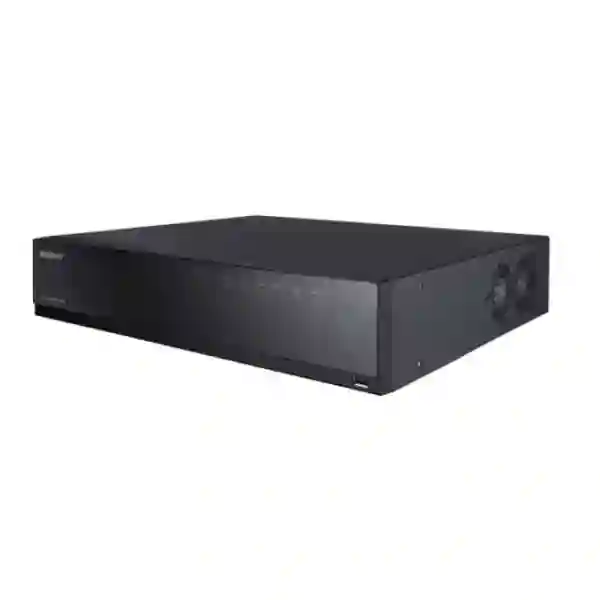
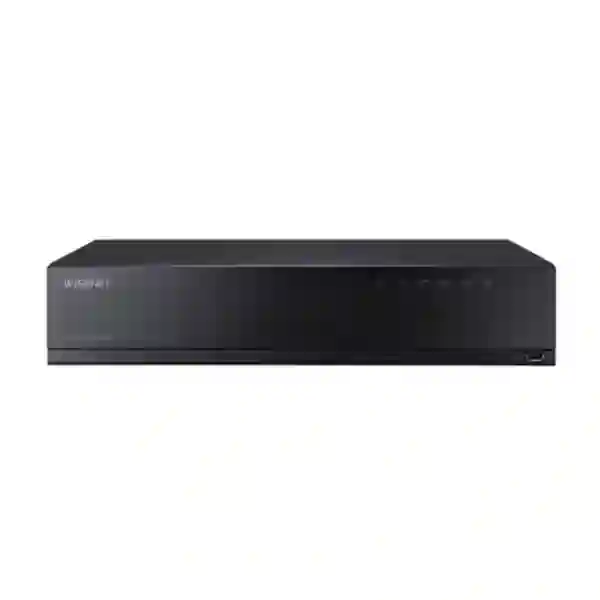
Hanwha HRX-1635-4T 16-Channel Pentabrid DVR
Keep suitable existing coaxial cameras in service while planning selected network-camera additions. This 16-channel recorder combines five camera-input technologies, H.265 recording support and room for substantial storage expansion. The 4T version is associated with a 4TB configuration; confirm the exact drive supplied and your retention requirements when requesting a Tanzania quotation.
Built for informed CCTV upgrades, the recorder should be matched to your camera signal formats, desired recorded detail, operating environment and access procedures. Ask for a channel-by-channel compatibility check before buying.
At a glance: verified capabilities
Key technical specifications
| Model family | Hanwha Vision HRX-1635; 4T configuration |
|---|---|
| Analogue video | 16 BNC inputs; AHD / HDTVI / HDCVI / CVBS |
| Network video | Two additional channels in stated configuration; up to 18 total |
| Analogue resolution support | Up to 8MP on compatible cameras |
| Published analogue main-stream rate | 8MP: 8fps; 5MP: 12fps; 4MP: 15/12fps; 2MP: 30/25fps, by video standard |
| Compression | H.265, H.264, MJPEG |
| Record / playback bandwidth | Up to 128Mbps / 32Mbps |
| Storage expansion | 8 SATA bays; up to 6TB per supported drive, 48TB raw total |
| Local monitor interfaces | HDMI, VGA; additional BNC spot output |
| Camera integrations | SUNAPI, ONVIF support; model-level verification needed |
| Event and alarm functions | Motion/video-loss/tamper events as applicable; external alarm connections |
| Power | 100–240VAC, 50/60Hz |
| Published operating range | 0°C to +40°C; 20–85% relative humidity |
| Size | Approximately 440 × 88 × 384.8mm |
| 4TB package | 4T designation; exact Tanzania supplied HDD not independently confirmed |
Specifications come from Hanwha’s HRX-1635 product documentation. Recording performance, camera interoperability and supplied storage must be confirmed for the final installation and package.
Who this recorder is for
The Hanwha HRX-1635-4T DVR is designed for sites where reliable recording matters and replacing every existing camera is neither necessary nor desirable. A business with a working coaxial installation may want clearer images at selected entrances, more organised footage review, or additional coverage without rebuilding its entire cabling system. A pentabrid recorder provides a practical basis for assessing that upgrade. The useful question is not simply whether a recorder has sixteen ports, but whether it can work with the signals, camera resolutions, footage retention targets and day-to-day monitoring routines already in place.
This model can suit offices, managed buildings, shops, hospitality premises, warehouses and other fixed-site CCTV applications when the supported camera formats match the design. It should not be selected from a channel count alone. A successful order begins with an inventory of the existing cameras, the number of positions that need recording, the condition of cabling, the availability of reliable power and the person responsible for reviewing incidents. Confirm these points before making commitments about a complete system or a particular recording duration.
What pentabrid actually means
Pentabrid refers to support for five video-input families rather than five separate recorders. In this case, Hanwha lists AHD, HDTVI, HDCVI, traditional CVBS and IP camera connections. This is useful on sites that have accumulated CCTV equipment through several refurbishment cycles. A single recorder may offer a path to preserve compatible cameras while replacing unsuitable ones selectively. However, a format printed on a box is not proof that every camera from every manufacturer will deliver every advertised function when connected.
For analogue cameras, review the exact resolution and signal setting, supported frame rate, coaxial control requirements and any mode selections in the camera menus. For network cameras, check supported protocols and their practical implementation. Even within a supported signal family, camera firmware and features can affect motion events, audio, setup and remote controls. Treat compatibility as a commissioning test, not an assumption. This prevents avoidable problems such as a picture appearing locally while alarms, playback or advanced camera settings behave differently than expected.
Understanding sixteen analogue and eighteen total channels
The base hardware provides sixteen analogue BNC camera inputs. Hanwha also describes a configuration with two additional network-camera channels, allowing up to eighteen connected camera channels in total. This is not the same as eighteen physical coaxial sockets. Nor should the term eighteen channels be interpreted as an unlimited ability to add IP cameras. A design that depends on additional network positions should explicitly confirm the channel allocation, relevant resolution settings and recorder resources before equipment is purchased.
Plan the final channel map on paper first. Number every existing coaxial camera and reserve meaningful names for the new network positions. If the site already has sixteen analogue cameras, the two additional IP channels may be useful for a new doorway, a remote area reached by Ethernet or a position where running fresh coax would be undesirable. If the site needs substantially more than eighteen total channels, consider a different recorder architecture rather than relying on an unverified channel-expansion assumption.
8MP support is not the same as 8MP full-frame recording
The recorder supports compatible analogue video inputs up to 8MP, but recording performance varies by resolution. Hanwha’s published analogue main-stream recording figures include approximately 8 frames per second at 8MP, 12 at 5MP, 15 or 12 at 4MP depending on video standard, and 30 or 25 at 2MP. These figures matter when selecting cameras for places where smooth motion is more important than the highest pixel count. The local display capability must also be distinguished from the frame rate stored for later evidence review.
For a car park entrance, reception desk or loading bay, consider what must be identifiable in recorded footage, the speed of movement across the scene and the lighting conditions. Higher resolution can help with detail, but it does not automatically solve blur, weak illumination or unsuitable viewing angles. Test representative recorded clips, not only the live monitor. Check both day and night footage, export a sample and verify that the detail needed for the intended purpose remains usable at the configured recording settings.
Picture quality begins before the recorder
A DVR cannot reconstruct detail that a camera does not capture. Lens selection, mounting height, angle, scene contrast, backlighting and night illumination often determine whether recorded video answers the question that matters. Before selecting a high-resolution camera, define the scene: overview, recognition at a doorway, activity at a counter or a vehicle approach. Each objective changes the required field of view and pixel density. The recorder then needs to support a suitable signal and recording configuration for that camera.
When upgrading an old coaxial system, inspect whether the camera’s power supply is stable, connectors are clean and long cable runs introduce visible interference. A camera labelled 8MP may be set to a lower output mode for compatibility. A technician should confirm its actual operating signal and test a recorded scene. Avoid assuming that replacing only the recorder will produce a higher-resolution picture from an older low-resolution camera; both the source and its recording profile influence what can be recovered.
The meaning of the 4T variant
The suffix 4T is used for a 4TB configuration of this model in supplier descriptions. That designation is useful when discussing the intended package, but it should not be treated as independently verified evidence of the drive physically supplied with an unconfirmed Tanzania order. Ask the seller to specify the installed capacity, drive type, number of populated bays and any options that change the total. Also confirm whether the unit is new, what accessories are included and who is responsible for configuring the drives.
Four terabytes is a storage capacity, not a promise of a fixed number of recording days. Sixteen cameras recording around the clock can consume storage at very different rates depending on codec, resolution, scene activity, frame rate and bitrate. Event-only recording may use less space but can miss information outside the trigger window. Request a retention estimate that reflects the actual camera schedule and then compare it with a supervised trial. Any required evidence-retention policy should be decided before the disk arrangement is finalised.
Planning realistic video retention
Start with the number of cameras that must be kept, how often they record and the minimum number of days that footage should remain accessible. Separate continuous recording requirements from schedules or event-triggered channels. Estimate bitrate for each configured stream using realistic scene settings rather than one optimistic number across the site. Remember that motion, rain, foliage, traffic and digital noise can affect compressed video. Allow additional space for system overhead and do not plan to use every published byte as retained evidence.
A simple retention worksheet should include camera name, resolution, frame rate, codec, expected bitrate, recording hours, days required and a margin for changing conditions. Review this worksheet whenever adding a camera or increasing quality. If the baseline 4TB arrangement cannot satisfy the objective, evaluate expanding the storage layout or changing the system design. A useful quotation should state the retention assumptions clearly; an unsupported promise of thirty, sixty or ninety days is not a suitable buying specification.
Eight SATA bays and expansion headroom
Hanwha specifies eight SATA hard-drive positions with a maximum of 6TB per supported drive and a maximum published raw capacity of 48TB for the HRX-1635 family. This is an expansion ceiling, not evidence that the supplied unit contains eight drives or 48TB of usable recorded video. Storage planning should consider approved disk models, recorder compatibility, power consumption, environmental conditions and the intended recording load. The installed storage configuration should be documented at commissioning.
Ask whether a proposed drive upgrade changes how existing recordings are handled and whether the relevant service procedure requires downtime. Confirm any approved-disk compatibility guidance for the exact firmware and hardware revision. Additional disks can increase retention potential, but they do not fix cameras that are poorly positioned or configured with the wrong recording profile. When future camera additions are likely, specify the capacity and network performance required at the future site size, rather than purchasing expansion purely as a number on a specification sheet.
Compression and bandwidth in practical terms
H.265, H.264 and MJPEG are listed among the recorder’s supported video codecs. Compression helps reduce the amount of data that must be written or transmitted for a given image stream, but the result depends on camera encoding, scene complexity and configuration. Hanwha quotes a maximum recording bandwidth of 128Mbps and a maximum playback bandwidth of 32Mbps. These are recorder-resource limits, not target bitrates for individual cameras, and the operating plan should keep adequate margin below the limits.
For remote viewing, include the upload capability of the site connection and any bandwidth consumed by other business systems. A camera might record at one quality while a lower-bandwidth stream is used for mobile live view. That difference can improve usability without necessarily changing the recorded evidence. The person designing the system should distinguish recording throughput, live streaming, concurrent users and incident export load. Network stability is just as important as peak advertised connection speed when somebody needs dependable access to time-sensitive footage.
Using existing coaxial camera wiring
A major reason to investigate this recorder is the possibility of continuing to use compatible coaxial camera routes. For a functioning analogue installation, that may reduce the need to disturb finished walls or ceilings merely to replace a recording device. It does not eliminate checks on cable quality, termination, signal format, interference, available power or camera condition. Existing coaxial infrastructure should be treated as a component to test rather than an asset that is automatically suitable for every higher-resolution signal.
Before the changeover, identify each cable, record its destination and photograph the existing connections. Check whether any cameras depend on special adapters, baluns or shared power arrangements. Replace damaged connectors and resolve unstable images before moving the complete system. During migration, connect representative cameras of each signal type to confirm picture, recording and control functions. A staged approach helps distinguish compatibility faults from pre-existing camera or cabling problems and keeps a clear record of what has changed.
Adding network cameras without overstating compatibility
The HRX-1635 supports network-camera integration through Hanwha SUNAPI and ONVIF-related protocols. This is particularly useful where a site wishes to add selected IP cameras alongside analogue channels. It is not a substitute for reviewing the exact camera model, firmware, stream resolution, codec and event capabilities. Different network cameras may provide live images but expose different configuration or event functions. Check the manufacturer’s supported camera guidance and test the intended stream settings before making a permanent design decision.
Network cameras require a suitable Ethernet path and their own power arrangement. The recorder’s network connection should not be confused with a built-in bank of camera PoE ports. Where PoE is required, plan an appropriately specified switch or injector as part of the system and verify the camera’s power requirements. Assign clear network addresses, record credentials securely and document how the cameras will recover after a power interruption. For critical positions, demonstrate both continuous recording and incident playback after the installation is complete.
ONVIF and SUNAPI: useful but not universal guarantees
SUNAPI is Hanwha’s integration interface and ONVIF is a widely used interoperability framework for compatible network video products. Hanwha lists support for both on the HRX-1635. Such support improves integration possibilities, but it does not mean that every analytics function, microphone, playback command or camera-specific setting is available across brands. A project that depends on a particular alarm or special feature needs compatibility testing at the feature level, not just a successful camera connection.
Create a small compatibility record for each intended IP camera. Include the camera model, firmware version, protocol, stream codec, frame rate, resolution, credentials, time synchronisation and any required events. If a buyer needs video analytics, verify whether the camera generates the event, whether the recorder can receive it and whether the viewer can search it in the intended way. Avoid treating general protocol support as a promise that the recorder itself performs every form of advanced video analytics.
Local monitoring and display connections
The recorder provides HDMI and VGA display connections and a spot-monitor BNC output in the published hardware description. Hanwha specifies HDMI display resolutions that include 3840 by 2160. That display output capability is distinct from the frame rate at which high-resolution cameras are recorded. A 4K-capable monitor may be useful for viewing a multi-camera layout, while reviewing recorded material still depends on the source camera and recording profile used at the time.
Plan the monitor arrangement around the operator’s daily tasks. A reception desk may require a simple group view while a security supervisor may need rapid access to a full-screen camera. Verify any multi-monitor behaviour and supported layout on the installed unit rather than assuming all independent-display functions are available in every mode. Position screens where sensitive video is not unnecessarily visible to the public, and choose screen resolution and viewing distance that make camera labels and timestamps readable.
Mobile viewing and off-site access
Hanwha describes Wisenet Viewer and Wisenet Mobile integration, with a QR-code-based P2P setup option. These can help authorised users review surveillance activity without remaining beside the recorder. Remote access nevertheless depends on a correctly configured recorder, compatible software, internet connectivity and the security policies of the organisation. A smartphone app should be viewed as one access route, not a substitute for reliable local recording or an assurance that every remote function is supported on every device.
Before handover, test the specific tasks users intend to perform: live viewing, recorded playback, event notification, camera selection and export where supported. Confirm login separation for different users and document who can change recording settings. Test over the actual type of internet connection the site uses. If the connection becomes unavailable, local recording and remote access can behave differently; explain that distinction to the operator so an app connection problem is not automatically interpreted as a stopped recorder.
Events, alarms and actionable notifications
The published capabilities include event triggers such as video loss, motion detection and tampering for relevant camera types, as well as support for external alarm input and relay output functions. Connected network cameras may expose additional camera-generated events depending on compatibility. Notifications can be useful when they are linked to a clear operational response, but a long list of alerts alone does not constitute an effective monitoring procedure. Every event category should have an owner and a sensible response.
Set up alarms around meaningful conditions, such as the loss of a critical camera feed or a monitored entry point outside business hours. Assess sensitivity and test common false-trigger sources before enabling frequent mobile notifications. Decide who receives alerts, who checks the associated video and how incidents are recorded. If external sensors, relays or PTZ presets are part of the design, verify wiring and trigger behaviour at installation. Event-driven settings should not silently compromise the required continuous recording of a critical scene.
Coaxial control and PTZ considerations
Hanwha lists coaxial control support for compatible video formats and PTZ control mechanisms through the recorder interface and supported control protocols. This can simplify work with cameras that have compatible control functions over existing signal wiring. However, not every analogue camera exposes the same menu or movement features, and not every control method works with every wiring arrangement. A camera that produces a stable video image may still need a different control configuration.
If zoom, pan or tilt functions are essential, identify the particular camera model and its control standard before purchasing. Confirm whether it uses coaxial signalling, a supported serial interface or a network command path. Demonstrate presets and operator permissions during commissioning. For fixed cameras, distinguish electronic image zoom in the viewer from actual optical zoom in the camera. Document the supported commands so future technicians do not mistake a limitation of the camera for a defect in the recorder.
Finding and exporting an incident
Effective surveillance is measured partly by how quickly an authorised person can locate useful evidence. The recorder supports search and playback capabilities, schedule-based recording and file backup options. Operators should know how to find footage by date, camera and event type, and how to confirm that the correct time period has been selected. A technically excellent recording system can still fail its operational purpose when staff have never practised reviewing and exporting an incident.
Include one practical evidence-handling exercise in the handover. Select a test event, find it in playback, verify the time and camera label, and produce a permitted export in a suitable format. Check the export on an authorised computer before deleting a temporary copy. Keep an incident log that records who accessed footage and why. Establish local privacy and retention procedures appropriate to the organisation; this page does not make any claim that a particular configuration automatically satisfies Tanzania legal requirements.
Time synchronisation and evidence confidence
Incorrect timestamps can undermine the usefulness of a recorded event even when the pictures are clear. At installation, set the appropriate local time zone, verify the system clock and confirm a dependable time-synchronisation approach. The recorder supports network time protocols, but the site’s network configuration determines whether an intended time source is reachable. Compare the displayed time with a trusted clock during setup and after major network or power changes.
Every camera name should be descriptive enough to identify the location without guesswork. A name such as Front Gate North is more useful than Camera 07 when multiple people review incidents. Keep an up-to-date channel map showing camera direction and area covered. When replacing or moving a camera, update its label and any relevant schedules. These administrative details take little equipment but significantly improve the value of footage during maintenance, investigations and future handover to a new site manager.
Network security from the beginning
A surveillance recorder is a networked device and should be managed with the same care as other business systems. The HRX-1635 specification lists features including HTTPS, access controls, logging and encryption-related functions. The security outcome depends on how the device is configured and maintained. Do not leave default credentials in place, share administrator passwords casually or expose management services to the public internet merely to make remote access convenient.
Use distinct user accounts according to operational roles and provide management access only to authorised staff. Where practical, separate camera and recorder traffic from general guest networking, and use an approved remote-access design. Disable unused services when permitted by the deployment guidance and maintain a recorded process for firmware review and updates. Confirm the latest appropriate instructions directly with official Hanwha support information before changing a production recorder. Keep recovery information securely so a personnel change does not leave the organisation unable to administer its own CCTV system.
Access levels and operational responsibility
Not everyone who views live CCTV needs the power to delete footage, change a recording schedule or modify cameras. Establish roles for general viewers, supervisors and technical administrators. The recorder’s exact permission settings and session limits should be validated on the installed firmware and viewing software. Assign responsibility for handling access requests and for removing accounts when staff change roles. This reduces the chance that security settings will drift because the shared login is easier to remember.
The operating team should also decide what constitutes a fault. A single offline camera, a disk warning, an incorrect time, a failed remote connection and a total recorder power loss require different responses. Keep the help process simple enough that staff actually use it. A routine check sheet can cover recording status, camera images, disk alerts and clock accuracy. This operational design matters as much as individual headline features in a multichannel surveillance system.
Power planning and electrical conditions
Hanwha specifies an input range of 100 to 240 volts AC at 50 or 60 hertz for the recorder family. Published power consumption reaches up to 200 watts in an eight-drive configuration. The actual installed load depends on the number and type of drives and should be considered alongside the cameras, switches and monitors connected elsewhere in the system. A backup power design must account for all equipment needed to continue recording, not just the DVR chassis.
For a site that experiences interruptions, assess a suitable UPS, safe shutdown behaviour and the desired operating duration during an outage. Confirm that analogue cameras continue receiving power and that any IP switching equipment is also protected. Ensure earthing and cable routing are appropriate for the installation. Always use qualified personnel for mains work. A recorder that stays on while its cameras or network switch go off will not preserve the intended coverage, so test the complete system during a controlled power-loss exercise.
Heat, ventilation and equipment placement
The published operating temperature range is 0 to 40 degrees Celsius with relative humidity requirements of 20 to 85 percent. These are important design limits for an equipment room, cabinet or small security desk. The physical unit measures approximately 440 by 88 by 384.8 millimetres, so allow adequate room for cables, ventilation and service access. A cramped closed cabinet may expose both the recorder and multiple hard drives to higher temperatures than the surrounding room.
Place the recorder in a secure, dry and ventilated location that authorised staff can reach for maintenance. Avoid direct sun, water exposure, heavy dust and poorly ventilated roof spaces. Do not block ventilation openings or make the equipment accessible to people who have no reason to handle it. Evaluate ambient temperature under real operating conditions, especially with multiple drives installed. Heat management, cleaning and a sensible cabinet layout help prevent avoidable interruption without making unsupported promises about equipment lifetime.
Commissioning checklist for an existing site
Begin commissioning by documenting the current system before changing any connections. Count working cameras, identify all signal types, review the existing recording settings and decide what must be retained from the old system. Label cables and keep administrator credentials secure. Establish where the new recorder will be mounted, which monitor will show its setup interface and how the camera power will be maintained during the cutover. Work in a planned maintenance window if continuous security coverage is important.
After connecting the recorder, verify every channel individually. Check live image, recorded playback, clock and camera labels, recording schedules, storage status and relevant events. Test the highest-resolution cameras against the selected recording frame rates. Confirm HDMI or VGA viewing, remote access and any required export workflows. Record the final firmware version, drive layout, network settings and person responsible for the system. An installer handover should include an operating demonstration rather than only a statement that the equipment has been switched on.
A careful migration rather than an abrupt replacement
When replacing an older DVR, preserve the information that makes the existing system useful. Photograph its channels, list camera locations and record which areas need uninterrupted coverage. Determine whether the old recorder holds footage that must be exported before it is disconnected. A replacement recorder does not necessarily read the old device’s storage media or preserve its recordings. Treat any historical evidence transfer as a separate requirement that must be assessed in advance.
Move a small representative group of cameras first when the installation permits it. Confirm the signal mode, video quality and recording result before proceeding to the full set. If the work takes place across multiple days, use a clear temporary coverage plan. Retain documentation of any cameras that fail a compatibility test and describe alternatives based on the exact observed issue. This staged method is particularly valuable when the system combines older CVBS cameras with newer high-definition coaxial cameras.
Deciding when this DVR is not the right choice
The HRX-1635 is most compelling when a mixed analogue and limited network-camera design matches its published capacities. It may be a poor fit when a project requires dozens of additional IP cameras, high-frame-rate recording at maximum resolution on every camera, built-in PoE camera ports or an exclusively IP architecture with extensive native analytics. Those requirements should prompt a recorder comparison rather than an attempt to stretch the meaning of the manufacturer’s specification.
It may also be unsuitable when the installation environment cannot meet the published temperature and humidity range, or when required storage retention exceeds a practical configured drive plan. Do not treat a larger hard drive as a remedy for inadequate camera or recording-channel performance. Clarify whether the business values reuse of existing wiring, long retention, high-detail evidence, advanced search or future IP growth most. The answer determines whether this pentabrid approach is an efficient upgrade or a stepping stone towards another recorder platform.
The difference between HRX-1635 and smaller recorder options
Hanwha’s HRX lineup includes recorders with different channel counts and disk-bay limits. The HRX-1635’s distinguishing value is its combination of sixteen analogue inputs and eight SATA bays. The related HRX-1634 family is listed with a smaller two-bay storage configuration, so the preferred model depends partly on storage expansion requirements. A buyer with only a few cameras should not assume that a larger chassis is automatically better value.
Compare prospective models using the actual channel map, the available network-camera allocation, recording throughput, playback needs, disk layout and operational software. Product suffixes can refer to different drive configurations, which is why a quotation should include the complete model designation. Avoid comparing retail advertisements solely by advertised megapixels or bundled storage. A smaller recorder might be sufficient for a compact site, while a sixteen-channel unit with more drive bays could better match a multi-area deployment with a longer retention target.
Remote links, branch networks and reliability
Some organisations need authorised staff to review recordings from outside the premises. In that scenario the local network, internet access and remote-access method become part of the security design. Check upload stability and any traffic restrictions before promising that multiple users can view high-resolution streams at the same time. A published recorder bandwidth figure does not guarantee the same effective performance across an external connection or a congested office network.
Determine what staff need while away: a quick visual check, an alert, a specific clip or extensive multi-camera playback. Configure the viewing approach according to those tasks and test it with real network conditions. For installations with unreliable connectivity, preserve dependable local recording first and describe what remote features will be unavailable when the link drops. Document how the system resumes normal remote access and whether user intervention is needed after a router or power restart.
Future changes and expansion planning
A CCTV system often changes after a site renovation, a shift in operating hours or the introduction of a new controlled entrance. Leave a little design margin for those changes. Review whether unused analogue channels and the specified additional network-camera capacity are enough for the likely next phase. If a future project could require more cameras than this recorder supports, acknowledge the limit early and evaluate alternative architecture before creating a dependency on a nearly full system.
Storage expansion deserves the same forward planning. More cameras, higher resolutions and longer hours can increase the required data rate and shorten retention at the same disk capacity. Keep a simple record of camera count, configured frame rates, drive health and the observed age of the oldest available recording. Revisit these values whenever the site layout changes. An annual capacity review can prevent the unpleasant discovery that a newly added camera has reduced the historical footage available for every other channel.
Maintenance that protects evidence availability
Plan short, regular checks rather than waiting for an incident to reveal a recording failure. Inspect the recorder’s visible recording and network status, confirm that all required cameras have usable images and check any storage alerts. Review the oldest available recorded date against the organisation’s retention target. Check that the time is accurate and that a representative recorded clip plays correctly. A checklist should name the person responsible and record exceptions so recurring faults receive attention.
Keep the equipment location clean and adequately ventilated without exposing powered electronic components to inappropriate cleaning methods. Review firmware guidance and disk compatibility before maintenance, and make a verified configuration backup when the supported workflow allows. After an update or a power event, retest critical functions rather than assuming prior settings survived unchanged. Create a documented escalation path for camera failure, drive replacement and evidence export. These practices improve confidence in day-to-day operations without implying that any DVR eliminates the need for maintenance.
Data governance and privacy planning
Video surveillance records activities involving customers, workers and visitors, so access and retention need a clear purpose. Before installation, decide which areas must be monitored, what information the footage is meant to protect and who is allowed to inspect it. Avoid collecting more visual or audio information than the organisation can justify. Position cameras to serve the defined security objective while considering privacy concerns in surrounding spaces. Applicable local legal requirements should be reviewed separately rather than inferred from a product datasheet.
Set a retention period according to real operational and legal needs, then design storage to support it. Document when footage can be exported, to whom it may be disclosed and how exported files are protected. Restrict access to the recorder and review accounts periodically. When replacing an old recorder or disposing of disks, follow an approved data-handling process. A well-chosen DVR can support an organisation’s policies, but the organisation must establish and implement those policies itself.
What to confirm in a Tanzania quotation
For a Tanzania purchase, ask for the precise model and drive configuration, the supplied HDD capacity, any required compatible cameras, display accessories, network components and installation scope. Confirm the commercial price, availability, warranty and local support arrangements in a formal quotation because those details are not established by the manufacturer specification alone. If a prospective supplier presents a different suffix or regional package, request a clear written comparison before accepting it as equivalent.
The quotation should also identify exclusions that could affect the final cost: camera replacements, power supplies, new coaxial cable, PoE switching for IP devices, backup power, monitor equipment, hard-drive expansion, networking work and commissioning. Where site visits are necessary, describe the location and current system to the supplier through the appropriate enquiry channel. Buyers are better served by a complete working-system specification than by a recorder-only price that leaves essential infrastructure undefined.
Questions worth asking before approving the order
Request a channel schedule listing every existing camera model and its signal format. Ask which cameras will be reused, which will need replacement and how each will be powered. Confirm whether the two additional IP channels are relevant to the intended design and whether their exact resolution and stream settings have been checked. For high-detail positions, ask what frame rate will actually be recorded, not just what the camera can show on a live monitor.
Ask for a drive layout and realistic retention calculation, with assumptions clearly stated. Confirm who configures user accounts, timestamps, event alerts and remote access, and who trains the operators to retrieve footage. Verify the recorder’s placement and cooling arrangements. The final acceptance test should demonstrate camera-by-camera recording, playback, export and recovery after a controlled interruption where practical. These questions translate broad product features into evidence that the installed system is appropriate for its purpose.
A worked planning approach without false retention promises
Consider a site with existing analogue cameras across entrances, a storage area, reception and outdoor approaches. The first planning task is to list what each camera needs to show and whether its current image is usable. The second is to distinguish scenes where detail is essential from scenes where an overview is enough. This supports different choices of camera resolution and frame rate. The third is to identify whether a small number of additional network positions would improve coverage within the recorder’s stated channel limit.
Next decide how footage will be reviewed, who needs remote access and how long recordings must remain available. Only after these decisions should the installation team calculate storage consumption, check the number of drives required and decide whether the base 4TB configuration is sufficient. The exercise can reveal that a limited camera upgrade is more valuable than simply adding storage, or that additional disk capacity is required before deployment. This approach avoids presenting an arbitrary number of recording days as if it were a fixed property of the device.
Operational handover and user training
A clear handover is part of a useful CCTV investment. The installer should show staff the normal live-view screen, explain the camera names and demonstrate how to tell whether the recorder is actively recording. Operators need to know how to choose a date and time, play back footage, recognise common alerts and request an authorised export. Keep the instructions specific to the actual software and firmware in use rather than relying on generic screenshots from another model.
Give administrators a separate record of network settings, storage layout, service procedures, account ownership and any integrations. Identify the person to contact if a camera goes dark, time changes unexpectedly or a disk warning appears. Where multiple employees operate the system, use consistent roles and repeat the most important demonstrations. Regularly checking that staff can locate a known test recording can be as useful as a purely technical inspection of the equipment.
Selecting the right next step
The practical buying decision is whether the Hanwha HRX-1635-4T DVR meets the camera count, compatibility, evidence quality and storage needs of the site. Its combination of legacy signal support, additional IP options, H.265 recording and substantial potential disk expansion may make sense for a carefully specified upgrade. The system still needs appropriate cameras, working cabling, stable power, a secure network and a documented operator process. No individual feature should be mistaken for proof of a complete deployment outcome.
For an accurate proposal, provide the number and types of cameras in service, the intended retention period, any new IP camera positions and the main viewing or remote-access requirements. Ask the sales or technical team to confirm exact package contents, current availability and support terms for Tanzania before ordering. A configuration-led enquiry makes it easier to distinguish what the recorder supports from what a particular site and quotation will actually deliver.
Frequently asked questions
Is the Hanwha HRX-1635-4T a 16-channel or an 18-channel DVR?
It has sixteen physical analogue BNC inputs. Hanwha also lists support for two additional network-camera channels in a configuration reaching eighteen total channels. The exact camera plan should be confirmed before purchase; eighteen does not mean eighteen analogue sockets.
Can I keep old CCTV cameras?
Potentially, yes. The recorder supports AHD, HDTVI, HDCVI and CVBS inputs, but the camera’s exact signal mode, resolution, wiring, power and control features must be checked. A sample recording test is advisable before replacing an older DVR.
Does the 4T model include a 4TB hard drive?
The 4T suffix is associated with a 4TB configuration in independent supplier descriptions. The actual drive installed in the particular Tanzania package has not been verified here. Request written confirmation of installed capacity and all included accessories.
How many days will 4TB record?
There is no fixed answer. Retention varies with camera count, resolution, frame rate, bitrate, codec, recording schedules and scene activity. Ask for a calculation based on the proposed configuration and verify it against actual recorded usage.
Can the recorder support 8MP cameras?
Hanwha lists compatible analogue camera inputs up to 8MP. Published recording frame rates are lower at high resolution than at 2MP, so confirm the chosen cameras and evidence requirements. 8MP support does not mean 30fps 8MP recording on every channel.
Does it work with IP cameras?
The HRX-1635 supports limited network-camera integration using compatible protocols including SUNAPI and ONVIF. It is not a substitute for a large dedicated IP recorder. Check the exact camera, stream, firmware and available network-camera allocation.
Does it provide PoE ports?
The published chassis specification describes Ethernet connectivity rather than a built-in multiport PoE camera switch. Plan separate power or suitable PoE network equipment for IP cameras and verify the final wiring design before installation.
Can I watch CCTV on a phone?
Hanwha lists mobile viewing and QR-code P2P configuration options. Their operation requires compatible apps, suitable permissions, network connectivity and secure setup. Test the specific live-view, playback and alert functions required by your users.
Can I connect a 4K monitor?
The published HDMI display resolutions include 3840 by 2160. Display resolution is separate from recorded frame rates. Confirm the monitor and layout behaviour in the intended mode during commissioning.
How far can storage be expanded?
Hanwha’s HRX-1635 specification lists eight SATA drive bays, up to 6TB per supported drive, with a maximum published raw total of 48TB. Confirm approved disks, the exact installed drive arrangement and realistic usable retention.
Is this the right DVR for an all-IP project?
Not necessarily. The strongest use case is a mixed-format design with significant analogue-camera reuse and limited IP expansion. A project focused entirely on many IP cameras may be better served by a dedicated NVR assessed against its own requirements.
How do I request the right quotation in Tanzania?
Share the camera inventory, requested new positions, retention target, remote-viewing needs and installation conditions. Ask the supplier to confirm the exact 4T contents, installation scope, local availability, price, warranty and support arrangements in writing.
Request a compatibility-led quote
For the Hanwha HRX-1635-4T DVR, share your camera quantities and formats, site conditions, desired retention and remote-viewing requirements. Request confirmation of the exact 4TB package, supported configuration and current Tanzania commercial terms before ordering.
Ask FourTeck Tanzania for a product configuration review and quotation. No unverified checkout or enquiry link has been added.




Reviews
There are no reviews yet.