
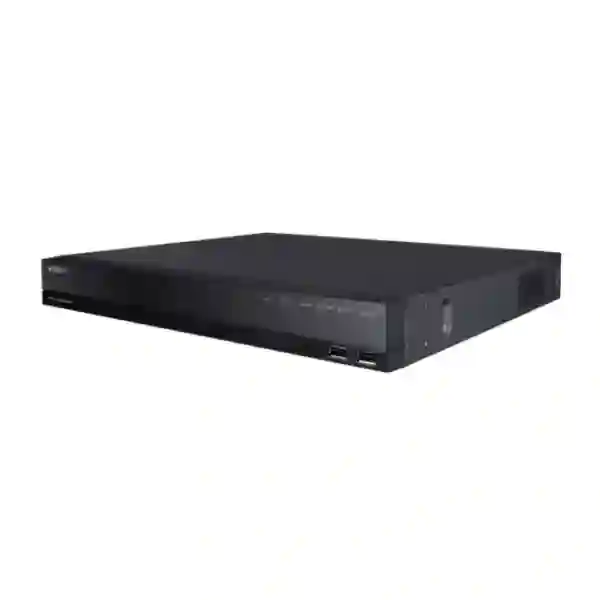
Hanwha HRX-435L — 4-Channel Pentabrid DVR
Keep compatible coaxial cameras working while planning a controlled move toward network video. The Hanwha HRX-435L DVR supports four analog inputs, a documented mixed-camera configuration of up to six channels, and one SATA hard drive of up to 4TB.
A clear answer for a mixed-camera recording project
The Hanwha HRX-435L DVR is a four-channel pentabrid digital video recorder intended for smaller surveillance systems that need to keep compatible coaxial cameras in service while allowing some network-camera integration. Its four BNC analog inputs accept supported AHD, HDTVI, HDCVI and conventional CVBS signals. A connected network enables supported IP cameras to be incorporated as well. For a site with existing coaxial runs, this can be a more measured starting point than replacing every camera and cable simply to gain modern recording, viewing and evidence-search functions.
For a Tanzania-based buyer planning security coverage for an office, retail counter, workshop, small hospitality property or similar premises, the important question is not just whether a recorder advertises 4K. It is whether the exact installed camera signals match the inputs, whether the available recording frame rates suit the scene, whether one internal hard drive can provide the retention period required, and whether the network can safely support the intended remote users. These decisions should be made before the system is purchased or wired.
Ask FourTeck to review the current camera inventory, proposed new cameras, desired storage duration and monitoring workflow. An appropriate configuration can then be assessed without assuming that every existing camera, application or network arrangement is compatible. This listing describes the HRX-435L model, not the similarly named HRX-435, which has a different published hard-drive arrangement.
What the HRX-435L can connect to
Four physical analog channels
Four BNC inputs accommodate compatible coaxial cameras. These are physical camera connections; they do not become six BNC connectors simply because the unit supports mixed-camera operation.
Five camera signal families
The pentabrid design addresses AHD, HD-TVI, HD-CVI, CVBS and IP video. Individual camera output modes, resolutions and firmware still require a compatibility check.
Up to six total video channels
The manufacturer-related documentation describes four analog channels plus two additional network camera channels in a typical six-channel mixed configuration. Channel allocation and network modes should be confirmed in the final design.
Single internal drive
The HRX-435L supports one internal SATA hard drive with a documented maximum of 4TB. A larger-drive or two-drive specification for HRX-435 must not be transferred to the HRX-435L.
The distinction between supported video standards and available physical connectors is particularly useful during an upgrade. AHD, TVI, CVI and CVBS all use coaxial-style analog connections in this application, but a recorder does not automatically decode every unusual camera signal, proprietary extension or unsupported frame mode. IP cameras use a network path and a supported protocol instead of a BNC video connection. Their data rate also contributes to the recorder’s performance limits.
Hanwha documentation identifies SUNAPI and ONVIF support for network cameras. ONVIF support is an interoperability starting point, not a guarantee that every third-party IP camera exposes all its recording, event and control functions. A sample stream test, firmware review and resolution or codec check are appropriate when a design mixes brands.
Verified technical specifications at a glance
| Manufacturer and model | Hanwha Vision HRX-435L |
|---|---|
| Recorder category | 4-channel, 5-in-1 pentabrid DVR |
| Analog inputs | 4 BNC camera inputs |
| Supported video families | AHD, HDTVI, HDCVI, CVBS, IP |
| Typical hybrid arrangement | 4 analog channels plus 2 network-camera channels; up to 6 total |
| Supported image resolution | Up to 8MP where supported by signal type and camera mode |
| Analog recording example | 8MP up to 8fps; 5MP up to 12fps; 4MP up to 15fps; 2MP up to 30fps, subject to camera/input conditions |
| Compression options | H.265, H.264 and MJPEG |
| Recording bandwidth | Up to 30Mbps |
| Internal storage | 1 SATA drive; documented maximum 4TB |
| Monitor outputs | HDMI and VGA; additional analog spot output is specified |
| Network and access | 10/100Base-T Ethernet, compatible browser/client and supported mobile workflows |
| Alarm and audio connections | 4 alarm inputs, 2 alarm outputs; 4 audio inputs and 1 audio output |
| Local USB | 2 front USB 2.0 ports |
| Power | 12V DC; vendor specification lists up to 22W with one 4TB drive |
| Operating environment | 0°C to 40°C; 20% to 85% relative humidity |
| Housing dimensions | 370 × 44 × 320mm, excluding some projections |
These specifications describe the identified HRX-435L hardware family based on exact-model technical material. They are not a claim about the storage drive fitted to a particular Tanzania sales package. One documented Japanese-market package includes an initial 2TB drive, but a supplied disk size, accessories, current firmware and regional sales configuration must all be verified in the actual quotation. The manufacturer may update specifications. If a project has strict procurement requirements, request the current model-specific technical sheet and confirmation of the delivered configuration.
Choosing between keeping coaxial cameras and going fully IP
The cost of a surveillance refresh often comes from the installation work rather than the visible recorder alone. Where usable coaxial cable is already installed, a compatible pentabrid DVR may preserve much of that infrastructure. The installer can inspect the cable, connectors and camera output modes, test image quality and decide whether replacement is necessary only at the locations that need it. This is especially useful where taking a shop, office or reception area out of service to pull new cable would be disruptive.
A completely new IP deployment has different advantages. It can make network-based expansion, centrally managed camera profiles and a broader selection of advanced camera functions easier, provided the chosen recorder and network have sufficient capacity. The HRX-435L is best considered a bridge for a modest estate of cameras rather than an unlimited platform for future growth. Four BNC inputs and one drive bay are real design boundaries; neither compression nor additional network cameras eliminates those boundaries.
For a customer deciding whether to reuse installed analog cameras, ask for photographs of the recorder connections, exact camera model labels and an inventory of the cable routes. Identify where night identification, wide-angle coverage or reliable detail is currently inadequate. The right upgrade may be one camera and a storage policy change, not a wholesale replacement. Conversely, a site planning many more cameras or very long retention may be better served by a different recorder class.
Camera formats and resolution: what to verify before purchase
AHD, HD-TVI and HD-CVI are not names for the same signal, even though their cameras often use similar coaxial cabling. CVBS refers to older standard-definition analog video. A pentabrid recorder is designed to recognize several of these signal families, but maximum resolution can differ by family. Exact-model documentation lists AHD and TVI modes through 8MP and HD-CVI modes through 5MP, while CVBS supports the appropriate older NTSC or PAL formats. Do not assume an 8MP claim applies to every connected camera format.
A camera may have a switchable output mode, a resolution setting that exceeds the DVR’s supported signal mode or a proprietary feature that requires additional configuration. Before ordering, record the brand, model, intended format, output resolution, current firmware and whether the camera must deliver a continuous main stream or provide PTZ control. Where a camera is already fitted, a bench test with a representative unit is often faster and safer than deciding compatibility from the connector alone.
For network cameras, verify both the protocol and the actual video stream. ONVIF availability may differ between discovery, live video, event handling and playback. SUNAPI is relevant to compatible Hanwha devices. Third-party camera functions should be checked independently. If the proposal depends on motion events generated inside a camera, make certain that the recorder receives the required event information and can use it for the intended recording schedule or alert.
Understanding the six-channel statement
A recurring source of purchasing confusion is the phrase ‘six channels’. The HRX-435L has four physical analog BNC input channels. Its documented hybrid capability allows additional network-video operation and is commonly described as four analog cameras plus two network cameras, making six total in that example. Some published descriptions also refer to flexible network-camera channel allocation when analog inputs are not all used. That flexibility should not be interpreted as six physical analog inputs or as an open-ended licence to add cameras.
A buyer should therefore define the intended combination in a camera schedule. A useful schedule has one line for each proposed camera, showing the connector type, standard, resolution, frame rate, estimated bitrate, event functions, mounting location and retention requirement. Once all cameras are counted, check the exact configuration against the recorder’s supported modes and recording-bandwidth limit. Where the total is close to a published limit, leave engineering headroom rather than treating a laboratory maximum as a preferred daily operating level.
If the site expects several future network cameras, compare a dedicated NVR or a larger hybrid system at the planning stage. Hardware with only one HDD bay may still be suitable for a four-camera property, but camera-channel capacity and storage capacity are separate calculations. Avoid buying solely on the higher of the two numbers. The final configuration must satisfy both at the same time.
Recording quality is a balance of detail and motion
The ability to accept an 8MP signal does not mean the recorder necessarily stores 8MP video at thirty frames per second. The HRX-435L’s published analog recording figures include approximately 8fps at 8MP, 12fps at 5MP, 15fps at 4MP and up to 30fps at 2MP under the specified operating modes. Frame-rate behavior also depends on the connected camera and signal system. A larger image offers more pixels across the scene, while a higher frame rate better describes rapid movement between moments.
For a relatively static entrance, loading bay overview or doorway, a carefully framed higher-resolution image may be valuable for identifying detail. For a fast-moving gate, vehicle path or cashier interaction, a different balance of resolution and frame rate may be preferable. Lighting, exposure time, lens selection and camera placement affect the result just as much as the number of pixels advertised. An apparently sharp still image may not be a good recording of a person moving through dim light.
Discuss the actual purpose of each camera before setting recording profiles. Is the goal general activity verification, reading a document at a counter, following an incident sequence or establishing vehicle movement? Choose a profile after examining day and night sample footage. The recorder cannot recreate detail that the camera never captured, and a higher recording resolution cannot compensate for glare, an unsuitable field of view or poor illumination.
Compression and bandwidth planning
The HRX-435L supports H.265, H.264 and MJPEG recording codecs. H.265 may reduce the data required for a given image-quality target compared with older compression approaches, but the realized difference varies with scene complexity, camera settings and playback compatibility. A quiet corridor and a busy street generate different motion patterns. Rain, tree movement, noise in low-light images and frequent lighting changes can increase bitrate even when the image resolution remains constant.
The listed maximum recording bandwidth is 30Mbps. This is a system resource to budget, not a guarantee that every imaginable collection of 8MP cameras can record at its maximum separate bitrate simultaneously. The camera schedule should include expected main-stream rates and a margin for variations. A design with four cameras averaging 6Mbps each would consume a substantial share of that recording budget before additional streams and operating margins were considered. Actual values should be established from the cameras and the agreed quality settings.
For remote access, remember that outbound viewing capacity is a different constraint from the amount of video the recorder writes locally. A limited uplink can make multi-camera live viewing difficult even while local recording is functioning correctly. Use suitable lower-bandwidth viewing streams where the system supports them, apply access controls, and test remote playback under the actual internet connection instead of relying only on an office-lab test.
Storage: one SATA bay, up to 4TB
The correct storage description for HRX-435L is one internal SATA HDD bay, with published model-specific material specifying up to 4TB. This matters because the non-L HRX-435 is widely described with two bays and a higher total drive capacity. Those figures must not be copied into this product listing. A quotation for HRX-435L should say whether a hard drive is included, its usable capacity after formatting, its intended surveillance workload and whether it is listed as compatible with the recorder.
Drive capacity on its own does not tell the customer how many days of recordings will be available. Recording duration depends on the aggregate average bitrate, how much of the day each camera records, the resolution and frame rate selected, the number of active channels, and storage consumed by system overhead or reserved space. Even two systems using 4TB drives can produce very different retention windows. Motion recording can reduce consumption in some environments but may not provide a predictable saving where activity is continuous.
For customers with mandatory evidence retention, determine the required number of days first and perform a conservative estimate using realistic bitrates. If the required duration cannot be achieved within the supported single-drive capacity while preserving useful image quality, reconsider the recorder or recording approach. Do not promise an exact number of days or make a procurement decision based on a generic online capacity chart.
How to specify a recording-retention requirement
Start with a written policy for the footage the business needs to keep. Some teams require a short rolling history for incident checks; others need longer retention for operational investigations or contractual obligations. Decide who may retrieve footage, how evidence is exported, who approves requests and what should happen when storage fills. A retention policy is a combination of operational choices, recording settings and available disk space, not simply the size printed on a carton.
Build the estimate from each channel. Record the selected resolution, realistic frames per second, estimated average bitrate, daily recording hours and number of retention days. Sum the expected data for all channels, then add a practical margin for busy scenes, file overhead and changing conditions. Event-only plans require an explicit assumption about event frequency; they should never be presented as a guaranteed percentage reduction. If recording includes audio, include its contribution as well.
After commissioning, monitor the recorder during an ordinary busy week. Compare actual stored-video duration against the specification. If it is too short, review the per-camera profiles, coverage requirements and whether a larger compatible drive is within the documented limit. The objective is dependable evidence, not the lowest possible bitrate. Compressing away useful detail to achieve an arbitrary number of days can defeat the purpose of installing the cameras.
Local viewing and incident review
The unit provides HDMI and VGA monitor connectivity, giving an installer options for a local security desk or equipment area. The vendor also specifies an analog spot output for suitable monitoring arrangements. Screen resolutions and the availability of different display layouts should be confirmed against the connected monitor and recorder settings. Having both HDMI and VGA sockets does not imply that every combination of independent high-resolution views is supported.
A local monitor is useful when the staff member investigating an incident is physically at the premises. The review workflow should be rehearsed: find the appropriate date and approximate time, select the correct channel, narrow the event range, play the video at a useful speed, and export the exact evidence segment. An employee who knows only how to view the live quadrants may still be unable to retrieve the needed recording quickly during a real incident.
Set the DVR clock and time zone accurately and verify that time remains correct. Where network time synchronization is used, confirm it is available and appropriate for the installation. Incorrect timestamps create avoidable ambiguity when camera video must be aligned with door logs, tills or other records. During handover, ask the installer to demonstrate both an ordinary continuous-recording search and an event-based search so that the business is not dependent on one person.
Remote access and mobile monitoring
Published HRX-435L material describes smartphone monitoring on Android and iOS, compatible Hanwha viewing software and a QR-code-based peer-to-peer setup approach. These features can help an authorized owner or supervisor check live scenes or review supported recordings without standing next to the recorder. However, connectivity, service availability, software versions, app permissions and the organization’s network policy all influence how well a particular remote-viewing workflow operates.
Before enabling remote access, establish whether the premises has a dependable internet uplink, who needs access, what each user may view and how credentials will be secured. Prefer individually assigned accounts where supported; avoid sharing an administrator login among staff. Test that a remote user can reach only the functions required for the job. Check mobile-data consumption, app compatibility, video latency and the practical quality of playback on a cellular connection.
A recorder that works on a local monitor is not necessarily accessible from outside the building. Router configuration, firewall rules, network addressing and upstream service restrictions can all matter. Do not expose administrative interfaces to the public internet simply to get the mobile app working. Have a qualified installer select a supported, appropriately secured access method and verify it against the actual network environment before handing over the system.
Recording modes, alarms and useful events
The HRX-435L supports manual recording, scheduling and event-oriented workflows. Manufacturer-related specifications also describe motion-related events, video-loss or tamper conditions on suitable analog inputs and camera-originated events from compatible network devices. These are useful tools for focusing attention on unusual activity, but events depend on the capabilities and settings of the participating cameras and the recorder. A feature named in a datasheet does not guarantee reliable detection for every scene or third-party IP model.
For example, a stockroom door might need continuous recording during business hours and a different schedule overnight. A front entrance might be reviewed more quickly if events are configured sensibly, while a busy public-facing counter could generate too many nuisance events to make motion-only storage practical. Outdoor cameras may register lights, insects, vegetation and weather. Walk through the real environment and refine detection zones or schedules based on sample recordings.
The listed hardware also provides alarm inputs and outputs, allowing some integration with external contacts or signaling devices where compatible. The physical wiring, electrical ratings, supported trigger/action mapping and any site-specific safety requirements should be verified by the installer. A DVR is not automatically a substitute for a certified intrusion alarm or fire-safety system. Use recording events as one element of the surveillance design rather than as an unsupported guarantee of security.
Audio, PTZ and coaxial camera control
The exact-model specification describes four audio inputs and one audio output. These interfaces may be relevant to a project that has a legitimate business need for synchronized sound, but the deployment must be assessed separately from video recording. Microphone wiring, camera or recorder audio support, permission to record conversations and clear site policies are all important. Never assume that every connected CCTV camera has audio or that audio is automatically enabled by the presence of an input socket.
Coaxial camera control is another useful distinction. Under supported analog protocols, some pan-tilt-zoom or compatible camera settings may be controlled along the existing coaxial path. A separate RS-485 interface is also documented for supported control arrangements. The exact protocol, address, camera firmware and physical cable path must be aligned. Simply connecting a PTZ camera by BNC does not guarantee every zoom, preset or movement function will be available.
When planning the system, list functions required beyond picture recording: microphone input, a spot monitor, alarm integration, PTZ presets, user permissions or event notifications. Demonstrate the necessary action on the proposed combination rather than assuming a headline standard covers all features. This is particularly important where the surveillance system supports daily operational decisions, access management or a later dispute.
Appropriate applications for a smaller hybrid DVR
Retail and checkout oversight
A small store may reuse existing camera runs for overview or entrance views and add a compatible IP camera at a higher-priority area. Frame rate, low-light performance and the desired evidence detail should be agreed per channel.
Offices and receptions
A compact mixed-camera recorder can bring existing reception, entrance and corridor feeds into one familiar local viewing workflow. User permissions and privacy expectations should be defined before installation.
Small hospitality premises
A modest guest-facing property may need clear perimeter and public-area coverage without cameras in private spaces. Storage planning, camera location and authorized staff access are more important than a generic camera-count target.
Workshops or back-of-house areas
A workshop may need oversight of access doors, equipment movement and storage zones. Dust, heat, physical security of the recorder and reliable power must be considered when choosing the equipment position.
These are planning examples, not claims that a particular site or industry has been approved or surveyed. A small number of well-positioned cameras is often more useful than installing all available channels simply because the ports exist. A buyer should prioritize the incidents they need to understand, decide which scene must show context and which must show detail, and ensure that lighting and camera placement support the goal.
A public-facing camera network also creates responsibilities around notices, staff access and secure handling of footage. Evaluate the applicable site policies and legal obligations before placing cameras or enabling sound. Where the risk is high or a scene requires critical identification, obtain a specialist design assessment rather than relying on generic product capabilities.
Environmental conditions and physical installation
Model-specific material specifies a 0°C to 40°C operating temperature range and 20% to 85% relative humidity. The enclosure is a compact metal recorder, approximately 370mm wide, 44mm high and 320mm deep, excluding certain projections. These figures help in planning a shelf, cabinet or equipment area, but they do not define the airflow clearance or suitability of an enclosure on their own. The full installation guide and supplied accessories should be consulted before mounting.
In a warm or dusty equipment room, avoid locating the recorder where direct sunlight, blocked ventilation or nearby electrical equipment could raise its operating temperature. Keep it accessible for controlled servicing but not open to casual tampering. Protect the external power adapter, signal connections and network cable from accidental disconnection. If the installation cabinet is locked, the operator still needs a defined process for controlled access and maintenance.
The published specification gives a 12V DC input and a vendor maximum around 22W with one 4TB HDD, but a complete backup-power design must account for the monitor, router, network switch, IP camera power supplies and all other components, not only the DVR. In a site where mains interruptions occur, assess a suitable UPS and orderly shutdown approach. A recorder with continuous network visibility but intermittent camera power will still have gaps in video evidence.
Network and electrical deployment checklist
- Power path: Confirm the supplied 12V DC adapter is correct for the exact unit, protect it from moisture and cable strain, and assess surge protection and backup-power needs.
- Analog path: Inspect coaxial cable continuity, terminations, electrical interference and the true signal format of every existing camera.
- IP path: Check addresses, gateway, DNS where needed, switch connectivity and the supported protocol before adding a camera to the recorder.
- Recorder location: Choose a protected and ventilated space within the specified operating range, with enough clearance for service and cable routing.
- Viewing path: Test the intended HDMI or VGA monitor and confirm its selected resolution and staff viewing position.
- Remote path: Verify external access through a supported secure method and test from a genuinely separate network connection.
- Evidence path: Agree who may search, download, retain and disclose exported footage; rehearse a complete incident-retrieval exercise.
This checklist is deliberately wider than the DVR’s connector list. The value of any recorder is the reliability of the end-to-end system: power, cameras, cables, network, disk, access rules and incident response. The person preparing a quote should be able to name who is responsible for each part of the work. Excluding the router, cable testing, HDD or display from the initial scope without stating it clearly can leave a buyer with a technically capable recorder but an incomplete installation.
For refurbishment projects, request a commissioning report that records camera labels, tested formats, the installed storage capacity, user roles, the video retention observed after testing and the date of the successful recording and export demonstration. This documentation makes future maintenance more straightforward and reduces dependency on a single installer.
Digital security and account management
A DVR is a network-connected computing device whenever its remote functions are enabled. Treat its administrator credentials and firmware as seriously as those of a business router. At commissioning, change default or shared passwords, disable unused accounts or services where the model supports it, assign the least privilege each user needs and document the approved access method. Strong authentication and access separation are practical controls, not optional cosmetic settings.
Hanwha Vision publishes product security and firmware information, and the HRX-435L has appeared in manufacturer security advisories. This makes firmware review an important part of deployment. Identify the exact device model, hardware revision and installed firmware before applying any update. Use official, model-matched firmware guidance, plan for backup of settings where supported, and verify operation after a controlled upgrade. Do not assume that a firmware package for HRX-435 or another regional variant is automatically suitable for HRX-435L.
Secure the recorder physically as well as digitally. Limit who can remove the drive or USB device, maintain a record of authorized exports and ensure that retired drives are handled according to the business’s data policy. Logins used by former staff should be disabled promptly. Where the installation is part of a larger organization, align remote access and evidence retention with its IT security practices rather than giving every user unrestricted administrative access.
A practical commissioning process
- Step 1 — Survey: Document camera locations, signal standards, cable condition, viewing goals, evidence needs and future expansion plans.
- Step 2 — Confirm the hardware: Verify the label says HRX-435L, determine the supplied hard-drive size and check accessories and firmware details against the purchase specification.
- Step 3 — Connect and test: Bring up each analog camera and supported IP stream one at a time, confirming image, correct channel name, stable recording and adequate night performance.
- Step 4 — Tune profiles: Select resolution, frame rate, compression and schedules according to each scene’s purpose and the 30Mbps recording budget.
- Step 5 — Secure access: Configure approved users, network parameters, event rules and protected remote access without exposing unnecessary services.
- Step 6 — Validate retention: Check capacity, recording continuity and actual overwrite behavior against the retention policy during realistic use.
- Step 7 — Handover: Demonstrate incident search, playback, evidence export, password custody and the route for support or later camera changes.
Each step should produce a clear pass or follow-up action. A system that shows live video from all cameras but has never been tested for recording, playback and export has not yet demonstrated its most important business function. For a multi-user installation, complete a short operator exercise with the people who will actually respond to incidents. Ask them to find a known event, identify the relevant channel and save a suitable clip under the correct access permissions.
Commissioning is also the right stage to note any limitations. For example, a camera might supply video correctly but not deliver its advanced alarm events through ONVIF, or a mobile workflow might be constrained by an internet uplink. Document these results clearly so that the customer can decide whether the limitation is acceptable or needs a different design.
How to evaluate the quotation and supplied package
A useful CCTV quotation separates the recorder itself from the full operating system. It should identify the exact HRX-435L model, condition, included or excluded hard drive, supplied power accessories, any cameras, network hardware, monitor, cabling, installation, configuration and support responsibilities. The available disk space and the required retention target should be stated in the same proposal. Without that detail, two prices that appear to describe the same DVR may represent quite different deliverables.
Ask whether the project is for supply only, upgrade of an existing system or installation of a complete new system. For an upgrade, the commercial assessment should say which current cameras have been tested, which are assumed compatible and which require replacement or additional investigation. For a new installation, clarify who provides suitable camera power, network switching, protective enclosure and any backup power. The stated scope should also explain whether remote-viewing setup and operator training are included.
FourTeck can be asked for a configuration review and a quote for the precise project. This page does not assert current stock, shipment dates, Tanzanian shilling pricing, local authorization status, on-site coverage, a particular warranty period or a bundled disk configuration. Confirm those commercial details directly in the quotation rather than relying on model descriptions from another region.
HRX-435L versus HRX-435: do not mix the specifications
These two model names are similar enough that search results and supplier catalogues can easily be confused. The distinction is material. Exact HRX-435L materials from the manufacturer ecosystem and a detailed regional product specification identify one SATA hard-drive position and a supported maximum of 4TB. Separate HRX-435 literature describes two SATA positions and a larger capacity. A listing using ‘HRX-435’ values to fill gaps for ‘HRX-435L’ may therefore overstate how much recording storage the buyer can install.
The comparison matters for retention, service access and future investment. A customer expecting two hard drives could discover after delivery that the actual enclosure supports only one. A single-drive design may still be entirely appropriate where camera count is small and realistic retention calculations fit inside the supported limit. But a project that requires additional internal disk capacity should be designed differently before procurement, not after the recorder has been mounted.
Check the exact suffix on the product label, carton and invoice. When reviewing a PDF, verify the heading and model references rather than assuming that a document for HRX-435 is interchangeable. The recorder’s core hybrid camera function may look similar, while the mechanical or storage specification differs. This page intentionally avoids transferring the two-bay claim and does not advertise a particular preinstalled HDD for Tanzania.
When to consider a different recorder
The HRX-435L is not the right answer for every surveillance requirement. It should be reconsidered when the camera count is expected to grow substantially beyond its documented mixed-channel capacity, when longer retention exceeds its single-disk design, or when the project requires higher recording frame rates at maximum resolution than its published profiles can deliver. It may also be unsuitable where all cameras are IP and advanced centralized video-management features matter more than preserving existing coaxial connections.
A larger hybrid recorder may help when a property needs additional analog channels and still has viable coaxial infrastructure. A network video recorder may be more suitable when the planned cameras are exclusively IP or require higher aggregate recording throughput. A dedicated video-management system may be needed across multiple facilities with complex operator permissions or a central security team. These are design directions, not specific replacement recommendations or claims about particular models.
Choose the category after mapping cameras, evidence quality, retention, bandwidth, remote users and future change. It is not necessary to pay for channels that will never be used, but it is unwise to buy a recorder that meets today’s exact count and no foreseeable expansion requirement. The best buying decision is the one that makes the end-to-end security workflow reliable within a clear scope and budget.
Frequently asked questions
Is the Hanwha HRX-435L DVR a four-camera or six-camera recorder?
It has four BNC inputs for supported analog cameras, and the documented hybrid arrangement can accommodate two additional supported network cameras, giving six channels in that configuration. The presence of six total channels does not mean there are six analog BNC connectors. Camera allocation should be checked for the exact mix proposed.
Does the HRX-435L support 8MP cameras?
Yes, supported signal formats include up to 8MP modes. However, recording frame rate at 8MP is lower than at 2MP, and the maximum format-specific resolution differs. Confirm the actual camera output and recording settings before relying on an 8MP specification for a fast-moving subject.
Can I keep my existing coaxial CCTV cables?
Potentially. The pentabrid design is useful for compatible coaxial-camera installations. Cables and connectors still need inspection for signal quality, damage, interference and correct termination. Camera standard and output mode must match the recorder; a physical connector alone does not establish full compatibility.
How many hard drives can I install?
The HRX-435L has one internal SATA HDD position with a documented maximum of 4TB. Do not use the two-drive capacity published for HRX-435. Ask whether any disk is included in the exact package being quoted and whether the proposed replacement disk is supported.
Does the product include a 2TB hard drive in Tanzania?
A regional Japanese product sheet describes a 2TB factory configuration, but that does not establish the package supplied in Tanzania. The storage included with a FourTeck quote must be separately confirmed, including the exact usable capacity and whether the disk is supplied and installed.
How long will the recorder keep footage?
There is no universal number of days. Retention depends on the number of active cameras, bitrate, resolution, frame rate, recording hours and event activity. Specify the desired retention period and have the proposed camera profiles and drive size calculated together. Verify the outcome under realistic operating conditions.
Can I watch the cameras on my phone?
The model documentation describes compatible smartphone viewing and QR-based P2P setup. Actual use depends on supported software, network access, security policy and internet performance. A secure remote-access method and user permissions must be configured and tested by the installer.
Is every ONVIF network camera compatible?
No universal compatibility should be assumed. ONVIF is a useful standard, but supported profiles, event functions, streams, codecs and firmware can differ. Test the intended camera for live video, recording and any required motion events before committing to the complete deployment.
Can it record around the clock?
The recorder offers scheduled and continuous recording configurations. Whether the desired footage can be retained for the required time depends on disk capacity and video data rate. Reliable 24-hour operation also requires stable camera power, a suitable environment and checking the resulting stored footage rather than viewing only the live image.
Can it record audio?
The specification includes audio input and output interfaces, but usable recording depends on the connected source, cabling, settings and the recording policy. Businesses should consider privacy and any applicable consent or legal obligations before capturing sound. Never assume that a video-only camera or cable provides usable audio.
What if the site has frequent power cuts?
Consider protected, correctly sized backup power for the recorder and all cameras and network equipment needed to preserve recording. The published power figure describes the recorder under stated conditions, not a complete system’s power demand. Plan orderly shutdown and test behavior after electricity is restored.
Can the HRX-435L be installed in a hot room?
Its published operating range is 0°C to 40°C. A closed cabinet, direct sunlight or other heat sources may cause the device itself to experience temperatures higher than the room reading. Select a ventilated protected location, respect the installation guidance and measure the actual operating environment.
Does the device support coaxial PTZ control?
Published material lists coaxial control for supported camera formats and relevant PTZ protocols. The camera must implement a compatible control mode, and the setup must be tested. A video image appearing correctly does not necessarily mean that zoom, pan, tilt or presets will operate.
Can I export footage after an incident?
The device includes backup and export functions, with front USB connections available for supported workflows. The operator should verify the exact file format, playable export, correct timestamps and chain of access to the footage. Include an export demonstration in handover training rather than assuming every user knows the process.
Is the HRX-435L the same as the HRX-435?
No. They are separate model designations and the published storage configurations differ. HRX-435L is documented with one internal SATA HDD position and up to 4TB. Verify the complete model suffix before selecting accessories, reviewing firmware documents or estimating evidence retention.
Can FourTeck confirm a Tanzania price and installation scope?
A quote can establish the actual local offer, supplied HDD size, accessories, cameras, configuration services and any installation arrangements. Nothing in the technical model name alone confirms pricing, availability, warranty, delivery timing or service coverage. Request those details explicitly for your site and proposed camera schedule.
Before you request a quotation: six details to send
- The exact number of cameras now fitted and the number expected within the next one or two years.
- The model or output signal of each current coaxial camera and any proposed IP camera.
- The locations that matter most: entrances, stock areas, corridors, loading areas or operational points.
- Whether the priority is broad coverage, identifiable detail, smooth movement or easier incident review.
- The number of days of footage required and whether recording should be continuous or event-based.
- The internet access, local monitor, intended mobile users and whether protected backup power is needed.
Providing these details makes the recommendation practical. It permits a compatibility review, a meaningful frame-rate and bandwidth plan, an evidence-retention estimate and a quotation that makes its assumptions visible. It also avoids a common mistake: buying a recorder solely because the channel count and maximum resolution sound adequate while overlooking the disk capacity or the camera formats already on the wall.
The next step is to request a Hanwha HRX-435L DVR configuration and quotation from FourTeck Tanzania. Ask for confirmation of the precise package contents, disk size, suitable camera combinations, deployment scope, commercial terms and any locally applicable conditions. There is no verified FourTeck destination link available for this request, so this call to action is intentionally presented without an unverified hyperlink.
Request a configuration review
Share the current camera models, required retention period, proposed upgrades and site network information. Request a confirmed HRX-435L package quotation with the exact storage, accessories and installation scope. FourTeck Tanzania can review the project requirements before an order is placed; technical documentation alone is not a confirmation of a local sale or service commitment.




Reviews
There are no reviews yet.