
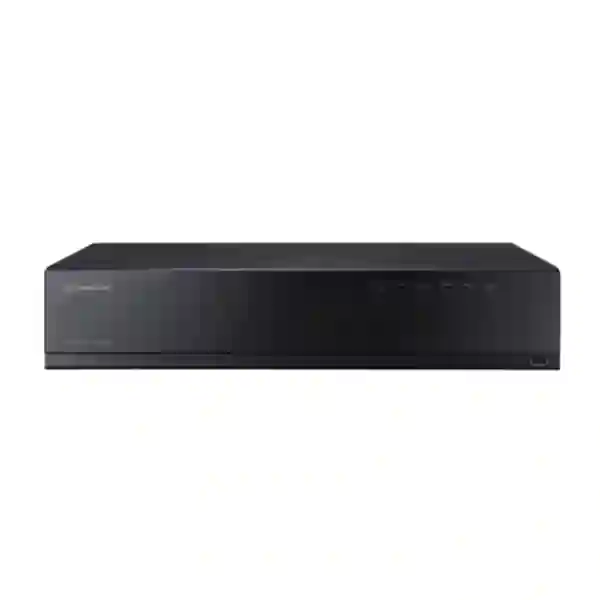
Hanwha HRX-835A-3T: keep compatible cameras, modernise the recorder
An 8-channel pentabrid DVR in a 3 TB configuration for organisations planning a controlled CCTV replacement or mixed analogue/IP surveillance project. Start by checking your existing camera signals, footage-retention needs and the environment where the recorder will operate.
Specifications at a glance
| Manufacturer / series | Hanwha Vision / HRX-835A pentabrid DVR |
|---|---|
| Exact requested variant | HRX-835A-3T, identified as 3 TB configuration |
| Analogue connections | 8 BNC video inputs; AHD, HDTVI, HDCVI and CVBS |
| IP camera support | Additional network cameras within stated channel limits; SUNAPI / ONVIF |
| Maximum video resolution | Up to 8 MP on supported configurations |
| Analogue recording examples | 8 fps at 8 MP; 12 fps at 5 MP; 15/12 fps at 4 MP; 30/25 fps at 2 MP |
| Video coding | H.265, H.264 and MJPEG |
| Recording bandwidth | Up to 80 Mbps, subject to supported configuration |
| Hard drive expansion | Up to 4 SATA drives, up to 6 TB per supported drive |
| Local monitoring | HDMI, VGA, and stated BNC spot output |
| External interfaces | Gigabit Ethernet, USB, alarm inputs / outputs and serial control |
| Power and environment | 100–240 V AC class; 0–40°C operating temperature |
Published specifications describe the HRX-835A family. Check exact firmware, camera compatibility, supplied accessories and the delivered 3 TB variant before finalising a project.
Is this recorder a good fit?
The Hanwha HRX-835A-3T is a practical candidate when an organisation wants to retain compatible coaxial surveillance cameras while adding limited IP camera capability. It is an eight-channel pentabrid digital video recorder from Hanwha Vision, with a 3 TB configuration identified by the exact -3T model suffix. This makes it particularly relevant when a site already has usable coaxial cabling and the owner does not want to discard the entire installation just to modernise recording. The central purchasing question is not simply whether the recorder has eight channels, but whether each existing camera speaks a supported signal format at an appropriate resolution and frame rate.
A suitable project may include a retail premises, an office, a small warehouse, an entrance-focused commercial property or another location with a defined group of surveillance viewpoints. It may also be useful for a staged upgrade, where selected older cameras are replaced over time rather than all at once. Before committing, list the camera models, recording expectations, event triggers, network access needs and number of monitored positions. The recorder does not create video coverage by itself: the placement, optics, lighting and health of every connected camera remain essential to the result.
What pentabrid really means
Pentabrid describes the five video-input families the recorder is designed to work with: AHD, HDTVI, HDCVI, traditional CVBS analogue video and supported network or IP cameras. For a buyer, this breadth can simplify an upgrade when a building contains more than one analogue generation. A camera that has a BNC connector is not automatically compatible, however. Its signal standard, resolution, timing mode and configuration still need checking against the recorder and the manufacturer’s compatibility guidance. Audio, coaxial camera control and other advanced features may vary even when the image can be displayed.
If the existing equipment is unknown, an installer should identify it before specifying a replacement recorder. Photograph labels, note the current DVR model, confirm each camera’s configured output and test a representative sample. Where cameras have selectable AHD, TVI, CVI or CVBS modes, document the actual mode rather than assuming the shipping default. A mixed installation can be viable, but deliberate testing is more reliable than a broad claim of universal camera support. This approach reduces return visits and helps preserve the value of wiring that is already functioning well.
Understanding eight analogue channels and IP expansion
The HRX-835A provides eight BNC analogue video inputs. Hanwha’s specification also describes additional network-camera support, with two additional IP channels in the usual eight-analogue-plus-two-IP arrangement and a total of up to ten recorded channels. That total is not a promise that every possible mixture of analogue and IP cameras is supported in every configuration. Confirm the camera allocation and supported profiles for the intended firmware, and calculate bandwidth after deciding the actual combination. A hybrid recorder should be designed around its channel rules, not merely the largest channel figure printed in marketing.
For example, a site with six working analogue cameras and a plan to add two new IP viewpoints should first verify the network cameras’ codec, ONVIF or SUNAPI interoperability and stream settings. A site needing twelve simultaneous inputs or substantial future network-camera growth should assess a different recorder class. Likewise, if the site is moving entirely to high-resolution IP video, compare a dedicated network video recorder rather than choosing a pentabrid unit just because it is available. The correct fit depends on both today’s signals and tomorrow’s likely camera count.
Resolution is not the same as recording speed
The HRX-835A family supports video resolutions up to 8 MP, but high resolution must be considered together with the achievable recording frame rate. Hanwha lists analogue main-stream recording at approximately 8 frames per second per channel at 8 MP, 12 at 5 MP, 15 or 12 at 4 MP depending on the video system, and 30 or 25 at 2 MP. Actual results also depend on the camera output and selected modes. These figures help explain why a nominally higher-resolution camera is not always the best choice for a scene involving rapid motion.
At an entrance where a person pauses and the objective is detailed still-image review, higher pixel count can be useful if placement and light are suitable. In a busy receiving bay, smoother frame rate may matter more when following fast activity. Choose camera settings by the evidence the site needs: faces, the movement of goods, gate operation or general scene awareness. Test live viewing and exported playback at the intended resolution rather than treating the maximum megapixel figure as a universal performance guarantee. Recording quality also depends on lens selection, exposure, compression and scene complexity.
Why the 3 TB variant matters
The -3T variant is identified as a 3 TB configuration in available model listings, but an exact Tanzania quotation should still confirm the physical hard drive installed and the usable capacity reported by the unit. The drive is not a promise of a fixed number of days of recording. Storage duration depends on how many cameras are active, their bitrates, resolution, frame rates, recording schedules and the amount of motion in each scene. A quiet store room and a continuously moving loading yard can have very different storage requirements despite identical camera counts.
During specification, ask for the required retention period in days, note any periods that must be recorded continuously, and decide whether event-triggered recording is acceptable for the task. Allow space for changing scene activity and the operational need to export footage. H.265 may improve compression efficiency compared with older formats in suitable deployments, but it does not guarantee a particular saving. A retention calculation using realistic camera bitrates is more helpful than a generic claim such as one month of video on 3 TB. Verify disk health and recording status after installation.
Storage growth beyond the supplied configuration
The HRX-835A chassis is specified for up to four SATA hard drives, with support for up to 6 TB per compatible drive and a stated maximum raw capacity of 24 TB. These are hardware limits, not an indication that this exact 3 TB listing is supplied with four drives or that every drive size and make can be fitted without qualification. Refer to Hanwha Vision’s current hard-drive compatibility information and the specific recorder firmware before choosing any additional drive. Storage upgrades must also consider power, heat, drive endurance and the organisation’s archival policy.
Expansion is useful when the first design underestimates bitrate, adds cameras or changes from scheduled to continuous recording. However, additional capacity does not resolve missing camera coverage, poor image quality or unsupported recording modes. It is wise to document the original capacity, any replacements, serial numbers and the retention observed under normal operating conditions. Establish who will monitor drive faults and what the response procedure will be. For sites handling sensitive footage, plan how failed drives are removed, securely handled and disposed of according to the organisation’s procedures.
H.265, H.264 and MJPEG explained
The recorder supports H.265, H.264 and MJPEG compression. A codec determines how video is encoded, which affects storage use, compatibility, processing demands and the ease of viewing or exporting footage. H.265 is often chosen where storage efficiency matters, subject to camera and viewer support. H.264 can be a practical interoperability choice for older clients and existing workflows. MJPEG is relevant to some integrations, although its storage requirements can differ considerably. Do not assume all cameras can deliver every codec at every resolution or frame rate.
A commissioning test should cover both live streams and footage retrieved later. Confirm that the personnel who receive exported evidence can open the approved file format, that timestamps remain meaningful and that a second device can view the recording when necessary. Compression settings should balance image detail, network use and storage. A low bitrate can make a scene appear economical to retain but leave crucial evidence too blurred for its purpose. The correct setting is a tested compromise tied to actual risks and review requirements.
Recording bandwidth and network planning
Hanwha states an upper recording bandwidth of 80 Mbps for the HRX-835A family, while playback and outgoing transmission have their own limits. Bandwidth figures should be treated as capacity constraints within the full product specification, not as guarantees that every stream configuration is accepted. Add up camera bitrates, leave reasonable headroom and understand how live views, playback sessions and remote users affect the local network. Existing cabling, switch capacity and internet service quality can become bottlenecks independently of the DVR.
For an IP camera addition, check whether the camera has a suitable network path to the recorder, receives power from an appropriate source and can be discovered through its supported protocol. The recorder’s Ethernet port does not itself establish that IP cameras can be powered directly from it. Where the network is shared with business systems, consider separating surveillance traffic or applying access controls under the organisation’s IT policy. Diagnose local recording first and remote performance separately; a weak internet connection need not mean video is not being recorded locally.
ONVIF and Hanwha SUNAPI integrations
The product specification lists ONVIF and Hanwha’s SUNAPI for supported network camera interactions. These are valuable terms when the project requires IP-camera interoperability or integration into an existing video-management environment. Nevertheless, standards support should never be confused with automatic full feature compatibility. Basic video discovery may work when a particular analytic event, audio feature, PTZ command or device-management function does not. Check device firmware versions, supported ONVIF profiles, available streams and the recorder’s feature matrix before committing to a mixed-brand deployment.
If a site uses existing Hanwha Vision cameras, verify the exact camera series and required functions rather than assuming a family-level match. For a third-party IP camera, request a compatibility test involving live view, scheduled recording, a search of historical footage, correct time settings and any alarms the buyer depends on. Keep a record of the final camera IP addresses and configurations, secured appropriately. These details are especially important when a service provider has to troubleshoot the system long after the original installer is no longer present.
Local viewing on HDMI and VGA
The HRX-835A includes an HDMI output and a VGA output and supports a dual-monitor arrangement. This is useful when a control desk needs both a principal camera display and an additional screen for related viewing tasks. Hanwha specifies HDMI resolutions up to 3840 by 2160 for local display, but the display output resolution must not be confused with the frame rate or resolution that the recorder saves from each camera. The monitor, cable, selected layout and number of simultaneous views all influence what an operator sees.
Plan physical monitor placement around the person who will actually watch the images. A busy eight-camera grid on a small screen can be less useful than a few carefully chosen large views. Consider which cameras must stay visible, whether an alert should change the display, and how staff will access playback without disturbing monitoring. For properties with a reception desk and a back-office review area, clarify how the dual outputs are intended to be used before purchasing monitors and cables. Test both screens under the final installation conditions.
Spot output and operator workflows
The published interface description includes a separate BNC spot-monitor output in addition to HDMI and VGA. Spot output can be relevant where a basic surveillance view needs to reach a designated monitor, but it should not be assumed to replicate every feature of a full user interface. Clarify whether the site’s requirement is a live spot display, an independently navigable operator station or a remote client session. Those are different operational needs and may call for different hardware or software.
Before designing a control room, identify the people who will use the system and their typical tasks. A front-desk employee may need quick confirmation that an entrance is clear, while a supervisor needs bookmarked playback and evidence export. A maintenance technician needs device status and troubleshooting access. Give each role the minimum suitable permissions and document when an operator must escalate an event. The recorder’s connection options provide flexibility, but a successful deployment depends on a workable human process as much as the available ports.
Events, alerts and recording schedules
The recorder supports scheduled recording, continuous or event-based modes, and event handling for scenarios such as motion, video loss, tampering and supported camera events. Configurable actions listed by Hanwha include notification and alarm-related responses. These features can help an operator notice problems instead of discovering them only during a later investigation. Their value depends on carefully chosen triggers and sensible alert routing. A camera facing moving trees, vehicle headlights or repeated reflections may create alerts that staff learn to ignore if settings are not tuned.
Start with a risk-based event list: loss of the entrance camera, intrusion after closing, unexpected movement near a restricted gate or a fault affecting recording. Decide which events justify an immediate response and which simply belong in a review log. Define pre-event and post-event capture so that the footage includes context rather than only the moment of the trigger. Test every critical alert after setup, and retest when camera placement, lighting or business hours change. Never represent an event feature as a guarantee that the system will detect every incident.
Alarm connections and external systems
Hanwha lists eight alarm inputs and four alarm outputs for the HRX-835A family. These physical interfaces can be relevant where an installation must respond to contact closures, a supported sensor arrangement or an external signalling device. However, the recorder should not automatically be treated as a certified intrusion panel, fire alarm controller or building safety system. Electrical characteristics, wiring methods and the behaviour of connected equipment require checking against the installation manual and qualified design guidance.
A useful commissioning checklist identifies each input, its source device, its normal and active state, the desired recording action, any output relay behaviour and who will act on the notification. The team should then test normal, triggered and fault conditions. Avoid promising that a relay can directly drive a load without evaluating ratings and external isolation. When connecting surveillance to access control or another operational system, document who owns the interface and how changes will be approved. Clear responsibility is a major factor in keeping a combined solution maintainable.
Audio and privacy-aware recording
The HRX-835A specification includes audio input and output capabilities, with details that can depend on the variant and associated accessories. An audio connector is not a reason to assume every camera captures sound or that audio recording is appropriate at every site. Confirm the physical inputs, camera support, selected recording mode and any accessory requirements for the exact unit supplied. When audio is proposed, assess whether it is genuinely required to meet the customer’s operational purpose.
Video and sound recordings may contain personal information. An organisation should define authorised uses, access controls, retention periods, disclosure procedures and clear information for people affected by surveillance. Obtain appropriate local professional guidance where a specific legal interpretation is needed. Practical safeguards include restricting administrator accounts, reviewing who can export footage and making sure unrelated employees cannot browse recordings out of curiosity. Audio is often more sensitive than video alone; an informed decision during system design is preferable to enabling it by default and reconsidering later.
Coaxial camera control and PTZ
The recorder supports coaxial control for relevant analogue camera formats and also lists PTZ control through supported interfaces and applications. This can be useful when a site has controllable cameras or intends to replace older models with compatible units. Compatibility is function-specific: a camera may display video but not accept the desired control command over the installed coaxial connection. Determine the camera’s actual protocol and verify the recorder’s supported controls before planning a remote-operated viewpoint.
For a PTZ camera, test movement speed, limits, presets, operator handover and behaviour after power restoration. A pan-tilt-zoom camera is not a substitute for fixed coverage if staff cannot guarantee it is pointing toward an important area when an incident occurs. Use fixed cameras for essential constant views and PTZ where active investigation or wider situational awareness is valuable. Document preset names and permissions so operators do not accidentally leave a camera facing the wrong direction. Where RS-485 or another control path is used, confirm cabling and interface details with the installer.
Remote viewing and P2P setup
Hanwha describes QR-code P2P configuration and support for mobile and desktop viewing tools. Remote viewing can let an authorised manager check cameras without standing beside the recorder, provided the network and selected software are configured correctly. It is not a guarantee that a phone will connect from every location or that every feature will be available in every application version. Verify supported viewing software, the installation’s internet arrangements, user authentication and any organisation-level rules before enabling access.
Remote access deserves deliberate security planning. Use individual accounts where supported, strong credentials, appropriate permissions and firmware maintained through the manufacturer’s approved process. Avoid exposing management services unnecessarily to the public internet. Where IT policy requires a private access method, design around that requirement rather than selecting convenience alone. Test live viewing and a short playback session over a typical remote connection, not only on the local Wi-Fi network. Record a recovery procedure for a lost device, a staff departure or a compromised password.
Security and user administration
Hanwha’s product documentation lists functions such as access logging, address filtering, authentication and encryption features. These can contribute to a well-managed recorder, but they must be configured and maintained. Default or shared passwords, unmanaged remote accounts and unreviewed software versions can undermine a technically capable device. At handover, assign an accountable administrator, establish a password procedure and keep configuration backups where permitted. The organisation should know exactly which users can observe live video, retrieve recordings, change settings and export files.
Consider the entire path of surveillance evidence. The cameras, local switch, recorder, storage drives, viewing computers, mobile devices and backup media can each become weak points. Separate routine operator access from system administration, log significant maintenance changes and revoke credentials when staff leave. Where a broader security policy is in place, bring the recorder under the same asset management and incident response processes as other network devices. Feature names are a starting point; the actual security outcome depends on disciplined operation and maintenance.
Recording time, timestamps and evidence export
Searching past footage is often the moment when a surveillance system proves its practical value. The recorder offers playback and export functions, but operators should be trained before an incident occurs. Agree on a naming convention for cameras, establish accurate time settings and verify that timestamps correspond to the site’s required local time. A camera named simply Channel 4 is harder to investigate than one labelled with the door or area it covers. Time discrepancies can cause confusion when CCTV footage is compared with entry logs or transaction records.
Test the full evidence workflow using a harmless sample event. Find the relevant time range, play it at the required quality, export the intended footage, verify the resulting file on an authorised second computer and document who received it. Check whether the selected backup format requires dedicated viewing software. Establish a record of access for sensitive investigations and avoid editing an original copy when preservation is important. These procedures may appear administrative, but they help turn camera footage into something staff can actually locate and use.
Choosing camera positions for useful coverage
An eight-channel recorder should encourage a deliberate coverage plan rather than simply filling all eight inputs. Start with the places where evidence would be most useful: entry and exit points, transaction or handover areas, reception routes and other locations identified in a site risk assessment. For each position, ask what the viewer must recognise and at what distance. A wide scene can show movement but may not contain enough detail for identification. Conversely, a narrow close-up may miss the context needed to understand an event.
Consider night lighting, backlight from windows, vehicle headlights, dust, weather exposure and obstructions. These are camera-design issues that a DVR cannot solve after recording. Test sample footage at the busiest and darkest relevant times, with motion in the actual field of view. Leave a clear maintenance path for cleaning lenses and adjusting brackets. If the site has critical blind spots, a higher-capacity recorder or additional fixed cameras may be more appropriate than trying to stretch eight channels into inadequate coverage.
Practical scenarios for Tanzania buyers
For a Tanzanian retail business keeping existing coaxial cameras, the recorder could offer a controlled upgrade path: assess the installed formats, replace the ageing DVR and retain compatible camera runs. For a small warehouse, the important considerations may be loading-bay motion, reliable retention and quick evidence retrieval. For an office, the priorities may be entrance visibility, appropriate permissions and review access for designated management. These are illustrative project scenarios, not claims that a particular model is installed at any named local customer.
The installation environment matters as much as the label on the recorder. Site power quality, network reliability, physical security and temperature control should be evaluated before specifying a surveillance system. An operator may prefer local recording when off-site internet service is intermittent, while still wanting optional remote access when connectivity permits. Buyers should describe their site conditions and the intended function rather than asking only for the cheapest eight-channel box. A correctly planned system makes better use of both the recorder and the cameras attached to it.
Power continuity and controlled shutdown
Hanwha states a wide-range AC power input for the HRX-835A family. That does not mean the device is immune to surges, unstable supply or unexpected outages. A suitable power-protection design may include a properly selected uninterruptible power supply, surge protection and reliable earthing, subject to the electrical installation’s requirements. The recorder, network switch, necessary IP camera power supplies and monitor may have different continuity needs. A UPS sized only for the recorder may leave cameras offline during a power interruption.
Define how long the organisation needs video recording to continue without mains power, then assess the actual connected loads. Confirm that the selected backup equipment is installed safely and can be maintained. Plan a controlled shutdown where appropriate and test recovery of recording when normal power returns. Important evidence can be lost during outages if the design protects only one component of the system. Document the service interval for batteries and the person responsible for checking alerts, status lights or failure reports.
Temperature, ventilation and physical placement
The manufacturer’s published operating temperature range is 0 to 40 degrees Celsius, with an operating humidity range of 20 to 85 percent relative humidity. These environmental limits make cabinet design and placement a significant part of procurement. Do not install the unit in a sealed hot box, in direct sun or where rain and dust can reach the chassis. Provide airflow around ventilation openings, adequate support for the equipment’s dimensions and accessible cable management. The enclosure itself is not described as a weatherproof outdoor recorder.
In a warm or humid building, conditions inside a cupboard can be much hotter than the room outside it, especially with other electrical equipment nearby. Assess the enclosure under realistic load and during the warmest expected conditions. Avoid placing the recorder where unauthorised visitors can disconnect cables or remove storage. A dedicated, lockable, ventilated location can help protect both reliability and recordings. Where there is unusual dust, salt exposure or industrial vibration, seek a site-specific design rather than assuming standard indoor operating limits are sufficient.
Installation and handover checklist
A well-managed installation starts with a camera and cable audit. Record model numbers, signal standards, existing faults, camera names, current retention expectations and required users. Confirm the final number of analogue and IP devices and compare it with the recorder’s channel allocation. Fit compatible storage and connect displays, network access and external alarms according to the current installation guidance. Then update authorised firmware where needed and establish secure account settings without leaving default credentials in service.
The handover should include a live-camera test, a short recorded playback for every input, a check of time synchronisation, remote-access verification if requested and an evidence export test. Review power interruption recovery, camera disconnection alerts and any configured schedules. Save an approved configuration record and provide clear operator instructions. A project should not be considered ready simply because images appear on a monitor: it is ready when the intended recording, search, notification and recovery workflows have been demonstrated to the people who will maintain them.
How to assess the 3 TB capacity before purchase
Begin by converting the organisation’s evidence requirement into a retention target. List each camera and its expected active hours, codec, resolution, frame rate and estimated average bitrate. For a continuous-recording scenario, calculate total storage from the sum of those bitrates across each day and add a margin for operational variation. If event recording is proposed, do not assume an unrealistically low motion percentage; observe the scene or use conservative assumptions. Revisit the estimate for night and day conditions because compression behaviour can change with lighting and movement.
Ask the supplier to document how the assumed capacity relates to the actual supplied 3 TB drive and what portion is available for recordings after formatting and system overhead. Agree on what happens when the storage fills: standard overwrite policy, alerts, export requirements and any special retention handling. If the resulting duration is too short, discuss compatible disk expansion or recording-setting changes. Reducing frame rate and bitrate solely to reach a day count may compromise the evidence purpose. The capacity plan should be documented and tested after deployment.
When a different recorder may be better
The HRX-835A-3T is not the universal answer to every video-surveillance project. Choose a larger recorder when more than eight analogue viewpoints are required, more IP growth is expected than the supported configuration permits, or storage requirements would make repeated expansion impractical. Consider a dedicated NVR when the installation is built primarily around modern network cameras and requires extensive IP-side capacity. A specialist platform may be preferable for complex central monitoring, advanced analytics or multi-site operations that exceed the recorder’s verified integration features.
It is also worth reconsidering a recorder replacement when most existing cameras are failing or deliver images too poor for their purpose. Replacing the box while preserving inadequate lenses and lighting may not provide meaningful improvement. Make the choice by comparing the full system cost of cameras, cabling, storage, network, displays, power protection, commissioning and ongoing maintenance. That comparison is more useful than treating channel count or initial recorder price as the only decision factor. Request a design review if the planned installation sits near any stated limit.
Comparing analogue upgrade and full IP migration
A hybrid upgrade can preserve compatible analogue camera investment and reduce disruption to a site with working coaxial infrastructure. It may allow a modest number of network camera additions while operators continue using familiar local recording workflows. The trade-off is that future growth remains tied to the recorder’s supported analogue and IP channel rules. A dedicated IP architecture may offer broader camera selection and different expansion options but can require new networking, power arrangements and operator training. Neither approach is automatically cheaper or better for every property.
To compare fairly, start with the number of working cameras that genuinely meet the risk assessment. Estimate the remaining life and maintenance burden of existing coaxial devices, then list desired future capabilities such as higher resolution, audio, analytics or multiple remote viewing stations. Evaluate physical cable routes, bandwidth, storage and backup power. If the existing cameras provide usable evidence and the channel count is stable, the pentabrid model may be worth considering. If major camera expansion is already approved, designing for it now can prevent an avoidable second recorder purchase.
Procurement questions worth asking
Request an exact-model quotation naming Hanwha HRX-835A-3T, and make sure it distinguishes the factory or supplied storage configuration from optional extra drives. Ask for the precise item contents, supported region and firmware revision, lead time, applicable seller terms and any installation services. The model name alone does not verify local stock, a manufacturer warranty in Tanzania or a specific price. These commercial points must be stated by the vendor for the particular transaction rather than inferred from a product family specification.
Also ask whether the quote includes cameras, compatible storage if different from the 3 TB configuration, cables, connectors, power backup, monitors, network equipment, mounting accessories, configuration and handover training. Confirm who is responsible for testing third-party cameras and what evidence is required if a compatibility issue occurs. A transparent scope allows quotations to be compared on equal terms. Where the customer has an existing system, provide its current camera list and photographs of key connections so the supplier can identify likely integration work before ordering.
Maintenance after commissioning
A recorder should have an owner and a routine inspection schedule. At sensible intervals, check that every camera is producing live video, that recent playback exists, that the hard drive reports healthy status and that the clock is accurate. Review failed-login events or other warnings according to the organisation’s policy. Confirm that people responsible for security know how to retrieve recordings and whom to contact for faults. A short periodic test can discover an inactive camera long before its missing footage is needed.
Firmware changes should follow the manufacturer’s official guidance and a planned maintenance process. Preserve permitted configuration information before modifying settings and verify recording afterwards. Keep the equipment physically clean without obstructing vents, monitor UPS battery condition and update the list of authorised users after staffing changes. When the original storage assumptions are no longer valid because new cameras have been added or settings changed, recalculate retention. The most valuable surveillance system is one that reliably records useful footage and whose operators can find that footage when necessary.
Before requesting a Tanzania quotation
Give the supplier the number of analogue cameras, each camera’s signal type, how many IP cameras are planned, the required retention period and the site environment. Include whether the property already has a recorder, what is wrong with it and whether the installer should preserve existing coaxial wiring. Identify the desired monitor arrangement and whether authorised staff require remote access. A short written brief with these details is more helpful than simply asking for an eight-channel DVR with a hard drive.
For a new site, share the coverage priorities and expected operating hours rather than assuming the camera count in advance. For an upgrade, arrange a compatibility review before planning a cutover that could interrupt surveillance. Ask for confirmation of the exact HRX-835A-3T configuration, drive capacity and proposed installation scope. FourTeck Tanzania can review the stated requirements and prepare a product or system quotation subject to confirmation of availability and commercial terms. A clear starting brief helps keep the decision anchored in the intended surveillance outcome.
Frequently asked questions
Is the HRX-835A-3T an eight-channel recorder or a ten-channel recorder?
It has eight analogue BNC inputs. Hanwha also describes supported IP-camera expansion and a total of up to ten channels in an eight-analogue-plus-two-IP arrangement. The exact mix, camera profiles and firmware matter. Do not interpret the total as ten physical BNC connectors. If all inputs are already planned, request a channel-allocation review before purchasing.
Does the 3T model include 3 TB of storage?
The exact HRX-835A-3T model is identified as a 3 TB configuration in model references. A sales quotation should explicitly confirm the installed drive and delivered capacity. Do not assume other drives or accessories are included. The amount of usable footage depends on camera settings, recording activity and system overhead rather than the drive label alone.
How many days can 3 TB record?
There is no defensible universal number of days for every installation. A four-camera low-bitrate site may retain footage for much longer than an eight-camera high-bitrate continuous-recording site. Estimate retention using each camera’s average bitrate, recording hours, codec and expected activity, then test actual overwrite duration after the recorder is commissioned.
Does it support 8 MP cameras?
The HRX-835A family is rated for resolutions up to 8 MP on supported inputs. That does not mean 8 MP can be recorded at 25 or 30 frames per second. Hanwha specifies lower recording rates at higher analogue resolutions. Verify camera signal format, input timing, expected recording frame rate and firmware compatibility for the exact cameras being proposed.
Will my existing coaxial cameras work?
Possibly, if their output standard and resolution are among the supported AHD, HDTVI, HDCVI or CVBS modes. The mere presence of a BNC plug is not enough to confirm operation. Record the camera model and present output mode, and test any unclear or mixed-brand equipment before relying on it for important coverage.
Can I add IP cameras later?
Supported IP camera additions are possible within the recorder’s channel, protocol and bandwidth limitations. Plan them before the original installation so the network can support their traffic and power needs. Confirm ONVIF or SUNAPI compatibility and test live view, playback and any required events for the specific IP cameras rather than relying on a generic compatibility statement.
Does the DVR support mobile access?
Hanwha lists mobile viewing tools and QR-code P2P setup for the HRX-835A family. The installation still requires suitable network access, supported software, correct security configuration and authorised accounts. Test remote access from the actual viewing device and connection type. Avoid creating uncontrolled shared accounts simply to make initial setup faster.
Can the recorder work when the internet is down?
Local recording is a function of the installed recorder, cameras, their power and local connections, not a constant cloud upload. Loss of off-site connectivity may interrupt remote viewing or notifications, however. For IP cameras, make sure the local network remains powered and reachable. Test the exact failure scenario because an internet outage and a power outage affect different parts of the system.
Are HDMI and VGA available together?
The manufacturer lists one HDMI and one VGA output with dual-monitor support. The practical screen layout and supported resolution should be tested with the chosen monitors. A second connector does not automatically provide a completely independent multi-user workstation. Explain the operator workflow to the installer before assuming that either output can perform a particular task.
Can I increase storage later?
Hanwha specifies up to four SATA hard-drive bays and supported drives of up to 6 TB each for this recorder family. Any expansion must use compatible drives and be assessed against the exact delivered unit and current documentation. Added capacity may extend retention, but there should still be a documented overwrite, fault-monitoring and evidence-export policy.
Does H.265 guarantee lower storage use?
H.265 can improve encoding efficiency in suitable conditions, but actual savings depend on camera support, scene detail, motion, frame rate and configured bitrate. Never use a generic percentage reduction as a guaranteed retention promise. Estimate with realistic data, verify footage quality and check that authorised viewers can play exported evidence.
Can I use third-party cameras?
Supported analogue standards and ONVIF are useful for integration, but interoperability is not universal. A camera may provide basic video while some audio, PTZ or analytics functions remain unavailable. Request a tested compatibility list for the specific models and firmware versions. Prioritise testing of functions the business genuinely needs.
Is this DVR suitable for an outdoor cabinet?
The manufacturer’s operating range is 0 to 40 degrees Celsius and the product is not described as an outdoor weatherproof unit. It should be installed in a secure, appropriately ventilated indoor environment or a purpose-designed enclosure whose operating conditions remain within specification. A hot, sealed or wet cabinet can undermine reliability regardless of camera compatibility.
What should I send when asking for a quote?
Share the exact model HRX-835A-3T, existing camera count and formats, any planned IP additions, required days of retention, monitor and remote-viewing requirements and the intended installation environment. Ask for explicit confirmation of the 3 TB drive, available services and all commercial terms. Price, local stock and warranty should come from the quotation, not an assumption.
Request a Hanwha HRX-835A-3T quotation
Tell FourTeck Tanzania which cameras you already use, how many days of recording you need and whether the project includes IP cameras, displays, remote viewing or installation work. Ask for confirmation of the exact 3 TB configuration, compatibility, current availability and commercial terms. No price, stock or warranty is assumed here.
Next step: request an exact-model product and installation quote from FourTeck Tanzania.




Reviews
There are no reviews yet.