
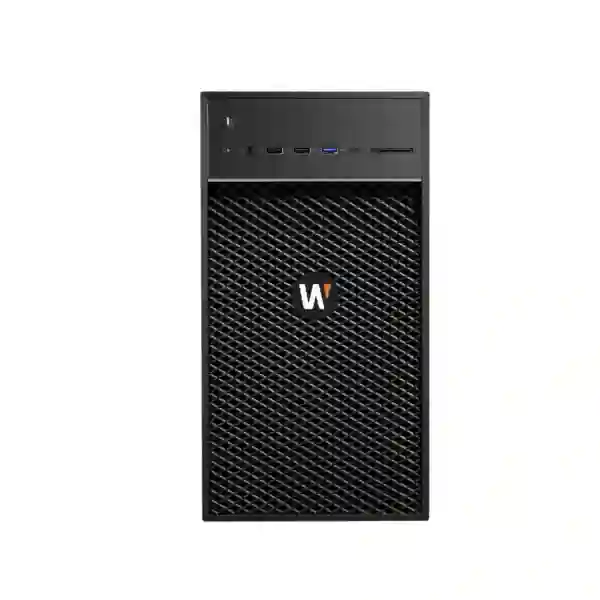
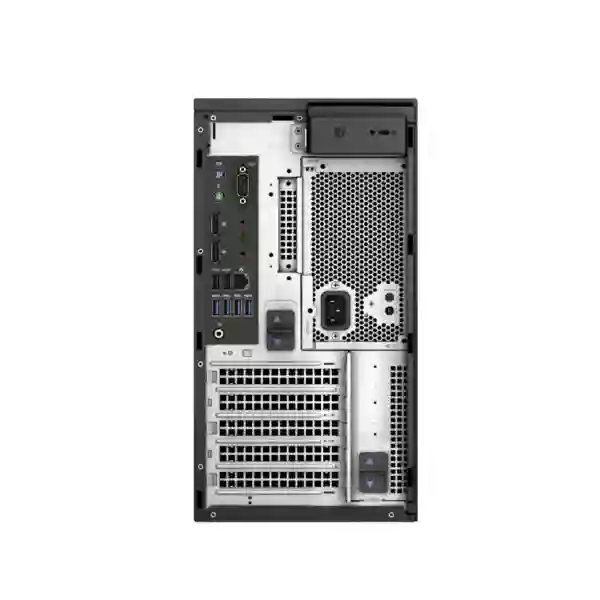
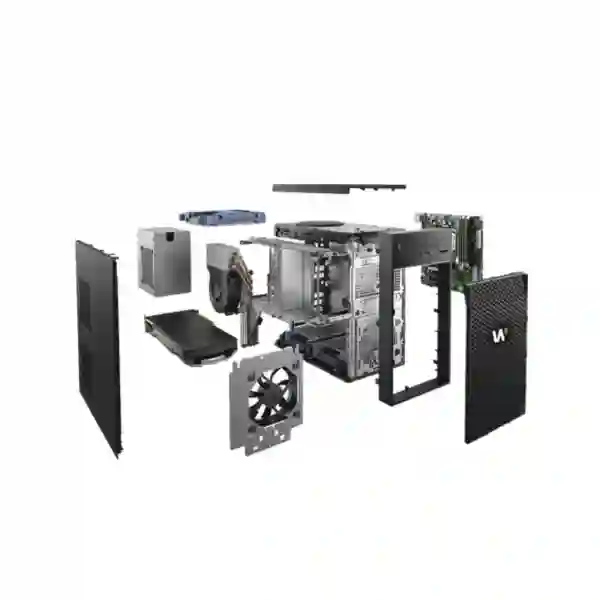
Hanwha WRT-P-3100W Wisenet WAVE Network Video Recorder
Need to record and manage IP camera video using Wisenet WAVE? The Hanwha WRT-P-3100W is an original Windows-based mini-tower recording server with four bundled WAVE Professional recording licenses, up to 170 Mbps published recording bandwidth, and support for up to 16 TB of raw storage. Confirm the exact configuration and security-support status before choosing it for a Tanzania surveillance project.
Next step: request a configuration, software-lifecycle and licensing assessment before ordering.
At a glance: what to verify first
- Four recording licenses were included originally; verify the entitlement on the actual unit and license additional recorded streams when necessary.
- Up to 170 Mbps is a recording-throughput specification, not a universal camera-count rating.
- Up to 16 TB is a raw-storage support figure, not confirmation of installed drives or a specified number of archive days.
- The WRT-P-3100W is a Windows 10 Professional-era model; standard Windows 10 support ended in October 2025.
- Two Gigabit Ethernet connections do not replace external PoE switching or a complete camera-network design.
- Confirm stock, warranty, price, deployment support and lifecycle suitability in a written Tanzania quotation.
Five decisions that determine whether this recorder fits
Recording performance
Calculate aggregate camera bitrates with margin; validate real recording and playback instead of relying only on the 170 Mbps ceiling.
Video archive
Verify physical HDD capacity, required retention days, recording schedules, and practical storage resilience.
License entitlement
Identify included and additional WAVE Professional licenses and any model-specific activation constraints.
Security lifecycle
Assess Windows 10 support, compatible WAVE software, access controls, patching, and eventual migration.
Deployment readiness
Confirm camera compatibility, external PoE equipment, stable power, ventilation, and the operator workflow.
A practical overview of this Wisenet WAVE recorder
The Hanwha WRT-P-3100W is a compact tower-style recording server built for organizations that prefer a software-led video management environment over a conventional fixed-function recorder. Its original configuration combines a Windows 10 Professional computer, an internally installed solid-state operating-system drive, hard-drive bays for recorded footage, and Wisenet WAVE video management software. Because the device can serve as both the recording server and a client workstation, a suitably planned site may use one machine for the recording service and local viewing. That does not remove the need to assess display workload, recording load, user activity, and resilience together.
The most useful way to evaluate the model is as a system component rather than as a simple box advertised with a camera count. The published recording throughput ceiling is up to 170 Mbps, with up to 16 TB of raw data storage and four originally bundled WAVE Professional recording licenses. Those are separate dimensions: throughput describes the quantity of incoming video data the platform was tested to record; storage influences how long recordings may be retained; licenses govern which video streams may be recorded. A satisfactory design must satisfy all three, as well as its own operational and security requirements.
For Tanzania-based procurement, the key question is whether this particular generation remains appropriate for the intended installation today. The original Windows 10 platform is an important consideration because standard Microsoft support ended in October 2025. Confirm the exact unit’s condition, supported software path, license history, disk configuration, and support arrangement before treating a legacy equipment specification as a current commercial commitment.
Who should consider this model, and who should not?
This platform may be relevant to an existing Wisenet WAVE deployment needing a compatible recording node, to a small professional surveillance installation with an appropriately limited number of recording streams, or to a facility whose operators want workstation-style access to WAVE. The tower format can be convenient where a full equipment rack is unavailable. The included local video connections also make it possible to plan a nearby monitoring screen, subject to the operating load and display requirements of the installation.
The better-fit cases are those in which an administrator can manage the operating system, networking, camera credentials, recording licenses, updates, and drive health. Examples include an office security room, a managed retail back office, or a service location with several IP camera views and clear retention rules. These are illustrative environments, not claims of existing FourTeck installations or verified sector-specific compatibility. Camera selection and site design should follow actual light, field-of-view, network, and legal requirements.
This is less suitable as an unexamined new purchase for a site that requires a currently supported operating system, built-in camera power ports, hot-swappable RAID storage, extensive redundancy, or a large guaranteed channel count. The original technical sheet does not claim such features. A newer supported WAVE server, a dedicated NVR with integrated PoE ports, or a managed rack-mounted architecture may be more appropriate. Request a comparison based on actual cameras, retention, operator needs, and IT policies rather than assuming an older model is automatically the economical option.
Quick specification reference
Use this reference to frame a technical discussion, not to assume a particular disk, software version, or license is present in the unit being offered.
| Product model | WRT-P-3100W, original Windows-based WAVE recorder |
|---|---|
| Manufacturer branding | Hanwha Techwin at original publication; Hanwha Vision branding used today |
| Video management | Wisenet WAVE VMS, originally preconfigured |
| Recording throughput | Up to 170 Mbps (published test figure) |
| Included recording licenses | Four Wisenet WAVE Professional licenses in the original configuration |
| OS drive | 256 GB internally mounted SSD |
| Video-data drive bays | Three 3.5-inch SATA HDD bays |
| Maximum listed raw storage | Up to 16 TB; exact installed capacity unverified |
| Processor / RAM | Intel Core i3-9100, 8 GB DDR4 |
| Original operating system | Windows 10 Professional |
| Network interfaces | Two RJ-45 Gigabit Ethernet ports |
| Monitor outputs | Two DisplayPort outputs; one DisplayPort-to-HDMI adapter listed |
| Form / dimensions | Mini-tower; about 33.5 × 17.7 × 34.5 cm (H × W × D) |
| Power input / power supply | 100–240 V AC; 460 W 80 Plus Gold power supply |
| Operating environment | 0°C to 35°C; 10%–80% RH non-condensing |
| Camera connectivity | Wisenet IP cameras and ONVIF-conformant IP cameras, subject to feature checks |
Historical product-sheet specifications are not proof of current Tanzania availability, support, warranty eligibility, installed drive capacity, or operating-system update entitlement.
Original hardware and system specifications
The specifications below describe the original WRT-P-3100W model as published in the Hanwha Techwin-era technical sheet dated October 2019. They are model-level values, not a statement about the installed components of any particular unit available for purchase. A listing that adds a storage suffix may identify a particular shipped hard-drive option; the unsuffixed model name does not prove how much storage is installed in the unit being quoted.
Important distinctions include the 256 GB internal solid-state drive used for the operating system versus the separate hard-drive bays intended for recorded video, and the 460 W rated power supply versus real-world power draw. The published maximum recording bandwidth is a measured platform capability, not a guarantee that every codec, resolution, camera combination, or simultaneous client workload can be used at that ceiling.
Understand the 170 Mbps recording bandwidth
A recording bandwidth limit is the rate of video data a recorder can ingest and write under the manufacturer’s test conditions. The WRT-P-3100W literature specifies up to 170 megabits per second of recording throughput. This is not an internet speed requirement and does not mean every attached camera sends 170 Mbps. It is a shared design ceiling for aggregate recording traffic, which must be evaluated alongside computer resources, disk behavior, playback sessions, and the actual WAVE version.
Start with the expected bitrate of each recorded stream. A camera set to a higher resolution, frame rate, less efficient encoding, or more detailed scene can generate more data than a camera with a lower recording profile. Day-to-night changes, foliage, traffic, rain, motion, and image noise can influence real bitrate as well. Where variable bitrate is used, designing only around a quiet-scene average may leave too little headroom during busy conditions. Ask the installer for representative measurements or a conservative engineering estimate based on the selected cameras.
A simple example illustrates the difference between a label and a design. Ten cameras averaging 5 Mbps each would produce about 50 Mbps of incoming video before headroom and other workload considerations. That is below the stated 170 Mbps ceiling, but does not prove the configuration will perform correctly or that the required ten recording licenses are present. A higher-bandwidth design may also need faster storage or a separate viewing workstation. Every final capacity decision should be checked against the current VMS guidance and real camera profiles.
Four included WAVE Professional licenses: what they mean
The original Hanwha specification states that the WRT-P-3100W ships with four Wisenet WAVE Professional licenses. In Wisenet WAVE licensing guidance, a recording license generally enables the recording of one camera or video stream, while live viewing without recording is treated separately. The four included licenses therefore should not be confused with a claim that the hardware can never connect to more than four devices. Conversely, the 170 Mbps throughput figure does not mean unlimited recording licenses are bundled.
For a new or unused original unit, confirm the exact license entitlement in the supplied configuration. For a pre-owned or previously commissioned server, verify that any advertised licenses are actually present, valid for the intended software environment, and capable of being used as expected. A license may be associated with server hardware, and changes to hardware identifiers can complicate migration or recovery. Documentation and authorization matter more than a statement that the software is already installed.
Plan expansion before commissioning. If a site needs twelve recorded camera streams, the bundled four original licenses alone do not cover twelve, even when the network and hardware appear capable of accepting the video. The additional entitlement must be quoted and checked for compatibility. Specialty streams, embedded recorder connections, and other software features can have their own licensing conditions; do not assume an ordinary recording license covers every use case. A professional bill of materials should identify cameras, required recording channels, applicable license types, server configuration, and expected growth.
Storage capacity: raw terabytes are not retention days
The original chassis provides three 3.5-inch SATA data-drive positions and is described as supporting up to 16 TB of raw video storage. Raw capacity is the physical storage total before operating-system reporting differences, formatting, database usage, reserved space, and other overheads. It is not an assurance that 16 TB are installed in a specific unit or that all 16 TB are available for archive files. Some variants sold in other markets were supplied with particular hard-drive capacities, but the exact storage configuration offered for Tanzania has not been verified.
Retention depends on the number of streams, bitrate or codec settings, continuous versus event-based recording, audio where used, archive policies, and available recording storage. As a planning illustration only, a constant 1 Mbps stream represents roughly 10.8 GB of data per day using decimal units. A 4 Mbps stream is roughly 43.2 GB per day. Multiply that by the number of streams and then allow for practical overhead, scene variation, periods of high activity, and operational reserve. These are mathematical approximations rather than promises of retention on this model.
Determine the retention policy before selecting drives. If an organization requires thirty days, specify which cameras must record continuously and which can use a defined schedule or event rules. Consider incident response needs, legal obligations, privacy policies, and who is authorized to export video. Do not extend retention merely because the server has empty space. For critical video, plan a separate evidence-handling and backup strategy; a locally recorded archive is not automatically a backup.
Why disk layout and resilience deserve attention
Storage capacity and storage resilience are different questions. The original WRT-P-3100W literature lists the data bays and capacity but does not advertise a dedicated redundant RAID subsystem or hot-swap drive architecture for this model. Do not assume that multiple physical drive positions mean the recorder protects an archive from the failure of one disk. Before acquisition or reuse, inspect what drives are actually installed, their health information, and how WAVE is configured to use available storage.
Surveillance drives work under prolonged write activity, and a failing disk can affect the continuity or completeness of recordings. A practical maintenance process includes checking drive health, unusual error messages, unexpected recorder restarts, available disk space, and the actual dates available on the playback timeline. When a disk must be replaced, verify its supported capacity, connection method, and service procedure before making changes. Storage work should be planned so that important evidence is preserved by an approved procedure.
If the surveillance requirement calls for fault-tolerant recording, a single mini-tower should not automatically be assumed to meet it. Ask about server redundancy, supported failover options, geographically separated recording, or an alternative architecture specifically designed for resilience. These decisions are driven by the consequence of losing footage, not just by the camera count or the amount of disk space advertised in a product title.
Camera interoperability and ONVIF planning
Hanwha’s original product literature identifies support for Wisenet IP cameras and ONVIF-conformant IP cameras. That is useful for organizations with a mixed camera estate, but ONVIF should be treated as a starting point for compatibility testing rather than a blanket feature guarantee. Discovery, live video, codec selection, recording, events, audio, PTZ control, camera-side analytics, and metadata can vary by device, firmware, profile, and VMS release.
Before promising a particular camera combination, compile each camera’s make, model, firmware version, network address plan, ONVIF capability, and intended stream profile. Check the current WAVE compatibility documentation and test any critical features on the actual versions involved. An installer should not assume that support for receiving a video stream implies support for every alarm input, smart search function, microphone, or advanced detection event.
When connecting third-party cameras, use dedicated credentials and change factory passwords where applicable. Limit cameras to the networks and services necessary for operations. Test day and night recording, time synchronization, motion and event behavior, and playback exports. Multi-sensor cameras and specialty devices may raise specific channel or stream licensing questions. Resolve those questions before completing a license quote or setting a firm retention target.
Network design for a reliable recording server
The WRT-P-3100W has two Gigabit Ethernet interfaces in its original specification. Dual physical network ports give a designer options, but they are not evidence of automatic failover, link aggregation, or a particular security architecture. Decide whether the interfaces should serve different network segments or another supported design only after consulting the operating-system and WAVE configuration guidance. The entire system must have a clear and supportable IP address, routing, access-control, and monitoring plan.
A professional surveillance network commonly separates camera traffic from ordinary office and guest traffic where feasible. Managed switching can help enforce VLAN boundaries, identify link problems, and support deliberate bandwidth allocation. However, network segmentation must not prevent necessary camera discovery, time synchronization, licensing processes, or authorized client connectivity. Verify those flows before commissioning and document every exception. The goal is controlled connectivity, not a maze of unexplained firewall rules.
The server’s dual network interfaces are not integrated PoE camera ports. IP cameras need suitable power and network access from separate switches, injectors, or other approved equipment. Calculate the PoE power budget independently, including any higher-demand cameras, infrared illumination, and expansion margin. A well-designed recording server can still fail to deliver reliable video when its connected switches, uplinks, power supplies, or cabling are inadequate.
Power, heat, dust and environmental planning
The original data sheet specifies a universal 100 to 240 V AC input and a 460 W 80 Plus Gold-rated power supply, with an operating temperature range of 0°C to 35°C and an operating humidity range of 10% to 80% relative humidity, non-condensing. The 460 W figure should not be presented as constant electricity consumption. Actual electrical load varies with installed drives, processor activity, attached devices, and operating conditions. Metering or a validated engineering calculation is required for accurate running-cost estimates.
A tower server needs airflow around its intake and exhaust. It should not be placed in a sealed cabinet without thermal design or alongside a heat source. In warm or dusty locations, consider the sustained room temperature rather than the temperature at the time of installation. Use appropriate protection from dust, accidental contact, liquids, unstable shelving, and blocked vents. The original chassis is not presented as an outdoor weatherproof recorder.
Include power continuity in the site survey. The recorder, network switches, camera power supply, router where necessary, and monitoring components may all require a coordinated UPS strategy. Size the UPS for the actual total load and the desired runtime, and verify safe shutdown procedures for the Windows-based server. A UPS can reduce interruptions during short outages, but it does not replace drive monitoring, backups, or a properly maintained power system.
Local monitoring and operator experience
The model’s original specification provides two DisplayPort video outputs and lists a DisplayPort-to-HDMI adapter, along with an included keyboard and mouse. This supports planning for local workstation-style use, but physical outputs do not establish a guaranteed number of simultaneous high-resolution views or decoding performance. The workload imposed by live viewing is distinct from the recording throughput figure, and the planned monitor configuration should be tested with representative streams.
A reception team may need a few always-visible cameras and an uncomplicated incident playback procedure. A security control room may require multiple layouts, detailed operator permissions, saved views, and fast evidence export. Those use cases should be documented before deployment. When many operators or screens are expected, assess whether a dedicated client workstation is a better design than asking the recording server to handle all local display duties.
Treat local console access as privileged access to a surveillance system. Use appropriate accounts, screen locking, physically secured equipment, and a defined policy for removable media. An exported clip can contain sensitive information; the system design should specify who may export, store, share, and delete such files. A convenient local screen is useful only when the organization can operate it safely and consistently.
Windows 10 support and the 2026 security decision
The original WRT-P-3100W is specified with Windows 10 Professional. Microsoft ended standard support for Windows 10 on 14 October 2025. That date is particularly important when evaluating this device in November 2026: a legacy recorder running its original operating system should not simply be connected to a sensitive production network on the assumption that it receives the same routine support as a current server platform. Extended security arrangements, where applicable, require separate verification and do not automatically attach to a previously supplied recorder.
There is no verified claim here that this exact hardware is eligible for an upgrade to a particular Windows release or that a newer WAVE build is supported on it. An operating-system change can affect drivers, service behavior, remote-management tools, camera integrations, and license activation. Do not install a replacement operating system or change critical hardware components until compatibility and license recovery have been checked with the relevant technical authority.
If a site already owns a working unit, the immediate priorities are to document its software and patch state, identify any exposed services, restrict remote access, confirm reliable backups of configuration data, and agree a supported migration or risk-treatment plan. If buying a recorder for a new long-term project, compare the model with contemporary WAVE recording servers built around supported operating systems. Lifecycle suitability is often more important than a modest difference in initial equipment cost.
Security configuration before connecting cameras
A recording server may store video of entrances, employees, visitors, goods, and operational areas. Its security configuration therefore matters as much as its video performance. Start with a named administrator, role-based accounts, strong unique credentials, and a documented process for granting and removing user access. Avoid shared privileged logins wherever the operating environment allows individual accountability. Protect credentials for the server and each camera separately.
Restrict administrative services to approved workstations or management networks, and avoid exposing the recorder directly to the public internet without a validated secure architecture. Remote access should be designed around approved authentication, firewall policies, and supported secure connectivity. Verify the exact WAVE version and any vendor-supported remote-access services before enabling them. Network access diagrams and account registers should be kept current as new cameras or operators are added.
Maintain accurate time on the server and cameras because time differences can complicate incident reconstruction. Establish an evidence-export procedure that preserves the relevant timestamp, camera identity, and original file wherever required. Protect configuration backups and exported recordings from unauthorized modification. Review logs and settings after major network, operating-system, or camera firmware changes, not just when an incident occurs.
Planning retention around your real security policy
There is no single correct retention period for every surveillance installation. A small shop may have a different incident-discovery pattern from a warehouse or a site with multiple access points. Begin by asking how quickly an event would usually be reported, what footage would be needed for investigation, and which privacy or employment rules apply. Translate that policy into a retention schedule before choosing hard disks or lowering image quality to make an arbitrary number of days fit.
Different scenes may justify different recording profiles. A doorway camera needing recognizable faces may require more detail than a general overview camera, while a low-motion corridor may consume less data than a busy vehicle area. Event-based recording may save space in some situations, but only if detection reliably captures the relevant event and its context. Test pre-event and post-event settings, nighttime behavior, and the implications of a missed trigger before relying on them.
Record actual available storage and observed bitrates during commissioning. Then compare the oldest and newest archive timestamps against the policy after the system has been running under normal and busy conditions. An estimated retention calculation is useful for ordering, but a measured retention result is the proper acceptance test. Include a process for preserving flagged evidence so routine archive recycling does not remove footage needed for an active investigation.
Single-site deployment versus a wider WAVE environment
The original Hanwha sheet describes the recorder as suitable for a single site or as an addition to an existing Wisenet WAVE system. This flexibility can help organizations that wish to operate more than one recording node, but the final design still depends on compatibility between software versions, network latency, access-control expectations, available licenses, and the placement of each camera’s recordings. It is not a promise of automatic cross-site backup or seamless recovery after every network fault.
A distributed design should answer several practical questions: which server owns each camera, where archive video is written, which operators may view each site, and what happens when the wide-area connection is interrupted. A branch with unreliable connectivity may need to retain video locally and permit central viewing only when sufficient bandwidth is available. A headquarters operator may prefer a unified client layout, but this should not be confused with physically centralized storage.
Any future expansion plan should identify additional license needs, measured server loads, storage headroom, and the support lifecycle of every node. Adding an older server to a current environment purely because the branding matches can introduce version-management and security complications. Validate integration in a controlled test before moving a production camera group or depending on the node for critical evidence.
Practical installation sequence for an integrator
A methodical commissioning process reduces the chance that an apparently working recorder hides a retention, licensing, or security problem. Begin with the approved site design: camera schedule, network drawing, recording policy, equipment locations, power arrangement, operator roles, and an acceptance checklist. Confirm the exact delivered model and physically installed components. Compare the unit’s software state with its documented support path before connecting it to the production surveillance network.
Next, establish secure administrative access, configure the intended IP addressing and time sources, verify camera power and connectivity, and check the recording storage. Add the first cameras and test live viewing, recording, playback, and evidence export. Confirm how many recording entitlements are shown and resolve missing license capacity before enabling the remaining streams. Review resource usage and verify that the configuration stays within an appropriate operating margin during normal and busy scenes.
Finally, test a realistic power interruption and recovery procedure where safe, inspect the archive timeline, verify unauthorized access is blocked, and train the people who will use the system daily. Provide the owner with a handover pack that includes equipment identifiers, approved topology, account-management process, camera map, retention settings, license record, backup process, and the maintenance escalation path. The handover should be usable even after the original installer has left the project.
What to check when buying an existing or legacy unit
Because this model is from an earlier WAVE recording-server generation, a procurement review should go beyond a picture of the enclosure and a printed feature list. Ask whether the quoted item is genuinely new old stock, refurbished, used, or supplied as a replacement with a different model. Request the exact manufacturer part number, installed hard-drive capacity, drive health status if applicable, software build, and current operating-system details. A suffix such as 4TB or 8TB must be validated against the actual unit rather than inferred from the series name.
Ask whether the originally advertised four licenses are included and how their entitlement will be demonstrated. Confirm whether any previously activated licenses remain bound to equipment, whether the handover is permissible, and who will coordinate support if a hardware failure requires reactivation. Request written confirmation of the commercial quotation, delivery arrangements, returns, warranty terms, and any paid installation scope. None of those Tanzania-specific commitments has been independently verified for the present listing.
For a project with stringent uptime or cybersecurity obligations, compare the total lifecycle cost against a current WAVE server. Include time for configuration, data migration, operating-system treatment, hard-drive replacement, additional licenses, and future support. The lowest hardware price may not represent the lowest operational risk or total ownership cost.
Sizing a surveillance project beyond the recorder
The recorder is one part of a larger surveillance solution. Camera placement determines whether the system can answer the operational questions the buyer cares about. A high-resolution camera mounted in the wrong position may produce attractive video but fail to capture useful identifying detail. Lighting, mounting height, field of view, lens choice, frame rate, and compression need to be evaluated at each location. Confirm the legal and privacy basis for recording before implementing cameras in sensitive spaces.
The network bill of materials should include suitable switches, the correct PoE budget, reliable uplinks, structured cabling, surge and power planning where appropriate, and service access. The recording bill of materials should include disk capacity, expected bitrate, license count, software support, physical security, and a backup or evidence preservation plan. The operations bill of materials should identify display workstations, staff permissions, training, maintenance, and the person responsible for responding to alerts.
This separation prevents common specification errors. A buyer may see four included WAVE licenses and assume the recorder includes four cameras; the technical sheet does not make that claim. Another buyer may see dual Ethernet ports and assume camera-power ports are included; they are not specified as PoE ports. A third may see 16 TB capacity and assume thirty days of video are guaranteed; actual retention depends on the recorded data. These distinctions are essential to a dependable quotation.
Maintenance and day-to-day operating checks
Once in service, the recorder should have an owner and a recurring inspection schedule. Daily or routine checks may include confirming that cameras are online, the expected streams are recording, the archive timeline is advancing, and storage is healthy. A green network link alone does not prove that the right video is being recorded. Use the WAVE interface and a defined spot-check procedure to confirm both live and historical material where appropriate.
Periodic maintenance should cover account reviews, configuration backups, operating-system and application support status, camera firmware compatibility, drive-health indicators, physical cleanliness, UPS battery condition, and recovery documentation. Changes should be recorded so an unexplained camera outage can be traced to a recent network, firmware, or policy adjustment. Before updates or drive replacement, identify who is authorized to make the change and how the system will be restored if something fails.
Carry out an occasional practical export exercise. A system may record correctly but fail its real purpose if an authorized user cannot locate, export, or securely preserve relevant evidence when needed. Confirm that playback timestamps agree with site time, exports can be reviewed by the intended recipient, and sensitive footage is handled under the organization’s policy. Include a process for removing access when employees or contractors change roles.
Troubleshooting common recording problems
When video is visible live but absent from the archive, first confirm that the camera has an appropriate active recording entitlement and that recording is enabled according to its schedule. Next check the camera connection, the configured recording location, available disk capacity, and any reported server or drive errors. Do not assume that a live image proves the footage has been stored. A planned test recording followed by playback is more meaningful than inspecting the live view alone.
Intermittent gaps may be related to network loss, power instability, camera restarts, overload, time synchronization, or storage problems. Compare the gaps across cameras: simultaneous interruption across the entire site suggests a shared dependency, while a single-camera pattern may point toward its cabling, power, settings, or firmware. Verify switch events and relevant application logs before changing camera profiles or replacing equipment.
If playback is slow, distinguish between disk access, server load, local graphics decoding, and the bandwidth available to a remote client. If an upgrade, reinstallation, or hardware repair causes licensing questions, preserve the server’s configuration and entitlement records and follow an authorized recovery path. Avoid repeated ad hoc changes that make the original cause harder to diagnose.
Comparing this model with a modern recording platform
The WRT-P-3100W has a clear original design: a compact tower, Windows 10 Professional, four bundled recording licenses, dual Gigabit Ethernet, and a specified 170 Mbps recording ceiling. More recent Hanwha WAVE recording-server generations exist with different hardware and operating-system configurations. For example, Hanwha has documented newer mini-tower WAVE models using Windows 11 IoT Enterprise LTSC in specific model variants. That fact does not mean those products are automatically a drop-in replacement or are available through a Tanzania quotation.
When evaluating alternatives, compare the supported operating-system lifecycle, WAVE version, verified license bundle, storage architecture, network interfaces, physical dimensions, power demand, local display workload, warranty terms, and projected camera growth. A model with the same nominal 170 Mbps bandwidth may still differ substantially in processor generation, RAM, drive layout, serviceability, and software support. Those differences can matter more than two specification tables showing the same recording ceiling.
Do not migrate a working system purely on the basis of a newer model name. First define what the present recorder cannot meet: security updates, capacity, retention, reliability, additional operators, or new camera features. Then specify a migration plan for camera assignments, licenses, configurations, existing recordings, and controlled cutover. An effective replacement is one that resolves the identified limitation without creating another avoidable operational problem.
Tanzania procurement and project quotation guidance
A useful Tanzania-focused quote request should describe the application instead of asking only for the price of the recorder. Include the number of IP cameras, their models where known, expected bitrate or recording resolution, desired retention period, operating hours, intended viewing locations, network readiness, and whether the project is a new installation or an extension of an existing WAVE system. This gives the technical team enough information to distinguish hardware capacity from camera licensing and storage requirements.
State whether there is a requirement for a specifically supported operating system, centralized security monitoring, an uninterrupted power arrangement, remote access, or resilience against a failed recording drive. Indicate whether the site can host a tower server in a ventilated and access-controlled room. If the network or cameras are not yet selected, request a full solution design rather than a stand-alone equipment quote. Physical installation and commissioning requirements should be itemized instead of silently assumed.
No current Tanzanian shilling price, stock commitment, local warranty entitlement, shipping schedule, or installation coverage is stated here because none has been verified for this exact offer. The appropriate next step is a model and configuration verification followed by a written quotation. Where a newer product is recommended, ask for an explanation of the lifecycle and design differences rather than relying on a generic upgrade claim.
A clear pre-purchase checklist
Before approving a purchase order, verify the complete model designation and any storage suffix, actual installed and supported storage, the presence and legitimacy of recording licenses, required additional camera licenses, OS and WAVE support status, and camera compatibility. Review the archive retention calculation and confirm that recording throughput leaves a sensible margin under expected busy-scene conditions. Document whether local viewing will share the server or use another workstation.
Check the physical installation as carefully as the software. The site needs suitable camera network infrastructure, independent PoE power where required, safe electrical provision, ventilation within the published operating environment, and planned backup power. Confirm who will configure accounts, preserve credentials securely, implement remote access, test exports, and maintain the equipment. Record what support is included and what would need a separate agreement.
For a legacy or used unit, insist on additional evidence about operating condition, disk health, license entitlement and transferability, and any support limitations. If any of these checks cannot be resolved, do not interpret the presence of a familiar Hanwha model name as proof that the system is ready for production use. An informed decision may be to retain a functioning existing unit with a managed risk plan, choose a current alternative, or adjust the project requirements.
Frequently asked questions
What is the Hanwha WRT-P-3100W? It is a compact Windows-based Wisenet WAVE network video recording server that can also act as a local WAVE client workstation. The original model combines recording software, a computer platform, drive bays, and networking for IP surveillance. It is not the same as a camera kit, a network switch, or a purpose-built PoE camera-power device. Its suitability depends on the actual recording workload, licenses, storage, and current support needs.
How many cameras can it record? The original bundle contains four WAVE Professional recording licenses. The number of recording streams that a project can use depends on valid license entitlement as well as performance and compatibility. Four included licenses should not be read as a fixed maximum physical device count, and a claimed throughput ceiling should not be read as a license entitlement. Additional recording streams usually require additional appropriate licenses.
Does it include 16 TB of hard drives? Not necessarily. The published specification states support for up to 16 TB of raw storage, while individual historical sales configurations may carry a separate hard-drive capacity designation. The exact drives installed in any quoted unit must be confirmed. Raw capacity also differs from available recording archive capacity after formatting and operational overhead.
What does 170 Mbps mean? It is the original published maximum recording throughput of the server under the manufacturer’s test conditions. It is not a promise of a specific camera count, image quality, number of simultaneous operators, internet speed, or footage retention period. A real design must sum expected camera bitrates, allow headroom, validate storage behavior, and test the actual workload.
Does the WRT-P-3100W supply power to cameras? Its original specification lists two Gigabit Ethernet interfaces, not built-in PoE camera ports. Cameras therefore need a properly designed network and power system, such as compatible external PoE switches or other manufacturer-approved supplies. Verify the total camera power budget independently of the recording server’s own electrical specification.
Can it work with non-Hanwha IP cameras? Hanwha’s original specification refers to Wisenet and ONVIF-conformant IP camera support. However, particular functions can differ between models and firmware versions. Confirm the exact camera and WAVE compatibility, especially for recording profiles, audio, PTZ, event metadata, and advanced analytics. ONVIF conformity alone should not be treated as an assurance of every feature.
Is Windows 10 still a suitable platform? Microsoft ended standard Windows 10 support on 14 October 2025. The original recorder is described with Windows 10 Professional, so current cybersecurity and maintenance arrangements must be checked before production deployment. This page does not claim that an operating-system upgrade, extended security program, or particular newer WAVE version is supported on the exact original machine.
Can it be used in an existing WAVE installation? The original product description allows for use as an additional WAVE system component, but modern integration requires verifying software compatibility, licenses, network architecture, and operational policy. Before connecting it to an existing site, test camera recording, permission behavior, playback, and the intended arrangement of servers and client workstations.
How many days will recordings be retained? The model name does not determine retention. The result depends on available archive capacity, each camera’s measured bitrate, recording schedules, compression, and operational reserve. Build a storage estimate and then verify actual oldest and newest footage dates under representative operating conditions. A data-storage ceiling should never be turned into an unsupported promise of a particular number of days.
Can the recorder show cameras on a monitor? The original technical sheet lists two DisplayPort outputs and a DisplayPort-to-HDMI adapter. These provide local display connection options, but the practical number and resolution of simultaneous views depend on software and hardware workload. For a busy control room, it can be useful to separate the recording role from the operator workstation role.
Does it have RAID or hot-swap storage? The original model specification identifies three SATA data-drive bays, but does not establish a guaranteed RAID protection or hot-swap implementation. Do not assume fault tolerance from the number of bays. If footage continuity through a drive failure is essential, specify a supported storage-resilience or recording-redundancy solution explicitly.
What should a Tanzania buyer request before ordering? Ask for the exact model and storage configuration, license entitlement, compatibility assessment, supported operating-system plan, confirmed supply and warranty terms, and a quotation aligned to the site’s camera and retention requirements. Where the requirement is a new long-term deployment, request a comparison with a current supported Hanwha WAVE recording-server option.
Request a configuration and lifecycle review
For an existing WRT-P-3100W installation, start by documenting the current hardware, recorded camera count, WAVE license state, disk capacity, retention history, operating-system version, network configuration, and any recurring faults. This information makes it possible to evaluate whether ongoing operation, a controlled migration, or replacement is the most responsible approach. Avoid changing the operating system or swapping hardware until license and software compatibility questions have been resolved.
For a new project in Tanzania, request a written assessment covering camera quantity, recording profiles, days of retention, local and remote monitoring, network power, UPS planning, operator access, cybersecurity maintenance, and the required support term. Ask that any offered legacy WRT-P-3100W be clearly distinguished from a newer WAVE model. Confirm exact equipment availability, pricing, and service arrangements directly through the quotation process; they are not established by this informational product page.
Contact FourTeck Tanzania to request a Hanwha WRT-P-3100W configuration review or to compare a current Wisenet WAVE recording solution for your surveillance requirements. Provide the camera schedule and desired retention target so the response can address the complete system rather than just the recorder model.




Reviews
There are no reviews yet.