
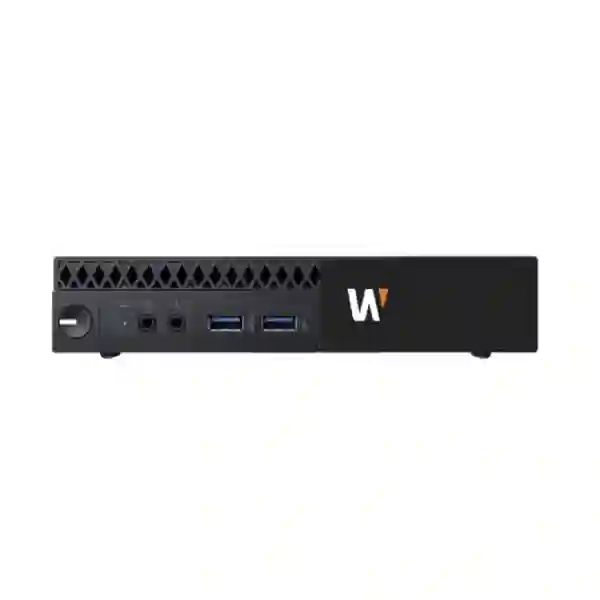
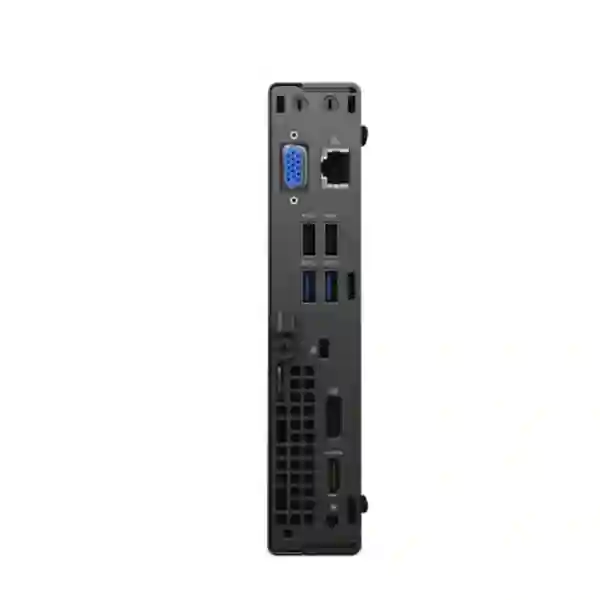
Hanwha WRT-P-3103MW: compact Wisenet WAVE recording server
The Hanwha WRT-P-3103MW is a small-footprint Windows-based IP video recording appliance for installations that need professional Wisenet WAVE management without a bulky rack server. It includes four Professional recording licences and a published up-to-45-Mbps recording rating. Choose the exact storage variant and licence quantity based on your cameras, recording schedule and retention target.
For Tanzania enquiries, confirm the exact supplied part number, commercial terms and regional availability in a formal quote. No local stock, price or warranty promise is made here.
Verified model essentials
Software
Wisenet WAVE pre-installed
Bundled licences
4 Professional
Recording bandwidth
Up to 45 Mbps
CPU
13th-generation Intel Core i3
RAM
8 GB DDR4
OS and drive
Windows 10 IoT Enterprise; 256 GB OS SSD
Video storage
One 2.5-inch HDD; confirm capacity variant
Network
1 x 1 GbE RJ45
Video outputs
HDMI, DisplayPort, VGA
Power input
100–240 V AC
Power figure
65 W
Operating environment
10°C to 35°C; non-condensing humidity
Storage capacity differs by ordered variant. The dedicated operating-system SSD is not the video archive drive.
Four questions to answer before ordering
1. Camera workload
Calculate total camera bitrate and provide a realistic margin below the rated recording bandwidth.
2. Recording licences
Verify entitlements for every source that must be archived, beyond the four licences supplied.
3. Retention requirement
Choose a confirmed video-drive capacity using the days of footage required by the organisation.
4. Operating conditions
Plan secure indoor placement, proper cooling, camera switching, power protection and controlled access.
Understanding the intended use
The Hanwha Vision WRT-P-3103MW is intended for organisations that need an integrated video-management recording appliance but have limited space for a conventional server. Instead of starting from an arbitrary desktop computer, the buyer starts with a compact system supplied with Wisenet WAVE software and four Professional recording licences. The processor class, memory, operating-system drive and published recording-bandwidth ceiling are known before cameras are selected. The crucial question is whether the proposed camera workload, retention duration and operating environment fit these boundaries in practice.
Typical candidates include a small retail premises, reception area, professional office, compact warehouse office or modest facility with a handful of strategically positioned IP cameras. These are illustrative applications, not promises that the appliance is suitable for every site in those categories. Four low-bitrate streams may have a very different storage and recording profile from four high-resolution streams recorded around the clock. Evaluate camera selection from the intended evidence quality and operating schedule, rather than the camera count alone.
This model is not a substitute for every rack-mounted network video recorder or enterprise recording server. Buyers needing multiple internal recording drives, extensive redundancy, very high aggregate ingest bandwidth or long archive retention should compare alternatives. Its small housing helps with placement, but does not remove cooling, physical security or electrical requirements. A technical assessment before purchase is more useful than relying only on a product photo and headline specifications.
Essential verified specifications
Hanwha describes the WRT-P-3103MW as a micro form factor Wisenet WAVE recorder with up to 45 Mbps recording bandwidth. It uses a 13th-generation Intel Core i3 processor, 8 GB DDR4 RAM, a dedicated 256 GB operating-system SSD and Windows 10 IoT Enterprise. These specifications belong to this identified model, not to the newer WRT-P-3104 or WRT-P-3105 series. The four bundled WAVE Professional licences should not be confused with an unlimited number of recording channels or a guaranteed camera capacity under every workload.
Video storage uses one 2.5-inch drive position, and the ordered capacity depends on the exact variant. Different capacity configurations are described in manufacturer-related product material and channel listings, so the quote must identify the full part number and installed video-drive capacity. The separate operating-system SSD should not be counted as video archive space. A customer comparing drive options needs to examine usable retention days based on the actual streams, recording schedule, file-system overhead and reserve space.
The appliance includes HDMI, DisplayPort and VGA video connections and a single gigabit Ethernet interface. A keyboard and mouse are also listed. The network interface carries traffic to and from cameras and viewing clients, while display connections facilitate setup or suitable local interaction. There are no integrated PoE camera outputs in the published specification, so camera power and switching must be planned separately. Accessories not explicitly confirmed in a formal quote should never be presumed included.
The practical value of preinstalled Wisenet WAVE
A recording system creates value when operators can locate the correct camera, find an incident and retrieve usable footage. Wisenet WAVE provides tools for managing supported cameras, organising views, administering users and reviewing archives. With WAVE already installed, the WRT-P-3103MW can reduce initial software installation effort compared with an unconfigured computer. However, the installer still has to connect and authenticate cameras, apply recording schedules, assign correct permissions and verify the system’s operation.
Ask the installer to demonstrate tasks that employees will actually perform. These may include switching between views, locating a particular time, reviewing a short event, making an approved export and checking that the exported file opens. Reliable operational procedures often matter as much as the user interface. Incorrect time synchronisation, inadequate camera placement or an unexpectedly short archive will undermine the installation even if live images appear clear.
Software features and licensing arrangements can change by WAVE release. Obtain confirmation of the version being deployed and whether the requested workflows, devices and integrations are supported. Not every capability illustrated in general product literature is necessarily included with four Professional recording licences. Remote-access requirements should also be evaluated against the business’s network-security rules. Installation should finish with a working demonstration and a brief user handover, not simply with a powered-on recorder.
Four included Professional licences: what they mean
Hanwha lists four Wisenet WAVE Professional recording licences with the appliance. Under WAVE’s documented conventional licence arrangement, an appropriate licence is needed to record a camera stream. The included four licences therefore provide a sensible starting point for a modest system, but they do not automatically licence every camera a buyer may want to connect. A maximum camera figure mentioned elsewhere in product literature is not the same as the number of paid recording entitlements supplied in the box.
Prepare a camera schedule identifying which sources need archived video, whether audio is required and which cameras may be added later. Check the number and type of entitlements needed under the WAVE release and licensing model actually supplied. Some embedded recorder or integration workflows can use different entitlements, while newer WAVE service models may involve additional considerations. The procurement decision should separate the hardware capacity question from the licensing question so that neither is overlooked.
WAVE documentation explains that traditional licence keys can be associated with a server’s hardware identifier. This matters for replacement, hardware changes and migration. Do not promise that an existing entitlement can be copied without a formal procedure. Ask the supplier how activation, future additions, repair or replacement and any applicable service conversion are handled. Licence records and activation keys should be stored securely by the customer, not included in public project documents.
Why the 45 Mbps recording rating matters
The manufacturer’s up-to-45-Mbps figure is an aggregate video recording throughput rating, not the link speed of the Ethernet port. The single 1 GbE interface can carry network traffic at a different maximum rate, but that does not increase the server’s tested recording workload. Likewise, a camera count alone cannot determine whether the system is correctly sized. The total bitrate depends on selected resolutions, frame rates, codec settings, image complexity and recording patterns.
For a preliminary calculation, list every camera and estimate its average recording bitrate under realistic conditions. Add those bitrates and leave capacity for changes in scene activity and operating conditions. A busy entrance may require a different bitrate than a quiet corridor even if both use similar cameras. Compression can vary with movement and lighting. A design based only on minimum claimed stream rates may perform poorly when the environment becomes more active.
Ten cameras averaging 3 Mbps produce approximately 30 Mbps of nominal stream data before variation or other overhead is considered. This is only a mathematical illustration, not a manufacturer-approved ten-camera configuration. A design close to 45 Mbps leaves little scope for unexpected peaks or expansion. Obtain a workload assessment using the actual camera models and current WAVE sizing guidance. If the required recording bandwidth is high, compare a higher-throughput appliance rather than reducing essential image quality to force a fit.
How to choose retention days and recording storage
Decide how long the organisation needs to retain usable footage before choosing a storage variant. The correct archive period depends on the time normally needed to discover and investigate an incident, the recording schedule and any applicable policy. A shop operating during the day may have different needs from a site recording continuously. The recorder’s single video-drive design makes storage sizing especially important, because it does not offer the same internal expansion flexibility as a large multi-bay server.
A useful first approximation multiplies total average recording bitrate by the number of seconds per day and by desired retention days, then converts from bits to bytes. At a sustained 8 Mbps, one day represents approximately 86.4 GB before overhead and variation. Seven days is therefore around 605 GB before allowances. This is illustrative arithmetic, not a retention promise for a specific video drive. Real footage duration changes with codec settings, scene movement, schedules, audio, file-system overhead and storage reserves.
Always distinguish raw installed capacity from usable video-recording space. Confirm whether the quote identifies a one-terabyte or two-terabyte variant, or another specifically approved configuration, rather than inferring a capacity from the base model number. The 256 GB operating-system SSD is separate and should not be counted toward archive retention. If the required footage exceeds the available capacity or if redundancy is essential, select a better-suited recorder or storage architecture.
Drive failure, footage protection and continuity
A single video-drive recorder is not the same as a redundant multi-disk archive. If video is stored only on that drive and the drive fails, recorded material may be unavailable or lost. This limitation should be understood at the purchase stage for projects where footage is important for incident investigation. Monitoring the device’s health and establishing processes for dealing with failures are therefore important parts of the solution, not optional afterthoughts.
Verify that the system is genuinely storing video, not merely showing live pictures. A successful live view confirms communication with a camera but does not prove that an archive will be available next week. During handover, play back earlier footage from multiple cameras and inspect scheduled recording behaviour. Assign responsibility for checking storage alerts, disconnected cameras, recording gaps and incorrect system time. Staff should know how to export important footage before routine retention overwrites it.
Evidence workflows may also require authorised exports, restricted access and appropriate backups. Define who may collect material, where exported files are kept and when records may be deleted. Internal audit, privacy and legal expectations differ by organisation and site; the product itself does not create regulatory compliance. A critical installation may need resilience beyond this single-drive appliance, including a different server class or a documented recovery architecture.
Network planning for reliable camera recording
The published hardware includes one 1 GbE RJ45 network interface. A reliable installation requires an appropriately designed network path between cameras, recorder and authorised clients. Consider switching capacity, cabling condition, addressing, camera power and traffic isolation. A recorder can have adequate internal processing resources yet fail to produce continuous archives if network links are congested or intermittently disconnected. Troubleshooting a network fault after an incident is far more difficult than documenting the design in advance.
A camera VLAN or other managed segmentation approach can reduce unnecessary access between business and surveillance systems. Its implementation depends on routing, firewall and switch capabilities. Because this model lists a single Ethernet interface, do not presume that it has multiple independent physical ports for separate camera and administration networks. If a segmented design is proposed, the network team should explain how communication and security boundaries will work with that interface.
Test camera streams at the actual installed resolution and frame rate, including scene activity during busy periods. Confirm the switch PoE power budget and uplink capacity, and establish how network failures will be detected. The local camera network and the external internet link serve different purposes. Normal on-site recording should not be made dependent on unnecessary public connectivity. Remote users must connect through an authorised, secure arrangement reviewed by the IT team.
Match cameras to the evidence requirement
Camera selection should begin with what people need to see. An entrance may require recognisable faces under changing light, a stockroom may need clear movement at a doorway, and a reception area may need broad incident context. Lens choice, placement, scene lighting and resolution all affect the usefulness of the recorded image. A capable recorder cannot reconstruct detail that an inadequately placed camera never captured.
Wisenet WAVE supports compatible network video sources, including supported Hanwha cameras. Exact compatibility should still be checked for the device model, firmware and WAVE version being used. Third-party cameras should be tested for discovery, recording, playback and the required events rather than assumed to provide feature parity through a common network-video standard. Specific audio, analytics and configuration functions may require additional verification.
Higher image quality often creates a greater bitrate and storage requirement, depending on compression and scene complexity. Lowering settings simply to make an unsuitable recorder appear sufficient can weaken the footage the business needs. Agree the image-evidence objective first, design the camera placement and stream settings, and then calculate recording bandwidth and storage. This sequence leads to a more defensible equipment choice.
Micro form factor and physical installation
The WRT-P-3103MW has a very small enclosure with published approximate dimensions of 36 by 178 by 182 millimetres. Its compact footprint can help a business that does not have a dedicated server rack or room for a conventional tower. This does not mean that the device should be hidden where it is difficult to ventilate, service or secure. A suitable installation gives the recorder access to stable power, network connections and controlled maintenance space.
Some product material describes optional VESA mounting. Verify the correct supported bracket and whether it is included before planning to attach the server behind a display. Do not trap the enclosure inside unventilated furniture or place it where cables can easily be disturbed. A small machine can be accidentally unplugged or removed if access control is neglected. The physical arrangement should be designed as carefully as the camera network.
Decide whether operators will use the recorder locally or connect through separate client computers. Direct access may simplify commissioning in a small office, while a protected equipment position and managed remote clients may offer better control. This decision affects where the appliance can be installed, who can reach it and how maintenance is performed. Record the choice in the project handover so future staff understand the intended operating method.
Processor, memory and operating-system planning
The unit combines a 13th-generation Intel Core i3 processor and 8 GB of DDR4 memory. These components serve the appliance’s intended recording-server function and should not be used to imply suitability for unrelated compute-intensive applications. The manufacturer’s published recording-throughput rating remains the controlling performance reference. Installing unnecessary background software or using the recorder as a general office workstation may consume resources intended for video management.
A dedicated 256 GB SSD holds the operating system, separate from the single video-storage drive. This is a useful architectural distinction, but the SSD is not a second archive copy. Keep the operating-system drive for supported system functions and avoid treating it as ordinary shared file storage. When comparing drive sizes, count only the confirmed video-storage capacity in retention planning. Back up relevant system settings through the appropriate supported procedure.
The listed operating system for this exact model is Windows 10 IoT Enterprise. Similarly named later Hanwha servers may use different operating systems and processors; they should not be conflated with this product. Request the actual Windows edition, servicing information and support position when ordering, especially for a long-lived security deployment. Maintenance windows, updates and recovery procedures should reflect the requirement to keep recording interruptions under control.
Local connections and operator viewing
HDMI, DisplayPort and VGA outputs, plus an included keyboard and mouse, support local setup and appropriate use. These connectors do not guarantee that the server can smoothly decode every conceivable high-resolution multiview layout. The ability to record camera streams and the ability to render many simultaneous streams on a monitor are different performance questions. Site operators should describe their viewing needs before the final workstation design is chosen.
For a dedicated security desk, an appropriately specified separate WAVE client computer may be useful. General WAVE client guidance identifies different computer recommendations for different viewing loads. The number of screens, stream resolutions and planned operator layouts should be evaluated independently from server ingest bandwidth. Do not assume that a small recorder’s display interfaces make it a substitute for a purpose-built high-end monitoring workstation.
Remote viewing should be scoped according to staff responsibilities. Specify who needs access, to which cameras, from which devices and whether playback or exports are allowed. Check the selected software release and network configuration before enabling remote connections. The ability to reach a recorder from outside the premises should never depend on indiscriminately exposing administration ports. Authentication, access review and the organisation’s incident-response rules belong in the deployment plan.
Electrical supply and UPS considerations
Hanwha publishes a 100–240 V AC input range and a 65 W power figure for the appliance. These figures do not describe the total electrical consumption of cameras, switches, monitors, routers and other infrastructure. Work from the complete bill of materials when selecting circuits, UPS capacity and protective equipment. Power planning is particularly important for a system expected to continue recording during interruptions.
A UPS can support brief outages or allow an orderly shutdown during longer ones, but the necessary battery capacity depends on the full connected load and required backup time. Supplying backup power to the recorder alone may achieve little if cameras or the network switch lose power at the same time. Include critical PoE switching and any essential communications equipment in the continuity discussion, and document which services are expected to remain available during a power event.
Commissioning should verify shutdown and restart behaviour in a controlled manner, including whether camera recording resumes as expected. The server’s input-voltage range is a technical specification, not proof of approval for a particular local electrical installation. Appropriate protective devices, cabling and installation practices should be confirmed with qualified professionals. No blanket claim of Tanzanian electrical certification is made for this listing.
Heat, ventilation and indoor equipment placement
The manufacturer states an operating temperature range of 10°C to 35°C and non-condensing relative humidity from 20% to 80%. These limits matter in locations where an equipment room can become hot, especially inside a closed cabinet or roof-level space. A small enclosure does not tolerate unlimited ambient heat merely because its electrical power draw is modest. Choose a ventilated indoor location and verify expected conditions during the warmest operating periods.
Dust, moisture and accidental spills also require attention. Keep the recorder away from open windows, cleaning chemicals and areas at risk of flooding. Maintain adequate airflow and avoid stacking heat-producing equipment against ventilation openings. Outdoor camera housings may carry weather ratings, but that does not make the recording server itself an outdoor appliance. Cabinet design and temperature monitoring should reflect its documented operating limits.
Assign someone to check the equipment area and recognise signs of trouble. Simple inspections can detect damaged cables, blocked ventilation or unusual operating conditions before an outage occurs. If the only proposed room regularly exceeds 35°C, an alternative protected location or properly rated hardware should be considered. It is more prudent to redesign the installation than to assume an unsupported high-temperature capability.
What else belongs in a complete CCTV quotation?
A functioning IP surveillance system needs more than the recording server. Depending on the project it may need cameras, appropriate mounts, cabling, PoE switching, network configuration, a UPS, operator workstations and secure equipment storage. Each item should be selected for the site rather than assumed to be part of the recorder box. In particular, this model’s listed network connection should not be confused with an integrated bank of PoE camera ports.
The supplied keyboard and mouse are specifically documented, but the monitor, cameras, UPS, mounting bracket and additional Professional licences should be treated as separate items unless confirmed in the quotation. A project with suitable cabling already installed may have different needs from a new installation. If remote viewing is proposed, the design must address existing internet service, access control and any network changes rather than relying on assumptions about connectivity.
Ask for a line-item quotation separating recorder hardware and capacity variant, licensing, cameras, network equipment, installation, commissioning and training. This makes it easier to compare proposals. A low equipment-only price can be misleading when another offer includes necessary power protection, configuration and user training. Clarify what is included, what is excluded and who will be responsible for each stage.
Choosing a drive configuration without guesswork
The base model name WRT-P-3103MW does not, by itself, identify the installed video drive capacity. Product-family material distinguishes capacity-specific configurations, including versions associated with one-terabyte and two-terabyte drives. Because only the base model was requested here, no capacity is assigned to the Tanzania listing. The exact part number and storage capacity must be written into the supplier’s quote and checked again before order approval.
More storage can improve retention where the recording workload is otherwise suitable, but a bigger drive does not increase the published 45 Mbps recording throughput, add licences or create redundancy. Those constraints must be evaluated independently. If a storage expansion is suggested, confirm it is supported for the exact appliance configuration. Unsupported internal modifications may introduce reliability, maintenance or service problems.
Request a written retention estimate listing every camera, the codec, resolution, frame rate, approximate recording bitrate, hours recorded per day and the number of archive days required. Include assumptions about free-space reserve and normal variation. Retention calculations should be revisited after commissioning using observed recording patterns. If the requirement cannot fit comfortably in the available video-storage arrangement, choose a server with greater capacity instead of making an unverified promise of retention.
A structured deployment and handover process
Start by documenting the surveillance objectives: areas to cover, required image detail, recording schedule, permitted users and retention period. Identify which incidents the system must help investigate and whether staff need live alerts or only later review. These requirements guide camera selection and recording settings. They also reveal early whether a compact server is appropriate or whether the design needs stronger throughput, resilience or storage.
Next prepare a camera schedule, network design and bill of materials. Confirm model-level camera compatibility, IP addressing, PoE supply, aggregate bitrate, storage calculations and licensing. Select a secure indoor equipment position and plan power backup. The proposed video workload should fit the manufacturer’s recording specification with a sensible margin, not merely meet a camera-count headline. The complete system needs to function during actual scene activity, not only in a quiet demonstration.
At handover, test live views, recording schedules, older playback, exports, user permissions and correct time settings. Disconnect a test camera to confirm the documented fault response and inspect normal recovery. Where suitable, test controlled power interruption and restart behaviour. Give the customer a clear configuration inventory and operational instructions, but store passwords and licence keys securely rather than putting them in open handover notes.
Security, access policy and responsible video handling
Treat the recorder as a managed IT asset because it handles footage of people, property and business activity. Strong unique credentials, limited administrator privileges and role-based user permissions reduce unnecessary access. Remove accounts that are no longer required and periodically review who can export or delete recordings. Do not expose administration services directly to the public internet as a shortcut to remote viewing.
Software and operating-system maintenance should follow current manufacturer guidance and the organisation’s change-control process. Apply appropriate security updates with awareness of possible recording interruptions and compatibility requirements. Keep a record of WAVE version, camera firmware and network configuration. Configuration backups and a documented recovery procedure can simplify restoration after hardware or software problems.
Footage exports require responsible handling. Determine who may request recordings, how files are transferred, which systems may retain copies and when material should be deleted. Specific legal obligations vary by purpose and location, so site managers should obtain applicable guidance instead of assuming the recorder itself confers compliance. A sound surveillance programme combines suitable hardware with well-defined staff procedures and accountability.
Operational monitoring after installation
An appliance should be monitored for active recording, not merely for power. Regular checks should confirm that required cameras are connected, schedules are correct, older video is playable and storage health is acceptable. Recorders can show live streams while an archive problem develops, so looking at a live monitor is not enough. Establish periodic verification and assign responsibility for reviewing relevant fault indicators.
Decide how notifications will be configured and who will respond to them. Supported alerting options depend on the deployed software version and configuration. A warning that nobody reads cannot prevent lost footage. Keep an inventory of cameras, network addresses and cable labels so that the person troubleshooting a disconnected stream can locate its path quickly. Document escalation procedures for recurring recording gaps or failing storage.
Service plans should address software support, available replacement equipment, warranty terms and handling of video already stored on the drive. Commercial support promises found in overseas brochures should not be treated as confirmed Tanzania coverage. Obtain written terms for the exact procurement and determine how responsibility is divided between supplier, installer and customer IT staff. Good maintenance planning reduces uncertainty when a fault occurs.
When a larger recorder is preferable
A compact appliance is attractive only when its limitations fit the project. Consider a higher-class WAVE recording server when the camera workload is near 45 Mbps, when many more cameras are planned, when storage requirements are substantial or when the project needs multi-drive redundancy. Larger products may offer additional interfaces and more expansion options, but these should be confirmed model by model. Never transfer a feature from another Hanwha series onto the WRT-P-3103MW without verification.
A four-camera branch office may not benefit from the complexity of a much larger rack server. Conversely, a distribution facility requiring long archives from many high-resolution cameras should not select a micro recorder solely to save equipment space. Evaluate expected growth over the service life, not just the first installation phase. Camera additions, increased resolution and longer retention can change the correct design materially.
Where continuous operation is a major requirement, discuss what happens during a drive failure, network interruption or server replacement. A single-drive system should not be presented as a fully redundant architecture. The most appropriate solution may involve a different recorder, additional storage infrastructure or more formal incident-recovery procedures. A well-supported decision explains both why the selected model fits and which limits the customer accepts.
Illustrative small-office deployment
Consider a small office with four intended cameras: an entrance, reception, corridor and controlled storeroom door. The four included WAVE Professional recording licences may fit the initial camera count under the documented traditional licence model. That does not establish archive duration or prove that the chosen camera settings fall comfortably within the recording-bandwidth rating. The site still requires appropriate cameras, PoE switching, storage sizing and a suitable equipment location.
A busy entrance camera and a quiet corridor camera may generate different amounts of video data even when their specifications appear similar. Continuous recording and motion-related schedules also affect retention estimates. Test cameras at their final installed settings and confirm the actual archive created. Avoid reducing essential evidence quality merely to meet a preferred storage number. The objective is useful footage rather than an attractive theoretical retention calculation.
If the office later adds cameras at a loading area or additional entrance, revisit licence quantities, total bitrate and storage capacity together. An apparently small expansion can change the installation’s requirements. Document the original system baseline so the expansion can be assessed accurately. This scenario is illustrative and does not represent an approved site design or a claim about a particular Tanzanian location.
Illustrative small-retail deployment
A shop may need footage of a customer entrance, service counter and stockroom transition. Selecting cameras for these positions involves lighting, mounting height and the detail needed to understand an incident. A fixed camera count does not tell the complete story: streams from busy areas can behave differently from those covering quiet zones. The recorder’s suitability should be established using the quality required at each point and the corresponding network and storage demands.
Before selecting a drive variant, agree how long the business must retain footage and who needs authority to retrieve it. Calculate the combined stream demand using expected conditions, not only product-sheet minima. Discuss what happens after closing time and whether continuous recording is necessary. A properly configured modest system can be more useful than a larger but poorly planned installation.
If the owner requests remote access, define secure authentication and appropriate permissions. Internet outages should not create a misunderstanding about how local recording is intended to operate. Test the chosen WAVE version and network arrangement, and confirm the operational plan for staff who cannot reach a remote view. Access should remain controlled while the organisation maintains reliable on-site recording.
Questions for a Tanzania procurement enquiry
A useful enquiry should include proposed camera count and models, recording resolution and frame rate, desired retention days, site power and cooling conditions, and whether the unit will join an existing Wisenet WAVE system. These details help the supplier decide whether the WRT-P-3103MW is suitable and which storage variant to quote. Asking only for the base model may leave important differences unresolved, particularly when drive capacity is not stated.
Request an itemised formal offer specifying the complete recorder part number, installed video drive, included four Professional licences, any additional entitlements, accessories and services. Ask separately about warranty, lead time and availability for the intended Tanzania purchase. These commercial particulars have not been verified for this listing; foreign-market descriptions should not be used to make local promises. The quote should be clear about what the purchaser will actually receive.
Finally, request a bitrate assessment against the up-to-45-Mbps limit and a transparent retention calculation. If the proposed camera system exceeds the appliance’s sensible operating range, compare a higher-capacity alternative. The aim is to align evidence needs, licensing, power, environment and budget before procurement, reducing the risk of a recorder that cannot meet expectations after installation.
Frequently asked questions
These buyer-focused answers distinguish stated model specifications from decisions that depend on the complete system and the exact quotation.
Is this a network video recorder or an ordinary PC?
It is a micro form factor Wisenet WAVE recording server using Windows-based computer hardware, designed for the video-management role. It should not be treated as an unrestricted office computer because unrelated applications may affect recording resources or support.
How many Professional licences are bundled?
The manufacturer lists four Wisenet WAVE Professional licences. Additional recorded sources may require additional or different entitlements under the relevant software licensing model. Confirm the precise licence scope when ordering.
Does a sixteen-camera claim mean sixteen included recording licences?
No. Some descriptions refer to systems with up to sixteen cameras, but this is not a promise of sixteen included recording entitlements or guaranteed capacity at any stream bitrate. Four Professional licences and up to 45 Mbps recording throughput are the important separately stated facts.
Is the Ethernet connection limited to 45 Mbps?
No. The product lists one 1 GbE interface, while the 45 Mbps figure describes the recording workload. Ethernet link rate and video-recording throughput are not interchangeable. Actual camera bitrate calculations remain essential.
What is the internal video-drive capacity?
The base model name does not establish the capacity of the supplied video drive. The product family uses a single 2.5-inch drive position and capacity-specific variants are described. Obtain the exact full part number and storage size in the quotation.
Can the 256 GB operating-system SSD be counted as recording storage?
No. The dedicated 256 GB SSD is identified as the operating-system drive. Retention calculations should be based on the separately confirmed video-data drive, recording policies and usable capacity.
Does this model have built-in PoE camera ports?
Its published interfaces include a network port and display connections, but not built-in PoE camera ports. Include suitable PoE switching or other approved camera power arrangements as needed.
Can it record third-party IP cameras?
Wisenet WAVE supports various network video sources, but model, firmware, software version and feature compatibility must be checked. Test required live view, recording, playback and event functions before relying on a particular combination.
Can staff use it for local monitoring?
Hanwha lists HDMI, DisplayPort and VGA outputs, plus an included keyboard and mouse. Demanding multiview operator displays may benefit from a separately specified client workstation. Viewing performance should be evaluated independently.
Which operating system is specified?
Windows 10 IoT Enterprise is listed for the WRT-P-3103MW. Do not substitute specifications from newer similarly named Hanwha recording servers. Confirm the installed edition, servicing branch and current support terms.
Will remote access work automatically?
Remote workflows depend on the chosen WAVE release, account setup and network security configuration. Confirm connectivity and authentication requirements without exposing administration ports indiscriminately to the public internet.
Can it be installed in an outdoor cabinet?
Do not treat it as weatherproof. The published operating range is 10°C to 35°C with non-condensing humidity limits. A secure, suitably ventilated indoor location is normally the relevant design starting point.
Is a Tanzanian price or delivery date confirmed?
No verified local price, stock status, delivery schedule or warranty term has been supplied. Request a formal quotation with those details and the exact recording-drive variant.
What if I need more retention days?
Recalculate actual footage consumption using camera settings, recording hours and the required retention period. If an approved storage variant is insufficient, compare more suitable recording hardware rather than promising extra days without evidence.
What should a buyer provide to request a configuration review?
Provide camera count and models, required video detail, recording schedules, retention target, preferred viewing setup, network arrangement and installation environment. Request an itemised quote covering storage variant and licensing.
Request a WRT-P-3103MW quotation and configuration review
Share your camera list, required image quality, expected bitrates, recording schedule, archive days and location conditions. Ask for a quotation specifying the exact storage-drive variant, bundled and additional WAVE licences, accessories and current Tanzania supply terms. Where requirements exceed this micro server’s suitable workload, request a comparison with a higher-capacity WAVE recording platform.
Contact FourTeck Tanzania to confirm the configuration before ordering.




Reviews
There are no reviews yet.