
Hanwha Vision | IP Video Recording
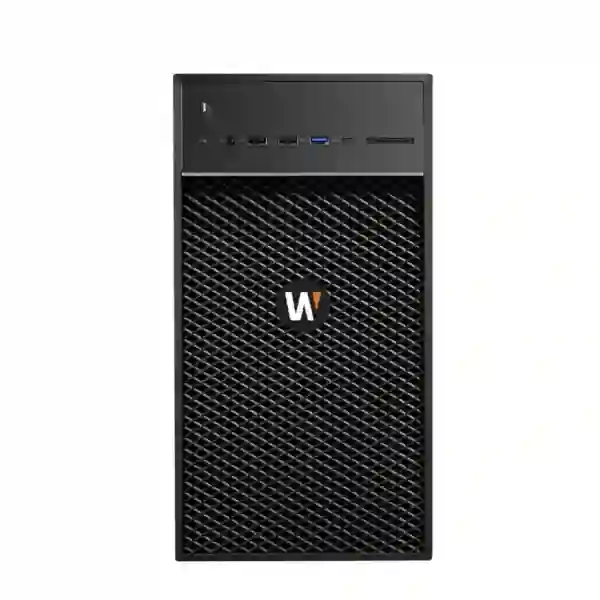
Hanwha Vision WRT-P-5200W Wisenet WAVE Network Video Recorder
Need a central Wisenet WAVE recording server and local viewing option for IP cameras? The WRT-P-5200W combines a dual-purpose mini-tower workstation with preconfigured video management software, four WAVE Professional licences, up to 470 Mbps recording throughput, and support for up to 30 TB of raw storage. For Tanzania procurement, confirm the exact disk configuration and operating-system support plan before ordering.
Buy for a defined recording requirement, not a headline number
The Hanwha Vision WRT-P-5200W addresses organisations assessing a Windows-based Wisenet WAVE network video recorder for a managed IP-surveillance deployment. Its published throughput and storage ceilings help with initial sizing, but they do not replace a camera-by-camera design. A successful purchase connects the required camera coverage, recording quality, footage-retention policy, licences, and viewing workflow to a verified configuration and a realistic maintenance plan.
Before requesting supply in Tanzania, identify the storage variant, the number of camera streams that must be recorded, whether the server will also be used for local monitoring, and the policy for running the specified Windows 10 Professional operating system. Ask for a written quotation and confirmation of software support and commercial terms. This page provides documented platform facts and a practical decision guide, not an unverified stock listing or a promise of local warranty coverage.
Technical specifications at a glance
| Product type | Dual-purpose Wisenet WAVE network video recorder and client |
|---|---|
| Manufacturer / model | Hanwha Vision / WRT-P-5200W |
| Video management software | Wisenet WAVE, preloaded and configured |
| Included licences | Four Wisenet WAVE Professional licences |
| Maximum recording throughput | Up to 470 Mbps, manufacturer’s test figure |
| Maximum raw data storage | Up to 30 TB; installed capacity must be confirmed |
| Data-drive bays | Three 3.5-inch SATA HDD bays |
| Operating-system drive | 256 GB SSD, internal |
| Processor | Intel Core i5-9500 |
| Memory | 16 GB DDR4 |
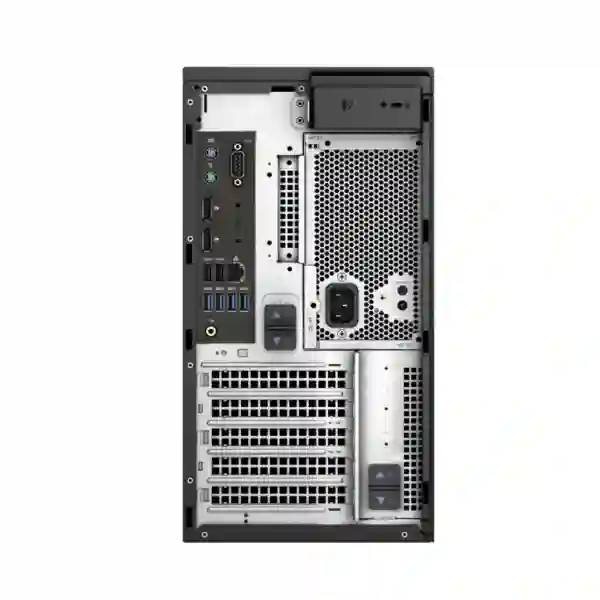
| Network interfaces | Two RJ-45 Gigabit Ethernet ports |
| Monitor outputs | Two DisplayPort outputs |
| IP-camera support | Wisenet and ONVIF-conformant cameras |
| Operating system | Microsoft Windows 10 Professional as manufacturer-listed |
| Power specification | 100–240 V AC input; 460 W rated power supply |
| Operating environment | 0°C–35°C; 10%–80% RH, non-condensing |
| Form factor | Mini-tower / tower |
| Listing SKU | Not supplied or verified |
Values refer to the WRT-P-5200W family as documented by Hanwha Vision; site configuration, actual supplied drives, software, service entitlement, and country-specific terms must be verified separately. Raw storage does not equal guaranteed usable recording capacity.
Important 2026 operating-system consideration
Microsoft ended standard support for Windows 10 on 14 October 2025, while Hanwha’s WRT-P-5200W listing specifies Windows 10 Professional. Before purchasing, verify the installed operating-system edition, security-servicing position, WAVE release compatibility, and the vendor-supported modernisation options. Do not infer an approved Windows 11 upgrade or current Tanzania availability from this model number.
What the Hanwha Vision WRT-P-5200W is built to do
The Hanwha Vision WRT-P-5200W is a dual-purpose Wisenet WAVE network video recorder and client workstation. It brings video recording software and a local viewing workstation together in a compact tower chassis. For a business replacing a fragmented camera-recording arrangement, that combination can simplify the physical equipment plan: the recording application and an operator’s local client do not necessarily require two separate computers. The exact monitoring arrangement still depends on the number of users, camera load, display expectations, network design, and how the system will be administered.
This product is designed around IP video rather than analogue coaxial camera inputs. Hanwha lists support for Wisenet cameras and ONVIF-conformant IP cameras, four included Wisenet WAVE Professional licences, a rated recording throughput of up to 470 Mbps, and capacity for up to 30 TB of raw internal data storage. Those numbers describe the platform, not a guaranteed camera count or number of days of retained footage. The installed drives, camera configurations, licence assignment, and operating conditions must be established for the exact equipment supplied.
Who should evaluate this recorder
A suitable buying conversation starts with the surveillance task, not simply with a desired recorder model. A small or medium office may need reliable recording of entrances, reception, and parking areas; a warehouse may prioritise loading bays, circulation routes, and high-traffic zones; and a campus or multi-building property may need several viewing points and documented incident retrieval procedures. The WRT-P-5200W can be evaluated for those IP-camera environments when the intended cameras, throughput budget, and Wisenet WAVE deployment plan match the equipment.
The model is also relevant to an organisation already operating Wisenet WAVE that wants to assess adding a recording node or replacing ageing hardware. In that situation, the questions include system version, existing licence entitlements, camera recording allocations, site network connections, operator permissions, and maintenance windows. A project should not assume that a previous recorder’s hard disks or licences can be transferred without checks. The correct outcome is a documented fit assessment, including a supported operating-system plan, rather than buying solely because the model number resembles an existing unit.
Core specifications and what each figure means
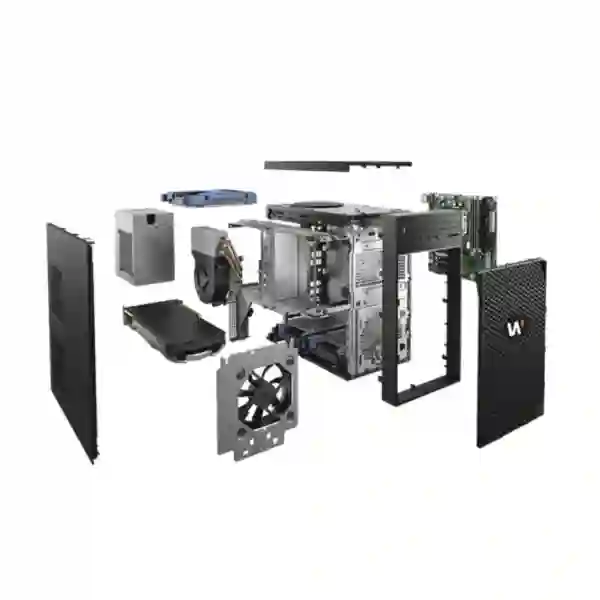
The published platform combines an Intel Core i5-9500 processor, 16 GB DDR4 memory, a 256 GB internally mounted solid-state operating-system drive, and three 3.5-inch SATA data-drive bays. The operating-system drive has a different purpose from the surveillance recording drives, so it should not be added to the advertised raw recording capacity. The hardware configuration helps buyers understand where the software operates, how recordings are stored, and what type of expansion and servicing questions should be asked before placing an order.
The up-to-470-Mbps figure is a tested recording-bandwidth limit, while up to 30 TB refers to raw storage, not necessarily usable footage space after formatting, file-system overhead, reserved capacity, or other storage arrangements. The dual-purpose description means the machine can act as a Wisenet WAVE recording server and a client workstation, but a demanding local display workload may need separate capacity assessment. Physical specifications, data-drive population, and service coverage should be confirmed against the exact offered configuration.
Understanding the 470 Mbps recording-throughput rating
Recording throughput is the combined incoming camera-video data that the server is designed to handle under the manufacturer’s test conditions. It is not the speed of the office’s internet package, the bit rate of a single camera, or a promise that every feature combination will run at the published maximum. A project designer should total expected recording bit rates across cameras and streams, then allow sensible headroom for scene complexity, variations in video compression, and future additions. Site-specific validation is more useful than selecting the recorder from headline throughput alone.
Different cameras can generate very different amounts of data even at similar resolutions. Frame rate, image detail, motion, low-light noise, codec, quality settings, and whether an additional stream is being recorded all influence demand. A quiet indoor corridor and a busy outdoor gate may behave differently. A useful quotation therefore specifies representative camera models and stream settings, states the aggregate expected rate, and checks that the recording server, network links, hard disks, and any additional services can handle the planned continuous load.
Wisenet WAVE: the software component
Hanwha ships this model with Wisenet WAVE video management software preloaded and configured. Wisenet WAVE is the software layer used to organise recording servers and connected camera resources, rather than a simple feature of the metal chassis. Before deployment, establish which software version is installed, which version is approved for the project, and how accounts, operator permissions, recording rules, updates, and remote administration will be handled. The existence of preinstalled software reduces initial installation work but does not replace commissioning, testing, or cybersecurity review.
An organisation moving from a basic standalone NVR to a video management system may value the opportunity to manage multiple cameras and viewing workflows in a more structured way. However, workflow capabilities depend on the current WAVE release, the licence and device mix, integration settings, and the selected client applications. Buyers should request a demonstration of their actual tasks: locating a timestamp, checking camera health, restricting user access, retrieving an incident, and confirming that recordings continue after a network or power interruption. A working demonstration is more meaningful than a generic software feature list.
Four included Professional licences
The WRT-P-5200W manufacturer’s listing includes four Wisenet WAVE Professional licences. These are software entitlements associated with the WAVE recording environment, not four additional physical cameras and not evidence that every intended channel is licensed. The quantity of recorded channels, how licences are activated, and the number of further licences needed should be checked against the current WAVE licensing rules and the proposed camera configuration. A site with more than four cameras should plan its licence review rather than assuming the chassis alone unlocks unrestricted recording.
Include licences as a separate line in the design worksheet even when some come bundled with the server. This makes an upgrade easier to audit and prevents a project being delayed because the right number of recording entitlements was overlooked. If the site is part of an existing WAVE system, verify how new licences and devices will be assigned and whether the intended server change requires an authorised transfer or reactivation. Do not publish licence keys or place them in unsecured correspondence; use an approved vendor or supplier process.
Camera integration and ONVIF considerations
Hanwha specifies support for Wisenet and ONVIF-conformant IP cameras. ONVIF is useful when planning a mixed camera environment, but the label alone does not guarantee that every camera function will behave identically. Detection events, audio, PTZ control, analytics metadata, multiple streams, time settings, and firmware-specific behaviour can vary by model and integration method. For critical cameras, verify the exact model and firmware against the selected WAVE version and test the features that operations staff genuinely need.
A practical compatibility test begins with video discovery and stable recording, then proceeds to expected resolutions, frame rates, continuous and event recording, and viewing permissions. For cameras supporting additional functions, test those functions individually rather than treating successful live view as a complete integration sign-off. Where compatibility remains uncertain, plan a small proof of concept before final procurement. In a multi-vendor installation, clearly record which system is responsible for firmware updates and who will troubleshoot discrepancies between camera configuration and recorder behaviour.
How to approach storage capacity
The manufacturer advertises up to 30 TB of raw internal storage and three SATA data-drive bays for the WRT-P-5200W family. A maximum supported capacity is not the same as the capacity installed in a specific unit. Some product variants in the market have been offered with different preinstalled hard-disk totals. Because this request identifies the base model and not a storage suffix, no particular installed HDD size should be assumed. A meaningful quotation should state the supplied drive count, individual drive capacities, total raw storage, and any usable-capacity assumptions.
Storage planning begins with required retention time, expected video bit rates, and an allowance for peak activity. Confirm whether the organisation needs a fixed number of days of footage at all times, whether selected cameras record continuously, and how motion-based or event-driven rules affect the intended design. Larger raw capacity can extend retention, but it cannot compensate for an inaccurate bit-rate estimate or a recording policy that does not capture the needed incident. Disk-health management, future replacements, and data protection procedures also deserve attention before commissioning.
Designing footage retention around real events
Ask the operations team what types of incidents they investigate and how long it normally takes to discover them. A shop may identify a dispute within days, while a warehouse discrepancy may only be noticed during periodic stock review. Those timelines should drive a retention target, subject to local legal requirements and the organisation’s privacy policy. The target is then translated into a storage plan using the expected camera streams, recording schedules, image quality, and actual disk capacity, rather than a generic claim that the recorder stores a fixed number of weeks.
Retention calculations should be revisited whenever a camera is added, resolution increases, a different codec is selected, or the site changes its operating hours. Include a clear escalation procedure when recording space becomes constrained. For important footage, decide how authorised users will preserve an incident outside normal rolling retention and how the exported material will be labelled and controlled. A properly chosen recorder is only one part of a retention process; staff responsibilities, regular checks, and incident-handling rules make that process dependable.
Operating-system drive and recording drives
The specified 256 GB solid-state drive is for the operating system, while separate SATA hard drives provide the video data area. This separation is important when discussing service, backups, and a drive failure. A system administrator should know where software configuration and licence information reside, where recorded footage is written, and which components can be safely replaced under the approved maintenance procedure. A backup of configuration information is not necessarily a backup of recorded footage; each has its own protection and restoration requirements.
Do not assume the three data-drive bays imply built-in RAID, live drive replacement, or uninterrupted operation after any disk failure. Those characteristics require explicit verification for the configured system. If high availability is an operational requirement, discuss a design that addresses redundancy at the appropriate level, such as resilient power, alternate recording arrangements, protected configuration data, and incident export. A drive replacement plan should account for the possibility of a data gap and the need to test recovered recording after maintenance.
Dual DisplayPort outputs and local monitoring
The hardware has two DisplayPort video outputs; published series documentation also identifies a DisplayPort-to-HDMI adapter. This creates options for a local operator workspace using compatible monitors and accessories. It does not establish a guaranteed number of simultaneously displayed high-resolution streams or a particular control-room layout. Live display workload is different from disk-recording workload and should be considered separately, particularly when several users expect fluid multi-camera views while the server is recording continuously.
Determine whether the recorder will sit in a locked communications room or be used directly at an attended desk. A machine installed in a secure equipment area may be better managed through separately authorised client stations than by granting general staff physical access to the recorder. When local displays are required, specify the exact monitors, cabling, conversion adapters, input devices, and viewing permissions. Confirm that loss of a monitor or client session does not interfere with the site’s expected recording behaviour.
Network layout and the dual Gigabit Ethernet ports
Two Gigabit Ethernet interfaces provide physical network connection options, but their existence does not automatically mean network failover or aggregated bandwidth is configured. The design must define what each interface connects to, what traffic it carries, and which routing and security rules apply. A camera network may have many streams converging on the recorder, while authorised viewing workstations and administrative tools require their own controlled access. Network switching, VLAN segmentation, addressing, and firewall policy should be designed around the full traffic flow.
Do not confuse the platform’s 470 Mbps recording figure with a promise of 470 Mbps available across every network pathway. The actual behaviour will depend on the camera traffic pattern, network infrastructure, uplink utilisation, and any simultaneous viewing or exporting activity. Before deployment, document port assignments, cable identification, IP settings, DNS and time sources, and monitored switch ports. Where video traverses a wide-area connection, assess reliability, packet loss, security, and required viewing quality independently of the local recording specification.
Security and administrator access
Video systems often contain sensitive footage of visitors, employees, deliveries, and business operations. Configure the WRT-P-5200W as a managed information-technology asset, not an unattended appliance that remains permanently on default settings. Use individual authorised accounts where supported, appropriate passwords, least-privilege roles, controlled physical access, and an approval process for changes to camera coverage or recording policies. Plan how operating-system, software, and device firmware updates will be evaluated and applied without creating avoidable recording interruptions.
Remote access should follow the organisation’s security architecture and the capabilities supported by the selected software version. Avoid exposing management interfaces to the public internet simply for convenience. Establish who is allowed to export footage, how exported copies are secured, and what logs or records are kept for sensitive actions. A project handover should include an access register, backup and recovery instructions, escalation contacts, and a schedule for checking account permissions. These controls are especially important when the recorder is shared by facilities, security, and IT teams.
Windows 10 Professional lifecycle: an essential buyer check
Hanwha lists Windows 10 Professional as the operating system for the WRT-P-5200W. Microsoft ended standard support for Windows 10 on 14 October 2025. That date does not mean an existing machine instantly stops functioning, but it does matter when evaluating new deployment, security patching, and long-term support. An organisation buying or continuing to use this model in 2026 should review its operating-system servicing options and vendor guidance before connecting it to a production surveillance network.
Hanwha’s WAVE support information still discusses compatibility with certain Windows 10 environments, but application compatibility is not equivalent to ongoing Microsoft operating-system support. Verify the exact Windows edition and build, current WAVE version, security-update position, and whether a supported migration route exists for this hardware. Do not assume that a direct Windows 11 upgrade is approved, technically compatible, or included in a purchase. If a new supported platform is a procurement requirement, request a comparison with a current Hanwha WAVE recorder before confirming the order.
Hardware and operating environment
The series documentation specifies a tower chassis approximately 33.5 cm high, 17.7 cm wide, and 34.5 cm deep, with a listed chassis weight of about 10.8 kg without hard drives. The power supply is described as 460 W, 80 Plus Gold, with an input range of 100–240 V AC. These figures help when planning cabinet space, shelving, cable reach, and power infrastructure. The 460 W maximum specification should not be mistaken for measured average electricity consumption in every recording scenario.
Manufacturer operating limits are 0°C to 35°C and 10% to 80% relative humidity without condensation. Actual room conditions, airflow around the tower, dust accumulation, and the heat from nearby equipment affect installation suitability. Place the unit on a stable surface with clearance for ventilation and access for maintenance. Before selecting a UPS, confirm the final configuration’s measured or appropriately budgeted load, intended backup duration, and safe shutdown expectations. Electrical installation, surge protection, and earthing should be assessed for the actual site.
Deployment planning for a site in Tanzania
For a Tanzanian business, the most valuable localisation is a realistic site assessment rather than a list of cities or an unsupported delivery promise. Review the stability of mains power, the need for backup power, room temperature, ventilation, internet dependencies, and the staff who will respond when a camera or recorder goes offline. A warehouse and a reception office may have very different environmental conditions even within the same property. A site visit or detailed installation survey helps identify such differences before equipment is specified.
Local procurement questions should be answered separately from product specifications. Request confirmation of the exact available variant, installed storage, pricing currency, lead time, support arrangements, import or tax treatment where applicable, and who will provide installation or after-sales service. None of those commercial terms can be inferred from the model designation or from a foreign distributor’s product page. The purchasing team should also confirm that the operating-system and software lifecycle align with its internal IT policy and intended useful life.
Commissioning checklist and first recording tests
Begin commissioning by recording the device serial information through the approved project documentation process and confirming the supplied drive configuration against the order. Check the operating-system image, Wisenet WAVE version, licence entitlements, firmware levels, and compatible cameras. Configure network access, time synchronisation, recording locations, and authorised accounts before accepting the equipment. Do not treat a live picture alone as commissioning success: the system must demonstrate that it is writing video, maintaining expected timestamps, and allowing authorised retrieval.
Use a representative test set that includes quiet scenes, peak-motion scenes, a controlled network interruption, and a planned restart. Confirm that recording resumes as intended, camera status is visible to the appropriate personnel, and important events can be retrieved from the expected time range. Where the workflow requires footage export, test an export on an authorised workstation and document the result. Complete a handover with network details, passwords stored securely, licence records, support information, and a clear list of any outstanding exceptions.
Daily operation and health monitoring
A recorder should have an owner responsible for checking that the surveillance system remains useful after installation. Define a practical review schedule for recording status, available storage, camera connectivity, system time, disk-health warnings, and relevant software or security notices. These tasks may be delegated across security and IT teams, but ownership needs to be unambiguous. Create an escalation rule for missed footage, failed disks, unstable cameras, and recurring network faults instead of relying on an incident to reveal an unnoticed problem.
Document normal operating settings so that an unexpected change can be investigated. This may include the intended number of cameras, typical recording load, retention objective, disk allocation, named administrators, and scheduled maintenance windows. When the business extends the surveillance area or adds higher-resolution cameras, repeat capacity and licence checks. A recorder with comfortable headroom at installation can become constrained after several small changes if nobody maintains the design record or verifies real utilisation.
Incident review and footage handling
Many buyers focus on whether a camera records, but a successful investigation also depends on whether footage can be found and handled correctly. Establish which staff members can search recordings, view sensitive areas, export material, and provide it to authorised recipients. Test that the necessary time interval can be located even when a user does not know the precise camera name. Where privacy or evidential requirements are relevant, agree on an organisational procedure for access approvals, preservation, and documentation.
Before a real incident, test the selected WAVE client workflow using the software version deployed at the site. Verify the export format, playback procedure, time reference, and available records of who created or handled the exported file. Store sensitive copies on authorised media or secured systems and avoid casual sharing. The recorder is a technology platform, not an automatic compliance solution; retention notices, lawful monitoring policies, incident handling, and staff training should be set by the organisation with appropriate professional advice.
Power continuity and recovery planning
Uninterrupted recording is a system-level objective rather than a feature that any single specification can guarantee. A practical design considers mains supply, surge protection, UPS capacity, connected network switches, camera power supplies, disk condition, and the ability to recover from a failed component. If cameras remain powered but the recording server shuts down, footage can still be lost. If the server remains powered while the camera PoE switches fail, the result may be the same. Plan protective measures across the complete recording path.
Discuss how long the site needs to operate during a power disruption and what happens if that duration is exceeded. Safe shutdown, automatic recovery, and post-outage recording verification should be part of acceptance testing where supported and applicable. For high-consequence coverage, a separate resilient recording arrangement or an appropriately designed multi-server architecture may be necessary. Do not presume the WRT-P-5200W includes RAID, dual power supplies, or automatic failover unless the exact supplied configuration and software design explicitly establish those capabilities.
Growth, additional cameras, and future changes
A surveillance system rarely stays unchanged for its entire service life. New entrances, additional storage areas, revised incident policies, or upgraded cameras can change recording demand. Treat each planned camera addition as a small capacity exercise: check licence availability, network traffic, processor and display demands where relevant, storage retention, and operator workflows. The fact that a recorder accepts another camera connection does not prove that it can continue meeting the same recording and retention objective with all current settings.
If substantial expansion is foreseeable, describe the likely end-state during procurement rather than only the opening-day configuration. Wisenet WAVE deployments can be designed around more than one recording resource, but cross-server behaviour, resilience, licence assignment, and compatibility must be confirmed for the intended release. Older hardware may also face software and operating-system lifecycle constraints. A current-generation model or a different server architecture may offer a more sustainable fit even where the WRT-P-5200W technically meets today’s narrow workload.
Questions to resolve before choosing a storage variant
The most important missing detail in a base-model request is the exact drive population. Ask the supplier to identify the manufacturer part number or configured suffix, preinstalled hard disks, raw capacity, usable capacity assumptions, and what happens if a drive fails. Request the target retention period and expected camera stream settings on the same document. Without this information, two quotations bearing the WRT-P-5200W family name may represent materially different systems in both cost and expected footage-retention capability.
Clarify whether the offer is for new equipment, refurbished stock, a replacement of an installed unit, or a support-and-upgrade project. The Windows 10 lifecycle makes that distinction especially significant. Confirm the bundled software and licensing position and ask for the vendor’s currently supported configuration guidance. Request written answers about local warranty eligibility, spare parts, installation responsibilities, and any ongoing service coverage. A clear bill of materials reduces expensive assumptions during delivery, commissioning, and later maintenance.
When a different recorder may make more sense
The WRT-P-5200W is not the automatic answer for every network surveillance project. A smaller deployment may be better served by a different recorder if its recording load, licence needs, local-monitoring requirements, or maintenance resources are modest. A large or mission-critical operation may instead require a deliberately resilient server architecture, dedicated viewing workstations, expanded storage, or documented hardware-failover arrangements. The right decision should follow the operational requirement and verified vendor support, not just the highest headline throughput.
New procurement should also evaluate the age of the platform. Hanwha has introduced later Wisenet WAVE recording-server models, including current options with newer operating-system platforms, but their specifications and regional availability must be compared individually. A newer model is not automatically a drop-in replacement: physical dimensions, network interfaces, storage approach, licences, client software, and integration behaviour may differ. Request a side-by-side fit assessment if the site expects years of new service rather than a narrow compatibility-driven replacement.
Information to provide for an accurate quotation
Prepare a compact project brief with the number and models of existing or proposed IP cameras, expected resolutions and frame rates, continuous or event-triggered recording rules, desired retention period, and the number of monitoring users. Add the installation environment, available network capacity, backup-power arrangements, and any need to integrate with an existing Wisenet WAVE system. If the camera bit rates are unknown, say so: a supplier can then identify the assumptions that need measurement or confirmation before promising capacity.
State whether the project needs an installed-and-commissioned system or supply of hardware only. Ask the quotation to list exact hardware configuration, installed HDD storage, software and licence entitlements, operating-system status, required accessories, and excluded work. Record any constraints on upgrades, access controls, service coverage, and support. This approach produces a quote that can be compared technically and commercially without relying on vague descriptions such as suitable for many cameras or guaranteed long-term storage.
Evaluation guide for IT, security, and procurement teams
Security staff usually care about camera coverage, footage quality, incident search, and ease of daily operation. IT staff need to assess accounts, network routing, software support, system logs, backups, update procedures, and recovery after failure. Procurement must verify exact part numbers, commercial terms, supplier responsibilities, and whether the offered product remains appropriate for its planned lifecycle. All three perspectives are necessary, particularly for a recorder that combines a Windows-based server and a monitoring client.
Use a joint acceptance document so every stakeholder signs off on measurable requirements. Examples include successful recordings from each intended camera, an agreed demonstration of retrieval, verified retention assumptions, a documented power-recovery test, and proof of which licence entitlements are supplied. Where something cannot be demonstrated before delivery, record it as a condition for final acceptance. This reduces ambiguity and makes any future troubleshooting easier because the expected system behaviour was defined before installation.
Maintenance planning and replacement readiness
Surveillance hardware may continue running for years, but disks, operating systems, firmware, software clients, and supported peripherals each have separate maintenance lifecycles. Plan periodic reviews of disk condition, free recording capacity, system event logs, authorised user accounts, and availability of relevant updates. Keep offline or otherwise secured copies of essential configuration documentation. If the recorder is already installed, identify its age and maintenance history before assuming that an expansion is preferable to a planned replacement.
Replacement readiness means knowing how to protect required recordings and restore services without treating video as disposable data. Document the current camera inventory, addressing plan, software release, licences, recording rules, and any special camera integrations. Determine whether old footage must be retained separately and who is permitted to transfer or view it. A disciplined migration plan also allows the team to assess newer supported server hardware without committing to a risky last-minute change after a failure.
Tanzania purchasing decision: clear next steps
The Hanwha Vision WRT-P-5200W is a credible specification to evaluate when a project needs Wisenet WAVE recording and local-client capability in one mini-tower device. The manufacturer’s documented strengths are the preconfigured software, four Professional licences, up to 470 Mbps recording throughput, dual network ports, dual DisplayPort outputs, and up to 30 TB raw storage. The purchasing decision still depends on the precise installed configuration and whether the Windows 10 platform is acceptable under the organisation’s present security and support policy.
Contact FourTeck Tanzania with the intended camera list, retention target, proposed storage configuration, and whether the equipment is for an existing WAVE system or a new installation. Request confirmation of exact model availability, compatible software, operating-system support strategy, licences, pricing, and service terms before making a commitment. Where a new supported operating system is essential, request an alternative-recorder comparison as part of the same evaluation. This is a request-for-quotation step, not a claim of stock or guaranteed local service.
Frequently asked buyer questions
Is the WRT-P-5200W both a recorder and a viewing computer?
Hanwha describes it as a dual-purpose Wisenet WAVE recording server and client. That supports considering a local monitoring arrangement, although the actual display workload, user count, and recording load still need to be assessed together. Separate client workstations may be preferable in some operational settings.
Does the recorder include cameras?
No camera bundle has been verified for the requested base-model listing. The manufacturer’s description is for a Wisenet WAVE recorder with software entitlements, not a promise that physical cameras are included. Request a detailed bill of materials that distinguishes cameras, recording hardware, hard disks, software licences, and accessories.
Does it come with four Wisenet WAVE Professional licences?
Yes. Hanwha’s product details state that four Professional licences are included. The project team should confirm the current licensing rules and whether further recording licences are needed for the planned camera count and features. Licence entitlement is a separate consideration from video throughput and disk size.
Can it record non-Hanwha ONVIF cameras?
Hanwha states support for Wisenet and ONVIF-conformant IP cameras. However, protocol conformity does not guarantee full support for every camera feature, analytics event, or firmware combination. Test the exact third-party camera model with the planned WAVE release before promising specific functions.
How many cameras can the WRT-P-5200W record?
A universal camera number cannot be established from the 470 Mbps recording rating alone. The answer depends on the individual camera bit rates, software licensing, recording configuration, network and storage resources, and intended viewing load. Provide camera models and stream settings for a properly sized proposal.
Is 30 TB of storage already installed?
Not necessarily. Up to 30 TB is the documented raw capacity of the platform, not proof of installed drives in this particular listing. Ask for the precise variant, drive count, disk sizes, and storage assumptions on the offered unit. The base model name does not by itself identify the included HDD configuration.
How long will the video recordings be kept?
There is no defensible fixed retention period without the installed raw capacity, usable recording space, camera bit rates, recording schedules, and storage policy. Retention should be designed around the organisation’s incident-response needs and privacy requirements, then confirmed using representative stream measurements and testing.
Does it have HDMI monitor output?
Hanwha specifies two DisplayPort outputs and series documentation mentions a DisplayPort-to-HDMI adapter. Confirm the adapter supplied with the exact unit and compatibility with the intended monitors. The number of display outputs does not by itself establish a guaranteed live-view layout or performance level.
Does the machine support RAID or hot-swappable disks?
Those capabilities should not be assumed from the presence of three SATA data-drive bays. Request explicit confirmation of the configured storage architecture, drive replacement method, and failure-recovery procedures. Projects requiring resilient recording should have separate, documented availability and backup requirements.
Is Windows 10 still supported by Microsoft?
Microsoft’s standard support for Windows 10 ended on 14 October 2025. Wisenet WAVE application compatibility and operating-system security support are different issues. Review the actual installed edition, available servicing path, and Hanwha guidance before deploying or extending the lifecycle of a Windows 10 recorder.
Can this be added to an existing Wisenet WAVE system?
Hanwha’s series description presents the product as usable for a single site or as part of an existing WAVE environment. Practical integration still requires checks for software-version compatibility, network design, recording licences, current server configuration, and migration procedures. Test critical workflows before the cutover.
Is the WRT-P-5200W available in Tanzania and what is the price?
Stock, installed capacity, pricing, warranty entitlement, local delivery, and service coverage have not been verified for the requested listing. Contact FourTeck Tanzania for a written quotation identifying the exact configuration and support terms. No Tanzania shilling price or availability guarantee is represented here.
Request a WRT-P-5200W configuration review and quotation
Share the planned camera models, required retention period, expected recording settings, preferred installed storage, and whether this is an expansion or a new installation. Ask FourTeck Tanzania to confirm exact product configuration, software and operating-system support, licences, commercial availability, service terms, and whether a newer recorder is better suited to the project.
No stock status, Tanzania price, local installation coverage, or regional warranty has been verified for this listing.




Reviews
There are no reviews yet.