
HANWHA VISION • VIDEO-WALL EXPANSION
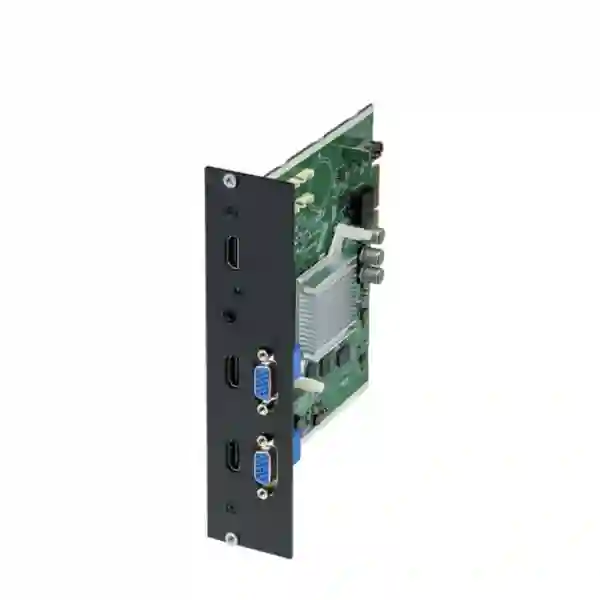
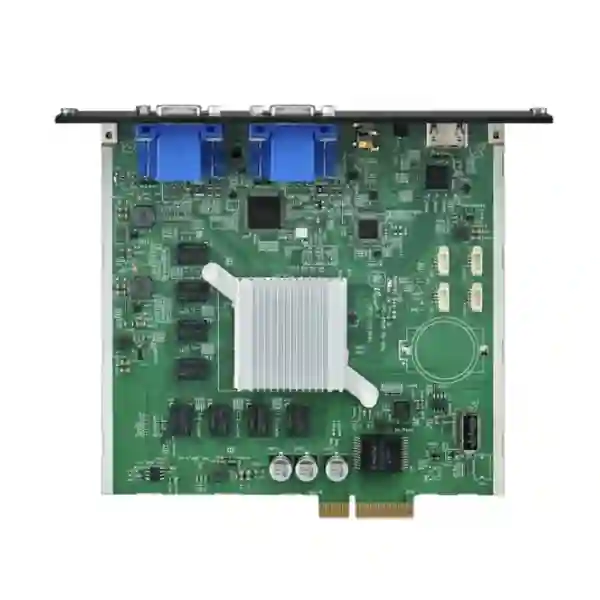
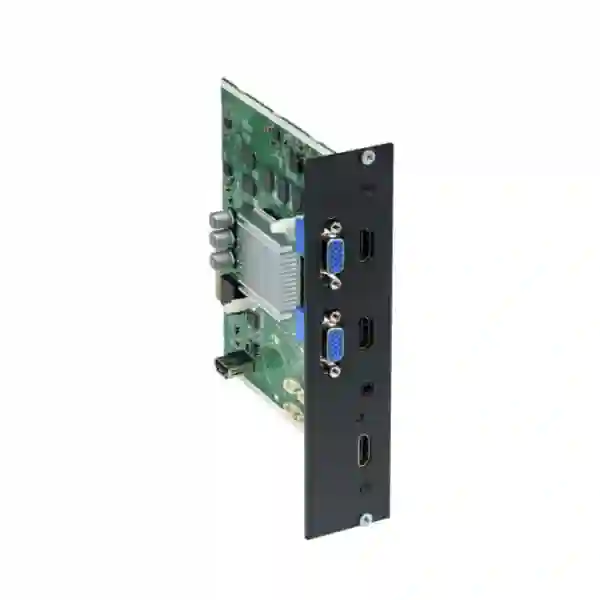
Hanwha SPD-260B 2-Monitor Decoder Board
Add two independent HDMI monitor positions to a compatible SPD-1660R network video decoder. Built for surveillance monitoring rooms that need a clear, scalable video-wall layout rather than another standalone recording device.
Verified technical overview
These figures distinguish board-level output capabilities from the maximum configuration of the SPD-1660R host. They are drawn from manufacturer product material and the original joint datasheet; actual integration should be validated for the intended system.
| Product model | SPD-260B; optional decoder board for SPD-1660R |
|---|---|
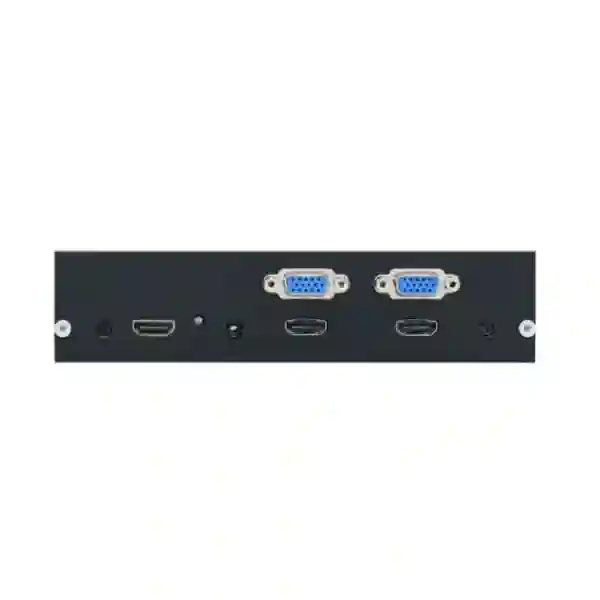
| Independent HDMI positions | 2 per board; HDMI 1 up to 4K, HDMI 2 up to 1080p |
| VGA outputs | 2 per board, up to 1080p; corresponding HDMI views are cloned |
| HDMI input | 1 on the board, for supported PC/display input scenarios |
| Supported video codecs | H.265, H.264, MJPEG |
| Published decode examples | Up to 4 × 4K/30 fps or 16 × 1080p/30 fps per board |
| Layouts | 1, 4, 6, 8, 9, 13, 16, 2V and 3V; up to 20 layouts per monitor |
| Host expansion | Up to 8 boards in an SPD-1660R chassis; up to 16 independent HDMI positions |
| Environmental range | 0°C to 40°C; 20% to 85% RH, per original datasheet |
| Board size and weight | 173.6 × 40.4 × 158.9 mm; approximately 284 g |
| Board consumption | Maximum 9 W, per original datasheet |
| Commercial details | Price, local stock, support and delivery require supplier confirmation |
What the Hanwha SPD-260B decoder board actually does
The Hanwha SPD-260B decoder board expands a compatible SPD-1660R network video decoder chassis so a surveillance team can send selected camera views to physical displays. It is a purpose-built monitor-output module rather than a camera, network video recorder or independent playback computer. A customer specifying a control room should therefore begin with the chassis, the number of desired screen positions and the video streams to be shown, not with the board quantity alone.
The main buying advantage is modular display capacity. Each SPD-260B adds two HDMI output positions and two VGA connections that mirror their respective HDMI views. Hanwha’s architecture permits up to eight boards in the SPD-1660R, giving the complete chassis as many as sixteen separate monitor views. This distinction matters when a quotation mentions sixteen HDMI and sixteen VGA connectors: those totals describe a fully populated chassis, not one add-on card.
Because the outputs are intended for surveillance viewing, the product suits a fixed monitoring desk or video wall where operators need regular visual access to many live scenes. It can help avoid making every wall screen depend on a separate general-purpose desktop computer. However, it does not replace the cameras, switching network, chassis, storage arrangements or operational procedures that make up a complete security installation.
Use the board when an existing supported SPD-1660R needs additional display positions or when a new modular wall is being designed around that platform. If the requirement is only one monitor, a self-contained decoder or the display outputs of a suitable recorder may be simpler. The correct choice depends on the current equipment, operator workflows, resolution targets and verified support for the camera streams.
Understanding the SPD-1660R chassis and board relationship
The SPD-1660R is the host hardware for the SPD-260B. Manufacturer information describes eight board slots and a maximum of two monitor positions per card. A chassis equipped with one board is fundamentally different from a chassis populated with eight, even when both systems are called an SPD-1660R video-wall decoder. Ask that every supply quotation states the exact chassis quantity, decoder board quantity and intended active display count.
A straightforward planning example is a four-position monitoring wall. The theoretical starting point is two SPD-260B boards installed in one compatible chassis, because each board contributes two independent HDMI monitor outputs. An eight-position wall would use four boards; a sixteen-position wall would use eight. These are architectural examples, not a guarantee of decoding performance or a finished design: camera count, stream characteristics and display requirements still need checking.
Do not count a VGA socket as an additional independent view without understanding mirroring. The accompanying VGA output carries the same displayed content as the associated HDMI output, according to the manufacturer datasheet. For example, four HDMI monitor positions plus their matching VGA connectors still represent four independent layouts rather than eight different operator screens. This is a frequent source of errors when a wall bill of materials is assembled from connector totals.
Before purchasing an expansion card, record the chassis model label, available slots, existing installed cards, firmware, the number of functioning display outputs and the network topology. Confirm physical fit and software configuration with the installer or responsible technical team. A correct board supplied for the wrong platform, or an existing chassis already at its expansion limit, does not solve the customer’s display problem.
HDMI and VGA outputs: what resolution is available
Each SPD-260B board provides two HDMI outputs. The first HDMI output supports display formats up to 3840 × 2160, often called 4K UHD. The second HDMI output supports formats up to 1920 × 1080, or Full HD. Both HDMI positions are useful, but they are not identical in maximum display resolution. Where a design calls for a 4K wall, mark the exact output that must feed the higher-resolution screen.
Two VGA connections are also provided and support formats up to 1920 × 1080. The manufacturer describes the VGA picture as a clone of the corresponding HDMI picture, so VGA is particularly relevant when an existing Full HD display must repeat a live view elsewhere. It should not be used to claim additional unique layouts. A mixed HDMI and VGA project must also consider display connectors, cable quality, length and the actual formats accepted by each monitor.
Output resolution and source-camera resolution are separate questions. A 12-megapixel camera stream may be among the supported decode sources, but that does not mean the board produces a 12-megapixel monitor signal. The available display is constrained by the chosen HDMI or VGA output and by the presentation layout. Camera-stream decoding, screen resolution and number of simultaneous tiles must be evaluated together rather than treated as the same capability.
For procurement, specify each screen by its role and connector instead of writing only ‘4K support’. A main evidence screen might use the board’s 4K-capable HDMI port while a secondary operator screen uses the Full HD output. Confirm desired refresh format and monitor compatibility during commissioning. A label saying 4K on a display or camera is not, by itself, proof that the entire connection path supports the required picture.
What the decoding capacity figures mean
The original SPD-260B technical datasheet lists decoding performance examples of up to four 4K streams at 30 frames per second or sixteen 1080p streams at 30 frames per second for one board. These figures describe specific tested stream-resolution combinations, not a universal promise for arbitrary mixes of cameras. The advertised ceiling must be considered together with codec, bitrate, scene complexity, frame rate and the layouts used on the attached monitors.
The same documentation identifies support for streams from cameras with resolutions up to 12 megapixels, with 8-megapixel decoding specified at 30 frames per second. This is a capability boundary, not a claim that sixteen 12-megapixel streams can all be decoded simultaneously. An integrator designing a wall containing higher-resolution cameras should build a realistic stream matrix and test which streams and secondary profiles will be displayed during normal operation.
At chassis level, the SPD-1660R documentation refers to up to 128 registered camera channels, with system-level decoding and network ceilings specified separately. It would be misleading to attach the 128-channel number to one SPD-260B card. A buyer should ask whether a figure refers to one decoder board, the fully configured host, registered camera inventory, the actual simultaneous decoding load, or the tiles visibly displayed by one monitor.
Practical sizing starts by listing the cameras most likely to be visible at the same time, including any critical zoomed view. Add the codec, expected stream resolution, frame rate and configured bitrate for each. Then decide which streams will use the 4K-capable output and which can be shown as lower-resolution tiles. This turns a marketing specification into a testable control-room design with clear performance expectations.
Choosing camera streams and compression formats
Hanwha identifies H.265, H.264 and MJPEG as supported video compression formats in the SPD-260B family. The support is valuable when a surveillance estate contains cameras of different generations, although actual operation also depends on protocols, configuration and compatibility. Codec support alone should not be interpreted as automatic compatibility with every third-party camera, recorder or video-management platform.
In a multiscreen layout, a low-bitrate substream can sometimes make a compact camera tile more efficient to present than a full-resolution main stream. When operators select a camera for closer inspection, the intended design can use a suitable higher-detail feed if the system and workflow support it. These choices should be verified with the real camera models and software settings rather than assumed from the maximum published decoder resolution.
A site using mixed camera brands should arrange a proof-of-concept before committing to the complete video wall. Check stream discovery, authentication, live-picture stability, reconnection after interruptions and how the system behaves when camera parameters change. Also confirm whether the selected management workflow expects Hanwha-specific integration features. Supported encoding standards do not establish all the features required for reliable control-room use.
Document any exceptions, such as unusual aspect ratios, corridor-oriented images, high-frame-rate feeds or cameras with specialized analytics overlays. The old manufacturer datasheet lists hallway-mode resolutions, but the exact on-screen experience should still be tested. The procurement decision is stronger when the buyer can point to a successful sample layout instead of relying only on a large number in a brochure.
Flexible multi-camera layouts and layout sequencing
The decoder system supports familiar split-view arrangements, including single-camera, four-way, six-way, eight-way, nine-way, thirteen-way and sixteen-way views, plus specialized layouts identified as 2V and 3V. This can give monitoring operators a choice between a broad situational overview and a more focused set of priority cameras. The right layout depends on screen size, viewing distance and what the operator must recognize.
Manufacturer information also describes up to twenty layouts per monitor and layout sequencing. In practical terms, a screen can cycle through predefined arrangements rather than remaining permanently fixed on the same subset of cameras. That is useful when a small team needs scheduled visibility across several areas, provided each change is predictable and does not hide a critical picture at the wrong moment.
Layout sequencing is not a substitute for a sensible alarm-handling process. If a vehicle entrance, fire exit or other high-priority view must remain visible continuously, place it on a dedicated screen or fixed tile rather than letting a sequence remove it periodically. Define which cameras are always-on, which are rotational and which are brought forward when staff need additional detail.
During setup, verify that text overlays, timestamps and camera labels remain readable in the actual tile dimensions. A sixteen-way split on a modest-sized display can produce very small images even when the decoder technically supports the layout. The buyer should approve the operator view from the real seating position, not only from a close-up photograph of the finished wall.
Video-wall monitor merge: when a larger picture helps
Hanwha’s SPD-1660R system supports monitor merge configurations that extend a single presentation across a group of screens. This offers a different operating mode from giving every monitor a separate camera matrix. For instance, a larger merged image may help a team emphasize an overview map or an incident-focused view during an event, while ordinary split layouts remain better for continuous multi-camera observation.
A merged wall requires attention to physical screen geometry. Bezels, alignment, individual panel settings and the expected distance from the operator all affect the final result. A large video canvas spread across several displays can look impressive but still be difficult to interpret if a crucial part of the picture lands at a screen boundary. Planning must include the real wall arrangement and intended content.
Monitor merge should also be distinguished from basic mirroring. HDMI and VGA cloning repeats the same view on associated connectors; merge arranges selected monitor positions to form a larger image. The two ideas address different needs. A proposal that uses either term without a diagram risks disagreement when the installer and customer expect different results at commissioning.
For a control room in Tanzania, consider the staff’s actual tasks before choosing a large display surface. A site with one operator monitoring entrances may benefit more from several stable camera groups than from a merged visual wall. A central control desk with incident coordination duties may need both. Ask the design team to demonstrate at least one routine layout and one incident-response layout.
Control and management with SSM and Web Viewer
Hanwha’s manufacturer announcement and datasheet identify Wisenet SSM and a Web Viewer as management approaches for the SPD-1660R platform. The attraction is being able to organize surveillance views without assigning a conventional PC to each monitor. However, current software versions, browser requirements, licenses and integration behavior must be checked against the specific installed system before describing a configuration as supported.
A useful commissioning conversation is about who can create layouts, who may change live views, and how quickly an operator can recover a preferred display after an interruption. Document account responsibilities, configuration backups and the procedure for restoring a known-good screen arrangement. These processes are often more valuable in daily operation than an additional screen resolution feature.
Web-based administration does not mean that an exposed internet connection is a good default. Access to the decoder’s management functions should be restricted to appropriate administrators and protected within the site network. The buyer should specify network ownership and account handover so that the installation is manageable after the original integrator leaves.
If the control room already uses video-management software, test the actual intended functions. Registration of cameras and layout configuration can be distinct from alarm handling, recording retrieval, PTZ actions or analytics presentation. The SPD-260B is a video decoding board; it should not be sold as a replacement for every feature of a full video-management or recording system.
Example deployments for different operating teams
A campus security office may need a stable view of entrances, corridors and shared external areas. Here, a few independent monitor positions with carefully grouped camera tiles may be enough. The aim is to keep high-priority scenes visible while allowing periodic rotation through lower-priority locations. The board’s contribution is to create those output positions inside the supported chassis, not to supply cameras or access-control systems.
In a warehouse monitoring room, different zones can be assigned to receiving, loading and perimeter views. Operators should be able to identify which area they are observing without decoding confusing camera names. Camera positions, lighting and stream quality remain essential: additional decoder outputs cannot compensate for poor placement or unsuitable camera images. A display plan should begin with tasks and events, then determine screen count.
A hospitality or multi-building facility may have people at different desks who need repeated views. The board’s HDMI and VGA cloning can support repeated presentation under suitable conditions, but any request for different live content on every destination must be counted as independent monitor positions. This distinction helps prevent an overly optimistic display plan and avoids buying accessories that do not provide the required independence.
A centralized incident room may prefer a blend of fixed surveillance tiles, rotating overview layouts and an occasional merged screen. That is a more demanding design. Test role-based operation, escalation procedures and wall readability before ordering the maximum number of boards. These scenarios are illustrations of potential use, not claims that a particular Tanzanian institution already uses this model.
Designing a practical operator display wall
Begin with viewing distance and the information required from each camera. A camera view intended to confirm a person’s direction of movement may remain useful as a smaller tile; a view used to inspect identifying detail may need greater size and appropriate source resolution. More displays can improve separation of tasks, but only when the layouts are organized in a way that people can interpret quickly.
Group related scenes together and keep labels consistent. Avoid mixing areas arbitrarily just to fill a grid. A useful visual grouping might be perimeter cameras on one monitor and entry points on another, with a separate priority screen for active situations. Agree the naming convention with security supervisors and retain it in the configuration documents for future maintenance.
Remember that a 4K-capable output is available on one HDMI connector per board, not on both HDMI connectors. If all specified monitors must receive independent 4K output, the standard two-position-per-board assumption needs reconsideration. Ask the integrator to map each screen to its exact physical output and show the proposed format before ordering screens and cards.
The final acceptance review should take place under normal room lighting and with ordinary operators present. Check glare, contrast, camera label size, smooth playback, refresh stability and how easily someone can identify the correct view. This human-centred review helps determine whether the design is actually usable rather than merely meeting a count of ports.
Network bandwidth and the real-world video path
The decoder displays compressed network video, so the network design matters as much as the monitor connections. At host level, the original SPD-1660R datasheet lists a maximum network bandwidth and a separate maximum decoding bandwidth. These are not interchangeable measures, and neither is a promise that every mixture of streams will always display without delay.
Create a stream inventory with average and peak bitrates and estimate the simultaneous traffic carried toward the decoder. Include headroom for scene changes, other network applications and the effect of selected camera profiles. If a wall will display many cameras continuously, the network should be assessed for sustained load rather than a brief test during a quiet period.
Where surveillance and office traffic share infrastructure, assess segmentation, switch capacity and link reliability. An intermittently congested uplink can make a carefully designed display appear unreliable even when every decoder board is functioning correctly. Verify the route from cameras or the video source to the chassis and confirm any required firewall rules with the responsible network team.
For sites where network quality varies, prioritize the most important feeds and design graceful behavior. Know which views are essential, which can use lower-bitrate streams and what the operator sees during a temporary source disconnection. A successful installation has a clear fault-reporting and recovery procedure instead of assuming that a large manufacturer’s performance specification eliminates network planning.
Physical specifications, power and environmental limits
The original manufacturer datasheet describes the SPD-260B board as approximately 173.6 × 40.4 × 158.9 mm and about 284 g, with a maximum specified board power consumption of 9 W. The compatible chassis supplies the host environment for the card. Do not interpret these board-level electrical values as an instruction to connect an external power supply directly to the module.
The documented operating range is 0°C to 40°C, with relative humidity from 20% to 85%. These limits make ventilation, dust control and a suitable equipment location important. A rack that is hot, poorly ventilated or directly exposed to environmental moisture should not be accepted merely because the monitoring room itself feels comfortable.
The SPD-1660R chassis has its own power specification and consumption limits. Planning must include chassis power, installed cards, any network switches, monitors and backup-power equipment. A reliable uninterruptible power supply is a design consideration for sites where brief electrical interruptions would disrupt surveillance operations, but the appropriate capacity must be calculated from the whole installation.
Keep enough access for installers to inspect connectors and replace or service hardware without pulling on display cables. Use appropriate cable management and label each output with its assigned monitor. If the environment has unusual heat, humidity or power characteristics, request a site assessment rather than assuming the stated indoor environmental limits will be maintained automatically.
Installation planning before adding or replacing a card
Before work begins, confirm the exact model of the host chassis and establish whether a supported board slot is available. Record which existing output feeds which physical display. A site with several similar-looking cables can lose valuable time if an installer has to discover the mapping by trial and error after the system is opened.
Plan any hardware installation according to the current official installation instructions and authorized technical procedures. Power isolation, anti-static handling and correct seating of modules are professional installation matters; this product description is not a substitute for the hardware manual. If the existing installation is under warranty or support contract, confirm who is permitted to make physical changes.
After the new board is installed and recognized, configure one test layout on each intended independent HDMI output. Confirm that the relevant VGA connector mirrors the correct HDMI view if VGA is used. Then test the expected display formats, camera registration or stream selection, and user access to the configuration interface.
Document the completed arrangement with a slot-to-display map, screen-resolution settings and a copy of the approved layout plan. Retain the firmware versions and any troubleshooting notes. This makes it easier to restore service after equipment replacement and lets the buyer establish exactly what the purchase has added to the original system.
Commissioning and acceptance tests that protect the buyer
A meaningful acceptance test begins with a clear list of planned outcomes. Agree how many independent display positions will operate, which outputs are assigned to 4K and Full HD monitors, and which camera groups belong on each screen. If the project expects a merged wall or a rotating layout, include those modes explicitly in the demonstration.
Test typical and demanding conditions rather than only one attractive static screen. Display the highest expected combination of streams and verify that picture movement, layout switching and responsiveness meet the project’s requirements. Check the behavior after a stream disconnects and reconnects, because a monitoring team must know whether the wall recovers sensibly during routine network disturbances.
Confirm camera labels, date-and-time overlays when applicable, the selected aspect ratios and any required corridor views. Walk through the intended operator actions: changing layouts, restoring a standard view and escalating a priority camera. These checks reveal practical limitations that are easy to miss in an equipment-only handover.
Keep written acceptance evidence such as the board count, tested source models, display mapping, configuration versions and outstanding issues. For a new purchase, request a final demonstration using equipment matching the quote. For an expansion, establish a before-and-after view count. This is a fairer procurement test than accepting a general claim that the decoder supports up to sixteen monitors.
Cybersecurity, accounts and long-term maintainability
Network video display hardware is part of the security system and should be treated as managed network equipment. Assign responsibility for its administration, use unique credentials as supported by the platform and keep management access limited to appropriate users. A decoder that is easy for operators to see should not automatically be reachable from every office or guest network.
Review the installed firmware and supported management tools before deployment. Because the SPD-1660R and SPD-260B are established models, buyers should confirm current lifecycle and support arrangements for the exact product and region rather than assume every current software feature is available. Ask what options exist if a needed browser, firmware version or integration feature cannot be supported.
Schedule change control for modifications to camera stream settings. A new compression configuration or altered resolution could affect a wall that was previously stable. When cameras, network equipment or monitoring software are changed, repeat the relevant display tests and update the source-stream list.
Operational resilience also depends on documentation. Keep secure configuration backups where supported, note the responsible technical contact and retain a tested method for returning to standard layouts. The goal is an installation that remains understandable after staff changes, not a one-time demonstration that only the original engineer can operate.
Choosing between an expansion board and a different decoder
The SPD-260B is strongest when a compatible SPD-1660R already exists or is deliberately chosen for a modular multi-screen design. A buyer should not order it just because the term ‘video decoder’ appears on an equipment schedule. The board does not operate alone, so the price and requirements of a complete platform must be considered alongside the module.
A smaller installation may use a self-contained decoder, suitable NVR monitor outputs or an existing authorized video-management workstation instead. Those alternatives differ in the number of outputs, supported codecs, network management and operational complexity. The relevant comparison is the finished monitoring workflow, not simply the maximum number of cameras mentioned on two product sheets.
The board’s modular architecture is also different from a general-purpose graphics card or HDMI splitter. It adds network video decoding capacity and output positions inside its specific chassis. An HDMI splitter duplicates a signal but does not add another independent decoded layout. A PC graphics solution may have its own software, operating-system and maintenance needs.
For a new control room, ask the supplier to show at least two suitable architecture options and explain how each meets the display count, stream load and support plan. For an existing SPD-1660R expansion, a correctly specified SPD-260B may be the natural fit. In both cases, confirm current supply and support terms before treating an older published specification as a current commercial offer.
Buying checklist for a Tanzania procurement team
Begin the enquiry with the exact product name: Hanwha SPD-260B 2-Monitor Decoder Board for SPD-1660R. State whether the requirement is a replacement module, additional display capacity in an existing chassis or a completely new control-room solution. This information helps distinguish the card from the host unit and prevents quotations that cover only part of the system.
List the current chassis model, installed board count, free slots and preferred number of independent displays. Add display sizes, required input connectors and whether any output must run at 4K. If a VGA duplicate is needed, specify which HDMI view it should mirror. A simple output map helps suppliers interpret the request consistently.
Provide the relevant camera model list and expected on-screen stream combinations. Mention whether the project relies on Wisenet SSM, the Web Viewer or another existing management method, and whether there are multiple camera brands. Request confirmation of compatibility, suitable firmware and the commissioning responsibilities rather than assuming integration from the model number alone.
Ask for a written quotation that distinguishes the board, chassis, monitors, cabling, installation, configuration and any separately priced software or support items. Confirm country-specific stock status, price, applicable taxes, delivery arrangements, warranty and service eligibility directly with the supplier. None of those commercial details are established by the technical datasheet.
Practical Tanzania deployment considerations
For a Tanzania-based security operations room, plan around conditions at the actual building rather than broad claims about the entire market. Important checks include stable power, appropriate backup arrangements, equipment-room ventilation and the quality of internal network links between cameras, source systems and the decoder chassis. These are engineering priorities, not assertions about the service levels of a particular city or operator.
Where surveillance locations are spread across a property, determine whether video traffic reaches the monitoring room over dedicated links, shared LAN infrastructure or an externally managed connection. The choice changes the risk profile for bandwidth, access control and interruptions. A decoder board cannot repair an unreliable upstream connection; the end-to-end path should be tested before handover.
Language and operating procedure also matter. Label camera scenes in terminology the local team recognizes, identify priority areas and agree how staff report a missing image. A concise local handover with screenshots of approved layouts can be more useful than a long manufacturer brochure when a new shift takes over.
Request confirmation of the exact delivery, installation and service arrangements for the intended Tanzania site before placing an order. Do not infer that the SPD-260B is in stock locally, certified for a particular project or covered by a specific warranty solely because a global manufacturer lists the model.
Suggested technical schedule for a clear quotation
A concise project schedule should state the equipment role as ‘two-monitor decoder expansion board for SPD-1660R’. It should separately list the compatible host chassis and the planned number of decoder cards. The schedule should identify two HDMI outputs per card, one with 4K capability and one with Full HD capability, plus two VGA mirror outputs. It should not state that each card independently delivers four separate monitor views.
Under supported video, list H.265, H.264 and MJPEG as manufacturer-documented codecs, then request confirmation that the intended camera models and configurations work with the delivered firmware. Under capacity, use the published board-level examples of four 4K streams or sixteen 1080p streams at 30 fps as design references, but specify that final acceptance depends on the chosen real-world stream mix.
For management, describe Wisenet SSM and Web Viewer as documented approaches and request confirmation of versions and any licensing conditions. For installation, require a slot map, connector schedule, tested layouts and documented configuration handover. These measurable deliverables help both customer and integrator evaluate whether the system meets the intended operating requirement.
Finally, ask the supplier to identify every exclusion and assumption. These might include monitors, brackets, network upgrades, cables, configuration labour or ongoing software support. An accurate scope is more valuable than a short product price that leaves essential parts of a working surveillance wall unspecified.
Frequently asked questions
Is the Hanwha SPD-260B a standalone video decoder?
No. It is a decoder board intended to be installed in the compatible Hanwha SPD-1660R chassis. A board on its own is not a ready-to-use recording or monitoring system. Buyers should confirm whether their quotation includes the chassis and any additional modules required for the planned screens.
How many independent monitor positions does one SPD-260B add?
A board adds two HDMI monitor-output positions. It also has two VGA connections, but these mirror the corresponding HDMI screens. Four physical output connectors therefore do not equal four different monitor layouts. Map the intended independent views before calculating the number of cards.
Can I connect two different 4K monitors to one board?
The original technical specification assigns 4K capability to the first HDMI output and up to 1080p to the second. It is not correct to promise two independent 4K output signals from one board. If the project needs multiple independent 4K screens, review the exact port assignment and total design with the integrator.
How many boards can be installed in an SPD-1660R?
Hanwha’s platform documentation describes eight decoder-board slots. Eight installed SPD-260B boards can provide as many as sixteen HDMI monitor positions, with associated VGA mirror connections. Confirm the actual chassis condition, installed modules and support status before purchasing additional boards.
Does the SPD-260B record video?
The SPD-260B is specified for decoding and presentation rather than storing the camera archive. A requirement for recording, video retention, search or export must be addressed by suitable recording equipment and software. The decoder may form one part of a wider video-surveillance solution, but should not be described as an NVR.
Which video formats are documented?
Manufacturer materials list H.265, H.264 and MJPEG. Whether a particular camera stream displays correctly depends on the broader interface, management and configuration requirements as well as its compression standard. Confirm exact models and firmware through a sample integration test where third-party equipment is involved.
Can it display images from a 12-megapixel camera?
The historic datasheet identifies support for source-camera resolutions up to 12 megapixels, but display output resolution and simultaneous decoding capacity are separate limits. A 12-megapixel source does not make the HDMI output a 12-megapixel signal. Validate the intended stream combination before approving a high-resolution monitoring design.
What simultaneous decoding performance should I plan for?
The original board specification gives examples of up to four 4K channels at 30 fps or sixteen 1080p channels at 30 fps. Those figures must not be combined into a single unrestricted capacity claim. Mixed streams, bitrate, codecs, current firmware and layouts should be tested in the intended working configuration.
Can HDMI and VGA show completely different pictures?
The datasheet specifies VGA output as a clone of the matching HDMI view. Therefore, a VGA-connected monitor is not normally counted as another independently managed camera layout. This is useful for repeated viewing, but a requirement for another unique display position needs an available independent output.
Does the decoder support rotating multi-camera views?
Yes, the documented system supports multiple split-screen layouts and sequencing, with up to twenty layouts per monitor. The best rotation pattern depends on operator duties. Cameras that must remain visible for incident response should be assigned with care rather than automatically placed in a timed sequence.
Can the board be used in a video wall?
Yes, when installed in its compatible chassis as part of a correctly configured installation. The broader SPD-1660R system supports multiple independent monitors and a monitor-merge function. The outcome depends on screen count, physical mounting, video streams and the chosen layout. Confirm any merged-wall arrangement during design.
Is Wisenet SSM required?
Manufacturer documents identify both Wisenet SSM and Web Viewer management, but the appropriate configuration depends on the deployment. Check the software version, support status and licensing or access arrangements for the installed equipment. Do not assume a particular present-day software entitlement simply because an old datasheet mentions the product family.
What is the power requirement?
The original SPD-260B board specification lists a maximum board consumption of 9 W and internal supply rails provided by the host environment. It should not be treated as a separate externally powered desktop unit. The chassis, monitors, network equipment and backup-power system must be sized and assessed as a complete installation.
What environmental conditions should be checked?
The original board specification lists an operating temperature of 0°C to 40°C and 20% to 85% relative humidity. Rack airflow, dust, power quality and physical access still matter. Verify that the equipment location can maintain suitable operating conditions across ordinary daily use.
Can I order the SPD-260B in Tanzania at a fixed published price?
No local price, stock position, delivery date or service term has been verified here. Ask for a project-specific quotation stating the card quantity, chassis requirements, installation scope, taxes if applicable, warranty and support arrangements. A price displayed by an overseas retailer is not a verified FourTeck Tanzania offer.
What should I send when requesting a quote?
Send the SPD-260B model name, current SPD-1660R chassis details if any, required number of independent displays, desired 4K and Full HD allocation, camera models, expected simultaneous streams and management software. Mention whether this is an expansion or new build, and ask for compatibility confirmation and a complete scope of supply.
Request a compatible SPD-260B quotation
Tell the FourTeck Tanzania team how many distinct surveillance displays you need, which SPD-1660R chassis is already installed if applicable, and whether the project needs 4K or Full HD outputs. Request confirmation of model compatibility, exact scope of supply, current local availability, price and support terms before ordering.
For a new video wall, include the screen map and camera stream list so the proposed number of modules can be checked. For an existing site, send the chassis model, existing module count and details of the display positions to be added. This helps produce an accurate proposal rather than an incomplete board-only quotation.
Next step: Contact FourTeck Tanzania for a project-specific compatibility review and quotation.




Reviews
There are no reviews yet.