
Analogue-to-IP CCTV migration • Tanzania
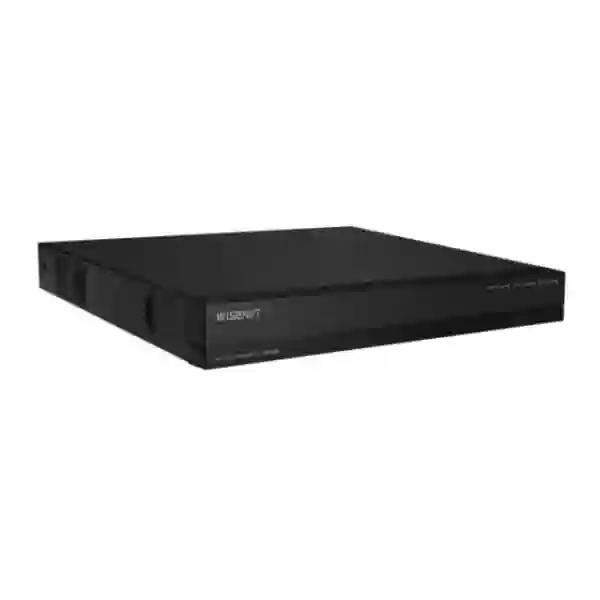
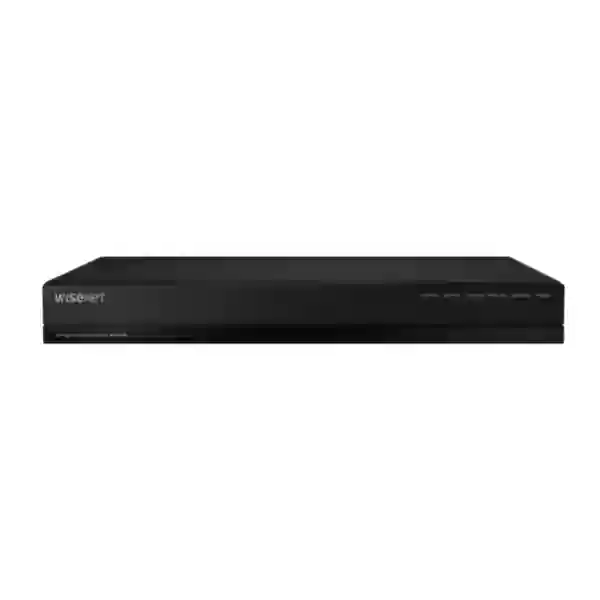
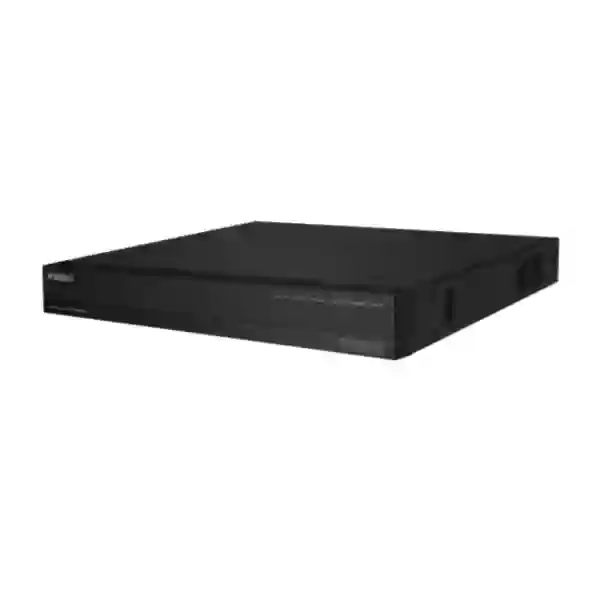
Hanwha Vision SPE-1630 16-Channel Video Encoder
Bring compatible existing analogue CCTV cameras into a modern IP video workflow without assuming that every cable and camera must be replaced at once. The Hanwha Vision SPE-1630 accepts sixteen BNC feeds and delivers compressed network video for appropriate recorders and management systems.
Planning a CCTV upgrade? Request a compatibility review and configuration-specific quotation from FourTeck Tanzania.
SPE-1630 specifications at a glance
These are selected manufacturer-specified capabilities to help with first-stage evaluation. Confirm the full installation manual and intended configuration before specifying connected equipment.
| Analogue video inputs | 16 BNC; CVBS and supported AHD/CVI/TVI formats |
|---|---|
| Maximum network resolution | 5MP (2560 × 1920) |
| Main-stream frame rate | 5MP: up to 12fps per channel; 1080p: up to 30fps NTSC or 25fps PAL |
| Video compression | H.265, H.264, MJPEG |
| Multiple streams | Up to three profiles per input channel |
| Network and integration | 1 × RJ-45 Gigabit Ethernet; ONVIF Profile S; SUNAPI |
| Local display | 1 × HDMI; sixteen-image layout at 1920 × 1080 |
| Operational interfaces | 16 alarm inputs / 4 alarm outputs; 4 line audio inputs / 1 line output; RS-485 |
| Power | 12V DC, 5A input rating; maximum consumption 20W |
| Physical and environmental | 370 × 44 × 320mm; 2.32kg; rack maximum ambient +40°C |
A practical route from analogue CCTV to IP management
If a site already has a useful investment in analogue surveillance, the first decision is not necessarily which new IP cameras to buy. The more immediate question is whether the existing cameras and coaxial cable runs can continue providing the coverage the site needs while the control room, recording system or network infrastructure is modernised. The Hanwha Vision SPE-1630 is intended for that bridge between established analogue equipment and an IP-oriented workflow.
Each of the sixteen video inputs accepts a compatible feed over a BNC connection. The encoder processes those incoming signals into network streams that compatible recorders and video management platforms can request. This separates the camera replacement decision from the recorder migration decision: some positions may remain analogue for now, while other positions can be upgraded independently as operational priorities and budgets allow.
That flexibility is conditional rather than automatic. The cameras must use supported signalling modes and resolutions, and the chosen recorder must be able to discover, decode and license the intended channels. A short equipment audit is therefore more useful than a promise that all old cameras will be compatible. FourTeck Tanzania can be asked to review the proposed equipment combination before a quotation is finalised.
What this unit does—and what it does not do
The SPE-1630 is a video encoder, not a standalone network video recorder and not a new security camera. It does not create camera images by itself. It accepts image signals from existing analogue cameras and makes encoded streams available through its network interface. Separate recording software, a compatible NVR or another appropriate video platform is required when the project calls for central recording, search, retention or wider user management.
Likewise, its single HDMI output is a convenient local display interface showing a sixteen-image layout at 1920 × 1080. That does not make the unit a replacement for a feature-rich recording workstation. Buyers should distinguish local live viewing from recorded playback, event investigation and the retention rules that a complete surveillance solution requires.
For a technical buyer, the key benefit is preserving options. Instead of discarding every analogue camera because a recorder is changing, the encoder can be assessed as an intermediate network component. If camera image quality, coax condition or software compatibility falls short, replacing those cameras may still be the better engineering choice.
Who should consider the 16-channel format
This model makes most sense where numerous nearby camera cables terminate at one secure equipment point, such as a monitoring cabinet, communications room or established CCTV rack. A sixteen-channel chassis can reduce the need to distribute many small encoders, provided the site layout brings those analogue feeds to a suitable location and the local power and environmental conditions are satisfactory.
A warehouse may need to keep fixed perimeter cameras while changing its central recorder. An office compound may be standardising monitoring across several buildings. A school or commercial premises may be planning phased upgrades without a single disruptive camera replacement project. These are examples of project requirements, not claims about any specific installation or service coverage.
A small site with only two or three cameras should compare the total system cost of a smaller encoder, a compatible replacement recorder or direct IP camera migration. A large site with more than sixteen feeds should plan channel allocation and network architecture first. Avoid treating the advertised input count as proof that a particular NVR will accept sixteen additional streams without configuration or licence checks.
Supported analogue video formats and inputs
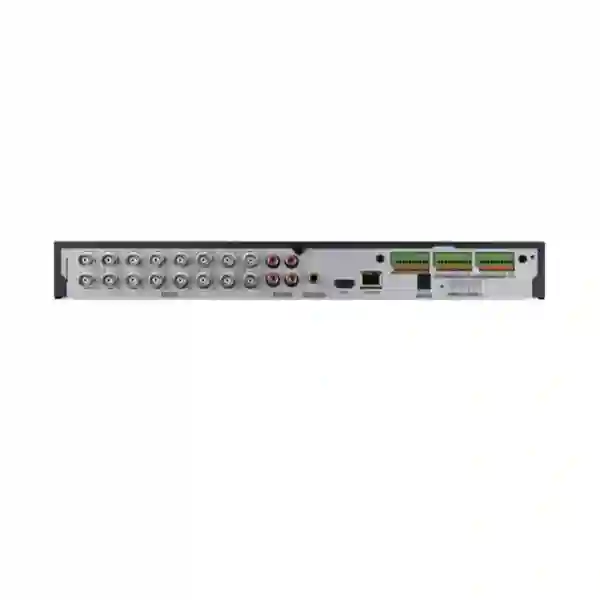
The manufacturer specifies sixteen BNC camera inputs using 1.0 Vp-p, 75-ohm composite signalling, with automatic detection of CVBS and supported AHD, CVI and TVI modes. These names matter because analogue CCTV can look similar at the connector while using different transmission formats. An installer should record the actual signal standard and camera output setting for each cable, rather than assuming every BNC camera is interchangeable.
The supported high-definition analogue inputs are described at 1, 2, 4 and 5MP, subject to the manufacturer’s format support. A camera capable of a different resolution or an unusual vendor-specific mode may need its video output adjusted before an image appears. Older CVBS cameras can also be relevant, although they will not gain megapixel detail merely because their feed passes through the encoder.
For mixed generations of cameras, the practical test is to connect a representative sample from each camera family and confirm stable colour, image geometry and timing. Keep a record of models, firmware versions and transmission settings. This is especially valuable when analogue equipment has been repaired or exchanged over several years and the label on the old recorder does not accurately describe every camera currently connected.
Resolution and frame-rate expectations
The SPE-1630 supports network output resolutions up to 2560 × 1920, commonly described as 5MP. Maximum main-stream frame rates depend on the incoming mode. Hanwha lists 12 frames per second per channel at 5MP, 15fps at 4MP under NTSC and 12fps at 4MP under PAL. At 1080p and common lower resolutions, the manufacturer lists up to 30fps for NTSC or 25fps for PAL. These values should be evaluated per channel, not simplified to one frame rate for every configuration.
The distinction affects a real buying decision. A 5MP camera may provide more image detail, but it will not provide 30fps through this encoder at that resolution. Faster movement at a vehicle gate, loading bay or production line may require a different balance of resolution and temporal detail. An assessment should look at sample footage of the actual scene, not only a resolution figure on a specification sheet.
Hanwha also warns that enabling its time-display function in the on-screen display menu can cause a substantial frame-rate reduction, potentially up to half the original setting. Projects that require a visible time overlay should test that setting during commissioning. Confirm the final capture configuration with recorded clips rather than relying on a configuration screen alone.
Understanding the H.265, H.264 and MJPEG options
The encoder supports H.265, H.264 and MJPEG. H.265 can be attractive where the recording system supports it and the priority is to manage bandwidth and storage more efficiently. H.264 remains a useful compatibility choice for some older software and hardware. MJPEG is available for workflows that specifically need it, but it should not be assumed to offer the same compression efficiency as inter-frame video codecs.
A codec selection is not a promise of a particular percentage saving. Resulting bitrates vary with image complexity, noise, movement, frame rate, chosen quality settings and recording behaviour. A dim, noisy scene with moving foliage may require very different capacity from a clean, mostly static corridor view at the same nominal resolution. Measure real streams and give the network and storage designs appropriate headroom.
When considering an existing NVR, ask whether it can decode the chosen codec on all intended channels at the chosen resolution. A recorder might accept H.264 but offer more restricted H.265 support, or it may have a total decoding or incoming-bandwidth limit. The safe sequence is compatibility first, then codec optimisation, rather than selecting the theoretically most efficient format before the recorder is known.
Three streams per channel: useful, but not three independent cameras
Hanwha specifies multiple streaming with up to three profiles per channel. Profiles let an integrator select different settings for distinct consumers of a camera feed. For example, a high-quality profile can serve a recorder, while a lighter profile may be selected for a viewing client where network capacity or screen size makes the highest setting unnecessary.
These profiles still originate from the same camera input. They do not produce three independent viewing angles or expand the sixteen analogue input connections. How each profile can be consumed depends on the target VMS, browser or integration. Some software selects profiles automatically; other systems require an installer to choose the profile manually or enter a specific stream path.
During testing, verify that the recorder saves the intended profile rather than accidentally selecting a lower-resolution substream. Equally, ensure operators are not opening full-resolution streams from every camera on every viewing station when a lighter live-view profile would suffice. Sensible profile allocation can improve the overall experience without changing the existing cameras.
Network connection and traffic planning
The unit has one RJ-45 10/100/1000 Base-T Ethernet interface and supports IPv4 and IPv6. That physical interface is the shared route for the encoded camera streams and supported device management traffic. It is not sixteen individual Ethernet ports, nor does it provide one dedicated physical network cable for each camera. The upstream switch, network segmentation and recording destination need to be designed around the aggregate use.
For planning, estimate the configured video bitrate of every active main stream, then add audio, additional clients, any requested substreams and practical overhead. Consider both the encoder-to-recorder path and traffic created by viewers or management platforms. The camera count alone is not an adequate bandwidth estimate because resolution, scene movement and codec settings all alter the result.
A wired gigabit connection is the appropriate starting point for the encoder uplink. The wider path may still include a slower switch, wireless bridge, shared office LAN, firewall or remote connection. Identify those bottlenecks before commissioning. When the site includes remote branches, consider where recording occurs and avoid designing a continuous high-bitrate feed across an unreliable or expensive wide-area link without measuring the real requirement.
Recorder and video management compatibility
Hanwha lists ONVIF Profile S and its SUNAPI HTTP API among the supported interfaces, alongside compatibility references for Hanwha video management software and specified Hanwha NVR families. This is helpful for integration planning, but it is not a universal guarantee that every third-party recorder will offer every feature from the encoder.
A useful acceptance test covers more than whether a single live image appears. Confirm that the chosen system can discover the device, register the required channels, select the correct video profile, record continuously or by schedule, show the correct channel names and retrieve footage when requested. Test the expected user permissions and event workflow too. A platform may display video while omitting advanced controls, alarm metadata or some settings.
Check recorder channel capacity, licensed camera count, incoming bandwidth and decoding resources. Depending on implementation, a multi-channel encoder can be represented differently by different VMS products. Obtain the exact software version and supported-device evidence for the intended recorder. If possible, commission one representative camera before migrating the complete group of sixteen.
ONVIF and SUNAPI: what buyers should ask
ONVIF Profile S is commonly associated with IP video streaming and basic configuration interoperability. Its presence can make a multi-vendor migration more practical, but it does not eliminate testing. Profile support on both devices and the particular implementation still matter. Do not infer support for every analytics, audio, recording or event feature solely from the words ONVIF compatible.
SUNAPI is Hanwha’s device interface for software integration. It may be relevant when a management platform specifically implements Hanwha features beyond a generic camera connection. The correct choice depends on the VMS and on the functions the security team actually needs. An integrator should document which protocol is being used and which features are expected through that integration.
Ask a prospective recorder or software supplier to confirm the device model, version and sixteen-channel behaviour in writing. Request evidence for live video, playback, motion or tamper events where needed, PTZ commands and user authentication. If the installation must interoperate with an existing control room, schedule a proof-of-concept instead of discovering feature gaps on the day the old recorder is disconnected.
Existing coaxial cabling: inspect before reuse
One reason to consider an analogue-to-IP encoder is that the current coaxial cable routes may remain useful. Reusing them can reduce disruption to buildings where cables run through finished ceilings, underground conduits or hard-to-access spaces. Nevertheless, successful reuse depends on cable quality and the transmitted video format, not simply the fact that a BNC connector fits.
Inspect terminations, continuity, grounding strategy and signs of water ingress or crushed cable. Test long runs with the cameras operating at the resolution intended for the new system. A feed that appeared acceptable at an older standard-definition mode can reveal interference or instability after a higher-resolution analogue setting is selected. Some symptoms are intermittent and need observation across normal day and night conditions.
Label each input with the actual camera location and keep a simple cable-to-channel schedule. This will make future replacement work easier and reduces the risk of recording the correct stream under the wrong scene name. If an individual run fails testing, compare the cost of repair against a new IP camera path rather than treating the entire project as one all-or-nothing conversion.
HDMI monitoring and operator expectations
The encoder offers one HDMI output with a sixteen-image multiview layout at 1920 × 1080. This is useful for local visual verification, commissioning and a simple nearby monitoring display. It can also help a technician identify a disconnected or mislabelled camera feed without opening a remote VMS workstation.
The output resolution should not be confused with the resolution of every encoded camera stream. A sixteen-way layout places multiple scenes within one Full HD display canvas; it is not sixteen simultaneous full-screen 5MP images. For investigations requiring detail, the operator should access the appropriate network stream or recording through a capable viewing platform.
Before specifying a local monitor, check its connection requirements, cabling distance and intended operator workflow. If users expect extensive playback controls, recording export or multi-screen layouts, those are requirements for the wider recorder and management system. The HDMI port is one useful interface, not a substitute for a complete control room design.
Alarm inputs, alarm outputs and event handling
The manufacturer’s operational specifications list sixteen alarm inputs and four alarm outputs. One output is described with normally open, common and normally closed contacts, with three additional normally open/common outputs. Supported alarm triggers include motion detection, an alarm input, video loss, tampering and a network-disconnect condition.
For a site with existing door contacts or other suitable detection interfaces, those connections may be relevant to the proposed security workflow. However, electrical contact ratings, wiring arrangements, event mappings and the behaviour of the downstream recorder must be checked against the installation documentation. Do not wire an unknown powered signal directly to an input without verifying the interface requirements.
Alarm events may be associated with file upload through FTP or email functions, as listed by Hanwha. A buyer should still define what a successful alert means operationally: who receives it, whether it is retained, whether the VMS displays it, and whether it is supervised after a network failure. An alarm output on the encoder is not the same as an independently monitored intruder-alarm solution.
Audio connections and privacy considerations
The SPE-1630 includes four line-level audio inputs and one line-level audio output, with G.711 u-law audio compression listed in the network specifications. These interfaces may be useful where audio is genuinely part of a permitted surveillance or operator communication design. They do not mean that every one of the sixteen camera channels has its own separate analogue microphone input.
Audio source levels, cabling, noise and software routing should be verified. If a site needs more audio endpoints than the available connections, that requirement has to be resolved through the wider system architecture. The recording platform also needs to support the intended audio stream and playback workflow.
Before enabling microphones, the organisation should assess its applicable notice, access and retention obligations. It should also restrict recording to legitimate purposes and protect stored audio appropriately. Audio collection can be more sensitive than video-only monitoring, so it deserves an explicit project decision rather than being enabled simply because the hardware has an input.
PTZ and camera control interfaces
Hanwha lists a half-duplex RS-485 interface with SAMSUNG-T and PELCO-P/D protocols, as well as coaxial control support for specified analogue modes. These interfaces can matter if some of the existing cameras are movable or have functions controlled over the coaxial link. The available control method depends on the camera model, its settings, physical wiring and the integration used by the recording platform.
For an existing PTZ camera, document whether movement is controlled by separate RS-485 wiring or coaxial commands. Confirm addressing, baud settings and protocol compatibility where applicable. A successful video image does not prove that PTZ control will work. Test pan, tilt, zoom and any required presets or tours from the actual operator software.
If camera control is essential for a gate, car park or loading area, make it part of acceptance testing. Where a legacy camera uses proprietary commands, assess the options before promising control through ONVIF or a generic VMS. Retaining the video feed and retaining full camera controls are separate compatibility questions.
Power design, UPS protection and restart behaviour
Hanwha specifies a 12V DC input with a 5A rated supply arrangement and a maximum device power consumption of 20W. These figures describe different aspects of the power provision: the supply rating is not the same as the encoder’s stated maximum operating draw. The device should be powered using a suitable specified supply and professionally installed connections.
An encoder may form a critical bridge for many cameras, so loss of power can interrupt all the streams passing through it. Where surveillance continuity matters, plan backup power for the encoder, network switch, recorder and any necessary camera power supplies. Supporting only the encoder with a UPS does not keep the system working if the other components lose power.
Confirm the voltage stability, earthing and surge-protection plan at the actual equipment location. During commissioning, test recovery after a controlled power interruption: the unit should restart, cameras should be detected and recording should resume as configured. Record the restart observations so that the operating team understands any recovery delay and knows whom to contact if channels do not return.
Rack size, heat and environmental limits
The SPE-1630 is a black metal unit measuring approximately 370 × 44 × 320mm, with an additional connector depth stated by the manufacturer, and weighing about 2.32kg. The shallow-looking front profile does not remove the need for rear cable clearance, service loops and a supported mounting arrangement. Check the actual cabinet depth before finalising the equipment layout.
Hanwha lists operation from -10°C to +50°C at 20% to 80% relative humidity, with a narrower upper temperature limit of +40°C when installed in a rack. This rack-specific requirement is important in a crowded enclosure. Equipment-room temperature, airflow, dust, moisture and whether the cabinet is cooled should all be reviewed.
In Tanzania or any other market, a site should be assessed for its real operating conditions rather than assuming that a published laboratory range is enough. Place network and power equipment where access can be controlled and maintenance can be performed safely. If the intended area regularly exceeds the rated limits, address the environment before relying on the installation.
Security and responsible network configuration
Hanwha lists HTTPS-based login authentication, digest authentication, IP address filtering, user access logs and 802.1X options in the product specifications. These are useful building blocks, but a secure deployment depends on the settings applied and the wider network architecture. A newly connected encoder should not be treated as safe merely because it supports encrypted management protocols.
Use unique administrative credentials, assign role-appropriate accounts and keep the encoder on a managed surveillance network where practical. Limit management access to authorised systems and personnel. Review switch ports, firewall rules and remote-access methods so that the device is not unnecessarily exposed to the public internet. Where supported by the project policy, use secure management protocols and review access logs.
Firmware management also matters. The manufacturer’s support portal publishes model-specific downloads; the installation team should verify the applicable release, its requirements and the maintenance procedure before an update. Back up settings where the procedure permits and arrange a maintenance window for changes that could interrupt recording. Cybersecurity is an ongoing operating practice rather than a single purchase feature.
Network sizing and retention: a working example
For a preliminary capacity plan, begin with the intended number of active channels, an estimated average bitrate for each stream and the number of hours each camera will record. If sixteen cameras each average 2Mb/s on their recording profile, their combined nominal video payload is about 32Mb/s before network overhead and any additional stream consumers. This is an illustrative calculation, not a certified bitrate for the SPE-1630 or a promise about a particular scene.
At the same illustrative average, one continuously recording camera sends roughly 21.6GB of compressed video in 24 hours, and sixteen cameras send about 345.6GB per day before file-system overhead, audio, reserves or variation in actual rates. Over thirty days, that simplistic model exceeds 10TB. Motion-triggered schedules, frame rates, scene conditions and retention rules can change the result substantially.
The purpose of this example is to show why storage planning cannot be separated from camera count and stream settings. Establish an agreed evidence-retention period, calculate with a sensible margin, and confirm the recorder’s supported disks, redundancy options and incoming bandwidth. Revisit the estimate using sample captures from the real site after configuration, not just catalogue assumptions.
Deployment examples for Tanzania-based organisations
Commercial offices may need to preserve existing reception, corridor and perimeter views while moving to a network recorder that can be managed centrally. In that setting, the biggest benefits often come from consistent camera naming, reliable recording schedules and controlled access for authorised staff. The encoder is one component of that larger process, not a replacement for the policies governing video access.
Warehouses, logistics areas and industrial facilities often have long-lived cable routes and cameras installed at difficult access points. Keeping a functioning analogue camera can be sensible if its image quality still answers the operational need. Higher frame rates, better low-light performance or intelligent analytics may still justify replacing selected cameras rather than assuming that encoding alone adds those capabilities.
Education premises, retail locations and mixed-use compounds may face different privacy, coverage and retention requirements. The same encoder can be evaluated against those requirements, but the system design should reflect the actual site. These scenarios illustrate possible uses; they do not imply that FourTeck operates a local office, holds stock, offers installation in a given city or supplies a particular price. Confirm commercial arrangements directly during the quote process.
How to plan a phased migration
A controlled migration starts with an inventory rather than a purchasing list. Count cameras, record the location and purpose of each view, note the outgoing signal mode and identify the installed recorder’s functions. Classify each feed as retain, repair, replace or undecided. That classification exposes the genuine value of reuse and avoids paying to preserve images that no longer meet the site’s needs.
Next, choose the destination recording and management architecture. Establish who will watch live video, who may retrieve evidence, how long footage must remain accessible and whether alerts need to reach another operational platform. Then run a small compatibility test with the encoder and the chosen NVR or VMS. Use different camera models in the test rather than selecting only the easiest feed.
Schedule cutover in manageable channel groups, maintain a labelled connection map and have an agreed rollback option for operationally important cameras. Verify footage both live and after recording before declaring a group complete. The result should be a supportable, documented system rather than a one-day change that leaves uncertain camera mappings or undocumented permissions.
Commissioning checklist and handover evidence
Before delivery or installation, check the exact model, accessory and supply requirements, proposed channel allocation and rack space. Record the current camera signal standards and confirmed recorder or VMS compatibility. Agree on the video resolution, frame rate, codec, target bitrate and record schedule for each operationally important group. Identify who approves the settings and who will maintain them.
During installation, confirm each BNC feed, its correct scene label and its behaviour after switching between day and night conditions. Inspect representative recorded clips for movement quality and timestamp consistency. Test ONVIF or SUNAPI integration as configured, user permissions, the HDMI display, any audio or alarms and any PTZ functions actually required. Test channel restoration after a planned power or network interruption.
At handover, retain a configuration summary, network address plan, asset and firmware records, camera-to-channel map, recorder integration notes and controlled access procedure. The operator should know how to identify failed video, request assistance and retrieve a recording. A well-documented sixteen-channel encoder installation is easier to maintain than one that works only while the original installer remembers the details.
Common problems and a sensible troubleshooting order
A blank channel is not automatically a faulty encoder. Start at the camera: is it powered, producing the expected analogue format and delivering a stable signal at the equipment cabinet? Check the BNC termination, cable condition and actual output resolution. Move a known-good feed to the suspect input where appropriate to separate camera and input issues without disrupting critical monitoring.
If a local image is visible but the NVR shows no stream, investigate network connectivity, credentials, protocol selection, channel registration and recorder capabilities. If the recorder accepts video but playback is poor, verify that it is recording the intended profile and that storage throughput and retention settings are appropriate. Where audio or PTZ is missing, test those functions independently rather than assuming a working video stream confirms every interface.
For intermittent freezes, compare network utilisation, error counters, power stability and environmental conditions with the time of the incident. Check whether a time overlay or another configuration change affected the configured frame rate. Document what was changed and test again after each adjustment. This method is more reliable than changing multiple unrelated settings at once.
When a different approach may be better
An encoder is a sensible option only when retained cameras still deliver useful images and the receiving platform can manage the required streams. If many cameras are damaged, have inadequate low-light capability or cannot identify relevant details, the apparent savings from keeping them may disappear. A modern IP camera could offer improved image quality or other functions that cannot be added simply by converting an analogue feed to IP.
For a smaller number of cameras, a four-channel encoder or a suitable hybrid recorder may deserve comparison. For a distributed site with widely separated camera termination points, multiple smaller units or direct IP endpoints could simplify cabling. For a new-build site, design network-native CCTV from the outset instead of creating an analogue stage without a clear reason.
Buyers should compare total project cost: hardware, software licences, network equipment, power backup, maintenance, camera replacements, storage, installation and future expansion. The lowest immediate equipment price is not always the lowest sustainable cost. The right answer depends on the current installation and the functions the organisation needs to achieve.
Key limits to acknowledge before ordering
The sixteen-channel count is an input capacity, not proof of unlimited recording capacity elsewhere. The maximum 5MP rate is 12fps per channel, not full-frame 30fps at that resolution. A 1080p HDMI multiview cannot be interpreted as sixteen separate high-resolution monitor outputs. Three streaming profiles do not mean three extra physical input channels.
The four line audio inputs do not provide a dedicated microphone for every video channel. The encoder must be supplied with appropriate 12V DC power and does not replace a recorder, storage array or secure management platform. The rack temperature limit is lower than the free-standing maximum. PTZ functions, alarms and software integrations require explicit end-to-end checks.
Neither compatibility, local stock, delivery, installation services, product warranty nor Tanzanian market pricing has been presumed in this description. Request a formal, configuration-specific quote and verify the exact proposed recorder, cameras, power arrangement and deployment scope. These checks turn the specifications into a dependable buying decision.
Frequently asked questions
Can the Hanwha SPE-1630 turn sixteen analogue CCTV cameras into IP streams?
Yes, for cameras that use compatible CVBS, AHD, CVI or TVI signals and supported output settings. The unit has sixteen BNC inputs and encodes those video feeds for supported network use. It does not guarantee compatibility with every analogue camera variant, so checking the actual models and signal configurations is essential.
Does the SPE-1630 record footage by itself?
No. It is a network video encoder rather than a standalone NVR. The recording and playback functions normally come from a compatible recorder or video management system with appropriate storage, channel capacity and configuration. The encoder’s HDMI output is useful for local monitoring, but it does not make the device a complete recording solution.
What is the highest supported resolution and frame rate?
The manufacturer lists network video up to 5MP, with a maximum main-stream rate of 12fps per channel at that resolution. At 1080p, the listed maximum is 30fps for NTSC or 25fps for PAL. Actual configurations should be tested, and the on-screen time display setting may reduce frame rate.
Does it support older standard-definition analogue cameras?
CVBS is among the supported input formats. A compatible older camera may therefore be retained as part of a migration, provided its signal and wiring are suitable. Encoding will not create missing image detail; the original camera’s capture quality remains the limiting factor for what can be seen in a recording.
Can I connect the encoder to any IP NVR?
Do not assume universal compatibility. ONVIF Profile S and SUNAPI support offer integration routes, but the chosen NVR or VMS must be verified for the model, number of channels, codec, frame rate, stream profiles and required alarms or controls. A small representative trial is recommended before a full cutover.
What are the network and codec options?
The SPE-1630 has one 10/100/1000 Base-T Ethernet port and supports H.265, H.264 and MJPEG. It can supply up to three streaming profiles per channel. Select settings based on the capabilities of the recorder, the required image quality and measured network capacity rather than assuming one codec is best for every system.
Is an HDMI monitor enough for surveillance recording?
No. HDMI provides a local sixteen-image multiview output at 1920 × 1080. Recording, searchable playback, retention and evidence export depend on the broader surveillance installation. For fine detail, use the appropriately configured stream or recording in a suitable video platform instead of relying only on a reduced multiview tile.
Can it handle alarms, audio and PTZ?
The model includes sixteen alarm inputs, four alarm outputs, four line-level audio inputs, one line-level audio output and a half-duplex RS-485 interface. Hanwha also lists coaxial control options. Each function requires correct wiring and compatibility with the cameras and management platform; the presence of a physical port does not prove a complete end-to-end workflow.
What power supply and location should be planned?
Hanwha specifies 12V DC input, a 5A-rated supply arrangement and maximum equipment consumption of 20W. The unit requires an appropriately rated environment, with a stated -10°C to +50°C operating range but a +40°C upper limit in a rack. Plan cabinet clearance, airflow and backup power for the connected system components.
What information is useful for a Tanzania quotation?
Provide the approximate camera count, camera models and signal formats if available, the existing recorder or VMS model, installation layout, target recording period and any requirements for remote access, audio, PTZ or alarm integration. Include any power or cabinet constraints. This allows the proposed encoder to be evaluated against real requirements without assuming stock, price or installation eligibility.
Does it upgrade camera intelligence or low-light performance?
It converts a compatible analogue image into network video; it does not automatically change the sensor, lens, illumination or analytical functions of the original camera. Where the project requires improved recognition, broader scene coverage or new camera-side analytics, evaluate replacement IP cameras for those particular viewpoints rather than expecting the encoder to create those capabilities.
Request a Hanwha SPE-1630 compatibility-led quote
Share your camera list, analogue formats, existing NVR or VMS and intended retention requirements. FourTeck Tanzania can then review the proposed specification and advise on the information needed for an accurate quotation. Ask about the exact equipment and commercial scope rather than assuming any stock, delivery date or installation coverage.
Next step: request product information and a tailored quotation.




Reviews
There are no reviews yet.