
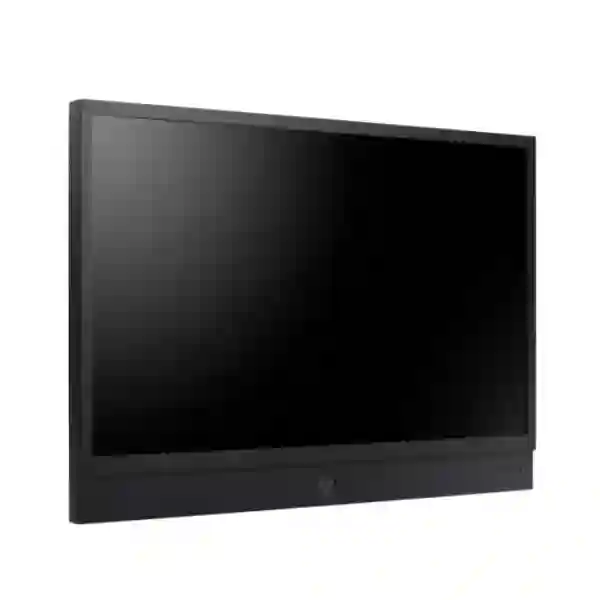
Hanwha SMT-3231PV 32-inch AI Public View Monitor
Make monitoring visible at an indoor entrance, checkout or reception with a 32-inch Full HD screen and integrated 2MP AI camera. The SMT-3231PV adds event-driven alerts, configurable on-screen notices and a two-window layout for the built-in camera and a supported HDMI source. Ask FourTeck Tanzania to assess suitability and the complete installation requirements before requesting a quote.
At a glance: important buying facts
- Public-view display with a built-in fixed-lens, 2MP IP camera
- 1920 × 1080 Full HD screen; listed brightness 400 cd/m²
- Two HDMI inputs; PIP/PBP pairing documented for internal camera and HDMI 1
- AI-based event functions, face-detection display and configurable messages
- Ethernet, WebUI management, audio and alarm interfaces
- Power via compatible 24 V DC or 802.3bt HPoE equipment; power accessories not included
- Indoor operating range 0°C to +40°C; plan mounting, storage and recording separately
What makes this an AI public-view monitor?
The Hanwha SMT-3231PV 32-inch AI Public View Monitor combines a customer-facing screen with a camera and intelligent video functions in one device. A conventional surveillance display generally shows pictures delivered from another camera or recorder. A public-view monitor has a different job: it lets people see that a space is being monitored while displaying a selected live view or message. The built-in camera reduces the need for a separate camera immediately beside that particular display, although it does not automatically remove the need for other cameras elsewhere on a site.
That distinction matters to shops, reception teams and facility managers in Tanzania. Before selecting equipment, decide whether the business wants a visible deterrent, an operational screen, a source of event information, or all three. The SMT-3231PV can contribute to each objective, but a successful design still depends on camera position, network configuration, the wider recording system and a clear operating procedure for staff.
Buyers should evaluate the device as a combined display-and-camera component rather than assuming it is a complete security system. It is especially relevant where a customer-facing view, configurable messages and an integrated IP camera are more useful than an ordinary television. Confirm the intended workflow and supporting hardware before ordering.
Who should consider the SMT-3231PV?
The most direct fit is an indoor location in which visitors, customers or employees can see a screen at an entrance, checkout or other deliberately chosen point. Retail managers may want people to notice a live image and an appropriate monitoring notice. A reception desk may need a visible view and a branded message. A site supervisor may value the ability to investigate queue movement or configure event-driven alerts, subject to a suitable network and responsible operational policies.
A second fit is a facility already using network surveillance equipment that can benefit from the monitor’s IP-camera capabilities and supported interoperability interfaces. A compatible recorder, video-management system or security network may be part of the design, but the supported ONVIF profiles do not guarantee every third-party application will implement every feature. Verify the actual software and firmware combination before committing to integration.
The product is less suitable where the requirement is only a cheap generic video screen, a very small counter display, or a weather-exposed outdoor installation. In those cases another format may be simpler and more cost-effective. A purchase decision should start with the intended audience, viewing distance, ambient conditions, camera field of view and power infrastructure.
Full HD screen: what viewers actually see
The display is a 32-inch-class LED monitor with a 1920 × 1080 Full HD resolution, a 16:9 image ratio and a stated brightness of 400 cd/m². Hanwha specifies a 1300:1 contrast ratio, 178-degree horizontal and vertical viewing angles, a 25 ms response time and approximately 16.7 million display colours. These figures describe a practical customer-facing display rather than a 4K professional editing panel.
At a retail entrance or service desk, placement and content size can matter more than nominal pixel count. If the screen is mounted high or viewed from several metres away, make any accompanying text large and straightforward. Do not fill the display with tiny instructions. A 1080p image may work well for a public-view task, but the screen does not turn lower-resolution inputs into genuine high-detail footage. Check the actual image source and lighting during commissioning.
The stated panel life is 30,000 hours, not a guarantee of operating life under every duty cycle or environment. Display scheduling and reasonable brightness choices can form part of an operational plan. Specify expected daily use, indoor temperature and the service process when evaluating whether the monitor matches the site’s operating requirements.
Built-in 2MP IP camera and optical coverage
The integrated camera uses a 1/2.8-inch 2MP CMOS imaging device with a fixed 3.06 mm lens and an F1.6 maximum aperture. Hanwha lists an approximate horizontal field of view of 107.7 degrees, vertical field of view of 59.0 degrees and diagonal field of view of 126.7 degrees. This relatively wide view can be useful when monitoring the area immediately in front of a public-facing screen, but field of view should not be confused with guaranteed identification detail.
With a fixed lens, the camera cannot be optically zoomed to compensate for a poor mounting position. Decide where people will stand, how close they will be, whether the display is likely to be blocked and whether the camera points at the intended area. A screen at a checkout may face customers effectively but overlook an aisle to its side. Use a floor plan and an on-site view test rather than assuming a single unit covers an entire premises.
Hanwha specifies 120 dB wide dynamic range and a minimum colour illumination figure of 0.03 lux under stated settings. These are technical capabilities, not promises of recognisable faces in every shadow or backlit entrance. Window glare, artificial light, evening conditions and reflective surfaces can change the outcome significantly. Review sample images in the actual environment before finalising a deployment.
AI analytics without unrealistic expectations
Hanwha identifies AI-based classification and analytics as core functions of the SMT-3231PV. Its published feature information covers person and face-related classification and event rules including motion detection, virtual-line crossing, direction, intrusion, loitering and enter or exit activity. The platform also lists defocus and tampering detection. This offers more event-design options than basic continuous viewing, but every configured rule should answer a real operational question.
For example, an entrance rule might support awareness of movement through a defined area, while a loitering rule could be examined for a restricted zone. The result depends on scene geometry, camera position, lighting, event settings and the business’s process for responding to an alert. Analytics may generate false alarms or miss some events, especially when views are obstructed or conditions change. Pilot the rules before relying on them.
Face detection must not be described as personal identity recognition. A visible box around a detected face is a way of illustrating that a person is in the camera view; it is not proof of someone’s name, identity or intent. Avoid claims that the monitor can automatically establish theft, misconduct or any other conclusion from a visual event alone.
Public-view deterrence and on-screen messages
The device supports a face-detection box, motion- or event-activated LED and audio alerts, configurable text overlays, a custom logo image and an image slideshow. These functions let a site communicate that a monitored area is visible without installing a second signage screen for every message. A default message such as “Recording in progress” is available, but businesses should verify that its wording accurately reflects their recording practice.
A useful message should be short, factual and legible. For example, a shop might show a live image alongside a concise security notice and an approved business logo. The display should not create a misleading impression that every activity is recorded, that personnel are watching continuously or that the site is using technology it has not configured. Align the wording with actual camera settings and the organisation’s privacy notices.
Alerts are also best treated as supporting indicators, not a substitute for staff judgement. A loud sound or bright visual warning may be inappropriate near a clinic reception or quiet waiting room. Test the experience from the visitor’s point of view, establish when an alert is useful and define who can change the display messages.
PIP and PBP: understanding the two-window layout
Picture-in-picture (PIP) places one supported video view inside another; picture-by-picture (PBP) arranges supported views beside one another. On the SMT-3231PV, Hanwha specifically identifies the internal camera and HDMI input 1 as the two sources for its two-window PIP/PBP functions. That distinction is important when specifying an external recorder or content player: do not assume any two arbitrary HDMI inputs can be paired in every arrangement.
One practical design is to make the integrated camera view visible while also showing a compatible HDMI feed. Another is to focus attention on the local camera, then use a separate input for a selected external video source. How the layout looks from a distance is as important as whether the feature exists. Two small images on one 32-inch screen may be less legible than one well-composed view.
Confirm input resolution, the intended window arrangement and how users switch modes during a demonstration. If an installation requires three independently displayed sources, a different display architecture may be necessary. PIP/PBP is a two-window capability here, not evidence of an unrestricted video wall or multichannel recorder.
HDMI, network and audio connections
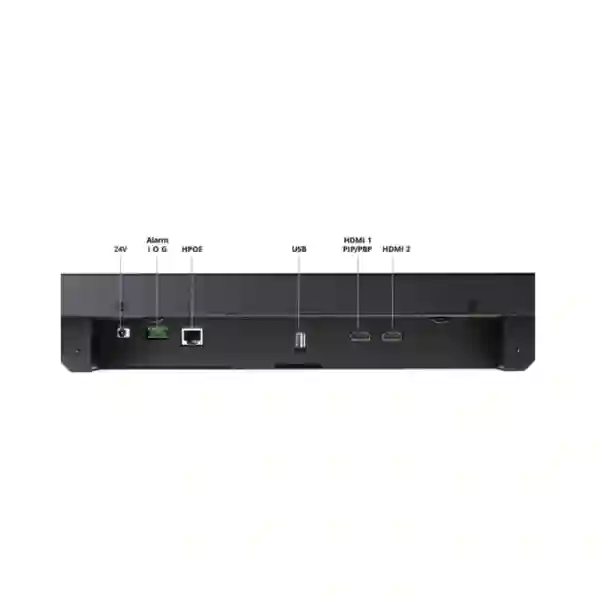
Hanwha specifies two HDMI inputs and one RJ-45 10/100BASE-T Ethernet interface. These serve different roles: HDMI is relevant to supported local video feeds, while the network interface supports IP-camera connectivity and management functions. The presence of two HDMI connectors should not be read as support for two simultaneous PIP sources; the documented PIP/PBP pairing remains the internal camera with HDMI 1.
The product also includes built-in speakers rated at 2 W each and one alarm input plus one alarm output. Those interfaces can help a project designer plan visible and audible alerts, but the connected alarm devices and required interface wiring still need to be specified. Loudness, audibility and suitability should be evaluated in the final installation environment rather than inferred solely from the speaker power rating.
Before purchase, make a connection schedule identifying what uses each HDMI port, who provides the Ethernet point, what audio or alarm devices are intended and where the cables will run. This prevents common project surprises such as a display being installed where the power and network infrastructure have not been prepared.
Recording, memory cards and event evidence
The built-in camera supports H.265, H.264 and MJPEG streams at the manufacturer-specified frame-rate limits. Hanwha lists a microSD/SDHC/SDXC slot supporting up to 256 GB, and its specification includes event-related recording to supported SD storage or NAS. That is useful for planning local evidence workflows, but an empty memory-card slot is not the same as a configured recording service.
Storage capacity depends on bitrate, scene activity, recording mode, compression and retention policy. Do not assume that a 256 GB card always provides a fixed number of days of video. If retaining footage is essential, calculate storage against the chosen encoding profile and typical event volume. Decide what should happen if the card fills, becomes unavailable or needs replacement.
Some installations may also connect the IP-camera stream to compatible recording or video-management infrastructure. Verify supported protocols, event integration, storage permissions and time synchronisation in a controlled test. Backups and access control should be planned according to the importance of the footage. The SMT-3231PV should not be advertised as a complete NVR replacement without evidence for the exact requirement.
People counting, queue management and heatmaps
Hanwha’s published specification lists people counting, queue management and heatmap functions based on its AI engine. These features can provide operational context in addition to the visible deterrence role. A retail or service manager may want to understand whether a monitored entrance is getting busier or how activity changes around a designated zone, without turning the screen into an all-purpose business analytics platform.
Before deploying any such function, identify the precise measure that matters. Is the objective entry counting, a queue-related alert, or a broad picture of movement? Each question may require a different rule and camera angle. A side-facing or obstructed camera can produce materially different measurements from a camera intentionally positioned for that task.
Treat the resulting figures as operational estimates subject to validation, not certified attendance counts or guaranteed measures of customer behaviour. Document the testing method, compare analytics with manual observations in representative conditions and ensure the team understands how to interpret exceptions.
Retail entrances and checkout lanes
In a shop, public viewing is often about making camera coverage obvious and helping visitors understand that an entrance or checkout is monitored. The SMT-3231PV may suit a visible indoor mounting point where the camera faces the customer approach. The screen can show the local view and an appropriate short message; configurable display content can support the site’s communication without adding a separate signage player for every basic use case.
Checkout areas create special constraints. Staff must still be able to work normally, screens should not obstruct customer flow and camera placement should avoid collecting unnecessary confidential details. A payment terminal, paperwork or unrelated private conversation may fall inside the wide camera angle unless the site carefully plans the view. Use masking and position changes where appropriate, and seek the organisation’s privacy guidance.
At an entrance, consider backlighting from doors or windows and whether visitors move rapidly across the frame. Position the monitor so people can see it naturally, not as an obstacle. A real trial is more informative than treating the screen size or analytics specification alone as proof that deterrence or queue handling will improve.
Reception areas and visitor-facing spaces
An office or shared-building reception can use a public-view monitor to present a live view while reinforcing a consistent visitor notice. The integrated camera and WebUI-managed content may reduce some of the complexity of running separate display and camera components at one reception point. Staff, however, should understand what information the device collects and which displays or notifications are active.
The appearance of the screen matters in a welcoming space. Select a mounting height, orientation and message design that allow visitors to understand the purpose of the unit without feeling that it dominates the room. A portrait-oriented installation may be attractive in a narrow wall position, but verify sightlines and content layout rather than assuming portrait mode is always the best choice.
For sites with separate security desks, confirm how the camera feed is monitored and who responds to an event. A public-view monitor tells visitors something about monitoring; it does not itself create a staffed response service. Ownership of alerts, access permissions and incident procedures should be defined before commissioning.
Clinics, hospitality and sensitive environments
Some waiting areas, hospitality receptions and other customer-service environments may consider a visible monitoring display, but sensitivity to privacy and atmosphere is especially important. The device’s capabilities do not justify filming areas where visitors have a reasonable expectation of privacy. A clinic may need a tighter field of view, a quieter alarm policy and clearer internal approval before using a screen in a public reception zone.
In hotels or guest-facing settings, practical issues include screen brightness at night, messages in a multilingual environment and whether a live camera image is appropriate for the customer experience. Hanwha lists English, Spanish and French for the monitor’s on-screen display interface; this does not establish a Swahili-language interface. Custom notice wording may need to be prepared separately and tested on the screen.
Use the product only in areas and for purposes approved by the site operator’s legal and data-protection policies. Where the required scope is primarily wayfinding or advertising rather than security visibility, a dedicated information display may better match the job.
Warehouses, service counters and controlled points
A warehouse reception, dispatch office or supervised service counter may want a clearly visible camera view at a single access point. The monitor can be evaluated as one part of that arrangement when the environment remains within its stated temperature and humidity limits. For a warehouse, distinguish between a protected indoor reception zone and a dusty, wet or exposed loading area; the listed product specifications do not establish outdoor weatherproofing.
Event triggers, virtual areas and image views can support a defined process, such as recognising activity in a marked approach zone. They do not replace barriers, access-control decisions or a trained security procedure. If access control equipment is involved, do not assume the alarm input/output creates an end-to-end integrated solution without engineering confirmation.
Plan cable protection, physical mounting security and how authorised staff can reach the equipment for maintenance. A large public display is more exposed to accidental contact than a ceiling-mounted camera, so install it where it is visible but not easily struck by trolleys or everyday movement.
Landscape, portrait and screen placement
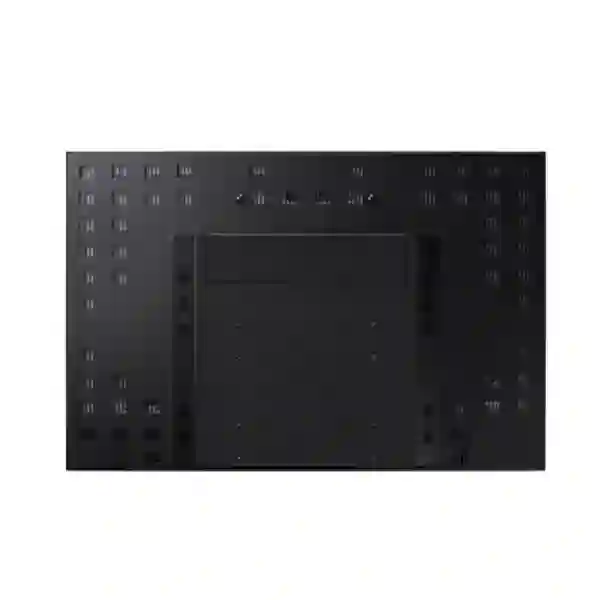
The SMT-3231PV supports landscape and portrait orientations. Hanwha lists VESA mounting patterns of 100 × 100 mm, 200 × 100 mm and 200 × 200 mm. Its published dimensions without a stand are approximately 734 × 490 × 68 mm, and the listed weight is 12.4 kg. These dimensions should inform the wall-bracket choice and site survey rather than being treated as final installed clearance.
Choose an appropriately rated mounting system and confirm wall construction, fixings, cable access and any local electrical safety requirements. Allow enough access for maintenance and ventilation. Do not assume a generic consumer television stand is included or suitable. Before purchase, decide whether the site needs a wall mount, compatible bracket, special orientation or a protected enclosure.
Position the camera to capture the intended approach and the screen to face the people who should see it. These two goals may conflict; the right place for a camera view is not always the right angle for reading the screen. A mock-up or temporary installation can reveal that problem before permanent holes and cable routes are committed.
Power: 24 V DC versus HPoE
Hanwha specifies two power approaches: 24 V DC and high-power Power over Ethernet identified as 802.3bt HPoE. The published power consumption is 56 W. The manufacturer explicitly notes that power adapters are not included, so an order should be checked for the correct separately supplied power equipment. Do not expect an ordinary low-power PoE port to operate a 56 W monitor.
HPoE can simplify placement where suitable cable runs and supported power-delivery equipment already exist. A 24 V DC design may be appropriate where a compatible adapter and protected power point are available. Either way, confirm the correct source ratings, cable quality, length, protection and compatibility with the device. Use the latest manufacturer-approved accessory details because accessory references may vary across documentation revisions.
For Tanzanian projects, establish the actual incoming power arrangement on site, whether continuity is required and how the display will behave during an outage. If the installation needs a UPS, choose it based on the whole system load and operational objective. Neither dual input options nor the presence of an Ethernet port implies that backup power is included.
Environmental limits and durability planning
The official operating range is 0°C to +40°C with relative humidity of 10% to 80%, non-condensing. A steel cabinet is specified, but this is not evidence of an outdoor enclosure or an ingress-protection rating. Indoor locations can still exceed recommended conditions near heat sources, direct sun through windows or poorly ventilated equipment recesses.
Check the temperature at the proposed wall position, not only the room thermostat. Consider humidity, dust, cleaning methods and accidental liquid exposure. If a retail display faces a sunlit doorway, the local heat load and glare may affect both screen readability and device conditions. Adjust the position or choose different equipment when the environment falls outside the documented limits.
Where the monitor may run for long periods, include cleaning, physical inspection, software review and service access in the maintenance plan. A manufacturer panel-life figure should guide expectations, not be presented as an unconditional warranty or guaranteed replacement interval.
Network design and IP-camera interoperability
The integrated camera offers an Ethernet connection, and Hanwha identifies ONVIF Profiles S, G, T and M alongside its SUNAPI interface. This can help system designers evaluate connections to compatible security software and recorders. An ONVIF profile label is a starting point for an interoperability test, not an assurance that every metadata, analytics or management feature will appear in every third-party platform.
Ask the integrator to validate live-stream access, chosen codec, user authentication, network discovery, event availability and any recording expectations against the exact software versions in use. The HDMI display function and the IP-camera function have separate roles; a successful network connection does not mean an HDMI source will automatically be displayed in the desired PIP configuration.
Document addressing, VLAN or subnet placement, DNS and time synchronisation where relevant to the installation. A simple deployment diagram showing the camera network, management workstation, display inputs and recording destination is useful for future support. Secure segmentation and monitored changes can help prevent a visitor-facing device from becoming an unmanaged endpoint.
Security settings and responsible access
Hanwha lists security features including secure boot, signed firmware, encrypted firmware, HTTPS, 802.1X network authentication and audit logs, together with support for controlling access by IP address. These features are useful only when enabled and maintained appropriately. A deployment should replace default credentials, define administrator roles and restrict who can edit messages, view recordings or change camera settings.
Configure network exposure conservatively. Avoid putting a management interface directly on the public internet or sharing administrator credentials among a large team. Where remote support is required, use the organisation’s approved secure-access method. Review firmware releases and compatibility notes as part of a controlled maintenance process rather than updating critical devices without a recovery plan.
The monitor’s camera may capture people who do not interact with the screen. Establish a proportionate retention period, restrict footage to authorised personnel, maintain incident procedures and follow applicable laws and internal policies. A visible monitor or warning message does not by itself establish that a particular recording purpose or processing activity is lawful.
Tanzania installation planning checklist
For a deployment in Tanzania, the most useful first step is a site-specific requirements check. Identify whether the screen will be placed in a shop, commercial reception, hospitality entrance or controlled operational area. Record the camera-facing direction, typical viewing distance, indoor light conditions, daily operating hours, planned network connection and expected video-retention policy.
Next, identify the installer or technical owner responsible for mounting, the electrical or HPoE power design, any recorder integration and the authorisation to configure camera analytics. Request a written bill of materials that separates the monitor from the compatible power equipment, wall-mount hardware, storage media and any project-specific network accessories. Confirm prices, tax treatment, delivery and installation terms in an actual quotation; none should be inferred from the model name.
Finally, arrange an acceptance demonstration covering the live image, correct PIP/PBP pairing, privacy masks where used, event alerts, on-screen messages, authorised logins and any recording requirements. This practical review is more valuable than assuming that a feature shown on a datasheet is already activated in a delivered installation.
Internet connectivity versus local operation
Network connectivity is important for an IP-camera and WebUI-managed installation, but an internet subscription is not the same thing as a functioning local network. A site may need local connectivity to authorised management or recording systems while restricting direct external access. Whether any particular remote workflow requires internet access depends on the selected infrastructure and software.
Plan for foreseeable interruptions: loss of the network switch, an unplugged Ethernet cable, a failed recorder or a power outage. Define which local display behaviour is expected in each situation and test it before handover. Do not promise that all analytics, notifications or recordings continue through every outage unless the exact configuration has been validated.
When a business relies on this screen as a public security notice, establish a simple manual fallback such as a physical sign and an incident escalation process. Good operational design considers what staff will do if the display or camera is temporarily unavailable.
Video streams and realistic image quality
The integrated IP camera supports H.265 and H.264 video streams with maximum published rates of 30 fps under 60 Hz settings or 25 fps under 50 Hz settings, as well as MJPEG at lower stated limits. Video quality and bandwidth can vary with codec, configured profile, scene movement, lighting and storage choices. A high frame-rate setting may not be necessary for every visitor-facing scene.
Before choosing recording settings, determine whether the use case is situational awareness, event review or another clearly defined task. The wide fixed lens is suited to showing a broad nearby area, but the pixel detail available at a distance will be different from a dedicated zoomed or higher-resolution camera. Avoid treating the wide-angle view as reliable evidence of fine facial detail across a large room.
During commissioning, inspect day and evening footage, motion blur, reflections and the result of people crossing the frame. Check the stored clip, not only the attractive live picture on the screen. If evidence quality is central, design dedicated camera coverage and recording arrangements around that requirement.
Comparing the 32-inch AI PVM with ordinary monitors
An ordinary monitor primarily presents a video input. The SMT-3231PV adds a built-in 2MP camera, AI analytics, public-view overlays, PIP/PBP modes and network management features. This difference can matter when a business wants the monitor and security-facing camera view to work together. It may be unnecessary when the task is simply to display a single NVR feed to staff in a back office.
A smaller public-view unit might be easier to position near a compact till point, while a 32-inch-class display can be more noticeable in a reception or larger entrance. Neither choice is automatically better: visibility, mounting space, camera angle and customer experience determine suitability. A larger screen does not automatically increase the detail captured by its camera.
Compare equipment using a functional checklist rather than a headline diagonal size. Look at screen readability, built-in camera capability, input-source flexibility, intended analytics, power infrastructure, maintenance access and total project materials. This is a stronger basis for a quote than assuming any device labelled “security monitor” will fulfil the same role.
Capabilities the product should not be assumed to include
The SMT-3231PV is not advertised here as a weatherproof outdoor camera, biometric identity system, guaranteed crime-prevention service, complete surveillance recorder or substitute for a comprehensive access-control design. Face detection indicates a detected face-like object in the image; it does not confirm who the person is. Event analytics provide configurable signals, not conclusions about behaviour.
The PIP/PBP feature is specifically documented for the internal camera and HDMI input 1. Do not plan an arbitrary number of simultaneous camera views without designing an external recorder or video-display system. The specified 1080p monitor resolution is not 4K, and the 32-inch-class screen does not provide an optical zoom lens for its integrated camera.
Power accessories are not automatically included, and regional product availability must be confirmed. The manufacturer’s published technical capabilities also do not verify local pricing, installation service, warranty coverage or regulatory approval for a particular project in Tanzania. Request those details in writing where they matter to a purchasing decision.
What to include in a quotation request
Provide the precise model number SMT-3231PV and the quantity required. Explain whether each unit will be mounted in landscape or portrait orientation and which input sources it should show. Supply the site layout, approximate mounting height, desired camera viewing area, lighting conditions and the normal daily operating schedule. These details help a supplier assess fit without guessing from the product title.
Describe the existing network, whether suitable 802.3bt HPoE infrastructure is present, and whether a 24 V DC adapter would be preferred. Ask the supplier to itemise compatible power equipment, mounting materials, storage cards, network devices and professional configuration separately where relevant. If there is an existing NVR or VMS, provide its make, version and the features that need to interoperate.
Also ask how acceptance testing, user handover and ongoing maintenance will be handled. Clarify whether price, delivery, taxes, installation, support and warranty are included in the specific offer. An accurate quote should match a documented design rather than presenting a bare monitor as a turnkey solution.
A sensible commissioning sequence
Start with a bench test of the monitor, its approved power source and the intended network connection. Set up authorised management access and document the initial configuration securely. Confirm the screen, built-in camera and whichever HDMI input will be used. Where PIP/PBP is required, test the precise pairing described by the manufacturer rather than assuming that a menu option alone proves compatibility.
Move to the installation point and verify the image under typical light and traffic conditions. Adjust mounting orientation and the intended view before final cable dressing. Configure privacy masks and a proportionate notice if applicable, then select the analytics rules that correspond to genuine operating decisions. Review the image in both live and recorded form if recording is in scope.
Finish with an operational handover: demonstrate how authorised staff change messages, manage schedules, acknowledge relevant events and request technical support. Record the network settings, installation date, power arrangement and test outcomes in a controlled handover document. A small amount of structured commissioning work helps avoid later confusion over what was configured and what was merely available.
Maintenance and troubleshooting priorities
If the screen powers on but shows an unexpected image, begin by checking the selected source and PIP/PBP configuration. If the camera is unavailable to a recording system, check link status, addressing, credentials, supported video profiles and access restrictions. Avoid resetting the device without first preserving the current configuration or confirming the approved recovery process.
For inconsistent analytics, inspect the scene before changing many settings. A moved display, new shelf, bright doorway or temporary obstruction may alter detection behaviour. Revisit the event zone and compare alerts with observed movement. If storage is failing or footage is absent, check the media status, retention policy and event-recording configuration rather than assuming the camera has stopped working.
Assign responsibility for firmware reviews, cleaning, configuration backups and inspection of physical mounts. The same equipment can be technically functional but operationally ineffective if nobody owns its messages, alerts or incident process. Record changes and retest critical functions after network, environmental or layout modifications.
Decision summary for buyers
Choose the Hanwha SMT-3231PV when the requirement is a visible indoor public-view screen with an integrated 2MP IP camera, AI-assisted events, configurable messaging and limited two-window display functionality. It offers a useful combination for a deliberately designed entrance or reception workflow, particularly where a single mounting position must support both a screen and a nearby camera view.
Before ordering, confirm three essentials: the exact use case and camera sightline; the intended HDMI, network and recording integration; and the separately supplied power and mounting requirements. Then verify environmental suitability, privacy notices and the responsibilities for installation and ongoing management. These checks reduce the likelihood of buying a capable product that does not suit the actual space.
FourTeck Tanzania can be asked to review a project brief and prepare a model-specific quotation. Local price, stock, lead time, installation coverage, warranty and any special project commitments should be confirmed in the resulting offer, not inferred from this technical overview.
Verified technical specifications
These manufacturer-published values are for comparing the SMT-3231PV with the intended site requirements. Confirm the final regional datasheet and compatible accessories with the quotation. Video performance, features and setup outcomes can depend on configuration and integration.
| Parameter | Specification |
|---|---|
| Manufacturer / model | Hanwha Vision / SMT-3231PV |
| Product type | AI public-view monitor with integrated IP camera |
| Display size / type | 32-inch class LED monitor |
| Display resolution / aspect | 1920 × 1080 Full HD / 16:9 |
| Brightness / contrast | 400 cd/m² / 1300:1 |
| Viewing angle | 178° horizontal / 178° vertical |
| Response time / panel life | 25 ms / 30,000 hours (manufacturer specification) |
| Camera sensor | 1/2.8-inch 2MP CMOS |
| Fixed camera lens | 3.06 mm; maximum aperture F1.6 |
| Camera field of view | 107.7° H / 59.0° V / 126.7° D |
| Wide dynamic range | 120 dB |
| Video compression | H.265 / H.264 / MJPEG |
| HDMI inputs | 2 |
| Two-window modes | PIP/PBP: integrated camera with HDMI input 1 |
| Network port | RJ-45 10/100BASE-T Ethernet |
| Other interfaces | One alarm input; one alarm output; dual 2 W speakers |
| Removable media | microSD / SDHC / SDXC slot, up to 256 GB |
| Network API / profiles | SUNAPI; ONVIF Profiles S/G/T/M |
| Power | 24 V DC or 802.3bt HPoE; accessories separate |
| Power consumption | 56 W |
| Operating conditions | 0–40°C; 10–80% RH, non-condensing |
| Dimensions without stand | 734 × 490 × 68 mm |
| Weight | 12.4 kg |
| VESA mount patterns | 100 × 100; 200 × 100; 200 × 200 mm |
| Cabinet finish | Black steel cabinet |
Frequently asked buyer questions
Is the SMT-3231PV a CCTV camera or a monitor?
It is a public-view monitor with an integrated 2MP IP camera. It combines a customer-facing Full HD screen with camera functions and configurable messages. It is not simply a passive screen, but neither is it a complete CCTV installation on its own. Recording, monitoring staff, network design, positioning and any additional cameras must be specified according to the site.
What is the purpose of a public-view monitor?
A public-view monitor lets people see a camera view or an appropriate monitoring message at a visible location. It may help communicate the presence of surveillance at an entrance or checkout. The display’s impact depends on what the viewer can actually see and how the installation is operated. It does not guarantee prevention of theft or other incidents.
Can the display show its own camera and an NVR image together?
Hanwha documents two-window PIP/PBP operation using the integrated camera and HDMI input 1. A compatible recorder or other device could provide the HDMI feed, subject to output settings and on-site testing. Do not assume HDMI input 2 can become an unrestricted second PIP source or that all NVR and display configurations work automatically.
Does the built-in camera provide facial recognition?
The product includes face-detection functionality and can display a visual face box. That is different from identifying an individual person or verifying identity. The specification describes AI-assisted detection and event analytics; the buyer should not represent it as a biometric identity verification service without separate verified evidence of that particular capability.
What AI events does the monitor support?
Hanwha lists person and face-related classification plus functions such as motion, virtual-line, virtual-area, intrusion, loitering and selected tampering or defocus events. It also lists people counting, queue management and heatmap features. Each rule needs an appropriate camera angle, configuration and testing. Real-world accuracy should be evaluated in the planned environment.
Can the SMT-3231PV record footage locally?
The manufacturer lists one microSD/SDHC/SDXC slot with a supported capacity up to 256 GB and event-related recording options. A card, recording plan and settings may be required. Storage duration is not fixed by the card capacity alone, because compression, bitrate and activity all influence retention. Confirm a recording workflow by testing saved video rather than only the live view.
Does the monitor support ONVIF?
Hanwha identifies ONVIF Profiles S, G, T and M, along with SUNAPI. These are useful signals for evaluating integration with compatible recording and management systems. Features available through any specific NVR or VMS depend on the exact software, firmware and implementation. Test video streams, analytics metadata and event functions rather than assuming complete universal compatibility.
Can it run on ordinary PoE?
Plan for the specified 802.3bt HPoE arrangement or an approved 24 V DC power source. With a stated consumption of 56 W, an ordinary low-power PoE port should not be assumed suitable. The required power adapter or injector is not included according to the manufacturer. Have the installer confirm compatible power accessories and cable conditions.
Is it suitable for outdoor installation in Tanzania?
Do not assume so. The published operating range is 0°C to 40°C and 10% to 80% relative humidity without condensation. The specifications supplied here do not establish an outdoor ingress-protection rating. Exposed entrances, rain, dust, intense sun or unventilated enclosures may require a different product or engineered protection.
Can the screen be installed vertically?
Yes, Hanwha lists portrait and landscape modes and several VESA mounting patterns. The wall, fixing system, bracket load rating, cable access, visibility and camera direction must be assessed before installation. A portrait display can help in a narrow wall space, but the chosen content and live view must remain readable.
Does it come with a power adapter, memory card or bracket?
The manufacturer explicitly states that power adapters are not included. Do not presume that a microSD card, mounting bracket, network switch, recorder or other installation materials are provided. The final supplier quotation should list the exact supplied contents and any required separate items. An accessory model should be confirmed against the latest regional documentation before purchase.
What is the monitor resolution?
The screen is 1920 × 1080 pixels, commonly called Full HD or 1080p, in a 16:9 aspect ratio. It is not specified as a 4K display. The integrated camera is 2MP with its own video-stream settings. Selecting a suitable source and positioning the screen at a readable distance are important to the result.
Is it useful for people counting or queues?
The official specification lists people counting, queue management and heatmap analytics. Whether one installation produces useful operational measurements depends on the view, lighting, traffic pattern and how each function is configured. Test counts against real observations and avoid treating analytics as guaranteed or audited business figures without validation.
Can it show a business logo or customised warning?
Yes. Hanwha lists custom logo images, configurable text overlays and a slideshow. Keep the displayed notice accurate, readable and aligned with the business’s actual recording policies. A preconfigured monitoring phrase should not be used to imply continuous recording unless that is what the installation really does.
Can FourTeck Tanzania provide a price and installation quotation?
A buyer can request a project-specific quotation that identifies the monitor quantity, desired configuration, required power accessories, mounting materials and support scope. This page does not confirm stock, price, local delivery terms, warranty or installation coverage. Those items should be provided by the sales team in a written offer for the exact project.
What information should I send before ordering?
Send the model name SMT-3231PV, quantity, installation location and indoor conditions, preferred orientation, how the camera will face visitors, and the source to be connected by HDMI. Mention whether an existing recorder or VMS is involved, and whether 802.3bt HPoE or 24 V DC power is available. A layout or site survey can help resolve integration questions.
How should video privacy be handled?
Define the recording purpose, determine what area should be captured and restrict management and footage access to authorised personnel. Set a documented retention policy and use available privacy controls where appropriate. Requirements differ by organisation and use case; a public-view display should never be treated as a replacement for an appropriate legal or privacy assessment.
What happens if the internet is down?
The answer depends on whether the installation uses local sources, network recording, cloud services and a separate power arrangement. Loss of internet does not necessarily mean loss of a local network, while loss of switch power may affect the camera and display functions. Define and test the expected failure modes instead of assuming uninterrupted recording or management.
Is the screen suitable for a small counter?
Possibly, but 32 inches may be larger than necessary in a compact workspace. Consider sightlines, physical clearance, safety, viewing distance and the fixed camera angle. A smaller public-view product or a separate camera and screen could be more appropriate. Match the physical installation to the role rather than selecting by screen size alone.
What should be checked at handover?
Verify the live camera view, intended HDMI picture, PIP/PBP arrangement, event settings, screen messages, authorised users, network access, power recovery and any actual recording function. Document the accepted configuration and make sure site staff know who is responsible for alerts, updates and troubleshooting. A brief functional demonstration is often the clearest acceptance test.
Request a Hanwha SMT-3231PV quotation
Tell FourTeck Tanzania how many monitors you need, where they will be mounted and whether the project requires an NVR or VMS connection, a wall bracket, 24 V DC power or 802.3bt HPoE equipment. Request confirmation of the exact supplied accessories, compatibility, price, availability, warranty and project-specific support terms. No local stock or delivery commitment is implied on this page.
Next step: contact the FourTeck Tanzania sales team with the model number SMT-3231PV and your installation requirements.




Reviews
There are no reviews yet.