
Ubiquiti UniFi Flex 10 GbE USW-Flex-XG
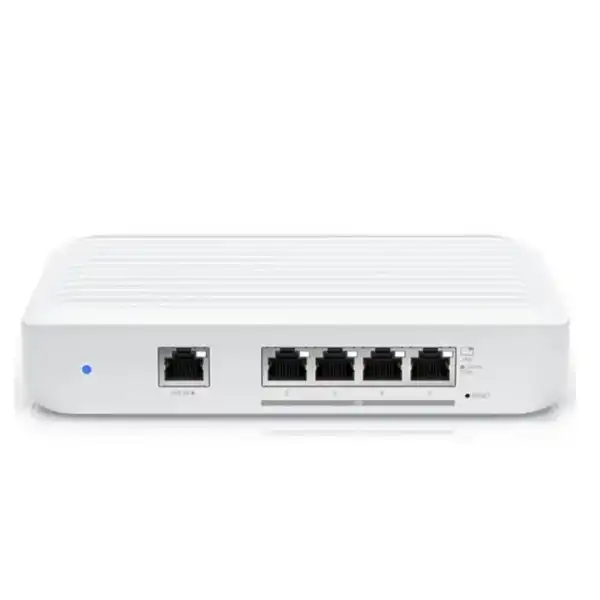
Connect a small cluster of high-bandwidth workstations, NAS devices and servers using four 10 GbE RJ45 ports with UniFi Network management. The Ubiquiti USW-Flex-XG Tanzania buying decision is primarily about the correct port layout, power choice and upstream connection—not simply the headline speed.
At a glance: what you are buying
The Flex XG is a compact, configurable 10 GbE Layer 2 switch for a concentrated wired high-speed segment. It offers a clear upgrade path for teams whose local data movement is limited by gigabit connections, while preserving the distinction between local switching speed and speed to the wider network. Review the specifications and deployment guidance below before requesting a quote.
Verified technical specifications
| 10 GbE connectivity | Four RJ45 10 GbE ports |
|---|---|
| Additional network and power port | One RJ45 10/100/1000 Mb/s port with PoE+ input |
| Switching and forwarding | 82 Gbps switching capacity; 41 Gbps non-blocking throughput; 61 Mpps forwarding rate |
| Management | UniFi Network application, version 6.1.67 or later |
| Operating role | Managed Layer 2 Ethernet switching |
| Power methods | 802.3at PoE+ input or USB Type-C, 5 V DC / 5 A |
| Maximum power consumption | 25 W |
| Form factor | Desktop or wall mounting; 135 × 185 × 32 mm |
| Weight and housing | 1.2 kg; polycarbonate enclosure |
| Operating environment | −5°C to 45°C; 10–90% non-condensing humidity |
| Selected Layer 2 functions | VLANs, LACP, STP/RSTP, IGMP snooping, port mirroring, jumbo frames and storm control |
Figures and functions are based on Ubiquiti’s model-specific technical documentation. Actual application throughput and feature operation depend on the complete deployment.
A practical 10 GbE upgrade without replacing your entire network
The Ubiquiti USW-Flex-XG Tanzania product consideration starts with a familiar problem: a capable computer or storage server is connected through an ordinary gigabit switch, so large local files still move across a one-gigabit path. Upgrading every switch and network device can be expensive and unnecessary. A smaller high-speed segment lets teams concentrate 10 GbE where it changes day-to-day work, while keeping compatible parts of the existing network in service.
The Flex 10 GbE is intended for this focused deployment. Four copper 10 GbE RJ45 interfaces can connect demanding systems, and UniFi Network gives an administrator visibility and Layer 2 controls. It is not an Internet-speed booster, a router or an automatic cure for slow storage. Actual results depend on the network adapters, storage performance, cabling, host configuration, upstream capacity and the traffic pattern. A sensible purchase begins with identifying which connections are truly constrained.
Understand the five-port layout before committing
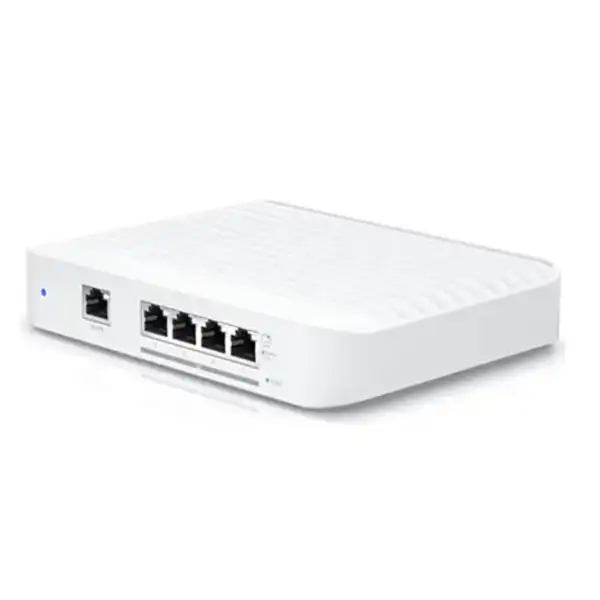
The most important distinction is the port mix. The product has four 10 GbE-capable RJ45 ports and one additional RJ45 port with a maximum line rate of 1 GbE. The gigabit interface is also the PoE+ power input. Descriptions that merely say five-port switch can be misunderstood: there are not five 10 GbE connections. Each of the four high-speed ports is valuable, particularly if one must be reserved for a connection to another switch.
Draw a simple port map before purchasing. For example, a desktop workstation, an editing machine and a NAS can occupy three 10 GbE interfaces while the fourth connects to a 10 GbE upstream network. Alternatively, four local 10 GbE devices can connect directly, while an upstream gigabit network attaches to the fifth port. The right layout depends on whether most traffic stays local or must reach services beyond this switch. Neither layout is inherently best for every business.
Choose the uplink according to the traffic path
An uplink is the connection that carries traffic from this compact switch to the wider LAN. When that connection uses the separate 1 GbE RJ45 port, traffic toward other switches, routers and upstream servers shares a 1 GbE link. Communication among devices connected directly to the 10 GbE ports can still use their faster local links, subject to endpoint and switching limits. This distinction matters for office file servers and shared storage that sit elsewhere in the building.
When users regularly transfer data to a remote 10 GbE server, assign one of the four 10 GbE ports as the uplink and connect it to a compatible high-speed port. That leaves three high-speed copper ports for nearby equipment. With a 10 GbE uplink, an administrator still needs to check the rest of the route: a downstream gigabit server, firewall interface or oversubscribed backbone can remain the limiting factor. Design for the full journey of the data rather than only the nearest port.
PoE+ input is for powering the switch, not powering clients
The USW-Flex-XG accepts power through its dedicated gigabit RJ45 interface using a suitable 802.3at PoE+ source. This may simplify placement when a compatible powered Ethernet connection is already present. PoE+ describes how this switch can receive power, not a promise that it delivers PoE to access points, cameras, IP phones or other attached devices. Buyers who need to power endpoints should select equipment with explicitly specified PoE output ports and a sufficient power budget.
Check the power source before installation. The source must provide the required standard and adequate power; do not assume that any similarly shaped injector or passive power system is interchangeable. Confirm the cable path and the intended data link separately. A site with a high-speed upstream network may choose the alternate power method so that the gigabit power connection is not mistaken for the main data uplink. Appropriate electrical protection and reliable site power remain important.
USB-C power offers a different installation choice
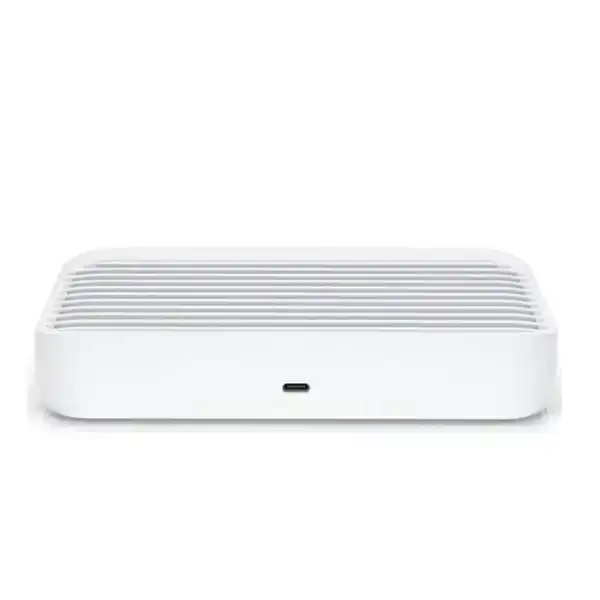
Ubiquiti also specifies USB Type-C power at 5 V DC and 5 A, with an external 25 W supply in the product specification. This option is useful when an appropriate local mains supply is preferred or when the administrator wants to use a 10 GbE copper port for the main uplink. The USB-C connector is for the specified power input; it should not be presented as a USB data interface or a general-purpose charging facility.
Make the power decision together with the network layout. If a site has a central UPS-backed networking cabinet, review how the switch will remain powered during interruptions and whether the selected power route also remains active. If the switch is located at a desk, choose an accessible and protected position for the power connection. Confirm the exact power accessories included in the proposed local quotation rather than relying on assumptions based on packaging offered in another region.
Where the performance figures fit into planning
Ubiquiti lists 82 Gbps switching capacity, 41 Gbps total non-blocking throughput and a forwarding rate of approximately 61 million packets per second. These are manufacturer hardware figures describing the device’s switching capability. They are not claims that one file copy will reach 41 Gbps or that every individual host can exceed its negotiated Ethernet link. Real application speed also depends on packet sizes, protocols, host processing, storage media and how many simultaneous traffic flows are active.
Consider a workstation copying a large project to a NAS. If both endpoints have compatible 10 GbE adapters and storage capable of sustaining the transfer, the network may stop being the main bottleneck. If the NAS uses slow disks, a constrained storage pool or a single gigabit link, the same switch cannot create bandwidth that is not present elsewhere. Evaluate performance by identifying the slowest necessary component, then test expected workflows after deployment rather than relying on headline capacity alone.
Management through UniFi Network
The Flex XG belongs to the UniFi managed switching ecosystem. Ubiquiti specifies UniFi Network application version 6.1.67 or later for management. A compatible UniFi Network deployment allows administrators to adopt the switch, inspect connected interfaces, observe negotiated link rates and apply supported port settings. This is helpful for teams that already manage other UniFi equipment and want consistent operational visibility rather than separate configuration interfaces for every switch.
Before ordering, confirm where UniFi Network will run, who administers it and whether that deployment supports the switch. The presence of UniFi management should not be confused with a requirement to purchase an unrelated network appliance when a suitable supported controller path already exists. Plan administrative access, backups of relevant network settings and a method for updating firmware safely. Management visibility improves diagnosis, but it does not remove the need for basic documentation of cables, VLANs and uplinks.
VLAN segmentation for a small high-speed segment
Virtual LANs help organize traffic into logical network groups. Ubiquiti’s current specification lists support for 1,000 VLANs, and the switch supports the related Layer 2 controls expected in a managed deployment. A practical design might separate an editing workstation group, an infrastructure management network and a shared services network. The exact configuration should follow the wider network’s IP addressing, routing and access policy, not merely the number of supported VLANs.
Plan port roles carefully. A port connected to one workstation may carry a selected untagged network, while a switch-to-switch uplink might need several tagged networks. Confirm which VLAN is native and which tagged networks the upstream equipment permits. VLANs alone do not provide a firewall policy, and crossing between isolated networks requires suitable routing and security controls elsewhere. Test reachability and permitted services after any change so that segmentation does not accidentally block legitimate business workflows.
Link aggregation is not a substitute for counting 10 GbE ports
The specification identifies LACP port aggregation among the supported Layer 2 features. Aggregation can be useful when compatible endpoints and network designs need multiple physical paths working as one logical bundle. However, using more than one of the four 10 GbE ports for a bundle reduces the number available for other equipment. There is no fifth high-speed port hidden behind the management interface, so available connectors should be planned explicitly.
LACP also does not mean that a single ordinary transfer automatically runs at the sum of all member-port speeds. Traffic distribution depends on the hashing method and the number of distinct conversations. A business moving many concurrent file streams may benefit differently from a single workstation sending one large file. Confirm aggregation support and configuration on both ends, and avoid combining it with an unplanned loop. For most small deployments, straightforward single-link 10 GbE may be easier to support.
Spanning tree, loops and network resilience
The USW-Flex-XG supports STP and RSTP, technologies used to control unwanted Layer 2 loops in suitable switching topologies. They matter when a small 10 GbE workgroup connects to a larger business network that already has multiple switches and possible redundant paths. A mistakenly duplicated cable can disrupt connectivity if the wider network is not configured to handle the loop. Good labeling and a documented layout reduce that operational risk.
Do not assume that plugging multiple uplinks into different switches automatically creates a resilient design. Resilience depends on the upstream architecture, spanning-tree behavior, aggregation capabilities and failure testing. Where uninterrupted connectivity is critical, validate the network-wide design with the responsible administrator before implementing redundancy. This compact switch may form part of such a design, but it should not be described as a complete high-availability solution by itself.
Multicast and shared media workflows
Ubiquiti includes IGMP snooping and advanced IGMP options in the technical feature list. In networks that use multicast streams, properly planned handling can limit unnecessary traffic to ports that do not need it. This is relevant to some media distribution, monitoring and application scenarios, but the value depends on how the network actually uses multicast. Ordinary file transfers between a PC and NAS do not automatically require an elaborate multicast configuration.
Review the path taken by multicast traffic across the full LAN. Group membership, querier behavior, VLAN placement and the upstream device configuration can all affect results. If a deployment uses video feeds or specialized live production applications, confirm the application requirements and test the configuration rather than enabling every advanced feature without a plan. The goal is predictable delivery and maintainable settings, not a long list of enabled options.
Security-related Layer 2 controls
The published feature list includes 802.1X control, access lists, DHCP snooping and guarding, device or port isolation, storm control and various MAC-based restrictions. These functions give administrators tools to enforce a wired access policy on supported UniFi software. For example, a small office may use access controls to reduce casual device connection risks or to limit communication among devices attached to specific ports.
Security is still a whole-network responsibility. Policies must match the topology and should be verified with test devices before they are applied to critical workstations or servers. Some controls interact with gateway configuration, routing and how identities are maintained. A managed Layer 2 switch does not replace a perimeter firewall, endpoint protection, identity administration or reliable backups. Choose settings because they address a documented risk, and retain a recovery plan for accidental misconfiguration.
Monitor what actually happens on the wire
The switch supports port mirroring and other management functions that are useful when investigating a network problem. An administrator can inspect the reported link state, identify whether a port negotiated below its expected speed and review the relevant settings. The physical port label and a simple connection diagram make these observations much more useful. When a transfer becomes slow, record which two endpoints were communicating and whether the traffic crossed an uplink.
Port mirroring can assist with packet capture when configured appropriately and when a suitable analysis host is available. It is not a substitute for careful handling of sensitive network data, and captured traffic should be protected. For everyday troubleshooting, begin with mundane checks: cable seating, adapter driver, port profile, power stability and the intended route. This systematic approach often separates a bad cable or an upstream bottleneck from an issue with the switching hardware.
Cabling choices for copper 10 GbE
The four high-speed interfaces use RJ45 copper Ethernet rather than built-in SFP+ cages. That is convenient when equipment already has 10GBASE-T interfaces and structured copper cabling is available. It also means the design should not assume that a direct-attach copper SFP+ cable or a fiber optic module plugs straight into this switch. A network based around fiber or DAC cabling may need different switch hardware or appropriate upstream interface conversion.
For new longer copper 10 GbE runs, Cat 6A cabling is a sound planning choice, with installation quality and relevant channel limits verified by the cabling contractor. Existing shorter cables may work in some conditions, but performance depends on length, termination, interference and cable quality. Request certification or suitable testing for critical links. Do not treat the printed cable category as proof that a specific installed channel will negotiate or sustain the intended speed.
Check the adapter at both ends
A 10 GbE switch port only delivers its intended benefit when the connected device can participate at a compatible speed. A desktop may need a supported 10 GbE network interface card, while a laptop may require an appropriate external adapter or dock. Many NAS appliances offer 10 GbE only on selected models or through optional expansion. Confirm adapter type, supported operating system, drivers, bus bandwidth and connector format before purchasing accessories.
Avoid buying on the assumption that every Ethernet port marked fast will negotiate at 10 GbE. Inspect the documented capabilities of the specific workstation and storage appliance and then check the actual negotiated speed after installation. When a host is limited to 1 GbE or 2.5 GbE, the switch does not multiply that host’s interface speed. A phased approach can still make sense: upgrade the busiest device first, measure the improvement and add others when the business case is clear.
Shared storage and NAS access
Small teams often investigate 10 GbE because several people need access to large design files, media assets, backup archives or virtual-machine images on a local NAS. The Flex XG provides a practical way to connect a compact group of high-bandwidth devices close to shared storage. For instance, one 10 GbE port could serve a NAS, two could serve workstations and the fourth could form a high-speed link to the wider network.
Before promising faster collaboration, look inside the storage system. The disk layout, SSD cache, CPU, protocol, concurrent users and available network interfaces all influence throughput. A NAS with insufficient read or write capability may remain slow regardless of switch speed. Authentication, file permissions, reliable backups and storage resiliency must be designed separately. The switching upgrade is one component in a shared data workflow, not a replacement for a coherent storage plan.
Creative workstations and media production
Editors, animators, visual designers and other creators frequently work with files large enough for a gigabit connection to become noticeable. A focused 10 GbE area can help when multiple machines exchange large local assets or access a suitable centralized media server. In a small creative studio, keeping the workstations and their active storage close to the same high-speed switch may reduce unnecessary movement across a slower network backbone.
Workflows vary substantially. Real-time playback, proxy editing, sequential transfers and simultaneous mixed workloads place different demands on disks, applications and network infrastructure. Test representative project files rather than relying on an idealized copy-speed estimate. If staff primarily use cloud applications over an Internet connection far slower than 10 GbE, an internal switch upgrade may have limited impact on their most common tasks. Match the investment to measured local activity.
Virtualization, development and test labs
A small lab can use the four high-speed copper connections to link hypervisor hosts, a test server and shared storage. This can be useful for moving large virtual-machine images, software build outputs or test data where the hosts are physically close. UniFi Network management also helps a lab owner see port state and experiment with supported Layer 2 settings in a controlled environment.
It is important to distinguish laboratory connectivity from enterprise storage-network architecture. A high-speed Ethernet interface alone does not ensure low latency, redundancy or predictable storage I/O under load. Where virtual machines or critical workloads depend on the link, check the storage protocol, host adapters, VLAN design, link failure behavior and recovery procedures. Production use should be assessed against reliability requirements, and the small number of ports may become a practical limit as the lab grows.
Small office file sharing and internal services
A small office does not need to replace every access switch to benefit from one high-speed segment. The Flex XG can connect a file server, a local backup appliance and a few demanding PCs while ordinary office devices remain on existing networks. This lets planners focus spending on the connections involved in repeated large local transfers. Management policies can remain aligned with the larger UniFi environment when the site already uses it.
The design should separate two questions: how quickly devices within the segment communicate, and how they reach other offices, cloud platforms and the Internet. Traffic leaving through a gigabit uplink remains subject to that link’s limits. If the primary need is faster cloud upload or download, review Internet service capacity, router throughput and WAN policy first. A 10 GbE local switch is appropriate only where the work genuinely depends on high-bandwidth local connections.
Backup windows and restore operations
Backups often expose a network bottleneck because large volumes of data move in a scheduled window. A 10 GbE link between a backup server and suitably fast storage can reduce the network portion of that constraint. The Flex XG can be part of this path when the required endpoints fit within its four 10 GbE connectors and the route avoids an unintended gigabit chokepoint. Planning should include both routine backups and occasional large restores.
Backup speed is not the same as backup safety. Retention policy, off-site or isolated copies, access control, restore testing and protection against accidental deletion remain essential. Compression, deduplication, source-disk read speed and software concurrency may determine the result more than port line rate. If the backup application or storage system cannot keep a faster link busy, a switch upgrade alone may produce modest gains. Test a representative restore as well as the backup job.
Physical placement and heat management
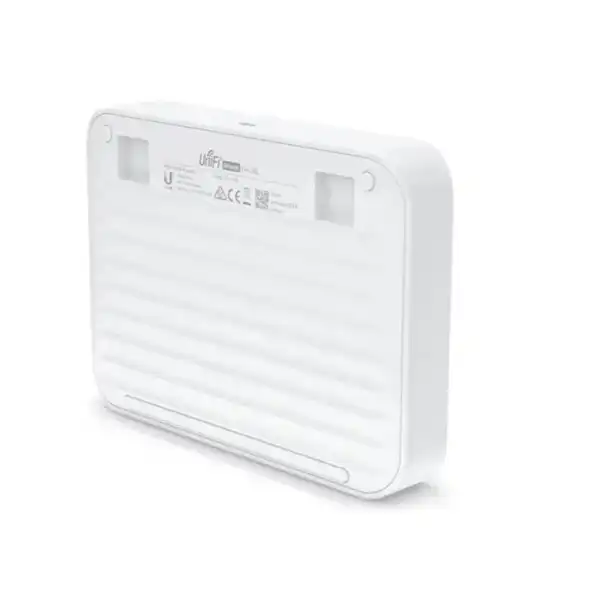
The manufacturer lists dimensions of 135 by 185 by 32 millimetres, a weight of approximately 1.2 kilograms and a polycarbonate enclosure. The product is designed for desktop or wall placement, offering an alternative to a larger rack switch. Its compact format suits a workstation cluster, small equipment shelf or carefully planned wall position. Make sure the mounting surface, cables and power routing are appropriate for the actual location.
High-speed networking equipment consumes power and produces heat. Ubiquiti specifies up to 25 W of power consumption and an operating ambient temperature range of −5°C to 45°C. Keep ventilation paths clear, avoid stacking equipment on the enclosure and consider the air temperature around the mounted device rather than the average temperature elsewhere in the building. For warm equipment spaces, review cooling and airflow before installation. Do not treat the stated range as permission to operate in direct sun or an unprotected outdoor enclosure.
Tanzania deployment considerations
For a Tanzania office, studio, workshop or technical lab, the best installation approach depends on the actual building and network environment. Survey power availability, equipment-room ventilation, Ethernet routes and the condition of existing terminations. Review how local power interruptions affect workstations, NAS equipment and the upstream network, and decide whether a suitably sized UPS arrangement is required. These are site-design questions, not claims about product stock or service coverage.
If the switch must connect rooms or floors, measure the required copper runs and assess whether the cable channel meets the intended speed. Where infrastructure relies on fiber between buildings, the RJ45-only high-speed interfaces deserve particular attention: the Flex XG may need to sit behind an upstream device that handles the optical connection. Request a topology review and an itemized quotation for the switch and any necessary accessories before purchasing, especially when existing interfaces are not fully documented.
An installation sequence that reduces surprises
First, draw the network and label which of the five ports will serve each device. Verify the power method, the available RJ45 interfaces and the upstream speed. Second, prepare suitable cabling and confirm host adapters. Third, connect the switch with stable power and use a supported UniFi Network application to adopt and configure it. Fourth, check link negotiation on every high-speed port before moving critical production traffic.
After the physical links are healthy, apply the required VLAN and access policies in a controlled order. Verify that each connected device reaches only the intended services. Run ordinary file transfers and representative workloads, recording the path and achieved performance. Finally, save a port map and the relevant administrator procedures for future support. A short commissioning record is particularly useful when the person maintaining the network is not the person who originally installed the switch.
A realistic troubleshooting checklist
If a device connects at a slower rate than expected, start by checking whether that device genuinely has a 10 GbE interface and whether the cable is seated and suitable. Inspect negotiated speed in UniFi Network and on the host. Try a known-good short cable if possible, and confirm that the connection is using one of the four high-speed ports rather than the separate gigabit port. Confirm the NIC driver and any speed settings before replacing hardware.
If the reported link rate is correct but file copies remain slow, look at disk performance, storage protocols, application overhead and CPU usage. Check whether traffic crosses a gigabit uplink or a slower gateway. If the switch disappears from management, review the power source, management network and VLAN assignment. Make one change at a time and keep notes about the outcome. These steps help prevent unnecessary changes to a functioning network when the real bottleneck is somewhere else.
When this compact switch is a good fit
The strongest fit is a compact copper 10 GbE cluster whose owner wants UniFi management and can work within four high-speed ports. Typical examples include two or three demanding PCs with shared local storage, a small editing suite or a technically managed lab. The switch can also be attractive where a wall or desktop mount is preferable to a rack-sized device, and where PoE+ input or specified USB-C power offers a practical installation choice.
Buyers should value the management ecosystem as well as the data ports. If a site already uses UniFi Network and administrators understand its configuration, the added device may fit naturally into established processes. If the site has no management plan, an unmanaged switch might be simpler for a basic requirement. If several additional 10 GbE devices are expected soon, choose enough capacity for growth instead of filling all available ports on the first day.
When a different switch may be more suitable
The Flex XG is not designed to provide five 10 GbE copper ports, PoE output to client devices, SFP+ fiber/DAC connections, routing or firewall functions. An installation needing any of these as a primary requirement should examine another product category or switch model. A larger 10 GbE switch may also be more sensible when many endpoints, multiple high-speed uplinks or future expansion are required. The smallest switch is not always the lowest-cost complete solution.
A 2.5 GbE product can be adequate where endpoint adapters and actual workloads do not justify 10 GbE. An SFP+-based architecture can be attractive for compatible fiber and direct-attach cable paths, but it must be assessed against transceiver and media requirements. Conversely, a copper RJ45 deployment may favor the Flex XG’s interface type. Select on topology, ports, management, power and operational support rather than on a marketing speed number alone.
Plan for growth and total project cost
The purchase price of a switch is only one item in a high-speed network project. Include compatible network interfaces, patch leads, structured cable upgrades, mounting materials, a suitable power source and possible upstream switch changes. Include configuration and acceptance testing if internal staff are not familiar with UniFi Network. If the existing cabling is unsuitable, installation work can be a larger task than placing the switch on a desk.
Growth planning starts with a forecast of devices rather than an arbitrary throughput target. Count the present 10 GbE endpoints, the uplink and the likely additions during the expected lifetime of the setup. A topology that uses all four high-speed ports immediately may require another switch when a fifth device arrives. Request a quote that makes the port map and accessory assumptions explicit so there are fewer surprises during deployment.
Questions to ask before requesting a quotation
Identify which machines need 10 GbE, which already have compatible RJ45 adapters and which will continue using gigabit connections. Determine whether the switch needs a 10 GbE uplink, a gigabit uplink or primarily local switching. Check whether the site already runs a supported UniFi Network application. Document the preferred power method, the mounting location and whether cable routes have been tested for the intended speed.
Next, decide whether any endpoints need power over Ethernet; the Flex XG does not provide PoE output. Check the number of near-term future connections and whether fiber, DAC or copper RJ45 is required upstream. Confirm the accessories and commercial terms of the specific local quotation, including any relevant availability and warranty information, rather than relying on listings for other markets. Supplying this checklist helps a seller recommend the right product or identify a better fit.
What the Flex XG does and does not promise
The hardware specification describes a capable managed 10 GbE switching segment, not guaranteed transfer speeds for every application. Ethernet line rate is different from useful file throughput, and real results vary with protocols, packet overhead and endpoints. Similarly, supported VLANs and Layer 2 security features describe configuration capabilities, not an automatic security outcome. A correct network design is necessary to turn those capabilities into practical business value.
The model should be assessed within its physical constraints: four 10 GbE RJ45 ports, one separate 1 GbE PoE+ input port, limited device count and a requirement for appropriate UniFi Network management. It has no advertised 10 GbE SFP+ interfaces, PoE output ports or integrated routing function. Presenting these limitations clearly helps avoid buying the right brand but the wrong piece of equipment for the actual network.
Frequently asked questions
Is the USW-Flex-XG a five-port 10 GbE switch?
No. It has four 10 GbE RJ45 interfaces plus one additional 1 GbE RJ45 interface. The gigabit port also accepts PoE+ input. This distinction is important if the project needs four 10 GbE endpoints and a separate 10 GbE uplink, because that arrangement would require five high-speed connections.
Can I power an access point, camera or IP phone from it?
Not from the switch’s Ethernet ports as a PoE output service. The specified PoE+ capability is an input used to power the switch itself. Choose a switch with explicitly rated PoE output ports and adequate power budget when endpoint powering is required.
Can the switch operate with a 10 GbE uplink?
Yes. Plan to use one of the four 10 GbE RJ45 ports for the compatible upstream connection, leaving three 10 GbE ports for endpoints. Using the separate 1 GbE port as the uplink restricts that particular upstream path to gigabit line rate.
Does PoE+ power force all four 10 GbE ports to become gigabit?
No. The 10 GbE connectors retain their own switching capability. The limitation is that the separate RJ45 interface used for PoE+ power and possible upstream data is a gigabit port. Whether traffic must cross that slower port depends on the cabling and topology.
Is a UniFi gateway required for basic switch management?
A compatible UniFi Network application is the specified management platform. The exact controller deployment should be checked against the existing environment and supported software versions; the switch is not itself a router, firewall or UniFi gateway.
What power supply does it require?
Ubiquiti specifies 802.3at PoE+ input or USB-C power at 5 V DC and 5 A, with a maximum consumption of 25 W. Confirm the exact local accessory package and use a compatible supported power source rather than an arbitrary USB-C charger or passive injector.
Can I connect an SFP+ fiber transceiver or DAC cable directly?
No built-in SFP+ cage is specified for the USW-Flex-XG. Its high-speed network connections are RJ45 copper ports. A design based on fiber or direct-attach SFP+ links requires a different compatible interface arrangement or switch.
Will replacing a gigabit switch make my Internet 10 times faster?
Not by itself. Internet throughput depends on the ISP service, router, uplink, endpoint and other parts of the route. This product is most useful for a high-bandwidth local wired segment where compatible devices exchange substantial traffic.
Does it support VLANs and other managed switch features?
Yes. Ubiquiti lists VLAN support, LACP, STP/RSTP, IGMP snooping, port mirroring and several Layer 2 security controls. Their practical use depends on the UniFi configuration and the rest of the network. They should be implemented against a documented design.
Can I wall-mount the Flex XG?
Yes. Ubiquiti identifies both desktop and wall use. Plan adequate airflow, accessible cabling, stable mounting and a suitable power arrangement. Check the supplied mounting components in the local quotation before installation.
Is the switch suitable for a NAS and editing workstations?
It can be a good fit if the required computers and NAS support compatible 10 GbE RJ45 connections and the number of high-speed ports is sufficient. Storage throughput, cable quality and uplink placement must also be evaluated; the switch cannot remove a bottleneck inside the NAS.
Is this a Layer 3 routing switch?
No. Ubiquiti describes the device as a managed Layer 2 switch. Routing between networks and firewall enforcement belong elsewhere in the infrastructure. Keep the intended switch role clear when planning VLAN and gateway connectivity.
What should a Tanzanian buyer confirm before ordering?
Provide the intended port map, the upstream connection speed, endpoint network-adapter models, cable routes, UniFi management environment and preferred power method. Ask FourTeck for a model-specific quotation and confirmation of any included accessories, availability and applicable commercial terms.
What if I expect more than four 10 GbE connections?
Consider a switch with additional high-speed ports or a different aggregation design. Remember that a 10 GbE uplink consumes one of the four high-speed interfaces on this model. Buying with a clear expansion plan helps avoid an early redesign.
Request a Flex 10 GbE deployment quotation
Ask FourTeck Tanzania about the Ubiquiti USW-Flex-XG Tanzania product quotation with your number of 10 GbE devices, uplink speed, power preference and existing UniFi Network environment. Confirm the exact local accessory package and commercial terms before purchase.
Availability, pricing, delivery and warranty terms must be confirmed for the specific Tanzania quotation.




Reviews
There are no reviews yet.