
Enterprise venue networking · Tanzania buyer guide
Ubiquiti E7 Audience Indoor: High-Density WiFi 7 Access Point
Build purposeful wireless coverage for auditoriums, conference halls and concentrated indoor audiences. The E7-Audience-Indoor combines twelve spatial streams, directional antenna options and 10 GbE connectivity; the right installation still begins with a capacity plan and confirmation of locally permitted radio bands.
Need a fit-for-purpose quotation? Share your venue floor plan, device mix and expected audience so the correct hardware, switching and radio plan can be reviewed.
At-a-glance technical specifications
Use these verified manufacturer figures as selection inputs. Environmental conditions, available channels, connected devices and supporting infrastructure affect practical results.
| Exact model | Ubiquiti UniFi E7 Audience Indoor (E7-Audience-Indoor) |
|---|---|
| Wireless standard / radios | WiFi 7; 5 GHz 4×4 MU-MIMO plus two 6 GHz 4×4 MU-MIMO groups |
| Spatial streams | 12 |
| Manufacturer coverage figure | 465 m² (5,000 ft²); site conditions vary |
| Manufacturer maximum client figure | 1,500+; not a simultaneous-throughput guarantee |
| Network interfaces | One 10 GbE RJ45 port; one 1 GbE RJ45 port |
| Power | PoE++; maximum 51 W |
| Mounting | Wall or pole mounts included; optional VESA mounting |
| Physical dimensions | 474.1 × 239.4 × 42.2 mm |
| Management requirement | UniFi Network 10.0.162 or later |
| Important compatibility note | No 2.4 GHz radio; 6 GHz operation is region-dependent |
Technical figures are for the exact Indoor model. Local radio configuration and commercial supply terms require separate confirmation.
Where the design can make sense
Auditoriums and lecture theatres
Plan coverage toward occupied seating, with attention to digital learning, event registration and coordinated session starts.
Convention and exhibition venues
Map changing audience zones and temporary infrastructure, and review the RF plan whenever partitions or exhibitor equipment change.
Conference and meeting halls
Keep visitor connectivity distinct from presentation equipment, staff applications and venue operations.
High-traffic indoor event spaces
Test peak arrival, login and content-upload periods; validate wired, PoE++ and internet capacity together.
Who the E7 Audience Indoor is designed for
The Ubiquiti E7 Audience Indoor is intended for venues where many people use WiFi at the same time and where the wireless system must serve a defined area rather than simply reach the farthest corner of a building. Think of an auditorium with rows of connected visitors, a convention hall hosting simultaneous presentations, a lecture theatre supporting digital learning, or a conference venue with guests joining meetings and streaming media. Its directional antenna system and substantial radio resources make it a candidate for these concentrated demand patterns, but selection should follow a venue survey rather than a headline specification alone.
Buyers should start by describing the actual event or working day: how many devices may be active, what each device is likely to do, what applications cannot tolerate interruption, and how quickly demand changes when an audience arrives. An access point chosen only for large numerical capacity may still disappoint if an uplink, internet circuit, client device, channel plan, or surrounding access point becomes the bottleneck. The product is most useful as one deliberate component in a planned enterprise wireless environment, with switching, authentication, radio coverage, support procedures and operational ownership considered together.
High-density WiFi is about usable airtime, not just connections
Ubiquiti lists support for more than 1,500 connected clients for this model. That figure describes a manufacturer capacity specification; it is not a guarantee that 1,500 people can simultaneously perform demanding video calls, transfer large files or stream high-definition content at a fixed speed. Shared wireless airtime must be divided among clients, and client signal quality, radio capabilities, traffic mix and interference strongly influence the result. A practical project therefore estimates simultaneous active devices, not only the total number of phones or laptops capable of associating with a network.
For an auditorium, a network architect may model a quiet presentation interval, a busy registration interval and the peak when everyone opens a web application at once. Those phases can impose very different loads on DNS, authentication, upstream connectivity and radio scheduling. Establish expected minimum service for the application, then decide whether one access point or multiple carefully placed units are needed. The objective is predictable experience across the audience, with enough headroom for unexpected demand and with manageable recovery procedures when a component fails.
What 12 spatial streams bring to a venue
The E7 Audience Indoor is a 12-spatial-stream WiFi 7 access point. Its published radio configuration comprises 4 x 4 MU-MIMO at 5 GHz, plus two 4 x 4 MU-MIMO groups covering the lower and upper 6 GHz portions of the spectrum. These streams increase the hardware resources available to handle compatible wireless traffic, especially in busy environments. They should not be mistaken for twelve separate client connections with permanently reserved speeds, or for a promise that every visitor’s smartphone can use the full stream count.
Most personal devices have fewer receive and transmit streams than a high-capacity enterprise access point. Real gain depends on scheduler behavior, supported client features, signal-to-noise ratio, channel width, regulatory configuration and the number of clients using the same channel. When comparing an audience-class device with a conventional office model, look at the physical room, traffic concentration and antenna direction as well as the stream total. A powerful access point installed in the wrong position can perform less consistently than a smaller design using several units in better locations.
Understanding its 5 GHz and 6 GHz radios
This model is built around 5 GHz and 6 GHz operation; it does not provide a 2.4 GHz access radio. That matters for venue owners whose environment also contains older scanners, printers, IoT sensors, ticket readers or handsets that connect only on 2.4 GHz. These devices need another compatible access point or a separate wireless design. It is sensible to inventory clients before buying, record their supported bands and security standards, and decide whether the audience network should remain separate from staff and building-equipment connectivity.
On capable clients, 6 GHz can provide additional spectrum and more options for wide channels, while 5 GHz remains important for device compatibility and coverage. However, not every WiFi 7 laptop or phone will receive identical 6 GHz performance, and regional rules may restrict the available channels or the entire feature. Do not design a Tanzania deployment on an assumption that the complete 6 GHz feature set will operate locally. Confirm the selected device’s regulatory region, the applicable permissions and its actual UniFi configuration before finalising user-capacity or performance expectations.
WiFi 7 features in everyday operation
WiFi 7, also known as IEEE 802.11be, adds capabilities intended to improve wireless efficiency and throughput when compatible radios, clients and settings are used. The E7 Audience Indoor supports WiFi 7 alongside earlier standards on its supported frequency bands. Manufacturer data rates describe radio link capabilities under specified bandwidth and modulation conditions, not the speed that a single visitor should expect from an internet speed test. Application responsiveness also depends on the wired network, gateway, internet service, server and client software.
For procurement teams, this distinction prevents an expensive misunderstanding. A venue may benefit more from dependable coverage, low retransmissions and proper capacity segmentation than from chasing the largest theoretical rate. Ask whether the devices currently carried by guests can actually use the relevant features, and whether the business has a long enough hardware life cycle to benefit as newer clients arrive. Treat WiFi 7 as a platform capability and plan measurable outcomes, such as successful registrations, reliable check-in transactions and stable presentation applications, rather than an unsupported speed promise.
Coverage of up to 465 square metres: how to interpret it
Ubiquiti specifies a coverage area of 465 square metres, approximately 5,000 square feet. This is a useful starting point for screening potential deployments, particularly in open indoor spaces, but it is not a floor-plan guarantee. Concrete walls, metal structures, seating, elevated stages, glass, equipment racks and even the position of a dense audience can change signal paths. The access point’s directional coverage also means that orientation and intended beamwidth matter more than they would for a simple uniformly radiating device.
A coverage design should show where people sit or stand and where connected applications will be used. Include the far corners, entrances, elevated galleries and places where audience members gather during breaks. Survey the space both empty and, where possible, under conditions representative of an occupied event. The aim is not merely to see an SSID everywhere; it is to meet defined signal, channel-utilisation and user-experience targets. A shaped, well-positioned coverage zone can be preferable to projecting unnecessary RF energy through adjacent rooms or overlapping several access points without a channel plan.
Directional antennas and selectable coverage zones
The hardware uses internal directional antenna patterns, with manufacturer-listed 50-degree by 50-degree and 90-degree by 90-degree options and corresponding antenna-gain values. Ubiquiti describes software-switchable beamwidth as a way to create controlled coverage zones. For buyers, that makes this product different from a generic ceiling-mounted office access point intended to radiate broadly across surrounding desks. In a lecture hall or arena seating block, the ability to concentrate coverage toward the audience can become an important part of capacity planning.
The narrower pattern should not automatically be selected in every venue. A wide seating arrangement, shallow hall or unusual mounting position may benefit from a different orientation or coverage pattern, and surrounding access points must be considered. Directional gain is not equivalent to unlimited usable distance; client transmit power, reflections and neighbouring RF remain limiting factors. During design, document the antenna aim, proposed beamwidth, mounting height and expected cell boundary. Verify the result after installation using actual client measurements rather than relying only on a diagram or a calculated coverage circle.
10 GbE uplink and a secondary gigabit connection
The E7 Audience Indoor includes one 10 GbE RJ45 network port and one 1 GbE RJ45 port. The higher-speed connection is a valuable option when a substantial number of clients generate aggregate traffic, and it avoids making a 1 GbE uplink the automatic ceiling for the primary wired connection. The additional gigabit port supports a resilience-oriented design described by Ubiquiti as redundant data connectivity. The precise behavior of failover should be validated against the chosen switch topology, power configuration, device firmware and actual deployment settings.
A 10 GbE access point does not make every wireless client a 10 Gbps client. The installed cable, supported Ethernet negotiation, switch port, switching backplane, security appliance and internet connection all need to align with the capacity requirement. During purchasing, confirm an available 10 GbE copper port and a suitable cable route. Avoid accidentally placing a high-end access point behind a slower edge switch without understanding the effect. If the second port will be used for resilience, plan the supporting network paths deliberately and test the failure case before the venue becomes operational.
PoE++ power planning and the 51 W maximum
Power is supplied through PoE++, and Ubiquiti lists maximum power consumption of 51 W with a supported input range of 42.5 to 57 V DC. This is not a device to connect casually to any old PoE switch port. The selected switching or injector equipment must deliver the required power class and budget, including when several access points draw power simultaneously. Budget for cable losses, uplink equipment and other powered network devices rather than adding access-point wattages without examining the distribution equipment.
Ubiquiti identifies dual PoE++ RJ45 connectivity as part of the design’s availability features. A resilient deployment should still verify what happens when a switch, injector, cable or upstream network component fails. Independent power sources, compatible switch ports and a tested data path can matter more than simply connecting two cables. For event venues, also consider UPS capacity and operating procedures during a power disturbance. Confirm whether the ordered package includes any separate power equipment before installation, because a power specification alone does not prove that an injector or switch is supplied with the unit.
Mounting and physical installation choices
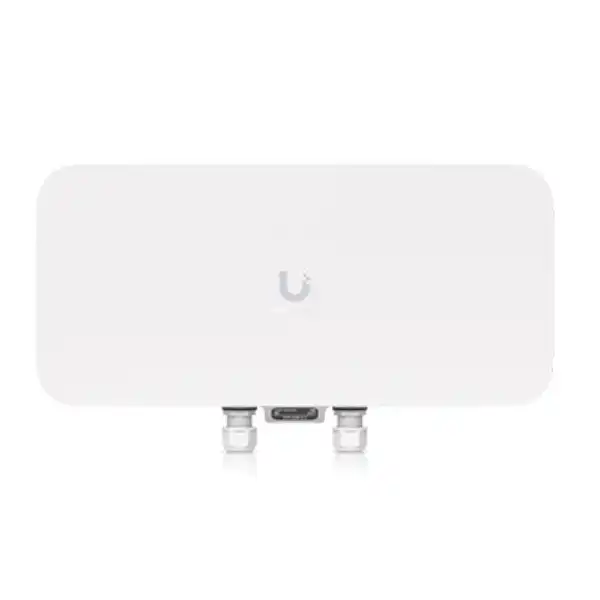
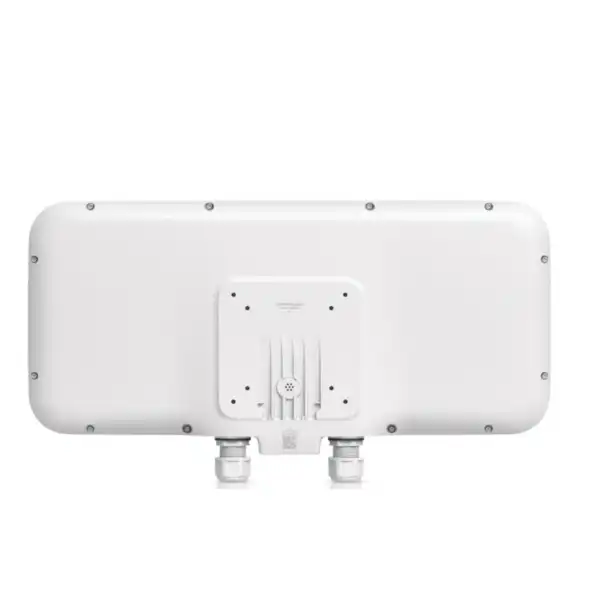
The manufacturer specifies wall and pole mounting, with mounts included, and an optional VESA mounting arrangement. The device body measures approximately 474.1 by 239.4 by 42.2 millimetres and weighs 3.2 kilograms, or about 4.2 kilograms with the mount. These dimensions matter when selecting a wall position, support bracket, pole and cable route. A structurally suitable installation should be planned in advance, especially where equipment sits above occupied seating, public circulation or a stage.
This is the Indoor variant, so a buyer should not infer an outdoor weatherproof rating from its resemblance to other E7 Audience family products. Avoid treating it as a rain-exposed or unprotected outdoor solution without an explicit manufacturer rating for this exact model. Plan for access to service ports, secure cable routing, appropriate strain relief and practical maintenance access. When the device is mounted high above a crowd, a clear installation record helps the next technician understand which switch port, cable, antenna direction and wireless coverage zone belong to that access point.
UniFi Network software and fleet management
Ubiquiti lists UniFi Network version 10.0.162 or later as an application requirement for the E7 Audience Indoor. That makes controller compatibility an essential procurement checkpoint, not an afterthought. Before installation, confirm that the intended UniFi management environment supports the exact hardware, firmware and network configuration. A team already operating older UniFi equipment should review its upgrade path and backup procedures rather than assume a newly purchased access point can be adopted without changing anything.
Central management can help operators keep track of SSIDs, clients, access-point settings, software maintenance and network performance. The benefit is strongest when configuration follows documented standards across the entire site. Assign responsibility for administrator access, credential management, change windows and backups. For temporary events, save a known-good configuration before visitors arrive; for permanent installations, keep an asset register and record the reasons for radio-setting changes. A large venue can contain several networking problems that look similar from a guest’s perspective, so consistent operational data makes diagnosis faster and less dependent on guesswork.
Enterprise authentication, VLANs and access control
The E7 Audience Indoor supports business-oriented wireless features including RADIUS over TLS, dynamic RADIUS-assigned VLANs, private pre-shared keys, guest network isolation and client device isolation. These capabilities can help separate groups that should not share the same trust level, such as staff, presenters, contractors and general visitors. They must be configured within a wider network security design: a VLAN assignment does not replace firewall policy, secure identity administration or a properly managed network gateway.
A venue can start by mapping identities to services. Presenters may need presentation systems and printers; ticketing personnel may need payment or registration applications; ordinary guests usually need internet access but not internal systems. Design these access rules before creating SSIDs. Consider how devices are authenticated, how access expires, how credentials are rotated and how incidents are investigated. Also note that 6 GHz networks have security requirements associated with modern WiFi, and older devices may not support them. A well-designed separate 2.4 GHz environment for legacy equipment can be safer than weakening an audience SSID to accommodate incompatible clients.
Guest WiFi portals and event access
Manufacturer-listed hotspot features include a captive portal, custom-branded landing page, voucher authentication, password authentication, payment-based authentication support and external portal server support. These functions can be relevant when a conference venue wants temporary attendee access or when an operator needs a controlled guest workflow. Their presence does not mean a complete payment, ticketing or identity system is automatically included. External integrations, customer-facing policies, application design and business processes require separate evaluation.
Keep a guest journey short and understandable. Before an event, test how a first-time phone user joins the network, opens the portal, accepts terms if applicable and reaches the service they need. Check how captive-portal detection behaves on different operating systems and how visitors reconnect after roaming. If vouchers are used, define who issues them and when they expire. For business-critical check-in systems, do not rely on a public guest SSID alone; establish separate access and fallback procedures. A technically powerful radio is only one part of a dependable visitor experience.
Roaming and mobility across larger venues
Ubiquiti lists wireless meshing, band steering, 802.11k radio-resource management, 802.11v transition support and 802.11r fast roaming among the E7 Audience Indoor’s capabilities. These features can assist clients as they move between suitable wireless cells, but an individual device’s roaming behavior also depends on its own software and radio decisions. Support for a roaming feature is not a guarantee that every device will change access points at exactly the right moment or maintain a real-time session under every condition.
In a conference centre with multiple halls and connecting corridors, plan how clients transition between coverage zones and how far the audience-cell signal should extend. Too much overlap can increase contention, while insufficient overlap can create dropouts in movement paths. If fast roaming is enabled, test the actual categories of phones, scanners and laptops used by the venue. Maintain consistent security and network assignment where seamless mobility is required. The best validation is to walk realistic routes while running representative applications and recording whether the service stays usable, not simply whether the signal icon remains visible.
RF filtering, spectral analysis and channel planning
The E7 Audience Indoor includes Ubiquiti PRISM RF filtering, real-time spectral analysis, advanced radio management and Zero-Wait DFS in its listed feature set. These are valuable tools for an operator who must share an indoor RF environment with nearby access points, neighbouring organisations and temporary equipment. They do not eliminate the need for site planning. Interference, regulatory channel availability, radar-related behavior where applicable and clients with limited band support can still affect the final experience.
Before deployment, identify existing wireless infrastructure and the busiest occupied periods. Decide channel widths based on practical capacity and the number of non-overlapping channels available rather than automatically selecting the widest option. Review neighbouring cells, mounting direction and RF energy leaking into another area. At commissioning, examine channel utilisation, retry patterns and client distribution under load. If an event changes its layout or adds many exhibitors with their own WiFi equipment, revisit the plan. Spectrum management should be an operational discipline, not a one-time setting applied without measurement.
Legacy devices and the missing 2.4 GHz band
The lack of a 2.4 GHz radio is among the most important selection criteria for this model. A buyer should not choose it as the sole wireless access point for a mixed site until checking the requirements of barcode scanners, building controls, older tablets, printers and other equipment. Some of those devices support only 2.4 GHz, and many older clients do not support modern 6 GHz security requirements. A successful audience network might therefore use the E7 Audience Indoor for high-capacity coverage while separate access points handle legacy or operational devices.
That separation can also improve planning clarity. The audience WLAN can be tuned for modern handsets and laptops in a crowded space, while a dedicated equipment WLAN can provide the bands, security compatibility and coverage appropriate for managed devices. The two networks should still have intentional VLAN and firewall boundaries. Capture the legacy-device inventory in procurement documentation, because adding a second radio system after the venue opens can be more disruptive than planning it from the outset. A strong enterprise design accommodates the real client estate instead of forcing every device into one feature-rich SSID.
Network core, internet service and application dependencies
A high-capacity wireless access point relies on a suitable wired infrastructure. Check the chosen switch’s 10 GbE support, PoE++ budget, network backplane, uplink architecture and upstream security appliance. Consider whether guest traffic, event production systems and staff applications share a single internet connection or require different policies. An access point can deliver strong local wireless performance while users still experience poor service because a gateway is saturated, a DNS resolver responds slowly or an internet circuit is congested.
List the critical application paths rather than designing for one generic speed-test number. Registration services might depend on cloud authentication; video presentations may rely on local streaming or remote delivery; payment terminals may require strict separation from guest devices. Test those workflows end to end, including periods of heavy demand. Consider sensible rate limiting where fairness is more important than peak throughput. If the site requires resilient operation, design backup power and upstream connectivity as a system, and identify what the venue can still do during a primary connection outage.
Tanzania deployment: 6 GHz and regional configuration
For a proposed installation in Tanzania, regulatory compatibility is a mandatory design checkpoint. Ubiquiti’s public list of supported 6 GHz regions, reviewed for this content, did not list Tanzania. That absence is not by itself a definitive statement of Tanzanian law, but it is a clear reason not to promise 6 GHz operation, wide 6 GHz channels or the associated headline rates in a local quote. The applicable requirements should be checked with the relevant Tanzanian communications regulator and the manufacturer before a project depends on those features.
Ask the supplier to confirm the exact regional variant being offered, applicable radio configuration and any local approval documents required for the planned installation. Record the permitted band, available channels and supported software behavior in the commissioning plan. The ability to buy a product and its technical capability in a different country do not establish permission to operate every radio feature locally. If 6 GHz cannot be used in a proposed deployment, reassess whether the remaining 5 GHz capability meets the business goal or whether a different access-point design offers better value. Avoid treating a US-specific AFC feature as available in Tanzania.
Common indoor deployment scenarios
Auditoriums need focused coverage towards seats, a workable plan for peak attendee activity and reliable connectivity for presentation-related systems. University lecture theatres may add learning platforms, student laptops and periods when an entire class begins a timed activity. Convention spaces often change layout between events, so a documented RF plan and repeatable commissioning routine become especially useful. Large meeting halls may need a guest network separated from presentation, administration and operational traffic.
In every scenario the aim is consistent service for the actual applications. A single E7 Audience Indoor may be suitable for a defined open-space zone, while an irregular floor plan, balconies or a very dense audience may require more than one unit. Multiple units should be engineered together to avoid excessive overlap and channel contention. Buying more access points without a design can make a difficult RF environment worse. Make the physical plan, traffic assumptions and acceptance criteria explicit before choosing a quantity.
How to size a venue before ordering
Begin with a floor plan that shows audience seating, stages, entrances, partitions, mounting positions, power availability and network-cable routes. Then estimate the number of active users in each zone, the number of devices per person and the likely traffic mix. Distinguish browsing from interactive video, uploading event content, ticket verification and local production workflows. Decide whether separate SSIDs and VLANs are needed, which users must roam, and which client classes cannot use 5 GHz or 6 GHz.
From that evidence, define acceptance tests such as successful guest onboarding, useful coverage across occupied seating, acceptable application response under representative load and predictable handling of an uplink or power failure. A design review should examine antenna orientation, channel selection, switch capacity and regional spectrum constraints. The outcome may be one unit, several coordinated units, or an alternative network mix. For an investment of this type, the right quantity is the one supported by a deployment plan, not the one derived by multiplying a theoretical coverage area across the building.
Commissioning tests worth performing
After installation, verify that the exact device has been adopted by a compatible UniFi Network application, that expected Ethernet link speeds are negotiated and that the selected PoE++ supply remains stable under load. Record firmware, configuration and switch-port information. Check SSID visibility from representative positions, guest authentication, VLAN assignment and traffic isolation. Confirm the actual operating frequency bands and channel selections allowed by the local configuration instead of presuming that every advertised WiFi 7 feature is active.
Next, test real tasks with different client types during an occupancy pattern that resembles the intended environment. Observe connection success, throughput distribution, latency, retries, portal response and roaming behavior. If a backup port or redundant power feed is part of the design, test the failure mode in a controlled window and record the result. Finally, give local operators a concise handover document: management access procedures, baseline measurements, expected alarms, escalation contacts and a rollback plan. A good handover protects the original investment long after the first event has finished.
Ongoing maintenance and support considerations
Wireless performance can change when a venue adds partitions, new audiovisual equipment, exhibition stands or neighbouring access points. Keep periodic RF checks on the maintenance calendar, especially before high-attendance events. Monitor client experience and authentication failures rather than relying solely on whether an access point reports as online. Review alerts, security updates and configuration changes using a documented process, and keep backups appropriate for the organisation’s management environment.
Operational teams should know who can change radio settings and what evidence is required before increasing transmit power or widening channels. An indiscriminate change may improve one seating block while making another worse. Update client inventories when a new category of handheld or ticketing device is introduced, particularly if it has 2.4 GHz requirements. Make spare equipment, escalation paths and event-day support decisions according to business criticality. The commercial benefit of a well-specified access point depends on maintaining a consistent service, not just installing modern hardware.
How it compares with a conventional office access point
The E7 Audience Indoor is better evaluated as an audience-class directional high-density device than as a simple replacement for every ordinary office access point. Its 12-stream design, directional coverage options, 10 GbE connectivity and redundant network-port architecture are aimed at a demanding deployment. In a small office with modest simultaneous traffic, these capabilities may add cost and infrastructure requirements without delivering a proportional user-experience improvement. A general-purpose access point with 2.4 GHz support may also serve a mixed device population more naturally.
By contrast, an auditorium where many modern clients concentrate in a defined space can make directional radio design and substantial aggregate capacity far more relevant. The comparison should cover client bands, coverage geometry, power budget, switch upgrades, management support and maintenance needs. Do not compare products using a theoretical wireless data rate alone. The best choice is the system that satisfies the particular room’s access, security, resilience and user-experience requirements with an understandable total deployment cost.
Questions to settle in a procurement quote
Request confirmation of the exact model name E7-Audience-Indoor and its regional configuration, rather than accepting an ambiguous E7 Audience family description. Ask what is included in the supply package and whether suitable PoE++ power equipment, mounting accessories, switches and cables are part of the proposed scope. Confirm the management-software requirement, the expected wired topology, whether secondary power and data redundancy will actually be configured, and the method used to determine access-point quantity.
For Tanzania projects, include a written check of radio-band legality and practical 6 GHz enablement before approval. Ask separately about stock, lead time, local currency price, warranty terms, installation scope and support responsibilities; those commercial facts must be confirmed in a current quotation, not inferred from a foreign manufacturer store. If your project includes event WiFi portals or authentication integration, describe the desired workflow so the quotation covers any extra services. A clear scope protects both buyer and installer from discovering missing pieces when the venue is almost ready to open.
What to provide when requesting a specification review
An efficient technical enquiry includes a venue floor plan, approximate audience count, number of simultaneous devices, typical client models, ceiling or wall heights, existing access points, available switches and the intended internet connection. Mention whether the location is a permanent installation or a temporary event build. Specify requirements for guest access, staff security, payment or registration terminals, live media and application availability, along with any limitations on drilling or cable routing.
If the site already uses UniFi, include the current UniFi Network version and a summary of the gateway and switching environment without sharing administrator credentials. If it uses another management platform, explain whether the proposed access point will be part of a separate UniFi installation. This information helps distinguish a straightforward equipment purchase from a project that requires network redesign, a new PoE++ switch, additional 2.4 GHz coverage or a spectrum-approval check. The outcome should be a fit-for-purpose recommendation and a clear scope for verification, not an unsupported guarantee of coverage.
Pre-purchase checklist
- Identify active clients by application and frequency band, including 2.4 GHz-only devices.
- Confirm whether the offered region and Tanzanian rules permit the planned radio features.
- Survey coverage zones and agree practical service-level acceptance criteria.
- Verify UniFi Network compatibility, 10 GbE switch capacity and PoE++ power budget.
- Plan guest, staff and operational network segmentation and access policies.
- Test onboarding, occupied-zone performance, roaming and any required resilience.
Frequently asked questions
Is the E7 Audience Indoor a WiFi 7 access point?
Yes. Ubiquiti specifies WiFi 7 and twelve spatial streams for the exact E7-Audience-Indoor model. Its wireless radios serve 5 GHz and 6 GHz bands, subject to regional support. WiFi 7 support on the access point does not mean every connected client will operate at WiFi 7 speeds. Client hardware, software, channel selection, security settings and real conditions all affect the experience.
Does it provide 2.4 GHz WiFi?
No. Its published radio configuration covers 5 GHz and two 6 GHz radio groups, not a 2.4 GHz radio. Buyers with older phones, IoT units, printers or other devices requiring 2.4 GHz should plan separate compatible access-point coverage. This is particularly important if the E7 Audience Indoor would otherwise be the site’s only access point.
Can it connect more than 1,500 clients?
Ubiquiti publishes a maximum client-count specification of 1,500+. This should be treated as a hardware capability indicator rather than a promise of uniform performance for that many simultaneous demanding users. Active traffic patterns, airtime, channel use, client capabilities, backhaul and authentication infrastructure determine the useful capacity. A realistic design uses measured demand and load tests.
Does 465 m² mean guaranteed coverage across a hall?
No. The stated 465 m² is manufacturer guidance, not a guarantee for every floor plan. Directional antenna orientation, obstructions, wall materials, audience density and the intended client performance threshold change effective coverage. Conduct a site survey, define the needed service level and test the chosen mounting location before deciding whether one or several units are appropriate.
Can 6 GHz be used in Tanzania?
Do not assume that it can. Tanzania was not listed on Ubiquiti’s reviewed public supported-country list for 6 GHz. This observation is not a legal determination. The correct project decision requires confirmation of Tanzanian regulatory requirements, the offered hardware region and manufacturer-supported software behavior. A purchase plan should not depend on a feature until those checks have been completed.
Is the 10 GbE port necessary for every installation?
The 10 GbE uplink is a core capability that can support high aggregate traffic, but a particular venue may have other limiting factors. The real benefit depends on compatible switching, cabling and the rest of the network. Evaluate expected throughput, number of active users, gateway capacity and application needs. The port rating alone does not promise 10 Gbps to any single wireless device.
What power supply does it need?
Ubiquiti specifies PoE++ and a maximum power draw of 51 W. Select compatible power equipment with the necessary per-port capability and overall budget. If redundancy is part of the plan, validate both the power and network paths using the exact hardware and configuration. Do not assume a suitable injector is included unless the supplier confirms the package contents.
Can the E7 Audience Indoor be installed outdoors?
This listing is for the Indoor variant. Do not infer an outdoor ingress-protection rating from similarly named products in the E7 Audience family. An exposed installation should use equipment explicitly specified for the environment and comply with its installation requirements. For this model, choose a suitable indoor location and follow the manufacturer mounting and environmental guidance.
Which UniFi Network version is needed?
Ubiquiti lists UniFi Network version 10.0.162 or later as the application requirement. Verify the management host and software version before ordering or scheduling deployment. Firmware, platform updates and organisation policies may introduce further practical steps. Back up a working configuration and plan upgrades before event-day operations.
Does it support guest portals and vouchers?
The manufacturer’s listed features include captive hotspot portals, customised landing pages, voucher authentication and additional guest-network options. The access point is not a complete event-registration or payment platform by itself. Test onboarding across representative phones, identify any external integration needs, and separate guest access from staff or operational systems through appropriate network policies.
Does the second Ethernet port guarantee continuous service?
The 1 GbE secondary port is part of a redundancy-oriented hardware design, but uninterrupted service is not guaranteed by the presence of a port. The switches, power sources, cabling, topology and failover behavior must all be configured and tested correctly. Plan for failures upstream of the access point as well as failures of a local cable or power feed.
How do I decide how many units to buy?
Start with an actual floor plan, audience distribution, active-client estimate, application requirements and supported frequency bands. Factor in antenna patterns, mounting heights, interference, switches and the availability of 6 GHz in the intended jurisdiction. A site survey and capacity model can then guide a sensible quantity. Avoid calculating the purchase solely by dividing floor area by the nominal coverage figure.
Request an E7 Audience Indoor suitability review
For a Tanzania venue project, request a quotation after confirming your audience density, floor plan, Ethernet and PoE++ infrastructure, 2.4 GHz legacy needs and lawful availability of intended wireless bands. Ask for an itemised scope that clarifies equipment configuration, coverage design, installation and support. Product price, local availability, delivery and warranty terms must be confirmed in the quote.
Contact FourTeck Tanzania with your project requirements and the exact model E7-Audience-Indoor.




Reviews
There are no reviews yet.