

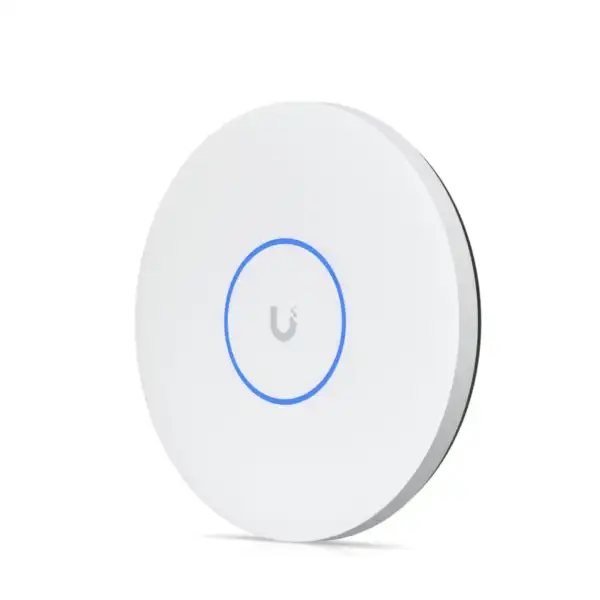
Ubiquiti U7 Pro Tanzania | UniFi WiFi 7 Access Point
Upgrade to centrally managed indoor wireless without confusing access point specifications with a complete network design. The UniFi U7 Pro brings three radio bands, a 2.5 GbE wired uplink and PoE+ power to properly planned offices, venues and connected homes.
Best next step: request a model-specific quote and confirm site coverage, switch compatibility and locally permitted wireless bands.
Key specifications at a glance
Published radio rates and coverage figures are technical planning references, not guaranteed in-building speeds. Availability of 6 GHz requires regional and regulatory confirmation.
Who should consider the U7 Pro
The Ubiquiti U7 Pro is intended for organisations and demanding homes that need a centrally managed indoor wireless access point rather than another all-in-one router. It is especially relevant when several people use video meetings, cloud applications, shared files, or visitor WiFi at the same time. The unit joins a wired network, broadcasts wireless networks, and is managed through UniFi Network. A suitable gateway, switching, internet service and cabling remain part of the overall solution. This distinction matters during procurement: purchasing an access point alone does not replace a fibre router, firewall, or internet subscription.
For Tanzania projects, begin with the floor plan and the clients that actually need connectivity. A small office with thick interior walls may need more carefully positioned access points than a larger open-plan space. The U7 Pro is a strong candidate when a multi-gigabit uplink and a managed WiFi architecture are useful, but it is not automatically the best or cheapest answer for every site. Ask for a deployment plan that explains coverage, switching, power, security and future expansion.
What makes this model different
The U7 Pro combines three radio bands—2.4 GHz, 5 GHz and 6 GHz—with the WiFi 7 standard and a single 1/2.5 GbE RJ45 Ethernet interface. Ubiquiti specifies six spatial streams in total, implemented as 2 × 2 MIMO on each band. The 2.5 GbE connection gives designers more wired backhaul capacity than a conventional Gigabit-only access point, provided the switch and cabling support it. PoE+ supplies electrical power over the Ethernet cable, keeping a separate power outlet away from the mounting location.
These features have different practical benefits. The 2.4 GHz band helps support devices that favour reach over speed. The 5 GHz band serves a broad population of current laptops and phones. The 6 GHz band can create additional spectrum options for suitable clients, but activation depends on permitted regional operation, device support and configuration. None of the theoretical radio values should be read as a guaranteed real-world internet speed. The best result comes from matching the access point to a correctly designed network.
WiFi 7 capabilities explained without the hype
WiFi 7 is the name commonly used for IEEE 802.11be wireless technology. Its innovations include wider channel configurations, higher modulation capability and Multi-Link Operation where supported by access points, clients, firmware and regional settings. The U7 Pro belongs to this generation, making it relevant to buyers replacing older access points or planning for newer devices. However, a phone labelled WiFi 7 does not mean every WiFi 7 feature will work in every network configuration.
Ubiquiti lists a maximum nominal data rate of 5.8 Gbps on 6 GHz using 320 MHz bandwidth, 4.3 Gbps on 5 GHz using 240 MHz bandwidth, and 688 Mbps on 2.4 GHz using 40 MHz bandwidth. These are radio-link specification values under particular channel and client conditions. They are not simultaneous usable download speeds, not a promise of throughput across walls, and not a guarantee that the installed country profile makes every channel available. A realistic wireless proposal explains achievable experience in the building instead of adding peak numbers together.
Choose the right frequency band for each device
Band choice is part of the network design, not merely a checkbox. Many printers, scanners, sensors and older smart devices connect at 2.4 GHz, while current business laptops generally work well on 5 GHz. Compatible WiFi 6E and WiFi 7 devices may use 6 GHz when the country configuration permits that band and the network has the required security settings. Because higher frequencies attenuate more readily through walls, a band that is excellent near an access point can be less useful in another room.
The U7 Pro supports band steering, but administrators should still test actual client behaviour. A dedicated network for legacy devices can simplify compatibility where older equipment cannot meet newer security requirements. Avoid assuming that all devices automatically roam to the fastest band or that increasing transmission power solves weak signals. Good design balances coverage, interference, capacity and the behaviour of the endpoint devices. It also reserves time for a real installation test rather than relying exclusively on promotional coverage figures.
Understand the 140 square metre coverage figure
Ubiquiti quotes approximately 140 square metres, or 1,500 square feet, of coverage for the U7 Pro. Treat this as a planning reference, not a guarantee for an entire building. Walls, reinforced concrete, metal cabinets, ceiling height, glass treatments, surrounding wireless networks and the client device all affect signal strength. A reception area and a set of enclosed meeting rooms might fit within the published area but still need more than one access point to achieve consistent service.
Coverage also differs from capacity. An area may show a strong wireless signal while still becoming congested during a full training session. Likewise, two access points placed too close together can interfere when channels are not planned properly. For important deployments, map work areas, determine the applications that will run, and test signal, roaming and actual traffic on representative devices. If the building contains more than one floor, account for signals passing vertically and interfering with adjacent floors. A site-specific survey makes the product specification meaningful.
What does support for 300+ clients mean?
Ubiquiti lists a maximum client count of more than 300 for this model. That describes a product capability, not a guarantee that 300 active users can simultaneously achieve high throughput during heavy traffic. Client count is only one input. The wireless airtime consumed by video, voice, backups and large transfers can be much more important than the number of registered devices. A classroom of devices occasionally accessing a learning page behaves differently from a conference where everyone joins a high-definition video call.
For capacity planning, identify the number of concurrent users, typical devices per person, applications, required latency and peak-time traffic. Also consider the bandwidth and stability of the internet connection. Where crowd density is high, several access points with appropriate channel separation may provide a better user experience than expecting one unit to serve the whole area. A thoughtful quote should distinguish maximum association figures from a realistic design target based on the customer’s own workload.
The value of the 2.5 GbE wired uplink
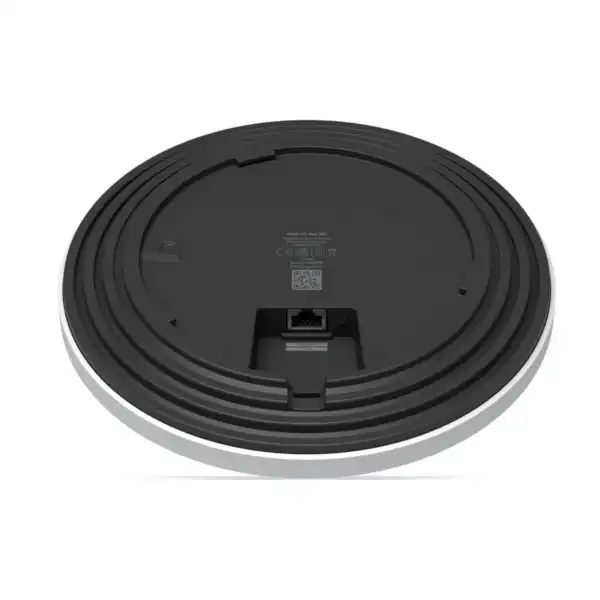
The U7 Pro has one RJ45 networking port that negotiates at 1 or 2.5 GbE. When connected through suitable cabling to a 2.5 GbE-capable switch port, it can access more wired backhaul bandwidth than an access point limited to 1 GbE. This can be helpful where several clients exchange data with local servers, use cloud applications at once, or share a multi-gigabit network. It does not, by itself, increase the speed purchased from an internet provider.
Check the complete connection path. An injector, switch port, damaged cable or upstream link restricted to Gigabit Ethernet may limit the connection to 1 GbE, despite the access point’s capability. A PoE+ switch with multi-gigabit ports is a practical combination, but only after calculating available power and network capacity. For a modest site with a slower internet connection, a 1 GbE uplink may already meet requirements; buyers should pay for multi-gigabit infrastructure where the expected workload justifies it.
PoE+ power and electrical planning
This model uses PoE+, with Ubiquiti specifying a maximum power consumption of 21 watts and a supported supply range of 44–57 volts DC. Power can be supplied by a compatible PoE+ switch or an appropriate power injector. Do not assume an existing switch provides PoE+ simply because its ports look the same as ordinary Ethernet ports. Also check whether the offered hardware package includes a power source; a listing for the access point alone should not be taken as evidence that a switch or injector is included.
In a multiple-access-point deployment, add the stated maximum demands and compare the total with the switch’s PoE power budget, leaving operational headroom. Examine the capacity of the upstream UPS if the site must remain connected through short power interruptions. Proper grounding, suitable cabling, secure connections and competent installation support reliability. The best purchase decision may involve a modest additional investment in switching and power protection, rather than discovering after mounting that the network cannot consistently power every radio.
UniFi Network management requirements
The U7 Pro is designed for the UniFi ecosystem and is managed through UniFi Network. Ubiquiti’s published technical page lists UniFi Network version 8.0.28 or later as its application requirement. This is a minimum stated in the product specification, not a recommendation to remain on an old release. Confirm current supported firmware and application versions before a rollout, especially when upgrading an existing UniFi environment that also contains older switches, gateways or access points.
Central management is useful when administrators need a consistent configuration across several wireless access points. SSID settings, updates, connected-client visibility and network policies are easier to maintain from a coordinated management system than from independent consumer routers. Plan where the UniFi Network application will run, how administrators will access it, who owns configuration backups and how recovery will work. A buyer without an existing UniFi environment should include controller hosting or a suitable UniFi console in the solution plan rather than treating management as a feature that requires no setup.
Guest access and practical network separation
A business often needs one network for staff and another for visitors. UniFi supports features relevant to guest environments, including captive portal options and guest isolation. The U7 Pro also supports client isolation, WiFi schedules, speed limits and dynamic RADIUS-assigned VLANs according to Ubiquiti’s specification. These are useful building blocks, but their security outcome depends on the complete network configuration, including the gateway, switch, VLANs, DHCP service and firewall rules.
For example, a meeting venue might provide visitor internet access while restricting access to accounting computers and management systems. A school might separate student devices from administrative equipment. A clinic might choose distinct networks for visitors and operational systems, with privacy requirements handled through an appropriate overall security policy. A radio alone cannot enforce every cross-network rule. Define who may connect, what those devices may reach, how credentials are issued and how unused access is revoked. Review the finished design by testing the restrictions from each network.
Security settings, WPA3 and older equipment
Modern wireless security deserves deliberate configuration. Ubiquiti’s 6 GHz guidance describes WPA3 and Protected Management Frames requirements and explains that some legacy devices can experience compatibility problems when a network’s security mode changes. This matters when a site combines recent laptops with older printers, point-of-sale equipment or specialised devices that may not understand the newest authentication settings. Simply enabling every band and selecting a complex security mode without testing can interrupt ordinary operations.
Start with an inventory of device types and authentication needs. Consider a separate restricted SSID for legacy equipment rather than weakening the main staff network. Use strong administrative access controls, maintain firmware, limit management permissions and verify segmentation at the gateway. For larger organisations, review RADIUS-backed authentication and user offboarding procedures. Network security also includes physical access to ports, controller backups and the handling of guest credentials. The U7 Pro supplies wireless capabilities; effective protection comes from applying them inside a coherent and maintained network policy.
6 GHz use and regulatory checks in Tanzania
The U7 Pro hardware has a 6 GHz radio, but the availability of 6 GHz channels in a particular installation is a separate question. Tanzania Communications Regulatory Authority material addresses short-range devices and 6 GHz wireless local-area-network operation. Ubiquiti also maintains its own supported-country and minimum-version guidance. At the time this copy was prepared, Tanzania could not be confirmed on Ubiquiti’s published 6 GHz supported-country list. Therefore, do not purchase on the assumption that the 6 GHz radio can immediately be enabled in every Tanzania deployment.
Before ordering, confirm the exact regional hardware variant, relevant local regulatory requirements, current UniFi software support and the channel set available to the intended installation. The 2.4 and 5 GHz bands remain important for mixed-device networks, but they too should be configured within locally applicable limits. FourTeck should not be represented as having obtained approval for a particular unit without documentary evidence. Buyers who specifically need 6 GHz service should make confirmed legal and software availability an acceptance criterion in their quote.
Indoor mounting and physical installation
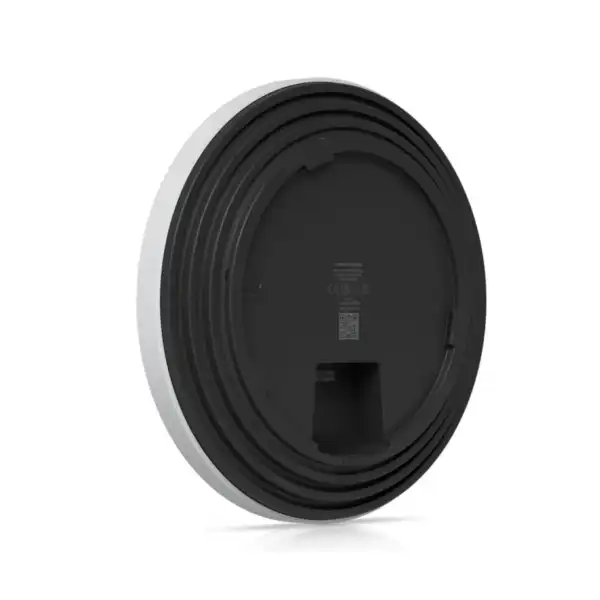
The U7 Pro is an indoor access point with a circular housing approximately 206 mm in diameter and 46 mm deep. Ubiquiti lists ceiling and wall mounting and indicates that a Pro mount is included. Mounting position changes radio performance: a centrally located ceiling installation often differs substantially from hiding an access point inside a cupboard, behind a television or above a metal ceiling panel. The location should also allow safe access for inspection, mounting security and any future replacement.
Because this is not the outdoor U7 Pro variant, do not place it in rain-exposed courtyards, open roofs or other weather-exposed areas. Check actual environmental conditions at the chosen position. Keep network cable runs professional and verify the location before drilling or final cable termination. Public corridors may require approval from the building manager, while schools and hotels may need extra attention to tamper resistance and guest safety. A measured installation is more valuable than simply selecting the visually easiest mounting point.
A practical approach to radio and channel planning
Access point placement and channel width strongly influence WiFi quality. Very wide channels can offer higher headline rates under ideal conditions, but they also need enough clean spectrum and compatible client devices. In a busy building, narrower or better-separated channels may deliver more consistent performance because nearby access points and neighbouring networks compete for airtime. A small network should not automatically use the widest channel supported by the product; the right setting depends on congestion, band availability and required reliability.
Use a survey or representative test devices to identify weak coverage and contention. Set transmit power thoughtfully and inspect roaming between access points. Review the impact of neighbouring businesses and different floors, particularly where wireless equipment is installed densely. If 6 GHz is authorised and operational, its propagation differs from 2.4 and 5 GHz, so plan it separately rather than assuming identical coverage. Schedule a final validation test during realistic occupancy, not only when the premises are empty and every device is turned off.
Office deployment: collaboration and cloud applications
Consider a professional office where several employees make video calls while colleagues use cloud documents and a shared printer. The U7 Pro can serve as a centrally managed indoor access point in a wider wired-and-wireless design. Its 5 GHz capability supports many current business devices, while WiFi 7 and 2.5 GbE help position the network for newer hardware. The gateway, internet line and switching infrastructure must still be sized for the whole office, and the performance of video calls is sensitive to congestion and upstream internet quality.
Start by mapping desks, meeting rooms and reception. Decide whether guest access is needed and whether administrative systems should be separated from routine staff devices. A meeting room with unusually heavy use may need closer wireless capacity than a quiet archive area. If the business relies on connectivity throughout the workday, account for service monitoring and power backup. The outcome should be a practical network specification, not an unsupported promise that one access point covers every office layout.
Hospitality and guest WiFi considerations
Hotels, serviced apartments and meeting venues face changing occupancy and a wide variety of guest devices. A U7 Pro deployment can use UniFi’s guest-network capabilities to separate visitor access from operational traffic, but the correct number of access points depends on the building. Thick room partitions, corridors and floors may weaken coverage, so placing one device at reception rarely solves a complete multi-room property. Outdoor dining areas would also require equipment selected specifically for their environment.
Guest networks should balance convenience with basic security. Think about password distribution, voucher or portal workflows, bandwidth policies, isolation and the experience of visitors whose devices lack the newest WiFi features. Staff point-of-sale or property systems need their own carefully protected access. The backhaul and internet service must handle peak occupancy, and support procedures should be written for non-technical staff who may receive complaints. If a captive portal or voucher workflow is part of the offer, confirm its exact configuration and operational suitability before promising it to guests.
Schools, colleges and training rooms
Education networks combine different workloads: classroom browsing, shared video lessons, administrative services and sometimes large numbers of devices starting an activity at once. The U7 Pro can participate in a managed campus or training-centre wireless design, with separate SSIDs and upstream policies for different user groups. However, the published 300+ client count does not guarantee that a single radio location will support hundreds of simultaneous high-bandwidth lessons or live video sessions.
Survey classrooms when occupied, and record the number of devices expected in each space. Use properly planned wired uplinks so that several access points do not compete unnecessarily through a wireless mesh backhaul. Test whether older laptops and educational devices can connect under the intended security settings. Staff networks and student networks often have different authentication and content-access rules, which need appropriate gateway and service configuration. A sensible design also accounts for scheduled updates, access for IT staff, power protection and a straightforward process for troubleshooting a classroom before the next session starts.
Retail, reception and point-of-sale environments
Retail sites may need WiFi for handheld scanners, management laptops, customer engagement and sometimes payment terminals. Reliability can be more important than a theoretical top speed. A U7 Pro can provide managed wireless access, but buyers should first identify which transactions depend on the network and whether any critical device needs a dedicated wired connection. Point-of-sale systems may have provider or security requirements that must be checked independently of the access point.
Keep visitor traffic separate from systems that handle business operations. Where scanners or printers use only legacy wireless standards, test them before changing authentication methods or retiring an older access point. Store fixtures, shelving, refrigerators and metal surfaces may affect signal paths. Plan coverage for the actual checkout and stock-handling locations rather than only public-facing floor space. Consider backup internet and power arrangements if disruption would stop sales. A well-specified wireless access point supports the workflow; the wider network and the payment-system design determine the real level of continuity.
Homes with demanding connectivity needs
A home with multiple workstations, gaming devices, streaming screens and smart appliances may benefit from enterprise-style wireless management. The U7 Pro is particularly relevant when the household already uses UniFi infrastructure or wants multiple coordinated access points rather than a collection of unrelated extenders. Its PoE+ installation can keep visible cables and separate power adapters to a minimum at the ceiling location, although the power source and Ethernet route still need to be planned.
Before choosing this product, consider whether the home actually needs multi-gigabit wired backhaul, how many floors and concrete walls are involved, and whether existing devices support the newer bands. A simpler wireless router may offer better value for a small apartment with ordinary usage. The U7 Pro does not itself provide the router, firewall or modem functions often bundled into consumer WiFi products. For a larger residence, ask for a floor-by-floor wireless plan, appropriate security for family and smart devices, and a support approach that does not depend on every resident understanding network administration.
Small business network architecture example
A straightforward deployment may start with the internet provider’s handoff connected to a properly configured gateway. The gateway connects to a managed switch, and the switch powers the U7 Pro through a PoE+ port. Wired computers, printers and servers can use other switch ports. The UniFi Network application manages the access point and, where applicable, other UniFi equipment. This description is an architecture example, not a bill of materials: precise device choices depend on the business network, budget and support arrangements.
Where separate staff, guest and equipment networks are required, configure the intended VLANs, DHCP scopes and firewall policy on compatible upstream equipment. Ensure the access point’s uplink can carry the needed networks safely and that the switch has sufficient PoE and data capacity. Label the cabling, record software versions, and back up management settings. If a business needs resilience, include the gateway, switch and internet link in that planning rather than assuming that access point uptime alone will keep the site online.
Upgrade planning from WiFi 5 or WiFi 6
Replacing older access points may improve management consistency, radio options and wired uplink capacity, but an upgrade should be driven by identified limitations. Check whether users suffer from weak coverage, interference, insufficient capacity, outdated security or merely a slow internet service. If the underlying problem is a congested provider link, installing a U7 Pro may not change the user experience. If coverage is poor because of thick walls, replacing one access point with another in the same position may also fail to solve the problem.
Compare the old and new Ethernet standards, PoE requirements, mounting arrangements and controller compatibility. A PoE-only switch may need replacement or an appropriate injector to power the U7 Pro. Older endpoint devices remain limited by their own wireless capabilities. Before rollout, document the current SSID and VLAN configuration, create a rollback plan and test representative phones, printers and application devices. Measure results against a defined target, such as improved meeting-room coverage or reliable guest segmentation, rather than a generic claim of faster WiFi.
U7 Pro versus alternative UniFi options
The U7 Pro sits among several UniFi models that address different environments and capacity requirements. A WiFi 6 access point can remain a sensible choice when client devices are older and the network is restricted to Gigabit Ethernet. A higher-tier WiFi 7 access point may be justified for environments that need more radio capacity or different interfaces, but that decision requires comparing the exact current technical specifications. The similarly named U7 Pro Wall, U7 Pro Max and U7 Pro Outdoor are not interchangeable with the standard ceiling-oriented U7 Pro.
Select by installation environment, number and type of clients, radio design, switch compatibility and the cost of the entire network rather than model name alone. A multi-site business may benefit from standardising on a model, while a mixed-use property may need different access point types in offices, corridors and sheltered or external areas. Confirm every quoted model identifier before purchasing accessories or installing brackets. The right alternative is the unit that solves the actual wireless constraint while remaining supportable within the customer’s network.
Power, cabling and switch compatibility checklist
Before installation, check four linked requirements: whether the switch or injector supplies PoE+, whether the total PoE budget is adequate, whether the Ethernet link supports the intended 2.5 GbE rate, and whether the cable run is sound. The access point’s RJ45 socket can connect at 1 GbE, but a faster upstream connection requires compatible equipment throughout the wired path. The amount of power a switch can provide in total may be lower than the sum of its individual port ratings.
A proper quote should identify who supplies cables, mounting work, the switch or injector and any required UPS. For existing installations, check cable category and condition without assuming that labels alone prove performance. Test and document each installed link. Keep data and electrical pathways professionally routed and accessible for maintenance. Where several access points share a single switch, calculate both the power budget and the bandwidth available upstream. These checks are inexpensive compared with the disruption of replacing infrastructure after the wireless hardware is already installed.
Firmware, monitoring and ongoing support
Wireless infrastructure is not finished when the access point first comes online. Assign responsibility for maintaining UniFi Network and access point firmware, reviewing release notes and scheduling changes at suitable times. Record the site’s administrative access, device inventory, adoption procedure and backup arrangements. Support staff should know where to check client connection status, Ethernet negotiation, PoE availability and recurring wireless errors.
Network monitoring can help distinguish a genuine radio problem from upstream internet interruptions or gateway congestion. A complaint that WiFi is slow may involve DNS, a weak signal, an overloaded application server, a damaged cable or a device connected to an inappropriate band. Establish a baseline after installation, including representative signal and speed tests in important rooms. When major changes are made, compare new results with that baseline. Strong operational habits preserve the value of an investment in capable access points and reduce the need for repeated ad hoc troubleshooting.
Roaming between several access points
UniFi lists features such as 802.11k radio resource management, 802.11v transition management and 802.11r fast roaming for the U7 Pro. They can assist a thoughtfully configured multi-access-point network, but a client device still makes important decisions about when and where to roam. Fast roaming may need special care with older or specialised endpoints. The existence of a roaming feature does not mean a live call will move between all rooms without interruption in every environment.
Design an appropriate amount of coverage overlap, choose channels carefully and test devices moving through real routes, such as from reception to a conference room. Avoid making access points transmit at maximum power simply to reach the farthest possible corner; a device may hear the access point while its own weaker transmitter cannot communicate reliably in return. If voice or mobility is a major requirement, include roaming tests in acceptance criteria. For static devices that are business critical, consider whether a wired link is preferable.
When wireless meshing makes sense
Ubiquiti lists wireless meshing as a supported U7 Pro capability. Meshing can help when running an Ethernet cable is difficult, but it is not the default best option for demanding deployments. A wireless backhaul uses radio resources and depends on the quality of the wireless connection between access points. That can reduce the capacity available to client devices and introduce another source of performance variation compared with a well-installed wired uplink.
For a business installing new cabling, wired backhaul usually offers clearer performance, power and fault-isolation advantages. A temporary office, exhibition or unusual building may justify a carefully tested wireless mesh link where cable installation is impractical. The chosen topology still needs a reliable power source, and the access point’s PoE+ requirement does not disappear simply because data uses a wireless link. Map the meshing path, test it under load and document what happens if the parent access point loses connectivity. Avoid selling wireless meshing as equivalent to a dedicated 2.5 GbE wired connection.
Device compatibility and client expectations
The U7 Pro supports modern wireless standards while also providing connectivity for many older WiFi generations, subject to the specific bands and security configurations those clients support. A new access point does not upgrade the radio inside a phone, laptop or printer. An older client may be limited to 2.4 or 5 GHz, narrower channels, fewer spatial streams or older authentication methods. That client’s real performance may improve through better placement and reduced interference, but it will not suddenly achieve a WiFi 7 headline rate.
Create a short device inventory before ordering. Note important model families, operating systems, application requirements and any specialist equipment that needs testing. For 6 GHz usage, confirm client support, local operation and security compatibility. For ordinary office WiFi, assess actual user needs rather than treating future-proofing as a substitute for immediate service quality. A pilot test with real devices can reveal issues that an online specification comparison cannot show, particularly where old devices and newly purchased hardware must share one network.
Business continuity and support responsibility
Organisations that depend on wireless should consider the complete path from device to application. The U7 Pro needs power, functioning cabling, switching and a usable upstream network; any of those can become a single point of failure. A UPS may keep the switch and gateway available during a brief power interruption, but the internet service must also remain operational. If access is mission critical, discuss backup connectivity or alternate network paths according to the site’s operational needs.
Document who is responsible for configuration, firmware maintenance, fault reporting and escalation. Keep appropriate administrator recovery procedures and network backups in a secure location. Establish what support is included in the procurement offer, if any; do not presume installation, remote management or an extended warranty is bundled with the hardware. For facilities that open early, host events or operate outside normal office hours, agree an incident process before deployment. Clear responsibility often matters as much as the access point’s technical capabilities.
Questions to ask before requesting a quote
A useful quotation should be based on more than the number printed on an equipment box. Tell the supplier how many floors and major rooms need coverage, what the walls and ceilings are made of, how many people and devices use the network at peak times, and which applications are sensitive to delays. Share whether you already have a UniFi Network management environment, a managed switch, usable Ethernet cabling and PoE+ capacity. Mention any guest network, authentication or VLAN requirement.
Also explain the desired installation scope. Some buyers only need hardware; others need a site survey, cabling, switch changes, configuration, testing and user handover. Ask whether a proposed price covers the access point alone or the full network components. Confirm the exact U7-Pro model, regional variant, power arrangement, accessory package and any applicable support terms. If 6 GHz use is essential, request explicit confirmation of regulatory permission and working software support for the Tanzania deployment. This gives both sides a more precise basis for evaluating the project.
How to evaluate the total cost of the solution
The initial access point price is only one component of a reliable wireless installation. Other potential costs include PoE+ switching or an injector, multi-gigabit switch ports, structured cabling, physical mounting, controller hosting, network security configuration, a UPS, testing and ongoing support. Not every site needs all of these, but leaving them out of a quote can make two otherwise similar proposals difficult to compare. No Tanzania selling price, stock position, installation fee or delivery date is asserted on this page.
Compare proposals on the same scope. Identify the number of access points, expected coverage areas, cabling assumptions, power equipment, configuration tasks and acceptance tests. Ask what happens if the initial survey reveals more difficult signal conditions than anticipated. A solution that looks cheaper on hardware alone can require additional work to become usable. Conversely, an existing UniFi environment with an available PoE+ multi-gigabit port may need fewer additions. The most useful figure is the verified cost of the system that meets the requirement.
A sensible implementation sequence
Begin by documenting user needs, building layout, applications and the present network. Next, assess coverage and capacity, choose appropriate AP locations and confirm the right switch and power approach. Check local regulatory and vendor region support for any proposed 6 GHz operation. Then configure UniFi Network, the intended staff or guest SSIDs and the required upstream policy. Finally, mount the access point, test its Ethernet negotiation and confirm it behaves correctly with representative user devices.
After commissioning, walk through the premises and test the places where connectivity matters. Verify guest isolation where it has been requested, check roaming between installed access points, and record any weak spots before the installation is accepted. Export or secure the configuration according to the customer’s IT policy. Provide a short handover with equipment models, mounting positions, network labels and responsible contacts. This sequence avoids treating wireless performance as an untested assumption and makes it easier to support the network in the months that follow.
Troubleshooting common real-world problems
If a newly installed U7 Pro is not connecting, begin with the fundamentals: verify PoE+ power, cable integrity, switch port status, network reachability and the UniFi adoption state. For slow connections, determine whether the problem affects every client or a particular room, device or application. Inspect the negotiated Ethernet rate and check whether the internet gateway or provider link is congested. Testing near the access point and at the problematic location can help separate signal issues from general network limitations.
If older equipment cannot join after security settings change, inspect authentication and band compatibility. If clients wander between access points unpredictably, review overlap, channel planning and their roaming behaviour. If someone expects 6 GHz but cannot see it, check regional support and legal operation before exploring software settings. Do not attempt to defeat regional restrictions. Changes should be documented so they can be reversed safely. These steps are not a substitute for professional diagnosis, but they help teams collect useful evidence rather than repeatedly restarting equipment without identifying the cause.
Procurement and acceptance checklist
Before approving a purchase, confirm the exact Ubiquiti U7-Pro model identifier and whether the quotation covers the access point, mounting accessories, power supply arrangements and any other requested hardware. Validate PoE+ and 2.5 GbE requirements against the installed switch and cabling. Ensure a suitable UniFi Network management plan exists and ask whether any controller, gateway or licensing-related service is included in the proposal. Keep equipment identification distinct from a retailer-specific SKU; this page does not claim a verified FourTeck listing SKU.
For an installed project, define acceptance around useful outcomes: connectivity in named rooms, representative applications performing satisfactorily, appropriate access isolation, sensible roaming and a completed handover. If the project requires a particular level of capacity or signal, specify a test method rather than relying on a brochure figure. Record any outstanding concerns and what will be done about them. Treat regulatory eligibility for 6 GHz as a separate documented requirement if that spectrum is central to the business case. These details protect the buyer and clarify what constitutes a finished solution.
Request a Tanzania-focused U7 Pro quotation
Buyers researching Ubiquiti U7 Pro Tanzania options can use FourTeck Tanzania as a starting point for a product or solution enquiry. Share the site type, approximate layout, expected concurrent clients, existing switch and gateway details, and whether you need hardware only or a complete wireless design. Also note any priority applications, guest network needs or installation constraints. This helps define the right scope without assuming that a generic access point specification is the same as an engineered network.
Ask for written confirmation of the proposed model and regional variant, included accessories, power method, commercial terms and the project’s technical scope. Where 6 GHz operation is required, make verified compliance and operational enablement a specific item for discussion. Pricing, stock, delivery, warranties and service availability should be confirmed in the eventual quotation rather than inferred from this page. The next step is to request a tailored U7 Pro quote or deployment review and compare it with the actual needs of your Tanzania premises.
Frequently asked questions about the U7 Pro
Is the Ubiquiti U7 Pro a router?
No. It is an indoor wireless access point that connects to an existing network and provides WiFi coverage. A gateway or router is still needed for internet routing and firewall functions. A switch, Ethernet cable and PoE+ power source may also be needed depending on the site. If you want a complete solution, ask for all required network components to be included in the scope, not only the access point.
Does the U7 Pro support all three bands?
The U7 Pro hardware includes 2.4, 5 and 6 GHz radios. Actual band and channel availability depends on local regulatory rules, the specific regional device variant, UniFi software support and connected client devices. In particular, do not assume the 6 GHz band will be available in Tanzania without verifying the current requirements. The 2.4 and 5 GHz bands still serve important roles for ordinary and legacy client devices.
Can the U7 Pro provide 2.5 Gbps internet speeds?
Its Ethernet uplink supports 2.5 GbE, but that is a wired interface capability, not a promise of end-to-end internet throughput. The upstream switch and connection must support the relevant speed, and client radio conditions also matter. Internet performance depends on the subscribed service, gateway, backhaul and network load. Ask for performance expectations tied to your actual setup rather than treating the port speed as a guaranteed user download rate.
Will my existing PoE switch power it?
Only if the available power and electrical standards are compatible. The U7 Pro needs PoE+ and Ubiquiti lists a 21 W maximum consumption. Check the switch’s per-port capability and remaining total PoE budget. A switch with ordinary PoE ports may not provide the required power. Where an injector is proposed, confirm its compatibility and whether its data interface will limit the intended Ethernet speed.
Is one U7 Pro enough for a whole building?
Not necessarily. Ubiquiti quotes approximately 140 square metres of nominal coverage, but walls, floors, interference, construction materials and client capabilities change the result. An open area can perform very differently from a building filled with enclosed rooms. Busy locations may also require more access points to handle concurrent use, even where signal coverage appears acceptable. A site plan or survey is the best basis for selecting quantities and mounting positions.
What does 300+ clients mean in practice?
It is a published maximum-client capability, not a guarantee that more than 300 simultaneous users can all stream or video conference at full speed. Real performance depends on airtime, interference, traffic mix, radio settings, upstream bandwidth and client capabilities. High-density applications are better evaluated using expected concurrent activity and a multi-access-point design. For a venue or school, specify the actual peak use case during the planning process.
Can older WiFi devices connect?
Many older devices can connect through supported bands and standards, but their own radio specifications and security capabilities still set limits. Some legacy equipment may struggle when WPA3 or 6 GHz-related network settings are enabled. Test critical devices such as printers, scanners and point-of-sale systems. If needed, use an appropriately restricted separate WiFi network for legacy equipment rather than compromising the security policy of all users.
Does the U7 Pro work outdoors?
The standard U7 Pro covered here is an indoor model. It should not be treated as weatherproof or installed where rain and other exposed conditions can affect it. An outdoor deployment needs an access point designed for that environment and a separate assessment of radio regulations, mounting, cabling and power. Do not confuse the indoor U7 Pro with similarly named outdoor models.
Do I need an internet connection to manage it?
The access point is managed using UniFi Network, so you need a supported management environment and a plan for administrative access. Specific remote-management features may depend on how the UniFi system is deployed and connected. A local wireless network and its internet connectivity are different functions. Confirm the controller or UniFi console arrangement, backup approach and management responsibilities as part of your installation design.
Can it run separate staff and guest networks?
UniFi includes capabilities for multiple SSIDs, guest isolation and other access policies. Effective separation also relies on properly configured upstream switching, VLANs, routing and firewall rules. A guest SSID alone is not proof that business systems are protected. Define the exact access restrictions you need and test them after configuration. Businesses handling sensitive operational information should review the whole network security architecture.
Is 6 GHz automatically legal and enabled in Tanzania?
No such assumption should be made. Although the U7 Pro hardware supports 6 GHz, actual use depends on current Tanzania Communications Regulatory Authority conditions and Ubiquiti’s supported country and software settings. Tanzania could not be confirmed on the manufacturer’s published 6 GHz country-support list during preparation of this description. Request model-specific confirmation for any planned 6 GHz deployment before accepting a quote based on that feature.
What comes with the U7 Pro?
Ubiquiti’s technical information identifies ceiling and wall mounting with a Pro mount included. Do not assume that the access point package includes a PoE+ switch, injector, Ethernet cabling, gateway or installation service. Packaging and accessories should be checked against the exact regional product listing and written offer. Ask the supplier to list each included component, especially where the installation must be completed on a fixed budget.
How should I choose between the U7 Pro and a cheaper access point?
Start with your real requirements. If the site has modest traffic, Gigabit-only wiring and older clients, a suitable WiFi 6 access point may be sufficient. If multi-gigabit backhaul, modern client devices, UniFi management and an upgrade path matter, the U7 Pro may be worthwhile. Evaluate room layout, concurrent use, switching costs and compatibility before deciding. The most useful comparison includes total deployment cost, not only the access point price.
Can FourTeck provide a local price and availability?
This description does not confirm a live FourTeck Tanzania price, inventory, delivery schedule or installation commitment. Those terms need confirmation through a specific enquiry or quotation. Provide your preferred quantity, intended usage and any accessories or services you need. That allows the proposal to clarify both commercial scope and technical requirements without relying on outdated market listings.
What information is needed for a useful quote?
Send the number of floors and rooms, approximate area, peak user and device counts, key applications and existing internet, router and switch details. Explain whether you require guest networks, separate VLANs, outdoor coverage or an installed solution. Mention if the deployment depends specifically on 6 GHz operation. A floor plan and a summary of troublesome signal locations can help make the proposed design more accurate.
Request a U7 Pro product or deployment quote
Tell FourTeck Tanzania what you need: quantity, layout, client count, existing switching, power, guest access and whether installation is required. Ask for written confirmation of product variant, commercial terms and the region-specific capabilities that matter to your project.
Request a quotation or a wireless deployment review.




Reviews
There are no reviews yet.