
Ubiquiti · Outdoor Wi-Fi · Tanzania buying guide
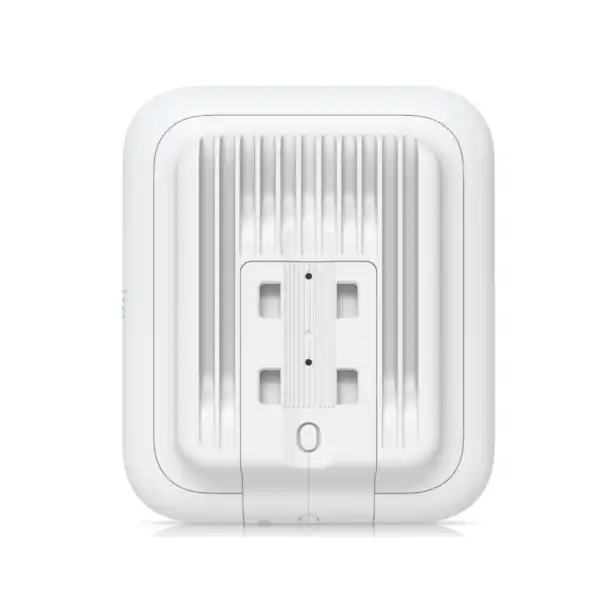
Ubiquiti U7 Outdoor: precise outdoor Wi-Fi 7 coverage starts with the right design
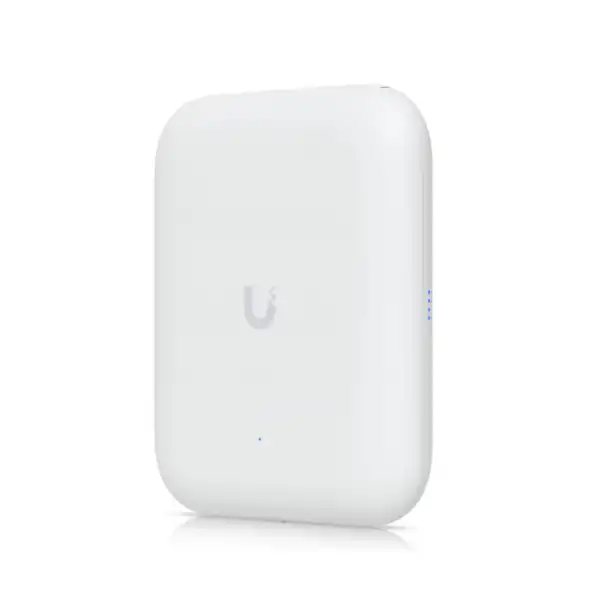
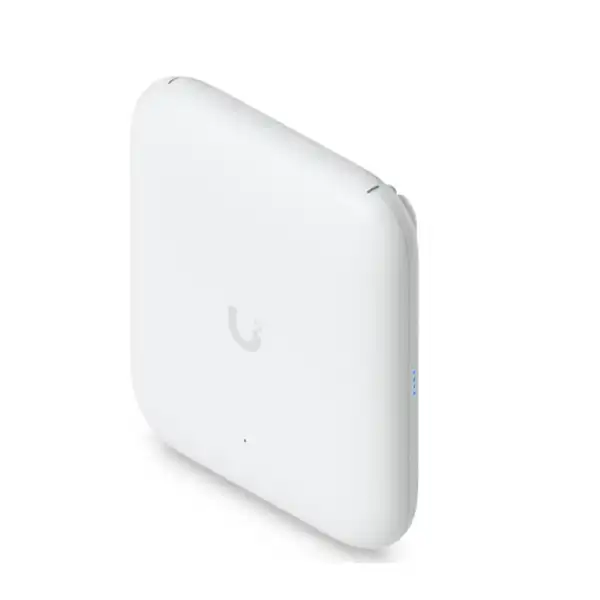
The Ubiquiti U7 Outdoor (U7-Outdoor) brings dual-band Wi-Fi 7 to courtyards, campuses, hospitality terraces, estates, and work yards. It is best evaluated by antenna shape, mounting location, wired uplink, and user needs—not just headline speed. This guide explains where it fits, its important limits, and the practical questions to resolve before purchasing or installing it in Tanzania.
The buying decision in one minute
Choose this model when a wired, centrally managed outdoor access point can be positioned to serve a defined space and PoE+ is available. Its internal directional antenna is especially relevant to a coverage zone in front of the mounting point; the external omni configuration offers an alternative when users surround a central pole. If you need 6 GHz, internet routing, or a dedicated long-distance building bridge, review another product category or model.
Ask for a site-aware quote covering the actual client locations, cabling route, switch and controller, mounting position, radio plan, and expected concurrent usage. Hardware price, availability, delivery, installation scope, warranty, and Tanzania regulatory suitability must be confirmed separately.
U7 Outdoor technical specifications
The following are the manufacturer’s published model-level specifications. Advertised peak wireless rates, area, and client capacity are reference values rather than performance guarantees. Radio channels and permitted output parameters depend on appropriate regional configuration.
| Feature | Verified specification |
|---|---|
| Model | U7-Outdoor; UniFi U7 Outdoor outdoor access point |
| Wireless | Dual-band Wi-Fi 7 (802.11be), 2.4 GHz and 5 GHz; 4 spatial streams |
| Maximum radio rates | 5 GHz: 4.3 Gbps at 240 MHz; 2.4 GHz: 688 Mbps at 40 MHz (theoretical link rates) |
| Antenna options | Integrated directional; two external omni antennas |
| 5 GHz antenna gain | Directional 12.5 dBi, 45° × 45°; omni 4 dBi, 360° × 30° |
| 2.4 GHz antenna gain | Directional 8 dBi, 90° × 90°; omni 3 dBi, 360° × 30° |
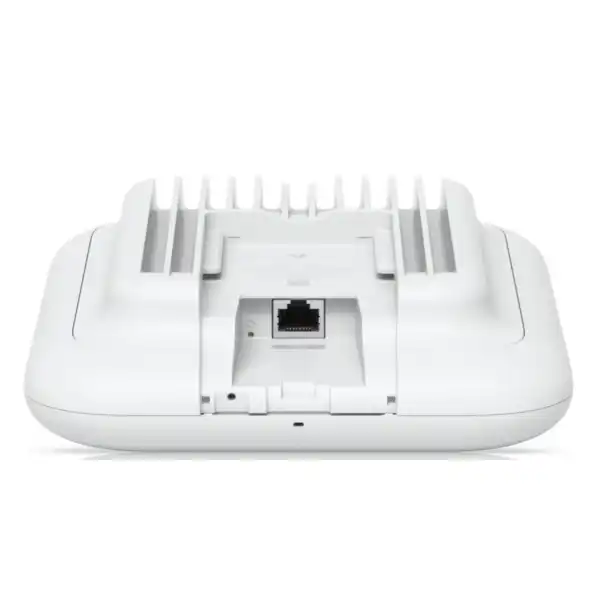
| Ethernet uplink | One 1/2.5 GbE RJ45 port |
| Power | PoE+; 19 W maximum consumption |
| Weather protection | IPX6 |
| Mounting | Wall or pole, mounting hardware included |
| Manufacturer reference figures | 465 m² coverage; 250+ maximum client count |
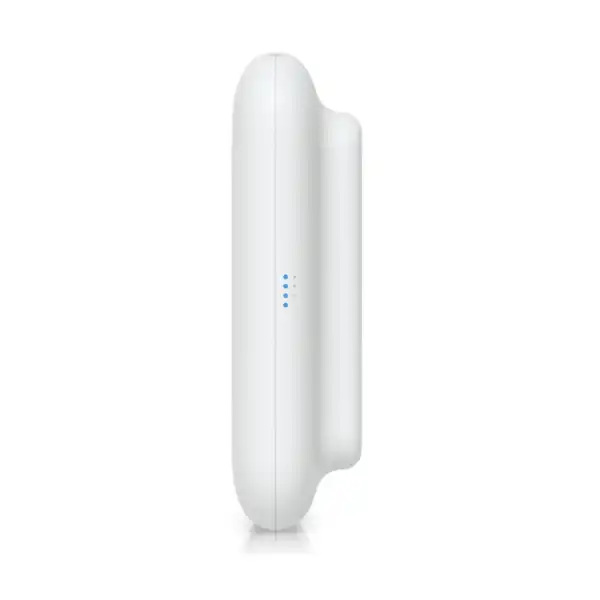
| Dimensions and weight | 170 × 208 × 54.5 mm; about 1.2 kg |
| Management | UniFi Network version 8.2.93 or later |
| Important limitation | No 6 GHz radio; not a standalone router |
Who should choose the U7 Outdoor?
The Ubiquiti U7 Outdoor is intended for a business, institution, or property owner that already has a network and wants dependable wireless access outside the building. Think of a hotel terrace where guests move between rooms and a garden, a school courtyard used for supervised learning, or a service yard where mobile equipment needs to reach an application. The principal decision is not simply whether Wi-Fi 7 is faster. It is whether the antenna pattern, mounting location, wired backhaul, and management approach suit the people and devices in that particular outdoor space.
This model is especially interesting when the target area lies predominantly in front of one mounting position. Its internal directional antenna can focus the design toward that area, while separate external omnidirectional antennas provide another coverage pattern. Before selecting a quantity, identify where users stand, which devices they carry, and whether walls, foliage, parked vehicles, or changing crowds will alter the radio path. The access point is one part of a working network, not a promise that one unit will serve every property.
What this access point does—and does not do
A wireless access point bridges Wi-Fi clients onto an existing local network. The U7 Outdoor is not a mobile-data modem, an internet subscription, or a standalone broadband router. An internet connection, gateway or router, switching infrastructure, and suitable network policies must be arranged separately. A properly designed installation normally connects the access point to the wired LAN using its Ethernet port; a PoE+ source supplies the electrical power along that connection. A controller running UniFi Network is used for adoption, monitoring, and configuration.
The U7 Outdoor also should not be confused with an outdoor point-to-point bridge dedicated to connecting two distant buildings. Although Ubiquiti lists wireless meshing among its features, mesh operation introduces airtime and uplink-planning tradeoffs. If your primary goal is to span a long distance between fixed sites, compare a purpose-built bridge design before purchasing an access point. When your goal is smartphones, tablets, laptops, and other ordinary Wi-Fi clients distributed outdoors, this is the more relevant product category.
Understanding its dual-band Wi-Fi 7 radios
The U7 Outdoor uses the 2.4 GHz and 5 GHz bands with four total spatial streams, configured as two-by-two MIMO on each band. The manufacturer lists a maximum theoretical data rate of 4.3 Gbps on 5 GHz at 240 MHz channel width, and 688 Mbps on 2.4 GHz at 40 MHz. These figures describe supported radio link rates under qualifying conditions, not guaranteed internet speed, application throughput, or a speed every client will receive. The wired uplink is a single 1/2.5 GbE RJ45 interface, which is another practical constraint when calculating total traffic.
A Wi-Fi 7-capable client may use newer radio features when device support, firmware, channel availability, and local configuration permit them. Older Wi-Fi clients can continue to connect through supported earlier standards, though they do not magically gain Wi-Fi 7 capabilities. More importantly, a high theoretical radio rate cannot compensate for a congested internet circuit, weak client signal, oversubscribed switch uplink, or a poorly selected channel. Evaluate performance across the whole path from user device to the application or internet destination.
Directional antenna: focus signal where people actually are
The built-in directional antenna is a defining feature of this access point. Ubiquiti specifies a 12.5 dBi internal directional configuration on 5 GHz with a 45° by 45° pattern, and an 8 dBi directional configuration on 2.4 GHz with a 90° by 90° pattern. These figures help describe the approximate shape and concentration of radiation; they are not distance guarantees. A narrower pattern can be useful when the service area is a defined courtyard, outward-facing patio, parking lane, or open field viewed from the mounting point.
For this approach to work, the access point needs deliberate orientation. A radio mounted behind the guests or pointing over the area can produce disappointing results despite its strong headline antenna gain. Sketch the target zone before deciding the position. Check where clients will use 5 GHz, whether there are vertical level changes, and whether the narrowest part of the pattern will miss people at the edges. Remember that antennas at both ends matter: a phone with a modest transmitter cannot always send data back as strongly as an access point can transmit.
Omnidirectional mode: different shape, different tradeoff
Ubiquiti also lists two external omnidirectional antennas and RP-SMA connections. Their stated gains are 4 dBi on 5 GHz and 3 dBi on 2.4 GHz, with an approximately 360° by 30° pattern. This arrangement is useful when users gather around a central pole or outdoor structure rather than in front of a wall. It does not mean the signal will travel equally well in every direction and at every elevation. The broad horizontal pattern is paired with a comparatively limited vertical beam shape, so height and orientation still matter.
Choose the active antenna configuration to match the real client distribution, and verify that the setting in UniFi Network corresponds to the hardware arrangement used. Do not plan a design on the assumption that the unit will simultaneously supply its full specified internal directional pattern and its external omni pattern on the same band. A site survey can reveal whether multiple smaller cells would serve irregular spaces better than a single central radio. If a hotel has separate courtyards behind thick walls, one outdoor access point in the middle may not reach both acceptably.
Read the coverage and client figures correctly
The manufacturer advertises a coverage area of 465 square metres, equivalent to 5,000 square feet, and a maximum client count of more than 250. These are useful product reference figures, but a coverage area is not a fixed radius, and maximum association capacity is not a guarantee of acceptable application performance for 250 simultaneous heavy users. Real capacity depends on airtime, per-device traffic, channels, interference, client capabilities, security overhead, and the behaviour of surrounding access points.
Build the design around a target service level rather than a single theoretical count. Ten people streaming large video files may create more load than many devices checking messages occasionally. Likewise, two buildings covering an area smaller than the headline figure may still need several radios if walls obstruct the signal. For a high-density venue, calculate busy-hour users, expected activities, and acceptable minimum performance. Record the intended number of active devices per zone and validate by testing before committing to final access point quantities.
Site survey before ordering equipment
Start by identifying the boundaries of the outdoor area, the likely mounting points, the position of existing network switches, and the location of electricity and grounding infrastructure. Walk through the service zone with a realistic client device and note where people spend time. Map physical barriers such as metal roofs, concrete walls, dense vegetation, containers, vehicle fleets, and changes in ground elevation. Check whether neighbouring Wi-Fi networks may already occupy the channels you plan to use.
During a professional survey, distinguish coverage from capacity. Coverage asks whether clients can maintain a stable signal; capacity asks whether the available airtime and wired network can carry their combined traffic. Plan for the weakest commonly used client devices, not just a technician’s modern laptop. For deployments that must support voice calls or transactions, test during activity patterns that resemble working hours. A survey should produce a placement proposal, antenna selection, tentative channel plan, cabling route, and list of assumptions requiring validation after installation.
Wired uplink and PoE+ power requirements
The U7 Outdoor has one RJ45 interface supporting 1 GbE and 2.5 GbE link rates and is specified for PoE+ power. Its maximum electrical consumption is 19 watts, with a published supported voltage range of 42.5–57 volts DC. Confirm the exact supplying switch or injector supports the required PoE+ standard and has spare power budget. A switch with multiple PoE ports can still be short of power if other connected access points, cameras, or telephones consume most of its aggregate budget.
A 2.5 GbE port is useful when client traffic could exceed a gigabit, but only if the connected switch port and cable path can negotiate that speed. A 1 GbE link may function in a compatible setup yet limit aggregate wired throughput. Avoid describing the access point as delivering 4.3 Gbps of internet service over a 2.5 GbE port; the figures measure different things. If the unit will be installed far from the communications cabinet, confirm cable specifications, run length, connector weatherproofing, and environmental protection before selecting the powering equipment.
Plan the cable route as carefully as the radio path
An outdoor access point depends heavily on the physical network installation. Consider how the Ethernet cable will leave the equipment room, travel outdoors, reach the pole or wall, and enter the access point without inviting moisture into the connector. Use cable and accessories suitable for the environment and comply with the installation guide and applicable electrical practices. Avoid tight bends, unsupported spans, exposed connectors, or cable paths that can be cut by a door, vehicle, or maintenance crew.
Where a copper Ethernet path travels between buildings or through an exposed outdoor route, obtain qualified advice about grounding, bonding, surge protection, and whether fibre isolation is more appropriate. Surge protection is not the same as guaranteed lightning protection, and no single component eliminates electrical risk. Document the route and label the cable at both ends so that future network changes do not require tracing unknown conductors. Plan enough service access for testing or replacing parts without creating unsafe work at height.
Wall and pole installation decisions
Ubiquiti includes wall and pole mounting options. The published enclosure dimensions are 170 by 208 by 54.5 millimetres, with a weight of approximately 1.2 kilograms; the manufacturer lists a suitable pole diameter range of 25–60 millimetres. Verify that the selected support and fastening arrangement are structurally suitable and that the antenna faces the intended service area. A convenient mounting location is not necessarily the one that delivers the strongest, most consistent user experience.
Position the device so that maintenance access is reasonable and cables remain protected. Avoid installing it where rainwater can collect around a connector, where branches or signage may block the antenna, or where physical impact is likely. Higher is not invariably better: raising a directional access point can place nearby users outside its strongest vertical coverage. When planning a wall installation, check construction materials and whether the mounting surface itself blocks part of the desired pattern. Follow current manufacturer installation guidance rather than improvising brackets or orientation.
Weather resilience for outdoor deployments in Tanzania
The U7 Outdoor carries an IPX6 water-ingress rating and uses an enclosure described by Ubiquiti as UV-stabilized polycarbonate and aluminium alloy. Its specified operating temperature range is minus 30 to 60 degrees Celsius, with 5–95 percent non-condensing relative humidity. These are hardware characteristics, not a declaration that every possible installation is safe in every weather event. IPX6 concerns resistance to powerful water jets; it does not establish a particulate-protection digit or make the product submersible.
For an outdoor site in Tanzania, assess rain exposure, solar heating, dust, wind, mounting stability, water runoff, and the maintenance practices available at that property. A seaside or industrial environment may create additional concerns involving corrosion, airborne deposits, or equipment cleaning. Do not rely on the access point’s enclosure rating to compensate for damaged cable jackets or badly sealed connectors. A useful installation review includes physical inspection after severe weather and a plan for restoring service safely if power or network infrastructure fails.
Surge protection, continuity, and resilience
Wi-Fi service outdoors can be interrupted by problems beyond the access point itself. A power outage, damaged outdoor cable, saturated internet connection, failed switch port, or upstream gateway fault can make a healthy radio appear defective. Identify the components necessary for the service and determine whether any need backup power. If the use case is business-critical, plan the uptime target for the complete chain rather than assuming a weather-rated radio alone produces uninterrupted connectivity.
Use appropriate surge-protection and grounding designs, selected by qualified personnel for the property and cable topology. Consider how an exposed pole is bonded and what equipment remains connected to the access point indoors. The correct protection approach depends on local conditions and installation standards; this listing cannot certify a particular design. If a venue handles customer transactions, have an operational fallback for internet or power interruption. Maintain records of switch ports, cable routes, device identity, firmware, and the person responsible for troubleshooting.
UniFi Network management and adoption
The manufacturer specifies UniFi Network version 8.2.93 or later for this model. Confirm the intended gateway, console, or self-hosted UniFi Network application can run a supported version before committing to an upgrade. The management system is where administrators adopt the access point, define wireless networks, select antenna and radio settings, monitor clients, update firmware, and assess reported health. The access point does not become a complete managed network simply because it has a modern radio.
For multi-site operations, establish naming conventions that indicate building, area, and mounting position. Document which switch port powers each access point and which wireless networks are broadcast there. Assign configuration responsibility carefully; guest access should not depend on a personal account whose owner may leave the organisation. Monitor errors and client experience after installation rather than relying only on a green device status. Before changing firmware or wireless settings, consider business operating hours, rollback procedures, and whether critical users need advance notice.
Guest Wi-Fi and access control
The official feature list includes guest network isolation, client device isolation, a captive hotspot portal, voucher authentication, password authentication, speed limiting, and Wi-Fi schedules. These capabilities can be useful at hospitality venues or public-facing facilities, but they require correct network design. A guest SSID should not automatically grant access to internal financial systems, office printers, management services, or other sensitive networks. Define VLANs, firewall policies, and authentication requirements according to the actual security goals.
A hotel may want a guest splash page, while a company yard may need secured access only for authorised employees and managed handheld devices. A school might need separate policies for staff, learners, and visitors. Features such as a branded portal or vouchers can improve an operating workflow, but do not substitute for sound privacy practices or appropriate access controls. Verify the capabilities of the chosen controller, gateway, and payment or authentication integration before promising a particular customer-facing sign-in experience.
Roaming and multiple access point design
A property may need several outdoor access points when user areas are separated by walls, buildings, trees, or substantial distance. Ubiquiti lists standards-related roaming and radio management functions including 802.11k, 802.11v, and 802.11r. Their practical effectiveness depends on clients, controller configuration, security settings, and the overlap between cells. A roaming-capable feature does not guarantee that every phone will hand off at the ideal moment; client devices participate in deciding when to roam.
Place adjacent cells to support continuity without creating unnecessarily high co-channel interference. If clients walk between outdoor and indoor spaces, treat the transition as part of the design. Test voice, messaging, and application sessions while moving, not only while standing still in the middle of a coverage zone. Set channel width and transmit power according to site conditions rather than automatically selecting the largest available values. When troubleshooting sticky clients, inspect the client experience, overlap, and network settings together.
Wireless meshing is an option, not a free backhaul
Wireless meshing appears on the U7 Outdoor feature list. It can offer flexibility in circumstances where an access point cannot have a direct Ethernet data uplink, but any mesh design must account for the wireless hop back to the main network, power at the remote unit, signal quality between mesh peers, and contention for available airtime. The advertised 2.5 GbE uplink specification describes its wired network interface; mesh performance is a different question and should be measured in the intended topology.
For permanent business deployment, a wired uplink is often easier to predict and troubleshoot when a suitable cable route exists. If meshing is necessary, confirm which devices and software versions support the intended role, how reliable the parent link is, and what happens when a parent device fails. Do not infer that an arbitrary third-party access point can become a compatible UniFi mesh parent. Consider a purpose-built wireless bridge if the actual requirement is transporting network connectivity between fixed buildings over distance.
Hospitality terraces, restaurants, and guest areas
An outdoor hospitality venue typically needs more than raw radio power. Visitors may carry a mixture of modern and older devices, move between indoor and outdoor seating, and use bandwidth-heavy apps at overlapping times. Survey the tables, garden paths, and waiting areas during realistic guest activity. A directional antenna can make sense along a defined terrace; the external omni option may be more appropriate on a central structure surrounded by seating. Where walls divide guest spaces, plan more than one access point if testing shows gaps.
Consider whether guests require a separate Wi-Fi network, whether bandwidth needs fair-use policies, and which business applications must remain isolated. The venue’s internet package and gateway should support the expected busy-hour traffic. Coverage for seating at ground level should be tested from common phone positions, not inferred only from pole height. Avoid designing solely from the manufacturer’s maximum client count. The aim is an acceptable guest experience when the property is busy, including recoverability if an upstream component fails.
Education campuses and institutional courtyards
Schools, colleges, and training centres may require outdoor access in assembly areas, between buildings, or around recreation and shared-study spaces. Start by separating everyday demand from special events. A courtyard used by a small group for research may have very different capacity requirements from an assembly where most participants connect at once. Create an RF plan that considers building walls, moving crowds, the devices commonly used, and whether users need consistent access while crossing between indoor and outdoor cells.
Network policy matters as much as radio specification. Staff devices, student devices, guest equipment, and infrastructure devices may require different access permissions. Authentication, content policy, and security monitoring should be planned in the wider gateway and management environment. The U7 Outdoor supports useful management features, but it does not enforce an institution’s entire security policy by itself. For a multi-building campus, document ownership of each pole, switch, cable route, and maintenance access point before installation.
Industrial yards, logistics areas, and warehouse approaches
In a logistics or industrial setting, applications may include inventory lookups, vehicle check-in, yard coordination, or basic connectivity for authorised handheld terminals. The critical questions are device compatibility, signal consistency at working positions, and the impact of moving metal objects. Trucks, containers, loading equipment, and metal-sided buildings can change the radio environment throughout the day. A survey performed in an empty yard may not represent conditions during a full operating shift.
Directional coverage may help target a loading lane or gate area, while a different topology may be needed for several separated work zones. Test the exact device types and applications that employees will use. A strong Wi-Fi signal is not enough if a warehouse application also depends on a distant server, constrained internet route, or unstable authentication service. Protect the installation from vehicle impact, vibrations, exposed cabling, and unauthorised tampering. Make the service target measurable, such as successful application transactions in each required work zone.
Estates, gardens, farms, and dispersed properties
A large property may have garden seating, accommodation blocks, staff offices, gates, or service points separated by open ground. The U7 Outdoor may be a useful component when an existing LAN can be extended to a sensible mounting location. However, the manufacturer’s advertised coverage figure should not be treated as proof that a single access point can cover a farm or estate. Terrain, foliage, building materials, antenna aiming, client transmit power, and backhaul reach determine what actually works.
Begin by drawing where Wi-Fi is genuinely needed. Guests in a landscaped courtyard, workers in a service enclosure, and fixed sensors at a distant gate create different demands. Some remote locations may be better served by a separate wired or purpose-built wireless transport link feeding another access point. For each location, define power availability, backhaul, weather protection, physical security, and who can maintain the device. Avoid overbuying radios before the topology and the client use cases are understood.
Important limitation: no 6 GHz radio
Despite being a Wi-Fi 7 access point, the U7 Outdoor is a dual-band product operating on 2.4 GHz and 5 GHz. It does not contain a 6 GHz radio. This distinction matters for buyers comparing Wi-Fi 7 models: the standard name alone does not guarantee that every device supports every Wi-Fi 7 frequency or feature. If 6 GHz operation is a mandatory design requirement, evaluate a different model, such as an appropriate U7 Pro Outdoor variant, and validate that model’s current specifications and local regulatory suitability separately.
For many outdoor deployments, the decisive features are a suitable antenna pattern, robust mounting, correct backhaul, and manageable guest or operational networks. In those cases, the absence of 6 GHz may be acceptable. Do not purchase based on the expectation that a software update will add a missing physical radio. When comparing products, separate required capabilities from attractive marketing features. Confirm supported bands, channel options, power needs, controller compatibility, and physical installation requirements on the exact model being quoted.
Channels, interference, and bandwidth choices
The U7 Outdoor supports multiple channel widths, including up to 240 MHz under qualifying 5 GHz Wi-Fi 7 configurations. A wider channel can support a higher theoretical link rate in favourable conditions, but it also occupies more spectrum and can create problems in congested areas. A busy compound with neighbouring networks may perform better using narrower channels and more carefully planned access points. The appropriate choice is informed by local channel availability, client support, interference, and the number of nearby radios.
Do not assume every channel width is legal or available in every country or regulatory domain. Set the device’s country or regulatory configuration correctly and follow the applicable local rules; this page does not assert Tanzania type approval or a specific permitted channel list for this unit. Evaluate both 2.4 GHz and 5 GHz behaviour because older devices, IoT equipment, and handsets may prefer different bands. After making changes, compare actual service metrics rather than selecting settings solely because the numbers are largest.
How to plan capacity without overpromising speed
Estimate simultaneous users and divide them by the activities they perform. Messaging, payment terminals, video calls, and multiple video streams have different traffic patterns and tolerances for packet loss or delay. Review peak demand separately from average demand. The advertised radio data rate is shared through the wireless medium, and usable application throughput varies with protocol overhead, contention, airtime fairness, retries, signal quality, and the capability of each client.
Check every upstream bottleneck, including the access point’s negotiated Ethernet speed, PoE switch capacity, gateway performance, ISP connection, and relevant application servers. A well-configured network with a moderate internet circuit may still feel slow under heavy use; swapping only the access point will not fix every problem. Choose the number of cells and radios based on acceptable user experience in each zone. Where there is a specific service-level requirement, arrange measured site testing and retain a record of both test conditions and results.
A practical pre-installation checklist
Before installation, confirm the exact model is U7-Outdoor, not a similarly named Pro or indoor variant. Check that the package and chosen mounting method suit the site, that the controller can support UniFi Network 8.2.93 or later, and that the PoE+ source has adequate power headroom. Verify the Ethernet cable route, switch uplink, intended VLANs, available internet bandwidth, and the person authorised to administer the network. Decide whether the directional or external omni antenna configuration matches the zone.
Next, document the desired Wi-Fi network names and permissions, guest policies, and any authentication or captive portal settings. Plan how installers will verify the active antenna selection and negotiated uplink speed. Inspect the pole or wall, weather exposure, and service access. If there are multiple access points, write down a tentative channel and roaming plan. Finally, arrange a real-device acceptance test rather than treating a successful power-on light as proof that the installation satisfies business requirements.
Commissioning and acceptance testing
After mounting and connecting the access point, confirm that UniFi Network adopts the correct device and reports the expected firmware, wired link, and operational health. Verify that the configured antenna mode matches the physical deployment and that the country-specific radio settings are appropriate. Walk the designated user area with representative devices and record connection success, signal quality, application responsiveness, and any disconnections. Test from the edges and locations partially screened by buildings or landscaping, not just directly below the mounting point.
Repeat tests when the outdoor space has a realistic number of users or when working conditions resemble peak demand. Check guest isolation and network segmentation using authorised test devices. Review the switch’s PoE budget, cable errors, and uplink negotiation. If roaming matters, walk between indoor and outdoor cells while running an application that exposes interruption. Log the tested configuration and any limitations clearly. A useful sign-off states what was measured, under which conditions, and what still needs observation during normal operations.
Troubleshooting weak or inconsistent outdoor Wi-Fi
If users complain about weak coverage, first ask where the problem occurs and which devices are affected. Confirm the access point is online, its cable and power source are healthy, and its antenna setting is correct. Check whether the unit is aimed across the actual service area. Inspect possible new obstructions, changes to a nearby building, vehicles, or vegetation. A client that shows a Wi-Fi connection may still have a poor upstream route or damaged application service, so separate radio faults from network and internet faults.
For slow performance, examine channel utilisation, retries, interference, client signal quality, Ethernet link speed, and internet capacity. For occasional dropouts, check power events, switch logs, roaming behaviour, and client compatibility. For guest sign-in failures, inspect the portal, authentication policy, gateway access, and DNS rather than assuming the radio is defective. Change one major variable at a time and document the outcome. Where multiple radios overlap, review the complete RF design instead of simply increasing transmit power.
Maintenance and long-term management
An outdoor access point should remain visible in the organisation’s equipment records after installation. Record its model, serial reference in the private asset register, mounting location, network port, powering equipment, management owner, and configuration baseline. Monitor firmware updates using the official supported management process and schedule changes appropriately. Check outdoor cables and mounts periodically, especially after significant weather, construction, or landscaping changes. A damaged accessory can degrade service even when the AP itself appears operational.
Maintain sensible administrative access practices and keep guest, staff, and infrastructure traffic separated according to policy. Review capacity when the business changes its device fleet or introduces new applications. If the installation is expanded, reassess RF overlap and upstream capacity instead of simply copying another access point’s channel and power settings. This lifecycle discipline helps protect the original investment by making faults easier to isolate and changes easier to evaluate.
What to confirm when requesting a Tanzania quotation
A useful quote should describe more than a U7 Outdoor unit price. Ask for the exact U7-Outdoor model and the intended region or regulatory variant; confirm whether the selected package includes the required mounting and antenna accessories. Determine whether a PoE+ switch or injector, outdoor-rated cabling, surge protection, mounting labour, testing, and network configuration are included or needed separately. Check what upstream gateway and UniFi Network controller will be used. Keep hardware, installation scope, and optional services distinct so that offers can be compared fairly.
Also confirm local availability, applicable commercial terms, delivery arrangements, support responsibilities, and warranty coverage directly before an order is placed; none is guaranteed by this description. If the project involves a hotel, school, estate, or industrial site, provide a rough site plan, expected users, photos of potential mounting positions, and the existing network topology. These inputs allow a more useful technical discussion than asking only how far one access point reaches.
Frequently asked questions about the U7 Outdoor
These answers address the most common pre-purchase and installation questions. For any application with strict service requirements, validate performance at the real site and confirm the exact supplied hardware variant before ordering.
Is the U7 Outdoor a Wi-Fi 7 access point?
Yes. Ubiquiti identifies the U7-Outdoor as a Wi-Fi 7 outdoor access point with four spatial streams across its 2.4 GHz and 5 GHz radios. Wi-Fi 7 branding does not mean every Wi-Fi 7 band is included. Check the supported bands and your client devices before assuming a particular feature or speed.
Does the U7 Outdoor support 6 GHz?
No. This specific model is dual-band, using 2.4 GHz and 5 GHz. Buyers requiring a third 6 GHz radio should assess another suitably specified outdoor model rather than expecting an upgrade to enable hardware that the U7 Outdoor does not contain.
Can one unit cover 465 square metres?
465 square metres is Ubiquiti’s published coverage reference, not a guaranteed area at a specified speed. Building materials, obstacles, mounting position, selected antenna, user devices, and interference all affect results. A survey and on-site testing determine whether one or more access points are appropriate.
How many devices can connect at once?
The manufacturer advertises more than 250 maximum clients. That figure should be treated as an association-capacity reference rather than a guarantee that 250 active users can simultaneously stream, call, or transact at a defined speed. Practical capacity depends on usage, RF conditions, and backhaul.
Does it need a PoE+ switch?
The unit requires compatible PoE+ power, which may come from a suitable switch or a compatible powering arrangement. Confirm the required standard, available power budget, and cable run. The access point’s maximum specified consumption is 19 watts; do not assume every ordinary PoE output is equivalent.
What is the Ethernet port speed?
The manufacturer specifies one RJ45 interface supporting 1 GbE and 2.5 GbE. The negotiated speed depends on the connected switch port and the cable path. A 2.5 GbE uplink provides more wired headroom than a gigabit link, but it is not a guarantee of matching internet throughput.
Can it be mounted on a pole?
Yes. Ubiquiti lists included wall and pole mounts and a pole diameter range of 25–60 millimetres. The mounting surface, wind exposure, cable path, antenna orientation, and safe service access still need review before installation.
Is IPX6 waterproof enough for any outdoor location?
IPX6 indicates resistance to powerful water jets under the relevant test method; it does not mean indefinite immersion resistance or certify that exposed cable joints are protected. Follow the mounting guide and assess site-specific rain, wind, corrosion, and physical hazards.
Should I use the directional or omni antennas?
Use the directional configuration when the important service area lies predominantly in front of the access point. Consider external omni antennas when users are distributed around a central mounting point. Both patterns have elevation and placement limitations, so test the chosen setup at actual user positions.
Can the access point replace a broadband router?
No. It supplies wireless access to a network but does not replace the internet service, routing, firewall, or overall LAN infrastructure. Plan an appropriate upstream gateway, switching, management, security policy, and broadband connection for the intended service.
Can older Wi-Fi phones still connect?
The product supports earlier Wi-Fi standards as well as Wi-Fi 7. Older clients can use compatible connections, but they remain limited by their own radios and capabilities. Test any business-critical handheld or specialist device rather than assuming theoretical compatibility covers every application.
Does it support a guest hotspot?
Ubiquiti lists captive portal, voucher, branded landing page, guest isolation, and related management features. The specific experience depends on controller, gateway, authentication setup, and network policy. A secure guest deployment needs correct segmentation and operational management, not just a portal screen.
Can I use wireless meshing instead of Ethernet data?
Wireless meshing is listed among supported features, but a wireless backhaul needs a compatible parent topology and careful signal planning. It may reduce available capacity or complicate fault isolation compared with wired backhaul. Power is still required at the remote unit.
Which UniFi Network version is required?
Ubiquiti lists UniFi Network version 8.2.93 or later in the technical requirements. Confirm that the intended console, controller host, and management architecture support the relevant current software before deploying or upgrading equipment.
Is the U7 Outdoor approved for operation in Tanzania?
This description does not verify Tanzania-specific type approval, channel permissions, or the suitability of any particular regional hardware variant. The buyer or installer should confirm current regulatory requirements and the exact supplied model with the relevant authorities and supplier before operation.
Request a site-aware U7 Outdoor quotation
For a useful buying decision, provide the intended outdoor service area, number and type of clients, nearby obstructions, possible wall or pole positions, and the existing gateway, switch, and UniFi management setup. Specify whether you favour a directional zone or coverage around a central mounting point.
Ask FourTeck Tanzania to confirm the exact model, accessory requirements, available commercial terms, and any scope for installation or configuration before committing to an order. This is a request for verification, not a claim that a particular unit is in stock or a service is available.




Reviews
There are no reviews yet.