
OUTDOOR WIRELESS • TANZANIA PRODUCT GUIDE
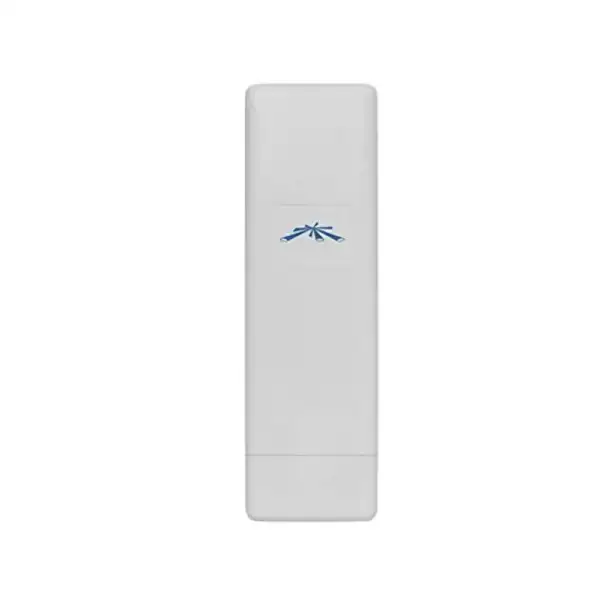
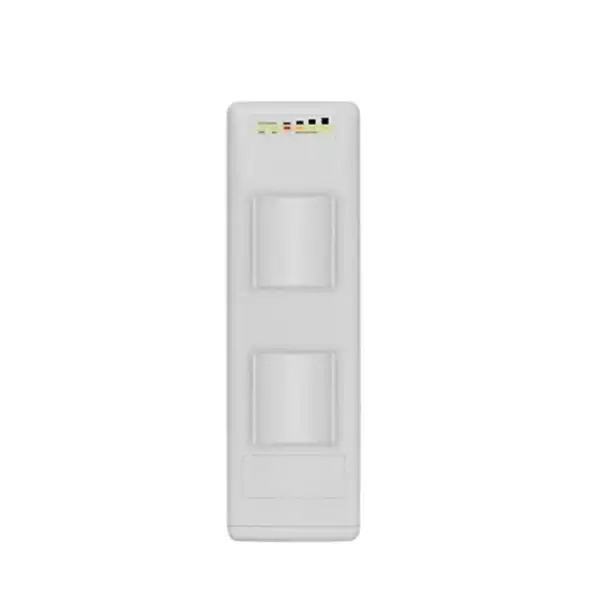
Ubiquiti airMAX NanoStation M2 NSM2 — 2.4 GHz Outdoor CPE
Connect a suitable remote network point without automatically running new cable. The NSM2 combines an integrated directional 2.4 GHz antenna, airMAX M wireless technology and dual Fast Ethernet ports in a compact outdoor radio. It is designed for fixed wireless applications, not blanket indoor Wi-Fi coverage.
Check compatibility, path clearance, realistic throughput and Tanzania operating requirements before buying. Ask FourTeck Tanzania to review your project outline and the exact radio already installed at the other end.
Quick decision guide
Good reason to consider it
A compatible fixed 2.4 GHz airMAX M link needs a compact directional outdoor station, and the traffic demand fits Fast Ethernet equipment.
Reason to reconsider
The project needs gigabit-capable backhaul, broad smartphone coverage, an uncertain radio partner or a congested 2.4 GHz path.
What the NanoStation M2 is designed to do
A network extension often starts with a simple problem: the internet connection is in one building, while another building, gate, office, workshop or remote device needs dependable access. Running a new cable may involve excavation, a road crossing, difficult terrain or an exposed route. The NanoStation M2 puts a focused 2.4 GHz wireless radio and an antenna in one outdoor-friendly enclosure. In an appropriately designed network, it can become the wireless portion of a link between the existing LAN and a remote Ethernet endpoint. That makes it a different tool from an indoor Wi-Fi router that spreads coverage around rooms.
The Ubiquiti NanoStation M2 NSM2 belongs to the airMAX M family, which is based on an earlier generation of wireless technology. It remains useful where its bandwidth, frequency and compatibility are a match, particularly when maintaining or expanding an established M-series installation. It should not automatically be the first choice for a new high-capacity backhaul. Buyers should describe the application, traffic load and other radios already in service before selecting it. A correct design may involve two compatible radios, a separate local access point, network switching and professionally installed cable and power protection. The radio alone does not make all of those components unnecessary.
- Useful when the job is a directional outdoor wireless connection rather than room-wide Wi-Fi coverage.
- Best evaluated against an exact site survey, link budget and traffic requirement, not an advertised maximum range.
- A reasonable candidate for compatible existing 2.4 GHz airMAX M networks, subject to firmware and topology checks.
Key specifications that affect your buying decision
The NSM2 is a 2.4 GHz radio with dual-polarized antenna elements and 2×2 MIMO architecture. Ubiquiti lists 10.4–11.2 dBi antenna gain, a nominal operating frequency range of 2412–2462 MHz, and two 10/100 Mbps RJ45 network interfaces. This last detail matters: each physical Ethernet interface is Fast Ethernet rather than Gigabit Ethernet. A product claim about over-the-air modulation or aggregate radio performance must not be interpreted as a promise of more than 100 Mbps through a single wired Ethernet port. Protocol overhead, signal quality and interference further affect actual usable throughput.
Ubiquiti lists a 24V, 0.5A passive PoE adapter for the NSM2 and a maximum device consumption of 5.5W in its current technical listing. The nominal dimensions are 294 × 31 × 80 mm and the weight is about 400 g. The enclosure uses UV-stabilized plastic and the published ambient temperature range is -30°C to 75°C, with 5–95% noncondensing humidity. These are manufacturer specifications, not assurances that any installation will survive incorrect mounting, lightning, water ingress through unprotected connectors, voltage problems or poor cabling. Confirm exact box contents and the revision supplied in the quotation.
- Wireless band: 2.4 GHz; radio family: airMAX M; antenna: integrated directional, dual-polarized.
- Networking: two 10/100 Ethernet RJ45 ports; do not plan for a native gigabit handoff.
- Power: 24V passive PoE, with a matching power source rather than an assumed standard PoE switch port.
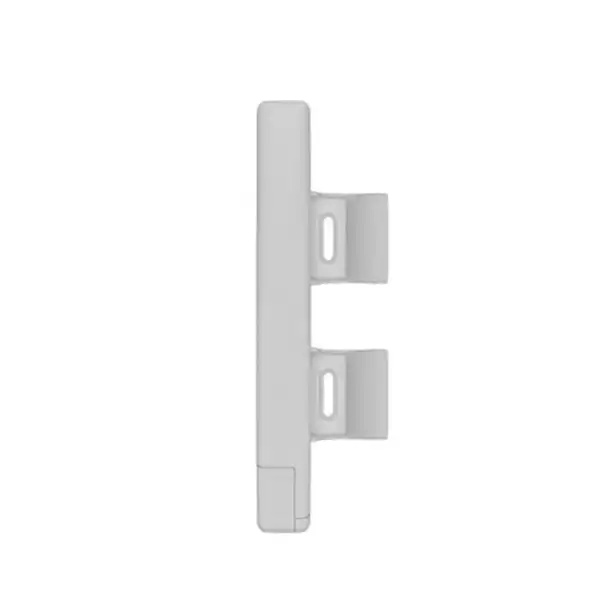
- Mounting: compact enclosure with manufacturer-listed pole mounting hardware; check the supplied kit.
Which Tanzanian site scenarios are a good fit?
Consider a small organization with an internet handoff in one building and an office across a courtyard. If the buildings can see each other directly, a properly aligned pair of compatible outdoor radios may transfer network traffic without digging a trench. A school compound might have an administration block and a separated classroom block; a workshop might require access to the main router from a nearby shed. Such examples describe possible network designs, not a guarantee that the NSM2 can cross every distance or obstacle. The right equipment depends on measured interference, mounting heights, traffic requirements, security policy and the number of endpoints.
Another use is as customer-premises equipment on a compatible point-to-multipoint wireless network. In that arrangement, the NSM2 acts as a station looking toward a suitable sector access point, instead of serving as the sole central base station for an entire community. A surveillance installation might use a link to carry traffic toward a recorder at a different building, but video bitrate, continuity requirements and PoE arrangements need careful calculation. For new networks with many cameras or high simultaneous data demand, modern alternatives may provide a better capacity margin. Ask for a topology diagram rather than relying on a generic product description.
- Office-to-annex network connections where a clear, legal and interference-managed radio path exists.
- Compatible fixed-wireless subscriber endpoints on an existing airMAX M platform.
- Limited remote Ethernet connectivity for access control, monitoring or cameras after bandwidth design.
Point-to-point and point-to-multipoint: know the difference
A point-to-point bridge is a dedicated relationship between two endpoints. Typically one radio is configured as an access point and the other as a station, with appropriate bridging behavior so devices at each end can communicate according to the network design. A pair of compatible radios is normally involved; buying one NSM2 is not by itself a complete two-ended wireless bridge. If a user already owns a compatible access point, one additional station may be sufficient, but only after its frequency, protocol, channel width, firmware and security settings have been reviewed. Where Layer 2 transparency is important, consult Ubiquiti guidance on WDS behavior.
A point-to-multipoint deployment allows a suitable central access point to serve multiple stations. The NSM2 can be a subscriber-side device in this architecture, but the central radio, antenna pattern, channel plan and airtime budget must suit the complete group. Adding stations does not create free capacity: noisy clients, weak links and heavy traffic consume shared airtime. Not every radio that operates on 2.4 GHz can join an airMAX network. Brand, protocol, hardware generation and exact operating mode matter. Document the planned network before ordering so a nominally compatible product does not turn into an expensive field troubleshooting exercise.
- For PtP: identify both ends, the network bridge settings and the required usable bandwidth.
- For PtMP: identify the central AP, number of subscribers and traffic pattern before choosing station radios.
- For either topology: verify frequency, airMAX mode, channel width, security and firmware compatibility.
Why 2.4 GHz can help—and where it becomes a limitation
A 2.4 GHz wireless design can be useful when existing infrastructure already uses that band and the path conditions support it. Compared with higher-frequency radio choices, lower-frequency signals may respond differently to some obstacles, although a professionally designed directional link still benefits from a clear path and sufficient Fresnel-zone clearance. The real problem at many sites is congestion. Neighbouring Wi-Fi networks, wireless devices and other emitters may already occupy substantial airtime. A strong signal reading does not prove a clean link if competing traffic or interference is significant. The correct question is whether the band can deliver the required application performance at the proposed location.
A survey should inspect the radio noise floor, channel utilisation where measurable, visible networks, practical mounting height and path obstructions. A narrow channel can sometimes be preferable to a wider one in a crowded environment because it leaves more room for interference avoidance. Conversely, increasing channel width without checking the spectrum may reduce reliability rather than increase useful throughput. When the site has demanding backhaul needs, ask whether a 5 GHz, newer airMAX or wired design is more suitable. Changing to a different band is not automatically better: line of sight, equipment compatibility and local permitted channels must still be checked.
- Prioritise stable application throughput rather than the highest displayed connection rate.
- Examine competing 2.4 GHz networks before choosing a channel or mounting position.
- Allow for growth, seasonal vegetation and changes in the surrounding radio environment.
Antenna gain, direction and realistic range
The NSM2 uses a directional antenna. Its approximately 11 dBi gain concentrates the radio pattern compared with an omnidirectional antenna, which helps when an endpoint lies within a defined direction. Directionality also imposes an installation requirement: the face of the unit must be properly aimed toward the intended peer. Ubiquiti lists approximately 55 degrees horizontal beamwidth for horizontal polarization and 53 degrees for vertical polarization, with a narrower elevation specification. These numbers describe an antenna pattern, not a promise that all links inside the beam are equally strong or that people can connect from any direction.
Claims such as “up to 10 km” or “15 km” circulating in retail descriptions should never be treated as guaranteed service range. Achievable separation depends on transmit power, local EIRP limits, receiver characteristics, noise, Fresnel clearance, obstructions, cable and mounting quality, weather exposure and available margin. Even when a long link can associate, it may fail to carry the workload with the reliability a business needs. For a quotation, supply approximate coordinates or a sketch, the proposed mounting heights, photos facing each endpoint and a description of the traffic. An installer can then test feasibility and recommend an appropriate design without treating marketing distance as an acceptance criterion.
- Aim each radio carefully and verify the path from both ends; a directional unit is not a 360-degree hotspot.
- Check clear line of sight and Fresnel-zone clearance, not just whether one roof can be seen from another.
- Ask for measured receive signal, noise, link quality and usable throughput at commissioning.
Understand Ethernet throughput before planning the network
A common purchasing mistake is comparing the highest wireless data-rate figure on a listing with the number of users and assuming they are equivalent. A radio modulation rate is not the same as sustained TCP or UDP traffic delivered to applications. Packets need acknowledgements, management traffic and protocol overhead. Shared airtime must serve both directions, while interference and retransmissions use still more capacity. The NSM2 also has 10/100 Ethernet interfaces, which create a practical port ceiling independent of any larger advertised radio headline. Network design should work from the expected usable end-to-end throughput under realistic conditions rather than a nameplate maximum.
List the services that will share the wireless path: video surveillance, point-of-sale, web access, voice calls, file transfers, backups and remote desktops. Note their peak simultaneous usage, latency sensitivity and acceptable downtime. Video cameras can produce sustained traffic while backup jobs may saturate a link during scheduled periods; interactive calls can suffer even if total data volume appears small. If the business expects fibre-like performance, numerous high-bitrate cameras or heavy uploads, do not specify this legacy Fast Ethernet device without a clear capacity assessment. A capable alternative may require newer radios, a different band or a physical fibre run.
- Calculate concurrent demand and reserve headroom for protocol overhead and changing conditions.
- Treat the Ethernet port rate as an engineering limit, not a footnote.
- Include latency, packet loss and service priorities in acceptance testing, not only download speed.
Powering the NSM2 safely with passive PoE
The NSM2 is designed around 24V passive Power over Ethernet, so power and data reach it using a suitable Ethernet run. Passive PoE is not interchangeable with every 802.3af or 802.3at PoE output. Do not assume that plugging the device into a standard managed PoE switch, a 48V injector or an unverified adapter is safe. Confirm voltage, pinout, current capability and connector requirements against the exact hardware revision and Ubiquiti guidance. Ubiquiti lists a 24V, 0.5A PoE adapter in its manufacturer documentation, but a purchaser should still verify what the local package and quote include.
The second Ethernet interface can be useful in carefully planned integrations, including configurations involving software-controlled PoE passthrough described in Ubiquiti installation material. That does not mean every connected camera or accessory can be powered directly without checking its voltage, power draw and cabling. Avoid inferring standard PoE interoperability from the mere presence of an RJ45 socket. Route cables to reduce exposure, provide appropriate strain relief, protect terminations and follow manufacturer grounding instructions. Where mains power is unstable, design backup power for the whole network path, including the router and any switches, not just the radio itself.
- Use only verified compatible passive-PoE power arrangements and correct polarity.
- Confirm accessory passthrough capability before enabling it; downstream voltage and load are critical.
- Plan protected cable entry, grounding and power continuity as part of installation.
Outdoor installation, weather exposure and mounting
A slim enclosure is convenient on a pole, but a reliable installation depends on what surrounds the device. The NSM2 enclosure is described by Ubiquiti as outdoor UV-stabilized plastic; this should not be converted into an invented IP rating. Waterproofing the Ethernet connection, mounting securely, avoiding water traps and providing sufficient service access remain the installer’s responsibilities. Keep cabling protected from abrasion, UV damage and accidental pulling. Use outdoor-rated, shielded cable where required by installation guidance and follow proper grounding and electrical safety practices. Select mounting hardware for the actual pole or structure and consider the effect of wind, vibration and future access.
For a Tanzania site, heat, intense rain, lightning exposure and interruptions to mains electricity may influence the finished design, but conditions vary substantially by location and season. Do not rely on a generic “weatherproof” promise as a substitute for site inspection. Keep the radio clear of structures that block its beam and away from unsafe roof access routes. Leave enough cable slack for service but avoid loose loops that collect water or strain the connector. After mounting, perform alignment and monitoring checks before declaring the link complete. Record photographs and settings so the next technician can diagnose the network without starting from zero.
- Mount firmly, protect exposed cables and follow safe electrical and height-working practices.
- Do not infer a specific ingress-protection grade when none is verified for the supplied listing.
- Include surge protection and an appropriate grounding strategy in the site installation design.
Compatibility with normal Wi-Fi, airMAX M and newer radios
The term Wi-Fi is often used loosely in equipment listings. In its native airMAX role, the NSM2 is intended for compatible outdoor radio networking rather than as a drop-in replacement for an indoor consumer access point. Ubiquiti states that M-series radios in station mode can connect to standard access points in supported configurations. It also explains that an M-series access point can allow standard 802.11 clients when the proprietary airMAX protocol is disabled. That mode change has performance and topology implications and should not be made casually on an established wireless provider network. A directional antenna also makes it an awkward choice for general mobile-device coverage around a property.
Do not assume that any airMAX product automatically works with another. A NanoStation M2 operates at 2.4 GHz, whereas an M5 operates in a different band, so they cannot make a direct same-frequency link. Ubiquiti documents specific mixed-mode circumstances in which M-series stations may connect to compatible AC access points, with firmware and configuration prerequisites; the reverse relationship is not generally equivalent. The safest buying question is not “Are both Ubiquiti?” but “Are the exact access point and station models, frequencies, software versions and wireless modes interoperable?” For an existing installation, provide device model labels and firmware details before ordering.
- Native airMAX links require compatible radio modes; ordinary Wi-Fi use may require disabling airMAX.
- M2 and M5 are not direct peers because their operating bands differ.
- Newer radio families require a compatibility check, not a brand-only assumption.
How the NanoStation M2 differs from the loco M2
NanoStation M2 and NanoStation loco M2 names are easy to confuse, but they identify different physical models. The full NSM2 has the long enclosure and two 10/100 Ethernet ports listed by Ubiquiti. The smaller loco M2 is a separate compact product with one 10/100 Ethernet port in the current manufacturer listing. The difference can affect the cabling diagram, mounting position, antenna performance and intended project. A seller’s photograph might show an M-series family member rather than the exact variant, so check the printed label and model before approving the order.
A compact unit can be appealing on a small building facade, while the full NSM2 may be preferred for a design that specifically needs the documented ports and antenna characteristics. That is not proof that one device is always faster, more reliable or better at a particular distance. Compare exact datasheets, test the proposed path and account for total project requirements. Similarly, “NanoStation AC,” “NanoStation M5,” and “NanoStation 5AC” refer to different products or families and should not be substituted without examining band, protocol and power compatibility. If a quote simply says “NanoStation,” request the complete manufacturer model code.
- Confirm that the model is NSM2, not locoM2, NSM5 or a 5AC variant.
- Check the required number of Ethernet ports and the antenna pattern for each candidate.
- Avoid using one model’s specifications to describe another model with a similar name.
Installation planning checklist before you request a quote
A good quote begins with a simple network sketch. Identify the current internet entry point and router, the remote endpoint and the equipment that must connect there. Measure or estimate the separation and document the structures between them. Mark proposed radio heights and whether trees, walls or rooftops enter the path. If either building lacks safe power access, include the power solution and cable route. Include existing switches, access points, CCTV recorders or other devices to avoid purchasing a link that cannot connect to the network in the expected way. If only one side is being upgraded, record the model of the untouched radio.
Next, quantify the service need. How many users are active together? Are there live video streams? Is a link drop acceptable for a few seconds, or would it interrupt critical operations? Is the traffic mostly local between buildings or destined for the internet? Document network separation, device-management access and authentication needs as well. The final proposal should explain why 2.4 GHz and this radio generation were selected, what supplies and accessories are included, what must be configured on site, and how success will be measured. This process reduces accidental purchases and produces a useful record for maintenance.
- Share a site sketch, endpoint photographs, estimated distance and mounting heights.
- List existing radio models, firmware, switching and the number of required wired connections.
- Provide peak traffic, required service availability and any planned expansion.
- Ask for separate line items for radios, PoE, cabling, protection, mounting and commissioning.
Basic configuration approach and commissioning checks
A typical field workflow starts on a bench with one radio at a time, using the verified power adapter and a safe management connection. Confirm that the hardware is genuine and that the firmware offered for download matches the exact model and board type. Give each device a distinct management address, use a strong administrator credential and establish the intended wireless security configuration before mounting it beyond easy reach. Record software versions and keep secure backup copies of approved settings. Different airOS versions present menus differently, so installers should follow the corresponding manufacturer instructions instead of blindly copying a generic screen-by-screen tutorial.
For a planned two-radio bridge, configure compatible AP and station roles, the correct security parameters, supported operating channel and channel width, and bridge settings suited to the topology. Ubiquiti recommends WDS for supported links between its radios when transparent bridging is intended. Once mounted, aim the units while monitoring received signal, signal-to-noise ratio and link quality rather than relying only on an LED. Test each wired endpoint, verify that IP addressing behaves as designed, then run repeatable throughput and latency checks. Record the results and revisit them after initial operation. No exact menu setting is universal across every network, firmware version and regulatory domain.
- Bench-test hardware and management access before an elevated installation.
- Match AP/station, WDS or bridge options and security values to the intended topology.
- Commission with measured signal quality, throughput, latency, packet loss and a documented baseline.
Troubleshooting a link that connects but performs badly
Intermittent throughput does not always mean a defective radio. Begin by separating the wireless path from the wired network. Check adapter voltage and physical Ethernet negotiation, inspect connectors for moisture or damage, and confirm that devices are not limited by a misconfigured switch port. Then review radio alignment, signal strength, noise floor, channel interference and retransmission indicators. Ubiquiti’s airMAX guidance highlights the importance of link quality, signal-to-noise ratio and channel selection. Increasing transmit power without measuring these factors can worsen interference and may violate permitted operating limits.
If the station fails to associate entirely, compare the operating bands and model families first. A 2.4 GHz M2 cannot connect directly to a 5 GHz M5 on the same radio interface. Next compare SSID, password, airMAX setting, channel width, permitted frequencies and any mixed-mode prerequisites. Check whether the proposed bridge is passing traffic as intended rather than merely reporting a connected radio state. For persistent issues, retain logs and both ends’ configurations before changing settings. A structured diagnosis is less disruptive than randomly adjusting every radio parameter, especially where the link carries cameras, transactions or business applications.
- Check both Ethernet and RF health; a connected radio does not prove the entire LAN path works.
- Investigate channel congestion, alignment, cabling and power before replacing hardware.
- Use a recorded baseline to identify whether performance has deteriorated over time.
Network security and ongoing maintenance
An outdoor radio is part of the organisation’s network boundary, not just a piece of mounting hardware. Restrict management access to authorised administrators, avoid exposing the management interface unnecessarily to the public internet and use a documented credential policy. Select supported strong wireless authentication for the specific firmware and topology. Review the network design for guest isolation, camera segregation and administrative access where relevant. A transparent bridge can carry traffic between buildings, but that does not automatically provide firewall segmentation. The router, VLAN architecture and security controls remain part of the overall system.
Operational care matters after commissioning. Keep an inventory of radio locations, MAC addresses, firmware, management addresses, adapter types and cable routes. Monitor key link metrics and investigate sustained changes before users report outages. Check manufacturer software notices for the exact M-series hardware; do not install a firmware file simply because it mentions airMAX. Coordinate upgrades for both ends, back up configuration and arrange safe rollback access. Physical inspection should include mounts, ties, water protection and power equipment. A design that can be maintained safely is generally more valuable than a link that performs well only on its first day.
- Secure management credentials and minimise exposed administration services.
- Keep configuration backups, firmware records and a protected inventory of endpoints.
- Plan periodic checks of mounts, weather protection, cable terminations and link health.
Tanzania-specific radio and procurement considerations
Wireless equipment must be deployed within the rules that apply where it is operated. The Tanzania Communications Regulatory Authority publishes national spectrum information and technical requirements relevant to wireless equipment. Those sources should be checked for the proposed use, channel, output power, antenna configuration and any licensing or type-approval obligations. A frequency being common in Wi-Fi equipment does not itself establish that every outdoor installation, transmit-power setting or imported hardware variant is authorised. Do not copy a foreign country profile or increase output power beyond what is permitted. Regulatory confirmation belongs in the deployment review, particularly for commercial fixed-wireless services.
Commercial decisions also need local verification. Ask for the actual model and condition, local quotation in the supplier’s stated currency, included injector and power cord, procurement lead time, support arrangements and any warranty terms offered for that transaction. No price, stock position, delivery window or product approval is assumed here. When replacing an old radio, ask whether a matched modern pair would be more economical than maintaining a constrained legacy segment. Where business operations depend on the connection, include backup connectivity and recovery arrangements in total cost, not just the purchase price of one device.
- Confirm applicable TCRA requirements and configure the lawful country and power settings.
- Ask for exact listing details, package contents and written commercial terms.
- Compare lifetime network reliability and maintenance cost with modern alternatives.
When to choose an alternative to the NSM2
A buyer should consider alternatives when the application needs more than a Fast Ethernet handoff, heavy concurrent traffic or a cleaner spectrum than 2.4 GHz provides at the site. A new multi-camera network, high-use business backhaul or growth-oriented campus may justify an updated radio family with greater capacity, or a fibre installation if a suitable path is available. An indoor Wi-Fi access point is usually more appropriate for distributing wireless service to ordinary phones and laptops inside rooms. For a fixed link, however, compare directional radio designs rather than assuming a household mesh kit will perform well outdoors across a road or field.
Equally, avoid replacing a working compatible airMAX M subscriber without first examining the central access point. The newer product on a shop shelf may not join an existing radio network without a change in AP equipment or operating mode. Ask for a decision based on traffic, interference, band, interoperability, mounting and realistic total cost. A sound recommendation may be to retain an NSM2 in a low-demand compatible link, replace both endpoints with a newer pair, or move critical traffic to cable. The aim is to select the simplest dependable solution for the site—not to promote one product for every wireless problem.
- Consider newer wireless backhaul when sustained capacity and expansion are priorities.
- Use purpose-built indoor access points for general client coverage.
- Consider wired fibre or copper where engineering, safety and distance limits favour cable.
What to ask FourTeck Tanzania before ordering
Tell the team whether you need a new bridge, a replacement unit, an airMAX subscriber station or advice about an existing network. Share the exact product code NSM2 and explain what device it must connect to. If you already have an outdoor radio, photographs of the label and a non-sensitive screenshot of the firmware information can help clarify compatibility. Include the desired outcome—such as connecting a remote office network or carrying two camera streams—rather than only the request for “long-range Wi-Fi.” This helps distinguish a workable project from an application that needs a different device family.
Ask for a quotation that identifies the exact hardware variant, compatible power equipment, any additional radio needed at the far end, mounting and cable materials, commissioning responsibilities and the intended acceptance test. If there is uncertainty about RF conditions, begin with an assessment rather than a promise. FourTeck Tanzania can review the information you supply and discuss an appropriate next step without assuming that the device is available, a particular price applies or installation is included. A precise requirements brief also makes subsequent comparison between solutions more meaningful for the buyer.
- Request a suitability review for the proposed link and existing radio family.
- Confirm the NSM2 model, quantity, accessories and commercial terms in writing.
- Ask for a site-appropriate commissioning plan instead of a guaranteed maximum-distance promise.
NanoStation M2 NSM2: frequently asked questions
Is Ubiquiti NanoStation M2 NSM2 a Wi-Fi router?
It is primarily a directional outdoor CPE and wireless bridge radio, not a conventional all-in-one household Wi-Fi router. airOS can offer bridge and routing features, but the physical antenna pattern and airMAX design are oriented toward fixed wireless applications. If you need comfortable coverage for phones in multiple rooms, use a suitable access point as part of the wider network. Describe the intended users and their locations before deciding whether the NSM2 belongs in the system.
Can one NanoStation M2 connect two buildings by itself?
Usually a purpose-designed point-to-point link needs compatible equipment at both ends. One radio may be enough when a compatible access point is already installed and you are adding a station to its network. If both buildings are starting from nothing, plan the two endpoints plus the wired network equipment each side requires. The number and model of radios depend on the topology and compatibility, not simply the distance between buildings.
Does the NSM2 use 2.4 GHz or 5 GHz?
The NSM2 is the 2.4 GHz NanoStation M2 model. A NanoStation M5 is a different-band product, and a shared brand name does not make them wireless peers. Channel availability and allowed power also depend on the regulatory settings and local requirements. When replacing equipment, inspect the complete label and existing AP model to avoid a purchase that cannot join the installed network.
What is the antenna gain?
Ubiquiti specifies approximately 10.4–11.2 dBi of gain for the integrated directional NSM2 antenna. This figure describes an antenna characteristic, not a guaranteed operating distance, internet speed or radius of coverage. A link budget must also account for permitted transmit power, receiver sensitivity, alignment, terrain clearance and interference. A high antenna gain figure does not overcome a blocked or very noisy radio path.
Does the NanoStation M2 have Gigabit Ethernet?
No. The current Ubiquiti technical specifications list two 10/100 Mbps Ethernet ports for the NSM2. That means a buyer should not design a gigabit wired backhaul around the NSM2 itself. Real user throughput can be lower than the wired port limit because the radio must share airtime and handle wireless overhead. Applications with greater sustained bandwidth requirements deserve a different technical assessment.
Can I power it from any PoE switch?
Do not assume so. The NSM2 uses 24V passive PoE rather than a promise of universal compatibility with standard PoE switch outputs. Check the voltage, polarity, power capacity and any adapter arrangement for the exact hardware. Using an unsuitable power source can cause a failed installation or equipment damage. Confirm what the supplier includes before purchasing separate injectors, switches or backup-power devices.
Can the NSM2 connect to an ordinary Wi-Fi access point?
Ubiquiti states that supported M-series stations can connect to standard Wi-Fi access points. In access-point mode, compatibility with ordinary Wi-Fi clients generally requires airMAX to be disabled on the M-series device. These are configuration-specific capabilities rather than universal interoperability guarantees. Check security mode, channel width, firmware, range and network topology before treating an NSM2 as an ordinary Wi-Fi extender.
Is the NanoStation M2 suitable for CCTV cameras?
It can form part of a link that carries camera traffic, provided the link budget, total video bitrate, network design and power arrangements are adequate. The NSM2 is not itself a camera or recorder, and its 10/100 Ethernet interfaces require realistic capacity planning. Any use of secondary-port power needs separate voltage and consumption checks. For several high-resolution streams, consider whether a newer or wired design offers more reliable capacity.
What distance can a pair of NSM2 radios cover?
There is no trustworthy single guaranteed distance for every site. Clear line of sight, Fresnel clearance, permitted power, interference, antenna alignment and desired application throughput determine feasibility. Long-range figures in retail marketing are not service-level promises. A practical quote should involve approximate coordinates, mounting heights, spectrum conditions and a link-budget or site-survey assessment, followed by acceptance testing at installation.
What is the difference between NanoStation M2 and loco M2?
They are different products. Ubiquiti lists two 10/100 Mbps Ethernet ports for the full NSM2 and one such port for the smaller loco M2. Their physical sizes and antenna characteristics should be checked separately before ordering. A generic product photograph or abbreviated label is not enough to establish which unit you will receive. State the full model code on the purchase request.
Will the NSM2 work with airMAX AC equipment?
Only in supported combinations and modes. Ubiquiti documents circumstances in which an airMAX M-series station on suitable firmware connects to a mixed-mode airMAX AC access point, but that does not imply that all M and AC radios can freely pair in either direction. Frequency and exact hardware families still matter. Verify the AP model, firmware and channel settings with a technician before ordering a replacement station.
What should I prepare to request a Tanzania quotation?
Share your location or site layout, approximate endpoint distance, existing radio model and firmware, number of locations, required throughput, power arrangement and the application being connected. Ask the seller to identify the exact NSM2 hardware, package contents, supply terms and any optional installation work. The site-specific regulatory requirements and radio configuration should be checked separately. This information makes the response far more useful than requesting a price for an unspecified “NanoStation.”
Request an NSM2 compatibility and quote review
Send FourTeck Tanzania your endpoint distance, equipment models, anticipated traffic, mounting conditions and required accessories. Request a written check of model suitability, itemised package contents, local commercial terms and any installation scope. This is a request for review, not a statement of confirmed inventory, pricing or guaranteed service range.
Next step: contact FourTeck Tanzania with your requirements and request a tailored quotation.




Reviews
There are no reviews yet.