
WIRELESS BUSINESS COMMUNICATION
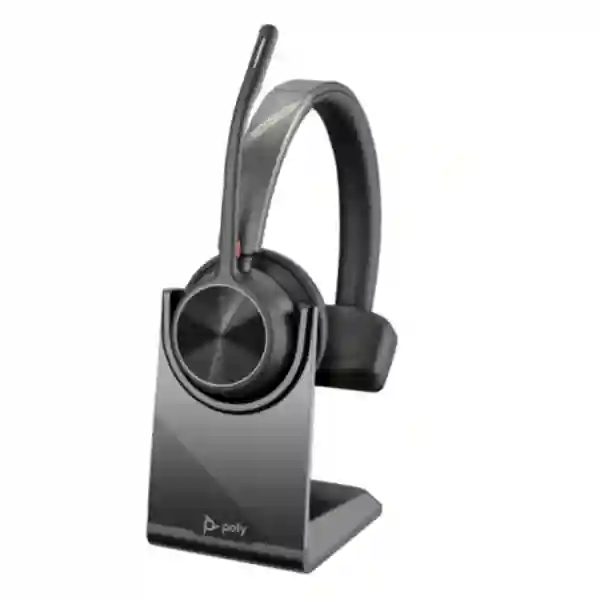
HP Poly Voyager 4310 UC Headset with Charging Stand
For professionals who spend much of the day on voice and video calls, the HP Poly Voyager 4310 UC Headset with Charging Stand offers single-ear wireless communication without tying you to one chair. Its boom microphone uses Poly Acoustic Fence technology to help the person you are speaking with hear your voice instead of surrounding chatter. The included BT700 Bluetooth USB adapter connects the headset to a compatible computer, while smartphone Bluetooth support gives you another way to communicate. A dedicated desktop charging stand makes it easier to return the headset to a regular charging location. The monaural design leaves one ear uncovered so you can remain aware of colleagues and events around you. Choose this headset when conversations, mobility and practical workplace call handling matter more than immersive stereo listening. Before requesting a quotation in Tanzania, confirm the exact USB adapter variant, your preferred collaboration application, and whether your organization requires the dedicated Microsoft Teams version.
Quick feature summary
Best for professional conversations, shared offices and hybrid work when employees want one ear free. Not intended to provide active noise cancellation for the wearer’s surrounding sound, and not a direct desk-phone connection without an appropriate separate accessory.
Who this headset is for
This model suits reception staff, account managers, coordinators, educators, office administrators and remote employees who need to move between a computer and ordinary workplace tasks while remaining available for conversations. A single-ear headset is particularly useful when the user must notice a colleague approaching or hear activity at a nearby desk. Unlike a large entertainment headset, the Voyager 4310 UC is organized around speech intelligibility, easy call handling and a practical desk routine. It can also suit supervisors who need to participate in online meetings while keeping some awareness of the room. The best choice depends on how frequently the wearer joins calls, how noisy the workspace is and whether the open ear is an advantage.
For buyers outfitting a team rather than one person, consider the wider work pattern before ordering. A quiet office user may value portability and unobtrusive fit, whereas an agent taking uninterrupted calls could place more weight on consistent charging opportunities and the correct computer adapter. A user who must concentrate in a loud room may prefer both ears covered, which is a different design priority from the Voyager 4310 UC. Buying a headset that matches the daily task normally matters more than choosing the model with the longest feature list. These practical questions help turn the specification sheet into a confident purchasing decision.
Understanding the single-ear design
The Voyager 4310 UC is a monaural, on-ear headset: audio from the call reaches one ear cup, while the other ear remains uncovered. This can reduce the feeling of being isolated from a shared office and makes short conversations with nearby colleagues more natural. It can also make a user more aware of doorbells, instructions and routine workplace activity. The adjustable headband and cushioned contact surfaces are designed for extended desk use, although comfort is personal and should be checked against the wearer’s preferences. This wearing style is useful for phone conversations and meetings, not a substitute for protective hearing equipment or for a stereo headset when immersive listening is the objective.
The open-ear arrangement is also a compromise. Background noise will still reach the ear that is not covered, and speech from colleagues can remain distracting to the wearer even when the headset microphone is helping the remote caller. In environments dominated by loud machinery, large crowds or constant overlapping conversations, a dual-ear headset may be a better starting point. If employees routinely need to hear a manager or visitor while on a call, however, a single-ear model can be a sensible operational choice. Select by how staff work rather than assuming that more ear coverage is always better or worse.
How the microphone handles speech
The boom microphone uses a noise-cancelling design with Poly Acoustic Fence technology. Its purpose is to give a call participant clearer access to the wearer’s voice by helping reduce interfering sounds picked up by the microphone. This is relevant in a home workspace with family activity, a shared administrative office, or a service desk where conversations happen nearby. The microphone is close to the mouth, which supports a more consistent speech pickup position than relying on a distant laptop microphone. HP lists two microphones for the referenced UC bundle, and the design is intended for communication rather than recording music or capturing the ambience of an entire room.
Microphone performance still depends on placement, the surrounding acoustic conditions, the meeting application and the quality of the connection. The technology does not remove every unwanted noise, and it cannot make a severe network interruption sound normal. Position the boom as recommended by the product guidance, use the headset rather than the laptop microphone in the chosen app, and test a real call before issuing equipment to a whole team. A useful evaluation includes normal speaking volume, nearby keyboard activity and another person talking at a moderate distance. That method gives a more meaningful result than judging the headset only from a theoretical microphone specification.
Noise reduction is not active noise cancellation
A common source of confusion is the difference between noise cancellation in a microphone and active noise cancellation for the person wearing headphones. The Voyager 4310 UC is promoted for reducing background noise transmitted from its microphone through Acoustic Fence. That feature assists the far-end listener. It should not be described as a personal active-noise-cancelling listening headset that blocks the sound of an office around the wearer. The single-ear architecture deliberately keeps one ear open, so the user can continue to hear local activity. The distinction matters when comparing office headsets for call centres, private offices and high-noise locations.
If the primary challenge is the caller hearing keyboard clicks or conversations near the employee, improved microphone pickup can make a meaningful difference. If the main challenge is that the employee cannot concentrate because other people are talking, a dual-ear or purpose-built active-noise-cancelling design may deserve consideration. Neither approach fixes a poor internet connection, clipping caused by overly high microphone gain or a meeting app using the wrong device. Treat acoustic performance as part of a complete workstation plan involving the room, user habits, application settings and network quality rather than as one universal claim.
Wireless mobility in an office
HP states a wireless range of up to 50 metres, or approximately 164 feet, with the included BT700 USB adapter under suitable conditions. This creates room to stand up, collect a document or move within a nearby workspace while keeping an ongoing call. The figure is a manufacturer maximum, not a guaranteed distance through every wall or floor. Building materials, interference, USB adapter placement and other active wireless equipment can shorten the usable range. For ordinary workplaces, it is wise to test the real route a user intends to walk rather than plan a communication policy around the maximum figure alone.
Mobility can help teams whose jobs alternate between calls and simple physical tasks, but it also changes call etiquette. An employee should remain aware of confidentiality when walking away from a private desk, and should avoid taking sensitive conversations into a corridor where other people can hear. If the signal becomes unreliable at a location, stepping closer to the connected computer is often a useful first test. The desktop charging stand is for convenient charging, not an extender that guarantees additional roaming distance. A separate compatible Voyager Office base is a different accessory with a different use case and must not be assumed to be part of this bundle.
The role of the BT700 USB adapter
The BT700 is the compact Bluetooth USB adapter supplied with the relevant UC charging-stand configurations. It is the intended computer connection for a straightforward wireless headset experience: insert the matching adapter into an appropriate computer port, select the Poly device as the input and output for calls, and follow the installation guidance. The connector type matters. A USB-A adapter fits a traditional rectangular USB-A port, while a USB-C variant uses a smaller reversible connector. Some laptops and docking stations offer both, but many modern devices do not. The product title alone does not establish which version is being supplied.
A practical IT purchasing process checks the real computer port before selecting the package. Teams using thin laptops, USB docks or shared desktops should verify the ports available at the workstation where the headset will normally be used. Avoid treating a third-party converter or a generic computer Bluetooth radio as automatically equivalent to the included BT700 in every calling application. Call controls and management behaviour can vary with the connection method. Keeping a record of which adapter belongs to which employee also simplifies troubleshooting and reassignment when equipment is moved between people or office locations.
Computer and smartphone conversations
Manufacturer information identifies connectivity with a compatible PC through the BT700 adapter and with a smartphone over Bluetooth. This helps professionals who may work in a computer meeting application while also receiving ordinary mobile communications. The design is intended to support multiple-device working, though the exact stored-pairing count can differ between published configuration sheets. Avoid assuming that two simultaneous active calls can be combined into one conversation. Pairing, connection, active audio and call switching are different functions, and the operating behaviour should be tested using the devices and applications that the employee actually uses.
For daily operation, decide which device should handle work calls and which should handle personal or secondary calls. The chosen computer meeting software should have the headset selected explicitly for speaker and microphone; the mobile device should use its own Bluetooth selection. When an incoming call interrupts another task, users should follow the documented call-switching procedure rather than repeatedly changing application sound settings. If deployment involves company-managed phones, confirm the mobile operating system and any device restrictions before committing to a bulk purchase. A short practical test on one computer and one phone is usually more informative than assuming every software combination behaves identically.
Compatibility with collaboration platforms
The UC designation refers to unified communications usage. The headset is designed for professional calling and can be used with common meeting and voice applications on supported systems. HP documentation lists Windows, macOS, Android and iOS among supported operating-system families for the referenced model. Actual call controls, prompts and application integration can vary by version, software configuration and the specific USB adapter bundle. A headset being able to pass audio in Microsoft Teams does not automatically mean that the purchased package is the dedicated Microsoft Teams version with its additional application-specific controls or certification.
Before purchasing, identify the main collaboration platform, its current client version, the computer operating system and the features employees rely on. A team may need only reliable two-way audio and volume control, while another may require a specialized Teams call workflow or device management controls. If dedicated Microsoft Teams integration is mandatory, ask for the precise Teams-labelled configuration rather than accepting any product described generally as UC compatible. Similarly, certification or support for a particular application should be checked for the exact part number and current deployment. This reduces misunderstandings when replacing older office headsets or standardizing across several departments.
Battery life in real working conditions
HP specifies up to 24 hours of talk time with the online indicator disabled and up to 18 hours when that indicator is enabled, plus up to 47 hours of music listening under stated test conditions. Those figures are helpful for planning but are not promises for every employee’s real schedule. Volume level, usage pattern, wireless environment, software features and battery age can affect operating time. For an organization with back-to-back meetings, the most useful question is whether the headset can be returned to its charger during normal breaks. A dependable charging habit is often more valuable than the largest possible nominal battery figure.
A wearer who uses the busy indicator throughout the day should plan using the lower applicable manufacturer talk-time figure rather than the maximum with that feature switched off. Battery life and standby time also describe different types of use. A headset sitting unused for long periods is not performing the same job as one in continuous conference calls. Where many employees share equipment, define a routine for returning devices to charging locations between shifts and checking charge status before a scheduled meeting. For very long calling sessions, the supported audio-over-USB mode can provide an additional operating option when configured appropriately.
What the charging stand adds
The supplied desktop charging stand gives the headset a consistent home on a desk. Instead of leaving the device among notebooks and cables, the user can place it at a recognizable location and make charging part of their routine. This is attractive for shared offices, hybrid workers with a fixed home workstation and employees who begin each day with a series of scheduled calls. The stand uses an appropriate USB power connection according to the manufacturer instructions. The presence of a stand in this described package should still be confirmed against the precise quotation and supplied part number, because other Voyager 4310 configurations are offered without one.
The charging stand is not the same as a telephone base station, a SIP gateway or a conferencing hub. Its purpose is to charge and store the headset. A buyer who needs direct desk-phone connectivity must investigate the correct separate office-base option and desk-phone compatibility rather than assume the stand will plug into a telephone. For practical placement, choose a stable surface with a reachable power port and enough space for the boom microphone and headband. Keep the USB cable away from chair wheels and regularly inspect the connector. A good location makes the stand genuinely useful rather than another accessory hidden in a drawer.
Charging time and daily routines
HP lists a charge time of less than 1.6 hours for the referenced configurations under its stated conditions. The rechargeable lithium-ion battery is intended for repeated use, but the result in any particular workplace depends on power supply, remaining charge and the condition of the equipment. A team should not calculate exact shift coverage by multiplying a single charging figure without considering its own calling pattern. A simple practical routine is to place the headset on the stand after the final call of the day and check its status before the first meeting of the next shift.
For shared hot desks, make sure users know which charging location belongs to which headset. Labels or an asset record can prevent the BT700 adapter, stand and headset becoming separated during office moves. Avoid assuming that an arbitrary charger, replacement stand or cable is the correct accessory merely because the connector seems to fit. Follow manufacturer charging and safety guidance, particularly if equipment is being used with power strips or in a hot workspace. When a battery no longer performs as expected, check software, connection settings and physical condition before concluding that the battery itself is defective.
Corded operation when needed
A useful characteristic of the Voyager 4300 UC family is support for audio over USB on the appropriate computer connection. In this mode, a suitable USB cable provides a wired audio path rather than relying on a wireless link, which may be valuable when the headset needs charging or a workstation has a difficult radio environment. The manufacturer explicitly identifies corded use as a way to extend working time. This should not be confused with a permanently wired analog telephone headset, and an ordinary charging lead should not be treated as universally compatible with every device or adapter.
For an employee, corded mode can serve as a practical fallback during a long meeting. For an IT team, it offers a useful controlled test if wireless audio becomes unreliable. First identify the correct cable and supported device, then select the resulting audio endpoint inside the communications software. Some applications can show both the BT700 wireless path and a USB audio device, so users should avoid leaving the wrong one selected. The exact call-control behaviour and available features should be tested with the organization’s software. A clear internal instruction sheet can prevent people from mistaking a charging connection for an application problem.
Comfort, fit and long meetings
HP describes an on-ear single-ear design with an adjustable headband and a cushioned ear contact surface. The USB-A charging-stand configuration is listed at approximately 122 grams in the manufacturer specifications, while published weights can differ between specific product configurations. More important than a number alone is whether the headband sits securely, the ear cup rests naturally and the microphone can be positioned comfortably for speech. The fit should be checked with the individual employee rather than based on a photograph or the experience of a different wearer. For organizations buying many units, a small user trial can help identify any ergonomic concerns.
Comfort also involves work habits. Long audio calls can become tiring with any headset when the wearer remains in one posture for hours, keeps the volume unnecessarily high or constantly readjusts the headband. Encourage sensible listening levels and ordinary screen breaks. When several people share devices, hygiene and fit adjustments become additional considerations. A monaural headset is especially worth assessing for employees who must stay aware of their environment, but it is not automatically the most comfortable choice for everyone. Procurement should consider a clear alternative route for users who need a different wearing style or accommodation.
Call controls and visible busy indication
The Voyager 4310 UC provides on-device call functions such as answering or ending a call, muting and adjusting volume. HP also describes an on-call indicator that gives people nearby a visual signal when the wearer is busy. This can be useful in a shared workspace where colleagues otherwise interrupt someone whose meeting is not visible on a computer screen. The online indicator has an associated battery-life consideration, so a team should decide whether its workplace value justifies the different talk-time setting. Software and device versions may influence which controls operate in a particular calling application.
Teach users the difference between headset mute, application mute and device volume before they begin using the headset for important conversations. A microphone can appear muted in one interface while the wearer expects a different control to be authoritative. Short practice calls can confirm the behaviour of the headset button, the meeting app indicator and the remote listener’s experience. When the busy light is active, coworkers should still follow ordinary privacy and interruption policies; a light does not guarantee the room is confidential. Properly understood, these simple controls can make a significant difference to the daily experience of repeated calls.
A straightforward first-time setup
Begin by identifying the exact USB-A or USB-C BT700 configuration supplied in the box. Check that the computer offers the required port and that the user is allowed to connect permitted USB audio equipment. Charge the headset using the provided equipment and follow the manufacturer startup instructions. Insert the BT700 adapter, power on the headset and allow the supported pairing process to complete. In the operating-system audio settings and the employee’s main call application, select the appropriate Poly microphone and speaker. Then make a test call that checks speech pickup, incoming audio, mute, volume and call disconnection.
If the user also needs a smartphone, follow the supported Bluetooth pairing instructions for that device separately and confirm which application should receive calls. Do not assume a one-time successful pairing means every meeting tool will automatically use the headset. Different apps may remember their own audio devices. Where a team uses a dock, also test whether the adapter remains recognized after unplugging and reconnecting the laptop. Keep the supplied quick-start information available to users and document any organization-specific settings. These basic steps can prevent a great many avoidable service tickets during rollout.
IT deployment and device management
For organizations rolling out multiple units, the purchasing decision extends beyond comfort and sound. IT administrators should record the chosen variant, assigned headset, BT700 adapter and expected collaboration application. HP identifies Poly Lens as management software associated with the Voyager 4300 UC family; its use may help appropriate administrators manage and update supported devices. Features, licensing, administration rights and supported deployment methods should be verified for the organization’s current software environment. Avoid claiming that every management capability is available without configuration or that the headset automatically solves all collaboration support problems.
A controlled pilot can use representatives from administration, reception, customer service and remote working teams. Ask participants to test their normal call applications, the physical rooms they use and the route they typically walk while talking. Record problems such as mismatched audio devices, insufficient wireless range, difficulty with mute controls or discomfort over a long call. The findings can inform a simple deployment guide covering pairing, device selection, care, charging and support. This approach is particularly important when laptops, mobile operating systems and calling platforms differ across staff members. Consistency in setup often produces more value than an untested bulk order.
Everyday business use cases
At a reception counter, the monaural design can let a team member notice approaching visitors while handling a remote call, provided confidentiality and local service procedures permit it. In a sales department, wireless operation can support movement between a laptop and paper records during a customer conversation. In an administrative office, the visible busy indicator may help colleagues recognize an active call. In a training or education setting, the headset can support one-to-one online discussions when the instructor still needs some awareness of the surrounding room. These are examples of suitable workflows, not guaranteed performance in every environment.
For remote employees, the stand gives equipment an identifiable place at the end of the working day, while the travel pouch included with relevant packages can help keep accessories together when moving between workstations. For hybrid personnel using both a computer and smartphone, the available connection options can reduce reliance on the laptop’s built-in microphone and speakers. Employees who produce audio recordings, work in highly noisy environments or require immersive dual-channel listening may instead need a different product category. A useful headset is one that supports the actual job with minimal friction and without overstating its capabilities.
How it differs from stereo alternatives
The Voyager 4310 UC is designed around one ear cup and voice-first professional communication. A two-ear model, such as another appropriate headset in the wider Voyager range, may provide a more enclosed listening experience, which some users prefer for sustained concentration. The tradeoff is that enclosing both ears can reduce awareness of colleagues and routine office activity. Neither form factor should be described as universally superior. The choice depends on the relative importance of hearing a remote conversation, hearing the immediate environment, wearing comfort and the type of work being performed at the same time.
If the buyer is comparing products specifically for active noise cancellation heard by the wearer, examine models that explicitly offer that capability rather than assuming microphone noise reduction fulfills the same need. For occasional laptop meetings, a simpler wired USB headset may be sufficient. For a user who walks during calls and wants a home for the headset on the desk, the Voyager 4310 UC with charging stand addresses a different requirement. A procurement discussion should consider call length, movement, device compatibility, workplace acoustics and staff preferences before making a final selection.
Product specifications at a glance
| Attribute | What buyers should know |
|---|---|
| Headset style | On-ear, monaural (single ear) |
| Microphone | Noise-cancelling boom microphone, Acoustic Fence |
| Computer connection | Included BT700 USB Bluetooth adapter; connector depends on bundle |
| Smartphone connection | Bluetooth with supported smartphones |
| Bluetooth | Version 5.1 shown on HP product specifications |
| Specified wireless range | Up to 50 m with BT700 in suitable conditions |
| Talk time | Up to 24 h online indicator off; up to 18 h on |
| Music listening | Up to 47 h under stated conditions |
| Charge time | Less than 1.6 h specified by HP |
| Audio fallback | Supported USB corded audio mode |
| Management | Poly Lens capabilities depend on supported deployment |
| Items in referenced stand bundles | Headset, charging stand, BT700 adapter, USB charging cable, travel pouch and quick-start guide |
| Exact USB and Teams configuration | Confirm with quotation; several distinct variants exist |
Figures above summarize published HP information for relevant variants. Features and package contents must be checked against the exact purchased configuration; values such as wireless range and battery hours are stated manufacturer maxima, not guarantees for every use condition.
Variant check before ordering
| Manufacturer reference | Configuration described by HP |
|---|---|
| 77Y92AA | Standard UC, BT700 USB-A, charging stand |
| 77Y96AA | Standard UC, BT700 USB-C, charging stand |
| 77Y93AA | Microsoft Teams version, USB-A, charging stand |
| 77Y97AA | Microsoft Teams version, USB-C, charging stand |
These are manufacturer product references to help distinguish packages, not a verified SKU for the FourTeck Tanzania listing. Ask which exact variant is supplied; do not treat all four configurations as interchangeable.
Frequently asked buyer questions
Is the Poly Voyager 4310 UC single-ear or dual-ear?
It is a monaural, single-ear on-ear headset. The other ear remains uncovered, which can help the wearer notice colleagues and workplace activity. If the employee needs two-ear listening or more isolation from the surrounding room, compare a suitable stereo model before purchasing.
Does the charging stand come in every Voyager 4310 box?
No. The Voyager 4310 family includes different bundles, including packages with and without a desktop charging stand. This page concerns a package with the stand, but the buyer should still have the supplier confirm the exact variant and accessories on the final quotation.
Can I connect it to a laptop with USB-C?
A USB-C version of the BT700 bundle exists, and other configurations use USB-A. Confirm the exact package and the laptop’s available ports before ordering. Do not assume that every device marketed as Voyager 4310 UC includes both adapter connectors.
Does it work with Microsoft Teams?
It is designed for unified communications and can be used for meeting audio in compatible software. Dedicated Microsoft Teams-labelled configurations are separate variants, and their specific controls or certifications should not be assumed for a standard UC package. Verify the exact edition when Teams-specific behaviour is a purchase requirement.
Does the headset have active noise cancellation?
The main noise-control claim concerns microphone noise cancellation with Acoustic Fence technology, which is intended to improve what the remote caller hears. It should not be confused with active noise cancellation that suppresses ambient sound for the wearer. Because one ear is open, local sounds will still be audible.
How far from the computer can I walk?
HP states up to 50 metres with the BT700 adapter in suitable conditions. Actual working distance depends on obstructions, interference, adapter placement and the building layout. Test the intended route in your own office; the maximum manufacturer figure is not a guaranteed indoor coverage radius.
How long does the battery last on calls?
HP quotes up to 24 hours of talk time when the online indicator is off and up to 18 hours when it is on, under specified conditions. Real results vary with settings and use. A charging routine and the available wired USB audio option are worth considering for long calling days.
Can I use it while connected by a USB cable?
Manufacturer documentation describes an audio-over-USB mode on supported configurations. Use the appropriate cable and set the correct device in the computer’s call software. Do not assume that a generic USB charging cable or any smartphone port will provide identical functionality.
Can the charging stand connect directly to a desk phone?
The ordinary desktop charging stand is a charging and storage accessory; it is not a desk-phone base station. Desk-phone operation requires checking the separate compatible Voyager Office base, supported telephone model and any additional accessories before buying.
Will it connect to my smartphone?
The UC headset supports Bluetooth connectivity with compatible smartphones. For users who also connect a computer, check the supported pairing procedure and how calls switch between the devices. Mobile operating system and application behaviour should be validated with the actual phone being used.
What should our IT team test before buying several units?
Test microphone clarity, on-device mute, application device selection, wireless range in the relevant rooms, charging and comfort over a normal work session. Include the specific laptop, dock, smartphone and collaboration software. Record the exact headset and BT700 variant for support.
Is there a verified Tanzania price, stock level or delivery time?
No particular local price, stock position or delivery time is stated in this page. These details depend on the precise package and seller quotation. Request current Tanzania-specific commercial information and confirm the supplied accessories and applicable terms before placing an order.
Request a variant-confirmed quotation for Tanzania
If this single-ear wireless headset matches your workplace, request a quotation for the HP Poly Voyager 4310 UC Headset with Charging Stand. Specify the number of units, the required USB-A or USB-C adapter, whether the standard UC or dedicated Microsoft Teams package is needed, and the intended computer and meeting software. Ask for confirmation of the stand, BT700 adapter, cable and other supplied accessories before approving the order.
For team deployments, include any compatibility or asset-management requirements and ask for the current local price, availability, delivery and applicable support terms in writing. This prevents assumptions based on a differently configured international listing. FourTeck Tanzania can use the requirements provided in your enquiry to help establish the precise product configuration to quote; no stock or service promise is implied by this description.




Reviews
There are no reviews yet.