
Professional Bluetooth calling · UC headset
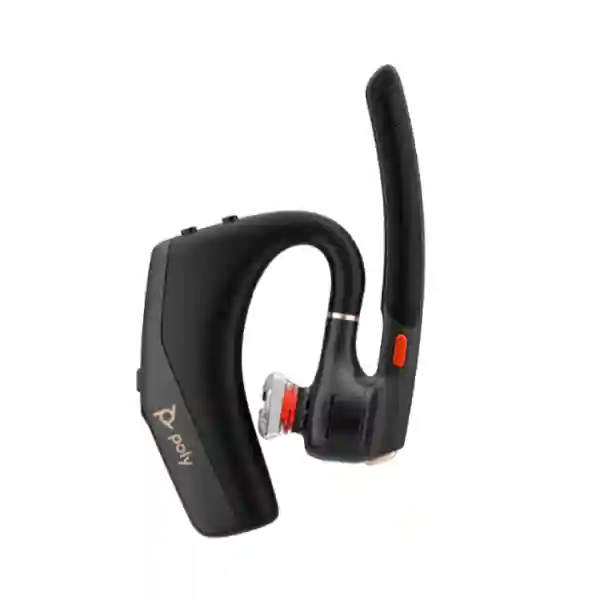
HP Poly Voyager Legend 50 UC Bluetooth Headset
Clearer outgoing voice in everyday calling environments, single-ear awareness and a portable charging case. Built for professionals who move between mobile calls and computer meetings.
At a glance: what matters to the buyer
Choose this headset when clear voice transmission, compact wearing comfort and wireless movement between a phone and a computer matter more than immersive two-ear listening. The UC package brings the headset together with the charging case and BT700 computer adapter. Before ordering, confirm the exact included accessories, your intended calling software and the local quotation details.
NoiseBlockAI and WindSmart for outgoing speech.
Rated headset talk time plus additional case power.
Multipoint connection; up to eight remembered pairings.
Compact headset, approximately 20.5 grams.
A dependable calling headset for mobile business work
The HP Poly Voyager Legend 50 UC Bluetooth Headset is intended for people whose working day revolves around conversations rather than listening to stereo music. It combines a compact single-ear design, a microphone boom, wireless connectivity and a travel-ready charging case. For a professional who frequently moves between a smartphone and a computer, the UC configuration is especially relevant because the package includes a Poly BT700 USB Bluetooth adapter for supported computer connections. It is a practical category to consider for sales discussions, customer follow-ups, coordination calls and online meetings where being heard matters more than a large over-ear design.
Its appeal is not that it eliminates every distraction. The headset uses four noise-cancelling microphones and Poly NoiseBlockAI together with WindSmart technology to help reduce unwanted sound captured by the microphone. That addresses what other people on the call hear. The open single-ear approach still lets the wearer hear parts of the surrounding environment. Buyers should view those two characteristics together: it is designed to help outgoing voice quality while preserving awareness, not to provide the isolated listening experience of a sealed stereo headset. Request confirmation of the exact UC bundle before purchasing.
What is included in the UC experience?
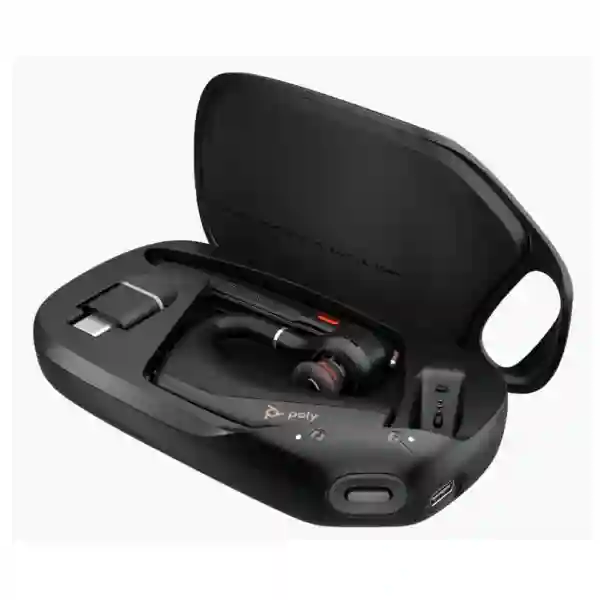
The letters UC refer to unified communications, a working style in which one user may take calls through multiple devices and communication applications. In the Voyager Legend 50 UC package specified by HP, the essential components are the headset, charging case, BT700 Bluetooth USB Type-C adapter, USB Type-C to Type-A adapter, USB Type-C charging cable and quick start guide. The USB accessories help when a desktop or laptop has an available Type-C or Type-A port. Check the proposed package against the quotation so the expected accessories and exact regional variant are recorded before an order is approved.
The charging case is a meaningful part of the UC buying decision. The headset offers a manufacturer-rated maximum of 10 hours of talk time per charge, and the case supplies up to 20 additional hours, producing a total rated figure of up to 30 hours. Those numbers are not a promise that every user will obtain the maximum in every setting. Call patterns, device conditions, settings and battery age can affect runtime. The case makes repeated short journeys and periods away from a desk easier to plan, particularly where there is no convenient charging socket between meetings.
Four microphones, NoiseBlockAI and the sound your caller hears
The microphone system is central to this model’s purpose. HP describes four noise-cancelling microphones positioned with an aerodynamic boom. Poly NoiseBlockAI uses processing intended to distinguish speech from competing background sound, while the microphone array and boom placement help present the user’s voice to the calling system. This is useful when normal office movement, nearby discussion or background activity would otherwise compete with conversation. The design focuses on transmitted audio; it does not mean that sound from the surrounding environment cannot reach the wearer’s free ear or the ear wearing the earpiece.
When evaluating microphone performance, make a representative test call instead of relying solely on feature labels. Ask a colleague to listen while you speak at your normal volume in a quiet room, then in a typical shared workspace. Check whether words remain intelligible, whether the microphone becomes muffled with sudden movement and whether voice level is consistent. Calls on different mobile networks or conferencing services can sound different because the entire communication path contributes to quality. A careful comparison should keep the phone, application, internet connection and microphone placement as consistent as practical.
WindSmart technology for work away from a quiet desk
Wind noise can overwhelm a conversation because moving air interacts directly with a microphone. Poly WindSmart technology is designed to help mitigate this effect, complementing the headset’s other microphone processing. That can matter to a field coordinator stepping outdoors, a manager crossing between buildings or a professional taking an urgent call near an open window. An outdoor call still depends on network quality, ambient conditions and how strongly the wind strikes the microphone. The headset should not be presented as weatherproof or guaranteed to deliver silent backgrounds under all conditions.
Practical use remains important. Position the boom as directed by the manufacturer’s fit instructions, avoid covering the microphone openings and move away from severe wind or machinery when important information must be heard accurately. If the call is confidential, choose a more private environment even when voice processing is effective. Noise suppression assists intelligibility; it does not remove the need for thoughtful workplace behaviour. For buyers in Tanzania comparing mobile communication tools, the right question is whether the headset handles their ordinary calling environments satisfactorily, not whether a technology label sounds impressive on its own.
Comfort, single-ear awareness and wearing style
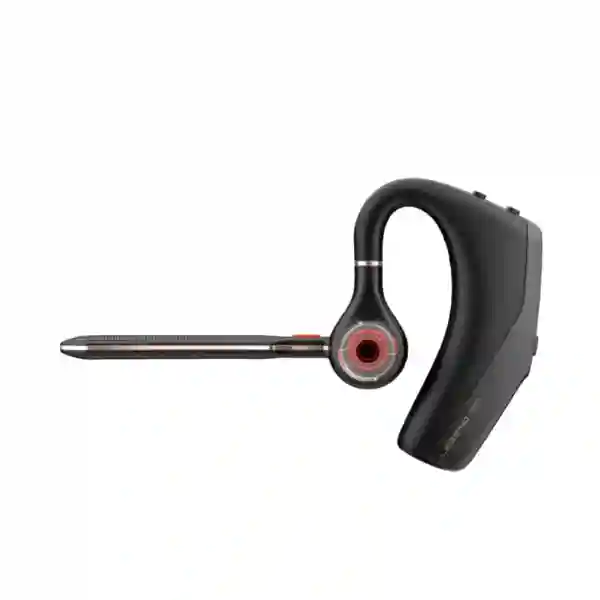
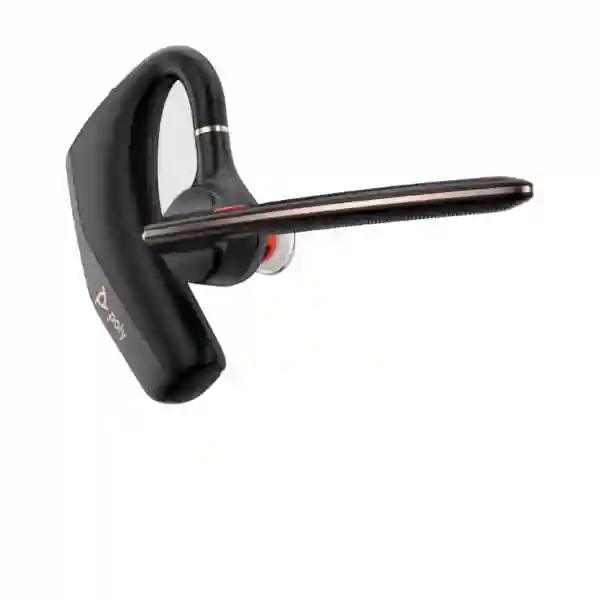
The Voyager Legend 50 UC is a monaural, in-ear headset with an ergonomic ear loop. HP lists a headset weight of approximately 20.5 grams and three earbud sizes in its product information. The compact design may suit users who find large headbands inconvenient during intermittent calls. Choosing the correct eartip is essential: a fit that is too loose can move during conversation, while an unsuitable size may become uncomfortable. Set aside a short trial period to identify the most secure, comfortable configuration before using it throughout a full working day.
A single-ear headset also has a deliberate tradeoff. With one ear free, a wearer can remain aware of routine office conversation or someone asking for attention. That can be valuable at reception desks and in roles involving colleagues nearby. It is not an invitation to use the headset where divided attention creates danger. Local workplace safety rules and common sense should govern calls around traffic, moving equipment or other hazards. Buyers who need both ears covered, stronger passive isolation or immersive listening should compare a stereo headset rather than assuming this model will meet a different requirement.
Bluetooth 5.4, pairing and device switching
HP specifies Bluetooth Core 5.4 and the ability to remember up to eight paired devices. Multipoint support allows connection with two devices at the same time on the relevant UC configuration. That can simplify a workday split between a smartphone and a computer, although the experience of handing calls between devices depends on the connected hardware and applications. Eight paired devices does not mean eight simultaneous active conversations. The paired-device list is a convenience for returning to previously configured equipment, while active connections and audio focus are separate behaviours.
For a smooth setup, pair the mobile phone deliberately and use the included BT700 adapter with the computer where suitable. Test an incoming call on one device, end it and then test a call on the other. Check which device has audio priority if notifications arrive together. If audio does not move as expected, examine the phone’s Bluetooth settings and the meeting application’s selected microphone and speaker. Corporate computers may also have device-management rules that affect USB hardware. An IT team should verify the configuration with the exact laptop model and approved software environment before rolling out multiple units.
The value of the Poly BT700 USB adapter
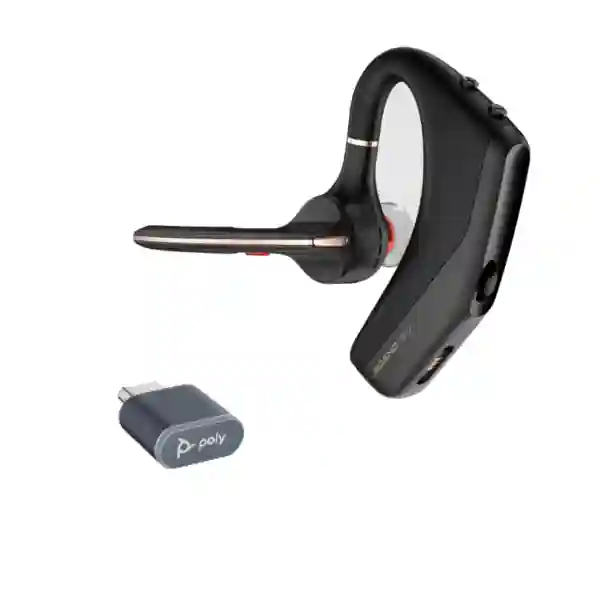
The BT700 in the UC package is more than a small accessory to leave in the box. It provides a dedicated computer Bluetooth connection path that may be useful for employees who spend substantial time on conferencing applications. HP specifies a USB Type-C BT700 adapter with an included Type-C to Type-A adapter for this UC configuration. That makes the bundle appropriate for consideration across different workstation port arrangements, provided an available port and local IT policy permit it. The adapter is wireless connectivity hardware, not a guarantee of universal software compatibility.
Ask employees to keep the adapter in an identified location when moving between workstations. If a user changes computers frequently, they should check whether the intended workflow supports moving the adapter and whether each computer requires application or security settings. Bluetooth audio may behave differently through an internal PC radio and through a dedicated adapter. In a business rollout, document the preferred connection method, selected conferencing application and basic troubleshooting steps. The result is a repeatable experience rather than each user improvising settings during a client meeting.
Battery planning and the charging case
The manufacturer lists up to 10 hours of talk time on the headset and up to 30 hours with the included charging case. This distinction is important. Thirty hours is the combined charging-case figure, not 30 continuous hours with the earpiece away from its case. The published headset charging time is under 1.5 hours under the manufacturer’s conditions. A typical user can place the headset back into the case between calls, making use of otherwise idle time. Keeping the case charged is necessary if the extra rated talk time is to be available.
HP identifies Qi wireless charging support for the case. That can add convenience where a compatible Qi charging surface is available, while the provided USB Type-C cable offers a conventional charging option. Confirm the equipment available at the workplace rather than assuming every desk has a compatible wireless charger. Plan a charging routine around the longest expected calling block and the availability of electricity during travel. For a field-based worker or a professional whose day includes lengthy meetings, a simple end-of-day charging habit will often be more useful than relying on a battery indicator only when power becomes low.
Controls and smart sensors during real calls
The headset has user controls for power, call answer and end, volume, mute, pairing and access to supported voice-assistant functions. HP also describes smart sensor behaviour associated with wearing and removing the headset. These functions are useful when a call arrives while the user is occupied with another task, but they still deserve a quick orientation. An employee should know how to mute without looking at the phone, how to end a conversation intentionally and how to confirm whether the microphone is active before discussing private information.
Voice alerts include incoming-call, battery-status and mute notifications, and HP lists answer and ignore voice commands. Exact behaviour can depend on the connected device and its configuration. During onboarding, make a short test call and practice the controls deliberately. Smart sensors can simplify everyday use, but they should not replace checking the application’s visible call state during high-stakes conversations. When a meeting starts, confirm which microphone is selected and whether the headset is actually transmitting. Familiarity with straightforward controls can prevent avoidable interruptions and awkward restarts.
Where this headset fits in a Tanzanian workday
A business in Tanzania may use smartphones, laptops and cloud communication services in different combinations. The Voyager Legend 50 UC is worth evaluating when employees make repeated voice calls and want a compact, portable listening device rather than a full-size wired headset. Potential use cases include account managers following up with customers, project supervisors coordinating tasks, administrative staff moving between a desk and meeting space, and professionals switching from phone calls to computer-based collaboration. These are suitability examples, not claims about deployment, stock, support coverage or customer installations in a particular city.
Connectivity conditions remain decisive. A headset can help the clarity of speech captured locally without correcting a poor mobile signal, unstable Wi-Fi or insufficient bandwidth for an internet calling service. If calls regularly fail at a particular location, first distinguish a headset audio issue from a network problem. Teams evaluating a replacement should record their calling applications, primary device types, call frequency and environmental noise. This gives purchasing staff a grounded way to choose the right equipment for the user’s job and prevents buying based only on a long feature list.
Working across smartphones and laptop meetings
On a smartphone, Bluetooth pairing supports the familiar routine of receiving and placing calls without holding the phone to the ear. On a computer, the BT700 adapter offers the corresponding headset connection for supported communications software. The product is listed with compatibility across Windows 11, macOS, Android and iOS, but an operating-system name alone does not establish every feature of every app. The application, version, company policy and specific device must still be checked for controls, microphone selection and certification requirements.
Before standardising the headset across a team, identify the applications that matter: voice calls, online meetings, browser-based communication or another approved workflow. Test outgoing audio, incoming audio, mute, call controls and reconnection after sleep or restart. Repeat the test when the headset is paired with two devices so call routing is understood. A basic test plan is particularly valuable in mixed-device teams, where colleagues may use different laptops and phones. The aim is practical compatibility with the work to be performed, not an unsupported claim that every service will function identically.
Poly Lens and the IT management conversation
HP positions Poly Lens software as part of its broader device-management environment. For an organisation considering multiple headsets, supported Poly software can be relevant to configuration, maintenance and fleet visibility. The exact features available to a particular headset, operating system or administrative environment should be checked against current HP Poly documentation. Do not assume that buying one headset automatically includes a subscription, central dashboard or every enterprise management feature. Those items belong in an IT assessment if they are important to the purchasing decision.
A sensible pilot begins with a small representative group rather than an immediate organisation-wide change. Ask the users to record connection difficulties, perceived comfort, battery sufficiency and incoming-call behaviour. Have IT note the tested adapter, operating system, application version and any configuration changes. If firmware updates are recommended for the specific device, apply them through authorised manufacturer procedures in accordance with company policy. This kind of evidence is more useful for a procurement decision than relying on generic claims about productivity or simplicity.
Microphone noise reduction versus listening isolation
Two distinct ideas are often described using similar language. Microphone noise reduction works on sound transmitted to the people listening to the user. Active noise cancellation for the wearer is a different function designed to reduce environmental sound heard in the ear. The Voyager Legend 50 UC is presented by HP around microphone NoiseBlockAI, WindSmart and its single-ear design. Buyers should not interpret the microphone technology as a guarantee of active noise cancellation for the person wearing the headset. This distinction matters in shared offices where the listener may also want to block colleagues’ voices.
If the primary requirement is to be understood during phone calls while remaining aware of surroundings, a monaural headset has a clear use case. If the requirement is deep concentration, stereo music listening or isolating both ears from environmental noise, consider a different headset format. The right choice depends on which side of the call needs improvement. During a demonstration, test the microphone with someone at the far end and separately ask the wearer about comfort and environmental distraction. These two observations answer different buyer questions and should not be confused.
A practical fit test before choosing the headset
Fit is personal, and an online specification cannot establish whether a headset will feel right for an individual employee. Begin by trying the available eartip sizes, placing the ear loop securely and positioning the microphone boom correctly. Check whether the device stays in place during ordinary head movement. Then use it for a realistic sequence of calls with normal short breaks. Notice any pressure at the ear, tendency to slip or need to adjust it repeatedly. The device’s published low weight is relevant, but comfort remains a user-specific judgement.
An employee who wears spectacles, protective equipment or other ear accessories should test the combination rather than assuming a universal fit. Likewise, a user who prefers over-the-head support may find an ear-loop style less familiar. No headset can be the right answer for every user, even when its engineering suits the intended application. A fair comparison should consider how long the headset remains in the ear, the type of work performed between calls and how much movement takes place. Procurement can then select equipment based on actual working conditions.
Detailed specifications buyers should interpret correctly
Important published specifications include Bluetooth Core 5.4, a rated wireless range of up to 30 metres, a 13.6 mm speaker, monaural in-ear construction and a headset weight of approximately 20.5 grams. HP also gives a microphone bandwidth of 100 Hz to 8 kHz and speaker bandwidth of 100 Hz to 20 kHz. These figures describe the product but do not by themselves predict the quality of every conference call. Walls, obstacles, other radio devices and host equipment may reduce usable wireless range below a laboratory or open-space maximum.
The device can remember up to eight paired devices and supports a two-device active multipoint configuration. Charging-case capacity and maximum talk time should be considered alongside the practical need to dock the headset for charging. HP specifies SoundGuard acoustic protection technology, but this should not be treated as permission to use excessive listening volume. As with any audio device, users should maintain a comfortable level and take breaks when appropriate. A procurement specification should capture the genuinely required capabilities rather than treating every number as an independent benefit.
Package contents and order-verification checklist
The manufacturer-described UC package includes the headset itself, charging case, BT700 USB Type-C Bluetooth adapter, USB Type-C to Type-A adapter, USB Type-C charging cable and quick start guide. These items are important because the standard Voyager Legend 50 product and related regional variants may be presented differently in online listings. Do not rely on an abbreviated product title as the only evidence of what will arrive. Ask the seller or purchasing contact to identify the complete model and bundle components in writing before approving the order.
It is also wise to verify the intended device environment: a free computer USB port if the BT700 will be used, a suitable charging method, mobile phone Bluetooth support and any employer restrictions on personal or external audio devices. Ask about the applicable commercial quotation, availability, delivery arrangements and warranty terms for the actual Tanzania transaction rather than assuming the general manufacturer page establishes local supply conditions. This product information deliberately does not advertise a price, local stock balance or guaranteed delivery date because those facts have not been independently established for the target listing.
Voyager Legend 50 UC compared with the standard Legend 50
The closely related names can create confusion. HP’s published family comparison describes the Voyager Legend 50 UC with a Qi wireless charging case and BT700 connectivity, while the standard Voyager Legend 50 lists the case as not included in the basic offering. Both are built around a single-ear calling concept and Poly microphone technologies. For a buyer who predominantly calls on one phone, the standard model may warrant consideration depending on the exact accessories supplied. Someone moving routinely between a computer and a mobile phone has a clearer reason to examine the UC package.
The right comparison is not simply a question of which model has the longest name. Compare the required computer connection, case inclusion, charging method, actual package contents and business applications. A separate Voyager Legend 50-M UC variant is associated with Microsoft Teams-focused configurations; confirm that variant only where a specific Teams certification or dedicated behaviour is required. Avoid treating a general UC listing as interchangeable with a named certified variant. The purchasing document should identify exactly which option is under consideration to reduce misunderstandings during fulfilment.
Other headset styles worth considering
A lightweight single-ear headset excels at a particular combination of mobility, short access to call controls and awareness of the surrounding room. It may be less suitable when two-ear listening is necessary for detailed audio work. A wired USB headset can make sense for a fixed desk where charging is undesirable and wireless roaming adds little value. A stereo wireless headset may fit a worker who listens to training material for extended periods or wants a different acoustic environment. A larger boom-microphone design may also suit intensive contact-centre schedules where consistent fit and frequent calls are central.
Choose by task instead of by category labels alone. Compare movement needs, call duration, whether only one ear should be covered, approved collaboration software, the availability of computer ports and how frequently charging will be convenient. If a team includes multiple kinds of user, it may be more economical operationally to standardise on a small set of appropriate headset styles than to force one design on everyone. The Legend 50 UC is most compelling where mobile voice communication is the main task and a compact headset is valued.
Setup sequence for a mobile user
Begin with a charged headset and case. Choose an eartip size that fits securely, position the headset according to its quick start guide and switch it on. Follow the official pairing procedure to make the headset discoverable, then select it from the smartphone’s Bluetooth device list. When pairing completes, make a brief call and check that both audio directions are working. Learn the mute and volume controls before relying on the device during a customer discussion. Keeping the quick start guide available makes setup easier when a device must be re-paired.
After pairing, test a normal call in a quiet place and then in the environment where the headset will actually be used. Ask whether the other party can hear you clearly, while separately assessing whether you can hear them at a comfortable volume. Avoid immediately attributing every audio problem to the headset. Check phone volume, network service, application permissions and the selected audio route. If the phone automatically reconnects to another audio device, review its Bluetooth settings. These basic checks can resolve many initial configuration issues without unnecessary replacement.
Setup sequence for a computer user
For a compatible computer, identify the preferred USB port and connect the included BT700 Type-C adapter, using the Type-A adapter where needed. Follow the employer’s IT policies for USB devices and any manufacturer pairing or configuration instructions. Open the intended communication application’s audio settings and select the correct microphone and speaker endpoint. Make a test call and confirm that mute, volume and call audio work as expected. If the system has another microphone, such as one in a laptop, verify that the call is not mistakenly using that built-in device.
A meeting can fail acoustically even when the Bluetooth connection itself appears normal. Browser permissions, a selected webcam microphone, a muted operating-system input or a software update can alter the audio path. Record the tested arrangement once it works. For shared desks, agree who owns the BT700 adapter and how equipment is stored. For managed computers, prefer an organisation-approved procedure for driver or firmware changes. These are ordinary deployment safeguards, not special technical barriers unique to the headset, and they help employees start meetings with fewer surprises.
Troubleshooting calls, connectivity and charging
When a caller reports low volume or unclear speech, start by identifying the symptom precisely. If the far end cannot hear you, inspect the microphone position, mute state and calling application’s input selection. If you cannot hear the caller, review volume settings and the chosen output device. If sound disappears only in one location, test for Bluetooth range, radio interference or network instability. If the problem occurs only in one meeting application, compare its settings with a successful phone call. Changing one variable at a time makes diagnosis more efficient.
For reconnection trouble, confirm that the headset is charged, that the intended phone or adapter is available and that another paired device has not taken the audio connection. Use the manufacturer’s documented reset or re-pairing procedure if necessary rather than inventing an undocumented button combination. For charging difficulties, inspect the power source, cable and charging-case seating, and try an appropriate known-working charger. Escalate persistent hardware concerns through an authorised support route. Do not attempt to dismantle the lithium-ion battery or expose the product to unsuitable moisture or heat.
Battery care and everyday handling
Like other rechargeable personal electronics, a Bluetooth headset benefits from routine handling. Keep the case and headset dry, clean contact surfaces according to the official instructions and avoid crushing the case in a crowded bag. Use the specified charging arrangements and keep the equipment away from extreme heat. A headset placed back in its case between calls is less likely to be misplaced and is better positioned for the next conversation. Because the headset is small, establish a consistent storage place at the desk, in a bag or in an assigned equipment cabinet.
Employees should also have realistic expectations about rechargeable batteries. Maximum talk-time figures represent stated operating conditions and may change with age, call patterns and environmental factors. A useful workplace rule is to check battery status before a long meeting or travel day rather than waiting for a warning during a conversation. For equipment issued to staff, record which accessories belong to each unit. That simple process makes replacement-adapter requests and equipment returns easier and helps preserve the intended UC bundle for its next authorised user.
Security, privacy and professional communication
Hands-free convenience does not change the need to protect sensitive conversations. A single-ear headset may make it easier to receive a call in a shared or public space, but the surrounding environment can still expose spoken information to people nearby. Before discussing payment details, personnel matters or confidential business plans, move to an appropriate private place and confirm the identity of the caller. Be deliberate with mute state when joining a larger meeting. A device’s microphone noise reduction is not a privacy shield and does not prevent bystanders hearing the wearer speak.
For company-owned equipment, IT teams should follow normal endpoint-management rules: approve Bluetooth use, maintain supported device firmware, control who can connect to managed computers and remove stale pairings when equipment changes hands. Users should learn how to check the connected device rather than assuming a call will always route through the intended handset or laptop. The headset itself is one component in a wider communication system, and good call practice still depends on secure applications, appropriate networks and the organisation’s own information-handling procedures.
Business procurement questions before requesting a quotation
A useful procurement request identifies the intended use before asking for a quantity. State whether the employees mostly call from smartphones, computers or both. Mention the computer operating systems, required conferencing platforms, expected daily calling time and whether a charging case and BT700 adapter must be included. Ask for the exact UC configuration rather than a generic Voyager Legend 50 name. Check whether particular team members need a stereo design, a wired connection or a different wearing style. These details can prevent the wrong type of headset being selected.
For a Tanzania-based order, the purchaser should request current product pricing, applicable taxes, availability, delivery arrangements and relevant after-sales terms from the seller responsible for the transaction. Such information is specific to a quotation and should not be inferred from an international product specification. Ask how the supplied product will be identified on the invoice and whether the listed accessories match the intended bundle. A responsible purchasing decision brings together verified technical capability and confirmed local commercial terms rather than treating either one as sufficient.
Technical specification summary
| Specification | Published information |
|---|---|
| Product family | Poly Voyager Legend 50 UC |
| Form factor | Single-ear, in-ear monaural headset |
| Microphone system | Four noise-cancelling microphones; NoiseBlockAI; WindSmart |
| Bluetooth | Core 5.4 |
| Computer adapter | BT700 USB Type-C; Type-C to Type-A adapter |
| Paired / active devices | Up to eight remembered pairings; two active with multipoint |
| Wireless range | Up to 30 metres in suitable conditions |
| Headset talk time | Up to 10 hours |
| With charging case | Up to 30 hours combined talk time |
| Charging | USB Type-C cable; Qi-capable charging case |
| Headset charge time | Under 1.5 hours, as specified by HP |
| Weight | Approximately 20.5 g headset; 100 g charging case |
| Speaker | 13.6 mm driver |
| Operating systems | Windows 11, macOS, Android, iOS; verify app features |
Specifications are drawn from HP’s product and support information for the Voyager Legend 50 UC series. Maximum ratings are conditional; exact features, accessories and compatible calling-software behaviour should be checked for the proposed regional bundle before purchase.
Frequently asked questions
Is the Voyager Legend 50 UC designed for phone calls or music?
Its main purpose is professional voice communication. It is a monaural headset with a noise-reducing microphone arrangement, which makes calls and meetings its natural use case. Bluetooth audio can also carry other sound, but a single-ear earpiece is not the same listening experience as a stereo music headset. Buyers who primarily want music, editing or immersive entertainment should compare other product types rather than assuming this design was intended for those priorities.
Does the headset cancel background noise for the person wearing it?
HP highlights microphone NoiseBlockAI and WindSmart technologies for improving transmitted voice. That should not be confused with two-ear active noise cancellation for the listener. The single-ear format is intended to leave the wearer aware of surrounding sound. If reducing environmental noise reaching both ears is the chief requirement, compare a suitable stereo or noise-isolating headset. A demonstration should assess what the remote caller hears separately from the wearer’s own listening experience.
How long does the battery last?
HP rates the headset for up to 10 hours of talk time on its own. With charging from the included case, the combined published figure is up to 30 hours of talk time, meaning up to 20 additional hours supplied by the case. Those are maximum stated figures, not a continuous 30-hour battery in the earpiece. Real results depend on usage and conditions. Return the headset to its charged case when convenient and check remaining power before important calls.
Can the charging case be charged wirelessly?
The UC charging case is described by HP as supporting Qi wireless charging. A compatible wireless charging surface is required for that option. The package also includes a USB Type-C charging cable for conventional charging arrangements. Do not assume a separate Qi charging pad is included in the product box. For offices, it is sensible to decide in advance whether employees will use a shared compatible charging surface or the ordinary USB charging method.
What does the BT700 adapter do?
The BT700 is the Bluetooth USB adapter included with the specified UC package. It provides an intended computer connection path for the headset. HP lists a USB Type-C adapter and a Type-C to Type-A adapter, allowing buyers to consider different computer port types. The actual meeting application’s audio settings still need to select the headset correctly. Check company USB policies and verify the exact computer workflow instead of assuming the adapter guarantees identical behaviour with all software.
Can I use the headset with two devices?
HP describes multipoint connectivity for two active devices and the ability to remember up to eight paired devices. This is useful when a user alternates between a phone and a computer, but it is not equivalent to eight simultaneous calls. Device priorities, incoming notifications and the way calls transfer can vary with the software involved. Perform a real phone-and-laptop test before purchasing multiple headsets for a team that depends on switching frequently.
Will it work with Windows, Mac, Android and iPhone?
HP lists Windows 11, macOS, Android and iOS compatibility. In practice, a specific operating-system version, Bluetooth implementation, communication platform or company policy may affect available features. For a computer, the supplied BT700 adapter may form part of the preferred connection setup. Verify microphone, speaker, mute and call-control behaviour in the actual application. Compatibility with an operating system should not be interpreted as an unlimited promise about every feature of every app.
How far can I move from my connected device?
HP states a wireless range of up to 30 metres. This is an upper specification, not a guaranteed distance inside every building. Walls, other wireless equipment, office layouts and the radio performance of the connected device can reduce the practical range. Buyers should test the distance that matters in their workplace, especially when moving between rooms. A headset connection also cannot improve the underlying mobile or internet service if that service is unstable.
Is the Voyager Legend 50 UC the same as the 50-M UC?
They belong to the same product family but should not be treated as interchangeable names on a purchase order. The 50-M UC is associated with Microsoft Teams-focused configurations. The precise device variant and certification should be confirmed whenever an employer requires a particular collaboration-platform approval or dedicated control. Request a quotation with the exact model designation and listed accessories. Do not infer that every general UC unit has exactly the same certified software behaviour.
What should be in the box?
HP’s Africa specification for the Voyager Legend 50 Headset UC identifies the headset, charging case, BT700 Bluetooth USB Type-C adapter, USB Type-C to Type-A adapter, USB Type-C charging cable and quick start guide. The quotation should explicitly confirm these items, since accessory packages can differ across related models and regional listings. The manufacturer’s product number is not a substitute for a seller’s own inventory SKU. Buyers should verify the labelled item against their intended purchase.
Is this suitable for staff working in Tanzania?
It may be suitable for professionals in Tanzania whose work involves frequent calls on compatible smartphones or computers and who prefer a compact single-ear design. Suitability is based on job requirements, not geography alone. Check calling applications, computer permissions, available charging arrangements and the real environments in which calls are made. Local price, stock, delivery arrangements and warranty handling must be confirmed with the seller; they are not established by the international technical specifications.
How should a business decide whether to buy several units?
Start with a small practical assessment. Confirm which employees need a single-ear headset and which need another style. Test the intended phones, laptops and meeting applications; assess microphone clarity with a person at the other end; and ask wearers about fit and charging convenience. Then request a written quotation for the precise UC configuration and its accessories. This approach helps purchasing teams separate genuinely useful capabilities from features that may not matter to their users.
Request a quote for the Voyager Legend 50 UC
Ask FourTeck Tanzania to confirm the exact HP Poly Voyager Legend 50 UC bundle, current quotation terms, included charging case and BT700 adapter. Share the intended quantity, primary phones or computers and main calling applications so the configuration can be checked against your use case. Price, stock status, delivery and local after-sales terms should be confirmed in the written offer.
Next step: Request product and bundle confirmation before ordering.
Product information is descriptive and does not imply current local inventory, a quoted price, or guaranteed compatibility with every communication platform.




Reviews
There are no reviews yet.