
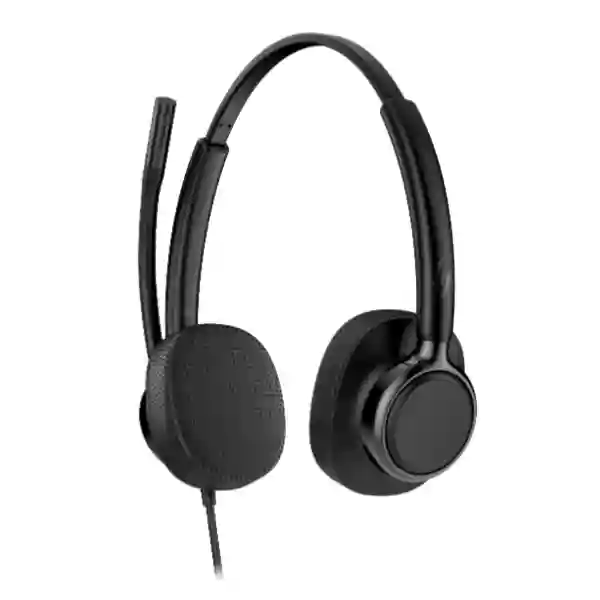
HP Poly Mission 420 Stereo USB Wired Headset
Clearer conversations, straightforward USB connections and practical controls for desk-based work.
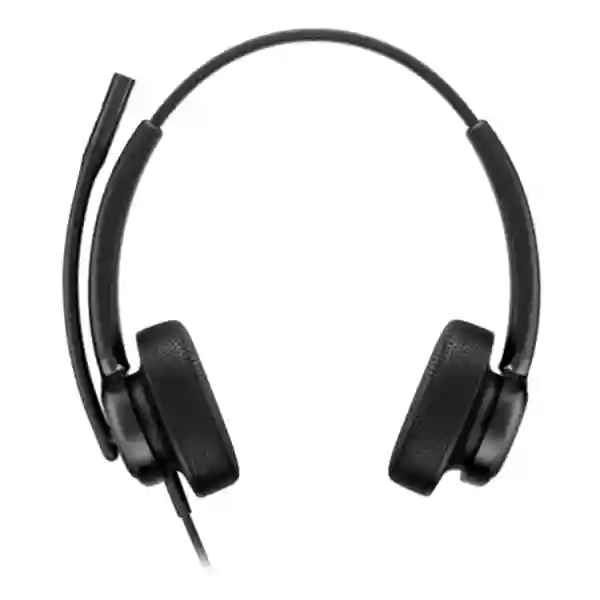
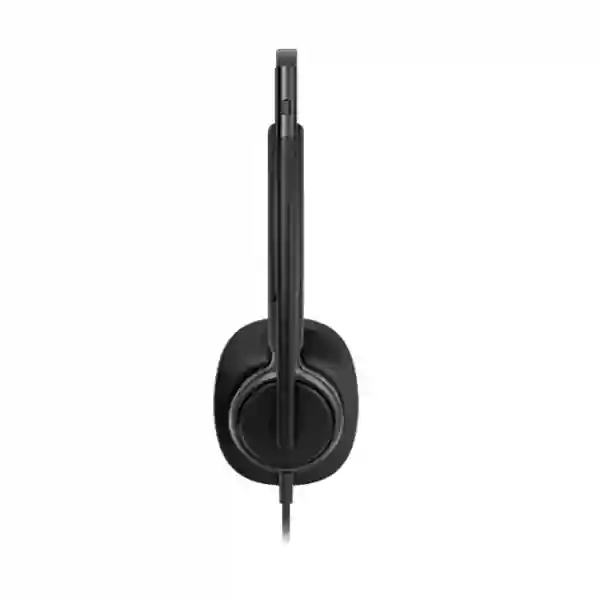
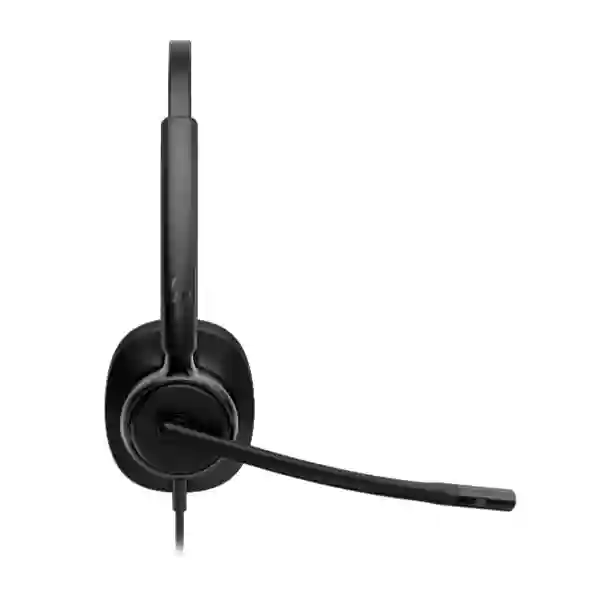
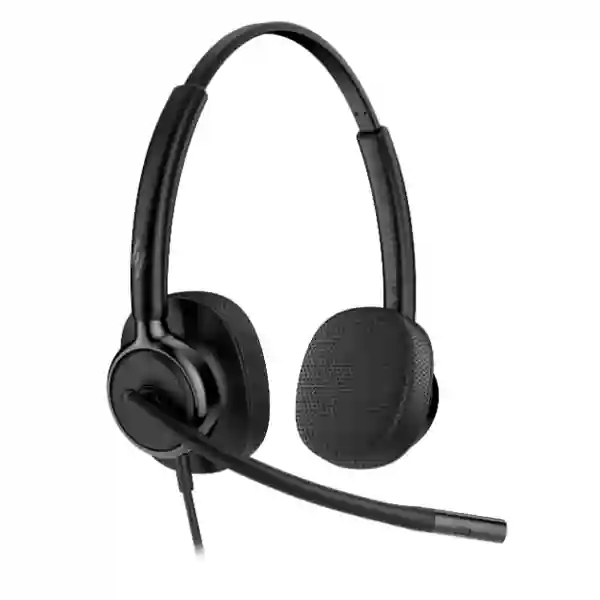
The HP Poly Mission 420 Stereo USB Wired Headset is a practical option for Tanzania organizations that need reliable desk-based audio for meetings, customer calls and routine communication. It combines stereo listening, a boom microphone with AI-enhanced noise reduction, USB-C connectivity with an included USB-A adapter, and a conveniently positioned inline controller. The headset is designed for communication rather than wireless mobility or listening-side active noise cancellation. Use the guidance below to decide whether its particular features match your staff, applications, workstations and support requirements.
A good buying decision starts with the real calling environment. Check how loudly people speak around the user, whether a two-ear design is welcome, which USB connectors are available and how the organization handles support. These questions are especially important when several departments share a purchasing standard. Detailed specifications are helpful, but a short test with real workflows is the best way to turn them into an informed equipment choice.
The essentials at a glance
- Stereo on-ear office headset with 32 mm speakers and soft memory-foam cushions
- AI-enhanced transmit microphone noise reduction and super-wideband call audio
- USB-C wired connection with an included USB-C to USB-A adapter
- Approximately two-metre cable and 132 g headset weight
- Inline mute, volume, Microsoft Teams and supported call-handling controls
- SoundGuard Digital acoustic protection technology; software configuration may apply
- Not a wireless headset, and not equipped with active noise cancellation in the earcups
Verified technical overview
These specifications summarize HP’s published information for the standard Mission 420 stereo model. Exact quoted variant and local terms should be confirmed before purchase.
| Wearing style | On-ear, stereo |
|---|---|
| Connection | Wired USB-C; USB-C to USB-A adapter included |
| Cable length | 2 m |
| Microphone | One AI-enhanced noise-reducing microphone on rotatable boom |
| Speakers | 32 mm drivers; 20 Hz–20 kHz in multimedia mode |
| Microphone bandwidth | 50 Hz–16 kHz |
| Acoustic technology | SoundGuard Digital |
| User controls | Mute, volume, Microsoft Teams, supported call handling |
| Ear cushions | PU-leather surface with memory-foam padding |
| Weight | 132 g |
| Published compatible systems | Windows 11, macOS, Chrome OS, Android, iOS; device-level verification advised |
| Manufacturer reference | D14Z3AA (not a verified FourTeck Tanzania listing SKU) |
Who should choose this wired stereo headset?
Choose the HP Poly Mission 420 Stereo USB Wired Headset when your priority is clear, repeatable communication from a desk rather than portability across a building. It is aimed at users who join frequent online meetings, handle customer queries, coordinate projects and need a simple USB audio connection. The stereo format covers both ears, while the attached microphone boom brings voice capture close to the speaker. That pairing suits employees who listen and speak throughout the same working session, including shared-service and administrative teams.
The useful question is not whether the headset has the longest feature list; it is whether it removes recurring friction from the workday. A wired connection means there is no headset battery to recharge, no Bluetooth pairing routine and no need to manage radio interference between the headset and the computer. A dedicated inline controller can also make essential actions more convenient than hunting for an application’s mute and volume buttons during a live conversation.
Before selecting it, decide whether employees need stereo listening, whether their computers have working USB-C or USB-A ports and whether a cabled desk setup is acceptable. People who regularly walk away from their desks during calls should assess wireless alternatives. Buyers who specifically require headphone active noise cancellation, a built-in busy light or microphone muting by raising the boom should also consider different models. Those are decision criteria, not missing details to assume away.
Stereo on-ear listening: what it means in practice
The Mission 420 uses a stereo, two-ear on-ear design. Both ears receive audio, which can make spoken presentations, meeting audio and occasional media playback more convenient than a single-ear headset. The two-ear arrangement can also reduce the temptation to raise playback volume when surrounding speech competes for attention. It remains an on-ear office design rather than a sealed over-ear studio headphone, so the amount of passive sound reduction depends on fit and the actual surrounding environment.
A stereo headset is a sensible option for an employee who spends extended periods listening to detailed instructions, client explanations or training sessions. Stereo playback does not mean every voice platform transmits spatial audio, nor does it make a poor internet connection sound perfect. Actual call clarity depends on the application, speaker levels, network conditions and the far-end caller’s microphone. Those everyday factors matter just as much as the headset’s speaker configuration.
If an employee must continually hear colleagues approaching, reception calls or local announcements, compare a monaural alternative that leaves one ear uncovered. If the desk is located next to loud equipment, assess the noise environment and workplace hearing requirements before choosing any headset. A short pilot with the intended users helps identify whether the two-ear fit improves focus without becoming uncomfortable or reducing essential awareness of the room.
AI microphone noise reduction for clearer outgoing speech
HP describes an AI-enhanced microphone system designed to reduce typical background sounds in the audio that other participants hear. That is particularly relevant when a caller is seated near conversations, keyboard activity or normal office movement. The boom positions the microphone near the mouth, giving it a more consistent voice source than a laptop microphone placed much farther away. This is a benefit for communication quality, but it should not be represented as total elimination of every unexpected sound.
There is an important distinction between cleaning up transmitted microphone audio and making the wearer’s room silent. The Mission 420’s AI noise reduction principally helps the person on the other end of a call hear your voice. It is not the same as active noise cancellation in the earcups. Other people may still be audible in the room, and unusually loud or overlapping sounds can affect any microphone system. Good microphone position remains essential.
For an evaluation, place the boom at an appropriate distance beside the mouth, make a test call and ask the far-end participant to judge speech intelligibility rather than loudness alone. Repeat the test during ordinary activity instead of relying only on a quiet demonstration. A contact-centre supervisor can collect comparable feedback from a few workstations before committing to a larger purchase. This makes the capability meaningful to the actual environment in which it will be used.
Understanding the difference between noise reduction and ANC
Buyers often see the phrase ‘noise cancelling’ and assume it means the listener will no longer hear office noise. The manufacturer distinguishes AI transmit noise reduction from active noise cancellation, and its Mission 400 series brief lists active noise cancellation as absent. In simple terms, the microphone tries to reduce competing sound in what you send to others, while active headphone ANC would use electronic processing to reduce some environmental noise reaching your own ears.
That distinction matters in open-plan workplaces and busy service areas. If the aim is for customers to hear staff more clearly, the microphone feature is directly relevant. If the aim is to make transport noise or mechanical hum quieter for the employee, investigate headsets specifically equipped with listening-side ANC instead. The Mission 420’s physical ear pads may provide some passive attenuation, but they are not a substitute for an active cancellation system.
A practical purchasing questionnaire should therefore ask two separate questions: ‘What noises are callers complaining about?’ and ‘Which noises are distracting the headset wearer?’ Answers can point to different technical solutions. Acoustic treatment, moving workstations, adjusting microphone placement and selecting a suitable headset may all be part of a sensible plan. Accurate expectations lead to fewer returns and more useful demonstrations than relying on an ambiguous feature label.
Super-wideband calling and speaker performance
HP lists super-wideband audio and 32 mm speaker drivers for the Mission 420. The microphone bandwidth is specified as 50 Hz to 16 kHz, while the speakers are listed for 20 Hz to 20 kHz in multimedia mode. These figures describe technical audio capabilities; they are not a promise that every call will carry the full stated range. Meeting applications and networks may compress or limit the sound they transmit. Even so, a voice-focused headset can make detailed spoken exchanges easier to follow.
For teams that discuss names, account references, numbers, product codes or technical instructions, intelligible voice audio is often more valuable than exaggerated bass. Encourage users to set a comfortable listening level and test the sound with familiar colleagues. Turning up volume beyond what is needed may create fatigue, and it will not correct a distorted microphone at the remote end. The goal should be a natural speaking level and consistently understandable conversation.
The speakers also let staff listen to webinars, recorded instruction and ordinary computer audio from the same device. This versatility is useful for desk users who switch between calls and learning modules. However, specialized music mixing, gaming features or high-isolation entertainment listening are not the product’s primary purpose. Evaluate it for the business communications it is designed to support, using the actual application and recordings that employees rely on daily.
USB-C connection with a supplied USB-A adapter
The headset connects through a wired USB-C interface, and HP includes a USB-C to USB-A adapter in the box. This is valuable in offices where some computers have newer USB-C ports while others still use rectangular USB-A ports. A buyer can standardize on one headset model across different workstation generations, provided that each device and its operating system support compatible USB audio operation. The adapter is for the supplied USB connection; it does not turn the product into a 3.5 mm analog headset.
For desktop deployment, check the available physical port before purchasing. Some laptops provide USB-C ports primarily for charging, although modern computers commonly support USB peripherals through them. A port may also be blocked, damaged or controlled by corporate policy. Avoid assuming that a nearby docking station or monitor hub will behave identically to a direct computer connection. A quick live test can reveal compatibility issues before a large rollout.
The included adapter adds flexibility, but it should be kept with the assigned headset and not treated as a generic substitute for every USB device adapter. During onboarding, show employees which connector to use and how to select the headset as the system’s preferred input and output device. That small step prevents situations where a user can hear through the headset but the meeting software continues to capture audio from the laptop microphone.
A two-metre cable and predictable desk use
HP specifies a cable length of approximately two metres. That gives a desk-based worker room to reach a computer under the desk or a nearby docking arrangement while remaining connected to the workstation. Because the headset is wired, it is ready for audio without a separate battery-charging schedule. There is also no Bluetooth pairing list to reset when the computer changes, which can simplify standard workplace support procedures.
Cable layout still deserves thought. Route the lead away from chair wheels, sharp desk edges and walkways, and leave enough slack for the user to turn comfortably without pulling at the connector. A cable that hangs across a busy reception counter can be inconvenient even when the electronics work perfectly. Review where the desktop, monitor, USB hub and phone are positioned, especially if desks are hot-desking stations used by several employees.
Staff who move between conference rooms may appreciate the simplicity of taking the headset with a laptop, but they remain tethered during calls. Users who need to stand, walk or answer messages from another part of the office should compare wireless options. A purchasing decision should account for movement habits and workspace design, not merely the appeal of avoiding battery charging or the low-effort appeal of plug-and-play connectivity.
Inline mute, volume and call controls
A controller on the cable provides controls for microphone mute and unmute, volume adjustment and call handling. HP also lists a Microsoft Teams control for the product. This arrangement can be convenient when employees have multiple application windows open or are reading instructions during a customer call. Recessed controls are intended to help reduce accidental presses, while a dedicated physical location for important functions can be easier to find than a moving on-screen button.
Button support should be checked within the exact collaboration software and device configuration. Operating-system audio volume may work more broadly than platform-specific answer, end or Teams behavior. An organization running a browser-based calling application, a softphone or a managed virtual desktop should test the functions it considers essential. Do not infer that every control will operate identically in every meeting service just because the headset can play and capture USB audio.
During staff induction, demonstrate three actions: mute before entering a confidential discussion, adjust playback to a comfortable level and check whether the chosen calling platform responds to the call button. Users should know how to confirm mute status in the meeting application itself. This is especially important for front-desk teams and advisors who need to prevent accidental transmission of nearby customer conversations. Physical buttons are helpful, but good communication procedures remain important.
Microsoft Teams, Zoom and Google Meet workflows
HP’s Mission 400 series material identifies certification or compatibility with major collaboration environments including Microsoft Teams, Zoom and Google Meet. For a business choosing standardized headsets, that is a helpful starting point: the product was designed around everyday conferencing instead of being treated as a general-purpose entertainment headphone. Platform claims should nevertheless be checked against the organization’s exact app version, administrative configuration and call-control requirements.
A headset can be recognized as a USB audio device while some specialized features depend on the software client. Test whether staff can hear meeting audio, select the microphone, control mute, answer and end supported calls and maintain the correct input selection after reconnecting. In an environment with both desktop software and browser meetings, test both paths. Changes to meeting application permissions can matter more than the physical USB connector.
For mixed-platform organizations, prepare a short compatibility matrix before ordering in quantity. Include the computer operating system, conferencing application, headset input and output selection, button behavior and any needed administrative permissions. A pilot with representatives from each software group provides practical evidence. The aim is to reduce unexpected help-desk incidents without promising universal functionality that no single headset manufacturer can guarantee across every external platform.
Practical fit for remote and hybrid employees
Home-based and hybrid workers often need to join calls from a compact desk, a quiet room or a shared household workspace. A wired headset with a boom microphone can help keep the audio setup consistent when moving between a company office and a home desk. The Mission 420 offers a predictable USB connection, stereo listening and controls close to hand. Staff can focus on the conversation rather than checking whether a wireless accessory is charged.
The surrounding workspace still influences results. A loud television, an echoing tiled room or several people talking at once can challenge microphone processing. Encourage employees to position the microphone properly, use a stable internet connection and choose an appropriately quiet place for sensitive meetings. When connecting through a laptop dock or USB hub, a quick test call after moving desks is a useful habit. It reveals incorrect device selection before a scheduled customer conversation begins.
For remote procurement, clarify who will own the headset, what equipment employees already use and which support processes apply. Replacement cushions and cable wear matter more over years of use than during a single product demonstration. If staff travel frequently and take calls while walking, a wireless option may be more appropriate. A practical remote-work standard should consider user behavior and deployment support rather than treating every home office as identical.
Customer service and contact-centre considerations
Customer service teams value predictable call audio, comfortable wear, reachable mute controls and straightforward replacement processes. The Mission 420 addresses several of those needs through its microphone boom, USB connection, stereo drivers and inline control. For relatively quiet to moderately busy desk environments, it can be considered as part of a standardized headset evaluation. The two-ear design is useful when an agent needs to follow detailed customer explanations without relying on laptop speakers.
A heavily occupied contact centre may have more demanding acoustic requirements. HP does not list Microsoft Teams Open Office certification for this Mission 400 series model, and the series brief identifies no built-in busy light or lift-to-mute boom function. If a workplace specifies any of those capabilities, do not assume they are present. Evaluate competing models against the documented requirements, especially where multiple agents speak simultaneously in a dense open-plan floor.
Pilot testing should include realistic customer call durations and a range of employees. Record feedback on microphone clarity, comfort, cord placement, application integration and ease of muting. Test an actual call workflow rather than just a music sample. Any decision to standardize should consider the desk layout, cleaning policy, replacement parts, endpoint configuration and the availability of a support process that can manage faults without disrupting customer communications.
Meetings, training and virtual presentations
Online meetings require different actions from continuous contact-centre work. A participant may spend long periods listening, speak briefly to ask a question and then return to note-taking. The Mission 420’s stereo presentation and cable-mounted controls support that rhythm. A training facilitator can use the boom microphone to speak at a normal level, while trainees can hear instructions privately instead of broadcasting meeting audio into the room.
For presentations, clear speech matters more than simply making the microphone sensitive. Position the boom beside the mouth, keep papers and keyboards from rubbing against it and ask a colleague to perform a brief sound check before a major session. Confirm the calling application is using the headset microphone rather than a built-in laptop array. If screen-sharing or video software changes the default audio device, reselect the correct device and test again before participants join.
Businesses purchasing for a training room should also consider hygiene and ownership. Shared headsets need a clear cleaning process, and personal ear cushions may be preferable where many employees use the same station. A two-metre lead can be useful at a desk but may not be ideal for a presenter moving around a room. For walking presentations, a wireless microphone system may be more suitable than a cable-tethered office headset.
Computer and operating-system compatibility checks
HP lists Windows 11, macOS, Chrome OS, Android and iOS among compatible operating systems for the product. That broad list should not be interpreted as a guarantee that every phone, tablet, browser, dock and application exposes the same features. A physical USB-C connector is only the beginning of a successful connection. The device must support the relevant USB audio function, and the application must have permission to use the microphone.
For a computer fleet, first identify which operating systems employees actually run. Then test representative hardware revisions and both available connection paths: direct USB-C and USB-A through the included adapter. Check recording input, speaker output, volume changes and reconnection after sleep. Device management policies may restrict drivers, USB peripherals or user changes to audio settings. Record any adjustment needed so other employees can follow a consistent installation procedure.
For phones and tablets, confirm the exact device rather than assuming that an operating-system name on a specification sheet is sufficient. Connector shape, operating-system permissions, calling-app support and power behavior can differ. The headset is not a wireless accessory and does not connect through a traditional 3.5 mm headphone socket. If an organization needs analog phone compatibility or a specific desk-phone integration, request confirmation for that exact phone model before making a purchasing commitment.
How to set up the headset at a workstation
Begin by inspecting the USB port and selecting the connection that matches the computer. Attach the headset’s USB-C plug directly when suitable, or use the supplied USB-A adapter with a compatible USB-A port. Seat the connector firmly without forcing it. Put on the headset and adjust the headband so both ear cushions rest comfortably. Move the microphone boom near the mouth without letting it touch the lips, then route the cable where it will not pull during ordinary movement.
Open the operating system’s sound settings and choose the HP Poly headset for both input and output if it is not selected automatically. Speak at a normal volume while watching the input meter. Then open the conferencing or calling application and confirm its microphone and speaker selections independently. This second step matters because some applications retain older device preferences even when the operating system has changed the default audio route.
Complete setup with a brief two-way call. Check whether the other participant can hear words clearly, whether your own listening volume is comfortable and whether mute behaves as expected. Test the inline buttons in the actual application rather than judging them from appearance. If the headset is being issued by an IT department, document the working settings. Consistent onboarding can prevent repeated questions and improve the user experience without additional equipment.
Comfort, adjustment and long working sessions
HP lists a headset weight of 132 g for the stereo version and describes memory-foam cushioning with a polyurethane-leather surface. The microphone boom is rotatable, which gives users more flexibility to position it comfortably. A relatively light office headset can be attractive to employees who wear it for many meetings. Comfort, however, remains personal: head shape, glasses, hair, ear sensitivity, room temperature and session length all affect the experience.
Encourage users to adjust the band gradually rather than pulling the cups tightly against the ears. The ear cushions should sit evenly without excessive pressure, and the boom should be positioned for speech capture rather than used as a handle. A wired headset can also feel uncomfortable if its cable catches on clothing or drags against the desk. Small changes to workstation arrangement can improve perceived comfort without changing the device itself.
For a workplace trial, include employees who use headsets for different lengths of time. Request feedback after a full normal shift as well as after an initial short meeting. The ability to hear clearly at a moderate volume, the stability of the ear pads and the ease of adjusting the microphone are all relevant. Avoid promising that any single design is comfortable for every person all day; provide a clear path for alternative fitting needs.
SoundGuard Digital and sensible listening practices
HP lists SoundGuard Digital as an acoustic protection technology on the Mission 420. Its published series documentation describes technology intended to manage sudden audio peaks and average listening exposure, with some features requiring HP Poly Studio App configuration. This is useful context for organizations that want a business headset with documented audio-protection capabilities. It should not be treated as a medical safety guarantee or a replacement for a formal workplace hearing-conservation approach.
Even with protective processing, employees should avoid running at unnecessarily high listening volumes. Test call levels with a normal speaking voice and change volume gradually. If a far-end participant is extremely quiet, check the meeting software, network quality or microphone rather than immediately turning the headset to maximum. Provide workers with instructions for reporting distorted audio, sudden loud sounds or discomfort so equipment problems can be investigated promptly.
For managed deployments, IT teams should review HP’s current application guidance and any available device-management options before relying on a particular configuration. Document which features are enabled by default and which may need additional software. Regulatory and workplace compliance requirements depend on the specific organization and jurisdiction; the product description alone does not establish compliance for a Tanzania employer. Treat acoustic protection as one element in a wider safe-audio policy.
HP Poly software and device management
HP identifies HP Poly Studio App as part of the headset’s management ecosystem. In a small office, that may help a user or support colleague inspect device options. In a larger organization, consistent audio settings and approved software versions can be important when many employees use similar peripherals. A buyer should verify the software environment currently supported for the exact hardware and operating-system combination rather than relying on generic references to legacy Poly administration tools.
Before rolling out software, review the employer’s endpoint-management policy. Some companies restrict local installation rights, while others rely on a centrally prepared configuration. If advanced settings or acoustic-protection functions require a companion application, identify that requirement during pilot testing. Avoid promising centralized remote management, licensing features or monitoring capabilities unless they are confirmed for the particular product and software deployment being planned.
A simple operations document can list the approved USB port type, preferred audio device names, conferencing-app setup, basic troubleshooting steps and escalation contact. For buyers, the practical question is whether support staff can restore a user to a working call quickly. Hardware features should be evaluated together with operating procedures, especially where a headset is part of a critical front-office or service-desk workflow.
How to troubleshoot common audio problems
If a user cannot hear a meeting, first check the headset connection, the system playback device and the meeting application’s selected speaker. A second audio device, such as a monitor, Bluetooth speaker or laptop output, may still be active. If others cannot hear the user, check the application’s microphone selection, its permission to access audio input and the mute status on both the headset controller and the software interface.
Low microphone levels can result from incorrect positioning, an application gain setting or choosing the laptop microphone accidentally. Crackling or intermittent audio may justify trying a direct computer port rather than a problematic dock, reviewing connector condition and restarting the affected audio application. Do not repeatedly force a plug into a damaged USB socket. If several users experience the same issue after an application update, compare their configuration before replacing hardware.
When only specialized call buttons fail, distinguish that issue from basic USB audio operation. A headset may transmit sound normally while a softphone does not support its answer or end command. Keep test notes with application names, versions, operating systems and observed symptoms. This disciplined approach helps support teams determine whether the fault belongs to an individual headset, the endpoint, the application or the surrounding network.
Care, cleaning and replaceable cushions
Office headsets are frequently handled and sometimes shared, so routine care is worth planning at purchase time. Encourage staff to store the Mission 420 where the microphone boom and connector will not be crushed, and avoid winding the cable tightly around the earcups. Keep drinks away from the USB connection, and inspect the cord periodically for damage. The headset is an electronic peripheral and should not be immersed in liquid or cleaned with unapproved chemicals.
HP describes replaceable ear cushions for the standard Mission 420 style, sold separately. That may be useful when cushions wear from extended use, but the availability and exact part required should be confirmed at the time of replacement. Do not assume that classic foam cushions, a different series or a generic third-party part will fit correctly. Check the manufacturer’s instructions and the organization’s approved cleaning practice before treating a headset used by multiple people.
For managed fleets, keep a simple record of issued equipment, observed wear and any support cases. Staff should report a frayed cable, cracked housing, persistent connector fault or deteriorating ear pad before an important call fails. The appropriate cleaning method and replacement interval depend on usage and environment. Planning these routines makes the buying decision more realistic than looking only at initial product features.
The box contents and what they do not include
HP’s listed package contains the headset, a USB-C to USB-A adapter, a quick-start guide, warranty documentation and a product notice. The included adapter is an important buying detail because it supports compatible workstations with USB-A ports as well as newer USB-C systems. It reduces the need to purchase a separate basic connector adapter simply to attach the headset to a suitable computer. Packaging details should still be checked against the exact quoted item and regional supply configuration.
The official package list does not indicate a Bluetooth dongle, wireless charging dock, separate analog 3.5 mm audio cable or dedicated carrying case. Do not assume those accessories are included based on photographs of other Poly models. If a company needs a particular headset stand, spare cushion, storage pouch or cable management accessory, specify it separately in the procurement request. Comparing itemized quotations helps prevent confusion about what is actually being supplied.
A useful receiving checklist includes the model name, manufacturer product number when known, visible condition, connector and adapter presence, documentation, and a successful short audio test. Record any missing or damaged items through the seller’s stated support process. Product number D14Z3AA is shown by HP for the standard Mission 420 stereo model, but a supplier’s inventory SKU is a separate identifier and should not be inferred from that manufacturer number.
Mission 420 compared with other headset styles
The Mission 420 occupies a practical position within wired office communications: stereo listening, a single AI-enhanced microphone, USB connectivity and inline controls. A monaural headset may be preferable when a receptionist or supervisor needs one ear available for in-room conversations. A higher-specification headset may be preferable where employees need listening-side active noise cancellation, more advanced microphone arrays or other specialist workplace features. The right choice follows the job requirements.
Within HP’s broader Mission family, series and trim names matter. A ‘Classic’ variant can have different ear cushion materials, and higher series models may add capabilities not present in the Mission 400 range. Avoid transferring a feature from a Mission 600 or 800 model into the Mission 420’s specification. Request an exact model comparison if the procurement brief requires a busy light, boom-lift mute, open-office certification or a particular wearing style.
A simple decision exercise can rank the top three daily problems: unclear outgoing speech, distracting incoming noise, unreliable connections, uncomfortable fit or restricted movement. Then test solutions against those problems in order. This approach is especially helpful for businesses buying a mix of devices for reception, remote work, meeting rooms and telephone support. There is no requirement for one headset model to serve every role equally well.
Why a wired option may be easier to standardize
IT teams managing many desks often prefer peripherals that behave consistently when connected. A USB headset avoids separate charging cycles and Bluetooth pairing routines, which can simplify employee handover and replacement procedures. The included USB-A adapter also helps support a mixed fleet of older and newer computers. These are operational advantages, not a claim that wired technology can never develop faults. Damaged ports, worn cables and application settings still require attention.
A standardized model allows help-desk staff to publish one setup guide and retain a consistent reference configuration. Employees can use the same basic procedure to select the input and output devices, position the boom and check inline controls. For a growing organization, document compatible endpoint models during the pilot. If employees have different desktops or use a virtual calling environment, the support guide should include those variations rather than describing only an ideal workstation.
Procurement teams can also benefit from tracking a consistent product family and its service needs. Before a bulk order, however, ask about the exact quoted product variant, any relevant replacement-cushion options, support pathway and local purchase terms. The manufacturer identification is not evidence of present local inventory or supply lead time. Standardization is worthwhile only when it fits the users and the equipment can be acquired and supported under acceptable conditions.
Sustainability details without overstating the claim
HP’s published specifications describe paper-based packaging and a minimum of 25 percent post-consumer recycled plastic in the product’s plastic content, subject to the manufacturer’s stated definitions and footnotes. HP also identifies TCO Certified generation 10 for the Mission 420. These are useful points for buyers who consider product documentation and environmental criteria in IT procurement. They do not establish that every component is recyclable through any particular local collection program.
When an organization has purchasing sustainability requirements, it should compare the specific evidence requested by that policy with the manufacturer’s current documentation. Claims about recycled content, product certification and packaging refer to different measurements. A headset with some recycled plastic is not automatically free from environmental impact, and a certificate does not prove the availability of local repair or recycling services. Avoid treating broad sustainability language as a substitute for traceable requirements.
Useful lifecycle questions include how staff will maintain and clean ear cushions, whether replacements can be sourced and what the organization does with electronics at end of life. For purchases in Tanzania, local collection and disposal arrangements must be confirmed independently rather than presumed. Buying an appropriate, supportable headset and maintaining it responsibly can be a more meaningful procurement practice than comparing an isolated environmental slogan.
Procurement checklist for Tanzania businesses
For a Tanzania workplace, start with the number of intended users and their actual roles. Identify whether the headsets will be deployed to individual laptop users, fixed desk stations, customer support agents or shared training desks. Then check USB port types, supported computer operating systems and conferencing applications. A concise requirement sheet makes it easier to request an accurate quotation and avoids purchasing an audio device that does not match a critical workflow.
When requesting commercial information, specify the complete product name and ask the supplier to confirm the exact model variant, quoted quantity, currency, delivery arrangement, warranty applicability and any available replacement accessories. No Tanzania-specific price, stock level, delivery time or reseller authorization has been verified for this content, so none should be assumed. A quote should explicitly state what is being offered. The buyer can then compare the offer against both functional suitability and procurement policy.
Where the purchase is for several teams, plan a short representative trial first. Include people who wear glasses, staff who participate in long calls and users of each important meeting application. Record any software button limitations, comfort concerns or desk-placement issues. Ask FourTeck Tanzania for product-specific purchasing information and discuss compatibility requirements before committing to quantities. The purpose of that discussion is to confirm details, not to promise a particular supply outcome.
A realistic pilot before a larger order
A trial does not need to be complicated to produce useful buying evidence. Select a small set of representative users, define the calling tasks they perform and agree on a simple evaluation period. Ask each participant to make real calls through the software they normally use, rather than testing only a recorded sound clip. Include both quieter desks and the busiest reasonably representative environment. This helps separate microphone performance from room conditions and application limitations.
During the evaluation, capture a few consistent observations: outgoing voice clarity, ease of hearing the other party, fit after a lengthy session, reliability of the USB connection, cable placement and response of essential buttons. Record which laptop, operating system and calling application was used for each test. If an issue appears only on one model of computer, examine endpoint configuration before drawing conclusions about the headset. Comparing like-for-like results makes the feedback more useful.
After the pilot, group the results by user role. Reception staff may value awareness of the surrounding room, while advisers on continuous calls may prioritize comfortable stereo listening. Employees who regularly leave their desks may reject a wired format even if the microphone sounds good. A final decision can then specify where the Mission 420 fits, where an alternative is needed and which setup notes should accompany every issued headset.
What to confirm before placing an order
A complete product name is helpful, but it is not the same as a confirmed local listing with an assigned SKU and commercial conditions. HP publishes a manufacturer product number for the standard Mission 420 stereo headset; however, this page has not been given a Tanzania listing identifier. Ask the seller to identify the exact quoted variant and the contents of that offer. Confirm the intended cable connection, stereo wearing style and included adapter in the quotation.
Review operational details alongside commercial terms. Does the purchasing team need to test a particular desk phone or softphone? Are any desktops restricted from accepting USB audio accessories? Is the organization expecting a specific call-control action, an active-noise-cancelling earcup or a built-in busy indicator? If yes, raise those details explicitly. They should never be assumed from a brief headline describing a USB headset. A small compatibility check can prevent a much larger deployment issue.
Finally, confirm stock status, applicable warranty conditions, delivery arrangements, purchase documentation and any needed spare cushions directly through the supplier’s approved process. Do not rely on international manufacturer warranty text as proof of identical local sales terms. A successful order is one where the buyer knows precisely what will arrive, how it will be used and what support steps apply if the hardware or software does not behave as expected.
Frequently asked questions
Is the Mission 420 a stereo or single-ear headset?
It is the stereo, two-ear on-ear model. Buyers who need one ear uncovered should compare an appropriate monaural option.
Does it connect to USB-C and USB-A?
The headset has a wired USB-C connection and HP includes a USB-C to USB-A adapter. Confirm that the chosen computer supports USB audio through the intended port.
Does this headset have active noise cancellation for the wearer?
No. Its AI noise reduction is intended to improve transmitted microphone audio. HP’s Mission 400 series documentation does not list headphone active noise cancellation.
Can I use it with Microsoft Teams or Zoom?
HP lists collaboration-platform support including Microsoft Teams and Zoom. Test the exact application version, audio routing and specialized button functions in your environment.
Does the microphone remove all background noise?
No microphone can guarantee that. AI-enhanced transmit noise reduction can reduce typical unwanted sounds, but the room, microphone position and intensity of competing voices still matter.
Do I need to charge the headset?
No separate headset battery-charging routine is needed for this wired USB model. It must remain connected to an appropriate USB audio host during use.
What is the cable length?
HP lists a cable length of two metres. Route it safely around the workstation and check whether that reach suits the intended desk arrangement.
Is the boom microphone adjustable?
HP describes a rotatable microphone boom. Position it beside the mouth for clear capture, and use the supported mute control rather than assuming lifting the boom will mute it.
Can it connect to any mobile phone?
Not necessarily. HP lists Android and iOS compatibility, but the exact device, physical connector, USB audio support and calling application must be checked.
Is it suitable for a busy contact centre?
It may be worth evaluating, but high-noise floors may require specialized capabilities. HP does not list Teams Open Office certification for this Mission 400 series model.
Are there controls for call handling?
HP lists mute, volume, call answer or end and a Microsoft Teams control. Application-specific behavior may vary, so test the buttons in the software staff actually use.
Can the ear cushions be replaced?
HP identifies replaceable cushions for the standard style, sold separately. Confirm exact accessory compatibility and supplier availability before ordering replacements.
Is a USB-A adapter included?
Yes, HP’s published box contents include a USB-C to USB-A adapter along with the headset and supporting documentation.
Is a Tanzania price or stock quantity confirmed?
No Tanzania price or inventory status was provided or verified for this listing. Request a current, product-specific quotation before making a purchase decision.
What is the SKU for the FourTeck Tanzania listing?
The listing SKU was not supplied. The HP manufacturer product number must not be treated as a verified FourTeck inventory SKU.
Request product information for your workplace
Need a wired stereo headset for a particular team or quantity? Ask FourTeck Tanzania for an exact-model quotation and confirm the planned workstation connections, application compatibility, current availability, warranty terms and any replacement-cushion needs. Share your intended number of users and key software platforms so the discussion can focus on the right configuration.
The published manufacturer specification is a starting point; a verified offer and pilot test complete the buying decision. No price, stock level, delivery promise or local warranty entitlement is asserted on this page.




Reviews
There are no reviews yet.