
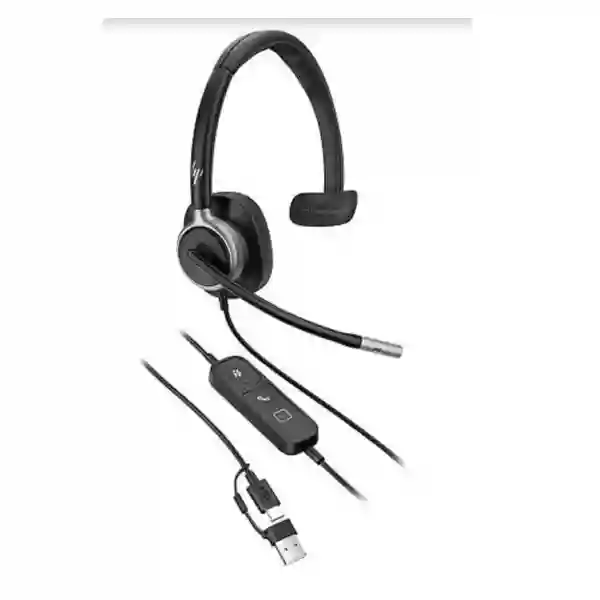
HP Poly Mission 610 Monaural USB Wired Headset
For teams that need clear business conversations and awareness of the surrounding workspace, the HP Poly Mission 610 combines a lightweight one-ear design, AI-assisted microphone noise reduction, USB connection flexibility and everyday call controls. It is an option to evaluate for office desks, reception, remote meetings and customer-support work in Tanzania.
Key benefits at a glance
Clear transmitted speech
Two microphones and AI noise reduction help callers focus on the conversation.
Aware of your surroundings
A single earcup leaves one ear uncovered for the working environment.
Practical wired setup
USB-C plus the included USB-A adapter suit a range of compatible hosts.
Workday controls
Manage mute, volume and supported call actions without hunting through menus.
Who should choose this monaural headset?
The HP Poly Mission 610 monaural USB wired headset is designed for people whose working day depends on speaking clearly, listening carefully and moving between calls without fuss. Consider it for a customer-service representative who needs to hear a nearby supervisor, a receptionist who switches between telephone conversations and walk-in enquiries, or an administrator who attends online meetings while remaining aware of the office. The single-ear arrangement keeps one ear uncovered. That is a specific workflow advantage, not merely a style preference: a colleague can attract attention without forcing the wearer to remove both earcups, although people should still respect meeting time and privacy.
For purchasing managers in Tanzania, the most useful starting point is the task each employee actually performs. A headset for a quiet reception desk may be evaluated differently from one used by a concentrated transcription worker or an agent handling simultaneous conversations. The Mission 610 combines a wired connection, dual-microphone voice processing and easy call controls in a compact work accessory. It is most compelling when employees spend substantial time in business conversations yet do not require stereo immersion. Before placing a multi-user order, identify the computer ports, operating systems, collaboration applications and preferred wearing style of the intended team. Those checks prevent a good headset from becoming a poor fit.
What monaural means in everyday work
Monaural means that the headset delivers audio through one earcup rather than two. The uncovered ear remains available for sounds in the room, such as a coworker speaking or a customer approaching a counter. This can make it a sensible option for desks where awareness of the surrounding workspace is part of the role. It does not mean the headset amplifies environmental sounds, and it does not guarantee that every person will find open-ear listening easier. In a very noisy workplace, room sound may compete with what the caller is saying, so a two-ear headset or a quieter working location might be a better choice.
A single-ear headset also differs from a mono phone speaker or hands-free laptop audio. The earcup keeps call audio relatively close to one listener, while the boom microphone positions speech pickup nearer to the mouth. That arrangement is useful where several colleagues are on calls at the same time and loudspeaker playback would create distraction or privacy concerns. It still cannot replace the safeguards of a private meeting space when confidential information is discussed. If your team handles sensitive customer records, combine headset selection with screen privacy, appropriate call policies and access controls rather than assuming personal audio equipment solves all confidentiality problems.
Two microphones and AI noise reduction
The Mission 610 uses a two-microphone system with AI-assisted noise reduction to help the person at the other end hear the speaker rather than as much background activity. The microphone boom helps position voice pickup near the mouth, while processing works on the transmitted audio. This is particularly relevant to shared offices where keyboards, air-conditioning, other conversations and occasional movement can be picked up by an ordinary laptop microphone. It is important to describe the feature accurately: it manages noise in the signal sent to callers; it is not a promise of complete silence, nor is it active noise cancellation for the ear that listens.
Microphone performance also depends on wearing habits. Position the boom consistently near the side of the mouth, avoid touching or rubbing the microphone during a call, and check the input device selected in your meeting application. If coworkers report low volume or muffled speech, test the headset in a quiet space first and then under normal office conditions. This helps distinguish placement, application gain, network quality and actual environmental noise. For call-centre procurement, a realistic sample call made from the intended work area provides more useful evidence than an isolated product description. The objective is intelligible conversation, not a claim that every external sound disappears.
Listening clarity, super-wideband voice and the 32 mm speaker
HP describes super-wideband audio and a 32 mm speaker in the Mission 610. Together, these are intended to make spoken words more natural and easier to follow during frequent calls. The manufacturer specifies a speaker bandwidth of 20 Hz to 20 kHz in multimedia mode and a microphone bandwidth of 50 Hz to 16 kHz. These figures describe component capabilities under stated modes; the actual sound delivered in a meeting depends on the application, connected hardware, audio settings and network conditions. Buyers should therefore evaluate clarity with their regular calling system rather than treating a frequency figure as a guaranteed meeting experience.
For a service desk, the essential question is whether a person can reliably understand names, numbers, instructions and accented speech in typical situations. Good intelligibility can help reduce requests for repetition, especially during long interactions where fatigue becomes an issue. The single-ear format may also improve awareness of colleagues but can allow room noise to interrupt concentration. Try both a short conversation and a longer meeting when assessing fit. If employees spend many hours editing music, monitoring stereo media or listening to detailed recordings, a stereo-focused alternative may serve those tasks better than a voice-oriented monaural design.
USB-C connection with USB-A flexibility
This is a wired USB headset, not a Bluetooth headset and not a conventional analogue 3.5 mm audio headset. Its USB-C connection is intended for a compatible USB audio host, and HP lists a USB-C-to-USB-A adapter in the box. That gives a straightforward way to use newer computers with USB-C ports and many existing office computers with USB-A ports. The specified cable length is 2 metres, which may help a user place a laptop dock or desktop tower without stretching the lead across the desk. Cable routing still matters: keep it clear of chair wheels, desk drawers and busy walking paths.
A connector that physically fits is not, by itself, proof that every device will deliver full audio and call-control functions. Check that the target laptop, desktop, phone or tablet supports USB audio through its intended port. Some phones require a suitable adapter, and software features can differ across operating systems or applications. For USB hubs and docks, confirm that the device appears as an audio input and output after connection. A small pilot across the actual computer models used in your office is often the fastest way to uncover unusual port restrictions, device policies or docking-station behaviour before buying equipment for an entire team.
Operating systems and platform fit
HP lists Windows 11, macOS, Chrome OS, Android and iOS among compatible operating systems for the Mission 610 family. This broad operating-system coverage is useful for teams that mix corporate Windows laptops with other approved devices. However, it should not be interpreted as a guarantee that a particular meeting-button action, firmware function or USB adapter behaves identically on every platform. Basic audio recognition and application-specific controls are separate matters. For example, a meeting may use the headset as a microphone and speaker while the dedicated button’s contextual action depends on the installed client and its supported features.
When evaluating devices for a Tanzanian office, list the tools employees use most often: Microsoft Teams, browser-based meetings, a softphone, a customer-support application or a proprietary voice platform. Test the input, output, mute status and call-answer behaviour in each important workflow. If desk phones are involved, verify the exact USB interface and accessory support of that phone; do not assume a standard USB headset can connect directly to an analogue handset socket. IT administrators can document a supported combination of operating system, device, app and port so staff know what to expect when they move between desks or work remotely.
Microsoft Teams and daily call controls
The Mission 610 includes a dedicated Microsoft Teams button and is listed by Microsoft among certified Teams headsets. HP also identifies the headset with Microsoft Teams Open Office microphone certification. These points make it a relevant choice for organisations that standardise on Teams and need practical controls near the user’s hand. HP lists functions for mute and unmute, volume adjustment, and answering, ignoring or ending calls. Teams features can depend on the client version and device setup, so a purchaser should validate the intended workflow on the organisation’s managed equipment rather than promise identical results in every collaboration tool.
An employee who regularly joins virtual meetings benefits when common actions are easy to locate without searching for a tiny on-screen button. Inline controls can reduce interruptions during note-taking, customer lookups and screen sharing. They also introduce an important operational habit: users should check the application mute indicator when privacy matters because software state, device state and meeting policy may interact. Teams certification is strong evidence of platform suitability, but it is not a substitute for testing custom calling applications, virtual desktops or browser permissions. Your IT team should check those situations before a larger rollout.
Rotating boom and visible call status
HP lists a 285-degree rotating microphone boom. Its rotation allows flexible positioning, including wearing the boom on a suitable side, and HP describes a quick upward movement that mutes the microphone. This can be practical when someone needs to speak briefly to a colleague or pause the transmitted conversation. Staff should still check the meeting or softphone interface for confirmed mute state before talking privately. The physical gesture is a convenience feature, not a reason to abandon good call handling. Keep the boom within its intended travel and avoid twisting it in ways not described by the manufacturer.
The Mission 610 also has an on-ear busy light that HP describes as visible around the headset when a call is active. A visible call-status cue can help colleagues recognise when to avoid interrupting an agent or receptionist. It works best when everyone follows a simple team convention, such as asking through chat before approaching someone whose call indicator is active. A busy light does not guarantee confidentiality, convey the urgency of a task or show that the person is unavailable for emergencies. Think of it as one small element of a considerate shared-office workflow rather than a complete workplace communication system.
Fit, weight and comfort throughout the day
At 117.5 g, the manufacturer-listed Mission 610 is relatively light in absolute mass, and its padded adjustable headband and memory-foam ear cushion are intended to support long periods of wear. Comfort nevertheless remains personal. Head size, glasses, hair, skin sensitivity and the pressure at the ear all affect how a headset feels after a few hours. The on-ear cushion contacts the ear rather than enclosing it like a large over-ear headphone. That may be welcome to some users and less comfortable for others. A trial during a real work shift is more informative than trying the headset for only a minute.
Before issuing devices, show staff how to set the headband, place the earcup and position the boom for consistent speech pickup. Encourage short breaks where work policies allow, and ask users to report discomfort rather than simply turning the volume up. Shared devices require a sensible cleaning and personal-use policy, particularly when an ear cushion touches skin. A well-fitting headset should not need constant readjustment, but there is no universal fit guarantee. If your team includes employees with particular accessibility or hearing needs, include those requirements in the evaluation instead of assuming a monaural design is suitable for everyone.
SoundGuard Digital and sensible listening levels
HP includes SoundGuard Digital acoustic protection technology with the Mission 610. The feature is intended to manage sudden audio spikes and longer-term exposure to sound through the headset. It offers a useful layer of listening protection for people who spend substantial parts of the day on calls. Protection technology should be described without turning it into a medical or occupational-safety guarantee: individual comfort, output volume, listening duration and work conditions still matter. HP notes that certain SoundGuard Digital settings require the HP Poly Studio App, so organisations should check which features are active by default and which require configuration.
A practical audio policy is to start with a comfortable, moderate volume and increase it only when needed to understand speech. If calls sound consistently too quiet, investigate application audio, the caller’s microphone, the network or the room before raising the volume to excessive levels. Staff who experience uncomfortable sound should be encouraged to report the event and check the equipment. Headset protection features work alongside, not instead of, sensible work practices. For large deployments, central guidance on device setup and audio checks helps maintain a more consistent experience as different staff members use the same collaboration tools.
Where the Mission 610 makes sense in Tanzania
Businesses in Tanzania may use online meetings, customer callbacks, remote training, internal service desks and daily administrative calls across a wide range of computer setups. The Mission 610 can be evaluated for these activities wherever the organisation has suitable USB audio devices and compatible calling software. A reception team may value the exposed ear for local interaction, while an accounts or operations team may value the cable connection and dedicated controls. These are use-case examples, not claims about local stock, a specific service package, official representation or guaranteed performance on any Tanzanian telecommunications network.
There is a useful distinction between a headset and the infrastructure that carries the call. The Mission 610 handles microphone and speaker audio at the employee’s device; it does not supply internet access, a phone number, a SIP trunk, calling minutes or a cloud meeting subscription. Voice-call stability still depends on the selected application, local network, router, bandwidth, power and the remote participant’s setup. Teams planning a rollout should consider reliable connectivity and suitable power arrangements for their computers. A well-chosen headset can improve the endpoint experience, but it cannot remedy every interruption caused by a wider communications system.
Customer support, reception and help-desk scenarios
At a customer-support desk, staff often need to listen to a customer while entering notes in a case-management system. A wired mono headset can keep their hands available for typing and allow them to hear a nearby colleague when escalation is needed. The dual-microphone voice system may help in ordinary shared-office noise, and the mute, volume and call buttons can support a disciplined call process. Before standardising, verify that the actual contact-centre or softphone application recognises the headset correctly. Audio compatibility is often straightforward, while platform-specific answer and end actions can vary and should be tested.
Reception staff may have a different priority: maintaining awareness of a visitor without broadcasting the caller’s voice over speakers. A monaural headset can suit that balance when used with the organisation’s supported communication device. A technical help desk may use it for screen-sharing calls and remote troubleshooting, where accurate exchange of model numbers and instructions matters more than music playback. In both settings, establish a clear procedure for transferring calls, muting around confidential discussions and managing shared equipment. Those operational details make an equipment purchase valuable long after the first day of installation.
Hybrid workers and online learning sessions
For people alternating between a home desk and an office, the wired Mission 610 offers a familiar physical connection rather than dependence on a rechargeable headset battery. The included USB-A adapter can be helpful when one computer uses USB-C and another uses a standard USB-A port. The listed carrying case can support transport between suitable work locations. A wired design also means the user remains tethered to the device: anyone who needs to walk around during long calls, move far from a workstation or take calls away from the desk should compare wireless alternatives before making a decision.
In remote training or online learning, a dedicated boom microphone can make speaking more convenient than leaning toward a laptop. The exposed ear may help a trainer remain aware of someone entering the room; conversely, an easily distracted learner might prefer a quieter space or a stereo option. Confirm that each course or meeting platform can select the headset as both its input and output. When sharing a home computer with other users, make sure the audio device is changed deliberately in the application. Convenience is highest when people know how to switch between the headset, speakers and other microphones without causing an avoidable audio problem.
A clear comparison: monaural, stereo and wireless
Choose monaural when awareness of coworkers or customers is important and work centres on conversations. Choose stereo when stronger separation from room sound or two-ear listening is more valuable, while remembering that stereo alone does not guarantee active noise cancellation. Choose wireless when freedom to move away from the computer outweighs the simplicity of a cable. These are practical decision patterns, not a claim that one construction is universally better. A user who spends the day at a fixed reception desk may value the Mission 610’s one-ear style; a user working in a loud open office may need a different physical arrangement.
The Mission 610 should be assessed as a USB business headset with microphone processing, not as a general-purpose Bluetooth travel headphone. It has no stated wireless range or battery runtime because its defining connection is wired USB. Likewise, a 3.5 mm audio jack or a direct analogue desk-phone lead is not among the verified connection types. When comparing quotations, make sure the seller is describing the same wearing style and connection variant rather than a similar-looking member of the Mission family. Ask the user what the job requires first; then compare fit, app controls and accessories, not just headline feature counts.
Five checks before you buy for a team
First, confirm that employees want one-ear listening. Some teams require awareness of the room; others need greater isolation. Second, confirm the port and USB audio capabilities of every important workstation, including docks and thin clients where applicable. Third, record the meeting and softphone applications and identify which physical call controls must work. Fourth, assess comfort through realistic use, especially for employees who wear glasses or remain on calls for several hours. Fifth, agree on maintenance, cleaning and replacement arrangements. These checks help minimise avoidable returns and strengthen the reasons behind an equipment standard.
For procurement, ask for the exact model description, included connection adapter, quantity, current commercial quotation and any locally applicable support or warranty terms. The manufacturer publishes detailed information for several Mission 600 variants; buyers should not treat a reference to one regional or promotional part number as the FourTeck listing’s SKU. A procurement team can also define who tests a sample device, what constitutes an acceptable call, and how user feedback will be recorded. Even a brief written acceptance checklist gives the office a consistent standard and makes it easier to compare a headset with alternatives.
How to set up the headset at a workstation
Begin with a compatible computer or mobile device and a supported USB audio connection. Connect the headset using USB-C, or use the supplied USB-A adapter where the host has a suitable USB-A port. Give the operating system a moment to recognise the device, then open its audio settings and select the headset as the microphone and speaker. In the meeting or calling application, check that those selections are also correct. Make a short test recording or test call and confirm that your voice is clear and the remote audio is comfortable. Avoid making assumptions based on the operating system’s notification sound alone.
Adjust the headband, position the earcup and place the boom in a natural speaking position. Test the volume control, mute action and any call buttons supported by the selected application. If using Microsoft Teams, check the current client and whether the dedicated Teams control responds as expected. If a feature behaves differently from its description, consult your organisation’s IT policy and the manufacturer’s current app or support documentation. Route the 2 m cable so that it does not pull on the USB connector or cross a walkway. A well-organised first setup reduces daily interruptions and supports consistent sound quality.
Troubleshooting audio and call problems
If the headset does not appear as an audio device, check that the host supports USB audio, confirm the connector is fully seated and try the appropriate port without an unreliable hub. Restart the calling application if it was already open before the device was connected. If the microphone is recognised but nobody can hear you, review operating-system microphone permissions, application input selection, mute state and boom position. If you hear the caller but the Teams button does nothing, separate basic audio functionality from app-specific control support. One can work when the other requires a compatible client or configuration.
For distorted or interrupted speech, compare a local recording with a live internet call. A clean local recording but poor remote-call quality suggests you should investigate network or platform conditions before blaming the headset microphone. If only one employee hears uncomfortable audio, examine volume settings, fit and the individual workstation. If several employees report the same issue after an application update, reproduce it with a controlled test. Record the device model, operating system, application version and precise symptom before contacting technical support. Structured troubleshooting is more efficient than repeatedly disconnecting equipment without knowing which part of the call path is at fault.
Care, cleaning and everyday handling
A headset used every weekday benefits from basic care. Keep the ear cushion and headband clean using a method approved by the manufacturer and avoid soaking the electronics or exposing the USB connection to liquids. Do not pull the device from the computer by yanking its cable. Store the cable loosely rather than wrapping it tightly around the microphone boom, and use the supplied case for suitable transport. When a headset is not in use, leave it somewhere protected from being crushed by office materials or caught in desk mechanisms. These small habits help keep the physical device dependable.
If several people share a workstation, agree whether they should share headsets or keep individually assigned units. Consider hygiene, adjustment preferences and the ability to trace a damaged accessory to its owner. The product feature description mentions replaceable pads and cushions sold separately; availability of replacement parts in Tanzania must be checked before promising them to a buyer. For larger teams, keep a basic asset record listing the user, issue date, device model and any service history. A simple maintenance process is often more beneficial than buying accessories nobody can identify or install.
Sustainability and longer-term procurement
HP states that this headset uses at least 25 percent post-consumer recycled plastic and paper-based packaging. These are product-level manufacturer claims; they should not be expanded into a claim that the entire product is recyclable in a particular local recycling system. Teams with environmental procurement objectives can include material content, replaceable wear parts and product lifespan as evaluation factors alongside functionality and price. A device that employees actually find comfortable is also less likely to be set aside prematurely, which makes fit testing relevant to responsible purchasing.
An IT department may also consider how frequently equipment moves between staff, whether its USB connectors suit current and planned laptops, and whether the headset’s controls remain useful in the applications the business expects to use. Compatibility should be reviewed as applications and device fleets change. Keep manufacturer documentation and local purchase records so the organisation can confirm the exact supplied variant and the applicable commercial terms. For end-of-life treatment, follow locally available responsible electronics-disposal processes rather than assuming general household waste is suitable.
What the published specifications do and do not establish
Manufacturer specifications provide a dependable basis for describing physical properties: a single-ear on-ear format, two microphones, a 32 mm speaker, 2 m USB cable, 285-degree boom rotation, black colour and the listed controls. They do not establish that FourTeck Tanzania currently holds stock, what the current price is, whether a particular tax is included, or when an order would arrive. Likewise, an international manufacturer warranty statement does not by itself confirm the commercial and service terms offered for a local transaction. Those matters belong in a current written quotation and the seller’s confirmed terms.
The product family contains related names and variants, so exact identification matters. Confirm the selected headset is the Mission 610 monaural USB wired model and not a Mission 615, Mission 620 stereo model, Quick Disconnect configuration or unrelated Blackwire product. If the supplier gives a manufacturer part number, compare it against the description and the accessories actually offered. A good ordering decision is based on a precise device configuration and a successful compatibility check, not only on the product title in a catalogue. This page deliberately avoids assigning an unverified FourTeck SKU or making claims about Tanzanian inventory.
Technical specifications
The following details describe the manufacturer-documented Mission 610 model. They are useful for comparing the headset against the requirements of a specific computer or calling application, but they do not establish the local selling SKU, stock status or price.
| Design | Monaural, on-ear, single earcup |
|---|---|
| Connection | Wired USB-C; USB-C to USB-A adapter supplied |
| Microphones | Two microphones with AI noise reduction |
| Speaker | 32 mm driver |
| Speaker bandwidth | 20 Hz to 20 kHz in multimedia mode |
| Microphone bandwidth | 50 Hz to 16 kHz |
| Boom movement | 285-degree rotation |
| Cable | 2 m |
| Weight | 117.5 g |
| Colour | Black |
| Ear cushion | Memory foam with PU leather surface |
| Acoustic protection | HP Poly SoundGuard Digital |
| Physical controls | Mute, volume, Teams, call answer/ignore/end |
| Listed operating systems | Windows 11, macOS, Chrome OS, Android and iOS |
| Included accessories | USB-C-to-USB-A adapter and carrying case; confirm exact quoted pack |
Frequently asked questions
Is the HP Poly Mission 610 a one-ear or two-ear headset?
It is a monaural, single-ear on-ear headset. One ear receives call audio and the other remains uncovered, which can help people remain aware of their surroundings. A two-ear, or stereo, model is a different wearing style and should not be assumed to be the same product. If you work where conversations around you are very loud, test whether the one-ear layout lets you understand customers comfortably. The correct choice depends on your environment and job rather than the assumption that single-ear designs are always more comfortable.
Does the Mission 610 connect using USB-C or USB-A?
HP describes a wired USB-C connection and lists a USB-C-to-USB-A adapter in the supplied contents. Use the connection appropriate to your compatible workstation. A port with the correct shape is only part of compatibility: the host also needs to support USB audio, and the calling software must recognise the chosen input and output. If your office uses docks, shared workstations or older computers, test representative devices before a larger purchase. This headset should not be described as a conventional analogue 3.5 mm headset.
Does the headset have noise cancellation?
It has two microphones with AI noise reduction designed to reduce unwanted sound transmitted to the far-end participant. That is microphone-side environmental noise handling, not a statement that the single earcup actively cancels all noise heard by the wearer. For a noisy service desk, position the boom correctly and test a realistic call to judge the outcome. If a buyer needs to block a substantial amount of surrounding sound from their own listening experience, they should compare other wearing styles and specifically verified listening-side noise-control features.
Can I use the headset with Microsoft Teams?
Microsoft lists the Mission 610/615 headset family among Teams-certified devices, and HP identifies the Mission 610 with a dedicated Teams button and Open Office microphone certification. For a managed deployment, verify the current Teams client, device selection and physical control behaviour on your organisation’s computers. Certification supports the intended use, but it does not prove that every third-party softphone or web application implements the same button actions. Make a test call, mute and unmute, and confirm that the computer is using the headset microphone rather than a built-in microphone.
Will it work with a Mac, Chromebook or phone?
HP lists macOS, Chrome OS, Android and iOS along with Windows 11 in its compatible operating systems. Actual use still depends on the device’s USB audio support, connector and applicable operating-system or app permissions. Not every mobile phone or tablet supports the same USB accessories or call-control functions. Before ordering for a non-Windows fleet, test one of the exact device models used by staff. Basic audio and the special meeting controls should be treated as separate compatibility checks.
Does it need charging or Bluetooth pairing?
No wireless battery or Bluetooth pairing procedure is part of the verified wired USB connection. The headset is intended to operate through a suitable host device’s USB connection. This can be convenient for people at fixed workstations who prefer not to manage charging or wireless connections. The tradeoff is movement: the cable keeps the user near the device. If staff need to walk around a warehouse, office floor or training room while on calls, a properly selected wireless headset may fit their work better.
How long is the cable?
HP specifies a 2 metre cable. That length can be helpful where a computer tower, laptop dock or USB port is not immediately next to the keyboard. It does not mean staff should pull the cable tight across desks or walking routes. Plan a safe route with enough slack for normal head movement, and avoid making the connector bear the load of the headset. If a desk layout cannot accommodate the cable safely, review the workstation arrangement or an alternative headset configuration before purchasing.
Can the microphone be positioned on either side?
HP describes a boom with 285 degrees of rotation and says it supports a flexible wearing arrangement. The manufacturer also describes muting through an upward boom movement. Wear the headset in its intended configuration and follow the current HP instructions for adjustment. When speaking privately, confirm the microphone state in your calling software rather than relying on a physical movement alone. This is particularly important when several apps may be using audio at once or a meeting window is not visible.
Is it suitable for a call centre?
It can be a useful candidate for a call centre or help desk that uses compatible USB audio equipment, particularly when agents benefit from hearing colleagues nearby. Its dual-microphone system, mono design and call controls address common conversational needs. However, each centre has its own softphone, acoustic environment and workflow requirements. Test call handling, long-shift comfort and input/output selection with the exact software. A device may provide good audio even when a particular answer or end-call button is not supported by a proprietary call application.
Does SoundGuard Digital eliminate hearing risk?
SoundGuard Digital is an acoustic protection feature intended to manage sudden sound spikes and sound exposure. It should not be interpreted as proof that every possible audio condition is harmless. Maintain comfortable volume levels, take suitable breaks and investigate unusually loud or distorted calls. HP states that certain configurable SoundGuard Digital functions use the HP Poly Studio App. Ask IT to verify settings and consult current manufacturer guidance if your workplace has formal audio or occupational-safety requirements.
What is included in the box?
HP lists the headset, USB-C-to-USB-A adapter, carrying case, quick-start guide, warranty card and product notice for the documented Mission 610 configuration. Retail packaging or a quoted variant should be confirmed against the exact item being supplied rather than inferred from another regional catalogue. If the case or adapter is important to your procurement requirements, ask the seller to include it on the quotation or packing confirmation. Do not rely solely on a photograph or a similar-looking product family name.
Can I connect it straight to an office desk telephone?
Do not assume that a generic desk telephone accepts this USB headset. The phone must support a compatible USB audio device or an explicitly supported accessory arrangement. Many traditional desk telephones use different headset interfaces. Check the exact telephone brand and model, its port specifications, and its accessory compatibility documentation. A laptop softphone and a physical phone can have very different connection requirements even when they make calls through the same organisation’s phone system.
What should an IT team test before buying several units?
Pilot the headset on the computer models, docks and software used by the intended staff. Check microphone recognition, listening volume, mute operation, call-control buttons, long-session comfort and cable placement. If users work in a shared area, make test calls during ordinary background activity rather than only in a quiet meeting room. Record which functions work as expected and which are controlled by the calling app. A simple acceptance report helps buyers decide whether this exact monaural model is suitable for all roles or only selected teams.
Is a price or Tanzania delivery commitment available here?
No current local selling price, stock quantity, tax inclusion, lead time or delivery promise has been verified for this product listing. These details can change and should be confirmed with a current FourTeck Tanzania quotation. State the required quantity, destination, intended devices and any accessories needed so the commercial response can be specific. Also request written confirmation of the actual supplied variant and applicable support or warranty terms. Avoid treating a price from another country or a manufacturer reference as an offer for a Tanzanian purchase.
How do I distinguish Mission 610 from similar HP Poly models?
Start with the model name and wearing style: Mission 610 is the monaural wired USB headset discussed here. Related Mission family products include other mono, stereo and connection configurations, so the series name alone is not enough to confirm equivalence. Compare the specified USB connection, included adapter and manufacturer identification for the quoted unit. An exact FourTeck product SKU has not been supplied for this task, so it should be left unspecified rather than copied from a different seller or inferred from a model or manufacturer part number.
Request a Mission 610 quotation for Tanzania
Tell FourTeck Tanzania how many headsets you need, which computers and calling platforms your team uses, and whether one-ear listening is right for your workspace. Ask for confirmation of the precise model, included accessories, current local pricing, availability, delivery arrangements and applicable support terms before placing an order.
Next step: Request a current quote and confirm compatibility for your team.




Reviews
There are no reviews yet.