
Professional USB calling headset • Tanzania buyer guide
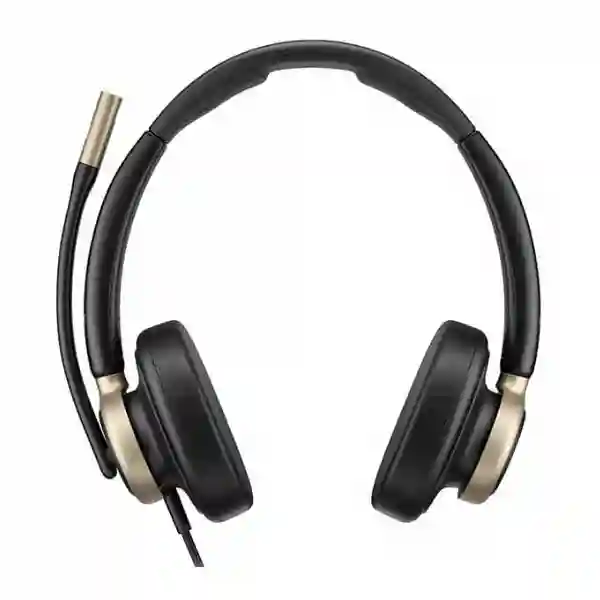
HP Poly Mission 825 Stereo USB Wired Headset
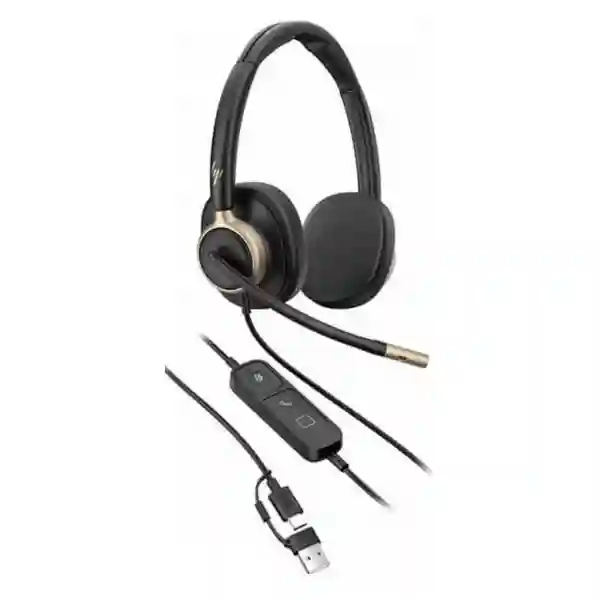
Clearer work calls begin with a headset suited to the workplace. This on-ear stereo USB model brings together four-microphone AI noise reduction, active noise cancellation for listening, physical calling controls, and a practical USB-C connection with USB-A adapter.
For offices, customer support teams and hybrid workers assessing equipment in Tanzania, the right next step is to confirm device fit, app support and the exact commercial offer rather than assume one headset works equally well for every role.
At a glance
Wearing style
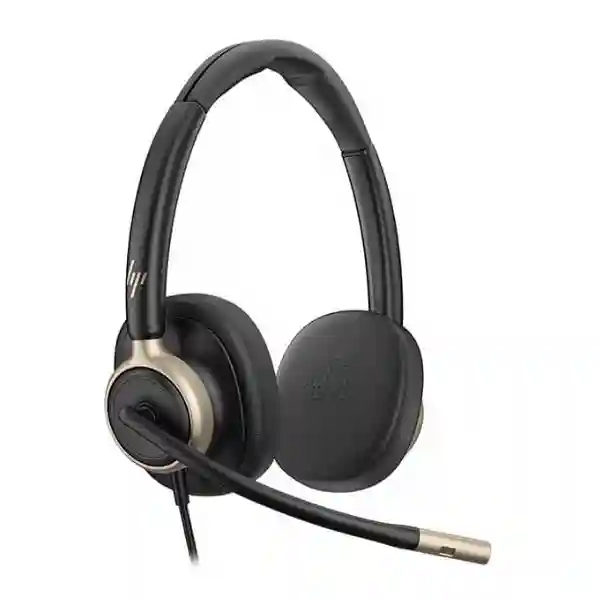
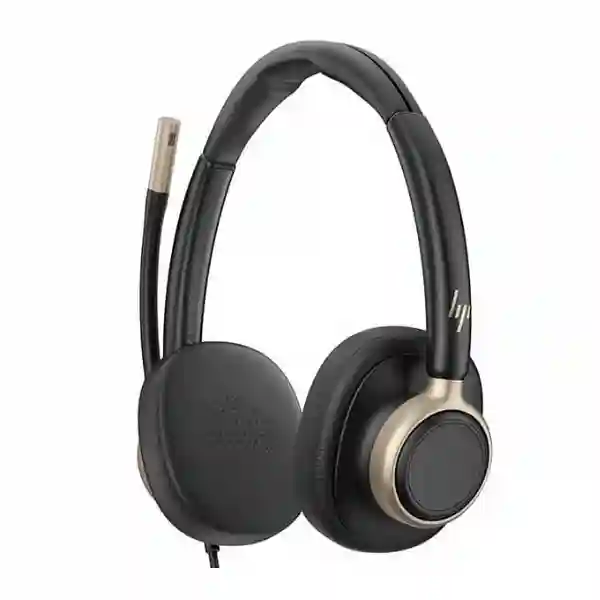
On-ear stereo; two earcups
Connection
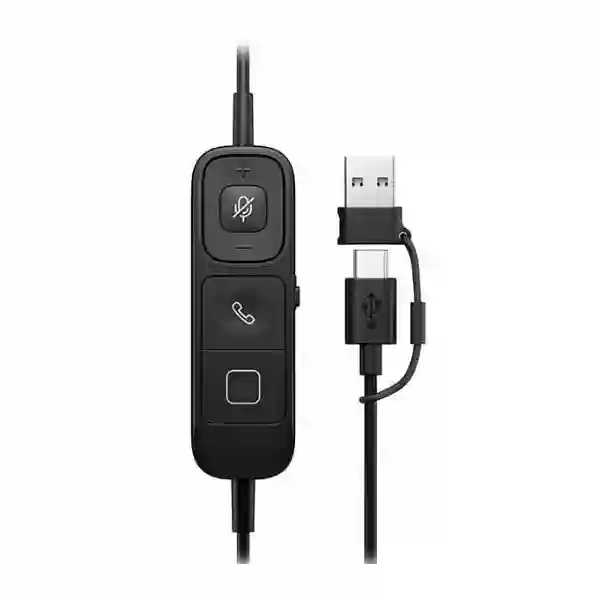
Wired USB-C; USB-C to USB-A adapter supplied
Voice pickup
Four microphones with AI noise reduction
Listening focus
Feedback active noise cancellation with on/off control
Drivers and cabling
32 mm speaker drivers; 2 m cable
Controls
Mute, volume, Teams, call handling, ANC
Weight
164 g according to HP
Fit and carrying
Memory-foam PU-leather cushions; carrying case
Published manufacturer features are not a promise of local stock or performance in every application. Verify certification requirements, configuration and Tanzania-specific purchase terms before ordering.
Who this headset is for
The HP Poly Mission 825 Stereo USB Wired Headset is intended for professionals who spend a significant part of their day speaking and listening through a computer. The most natural buyers are customer service teams, finance and administration departments, meeting-heavy office workers, remote support staff, and managers who need to hear speech clearly in shared spaces. It combines a two-ear on-ear wearing style, a wired digital connection, microphones designed to reduce transmitted background noise, and active noise cancellation for the listener. The practical buying question is whether those capabilities match the noise, software, working patterns, and device connections of your particular workplace.
For organisations in Tanzania, assessing the headset begins with real tasks rather than a claim that one accessory suits everyone. Consider how often employees take calls, whether desks sit near conversations or ventilation, whether users need awareness of nearby colleagues, and which computers they use. Someone on consecutive web meetings may value stereo listening and memory-foam cushions. A supervisor who must hear in-room questions may prefer a mono alternative. An IT buyer should additionally check USB ports, communication applications, local purchasing terms, and replacement accessory plans before approving a larger rollout.
The business problem it addresses
A typical office does not fail because people lack headphones; it struggles when call participants repeat themselves, staff lose concentration, and users constantly switch audio devices. The Mission 825 addresses several of these points in one corded headset. Four microphones with AI-based transmit noise reduction are intended to help the person at the other end hear speech more distinctly. Feedback active noise cancellation works on what the wearer hears. Inline controls bring routine actions within reach so staff do not have to hunt for an application window during every call.
These features support a more controlled daily workflow, but they do not remove every disturbance. Loud nearby voices, room acoustics, an unstable meeting connection, or a poor microphone position can still affect communication. The benefit is best evaluated by a short trial in the actual workspace. Have staff take representative meetings, place calls from normal desks, and compare speech intelligibility with existing equipment. That type of test is more useful than an unqualified promise of silence or perfect conversations.
Four-microphone AI noise reduction: what callers hear
HP specifies a four-microphone array with AI noise reduction for this model. The microphones collect the voice signal while the device’s processing is designed to suppress common competing sounds before the audio reaches another participant. This is sometimes described as transmit noise reduction because it acts on the outgoing microphone signal. It matters when coworkers are talking nearby, keyboards are active, or shared working areas contain routine environmental sounds. The objective is to keep the speaker understandable rather than simply turning up microphone volume.
Microphone processing is not the same as a soundproof booth. It cannot restore words spoken too far from the boom, fix a clipped network stream, or guarantee that every sudden sound disappears. Encourage wearers to position the microphone consistently, speak at a normal level, and confirm the correct input device in their calling application. For quality assurance, test with another person listening remotely; recordings made on a single local computer may not represent every meeting service’s processing. This distinction makes headset evaluation fairer and helps teams identify whether a problem is acoustic, technical, or network-related.
Active noise cancellation: what the wearer hears
The Mission 825 includes feedback active noise cancellation, commonly called ANC. Its purpose is to reduce some ambient sound reaching the ears while the wearer listens. That can be valuable when concentrating on speech in a busy working area. The on-ear cushions also provide passive isolation by forming a physical barrier around the ears. Together, these approaches can make it easier to follow a conversation without responding by raising volume excessively. HP lists an ANC on/off control, allowing users to assess which listening mode feels best during work.
ANC performs differently with different sound types. Steady hums are often easier for noise-cancellation systems to reduce than a nearby person calling out a name. ANC should not be presented as a way of making an office completely quiet, and it is not a substitute for safe awareness in environments where warning sounds matter. The two independent paths are worth remembering: the microphone system helps remote participants hear you, while ANC helps you concentrate on what you hear. Buyers comparing headsets should verify both capabilities separately instead of treating every ‘noise cancelling’ label as equivalent.
Stereo on-ear listening in practice
A stereo headset covers both ears and provides separate left and right audio channels. That arrangement can help users remain engaged with a meeting rather than dividing attention between incoming speech and nearby activity. The Mission 825 uses an on-ear design, so its cushions rest against the ears rather than surrounding them like a large over-ear headset. Whether that fit feels pleasant is personal. People with glasses, different head sizes, or long call schedules may experience the same headset differently despite identical specifications.
Dual-ear listening is useful for detailed customer discussions, virtual training, and meetings where several participants speak at different volumes. However, a worker who frequently needs to respond to a colleague seated nearby might deliberately choose a single-ear model instead. Before buying for an entire team, let people who perform different jobs try the wearing style for a realistic session. Balance concentration against the need for situational awareness, especially around reception desks, shared service counters, and high-traffic workstations.
32 mm speaker drivers and voice detail
HP lists 32 mm speaker drivers and a multimedia-mode speaker bandwidth of 20 Hz to 20 kHz. Those figures describe parts of the audio hardware; they do not by themselves guarantee that every video meeting will sound equally good. Actual intelligibility depends on the application, audio stream, recording quality of the other participant, operating-system settings, and background conditions. HP also highlights super wideband audio for more natural speech reproduction when the supporting communication path permits it.
For day-to-day work, evaluate whether quieter speakers remain understandable, words sound natural, and volume changes can be made without interrupting a conversation. Staff may use the same headset for training clips or routine computer sound, but its primary value remains professional communication. If a company wants equipment for studio mixing, live monitoring, or specialised entertainment, its audio criteria will differ. Choosing according to the job avoids interpreting a technical frequency range as a universal measure of audio quality.
Wired USB-C connection and included USB-A adapter
The headset uses a wired USB Type-C connection, and HP lists a USB Type-C to USB Type-A adapter in the standard package. This supports deployment across many modern computers with USB-C ports and older workstations with suitable USB-A ports. HP lists a cable length of approximately 2 metres. A physical cable keeps the headset attached to the workstation and avoids a wireless charging routine, making it attractive for stable desks and users who do not need to walk around during calls.
Physical compatibility is only the first step. A port must be functional, the operating system must recognise the USB audio device, and the conferencing application must route the correct microphone and speaker to it. Some phones and tablets have additional accessory or adapter requirements, so a generic operating-system compatibility listing is not proof that every individual device will work in every configuration. Verify the connectors and deployment policies on actual equipment. This product is not presented by HP as a Bluetooth headset or a standard 3.5 mm analogue model.
Why a wired headset may suit managed offices
A corded model can simplify certain procurement and support decisions. There is no headset battery-charging timetable to coordinate, no wireless pairing step each morning, and no separate radio dongle identified for the standard USB configuration. A staff member can move the headset to another compatible workstation and select it as an audio device. Those advantages are particularly relevant to training rooms, fixed reception computers, support teams, and organisations with centrally managed desk equipment.
The trade-off is movement. A two-metre cable is suitable for many desk setups, not for walking to a printer while remaining on a call. The lead must be routed carefully to avoid pulling the connector, catching on chairs, or stretching across walkways. For teams whose agents need freedom to move, a suitable wireless headset may be worth evaluating instead. For a team whose priority is a straightforward computer connection at a fixed station, the Mission 825’s wired approach is a sensible design choice rather than a limitation to hide.
Comfort for extended calling sessions
HP describes a lightweight frame with padded headband and oblong memory-foam ear cushions covered with PU leather. The published headset weight is 164 g. These are meaningful considerations for people who spend much of their working day in conferences, although comfort cannot be guaranteed by weight alone. Headband pressure, ear shape, glasses, temperature, and personal preference influence whether the fit remains comfortable through a full schedule.
Encourage employees to adjust the band rather than wearing it tighter than necessary. Where breaks are practical, brief periods without the headset can reduce the feeling of constant pressure. Keep cushions clean according to the manufacturer’s care instructions and inspect wear over time. HP mentions replacement cushions and pads sold separately; procurement teams should ask about sourcing those consumables for the exact model instead of assuming they are included in every package. A successful pilot should assess comfort after repeated calls, not just after a quick fitting at the procurement desk.
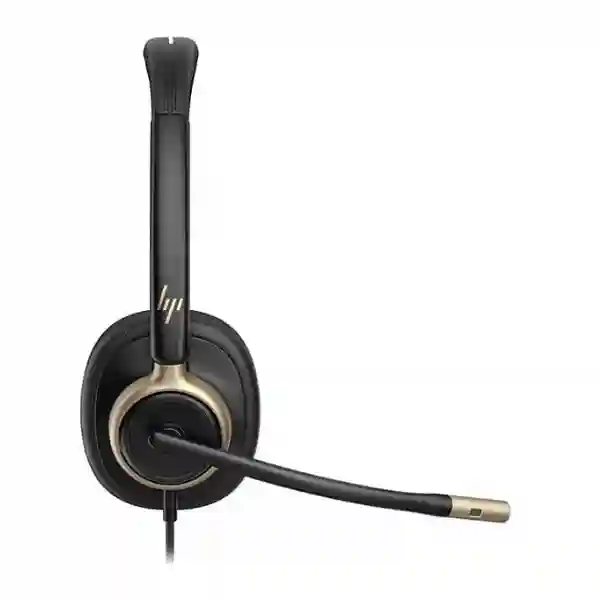
Rotating boom and microphone placement
HP specifies a 285-degree rotating boom microphone and a boom length of about 130 mm. The rotating design helps the wearer adjust the microphone position and supports practical use from different sides of the face. HP’s Mission series description also identifies rotation-to-mute behaviour. This means the boom serves both as a way to position the microphone and, when configured as specified, a physical mute interaction. Clear placement helps voice pickup remain consistent during a call.
Users should learn the actual mute state rather than assuming that moving the boom always produces the same result in every application. Voice alerts and any status indicators can help, but a first-use call test is still appropriate. In sensitive customer conversations, verify mute in the meeting or softphone interface before discussing information that should not be transmitted. Avoid repeatedly forcing the boom beyond its intended range. During rollout training, show employees how to place it at a comfortable distance without brushing it against clothing, hair, or the face.
Controls that reduce interruption
HP lists buttons for mute and unmute, volume up and down, call answer or end, Microsoft Teams, and ANC on or off. These accessible actions are useful when an incoming call arrives while a worker is using several desktop applications. Rather than searching through windows to change volume or toggle mute, the wearer can reach the headset’s physical controller. HP also lists spoken alerts for some events, including mute state, volume limits, incoming calls, and the ANC-off condition.
Button behaviour may depend on the application and computer environment. For example, an on-headset call-control command may interact differently with a supported collaboration client than with a browser-based service or an organisation’s custom softphone. Test the actual buttons staff expect to use, particularly mute synchronisation, answering, and ending calls. Make clear which actions are controlled by the headset and which still belong to the meeting platform. That small training investment can reduce confusion during calls where employees need quick, reliable control.
Collaboration platform and certification checks
HP’s product material for the Mission 825 describes a Microsoft Teams button and references Microsoft Teams Open Office certification. Other current HP regional Mission-series material has shown differing certification status language for the 800 series, while some regional product listings show multiple collaboration certifications. Rather than making a blanket promise for every country and hardware revision, organisations should confirm the exact product configuration and current certified-device status with their software platform and purchasing channel.
Certification and basic compatibility are not identical. A USB headset may function as a microphone and speaker in a conferencing application even if a particular advanced button or approved-device designation requires more checks. Buyers working with Microsoft Teams, Zoom, or Google Meet should identify which capabilities are essential: basic audio, hardware mute synchronisation, call control, open-office microphone performance, or an IT compliance requirement. Pilot those features on the installed client versions. This approach is especially important for businesses where software updates, organisational policies, and endpoint builds vary across departments.
Operating systems and device estate
HP’s technical specifications list compatibility with Windows 11, macOS, Chrome OS, Android, and iOS. That is a broad starting point, not a promise that every operating-system edition, USB-C phone, kiosk, or thin client will expose identical controls. For corporate PCs, check whether the device is detected after connection and whether it appears in operating-system sound settings as both an input and output. Confirm that conference applications have permission to use the microphone.
If an office has a mixed device estate, prepare a short compatibility matrix before placing a volume order. Record computer model, port type, operating system, calling software, and any observed limitations. Include docking stations and USB hubs in the test where those are common. Where a desk has only one easily accessible connector, consider whether the workstation’s available ports are needed for other essential accessories. This practical review avoids last-minute improvisation with unapproved adapters and helps IT support describe a repeatable setup procedure.
Shared desks, reception and customer service
Shared workstations need simple, predictable equipment. The Mission 825 can be connected to a compatible computer by USB, making it a candidate for hot-desking programmes where each person carries their own headset or where workplaces provide managed audio peripherals. Personal assignment is usually preferable when hygiene, comfort adjustment, and repeat use matter. For a shared set, establish procedures for cleaning cushions and tracking accessories so equipment remains ready for the next shift.
At reception or customer service counters, the right wearing style depends on staff responsibilities. A worker who must continuously monitor visitors and speak to onsite colleagues may need more ambient awareness than a stereo model offers. A back-office agent who is handling extended customer calls may benefit more from stereo focus and ANC. Build an equipment allocation policy based on work pattern rather than job title alone. Different members of one team may need different headset designs even though they use the same meeting or telephony software.
Remote work and hybrid meetings
For staff alternating between home and office, a compact wired headset provides a consistent audio interface without requiring separate wireless pairing routines. The standard package includes a carrying case, which helps keep the headset and adapter together between locations. A two-metre cable can give reasonable flexibility around a home workstation, and the USB-A adapter can be useful when moving between devices of different ages. As with any accessory, check the destination computer before relying on a connection.
Hybrid meetings introduce factors no headset can control: laptop microphones on the opposite end, room speakers, echo, poor internet service, or participants who speak away from their own microphone. The Mission 825 can address the wearer’s local input and listening experience, but clear meetings also require sound meeting etiquette and adequate connectivity. Encourage staff to use their headset rather than laptop speakers when taking individual calls in a shared room, and choose the correct audio endpoint when joining a meeting. A simple pre-call audio check prevents many avoidable disruptions.
Practical deployment in Tanzanian workplaces
Organisations sourcing headsets for use in Tanzania should match the product to their existing computer hardware, call applications, and office noise. Relevant environments might include professional-services offices, training centres, support desks, and distributed teams, but suitability must be assessed for each organisation rather than presumed from geography. Look at room layout, nearby workstations, power continuity for the computers, and the stability of the internet connection used for voice and video. Those factors often influence call experience as much as the headset selected.
Do not assume a local price, immediate stock, import status, warranty service location, or delivery window without confirmation from the intended seller. For a business purchase, request the exact configuration, quantity, supplied accessories, applicable tax treatment, and support arrangements in the quotation. Where equipment is shared across several offices, test the same headset configuration in each representative environment before standardising. A well-scoped pilot can reveal differences between a quiet manager’s office and an active customer support floor.
Protecting listening comfort
HP lists SoundGuard Digital acoustic protection technology for the Mission 825. This feature is designed to address certain sudden or sustained audio exposure conditions; it should not be treated as a promise that any listening volume is risk-free. Users still need to set levels appropriate to the call and follow workplace hearing-health guidance. Audio discomfort may result from too much volume, long listening periods, or poor physical fit even when protective processing is available.
Begin with a moderate playback level, use the volume controls to make speech comfortable, and investigate persistent low audio instead of simply increasing volume every time. Problems may originate from the application, the other participant’s microphone, or an operating-system mixer. ANC can sometimes make speech easier to follow in a noisy environment, but it should not encourage employees to ignore important surroundings. Supervisors should select the wearing style and work area with safety and communication needs in mind, particularly wherever face-to-face interruptions or warning sounds are part of the job.
Durability, cleaning and replaceable parts
Professional headset ownership extends beyond the initial purchase. Cables can be stressed at desk edges, ear cushions may wear through repeated use, and adapters can be misplaced. HP describes replaceable pads and cushions sold separately for the product family. Those replacement items may support a longer useful life where parts can be sourced for the exact headset. The right maintenance plan should include careful cable routing, appropriate storage, routine condition checks, and cleaning methods consistent with HP’s product guidance.
Do not soak ear cushions or apply aggressive cleaning products without confirming manufacturer instructions. Label assigned headsets if your workplace uses personal issue, and store the USB-A adapter with the carrying case when not in use. For larger rollouts, record when cushions need replacement and whether spares are available through the chosen supplier. A procurement comparison should consider total ownership cost, including replacement accessories and staff disruption, rather than focusing only on the first unit price.
Sustainability considerations without overclaiming
HP lists paper-based packaging and at least 25% post-consumer recycled plastic for this model, calculated as a proportion of the relevant plastic content according to HP’s published methodology. The manufacturer also describes the Mission 800 family in connection with a sustainability certification. Those statements can inform a responsible purchasing review, but they do not mean that the entire headset is recycled, that every component is recyclable locally, or that any particular take-back programme is automatically available in Tanzania.
Procurement teams can compare verified manufacturer material claims alongside practical factors such as expected use, replacement cushions, repair access, and packaging disposal. If a purchasing policy requires a specific certification, verify the exact model and current certificate details with the supplier before committing. Ask what will happen to damaged or end-of-life headsets and whether your organisation has an appropriate electronics-waste process. A product’s environmental profile is better assessed through verifiable details and the full lifecycle than a vague label such as ‘green’ or ‘eco-friendly’.
What the published specifications mean
The manufacturer identifies the Mission 825 as a black, on-ear, two-ear USB wired headset with four microphones, 32 mm drivers, a 2 m cable, a 285-degree rotating microphone boom, and a weight of 164 g. The published dimensions are 175 by 180 by 40 mm. Speaker and microphone bandwidths are technical measurements that help describe the audio path; they are not direct forecasts of how a particular call will sound. Application processing, caller equipment, ambient conditions, and fit remain important.
HP also publishes a standard limited manufacturer-warranty term for its product material, but buyer entitlements can depend on sales territory, exact configuration, documentation, and local support conditions. Request written terms for the proposed Tanzania purchase rather than assuming another region’s retail offer applies. Similarly, manufacturer product references such as C01FCAA identify a product family or configuration and must not be mistaken for a FourTeck listing SKU unless that listing explicitly assigns the same value. Always reconcile the quotation with the intended physical item.
Compare stereo with the mono alternative
The biggest wearing-style decision is whether staff should cover one ear or both. A stereo Mission 825 places sound in both ears and can support concentration during long meetings. A mono headset keeps one ear free, helping users hear nearby colleagues, service bells, or visitors. Neither is universally superior. In an office where ambient awareness is essential, mono can be the more suitable option even though stereo may sound more immersive during calls.
Use a small decision matrix when buying for different roles: how much of the day is spent on calls, how noisy the room is, whether the user must respond to in-person requests, and whether the user prefers a lighter or less enclosed feel. Test employee comfort and microphone intelligibility under the same working conditions. The Mission family includes mono and stereo designs, but compare exact model specifications rather than assuming every feature carries across each tier. In particular, the premium Mission 800’s ANC capability should not be assumed on every less expensive family member.
Compare a wired USB headset with wireless designs
The primary advantage of this wired design is a direct computer audio path without routine headset charging. It is appropriate where calls happen at one workstation and where physical desk organisation is manageable. Wireless alternatives can be more suitable for staff who leave their chairs during conversations, move between rooms, or need a broader roaming range. They introduce other variables such as battery maintenance, pairing, charging equipment, and radio conditions.
Your choice should be based on workflow, not a simple ranking of technologies. A high-volume contact centre may prefer wired headsets for consistent fixed-seat deployment. A mobile supervisor may value wireless movement. A hybrid employee may prefer one headset that connects quickly to several different machines, provided the selected devices accept its connector. Evaluate real user behaviour, local support arrangements, spare-part needs, and the IT team’s capacity to manage the resulting fleet.
Procurement checklist before requesting a quote
First, define the number of users and the operating environment: quiet desks, open-plan desks, training rooms, remote workers, or mixed conditions. Second, confirm the computer port types and the exact collaboration application versions. Third, identify the tasks that hardware controls must perform, such as Teams launch, mute, or answering softphone calls. Fourth, run a trial with representative staff and compare microphone clarity, listening comfort, and ease of operation. Fifth, obtain written confirmation of the headset configuration and what is included in the box.
For a Tanzania purchase, ask your intended vendor to state the applicable quoted price, tax details, delivery arrangements, stock status, after-sales process, and warranty terms rather than extrapolating from another country’s product listing. If the quotation references a manufacturer part number, verify that it corresponds to the stereo Mission 825 and not the mono Mission 815 or a special packaging variant. Record how staff will receive, identify, clean, and store headsets. These checks turn a product preference into a manageable procurement specification.
First-use setup: a practical sequence
On a compatible computer, connect the headset using USB-C or the supplied USB-A adapter where appropriate. Wait for the operating system to recognise the device, then open sound settings to select it as the microphone and speaker. Open the call or conference application and select the headset there too if the application maintains its own device settings. Place the boom near the mouth, check the mute state, and make a brief test call with another participant.
After connection, test volume changes, the physical mute control, and ANC on/off. If your chosen application supports hardware answer or end controls, test those as a separate step. Pay attention to any operating-system or app privacy permissions that could block microphone access. Once everything works, save the setup procedure in the organisation’s employee guide. These checks are particularly valuable when the same headset design is introduced across many desks with different laptops, docks, or collaboration software.
Troubleshooting common call issues
If the other participant cannot hear you, check whether the microphone boom or controller is muted, whether the correct input device is selected, and whether the application has microphone permission. If you cannot hear the other party, confirm the output device, application volume, and operating-system mixer. If the audio is intermittent, inspect the connector, the adapter, and the USB port; then test a direct connection to an approved port rather than relying immediately on a hub.
If background sounds remain disruptive, distinguish between what you hear and what remote listeners hear. ANC mainly addresses your listening environment, whereas the microphone array and its processing address transmitted voice. Check the boom position and run a call test in the actual room. For call delay, echo caused by a far-end device, or dropped audio, investigate network and conference settings as well. Escalate repeated failures with the computer model, operating-system version, application, connection method, and a short description of the symptom so support staff can reproduce it.
IT administration and fleet management
HP’s Mission series material identifies the HP Poly Studio App and Poly Lens management tools in the wider device-management offering. Such tools may help organisations configure or manage supported endpoints, but the exact available functions, software requirements, and entitlements should be checked for the selected headset and environment. A business should not base a purchase on an assumed cloud administration capability without verifying that its intended software version and deployment policies support the desired operation.
Maintain an asset record that captures user or desk assignment, product model, manufacturer identification where applicable, purchase date, and issue history. Standardise USB connection guidance, conferencing app device selection, and a first-line troubleshooting checklist. For compliance-sensitive environments, involve the IT security team before adopting central management tools or enabling services. A headset rollout is easier to support when staff can identify the correct device and technicians can distinguish a damaged cable from a software configuration issue.
Pilot plan for teams of different sizes
For a small office, a practical trial may involve a few people who represent the quietest and noisiest desks. Ask each person to evaluate microphone pickup, comfort after repeated calls, control behaviour, and whether stereo listening makes their job easier. For a larger organisation, include at least one representative from major software and hardware configurations as well as users who wear glasses or alternate between desks. Keep the trial focused on actual work tasks rather than an artificial demonstration.
Collect observations in consistent categories: incoming speech clarity, outgoing speech clarity, physical fit, cable convenience, ANC usefulness, and ease of changing devices. Record concrete problems, not just a single overall preference score. If a compatibility concern appears, investigate whether it is specific to an operating-system build, USB adapter, or application version. Finish with a documented decision: which users receive this model, which need a mono or wireless alternative, and which support arrangements must be confirmed before ordering.
A purchasing decision that lasts beyond day one
The Mission 825 may be appropriate when a team values focused stereo listening, microphone noise reduction, wired computer connectivity, and quick physical controls in an office-oriented headset. Its strengths are most relevant when those capabilities address a measured workplace problem. It is less suitable when staff need to roam during calls, when the workplace requires constant awareness of nearby sound, or when the intended host does not support the required USB audio configuration.
Assess value through the full working life: the number of calls, time spent resolving audio problems, staff comfort, replacement accessories, and the support burden on IT. The preferred option is the one that employees can use consistently and support teams can maintain with confidence. Before a final commitment, request confirmation of the exact configuration, application requirements, current local commercial terms, and any organisation-specific compliance needs. A grounded purchase protects both the user’s daily experience and the organisation’s budget.
Verified technical specification overview
| Product | HP Poly Mission 825 Stereo USB Wired Headset |
|---|---|
| Design | On-ear, stereo, black |
| Connection | Wired USB-C with included USB-C to USB-A adapter |
| Cable length | 2 m |
| Microphones | Four; AI noise reduction |
| Noise cancellation | Feedback ANC for listening; controllable on/off |
| Speaker driver | 32 mm |
| Speaker bandwidth | 20 Hz–20 kHz in multimedia mode |
| Microphone bandwidth | 50 Hz–16 kHz |
| Boom rotation | 285° |
| Ear cushions | PU leather surface, memory-foam padding |
| Acoustic technology | SoundGuard Digital |
| Operating systems listed by HP | Windows 11, macOS, Chrome OS, Android, iOS |
| Weight | 164 g |
| Dimensions (W × D × H) | 175 × 180 × 40 mm |
| Standard box | Headset, USB-A adapter, carrying case, quick start guide, warranty card, product notice |
Based on HP’s published Mission 825 product specifications. Platform support and certification can depend on version and configuration. Seller-specific SKU, local price, availability, service arrangements, and quoted warranty terms have not been established here.
Frequently asked buyer questions
Is the HP Poly Mission 825 a wireless headset?
No. This specific model is a wired USB headset. It connects using USB Type-C and includes a USB-C to USB-A adapter in the standard package. It is not sold in HP’s published specification as a Bluetooth headset. A wired connection is useful for stable computer workstations, but users who need to walk around during calls should compare suitable wireless models.
Does this model have active noise cancellation?
Yes. HP specifies feedback active noise cancellation, with an ANC on/off control. ANC is intended to reduce some background sound for the person wearing the headset. The four-microphone AI noise reduction system addresses a different problem: reducing competing sounds in the outgoing voice signal. Neither feature guarantees complete silence, and performance should be tested under the normal conditions of your workplace.
Can I use it on a computer with a USB-A port?
HP lists a USB Type-C connector and a USB Type-C to USB Type-A adapter in the standard box. This means an appropriate USB-A computer connection can be used without purchasing a separate adapter for the standard package. Confirm that the port works, the operating system detects the headset, and your communication application selects it for microphone and playback audio.
Will it work for Microsoft Teams meetings?
HP markets the Mission 825 for workplace communication and supplies a Microsoft Teams control. Regional HP product materials describe Teams and Open Office certification, but some HP series-level regional pages have displayed different certification-status language. Confirm the exact offered configuration and current certification or approved-device requirements when those details matter. Basic USB audio and advanced platform controls should be tested separately.
Can the headset be used with Zoom or Google Meet?
As a USB audio device, it can be evaluated with compatible computer-based meeting applications, including Zoom and Google Meet. However, do not assume every hardware control or certified status is identical across platforms, software versions, and country-specific configurations. Select the headset as both input and output in the application, test mute and call control, and verify any formal certification requirement using up-to-date platform documentation.
What is the difference between stereo and mono?
Stereo has two earcups and presents audio to both ears, which can help people concentrate on speech. Mono covers one ear and can make it easier to monitor people and activity nearby. The Mission 825 is the stereo option. Choose based on the employee’s work, listening preference, the office environment, and the need to respond to in-person interactions instead of assuming two ears are always better.
Is it appropriate for a call centre or customer support team?
It can be a strong candidate for computer-based customer support work, particularly where staff benefit from a wired connection, microphone noise reduction, physical mute control, and focused stereo listening. Evaluate its compatibility with the organisation’s actual softphone, its comfort through long shifts, and whether an agent needs to hear colleagues. A real desk-level trial is preferable to a general call-centre suitability guarantee.
How long is the cable and how much does the headset weigh?
HP publishes an approximately 2 m cable length and a headset weight of 164 g. These figures are helpful for checking whether desk layouts are practical and whether the headset is in the lightweight category relative to other devices. They do not determine comfort for everyone. Test headband pressure and ear-cushion fit during repeated calls, and keep the cable clear of chairs and walkways.
What accessories come in the box?
HP lists the headset, a USB Type-C to USB Type-A adapter, carrying case, quick start guide, warranty card, and product notice for its standard product specification. Confirm the exact carton contents with the proposed quotation, especially if the offer uses a bulk-packaging variant. Replacement ear cushions and pads are described by HP as separately available rather than part of the standard included accessory list.
Does the headset need charging or batteries?
The Mission 825 is a corded USB headset, so users do not follow the battery-charging routine associated with wireless headsets. It relies on the host device and its USB connection. This helps fixed-desktop workflows, although it also means the user is attached to the workstation while the headset is connected. Ensure the selected computer and port function properly.
Does ANC solve poor internet quality?
No. ANC changes part of the sound experience at the headset, and AI microphone processing helps manage local background sounds. Neither corrects network delay, packet loss, a failing connection, or the other participant’s microphone. If words drop out or calls disconnect, check the conferencing service and network alongside the headset. Good audio results require both suitable local equipment and a reliable communication path.
Can we order the headset for a business in Tanzania?
This content is intended to support product evaluation for Tanzania, but it does not establish inventory, a local price, delivery schedule, or a specific warranty arrangement. Ask FourTeck for an exact-model quotation and written confirmation of current commercial conditions. Provide expected quantities, workstation ports, collaboration software, and the intended working environment so the configuration can be checked before purchase.
Is the manufacturer part number the same as FourTeck’s SKU?
Not necessarily. HP uses manufacturer product identifiers such as C01FCAA in its published product information. A seller’s SKU is an inventory identifier for that specific store or listing and should only be used when confirmed by that store’s listing information. The manufacturer reference helps identify the product but does not establish a FourTeck Tanzania SKU by itself.
What should a team test before buying many units?
Test audio input and output in the actual calling applications, confirm USB-C and USB-A workstation compatibility, check physical mute and call-control behaviour, try ANC in normal workplace noise, and evaluate fit after repeated meetings. Include people with different job roles and device configurations. Record observations and compare any alternative mono or wireless models where ambient awareness or movement is important.
Request a configuration and business quotation
Considering the HP Poly Mission 825 Stereo USB Wired Headset for your team? Contact FourTeck Tanzania through its usual enquiry channel. Share the number of users, their computer ports, meeting or calling software, preferred wearing style and intended deployment setting so the exact product configuration can be reviewed.
Before ordering: request confirmation of price in the applicable quoted currency, stock, delivery, box contents, certification needs and local warranty or service terms. No unverified checkout or enquiry link is provided.




Reviews
There are no reviews yet.