
Wired business audio · Tanzania buying guide
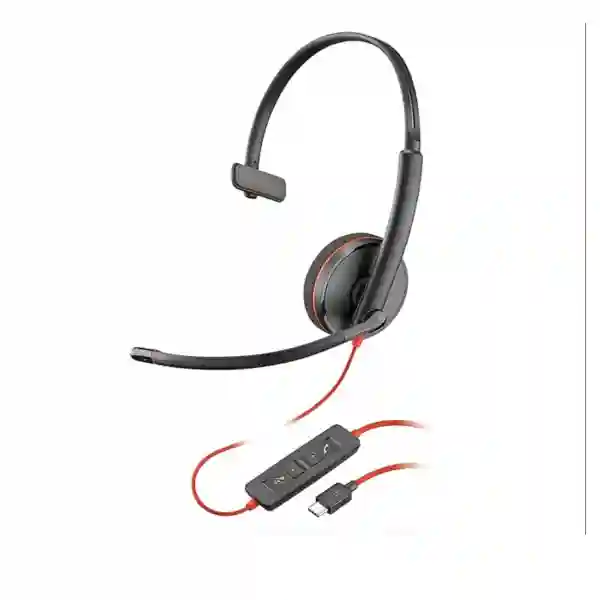
HP Poly Blackwire 3210 Mono USB-C Headset
Clearer desk calls without Bluetooth pairing or charging. This single-ear USB-C headset combines a noise-cancelling boom microphone, practical inline controls and a design that keeps one ear open to the office.
For reception teams, administrators and computer-based callers. Request a quote for the exact variant and confirm your device and app compatibility before purchasing.
Is this the right headset?
Good fit: Desk-based voice calls, front-desk awareness, business meetings, a compatible USB-C computer and users who prefer wired simplicity.
Consider alternatives: Wireless roaming, two-ear listening, high-noise isolation, an analogue 3.5 mm connection or applications requiring unverified button integration.
Buying action: Confirm the exact part number, connector, accessories and commercial terms for the offered unit before ordering.
Verified specification summary
These are core Blackwire 3210 characteristics verified against HP’s official product specifications. For package-specific items, request the exact unit’s current datasheet before purchase.
| Item | What to know |
|---|---|
| Headset style | On-ear monaural (single ear) |
| Connection | Wired USB Type-C |
| Microphone | Noise-cancelling boom microphone |
| Audio processing | Poly Dynamic EQ and digital signal processing |
| Call functions | Inline mute, volume and supported call actions |
| Speaker | 28 mm driver (HP product specifications) |
| Microphone bandwidth | 100 Hz–10 kHz (HP product specifications) |
| Acoustic protection | HP SoundGuard technology |
| Included adapter | Varies by exact manufacturer package; confirm before ordering |
| Price, stock and local terms | Confirm for the offered Tanzanian listing |
A headset for people who need to talk and stay aware
The HP Poly Blackwire 3210 Mono USB-C Headset addresses a familiar office problem: a laptop microphone can pick up room activity, but a headset must still feel straightforward enough to use every day. The Blackwire 3210 combines a dedicated boom microphone with a single-ear listening design and a wired USB connection. The result is a focused tool for work conversations rather than a complicated personal audio system.
Choose this model when calls are mainly taken at a desk and you want one ear available for nearby interaction. A receptionist may need to hear a visitor, and a team coordinator may need to respond to a colleague without removing the entire headset. The mono arrangement supports those situations, although it will not isolate the wearer from workplace sound.
The next step is to confirm your computer's USB-C connection, your preferred meeting software and the exact Blackwire 3210 package on offer. These checks are more helpful than relying on the product family name alone, because similarly named versions can differ in included connectors or accessories.
Key benefits at a glance
A single-ear earpiece lets you listen to a remote caller while keeping the opposite ear open. This is different from a stereo headset, which covers both ears and usually creates more separation from the room. For work that alternates between a screen and people nearby, that distinction can be more important than a long list of audio specifications.
The microphone is designed for voice communication and incorporates noise cancellation. Poly's Dynamic EQ is intended to optimise sound for calls and adjust when multimedia is playing. Inline controls help with common actions such as changing listening volume and muting the microphone. Actual call-button behavior can depend on the computer and calling application.
Because the headset connects by cable, it does not require Bluetooth pairing or headset battery charging. That convenience comes with a tradeoff: movement is limited by cable routing and the distance to the connected device. Consider where the computer sits before ordering multiple units for a shared office.
What the mono design means in practice
Mono and monaural both describe the single-ear wearing style used by the Blackwire 3210. Only one ear receives the headset audio, while the other remains uncovered. The earpiece sits on the ear rather than surrounding it like a large over-ear cup. This makes the headset suitable for users who do not want to shut out their physical surroundings completely.
A mono design is often a thoughtful fit for front-desk staff, administrators and employees who move between a computer call and brief face-to-face exchanges. It is not necessarily the best choice for a person working beside noisy machinery or in a highly distracting room. The uncovered ear will still hear the environment.
A buyer comparing models should first decide whether ambient awareness or listening immersion matters more. If both ears need coverage, a stereo Blackwire alternative may be more appropriate. If one ear should remain open for safety instructions or colleagues, the 3210's single-ear format becomes a practical feature rather than a compromise.
Microphone noise cancellation explained
The Blackwire 3210 uses a noise-cancelling boom microphone intended to make the wearer's speech clearer to other participants. This is microphone-side noise reduction: it is not the same as active noise cancellation inside the earpiece. The distinction matters when a buyer sees the phrase noise cancelling and expects workplace sounds to disappear from their own hearing.
A boom microphone helps position the pickup closer to the mouth than a laptop's built-in microphone. For better results, place the boom at a consistent, comfortable distance from the mouth and avoid rubbing it against clothing. Reducing unnecessary room noise and using the correct input device in the meeting application are also important.
No microphone can guarantee that every conversation, keyboard sound or street noise will be removed. Busy shared spaces may still benefit from acoustic treatment, seating changes or a more specialised headset. Treat the 3210's microphone as an aid to intelligible calls, not as a promise of silence in any environment.
Voice-focused audio and Dynamic EQ
Poly lists Dynamic EQ and digital signal processing among the Blackwire 3200 family's audio features. Dynamic EQ helps adapt playback between communication and multimedia use, so the same headset can be used for a customer call and a short training video. This does not turn a single-ear business headset into a two-channel, immersive music listening device.
On a call, spoken-word clarity should take priority over dramatic bass or room-filling sound. The 3210 is designed around that use case, with specifications for speech and media playback published by HP. Users should still manage volume responsibly, because clear audio does not require listening at maximum level.
When evaluating headset quality, make a test call using the same laptop, calling software and network conditions that employees will use. Listen for understandable speech, consistent microphone level and comfortable volume. That test reveals more about the real workflow than a specification line viewed in isolation.
Straightforward USB-C connectivity
The requested version is a wired USB-C headset. It connects to a suitable computer USB-C port and is intended for computer-based communications without wireless pairing. This can be especially helpful for managed business laptops where employees should not need to manage Bluetooth devices or charging schedules before joining meetings.
USB-C describes the connector shape, not a universal guarantee of compatibility with every phone, tablet, hub or accessory. Confirm that the destination device supports a USB audio headset, and test the intended operating system and communications application. Some devices may need the headset selected manually in their audio settings.
A USB-A adapter is listed with certain newer 3210 packages, but that does not prove that every USB-C-only listing includes one. If your office has mixed USB-A and USB-C machines, ask for the exact part or package description. Do not assume a cable can be changed to a different connection type after purchase.
Do not confuse model and package variants
Blackwire 3210 names can appear in USB-C-only, USB-A and USB-C-with-adapter listings. Manufacturers also publish bulk-pack versions for organisational purchasing. Differences can include package contents and other listing-specific details. The product title identifies the general headset and intended connector, but does not by itself establish the exact retail bundle.
Ask a supplier to state the manufacturer part number for the offered unit and whether a USB-C-to-USB-A adapter is supplied. Confirm any included documents or accessories from that particular box. If those details are not provided, describe the offer simply as a mono USB-C headset rather than assigning unverified extras.
This careful approach is useful when purchasing headsets for a fleet of computers. A single incorrect adapter assumption can interrupt installation for a whole team. Identify the machines first, verify one sample package where possible and then standardise the order description used by procurement and IT.
Inline call controls and daily workflow
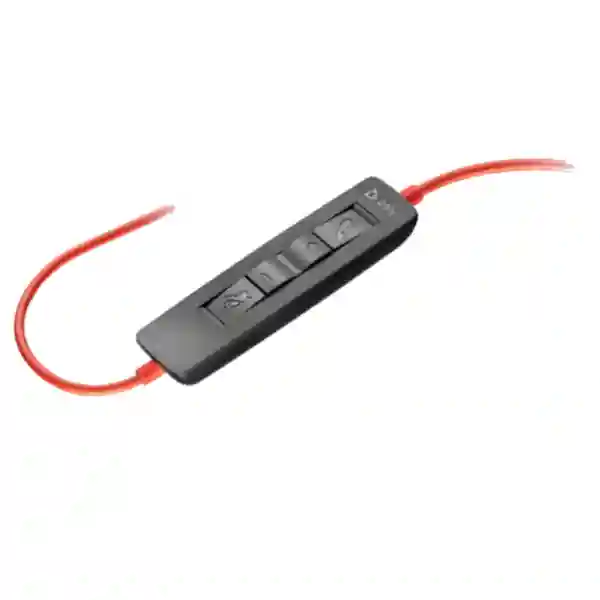
A control module on the headset cable allows users to reach frequently needed functions without navigating a meeting window each time. HP describes actions including call answer, ignore, end, hold, redial, volume adjustment and microphone mute. Which functions work inside a particular softphone may depend on application integration and device configuration.
The mute function is especially valuable during group meetings, when a colleague briefly enters the room or a participant needs to speak privately. Encourage employees to check both the headset's mute state and the application's microphone indicator before speaking. Relying on one visual status alone can lead to accidental silence.
For customer support teams, consistent controls can shorten the learning curve when employees use similar equipment at every desk. During rollout, provide a short orientation covering call pickup, mute, volume and where the cable module should rest. Keep the control unit within easy reach rather than dangling behind the desk.
Wired reliability without headset charging
A corded headset has a predictable operational advantage: there is no headset battery to recharge between calls. Employees can begin a scheduled meeting without checking a battery percentage or remembering where a charging stand was placed. USB connectivity also avoids Bluetooth pairing steps and common confusion about which nearby wireless device is connected.
That simplicity does not mean a call can never fail. Audio still depends on the computer, operating system, communications application and network connection. A damaged USB port, unsupported adapter or incorrect default microphone selection can prevent successful audio even when the headset itself is functioning.
The cable also creates a physical boundary. Anyone who needs to walk around the office during conversations may be better served by a wireless model. For primarily seated staff, however, the absence of batteries and pairing steps can simplify procurement, basic support and everyday use.
Comfort and long-session expectations
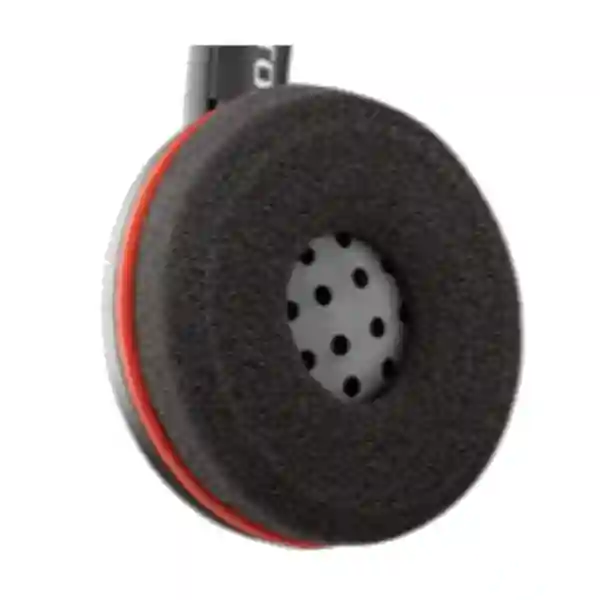
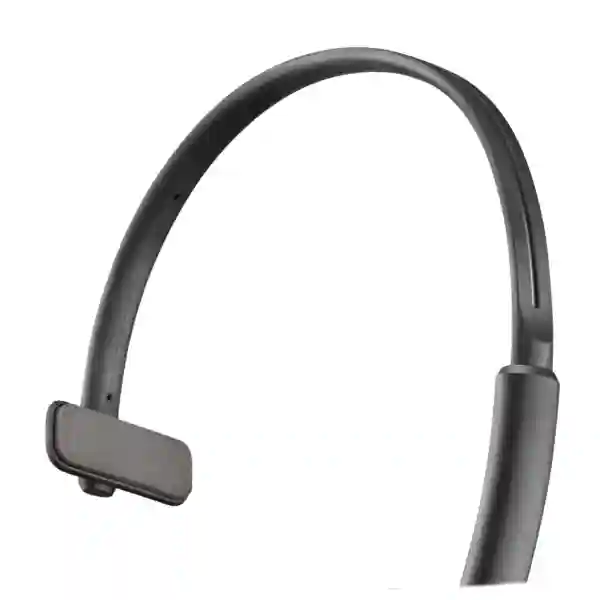
The Blackwire 3210 uses an over-the-head, single-ear wearing style with an adjustable headband. HP describes a lightweight metal headband, while exact cushion materials and package specifications may differ between related listings. An employee who takes frequent calls should evaluate fit on their own head rather than assume a headset is comfortable for everyone.
During a trial, check whether the earpiece rests securely without unnecessary pressure. Make sure the boom can be positioned for intelligible speech and that the headband does not interfere with spectacles or other regularly worn equipment. Short breaks and appropriate volume remain sensible during a full day of calls.
Because only one ear is covered, users may appreciate greater awareness of nearby conversation; others may prefer the symmetry of two earpieces. Neither preference is universal. Where practical, offer a small wearer trial before committing a large team to one wearing style.
Where the 3210 fits best
The strongest fit is desk-centred communication: reception counters, administrative offices, scheduled online meetings, business support desks and staff who need computer audio without a charging routine. The product's core strengths are a dedicated voice microphone, a practical call-control module and a single-ear form factor.
In these roles, employees often alternate between speaking to an online contact and listening to colleagues in the same room. A monaural headset allows that switching without constantly removing both earcups. It can also make onboarding simpler for people moving from a built-in laptop microphone to a dedicated headset.
The 3210 is less compelling when users require strong personal isolation, studio monitoring, wireless roaming or a direct analogue 3.5 mm connection. Consider those needs explicitly before treating any business headset as a universal solution. Good purchasing begins with the task, not only the brand.
Reception and front-desk conversations
A front desk is rarely a silent space. Visitors arrive, colleagues ask questions and a computer-based telephone or meeting application may ring at the same time. A mono USB-C headset can help the receptionist hear the caller clearly while keeping the uncovered ear available for the room. That is the central design benefit in this environment.
Plan the desk layout carefully. Keep the cable away from drawers, chairs and areas where visitors can pull it accidentally. Locate the inline control where the employee can mute promptly before speaking with a person standing at the desk. Check that the computer has an accessible, compatible USB-C port.
For busy counters, test whether background conversations remain acceptable to remote callers. Microphone noise cancellation is useful, but it is not a substitute for privacy practices or the right location for confidential discussions. Choose an area suited to the sensitivity of the call.
Customer service and help-desk teams
Support employees may handle many short conversations each day. A lightweight, wired headset with accessible controls helps them maintain a repeatable routine: put on the headset, select the call, speak, mute when necessary and finish without adjusting a separate wireless connection. The Blackwire 3210 suits that basic pattern.
Before standardising a team, confirm the exact softphone or browser calling application. Audio playback and microphone input are general operating-system functions, but call-answer and hold commands may not map identically across every application. Test the complete workflow, including calls received while another app is open.
Also review workstation noise and employee preferences. If agents sit close together and need to concentrate on one conversation, a two-ear design may be worth testing alongside this mono model. A sensible deployment evaluates communication quality and distraction levels rather than measuring price alone.
Hybrid work and home-office use
A wired headset can be helpful in a home office where the laptop remains on the desk for scheduled video meetings. It eliminates headset charging and provides a microphone closer to the mouth than the computer's built-in array. The user can also keep one ear open for a doorbell or another legitimate household signal.
Home setups differ widely, so USB-C port availability should be confirmed before purchase. Some laptops have a limited number of ports already occupied by displays, storage or power. If a dock is involved, test the audio connection through that dock rather than assuming every arrangement behaves in the same way.
For video conferencing, check the application's speaker and microphone menus before the first important meeting. A test recording can reveal whether the laptop microphone is still active by mistake. The headset supports clear communication most effectively when the right device is actually selected.
Education, training and online consultations
Remote training and computer-based consultations place a premium on understandable speech. The Blackwire 3210's boom microphone and ear-level speaker can support instructors or participants who spend most of the session speaking and listening rather than moving around. The mono arrangement may also help educators remain aware of activity in a shared room.
A trainer using multimedia should remember that a single-ear headset is not the same as a stereo monitoring headset. Videos can still be played, but content that depends on left-right audio immersion will be better experienced through two earpieces or appropriate speakers. Match the audio format to the learning activity.
For sensitive consultations, choose a private setting regardless of microphone technology. An uncovered ear means nearby speech remains audible, and callers may still hear some room noise. The headset is a communication accessory, not a privacy barrier or a substitute for appropriate data handling.
Administrative teams and daily office calls
Payroll, scheduling, procurement and general administrative roles often need reliable audio for short supplier calls and longer team meetings. A wired USB-C headset may fit such desks because it has no charging routine and lets employees manage mute and listening volume directly from the cable control.
An administrator may spend part of a call looking at a shared spreadsheet and another part answering a colleague's question. The one-ear-open arrangement supports that combination, provided workplace conversations do not become too distracting. Headset comfort and audio clarity should be checked at the normal computer seating position.
For offices moving away from laptop speakers, provide basic etiquette guidance: keep meeting volume moderate, mute when not speaking and use a private area for confidential calls. Better equipment can improve communication habits, but it cannot replace them.
Small-business purchasing considerations in Tanzania
Tanzanian businesses choosing work headsets should begin with their existing computers, communication tools and staff tasks. A business with USB-C laptops may value a direct wired connection, while mixed older and newer machines may need clarity on adapters and exact variants. The local market context changes procurement questions, not the manufacturer's specifications.
Ask for the current offer's exact configuration, availability, quantity options, applicable warranty terms and final quote before committing. Do not infer Tanzania stock, shipping time, installation service or local pricing from an international manufacturer's catalogue. These commercial points should be confirmed for the specific transaction.
For multi-user offices, prepare a brief device inventory and test the headset on representative computers. A small amount of checking prevents compatibility surprises, helps employees adopt the equipment and gives purchasing staff a clearer basis for comparing alternatives.
Choosing between mono and stereo
The Blackwire 3210 is a mono model. Someone who needs to monitor the room and a caller at the same time may welcome its single earpiece. Someone who regularly works in a shared open-plan area may prefer a stereo model that covers both ears and directs the meeting audio to both sides.
Stereo does not automatically mean superior microphone quality, nor does mono automatically mean poor audio. These describe how the headset is worn and how sound reaches the listener. Assess speaking needs, duration of use, background distraction and comfort before deciding.
If a team contains both reception staff and employees engaged in concentrated telephone support, it may be reasonable to test different headset styles. A useful purchasing policy standardises basic connectivity and support while recognising that listening environments differ from role to role.
Comparing wired and wireless options
A wired headset such as this Blackwire model is well suited to users who remain near a computer. Its direct connection avoids charging and Bluetooth pairing. A wireless headset allows more movement but introduces other considerations, including battery capacity, radio connectivity and management of charging accessories.
Neither approach is universally best. For a receptionist seated beside a computer, predictable USB audio may matter more than roaming range. For a supervisor who must move between desks during long calls, a wireless unit might serve the workflow better. Think about employee movement throughout an ordinary workday.
The price of a headset should also be assessed alongside support effort and employee productivity, without assuming particular savings. Selecting the right wearing style and connector can prevent avoidable returns and reduce setup confusion. Start with the actual working pattern.
Platform compatibility: what to confirm
HP identifies Windows and macOS among supported computer environments for Blackwire 3210 versions, with some current product listings also naming mobile operating systems. This should not be interpreted as proof that every mobile phone or tablet will recognise every USB-C headset configuration. Hardware ports, operating-system support and application behavior all matter.
For a computer fleet, record the operating-system versions, available USB connectors and main calling applications. Where a USB dock or hub is used, include that exact setup in acceptance testing. Do not assume a USB-C power-only accessory will necessarily provide the same audio functions as the computer's headset-capable connection.
If your organisation relies on special call controls inside a softphone, test those features separately from ordinary speaker and microphone operation. A headset may carry audio correctly while the application's answer or hold shortcut needs additional support or configuration.
Meeting software and call-control expectations
The Blackwire family is intended for unified communications, and HP describes its audio and call-management features for professional conversations. Common meeting applications can use supported USB audio input and output, but the level of integrated call control varies by platform, software version and selected device variant.
Before ordering for a specific conferencing platform, verify any certification requirement against that platform's current approved device information for the precise part number. A general claim that the headset works for calls is not the same as an official certification for every edition of an application.
During testing, check joining a meeting, hearing a participant, speaking, muting and leaving the call. If employees depend on the inline answer button, verify that exact button as well. Document any required settings so the rest of the team can reproduce a successful setup.
Prepare the desk before connecting
A well-planned physical setup reduces preventable trouble. Locate the computer's appropriate USB-C port, decide where the cable will run and leave the inline controls within reach. Avoid sharp bends, pinching the cable beneath furniture or stretching it across a walkway. The headset is intended for desk-based use, not tethering across a room.
Consider whether the wearer normally sits to the left or right of colleagues. Adjust the headband and boom microphone to keep the earcup comfortable and the pickup positioned sensibly. A stable position matters more than constantly readjusting the microphone during a live call.
If multiple people share equipment, establish a sensible cleaning and storage routine. The headset should be easy to find at the beginning of a shift and protected from spills or accidental cable pulls when not in use.
Setting up on a Windows computer
Connect the headset to a compatible USB-C port and allow the computer to recognise the audio device. In Windows sound settings, identify the Poly headset as the intended output and microphone input where necessary. Do not presume that plugging in any USB headset always replaces a previously selected Bluetooth or laptop audio device.
Open the organisation's calling application and check its independent speaker and microphone settings. Many applications can remember their own choices, so a correct system default does not always guarantee that the meeting will use the same device. Use the application's test-call or microphone-test feature where available.
Make a short trial call, adjust listening volume to a comfortable level and check the mute action. If the headset is not detected, try the computer's known working USB-C port before attributing the issue to the microphone or network. Follow your IT support policy for managed machines.
Setting up on a Mac
A Mac with a compatible USB-C audio connection can be used with the relevant Blackwire 3210 configuration. After connecting, inspect the Mac's sound input and output selections, then choose the headset inside the meeting application if the app maintains separate audio preferences. This two-level check avoids talking into the laptop microphone unintentionally.
Confirm that the selected headset input receives a clear signal and that incoming audio is audible at a moderate volume. If the application's call-control features behave differently from those on Windows, verify platform-specific support rather than assuming every inline command is mapped identically.
For users who connect through a dock, test the real work configuration before a meeting. If direct connection works but docked connection does not, investigate the dock and port arrangement. Avoid replacing a functioning headset until the surrounding audio path has been checked.
Quick first-call acceptance test
A short acceptance test is worthwhile for both individual purchases and larger deployments. Start by identifying the exact headset label in the computer's audio settings. Play a short sound, make a test recording or call and confirm that the speaker and boom microphone are the devices actually being used.
Next, check the inline volume and mute controls and, where relevant, the call-answer function in the chosen softphone. Listen for steady speech without obvious distortion. Ask the remote participant whether the volume is appropriate, while remembering that network conditions and their own speakers can affect perceived quality.
Finally, move naturally in the chair and ensure the cable does not pull or interfere with normal desk work. Record the test results for the device model and software version. That information becomes particularly valuable when purchasing several units for a department.
If the headset has no sound
First check the obvious causes: the USB-C plug may not be fully inserted, the wrong output may be selected or the application's volume may be low. Verify that the computer itself can play audio and that the desired headset appears in its output settings. Then inspect the meeting application's separate speaker choice.
If the connection runs through a USB hub or dock, try the computer's direct compatible port as a diagnostic step. Restarting the calling application or reconnecting the headset may also help, subject to your organisation's IT policies. Do not repeatedly force a connector into a port that appears damaged.
If audio still fails, document the computer model, operating system, application and headset variant. Those details help support staff isolate whether the problem lies with a particular USB path, software selection or hardware fault rather than relying on a vague description of no sound.
If colleagues cannot hear the microphone
Confirm that the headset is not muted using either its inline control or the calling application's mute button. Check that the system input device is the Poly headset rather than the built-in microphone, and observe whether input levels change when the wearer speaks. A microphone test is more reliable than guessing from the screen layout.
Reposition the boom close enough for consistent speech and check whether the cable connection is stable. If the problem occurs only in one application, compare its audio settings with a known working test. Permissions or organisation-managed device restrictions can also affect microphone access.
When reporting the issue to IT, include whether playback still works, which USB port was tested and whether the headset was recognised by the computer. The goal is to distinguish mute, application configuration, connection trouble and an actual microphone fault before replacing equipment.
Responsible listening and acoustic comfort
HP lists SoundGuard acoustic protection among the Blackwire 3210's features. Such protection is an additional product design measure; it is not a reason to listen at excessive levels. Encourage a comfortable, moderate volume and regular breaks during demanding schedules, especially where staff take calls for extended periods.
Users should not increase volume simply to overcome loud room noise without considering the environment. Changing seating, reducing nearby conversations or using a different headset design may provide a better solution. The mono style intentionally keeps one ear open, so it does not create full acoustic separation.
Employers should consider local workplace policies, employee needs and the character of the work when setting equipment guidance. The headset's audio features support communication, while good ergonomic habits and reasonable call practices remain important.
Cable care and routine maintenance
The cable is a working part of any corded headset. Route it so chairs cannot roll over it, drawers cannot close on it and people cannot accidentally catch it while walking past. Avoid pulling the headset from the USB socket by the cable itself; use the plug when disconnecting.
Keep the earpiece and microphone clean according to manufacturer-safe care guidance and workplace hygiene policy. For shared desks, decide whether headsets should be individually assigned or cleaned between users. Do not saturate the ear cushion or use aggressive chemicals without checking material compatibility.
When storing the headset, avoid tight cable knots or loads placed on the boom. Basic care will not eliminate every possible fault, but it makes ordinary inspection easier and reduces avoidable handling problems. Inspect visibly damaged cables before reusing shared equipment.
Buying checklist for an individual user
Before placing an order, identify your main task: office calls, online meetings, customer support, front-desk communication or occasional multimedia. Confirm that a single-ear headset suits your environment and that you do not need wireless movement or immersive listening in both ears.
Next check whether your computer provides suitable USB-C audio connectivity and whether the specific product offer mentions an adapter. Review the exact contents of the package, particularly if a retailer uses the same headline across several Blackwire variants. Do not assume a different connector or charging feature is included.
Finally, confirm pricing, stock, after-sales terms and any relevant local taxes or delivery arrangements with the seller. These are transaction-specific details, not fixed headset specifications. If compatibility is mission-critical, ask to verify it with the intended system before purchase.
Procurement checklist for teams
For a multi-seat order, document computer models, USB ports, operating systems, calling applications, headcount and the working environment. Group staff by headset needs rather than assuming everyone requires the same wearing style. Reception, accounting and high-volume support positions may have different priorities.
Request a quotation that identifies the exact Blackwire 3210 variant and package contents. Check how accessories, support arrangements and any claimed warranty apply to the offered units. Seek confirmation of current availability and delivery terms for Tanzania; do not infer local inventory from a manufacturer's international catalogue.
Run a small pilot on typical desks, including any USB docks and softphone functions that matter. Note common setup steps and employee feedback. With that evidence, purchasing can evaluate suitability and operational effort rather than selecting a headset purely by its model name.
A realistic comparison with laptop audio
Built-in laptop microphones and speakers are convenient because they require no accessory, but they share space with the keyboard, fans and room noise. The Blackwire 3210 places a microphone on a boom near the user and delivers listening audio to one ear, helping create a more intentional communication setup.
That advantage depends on using the headset rather than leaving the laptop microphone selected in the calling application. It also depends on proper boom position, reasonable volume and an acceptable acoustic environment. A headset cannot improve a poor internet connection or prevent every interruption around a shared desk.
For organisations deciding whether to provide employees with dedicated call audio, compare a real meeting using the laptop alone against the same meeting using the 3210. Ask participants about speech intelligibility, comfort and ease of muting rather than assuming an accessory must automatically solve every problem.
Connectivity questions before buying accessories
A USB-C socket on the headset should be matched with a device and port that support the intended audio function. If a supplier offers an additional adapter, confirm that it is suitable for the exact device and listing rather than assuming any low-cost converter will work identically.
Do not confuse the 3210 with Blackwire models that offer a separate 3.5 mm audio connection. The specified version is a wired USB-C product. If a worker must connect to a traditional analogue headset jack, select hardware explicitly designed for that port instead of relying on an unverified conversion cable.
For hot desks, consider the range of available computer models and docking stations. A clear standard operating instruction covering connection and audio selection will usually be more useful than a pile of adapters whose compatibility has never been tested.
Specifications that matter most
The primary characteristics to verify are the on-ear monaural wearing style, wired USB Type-C connection, noise-cancelling microphone, Poly Dynamic EQ and inline call controls. HP also documents a 28 mm speaker, microphone bandwidth of 100 Hz to 10 kHz and SoundGuard acoustic protection for Blackwire 3210 variants.
Detailed figures such as cable length, weight, packaging and earpiece covering may differ across part numbers or revised bundles. Use the manufacturer's documentation for the exact unit being supplied before adding such figures to a purchase order or technical compliance matrix.
If an organisation has a fixed procurement specification, ask for the model's manufacturer part number and current datasheet. Do not treat a broad Blackwire 3200 series overview as proof that every feature or accessory appears in every 3210 package.
How to decide whether this is the right headset
Choose the Blackwire 3210 when you want a professional, desk-based single-ear headset for voice calls and compatible USB-C computer audio. It makes sense for people who need inline mute and volume controls, do not want a charging routine and appreciate awareness of nearby workplace activity.
Consider another option when the role demands wireless roaming, full two-ear listening, an analogue 3.5 mm plug or greater isolation from loud surroundings. Those are legitimate functional differences, not shortcomings that can be solved simply by changing a software setting.
For business buyers in Tanzania, the most productive next action is to request the exact offered variant and validate it against a typical workstation. A confirmed match between headset, computer, application and employee task is more valuable than an unsupported promise of universal compatibility.
Planning a headset rollout without surprises
Start by assigning someone to own the acceptance criteria. The test should include installation on a typical managed laptop, microphone and speaker selection, call mute, basic call controls, normal desk movement and the intended conferencing software. Keep results in a simple table so users report the same issues consistently.
Check at least one desk with an external monitor or dock if such configurations are common. These workstations can have additional audio destinations, and users may need guidance selecting the headset. An IT team that records a working configuration can often shorten future setup conversations.
Once the trial is satisfactory, distribute a one-page user guide explaining what the controls do and how to check mute before speaking. This creates a predictable experience without promising that every platform exposes every feature in exactly the same way.
Managing shared and hot-desk stations
Shared desks bring different needs from an individually assigned workstation. Employees may arrive with a different laptop or connect to a dock that still remembers a previous audio output. Place connection instructions where users can find them and explain how to confirm that the microphone is routed to the headset.
Keep cables organised and the headset protected between shifts. If multiple users share the same physical unit, establish a cleaning policy appropriate for its materials and the organisation's hygiene expectations. Keep a spare compatible audio accessory where interruptions would have a material operational impact.
Support staff should also know the exact variant used at the desk. This avoids confusion about adapters and makes it easier to replace a damaged unit with a like-for-like model rather than a superficially similar headset with different connectors.
Questions to ask before requesting a quotation
A productive supplier conversation should establish what is actually being offered. Ask whether the unit is Blackwire 3210 USB-C only or a specific USB-C-with-adapter package. Request the manufacturer's part identifier, the stated contents and any relevant product datasheet corresponding to that offer.
Next, verify the commercial details that cannot be inferred from HP's global documentation: current Tanzania availability, unit price if quoted, quantity conditions, warranty handling and delivery arrangements. Each should be confirmed for the transaction, not borrowed from another market or an unrelated retailer.
Finally, provide the computer and application environment. A seller who understands the intended setup can help identify a mismatch early. Even then, perform acceptance testing on the actual systems used by employees, especially when call-control integration is important.
Common mistakes when selecting office headsets
One mistake is assuming that every model with a similar name comes with the same accessory. Another is confusing microphone noise reduction with active isolation for the listener. Both assumptions can create disappointment even if the headset performs as designed. Read the exact offer rather than only the headline.
A third mistake is ignoring the communication application. Selecting a headset based on USB connectivity alone does not verify that every in-line softphone command will work in a particular browser or phone system. Test the functions employees actually rely on.
Lastly, avoid treating comfort as a universal specification. Users have different head shapes, glasses and working habits. A brief wearer trial can identify whether the mono earpiece and cable arrangement suit the people who will use the equipment for long stretches.
Frequently asked questions
Is the Blackwire 3210 a single-ear or two-ear headset?
It is a monaural, or mono, headset with one on-ear earpiece. The other ear remains uncovered so the wearer can hear activity nearby. That can be helpful at a reception desk or in a collaborative office. For greater listening separation or stereo media playback, evaluate an appropriate two-ear model instead.
Does the HP Poly Blackwire 3210 need charging?
No headset battery charging is required for this wired USB-C design. It receives its audio connection from a compatible device over the cable. The tradeoff is that the wearer remains physically connected to the computer, so a wireless model is better for walking around while talking.
Can I connect it directly to a USB-C laptop?
A compatible laptop with an appropriate USB-C audio connection is the intended use. Confirm the device supports USB audio and that the headset is selected as the speaker and microphone where needed. Test the specific laptop and any docking station before buying headsets for multiple users.
Is a USB-A adapter included?
Some manufacturer listings for Blackwire 3210 packages specify a USB-C-to-USB-A adapter, while other configurations are described simply as USB-C. The product name alone does not verify the contents of an individual retailer's box. Request the exact part number and a list of included items before ordering.
Does noise cancelling block noise for the wearer?
The stated noise-cancelling feature relates to the boom microphone, helping reduce unwanted sound transmitted to other people on the call. It does not mean the uncovered ear is isolated or that the headset has active noise-cancelling earcups. For loud environments, assess the room and alternative headset designs.
Can I use it for Microsoft Teams or Zoom?
The headset is designed for computer-based communications and can be evaluated as a USB audio input and output device in compatible meeting software. However, official certification and inline button integration are specific to exact products and software versions. Test your platform and verify any mandatory certification separately.
Is it suitable for a call centre?
It can suit desk-based agents who prefer a single-ear headset and need a dedicated microphone plus inline controls. Check how the call software handles answer, hold and mute functions. In a noisy, densely seated call centre, trial a two-ear alternative as well before choosing equipment for the whole floor.
Will it work with a phone or tablet?
A USB-C connector alone does not guarantee operation with every mobile device. The phone or tablet must support the relevant USB audio accessories, and application behavior can vary. Confirm the exact hardware and operating system, and test your intended calling app rather than assuming universal mobile compatibility.
Does the headset use Bluetooth?
No. The Blackwire 3210 USB-C is a wired headset. There is no Bluetooth pairing process or wireless roaming range to configure. This can make desk setup straightforward, but someone who must move away from the computer during a call will need a different type of headset.
Can I listen to training videos or music?
Yes, compatible computer audio can be played through the headset, and Poly describes Dynamic EQ for communication and multimedia. Remember that the 3210 has a single earpiece, so it is not intended to provide the two-ear stereo listening experience of a dedicated music or media headset.
What if my microphone is not working?
Check the inline mute and the software's mute state, then confirm the Poly headset is selected as the microphone in both system and app settings. Inspect the USB connection and test a known working port. If problems continue, record the device model and software details for technical support.
Is a two-ear Blackwire model better?
Not in every situation. A stereo headset may help when users want sound delivered to both ears or greater focus on a call. The 3210 is useful when one ear should remain open to colleagues or visitors. Choose based on room noise, the job and wearer preference rather than assuming one style is universally superior.
How do I buy the right version in Tanzania?
Ask for a quote that specifies the Blackwire 3210 USB-C configuration, exact manufacturer part number, package contents and current commercial terms. Confirm stock, taxes, delivery arrangements and applicable support with the seller. For a team order, test a sample on the actual computers and calling software first.
Request a Blackwire 3210 USB-C quotation
Tell the FourTeck Tanzania team how many headsets you need, which computers and calling applications you use, and whether USB-A connectivity is also required. Ask for confirmation of the exact HP Poly Blackwire 3210 variant, the package contents and current commercial terms before committing to an order.
No price, stock status, delivery promise or optional adapter is assumed here. A verified quotation will establish the details of the specific offer.




Reviews
There are no reviews yet.