
UniFi cloud gateway • Tanzania buyer guide
Ubiquiti Dream Machine Pro UDM-Pro
A rack-mounted gateway for businesses that want centralised UniFi network management, robust firewall controls and high-speed uplinks. Understand the hardware, real deployment requirements and important tradeoffs before requesting a complete configuration.
Dual 10G SFP+ interfaces
3.5 Gbps IDS/IPS
Request a configuration-led quotation: share the internet handoff, number of access points, switch requirements, security needs and any UniFi Protect recording plans. No local price or stock claim is made without a verified quotation.
At a glance: where it fits
The UDM-Pro is best evaluated as a wired network core for an office, hospitality site, educational environment or other professionally managed UniFi installation. It combines gateway routing, security policy and supported UniFi application hosting. It does not include a built-in Wi-Fi radio, PoE LAN outputs or an automatically populated CCTV recording disk. A deployment plan should identify the switches, access points, ISP handoff and power arrangements that complete the system.
What the UDM-Pro is designed to solve
Running a professional network involves more than sharing an internet connection. Administrators need a reliable gateway, clear traffic policies, visibility into connected devices, and a sensible way to expand without rebuilding everything. The Ubiquiti Dream Machine Pro UDM-Pro brings gateway routing, firewall controls and UniFi application hosting into one rack-mounted console. It is particularly relevant when an organisation already operates UniFi switches or access points, or plans to introduce them as part of a coordinated infrastructure refresh. Rather than selecting a small desktop router solely on advertised link speed, buyers can evaluate how the gateway fits their intended topology, security policies and operational responsibilities.
The practical benefit is consolidation, not the elimination of every other network component. The UDM-Pro still needs suitable internet service, cabling and a working LAN design. Wireless coverage requires separate access points, and powering those access points generally requires PoE-capable equipment. Some organisations may also need separate switching, camera storage, backup power and a second gateway for higher availability. Treat this appliance as the management and security core of a designed network, not as a plug-in replacement for an entire business IT infrastructure.
Understand the physical connections before buying
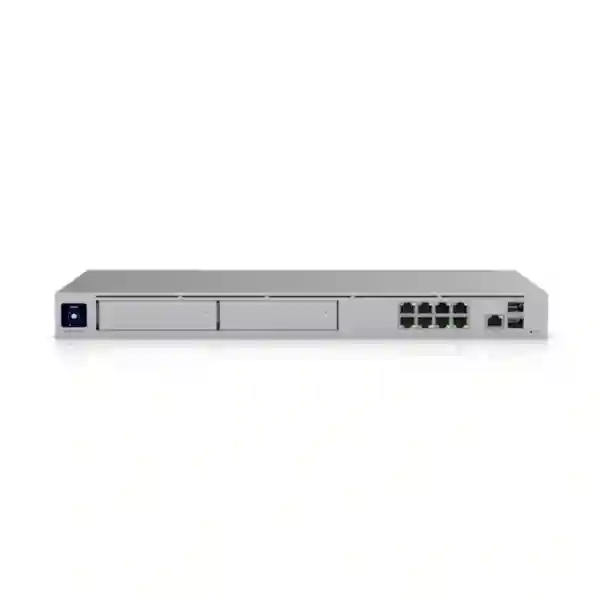
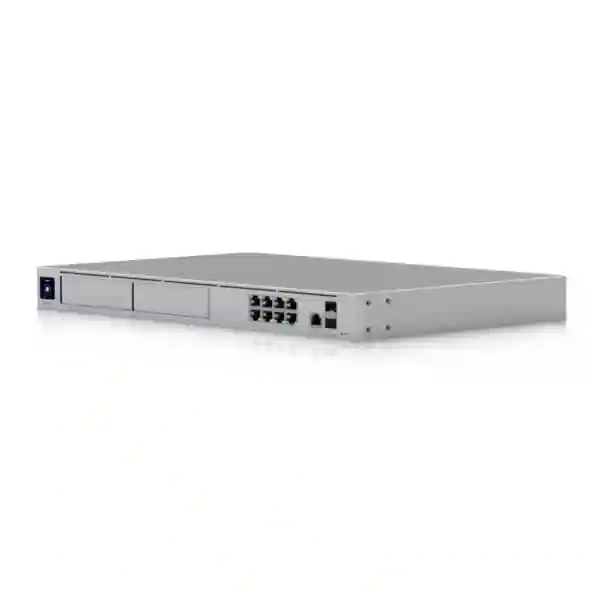
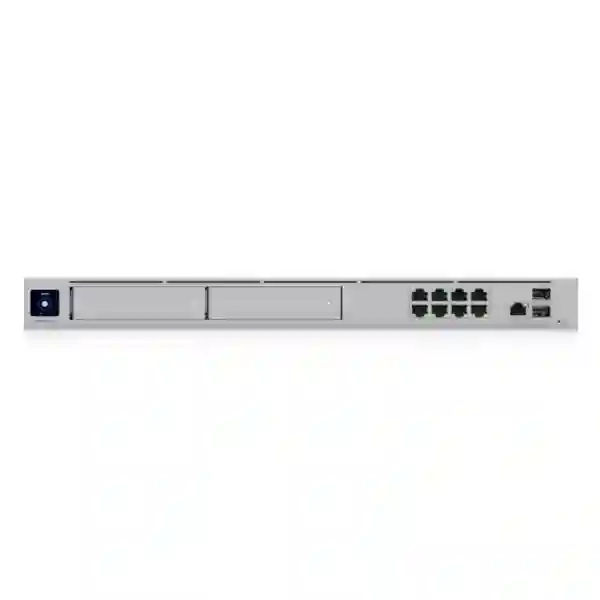
The rear and front interfaces determine what can attach directly. The unit provides eight 10/100/1000 Mbps RJ45 LAN ports for wired devices, one Gigabit RJ45 WAN port for an internet handoff, one 1/10G SFP+ WAN port and one 1/10G SFP+ LAN port. These are separate physical functions in the standard layout, although current UniFi software provides additional WAN configuration options. A short business connection may be delivered over copper Ethernet, while a higher-speed service or switch uplink may call for an SFP+ module, direct-attach cable or another compatible connection method.
A 10G-capable port does not mean every connected device will receive 10 Gbps. The connection speed, transceiver, cable, peer equipment and routing workload must all support the required performance. The eight built-in RJ45 LAN ports are Gigabit, not multigigabit 2.5 GbE ports. When a site expects multiple fast wired clients, use a suitably specified downstream switch on the SFP+ LAN uplink and calculate the traffic crossing that uplink. Confirm the exact link medium and module compatibility before ordering optics, particularly where a provider presents a fibre circuit rather than an Ethernet handoff.
Know what the 3.5 Gbps security figure means
Ubiquiti specifies 3.5 Gbps IDS/IPS throughput for the Dream Machine Pro. This is a useful headline when comparing cloud gateways, because intrusion inspection can impose processing costs beyond ordinary forwarding. It is not a promise that every VPN tunnel, firewall rule set, application workload or connected user will maintain the same speed. Real throughput depends on packet characteristics, enabled services, traffic direction, uplink configuration, network topology and software version. In a procurement exercise, size against expected busy-hour traffic rather than equating a port’s physical rating with achievable encrypted or inspected throughput.
For a site with a modest broadband circuit, the UDM-Pro may offer substantial capacity headroom. For an environment approaching multiple gigabits of sustained inspection, the purchasing decision should be tested more carefully. Consider what portion of traffic is internet-bound, what portion stays within the switching layer and what portion is routed between VLANs. Include future security policies rather than measuring only a clean baseline. Where a deployment has unusually demanding VPN or security workloads, review alternatives in the UniFi gateway family against the exact requirement instead of assuming the highest advertised number answers every performance question.
Centralised UniFi network administration
The integrated UniFi Network application allows an administrator to configure supported UniFi access points, switches, networks, routing features and monitoring from the same local console. For sites transitioning from a mix of unrelated devices, consistent management can simplify routine tasks such as adjusting wireless networks, checking uplink health and investigating which switch port serves a connected device. Site visibility and remote management should still be planned with access controls, authorised administrator accounts and secure recovery procedures. Convenience should not come at the expense of appropriate separation of duties.
Businesses should also recognise the distinction between a UniFi-managed environment and equipment from unrelated vendors. Standard Ethernet interoperability is useful, but adoption, configuration and detailed telemetry are not automatically available for every third-party switch, camera or access point. A staged UniFi deployment can begin with the gateway and selected network hardware without implying that all current equipment needs immediate replacement. Document the equipment that will be managed by UniFi and the items that will continue to use their own configuration interface. That inventory helps prevent costly assumptions about central control.
Firewall controls and responsible segmentation
The UDM-Pro supports a stateful firewall, application-aware filtering, traffic identification, zone-based policy controls and network segmentation. These tools are most useful when the organisation has decided which groups may communicate. A flat network that places staff laptops, visitor devices, point-of-sale equipment and cameras in the same unrestricted subnet can be difficult to protect or troubleshoot. Separating functional groups with VLANs and appropriate firewall rules can reduce unnecessary exposure while keeping legitimate business applications reachable. The policy should be designed around actual service flows rather than arbitrary blocks.
A practical starting point is to identify administrative systems, staff clients, guest access, devices such as printers and scanners, and security systems. Define which destinations each group needs and test the rules against real operations. Some discovery protocols and shared services behave differently across subnets, so account for printers, casting, authentication and management traffic in the design. Logging and traffic identification help administrators identify problems, but they are not a substitute for supported endpoint software, secure device configuration or human review. Maintain documented policies and periodically remove exceptions that are no longer required.
IDS/IPS and content controls need a plan
Intrusion detection and prevention features can inspect network traffic for known suspicious patterns and help reduce exposure to certain classes of threats. The UDM-Pro also supports content filtering and other security controls within the UniFi software suite. However, an inspection switch is not the same as a complete cybersecurity programme. It cannot guarantee that a malicious attachment, compromised account or unsafe device configuration will be prevented. Choose settings that make sense for the business, monitor alerts, and ensure legitimate applications continue functioning after enforcement is enabled.
Security administrators should document who can approve firewall changes, how blocked traffic is investigated and what happens after a suspected incident. Begin with measured policies, record a known-good configuration, and review any false positives before rolling restrictions across a busy network. Some enhanced signature or security services may have separate commercial terms, so check the exact feature and entitlement rather than assuming every advanced add-on is included in the hardware purchase. A sound design combines the gateway with endpoint protection, backups, identity controls, patch management and staff procedures.
Internet connections, failover and policy routing
Many organisations require internet continuity for cloud applications, communication systems and transactions. The gateway supports multi-WAN functions and internet quality reporting, while the default physical WAN connections include Gigabit RJ45 and 10G SFP+. How an additional uplink is configured depends on current software options, the selected ports and the service handoffs. Failover can redirect eligible traffic when a monitored connection becomes unavailable, but it cannot repair a failed provider or guarantee that an existing live session will survive a change in public addressing.
Before purchasing a backup connection, verify that the two services are genuinely diverse where business continuity is important. Two plans that share an upstream path, building entry or power dependency may fail together. Record each ISP’s handoff type, addressing method, expected bandwidth, authentication requirements and support contacts. Decide which traffic should prefer which connection and whether policy-based routing is needed for specific applications. Test failure and recovery deliberately during an agreed maintenance window. For critical systems, the overall uptime plan should include provider, gateway, power, switching and application dependencies rather than WAN failover alone.
Remote access and site-to-site VPN
A professional gateway should support authorised staff and branch offices without exposing private services directly to the public internet. The UDM-Pro’s UniFi feature set includes VPN options such as WireGuard, OpenVPN, IPsec and UniFi remote-connectivity features, subject to current versions and configuration. Remote-access design starts with the user population, identity requirements, device posture and resources each person may reach. It should not begin with a blanket assumption that every remote employee needs full access to every internal subnet.
For two offices, site-to-site connectivity may be useful for shared administration or carefully selected services. Plan IP address ranges so networks do not overlap, establish suitable routing and firewall policies, and define the behaviour when either location loses internet access. VPN throughput should be evaluated separately from the headline IDS/IPS rating because encryption and traffic patterns differ. Where the organisation uses cloud-hosted applications, it may be preferable to provide remote users only the necessary private services rather than force every application through the office gateway. Good access design balances security, performance and supportability.
Routing, VLANs and advanced network design
Beyond simple home-style routing, the Dream Machine Pro supports features including advanced NAT, traffic policy options, OSPF and BGP in current UniFi specifications. These features can matter when there are multiple internal routers, distinct routed networks or specialist WAN requirements. Their presence does not remove the need for a deliberate addressing and routing plan. The best design for many single-site businesses remains relatively simple: a clearly defined default route, a manageable number of VLANs, predictable DNS and DHCP services, and firewall rules that are easy to audit.
Consider more advanced dynamic routing only where it solves a demonstrated operational problem. A poorly planned routing protocol can make outages harder to diagnose than a straightforward static design. For each VLAN, record its subnet, DHCP range, gateway address, DNS behaviour, purpose and authorised connectivity. Avoid using a single management VLAN for unrelated visitors and production equipment. If a specialist application requires NAT behaviour, multicast or unusual discovery flows, test those requirements with the final software version before replacing a working router.
Connecting UniFi switches and wireless access points
The UDM-Pro hosts the management application for compatible UniFi network equipment, but it does not produce Wi-Fi coverage itself. To create a wireless network, choose access points according to room layout, wall materials, radio demand, client density and expected roaming behaviour. A reception area, classroom and large open-plan office may need different numbers or placements of access points. Wireless design is a site survey and capacity problem rather than a simple matter of selecting the access point with the highest theoretical speed.
Plan switching at the same time. A dedicated PoE switch can provide data and power to supported access points, subject to the correct PoE standard and switch budget. A suitably sized switching layer may also supply extra wired ports, fibre uplinks and manageable port-level settings. Use the gateway’s dedicated 10G SFP+ LAN port when a faster upstream connection to an appropriate switch is required. Check end-to-end compatibility, including transceivers and cabling, rather than assuming an SFP+ socket can accept any module or that every Ethernet port will deliver power.
PoE limitation: an essential purchasing distinction
The eight built-in Gigabit LAN ports on the standard Dream Machine Pro are not PoE power outputs. This is important when someone intends to connect UniFi wireless access points, powered cameras or other Ethernet-powered devices directly to the gateway. Such devices may need a compatible PoE injector or a suitable PoE-capable switch. The right choice depends on the device’s specified power requirement, cabling length, available ports and the total power budget for the installation. A data connection alone does not guarantee that an access point or camera will start.
Buyers sometimes compare this model with the Dream Machine Special Edition because they appear similar in general form. The models differ in hardware configuration and power-delivery capabilities, so the comparison should be based on the exact current specifications. If a purchase includes several access points or cameras, price the appropriate PoE infrastructure as part of the complete solution. It is better to establish these requirements before placing the order than discover during installation that the gateway cannot power the planned endpoint devices.
Using UniFi Protect with the HDD bay
The appliance can run the UniFi Protect application and has a 3.5-inch NVR drive bay for compatible recording storage. This is a useful option when a network project also includes UniFi cameras and an organisation wants to keep network and video management within the same application family. The camera installation still needs suitable camera models, power, cabling, network design and storage. The built-in 16 GB of onboard system storage should not be confused with dedicated hard-drive capacity for retained surveillance footage.
Choose the recording drive and expected retention period using camera count, resolution, frame rate, recording mode and operational requirements. Continuous recording and high-resolution footage can consume storage quickly. There may also be privacy, access-control and retention considerations specific to the organisation. The HDD is not included as a general assumption for this gateway and should be priced as a separate requirement unless an exact supplied bundle says otherwise. Avoid promising a number of recording days without a capacity calculation tied to the planned cameras and settings.
Camera capacity is a planning reference, not a guarantee
Ubiquiti’s current specification lists reference camera counts of 24 HD, 14 2K or 8 4K for the Dream Machine Pro. These figures help buyers recognise the general class of the product, but they are not a universal performance guarantee for a mixed camera fleet. Actual recording performance can vary with camera models, codecs, resolution, frame rate, additional enabled applications and the overall gateway workload. A site with demanding network traffic and multiple cameras should evaluate both functions together instead of sizing each in isolation.
For a small office with a limited number of supported cameras, using the gateway as a recorder may be operationally convenient. For a larger surveillance estate, a dedicated UniFi NVR or a different recording architecture may provide better scaling and fault separation. Review whether the business can tolerate the gateway and recorder sharing one chassis, especially when video evidence is business critical. Plan who can view footage, how storage health is monitored and what the organisation will do if the recording disk fails. Recording capacity, redundancy and retention are distinct decisions.
Power, rack space and physical environment
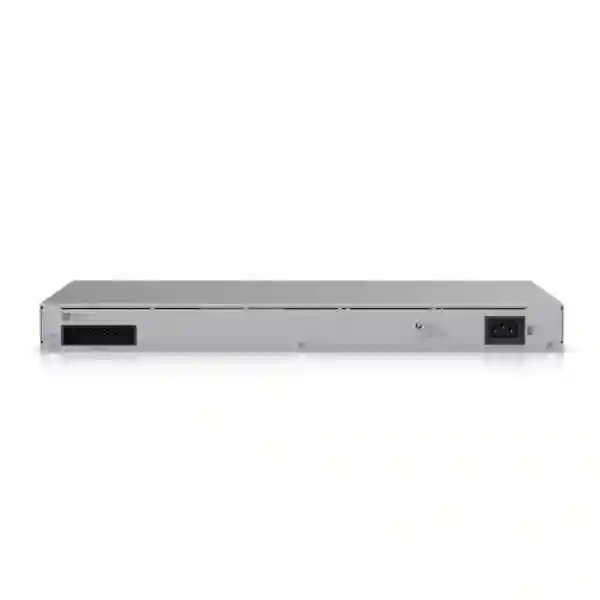
The UDM-Pro is a 1U rack-mount device measuring 442.4 × 43.7 × 285.6 mm, with a listed maximum power consumption of 33 W. It accepts universal 100–240 V AC power and includes an internal power supply. The official product specifications also show an optional redundant power-system input, but a connection for an external power system is not the same as having a complete redundant setup automatically included. An appropriately sized UPS is often worth considering when the site needs continuity through brief power disturbances.
Plan the rack around more than the gateway’s own height. Allow space and airflow for switching, patch panels, cable bends, a UPS and any network recorder. Keep the appliance within its specified operating environment of −10 to 40°C and avoid humid or dusty conditions that could compromise reliability. In a site with fluctuating electricity, assess safe shutdown and restart procedures, grounding and the capacity of backup power for the entire critical network path. Powering only the gateway will not preserve service if the modem, switch or access points have already shut down.
Tanzania deployment: start with the ISP handoff
For an installation in Tanzania, the most useful early question is how the existing internet service reaches the business. A provider may present an Ethernet handoff, an optical connection through separate termination equipment, or a router that performs functions the organisation cannot remove without coordination. The UDM-Pro has both copper and SFP+ WAN options, but physical connection compatibility and service authentication must be established for the exact circuit. Do not assume that installing an SFP+ fibre module directly replaces every provider-supplied optical terminal or that advertised fibre bandwidth defines the usable office experience.
Ask the provider or existing network administrator for the delivered interface speed, IP addressing method, any VLAN tagging, authentication credentials if applicable, and whether inbound traffic is affected by carrier-grade NAT. These details influence VPN, public services and firewall planning. The page does not claim compatibility with a named Tanzanian ISP or a particular network service, because such claims require verification for the actual connection. Confirm the handoff before choosing optics, copper adapters or a failover design.
Office network example: staff, visitors and devices
Consider a growing professional office using cloud accounting, video meetings, local printing and guest Wi-Fi. A practical UDM-Pro deployment could put the WAN at the gateway, connect the LAN SFP+ uplink to a managed switch, and use additional UniFi access points for wireless coverage. Staff devices would use a business network, while guests would receive internet access without a route to private file shares or management interfaces. Printers and specialist devices could occupy their own controlled subnet if necessary.
This example illustrates planning rather than a universal installation template. Access points must be placed and powered correctly, while firewall policies must allow real business tasks. The network administrator should also account for software update windows, endpoint identity, backup connectivity and monitoring. The number of users alone does not tell the full story: thirty busy media-editing workstations can create very different traffic from thirty light web-browsing clients. Measure applications and peak use before deciding that a given uplink or switching arrangement is sufficient.
Hospitality, education and shared environments
Hotels, training centres and educational facilities often need to support different groups of people without granting them identical network privileges. Guest devices may use internet-only access, administrative teams may need secure internal services, and managed devices may require access to a limited number of controllers or platforms. A UDM-Pro can serve as the security and routing centre of such a design when matched with appropriately sized switches and access points. Centralised UniFi management can make it easier to understand network health across rooms or teaching spaces.
Wireless performance in these locations depends heavily on building construction, density and airtime usage. A high number of connected devices is not the same as a high number of active high-throughput streams. Plan radio coverage with surveys and appropriate channel settings, then confirm the wired uplinks will not become a bottleneck. Where personal data or visitor information is processed, apply suitable access restrictions and retention practices. The gateway offers configuration tools, but organisations remain responsible for their policies, staff training and operation of the overall system.
Multi-site operations and branch connectivity
A business with several offices can benefit from consistent addressing, naming, firewall policy and central visibility. UniFi VPN and site management features may simplify some parts of this work, particularly when the organisation uses compatible UniFi gateways across locations. Design branches around their individual WAN speeds, critical applications and local support arrangements rather than assuming one uniform setup is right everywhere. A branch with a low-bandwidth link may need different traffic priorities from a headquarters site with a larger uplink.
If the sites need private connectivity, check for overlapping IP ranges and specify which subnets must communicate. Define monitoring, alert routing and an escalation process for a branch outage. Also consider what happens when an administrator cannot reach the remote gateway and whether local staff can restore essential connectivity. For larger or more complex estates, evaluate gateway redundancy and management boundaries carefully. Remote administration offers convenience, but access should be granted only to authorised people, protected with strong authentication and reviewed periodically.
Migrating from an older firewall or router
A replacement gateway should be treated as a planned migration, not simply a cable swap. Begin with a configuration inventory of WAN settings, public IP requirements, VLANs, DHCP scopes, DNS forwarding, VPN peers, port forwarding, firewall rules and any special routes. Identify services that rely on fixed addressing or vendor-specific behaviour. An inventory is especially important when the existing firewall has accumulated temporary exceptions or undocumented rules over several years. The migration offers an opportunity to simplify them, but changes should be deliberate.
Prepare a target configuration and a rollback option before touching the production link. If possible, test the new appliance on an isolated connection or during a scheduled maintenance period. Confirm that essential services work from the correct VLANs, not just from a technician’s laptop on the default network. Validate cloud applications, voice services, remote access, printers, cameras and any inbound-hosted systems. Keep a secure copy of settings and a record of how to recover the environment. A successful migration is measured by usable business services, not only by the gateway reporting an online WAN interface.
Preparing a greenfield installation
For a new network, document the expected users, devices, applications, security groups, physical locations and internet availability before specifying hardware. Draw a simple topology showing the gateway, switch uplinks, access points, camera segments and management network. Choose a consistent IP addressing scheme, decide which networks use DHCP, and record the authoritative administrator accounts. A basic drawing helps installers understand where the SFP+ uplink belongs and which RJ45 ports will be used for temporary or permanent connections.
Next, plan the physical installation: rack mounting, power protection, patching, cable identification and a convenient management path. Install and update approved software during the commissioning process, then configure routing and network policies one service at a time. Test with actual endpoints from each user group. Leave a concise handover document with login ownership, backup procedures, WAN contacts, diagrams and a list of authorised changes. This approach is more valuable than an installation that works on day one but becomes difficult to maintain after the installer leaves.
Operational visibility after commissioning
Network work continues after the first successful connection. Administrators should regularly review WAN availability, gateway resource usage, firmware status, client associations, switch uplink health and relevant security alerts. UniFi provides visibility into many of these operational signals, but monitoring only matters if someone is accountable for responding. Establish clear ownership for routine maintenance, urgent outages and configuration changes. Keep critical contact information and recovery details accessible to authorised personnel even if the network is offline.
Agree on sensible maintenance windows for updates and test the recovery process before it is needed. Review inactive administrator accounts, outdated VPN permissions and forgotten firewall exceptions. Where the network serves retail or business applications, coordinate major changes with the teams that depend on connectivity. A documented backup is useful only if restoration has been understood and tested. The gateway can make management more coherent, but reliability ultimately comes from the combination of design, monitoring, power planning, disciplined administration and staff readiness.
How to interpret capacity claims
Ubiquiti lists support for more than 100 managed UniFi devices and more than 1,000 simultaneous connected users. These are useful product-class indicators, not a statement that every combination of devices and applications will operate at those levels without tradeoffs. The work handled by the gateway changes when an installation adds advanced inspection, remote VPNs, cameras, additional UniFi applications and inter-VLAN routing. A high client count may also include low-traffic endpoints, while a much smaller group of demanding users can create higher throughput needs.
For accurate sizing, consider the simultaneous peak rather than the total number of names in an asset register. Include how many network devices the console will manage, whether video recording is enabled, how many remote users require VPN and what the WAN service is contracted to deliver. Review growth over the expected ownership period. If the gateway becomes a critical component in a very large deployment, compare higher-capacity products and failure-domain choices instead of stretching a compact platform beyond its intended role.
Choosing between UDM-Pro, UDM-SE and larger gateways
The Dream Machine Pro is attractive for buyers who want a rack-mounted UniFi gateway with 10G SFP+ connectivity, security features and an integrated application console. The Dream Machine Special Edition and Dream Machine Pro Max are different products with distinct port, power, storage and performance specifications. Selecting among them should start with the questions that actually change the bill of materials: do you need PoE ports directly on the gateway, different WAN copper speeds, more recording capacity, greater security throughput or a specific redundancy design?
Avoid replacing a whole-network cost comparison with a chassis-price comparison. A UDM-Pro plus a correctly sized PoE switch may be preferable in an installation that needs substantial switching capacity or distributed access point power. In a compact deployment, a different gateway could reduce additional hardware. Larger gateways may be justified when the expected workload or number of managed services warrants it. Use model-specific current manufacturer specifications and an accurate topology before choosing. The model name alone does not establish which appliance is best for the site.
Procurement checklist for a complete solution
A useful quote should identify more than one gateway. Start with the exact UDM-Pro model and hardware quantity, then specify WAN handoff accessories, SFP+ modules or DAC cables if required, suitable switches, PoE capacity, access points and any cameras. If UniFi Protect recording is planned, include a supported HDD selected for the retention target. For a rack deployment, include mounting provisions, patch leads, power protection and any practical on-site accessories. Ask for a distinction between what is included and what will be sourced separately.
Also document the services expected from the solution: initial configuration, migration, segmentation, VPN deployment, tests, handover and ongoing maintenance. Separate product features from optional subscriptions or enhanced services so there is no confusion about recurring terms. Tanzania pricing, stock, delivery arrangements and warranties should be confirmed for the exact quote rather than assumed from an international catalogue. Providing these details at the quotation stage helps compare complete, usable systems instead of incomplete shopping baskets that lead to unexpected installation costs.
Security governance and administrative access
A gateway that controls the edge of the network deserves careful administration. Assign named administrator accounts, enable strong authentication methods, apply least-privilege access where roles permit and store recovery information securely. Decide who approves VPN access, who can modify firewall policy and who has emergency access when the primary network administrator is unavailable. Shared credentials make accountability difficult and can complicate incident review, especially when external installers or short-term contractors assist with commissioning.
Maintain a change record for important network settings and ensure the organisation retains ownership of its management access. A good handover should state which services rely on remote management and what local access is possible during an internet outage. Review software and firmware updates with attention to release notes, compatibility and business timing. These practices do not depend on special marketing claims: they are core operational measures that help turn capable security hardware into a controlled and supportable network service.
Network availability and realistic redundancy
A single powerful gateway is still a single physical chassis. If it fails, the internet gateway function and applications hosted on that chassis may become unavailable. The UDM-Pro includes manufacturer-listed Shadow Mode high-availability capabilities in supported configurations and an interface for a compatible redundant power solution, but high availability requires additional compatible equipment, correct configuration and testing. It should never be represented as an automatic guarantee from purchasing one unit. Actual recovery behaviour depends on the selected topology and software.
List all major dependencies when planning resilience: two internet circuits if needed, provider handoffs, gateway redundancy, sufficient power, access switches, fibre or copper uplinks, DNS and essential application services. Decide what must stay online during a power interruption or a hardware failure and what downtime can be tolerated. Test fault scenarios in controlled conditions, including the effect on VPN and ongoing sessions. A clear recovery objective is more useful than a vague promise of uninterrupted service because it guides hardware selection and operating procedures.
Total ownership cost and long-term fit
The acquisition price of a gateway is only one line in the cost of operating a reliable network. A practical estimate should cover compatible switching, Wi-Fi infrastructure, optics, surveillance storage, power backup, installation, documentation and the time required for updates and monitoring. Costs may change with the planned lifecycle: added workstations require more wired ports, increased wireless demand may require more access points, and a growing camera installation may need additional recording resources. Plan for these changes before building the network around a very tight initial capacity.
Consider the benefits as well as the expenses. Consolidating compatible UniFi device management can reduce the number of separate interfaces used by the IT team, while standard network policies can help with troubleshooting. Those benefits are strongest when the deployment is appropriately designed and administered. There is no universal return-on-investment figure and no basis to infer Tanzanian selling prices from another country. For a considered purchasing decision, request a complete configuration based on the site’s requirements and compare it with realistic alternatives.
Frequently asked questions
Does the UDM-Pro provide Wi-Fi by itself?
No. The UDM-Pro is a wired cloud gateway and UniFi application console, not a wireless access point. Install compatible Wi-Fi access points for wireless coverage. Their number and placement depend on the building, radio environment and capacity requirements. If the access points use Power over Ethernet, select appropriate PoE injectors or switches because the gateway’s eight RJ45 LAN ports do not themselves supply PoE.
Are the eight LAN ports 10G?
No. The eight RJ45 LAN ports support Gigabit Ethernet. The device has a separate 1/10G SFP+ LAN connection that can be used as a faster uplink to suitable equipment. A compatible transceiver, cable or direct-attach cable may be required. Confirm the end-to-end configuration rather than assuming every device connected through the gateway can receive a 10G physical link.
Is the UDM-Pro suitable for a business firewall?
It includes a stateful firewall, IDS/IPS functions, traffic identification and network segmentation features. Suitability depends on the company’s threat model, WAN throughput, VPN workload, change-management process and other security needs. The manufacturer’s 3.5 Gbps IDS/IPS rating is a reference, not a guarantee for every configuration. It should be part of a broader security programme rather than the only protective measure.
Can it use a fibre internet connection in Tanzania?
The gateway includes a 1/10G SFP+ WAN port, but direct compatibility depends on the service provider’s exact handoff and the selected module. Some fibre connections terminate at provider equipment that supplies an Ethernet interface instead. Ask for the circuit’s physical interface, speed, authentication and addressing details before ordering. Do not assume any SFP+ optic can replace a provider-supplied optical termination device.
Can it manage UniFi access points and switches?
Yes. The gateway hosts UniFi Network and is designed for management of compatible UniFi network hardware. This allows connected devices and network settings to be operated through a shared platform. Detailed features depend on device model and software release. Non-UniFi devices can often communicate through standard Ethernet networking, but they do not automatically gain the same adoption and management experience.
Does the UDM-Pro support VPN access?
Current Ubiquiti specifications list multiple VPN functions, including WireGuard, OpenVPN, IPsec and UniFi remote-connectivity options. The right method depends on client platforms, identity controls, site-to-site requirements and current software. Test performance, access permissions and addressing as part of deployment. VPN availability does not mean every remote client should receive unrestricted access to the internal network.
Can I record CCTV footage directly?
Yes, with a supported UniFi Protect camera arrangement and a separately supplied compatible recording hard drive. The UDM-Pro has an HDD bay for NVR recording; its system storage is not a substitute for surveillance footage storage. Camera count and retention need to be sized for resolution, recording mode, disk capacity and concurrent gateway workloads. A large installation may be better served by a dedicated recorder.
How many cameras can the gateway manage?
Ubiquiti lists reference figures of 24 HD, 14 2K or 8 4K cameras in its current Dream Machine Pro specifications. These are useful manufacturer planning figures, but deployments with mixed resolutions, demanding settings or other simultaneous applications should be assessed in detail. The right count also depends on storage and the retention requirement. Avoid assuming that these reference limits guarantee a specific recording duration.
Does the gateway include PoE for access points?
No. The standard UDM-Pro’s eight Gigabit LAN ports are not PoE outputs. Add a PoE-capable switch or suitable power injectors for devices that require Ethernet power. Calculate the total PoE budget and confirm each endpoint’s power standard. The related Dream Machine Special Edition is a different model and should not be confused with the UDM-Pro when comparing port power capabilities.
Is a hard drive included with every UDM-Pro?
Do not assume so. Ubiquiti’s installation guidance describes a hard drive for UniFi Protect as not included. Confirm the exact seller bundle if a quotation says otherwise. When selecting storage, calculate capacity from the number of cameras, video settings and the required days of retention. Keep storage health monitoring and authorised access to recordings in the operational plan.
What if the site loses mains electricity?
The gateway requires power, as do the internet handoff, switches and access points. An appropriately designed UPS can help protect the network during short interruptions, but the runtime depends on the total connected load and battery capacity. Ubiquiti also lists a compatible redundant power connection. Neither feature guarantees continuity unless the associated equipment is purchased, installed and tested for the site’s needs.
Is 1,000+ connected clients guaranteed at full speed?
No. The manufacturer’s 1,000+ simultaneous connected-users reference describes a supported scale class, not a guarantee of full throughput for every user at once. The mix of applications, number of managed UniFi devices, inspection features, VPN traffic and hardware connected downstream all matter. Design for peak demand, not only the theoretical count of registered devices or the port’s headline data rate.
Can this replace every piece of network equipment?
No. It consolidates gateway, firewall and UniFi management functions and can host UniFi Protect, but additional internet termination equipment, switches, access points, cameras, recording drives and backup power may still be required. The appropriate set of accessories depends on the physical site and business requirements. A complete bill of materials helps distinguish the core appliance from the rest of the working network.
How do I request an accurate Tanzania quotation?
Provide the site type, internet service handoff, approximate device counts, expected WAN speed, desired wireless coverage, number of PoE endpoints, VPN needs, camera requirements and the number of rack or switching ports needed. Indicate whether an existing network must be migrated. Ask for the exact hardware bundle, separate accessories, installation scope and any applicable commercial terms. Price and local availability must be confirmed for the requested configuration.
Plan the right UDM-Pro configuration
The Ubiquiti Dream Machine Pro UDM-Pro can be an effective foundation for a well-planned UniFi deployment. Before ordering, specify whether you need PoE access switching, fast SFP+ interconnects, VPN access, a recording drive, redundant connectivity or a carefully managed router migration.
Request a tailored Tanzania quotation with a bill of materials and confirmed commercial terms for your site. Include WAN speed and handoff type, connected-device estimates, security requirements, camera counts and the expected deployment scope.




Reviews
There are no reviews yet.