
Whole-home Wi-Fi • Gaming traffic management
Ubiquiti AmpliFi Gamer Edition AFi-G
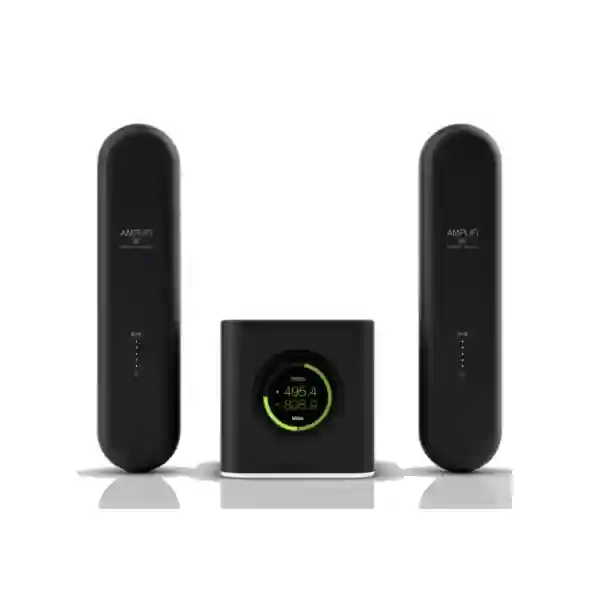
Bring Wi-Fi coverage into more rooms with one mesh router and two included MeshPoints, while using an NVIDIA GeForce NOW-focused quality-of-service profile to manage gaming traffic on a busy household connection. Designed for Wi-Fi 5 networks, this is a practical coverage and traffic-management option—not a guarantee of zero lag or a substitute for broadband.
Request a Tanzania-specific quotation and confirm kit variant, installation fit and current availability.
Verified specifications at a glance
| Model | AFi-G |
|---|---|
| Product class | Wi-Fi 5 whole-home mesh system |
| Kit components | 1 router + 2 MeshPoints |
| Primary wireless standard | 802.11ac |
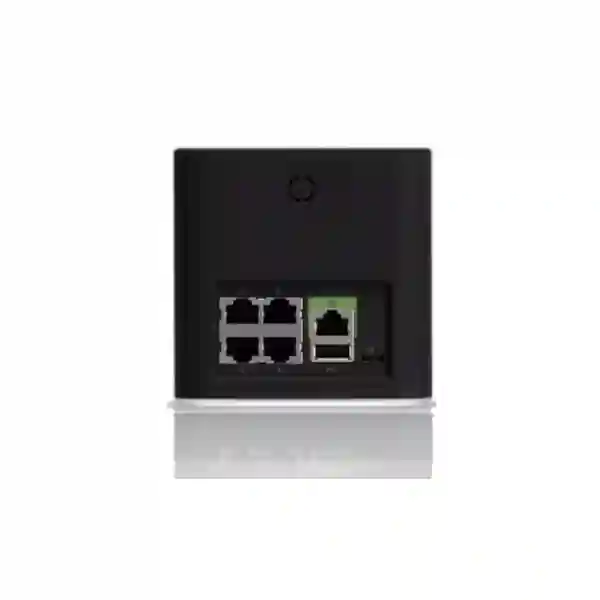
| Router Ethernet | 1 × Gigabit WAN; 4 × Gigabit LAN |
| Router display | 1.6-inch colour touchscreen |
| Router max power draw | 11 W |
| Special function | GeForce NOW-oriented QoS mode |
Wireless speeds are theoretical signalling figures; results depend on connected clients, walls, interference and broadband service. Local product availability and commercial terms require confirmation.
Who this system is for
The Ubiquiti AmpliFi Gamer Edition AFi-G is designed for households that want broader wireless coverage and more deliberate treatment of online gaming traffic than a basic standalone router typically provides. Its core value is the combination of an AmpliFi mesh router, two companion MeshPoints and a gaming-oriented quality-of-service profile. That makes it relevant to a family with several rooms, a gamer whose console or computer competes with video streams, or a household looking to replace a patchwork of range extenders. It is not a substitute for a reliable broadband subscription, and it cannot remove latency introduced by distant game servers. Before ordering in Tanzania, check the exact package variant, power adapter suitability, current software support and whether your existing internet connection can feed a standard Ethernet WAN port. If Wi-Fi 6 or Wi-Fi 7 is a must-have, this Wi-Fi 5 product is not the right technology generation.
What comes in the AFi-G kit
According to the official quick start guide, the complete Gamer’s Edition package includes one AmpliFi router, two AmpliFi MeshPoints, a power adapter and an Ethernet cable. The router connects to a broadband modem or existing upstream connection through its WAN port. The MeshPoints plug into suitable electrical outlets and extend the wireless network to parts of the home where the main router’s signal may be weaker. This arrangement is intended to behave as a coordinated mesh system rather than three unrelated Wi-Fi names. Buyers should verify that a proposed offer is for the complete kit rather than an individual base unit, a replacement component or an open-box bundle. Also verify the supplied power plug and regional variant because illustrated hardware and regional power accessories may differ. If the property already has network cabling, consider which devices should connect by Ethernet before deciding where the router belongs.
Gaming prioritisation and latency
The signature feature is a GeForce NOW QoS mode developed by Ubiquiti with NVIDIA support. QoS means quality of service: a router uses traffic-management rules to reduce the effect of competing data flows on latency-sensitive applications. When a game stream is active while other family members are downloading files, such prioritisation can help allocate limited bandwidth more intelligently. NVIDIA’s official guidance describes selecting a latency-optimised profile and allowing the router to estimate connection bandwidth, with the option to adjust figures manually. The important limitation is that QoS operates mainly within the network the router controls. It cannot promise a fixed ping, prevent outages on the internet service provider’s network or repair poor signal from a distant MeshPoint. Treat the feature as a practical way to manage congestion, not as a guarantee of lag-free gaming.
Why a wired gaming connection still matters
For a gaming PC or console near the router, Ethernet is generally the first connection to consider. NVIDIA recommends using a router LAN port for the gaming device where possible. A cable removes the wireless hop between the device and base unit and avoids some radio interference, contention and variable signal-strength problems. The AFi-G router provides four Gigabit Ethernet LAN ports, so an appropriately equipped console, desktop or television can connect directly while phones and tablets remain wireless. Ethernet does not make an internet connection faster than the subscribed service or fix delay beyond the home, but it helps establish a consistent local link. For gamers in rooms beyond convenient cable reach, the mesh system can improve reach, although wireless links remain dependent on placement and building materials. The Gamer’s Edition should be judged on end-to-end consistency, not a headline wireless data-rate number alone.
Whole-home mesh coverage
A mesh layout is useful when one centrally positioned router cannot provide adequate reception across the intended living space. The included MeshPoints communicate with the AmpliFi system to carry the network into other areas. Place them strategically rather than automatically at the furthest outlet. A MeshPoint needs a sufficiently strong link back toward the router or another valid mesh path before it can provide a useful connection to nearby devices. If it is installed inside a dead zone, it may only repeat a weak connection. The manufacturer’s material describes multi-hop arrangements, but actual capacity and responsiveness depend on each wireless hop. Reinforced concrete, metal fixtures, floors, dense walls and interference can reduce usable coverage substantially. A plan of the property, its wall construction and where users spend time will generally produce a better installation than reliance on an advertised maximum coverage figure.
Wi-Fi 5 explained
The AFi-G uses 802.11ac wireless technology, commonly called Wi-Fi 5, alongside compatibility with older Wi-Fi standards. This is an established technology for everyday web access, streaming, video meetings and many gaming scenarios. It is not a Wi-Fi 6, Wi-Fi 6E or Wi-Fi 7 platform. Newer phones and laptops can generally communicate with compatible older access points, but the wireless link will not gain newer-generation radio capabilities simply because the client device supports them. If your priorities include the newest spectrum bands, advanced Wi-Fi 6 scheduling or a multi-gigabit home-network upgrade, compare a current-generation system before buying. Conversely, a household with moderate bandwidth needs and legacy devices may find the older platform suitable, provided model support, price and condition make sense. Choose by observed coverage, stability and the devices actually used.
Understanding the speed figures
Manufacturer specifications list a system aggregate radio speed figure of 5.25 Gbps, with 1,750 Mbps indicated for the router and each MeshPoint. These are theoretical wireless radio-related figures across the equipment, not a promise that one phone, PC or broadband connection will deliver 5.25 Gbps. Practical speeds are reduced by radio overhead, signal quality, neighbouring networks, walls, client capabilities and shared airtime. The wired WAN port is Gigabit Ethernet, which also sets a boundary for internet traffic delivered through that port. A single wireless client cannot combine every radio and mesh node’s headline capacity into one download. When reviewing whether the AFi-G is appropriate, begin with your ISP plan, the wired performance measured at the router, the distance to important devices, and the actual application needs. Measured latency and packet consistency may be more useful than a marketing speed summary for cloud gaming.
Router ports and physical design
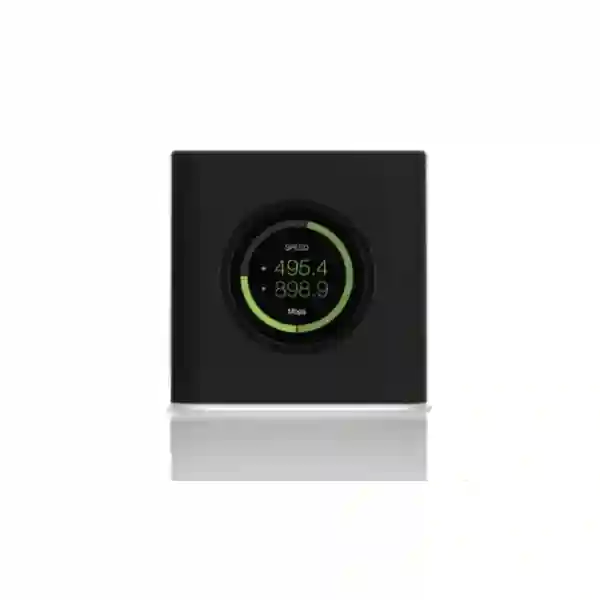
The base router is a compact square device with a full-colour touchscreen on its front. The display provides a visible interface for viewing system information, while an adjustable LED contributes to its distinctive appearance. The official guide confirms one Gigabit Ethernet WAN interface and four Gigabit Ethernet LAN ports, making it possible to connect multiple nearby wired devices without immediately adding a switch. The router also has a power connection and reset control. A USB connector is described in the official quick start guide as reserved for future use, so do not purchase the product expecting it to operate as a general-purpose USB file-sharing or modem port. The router’s published dimensions are approximately 99.5 by 97.8 by 99.6 mm and its weight is about 410 g. Leave adequate space around the unit for airflow, cable routing and unobstructed radio propagation.
The two MeshPoints
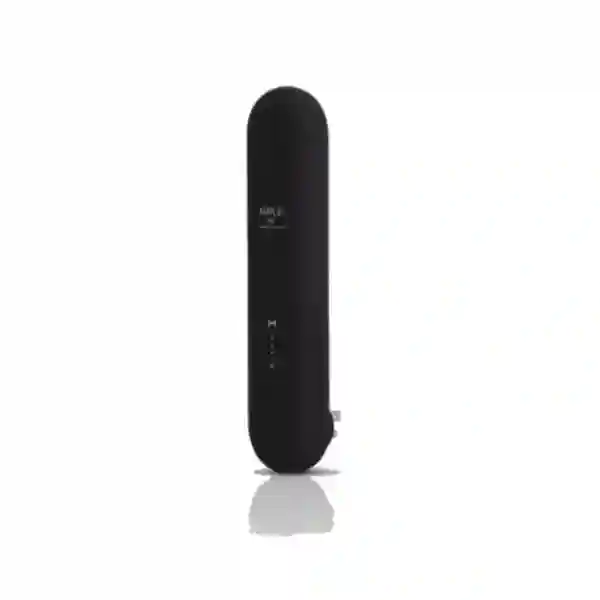
Each supplied MeshPoint is a wireless extension element designed to work with its parent system. The manufacturer lists dimensions of about 228 by 54 by 57.1 mm and a weight of approximately 165 g per MeshPoint. Their adjustable physical design can help adapt placement to particular outlets and room arrangements. These are not independent wired access points in the same sense as a separate Ethernet-fed ceiling access point. Buyers who require Ethernet backhaul at every satellite location should verify the capabilities of an alternative mesh system instead of assuming the bundled plug-in MeshPoints provide wired ports. When positioning them, avoid blocked sockets, electrical cabinets, locations immediately behind large appliances and excessively long wireless hops. A useful placement often sits between the primary router and the weak-coverage area. Check the app’s connection information and test the devices that matter most before treating the installation as finished.
Configuration through the AmpliFi app
The AmpliFi ecosystem is set up primarily through a smartphone app. The official quick start guide describes an installation path for iPhone and Android users and also documents a non-app initial connection method. During setup, users can create the Wi-Fi network name and password, connect the internet uplink and inspect the system dashboard. The dashboard can present connected-client information and current network performance. Management features and their interface may evolve with software versions, so verify the currently available app and firmware for the specific hardware before purchase. A sensible installation starts with default settings and a stable connection, then introduces changes one at a time. Record the network name, administrative access method and any ISP-specific connection details securely. Avoid assuming that the system provides enterprise-style centralized administration merely because it comes from the broader Ubiquiti family.
A practical initial setup
Start by identifying the internet provider’s modem, fibre termination device or existing router and the Ethernet port that provides internet access. Connect that uplink to the AmpliFi router WAN port, power the base unit and follow the instructions shown by the router and setup app. Establish a new network name and strong password, and confirm a device can reach the internet while standing close to the base router. Next, connect and position the two MeshPoints according to the quick start guide. Do not begin with both satellite units in remote rooms; test each at a moderate distance, then move it gradually toward the area requiring coverage. Check the app to ensure each node participates in the intended mesh and use repeatable speed, latency and connection tests. Only after obtaining a sound baseline should you activate gaming prioritisation or adjust advanced settings. Preserve a note of the working arrangement for future troubleshooting.
Where to position the main router
Place the main AmpliFi router where it can serve the occupied rooms rather than in the most convenient hidden cabinet. A relatively central, open and elevated location often helps Wi-Fi coverage. Keep it away from large metal objects, tightly packed electrical equipment and places where cables force it behind a television or under heavy furniture. The router still must reach the internet handoff by Ethernet, so physical placement may be constrained by the broadband installation. In a multi-floor home, a location close to the centre of activity can be more useful than a corner office. If the modem must remain in a distant utility room, assess whether an Ethernet run can relocate the router. After placement, use measurements in the actual gaming room and other important spaces; one strong reading next to the router says little about the performance of the full property.
Placement of satellite points
A common mistake is putting a MeshPoint directly where Wi-Fi already fails. A wireless extender needs an upstream signal to relay, and weak reception at the MeshPoint often translates into disappointing performance for nearby clients. Instead, begin at an outlet around the edge of the router’s reliably covered area, test connectivity and move gradually toward the intended room. Think in terms of signal pathways rather than straight-line distance: a corridor or open doorway may offer a better route than penetrating several reinforced walls. On multiple floors, stairwells and vertical openings sometimes provide more favourable paths, but the correct location needs real testing. Where multi-hop is used, every additional wireless segment can share capacity and introduce variability. An installation report should include both signal strength and actual application performance, because maximum indicated bars alone are not a meaningful guarantee.
Internet connection and ISP considerations in Tanzania
For Tanzania-based customers, the essential compatibility question is how the existing internet service is presented to customer equipment. Some services provide a standard Ethernet handoff, while others require a provider-supplied modem, optical terminal or mobile broadband gateway. The AFi-G is not itself a fibre optical network terminal or a cellular SIM router. It connects to an upstream broadband device or suitable Ethernet handoff. If the provider device is also functioning as a router, review whether the AmpliFi will operate behind it or whether a supported bridge arrangement is preferable. Double NAT can complicate certain games, port forwarding and remote access even though ordinary web browsing works. Do not change provider authentication or bridge settings without obtaining the right details. Confirm the internet technology, modem ports, contract restrictions and local power compatibility before committing to a network layout.
Gaming on a busy household network
The real test for a gaming router often arrives when the household uses the connection simultaneously. One family member may start a large game download while another makes a video call and a third watches high-resolution streaming video. Any shared internet link has finite capacity, especially on the upstream side. The Gamer’s Edition QoS profile is intended to help manage the consequences of congestion for supported gaming use cases. To evaluate it, measure ordinary latency and jitter when the connection is quiet, then repeat while generating a realistic competing load. Compare results with the latency-oriented setting enabled and disabled where the interface permits. Remember that the results may depend on correctly measured bandwidth and current firmware. QoS rules are not a reason to purchase an inadequate internet plan, and a weak wireless link can dominate performance even when traffic management is correctly configured.
Cloud gaming and GeForce NOW
Cloud gaming sends player inputs to a remote rendering service and returns an encoded stream of images and sound. This creates sensitivity to round-trip network delay, variation in delay, packet loss and available throughput. NVIDIA’s setup guide specifically covers the AmpliFi Gamer’s Edition and provides steps for activating the latency-optimised GeForce NOW mode. That integration is the reason this model has a distinct Gamer’s Edition identity. It should not be interpreted as including a subscription, providing access in every country or ensuring that a particular game and server location is available. Before buying in Tanzania primarily for cloud gaming, independently confirm that the desired game service supports your location, account, games and devices. Also test the ISP path to the relevant service. A router can optimise local traffic handling but cannot create a nearby cloud gaming server or override regional service policies.
PC, console and mobile gaming
A gaming network often serves a mix of wired desktops, consoles, laptops and phones. A nearby desktop or console can make use of one of the four Gigabit LAN interfaces. Wireless gaming devices can connect to the Wi-Fi system, with their experience influenced by client radio capabilities, selected band and the path through the mesh. The AFi-G does not require every household device to be a gaming product: printers, smart televisions and ordinary phones can use the same home network where compatible. The best configuration depends on how traffic competes for capacity. For example, prioritising interactive use may be valuable during a large background download, while an idle household connection may show little difference. If a new console supports faster or newer wireless standards, the AFi-G will still operate within its own Wi-Fi 5 design and wired port limits.
Working and studying from home
Although marketed toward gamers, the mesh design is also relevant to ordinary remote work and study. Consistent Wi-Fi in a home office or learning area can support web meetings, cloud documents and messaging without requiring everyone to gather beside a single router. This benefit is primarily about coverage and connection reliability rather than gaming-specific features. For an important work desk, a wired connection to the main unit remains a useful option when practical. For a remote room, the MeshPoint must have a sufficiently strong backhaul connection so a strong-looking local Wi-Fi signal does not hide a poor upstream link. Assess the number of active users, video meeting quality, household wall materials and available upload bandwidth. Businesses with formal segmentation, roaming, management or uptime needs should assess dedicated business networking equipment instead of treating this home-oriented kit as an enterprise deployment.
Streaming and smart-home devices
The system can also provide wireless access for televisions, media boxes and other compatible home devices. Video streaming benefits from steady throughput and sufficient signal quality, while connected household equipment often needs uninterrupted but relatively small amounts of data. The key design challenge is managing many devices across the available wireless channels without creating coverage gaps. The AmpliFi platform includes configuration features that may differ by software version; for instance, official support documentation describes an IoT network feature for supported firmware. Such features should be checked against the firmware actually installed rather than assumed to be present in every historical unit. For devices that only support older Wi-Fi modes, use documented compatibility settings and keep passwords secure. If specialised security policies, VLAN segmentation or extensive network automation are required, evaluate a more purpose-built platform.
Security and responsible configuration
Manufacturer specifications list WPA2-PSK wireless security for this model. Set a long, unique Wi-Fi password and keep router administrative access protected. As a Wi-Fi 5-era device, the AFi-G should not be advertised as offering Wi-Fi 6-specific capabilities or presumed to support every newer wireless security mode. Verify firmware availability and current manufacturer support before purchase, especially if security lifecycle matters more than appearance or gaming branding. Apply official updates carefully, make a configuration backup if the software supports one, and remove credentials of previous owners from used equipment. Avoid sharing administrative passwords with guests. Where the router is behind a provider gateway, understand which device controls firewalling, NAT and remote management. A mesh network can simplify coverage, but it does not remove the need for updates, account security or appropriate home-network segmentation.
Understanding bridge mode and double NAT
If an internet service provider gives you a router rather than a simple modem, connecting a second routing device behind it may create two layers of network address translation. Many websites and applications will function, but some multiplayer games, inbound connections and device discovery workflows can become harder to configure. Official AmpliFi support describes third-party-router arrangements using bridge mode on one side of the connection where appropriate. The best design depends on the capabilities and restrictions of the provider equipment. Bridge mode may move routing responsibilities and change how addresses are assigned, so it should not be selected without a clear plan. Confirm which unit will provide DHCP, firewall services and wireless access, then test the services important to the household. For a home with no network-management experience, a correctly working simple arrangement may be preferable to unnecessary configuration changes.
Coverage estimates versus real buildings
Published manufacturer coverage material may describe a very large theoretical area, but that figure is not an installation guarantee. Wireless propagation changes dramatically between an open-plan property and a concrete home with internal walls, metal doors, multiple floors and neighbouring access points. The most useful planning tool is a room-by-room survey based on actual construction and usage. Identify the weakest current locations and the devices used there. Determine whether the proposed MeshPoint position still receives a healthy connection to the main unit. Measure in the evening or at times when nearby networks are active, because radio congestion can vary. Distinguish between a device showing full signal bars and it receiving adequate usable internet bandwidth. If the building layout is particularly challenging, wired access points or a newer system with suitable backhaul options may deliver more predictable results than adding wireless hops.
Expansion and pairing limitations
An especially important purchasing detail is that MeshPoints supplied as part of a bundled AmpliFi kit are associated with their original router. Official AmpliFi troubleshooting documentation warns that kit MeshPoints cannot simply be paired with another router. This matters when considering used components, replacement base units or a future redesign. Separate standalone AmpliFi devices may have different adoption options, subject to model and firmware compatibility, but that should not be confused with breaking apart a factory bundle. Before committing to a second-hand or incomplete listing, establish whether all kit components are present and functional together. Also verify any potential expansion against current manufacturer instructions. Do not assume that a standalone device from a different AmpliFi family, such as the Alien line, will join this system. A purchase intended as a modular long-term upgrade should be evaluated with these limitations clearly in mind.
Power and operating environment
The official specifications state a maximum router power consumption of 11 W, an operating temperature range of approximately minus 10 to 55 degrees Celsius and 5 to 95 percent non-condensing operating humidity. These figures describe the product’s specified conditions and do not mean it is weatherproof or suitable for outdoor mounting. Protect the unit from water, direct weather exposure, excessive heat and unventilated enclosures. MeshPoints also require appropriately located electrical outlets. Confirm the exact regional power adapter and its input requirements before using the kit in Tanzania; do not infer plug fit or electrical approvals merely from a manufacturer’s overseas product listing. Where household power interruptions are common, an appropriately specified backup power arrangement may help keep the router and upstream internet device operating, but every necessary device in the connectivity chain must have power. A powered router alone cannot restore a disabled upstream modem or ISP service.
Which buyers should consider an alternative
The AFi-G is not automatically the best choice for every modern network. Users seeking Wi-Fi 6, Wi-Fi 6E or Wi-Fi 7 should consider a newer radio platform. Homes with Ethernet cable to each room may benefit from wired access points instead of plug-in wireless MeshPoints. Businesses requiring centrally managed multiple sites, VLAN-heavy network designs, formal guest policies or scalable monitoring may be better served by dedicated business networking equipment. Very fast internet subscribers should examine the Gigabit WAN limitation and realistic end-device throughput. Purchasers who want to move MeshPoints between unrelated router kits should account for factory pairing restrictions. Finally, if the priority is competitive latency in a single room, a reliable wired link and well-configured existing router may be more cost-effective than buying a whole-home mesh package. Compare actual requirements before selecting hardware for its gaming label.
How to compare this system with a basic extender
A conventional Wi-Fi extender often creates additional choices for naming, placement and roaming behaviour, depending on its design. A coordinated mesh kit aims to manage multiple radio nodes within one product ecosystem and make whole-home setup more approachable. That is a practical advantage for buyers wanting an integrated package, but the word mesh does not guarantee uniformly fast speeds everywhere. The AFi-G still uses wireless links subject to interference and available airtime. A single modern router can outperform a poorly positioned mesh in a smaller, open home; conversely, satellites may improve usability in a long or multi-room building. Compare the real number of coverage gaps, the physical route the signals must traverse and whether you need Ethernet at remote locations. The Gamer’s Edition adds its gaming-oriented QoS profile, which a generic extender does not necessarily provide. The correct comparison is a complete network design, not a device count.
How to compare with newer mesh systems
Newer mesh systems may provide Wi-Fi 6 or later standards, more advanced airtime scheduling, additional frequency bands or different wired backhaul capabilities. Those improvements can matter when many active clients are sharing the network or when very fast broadband is available. However, a newer specification does not by itself ensure good performance if nodes are badly positioned. The AFi-G’s distinguishing features remain its complete three-piece Wi-Fi 5 package, AmpliFi management and GeForce NOW-oriented traffic treatment. When comparing quotations, look beyond theoretical bandwidth to supported firmware, available security features, remote Ethernet ports, physical size, subscription or account requirements and the planned positions of each node. Ask what the package actually includes and whether the accessories fit the local installation. If the budget permits an updated platform and long product life is the priority, factor lifecycle and upgrade path into the decision.
Troubleshooting slow wireless speeds
When a wireless device performs poorly, first test a laptop or comparable device connected directly by Ethernet to the router. This helps distinguish a broadband limitation from a wireless problem. Next, measure close to the main router and then in the room served by a MeshPoint. A large difference suggests attention to mesh placement, wireless interference or client connection behaviour. Check whether the slow device has connected to the intended network and whether it is using a suitable band. Avoid conducting all tests during uncontrolled large downloads. If performance improves when a MeshPoint is moved closer to the base unit, the wireless backhaul was likely a limiting factor. Firmware updates, channel selection and device compatibility may also influence results. Record what changed and retest systematically rather than applying many settings simultaneously. For gaming complaints, include latency and packet loss observations, not download speed alone.
Troubleshooting disconnections
Intermittent disconnections may arise from power fluctuations, upstream internet problems, radio interference or a MeshPoint losing contact with its parent system. Check the router display and app dashboard, then confirm whether wired devices also lose internet access. If both wired and wireless clients fail together, investigate the modem, ISP connection and router uplink first. If only a remote wireless room is affected, review the location and signal path of its MeshPoint. Manufacturer support explains specific reset and reconnection procedures, but a factory reset erases configuration and may require all kit components to be set up again. Back up important settings before resetting where possible. Do not assume that an unpaired kit MeshPoint can be adopted by an arbitrary router. If hardware was purchased used, confirm the kit’s original components and their ability to form a functioning system before investing significant time in reconfiguration.
Buying checklist for Tanzania
Before requesting a quote for the Ubiquiti AmpliFi Gamer Edition AFi-G, verify the precise model and regional kit variant, the presence of the base router and both MeshPoints, the power adapter and Ethernet cable, and the condition of each unit. Ask whether the proposed item is new, refurbished or used and whether the supplier can demonstrate working configuration. Confirm that the plug and power input are appropriate for the planned location. Make a note of the internet provider’s equipment and whether an Ethernet WAN connection is available. Decide where wired consoles and PCs will connect and whether wireless satellite placement is realistic for the building. If cloud gaming is the key purchase reason, check service availability independently. Ask the seller to state current price, stock, delivery terms and warranty for the specific Tanzania offer rather than relying on overseas listings. Keep the purchase decision tied to a verifiable complete package.
What to ask before requesting a quotation
A useful enquiry describes the property type, approximate number of floors, which rooms need stronger Wi-Fi, the broadband connection type and the highest-priority devices. Mention whether the problem is incomplete coverage, unstable gaming ping, congestion during shared use or a combination. Share the ISP plan speed and the location of its current modem or router, without disclosing account passwords. State whether you can run Ethernet cable to the gaming setup or relocate the base router. Request confirmation of the AFi-G variant, kit contents, firmware or app support, physical condition where relevant, and local commercial terms. The seller should not need sensitive network credentials to supply an initial quote. Clear information allows a more meaningful suitability discussion than simply asking for the highest nominal wireless speed. If a newer solution better fits the home and future upgrade plans, a comparative quotation may be worthwhile.
Frequently asked questions: what is AFi-G?
AFi-G identifies Ubiquiti’s AmpliFi HD Wi-Fi System Gamer’s Edition, a home mesh kit comprising a router and two MeshPoints. The product uses Wi-Fi 5 technology and incorporates a GeForce NOW-focused QoS feature. Its purpose is to combine whole-home wireless reach with gaming-aware management of competing traffic. It is not a standalone gaming console, a mobile broadband SIM modem, or a service subscription. Buyers should confirm they are receiving the full packaged system. The exact manufacturer’s model name is useful when comparing quotations because AmpliFi has other router and mesh products with different capabilities. Related models should not be assumed equivalent merely because they carry the AmpliFi name. For Tanzania installations, also confirm suitable power accessories and the intended broadband handoff. The AFi-G’s value depends on whether its whole-home topology and network-management feature meet the actual environment.
Frequently asked questions: is it Wi-Fi 6?
No. The Gamer’s Edition AFi-G is specified as an 802.11ac or Wi-Fi 5 system. It can serve compatible clients that use supported Wi-Fi modes, including many modern devices that are backward compatible, but it does not become a Wi-Fi 6 system when a Wi-Fi 6 phone connects. Buyers looking for the newest high-density features, newer spectrum or the longest expected platform life should compare newer equipment. The fact that a router is branded for gaming should not be confused with its wireless generation. For some households, reliable Wi-Fi 5 coverage is still adequate for ordinary internet plans and supported streaming applications. For others, especially those buying to accommodate years of future hardware upgrades, a newer mesh architecture may be more appropriate. Determine the target throughput and device count before deciding.
Frequently asked questions: does it eliminate lag?
No router can guarantee zero lag. Gaming responsiveness depends on the game server, broadband route, ISP congestion, local bandwidth sharing, client connection type and radio conditions. The AFi-G includes a low-latency-oriented QoS option intended to reduce the impact of competing household traffic, with particular attention to GeForce NOW. That is a useful function but not a guarantee of a particular ping or frame-loss result. When feasible, connect a primary gaming device directly through Ethernet and test during your normal household busy periods. A stable internet connection with reasonable routing is still essential. If packet loss or delay originates beyond the home network, changing the Wi-Fi kit may provide little benefit. Evaluate latency variation and disconnect frequency, not only a single speed-test headline.
Frequently asked questions: can I use it with my provider router?
Often the AFi-G can connect behind existing equipment through an Ethernet WAN interface, subject to the provider’s network design. If the upstream device is also routing, double NAT may occur, and this can affect certain multiplayer or inbound-connection scenarios. AmpliFi support documents bridge-mode options for third-party-router environments, but the correct arrangement depends on which device should handle routing and on the available provider settings. A customer should confirm the handoff and authentication arrangement before making changes. The AFi-G does not directly replace every fibre termination box or cellular gateway. Retain provider connection details securely and ask the provider about any restrictions if required. A working wired baseline followed by Wi-Fi mesh setup is usually the clearest order for installation.
Frequently asked questions: can the MeshPoints be used separately?
The two MeshPoints packaged with the kit are not general-purpose independent routers. Manufacturer support warns that MeshPoints originally sold in an AmpliFi kit cannot be paired with a different router. That is especially important when evaluating second-hand listings or trying to use one satellite to extend an unrelated installation. Some separately sold AmpliFi components have different expansion options, which require confirmation of specific models and current official instructions. Do not purchase an incomplete AFi-G kit on the assumption that missing or unrelated parts can easily be mixed and matched. Check that the original base router and both MeshPoints are supplied together and operate correctly. If modular, easily transferable access points are a major requirement, ask for a networking design that explicitly supports that architecture instead.
Frequently asked questions: will it reach every room?
Coverage depends on the physical building, interference, node placement and client equipment. A kit with two satellites has more placement options than one router alone, but neither a maximum-range marketing figure nor a count of three devices guarantees a reliable signal in every room. Concrete walls, metal doors and floor slabs can have substantial effects. A MeshPoint also needs its own good upstream signal; placing it where the router is already unreachable is not an effective solution. Sketch the home and identify where internet use occurs. Install the main router in a sensible location, place MeshPoints progressively, then verify upload, download and latency performance in the intended rooms. If the property is especially challenging, consider wired network extensions or alternatives that support wired backhaul.
Frequently asked questions: what is the real speed?
There is no universal real-world speed number for every installation. The manufacturer’s multi-radio aggregate system rating is not a single-device download guarantee. Each device’s actual result depends on signal conditions, supported radio standards, channel width, mesh hop count, network contention and broadband plan. The router has a Gigabit Ethernet WAN port, so end-to-end internet performance is also constrained by the wired uplink. A nearby wired computer may give a useful baseline, followed by tests over Wi-Fi at the main router and at each satellite location. Gaming responsiveness can remain good at moderate throughput when latency and packet loss are controlled. For large downloads or very high internet subscription speeds, consider a newer system with suitable interfaces. Request comparisons based on realistic use rather than the sum of advertised radio rates.
Frequently asked questions: does it include internet service?
No. AFi-G is local-network hardware and does not include a Tanzania internet subscription. A separate broadband service and suitable upstream connectivity are required. The base router connects over Ethernet to a modem, fibre termination device or network handoff supplied or configured for the internet service. The physical installation must also have appropriate electrical power. Any cloud gaming subscription, account or game access is separate and subject to the relevant service’s terms and geographic availability. Confirm the required service and the ISP connection method before buying. If a household’s existing internet service suffers frequent upstream outages, a new router cannot alone correct those external interruptions. Consider testing the existing modem and broadband link before attributing every gaming issue to wireless coverage.
Request a product suitability check
If you are evaluating the AmpliFi Gamer’s Edition AFi-G for a home in Tanzania, request a product quotation and ask for confirmation of the exact kit contents, applicable regional variant and current commercial terms. Include a brief description of your building layout, existing broadband equipment, planned router position and rooms where gaming or streaming matters. Explain whether your priority is wired console performance, expanded wireless coverage or more predictable performance during shared use. This information can help distinguish a mesh placement problem from a broadband capacity problem and may reveal when a newer alternative is preferable. Pricing, stock, delivery and warranty information should be confirmed for the specific offer; none is implied here. The most useful next step is a quotation based on the actual installation requirements, not a promise of coverage or a universal latency figure.




Reviews
There are no reviews yet.