
Business IP desk phone · Tanzania buyer guide
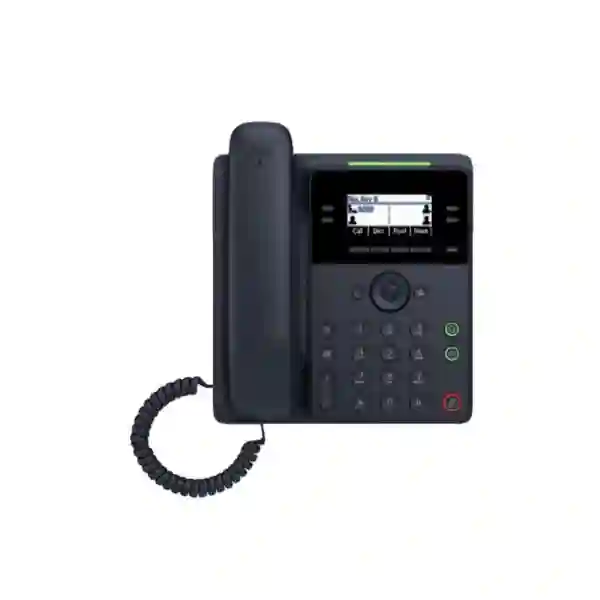
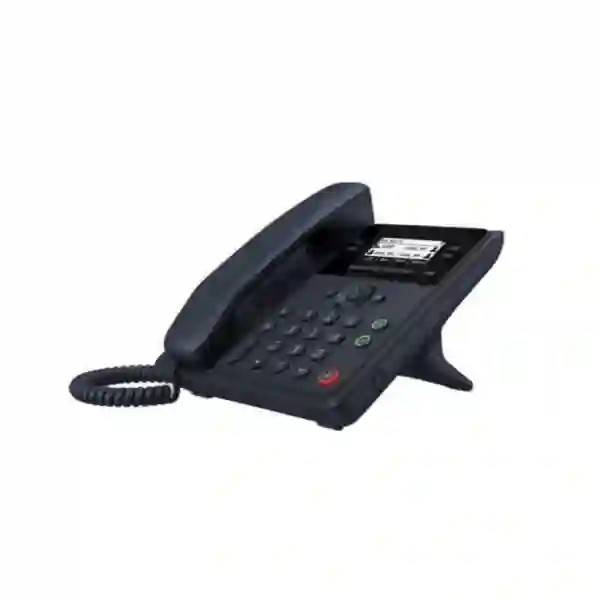
HP Poly Edge V200 IP Desk Phone
A professional wired Open SIP phone for common areas and everyday business calls. Compare the voice features, connections and deployment requirements before selecting the right bundle for your office.
HP Poly Edge V200 specifications at a glance
| Product family | HP Poly Edge V Series; Edge V200 Open SIP desk phone |
|---|---|
| Display | 2.5-inch monochrome |
| Line controls | 4 physical line appearance keys; up to 16 SIP lines with pagination |
| Audio | HP Poly HD Voice, NoiseBlockAI, Acoustic Fence, full-duplex audio and echo cancellation |
| Network | Two RJ-45 Gigabit Ethernet ports (10/100/1000 Mbps) |
| Headset connections | USB Type-C, RJ-9 and EHS connection; accessory compatibility must be confirmed |
| Wireless networking | No built-in Wi-Fi or Bluetooth |
| Power | Power over Ethernet or compatible external power arrangement, depending on setup |
| Expansion modules | Not supported on V200 |
| Security capabilities | Trusted Security Module, 802.1X, TLS, SRTP and secure provisioning options |
| Mounting | Two-position desk stand and HP-described wall-mount option |
| Use case | Common areas and everyday wired business calling |
Specifications describe supported hardware capabilities; availability of service functions depends on configuration, compatible equipment and the selected provider. Package contents may vary by orderable bundle.
A dependable desk phone for shared business spaces
The HP Poly Edge V200 IP Desk Phone is a wired Open SIP business telephone intended for organizations that want a familiar handset, straightforward call controls, modern speech processing and a clearly visible status indicator at a fixed location. It is especially relevant for common areas, administrative desks, staff workstations and workplaces where a telephone must remain available without relying on an employee’s computer or mobile handset. For a business evaluating desk phones in Tanzania, the important starting point is not the product’s appearance alone: the current calling platform, Ethernet infrastructure, available power and everyday users must all fit the planned deployment.
The Edge V200 combines four physical line appearance keys, access to as many as 16 configured SIP lines through pagination, a 2.5-inch monochrome display, dual Gigabit Ethernet ports and HP Poly’s HD Voice, NoiseBlockAI and Acoustic Fence audio technologies. It supports compatible wired headset arrangements and centralized provisioning methods. Because it uses a wired network connection rather than built-in Wi-Fi, the layout of the room and location of network outlets matter. Request a configuration check and a quote for the exact hardware bundle before committing to a multi-phone rollout.
- Best fit: shared areas, everyday calling stations and fixed office desks with Ethernet.
- Choose with care: compatibility with the exact hosted voice service or SIP PBX must be checked.
- Important limitation: the V200 does not provide integrated Wi-Fi, Bluetooth or expansion-module support.
What the four line keys and 16-line support mean
A frequent buying question is whether four keys restrict the phone to four telephone numbers. On this model, the four physical line appearance keys work with pagination to provide access to up to 16 configured SIP lines, depending on the telephone system and setup. The figure is a device capability, not a promise that a particular cloud service will automatically give a business 16 accounts or simultaneous external calls. Your provider may assign fewer registrations, restrict call appearances or offer a different set of supported features. The number of external calls possible also depends on the service package and available call paths.
For a shared office extension, one primary number and convenient access to other appearances can be sufficient. For a department, additional programmed appearances may simplify handling calls that arrive for more than one group. The physical controls still matter: staff can quickly identify a line or use call-handling keys without navigating a large touchscreen. When comparing products, consider how often employees must move between calls, how many shared lines they monitor, and whether the display and available keys meet their working habits. High-volume attendant desks that need many simultaneously visible contacts may be better served by a higher-tier model.
2.5-inch monochrome display: the practical advantage
The display is a 2.5-inch monochrome screen, not a color touchscreen. Its purpose is practical identification of calls, phone menus, contacts and line states rather than rich graphics. This keeps the everyday calling experience focused for employees who need to answer a call, find a contact or transfer a conversation with minimal distraction. Four line keys and associated indicators provide direct physical controls, while soft keys and navigation controls give access to contextual telephone functions. The actual screen layout depends on configured features and software.
A monochrome display is often an acceptable tradeoff for a staff phone mounted near a counter or placed in a corridor. It may be less suitable where employees expect detailed visual directories, numerous one-touch monitored extensions or color-coded workflows. Examine the space where the telephone will sit: viewing distance, lighting, the user’s familiarity with menu navigation and whether a printed extension guide is useful. Choosing the right interface at the beginning can reduce requests for changes after installation. Buyers who need color display and wireless connectivity should evaluate the Edge V250 family instead of assuming all Edge V models offer the same screen.
Clearer conversations in everyday workplace noise
An office call can become difficult when nearby colleagues speak, paperwork moves across a desk, a keyboard is used or a service counter gets busy. HP Poly equips the Edge V200 with HD Voice, full-duplex audio, echo cancellation, NoiseBlockAI and Acoustic Fence technology. NoiseBlockAI is intended to reduce distracting background sounds, while Acoustic Fence helps focus transmitted sound on the person speaking. These features can support more intelligible communication in busy environments, but their effect depends on microphone positioning, room conditions and the way the call is routed.
Audio technology does not compensate for packet loss, weak Internet connectivity or incorrectly configured voice services. A clear local microphone signal can still sound broken if the upstream connection is unstable. For a realistic assessment, test representative calls during normal working hours, including a noisy period if the phone will serve a reception or operations area. Have users try the handset and any proposed headset before approving a large installation. Voice quality is a combined result of the phone, the network, the service and the acoustic environment.
Open SIP calling: useful flexibility with compatibility checks
The Edge V200 belongs to HP Poly’s Open SIP desk phone range. Open SIP capability is useful when an organization has an IP PBX or hosted voice service that supports the appropriate SIP registrations, configuration and telephony features. It gives buyers a starting point for interoperability discussions instead of tying the hardware description to a single named operator. However, Open SIP does not mean every provider will provision every telephone or enable all functions automatically. Administrators should verify the provider’s supported model list, required software version, registration settings and provisioning method.
Ask your voice provider whether the Edge V200 can register directly, whether secure signaling and media are supported, and how voicemail, hold, call transfer, shared lines and directory access will work. Clarify whether service activation, phone numbers, outbound dialing and access to public networks are included in the commercial offer. If an organization is replacing analogue phones, remember that an IP desk phone still needs an IP voice service; a traditional analogue socket alone does not provide an SIP registration. Establish the intended call flow first, then map each phone to the correct endpoint and user permissions.
- Confirm the exact SIP platform, version and provider-supported configuration.
- Confirm number assignment, extension privileges and external call routing.
- Verify whether requested features require a specific hosted plan or administrator configuration.
Dual Gigabit Ethernet for a tidy wired workstation
The Edge V200 provides two RJ-45 Ethernet interfaces supporting 10/100/1000 Mbps connections. One can connect to the workplace network and the other can provide network pass-through for a nearby computer, where such a topology is permitted by the IT team. This can reduce the need to dedicate a separate wall network point to both a desk phone and a desktop PC. The benefit is most relevant at permanent workstations where there is a properly located cable, an approved access switch and predictable network use.
Pass-through should not be chosen without checking the office’s network policy. Some companies require computers and voice devices to use different VLANs, port-security settings or authentication policies. The switch and voice platform must support the intended arrangement, and troubleshooting can be more complicated if both the telephone and the computer share a cabling path. In a common area with no computer, the second Ethernet port may not be needed. The V200 is a wired desk telephone; the presence of two network ports must not be confused with wireless networking or with the ability to bypass a functioning IP network.
Powering the Edge V200 correctly
The device supports Power over Ethernet in suitable deployments, which is convenient when the switch can deliver network connectivity and power through the same cable. That can simplify desk installation and avoid a separate power plug immediately beside each telephone. If the planned location does not provide appropriate PoE, a compatible external power arrangement may be required. HP documentation also describes USB-C-related power options for the series; the exact accessory and allowed connection must be confirmed for the specific Edge V200 bundle being ordered.
Do not assume that a wall power adapter is included in every retail or regional package. HP’s series documentation distinguishes some included adapters by model, and reseller bundles can differ. Ask for a written package confirmation covering the handset, stand, Ethernet cable and any separate power accessories needed on site. For offices that must continue receiving calls during utility interruptions, assess the backup power available to the PoE switch, router, firewall, PBX and Internet equipment. A phone that receives electrical power will still need a working network and call service to place routine VoIP calls.
Security features that support a managed voice network
HP identifies security capabilities for the Edge V200 series that include a Trusted Security Module, 802.1X authentication, TLS, SRTP, HTTPS provisioning, encrypted configuration support and software integrity protections. These technologies give an IT team options for hardening the endpoint and protecting credentials or signaling where the rest of the voice environment supports the required mechanisms. They are particularly relevant to businesses managing phones across departments or locations rather than treating each desk phone as an unmanaged appliance.
Security should be assessed as a complete configuration. Merely purchasing a model that supports encryption does not prove that calls are encrypted in a particular installation. The SIP server, service subscription, certificates, administrator policies and media path also need to be configured appropriately. Before deployment, agree who controls administrator passwords, who approves firmware updates and who can change extensions or call routes. An organization may also wish to prevent unauthorized physical movement of a shared phone and to document the contact responsible for lost or damaged devices. A well-managed endpoint reduces risk, but cannot remove every operational or network vulnerability.
Provisioning and ongoing administration
When several phones have to be deployed, configuration consistency is as important as the hardware itself. HP lists Poly Zero Touch Provisioning and compatible device-management services among the series’ management options. In an appropriate environment, centralized provisioning can help distribute account settings, policies and supported updates without requiring technicians to repeat every step manually on each phone. The level of automation and remote control available depends on the selected management service, licensing and the service provider’s integration.
Plan the deployment data before unpacking the devices. Create an extension list, room assignments, network details, authorized administrators and a record of each device’s configuration. Decide whether the organization will manage phones directly or rely on its voice provider. Establish who performs future changes when employees move desks or a shared area is renamed. A useful acceptance test checks that registration, outgoing calls, internal calls, transfers, time settings and voicemail behavior match the approved design. For a single desk, manual setup may be manageable; for a fleet, a repeatable provisioning procedure can reduce mistakes and make later troubleshooting more predictable.
Handset, headset and hands-free use
Different workplaces need different ways to talk. Some employees prefer the familiar handset, while others may benefit from a headset during prolonged calls or while working at a computer. The Edge V200 offers handset calling and speakerphone functionality together with supported headset interfaces, including USB Type-C, RJ-9 and an Electronic Hook Switch connection. The presence of a connector does not guarantee that every wired or wireless headset can be used with every function. Connector type, accessory electronics and any required adapter must match.
For example, an EHS arrangement can support convenient call control with compatible equipment, but it may require the correct optional adapter and an approved headset model. Buyers should request a compatibility check for the exact headset rather than purchase a large set of accessories on the assumption that brand names alone establish interoperability. Where staff share a phone, hygiene, storage and responsibility for personal versus communal headsets also matter. Test headset audio, microphone volume, answering behavior and call release during commissioning. If the office needs native Bluetooth headset pairing, the V200 should not be presented as providing it; look at a suitable wireless-capable Edge V model.
A fixed-network phone, not a Wi-Fi replacement
The V200 does not have integrated Wi-Fi or Bluetooth. This is a meaningful product choice rather than an obscure technical detail. For a fixed counter or desk with a reliable wired port, Ethernet can be convenient and predictable. For a temporary kiosk, a frequently rearranged open-plan office or a room without structured cabling, the requirement to install a network point may change the economics of the project. Passive or other short-range features described for some devices in the broader product family should not be confused with Wi-Fi voice connectivity.
If a site depends on wireless connections, first consider whether installing approved Ethernet is practical. Where that is not appropriate, compare a verified model with built-in wireless support and confirm that the organization permits its use on the voice network. If staff need to move freely while talking, a compatible headset or a cordless telephony solution may be more appropriate than a stationary handset. Select the endpoint according to actual movement patterns, not simply the number of ports listed in a brochure. The V200’s strengths are strongest where the work location and network access are stable.
Desk placement, wall mounting and day-to-day reach
HP lists a two-position desk stand and a wall-mounting option for the Edge V200. This supports placement at an ordinary office workstation and can make the phone suitable for a shared wall location if the installation hardware and site conditions are appropriate. A fixed handset can be easier to locate in a common room than a personal mobile device, provided the telephone is mounted where users can access it safely and understand its purpose. The red status light bar and physical keys offer additional visible call cues.
Before buying mounting accessories, check the approved bill of materials for the exact package. Do not assume a separate bracket or particular screws are included without confirmation. Consider cable routing, handset reach, lighting, desk space and the possibility of accidental damage. In a public-facing reception area, placing the phone too close to visitors may expose conversations or allow unauthorized access to settings. Where wall mounted, keep the display at a readable height and provide a safe route for Ethernet. A neat installation makes the phone more useful and can also reduce repeated cable and connector faults.
Accessibility and shared-user considerations
HP describes accessibility functions across the Edge V Series, including text-to-speech and adjustments intended to help different users read or navigate telephone information. Its specifications also identify hearing-aid compatibility for the handset. These features can matter at shared desks where users have different needs, but administrators should verify the exact software release, setup options and relevant user requirements before promising that a particular function will be available out of the box.
Good deployment design is not only a software question. Make sure a wall-mounted handset can be reached, that the screen and labels are visible, and that the volume can be adjusted without confusion. Give users a simple guide explaining which keys answer, place on hold and transfer calls. For shared devices, define who may change preferences so that one person’s adjustments do not unexpectedly affect the next shift. Ask staff to participate in pilot testing rather than assuming that a technically successful installation is automatically convenient for every user. Comfort, accessibility and clear instructions support better adoption.
Discreet emergency features: configure and validate carefully
HP describes programmable discreet emergency-alert capability within the Edge V family. This may be useful in settings where an authorized employee needs to call a predefined internal contact without drawing attention. However, the feature is not a substitute for a verified safety system, and it must not be described as automatically linked to local emergency services. Whether the option is available and how it operates depends on configuration, the voice service, call routing and the site’s response procedures.
Before treating any telephone-based alert as a safety control, confirm its intended recipient, activation sequence and required permissions. Decide who receives a call, what happens if that person is unavailable, how calls are logged and how employees are trained. Test the scenario with suitable internal test numbers and do not create nuisance calls to emergency services. In a shared office, a discreet function can be overlooked by staff who have not been shown how to use it. Clear documentation and periodic testing are essential if the feature becomes part of an organization’s safety procedures. Seek professional advice for any regulated or safety-critical deployment.
Use case: reception and visitor-facing desks
A small reception or visitor desk often needs a dependable phone for internal transfers, routine outside calls and coordination with staff. The Edge V200 can support that role when the number of visible controls and required call appearances fits the workload. A receptionist handling occasional calls may appreciate a fixed handset, dedicated hold and transfer keys, and a clear display. If the workspace is exposed to visitor conversations, a compatible headset can help keep speech more private, subject to correct configuration and appropriate working practices.
Reception teams with heavy parallel call traffic should consider the workflow before selecting a device. How many colleagues must be monitored at a glance? How frequently does the operator move between callers? Is a large contact list needed? The V200’s four physical keys may become restrictive for complex attendant tasks even though it can access more lines through pagination. HP lists expansion-module support on select higher-tier Edge V models, not the V200. If the requirements exceed the simple shared-desk profile, compare a model intended for higher line visibility rather than forcing a busy reception into an unsuitable interface.
Use case: staff rooms, service counters and common areas
In a staff room or shared service counter, the priority is often that anyone on duty can place or receive a call from a known location. The Edge V200 is positioned by HP for common-area use. Its traditional dial pad, physical calling controls and wired installation suit environments in which a phone is used by several people during the day. The office can configure an appropriate shared extension or service account where the telephony platform supports that arrangement.
Decide what the phone should be allowed to do. A shared set may need internal calling, selected outside numbers or a restricted dialing policy. The appropriate permissions depend on business operations, not the hardware specifications. Place an extension reference nearby if employees often call other departments, and agree on a simple process for reporting faults. If an office has more than one shift, consider how voicemail is checked and whether missed calls need centralized follow-up. Buying a common-area phone works best when the responsibility for its call flow and daily monitoring is clearly assigned.
Use case: schools, clinics, hospitality and small offices
Organizations across different sectors may use a fixed IP desk phone for a variety of routine tasks. An education administration office may call other departments; a clinic’s reception area may coordinate with staff; hospitality operations may use internal extensions; and a small business may want a dedicated desk instrument in addition to softphones. These are illustrative scenarios, not claims that a particular organization or industry system is already certified for the Edge V200. Suitability depends on the actual phone platform, working environment and required call policies.
A school may prioritize simple user instructions and controlled outside dialing, while a clinic may focus on reliable communication and appropriate privacy practices. A hospitality site may require integration with an existing property telephone solution, which must be verified independently. A small office may care more about the cost and simplicity of one or two phone endpoints. In each case, identify the use case and conduct a real call test before ordering at scale. Do not purchase on the assumption that every business-specific feature is available simply because the phone supports SIP.
Comparing Edge V200 with Edge V250 and higher-tier models
Selecting between models is easier when requirements are separated into essentials and preferences. According to HP, the Edge V200 has a 2.5-inch monochrome screen, four line keys and no integrated Wi-Fi or Bluetooth. The Edge V250 adds a color display and integrated wireless options. Both sit in the part of the range intended for everyday multi-line calling. Higher-tier Edge V models serve roles that need more visible line keys, larger displays or selected expansion capabilities.
The V200 is a sensible candidate when a wired location, physical call controls and the familiar handset experience are more important than wireless pairing or rich visual information. The V250 may be worth considering where Wi-Fi installation or Bluetooth pairing is a requirement, subject to network and accessory policy. A more capable attendant-oriented phone may make sense for a receptionist or coordinator who regularly monitors many lines. Avoid choosing only by headline maximum line count. Compare daily call handling, screen readability, expansion needs, connectivity requirements and the total cost of properly installing the device, including accessories and voice service.
Things the Edge V200 does not include or guarantee
A clear product page should explain limitations before the buyer has placed an order. The V200 is not a wireless desk phone, and it is not a color touchscreen model. It does not support HP’s Edge V expansion modules, according to the manufacturer’s model comparison. It is an IP phone, which means a working compatible IP voice system is required. The hardware alone does not provide a public telephone number, an Internet connection, a SIP account or a paid voice subscription.
Likewise, a vendor’s general product claims should not be confused with a promise that particular cloud call features, headset controls or emergency procedures will work in every installation. Features such as shared lines, directory integrations, secure media and remote management depend on platform support and configuration. The presence of a power connector does not prove that a power adapter is included in the selected bundle. Stock, delivery, local warranty handling, taxes and quoted prices need confirmation for the actual Tanzania order. Being explicit about these points helps buyers choose the right configuration without unpleasant surprises at installation.
Network planning for a Tanzania office deployment
For an office in Tanzania, the practical infrastructure questions are similar to those for any VoIP deployment, but they must be answered for the exact site. Identify whether each proposed desk has a functional Ethernet outlet and whether the access switch can supply the necessary PoE. Confirm that voice VLANs, addressing, DNS, time synchronization and firewall rules match the requirements of the chosen PBX or hosted service. These are project checks, not evidence that FourTeck or any specific local provider has already qualified the site.
Internet reliability deserves attention when the voice service is hosted outside the office. Calls may suffer from delay, packet loss or interruptions if the connection is congested or unstable. Network teams may use appropriate traffic management and monitoring to protect call quality, with settings based on their own environment. If the organization needs higher availability, assess backup Internet connectivity and independent power for the relevant network equipment. Do not assume a backup link will fail over automatically without designing and testing the routing. An initial site survey can uncover expenses that are otherwise easy to miss when evaluating a phone’s purchase price.
A sensible deployment checklist before purchasing
Begin with the number of telephone locations rather than the number of employees alone. A team of ten may need only a few shared phones, or it may require ten individual devices, depending on the nature of work. List each desk, room or counter and specify the expected users, required extension, headset preference and hours of operation. Then capture the technical prerequisites: call platform, network access, power, number of external calls, voicemail workflow and relevant security policies.
An organized requirement list gives the supplier and IT team a common basis for an accurate quotation. It also helps prevent accessory mismatches, missing network ports or licenses that were not budgeted. For replacements, identify existing numbers and the migration process before disconnecting working endpoints. For new deployments, request a brief pilot at one representative location before expanding. Document the results in terms employees understand: calls arrive at the right desk, transferring works, the other person can hear clearly, and the phone remains registered during normal working hours.
- Record the target locations, counts and expected user roles.
- Check Ethernet, PoE and the required external power accessories.
- Confirm SIP registration, licensing, dialing permissions and number routing.
- Test representative inbound, outbound, internal and transfer calls.
- Assign ownership for provisioning, updates and routine support.
What to check when moving from an older business phone
Replacing an older analogue, digital or IP telephone is not necessarily a one-for-one hardware swap. Existing numbers may be managed by a carrier, a PBX, an analogue gateway or a hosted provider. The new Edge V200 needs a supported IP voice connection and correctly prepared account information. Before migration, inventory the current extensions and determine which call features employees rely upon. A legacy speed dial, paging group or busy-lamp setup may need to be recreated differently on the new platform.
Schedule migration in a way that allows practical testing and rollback. If numbers are being moved between providers, confirm the actual process and timing with the responsible parties instead of assuming a handset change transfers the number. Preserve any compliance, retention or call-recording arrangements through the voice platform if the organization requires them. Train a small pilot group on the new interface and document differences that will affect daily tasks. Once the pilot is stable, expand to other desks in manageable groups. This approach is usually more predictable than changing every phone in one untested operation.
Evaluating the full cost, not only the telephone
The total cost of installing a desk phone may include more than the device. Depending on the project, an organization may require PoE switch capacity, network cabling, power accessories, compatible headsets, provisioning services, SIP subscriptions, configuration labor and future support. The requirements will vary substantially between a small office with a working VoIP platform and a new location that has no structured voice network. A low hardware price does not automatically represent the lowest cost of operation.
When seeking a Tanzania quotation, ask for the specific Edge V200 configuration and a clear list of what is included. Request a separate indication of any optional headset, wall-mounting or power accessories. Confirm who will configure the phones, how faults are reported and whether the commercial terms cover any on-site work. Any local taxes, shipping charges and warranty handling should be confirmed in the actual offer rather than inferred from another country’s advertised package. The best purchase decision is based on fit, service compatibility, predictable installation and the support the business actually needs.
Day-one setup and acceptance testing
A structured first-day procedure should start by confirming the model and accessories against the order. Inspect the handset, cable, desk stand and any separately ordered power equipment. Connect the phone to the approved network port, allow it to obtain the intended configuration and verify that it registers with the correct extension. If the phone also carries a computer network connection, check the approved pass-through arrangement without bypassing the office’s security controls.
Then test basic calling. Place an internal call, an authorized external call and an incoming call. Confirm the ring behavior, display, on-hold action, transfer workflow and voicemail handling, where those functions are configured. Try the handset, speakerphone and approved headset. Check that the correct time appears and that a restart does not unexpectedly remove the working configuration. An administrator should record the results and resolve failed tests before declaring the location ready. Where the phone has a programmed discreet-alert function, verify its documented internal test procedure separately and safely. A signed acceptance record is useful for multi-site projects.
Good daily practices for users and administrators
A well-configured telephone is easier to support when users know a few basic practices. Keep the device connected to its assigned network point unless IT has approved a move. Report repeated registration messages, missing incoming calls or unusual sound behavior promptly. Avoid sharing administrator passwords or trying random settings to fix a problem during a busy workday. For a shared extension, assign responsibility for checking voicemail and maintaining any local contact list that the business depends upon.
Administrators can help by keeping a current endpoint register, applying approved updates and recording changes to extensions or call routing. When an employee changes departments, review their call permissions and the use of shared devices. Provide a simple reference card for transfers and other frequently used functions. These procedures matter more than elaborate feature lists because most phone-related frustrations arise when a straightforward task has become inconsistent. Training does not need to be lengthy, but it should be based on the actual configuration deployed in the office rather than a generic handset guide.
Troubleshooting sound, registration and call behavior
If users report broken or delayed sound, begin by establishing whether the issue affects one phone, an entire location or all callers. A single bad handset cable or headset can cause symptoms that look like a network failure. A site-wide problem may instead involve connectivity, bandwidth, routing or the voice provider. Compare internal calls with outside calls and note the times at which the problem occurs. Collect this evidence before changing settings.
When the phone does not register, check that its Ethernet link and power are healthy, then involve the authorized administrator to inspect addressing, DNS, SIP credentials, server reachability and certificate requirements as appropriate. If a call does not transfer as expected, review the phone system’s configured transfer policy and the steps users follow. Do not disable security features as a shortcut. After any change, repeat the relevant acceptance test and record the result. A clear fault description helps separate endpoint issues from network and platform problems and makes support faster without promising an immediate resolution.
Planning power and network continuity
A desk phone may be present during a power interruption but unable to complete a call because the router, switch or upstream service has stopped. For organizations that rely heavily on telephony, availability planning should cover the entire communication path. Where the Edge V200 is powered by PoE, assess the electricity supply to the PoE switch; where external power is used, assess that source too. Network gateways, firewalls, local PBX equipment and Internet termination may each need their own continuity plan.
Test backup arrangements under controlled conditions rather than assuming they will operate as designed. If a business has a secondary Internet connection, the call platform and network routing must support the intended failover behavior. Employees also need an alternative means of communication when an IP service is unavailable. Those alternatives are operational decisions based on the site’s risk profile, not built-in guarantees from a particular desk phone. In important locations, document an escalation contact and a practical outage procedure that users can follow without administrator access.
Ordering the right accessories and confirming the bundle
Accessory planning is easy to overlook when a procurement team focuses on telephone quantity. The standard model description covers the phone, handset and basic setup components, but regional packages and reseller bundles can vary. Do not take a retailer’s bundle-specific power-supply claim as proof about every Edge V200 package. Obtain confirmation of the exact orderable configuration and the accessories physically supplied for the destination market. If PoE is unavailable, separately verify a compatible power solution before the device arrives.
If staff need headsets, supply their exact model numbers or describe their required call-control workflow so that compatibility can be confirmed. If a phone will be mounted, check the included mounting hardware against the wall type and intended installation. For a shared workstation, consider whether a PC will connect through the phone and whether an additional cable is required. Ordering accessories deliberately can reduce avoidable installation delays. This is especially valuable when multiple branches use slightly different wiring or power arrangements and cannot simply exchange equipment between rooms.
Questions to ask a supplier before approving a rollout
Before placing an order, ask for a written confirmation that the proposed item is the HP Poly Edge V200 rather than another Edge V model. Specify whether the offer is for a single phone or a complete endpoint setup including any required adapter, headset and configuration. Ask the supplier to verify the preferred SIP platform and, where relevant, to identify configuration prerequisites or areas not yet tested. This makes the buying conversation about a working communications solution rather than a generic product description.
For larger quantities, request a simple deployment approach covering the first pilot location, how devices will be configured, how acceptance tests will be documented and who will provide operational support. If the organization has strict information-security or accessibility requirements, include those in the request rather than expecting them to emerge during installation. Do not rely on unsupported claims about current stock, delivery days, local certifications or warranty service. Those commercial and compliance details should be confirmed for the exact order and jurisdiction in a formal quotation.
Why this model can be the right level of phone
The Edge V200 is positioned in a practical part of HP Poly’s desk-phone family. It is a strong candidate for buyers who need an ordinary physical handset and a predictable wired network endpoint but do not need a color screen, integrated wireless features or expansion modules. The familiar controls, voice-processing technologies and manageability options can serve a straightforward office calling requirement while fitting a common-area deployment strategy.
The right decision is still conditional. A high-volume operator who needs many visible contact keys should evaluate a more advanced model. A temporary workspace without Ethernet may require a different connectivity approach. A company with a specialized call platform must obtain explicit compatibility confirmation before purchase. These tradeoffs are useful rather than negative: they help distinguish a well-matched phone from a product selected for a feature that will never be used. Choose the V200 when the operating environment genuinely calls for a fixed, wired, professionally managed IP desk phone.
Request a configuration-led quote for Tanzania
To prepare a meaningful quote for the HP Poly Edge V200 IP Desk Phone, provide the expected quantity, the location and type of each workstation, and the telephone service or PBX currently in use. If the service is not yet chosen, describe the calling requirement instead of guessing at compatibility. Note whether PoE is available, whether headsets are needed, and whether any phones will be wall mounted. These details help identify necessary accessories and technical questions before the purchase.
Ask FourTeck Tanzania to confirm the proposed product configuration, relevant compatibility information, current commercial terms and any available setup support for your specific requirement. The quote should identify exclusions and dependencies as well as included equipment. If the organization is upgrading multiple sites, a pilot plan and an endpoint inventory can make the approval process easier. No price, delivery commitment, local warranty arrangement or stock level is assumed on this page; those details require a current formal confirmation.
Frequently asked questions about the HP Poly Edge V200
Does the Edge V200 support 16 phone lines?
HP specifies four physical line appearance keys with pagination providing access to up to 16 SIP lines. The number of configured accounts, appearances and outside call paths available to your business depends on its SIP service and administrator settings. Treat 16 as a supported device capacity, not an automatic entitlement from a carrier or hosted PBX.
Is the screen a color touchscreen?
No. The Edge V200 uses a 2.5-inch monochrome display with physical keys and navigation controls. Buyers who need a color display should compare other models in the Edge V family and verify the exact screen and interface offered by the chosen version.
Can the phone use Wi-Fi?
No. The V200 is designed for a wired Ethernet connection and does not include integrated Wi-Fi. If the proposed location has no practical cable route, review the installation plan or evaluate a different Edge V model with the required wireless networking features.
Does it have Bluetooth headset pairing?
The Edge V200 has no built-in Bluetooth. It provides other supported headset interfaces, including USB-C, RJ-9 and an EHS connection. Check the exact headset model and any required adapter or call-control capability before purchasing accessories.
Is a power adapter supplied with the telephone?
Do not assume one is included in every V200 package. HP documents PoE and compatible external power options, while retailer bundles vary. Ask for the full contents of the exact configuration and confirm whether additional power accessories are required.
Can I use the V200 with an existing IP PBX?
Possibly, if the PBX or hosted service supports the phone’s Open SIP configuration and required functions. Confirm compatibility, software, provisioning credentials, security settings and expected call behavior with the responsible voice provider or administrator before ordering.
Will it work with a traditional analogue telephone line?
An IP desk phone requires a compatible IP voice environment and does not directly replace an analogue handset on an ordinary analogue socket. A suitable telephony platform, gateway or hosted service may be required. Ask your telephone provider to review the existing system.
Does the V200 support expansion modules?
No. HP’s model comparison lists no expansion-module support for the V200. If the user needs a large attendant panel or more simultaneously visible line keys, compare higher-tier Edge V devices and verify expansion compatibility for the particular model.
Can it share an Ethernet point with a computer?
The phone has two Gigabit Ethernet ports and can support workstation network pass-through where permitted. Your IT team should verify security, VLAN and switching requirements before connecting a computer through the phone. Network pass-through does not replace the need for a suitable wired network.
Is call encryption automatic?
The phone offers capabilities including TLS and SRTP, but an encrypted deployment depends on the service platform, configuration and supported endpoints. Do not assume a call is encrypted solely because the hardware supports the required mechanisms. Ask the administrator to verify the actual settings.
Can multiple Edge V200 phones be configured centrally?
HP lists compatible provisioning and device-management services for the series, including Zero Touch Provisioning. Actual centralized setup depends on the voice provider, chosen management system and required configuration. For a fleet, establish a tested provisioning method before devices are sent to their locations.
Can staff use it in a busy reception?
Yes, where the call volume and visible-key requirements match its capabilities. The device offers four physical line keys and up to 16 configured SIP lines through pagination. Receptionists who need numerous direct monitored keys or an expansion panel may find a more advanced model easier to use.
Can the phone keep working during a power outage?
Only if the relevant phone power source, network equipment, call platform and connectivity remain available. A powered handset without a working IP service may not complete calls. Organizations with continuity requirements should assess backup power, Internet resilience and alternative communications.
Does the discreet emergency alert contact local emergency services?
Not automatically. Any emergency or discreet-alert feature requires suitable configuration, a valid destination and a supporting phone service. It should be evaluated within the organization’s documented safety procedures. Do not treat an untested phone feature as a guaranteed emergency response system.
What information should I provide when requesting a quote?
Share the quantity, whether the phones are for shared or assigned desks, the existing SIP provider or PBX, available Ethernet and PoE, required headsets and any wall-mounting needs. Request a specific package description and confirmation of commercial terms for your Tanzania purchase.
Can FourTeck confirm stock, warranty and delivery?
Those details need a current product-specific quotation or formal confirmation. This description does not claim a particular stock level, price, delivery time or local warranty service. Ask for terms and inclusion details that apply to the exact supplied configuration.
Plan your HP Poly Edge V200 purchase
Request a FourTeck Tanzania quotation for the exact V200 configuration and quantity. Include your existing voice platform, Ethernet and PoE availability, headset requirements and installation location. Confirm accessories, compatibility and commercial terms before ordering.
Next step: contact FourTeck Tanzania to review your deployment requirements and request a product quote.




Reviews
There are no reviews yet.