
BUSINESS VOICE • OPEN SIP
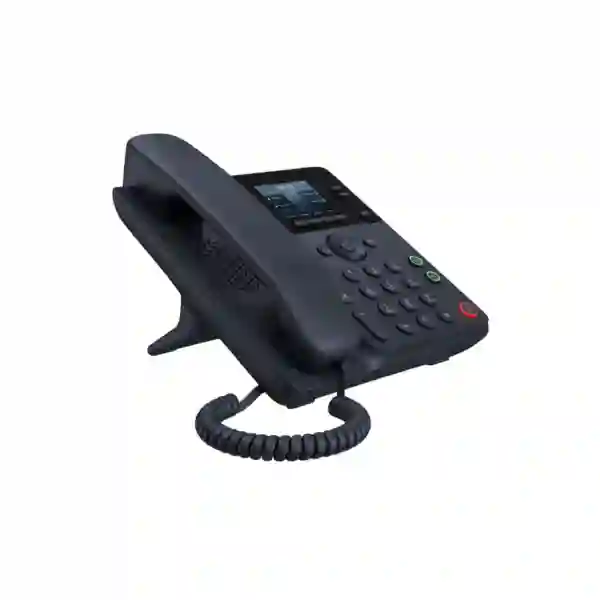
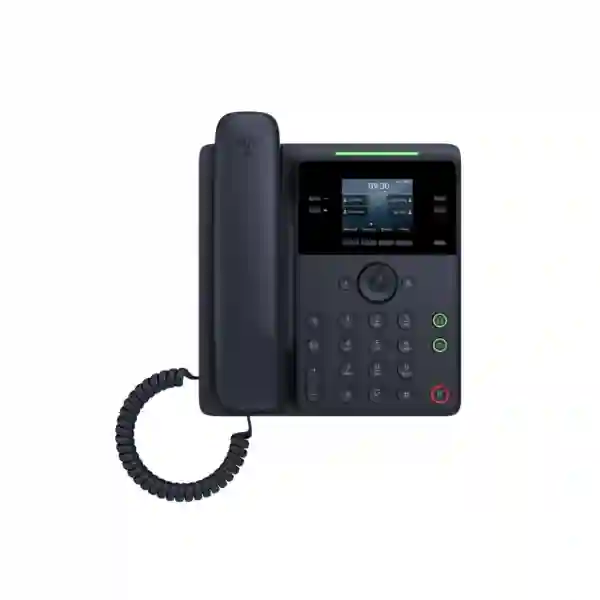
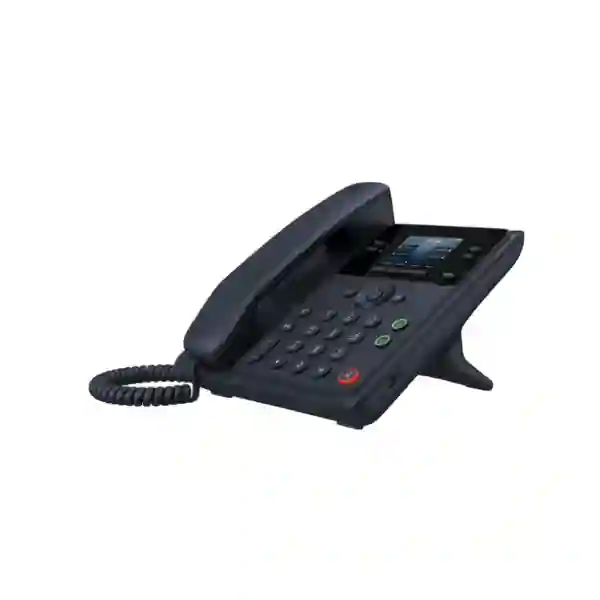
HP Poly Edge V250 Wi-Fi IP Desk Phone
A dedicated desk phone for clear everyday conversations, flexible Wi-Fi or wired placement, compatible headsets and familiar physical call controls. Explore the verified features and the decisions that matter before buying for a Tanzanian workplace.
Quick specification overview
| Display | 2.4-inch colour LCD |
|---|---|
| Controls | 4 physical line keys; up to 16 assignments via pagination |
| Wi-Fi | Integrated; HP model-specific specifications list Wi-Fi 6E |
| Bluetooth | Bluetooth 5.4 |
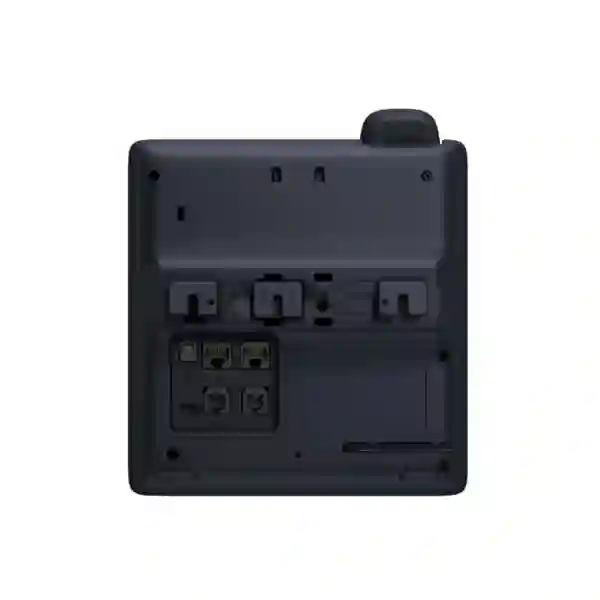
| Ethernet | 2 × RJ-45 10/100/1000 Mbps |
| USB | USB Type-C headset and device connectivity |
| Other headset connections | RJ-9; EHS port with optional compatible adapter |
| Audio | HP Poly HD Voice; NoiseBlockAI; Acoustic Fence |
| Power | Confirm PoE or external-power arrangement for exact variant |
| Software platform | Open SIP; provider compatibility must be verified |
Technical features must be validated against the actual service, region and quoted hardware variant. This page does not claim local stock, price or provider certification.
Who the HP Poly Edge V250 is for
The HP Poly Edge V250 Wi-Fi IP Desk Phone is a modern Open SIP business handset for staff who want a dedicated voice device on their desk. It suits ordinary office users, service counters, department coordinators and smaller front desks where a physical keypad, visible call information and familiar handset remain useful. Its colour display, four line keys, Wi-Fi and Bluetooth offer flexibility beyond a basic wired telephone. The strongest reason to choose it is a match between the employee’s actual work, the network available at the desk, and a compatible communications platform.
Buying the device is only one part of providing working business telephony. An organisation also needs a correctly configured SIP service or PBX, network access, power, user credentials and the call features its staff expect. The V250 is not a stand-alone phone system and does not supply external numbers, hosted subscriptions or a guaranteed connection to every provider. Before purchase, write down who will use the phone, what calls they handle, which features matter, and who will administer the device once it has been installed.
Open SIP and service compatibility
Open SIP identifies the type of telephone endpoint, not a universal compatibility promise. The Edge V250 is intended for SIP-based calling environments, but hosted providers and on-premises PBXs differ in their registration procedures, configuration formats, supported firmware and policy toward customer-owned phones. Ask whether your provider accepts this exact model and whether core tasks such as hold, transfer, voicemail, shared lines and call pickup will behave correctly. A successful registration test is useful, but it is not enough if an essential business workflow remains unsupported.
For an existing system, identify its make, software version, deployment model and person responsible for provisioning. For a new solution, establish which party will provide telephone numbers, routing, extension accounts and ongoing support. Some cloud platforms approve only selected devices or require additional gateways and subscriptions. Record those restrictions before ordering equipment. When a salesperson describes a phone as compatible, request confirmation against your exact provider and feature requirements, not merely the fact that both products use SIP-related technology.
Display and line keys
HP specifies a 2.4-inch colour LCD and four line-appearance keys on the V250. The phone supports up to sixteen configured lines, feature or contact assignments through pagination. That means the user can reach more assignments than the four keys visible at one time; it does not mean sixteen separate physical buttons appear on the handset. The best configuration places the most frequent and important functions first. Employees who transfer callers to the same colleagues several times a day benefit from a consistent layout they can learn and use without searching.
Plan key assignments with the end users rather than guessing from a job title. One department may need a shared incoming line and voicemail, while another uses direct extensions and a small number of speed dials. Busy-lamp or presence functions depend on the PBX and provisioning configuration, so they must be tested. If an operator needs to observe many monitored extensions simultaneously, a four-key paginated phone may not be suitable. Consider a different model or attendant workflow rather than asking a user to navigate too many pages during busy periods.
Audio quality and human conversation
The V250 is built around Poly HD Voice, full-duplex audio and echo cancellation. These features are intended to make dialogue sound more natural and reduce difficulties such as one speaker interrupting another. The phone also includes HP Poly NoiseBlockAI and Acoustic Fence technologies to help manage distracting sounds in shared environments. This combination is useful for administrative staff handling customer questions, employees near colleagues who are talking, and service desks where the person on the other end must hear instructions accurately.
Audio processing improves the foundation of a call, but it cannot repair a badly congested network or an unsuitable working environment. A desk beside a very loud machine or busy public entrance may still require a more appropriate microphone or a quieter location. Test calls at different times of day, including a typical busy period. Ask remote participants whether speech is clear, natural and consistently intelligible. Listen for clipping, echo, delays and sudden level changes rather than judging audio quality solely from a specification or promotional description.
NoiseBlockAI and Acoustic Fence explained
HP Poly NoiseBlockAI is intended to recognise and reduce unwanted sounds that may interfere with a call. Acoustic Fence focuses on the person speaking and seeks to lessen distracting sound from outside the intended pickup area. These are complementary techniques: one addresses types of noise while the other helps define the effective speaking zone. They can be especially valuable in open-plan offices, customer-service counters and domestic workspaces where the acoustic environment changes throughout the day.
Neither technology should be marketed as absolute silence for a remote caller. Microphone position, headset selection, room reverberation and the volume of surrounding noise will influence the result. Staff should still be taught to speak at a natural distance, to mute when appropriate and to move sensitive conversations away from public areas. During a trial, compare the built-in handset or speakerphone with the intended headset. Select the arrangement that produces the clearest real conversations rather than assuming one audio mode must be best for every user.
Voice codecs and call paths
HP lists audio codecs including G.711, G.722, G.729AB, iLBC, OPUS and G.722.1 for the V250. These are technologies for encoding and transmitting speech. They help an administrator understand the phone’s communication options, but the codec used on any individual call depends on what the PBX, provider, far endpoint and route negotiate. Even a phone that supports wideband voice cannot guarantee wideband quality for every call to an external telephone network or to a service using a different media profile.
Quality depends on the entire journey from microphone to listener. Local Ethernet or Wi-Fi, switching, internet stability, firewall traversal, SIP platform and the receiving device all play a role. For acceptance testing, make internal extension calls and external inbound and outbound calls, including conversations lasting more than a few seconds. Exercise hold, transfers and voicemail paths because these may use different signalling or routing. A clear recorded result helps distinguish an endpoint issue from a wider connectivity or service problem.
Wi-Fi connectivity without desk cabling
Integrated Wi-Fi is one of the reasons to evaluate the Edge V250. The model-specific HP technical listing identifies Wi-Fi 6E with IEEE 802.11ax support, although some family-level marketing uses the shorter label Wi-Fi 6. The practical buying requirement is to verify the phone configuration, supported bands and network-security requirements alongside the actual office access points. Where installing Ethernet would be disruptive, wireless operation can open up more possible desk positions and make office layout changes easier.
Wireless connectivity still needs deliberate planning. Check signal quality where the phone sits, access-point capacity, interference, channel availability and authentication arrangements. A phone may show a good wireless connection while its real-time voice suffers from occasional jitter or packet loss. Test during normal working hours when laptops, phones and other devices are active. If a wired connection is readily available and stable, it remains an attractive alternative. Wi-Fi should be chosen because it solves a site requirement, not because its presence automatically makes every deployment better.
Ethernet connectivity and switching
The V250 technical specifications include two RJ-45 Gigabit Ethernet connections rated for 10/100/1000 Mbps operation. This allows the phone to be considered for a structured office network with conventional desk cabling. A cable can offer a predictable path to the communications service and avoid radio interference in busy wireless environments. For companies already using managed switches and designated voice network policies, the wired option may be straightforward to integrate into the existing design.
Do not assume that simply plugging in an Ethernet cable completes the network setup. Addressing, DHCP settings, any voice VLAN, authentication, switch configuration and firewall policies must align with the intended SIP service. If a second port is to be used as part of a particular desk topology, confirm the supported behaviour with the administrator. Test whether calls recover properly after a network interruption and whether employees can access their assigned features. A well-planned wired connection should be documented just as carefully as a wireless one.
Power requirements and ordering variants
Wi-Fi connects a phone to a network; it does not supply electrical power. The V250 must use a compatible power arrangement, and HP describes both PoE-based and external-power configurations in the Edge V range. Manufacturer listings show that certain V250 orderable versions include a power supply while others rely on an appropriate power source being available or ordered separately. Therefore, the exact supplied power accessory is a purchasing detail that must be written into a quote.
With Power over Ethernet, the switch or injector and network cabling must meet the phone’s required standard and power budget. For Wi-Fi use, a suitable external supply and outlet must be planned. If calls must continue during an outage, think beyond the handset: the wireless access point, switch, router, internet access and PBX may also require backup power. Do not substitute an unverified adapter simply because the connector looks correct. Confirm the model variant, power ratings, plug suitability and included accessories for the proposed Tanzanian installation.
Bluetooth 5.4 and flexible headsets
The V250 includes Bluetooth 5.4 and is intended to support compatible Bluetooth headsets as well as specified mobile pairing functions. This can help employees who type, retrieve documents or move slightly around a workstation while taking calls. Wireless headsets can be especially convenient in shared offices where a coiled handset cord creates clutter. However, the telephone’s Bluetooth version alone does not establish that every headset supports the same answer, end, mute, charging or multi-device switching behaviour.
Choose accessories for the role rather than only for their wireless specification. A staff member taking short calls may prefer a lightweight single-ear design, while someone speaking for hours might need different comfort and microphone characteristics. Check the current headset compatibility information, and test the exact devices that will be supplied. Make pairing, firmware updates and reassignment procedures part of the support instructions. A headset which works well with one employee’s laptop may behave differently when it must share connections between the computer and desk phone.
RJ-9, EHS and USB-C headset options
Beyond Bluetooth, HP lists an RJ-9 headset interface, USB Type-C headset support and an Electronic Hook Switch connection that can work with an optional APP-51 adapter. These choices help organisations plan for fixed wired headsets, wireless accessories with compatible base stations, and desks where Bluetooth is not preferred. A physical connector is only the beginning of compatibility: microphone wiring, call-control signalling, adapter requirements and firmware can determine whether the chosen headset works as intended.
Ask what staff must do while wearing the headset. If they need to answer or end calls while away from the telephone, remote call control needs explicit verification rather than an assumption that any RJ-9 cable will provide it. If a headset must work across phone and computer, test that combined scenario. Accessories and EHS adapters are not automatically included simply because corresponding ports exist. Itemise the approved headset model, any required adapter, cable and support responsibility in the order.
USB-C and workstation integration
The USB Type-C interface is useful in a modern workstation, with HP describing headset use and selected computer-audio capabilities in Edge V documentation. This can offer options for employees balancing calls with computer tasks. Nevertheless, a USB-C port should not be interpreted as universal compatibility with conferencing software, every USB headset or all operating systems. The behaviour depends on the specific device mode, firmware, connected accessory and the employer’s managed computer environment.
Write down the intended workflow before deciding that USB-C is a deciding feature. Will staff use a USB headset for calls on the SIP phone, route supported computer audio, or keep a completely separate softphone running on the laptop? Those are different requirements. Test the actual cable and computer configuration, including what happens when the laptop sleeps or is disconnected. Where the organisation restricts USB peripheral access, involve IT early. It is better to validate a realistic desk arrangement than promise a feature based only on connector shape.
Suitable uses at a reception counter
A front-desk worker often needs an obvious answer button, a way to put callers on hold and a consistent method to transfer calls. The V250 can be a sensible candidate for a small reception point whose frequently used assignments fit the four-key interface with occasional pagination. Staff can become familiar with a fixed desk phone without managing a complex application. For a counter shared across shifts, keep labels, directory naming and common functions consistent so the handover between staff is predictable.
A high-volume operator may require a different tool. If the receptionist must constantly monitor dozens of colleagues, operate many queue lines or see numerous live states at once, a limited set of physical keys can slow the workflow. Determine how many contacts must be visible simultaneously and how often transfers occur. If the V250 feels cramped during a realistic trial, compare higher-line-count Edge V models or an attendant application. A phone should match the calling burden of the role, not just the size of the available budget.
Use in administration and coordination
Administrative employees regularly move between phone conversations, documents, schedules and internal requests. A dedicated V250 desk phone can keep voice communications separate from busy computer windows. Where properly configured, its line assignments may place common colleagues or features within quick reach. Headset choices make it easier to consult records while speaking. The compact colour display helps staff recognise phone status and navigate a predictable call-handling routine across the working day.
Different administrative roles should receive different configurations when justified. An employee making occasional outbound calls may need only a basic extension and voicemail, while a department coordinator may depend on shared numbers and rapid transfers. Decide who owns the directory and how frequently speed dials must change. Consider whether sensitive calls can be overheard in the room; no noise-management technology makes a conversation private to people standing nearby. Privacy depends on the workplace, user behaviour and selected audio arrangement.
Branches and home-based working
Wi-Fi can be attractive in a branch or home workspace without a conveniently placed Ethernet socket. It may let a user position the telephone where it is comfortable rather than where a network cable terminates. But remote registration is a service issue as well as a hardware issue. A hosted provider might restrict remote devices, require a particular security arrangement or depend on network traversal rules that must be checked before shipping a phone to a remote user.
For distributed deployments, define who will configure each device, support its wireless connection, update firmware and arrange a replacement if necessary. Review the quality of the local broadband service and the availability of electrical power. Staff should know what to do if the phone cannot register or the internet becomes unavailable. A clear fallback calling method is particularly important at remote points where an IT technician is not on site. Treat each location as a distinct deployment environment even when the same telephone model is being purchased.
Trusted security features
HP describes a Trusted Security Module and lists security technologies such as TLS, SRTP, 802.1X authentication, secure provisioning, encrypted configuration files and signed software. These capabilities can help an administrator build a more controlled business telephony environment. They do not mean that every deployment is secure automatically or that every security option will be enabled by default. Effective protection depends on the PBX, network architecture, provisioning process, authentication settings and ongoing maintenance.
Ask the communications provider which protective protocols it requires and which it supports for the exact model. Restrict configuration access, use strong credentials and avoid placing secrets in shared documents or open support messages. Maintain an approved firmware process and document procedures for reassignment or disposal. A phone on an untrusted network with weak account settings remains exposed despite its built-in security hardware. Security is a continuing operational responsibility shared by IT, service provider and authorised users.
Emergency functions and responsible setup
HP describes a discreet emergency-call capability in the Edge V series. A configured action may be used to contact a designated destination in supported deployments. This can be useful in a workplace that has a clearly defined internal response arrangement, but the behaviour must be understood before anyone relies on it. The alert destination, PBX permissions, call routing and selected configuration all matter. An advertised feature must not be presented as proof of guaranteed emergency service access.
Design the process with the organisation’s safety and communications teams. Decide who will receive an alert, how the phone’s location will be identified and what happens if the telephone system or network is unavailable. Test only through an authorised procedure that avoids unnecessary calls to public emergency responders. Do not claim compliance with local regulations or emergency-calling requirements unless it has been verified for the specific deployment. A robust emergency plan includes people, procedures, power continuity and alternative methods of contact.
Accessibility and everyday usability
HP identifies accessibility-oriented Edge V features including text-to-speech, larger font choices and colour-vision-related display adjustments. Such details can matter for people who find small on-screen text difficult to read or prefer familiar tactile controls. A handset and physical keys also make the phone approachable for many staff who do not want every task to depend on a computer application. The usefulness of any accessibility feature should be evaluated against the exact firmware and the user’s personal requirements.
Invite representative users to try the screen, navigation, sound level, keys and headset options before the organisation standardises on a configuration. Ask whether important status information is understandable without depending solely on colour. Check the position of the phone on the desk, lighting conditions and whether the handset can be reached comfortably. If a feature is essential for a specific employee, confirm it works in the proposed environment. Accessibility is best treated as a practical user requirement rather than a generic marketing claim.
Stand, wall mounting and desk planning
The V250 includes a two-position desk stand arrangement, and HP documents wall-mount clips or options that vary according to the configuration. This can make the device practical on conventional workstations, reception counters and certain wall positions. A good placement should avoid screen glare, keep the handset within comfortable reach and leave enough room for headset and power cables. Even a compact telephone needs safe cable routing so that drawers, chairs or people walking past do not catch the leads.
Confirm which mounting parts are included in the exact quote rather than assuming an optional wall kit is always supplied. In a new office, test one sample desk with the intended chair, monitor, keyboard and telephone before repeating it across the floor. In a shared area, consider how the telephone is labelled and whether people nearby can see private call information. Maintenance access is also important: staff should not need to dismantle furniture merely to inspect a cable or replace a power adapter.
Rollout planning across multiple endpoints
A multi-device project benefits from an inventory that connects each employee role to its extension, physical location, network connection and headset arrangement. Group common requirements into simple configuration profiles such as basic office caller, shared service desk and administrative coordinator. This reduces configuration variation without forcing everyone into the same workflow. Note which desks have suitable PoE, which will use Wi-Fi, and where the organisation needs power accessories or additional network work.
Start with a small pilot that includes a typical wired desk, a wireless position and any counter with heavy call traffic. Test inbound and outbound calls, voicemail, transfers, call quality, power interruption and headset behaviour. Record problems, refine the settings and prepare a rollout schedule that protects existing business numbers. A staged migration is usually easier to manage than replacing every telephone at once. It also lets staff feedback influence key layout and support instructions before the larger installation.
Provisioning and management
HP discusses provisioning tools and management workflows across the Edge V range, including Zero Touch Provisioning options and Poly Lens-related capabilities. The buyer benefit is the potential for standardised configuration and ongoing administration. The exact tool available may depend on the selected service provider, licensing and IT architecture. Some hosted providers use their own provisioning system and may not offer a customer direct control over every device setting.
Define the ownership of phone administration before installation. Someone should maintain extension assignments, approved firmware, configuration backups, security settings, time information and the list of deployed devices. Decide how new staff are added, how key assignments change and how equipment is reset when reassigned. Keep records of physical location and support contact without storing live SIP passwords in accessible spreadsheets. Repeatable provisioning is especially valuable when a business plans to grow or maintain phones across several sites.
Firmware, support and lifecycle
Business phones may stay in service through several changes to the surrounding communications system. HP publishes Edge V support information and software releases, making firmware identification and update planning relevant. However, installing the newest available software without checking provider guidance can create unexpected interoperability problems. The correct maintenance approach considers the exact phone model, approved service platform and an agreed window for changes.
During maintenance, verify registration and the most important call functions after an update. Retain a record of configuration changes and a way to revert or escalate a problem through the authorised support channel. Ask the seller who handles hardware defects, how regional service terms apply and whether replacements can be obtained if a unit fails. Do not assume that a warranty description shown for another country’s retail configuration describes the Tanzanian transaction. Service obligations should be explicit in the final commercial offer.
Understanding network quality
Good IP calling depends on latency, jitter, packet loss and reliable service access, not only a high advertised broadband speed. A brief interruption can be audible during a conversation even while email and web browsing continue to function. In a busy office, the network team should review switch capacity, access-point utilisation, DHCP, DNS, firewall handling and any traffic-priority policy. The appropriate technical controls depend on the existing environment and service provider.
Make a basic fault-isolation plan. Record when a problem happened, whether it affected wired or wireless phones, which call direction was involved and whether other users experienced the same symptoms. Check power and local connectivity before assuming the handset is defective. When several extensions fail simultaneously, look at the common upstream network or service. When one user experiences poor sound, test the headset, cable, position and phone settings. This systematic approach reduces downtime and avoids unnecessary hardware replacements.
Deployment considerations in Tanzania
Tanzanian organisations should assess the actual premises, available internet services, electrical arrangements and chosen voice platform before finalising a V250 purchase. A specification published internationally is helpful but does not establish local stock, import suitability, regulatory approval, compatible power plugs or a seller’s support terms. Where wireless operating conditions or telecommunications rules affect a particular installation, the buyer should obtain current, relevant evidence for that requirement.
Ask for a clearly itemised quote stating the exact model variant, included power arrangement, necessary accessories and the responsibilities for configuration or installation. Confirm currency, taxes, delivery method, service coverage and applicable warranty terms with the seller; these are not assumed here. If the business has multiple sites, consider network reliability, support coverage and power conditions for each location. Avoid basing a decision on overseas stock displays or prices because they do not prove what can be supplied under a Tanzanian commercial agreement.
V250 versus V200 and V250 Plus
The HP Poly Edge V family offers neighbouring models for different needs. HP positions the V200 as an entry-level device with a monochrome display and without the V250’s integrated wireless combination. The V250 introduces a colour screen with Wi-Fi and Bluetooth. The V250 Plus offers a larger colour display. These differences suggest a useful choice: select the V250 when its compact colour interface and wireless options match the employee’s work, rather than upgrading for a label alone.
Users who need more simultaneous visible line keys or external expansion functionality should consider appropriately equipped higher models. The V250 itself should not be presented as supporting an attendant-style expansion module. Compare the number of physical controls, screen information, network connection and supported headset arrangements with actual job requirements. A receptionist who continuously monitors many colleagues may prefer a higher-line-count option, while an ordinary office employee may find the V250’s layout more than sufficient.
Limits to understand before buying
A full-featured handset is still an endpoint. The V250 does not automatically include a SIP subscription, external business number, PBX licence, trunk, headset, secure network or installation service. Wi-Fi does not remove the need for electrical power. Bluetooth does not prove that every headset model supports all remote controls. A feature listed in manufacturer documentation may require the organisation’s service platform and correct configuration before staff can use it.
Also avoid interpreting features of the entire Edge V product family as features of every individual phone. Larger displays, more line keys and expansion module support differ by model. Do not assume native Microsoft Teams or Zoom certification for the V250 Open SIP unit without specific verification. For any mandatory requirement, such as a particular provider, headset, emergency function or device-management service, request written technical confirmation. Clarity about limitations is as important as recognising the product’s genuine strengths.
Pre-purchase checklist for decision makers
First, establish the job the phone must perform: how many calls and transfers occur, which colleagues must be reached, whether a headset is needed and how much screen and key space staff require. Next, verify the SIP platform and whether the V250 is on its support list. Document wireless versus wired operation, the power source, headset connection, accessibility needs and the necessary security controls. These steps link the hardware specification to the daily user experience.
Then validate the financial and operational scope. Request a quote specifying the exact orderable variant, power and mounting accessories, headset options, any subscriptions, configuration services and after-sales responsibilities. Identify what IT will handle internally and what a third party must provide. Test a sample unit where compatibility or connectivity is uncertain. The result should be a purchase that meets an agreed calling requirement instead of a loosely defined expectation that any IP telephone will work in any environment.
Training employees after installation
Staff training should concentrate on the actual configured workflow. Demonstrate how to answer calls with the handset and approved headset, mute, hold, transfer, navigate assignment pages and access voicemail. Show the employee how to distinguish common call states and which colleague or department to contact when the service is not working. Keep terminology consistent with the connected PBX. A short reference card for frequently used tasks can be particularly helpful at a shared counter.
If the station is shared, explain whether staff must sign in or use a common extension and how the configuration should be left for the next shift. Give users a simple way to report audio problems without disclosing private customer information. Check their comfort with headset fit, display readability and call control during the first days of use. Operational adoption is not complete just because a device powers on; users should be able to perform routine tasks confidently and know how to obtain assistance.
Evaluating long-term value
Assess the V250 as part of a functioning calling service rather than as an isolated device purchase. For an employee who uses a desk phone frequently, familiar physical controls, a colour display, audio processing and flexible connection methods may justify a dedicated endpoint. For someone who almost never places a call and already uses a supported softphone, another approach may be more appropriate. For a high-volume operator, a larger telephone may reduce friction despite a higher hardware cost.
Compare quotes using the same complete scope: endpoint, power, compatible headset, voice service, network readiness, configuration, training, software maintenance and service terms. Avoid treating an overseas price or a broad warranty statement as evidence of a local offer. Think about who will keep the system running, not only who will install it. A well-matched device can provide practical value when it is deployed deliberately and supported over its working life.
Prepare a useful FourTeck enquiry
To enquire about the HP Poly Edge V250 Wi-Fi IP Desk Phone for a business in Tanzania, provide an approximate quantity, the name and version of your existing PBX or hosted SIP service, and whether the relevant desks will use Wi-Fi or Ethernet. Mention the intended headset type, any power-supply requirement and whether a wall-mounted position is planned. These details allow a more precise discussion of fit and accessories instead of an unspecific hardware request.
If your organisation is developing an entirely new voice system, explain the expected number of users, any external calling requirements, reception workflow, voicemail and multi-site needs. Ask for verification of the exact model variant and compatibility before final purchase. Request written confirmation of what is included, any installation or configuration responsibilities, and the applicable commercial terms. Do not send passwords, live SIP credentials or private keys through an ordinary quotation enquiry.
Frequently asked questions
Is the HP Poly Edge V250 a Wi-Fi phone?
Yes. The V250 has integrated Wi-Fi, with model-specific HP information listing Wi-Fi 6E. Confirm the exact device configuration, wireless network settings and permitted channels for the intended installation. Remember that a Wi-Fi network connection does not supply power to the telephone.
Does it have Bluetooth?
HP lists Bluetooth 5.4 for the V250. It can be useful for compatible wireless headsets and supported mobile-pairing workflows. Test the actual headset model, call controls and firmware before ordering accessories for a large team.
How many line keys are there?
The phone has four physical line keys and can reach up to sixteen configured line, feature or contact assignments using pagination. This is not the same as having sixteen dedicated physical keys visible at once. The service platform determines which assignments can actually be used.
Can it work with my existing PBX?
It is an Open SIP endpoint, but exact compatibility requires confirmation. Ask the PBX or cloud-provider administrator to check firmware, registration, provisioning, transfers, voicemail, shared lines and support policies. A successful basic call does not confirm every required feature.
Is a power supply included?
Package contents vary by the exact orderable configuration. HP lists a with-power-supply V250 option and also describes PoE and other compatible powering arrangements. Obtain a quotation that names the specific version and states whether the required adapter is included.
Can it use Power over Ethernet?
PoE is a documented power option for appropriate V250 configurations. The network switch or injector and cabling must meet the equipment requirements. A PoE-powered phone still depends on the wider network and voice service being available.
Which headset connections are available?
HP lists Bluetooth, RJ-9, USB Type-C and an EHS connection that may require an optional adapter. Exact accessory support and remote call-control behaviour depend on the headset model and configuration. Ask to verify the intended combination before purchasing.
Will it eliminate office noise?
NoiseBlockAI and Acoustic Fence are designed to reduce distractions and focus the pickup area, but no handset can guarantee complete elimination of every sound. Microphone choice, room acoustics and network quality still matter. Test calls from the proposed desk during normal busy hours.
Is it a good phone for reception?
It can fit a smaller front desk that needs a few commonly used call assignments and occasional pagination. A high-volume operator who monitors many extensions may benefit more from a higher-line-count phone or an attendant interface. Pilot the real workflow before selecting a standard model.
Does it work natively with Microsoft Teams?
Do not assume native certification or compatibility merely because the phone uses Open SIP. The organisation’s chosen collaboration service may require a particular gateway, provisioning method or supported device model. Confirm the precise requirements with that platform before buying.
Can the V250 use an expansion module?
The V250 is not described as one of the Edge V models supporting an external expansion-module arrangement. Consider an appropriate higher model if a user needs many directly visible busy-lamp or line keys.
Is the phone secure?
HP lists security features such as a Trusted Security Module, TLS, SRTP and signed software. These are useful tools, but actual security depends on strong configuration, trusted provisioning, current software and the surrounding service architecture.
Does it include a phone number or calling plan?
No. It is a desk-phone endpoint and does not by itself include a SIP subscription, business number, trunk or hosted PBX service. Confirm those elements as part of the wider communications solution.
What should be tested before buying many units?
Test call registration, inbound and outbound calls, hold, transfer, voicemail, key assignments, preferred headsets, Wi-Fi or Ethernet stability, power interruption and the update process. Include the most challenging location in the pilot rather than testing only near the network equipment.
What details help with a quotation?
Share the quantity, existing SIP provider, network approach, power method, headset preference and the main call-handling tasks. Request the exact device variant, included accessories and written Tanzania commercial terms. Never send actual extension passwords or secret credentials in an open enquiry.
Request a tailored HP Poly Edge V250 quote
Share the quantity, SIP service, Wi-Fi or Ethernet preference and any required headsets or power accessories with FourTeck. Ask for a model-specific compatibility review and written quotation showing what is included for the proposed installation in Tanzania.
Please confirm pricing, supply, delivery and warranty terms directly. No unverified commercial guarantees are stated on this page.




Reviews
There are no reviews yet.