
FOURTECK TANZANIA • BUSINESS VOICE
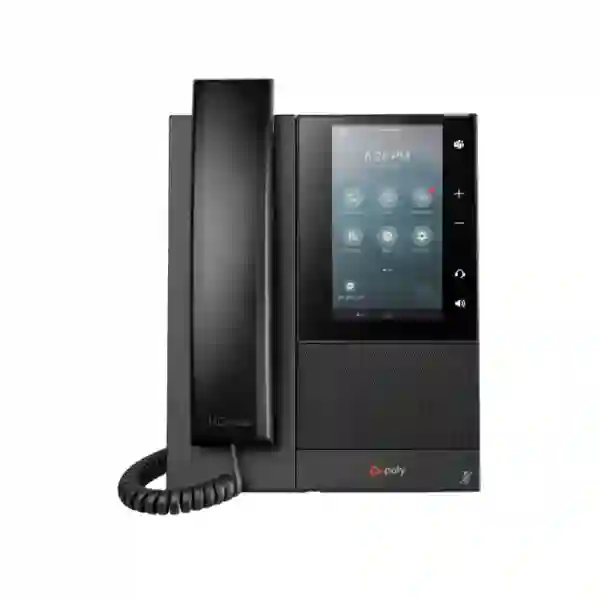
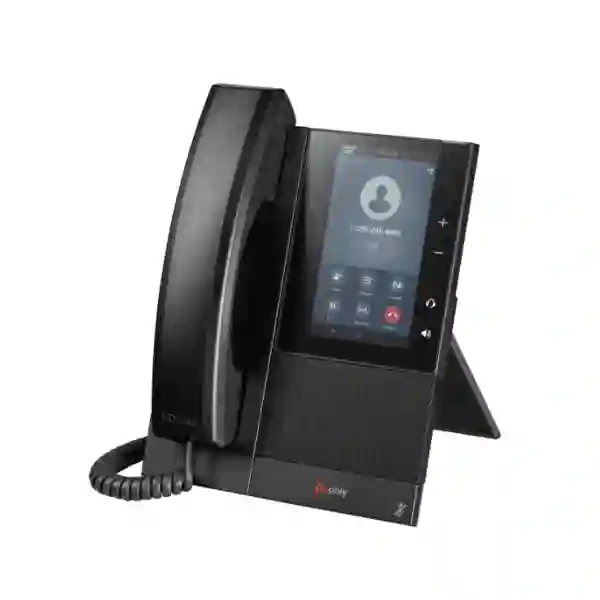
HP Poly CCX 505 Wi-Fi Business Media Phone
Choose a desk phone that fits your calling service and workplace, not just your furniture. The CCX 505 offers a five-inch touchscreen, integrated Wi-Fi, Bluetooth 4.2 and Poly voice technologies for employees who need an accessible way to handle daily business calls. It is designed for managed communications environments and is available in Microsoft Teams and Open SIP configurations.
For an installation in Tanzania, the best first step is to verify the intended edition, headset requirements, wireless or wired connection and power bundle. This guide explains the capabilities, practical limits and questions to resolve before requesting a configuration-specific quotation.
Key features and what they mean
The HP Poly CCX 505 Wi-Fi Business Media Phone combines a modern touch interface with a familiar handset. Audio functions include Acoustic Clarity, Acoustic Fence and NoiseBlockAI, while ports allow several compatible wired and wireless accessory choices. Selecting the correct Teams or Open SIP edition is essential; neither the required telephone service nor optional accessories should be assumed to be included.
For wireless use, plan for a compatible power adapter and a managed network without a captive portal. On a suitable wired PoE network, the phone can receive electricity through Ethernet. These are distinct deployment modes and must be planned accordingly.
Technical specification snapshot
| Display | 5-inch colour multi-touch LCD |
|---|---|
| Wi-Fi | 2.4 GHz and 5 GHz; 802.11a/b/g/n in HP specifications |
| Bluetooth | 4.2 |
| Ethernet | 2 × 10/100/1000 Mbps RJ-45 |
| Peripheral ports | 1 USB 2.0 Type-A and 1 USB 2.0 Type-C |
| Headset | Wired headset connection and EHS accessory connection; confirm accessory support |
| Power | IEEE 802.3af PoE on supported wired setup; adapter for Wi-Fi |
| Software editions | Microsoft Teams or Open SIP; confirm intended configuration |
| SIP capability | Up to 24 registrations in HP specifications; not guaranteed concurrent calls |
Specifications describe HP’s documented product capabilities; exact firmware, accessories, service features and regional commercial terms need separate confirmation.
A business desk phone built around voice work
The HP Poly CCX 505 Wi-Fi Business Media Phone is a professional voice endpoint for businesses that still benefit from a physical phone on the desk. It brings a touchscreen interface, different audio connection options and integrated wireless networking together in a device that can sit beside a computer. The main value is not a long list of features: it is giving employees a readily accessible way to answer, place and manage calls without moving between multiple desktop windows.
A receptionist, administrator, manager or service employee may appreciate a dedicated handset or compatible headset. Whether the phone performs the precise workflow they need depends on the connected calling platform and its configuration. Before purchasing for a Tanzanian workplace, identify the intended service, the desk’s network access and the power source. A correctly specified phone is more useful than an attractive model chosen without checking compatibility.
Verified capabilities at a glance
HP describes a five-inch colour multi-touch LCD, integrated Wi-Fi and Bluetooth 4.2. For wired networking, the phone has two Gigabit Ethernet ports rated for 10/100/1000 Mbps connections. Peripheral choices include USB 2.0 Type-A and Type-C, a wired headset connector and an electronic hook-switch connection intended for a suitable optional accessory. The platform includes Poly HD Voice, Acoustic Clarity, Acoustic Fence and NoiseBlockAI technologies.
A PoE-enabled CCX 505 can receive electrical power from a suitable IEEE 802.3af source when connected over Ethernet. An external power adapter is required for wireless network use when PoE is not supplying power. HP lists up to 24 SIP registrations in its product specifications, but this does not mean that 24 concurrent conversations or phone numbers are included. The chosen service and edition determine what calling features are usable.
Confirm Teams or Open SIP before ordering
There are different CCX 505 configurations intended for different calling environments. The Microsoft Teams edition is relevant to organisations using Teams Phone and its supported management framework. The Open SIP edition is relevant to suitable SIP-based telephone services and IP PBX systems. These are not interchangeable assumptions on a purchase order. The quotation should identify the required version explicitly, even where both versions look similar on the desk.
For Teams, check current Microsoft certification guidance, software requirements, tenant policies and licensing with the organisation’s administrator. For SIP, check registration, supported firmware, secure signalling and individual PBX features with the provider. A phone may be capable of placing a call while other requested features such as transfer behaviour or voicemail integration still require configuration. Always arrange a realistic pilot for a larger deployment rather than interpreting the edition label as a universal compatibility guarantee.
Where integrated Wi-Fi helps
Wi-Fi is the distinguishing installation advantage of the CCX 505 over the related CCX 500. A team can consider placing a phone at a reception counter, secondary desk or temporary work area where there is no convenient network outlet. This is helpful when office layouts change and adding another Ethernet cable is undesirable. The network still needs to be reliable enough for real-time voice, with sufficient coverage and an appropriate security configuration.
Check the position where the phone will actually be used, not merely whether the general office has wireless internet. Building materials, access point congestion, interference and the number of connected users all affect the experience. A wireless connection that handles email or web browsing well may still produce poor voice during a busy period. Include a test call under realistic conditions before approving a wireless installation, particularly for employees who rely on incoming customer calls.
Important limitation: Wi-Fi does not power the phone
The CCX 505 is not a battery-operated cordless handset. Integrated Wi-Fi changes how it connects to the network, not how it receives electricity. HP’s documentation states that when the phone uses Wi-Fi rather than a PoE-powered Ethernet connection, a compatible power adapter is needed. Do not assume the adapter is included with every PoE-only configuration. Power should appear as a separate item in the purchasing checklist.
A wired installation can use a suitable PoE switch or injector, but the surrounding equipment must also be powered. If an office needs calls during an outage, examine the router, access point, network switch and upstream voice service as well as the desk phone. A backup supply that keeps only the handset illuminated is insufficient when the broader communication path is unavailable. Power planning needs to reflect the exact installation mode.
Wi-Fi and Ethernet are separate network choices
HP’s administrator guidance explains that enabling Wi-Fi disables Ethernet as the phone’s network connection. The phone cannot use both interfaces simultaneously for active network access. This detail matters if a workstation design assumes a computer will use the phone’s Ethernet pass-through while the handset relies on Wi-Fi. Do not build that assumption into a deployment plan without confirming the desired topology and supported operation.
In a wired office, the available Ethernet ports may be useful within a suitably configured voice and data network. In a wireless office, the computer requires its own connection plan and the phone needs an approved power adapter. The network administrator should document which mode each location uses. Switching modes during a rollout may change IP settings, authentication and the support procedure, so the choice belongs in the design rather than being left to the person who unboxes the device.
The five-inch touch interface
A colour multi-touch display gives staff a visual method for navigating supported call features. Calls, contact information and other available functions can be accessed without depending entirely on physical key sequences. For a desk employee who is also working in customer records or scheduling software, a dedicated screen provides a consistent place to view the communication task. The familiar handset remains available when preferred.
What appears on the screen depends on whether the phone is configured for Microsoft Teams or an Open SIP environment and on which functions the provider makes available. Do not promise an identical interface or feature set across editions. In a pilot, ask typical users to find contacts, make an external call, answer a second call and retrieve voicemail. The advantage of touch controls becomes clear when these common tasks are straightforward in the business’s actual system.
Poly audio and the realities of call quality
HP lists Poly HD Voice and Acoustic Clarity technology as part of the CCX 505 audio design. Its published features also include full-duplex operation, acoustic echo cancellation and noise reduction. These technologies are intended to improve everyday speech communication through the handset and hands-free modes. They can be especially useful for employees who spend much of the day discussing customer requests or coordinating colleagues.
Audio performance is not determined by the phone alone. The remote caller’s microphone, chosen codec, service platform, internet route and condition of the local network can all affect clarity. Test external and internal calls using the real service rather than relying on a demonstration in isolation. An expensive phone cannot remove packet loss or prevent every environmental interruption. The sensible approach combines appropriate audio hardware with well-designed voice networking and good microphone practice.
Acoustic Fence and NoiseBlockAI serve different needs
Poly Acoustic Fence is described by HP as reducing distracting background sounds when a handset or wired headset is used. Poly NoiseBlockAI is associated with reducing many background sounds when using speakerphone. The difference is worth understanding before equipping a busy team. Staff at an open reception area may need a compatible wired headset, whereas a manager in a private office may occasionally prefer the hands-free speakerphone.
These features are not a guarantee of a silent environment. If callers can hear conversations from nearby desks, improve the room layout and microphone placement as well as the equipment. Use headset trials where speech privacy and concentration matter. Speakerphone should not be the default choice for confidential conversations that other workers might overhear. A good deployment matches a user’s preferred audio path with the physical setting and the type of call.
Bluetooth, USB and wired headset choices
The CCX 505 includes Bluetooth 4.2 for compatible wireless headset use. HP also specifies USB Type-A, USB Type-C, an RJ-9 headset connection and an electronic hook-switch port for an appropriate optional accessory. These options let organisations plan for staff who answer calls while typing, prefer a traditional handset or need a comfortable headset for extended conversations. Supporting several connection types can also help a business maintain a consistent desk-phone model across roles.
Not every headset and control function is guaranteed to work with every device build. Confirm the exact accessory model and whether features such as remote answer, call end and mute are supported. Some wireless headsets need their own charging arrangements or additional adapters. Where staff already have headsets, use one sample CCX 505 to verify the full interaction before placing a department-wide order. Accessory compatibility is a purchasing fact to establish, not a feature to infer from a connector shape.
Speakerphone and room suitability
The full-duplex speakerphone is practical for hands-free desk conversations and brief discussions where a user needs to consult papers or a computer. Noise processing can help with ordinary room sounds, but the device is still designed primarily as an individual business desk phone. A large boardroom with distant participants may require a purpose-built conference audio system rather than asking a desk speakerphone to cover the entire room.
Evaluate the surrounding environment. Hard reflective surfaces, nearby conversations and long microphone distances can reduce intelligibility. In a small private office, the phone may suit a user’s routine hands-free calls. At a public-facing counter, a headset may provide better consistency and greater privacy. Employees should know how to change between handset, speakerphone and headset and how to check the selected audio route. Everyday usability is strongest when the team has tested these modes with the exact calling service.
Microsoft Teams calling requirements
Selecting the Teams edition does not automatically supply the underlying Microsoft service, tenant setup, phone number or user licence. The organisation needs to confirm its Teams Phone requirements and current supported device software. Microsoft maintains guidance about certified hardware and device operation, and the IT team should review that information when planning procurement and software updates. Features available to an individual user can differ from those available to a shared phone.
Decide whether the device belongs to a particular employee, reception point or shared workspace. That decision affects sign-in, privacy, call history and licence planning. Administrators should test the actual policy for external calls, directories, call transfer and meeting-related features where supported. Do not assume that a generic Teams description covers every tenancy or subscription. A properly configured endpoint should be evaluated as one part of the organisation’s broader Microsoft communication architecture.
Open SIP calling requirements
The Open SIP configuration is designed for relevant SIP-based services. HP lists up to 24 SIP registrations as a technical capability, but actual call capacity, associated numbers and line presentation depend on the PBX, service provider and configuration. There is no basis to treat those registrations as 24 simultaneous calls. Explain the intended number of extensions, main numbers, line appearances and incoming-call routes when selecting the platform.
An IT administrator should confirm supported firmware, authentication, provisioning, codec negotiation, transfer functions, caller identification and voicemail signalling. Different PBX systems implement optional or proprietary functions in different ways. If a business depends on particular queues, shared lines or feature codes, make these part of a real integration test. The Open SIP edition is an appropriate starting point for compatible environments, not an unconditional guarantee that every SIP platform and feature will work without adjustment.
Wireless bands and local settings
HP specifies 2.4 GHz and 5 GHz Wi-Fi capabilities using the 802.11a, b, g and n standards. Do not describe this phone as supporting Wi-Fi 6 or 802.11ac without manufacturer evidence. An administrator must consider country-specific radio operation and available channels. HP recommends configuring the relevant country of operation; the device’s wireless behaviour and available bands can depend on that setting and local requirements.
For a Tanzania installation, apply the appropriate approved wireless configuration and check regulatory requirements with responsible local parties where necessary. A printed international specification should not be converted into an unsupported claim of local equipment approval. Test the actual access point setup, authentication method and wireless signal at the desk. Where a network includes both corporate and guest SSIDs, use a suitable managed business network for voice and ensure it does not require a browser login.
Captive portals are not supported
Some hotels, guest networks and shared buildings provide Wi-Fi only after the user opens a web page and accepts terms or enters a temporary code. HP’s administrator documentation says the CCX 505 does not support these captive-portal networks. A strong wireless signal in such a location therefore does not mean the handset can be registered and used. This restriction should be checked early for temporary offices and shared sites.
Ask the wireless administrator whether the required SSID supports an authentication method compatible with the phone. Do not bypass enterprise security simply to make a test call. If the intended wireless arrangement cannot support the device, consider an appropriately managed wired connection or another phone choice. A small compatibility check at the start can prevent a larger project from failing after the devices have been supplied and physically placed.
Network quality and call stability
Voice traffic is more sensitive to delay, jitter and dropped packets than many ordinary data applications. A web page might load successfully even when voice calls sound clipped or delayed. The network team should examine Wi-Fi congestion, access point placement, routing, switching and internet connectivity. Appropriate quality-of-service policies can help when supported end to end, but a single QoS setting does not eliminate interference or an overloaded service connection.
Run trial calls during working hours and under expected load. Check calls to both internal destinations and external numbers through the intended service. If the business uses cloud calling, include the quality of the upstream route in the assessment. If it uses a local PBX, consider the relevant local network and trunk connection. Reliable communications require end-to-end testing rather than a speed-test result or advertised Wi-Fi coverage map alone.
Security and administrative controls
HP publishes security-related capabilities such as 802.1X authentication, TLS, SRTP, HTTPS provisioning and encrypted configuration files. Whether a deployment actually uses these mechanisms depends on the phone profile, supported provider, certificate setup and network design. They should be checked within the entire voice system rather than presented as automatically protecting every call under all circumstances. Enterprise IT may also need to consider VLAN design and administrative access rules.
Use an agreed device-management policy. Keep a record of assigned handsets, restrict configuration access, update software through approved procedures and reset phones appropriately when they change users. For a shared-area device, decide how call history and account information are handled. For a SIP environment, coordinate security settings with the PBX and provisioning server. For Teams, align the device with the organisation’s tenant and management policies. Security is an operational process, not simply a product label.
Provisioning, updates and support readiness
Before installing multiple phones, determine how each one will receive settings and how the business will maintain those settings after a software update. HP provides administration documentation for the CCX family in both Teams and Open SIP contexts. An instruction designed for one firmware release or profile may not be suitable for another, so record the actual release in use before following a configuration procedure.
Build a documented standard configuration including network mode, country, time settings, account assignment, calling profile and headset integration. Keep a tested spare or a recovery procedure for a failed device. Where a support provider manages the system, clarify which changes the provider handles and which belong to local IT. A repeatable provisioning process improves consistency across desks and reduces the need for each employee to interpret technical options during the first day of service.
Pilot testing before a wider rollout
Use one device of the exact intended edition, power bundle and software profile. Verify that it turns on, joins the chosen network, reaches the calling service and signs in or registers correctly. Test incoming and outgoing external calls, internal calls, transfers, hold, voicemail and headset functions where those are part of the workflow. Include several call durations and realistic network conditions rather than performing only one quick dial test.
Then examine what happens after a reboot, internet interruption or wireless change. A support checklist should distinguish a power failure from a network problem or a service registration issue. Ask a normal employee to perform the main tasks without an administrator beside them. Their experience may reveal interface or training issues not visible in a technical lab. Only after the pilot meets the organisation’s needs should it become the reference build for additional workstations.
Reception and customer-service desks
A receptionist may need to answer a shared number, place a call on hold, transfer it to a colleague and locate a directory entry quickly. A dedicated desk phone can be valuable while their computer is occupied with visitor records, scheduling or other customer information. The touchscreen, headset connections and available calling features make the CCX 505 a candidate for this role, provided the service supports the required functions.
Write down the actual call flows before choosing the phone. Determine whether the employee handles a queue, needs multiple appearances, sees presence information or operates under a shared login. Test these functions on the chosen Teams or SIP system. A product description cannot guarantee that a particular PBX feature is available. For a busy counter, also check microphone privacy, headset comfort and the power arrangement; these day-to-day details can matter more than a specification line.
Managers and private offices
A fixed phone suits professionals who want an accessible business calling device next to their laptop or desktop monitor. The CCX 505 provides the option of a handset, a compatible headset or speakerphone. Its screen stays dedicated to communication tasks while the user works in other applications. Integrated Wi-Fi may be useful for an office with reliable wireless coverage but no conveniently positioned data outlet.
Confirm the professional’s specific calling identity and preferred workflow. Does the role need external calling through Teams, a personal SIP extension, shared-line access or frequent headset use? If video meetings or a larger interface are central, consider those requirements separately rather than assuming this desk phone covers them. The right selection is one that fits frequent voice tasks and the existing communications platform, not one chosen simply because it belongs to a particular product range.
Branches, shared spaces and temporary desks
Small offices and flexible work areas sometimes lack structured cabling at every possible desk. The CCX 505’s Wi-Fi connection can make a phone location easier to change, provided electrical power and a managed wireless network remain available. This does not make the phone a mobile cellular device. Moving the handset between locations may also require network reconfiguration, account verification and testing before it is ready for business calls.
A branch needs to consider the entire service path. A single internet router, access point or upstream circuit can become a point of failure. Shared desks raise additional questions about account sign-out, privacy and call history. Agree on who signs in, who maintains the device and how users reach urgent contacts when the primary calling platform is unavailable. A practical deployment plan should cover those operational questions alongside device purchase.
Office power continuity
Business desk phones are often expected to be ready whenever staff are at work. A wired PoE deployment depends on the switch or injector supplying power and on the network continuing to operate. A Wi-Fi deployment needs power for the handset through its adapter and for the relevant access points, router and wider service. If any necessary component fails, the phone may be unable to complete calls despite appearing to have power.
Where business continuity matters, decide what must operate during a local outage. A UPS may be appropriate for selected network equipment, but its capacity and runtime need to be calculated for the particular site. Verify the upstream service provider’s behaviour and maintain an alternative emergency communication procedure. Avoid claiming guaranteed uptime or emergency calling simply from the handset’s hardware specification. Reliability is designed across the complete system.
Compare CCX 500, CCX 505 and CCX 600
HP presents the CCX 500 and CCX 505 as mid-range touchscreen desk phones. A meaningful distinction is that the CCX 505 incorporates Wi-Fi, whereas the CCX 500 does not. If a desk already has a suitable Ethernet connection, assess whether wireless capability changes the purchasing decision. If a desk location is difficult to cable, the CCX 505 can be more convenient when its external power requirement is addressed.
The CCX 600 is positioned higher in the family with a larger seven-inch screen. That extra screen space may suit different users, but neither a larger display nor Wi-Fi fixes poor voice routing, insufficient licensing or unsupported PBX features. Compare the actual calling edition, desk-space needs, accessory compatibility, provisioning approach and intended user tasks. Product suitability is about the complete workflow, not simply the number printed after CCX.
Package contents and accessory assumptions
HP’s PoE-enabled configuration documentation lists the handset and cord, console, stand, network cable and setup information among the standard contents. Do not treat that list as a guarantee that every regional package includes a mains adapter, headset, wall mount or electronic hook-switch accessory. Ask for the exact quotation bundle. For a Wi-Fi deployment, the compatible external power adapter must be accounted for explicitly.
If the business needs headsets, verify the models against the intended phone software and connector method. If wall mounting is preferred, check the proper hardware rather than improvising a bracket. For multiple desks, inspect one complete sample kit for cable routing, socket access and ergonomic fit. Confirm what is included before the installation date so the team is not left with powered-off phones because a necessary accessory was omitted from the order.
Practical guidance for buyers in Tanzania
Start with the workplace’s real constraints: how many users need dedicated phones, which calling service is already in use, and whether the desks have Ethernet and stable electricity. Confirm the location’s internet and Wi-Fi readiness rather than assuming conditions are the same across every office. Where the platform is not yet chosen, determine the telephone system design before committing to a particular desk phone edition.
Tanzania-specific price, stock, tax, local approval, import status, warranty treatment or delivery conditions should be confirmed for the exact offer by the responsible supplier and authorities. International manufacturer literature can validate technical specifications but does not establish those local commercial details. A clear request for quotation should state quantity, Teams or Open SIP version, wired or Wi-Fi use, power requirements, headset preference and any essential calling functions. This allows a more accurate offer without inventing promises.
Questions procurement should resolve
The purchase request should name the specific phone edition and the service to which it must connect. It should also say whether the handset will use Wi-Fi or Ethernet, whether PoE is available, and whether an adapter is part of the required package. List any headsets, mounts or other accessories and check the support policy for them. These details prevent confusion between variants and optional items.
For a fleet purchase, ask how devices will be provisioned, tested, updated and supported. Confirm platform compatibility on a sample phone rather than relying on a generic statement that the device supports business calling. Record expected call volumes, user roles and feature requirements. Finally, request local commercial terms in writing. Technical fit, correct accessories and a sensible support process contribute to a successful deployment more than an unqualified claim that a phone works everywhere.
Problems to avoid during installation
A common mistake is assuming that a working wireless network necessarily supports the phone. Captive portals are not supported, and Wi-Fi coverage or interference may still make calls unreliable. Another is expecting Ethernet and Wi-Fi to serve as simultaneous network links. HP’s guidance does not support that design. A third mistake is assuming that Wi-Fi removes the need for a power adapter; it does not.
Other problems arise when a Teams version is ordered for an unrelated SIP environment or when headset compatibility is left until after delivery. Treat each of these as a verification point in the pilot. If call transfers, voicemail or directory functions do not behave as expected, first inspect the platform’s settings and permissions rather than replacing the handset. A well-documented test process helps distinguish product limitations from network and service configuration issues.
Troubleshooting a phone that does not register
First check whether the device has the expected power source and is using the intended network mode. For a wired setup, verify Ethernet cabling, link status and switch provisioning. For Wi-Fi, examine the SSID, authentication method, signal strength, country configuration and whether a web login page is required. A phone can have power and a network connection yet still be unable to reach the registration service.
Next review the assigned Teams account or SIP credentials, current firmware, time settings and relevant network rules. For poor calls, test several destinations and audio paths before changing settings. Record the results so IT can identify whether the issue follows one user, device, room or network segment. The objective is to isolate the failing part of the communication chain, not to make several untracked changes that complicate diagnosis.
When another type of device is a better fit
The CCX 505 is a desktop voice phone, not a cordless cellular device and not a dedicated meeting-room conference system. Someone who needs to walk through a warehouse while taking calls may require another endpoint. A large boardroom may need microphones and speakers designed for group coverage. A business that relies on web-authorised guest Wi-Fi may need to change the network arrangement or select equipment suited to that environment.
Consider the CCX 505 when a fixed desk position, touchscreen call controls, flexible audio accessories and optional Wi-Fi are genuinely useful. It can be a strong fit for voice-centric staff when properly configured, but it is not a shortcut around service licences, secure administration, adequate electricity or reliable internet. Stating the limitations openly helps the buyer make a more durable decision.
Frequently asked questions
Does the Poly CCX 505 have integrated Wi-Fi?
Yes. HP specifies built-in Wi-Fi supporting 2.4 GHz and 5 GHz operation under relevant 802.11a/b/g/n modes. Actual operation depends on country settings and the local business network. This makes the model useful for offices where a dedicated Ethernet connection is inconvenient, but wireless coverage and security must still be tested.
Can I use the phone over Wi-Fi without a power adapter?
No. Wireless network access does not supply electricity. An approved external power adapter is required when the phone is using Wi-Fi and is not powered by Ethernet PoE. Ask whether the exact package includes that adapter, since a PoE-only offer should not be assumed to include every optional accessory.
Can Wi-Fi and Ethernet connect at the same time?
No. HP’s administrator documentation says that Wi-Fi operation disables Ethernet as the phone’s active network connection. Plan one network mode for the phone. If a computer is located at the same desk, arrange its network access separately rather than assuming the phone bridges a wireless connection into the PC.
Will it join guest Wi-Fi that needs a browser login?
No. The CCX 505 does not support Wi-Fi captive portals that require web authorisation. Ask the network team for a suitable managed wireless SSID with supported credentials and security settings. Test voice calls at the intended location and during normal working conditions.
What is different about the Teams and Open SIP editions?
They are intended for different communications environments. The Teams edition belongs in a verified Teams Phone deployment; the Open SIP edition is intended for suitable SIP systems. Do not choose by appearance alone. Confirm the correct version, current software compatibility and the necessary service licences or provider features before ordering.
Is Teams Phone service included in the purchase?
A hardware quotation should not be interpreted as including telephone numbers, Teams Phone entitlements, operator connectivity or any particular cloud subscription. Those arrangements belong to the organisation’s Microsoft service configuration. The administrator should verify licensing, sign-in policy, call routing and supported phone firmware for the intended users.
Can the Open SIP phone work with any IP PBX?
Compatibility must be confirmed with the specific PBX and provider. SIP registration alone does not guarantee that transfer, shared lines, directories, security or voicemail behave as required. Check the supported firmware and provisions, then pilot common call flows on the exact installation environment.
How large is the touchscreen?
The CCX 505 features a five-inch colour multi-touch LCD. The visual controls depend on the selected phone edition and its application profile. It is designed for everyday business calling tasks; it should not be described as a stand-alone video conferencing solution.
Does the phone support wireless headsets?
Bluetooth 4.2 is integrated, and HP lists compatible headset use. USB and dedicated wired headset connections are also available. Confirm a particular headset’s compatibility and any adapter or charging requirement. Remote call-control features can depend on headset model and software.
Does the CCX 505 support Power over Ethernet?
Yes. HP specifies IEEE 802.3af PoE for its PoE-enabled configuration when a suitable wired network connection supplies it. That is distinct from Wi-Fi operation, which needs an external power source. Check the switch, injector, cabling and precise product bundle.
Does 24 SIP registrations mean 24 simultaneous calls?
No. HP lists 24 SIP registrations or lines in device specifications, but this does not provide 24 telephone numbers, simultaneous conversations or user licences. Actual behaviour is determined by the IP PBX, service plan, configuration and associated permissions.
Is it suitable for reception and customer service?
It can suit a fixed reception position with suitable call-routing service, touchscreen controls and a compatible headset. The important test is whether the selected platform supports the main number, transfer rules, directory and queue functions needed by that reception team. Pilot the complete workflow before ordering multiple units.
How does it differ from the CCX 500?
Integrated Wi-Fi is the key distinction: HP says the CCX 500 does not support Wi-Fi, while the CCX 505 does. For a desk with established Ethernet, review whether wireless capability is needed. For a hard-to-cable location, factor in the CCX 505’s external power requirement.
What is required for a reliable Wi-Fi call?
Check wireless signal, access point capacity, compatible authentication, interference and the quality of the voice service connection. Test during normal busy periods. An ordinary web speed test is not enough to establish low packet loss and stable voice performance. A dedicated pilot is valuable for critical desks.
Is the listed handset a conference-room system?
No. Its speakerphone is suited to individual desk use and some short hands-free conversations, but large rooms or many distant participants may benefit from specialised conferencing equipment. Consider room acoustics, privacy and microphone distance before relying on a desk speakerphone for group meetings.
What must be included in a Tanzania quotation request?
Specify quantity, Teams or Open SIP edition, PBX or service provider, wired or wireless deployment, need for a power adapter, preferred headset and any essential calling functions. Ask the supplier to confirm exact contents, local availability, price and commercial terms for that offer rather than using unrelated international pricing.
Does the page guarantee stock, price or local approval?
No. A technical product description does not verify Tanzanian stock, pricing, delivery, import treatment, regulatory approval or specific warranty entitlement. Each should be checked for the exact product configuration with the responsible supplier or authority before purchase.
Request your CCX 505 configuration quote
Tell FourTeck Tanzania how many phones you require, whether you use Microsoft Teams or Open SIP, and whether each desk needs Wi-Fi, PoE, a power adapter or a headset. Share important call-handling requirements so the correct edition and accessory bundle can be confirmed.
Next step: Request a configuration-specific quotation. Confirm actual local price, availability, delivery and support terms for the exact offer before proceeding.




Reviews
There are no reviews yet.