
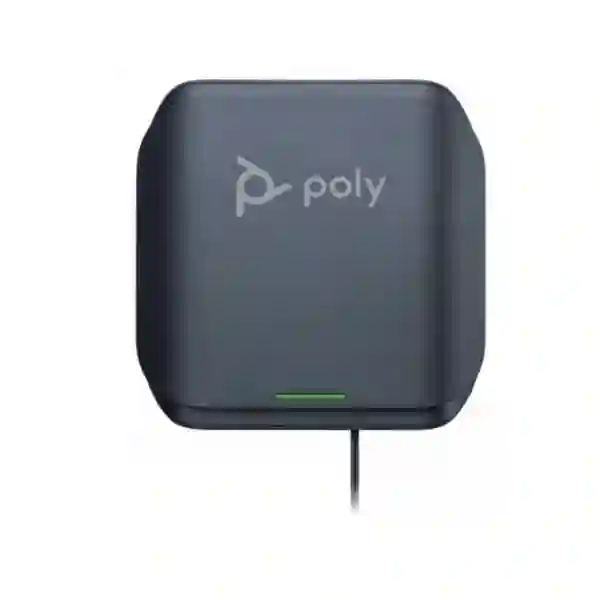
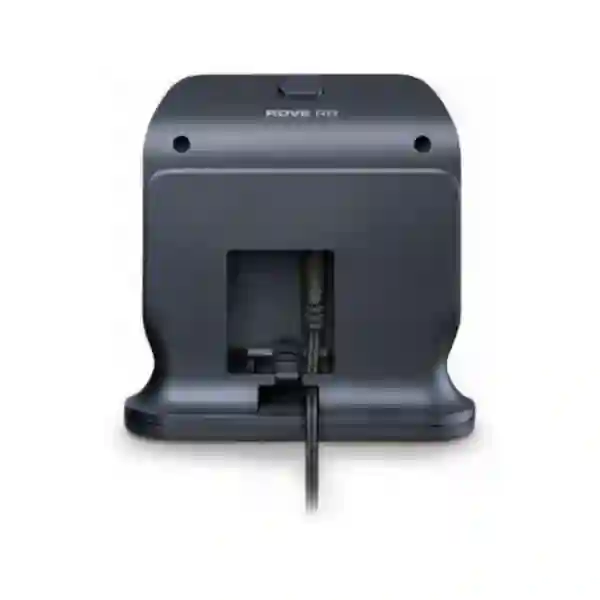
HP Poly Rove R8 DECT Repeater
Extend compatible Poly Rove cordless telephone coverage into harder-to-reach work areas without confusing radio extension with additional telephone lines. The Rove R8 is intended for businesses that need supported DECT handsets to remain connected as staff move through offices, hospitality premises, stockrooms and other operating environments.
Before choosing a repeater for Tanzania, check the installed Rove base station, expected simultaneous calls, physical obstacles and the correct regional radio variant. The most effective purchase starts with a defined coverage problem and ends with a tested solution, not merely a published range number.
Published indoor range, up to, under suitable conditions
Published outdoor range, up to, under suitable conditions
Supported Rove base-station family, model limits apply
Verified specifications at a glance
| Product type | DECT coverage repeater for compatible Poly Rove systems |
|---|---|
| HP global catalog reference | 84H79AA; regional ordering variant must be confirmed |
| Typical base-station family | Poly Rove B1, B2 and B4, subject to supported configuration |
| Published radio reach | Up to 50 m indoors; up to 300 m outdoors, environment dependent |
| Paired repeaters per base | B1: up to 3; B2: up to 6; B4: up to 3 |
| Cascade arrangement | Up to 3 repeaters, where supported and correctly configured |
| Audio call capacity | Up to 2 wideband or 5 narrowband simultaneous calls per repeater in documented configurations |
| Power information | External 5 V / 2 A DC adapter; quick-start documentation also references PoE |
| Operating conditions | -10°C to +55°C; published humidity range 5–95% |
| Product weight | 166 g, according to HP product specifications |
| Regional DECT frequencies | Different variants exist; confirm suitability for Tanzania before supply |
Published maxima describe manufacturer capabilities, not a guaranteed result for a particular premises or confirmation of local regulatory approval.
What to confirm before ordering
- Exact Rove base model, registered handset types and firmware versions
- Weak-signal locations, building layout and available mounting positions
- Peak simultaneous calls and whether a repeater or another base is more suitable
- Regional frequency variant and applicable Tanzania regulatory requirements
- Quotation scope, power accessories, testing and handover responsibilities
The buying decision: solve a coverage gap, not every phone problem
The HP Poly Rove R8 DECT Repeater is intended for organisations that already use, or are designing, a compatible Poly Rove cordless business telephone system and need a handset to remain connected beyond the practical reach of its base station. In a workplace, a signal gap often appears at the far end of a corridor, behind a reinforced wall, in a storeroom or between adjoining operational areas. A carefully positioned repeater can extend the radio footprint without asking people to abandon their existing Rove handset workflow.
It is important to distinguish a coverage problem from a capacity or network problem. An R8 improves the wireless path between a Rove handset and its DECT system; it does not automatically add new SIP accounts, increase the internet connection speed or repair an unstable telephone service. Buyers should identify the precise location where calls become unreliable, check the installed base model and determine how many people will be speaking at the same time. That information turns a product enquiry into a practical deployment plan.
What the Rove R8 actually does
A DECT repeater receives a suitable radio signal within the compatible Rove environment and extends the usable wireless area for registered handsets. Think of the R8 as an additional coverage point within an existing cordless-voice system, rather than as a new telephone, wireless router or standalone IP PBX. Staff continue to use their supported Rove handsets, while the properly configured system manages wireless mobility as they move across its coverage footprint.
Because the repeater belongs to a particular product ecosystem, choosing the matching system matters more than simply matching a broad label such as DECT. A generic wireless extender, a Wi-Fi range booster or an unrelated cordless-phone repeater should not be assumed interchangeable. For a new purchase, check the exact base station, handset family, firmware support, power arrangements and regional radio variant. A technically compatible repeater can still perform poorly when installed where the incoming DECT signal is already weak.
Indoor and outdoor range: interpret the figures correctly
HP identifies an indoor coverage figure of up to 50 metres and an outdoor figure of up to 300 metres for the Rove R8 under suitable conditions. These are potential radio ranges, not guaranteed distances for every building. Indoor and outdoor figures describe very different propagation environments, and neither should be multiplied blindly by the number of repeaters. Walls, doors, shelving, equipment and the layout between the base, repeater and handset influence the usable result.
A buyer comparing published figures should also know that Poly site-planning documentation uses more conservative working distances for planning examples. Use the headline specifications to understand the product category, then rely on an on-site signal assessment to place equipment. The best repeater location usually has a strong connection back toward the Rove system and reaches the intended weak-signal area. Positioning it at the extreme edge of a failing signal can extend a poor connection rather than create a dependable one.
Poly Rove B1 compatibility and limits
For an installation with a Poly Rove B1 single-cell base station, HP describes support for up to three paired Rove R8 repeaters per base station. This makes the R8 relevant when a relatively compact cordless telephone system needs to reach a few additional rooms or an adjacent work area. The practical design still depends on the route of the signal, the handset count and the expected number of active calls.
Do not interpret a three-repeater allowance as a promise that every location can support three useful coverage extensions. Repeaters need adequate radio connectivity and must be positioned to serve a real requirement. If staff are using more concurrent calls than the base or repeater path can handle, a different system architecture may be preferable. Verify the B1 firmware, the handsets in use and the proposed topology before finalising quantities, especially when the installation is being expanded in stages.
Poly Rove B2 compatibility and limits
The Poly Rove B2 supports single-cell or dual-cell configurations, and HP documents up to six paired Rove R8 repeaters per B2 base station. That allowance offers a useful path for extending wireless reach where a business has an established B2 environment and a modest number of difficult rooms, aisles or circulation areas. The potential to use multiple repeaters should still be balanced against call demand and the physical path to each coverage point.
For buyers, the main question is not simply how many units the specification permits. Determine whether the area needs radio extension, another appropriate base station, or both. A dual-cell arrangement has design considerations beyond a simple repeating chain, and supported base models must be matched correctly. Place repeaters only after identifying real weak spots and checking that handsets can move between the relevant areas while maintaining useful signal and speech quality.
Poly Rove B4 compatibility and limits
The Poly Rove B4 is the multi-cell member of the family, intended for larger Rove deployments. HP documents support for up to three Rove R8 repeaters per B4 base station, with wider multi-cell capacity governed by the overall supported system design. The R8 can help extend coverage into peripheral areas without treating every difficult corner as a reason to install a new base station.
B4 customers should pay particular attention to the relationship between the repeater and the wider radio-cell design. A repeater addresses coverage in a local area, whereas additional coordinated base stations may be a better response when a large workforce needs more system capacity. An experienced installer should map traffic, radio overlap and handset movement before selecting the combination. Do not apply B2 repeater counts to B4 or assume that equipment from different base families can be combined without restriction.
Radio coverage and simultaneous calls are separate specifications
An R8 can help someone place or receive a call farther from the base station, but the repeater has a finite number of calls that can pass through it simultaneously. HP administrator documentation describes up to two simultaneous wideband calls or five narrowband calls per repeater in supported configurations. These figures depend on audio mode, configuration and system limits; they are not additional independent SIP lines included with the hardware.
This distinction matters for reception teams, stockroom staff or operations groups where several people may enter the extended coverage area together. Ask how many users could be speaking through the same repeater at the busiest moment. A location used by one roaming supervisor can have very different requirements from a crowded shift-change area. Specify both coverage and concurrent voice traffic so that expanded reach does not introduce an avoidable bottleneck during busy hours.
Call handover and uninterrupted staff movement
Poly Rove documentation describes automatic call handover within a properly configured Rove deployment. In practice, this feature is useful when a person carries a supported cordless handset from a near-base area into an area served by a repeater. The commercial value is straightforward: staff can remain reachable as their work takes them away from a desk or a single fixed location.
Handover still requires planning. Test a real voice call while walking through every intended transition, including doorways, stairwells and corners. Note where speech becomes distorted, pauses or drops. If a boundary is unreliable, consider radio coverage, repeater placement and system configuration together rather than concluding that a handset is defective. Good handover is an outcome of compatible equipment and a validated installation, not a guaranteed result of placing a repeater anywhere with electrical power.
Cascade mode: useful but not unlimited
HP describes encrypted cascading, sometimes called daisy-chaining, for up to three repeaters in supported Poly Rove configurations. Cascading allows coverage to be planned beyond an initial repeater where the supported topology and incoming radio conditions make that feasible. It may be useful in a long facility or along a route where another suitable base-station location is difficult to arrange.
However, each link in a repeating chain must be designed with signal quality and call traffic in mind. The fact that the manufacturer supports a cascading arrangement does not mean three units automatically deliver three times the usable distance. Before using a chain, map the route, consider likely concurrent calls and identify where the original signal can be received reliably. A professionally planned additional base station can be more appropriate when broader resilience or larger traffic capacity is the real requirement.
Why a Wi-Fi extender is not a substitute
An R8 extends DECT voice coverage for compatible Rove handsets. A conventional Wi-Fi extender addresses a different wireless technology and does not become a Poly Rove DECT repeater merely because both devices are described as range extenders. Buyers searching for a telephone repeater should therefore establish the actual handset and base-station technology before comparing prices or mounting requirements.
This distinction can prevent a frustrating purchase. A business may have excellent Wi-Fi in an area where a cordless DECT telephone struggles, or the reverse. The two radio systems use different equipment and design rules. Ask the IT team whether the affected calls are carried by Poly Rove DECT handsets, Wi-Fi calling devices or ordinary mobile phones. If the affected product is not a compatible Rove DECT handset, the R8 should not be presented as a universal coverage fix.
Use the floor plan before ordering hardware
Mark existing Rove base-station locations and the parts of the building where handset performance is weak. Include corridors, individual rooms, service areas, loading points and the normal movement routes of staff. For each area, record whether the reported problem is loss of registration, poor audio, call dropout or an inability to connect a call at busy times. These observations lead to different technical responses.
A useful floor plan also captures floors, internal walls, large metal fixtures and likely installation points with safe power access. In a multi-floor premises, evaluate vertical movement rather than assuming coverage will spread evenly through ceilings. Poly’s site-planning guidance specifically recommends identifying coverage obstacles, peak activity, base-station needs and concurrent-call requirements. A basic annotated layout and a short handset walk test are often more valuable than purchasing several repeaters without an installation design.
Building materials can change the outcome
Reinforced concrete, steel structures, dense partitions and equipment-filled spaces can reduce or redirect radio signals. Even a small site can present difficult coverage conditions when a handset has to communicate across several structural barriers. Shelving and machinery may also change the radio environment when stock or operational equipment moves. For that reason, a distance measured on a plan is not necessarily a distance that will perform reliably in use.
A sensible installation process begins with representative working conditions. Check the route while doors are in their usual positions and while relevant equipment is operating. Do not test only in an empty room if that room is normally filled with people or stock. When a radio obstacle cannot be removed, moving the repeater to a better intermediate location may improve both its connection toward the base and the service available to a roaming handset.
Repeater placement: strong incoming signal first
The most distant location is not automatically the best mounting position. An R8 must receive a sufficiently good signal from its parent point before it can provide a dependable extension to staff. The best position is therefore often somewhere between the existing reliable service area and the area that needs attention. This creates useful coverage overlap rather than a fragile relay positioned inside an existing dead zone.
Consider mounting height, obstructions and access for maintenance. Test provisional locations before attaching the unit permanently. Check radio status using the device indications and the relevant management interface, then carry out live call tests in the intended service area. If the location cannot provide a stable backhaul radio path, adding a second repeater without addressing the first link may make diagnosis harder. Choose placement from evidence, not just convenience or the nearest electrical socket.
Power and physical installation planning
HP lists an external universal AC adapter rated at 5 V and 2 A DC in the Rove R8 product specification, and its quick-start documentation also references Power over Ethernet. The exact product kit, cabling and permitted powering arrangement should be checked against the regional hardware and current installation instructions before work begins. Do not assume an existing network socket or switch is automatically sufficient for every installation.
The device is described with desktop and wall-mounting arrangements, offering practical placement choices within a business environment. Check that power can remain available during the hours when staff need phone coverage, that cabling is protected and that the mounting location remains accessible for inspection. A repeater that loses power can remove the extended coverage area even when the wider telephone platform continues running. Local electrical safety and the supplied adapter variant should be confirmed before connection.
Package contents and product identification
HP’s published package information lists the repeater, a desk stand, a locally configured power adapter, a quick-start guide, safety documentation and wall-mount screws. The quick-start instructions refer to a base stand, USB power cable and adapter, with the included adapter varying by country. These descriptions are useful preparation references, but a quotation should confirm the precise kit offered in Tanzania instead of relying on packaging from another region.
The global HP product listing uses the reference 84H79AA for the Poly Rove R8. This is an HP catalog identifier, not a verified SKU for the particular FourTeck Tanzania listing. Buyers should request confirmation of the exact regional part number and compatible radio-frequency variant when obtaining a quote. Compare the shipped labels and documentation with the order specification before installation so the network team can register and support the intended device.
Understanding the frequency variant
Poly Rove R8 documentation distinguishes a North American DECT operating range of 1920 to 1930 MHz from a European, Australian, New Zealand and United Kingdom variant operating at 1880 to 1900 MHz. These are manufacturer-described variants, not evidence that either variant is automatically authorised for a deployment in Tanzania. The correct part must suit the base-station system and the applicable local spectrum requirements.
For a Tanzania purchase, ask the supplier to identify the actual regional product variant before payment and confirm the current regulatory position for the proposed installation. The Tanzania Communications Regulatory Authority publishes the country’s frequency-allocation framework, but the existence of a frequency allocation does not by itself certify a specific repeater or approve its importation and use. Do not substitute a frequency band printed on an overseas retailer listing for proper local verification.
Installing the repeater into an existing Rove system
A useful installation begins by documenting the existing base station, handsets, software versions and desired service area. Next, choose a candidate location where the Rove system is known to have adequate signal. Prepare the required power method, follow the current Poly Rove instructions to register the R8 to the compatible base or supported parent repeater, and confirm that the registration completes successfully.
The administrator should record the repeater’s identity and installation location, then verify its status after configuration. HP’s support materials describe repeater administration through the base-station management environment, although the exact menus can vary by software generation. Avoid relying on memorised menu names when updating a mixed-age deployment. Follow the documentation appropriate to the system version and verify the result through actual roaming calls, not only a successful registration message.
A practical post-installation test
Once the repeater is registered, carry out a structured walk test with the same model of handset that staff will use. Begin in the original base coverage area, move through the overlap zone and continue to the furthest required work point. During a live call, listen for interruptions and confirm that the handset maintains usable service. Repeat the route in both directions and across the normal doors and floor transitions.
Testing should include the busiest likely usage pattern, not only a single handset during a quiet period. Where the area needs several concurrent calls, test that requirement in a controlled way and review the system’s capacity limits. Document locations that remain marginal, the final equipment positions and any special environmental conditions. The outcome should be an operational coverage map that managers can recognise, rather than a vague promise that the entire building has been fixed.
Using status indicators for first-line diagnosis
The Rove R8 includes a status indicator intended to help installers understand registration and operating conditions. HP’s quick-start guide describes green, orange and red states, including indications associated with searching, registration and radio-signal quality. These signals are a practical starting point when a unit has power but a handset still cannot use the extended area reliably.
Interpret indicators according to the device’s registered or unregistered state and the documentation version that matches the actual hardware. An apparently healthy light cannot establish that every corner has acceptable voice performance or enough call capacity. Conversely, a marginal radio indication suggests checking placement and the link back to the system before replacing hardware. Record the normal operating indication for the finished installation so a future support technician has an easy reference.
Troubleshooting coverage without guesswork
If a handset still loses calls after an R8 is installed, first reproduce the problem at a known location. Determine whether the handset is properly registered, whether the repeater is linked to its intended parent and whether the parent area has dependable signal. Check power continuity, indicator state and any relevant system diagnostics. Move one variable at a time to avoid making a difficult problem harder to isolate.
When the issue occurs only during busy periods, consider simultaneous-call capacity and codec selection as well as radio reach. If multiple devices fail in the same location, focus on the common coverage path. If one handset fails while comparable devices continue working, check the individual handset configuration and condition. Escalate with recorded symptoms, topology, software versions and test results rather than assuming an additional repeater will correct every fault.
Firmware compatibility and long-term support
A Poly Rove installation should be maintained as a system rather than as unrelated handsets and accessories. HP publishes software and release information covering the Rove family, including the repeater and base stations. Administrators should check that installed firmware is supported for the intended configuration and follow a managed maintenance process when changes are necessary.
Before a firmware update or configuration change, record the current versions, identify the maintenance window and preserve the relevant settings according to the product documentation. Retest wireless registration, call handling and handover afterwards. For new procurement, confirm that the quoted R8 hardware is appropriate for the installed generation of Rove equipment. Software support is a compatibility issue to verify, not a reason to claim that every possible old and new Rove product combination works identically.
DECT security in the right context
HP describes DECT security features and encrypted cascading for the Rove R8. This is valuable for organisations considering voice mobility in work areas where ordinary business conversations may contain operational or customer information. The security story should be understood as part of a compatible, properly configured Rove telephone environment, not as a standalone guarantee that every communication path is secure under all circumstances.
An organisation should still apply appropriate credential management, access controls, firmware maintenance and network security to its telephone platform. If conversations are sensitive, clarify the security requirements for the wider PBX, handset provisioning, administration and any external call path. The repeater can extend the DECT coverage domain, but it does not replace the controls required elsewhere. Buyers comparing solutions should ask about secure deployment procedures as well as radio features.
For offices and multi-room workplaces
An office may have acceptable cordless phone service near reception but weak coverage in meeting rooms, rear offices or storage rooms. The R8 can be considered when the existing Poly Rove base and handset system otherwise meets the business’s needs. Teams benefit when mobile staff can take calls away from a particular desk without relying on an unrelated personal phone.
The first step is to identify exactly which work areas matter. A corridor that is used only to move between rooms is not the same priority as a back office where staff routinely take long calls. Estimate simultaneous use, check the existing base station and test the route. Where the business is adding many staff as well as rooms, compare repeater extension with base-station expansion so the selected design accounts for both capacity and mobility.
For hotels, lodges and hospitality premises
Hospitality staff may move between a front desk, back office, service corridor and operational area during a shift. A compatible DECT handset system can support this movement without relying on a fixed desk phone at every point. The Rove R8 may help extend coverage into a particular weak-signal zone, subject to the building’s materials, existing system architecture and a successful site survey.
Do not assume that a single repeater covers an entire lodge or a group of separated buildings. Outdoor spaces, concrete structures and changes in elevation can make the actual coverage map very different from a straight-line distance estimate. Focus the proposal on staff calling patterns and the areas where reliable voice access is operationally important. Confirm that the handset model, requested number of simultaneous calls and planned power locations suit the proposed installation.
For warehouses and retail backrooms
Warehouses and retail backrooms often contain metal shelving, moving stock and areas that are distant from the point where the base station was originally installed. A Poly Rove R8 can be evaluated as a way to extend the DECT footprint into selected working zones when compatible equipment is already in place. A roaming worker may then be able to remain reachable without returning to the front counter.
The exact aisle or loading position matters more than an attractive headline distance. Test the radio link with representative shelving and normal working conditions, including the movement route between the original coverage zone and the target. Consider whether several staff might be speaking simultaneously through the extension. If the problem spans a very large space or the number of active users is high, a broader base-station design may be more suitable than cascading multiple repeaters.
For clinics, schools and service facilities
In a facility where staff routinely move between rooms, keeping a compatible business handset reachable can simplify internal communications. Potential environments include service centres, education buildings and administrative sections of healthcare sites. The R8 should be considered only after confirming that the existing Poly Rove system supports the required handset workflows and that its installation can provide suitable radio coverage.
Careful planning is especially important wherever missed or interrupted communications would create an operational problem. A product’s normal voice-mobility capability should not be described as a certified life-safety, emergency-alert or clinical communications system without specific evidence. Organisations with critical calling requirements must evaluate redundancy, power continuity, service supervision and escalation procedures separately. A repeater extends a coverage area; it cannot remove every failure mode of a telephone platform.
Why more repeaters are not always the better design
Adding a repeater can be an efficient solution when the principal difficulty is a limited area beyond the reach of a working base station. It may be less appropriate where a business needs many additional concurrent calls, a larger number of registered handsets or a wide multi-building deployment. The system’s base-station and network architecture governs these wider requirements.
When deciding between one more repeater and another base station, compare coverage, capacity, available infrastructure and maintainability. A repeater requires an appropriate incoming radio link; a base-station expansion has its own network, power and supported system-design requirements. Neither option should be assumed cheaper or faster without a specific proposal. The aim is not to sell the most units but to create a reliable, understandable design that can be serviced and expanded as the workplace changes.
Planning for future expansion
A good initial deployment leaves room for normal organisational change. New shelves, office partitions, staff shifts and added rooms can alter both radio conditions and call traffic. When scoping an R8 installation, note possible future work areas, the base station’s remaining supported repeater allowance and the number of simultaneous voice users expected over time.
Document the final location and parent relationship of each repeater. This makes it easier to evaluate a second extension later without accidentally creating an unsupported topology. If the business expects substantial growth, consider whether a larger Poly Rove architecture would be more suitable from the outset. Future planning should not be built around a promise that published range or capacity figures will simply scale linearly; each significant change deserves a fresh assessment.
Power continuity and operational resilience
The extended coverage area depends on both the repeater and the wider Poly Rove environment remaining available. A loss of power at the R8, a base-station failure or an interruption in the upstream phone service can affect calling in different ways. The correct resilience plan therefore considers each layer, not just whether the repeater switches on after installation.
For sites where telephone availability is important, review the powering arrangement, protected cabling and any appropriate backup-power design with the responsible IT or facilities team. Do not assume a battery backup is included with the repeater. Confirm that staff have a documented fallback communication procedure for an unexpected outage. A reliable operating plan combines tested coverage, appropriate system capacity, configuration records and people who know how to report a fault.
Operating environment and installation conditions
HP publishes an operating temperature range of minus 10 to 55 degrees Celsius and an operating humidity specification of 5 to 95 percent for the Rove R8. These are device specification figures and do not mean the unit is waterproof, dustproof or suitable for unrestricted outdoor exposure. The intended mounting environment should be evaluated against the full safety and installation documentation.
For Tanzania premises, think about heat, dust, moisture, ventilation and the security of the chosen mounting point. A sheltered work area may be very different from a location exposed to rain or direct sunlight. Do not choose an exposed exterior position solely to exploit the outdoor range figure. Confirm the actual environmental conditions and use a compliant installation approach that respects the manufacturer’s instructions and the building’s operational needs.
Preparing a useful Tanzania quotation request
A clear enquiry makes it easier to confirm whether the HP Poly Rove R8 DECT Repeater fits the project. State that the deployment is in Tanzania and provide the installed Poly Rove base-station model, supported handset models, approximate floor plan and the precise coverage area that needs improvement. Include the number of likely simultaneous calls and whether the request is for a new system or an extension to an existing one.
Ask the supplier to confirm the correct regional radio variant, exact quoted product identifier, included power accessories, compatibility requirements, commercial terms and any applicable regulatory requirements. If a site assessment is needed, explain the building’s structure and operational constraints. A well-defined quotation request does not presume that stock, a particular warranty, on-site installation or a specific delivery time is available; it asks for these matters to be confirmed in writing for the intended order.
Compatibility checklist before purchase
The R8 should be evaluated against a named Poly Rove base station rather than selected only because a handset resembles a compatible phone. Record whether the installed system uses B1, B2 or B4 hardware and confirm the number of repeaters already paired. Check the handsets, software generation and any existing repeater chain before adding another component. This prevents a permitted hardware maximum from being confused with remaining capacity in the actual system.
Next, consider the radio environment and commercial scope. Is the target area inside one building or across multiple spaces? How much voice traffic will pass through it at peak times? Where can the repeater receive a strong signal and safe power? Which regional frequency variant is appropriate? A reseller or installer who can answer these questions is better positioned to supply the correct hardware than one working from a product title alone.
Questions for the person approving the purchase
The manager authorising a telecommunications purchase does not need every configuration command, but should understand the outcome the investment is meant to deliver. Ask which staff cannot currently complete calls reliably, where this happens, how the fault was measured and what the proposed R8 location will change. Request a simple plan showing the new intended coverage area and the expected limits.
Also ask what remains outside scope. A repeater does not create a new telephone service, change the desk-phone estate or guarantee complete property-wide coverage. Get clarity about what is included in the quote, who will perform registration and testing, whether mounting and power are addressed, and what the handover documentation will contain. These questions make the decision easier to justify and the installation easier to assess when the equipment arrives.
Acceptance criteria that can be measured
Before commissioning, agree on a small set of practical acceptance tests. Define the important locations, the handset models to be tested, the movement routes and the number of simultaneous calls relevant to daily operation. A successful result might be a continuous conversation from reception to a particular backroom while avoiding dropouts at the problem doorway. The specific criterion should come from the actual business need.
During handover, record the test results, repeater identity, location and associated base station. Note whether the validated area has any predictable limitations such as unusual doors or high-density storage. Keep those records with the site’s phone documentation so subsequent staff can tell whether performance has deteriorated or the layout has changed. This turns a one-time installation into a manageable system component rather than an unexplained device mounted on the wall.
Common purchasing mistakes to avoid
The first mistake is ordering a generic wireless extender when the requirement is specifically to extend a Poly Rove DECT handset system. The second is assuming that a repeater increases call capacity in the same way as a suitable base-station expansion. The third is counting only maximum advertised distance while ignoring walls, signal overlap and the number of active calls.
Other preventable errors include choosing a foreign regional frequency variant without local confirmation, placing the repeater where there is no dependable incoming signal, overlooking the power accessories and treating a successful registration as the end of testing. Avoid assuming an overseas product reference is the target seller’s SKU. The most effective buying process checks the installed system, the local requirements, the physical site and the testing plan before the equipment is ordered.
A clear next step for organisations in Tanzania
If your Poly Rove handsets already work well near their base station but struggle in a defined work area, the R8 is worth evaluating as a coverage-extension option. Share the model of your existing base station and the location of the weak signal so that the appropriate repeater count and topology can be considered. The published figures provide a starting point, while the actual design should be matched to the building.
For a new or expanded system, ask for a configuration review that covers compatible handsets, traffic capacity, regional frequency suitability, power, mounting and commissioning tests. Request a Tanzania-specific quotation for the exact regional product kit and any services required. The objective is a practical, verifiable extension of business telephone mobility, with purchasing terms and deployment details confirmed before commitment.
Frequently asked questions
These answers focus on the practical decisions buyers and installers must make before extending a Poly Rove telephone environment.
Does the HP Poly Rove R8 DECT Repeater work without a Poly Rove base station?
No. It is a coverage accessory for a compatible Poly Rove DECT telephone system, not a self-contained base station or SIP telephone service. Identify the installed Rove base model and system configuration before ordering. A Wi-Fi connection alone does not provide the required Rove DECT parent connection.
How much distance does one Rove R8 add?
HP publishes up to 50 metres indoors and up to 300 metres outdoors under suitable conditions. Real performance depends on the environment and how well the repeater communicates with the rest of the system. A survey is the right way to establish useful coverage in a particular building.
Can I pair six repeaters to a Poly Rove B4?
HP’s product guidance gives the B4 an allowance of up to three R8 repeaters per base station. The B2 has an allowance of up to six, while the B1 supports up to three. Confirm the precise installed topology and current documentation instead of applying one model’s count to another.
Can an R8 support several simultaneous conversations?
Yes, within its system capacity. HP’s administrator guidance describes up to two simultaneous wideband calls or five narrowband calls per repeater in supported configurations. The base station, codec choice and system design also matter. Count expected busy-hour conversations before deciding how many repeaters or bases are needed.
Can I use an ordinary Wi-Fi repeater instead?
No. Wi-Fi extenders and Poly Rove DECT repeaters are different products for different wireless technologies. If the user’s device is a Poly Rove DECT handset connected to a compatible Rove base station, an R8 may be suitable. Wi-Fi calling problems require a different investigation.
Will calls continue when a person walks between areas?
The Rove family supports automatic call handover in properly configured coverage arrangements. That does not remove the need to test overlap, registration, signal quality and the specific walk route. Conduct a real conversation test through the problem areas before considering a deployment complete.
Can several R8 repeaters be daisy-chained?
HP describes encrypted cascading for up to three repeaters in supported configurations. The usable design depends on radio conditions, supported base-model limits and simultaneous traffic. Avoid assuming every additional unit adds its maximum published range or that cascading always beats another base station.
What power does the repeater need?
HP’s published specification lists an external 5 V, 2 A DC adapter, and its quick-start documentation references Power over Ethernet. Confirm the exact regional hardware, accessories and permitted powering method for the quoted unit. Electrical supply and backup arrangements should be checked during site planning.
Can the repeater be installed outside?
An outdoor range figure is not the same as an outdoor weather-protection rating. Check the environment against HP’s safety and operating instructions and do not assume the device is waterproof. Any installation that may encounter rain, dust, direct sun or extreme heat requires a suitable protected design.
Does the R8 increase the number of registered handsets?
Its primary purpose is to extend DECT coverage. Handset registration, SIP registration and broader call capacity are controlled by the supported Rove system architecture. If the project needs many more users rather than improved radio reach, compare base-station expansion and the corresponding capacity rules.
Is the North American frequency version suitable for Tanzania?
Do not assume so. Manufacturer documentation lists different DECT frequency ranges for regional variants. The exact model offered for use in Tanzania should be confirmed against the existing telephone system and applicable current Tanzania Communications Regulatory Authority requirements before importation or deployment.
What information should I send for a quotation?
Provide the existing B1, B2 or B4 base model, handset types, site layout, locations where calls become unreliable and the estimated number of simultaneous conversations. Ask for confirmation of the exact regional part, radio suitability, accessories, technical scope and commercial terms. Do not assume price, stock or delivery from foreign listings.
Is an installation survey necessary for a small office?
A short site assessment is still worthwhile when the problem is affected by thick walls, multiple floors or metal fixtures. The survey may be simple, but it should identify a suitable incoming signal at the repeater location and confirm live call quality in the target area. Buying from distance alone is less reliable.
How do I know the deployment is successful?
Use a documented acceptance test with actual Rove handsets. Check registration and device indicators, then make live calls while walking through the original and extended areas. Include the busiest likely usage pattern and record any limitations. A powered-on light without a successful route test is not sufficient proof of coverage.
Request an HP Poly Rove R8 quotation for Tanzania
Share the existing Rove base-station model, handset details, required coverage area and likely simultaneous calls. Ask for confirmation of the correct regional product variant, suitability, accessories, applicable local requirements and commercial terms for your specific project.
Contact FourTeck Tanzania to discuss the product and request a tailored quote.




Reviews
There are no reviews yet.