
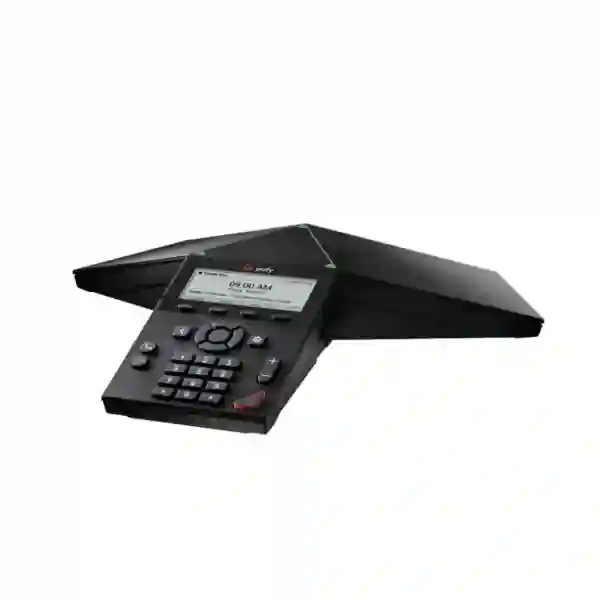
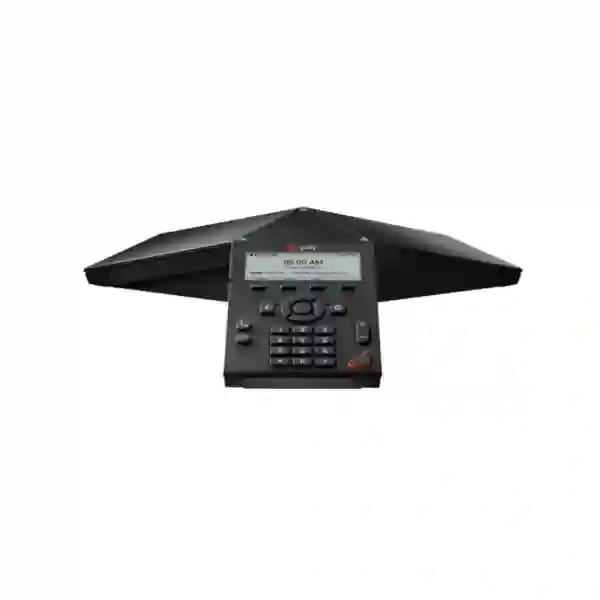
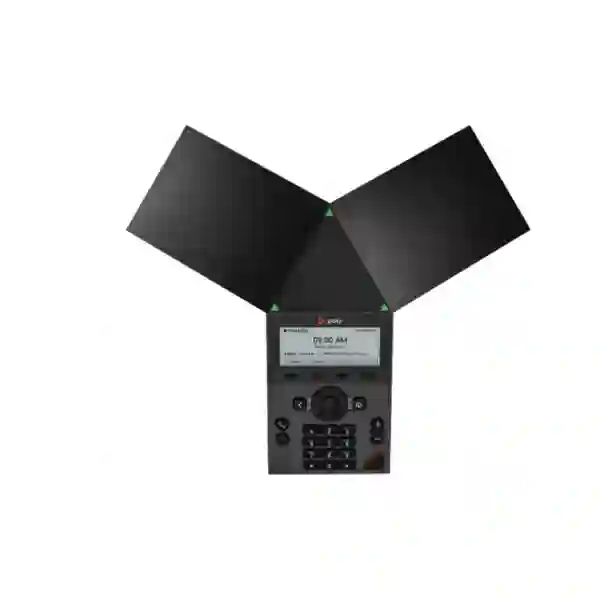
HP Poly Trio 8300 IP Conference Phone
A practical choice for compact rooms that need shared, business-grade audio calling. Assess the microphone coverage, simple keypad, SIP connectivity and Power over Ethernet alongside the exact radio variant and your phone system before buying in Tanzania.
At a glance: what buyers should know
The Trio 8300 is a compact audio conference phone, not an all-in-one video room kit. Its three cardioid microphones, physical controls and network-based calling are useful when people regularly dial from the same shared room. The decisive checks are how far participants sit from the console, whether the office PBX or hosted provider supports the device, and which hardware variant the quotation covers. No local price, stock, installation entitlement or approval should be inferred from manufacturer specifications.
| Intended environment | Small meeting rooms / shared audio conferencing |
|---|---|
| Microphones | Three cardioid microphones |
| Published pickup range | Up to 3.7 m / 12 ft |
| Display | 3.5-inch monochrome LCD with keypad |
| Network | One 10/100/1000 Mbps Ethernet port; SIP |
| Power | IEEE 802.3af Power over Ethernet |
| Wireless | Wi-Fi / Bluetooth on radio-equipped variant only |
| Computer audio | USB functionality documented; verify cable and application |
| Procurement note | Confirm exact variant, PBX support and optional accessories |
A dedicated conference phone for compact meeting rooms
The HP Poly Trio 8300 IP Conference Phone is intended for organizations that want a permanently positioned audio endpoint in a small meeting room rather than relying on the microphone and speakers built into one employee’s laptop. Participants can gather around a table, use familiar call controls, and join conversations through a managed business calling environment. This approach can be useful when meeting rooms are shared by departments, visitors, project groups, and staff who may not carry the same devices. The primary buying question is not simply whether the phone produces sound; it is whether the room, network, calling service, and user workflow suit a dedicated IP conference phone.
Poly positions the Trio 8300 for small meeting spaces. It combines three cardioid microphones with a specified pickup range of up to 3.7 metres, an integrated speaker, physical call controls, and a monochrome display. The microphone figure is a planning reference rather than a promise that every speaker at that distance will sound equally clear. Hard surfaces, noisy air-conditioning, seating arrangement, and how people face the microphones all affect the meeting experience. For a buyer in Tanzania, the sensible next step is to check the exact model variant, examine the room layout, and confirm that the existing calling platform can provision the device.
Practical points
- Designed primarily for small, shared meeting rooms
- Audio-first conferencing with an integrated keypad and display
- Business IP calling depends on compatible network and call-server configuration
Decide whether this is the right type of room device
A fixed conference phone makes most sense when staff regularly call clients, colleagues, suppliers, or remote offices from the same room. Unlike a personal headset, a room endpoint lets several people participate without passing a handset around. Unlike an ordinary desk phone, its microphones and speaker are arranged to serve people seated at different positions. Consider how often the room is occupied, whether meetings are mostly audio or video, who starts the calls, and how much IT administration is available. A conference phone can simplify a repeatable process, but it should not be bought solely because it looks more professional on a table.
The Trio 8300 may be less suitable for a large boardroom, an especially long table, or a training space with participants spread far from the device. It is also not automatically a substitute for a modern native video-conferencing room system. If the organization conducts most meetings through browser-based sessions with cameras and screen sharing, it should evaluate the complete application workflow before choosing an IP endpoint. A practical assessment begins with the furthest seat, expected number of talkers, noise conditions, and the meeting invitation process. Ask whether callers normally dial a telephone number, use a SIP extension, or join an application-based session.
Practical points
- Good starting point: a compact table with predictable seating
- Review alternatives for long tables and acoustically difficult rooms
- Plan around actual dialling and meeting workflows, not only room size
Understand microphone coverage and voice pickup
The Trio 8300 has three cardioid microphones and a published pickup specification of up to 12 feet, or approximately 3.7 metres. Cardioid refers to a directional microphone pickup pattern; the system uses multiple microphones as part of its conference-phone design. The practical aim is to collect conversation from a group around the unit while reducing the need for anyone to lean into a single laptop microphone. Position the phone near the speaking area rather than at the far end of a table, behind a laptop display, or beside a loud fan. Placement remains important even when a product offers noise-reduction features.
Test with normal speech from every seat, including the person who usually speaks quietly. The furthest participant should be evaluated while others are present, not just in a silent empty room. Listen for changes when someone turns toward a whiteboard, rustles papers, or speaks across another participant. Poly Acoustic Clarity technology is described as providing full-duplex conversation with acoustic echo cancellation and background noise suppression. Poly NoiseBlock is also part of the model’s documented audio features. These functions can improve call usability, but none can eliminate every room echo, interfering sound, or unstable network connection. Good acoustics and stable transport are still essential.
Practical points
- Three cardioid microphones
- Specified pickup reach: up to 3.7 m / 12 ft
- Evaluate real speaking positions before final installation
Hear remote participants clearly without promising perfect acoustics
Conference calling works in both directions. The people in the room need to hear remote colleagues, and remote colleagues need voices transmitted at a consistent level. The Trio 8300 uses an integrated loudspeaker and Poly’s full-duplex audio design, allowing conversational interruptions and natural back-and-forth when the call path supports them. Manufacturer material lists a loudspeaker frequency range of 220 to 14,000 Hz and a peak volume specification of 90 dB at half a metre. These are technical characteristics, not a guarantee that every meeting room will achieve identical speech intelligibility or loudness at every chair.
Before purchase, think about room materials and typical background noise. Glass walls, concrete floors, bare ceilings, open doors, printers, and air-conditioning can create a poor acoustic environment even for a capable device. A carpet, soft furnishings, and sensible table placement often help more than continuously raising speaker volume. During testing, verify that speech is clear without clipping, that echo is not distracting, and that people do not need to shout. If the room is unusually reverberant or if meeting participants often stand far from the table, review a larger-room solution rather than expecting a compact endpoint to overcome the physical space.
Practical points
- Poly Acoustic Clarity and Poly NoiseBlock audio features
- Integrated speaker for shared listening
- Room acoustics and seating remain decisive
Physical keypad and 3.5-inch monochrome display
The Trio 8300 uses a conventional keypad and a 3.5-inch monochrome LCD rather than the large colour touchscreen found on some higher-end room devices. That distinction matters. A physical keypad may feel familiar to employees who use desk phones, and it can be useful for direct number entry, basic navigation, call control, and routine audio conferencing. People who book the room only occasionally may value visible buttons and a simple layout. At the same time, buyers should not expect rich video previews, a tablet-like interface, or an identical experience to a full Microsoft Teams or Zoom room console.
A well-designed room procedure should match what the user sees on the phone. Document how to select the correct line, dial an outside destination, place a call on hold, mute, adjust speaker volume, and end a session. If the organization uses speed dials or meeting join features, arrange a demonstration using the intended calling environment rather than assuming every feature will appear automatically. Display behaviour and available controls can change with software profile and call-server provisioning. For a shared room, clear instructions beside the device and a simple naming convention for its extension can be more effective than training every meeting attendee on advanced telephony features.
Practical points
- 3.5-inch monochrome LCD with physical keypad
- Familiar mute, volume, dial and navigation controls
- Available features depend on provisioning and calling environment
SIP calling and compatibility with your existing PBX
The Trio 8300 is an IP conference phone with support for standards-based SIP signalling, as described in Poly technical literature. SIP is commonly used by business telephone systems to register endpoints and establish calls. A device supporting SIP is not, however, guaranteed to work with every hosted PBX, on-premises telephone system, SIP trunk provider, or cloud communication service without configuration. Providers may restrict endpoint models, firmware, provisioning methods, security settings, and the features available to third-party phones. The right commercial question is whether the exact Trio 8300 variant and its software version are supported by the phone system your organization actually uses.
Ask your telephony administrator or provider to identify the registration method, authentication details, SIP transport, supported audio codecs, dial plan, and any separate device licence. Features such as attended transfer, shared lines, conference handling, directory access, and remote management may require server-side support. Poly’s datasheet explicitly notes that many software-enabled features depend on the server. Before ordering multiple units, run a controlled pilot on the intended PBX. Confirm inbound and outbound calling, extension-to-extension dialling, hold, transfer, group-call behaviour, and recovery after the device reboots. A successful single test call is not enough to establish full operational compatibility.
Practical points
- Standards-based SIP foundation
- Up to three line registrations are described in product literature
- Provider support and firmware must be verified for the exact deployment
PoE power and Gigabit Ethernet connectivity
The device is designed to operate over an Ethernet connection and supports IEEE 802.3af Power over Ethernet. Its listed network interface is one RJ-45 port supporting 10/100/1000 Mbps. For rooms with a correctly configured PoE switch, the same network cable can carry data and supply the phone’s operating power. This can keep installation tidy and reduce dependence on a nearby wall adaptor. However, having an Ethernet wall socket does not prove that the port supplies the correct PoE power. The switch, injector, cabling path, and network policy all need confirmation before the unit is installed.
When PoE is not available, Poly describes an optional approved power or PoE-injector arrangement. Buyers should confirm whether that accessory is required and included in their exact quotation; it should not be assumed to ship with every unit. Check switch PoE budgets, cable testing, labelled patch-panel ports, and physical cable routing so the phone does not disconnect when somebody moves the table. In a business environment with unstable mains electricity, think about how the network switch, router, telephone server, and upstream connectivity will remain available. A UPS supporting only the phone-side switch will not preserve calling if the rest of the network loses power.
Practical points
- IEEE 802.3af PoE support
- Single 10/100/1000 Mbps RJ-45 LAN connection
- Optional power arrangement may be needed without a PoE switch
Standard model versus the No Radio variant
One of the most important product-selection checks is the radio configuration. HP identifies a Trio 8300 No Radio variant intended for sites that do not use wireless connectivity. The standard radio-capable model is described with Wi-Fi and Bluetooth functions, while Poly’s datasheet explicitly excludes those radio features from the No Radio version. Product titles published by different sellers can mix generic descriptive text with variant-specific names, so the buyer should not infer wireless capability from a photograph or an unqualified listing. The purchase order should specify exactly which version is being supplied.
If the meeting room will use wired Ethernet and the organization prohibits local wireless radios, a No Radio version may better match policy. If staff need to pair mobile devices over Bluetooth or rely on Wi-Fi for network calling, first confirm that the quoted unit is the radio-capable model and that the desired behaviour is supported by its software. Do not confuse the phone’s microphone range with Wi-Fi coverage; they are unrelated specifications. Also remember that PoE remains relevant even where wireless connectivity is used, because the phone still requires a supported power source. Verify the network architecture with the IT team before selecting a variant.
Practical points
- No Radio models omit Wi-Fi and Bluetooth radio capability
- Standard radio-equipped models offer additional wireless options
- Ask for variant identification on the quote
Using a laptop or mobile device with the room speakerphone
Some meetings begin from a user’s laptop or mobile phone rather than from a SIP desk extension. Poly’s documentation describes USB use with a computer, including an optional Micro-B-to-USB-A cable for speakerphone operation with computer-based calling applications. The radio-equipped variant also supports Bluetooth pairing for compatible devices. These options may be useful when staff join an application meeting on a computer but want the sound handled by the shared conference phone. They do not turn every conferencing application into a certified, fully integrated room system. The audio path, controls, and application support need to be checked individually.
During evaluation, connect the actual laptop operating system and conferencing application that employees use. Confirm that the Trio is selected as both microphone and speaker, and test what happens when a second audio device or headset becomes active. Ensure the employee understands which device controls mute and volume, because application mute and hardware mute may not behave identically in every configuration. If USB use is central to the deployment, verify the required cable type and whether it is part of the supplied package. If Bluetooth use is central, the No Radio variant is the wrong choice. An application-specific test is more reliable than broad compatibility language.
Practical points
- Computer speakerphone use is described through USB
- Bluetooth depends on the radio-equipped variant
- Test the intended meeting application and accessory cable
Meeting join and platform-specific expectations
Product literature describes one-touch speed dial and meeting join functions, but buyers should read those descriptions in the context of their configured platform. A shortcut to dial a known conference bridge is not the same as a native room console that reads every employee’s meeting calendar, presents a modern join button, or supports full meeting controls for a particular cloud service. Software profile, telephony server, meeting provider, and deployment mode influence what the user can actually do. A sales demonstration should start with an ordinary invitation from the organization’s own collaboration service and show the exact steps required to join.
For Microsoft Teams in particular, do not assume that the Trio 8300 is a current native Teams-certified conference phone. Poly’s migration guidance names other Trio models for specific Teams SIP Gateway scenarios and identifies Trio C60 as a native Teams conference-phone option for advanced meeting requirements. That documentation does not establish native Teams support for the Trio 8300. Similarly, references to cloud interoperability should not be read as a guarantee of complete features in Zoom, Webex, or any other service. If the requirement includes calendar join, participant controls, cameras, or screen sharing, validate the whole system and consider dedicated room equipment when appropriate.
Practical points
- One-touch behaviour depends on platform configuration
- Do not equate SIP calling with native Teams certification
- For application meetings, request a real workflow demonstration
Call handling for a shared business extension
Poly’s technical sheet lists business telephony functions that can be valuable in a communal room: hold, transfer, call waiting, do-not-disturb, directory access, and visual conference management are among the described capabilities. It also describes support for up to three registrations. These features should be viewed as platform-dependent possibilities rather than universal promises. The number of supported registrations is not the same as the number of simultaneous external conference participants, and it is not a substitute for checking a hosted PBX’s licensing or calling limits. The actual configuration should fit how the room is used.
A room extension should be easy to identify in the company’s dial plan and should have clearly defined external calling permissions. Decide whether calls to the room should ring openly, forward to reception, or be blocked when the room is unoccupied. Set rules for voicemail, missed-call logs, speed dials, and emergency numbers according to company policy and the local calling service. Shared equipment deserves special attention because a call history may reveal numbers used by previous attendees. A room-specific configuration with controlled credentials, administrator ownership, and predictable resets is preferable to reusing an employee’s personal phone profile.
Practical points
- Business call controls depend on the SIP server
- Plan shared-room dialling permissions and call history
- Up to three registrations does not mean unrestricted conferencing
Conference calling and multiple remote parties
The Trio 8300 can support audio conference workflows, including adding a participant during a live call when the configured environment allows it. Poly’s quick-start instructions illustrate initiating a call, selecting an add-participant function, and merging another contact into the ongoing conversation. How many participants can be combined locally or through the server may differ by software version, call service, and provisioned functions. Manufacturer references also differ in how some regional sheets summarize local conferencing capabilities. For this reason, a quotation should avoid guaranteeing a fixed number of parties without verifying the exact software and platform combination.
If a team regularly connects several remote offices, consider whether conferences will be hosted by the PBX, a telephone bridge, or an application meeting service. Hosted conference bridges may offer better participant management than local ad hoc merging, while the phone simply provides room audio. Test the expected scenario, including a late joiner, a dropped participant, and the need to place one caller on hold. Agree on a fallback way to reconnect if the call is interrupted. Buyers often focus on how the first call starts, but reliable meeting-room equipment must also behave clearly when normal meetings become messy.
Practical points
- Audio conference workflow can add remote participants
- Exact participant limits require platform validation
- Test participant changes and recovery, not just the first dial
Network quality, VLANs and voice traffic priorities
Even a capable conference phone cannot repair poor IP transport on its own. Voice traffic is sensitive to packet loss, variation in delay, and interruptions in connectivity. Poly documents support for common network management mechanisms, including VLAN discovery and quality-of-service markings. These capabilities can help administrators separate voice traffic and apply priorities where the switching and routing infrastructure is configured to honour them. Simply enabling a feature on the phone does not ensure that routers, firewalls, and upstream connections will treat voice traffic correctly. A properly designed network is a shared responsibility across the device and infrastructure.
Before rollout, the IT team should confirm the voice VLAN, DHCP options, DNS reachability, time synchronization, approved SIP and media paths, and any restrictions imposed by the firewall. Identify whether calls traverse a local IP PBX, a hosted service, or an external SIP provider. Measure call quality during periods of typical office traffic rather than only early in the morning. If traffic crosses a VPN or unreliable wide-area link, test those conditions too. Document which team owns connectivity faults, since a user may report ‘the conference phone is bad’ when the root cause is congestion, a changing router configuration, or intermittent internet service.
Practical points
- QoS and VLAN support are network features, not automatic quality guarantees
- Assess packet loss, jitter, and routing under normal load
- Coordinate switch, firewall, PBX and provider settings
Security for a device everyone in the room can touch
A shared meeting-room endpoint sits in a public part of the office and usually remains powered on. Poly’s listed security features include media encryption via SRTP, TLS-related capabilities, authentication mechanisms, HTTPS provisioning, and 802.1X support. Whether those protections are active depends on configuration and infrastructure. The existence of an encryption feature in a technical sheet does not establish end-to-end encryption for every phone call or compliance with a particular organization’s information-security standards. An administrator should verify the security policy that applies to the device, the SIP platform, the provisioning server, and any connected networks.
Use a dedicated room account with the minimum calling permissions needed. Protect administrative passwords, restrict access to configuration pages, and avoid exposing provisioning files or credentials to unauthorized users. Agree on a firmware maintenance process and a secure method to replace or retire the endpoint. If the company has a no-wireless policy, order the proper No Radio variant instead of assuming that changing a visible menu setting is an equivalent hardware control. For sensitive conversations, users should also understand that speakerphone calls can be overheard in an open office even when signaling and media are encrypted. Physical privacy and network security solve different problems.
Practical points
- Documented SRTP, TLS, 802.1X and HTTPS provisioning capabilities
- Security outcomes depend on correct deployment
- Shared-room access control and physical privacy also matter
Provisioning and lifecycle ownership
Business phones are easier to maintain when administrators manage them as part of an endpoint fleet rather than as isolated gadgets. Poly technical material describes centralized provisioning functions, including server-based configuration and device management options. The practical value is consistency: room names, dial plans, credentials, security settings, and firmware policies can be prepared and applied systematically. That may reduce manual work, but it still requires planning, supporting infrastructure, and a person responsible for updates. Before buying, determine whether the organization has a supported provisioning method for this exact model and whether its calling provider permits customer-managed settings.
Create a simple asset record for every unit. Record its model variant, serial number, installed location, network port, assigned extension, software version, date of deployment, and internal support owner. Keep confidential credentials out of documents shared with room users. Define a process for handling changes in PBX provider or office network policy. Check the current manufacturer support information for the exact model and software release when planning a new rollout; do not infer support duration from the product’s presence in a catalogue. For organizations purchasing several rooms at once, prove the management approach with one or two endpoints before scaling.
Practical points
- Centralized configuration can reduce inconsistent settings
- Track model variant, serial number, firmware and room owner
- Confirm current lifecycle information for your intended deployment
A practical Tanzania deployment plan
For an organization buying meeting-room equipment in Tanzania, planning should begin with facts that are under the buyer’s control: site connectivity, available network ports, local power arrangements, room design, and the telephone service already in use. A team that works mostly from a wired office LAN may prefer an Ethernet-first room endpoint. A site that regularly experiences power or internet interruptions should consider how the entire call path recovers when service returns. There is no reason to assume that a specific local network operator, SIP provider, or installation company supports the Trio 8300 merely because the phone is based on widely used VoIP standards.
Ask the internal IT team or contracted service provider to confirm SIP registration, external number routing, international dialling policy, and any applicable network equipment requirements. For cloud-hosted voice services, check whether users can still make internal calls if the internet connection fails and whether a secondary connection is needed for operational continuity. For sites with limited space, consider where the phone will be placed so its cable is not a trip hazard and its microphones are not blocked. Availability, local approvals, imported variant, warranty terms, support scope, and delivery options must be verified with the seller for the specific quotation.
Practical points
- Check the whole voice path, from meeting table to call service
- Plan for network and power continuity where needed
- Confirm local commercial terms separately from manufacturer specifications
Accessories and what to expect in the package
HP lists the console, a Cat 5e network cable, and a setup sheet as standard box contents for relevant Trio 8300 product configurations. Poly’s wider documentation also describes optional items such as a power accessory, expansion microphones, and USB connectivity accessories. The availability and suitability of any accessory must be checked for the exact regional and product variant. Do not assume that a quoted conference phone includes a PoE injector, a USB cable, a video camera, expansion microphones, or a service subscription unless those items are explicitly itemized. A bill of materials is more useful than a generic photograph showing a complete room solution.
An accessories review should begin with the real installation problem. If the switch already supplies supported PoE, a separate injector may be unnecessary. If the nearest switch is far from the table, cable routing and the supplied cable length matter. If the room’s seating exceeds comfortable pickup coverage, first re-evaluate whether the device is suitable; extra microphones are not a universal remedy for poor acoustics. If a laptop-based calling workflow is required, specify the appropriate cable and test the application. Keep accessories grouped with their target room and retain packaging identifiers so a replacement or future support request can be matched to the original purchase.
Practical points
- Typical core contents: console, Cat 5e LAN cable and setup information
- Power and USB accessories may be sold separately
- Review optional microphones against the exact room design
How the Trio 8300 differs from a larger-room alternative
The Trio 8300 is not intended to solve every room-audio requirement. HP Poly’s Trio product family includes models positioned for larger spaces, with different interfaces, pickup specifications, and collaboration capabilities. The Trio C60, for example, is presented as an option for larger or more demanding room environments and may be a better starting point when native collaboration platform workflows are essential. A comparison should look at room dimensions, microphone reach, control interface, conferencing application, and overall deployment cost. Selecting a more expensive device does not automatically make it better for a compact table, but selecting a smaller one solely to reduce cost can produce poor meetings.
Another alternative is a USB speakerphone used with an employee laptop. That approach may be appropriate when rooms are used occasionally and all meetings happen inside a computer application. Its tradeoff is reliance on the laptop, user sign-in, and correct audio-device selection. A dedicated SIP conference phone can be preferable for a shared room with a managed extension and a repeatable calling workflow. Neither is categorically superior. If the procurement requirement includes a room camera, content sharing, calendar scheduling, or central control panel, evaluate those as separate system requirements rather than trying to infer them from the words ‘IP Conference Phone’ in the product title.
Practical points
- Choose based on use case rather than branding alone
- Trio C60 and USB speakerphones solve somewhat different needs
- Audio, video, calendar join and room control are separate requirements
Procurement checklist before requesting a quotation
A successful procurement request should describe more than ‘one conference phone’. Include the exact model name, whether a radio-capable or No Radio variant is required, the number of rooms, and the intended calling service. Describe the table length and approximate distance to the furthest speaker. State whether the room has a tested IEEE 802.3af PoE connection and whether users need SIP extension calling, laptop USB audio, or Bluetooth pairing. This information helps prevent a quotation for the wrong variant or a unit that needs unbudgeted accessories. The seller should be able to confirm what the box contains and distinguish hardware from licensing or configuration work.
Also ask for the conditions that affect buying decisions but cannot be inferred from a global datasheet: the exact product identifier being offered, any applicable warranty arrangement, service scope, lead time, return conditions, and whether setup assistance is part of the quotation. If you are replacing an older conference phone, provide the previous model, PBX platform, and configuration requirements so the transition can be assessed. Record any mandatory network security conditions in the request, not after delivery. A quote that identifies these details is more useful than an attractive price for a vaguely described device.
Practical points
- Specify radio or No Radio hardware
- Confirm PBX compatibility, power and accessory list
- Request exact commercial and service terms for the offered unit
Installation steps for the IT team
A sensible installation sequence begins with a network check before the device is placed on the table. Confirm that the selected Ethernet port has the appropriate PoE capability, access to the required VLAN, and a route to the provisioned calling service. Check whether the phone can receive its expected address and time configuration, then apply the device profile using the organization’s approved method. Confirm software version, authentication, and call signalling before handing the unit to meeting-room users. Avoid beginning with a public-facing meeting and treating the first client call as an installation test.
After the endpoint registers, check basic input and output from every seat, then validate outbound and inbound calls, mute, volume, hold, transfer, and any configured meeting shortcuts. If the deployment uses USB or Bluetooth on a supported variant, test those separately with actual user devices. Label the port or cable only as permitted by facilities policy, place concise operating instructions near the console, and record the final configuration. Assign a named internal owner for future support tickets. The goal is to make the room ready for ordinary users without requiring them to understand SIP settings, router policies, or the difference between device and application audio paths.
Practical points
- Verify power, VLAN and server reachability first
- Confirm registration and common call controls
- Complete a room-based audio test before user handover
Acceptance testing and common troubleshooting
An acceptance test should resemble a real meeting. Place people in their usual seats, call a colleague outside the room, and have each person speak at a natural volume. Ask the remote caller to report whether speech levels stay understandable as speakers change. Listen for echo, sudden dropouts, low volume, or distracting fan noise. Repeat the test while the office network is busy. If calls repeatedly fail to register, begin with network reachability and configured credentials. If the phone registers but cannot complete external calls, review PBX permissions, dial plans, and provider routing before deciding the hardware is defective.
For poor sound quality, isolate the source. A remote participant using a bad headset, a noisy room, a damaged Ethernet cable, packet loss, or incorrect application audio selection can each create similar complaints. Compare a short internal call with an external call and, where permitted, inspect network and call logs. Rebooting can be useful as a diagnostic step but is not a durable fix for misconfiguration or intermittent transport. Document the symptom, time, called destination, software version, and what changed before the problem began. Clear evidence helps the administrator, provider, or service partner act quickly and avoids unnecessary replacement of functional equipment.
Practical points
- Test all seats and peak-network conditions
- Separate room acoustics from signalling and network faults
- Document repeatable failures for support
What a careful purchasing decision should deliver
By the time the organization is ready to order, the expected outcome should be specific: a small room with an easy-to-use audio endpoint that operates on the existing telephony environment and suits the staff’s way of joining calls. The Trio 8300 offers a defined combination of microphones, speaker, physical controls, Ethernet, and platform-dependent telephony features. Those qualities can be valuable without promising that every cloud meeting, wireless device, or conferencing feature will work out of the box. The correct model variant and a properly configured network matter as much as the hardware itself.
Request a quotation for the HP Poly Trio 8300 IP Conference Phone with your room requirements, preferred calling platform, and desired connectivity mode. Ask the seller to confirm the exact offered variant and identify optional accessories separately. If possible, arrange a pilot or compatibility confirmation before committing multiple rooms. For buyers in Tanzania, this is the most practical way to avoid unsupported assumptions about local stock, installation coverage, pricing, or regulatory status. A sound purchase is one that can be explained and supported by the organization after the equipment arrives, not merely one that looks complete on a product page.
Practical points
- Confirm fit, variant and call platform
- Separate verified specifications from quote-dependent terms
- Request a targeted quote with clear deployment details
Frequently asked questions about the Trio 8300
Is the HP Poly Trio 8300 intended for a large boardroom?
Poly positions the unit primarily for small meeting rooms. Its quoted microphone pickup distance is up to 3.7 metres, but that measurement does not guarantee uniform audio in every room. Large tables, hard reflective surfaces, and seated participants beyond the practical microphone area can justify a larger-room product. Make a seating plan and perform an audio test before choosing it for a boardroom.
Does the Trio 8300 need a separate power adaptor?
It supports IEEE 802.3af Power over Ethernet from suitable network infrastructure. Where PoE is unavailable, an approved optional injector or power arrangement may be needed. Confirm what is included with the exact quotation rather than assuming an adaptor is in the standard box. Remember that the phone also needs working network and call-server connectivity to place IP calls.
Can it connect to Wi-Fi?
Wi-Fi functionality is associated with the radio-equipped Trio 8300 variant. The No Radio model is intended for environments without wireless connectivity and does not provide those radio functions. Ask the supplier to confirm the model variant in writing. Even where Wi-Fi is supported, review the power requirement and the organization’s security policy before choosing a wireless call path.
Can a mobile phone pair over Bluetooth?
The radio-capable version includes Bluetooth-related functionality in Poly’s product literature. The No Radio variant does not. Pairing behaviour, supported audio profile, and call controls should be tested with the mobile operating system used by staff. Do not buy a No Radio unit if Bluetooth conferencing is a firm requirement, and do not infer that wireless capability is included solely from a generic marketing description.
Does it support Microsoft Teams meetings natively?
Do not assume native Teams certification or full Teams meeting control for the Trio 8300. SIP calling, calendar integration, and native room application capabilities are different things. Poly’s own Teams migration guidance names other models for specific scenarios. If Teams calendar join, participant control, or meeting-room management is mandatory, check the current supported-device list and evaluate a dedicated native Teams conference endpoint.
Can it be used with an existing office IP PBX?
The device supports SIP, which is commonly used for IP telephony, but successful interoperation depends on the PBX or provider, supported software, credentials, transport, security configuration, and specific call features. Ask the telephone administrator to verify the exact model and firmware before purchase. Test inbound and outbound calls as well as hold, transfer, and conferencing on the organization’s own system.
Is a USB cable included for computer conferencing?
Poly documentation describes optional Micro-B-to-USB-A connectivity for using the Trio 8300 with a computer. Core box contents are generally listed as the console, Ethernet cable, and setup information, so the appropriate computer cable should be confirmed separately. Test the intended conferencing application to ensure the unit appears as the selected audio device and that hardware and application controls behave as expected.
Does the phone provide video conferencing by itself?
The Trio 8300 is an audio-first conference phone. Some Poly documentation discusses optional collaboration and video accessories, but a standalone phone should not be treated as a complete camera, display, and content-sharing system. If a room needs video and screen-sharing, define the application, required accessories, and current support status as a separate project. Obtain a confirmed bill of materials rather than relying on an illustrative marketing photo.
How many people can join one conference?
The phone offers conferencing and call-management functions, but exact local or hosted participant limits depend on software and the telephony platform. Different product sheets may summarize local conference capability differently. Ask the provider to demonstrate the number of simultaneous participants required for your normal meeting, including how added calls are merged and how participants leave or reconnect.
What should a Tanzania buyer confirm before ordering?
Confirm the exact hardware variant, compatibility with the existing SIP platform, PoE availability, required accessories, and room dimensions. Ask the seller to state current pricing, stock or lead time, warranty arrangement, and support services for the offered unit. Do not assume any particular delivery coverage, local certification, or service entitlement until it has been verified for the specific quotation.
What if people at the far end of the table sound quiet?
Begin by checking the actual seating distance, microphone placement, room noise, and how the speakers face the phone. Make a test call and ask a remote participant to compare each seat. If the room is too large for the intended pickup design, a larger-room device or a suitably verified microphone arrangement may be needed. Increasing speaker volume will not solve inadequate microphone pickup.
Can the device work when office internet is down?
That depends on where the telephone server sits and how calls are routed. An internal PBX on an operational local network may have different failure behaviour from a cloud-hosted calling service. PoE keeps the unit powered only while supported network power is present, and it does not restore a failed router or provider link. Include power continuity and connectivity recovery in deployment planning, especially for meeting rooms used for important calls.
Request a configuration-specific quote
Tell the FourTeck Tanzania team your meeting-room size, telephone platform, preferred Trio 8300 variant, Ethernet and PoE setup, and any requirement for USB or Bluetooth audio. Request confirmation of the exact hardware offered, accessories, local commercial terms, and any separately agreed setup or support work.
Next step: Ask for an HP Poly Trio 8300 quotation with a compatibility check before placing an order.




Reviews
There are no reviews yet.