
HP Poly • Microsoft Teams audio conferencing
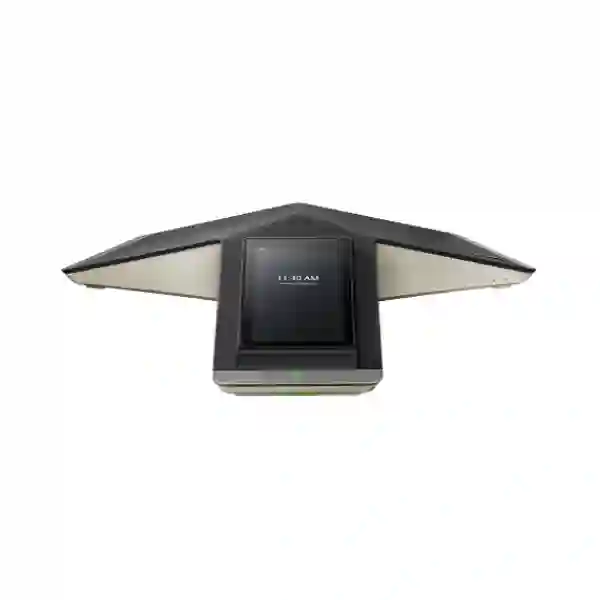
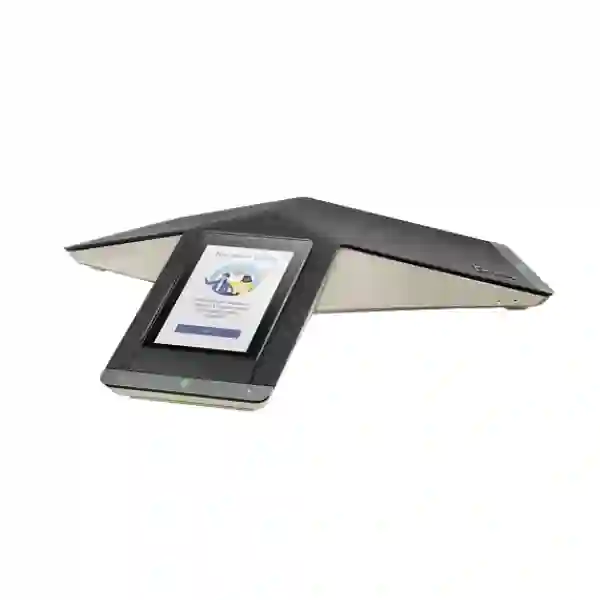
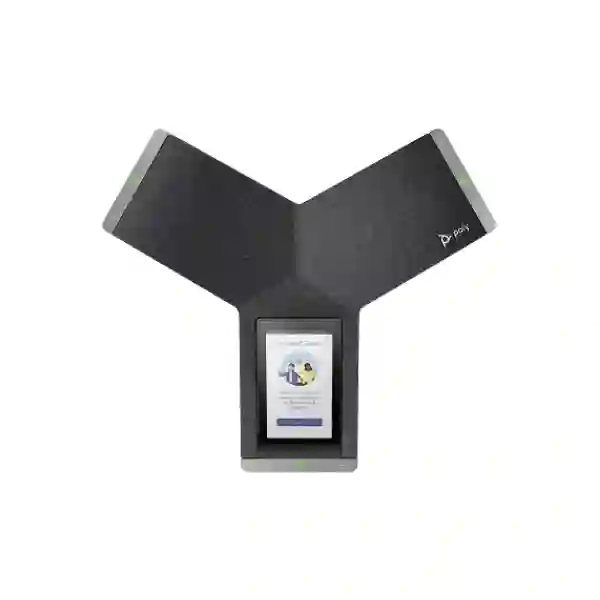
HP Poly Trio C60 Microsoft Teams Conference Phone
Give shared meeting rooms a dedicated audio endpoint with a five-inch touchscreen, three-microphone pickup array and Power over Ethernet. Plan the correct Teams variant, account and room coverage before you buy.
Who is it for?
The Trio C60 is for businesses and organizations that want a stable Microsoft Teams audio experience around a shared table. It is best assessed as a dedicated conferencing endpoint, not as a substitute for room video equipment. Before requesting a quotation in Tanzania, decide whether the installation needs a full-radio or no-radio Teams version, confirm the Microsoft account model and check that the meeting room has suitable network power and microphone coverage.
Next step: request a configuration-based quotation with your room size, device quantity and Teams environment.
Verified hardware and configuration overview
These published specifications describe the Trio C60 family and relevant Teams variants. Features such as wireless networking must be checked against the precise HP part number; do not interpret a family-level capability as a promise for every configuration.
| Feature | What the buyer should know |
|---|---|
| Device role | Tabletop IP conference phone; Microsoft Teams version |
| Display | 5-inch colour touchscreen |
| Microphones | Three cardioid microphones |
| Audio technologies | Poly Acoustic Clarity, echo cancellation, background-noise suppression, Poly NoiseBlockAI |
| Pickup planning reference | Up to about 6.1 m / 20 ft per manufacturer guidance; actual performance depends on the room |
| Power | IEEE 802.3at PoE, Class 4 LAN input |
| Wired connectivity | Two RJ-45 10/100/1000 Ethernet ports; USB connections per variant specifications |
| Wireless connectivity | Wi-Fi and Bluetooth 4.2 on applicable full-radio models only |
| Expansion | Optional microphones and supported multi-system configurations; verify exact mode and accessories |
| Critical exclusion | No integrated camera; Microsoft licences and phone service not included by implication |
| Dimensions and weight | Approx. 38.3 × 7.5 × 33.2 cm, 950 g in HP’s published product specifications |
A conference phone designed for the shared meeting table
The HP Poly Trio C60 Microsoft Teams Conference Phone brings a dedicated audio endpoint to a room where several people need to speak and listen through a single system. It suits organizations that hold Teams calls at a shared table and want participants to focus on the conversation rather than passing a laptop around or relying on a distant built-in microphone. The C60 combines the speaker, microphone array, touchscreen and call controls in one tabletop form factor, giving the room a recognizable place to start an audio meeting.
For a business evaluating equipment in Tanzania, the practical question is not simply whether the phone is branded for Teams. It is whether the exact hardware variant, account configuration, network and room layout will support the intended meeting routine. This page explains what the C60 can do, the important differences between radio variants, what is needed for deployment, and the questions worth answering before asking for a quote. The device is a conference phone; it does not itself replace the cameras, displays and compute elements required for a complete video meeting solution.
The practical benefits at a glance
Poly positions the Trio C60 around clear room audio, quick interaction and a familiar touch-based interface. Its core hardware includes a five-inch colour touchscreen, a three-microphone array and illuminated controls for everyday actions such as muting and changing volume. Poly Acoustic Clarity supports full-duplex conversation with echo cancellation and background-noise suppression, while NoiseBlockAI is intended to reduce distracting non-speech sounds. These capabilities address recurring meeting problems: overlapping voices, unwanted noise and uncertainty about whether the room microphone is muted.
With the Microsoft Teams version, the phone can be used as a dedicated Teams audio endpoint when the appropriate account, policies and network access are configured. An Ethernet connection and compatible Power over Ethernet infrastructure can simplify table installation. Depending on the purchased variant, Wi-Fi and Bluetooth may also be available. Those wireless features must be checked against the exact product part number rather than assumed from a family-level description. Optional expansion accessories can help address a table that is too large for the base placement.
- Dedicated tabletop audio with three cardioid microphones and a built-in loudspeaker.
- Five-inch colour touchscreen plus accessible, illuminated mute and volume controls.
- Microsoft Teams-certified device family, with operation dependent on configuration and current software support.
- Power over Ethernet capability for a cleaner installation when the network switch and cabling support it.
- Expansion possibilities for selected room arrangements, subject to accessory and configuration compatibility.
Audio pickup and conversation clarity
A meeting-room phone has to pick up the person nearest the device and the colleague at the far end of the table without forcing everyone to lean forward. HP specifies three cardioid microphones for the Trio C60 and describes a microphone pickup range of up to approximately 6.1 metres, or 20 feet, under its product guidance. That published figure is useful as a planning reference, not a guarantee that every quiet voice will remain equally intelligible at the outer edge of a noisy or reverberant room. Table length, ceiling height, acoustic treatment and where participants sit all change the result.
Poly Acoustic Clarity is designed to permit simultaneous speaking and listening, a property often called full duplex. Its acoustic echo cancellation helps prevent the remote participant’s voice from being returned through the room microphone. Noise suppression and Poly NoiseBlockAI address another common interruption: non-speech sounds that compete with the people discussing a decision. The output quality still depends on the network and the device at the remote end, so an installation test with real speakers is a better buying check than relying on a microphone-range number alone.
Before choosing a permanent table position, try normal speaking volume from every chair, including seats by windows, doors and air conditioning. Ask participants at the other end to confirm whether voices are distinguishable when someone turns sideways or speaks while looking at a display. If an important seat repeatedly sounds distant, investigate repositioning or a supported expansion option instead of increasing volume and hoping that fixes microphone coverage.
Five-inch touchscreen and straightforward meeting control
The C60 uses a five-inch colour touchscreen rather than making people navigate call operations through a traditional telephone keypad. For a shared meeting space this matters because occasional visitors may not know the room equipment. A visible interface can make basic actions easier to understand, while the separate illuminated mute and volume controls are useful when a chairperson needs to respond immediately. Poly also describes proximity-based wake behaviour, so the unit can be ready when someone approaches, depending on its settings.
The exact controls displayed will depend on the phone’s software profile, account type, assigned Teams policies and installed application version. Do not assume that a feature shown in a generic manufacturer demonstration is automatically present with every Teams licence. In particular, calendar access, meeting join behaviour, call handling and privacy-related views may differ between a shared phone and an individually assigned phone. The right evaluation is to demonstrate the workflow that the room will actually use: start a call, join a planned meeting, mute, adjust sound, finish and leave the device ready for the next group.
For rooms used by rotating teams, a short laminated guide or an internal help note can still be valuable. It should explain the local sign-in arrangement, which controls are safe for ordinary users, and whom to contact when a meeting cannot connect. Clear operating habits reduce disruption more effectively than relying on a feature list alone.
Native Microsoft Teams use: what to confirm
The Teams-focused Trio C60 is listed by Microsoft among certified Teams phone hardware, and Microsoft’s current device documentation includes the Trio C60 in its Teams phone software release information. That is meaningful evidence of platform alignment. It does not mean that the phone independently includes a Teams subscription, a telephone number, a calling plan or every room-management feature. The organization still needs to plan the account, licensing, user interface, sign-in method and applicable meeting or calling policies.
There are different ways an organization may use a shared device. Some rooms primarily join scheduled online meetings; others need to place or receive calls through the organization’s Teams Phone configuration. A reception-like shared phone, a meeting room endpoint and a personal user’s phone can require different account and policy choices. The correct path should be determined from the intended use case rather than selecting a licence by name alone. Calling outside the organization may also involve additional Teams Phone and connectivity arrangements that are not supplied by the handset.
Microsoft and HP update software and management requirements over time. Before deployment, compare the purchased device and its firmware against the current official Teams phone compatibility information, and run a pilot sign-in with the intended account type. This is particularly important when replacing an older Poly Trio product, because previous provisioning patterns and feature expectations may not transfer unchanged.
Built for audio meetings, not a complete video room
A conference phone can make a hybrid discussion more usable without being a video-conferencing system in its own right. The Trio C60 provides the tabletop audio and telephone-style controls that participants use during a call. It does not add a camera or room display by itself. If staff need to see remote colleagues or share a presentation on a large screen, a separate compatible Teams Rooms or video solution may be appropriate, with its own compute, camera, display, licences and installation requirements.
HP discusses the C60 alongside other Poly collaboration equipment, but specific interoperability varies with software mode and product generation. For example, using a Trio C60 as an audio peripheral with a supported video system is a different deployment from signing it into Teams as a standalone conference phone. Those two patterns should not be treated as interchangeable, and a supported audio connection does not automatically make the C60 a complete Teams Rooms controller.
A buyer should state which user journey matters: a standalone conference-table audio phone, audio for an existing supported video room, or a future full-room upgrade. That single decision changes the compatibility questions, the accessories required and the commissioning process. Request a written confirmation for the intended combination before purchasing additional devices.
Wired networking and Power over Ethernet
The Trio C60 Teams variants described by HP support Power over Ethernet, with the network input specified as IEEE 802.3at, Class 4. This lets a properly equipped network connection provide power as well as data, reducing the need to place an individual power adapter at the table. The hardware specifications also list two RJ-45 Ethernet interfaces with 10/100/1000 connectivity. Those details are useful when planning table boxes, structured cabling and the route back to the communications cabinet.
Power over Ethernet should be validated at the switch port, not assumed because the building has network sockets. Check available PoE budget, the switch standard, VLAN assignment, cabling condition and any power continuity requirement. A switch that supports only a lower power class may not match the phone’s specified input. If the room must remain usable through short outages, discuss which network components require backup power; supporting the phone alone is not enough if internet access and switching equipment go down.
The presence of a LAN-out capability is not permission to power any downstream device without checking the system design. HP’s specifications describe LAN-out power sourcing behaviour separately, and actual use should follow the applicable installation guide. An IT administrator should document the connected ports and verify that the room installation remains within the approved electrical and cabling arrangement.
Full-radio and no-radio configurations are not identical
The product family includes more than one hardware configuration. HP lists a Teams full-radio, PoE-enabled variant and a separate Teams no-radio, PoE-enabled variant. For the full-radio configuration, HP’s specifications describe Bluetooth 4.2 and dual-band Wi-Fi capabilities. A no-radio version is intentionally different; buyers should not expect it to provide the same wireless interfaces simply because marketing pages describe the broader C60 family. This is one of the most important distinctions to resolve before placing an order.
Wireless capability and the way it can be used are also separate questions. A supported radio does not guarantee that every Bluetooth laptop-audio workflow or every Wi-Fi authentication method will function identically in each firmware and operating profile. Confirm network security methods, approved frequencies, device policy restrictions and supported USB or Bluetooth modes for the proposed deployment. Where reliable structured Ethernet is available, it remains a straightforward choice for a fixed room endpoint.
Ask for the precise HP part number in the quote and confirm whether the requirement is Teams native calling, wired IP audio, or a specific bring-your-own-device connection. Make that choice explicit in the purchase specification. It avoids receiving the correct-looking conference phone with connectivity that does not match the room design.
Meeting size, table shape and microphone placement
Room coverage is best assessed by how people sit and speak, not by the room’s label. A compact boardroom with a long central table may be more demanding than a larger room with chairs grouped close to the phone. Place the C60 so the three-microphone array has a reasonable acoustic path to the intended seating positions. Avoid putting the device beside a noisy projector, directly below an air-conditioning outlet, inside a recess or behind objects that interfere with sound pickup.
HP describes the Trio C60 as adaptable through optional expansion microphones and daisy-chaining in supported deployments. These possibilities are useful for rooms where participants sit beyond the comfortable pickup zone of a single unit. Nevertheless, the maximum configuration and available accessory types depend on platform profile, firmware, cabling and compatibility. A proposed large-room design should be checked against the current HP administrator documentation, not just an accessory photograph or an older specification sheet.
Test for conversational balance. The quietest speaker should be audible, interruptions should feel natural and remote participants should not hear pronounced echo from the room speaker. If the room contains hard tile, glass and exposed ceilings, improving acoustics can sometimes help more than adding microphones. For a multi-room project, run one representative room as a pilot and use its results to refine equipment quantities.
Expansion microphones and multi-unit planning
Optional microphones can extend the ability to capture voices in a meeting layout where one tabletop unit is insufficient. In some supported configurations, Poly also provides multi-unit daisy-chain arrangements. These are distinct methods of expanding coverage. Expansion microphones add pickup positions; linked systems can distribute speaker and microphone elements across a larger table. Both approaches require careful planning to prevent cable clutter, awkward placement and inconsistent controls.
Do not treat every Trio-series accessory as universally interchangeable. Confirm the accessory model, compatible ports, software build and connection limits for the exact C60 operating mode. In a Teams-only installation, a generic SIP accessory guide may not answer the same question as the Teams-specific administrator guide. If the application is an integrated video room, confirm what the video system can actually accept rather than assuming every conference microphone can be attached.
Where a room often divides into smaller groups, ask whether a fixed expansion layout will still make sense when furniture moves. A permanent installation may benefit from measured cable pathways, protected table outlets and documented reconnection instructions. Include accessories in the bill of materials rather than leaving them to be discovered after the primary handset has arrived.
Microsoft Teams account and licence considerations
A Teams-certified phone still needs the right Microsoft account and licence for its role. Microsoft documents shared-space licensing for phones placed where multiple employees use the same endpoint. In 2026 Microsoft introduced the Teams Shared Space naming for licensing that had previously been called Teams Shared Devices. Documentation and purchasing terminology may therefore differ depending on when a guide or quotation was written. The current licence name and entitlement should be confirmed with the organization’s Microsoft 365 administrator.
A shared-room account is not necessarily equivalent to a personal account, and its available controls can differ by policy. A Teams Rooms deployment may involve a different licensing model from a common-area phone; external PSTN calling may need additional Teams Phone arrangements. Licences, phone numbers, calling policies and user-management responsibilities are not included automatically with the physical C60 hardware. The purchaser should specify whether the room needs internal Teams meetings only, external telephone calls, or both.
Before any large purchase, have the administrator verify the intended sign-in mode, meeting experience, calendar behaviour and policies on a test device. Confirm who owns the account, how authentication will be maintained and how privacy will be protected between meetings. These decisions affect the real user experience and ongoing IT workload more than the presence of a Teams badge on the product.
Management, software and long-term support
Microsoft publishes certified Teams device and firmware information, while HP supplies product support and Poly software documentation. In an organization with several rooms, this management ecosystem matters: IT teams need a repeatable method for provisioning, inspecting device health, applying approved updates and replacing devices if a room fails. A single successful call at installation is not the whole deployment; maintaining reliable conferencing requires a support process after handover.
An update can change a phone’s interface, available application modes or peripheral behaviour, so firmware should be approached as part of change management. Keep an inventory of the room name, device model, part number, serial number, account role, connected network port and tested software version. Schedule changes at times when rooms are not booked and confirm that the expected join, mute and calling workflows still operate afterwards. Where many devices share one configuration, test on a representative unit first.
Certification and software support have lifecycle dates and conditions that can change. Do not assume that support continues indefinitely, and do not confuse a platform certification date with a product warranty or a guarantee of local spare parts. Check current HP and Microsoft lifecycle documents when purchasing or upgrading, particularly if the organization expects to standardize on the hardware for several years.
Network readiness for reliable Teams calls
Good conferencing depends on the path between the room and the collaboration service. Even a capable microphone system cannot overcome a congested internet connection, severe jitter or misconfigured voice traffic. Before installation, the network team should review switching capacity, DHCP, name resolution, time synchronization, firewall access and the organization’s current Microsoft Teams network guidance. If Wi-Fi is being considered on a compatible radio variant, evaluate signal coverage and roaming behaviour at the exact table location.
Where the business uses multiple branches, check whether calls travel through a central internet gateway, a VPN or a local breakout. The simplest physical network connection is not always the simplest end-to-end media route. Record any quality complaints with their time, affected rooms and meeting type to distinguish an audio pickup issue from a packet-delivery problem. Changes to security controls should be approved by the organization’s network policy rather than made ad hoc during a meeting.
Plan for failure scenarios as well as normal operation. Power interruption, WAN downtime, authentication changes and expired account credentials can each make a room unavailable. Assign a clear owner for network faults and a separate owner for Microsoft 365 device administration if those functions sit with different teams. A basic operational runbook keeps the room usable when the first installer is no longer on site.
Security and privacy in a shared conference room
Shared meeting devices are different from personal handsets because anyone who enters the room may see the screen or attempt to change settings. Configure the phone according to the organization’s access policies and Microsoft Teams shared-device guidance. Use an appropriate managed account, protect administrative settings and review whether meeting histories, calendars, dialling privileges or contact details should be visible. The safest setup is one deliberately designed for a shared room, not a personal account left signed in for convenience.
HP lists enterprise-oriented security capabilities for the full-radio model, including authenticated network access and encrypted communication technologies. Those capabilities do not by themselves prove that a specific network is secure. Deployment choices still determine whether transport encryption, credentials, certificate policies and remote management are handled correctly. Align the configuration with the company’s actual identity and device-management procedures.
Create a practical handover policy: who can join calls, who may change room settings, how faults are reported and how the device is reset for reassignment. For a room used by customers or visitors, avoid exposing sensitive internal meeting details on a shared screen. Physical access and account privileges are as important as technical encryption when many people can reach the endpoint.
A sensible deployment sequence
Start by documenting one room rather than ordering around a broad description such as ‘medium conference room’. Record the seating plan, longest microphone distance, current Teams meeting pattern, internet and PoE availability, and whether the organization needs a shared or personal sign-in. Identify whether video integration is required from day one. This short design step determines whether the C60 alone meets the need and which hardware variant should appear on the quotation.
Next, verify the exact Teams C60 variant and Microsoft account requirements. Have IT prepare the switch port, network permissions and any required resource account before connecting the device. Bring the phone up on a controlled network, install or confirm supported software, apply approved policies and test with real users. Include an external participant in the acceptance call because someone in the same room cannot accurately judge the sound heard at the far end.
Finally, document the successful setup and hand over simple operating instructions. Record how the room is identified in the Teams environment, who approves software updates and where replacement accessories are sourced. A structured commissioning process makes it easier to scale from one room to multiple branches without repeatedly troubleshooting the same avoidable issues.
- Survey the room and map seating, acoustics, network and power.
- Specify the Teams full-radio or no-radio hardware variant and confirm the part number.
- Agree the Teams account, licence, policies and intended call scenarios.
- Validate PoE and network readiness before the installation visit.
- Run a real meeting test, document the result and train the room users.
Considerations for organizations operating in Tanzania
For a Tanzanian business, branch office, training centre or organization managing hybrid discussions, the Trio C60 can be evaluated as part of an existing Microsoft Teams environment. The same universal checks apply locally: reliable connectivity, appropriate electrical and network infrastructure, workable room acoustics and a clear support contact. Conditions can vary significantly between facilities, so it is more useful to assess each specific building than to make broad claims about coverage across the country.
If the room is expected to place external calls through Microsoft Teams Phone, confirm the organization’s telephony arrangement and available local calling services separately. A Teams-certified conference phone is not proof that a particular Tanzanian telecom operator, number range, SIP trunk or cloud calling route is available or compatible. Questions about local telephony service, number provisioning and any applicable approvals belong in the design and procurement review, supported by the current provider and regulatory documentation.
Likewise, availability, import arrangements, delivery, installation service, warranty handling and local pricing must be confirmed for the actual quotation. This page does not assert stock, a local office, tax treatment or a specific price in Tanzanian shillings. A useful purchasing request should include the number of rooms, the desired hardware version, Teams licensing context, network conditions and whether configuration support is needed, so the response can address a real deployment instead of an assumed one.
Common business scenarios
A shared project meeting room benefits from a simple audio endpoint because different teams can use the same table without depending on one employee’s laptop microphone. The C60 is particularly relevant where the organization already uses Microsoft Teams and wants a familiar interface for recurring group discussions. A small executive or leadership room may value clear full-duplex interaction and accessible mute controls during briefings with remote directors.
A training or interview room has a different requirement: several voices may speak from different seats, and the person leading the session may move around. Check whether the base microphone pickup pattern is sufficient before adding accessories. A site office that holds regular coordination meetings may place greater importance on Ethernet reliability and a documented recovery process. For a formal video meeting room, the C60 should be assessed against the proposed complete video system rather than ordered as though it includes a camera.
The suitability of any scenario depends on the meeting pattern, account configuration and acoustics. A short test should include the actual number of speakers and the most demanding routine event. The goal is not to buy the largest possible system but to deliver a room experience that visitors and staff can operate consistently.
- Department meeting room: shared Teams audio calls with straightforward touch and mute controls.
- Management boardroom: clear group discussion, with microphone coverage tested against table length.
- Training and interview space: multiple speakers and a possible need for carefully planned expansion.
- Branch coordination room: repeatable shared-endpoint setup with network and support ownership.
- Existing video room: evaluate the C60 only within a specifically confirmed compatible solution.
How to compare the C60 with another conference-phone option
A conference phone comparison should separate audio performance, platform compatibility and deployment effort. The Trio C60 is worth considering when native Microsoft Teams use, a touchscreen and a substantial tabletop microphone system are priorities. A basic speakerphone connected to a laptop may cost less and be easier to move between rooms, but its everyday workflow depends on a host computer and a user bringing or signing into that computer. Neither approach is universally better; the right choice follows the actual meeting routine.
Compared with a conventional SIP-only conference phone, a Teams-focused C60 may provide a better fit for an organization standardizing on Microsoft collaboration, but it can also involve account and policy planning that a straightforward SIP registration does not. Compared with a full Microsoft Teams Rooms system, it covers the audio endpoint role without independently supplying room video, shared displays or a broader meeting-room control environment. Price comparisons should therefore use complete, like-for-like configurations including licences, accessories and setup.
Ask competing suppliers to demonstrate the same tests: pickup from the farthest seat, simultaneous discussion, a scheduled meeting join, network interruption recovery and the required privacy controls. A feature checklist can identify candidates, but a short practical demonstration exposes workflow differences that marketing terms do not.
What to include in a purchase request or quotation
A useful request for a Trio C60 quotation identifies the exact room need and avoids ambiguous product-family names. State that you require the Microsoft Teams version of the HP Poly Trio C60, then clarify whether a full-radio or no-radio unit is expected. Give the number of rooms, approximate table size, participant count and whether the network switch can provide IEEE 802.3at PoE. Explain whether the devices will be shared endpoints and what Microsoft 365 environment they will join.
Also list optional requirements such as expansion microphones, cabling, table installation, accessories, deployment assistance and user training. Ask the seller to identify the actual HP part number and the contents of the offered package. Because manufacturer bundles and regional variants can differ, never assume that an item shown in a brochure, photograph or overseas listing is included in a local offer. A separate schedule for licensing and telephony is appropriate if those services are not part of the hardware quotation.
If multiple rooms are being planned, provide a simple room-by-room schedule rather than one averaged quantity. This helps match accessories to the difficult rooms and avoids unnecessary expansion in small spaces. Request written confirmation of support arrangements, warranty applicability, lead time and any relevant local regulatory requirements before making a final purchasing decision.
Checks before replacing an older Poly conference phone
An organization moving from an earlier Trio generation should review Teams compatibility rather than assuming that the new phone can inherit the old configuration unchanged. Different generations can use different firmware, management methods and feature profiles. Inventory the existing device, record how it connects to the organization’s calling platform and note which behaviours staff actually depend on. These could include meeting join actions, dialling shortcuts, USB use or integration with an existing room system.
Then map each required behaviour to the Teams C60 and its intended software configuration. Some features that worked in a generic SIP environment may have different availability or controls when using the native Teams application. Check whether older microphones, power arrangements or other accessories remain supported; physical similarity is not a reliable compatibility test. A pilot replacement gives staff and administrators a chance to discover changes before a busy room is affected.
Keep the old endpoint available as a rollback option during the initial acceptance period where organizational policy allows. Record lessons from the first room and update user instructions before a larger rollout. The objective is continuity of meeting work, not simply replacing a device with a newer model number.
Operating habits that help the room sound better
Even a well-specified conference phone benefits from simple meeting etiquette. Start with a short sound check, make sure the microphone is not covered by papers or bags, and position the unit where it is not likely to be moved accidentally. When several participants sit near each other, ordinary speaking volume is usually more effective than speaking directly into the phone. Encourage the person at the far end to report muffled or echoing audio immediately rather than accepting poor sound for the entire call.
Reduce avoidable room noise where possible. A running fan, an open corridor door and laptop speakers playing the same meeting can all confuse the audio experience. Participants in the room should avoid joining the same meeting with multiple unmuted microphones and speakers. If someone needs to share content from a laptop, use the approved workflow while keeping only the intended room audio path active.
Between meetings, return the device to its normal shared-room state. Do not leave confidential information displayed or let visitors change admin settings. If problems persist, document them in terms that IT can act on: which seats were difficult to hear, whether the problem was incoming or outgoing audio, and whether other Teams meetings were affected at the same time.
Limits and buying decisions worth stating clearly
The Trio C60 is a substantial audio endpoint, but its manufacturer features do not eliminate deployment dependencies. Microphone pickup depends on the room. Native Teams features depend on software, policies and licensing. Wireless connectivity depends on the exact radio variant. Accessories and multi-unit operation require compatibility verification. External telephone calling depends on a separate calling arrangement. Video meetings with cameras and displays require additional equipment.
These are not reasons to avoid the device; they are the checks that let an organization buy it for the right purpose. Where the room needs a simple portable accessory that travels with a laptop, a USB speakerphone may be a better operational fit. Where the room requires sophisticated camera framing, content sharing and room scheduling, a complete certified room system may be the more appropriate starting point. Where the room primarily needs a fixed Teams audio phone, the C60’s touchscreen, microphones and wired power architecture can be an attractive match.
Treat the procurement discussion as an opportunity to test assumptions. The best specification is the one that says exactly which use cases must work on the first day, which features may be added later and which items are intentionally out of scope.
Which room solution is the better fit?
Select an endpoint based on the user’s actual meeting workflow. The following decision guide is not a ranking of manufacturers; it helps distinguish the C60 from nearby categories of collaboration equipment.
| Requirement | Likely direction | Important check |
|---|---|---|
| Shared Teams audio room | Strong fit when a dedicated, managed table phone is needed | Verify Teams account role, licence and meeting flow |
| Laptop-led occasional call | Consider portable USB speakerphone alternatives | A laptop-dependent setup may be simpler |
| Room requiring video and content | Assess a complete compatible Teams Rooms system | C60 alone is not a camera or video-room system |
| Long conference table | Assess microphone expansion and acoustic testing | Check supported accessories and real seat coverage |
Frequently asked questions
Is the HP Poly Trio C60 Microsoft Teams Conference Phone officially Teams certified?
Yes. Microsoft lists the Poly Trio C60 among certified Teams phone hardware, and HP markets a dedicated Microsoft Teams version. Certification is relevant to the device and supported software, but it does not supply a Teams account, a calling plan or every feature automatically. Confirm the current software and lifecycle position during procurement, especially if the device will be installed into an environment with strict update policies.
Does it come with Microsoft Teams or Microsoft 365 licensing?
The physical conference phone and Microsoft service entitlements are separate procurement considerations. Your organization must provide a suitable account and the licence appropriate for its shared-phone, meeting-room or calling scenario. Current Microsoft guidance should be checked by the tenant administrator. If external telephone numbers and calls are required, additional arrangements may be necessary; those are not implied by the hardware product name.
Can people join Teams meetings directly from the phone?
The Microsoft Teams configuration supports a Teams-oriented meeting and calling experience, and HP highlights one-touch meeting interaction. What appears on the screen depends on the assigned account, calendar access, policies and app version. Demonstrate the exact scheduled-meeting and ad-hoc call scenarios before deployment rather than assuming every account type has identical meeting controls.
Does every Trio C60 have Wi-Fi and Bluetooth?
No. HP differentiates full-radio and no-radio Teams variants. The full-radio specifications include Wi-Fi and Bluetooth 4.2; the no-radio variant should not be treated as having those same wireless features. Ask for the exact manufacturer part number and confirm the desired connectivity mode before ordering.
Can the phone run from a PoE network switch?
HP specifies IEEE 802.3at Class 4 Power over Ethernet input for the Teams C60 variants described on its product pages. Verify that the actual switch port provides compatible power and sufficient capacity, and that structured cabling is suitable. An existing Ethernet socket alone does not prove that the required power is present.
What size meeting room can it cover?
HP provides a microphone pickup planning figure of up to approximately 6.1 metres or 20 feet, but effective speech pickup depends on the acoustic environment and how people sit. Use that figure as a starting reference, not a guaranteed participant count or fixed room-size rating. Test the farthest seat at normal speech level and consider supported expansion if the result is not satisfactory.
Are expansion microphones available?
HP describes optional expansion microphones for the Trio C60 and supports certain multi-device arrangements in applicable modes. Check current accessory compatibility and the specific Teams operating profile before adding hardware. Expansion accessories may need to be ordered separately; this page does not claim that any are included in the standard box.
Does the Trio C60 provide a camera or video display?
No. It is an IP conference phone focused on room audio and call control. A complete video conference room needs compatible camera, display and conferencing components. Some Poly ecosystems offer integration possibilities, but a particular C60-to-video-system combination must be confirmed rather than inferred from shared branding.
Will it work with an existing SIP trunk in Tanzania?
A Teams-focused purchase should not be assumed to register to any local SIP trunk or support every hybrid calling design. Supported modes depend on the exact firmware and configuration, while Teams Phone and external calling depend on the organization’s wider service setup. Verify the specific proposed provider and design separately before purchasing or changing telephony arrangements.
How is a shared-room C60 secured?
Use the organization’s supported Teams shared-device account model, protect administrative settings, review the visibility of calendar or call information, and follow current HP and Microsoft management guidance. Configure network and identity controls through the approved IT process. A shared meeting phone should not simply reuse an employee’s personal login.
How should IT keep the phone updated?
Record the installed device and software versions, consult the current HP and Microsoft release information, and test updates in a representative room before broad deployment. Updates can alter behaviour, management and supported modes. An assigned administrator and maintenance procedure help keep shared meeting rooms predictable.
Can I obtain a Tanzania price and confirm local availability?
Pricing, stock status, taxes, shipping, installation services and warranty handling need to be confirmed for the exact quoted hardware configuration and the proposed purchase. No Tanzania price or delivery commitment is asserted on this page. Provide the quantity, part-number preference, room details and any accessories required when requesting a quotation.
What should I compare before buying the C60 instead of a USB speakerphone?
Consider who starts meetings, whether the room has a permanent Teams endpoint, how frequently visitors use the room and whether a host laptop is acceptable. The C60 is designed as a dedicated tabletop IP conference phone; a portable USB speakerphone may suit mobile or laptop-led workflows. Compare complete configurations, not just the base device.
What is the simplest way to specify the right Trio C60?
State the Microsoft Teams version, required radio configuration, intended account type, PoE availability, table dimensions, participant layout and any expansion or video-system requirements. Ask the seller to confirm the precise HP part number, included accessories and applicable support terms. This prevents the broad family name from hiding a critical configuration difference.
Request a Poly Trio C60 configuration review
To prepare a useful Tanzania quotation, specify the room count, longest table, number of speakers, Teams account role, network PoE availability and whether Wi-Fi or Bluetooth is required. State if you need accessories, video-system integration or deployment assistance. Ask for the exact HP part number, scope and support terms before confirming an order.
Contact FourTeck Tanzania to discuss the appropriate Trio C60 configuration and obtain a verified quote.




Reviews
There are no reviews yet.