
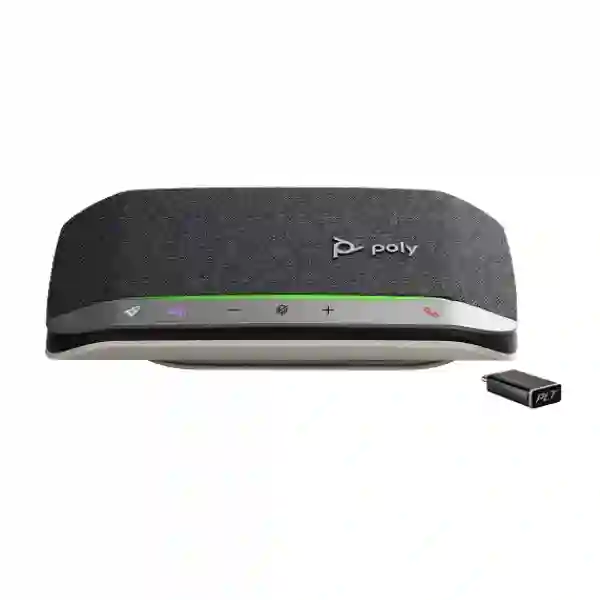
HP Poly Sync 20+ Microsoft Teams Speakerphone with BT700 Adapter
Make Microsoft Teams calls easier to hear and manage with a portable speakerphone designed for an individual desk or a compact group discussion. The HP Poly Sync 20+ Microsoft Teams Speakerphone with BT700 Adapter combines a steerable three-microphone array, speaker playback, full-duplex conversation, a rechargeable battery, and an included USB Bluetooth adapter. Confirm the exact USB-A or USB-C connector variant when requesting a quotation, because the title alone does not establish the supplied part number.
Quick answer: who should consider this speakerphone?
Choose this Teams-certified Poly Sync 20+ when you want portable open-air calling for a personal workstation, home office, or modest meeting table. The bundled BT700 adapter gives a supported computer a wireless audio connection option, while the speakerphone also serves compatible smartphones over Bluetooth. It is not intended to guarantee coverage of a large conference room or to replace a headset where conversations must remain private.
The most important pre-purchase decision is to identify the exact HP part number and connector package. Manufacturer documentation for the family covers several hardware variants, including different USB connector arrangements. This description focuses on capabilities supported by official HP documentation without assuming a specific local SKU, price, stock position, or delivery entitlement.
Technical specification overview
The following figures are sourced from HP’s documentation for relevant Teams-certified Sync 20+ configurations. They are reference specifications, not an assertion that every part number shares identical connectors or accessories. Confirm the exact unit on the final quotation.
| Product family | HP Poly Sync 20+; Microsoft Teams-certified BT700-equipped version |
|---|---|
| Primary role | Portable personal and small-group USB/Bluetooth speakerphone |
| Microphones | Three-microphone steerable array |
| Speech processing | Full-duplex audio; noise and echo reduction |
| Microphone pickup | Up to approximately 2 metres, depending on model and environment |
| Speaker | 40 mm driver; specified 80 Hz–20 kHz speaker bandwidth |
| Bluetooth | Bluetooth 5.1 on documented configurations |
| Computer connection | Wired USB or included BT700 USB Bluetooth adapter; connector type varies |
| Phone connection | Bluetooth with compatible smartphones |
| Battery | Rechargeable lithium-ion; up to 20 hours of manufacturer-rated talk time |
| Charging | Manufacturer reports less than 4 hours on documented variants |
| Supported desktop systems | Windows 10, Windows 11, macOS on referenced HP specifications |
| Physical format | Approx. 34 × 95 × 182 mm and 360 g on referenced variants |
| Included items | Speakerphone and BT700 adapter; carrying accessory and cable/adapter arrangement depend on variant |
| Not established for listing | Exact SKU, MPN, USB connector variant, local selling price, stock, delivery, warranty service terms |
A personal speakerphone built for understandable conversations
On a working day, the value of a speakerphone is not the number of buttons it carries. It is whether people can follow a conversation without leaning into a laptop microphone, asking colleagues to repeat themselves, or losing the thread when two participants speak together. The HP Poly Sync 20+ Microsoft Teams Speakerphone with BT700 Adapter is designed for that practical requirement. It combines a portable microphone-and-speaker unit with wired and wireless connection options, so a user can build a compact meeting setup without permanently equipping a conference room.
This is particularly relevant to individuals who alternate between desk work, small face-to-face discussions, and online meetings. A professional can place the unit on a clear tabletop, choose it as the computer’s audio device, and use familiar controls to manage a call. Its design is more flexible than relying only on a laptop’s built-in audio, but it should not be mistaken for a large-room conferencing system. The right purchase depends on participant position, surrounding noise, connecting devices, and the specific USB version in the supplied package.
Three microphones that focus on speech
HP specifies a three-microphone steerable array in the Sync 20+ family. The array is intended to concentrate on speech while supporting noise and echo reduction. That design matters when a person sits back from a computer or when two colleagues are speaking around a small table. It gives the device a more purposeful voice-capture system than the single microphone found in many basic accessories. It can also reduce the need to rearrange a laptop simply to point its microphone toward everyone.
Good capture still depends on placement and room conditions. Position the speakerphone where participants can speak toward it naturally rather than hiding it behind a monitor, under papers, or close to a noisy ventilation outlet. HP describes microphone pickup of up to approximately two metres for relevant Sync 20+ configurations. This is a useful planning figure, not a promise that every voice at that distance will sound equally clear. The size and acoustics of the room, voice levels, noise sources, and the exact hardware revision remain important.
Why full-duplex audio changes a meeting
Full-duplex audio allows incoming and outgoing speech to operate together, which is especially helpful in active discussions. People naturally acknowledge points, ask quick questions, and occasionally speak at the same time. A half-duplex system can make one side seem to disappear when the other side talks. The full-duplex capability documented for Poly Sync 20+ is intended to support a more conversational experience, helping a meeting feel less like a sequence of people waiting for an audio channel to open.
That benefit should be understood alongside echo management. If the speaker output is turned up excessively or the device is placed beside reflective surfaces, the surrounding environment can make communication less comfortable. Start at a moderate volume, keep the unit on a stable surface, and check that the meeting application uses the speakerphone for both microphone and playback. This simple configuration check is often more useful than changing advanced settings before the first call. A quick test call can reveal whether the speaker or room layout needs adjusting.
A speaker tuned for calls as well as everyday listening
HP lists a 40 mm speaker and a speaker bandwidth of 80 Hz to 20 kHz on relevant Sync 20+ specifications. The series also uses a bass-reflex approach with passive radiators in manufacturer descriptions. In ordinary use, this means the unit is intended to handle spoken presentations, voice calls, and general audio playback rather than serving only as a microphone. Users can review a recorded meeting, listen to a training clip, or play an audio presentation without changing to a separate speaker every time.
Sound preferences are personal, and one compact speakerphone will not perform like a dedicated multi-speaker entertainment system. More importantly, listening to music and participating in an online meeting are different tasks. Meeting applications may change their audio-processing behaviour when a microphone is active. Buyers should evaluate the unit principally as a communications tool, then treat general listening capability as an additional convenience. If a team expects amplified sound for a large training room, a larger conferencing device may make more sense.
The BT700 adapter: wireless PC audio with less setup ambiguity
The plus designation is important because the specified package includes a Poly BT700 Bluetooth USB adapter. This is designed to let a computer communicate with the speakerphone without leaving a cable across the desk. It is a practical arrangement for someone who regularly repositions a laptop, clears a meeting table, or wants to use the speakerphone a short distance from the computer. HP’s product-family guidance distinguishes the Sync 20+ package from the non-plus versions by the bundled computer adapter.
The BT700 is not a mobile internet device and does not provide a Teams subscription. It is an audio connection accessory. Insert the correct adapter into a supported computer port, allow the computer to recognise it, and confirm the intended audio device inside the meeting application. The USB-A or USB-C form of the dongle can vary by product variant. Before buying for a fleet of laptops, confirm both the adapter plug and any included conversion accessory rather than assuming that every box contains identical connector hardware.
The dependable role of a wired USB connection
Wireless flexibility is useful, but a wired USB path can also be valuable. It creates a straightforward setup at a dedicated workstation and is a good first test when troubleshooting a wireless pairing problem. On supported configurations, the integrated cable connects the speakerphone to a computer for conferencing audio while providing a way to supply power. For an employee working at the same desk for long periods, leaving the cable connected can reduce the need to think about battery charging between meetings.
Connector identification matters. HP offers USB-A, USB-C, and USB-C/A-adapter configurations in the wider product family, and older and newer part numbers can have different accessory bundles. The product name provided for this listing does not identify which one is being supplied. Consequently, a purchase request should include a check of the exact manufacturer part number, the integrated cable connector, and the BT700 connector. It is safer to verify those three points than to choose a device solely because the computer has a USB port.
Bluetooth audio for a smartphone
The Sync 20+ family supports Bluetooth connection to compatible smartphones, allowing a user to take a mobile call or join a meeting without depending entirely on a computer. This can be helpful when a laptop is occupied with a presentation, when someone is travelling with fewer accessories, or when an employee needs to join a call from a personal workstation. HP’s specifications identify Bluetooth 5.1 for the referenced configurations, and the unit has a physical pairing control.
For a successful mobile setup, enable Bluetooth on the phone, place the speakerphone into pairing mode, and select the device from the phone’s available devices. Once connected, verify that the phone is using the speakerphone for the call. Functions such as media control, call handling, and application integration can vary with phone operating system and software. Some environments also apply company restrictions to Bluetooth accessories. IT departments should test the intended mobile devices before writing a universal setup instruction for every employee.
USB-A and USB-C: choose the variant, not just the product name
A recurring purchasing problem with conferencing accessories is that apparently similar product titles conceal important connector differences. HP has documented Teams-certified Sync 20+ units with USB-A and USB-C configurations, along with newer USB-C/A adapter arrangements. A laptop with only USB-C ports may not accept a USB-A dongle directly. Conversely, a desktop equipped mainly with USB-A ports needs either a matching connector or an approved adapter. A USB connector mismatch is avoidable, but only when the exact bundle is identified before ordering.
Ask for the manufacturer part number shown on the quoted unit and request confirmation of the cable, Bluetooth dongle, and adapter contents. Then compare that information with a sample of the organisation’s laptops, docking stations, and meeting-room computers. A physical converter can solve some connector problems, but not every converter behaves identically with audio devices. For a larger deployment, test one complete package on the intended computer before scaling the purchase. This prevents a small purchasing assumption from becoming a widespread onboarding issue.
What Microsoft Teams certification means for buyers
This version is intended for organisations using Microsoft Teams as a regular meeting platform. HP identifies Microsoft Teams certification for the corresponding Teams variants and describes a dedicated Teams-oriented control on applicable models. That can be attractive where staff are expected to use a consistent interface for calls. A Teams-certified device is a better-targeted choice for that workflow than a generic speaker whose interaction with the application has not been designed or evaluated in the same way.
Certification does not remove the need for configuration. The computer must still have a supported operating system, the meeting application must be properly installed or accessible, and the correct input and output devices must be selected. Teams functions can depend on app version, account settings, and the actual Teams-certified hardware variant. Confirm whether the dedicated Teams button is needed for the intended users and test its behaviour with the organisation’s standard desktop application. The speakerphone itself does not include a Microsoft Teams licence.
Touch controls that reduce the need to search a screen
A conference call can become distracting when someone must repeatedly find the correct software window simply to mute a microphone. HP lists controls for answering or ending calls, microphone mute, volume changes, and a programmable function on relevant Sync 20+ configurations. The product family also includes power and Bluetooth-pairing controls, together with a visible call-status light bar. These are everyday usability features rather than obscure technical specifications.
Before a meeting begins, a user should learn where the mute and volume controls are located and what the light indications mean. It is also worth checking the difference between muting in the meeting application and using the device’s own controls. Depending on connection mode and application support, the two states may not always present themselves identically. A one-minute familiarisation exercise can prevent a participant from assuming the microphone is muted when the wrong interface was used. Organisations deploying several units can turn this into a concise user guide.
Battery life for mobile working days
HP publishes up to 20 hours of talk time for the Poly Sync 20+ configurations reviewed here, with a rechargeable lithium-ion battery and a published charging time of less than four hours under the specified conditions. That gives useful flexibility when moving between desks or short meetings. The number is an upper-bound manufacturer specification rather than a guarantee that every workflow, battery age, output level, and connection mode will reproduce exactly the same result.
A good charging routine is more reliable than assuming that the speakerphone will always last a full working week. Charge it before a travel day, keep an appropriate power connection available during long sessions, and consider the number of meetings scheduled. Users who spend many hours in continuous video conferences may reasonably prefer wired operation. When purchasing for a team, include charging arrangements in the deployment plan so that an otherwise suitable accessory does not become unavailable simply because nobody established where and when it should be recharged.
Compact enough to move between workspaces
At approximately 360 g and about 34 × 95 × 182 mm for manufacturer-documented configurations, the Sync 20+ is a compact piece of meeting equipment. The product family is supplied with a carrying solution in the relevant HP packages. A user can carry it between a home desk, a temporary meeting area, or an office workstation more easily than a fixed tabletop conferencing system. Portability is especially useful when employees work in shared or changing spaces.
Portable does not mean that the environment stops mattering. Protect the microphone area from dust build-up, avoid placing the device where it can be knocked off a desk, and pack the connector accessories together so that the BT700 is not lost. The case or pouch should be treated as a convenience rather than a substitute for careful handling. For employees who travel frequently, assigning a complete kit with the unit, dongle, and a simple printed setup instruction can make repeated deployment considerably smoother.
Matching the speakerphone to the size of the meeting
HP’s published microphone pickup guidance of up to around two metres indicates that this device is aimed at personal use and small meeting settings. Some manufacturer variants are described as suitable for small spaces measuring approximately 3 × 3 m or 4 × 4 m, so there is not one room-size figure that should be assigned to every unspecified Sync 20+ part number. The correct interpretation is practical: position people near the device and do not assume that it will collect speech equally from the corners of a large room.
An occasional meeting between two colleagues at a compact table is a very different requirement from a boardroom with many seated participants. In the latter case, microphone coverage, speaker output, seating distance, and multiple talkers can exceed the design intent of a personal speakerphone. A business planning shared conference spaces should map table dimensions and seating arrangements before choosing its audio equipment. If the room is consistently larger or more complex, evaluate a purpose-designed room speakerphone or conferencing system instead.
Reducing disruption from the surrounding office
Noise and echo reduction are useful because modern workspaces rarely remain completely silent. Nearby discussions, computer fans, and ventilation can interfere with a call, particularly when the laptop microphone is far from the person speaking. The Sync 20+ microphone system is designed to focus on voices and process some distracting sound. This is most valuable when the device is placed thoughtfully and participants remain within a sensible speaking distance.
However, no compact speakerphone can guarantee that an open-plan office, busy reception, or loud street environment will sound like an isolated studio. Microphones must still capture the person speaking, and some nearby voices may occupy the same frequency range as that person. For privacy-sensitive or persistently noisy environments, a personal headset may be a better choice. Close doors when feasible, avoid placing the speakerphone beneath a fan, and use the mute function whenever the local discussion should not be shared with remote participants.
A more practical home-office setup
Home workers often have limited desk space, and the computer may already support several screens, a keyboard, and a docking station. A compact speakerphone offers a way to make meeting audio more deliberate without committing to a large desktop microphone or external speakers. The user can place it centrally, select it in Teams, and continue using the computer camera or other presentation tools. With the BT700 adapter supplied in the relevant package, the speakerphone can be positioned without stretching a USB cable across the workspace.
A headset remains useful when other household members are nearby or when private conversations should not be heard aloud. The speakerphone is generally more suitable when hands-free communication and shared listening are priorities. It can also help someone who finds wearing a headset for consecutive meetings uncomfortable. The buyer should decide which situations call for open audio and which require private listening rather than expecting one device to replace every form of business audio accessory.
Working across hybrid and shared desks
Hybrid employees may move from an office to home and back within the same week. Carrying familiar audio equipment can make the meeting experience more consistent even when the computer and room change. The Sync 20+ gives such users a device with its own microphone array, speaker, call controls, and Bluetooth connectivity. It does not depend on a specific desk layout, which is attractive where rooms are booked temporarily or where employees share a pool of workstations.
The main administrative task is ensuring the correct connection path at each location. On one computer, the BT700 might be the best choice; on another, wired USB might be simpler. Employees should check the microphone and speaker selection before joining an important call, particularly after connecting a docking station or another audio accessory. A small standard operating guide that explains connection, mute state, charging, and basic troubleshooting will usually have greater value than a lengthy list of marketing features.
Small group discussions without a fixed room installation
A small team may need to speak with an external colleague while reviewing a document at the same table. In that setting, using one shared speakerphone can be more natural than gathering around a laptop whose microphone faces only one participant. A centrally placed Sync 20+ provides a microphone array and full-duplex audio intended for this kind of conversation. It can be set on the table for the meeting and packed away afterwards, without requiring permanent room cabling.
The arrangement works best when attendees speak at normal levels and remain close to the unit. If several people join the same online meeting from separate laptops in one room, the result can be echo or feedback because multiple active microphones and speakers are competing. A clearer approach is to designate one room audio device and have nearby participants mute their additional devices. If every person requires an individual microphone over a wide area, a larger room system or individual headsets should be considered.
Why a portable solution suits travelling professionals
Consultants, project coordinators, technical staff, and managers may need to join conversations from different temporary workplaces. The Sync 20+ is designed to make that easier by combining conferencing audio into one portable accessory. The included BT700 adapter provides a route to wireless computer audio, while Bluetooth connectivity can serve a compatible smartphone. This dual-device flexibility can be useful when a professional alternates between a laptop meeting and a mobile conversation during the same day.
Travel does not eliminate practical checks. Keep the dongle with the speakerphone, inspect charging options before departure, and avoid conducting sensitive conversations over open audio in public areas. The product’s portable form factor is a convenience, but it is not a guarantee of private sound or unrestricted wireless performance. A headset may be preferable on public transport or in a crowded shared office. Evaluate the environment first, then choose the audio tool that suits the actual task.
IT considerations for business deployment
Buying one speakerphone for personal use is different from selecting a standard device for a department. An IT team needs to know the supported operating systems, USB connector, expected meeting applications, Bluetooth policy, driver behaviour, and practical support steps. HP lists Windows 10, Windows 11, and macOS compatibility for documented Sync 20+ configurations. That is a useful starting point, but fleet administrators should still test the exact combination of endpoint, operating system version, Teams client, and hardware package used by their organisation.
HP also identifies Poly Lens as a management-related software capability on relevant product documentation. Whether a particular configuration and feature is available should be checked against the device version and current software support before inclusion in a deployment policy. Organisations should document where adapters are stored, how users pair replacement hardware, and who is responsible for firmware and application updates. Consistency at this level reduces avoidable support requests when the same device type is issued to many employees.
A sensible first-time setup sequence
Begin with the hardware. Check the package against the purchase specification, inspect the cable and BT700 connector, and charge the unit as necessary. For a computer-based meeting, connect the correct BT700 USB adapter or the speakerphone’s supported USB cable. Allow the computer to recognise the device, then open the audio settings for the operating system and the intended conference application. Select the Poly device for microphone input and speaker output, rather than assuming that the application automatically chose the desired device.
Next, make a short test call. Speak from the intended seat, increase or decrease speaker volume to a comfortable level, and verify the mute behaviour. If using a phone, pair it over Bluetooth and check that audio routes correctly during an actual call. Put the BT700 and cable in the carrying kit after the test. These steps also reveal a connector or software mismatch before a scheduled meeting. For managed workplaces, an IT-approved setup guide is preferable to individually improvised workarounds.
What to check when callers cannot hear you
Audio problems do not always mean the speakerphone is defective. First confirm that the unit is powered, connected, and not muted. Then review the computer’s selected microphone, the application-specific microphone setting, and any competing headset or webcam microphone. A user can inadvertently send speech through one device while listening through another. If the computer was moved from a docking station, an old default audio setting may have remained active even though the speakerphone is physically connected.
For wireless use, check that the BT700 is fully inserted and that the intended device pairing is active. Try a simple wired connection where supported to isolate a pairing or radio issue. Move the speakerphone away from obvious sources of interference and retest in a quieter room. If the issue persists, record the exact product variant, operating system, app version, and connection mode before requesting support. This information makes fault isolation much more efficient than describing the problem only as ‘poor sound’.
Physical care and IP64 protection
HP documentation for the Sync 20 family references IP64 dust and water resistance. This indicates a level of protection against dust ingress and splashing, but it should not be treated as permission to immerse the unit, expose connectors to liquids, or leave the device outdoors in severe weather. A meeting accessory can be resistant to everyday conditions while still requiring appropriate handling. Keep charging points dry, store the unit carefully, and follow the manufacturer instructions for cleaning.
Routine maintenance can be simple. Remove loose dust gently without blocking microphone openings, check that the USB connector has not become bent or strained, and keep the speakerphone away from excessive heat. Battery capacity can change with age and usage, as with other rechargeable devices. If the accessory is shared by several employees, establish a basic check-in process so damaged cables or missing adapters are noticed before the next booking. Careful storage is particularly important because the small BT700 dongle is easy to misplace.
Comparing this device with a headset
A speakerphone and a headset solve overlapping but different communication problems. A headset keeps playback close to the ears and can be the better choice for private calls or noisy shared spaces. A speakerphone gives the user freedom from ear-worn equipment, allows more natural movement, and can support a short group discussion around one table. The Poly Sync 20+ makes sense when open audio, portable collaboration, and straightforward handling matter more than isolation from surrounding sound.
Choose a headset when callers frequently discuss confidential information in public areas, when coworkers sit close together, or when background noise cannot be controlled. Choose a portable speakerphone when the room is suitably quiet and the user values shared audio or hands-free comfort. Many organisations benefit from offering both options for different tasks. Neither device category is universally superior. A responsible procurement decision begins with the working environment, not a broad claim that one technology is better.
Comparing a personal speakerphone with room equipment
The Sync 20+ is a personal and small-group accessory; it is not a substitute for an integrated room system in every scenario. A formal meeting room may need microphones distributed across a long table, louder speaker coverage, camera integration, and stable connections to a room computer. Those needs become more demanding as the number of participants and the speaking distances increase. A portable device is attractive because it is simple to move and requires less permanent arrangement, but physical coverage remains a real limitation.
Before assigning this model to a shared room, check the typical maximum participant count, actual seating geometry, local noise levels, and whether visitors will bring their own computers. Conduct a short trial with participants seated in the farthest normal positions. If distant voices are weak, the appropriate response may be to choose a larger-room product rather than increasing output volume or promising that software processing will solve the issue. The right-sized system usually produces a better meeting experience.
Buying considerations for organisations in Tanzania
Businesses in Tanzania considering this HP Poly speakerphone should focus on equipment fit and a clearly specified quotation. Ask for the exact Teams-certified product variant, the integrated cable connector, the BT700 adapter type, and the accessories included in the actual package. Confirm that the intended laptops and meeting software are supported. Request a written description of warranty handling and any applicable delivery arrangements from the supplier before committing to an order. These are procurement checks, not claims that a particular stock level or service is currently available.
No local selling price, Tanzanian stock position, import charge, or local warranty service entitlement is established by the supplied product title. Those details must be confirmed for the exact offer. For a multi-unit purchase, obtaining one sample or a complete specifications sheet can help the IT and purchasing teams avoid a mismatch. FourTeck Tanzania can be asked to quote the intended variant and clarify its connection accessories; the final choice should be based on the organisation’s devices, meeting style, and commercial terms actually offered.
A procurement checklist that catches small but costly mistakes
Before approving a purchase order, write down the business reason for the speakerphone: individual Teams calls, occasional small-group meetings, or portability across workspaces. Then record the endpoint operating systems, available USB ports, standard Teams application, security restrictions on Bluetooth use, and typical microphone distance. These factors determine whether the Sync 20+ is a suitable tool. They also make it easier to explain the purchase to someone reviewing the budget without technical familiarity.
Next, ask the supplier to state the exact manufacturer part number, connector bundle, BT700 format, package contents, and warranty terms on the quotation. Do not treat a product-family specification as proof of every detail in the particular carton being sold. If several units are being purchased, test a representative package in the same software and laptop environment that employees will use. Finally, establish a storage and charging process. A correctly specified, manageable device is often more useful than a list of features that nobody deploys consistently.
Software and security decisions still belong to the organisation
A USB or Bluetooth speakerphone forms part of the endpoint’s audio environment. Organisations with managed devices should decide who may pair Bluetooth equipment, whether USB accessory restrictions apply, and which meeting applications are approved. The BT700 adapter is an audio interface accessory, not a replacement for identity controls, device encryption, network security, or meeting governance. When meetings contain sensitive information, users must still choose a private location and follow the organisation’s confidentiality practices.
Software controls can change over time, so testing matters more than assuming every future version will behave exactly like today’s setup. A practical rollout involves confirming that the device is recognised, that the mute and call controls behave appropriately, and that any approved maintenance software is compatible with the intended variant. For a fleet, document who can install updates and how support teams will identify the physical part number. This creates a more reliable experience without promising security features or central-management capabilities that have not been confirmed for the exact listing.
What the published technical figures do and do not tell you
Manufacturer figures provide a useful comparison point, but they should be read in context. The advertised up-to-20-hour talk-time figure is based on specified use conditions; real battery endurance can vary. The up-to-two-metre microphone guidance describes a designed working range rather than a fixed radius within which all speech will be perfect. Bluetooth wireless range is also affected by obstacles, interfering devices, and the radio environment. These figures help narrow down choices; they do not replace a short real-world evaluation.
Different HP part numbers in the Sync 20+ family can also show differences in stated room size, microphone bandwidth, colour, connector design, and accessory bundle. The title alone cannot establish which full specification table applies. This page therefore highlights capabilities shared by the Teams-certified BT700-equipped family and flags model-dependent details for confirmation. Before a final purchase, compare the actual quote’s manufacturer identifier with HP’s specification for that exact variant. Doing so keeps the decision based on verifiable hardware, not a blended list of features from different versions.
Frequently asked questions
Is the HP Poly Sync 20+ suitable for Microsoft Teams?
Yes, the Microsoft Teams-certified versions of the Sync 20+ are designed for Teams meetings and include Teams-oriented functionality. Verify that the quoted item is the Teams-certified variant rather than a standard variant. The speakerphone provides audio hardware and controls; it does not supply a Microsoft Teams account or licence. Configure it as the microphone and speaker in the app before the first important call.
Does the package include a BT700 adapter?
The product brief specifies the Sync 20+ package with BT700, and HP confirms the dongle is bundled with relevant plus variants. However, adapter connector type differs between product configurations. Request confirmation of whether the actual box contains a USB-A or USB-C BT700 and whether a converter is supplied. Do not infer those details from an abbreviated product title.
Can I connect it to a laptop without using Bluetooth?
Supported versions provide a wired USB connection to a compatible computer. A wired connection is useful for a permanent desk setup and as a troubleshooting option when wireless pairing is not working as expected. Check whether your exact speakerphone cable terminates in USB-A, USB-C, or an adapted connector. The purchase should match the ports on the laptop or docking equipment.
Will it work with a smartphone?
HP describes smartphone connectivity through Bluetooth for the Sync 20+ family. The phone must support the relevant Bluetooth audio functions and permit pairing. After pairing, select the speakerphone as the call audio device and check the result in the intended calling application. The specific behaviour of phone call controls or meeting apps can vary according to the smartphone platform and software version.
How many people can use it in one meeting?
It is intended primarily for personal and small-group use, not a large boardroom. HP describes up to roughly two metres of microphone pickup for documented configurations, but effective speech quality depends on the table, seating, and noise level. A couple of people near the unit may be a suitable scenario. Larger groups or distant seats should be evaluated with room-oriented equipment instead of relying on a fixed headcount promise.
How long does the battery last?
HP states up to 20 hours of talk time for the referenced Sync 20+ configurations. Actual endurance changes with usage, audio volume, battery condition, and other operating factors. The published charge time is less than four hours under manufacturer conditions. Charge the device before travel or a long meeting day and use supported wired power arrangements when continuous availability is important.
Can it be used for music and presentation playback?
Yes. The Poly Sync 20 family is designed for spoken conferencing audio as well as general listening. The speaker is useful for hearing a presentation, training recording, or audio content at a personal workstation. It should still be evaluated primarily as a communications accessory rather than a replacement for a high-output room sound system. Audio processing can behave differently when a meeting application is actively using the microphone.
Does noise reduction eliminate all background noise?
No. The three-microphone array and noise and echo reduction are intended to improve voice communication, not to make all environments silent. Loud nearby discussions, traffic, fan noise, and room reverberation can still affect calls. Position the unit close to the intended speakers, select moderate playback volume, and use a headset when privacy or heavy ambient noise is the main concern.
Does the device require a Teams licence?
The speakerphone is hardware, and its Teams certification describes its suitability for the collaboration platform. Users still need whatever Microsoft Teams access their organisation or meeting requires. The BT700 dongle is a Bluetooth USB audio adapter, not a software licence, network service, or internet connection. For business deployment, verify the approved Teams client and account arrangement separately.
Is this a good choice for open-plan offices?
It can be useful where surrounding sound is reasonably controlled and open audio will not disturb colleagues. In a crowded open-plan office, however, nearby conversations may be captured, and speaker playback can be overheard. A personal headset is often more appropriate for frequent calls in close seating arrangements. The decision should be based on sound conditions and privacy requirements rather than portability alone.
Can we buy several units for staff?
The format can suit managed workplace use, provided the business confirms its standard laptops, connector types, Bluetooth policy, and conferencing applications. Before ordering multiple devices, request the exact part number and test a complete unit with the organisation’s typical computer build. Create clear instructions for selecting audio, muting, charging, and keeping the dongle with the speakerphone. Commercial availability and order terms must be confirmed separately.
Does the specification guarantee wireless range in every office?
No. HP lists a maximum wireless range in its specifications for relevant configurations, but real performance depends on walls, nearby electronics, radio congestion, and device placement. A stable desk arrangement and a successful test call are better indicators of suitability than a maximum-range figure alone. Keep the Bluetooth adapter unobstructed where practical and test in the actual room if the speakerphone will be placed away from the computer.
What should I verify before requesting a Tanzania quotation?
Share the intended computer type, preferred wired connector, use of Microsoft Teams, typical meeting size, and the requirement for the BT700 adapter. Ask the supplier to identify the exact manufacturer part number, box contents, quoted price, lead time, delivery conditions, and warranty process for that item. None of those commercial details should be assumed from an international specification page. A precise quotation makes the comparison more useful.
Is the Sync 20+ the right device for a large conference room?
Not usually as a default choice. It is a portable personal and small-group speakerphone with limited practical microphone coverage. A large meeting room may need several microphone pickup positions, greater output, and other integrated equipment. If the room is important to daily operations, evaluate table dimensions and seating first. A room-specific product can be more reliable than attempting to stretch a personal device beyond its intended use.
Request the correct Poly Sync 20+ configuration
Ask FourTeck Tanzania for a quotation on the HP Poly Sync 20+ Microsoft Teams Speakerphone with BT700 Adapter, specifying the desired USB connector, intended computer models, and whether the device will be used mainly for personal calls or small-group meetings. Request confirmation of the exact manufacturer part number, included accessories, commercial availability, and applicable warranty terms before ordering.
Next step: request a model-specific quotation and verify the connector bundle.




Reviews
There are no reviews yet.