
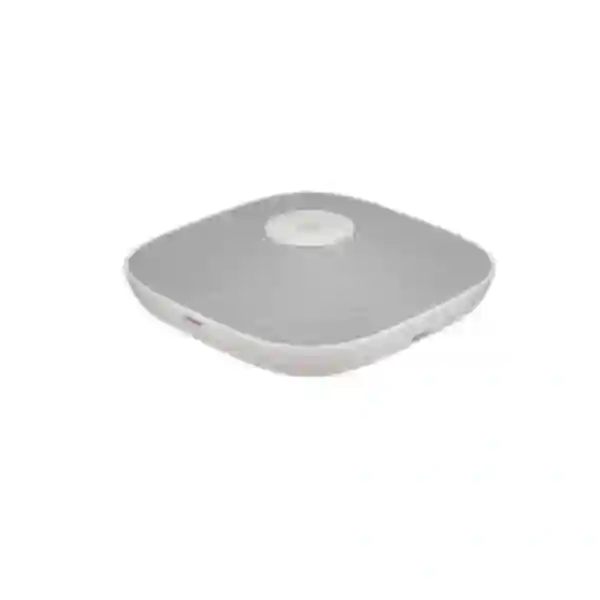
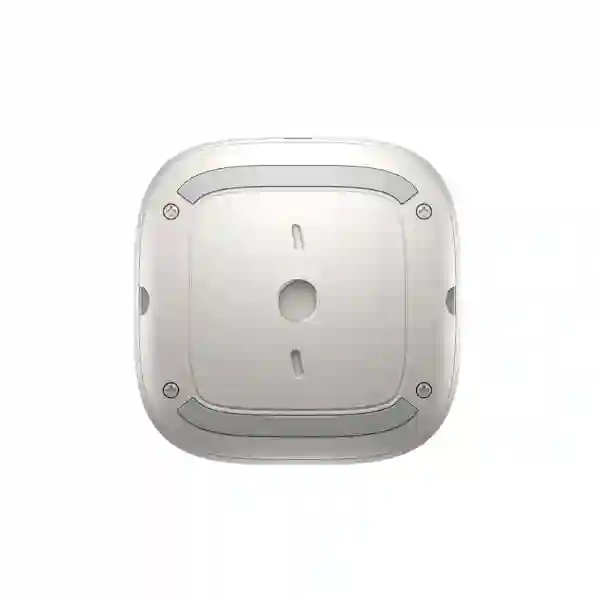
Poly Studio A2 room audio · White finish
Bring every seat closer to the conversation
The HP Poly Studio A2 Table Microphone White is a dedicated table microphone for compatible Poly Studio conferencing systems. It helps room designers position speech pickup where people actually sit, rather than relying solely on the sound captured near a video display. Its four-element cardioid array, purpose-built wired connection, included mounting hardware and compact white design make it suitable for considered conference-room audio expansion.
For a suitable system and accurate quotation in Tanzania, confirm the existing Poly Studio model, the number of microphones needed and whether the room requires a separate Studio A2 Audio Bridge. The accessory is not a universal laptop microphone or a complete video-conferencing kit.
Quick decision guide
Best evaluated for a supported Poly Studio G62, X72, V72, X52, V52, X32 or V12 conference-room deployment. Confirm bridge or direct-connect requirements before purchasing, then select microphone quantity from the host’s documented limits and the actual seating arrangement.
Verified technical specifications
The following figures come from HP’s technical materials for the white Studio A2 table microphone. They describe the accessory and published host support rather than a guaranteed result in every room.
| Device type | Wired table microphone accessory for compatible Poly Studio room systems |
|---|---|
| Manufacturer product number | B22X4AA (HP’s white variant; not a verified FourTeck SKU) |
| Finish | White |
| Microphone array | Four unidirectional cardioid elements |
| Manufacturer pickup figures | Up to 1.8 m radius, NoiseBlockAI off; up to 4.3 m radius, NoiseBlockAI on |
| Frequency response | 100 Hz–20 kHz (HP product brief) |
| Sensitivity | −35 dB (V/Pa) at 1 kHz |
| Signal-to-noise ratio | >68 dBA |
| Audio connections | 4-pin JST input; 3-pin JST output |
| Audio transport | Studio A2B audio architecture |
| Size and weight | 92 × 92 × 24 mm; approximately 120 g |
| Environmental range | Operating temperature 0–40°C; operating humidity 15–80% |
| Management | Poly Lens through supported room-system architecture |
| Host limits | G62: 8; X72/V72: 4; X52/V52: 4; X32: 2; V12: 1 |
What this white table microphone is designed to solve
When people sit farther from a video bar, remote colleagues can struggle to follow a meeting. The person nearest the display may sound clear while someone at the opposite end of a table sounds distant. The HP Poly Studio A2 Table Microphone White puts a dedicated voice-pickup point close to the conversation instead of relying only on microphones built into a room device. It is a purpose-built wired table accessory for compatible current-generation Poly Studio video systems, not a general-purpose computer microphone.
The intended result is a more balanced conversation across the conference table. A2 microphones can be planned around where participants actually sit, which is useful when a room’s furniture arrangement places speakers well away from the main camera or video bar. Rather than selecting an accessory based only on room dimensions, buyers should consider seating positions, the meeting system already installed and the possible need for multiple pickup points. FourTeck Tanzania can be asked to help confirm the correct product combination and obtain a quotation for the proposed room setup.
At-a-glance buyer fit
This white Poly Studio A2 microphone is worth evaluating if your organization already operates a compatible Poly Studio G62, X72, V72, X52, V52, X32 or V12 system, or is purchasing one of those room devices as part of a new meeting-room project. It supports in-room speech capture, works within the Poly Studio A2 audio architecture and offers a compact, low-profile appearance for a boardroom or meeting table. If you need to connect several microphones, the specific host device sets the supported maximum.
It is not the right assumption for a basic laptop’s USB socket, an arbitrary conference speakerphone, an older Poly video bar or a non-Poly audio installation. Determine the room system first, then the microphone count, signal path and required accessories. The white finish is a visual choice, while compatibility and cabling govern whether the deployment will work. The most useful first action is to identify the exact room-device model and share a simple table layout with a quotation request.
Understanding the four-element microphone design
Inside the A2 tabletop unit are four unidirectional cardioid microphone elements. That detail matters because the device is built to collect speech around a meeting surface while giving the audio processing system useful directional input. The hardware combines these elements in a product designed for conversational pickup; buyers should not interpret the four elements as four separate speakers, four user channels or four independently assignable meeting seats. It remains a single table microphone accessory in the room-audio chain.
With a sensible location on the table, this design helps avoid having every participant speak toward the main display. Actual voice intelligibility, however, also depends on who is speaking, whether people face away from the microphone, reflections from walls, mechanical noise and the capabilities of the connected Poly system. A cardioid element does not eliminate noise by itself. For important boardrooms, test normal speaking voices from several seats rather than assuming that a printed specification guarantees uniform clarity everywhere in the room.
How to interpret the advertised pickup ranges
HP specifies a pickup radius of up to 1.8 metres with Poly NoiseBlockAI off and up to 4.3 metres with Poly NoiseBlockAI on. These are manufacturer-stated maximum pickup figures under their respective processing conditions, not instructions to install a microphone at the maximum possible distance from every speaker. They should not be converted into a promise that every seat inside a circle will always sound equally clear. Room acoustics, mounting, voice level and the host’s available audio processing can change results.
A practical design starts with seating rather than circles drawn on a floor plan. Mark the typical chair positions, the centre and ends of the table, and any places where participants move while presenting. Then assess how many A2 microphone positions provide useful coverage while respecting host limits. A small meeting room may need one correctly placed microphone; a longer table may benefit from more pickup points if the host supports them. Ask for an equipment and placement review before committing to a microphone count based exclusively on the maximum published radius.
NoiseBlockAI and realistic expectations
The stated pickup figures distinguish configurations with Poly NoiseBlockAI enabled and disabled. NoiseBlockAI is part of Poly’s audio-processing approach on supported room systems; it should not be mistaken for a separate processing computer inside the A2 microphone or a setting that can be guaranteed on every possible installation. The compatible host, software configuration and connected audio chain determine what functions are available to the meeting room. If background noise is central to the purchasing decision, confirm how that host handles the A2 inputs.
Noise control works best when the room is also designed for communication. Air-conditioning noise, dishes on a conference table, laptops placed too close to the microphone and highly reflective surfaces can still make calls harder to follow. Talk with the installation team about furniture, cable routing and the location of noisy equipment. During commissioning, compare representative meetings with the intended processing settings rather than relying on an office demonstration in a completely different acoustic environment.
The mute control and status visibility
HP documents a capacitive touch mute button and integrated LED status indicators on the Studio A2 tabletop microphone. These controls are relevant in shared conference spaces where people need to understand whether the room’s audio is active without reaching for a computer. The physical interface can support a more predictable meeting experience when participants have been shown what it means and when the microphone is paired with a correctly configured compatible room system.
A tabletop mute control is not a replacement for reviewing how the video platform, host device and room system manage microphone states. Status indicators should be interpreted using the relevant HP administration guidance and the software version installed; avoid teaching users that any color always has the same meaning across unrelated devices. Before handover, demonstrate muting and unmuting during an actual call, check remote participants’ feedback and document any behavior that facility or IT staff need to know. This small commissioning step can prevent confusion later.
Compatibility depends on the precise Poly Studio model
The Poly Studio A2 family supports a defined group of current-generation room systems; the model name matters. HP’s published table lists Poly Studio G62 with up to eight A2 table microphones; Poly Studio X72 and V72 with up to four; Poly Studio X52 and V52 with up to four; Poly Studio X32 with up to two; and Poly Studio V12 with one. These are host-specific maxima, not a suggestion to install the maximum in every meeting room. Confirm software, planned wiring and any additional installation restrictions before ordering.
Look at the product label or management interface on the room system and record its exact model. Names that look similar can represent different hardware generations and expansion-microphone arrangements. Also distinguish a video bar from an external audio bridge and from the table microphone itself; they play different roles. If your quotation includes several rooms, provide a model and required microphone count for each room instead of assuming that one accessory list fits the whole building.
Poly Studio G62: modular room planning
For a Poly Studio G62 installation, HP lists support for up to eight Studio A2 table microphones. That maximum makes the family especially relevant when designing a meeting space with more than one pickup position, but it does not establish that eight units will improve every room. Room layout, the number of active seats, the audio bridge arrangement and practical cable paths should drive the bill of materials. A large table may need strategically placed microphones rather than an even pattern selected for appearance.
The G62 is a modular room system, so the audio setup is just one part of the solution. Camera coverage, display location, control interface, speakers and any integration requirements should be considered together. Before purchasing an A2 microphone for a G62, verify that the proposed architecture includes the compatible HP Poly Studio A2 Audio Bridge and the appropriate power and connectivity provisions. An integrated design avoids receiving a working microphone accessory that cannot yet be installed in the planned room.
Poly Studio X72 and V72: plan for up to four
HP specifies support for up to four Studio A2 table microphones on the Poly Studio X72 and V72. These systems can serve room designs in which people are spread across a wider table or where remote attendees need clearer pickup from participants beyond the video bar’s immediate area. That does not mean every large conference room should use four microphones. A good count follows the seating plan, the acoustics, the expected meeting format and the host’s supported connection topology.
Teams choosing between an X-series appliance and a V-series USB video bar should also consider how the overall meeting platform is hosted and controlled. The A2 table microphone does not independently provide a video-conferencing application or a networked meeting service. Confirm the exact host product, audio bridge, mounting arrangement and cable routes before a purchase request is raised. Where the room is regularly rearranged, discuss a layout that keeps cables safe and allows permitted repositioning without placing connectors under strain.
Poly Studio X52 and V52: expand coverage deliberately
HP lists up to four A2 table microphones for the Studio X52 and Studio V52. That gives designers options for medium-sized room arrangements, but the physical size of a room is not the only factor. A wide table, an offset seating arrangement or a presenter who frequently sits away from the front display may create more difficult pickup conditions than a compact room with the same floor area. Use the regular participant positions to decide whether one microphone or several are warranted.
For either host, confirm that the project includes the appropriate Studio A2 audio path rather than assuming that any legacy Poly microphone connection is compatible. Coordinate placement with the host’s video and loudspeaker layout. After the system is installed, conduct test calls with participants at near and far seats and ask a remote listener to evaluate the result. This helps detect issues caused by furniture, laptop fans or poor placement before the room enters everyday service.
Poly Studio X32: keep the two-microphone ceiling in mind
The Studio X32 is listed by HP as supporting up to two Studio A2 table microphones. That is an important distinction for buyers who might otherwise purchase the same microphone quantity for every Poly Studio X-series model. Two well-planned locations can serve an appropriate table arrangement, but the permitted count is a technical limit, not a promise about a particular room size or an acoustic performance guarantee. Confirm the model and use case before expanding.
For a compact meeting space, first establish whether the existing built-in audio setup meets needs or whether a tabletop pickup point would produce a meaningful improvement. Some rooms have excellent acoustics and a small seating radius; others have difficult layouts that call for closer microphone placement. If the intended table length or seating plan seems to require more than the X32’s documented maximum, review the room design and host selection instead of exceeding the limit. This is more reliable than adding unsupported hardware and hoping the system recognizes it.
Poly Studio V12: a special direct-connect case
The Studio V12 is a notable exception in the Studio A2 family. HP documents support for a single A2 table microphone that connects directly to the Studio V12 rather than through an A2 Audio Bridge. This makes it important to distinguish V12 orders from projects using other supported G, V or X room devices. A general-purpose specification sheet that says an A2 bridge is always required would be misleading for this specific host.
If your room uses a Studio V12, the correct question is whether you need one supported tabletop microphone and the cabling required for the direct connection. Do not plan a multiple-microphone daisy chain for the V12, because its stated support limit is one. Confirm the device firmware and refer to HP’s V12-specific setup instructions before installing. If the meeting table truly needs more distributed pickup positions, reassess the room-system choice against the desired coverage instead of assuming the V12 can be expanded past its documented limit.
Older Poly systems need a different accessory check
Do not assume that the Studio A2 Table Microphone works with every device that carries the Poly name. HP specifically distinguishes this newer A2 audio architecture from older models such as the Studio X70, X50, X30 and G7500, which use their established expansion-microphone approaches. An existing conference room may therefore require a different accessory from a newly purchased current-generation Studio system, even when the two rooms seem similar to end users.
This issue is particularly relevant to organizations upgrading several meeting spaces in stages. An IT team might have a mixture of older and newer devices across departments. Inventory the actual video-bar and codec models before requesting microphones. For every device outside HP’s listed A2 compatibility table, obtain a model-specific expansion-microphone recommendation rather than adapting connectors or assuming a generic audio interface will work. This protects the project from unnecessary returns, delayed installations and confusion over whether a problem is due to wiring or fundamental incompatibility.
The role of the HP Poly Studio A2 Audio Bridge
The Studio A2 Audio Bridge is a separate component used in the supported room-device architectures other than the documented direct-connect V12 arrangement. It provides the interface between compatible host systems and A2 audio peripherals. In installations that call for the bridge, the table microphone alone is not a complete room-audio solution; a quotation should identify the bridge and the relevant cables and infrastructure separately where needed.
HP describes the bridge as part of a flexible audio architecture that can accommodate multiple microphones. It is powered using Power over Ethernet, and the system uses an A2B audio connection for the table microphones. This does not make the microphone itself an ordinary Ethernet microphone, nor should a buyer connect its JST ports to a standard network switch. The bridge’s host connection, available power and routing need to follow the official setup guide. Ask for an itemized proposed configuration showing which components are in the package and which are already installed in the room.
A2B audio and why the connector type matters
The microphone uses an A2B-based audio path, with a four-pin JST input and a three-pin JST output. HP supplies purpose-specific cabling for input and daisy-chain arrangements. These are not interchangeable with typical USB-C, 3.5 mm audio or consumer Bluetooth connections. A buyer should not select the microphone simply because a room contains an available USB port, an Ethernet wall socket or a familiar-looking cable. Compatibility must be established at the system level.
For installation teams, the important preparation is to understand the signal path from host to bridge when applicable, and from bridge to microphones. Match the intended cable type to each run and follow the manufacturer guidance for wiring, cable quality, strain relief and permitted lengths. Avoid improvised connector substitutions or untested extensions. A clean installation is more than an aesthetic benefit: correctly routed cables reduce the risk that maintenance staff or meeting attendees pull a connector loose while moving chairs or rearranging the table.
Daisy-chaining for flexible table layouts
HP supports daisy-chaining Studio A2 table microphones, with the maximum number depending on the connected Poly room system. Daisy-chaining can reduce the need to provide a separate long cable run from the bridge to every table location. It also allows an installation to be designed around where speakers sit, rather than placing all microphones near the front of the room. Before choosing a chain, check the host’s support limit and the manufacturer’s permitted connection arrangement.
Cable distance planning remains essential. HP’s technical materials describe digital transport and installation-specific cable limits; a stated capability should not be treated as permission to use any cable over any distance. Coordinate the path through furniture, trays, conduits or approved floor outlets, and avoid pinch points where the table moves. The goal is to create a reliable audio path that installers can document and IT staff can troubleshoot. For larger meeting spaces, have the proposed chain and bridge placement reviewed before ordering hardware or cutting openings in expensive furniture.
Choosing microphone positions around the table
Start by marking the seating positions that matter most during normal meetings. In a traditional rectangular boardroom, the natural place for a table microphone might be near a group of chairs rather than at the exact geometric centre. In a horseshoe or modular layout, positions may need to account for speakers who face different directions. Consider where laptops, notebooks, water bottles and desk accessories usually sit so the microphone is not hidden beneath clutter or pushed into an unused corner.
Use the manufacturer pickup specification as a planning reference, then validate with a real test call. It may help to ask a remote participant to listen while several people speak at their usual volume from different seats. Check quiet speakers as well as confident presenters. Avoid placing the microphone beside noisy ventilation outlets or on a loose surface that vibrates when people type or move objects. Even a correctly specified microphone benefits from thoughtful placement and a room layout that supports conversational audio.
Acoustics and furniture can matter as much as electronics
Rooms with glass walls, bare floors and hard furniture can reflect voices back toward microphones, reducing intelligibility. Similarly, a quiet microphone will still capture nearby tapping, shuffling papers and mechanical noise if the device sits at a busy point on the table. The Studio A2 microphone’s directional elements and compatible audio processing are useful tools, but they do not replace sensible acoustic design. A room with persistent echo or loud air-conditioning may need environmental improvements alongside microphone placement.
When evaluating a Tanzanian office, classroom-adjacent meeting area or shared meeting suite, assess the actual space rather than assuming a generic boardroom configuration. Soft furnishings, suitable acoustic treatment and careful equipment placement may improve speech pickup, but any building work should be designed for the specific site. Treat the microphone purchase as one part of the wider collaboration experience: remote listeners need clear speech, while in-room participants also need good loudspeaker audio and an easy-to-use system.
What’s included with the white microphone package
For the manufacturer-listed white product variant, HP identifies the Studio A2 Table Microphone, a mounting plate, a six-metre JST-to-Phoenix input cable, a two-metre JST-to-Phoenix daisy-chain output cable, a 1.8-metre JST-to-JST daisy-chain cable, a quick start guide, a safety guide and a warranty card. The package contents help installers plan a first arrangement and understand which purpose-built connections the product uses. Always confirm the exact item and bundle on the quotation before treating any accessory as included in a particular local offer.
The microphone package is not described as containing a video bar, room codec, audio bridge, conference speaker system or conferencing subscription. Depending on the existing room setup, those items may be separate requirements. When comparing proposals, ask suppliers to list the white microphone, any bridge, required host hardware, cabling beyond the supplied lengths and installation work separately. An itemized bill of materials makes total project cost and readiness easier to assess than a single microphone price without an explanation of what it connects to.
Dimensions, finish and table presentation
The white microphone measures 92 by 92 by 24 millimetres and weighs about 120 grams according to HP’s specifications. That relatively compact square footprint can help it sit unobtrusively on a conference table. The white finish is particularly relevant where meeting-room furniture, cabinetry or accessories follow a light visual theme. It is still important to check real photos or an actual unit before selecting it for a design-sensitive executive room, because screen colors and product finishes can appear different under local lighting.
The included mounting plate and cable-management approach are intended to help create a more orderly tabletop installation. Furniture installers should plan the cable route before placing the unit permanently, especially if drilling or modification is being considered. Leave appropriate space for the cable and for people to use the mute control. A microphone that looks neat but is difficult to access, or is regularly moved to make room for laptops, may undermine the consistency of the meeting experience.
IT administration and Poly Lens
HP identifies Poly Lens as the management software associated with the A2 microphone family. For an IT team maintaining multiple compatible rooms, management visibility and consistent device configuration can be as important as the physical microphone. The detailed options available depend on the supported host, software versions and deployment architecture. Do not treat the microphone as a self-contained internet-managed endpoint that will automatically appear in a management console before the rest of the solution is configured.
A practical handover should record room names, the host device, the audio bridge where applicable, microphone quantity, cable paths, firmware versions and the intended mute behavior. It should also identify who is responsible for changes when room furniture is moved. Ask the installation team to confirm that all expected microphones are recognized through the supported system interface and that the room passes a live-call test. For organizations with several locations, use a consistent documentation format so support staff can understand the layout without guessing from a purchase invoice.
Collaboration applications and host-platform responsibilities
HP positions the Studio A2 audio family as part of its broader conferencing solutions used with leading collaboration platforms. The microphone itself is not a Teams, Zoom or other meeting-room computer, and buying it does not grant licenses, host certifications or platform features. Whether a particular meeting-service workflow is supported depends on the connected Poly Studio system, its approved mode and software, the organization’s room account configuration and any relevant platform requirements.
To avoid confusing accessory compatibility with application compatibility, ask two separate questions. First, does the exact Poly host support the Studio A2 microphone and its planned count? Second, is that host configured for the meeting platform and room experience the organization intends to use? Both answers are necessary. During commissioning, place a call using the actual platform used by staff and confirm remote audio from each expected seating position. A successful local microphone test without a representative collaboration call is not a complete proof of the meeting-room experience.
Operating conditions and care
HP lists an operating temperature range of 0 to 40 degrees Celsius and operating humidity of 15 to 80 percent for this accessory. Those figures describe the manufacturer’s environmental operating envelope, not a guarantee that every building or installation condition will be suitable. In warm climates or meeting rooms that are not continuously air-conditioned, pay attention to the conditions on the table and near equipment enclosures rather than relying only on a building’s general temperature reading.
Keep the device away from liquid spills, excessive dust and areas where cables can be tugged by moving furniture. Use the manufacturer’s care and safety instructions instead of unapproved cleaning liquids or forceful disassembly. If the microphone is moved between rooms, verify the connection and operation again after reinstallation. In a larger facilities program, include conference microphones in routine room inspections: check that the unit is present, the mounting is secure, the mute control is accessible and cables show no visible strain or damage.
Use cases in offices, institutions and meeting facilities
A boardroom is an obvious application, but the same purchasing questions arise in departmental conference rooms, management meeting spaces, training-room discussion tables and hybrid collaboration areas. In each case, what matters is how people speak and where they sit relative to the Poly Studio host. A meeting with several people around one table is different from a lecture with a single presenter walking around. A tabletop A2 microphone is designed for conference-table speech capture and may not be the best solution for every presenter or auditorium-style setup.
For an office upgrading its hybrid meetings, the value is the ability to design pickup around the people rather than around the display. For an organization standardizing multiple rooms, model-specific compatibility and repeatable installation processes matter more than purchasing identical quantities for every room. For a refurbished room, cable routes and furniture constraints may decide whether the proposed deployment is practical. Share the intended meeting pattern with the quotation team so the equipment recommendation reflects the real use case.
Planning a Tanzania procurement request
A useful request for quotation should identify the exact Poly Studio host model, the number of rooms, their approximate table shapes and seating capacity, and whether the rooms already have an A2 Audio Bridge. Include the desired white finish and the number of microphone pickup positions being considered. If possible, provide a basic room sketch showing the display, table, participants and available cable routes. These details are often more valuable than a broad request for a conference microphone without system information.
Ask for the configuration to be checked against the current manufacturer support table, with any required bridge, cables, mounting work and commissioning steps explained. Local price, tax treatment, shipping, lead time, stock and warranty terms should be confirmed in the actual commercial quotation, not inferred from global product literature. Nothing in this product description guarantees immediate availability, a particular service territory or a local support commitment. The sensible next step is to request a written proposal for the specific meeting room and confirm the total supplied scope before purchase.
Installation and commissioning checklist
Before installation, verify the room-device model and current manufacturer guidance; confirm whether the architecture needs an A2 Audio Bridge; review the supported number of A2 microphones; identify a safe and practical route for every connector; and inspect the table for usable pickup positions. Ensure the supplied cables and any separately quoted extensions match the approved wiring method. Record the expected components so a missing bridge or cable is noticed before the installation team arrives.
After connection, use the supported room-system interface to check that the microphone is detected, then test muting and status behavior. Run a call with someone listening remotely while people speak from all intended seats, including the ends of the table and seats where quieter participants often sit. Confirm that furniture movement does not pull on connectors and that meeting controls are easy to understand. Note any configuration changes and save an updated room diagram. This handover makes future troubleshooting more efficient and helps a business compare audio quality before and after a room upgrade.
Key questions before ordering
Confirm whether the quote is for the white A2 microphone itself or for a complete room-audio expansion. Check the host compatibility limit, the necessity of the A2 Audio Bridge, the quantity of microphones needed and the exact cable route. Ask whether the accessories listed by HP are part of the quoted local bundle, and whether any extra cable, installation material or professional service is excluded. If there is more than one room, request a separate equipment breakdown for each room instead of one ambiguous total.
Also ask who will configure and test the system, how issues will be handled at handover and what commercial warranty terms will apply in Tanzania. HP’s general manufacturer materials describe a limited warranty, but the exact purchasing and service arrangements should be confirmed with the seller for the quoted item. Finally, require a realistic acceptance test: the system should demonstrate intelligible speech from the expected seats on the actual collaboration platform. That outcome is more meaningful than checking only that a microphone’s indicator light comes on.
Frequently asked questions about the Studio A2 White microphone
Is the HP Poly Studio A2 Table Microphone White a USB microphone?
No. It is a dedicated wired conferencing accessory using the Studio A2 audio architecture and JST connections. It is designed for specific Poly Studio room systems, not for direct use as a plug-and-play USB microphone on a laptop.
Which Poly Studio systems can use it?
HP lists Poly Studio G62, X72, V72, X52, V52, X32 and V12, with different microphone limits. Confirm the precise model and current system guidance before placing an order; similar product names do not guarantee compatible audio hardware.
How many A2 microphones can a G62 support?
HP’s published limit is up to eight Studio A2 table microphones on a compatible G62 configuration. The number actually needed should be determined by seating layout, acoustic conditions and the proposed bridge and cabling arrangement, not by the maximum alone.
How many microphones can a Poly Studio V12 use?
HP documents one Studio A2 table microphone for the V12. It connects directly to that host, unlike the other supported bridge-based room arrangements. A multi-microphone daisy chain should not be planned for the V12.
Does the microphone include the A2 Audio Bridge?
The manufacturer-listed white microphone package includes the mic, mounting plate, several purpose-built cables and documentation. The Audio Bridge is a separate component. Confirm whether your Poly host requires one and whether it is part of the specific quotation.
What is the stated pickup range?
HP specifies up to 1.8 m radius with Poly NoiseBlockAI off and up to 4.3 m with it on. These are published specifications, not guaranteed uniform coverage for every seat. Placement, room acoustics, host features and testing matter.
Can several A2 microphones be connected in a chain?
The A2 family supports daisy-chain arrangements on appropriate compatible systems. The host model determines the maximum supported quantity. Cabling and topology must follow HP guidance; a greater microphone count is not automatically better for every room.
What ports does the microphone have?
The product has a four-pin JST input and a three-pin JST output. These are purpose-specific connections for the A2 audio chain, not standard USB or Ethernet sockets for connecting a computer or office switch directly.
Can it be used with Poly Studio X70 or X50?
Do not assume so. HP documents the A2 family for supported newer Studio G, X and V devices and distinguishes older X70, X50, X30 and G7500 expansion-audio arrangements. Check the correct microphone accessory for the older model.
Is the white model a speaker or a complete conferencing kit?
No. It is a tabletop microphone accessory for collecting speech. It is not a loudspeaker, camera, video codec or conferencing subscription. The full room solution may require compatible host hardware, an audio bridge and additional installation items.
What comes in the package?
HP lists the white microphone, mounting plate, 6 m JST-to-Phoenix input cable, 2 m JST-to-Phoenix daisy-chain output cable, 1.8 m JST-to-JST cable and printed guides. Confirm the exact local quotation and bundle.
Can the microphone be managed through Poly Lens?
HP identifies Poly Lens with the Studio A2 microphone family. Available visibility and controls depend on the supported connected host, software and configuration. The microphone should not be treated as an independently managed general-purpose network endpoint.
Does the white version have a known manufacturer part number?
HP identifies the white Studio A2 microphone with mounting plate and I/O cables as product number B22X4AA. This is the manufacturer’s product identifier; a FourTeck listing SKU is not assumed or invented from that number.
Is local Tanzania pricing or availability confirmed?
No local price, stock level, lead time or delivery coverage is claimed here. Request a current FourTeck Tanzania quotation that specifies the quantity, any audio bridge and cabling, commercial terms and the scope of installation or configuration.
What should be tested before signing off installation?
Have someone on a real remote meeting listen while participants speak from several table positions. Check microphone detection, mute behavior, unwanted background noise, clear cable routing and the installed host’s audio settings. Record the final room layout for support.
How do I decide between one and multiple microphones?
Begin with the exact host’s supported maximum, then review table length, number of active seats, participant positions and acoustic conditions. A representative voice test helps determine whether one carefully placed microphone meets the need or extra pickup points are justified.
Request a configuration-checked quotation for Tanzania
Tell FourTeck Tanzania which Poly Studio video system is installed, how many people sit at the table and whether an A2 Audio Bridge is already available. Request the white Studio A2 microphone with the appropriate quantity, purpose-built cabling and any required setup services clearly itemized. This helps you buy a compatible meeting-room solution rather than a microphone that cannot be connected.
Ask for a current quote and confirmation of specifications, commercial availability and local service terms before ordering.




Reviews
There are no reviews yet.