
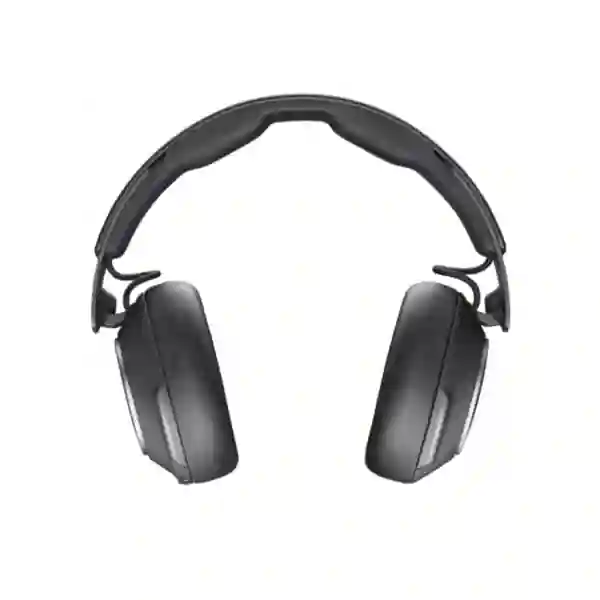
HP Poly Voyager Surround 80 UC Microsoft Teams Headset
For professionals working through Microsoft Teams meetings, client calls and focused tasks: a boomless, over-ear headset with a Teams-certified configuration, hybrid active noise cancellation and flexible USB-adapter connectivity. Check the exact quoted variant before purchase.
The essentials at a glance
Boomless microphone hardware; HP describes six microphones for voice transmission.
Manufacturer-rated maximum; battery results vary with settings and use.
Manufacturer-listed package also includes a USB-C to USB-A adapter.
Approximately 275 g, padded ear cushions, touch controls and carrying case.
Verified technical overview
The figures below reflect HP’s specification for the relevant Surround 80 UC Microsoft Teams package. They describe the manufacturer configuration rather than verified Tanzanian stock or seller terms. Exact included accessories should be reconfirmed in the quotation.
| Product category | Wireless, over-ear, boomless professional headset |
|---|---|
| Collaboration variant | Microsoft Teams-certified configuration; verify quoted part number |
| Bluetooth | Core 5.3; up to two paired devices |
| Wireless range | Up to 30 m under suitable conditions |
| Microphones | 10 overall; noise-cancelling voice pickup |
| Noise management | Hybrid ANC for listening; transparency mode |
| Speakers | 40 mm drivers; manufacturer-listed 20 Hz–20 kHz speaker bandwidth |
| Rated battery | Up to 21 hours of talk or 24 hours of music |
| Headset weight | Approximately 275 g |
| Computer accessory | BT700 USB-C Bluetooth adapter; USB-C to USB-A adapter |
| Listed operating systems | Windows 10/11, macOS, Android, iOS |
| Typical package | Headset, carry case, user guide, charging cable, BT700, USB-C/A adapter, USB-C to 3.5 mm cable |
A work-first wireless headset for serious conversations
The Poly Voyager Surround 80 UC Microsoft Teams headset is intended for people who need to hear colleagues clearly, keep their own voice intelligible and move between concentrated work and online meetings. It is an over-ear business headset rather than a small earbud set or a traditional call-centre model with a projecting microphone arm. The boomless appearance suits video meetings and customer-facing environments in which a discreet, professional look matters. What makes the product relevant is not simply wireless audio: it is the combination of microphone processing, listening comfort, meeting controls and a connection path designed for workplace computers. A buyer should begin by assessing the environment in which the headset will actually be used, rather than choosing only on the basis of its appearance or quoted battery figure.
For a professional who attends several Microsoft Teams meetings every day, the key questions are whether the organisation supplies an approved USB port, whether the chosen unit is the Teams-certified variant, whether background conversations need to be managed and whether a padded over-ear fit is comfortable for the individual. A headset cannot compensate for an unstable internet connection, poor meeting-room acoustics or an incorrect audio-device selection. It can, however, provide a more personal listening and speaking setup than an open laptop microphone. FourTeck Tanzania can be asked for a quotation and for clarification of the exact configuration offered. Local availability, delivery arrangements and commercial terms must be confirmed separately instead of assumed from the manufacturer’s international specifications.
Quick fit assessment before you buy
This is a compelling category of device for hybrid staff, project managers, consultants, sales personnel and team leaders who regularly work on laptops and need to participate in calls without using a handheld phone. The Surround 80 UC offers a full-ear wearing style, a ten-microphone hardware configuration, hybrid active noise cancellation and a Teams-certified option. It is also relevant to a user who listens to training material or recorded presentations between live calls. The ability to move from speech to media is convenient, but the product should still be evaluated principally as a communications headset. Its value is highest when reliable computer call handling and a comfortable personal fit matter more than achieving the smallest possible carrying size.
It may be less suitable for people who strongly prefer an open-ear design, who need to remain continuously aware of nearby speech without changing listening settings, or who need a dedicated desk telephone connector. Buyers who require a charging stand should check the precise package rather than assuming one is included: the manufacturer’s standard listing for the Surround 80 UC identifies a carrying case and charging cable, not a stand. A purchaser seeking a different arrangement should compare it with the related Surround 85 UC package or other Poly office headsets only after verifying current specifications. There is no universal best headset for every employee; role, environment, software policy, fit and procurement budget should guide the decision.
Boomless microphone design and voice clarity
The manufacturer specifies ten microphones in the Voyager Surround 80 UC system. That number describes the headset’s overall microphone hardware, not ten separate microphones all serving an identical voice-input purpose. HP’s product marketing describes six built-in microphones used for voice transmission, with other microphones supporting features such as noise management. This distinction matters because an inflated microphone count does not tell a buyer everything about speech intelligibility. The headset’s design tries to capture the user’s speech without a visible boom arm, making it more discreet than a traditional contact-centre headset. During a call, sound pickup and processing are influenced by the position of the earcups, surrounding noise, the selected computer audio device and the meeting application’s own processing.
For buyers sharing an office, the practical test is a real conversation with the same laptop, meeting app and background activity that staff experience daily. Ask listeners at the other end whether speech stays natural when a neighbouring person speaks, a fan starts or a chair moves. No microphone system promises to remove every interfering sound. In particularly noisy contact-centre conditions, a directional boom microphone positioned close to the mouth can still be worth comparing. The Surround 80 UC should be evaluated on the other party’s listening experience, not only on how effectively the wearer hears the call. This separation between transmit quality and received audio is essential when comparing professional headsets for Teams.
Hybrid active noise cancellation for the wearer
Hybrid active noise cancellation, commonly shortened to ANC, is designed to reduce some environmental sound reaching the listener. On this headset it is particularly relevant to steady workplace distractions such as ventilation, background office hum and the general acoustic activity around a desk. ANC may help a user maintain attention during a presentation or concentrate on a conversation without increasing the playback volume as aggressively. It is important to understand that ANC changes what the wearer hears; it is not the same feature as microphone noise reduction, which affects what other meeting participants hear. A product can handle one of those jobs better than the other, and a purchasing evaluation should consider them independently.
Noise cancellation performance varies with sound frequency, headset fit and the surrounding environment. Sudden voices, sharp impacts and unpredictable sounds may remain audible even when ANC is active. The Surround 80 UC also includes a transparency or awareness listening option, which is useful when the wearer needs to hear a colleague or public announcement without treating the earcups as a sealed acoustic barrier. Transparency is a convenience, not a safety substitute for removing the headset when situational awareness is essential. Teams working in shared spaces should agree on sensible use of ANC and awareness modes, especially when staff need to communicate with people nearby as well as with colleagues online.
Microsoft Teams certification and what it means
Microsoft’s published certified-device documentation includes the Voyager Surround 80 UC and Surround 85 UC headset family. The named product here is the Microsoft Teams version, so the buyer should explicitly request the Teams-certified configuration instead of assuming that every unit carrying the Surround 80 UC family name is packaged identically. Certification indicates a tested compatibility category under Microsoft’s device programme. It is not a promise that every Teams feature works on every computer, operating-system build or Bluetooth connection method. Desktop software versions, connection routes, organisational policies and device firmware can affect which controls and meeting integrations are available to an individual user.
The headset is especially relevant when an IT department wants staff to use a recognised Teams audio device rather than relying only on generic laptop audio. An approved USB adapter can help deliver a more predictable desktop workflow, provided that the adapter is installed and recognised correctly. When comparing quotations, confirm the full manufacturer description, the presence of the BT700 adapter and the exact Teams variant. If a company uses both Teams and another collaboration platform, test common actions such as answer, end, mute and meeting-audio selection with each required application. Teams certification should anchor the buying choice, but it should not replace a short compatibility pilot in the organisation’s actual environment.
Choosing the correct model and configuration
The Poly Voyager Surround 80 UC name refers to a family of configurations, and HP’s international catalogues show different manufacturer part numbers for Microsoft Teams-certified units in different product listings. A part number printed in another market should not automatically be treated as the SKU of the Tanzanian seller’s product. Ask for the exact manufacturer part number on the quotation and compare it with the unit, packaging and accessories offered. In particular, confirm that the proposal is for the Surround 80 UC and not the Surround 85 UC or a non-Teams variation. Similar product names can hide differences in package contents and accessory expectations even when headline audio features are closely related.
This verification becomes important in team purchases because one incorrect line on a purchase order can lead to inconsistent user experiences. The procurement document should distinguish the product family, the Teams certification, the adapter type, the colour and the expected box contents. If a supplier uses its own SKU, treat that identifier as specific to the supplier rather than as a universal Poly model number. The exact listing SKU for FourTeck Tanzania was not supplied with this request, so it must be confirmed before use in an order or inventory integration. This product description intentionally avoids making up that code or attaching a region-specific manufacturer identifier to the wrong item.
The BT700 USB-C adapter and a practical computer setup
The manufacturer lists a BT700 Bluetooth USB Type-C adapter with the headset, along with a USB-C to USB-A adapter. This makes it possible to plan for computers with modern USB-C ports and those whose available connection is USB-A, subject to system compatibility and port policies. The BT700 is not merely an ornamental accessory: for desktop collaboration software, the intended adapter connection can be important for call controls, status and application integration. Users should keep the supplied adapter identified with the same headset and ask IT before substituting an unrelated generic Bluetooth dongle. The adapter should be treated as part of the approved workstation configuration when an organisation standardises its Teams equipment.
A sensible setup starts by connecting the adapter to an approved USB port, powering the headset, and selecting it as both the speaker and microphone in operating-system sound settings. The user should then choose the same device in Teams settings and run an audio test. A USB hub, dock or locked-down company laptop can introduce its own restrictions, so testing the actual desk configuration is more useful than assuming every port behaves identically. If a computer has limited free ports, make that requirement visible early in procurement. Do not mistake the presence of a USB adapter for a guarantee that a proprietary security policy or every third-party dock will accept it without configuration.
Bluetooth 5.3 and two-device working
HP specifies Bluetooth Core 5.3 and support for two paired devices in the relevant product specifications. This is helpful for someone who works on a computer but also receives calls on a compatible smartphone. The precise behaviour when two devices request audio at once depends on connection state, priority and application behaviour; two-device support should not be described as two simultaneous mixed conversations. It is more useful to think of the feature as a way of reducing repeated disconnection and reconnection during the workday. When deploying it, pair the devices deliberately and learn how calls are prioritised so that an unexpected mobile notification does not interrupt a critical discussion.
Bluetooth performance is shaped by wireless conditions rather than the printed version number alone. Nearby wireless devices, the structure of a building, walls and the location of the host computer may affect reliability. HP lists a wireless range of up to 30 metres for the model, but this is a rated maximum under suitable conditions, not an assurance of uninterrupted audio through every room. An employee moving around the office should test the route from desk to meeting area rather than relying on a distance figure. Where stability and advanced call handling are most important, verify the supported BT700 connection method for the target PC and meeting application before choosing direct Bluetooth pairing.
Computers, smartphones and operating systems
The manufacturer’s compatibility information includes Windows 10, Windows 11, macOS, Android and iOS. It also describes the headset as compatible with PCs and smartphones through Bluetooth or the designated USB adapter arrangement. That is useful for mixed-device organisations, but operating-system compatibility is broader than full software feature parity. A headset may play audio on a platform even when its mute synchronisation, on-screen status or configurable controls are limited. IT should evaluate the specific function the user needs, such as joining a Teams meeting from a MacBook, answering a call from a Windows laptop or receiving a mobile voice call while the computer is nearby.
When preparing laptops for deployment, check USB-port access, Bluetooth policy, supported collaboration-software releases and the ability to install or update HP Poly device management software. On a smartphone, verify normal calling, media playback and any app functionality the organisation relies on. Employees should learn where to select the audio input and output when switching from a headset to a conference-room speakerphone. A list of supported operating systems is a starting point, not a substitute for checking the combination of device, application and connection path. These steps prevent a common issue in which a headset appears connected but a meeting silently uses the laptop’s built-in microphone.
Battery capacity, charging and realistic expectations
HP rates the Surround 80 UC for up to 21 hours of talk time and up to 24 hours of music time. These are manufacturer maximum figures; actual runtime will differ with call patterns, volume, radio conditions, active features and battery age. The product uses a rechargeable lithium-ion battery and the manufacturer’s published specifications list a charging time of less than one hour under the specified test arrangement. Buyers should avoid interpreting that figure as a guarantee for every charger, depleted-battery condition or operating environment. A good user practice is to check charge before the first long meeting and make charging part of the daily desk routine when the headset is used intensively.
The important purchasing question is whether the headset supports the organisation’s typical duty cycle without frequent unplanned charging. Someone taking short internal calls will experience a different pattern from someone speaking continuously to customers for most of a shift. Plan around the latter if both user types are served. Confirm that a compatible charging cable and accessible power source are available at the intended workstation. If uninterrupted all-day use under heavy duty is non-negotiable, ask the supplier about operating and charging behaviour, and test it rather than assuming rated battery life will match the longest possible shift. Battery claims should be presented as useful planning information, with room for ordinary operating variation.
Over-ear comfort and long meeting days
At approximately 275 grams in HP’s relevant specification, the Surround 80 UC is a full-size over-ear headset with padded, artificial-leather-surfaced ear cushions. The design places the earcups around the ears instead of using a small in-ear tip. For many users this can make a long video meeting feel more comfortable, especially when the headband is adjusted correctly. Comfort is nonetheless personal: head shape, glasses, hair, ear sensitivity and room temperature can all change the experience. Soft cushions also create a warmer fit than open-ear products, which may be a disadvantage in particularly hot offices or for people who prefer minimal ear coverage.
A pilot should include continuous wear through a representative meeting, not just a two-minute demonstration. Ask testers to comment on the headband, pressure around eyeglass arms, earcup seal and whether they can speak naturally while wearing the headset. A good seal can support listening quality and noise reduction, but excessively tight fit is not an acceptable trade-off. Staff who frequently remove their headset to speak with colleagues may prefer quicker on-and-off handling or a different form factor. The carrying case helps protect the headset when it travels between office and home; however, buyers should consider the space required by a full over-ear model in a laptop bag.
Touch controls, buttons and everyday usability
The Surround 80 UC uses touch-sensitive earcup controls for functions such as volume adjustment, play or pause and track navigation, while physical controls include mute and power or pairing. This can reduce the need to find software controls during routine use. HP also lists programmable touch controls, which should be configured only within the capabilities supported by the relevant device software. The value of a control is its predictability: a busy professional must be confident that a mute action has registered before discussing sensitive information. The team should practise common actions in a test meeting and check visual or audio feedback rather than assuming the first button press always reached the correct application.
Touch surfaces can also be activated inadvertently when someone adjusts the earcups. A short orientation session should cover where to touch, when not to touch and what happens during an incoming call. Employees should understand the difference between muting the headset and muting within an application, particularly when moving between software clients. Where the organisation uses accessibility tools or requires strict call-control workflows, test those scenarios rather than relying solely on an intuitive-looking control layout. For procurement teams, ease of use means fewer recurring support questions, not simply a longer feature list. A well-documented configuration can be more valuable than optional controls nobody has learned to use.
Sound for meetings, training and media
HP specifies 40 mm speakers and a listed speaker bandwidth of 20 Hz to 20 kHz. These hardware details indicate the headset is intended to reproduce a broad audio range, but they cannot by themselves establish subjective sound quality. The Surround 80 UC is best understood as a business communications product capable of handling speech, training videos and general media between calls. Teams audio quality will also depend on the meeting platform, source microphone, connection and audio-processing settings. If the main buying goal is critical music monitoring or studio work, a specialist listening product may be more appropriate than a Teams-certified office headset.
For regular office listening, a simple acceptance test should include spoken instruction at low volume, a recorded presentation, a live meeting and the user’s normal background music. Have users rate intelligibility and fatigue rather than being impressed only by loudness. Sound preferences differ, and some independent reviewers have disagreed about this model’s music presentation and its outdoor noise cancellation. That is a reason to trial the headset in its intended environment, not to make a universal claim for or against its sound signature. A headset intended for work should first make conversations comfortable and understandable. Entertainment quality can be a secondary advantage without becoming the sole basis for a business purchase.
Mute discipline, privacy and responsible use
Muting a call is an important part of professional communication, especially in shared offices, client consultations and internal meetings. The headset provides a dedicated mute control, but the workplace should teach users to verify mute state in the application where practical. If another device becomes the selected microphone, a headset’s mute action may not control the audio source the user expects. Users should be cautious when handling confidential conversations in public spaces even if they are wearing noise-cancelling headphones. ANC does not make an open room private, and a boomless microphone system does not prevent nearby listeners from hearing the speaker’s own voice.
Good meeting etiquette includes using the headset only where discussion is appropriate, keeping computer audio routing consistent and checking notification behaviour before presenting sensitive material. For organisations with formal information-handling rules, headset selection is just one piece of a larger process covering workspace choice, screen privacy and access controls. Staff should not rely on touch controls as a substitute for visible meeting confirmation. When dealing with client records, financial information or personnel matters, a closed room can matter far more than a premium microphone. This practical guidance makes the product more useful because it acknowledges that technology can reduce some distractions without eliminating the need for sound workplace processes.
Open-plan offices and shared workspaces
The Surround 80 UC is relevant to employees in open-plan workplaces where several people may be on calls at once. The over-ear design and hybrid ANC address the listener’s experience, while its voice pickup addresses the person at the other end of the conversation. Both can help a user concentrate, but physical office layout still matters. Desks positioned directly beside one another create overlapping speech that even advanced processing cannot always separate. Before buying for a whole department, observe noise levels during the busiest part of the day and pilot a headset in that actual environment. A certification badge should not be interpreted as a laboratory guarantee in every uncontrolled office.
For shared desks, agree how headsets will be allocated, labelled, cleaned and stored. Personally assigned headsets may be preferable where hygiene and device pairing convenience matter. If devices are shared, make accessory management and disinfection part of the procedure, using manufacturer-approved cleaning practices. The USB adapter and charging cable should stay with the assigned headset to avoid pairing confusion. Consider whether staff need to hear colleagues speaking across the room; if so, teach them to use the awareness setting or remove the headset. The aim is improved collaboration, not isolation from the people who are physically working together.
Hybrid working between office and home
For hybrid employees, consistency is one of the strongest reasons to standardise a business headset. A person may join a Teams call from an office workstation, then work from a home laptop or compatible smartphone later in the week. The Surround 80 UC’s Bluetooth capability, USB adapter and case support a flexible pattern, provided each workplace has appropriate connectivity and the company permits the required accessories. The headset is portable, but its over-ear dimensions mean it occupies more bag space than compact earbuds. That trade-off may be entirely reasonable for someone who values a full-size listening fit throughout meetings and online training sessions.
Employees should make a habit of checking audio devices whenever they move to a new desk, connect through a dock or join an unfamiliar meeting room. A headset that functioned correctly at home may not remain the active microphone after the laptop connects to a conference display. A basic travel checklist can include the headset, its case, BT700 adapter, USB-A conversion adapter, charging cable and any device required by company policy. There is no need to imply a specific local delivery service or travel guarantee. The practical benefit is simply a repeatable personal audio setup that can move with the user, reducing dependence on the microphones and loudspeakers fitted to each computer.
Customer service, consulting and management conversations
For an account manager or consultant, an intelligible voice and reliable mute control can improve the experience of remote customer conversations. The boomless design may be preferred for a polished video appearance, while over-ear listening can make long discussions easier to follow. A sales professional moving between a laptop and mobile phone may appreciate two-device pairing, but should still learn the device-priority behaviour before taking an important call. This headset suits a broad range of knowledge-work roles; it should not be sold as a specialised contact-centre system unless its actual deployment requirements have been assessed. A busy contact centre may value a different fit, a close-positioned microphone boom or integration with dedicated telephony controls.
Managers who take confidential or lengthy meetings should consider the workspace as carefully as the headset. Noise cancellation can make a call easier to hear, but it cannot prevent people nearby from overhearing what the manager says. Project teams may benefit from choosing the same known headset configuration, reducing the time spent resolving inconsistent audio setups. However, staff with hearing, comfort or accessibility needs should have room for alternative approved equipment. A standard should simplify support while still meeting the needs of different roles. A product evaluation should measure clarity and productivity during real calls, not just count technical capabilities on a product sheet.
A manageable choice for workplace IT teams
An IT department evaluating multiple units should focus on repeatable setup, supported device management and the actual communication platforms in use. HP Poly offers desktop management software that lists the Voyager Surround 80 UC among supported devices. Such tools can help with supported configuration or firmware workflows, but administrative capability depends on software version, operating system, connection method and organisation policy. The manufacturer also publishes a softphone compatibility matrix that distinguishes USB connections from Bluetooth direct modes. That distinction is particularly important when the purchasing brief includes Microsoft Teams. A generic statement that a headset supports Bluetooth does not establish full meeting-control integration across all pairing methods.
A sensible rollout begins with a small user pilot and a documented standard setup. Record the chosen product variant, approved adapter, operating-system builds, Teams version, update procedure and help-desk instructions. Test both a laptop connected directly to a USB port and, if applicable, a docked workstation. Decide how replacement cables and lost USB adapters will be handled. Also establish whether an employee is permitted to pair a company headset to a personal phone. None of these steps requires inventing an enterprise-management license or claiming that a specific feature is included in a commercial contract. They simply make the purchase easier to administer at scale and reduce uncertainty when staff move between devices.
Collaboration platforms beyond Teams
The Teams-certified edition is a reasonable starting point for an organisation centred on Microsoft Teams, but a mixed-platform business should still verify its other applications. HP Poly’s published desktop client matrix lists support distinctions for Microsoft Teams, Zoom, Webex and other softphone applications according to operating system and USB or direct Bluetooth connection. That means the broad label UC, or unified communications, should not be interpreted as an unconditional promise of identical call control everywhere. Basic audio input and output may be possible even where deeper answer, end or mute synchronisation differs. Test the exact applications staff need, particularly if a department alternates between client-hosted meetings on several platforms.
For example, an employee might join a Teams meeting through the BT700 adapter, later open a browser-based meeting room and then answer a smartphone call. The audio source may change between those events. A good acceptance test checks that the employee can tell which application has the microphone and that an active call is not disrupted unexpectedly. If a vendor claims support for a specific legacy softphone, ask for the relevant current compatibility statement and test it before ordering a large quantity. Certification and compatibility are more useful when tied to a real software version and connection path than when they appear as an unrestricted list of logos.
What comes in the manufacturer’s listed package
HP’s specification for the applicable Microsoft Teams-certified USB-C package lists the wireless headset, carrying case, user guide, USB charging cable, BT700 Bluetooth USB Type-C adapter, USB-C to USB-A adapter and USB-C to 3.5 mm audio cable. These details make it easier for a purchasing officer to ask precise questions when comparing proposals. The contents of a reseller’s actual package should be checked against the quoted manufacturer part number and sealed box label. Do not assume that a charging stand, replacement cushions, spare adapter or additional charger is part of the standard package simply because a related product family offers different accessories.
The USB-C to 3.5 mm cable can be relevant where a supported wired audio option is required, but a purchaser should verify the intended device and operational behaviour instead of assuming that all Teams controls will work through an analogue connection. If the business plans to use the headset with a desk phone, conference device or security-restricted computer, check that connection explicitly. The package list should be preserved in procurement records so missing accessories are noticed at delivery. Since no Tanzanian product listing or inventory data was supplied, this page describes the manufacturer’s listed package rather than asserting exactly what a local shipment contains. A final quotation should clarify that detail before payment.
Sound protection and listening practices
The manufacturer’s product specifications mention Poly SoundGuard Digital acoustic protection technology. This is a headset feature, not a substitute for an employer’s hearing-health policy or safe listening practices. Employees should use a comfortable volume, take suitable breaks and avoid increasing sound unnecessarily to overpower surrounding noise. Over-ear ANC can make it easier to listen in some environments, but individual hearing needs vary and no protective outcome should be promised without the applicable technical evidence. If a business has defined acoustic exposure requirements, its health and safety team should review product documentation alongside workplace policies rather than inferring legal compliance from a marketing feature name.
This point matters in long training sessions and customer-support work, where a person might wear the same device through multiple meetings. A sensible volume can preserve clarity while reducing fatigue. Headset comfort and sound protection should be evaluated together, because a user who finds the fit unpleasant may remove the headset repeatedly and change how calls are handled. Managers should allow users to report fit issues rather than insisting that one headset works for everyone. For people with specific hearing or accessibility requirements, consider professional advice and test approved alternatives. The manufacturer’s specification offers a useful technical starting point, while safe practice remains a separate organisational responsibility.
Setup checklist for a new employee
Start by confirming the unit is the ordered Teams-certified version and matching the accessories to the supplier’s package description. Charge the headset with a compatible supply and locate its power and pairing control. Connect the BT700 USB-C adapter to the computer, using the provided USB-C to USB-A adapter where appropriate. Follow the manufacturer’s pairing instructions if the headset and dongle are not already associated. In the operating system, select the headset as the preferred output and input device. Then open Microsoft Teams, select the same headset for speaker and microphone, and perform a test call. This sequence addresses the common case in which a computer recognises the headset but still records speech through a built-in microphone.
Next, practise mute, volume, call answer and any Teams-specific interaction supported in the installed configuration. If the employee also uses a smartphone, pair it according to policy and check how a second incoming call is handled. Test the headset while seated normally, walking a short permitted distance from the desk and working at the usual background-noise level. Encourage the employee to record any unexpected behaviour before a critical customer meeting. Finally, provide a short instruction note identifying the approved adapter, charging method and internal help-desk contact. This is a practical onboarding workflow, not a statement that every feature will work identically on every computer model.
Troubleshooting before escalating a support case
When audio is missing, first confirm that the headset has power and is correctly associated with its adapter or Bluetooth host. Check the operating-system audio device, then check the Teams microphone and speaker selection separately. If participants cannot hear the user, determine whether the application, the headset or another device is muted. If the problem occurs only while connected to a docking station, repeat the test through a known working USB port to isolate the issue. If call controls behave inconsistently, confirm whether the connection uses the supported BT700 path or direct Bluetooth, because those routes can expose different software functionality.
For poor speech quality, inspect the wearing position, nearby interference, environmental noise and meeting connectivity before assuming the headset is defective. For intermittent wireless audio, reduce distance, check local interference and test at the desk. Where permitted, review the current official firmware and supported device-management guidance. IT should document the operating system, software version, connection method and observed symptoms so a support request is actionable. Avoid unsupported factory-reset advice or assuming a particular driver change will fix every issue. The most effective first response is to identify which link in the audio chain has actually failed: headset, adapter, computer settings, application or network.
How to compare it with alternative headset styles
There are several useful alternatives to consider before choosing a premium over-ear business headset. A mono headset leaves one ear more open to nearby conversations and may suit reception or staff who need frequent awareness of the room. A conventional stereo headset with a boom microphone can appeal to people who want a close-positioned voice pickup in challenging acoustic conditions. Compact earbuds use less bag space, although some users prefer the stable fit and larger controls of an over-ear design. A wired USB headset removes Bluetooth charging from the workday but also reduces freedom of movement. None of these categories is automatically superior; each addresses a different balance of comfort, isolation, mobility and manageability.
Against those options, the Surround 80 UC’s distinctive proposition is its boomless look combined with work-oriented audio, hybrid ANC, Teams certification and an included USB adapter. That mix can be attractive for a manager who alternates between concentration and video meetings. It may be an unnecessarily complex purchase for someone who makes only an occasional call, especially if a simpler approved headset already satisfies the requirement. Ask users to compare at least one alternative in a realistic meeting rather than choosing on paper specifications alone. The total cost of a standard should also reflect replacement accessories, user training and time spent supporting connection problems, not merely the price of one headset.
Practical procurement questions for Tanzanian organisations
A Tanzanian organisation buying professional headsets should request a quotation that identifies the exact manufacturer model, Teams edition, expected package contents, quantity, commercial warranty terms and the seller’s current availability. Ask whether the price includes any applicable charges and whether the quotation specifies the currency. This page does not provide a TZS price because no verified target-listing price was available. It also makes no claim about local stock, delivery coverage or official authorisation. Those are commercial details to obtain directly from the supplier rather than infer from international manufacturer documentation. An accurate specification and a clear quote are both necessary for a confident purchasing decision.
For businesses replacing equipment across several departments, consider a sample unit or small pilot before approving the complete requirement. Confirm that staff laptops have the right ports, that local IT policies allow the Bluetooth USB adapter and that users can perform normal meeting controls. Where a company operates from multiple locations, document each site’s internet and workstation requirements without assuming a particular installation or delivery service. Procurement teams should also ask how accessories, returns and support enquiries would be handled under the offered terms. These questions give FourTeck Tanzania a clear brief and reduce avoidable misunderstandings about what is being purchased.
A pilot plan for managers and IT
A short structured pilot is an effective way to decide whether the headset fits a team. Include at least one heavy Teams user, one employee in a busy shared office, one hybrid worker and someone who wears glasses or has particular fit preferences. Ask participants to use the headset during normal work rather than only in a demonstration. Evaluate speech received by colleagues, the participant’s listening comfort, mute confidence, connection stability, battery routine and the ease of changing between calls and training audio. Record the test computer and whether the BT700 adapter was used. Without that detail, inconsistent results can be misinterpreted as hardware differences.
A pilot should produce practical answers rather than only an average satisfaction score. Did the user need to remove the headset often? Were colleagues intelligible when other people were speaking nearby? Did the application select the right microphone after a dock was connected? Did a phone notification interrupt a meeting? Could the user manage a full working day without inconvenient charging? Were help-desk instructions sufficient when something went wrong? These observations support a thoughtful decision about adoption. If an alternative headset works better for a particular role, that is useful evidence rather than a failed procurement exercise. The goal is to choose equipment that serves the work.
Ongoing care, storage and support
A personal headset will remain more useful if the organisation plans for ordinary wear and accessory management. Store the Surround 80 UC in its carrying case when travelling or placing it in a shared cupboard, and avoid pulling on cables or leaving the USB adapter loose in a bag. Clean surfaces using the manufacturer’s current care guidance; harsh chemicals or excessive moisture may damage cushions and electronics. Ear cushions have contact with skin and hair, so regular inspection is sensible. If a headset is assigned to another employee, reset or remove old device pairings through approved procedures and confirm that the recipient can connect it correctly.
IT should keep a record of headset ownership, manufacturer part number, included adapter and purchase terms where inventory practice requires it. When problems arise, retain the information needed for support rather than promising a repair or replacement period that has not been verified for the actual Tanzanian sale. Manufacturer documentation may state a standard limited warranty, but the local seller’s terms, eligibility and claim route must be confirmed separately. A modest amount of lifecycle planning can avoid lost adapters, mismatched accessories and unexplained connection issues. This is especially worthwhile for teams that purchase multiple headsets and expect them to move between desks over several years.
What to verify before approving the quotation
Read the supplier’s quote alongside the team’s real usage requirements. The document should say Microsoft Teams-certified Surround 80 UC, identify the exact offered part number and clearly describe USB-C adapter accessories. Confirm whether the product is new, what accessories are in the box and what local commercial policies apply. If the company expects a charging stand, ask for an explicit line item rather than assuming one. If it needs advanced softphone call control or a particular operating-system version, obtain compatibility confirmation and use the pilot result as the deciding evidence. Verify any payment, tax, delivery or warranty information directly in the quotation instead of relying on an SEO product description.
Do not let the wording UC alone settle every interoperability question. The phrase identifies a unified communications product family, while practical compatibility depends on the chosen platform and connection route. Similarly, a ten-microphone specification is useful but cannot replace a listening test, and an up-to battery figure cannot replace the user’s charging routine. Match the product to a work problem: calls that need a personal microphone, staff who require concentration, or hybrid employees who value consistent desktop audio. That decision framework is more durable than comparing a single feature in isolation and makes the purchasing discussion more productive.
Tanzania purchase guidance and next step
FourTeck Tanzania can be approached for a quotation covering the HP Poly Voyager Surround 80 UC Microsoft Teams Headset. A useful enquiry identifies the number of units, whether they will be used mainly with Windows or macOS computers, the organisation’s primary conferencing platform, available USB port types and whether staff also require mobile phone pairing. Tell the supplier if the environment is a quiet executive office, a busy shared workspace or a remote-working team. These details help establish the correct product variant and accessories to discuss. The enquiry should also ask for the current local price and stock position rather than expecting them to be fixed by this informational page.
Request confirmation of the Teams-certified configuration, manufacturer part number, package contents, local warranty terms and delivery arrangements before ordering. No unverified Tanzanian shilling price, shipping promise, office address or approval claim has been added here. If you are evaluating several headset options, explain the role each user performs and whether a short pilot is feasible. That gives the buying decision a practical foundation. The next step is straightforward: ask FourTeck Tanzania for a current quote and compare the written offer with your organisation’s requirements. A well-specified headset purchase should begin with clarity about the exact device, not an assumption based on a similar product name.
Frequently asked questions
Is the Voyager Surround 80 UC certified for Microsoft Teams?
Microsoft’s certified-device documentation includes the Voyager Surround 80 UC and 85 UC headset family. Buy the explicitly named Microsoft Teams-certified configuration and verify the exact manufacturer part number in the quotation. Certification does not mean every meeting control is supported through every possible Bluetooth connection or software version. Using the designated USB adapter and testing the installed Teams client are prudent steps for organisational deployment.
Does it have a microphone boom?
No. The Surround 80 UC uses a boomless microphone arrangement built into the headset. HP lists ten microphones overall, while its product information describes six microphones contributing to voice transmission. A boomless design offers a discreet appearance, but users in very loud environments should compare real call quality with a close-positioned boom microphone before choosing a standard for their team.
How long does the battery last?
HP publishes maximum figures of up to 21 hours of talk time and up to 24 hours of music listening. Actual results depend on settings, volume, connections, usage patterns and battery condition. These are not guaranteed shift lengths. Test the headset under representative calling conditions and keep its charging cable accessible when it is used throughout long meeting days.
Can I connect it to both a laptop and a phone?
HP specifies Bluetooth 5.3 and support for two paired devices. The laptop can use the BT700 adapter where appropriate, and a compatible phone can connect through Bluetooth. The handling of overlapping calls and audio priorities needs to be tested. Two-device pairing should not be confused with the ability to mix and actively participate in two simultaneous voice calls.
Is the USB-C adapter included?
HP’s published package details list the BT700 USB-C Bluetooth adapter and a USB-C to USB-A adapter, along with the headset and other accessories. Confirm the contents of the precise unit quoted by the local supplier. The adapter is particularly relevant when evaluating Teams controls and computer compatibility; do not assume a generic Bluetooth dongle provides identical behaviour.
Will it work with a Mac?
HP lists macOS among compatible operating systems. However, the available call controls, device-management features and collaboration-app support depend on the connection type and software release. Test the headset and its designated adapter with the team’s actual Mac hardware, security policy and meeting application before purchasing for a larger group.
Is it suitable for a noisy open office?
The headset combines hybrid active noise cancellation for the listener with noise-managed microphone pickup, which makes it worth considering in shared offices. It cannot eliminate every nearby voice or sudden sound. A pilot in the actual office is the best way to judge both ends of the call. If background speech is especially challenging, compare a boom-microphone option as well.
Does it have a charging stand?
The manufacturer’s standard listing for the Surround 80 UC identifies a charging cable and carrying case rather than a stand. Do not infer a charging stand is included based on images or bundles from related models. If a desk-based charging accessory is required, ask the supplier to specify the exact product and verify whether it is compatible with the offered headset.
Can it be used with Zoom or other meeting software?
Basic audio use may be possible on a range of applications, but meeting controls and integration are not identical across operating systems or connections. HP Poly publishes a client-support matrix distinguishing USB from Bluetooth direct configurations. Organisations using several conferencing applications should test join, mute, answer and end behaviour for each application in their actual environment.
What is included in the box?
HP lists the headset, case, user guide, USB charging cable, BT700 USB-C adapter, USB-C to USB-A adapter and a USB-C to 3.5 mm audio cable for the applicable package. A quotation should identify the exact offered variant and confirm contents. Package details are manufacturer information, not a statement about verified stock or packaging at any particular Tanzanian seller.
What is the price in Tanzania?
No verified Tanzanian retail price was supplied for this target listing, so a price would be speculative. Request a current written quotation from FourTeck Tanzania and verify currency, taxes, accessories and any commercial conditions shown. Do not apply an exchange-rate conversion to an overseas catalogue price as though it were a local sale price.
How should a business choose between this and a simpler headset?
Consider the worker’s call frequency, background noise, preferred fit, connection needs and approved software. The Surround 80 UC offers a full-size boomless, ANC-equipped, Teams-oriented design. A wired USB device, mono headset or boom-microphone model may be better for other roles. Have representative users try an alternative during real meetings before standardising a larger purchase.
Request a tailored quotation from FourTeck Tanzania
Share your required quantity, laptop and phone models, preferred meeting software and workplace noise conditions. Ask for confirmation of the Microsoft Teams-certified version, exact manufacturer part number, current price and availability, package contents and applicable local sales terms. No price, local stock or delivery promise is implied on this page.




Reviews
There are no reviews yet.