
Microsoft Teams-certified business earbuds · Tanzania buying guide
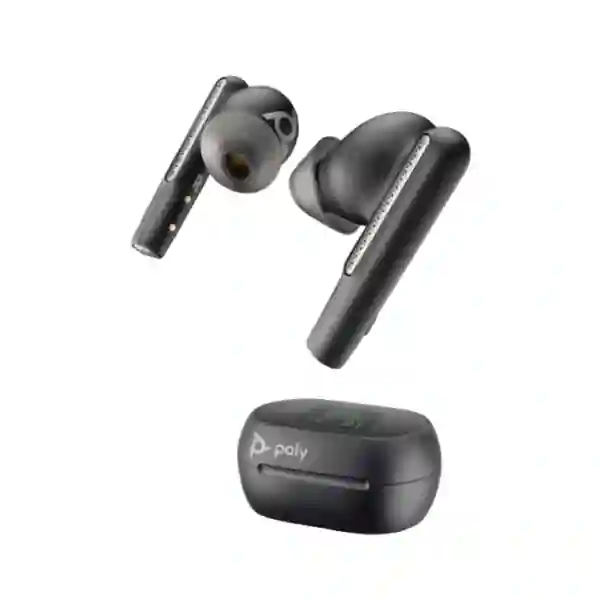
HP Poly Voyager Free 60+ UC Microsoft Teams Earbuds
A compact work-and-life audio system with adaptive ANC, a BT700 computer adapter, touchscreen case and a practical fit for Teams desktop calls.
Essential specifications at a glance
A work-first earbud system for real meeting days
The HP Poly Voyager Free 60+ UC Microsoft Teams Earbuds bring together discreet in-ear listening, a PC-ready Bluetooth adapter, a touchscreen charging case and communication features designed for professional calls. This is a useful option for someone who moves between computer meetings and mobile calls, wants earbuds rather than a headband headset, and values easy control of microphone mute and audio settings. The Microsoft Teams-certified edition is particularly relevant to an organisation where the Teams desktop app is an everyday tool.
The practical decision is not simply whether these earbuds play music or connect to a phone: many ordinary earbuds do that. The important questions are how you connect to a work computer, whether the exact Teams variant is being supplied, how the microphones handle ambient sound, and how the case supports charging and control during the day. Review the key specifications below, then use the buying and setup guidance to decide whether the system suits your workflows in Tanzania. Request confirmation of the exact configuration before placing an order.
What the exact Microsoft Teams configuration includes
The manufacturer identifies the Carbon Black Microsoft Teams version as the Poly Voyager Free 60+ UC M with the BT700 USB-C Bluetooth adapter and touchscreen charge case. HP lists product number 7Y8H0AA for that configuration. This is a manufacturer product number, not a verified SKU for this FourTeck Tanzania listing. The product family has multiple similar names, so an order should specify the platform edition, colour, USB adapter connector and type of charging case rather than relying on the family name alone.
The + designation matters because it denotes the touchscreen charging case in the Voyager Free 60 product range. The Teams edition adds Teams-oriented integration and controls that depend on the Teams desktop app. The included USB-C BT700 adapter is intended for connecting the earbuds to a compatible computer. A differently labelled Voyager Free 60 UC package may have a standard case or a different adapter. Confirm the exact packaging against the purchase quotation, particularly if your organisation uses USB-A laptop docks.
- Manufacturer product number for the verified Carbon Black Teams USB-C configuration: 7Y8H0AA.
- Earbuds: true wireless, in-ear stereo design with three microphones per earbud.
- Charging case: touchscreen model with wired audio input for an external listening source.
- Computer connection: included BT700 Bluetooth adapter with USB-C connector on this verified configuration.
- Colour and specific adapter variant should be reconfirmed at quotation stage.
Active noise cancellation and microphone noise reduction are different
Adaptive hybrid active noise cancellation, usually shortened to ANC, works on the sound you hear through the earbuds. It helps reduce environmental distractions so a meeting voice or a piece of music is easier to follow. That can be useful in a shared workspace, near a fan, at home with routine ambient activity or while travelling. As with any in-ear ANC system, results depend on the sound environment and on how well the ear tips seal; do not assume that it eliminates every nearby conversation or sudden noise.
The microphone side is another job. Poly NoiseBlockAI and the microphone arrangement are intended to reduce the environmental noise sent to listeners at the other end of a call. A user may benefit from both systems at once: ANC for personal focus and microphone processing for how colleagues hear the speaker. This distinction matters when evaluating workplace headsets. If outbound voice quality is the priority, test a real Teams call in the normal working environment, rather than judging only how quiet the earbuds seem when music is playing.
Six microphones, WindSmart and clearer spoken communication
Each earbud uses a three-microphone array, creating six microphones across the pair. Poly describes an arrangement that focuses on the wearer’s voice and technology intended to make calls clearer even when other sound is present. WindSmart is part of the design for reducing disruption during outdoor calls. The benefit is practical rather than absolute: a person taking a short call outside or moving through a busy office may find it easier to speak without holding a phone close to the mouth.
Consider what the headset cannot control. A crowded roadside, strong wind, a poor internet connection, a noisy public venue or a meeting application configured with the wrong input device can still affect intelligibility. Before a critical call, check the selected microphone, speak at an ordinary level and ask a colleague for feedback. The microphone features are not a substitute for a suitable place to discuss confidential material. When call privacy, consistent microphone position and long hours on the phone dominate the job, compare these earbuds with a dedicated boom-microphone business headset.
Microsoft Teams certification: what it means in use
The exact UC M product is listed by HP as certified for Microsoft Teams. In the manufacturer user guide, the Teams model supports launching or bringing the Teams desktop application forward using the earbuds or the touchscreen case. With the appropriate Teams configuration, the rear earbud button has Teams-related functions, including viewing notifications and a press-and-hold gesture for raising or lowering a hand during a meeting. These controls are most valuable when the user works regularly inside the desktop client.
There is an important boundary: the user guide explicitly states that these Teams-specific interactions require the Teams model and the Teams desktop application; the Teams mobile application is not supported for those Teams-button functions. Teams certification should not be interpreted as a promise that every meeting action works identically on every device, operating-system version or web browser. IT teams should test current Teams desktop client settings, policies, the BT700 adapter and the supported Poly software before purchasing at scale.
Why the touchscreen charging case changes daily use
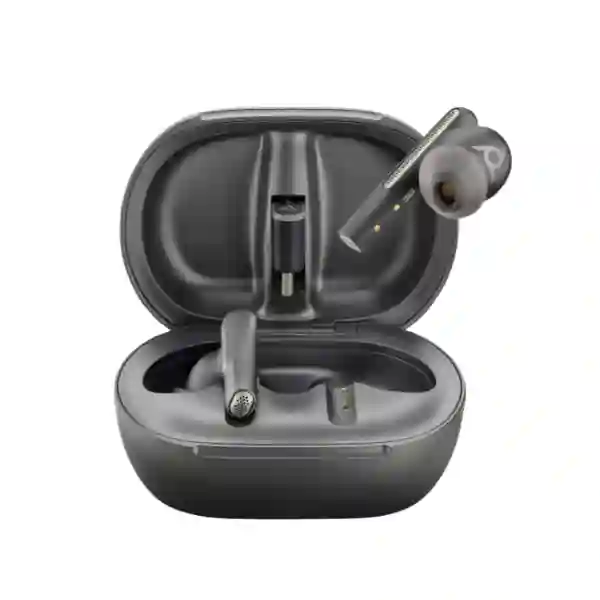
The touchscreen charge case does more than store the earbuds. It lets the user check battery information, adjust settings and access relevant audio and call controls without always opening a phone app. Depending on activity, available options include microphone mute, managing connections, audio settings and call functions. A visible interface can be especially helpful when alternating between meetings and short breaks: users can quickly check what is connected or whether the device is ready for another call.
This is not a replacement for a laptop display or for Teams itself. Some functions depend on the connected application and current headset status, and the screen is naturally smaller than a phone. The case should be treated as a convenient control surface, not as an independent conferencing device. The screen can time out while idle and can be awakened using the case controls. For a procurement decision, compare how often users really need the extra screen with the portability and simplicity of a standard charging case.
Comfort, eartip sizing and wearing style
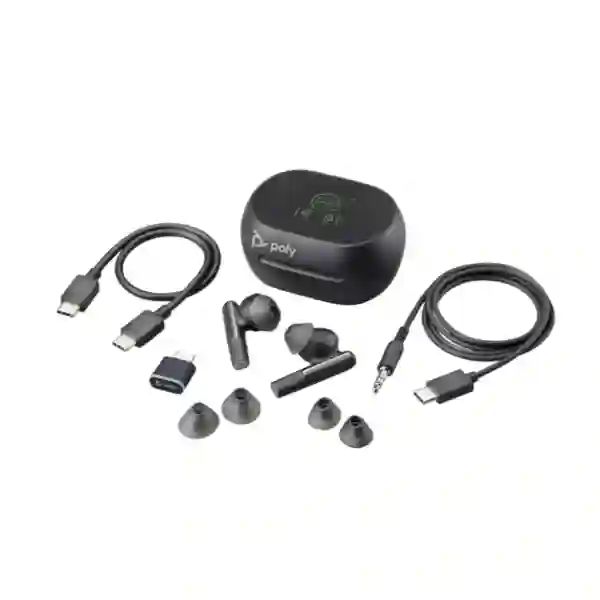
These are lightweight, discreet earbuds intended to avoid the look and feel of a traditional over-ear office headset. HP includes small, medium and large eartips so users can test their fit. That makes fit part of the setup process rather than a small afterthought. A comfortable seal helps with perceived bass response and with how effectively ANC works. People often have different ear sizes on the left and right, so it is reasonable to use different tip sizes when that creates a secure, comfortable fit.
A good fit should feel stable without painful pressure. Try the earbuds while walking, speaking and sitting through a typical meeting. If the fit is loose, voice and music may seem thin; if it is too tight, long sessions may become uncomfortable. The user guide gives a careful eartip removal and replacement method, including securing the replacement tip properly. Anyone with special ear-fit requirements should assess the design individually. An in-ear system is not universally more comfortable than a lightweight on-ear or over-ear alternative.
Stereo sound for both spoken audio and music
The Voyager Free 60+ UC M is designed for two distinct listening tasks: spoken communication and general media. HP specifies 10 mm speaker drivers, a speech-mode bandwidth and a broader media-mode bandwidth. In practical terms, call audio needs clear speech cues, while music and video benefit from the wider frequency range associated with media playback. Stereo playback also makes the earbuds a more versatile choice for someone who uses one device during meetings and then listens to training videos or personal music.
Audio quality is subjective, and performance varies with the ear seal, source material, volume and device settings. The presence of a 10 mm driver is a specification, not proof that the sound will match every listener’s preferred tuning. Poly Lens offers user adjustments, including available audio settings, that can help tailor the experience. If the main requirement is detailed music mastering, specialised studio headphones remain a different category of tool. These earbuds are oriented toward a balanced combination of business communication and everyday listening.
Choose the right connection for a work computer
The verified Teams package includes the Poly BT700 USB-C Bluetooth adapter. This provides a straightforward way to connect a compatible computer to the earbud system, with the adapter supplied for this purpose. For an office rollout, using the intended adapter also helps IT support teams provide a more consistent connection method than asking every user to configure a different built-in Bluetooth chipset. Plugging the adapter into the correct port is a simple step, but ensure that USB access is permitted by your organisation’s endpoint policy.
Direct Bluetooth pairing with a suitable computer is also described in HP guidance, but advanced softphone controls may require supported software and applications. If a laptop has only USB-A ports, do not presume the included USB-C adapter will fit; verify the order or the approved accessory strategy. The case’s 3.5 mm connection is another distinct feature for listening to an external source, not a substitute for connecting a microphone to an analogue socket. Separate these three connection methods during evaluation to avoid confusion.
Bluetooth multipoint for people with two devices
HP specifies Bluetooth 5.3 and support for connection to two devices at the same time, with memory for up to eight paired devices. This is useful for workers who regularly use a laptop and smartphone and do not want to repeatedly start a fresh pairing process. For instance, a person can keep work audio on a computer while also maintaining a phone connection for an incoming mobile call. The touchscreen case offers ways to inspect and manage connected devices.
Simultaneous device connection is not the same as simultaneous mixing of two independent audio streams. Audio focus and switching depend on the device state, profile and application. In a critical environment, test the actual sequence users need: playing media, receiving a phone call, joining a Teams meeting and returning to the earlier source. A device remembering eight pairings does not mean eight live audio connections. That distinction helps IT staff set realistic expectations when deploying a shared headset standard across staff who use several gadgets.
Battery life for meetings, breaks and commutes
HP rates this model for up to 5.5 hours of talk time from the earbuds with an additional 11 hours supplied through the charging case, for up to 16.5 hours combined. Its media figure is up to 8 hours from the earbuds with ANC on and another 16 hours from the case, or up to 24 hours combined. These are different usage measures and should not be added together. The user guide also describes up to 5 hours of earbud talk time with ANC on, versus up to 5.5 hours with ANC off.
Actual time can vary with use patterns, battery condition, volume, connection quality and noise-processing demands. The case is especially helpful for staff who take calls in separate blocks and can return the earbuds for charging between sessions. Someone handling a continuous shift of calls should assess whether one earbud charge covers the longest uninterrupted work period. For all-day contact-centre calling, a headset designed for continuous wear and easy charging during breaks may be the safer operational choice.
USB-C charging, fast charging and Qi wireless charging
The charging case supports charging through the provided USB-C cable and can also be charged on a compatible Qi wireless charging pad. HP lists under two hours for the earbuds and under three hours for the case in the product specification. The manufacturer also describes a fast-charge capability: about 15 minutes of charging can provide up to 1 hour and 12 minutes of talk time under its stated conditions. This is convenient before an unexpected meeting but does not remove the need to maintain a charging routine.
Qi charging is a case feature: place the earbuds inside their case, then place the case on a compatible wireless charger. The earbuds are not designed to charge individually when laid on the pad. A wireless pad is not listed among the included box items, so obtain one separately if it is required. In offices with several shared desk types, a simple USB-C charging location may be the most predictable solution. Encourage users to check the battery level before travel rather than relying on fast charging immediately before a call.
A useful feature for in-flight and other analogue audio sources
The Voyager Free 60+ touchscreen case includes a 3.5 mm audio input and can serve as a Bluetooth transmitter for audio from a compatible external source. HP presents in-flight entertainment as a clear example. Instead of connecting ordinary wired headphones to a seatback screen, a traveller can use the supplied audio cable with the case and continue listening through the earbuds, subject to the source and flight requirements. This is a specialised extra that may matter more to frequent business travellers than to staff who work entirely from one desk.
The feature is for listening to external audio, not for converting every analogue socket into a bidirectional meeting headset connection. It is not an assurance that all aircraft, seatback systems or other analogue devices provide compatible outputs or allow wireless equipment during every flight phase. Check the applicable operator instructions before using wireless functions while travelling. For everyday office selection, consider this a useful bonus, not a reason to overlook core call quality, fit and Teams compatibility.
Realistic working scenarios in Tanzania
A consultant or manager who moves between a laptop meeting and a mobile call can benefit from multipoint pairing, the BT700 adapter and a compact earbud form factor. A professional working in a shared office may value ANC for listening comfort and microphone noise processing for clearer speech. A remote worker joining scheduled Teams calls from home may appreciate the touchscreen case for mute control and battery checks. Frequent travellers may particularly value the charging case and its analogue audio transmitter.
These examples describe how the product might be used, not claims about local stock, network performance, office locations or delivery services in Tanzania. Teams call quality still depends on a functioning computer, compatible software, audio settings and a dependable internet connection. Where staff use mobile data or variable Wi-Fi, test the actual call path because even a good headset cannot correct network latency or lost packets. Define the main work setting first; then evaluate whether the Free 60+ features solve the specific communication problem.
Poly Lens for personal settings and IT management
HP identifies Poly Lens as the device management software for the Voyager Free 60+ UC M. For an end user, compatible Poly Lens applications can help with settings, firmware updates and device information. That matters because consistent results often come from keeping the earbuds, USB adapter and touchscreen case updated and appropriately configured. Users should check the instructions for their platform rather than installing arbitrary third-party headset tools.
For an IT department, Poly Lens is relevant to standardising a supported fleet and reducing avoidable differences between endpoints. HP describes administrative visibility and management options across Poly devices. Exact manageability depends on deployment choices, account configuration, software versions and the organisation’s policies, so confirm the necessary features with the IT team. Avoid promising that every setting is remotely controllable for this exact hardware. Plan user instructions, support ownership and an update procedure, especially where laptops are locked down and staff cannot install desktop software themselves.
First-day setup: prepare the system before an important call
Start by checking that the box contains the expected Teams version, a touchscreen case and a BT700 adapter with the connector specified in the order. Charge the case and earbuds and wake the touchscreen if necessary. Fit the most comfortable supplied eartips, then connect the adapter to the work computer and select the Poly audio device in the operating system and Teams audio settings. The adapter is supplied pre-paired for the intended earbud connection, according to the user guide.
Next, place a short test call and confirm both microphone and speaker selections. Check that call answer, end and mute controls behave as expected in the Teams desktop application, and review any available updates using approved Poly tools. Pair a mobile phone only if the user needs that workflow. Finally, demonstrate how to return the earbuds to the case, inspect battery status and recognise the Teams-specific button behaviour. A five-minute orientation can prevent much more confusion than handing over a box without guidance.
Using the physical controls without looking at a screen
The earbuds have a rear button and swipe-sensitive control area. Manufacturer instructions describe a single rear-button press for answering or ending a call, while swipes can manage volume during playback or mute during an active call, according to the current configuration. When idle, gestures can also switch between ANC and transparency functions. These interactions are designed to make quick changes possible while the user is walking, standing at a desk or keeping attention on a meeting.
Users should practise the gestures rather than assume that a tap, swipe and press always mean the same thing across applications. The earbud button may also have Teams-specific behaviour on the Microsoft Teams variant. Some functions differ depending on the call state or connected software, and the guide warns against pressing both earbud buttons at once. Poly Lens can offer appropriate customization, so an organisation may want to standardise a simple set of controls and provide users with a one-page reference.
Transparency mode and awareness of surroundings
Transparency mode is intended to let outside sound reach the listener without removing an earbud. It is useful when a colleague approaches, an announcement needs attention or someone is working in a location where environmental awareness matters. The contrast with ANC is important: ANC attempts to reduce distractions, whereas transparency deliberately admits more of the surroundings. Neither setting changes the need for normal care around traffic, machinery or other situations where hearing is important.
If users switch between focused listening and brief face-to-face conversations, explain how to change the mode and confirm its effect in a calm environment. The best selection may vary by wearer and by location. In high-risk environments, simply removing the earbuds may be more appropriate than relying on an audio mode. Teams deploying the earbuds should include this behavioural point in user training rather than presenting transparency as a safety guarantee. Everyday convenience is the goal, not replacing situational judgement.
Compatibility checks before standardising a fleet
HP lists Windows 10, Windows 11, macOS, Android and iOS as compatible operating systems for the manufacturer configuration. Compatibility with an operating system is only the starting point. Determine whether the device will connect by BT700 adapter or Bluetooth, whether the meeting application is a desktop client, whether appropriate drivers and approved software are available, and whether enterprise security policy permits the connection method. The Teams controls have their own desktop-client requirement.
If an organisation uses a mix of Teams, Zoom, browser meetings and mobile calling, conduct a short pilot with real applications. The earbuds may still serve ordinary audio purposes on other platforms, but a particular call-control function should never be assumed to work everywhere. Keep a record of the tested operating-system builds, Teams client version, adapter type and user experience. This turns a generic compatibility statement into something a help desk can actually support and makes future staff onboarding easier.
Comparing Voyager Free 60+ with Voyager Free 60 UC
It is easy to overlook the plus sign in a procurement request, but it changes what is supplied. HP describes the Voyager Free 60+ UC with a touchscreen charging case, while the Voyager Free 60 UC variant is shown with a basic charging case. The business relevance is convenience: the touchscreen version gives more direct information and controls, and the case-based analogue audio transmitter can be a benefit for travel. The standard case may be sufficient for people who seldom change settings from the case itself.
Platform edition is a separate choice from case design. A Teams-certified package should not be replaced with a general UC edition merely because both have similar earbuds. Similarly, USB-A and USB-C BT700 adapters are different purchase configurations. Ask the supplier to confirm all three distinctions: plus or standard, Teams or general UC, and USB-C or USB-A adapter. Compare the total purchase proposition based on who will use the device, rather than picking only on a similar-looking photograph.
Business earbuds compared with consumer earbuds
Consumer earbuds often advertise ANC, comfortable fit and good music playback, so the business value of this model needs a more precise explanation. The Voyager Free 60+ UC M combines the earbuds with an intended PC Bluetooth adapter, a Teams-certified configuration, Teams-specific desktop interactions and Poly management tools. Those elements can matter when a procurement team must support many computer users and troubleshoot calls quickly. The touchscreen case is another difference from basic consumer charging cases.
This does not imply that every consumer model has poor microphones or that every business earbud is the right choice. A cheaper consumer pair may meet a casual listening requirement, while a boom-microphone headset may be preferable for long, intense speaking schedules. Evaluate the product against the job: clear two-way communication, Teams integration, portable comfort, supportable connection method, easy charging and fit across individual users. Avoid paying for features that will not be used, but do not dismiss workflow-specific features that reduce friction.
Procurement checklist for organisations and individual buyers
For the buyer, the most important verification is the exact box configuration. Request a written quote naming the Teams version, the touchscreen case and the desired BT700 connector. Match the manufacturer product number to the actual quoted configuration. Ask what accessories are included and whether any optional charging pad is separate. Check the supplier’s locally applicable terms for commercial warranty, returns and support rather than assuming the manufacturer’s worldwide datasheet describes a Tanzania-specific service arrangement.
For organisations purchasing several units, document the user groups, approved computer models, connection policies and Teams client requirements. Arrange a small practical trial if possible and ask participants to report fit, call intelligibility, battery behaviour and controls after a representative workday. Determine who is responsible for Poly software updates and how replacement eartips or misplaced adapters will be handled. No local price, delivery commitment, tax assessment or inventory position is stated here because those details must be confirmed for the actual Tanzania quotation.
Limits worth understanding before purchase
ANC cannot guarantee silence, and microphone processing cannot remove the effects of poor connectivity or every environmental sound. The maximum wireless range quoted by HP is an idealised specification and will depend on obstacles and interference. Battery figures are upper limits under stated conditions rather than continuous guaranteed runtime. In-ear comfort varies considerably between people, despite the included tip sizes. Teams-specific controls depend on the Microsoft Teams version and desktop application, so a Teams mobile user should not assume the full desktop experience.
The analogue audio feature is a listening input to the case, not a universal cable connection for computer calls. The BT700 USB-C adapter will not physically fit a USB-A-only port without a suitable solution. The case requires charging and care, and a small touchscreen may not appeal to everyone. None of these points make the product unsuitable; they are the normal tradeoffs to evaluate against a real work pattern. A well-matched headset is one that does the important daily tasks reliably, not merely the one with the longest feature list.
Care, safe listening and keeping the headset ready
Store the earbuds in the charging case after use so they are less likely to be misplaced and can recharge between meetings. Keep the case connector and contact surfaces clean and dry according to the manufacturer’s care advice, and do not improvise cleaning chemicals or immerse the earbuds. Periodically check the fit of the ear tips and replace worn components through appropriate channels. Before leaving for travel, verify that both earbuds and the case have enough charge for the planned journey.
Use a comfortable listening volume, especially with long sessions and music. ANC may help a user listen at a lower volume in some noisy settings, but that benefit depends on fit and noise conditions. The manufacturer lists SoundGuard Digital acoustic-protection technology; the datasheet notes that relevant features require Poly Lens Desktop to be enabled. Do not turn that specification into a claim that prolonged loud listening is harmless. Staff should still use sensible volume levels, rest breaks and any workplace hearing guidance that applies to their tasks.
Frequently asked questions
Is this the Microsoft Teams model?
Yes. The verified Carbon Black USB-C edition is listed by HP as Voyager Free 60+ UC M and carries Microsoft Teams certification. Confirm the same edition on the quotation before buying.
Does the plus sign mean there is a touchscreen case?
For this series, the Voyager Free 60+ configuration is distinguished by the touchscreen charging case. Other similarly named Voyager Free 60 configurations may include the basic case.
Can I use the earbuds with a smartphone?
Yes. HP lists Android and iOS compatibility and the user guide explains Bluetooth pairing to a mobile device. Teams-specific desktop button functions are a separate capability.
Can the headset be connected to two devices?
HP specifies two simultaneous Bluetooth device connections and memory for up to eight paired devices. It does not promise simultaneous mixing of two audio streams.
How long will they last during calls?
HP specifies up to 5.5 hours of earbud talk time with ANC off, plus up to 11 additional hours from the case. The guide describes up to 5 hours with ANC on.
Can I charge the case wirelessly?
Yes. The case supports compatible Qi charging pads. The wireless charging pad is not listed among the included package contents.
Is the USB adapter USB-C?
In the verified HP product configuration numbered 7Y8H0AA, yes: the included BT700 adapter is USB-C. Other series configurations may ship with USB-A.
Can I make Teams controls work from the mobile app?
The manufacturer guide states that the Teams-specific earbud interactions require the Teams desktop application and that the Teams mobile app is not supported for those controls.
Will the microphones eliminate traffic or office noise?
The microphones and Poly noise-processing technologies aim to reduce unwanted sound for listeners, but no microphone can guarantee perfect clarity in every environment.
Does the case connect to in-flight entertainment?
The touchscreen case includes a 3.5 mm input for compatible external audio sources and can relay that audio to the earbuds. Follow the carrier’s rules for wireless devices.
Can the earbuds be used in non-Teams meetings?
They support ordinary computer and mobile audio, and HP presents the wider series for popular collaboration platforms. Test application-specific button and mute behaviour before relying on it.
Is there confirmed Tanzania pricing or stock?
No local price, stock status or delivery promise is asserted here. Ask for a current written quotation and the precise item configuration.
Make the next step specific
If your priority is professional Microsoft Teams calling without a traditional headband headset, the Poly Voyager Free 60+ UC M is a strong candidate to evaluate. The combination of Teams certification, the BT700 USB-C adapter, adaptable noise handling and touchscreen charging case addresses practical needs of hybrid work. For a purchase in Tanzania, the next step is to request a quotation that confirms the exact Teams variant, adapter connector, included accessories and locally applicable purchase terms.
Tell the sales team whether the earbuds are for one user or a fleet, which computers and meeting applications will be used, and whether the users regularly change between a laptop and phone. That information makes it easier to check fit and configuration without inventing stock or delivery promises. Request a current quote for the HP Poly Voyager Free 60+ UC Microsoft Teams Earbuds and confirm suitability before ordering.




Reviews
There are no reviews yet.