
HP Poly · Business collaboration audio · Tanzania
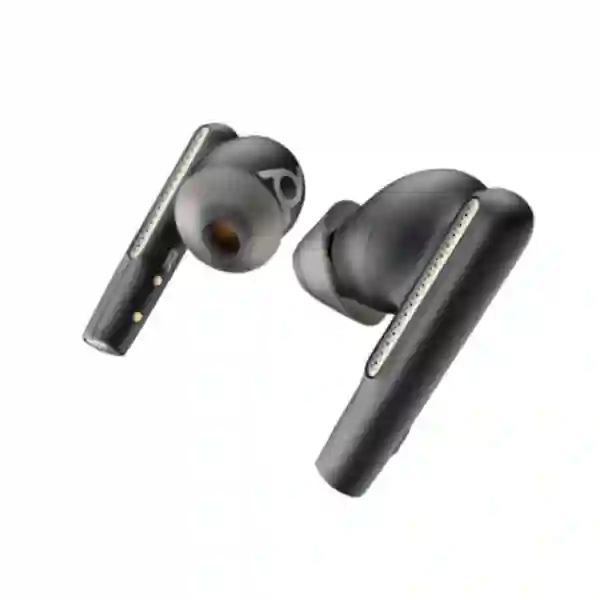
HP Poly Voyager Free 60 UC Microsoft Teams Earbuds
Teams-certified true wireless business earbuds with adaptive hybrid noise cancellation, three microphones per earbud and a BT700 adapter for supported laptop calling. Choose the correct USB adapter and case configuration before ordering.
Suitable to evaluate for hybrid meetings, mobile professionals and laptop-to-phone workdays. Ask FourTeck Tanzania to confirm the exact variant and quotation.
Key facts at a glance
Teams
Certified UC M configuration
Audio
Adaptive hybrid ANC and transparency
Calls
Three microphones in each earbud
Connectivity
Bluetooth 5.3; multipoint for two devices
Computer
BT700 adapter; USB-A or USB-C variants
Case
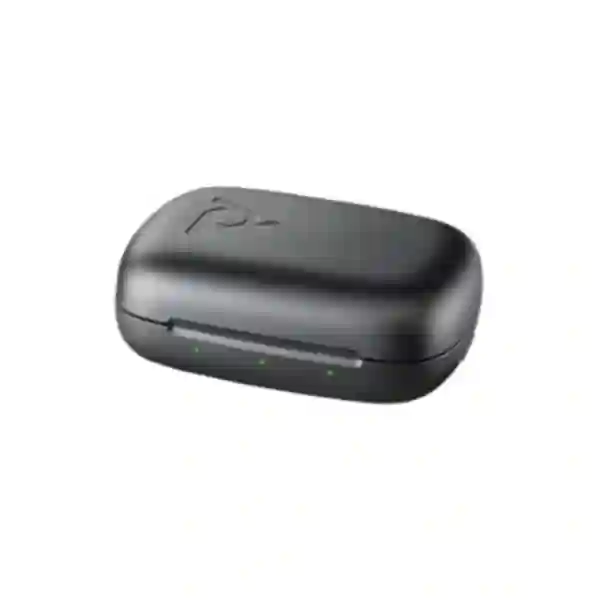
Basic charging case; Qi compatible
Battery
Up to 5.5 h call time per charge
Software
Poly Lens support
Battery figures are HP published maximums for documented variants, not guarantees. Exact quoted bundle and regional commercial terms must be confirmed.
A work-ready earbud system, not just a music accessory
The HP Poly Voyager Free 60 UC Microsoft Teams earbuds are intended for people who need a compact headset without giving up the practical controls and device compatibility expected at work. They combine stereo listening, in-ear portability and a dedicated wireless adapter for computer use. A Teams-certified version is especially relevant when video meetings and scheduled calls are part of the normal working day. Unlike everyday earbuds chosen only for entertainment, this UC package is built around a repeatable calling workflow: connect, join a meeting, hear speech clearly and control routine call actions.
For a buyer in Tanzania, the first decision is not simply whether the earbuds sound good. It is whether the exact Teams package fits a laptop, smartphone and software environment used every day. The included BT700 adapter type matters if the laptop has only USB-C ports or mainly USB-A ports. The user must also be comfortable with an in-ear fit and charging between sessions. This page explains those choices without assuming local stock, delivery coverage, pricing or services that have not been confirmed.
Who will find this configuration useful?
Consider the Voyager Free 60 UC when a day involves multiple short conversations, joining a Teams call from a laptop, answering a phone call later and listening to recorded material between meetings. It is a practical category to evaluate for managers, mobile staff, sales professionals, consultants and remote collaborators who prefer earbuds to a visible headband. True wireless earbuds are small enough to carry in a pocket or work bag, while the case provides a defined storage point when work is finished.
This design is not automatically the best choice for every office. Someone speaking for many continuous hours may prefer a full-size headset with a physical boom microphone, larger controls or longer per-charge endurance. A person who dislikes sealed ear tips may also favour an on-ear solution. The most reliable buying process compares actual work habits, fit preferences and the available connection ports instead of treating one headset style as universally superior.
Microsoft Teams certification explained
The Microsoft Teams edition is designed for a Teams-oriented computer calling experience. Microsoft lists Poly Voyager Free 60 UC earbuds in its certified-device documentation, and HP identifies a Microsoft Teams-certified UC M configuration in its product datasheets. On supported setups, dedicated Teams interaction and call controls make routine meetings easier to manage. Certification refers to the relevant device configuration and supported use conditions; it does not mean every Bluetooth pairing method offers the same integrated features.
A sensible deployment uses the provided BT700 adapter with the computer, installs applicable Poly software where permitted and checks the Teams desktop client’s audio-device selection. A Teams certification is not a Microsoft 365 subscription and does not create an account or meeting entitlement. The business must supply its own licensed collaboration environment where required. If a user also joins other meeting platforms, verify the required microphone, speaker and button behaviours on those platforms rather than assuming the Teams integration transfers unchanged.
Why the UC edition includes a BT700 adapter
UC refers to unified communications, the business calling environment that may include meeting software, computer audio and supporting device controls. HP supplies the Voyager Free 60 UC with a BT700 Bluetooth USB adapter to provide a consistent computer connection. HP explains that the adapter enables reliable audio, compatible remote call controls and supported firmware management features that may be unavailable when relying only on the computer’s built-in Bluetooth connection. This is a meaningful distinction for teams that want predictable behaviour.
The adapter does not turn the earbuds into wired headphones; sound still reaches the earbuds wirelessly. Instead, it acts as the computer-side Bluetooth interface chosen for the headset. Keep it with the assigned laptop or in the carrying kit when travelling. For a shared office computer or a locked-down enterprise device, confirm USB permissions and software policies before purchase. An adapter can be physically compatible with a port while still requiring approval under an organisation’s security or endpoint-management rules.
Choose USB-A or USB-C before ordering
HP documents Microsoft Teams variants of the regular Voyager Free 60 UC with BT700 USB-A and BT700 USB-C adapters. Both are members of the same product family, but the connector is an important order-level detail. A conventional rectangular USB-A port will not accept a USB-C plug directly, and a slim laptop with USB-C-only ports may not accept a USB-A adapter without an additional accessory. The target listing name does not establish which adapter comes in this particular package.
Before requesting a quote, check the ports on every primary computer and note whether a docking station is normally used. Ask the seller to confirm the exact adapter type, colour and manufacturer’s part number on the final quotation. Do not assume a photograph or a generic series description resolves this. Choosing the adapter deliberately reduces setup friction and avoids having a new headset ready for a meeting while the computer cannot accommodate its included accessory.
Multipoint Bluetooth for two connected devices
HP specifies Bluetooth 5.3 and multipoint support for connecting to two devices at the same time. In an everyday workflow, this may let a professional maintain connections to a computer and a smartphone without repeatedly forgetting one pairing to establish the other. The earbuds can remember additional paired devices, with HP’s cited specification indicating up to eight remembered pairings. Remembering a device is different from having all remembered devices actively connected at once.
Multipoint is useful, but its call-switching behaviour depends on the current application, device settings and active audio session. A call arriving on a phone during a computer meeting requires care: check which device currently owns the microphone and audio path before answering. During rollout, test the exact intended combination rather than promising seamless switching in every scenario. If an organisation prohibits personal phone pairing with company headsets, follow that policy despite the hardware’s technical capability.
Microphones designed to prioritise speech
Each earbud has a three-microphone array, creating six microphones across the pair. HP describes a steerable microphone system that helps identify the wearer’s voice and reduce surrounding noise during calls. This matters in environments with nearby conversations, office activity or changing ambient conditions. The benefit is directed at making the person speaking easier to understand at the far end, rather than simply making everything sound louder to the wearer.
Microphone performance still depends on fit, surroundings and microphone selection inside meeting software. A nearby loudspeaker, strong wind, movement against clothing or an unusually noisy workspace can undermine even sophisticated signal processing. Before a major customer presentation, run a short recording or test meeting in the real workplace. Ask a colleague how natural and intelligible speech sounds. This practical check reveals more about suitability than a microphone count viewed in isolation.
WindSmart for calls away from the desk
WindSmart is a Poly technology intended to reduce the impact of wind on microphone audio. It is relevant to a professional who answers a call while walking between buildings, waiting outside a workplace or moving through a breezy entrance. Outdoor speech is difficult for small microphones because wind pressure may produce low-frequency rumble that obscures words. The system aims to manage that problem while retaining a small earbud form factor.
Wind reduction should be understood as assistance, not a guarantee of perfectly clean speech in every weather condition. Strong gusts, traffic noise and exposed locations can still make a conversation difficult. When the message is important, move into shelter or a quieter position before continuing. People working regularly in very loud outdoor or industrial conditions should compare purpose-built communications headsets and local site safety requirements rather than relying solely on consumer-style earbud noise control.
Hybrid adaptive ANC for concentrating
Adaptive hybrid active noise cancellation, or ANC, is a listening feature that helps reduce unwanted environmental sound reaching the wearer’s ears. It can make it easier to follow meeting audio or focus on a task when there is steady background noise, such as ventilation or routine office activity. The Free 60 UC combines ANC with a sealed in-ear design, so both electronic processing and the physical ear tips contribute to the listening experience.
ANC should not be confused with outgoing microphone noise reduction. One helps the wearer hear; the other helps remote participants hear the speaker. Neither provides guaranteed isolation or certified hearing protection. Some people prefer less cancellation when they need awareness of colleagues or public announcements. The best setting depends on the task, fit and environment. Avoid using strong isolation in situations where hearing traffic, alarms or important workplace signals is essential to personal safety.
Transparency mode for situational awareness
Transparency mode is the practical counterpart to noise cancellation. It lets more of the surroundings be heard while the earbuds are worn, making brief conversations and situational awareness easier without necessarily removing both earbuds. HP lists transparency mode in the product specifications. This can help when a colleague needs attention, a person is waiting for an announcement or a worker moves between quiet individual tasks and a collaborative setting.
Users should experiment with the controls before relying on them during a busy day. A mode change may be available through the earbuds or software settings depending on the configured behaviour. Transparency is not a substitute for removing earbuds when accurate environmental hearing is necessary. For security checkpoints, machinery, road crossings or critical instructions, use the safest available approach. Making the distinction explicit helps teams set sensible expectations for employees who alternate between conversations and focused work.
Speech, media and everyday audio quality
HP specifies 10 mm speakers, a speech-mode speaker bandwidth of 200 Hz to 6.8 kHz and a media-mode bandwidth of 20 Hz to 20 kHz for the documented variant. These specifications indicate a product intended to handle both spoken communication and music playback. Voice-oriented calls place a premium on intelligibility, while recorded presentations and entertainment benefit from the broader media playback range. The listening result also depends heavily on ear-tip seal and audio source quality.
Do not judge an earbud solely by its nominal speaker diameter or frequency range. A comfortable, secure fit, appropriate volume and a stable wireless connection can have more impact on the day-to-day experience. Users who spend hours reviewing recorded meetings may value intelligible speech above strong bass; those who listen to music between calls may want a balanced presentation. Check both uses during evaluation and keep volume moderate to reduce listening fatigue.
Control calls without reaching for the laptop
The documented earbuds support call answer and end functions, mute and volume adjustment through physical or touch interactions. The Teams-certified version also provides supported Teams interaction when correctly configured with the desktop application. These details are valuable for users who stand during a discussion, move around a room or keep their laptop at a distance. Everyday control behaviour is more valuable when it is predictable and easy to learn.
Controls can depend on the active connection, user preferences, installed software and meeting platform. Train users to recognise how the earbuds indicate a muted microphone, how to answer a call and how to recover if controls behave differently after a software update. For a confidential conversation, verify mute inside the calling application as well as on the device. A quick look at the on-screen microphone status avoids the assumption that one control always changes every application simultaneously.
Comfort depends on the right ear tips
HP supplies small, medium and large ear tips with the documented basic-case Teams package. Selecting the correct size matters because earbuds need to remain stable while speaking and walking, while also forming the seal required for consistent audio and effective noise cancellation. The design is intended to feel discreet and lightweight, but individual ear shapes and sensitivity vary. The best tip size is the one that remains comfortable and secure without forcing the earbud.
Try both ears independently because left and right fit preferences can differ. Poor sealing may reduce perceived bass and ANC performance; excessive pressure may become uncomfortable during longer calls. For someone who has not used in-ear headsets before, a fit trial is particularly useful. Encourage sensible listening breaks and safe hygiene, especially for users who work in warm conditions or move between indoor and outdoor spaces throughout the day.
Battery endurance: plan around calls
HP’s published figures for the documented Teams UC variant are up to 5.5 hours of talk time on the earbuds and up to 16.5 hours of total talk time when additional charging from the case is included. The specification describes the additional case contribution as up to 11 hours. These are manufacturer figures under stated conditions, not a guarantee that every customer will obtain the same runtime in a particular workplace.
A practical assessment considers the longest uninterrupted meeting, not merely the combined case total. A professional who has a continuous six-hour call schedule with no breaks may need a different headset or a planned charging period. Battery ageing, volume, wireless conditions, use of features and call patterns can affect performance. The case adds flexibility during breaks, commuting and overnight storage, but it cannot recharge earbuds while they remain in use in the ears.
Music playback, quick top-ups and charging
For music playback with ANC enabled, HP quotes up to eight hours from the earbuds and up to 24 hours including the case for the documented configuration. HP also lists approximately two hours for earbud charging and three hours for case charging. A short charging interval can be helpful between meetings, but exact available power after any top-up depends on battery condition and usage. Keep the charging case itself charged so its additional capacity is genuinely available.
The case supports charging via cable and Qi-compatible wireless charging. A Qi charging pad is not automatically included, so buyers should check the quoted package contents if wireless charging is part of the plan. In an office, a simple charging routine often works better than relying on battery warnings during a meeting. Return earbuds to the case after use, check charge indicators and avoid leaving the case empty in a bag for several days.
Why the basic charging case is a benefit
The standard Free 60 UC uses a basic charging case rather than the touchscreen case associated with the Free 60+ UC. That is not a defect or a missing feature within the standard edition; it is a deliberate product-family distinction. A basic case protects the earbuds, provides extra battery capacity and keeps the package straightforward for professionals who prefer to manage audio and calls on their laptop, phone or earbuds.
The difference should be prominent in purchasing discussions because similarly named products can appear together in searches and quotations. Do not assume the standard model has the Free 60+ touchscreen functions or the special 3.5 mm case-based audio-transmitter capability described for the plus version. If an executive specifically wants touchscreen control from the case, discuss the plus model separately. If compact, straightforward charging is sufficient, the standard UC configuration may fit the requirement well.
Poly Lens for personal device settings
Poly Lens software is part of HP Poly’s broader device experience. For users, the companion software can help manage supported settings, identify the device and handle available updates. These capabilities matter because a headset is not merely a passive audio accessory; settings and firmware may influence how it interacts with a computer and collaboration software. The available features can differ by device, application version and organisation policy.
A worker should not install software that conflicts with company security requirements. If the employer manages its endpoints, ask the IT team which software distribution and update process it prefers. Where personal customisation is allowed, keep changes limited and document settings that have an effect on call operation. When troubleshooting, being able to identify the firmware or application version gives support personnel a more useful starting point than a generic report that the earbuds are not working.
What IT teams should evaluate
HP describes Poly Lens Admin Cloud as a way for IT administrators to obtain visibility and management capabilities for supported Poly devices. This is relevant when multiple staff members need the same headset configuration, when firmware consistency matters or when support teams want fewer one-off setup processes. The presence of Poly Lens in product documentation does not prove that every advanced administration function is enabled automatically for every customer or every operating environment.
A small pilot is the most reliable approach. Select representative users with different laptops, operating systems and meeting patterns; provide the correct BT700 adapter; then test calls, updates, device naming and support procedures. Record the results before expanding a purchasing request. Confirm software access, policies and any commercial licensing requirements independently. This avoids promising deployment features based only on product-family descriptions when the customer’s actual IT estate may have important differences.
Plan a reliable Windows laptop setup
On a supported Windows computer, start by checking that the supplied BT700 adapter matches an available USB port. Connect the adapter, allow the operating system and approved applications to recognise the audio device, and select the Poly device as both microphone and speaker in the relevant Teams settings. If an enterprise policy controls USB peripherals, involve the IT administrator before changes are made. Test with a real voice recording or meeting rather than assuming pairing alone confirms correct operation.
For repeatable results, test the setup both while the laptop is undocked and while it uses the normal workstation dock. Some employees change locations between meetings, and the default microphone may switch when a monitor, webcam or docking station is attached. If Windows selects an unintended audio input, other participants may hear the laptop’s built-in microphone instead of the earbuds. A documented device-selection check is a simple way to prevent such confusion.
Plan a macOS or mixed-device setup
HP lists macOS among compatible operating systems for the documented Free 60 UC Teams configuration. A Mac user should still confirm whether the selected BT700 adapter fits the computer or its approved dock. After connection, review the operating system’s audio settings and the meeting application’s microphone and speaker selections. A successful Bluetooth pairing does not prove that a particular conferencing application is using the intended input device.
Mixed Windows and Mac organisations benefit from a shared, platform-neutral setup checklist with separate notes for operating-system differences. Keep the onboarding steps practical: verify the adapter, select the audio device, make a test call, confirm mute and check that reconnection works after sleep or restart. If a meeting client changes device handling after an update, repeat the test. The objective is confidence in ordinary use, not a claim that all controls behave identically across platforms.
Phone pairing and mobile calling
Bluetooth smartphone pairing gives the Voyager Free 60 UC a second important role outside desktop meetings. HP lists Android and iOS compatibility for the documented model family. Staff who use a work smartphone can answer supported mobile calls without carrying a separate headset, while those who occasionally switch from laptop meetings to mobile conversations may benefit from multipoint connection. The phone’s own Bluetooth settings control the pairing and audio routing.
Before issuing earbuds for both personal and business devices, set an appropriate policy for shared use and privacy. Do not assume incoming calls automatically take priority over an active meeting in every scenario. Test how notifications, call waiting and microphone permissions behave on the exact phones involved. Mobile operating-system updates and user-installed apps can change these interactions. A brief orientation session is useful for employees who are new to multipoint wireless accessories.
Set up Teams to use the intended microphone
The Teams application must be configured to use the earbuds as the input and output device if the expected calling experience is to be achieved. Many computers also contain microphones in a built-in webcam, display or docking station. When users join a meeting without checking, the wrong microphone may be active even though they hear sound through the earbuds. The correct audio-device selection is therefore central to both call quality and troubleshooting.
During the first test meeting, ask someone else to assess speech clarity and noise handling from the far end. Confirm that Teams displays the intended microphone, that mute works as expected and that audio returns after ending the session. For a company-wide rollout, include these checks in a one-page onboarding guide. Certification and a manufacturer datasheet provide useful evidence of compatibility; a live test establishes whether a specific laptop, application and workplace configuration behaves as required.
Use the earbuds confidently in hybrid meetings
A hybrid worker may use the same earbuds at home, in a private office, at a customer site or while travelling. That flexibility is strongest when the computer’s adapter stays with the assigned machine and the charging case stays in the worker’s normal bag. A consistent routine reduces pairing errors and keeps accessories from being misplaced. It also makes transitions between phone calls and video meetings easier to manage.
The environment still matters. In a quiet room, small earbuds can be a comfortable alternative to bulky over-ear equipment. In a very busy open-plan workspace, people may prefer a headset with a close-positioned boom microphone and stronger physical isolation. In a conference room, a speakerphone or room system may be more appropriate when several people need to speak together. Select the device for the conversation format rather than making a single earbud system cover every possible meeting.
Private calls and confidentiality considerations
Using earbuds can help keep meeting playback out of a shared room, but it does not make a call confidential by itself. A user may still speak sensitive information loudly enough for nearby people to hear, and the surrounding network and meeting software still govern data security. A three-microphone array and noise processing are not privacy controls. For confidential conversations, choose a suitable physical location and follow the employer’s established meeting and information-handling practices.
Earbuds should also be kept in the correct owner’s possession. When equipment is shared, device pairing history, account settings and hygiene need deliberate attention. An organisation can simplify support by assigning each UC headset to one employee and recording the associated adapter. If reassignment is necessary, follow the manufacturer-supported reset and cleaning instructions. These practical steps protect user experience without pretending the hardware alone solves confidentiality, identity or access-management requirements.
Shared workspaces, hot desks and travelling staff
The Free 60 UC can be evaluated for employees who do not have a permanent desk. They may arrive at a workstation, connect the approved BT700 adapter and join a scheduled call. A compact case is convenient when furniture, laptop and accessories move each day. The approach works best when employees understand how their own adapter pairs to the earbuds and how the meeting software selects its audio input.
In a hot-desk environment, do not leave the adapter plugged into a shared computer indefinitely unless that is an intentional IT policy. Keeping the adapter and earbuds together reduces lost components and mistaken pairings. For travel, keep the case charged before departure and remember that wireless accessories may be subject to local transport or workplace rules. Make no assumption that the standard basic case can retransmit sound from an aircraft’s 3.5 mm entertainment socket; that feature is associated with a different case configuration.
What the technical specifications mean in practice
A specification list helps compare products, but it needs interpretation. Bluetooth 5.3 identifies the wireless protocol generation, not a promise that every device will offer a particular range or sound codec. HP quotes up to 98 feet of wireless range for its documented variant; real range depends on walls, interference and placement. The 10 mm speaker size identifies a physical component, not a guarantee of superior sound. Three microphones per earbud describe the hardware available for signal processing, not an objective ranking against every competing headset.
Likewise, a quoted battery maximum is measured under defined conditions rather than a fixed number of hours for every day. Use manufacturer’s data as the starting point and workplace testing as the final decision. For procurement teams, capture both: the published specification to compare models fairly, and the results of a user pilot to evaluate whether the headset actually meets the organisation’s demands. Avoid replacing evidence with marketing adjectives that cannot be tested.
The standard, UC and plus versions compared
The product-family names are easy to confuse. Voyager Free 60 refers to the broader true wireless earbud family. Voyager Free 60 UC adds the BT700 business-computer adapter and a basic charging case. Voyager Free 60+ UC includes a more advanced touchscreen charging case and a different accessory experience. Teams-certified M configurations exist within the UC family. Therefore, the words UC, plus and Teams should all be checked rather than treating every Free 60 listing as equivalent.
For a buyer who needs Microsoft Teams certification on a laptop, request the exact Teams-certified UC configuration. For a buyer who wants case-based touchscreen interaction, ask about the plus version rather than expecting it with the regular UC product. For a buyer who only needs occasional music playback on a phone, a simpler device may suffice. Clear product-name distinctions prevent misunderstandings about included accessories, expected controls and the reasons behind different quotations.
Compare against over-ear and boom-microphone headsets
The strongest case for the Free 60 UC is the balance of portability, discreet appearance and supported computer connectivity. An over-ear headset may provide a different sense of comfort or noise isolation and may have more space for physical buttons and battery capacity. A boom-microphone design can be attractive to staff speaking continuously near other people because its microphone is positioned closer to the mouth. These are tradeoffs in form factor, not a declaration that one category always wins.
An effective comparison asks what a user dislikes about a current headset. Is it weight, heat, carrying size, call quality, charging frequency or difficulty switching devices? If comfort and portability are the main concern, trial the earbuds. If continuous talk time and highly controlled microphone placement matter more, trial alternatives as well. Evaluate real calls with consistent conditions and feedback from remote listeners. This approach produces a purchase decision based on work outcomes rather than specifications alone.
A practical checklist for business purchasing
Start with the exact product designation: HP Poly Voyager Free 60 UC in its Microsoft Teams-certified configuration. Then confirm whether the supplied BT700 uses USB-A or USB-C, what colour is quoted, which computer operating systems are in use, and whether the charging case is the standard basic type. Identify how many people will use the earbuds, whether the allocation is personal or shared, and what collaboration software is expected to be used.
The second part of the checklist is commercial and operational. Ask for the current seller quotation, any applicable taxes and delivery terms, the local warranty conditions, the return or support route, and the actual package contents. These details cannot be established from the generic product title alone. For volume purchasing, run a small trial with representative users before committing to a larger order. A quote should describe the confirmed configuration rather than an assumed part number or an unrelated retailer’s stock-keeping unit.
How to evaluate audio in a short pilot
A structured pilot need not be complicated. Begin with a quiet-room call so users can learn controls and evaluate the basic sound. Repeat in the normal office environment, noting how remote listeners hear speech when another person is talking nearby. Test an outdoor call if that is part of the job, but avoid unsafe or excessively windy conditions. Check that the device reconnects after the laptop sleeps and that multipoint use behaves as employees expect.
Record comments separately on listening comfort, microphone clarity, ANC usefulness, battery sufficiency and ease of setup. The manager or IT reviewer should also note whether users chose the correct ear tips and audio settings. If someone reports poor quality, fix the obvious setup issue before concluding that the hardware is unsuitable. A short, well-documented evaluation can reveal why the earbuds suit some roles exceptionally well yet do not fit other roles that need a different headset format.
Troubleshooting audio that uses the wrong device
If you can hear a meeting but colleagues cannot hear you, inspect the application’s selected microphone first. The laptop may be using a built-in microphone, another Bluetooth accessory or a disconnected input. If colleagues hear you but you cannot hear them, check the selected speaker or playback device. Next, inspect the BT700 connection, confirm that the earbuds are charged and verify that the chosen application has permission to access audio devices.
If a problem appears only after changing rooms or connecting a docking station, test the normal workstation configuration again. If the issue follows a software update, check supported Poly Lens guidance and the meeting client’s current settings. Avoid repeated random pairing and reset attempts, especially on an organisation-managed laptop. A clear record of operating system, adapter type, app version, symptoms and steps already tried will help technical support diagnose the issue efficiently.
Care, storage and everyday reliability
Store the earbuds in their case when not in use, keeping the charging contacts clean and free of debris according to manufacturer instructions. Because these are in-ear devices, regular hygiene matters as much as software configuration. Ear tips that become dirty or deformed can alter fit and listening quality. Never use harsh cleaning methods or immerse equipment unless the manufacturer explicitly authorises the procedure for that exact part.
Keep the adapter, case and earbuds together during travel and office moves. Avoid exposing the devices to excessive heat, moisture or rough treatment. If multiple employees receive similar sets, label the carrying kit or record the assignment through normal asset-management practices rather than marking delicate audio surfaces. Good storage habits help avoid replacement costs and make it more likely that an employee begins the next workday with a charged, complete headset system.
Battery care and workday planning
Charging habits affect whether the published battery figures are useful in practice. Charge the case before a travel day or a busy schedule and check the earbuds’ remaining battery before a long meeting. A series of short calls with opportunities to return the earbuds to the case places different demands on power than one uninterrupted presentation. If the worker routinely exceeds a single-charge talk-time figure, plan an alternative device or a specific charging break.
Batteries naturally change with age and repeated charging. Actual endurance may vary due to active features, connection quality, volume and environmental conditions. Organisations should therefore avoid treating a maximum manufacturer figure as an internal service-level promise. For a large deployment, ask employees to report recurring battery concerns early and verify whether the issue is wear, charging contact cleanliness, software behaviour or an unusually demanding work pattern.
Common Tanzania buying considerations
A buyer sourcing business earbuds for use in Tanzania should focus on confirmed requirements rather than assume that a global manufacturer page describes the local sales package. The USB adapter type is especially important because different laptop fleets have different ports. The buyer should also establish whether the team primarily uses the Teams desktop client or mobile calling, whether company devices permit third-party endpoint software and whether the in-ear design is acceptable for long workdays.
FourTeck Tanzania can be asked to confirm the exact offer, including the selected variant, accessories, quote validity, delivery arrangements and applicable warranty conditions. None of those commercial details is asserted here without a specific verified quotation. Currency, stock, fulfilment time and local service coverage should be supplied by the seller when available. The most useful order is one that matches a documented, real operating requirement and leaves no ambiguity about the adapter or case.
A balanced decision for different job roles
For a remote professional attending multiple Teams calls, a small Teams-certified UC earbud package may offer a good combination of portability and dedicated computer connectivity. For someone alternating between laptop meetings and smartphone calls, multipoint capability becomes more significant. For a manager travelling between meeting spaces, the small case and ability to hear surrounding activity through transparency mode may be useful. Each benefit has value only when it maps to the person’s actual routine.
For reception staff who need all-day continuous voice communication, an earbud’s single-charge talk time deserves closer scrutiny. For highly noisy worksites, neither ANC nor microphone processing should be treated as specialist protective equipment. For rooms where several people speak together, consider a dedicated room audio system. Matching the product to a role and testing it in that role is more persuasive than a promise that a premium headset will perform every task equally well.
What is included and what must be confirmed
HP’s documentation for one Teams-certified Free 60 UC basic-case package lists the wireless earbuds, charging case, BT700 Bluetooth USB adapter, charging cable, small, medium and large ear tips and a carrying case. The configuration and exact accessories should nevertheless be checked against the final quoted manufacturer part number, because USB-A and USB-C packages exist. An online product title by itself cannot verify the contents of the exact stock unit being offered.
Do not presume that a Qi charging pad, a touchscreen case, a 3.5 mm analogue audio cable or any unrelated accessory is supplied. Some of these belong to different variants, and others are optional. A good purchase order identifies the complete bundle as well as the end-user device it must connect to. Ask for an itemised confirmation where needed, especially when buying several headsets at once or supplying employees who work away from a central IT desk.
Audio health and awareness at work
These earbuds can produce enjoyable audio during calls and media playback, but volume discipline remains important. Use a comfortable listening level, take breaks during lengthy sessions and reduce exposure when an application suddenly plays a loud notification. HP lists SoundGuard acoustic protection technology for the documented variant, but the presence of an audio protection feature is not permission to listen at unsafe levels or an alternative to occupational hearing-protection equipment.
A good onboarding message explains ANC and transparency as user-selectable listening tools rather than safety devices. If employees operate around traffic, equipment or alarms, they should follow the site’s rules on headphones and situational awareness. In some locations, removing earbuds entirely is the correct choice. Workplace suitability depends on the hazard and the task, not only on headset technology or a marketing statement about noise management.
Choose a verified configuration and request a quotation
The right next step is to match the Teams-certified Voyager Free 60 UC variant to the buyer’s specific computer ports and calling workflow. A quotation should identify the regular basic-case model, the exact BT700 connector and the manufacturer part number. It should also state what is included, the commercial terms and any local after-sales arrangements that the seller actually supports. These are reasonable purchase questions for a single user or a larger office rollout.
Request details from FourTeck Tanzania for the exact HP Poly Voyager Free 60 UC Microsoft Teams earbuds configuration required by your team. Provide the number of users, whether their laptops use USB-A or USB-C, their operating systems and their primary calling applications. This gives the seller the information needed to prepare a relevant offer, without making unverified claims about current inventory, Tanzanian prices, shipment times or warranty eligibility.
Frequently asked questions
Is the Voyager Free 60 UC certified for Microsoft Teams?
Yes. Microsoft lists Poly Voyager Free 60 UC Earbuds among Teams-certified devices, and HP documents Teams-certified UC M configurations. Confirm that the quoted unit is the Teams version and use the supported computer connection and meeting client for intended controls. Certification does not provide a Teams subscription or guarantee identical features across other applications.
Does the standard UC model have a touchscreen charging case?
No. HP describes the standard Voyager Free 60 UC with a basic charging case. The touchscreen case is a distinguishing feature of the Free 60+ UC. If case-based touchscreen operation is essential, specify that requirement before ordering rather than assuming every Free 60 package contains the same case.
Can I use the earbuds with a smartphone and computer?
Yes. HP lists Bluetooth multipoint support for two connected devices and compatibility with supported smartphones and computers. Actual call routing and switching depend on the connected devices, applications and current session. Test the particular phone and laptop combination that will be used at work.
What does the BT700 adapter do?
It provides a dedicated Bluetooth USB connection for a computer. HP states that using the adapter supports reliable audio, compatible call controls and device management capabilities that may not be available through a computer’s integrated Bluetooth radio. Check whether the supplied adapter is USB-A or USB-C before purchase.
How many microphones are in the earbuds?
There are three microphones in each earbud, six across the pair. HP uses these with voice-focused processing and WindSmart technology. The microphone array is designed to improve call clarity, but its effectiveness is affected by background noise, device selection and real-world speaking conditions.
How long does the battery last for voice calls?
HP quotes up to 5.5 hours of talk time from the earbuds and up to 16.5 hours of total talk time with the case for the documented Teams UC configuration. Actual performance can differ with settings, use, battery age and environment. People needing uninterrupted calls longer than one charge should plan accordingly.
Can the charging case charge wirelessly?
HP specifies Qi-compatible wireless charging for the case. A suitable Qi charging surface may be required and should not be assumed to be included. The regular UC model still uses a basic case rather than the touchscreen case fitted to the plus edition.
Will active noise cancellation remove all office noise?
No. Adaptive hybrid ANC helps reduce unwanted noise heard by the wearer, but it does not remove every sound and is not certified hearing protection. Microphone noise processing is a separate function that helps remote participants hear the speaker. Fit, surroundings and the type of noise influence the outcome.
Can I join Zoom or other meeting services?
The earbuds can be evaluated as a standard audio input and output device with supported meeting applications, and HP describes the broader family as compatible with leading collaboration platforms. However, special buttons and app integrations may differ. Confirm the behaviour required for the actual software used by your organisation.
Do the earbuds work on Windows and Mac?
HP lists Windows 10, Windows 11 and macOS compatibility for the documented Teams UC package, along with Android and iOS support. Match the BT700 connector to the computer and check any organisation-specific USB or software policies. For an exact deployment, confirm versions and test the chosen meeting application.
Are the earbuds suitable for long meetings?
They can be useful for meetings when the ear tips fit comfortably and the session is within available battery endurance. HP’s published per-charge talk-time maximum is up to 5.5 hours under stated conditions. If a role involves continuous longer calls, try a headset with different battery and wearing characteristics as part of evaluation.
What is the difference between USB-A and USB-C packages?
The adapter’s physical plug is different. Teams-certified Free 60 UC configurations have been documented with both BT700 USB-A and BT700 USB-C options. The correct choice depends on a user’s laptop or approved dock. The generic product title does not identify which one a particular FourTeck quotation contains.
What should a Tanzania buyer confirm before ordering?
Confirm the full model and Teams version, adapter type, colour, included accessories, local quotation, taxes, delivery arrangements and warranty terms. Ask whether the buyer’s workplace computers and software are supported. Price, stock and service coverage should be verified with the seller rather than inferred from global product documentation.
Is Poly Lens necessary for every basic call?
A compatible Bluetooth audio connection can handle basic listening and calls, while Poly Lens adds supported device settings, update and administration features. The availability and necessity of particular software functions depend on the computer, application and employer policy. Company-managed devices should follow approved software deployment rules.
What if the microphone does not work in Teams?
Check that the earbuds are charged, the BT700 adapter is connected and Teams has selected the intended microphone. Verify operating-system microphone permissions, mute status and any competing audio devices. Make a test call. If the issue persists, consult the organisation’s IT support process and supported Poly documentation before resetting managed equipment.
Request a configuration-specific quote
Tell FourTeck Tanzania how many HP Poly Voyager Free 60 UC Microsoft Teams earbuds you need, which BT700 USB connector suits the laptops and whether there are any deployment constraints. Request confirmation of the exact model, package contents, applicable terms and availability before placing an order.
Contact FourTeck Tanzania for product details and a quotation.




Reviews
There are no reviews yet.